You can have the best sales pitch in the world, but if you don’t know what happens after your reps pick up the phone, you’re flying blind. I dug into dozens of tools to find the best outbound call tracking software that offers real clarity, not just call logs, and platforms like HubSpot Sales Hub, Salesforce Sales Cloud, Nooks, Close, Salesloft, Aircall, JustCall, and CloudTalk stood out for connecting outbound activity to real, measurable results.
The best outbound call tracking software gives you visibility into what's working, what's not, and where deals are stalling. It helps you pinpoint which calls lead to conversions, which scripts resonate, and which reps need coaching. Yet too many teams still rely on outdated methods or scattered systems that don't connect the dots.
I reviewed G2 ratings, compared features across platforms, and looked at how sales and support teams are using these tools to improve outreach and close more deals. I evaluated some of the most widely used outbound call tracking solutions on the market, from full-scale customer relationship management (CRM) platforms to dedicated sales engagement and cloud calling tools.
Whether you're a startup dialing for your first few customers or a large team optimizing high-volume outbound campaigns, this guide will help you find the right tool to match your workflow and boost your results.
10 best outbound call tracking software: My picks for 2026
-
HubSpot Sales Hub: Best for CRM with built-in automation
Streamlines sales outreach with email tracking, pipeline views, task automation, and meeting scheduling. ($15/user/month)
-
Salesforce Sales Cloud: Best for customizable enterprise CRM
Offers robust pipeline tracking, forecasting, and deep integrations tailored for complex sales teams. ($25/user/month)
- Nooks: Best for AI-powered parallel dialing
Speeds up outbound with multi-line dialing, live coaching, and lead routing to boost rep efficiency. (Custom pricing)
- Close: Best for built-in calling and email for inside sales
All-in-one CRM with fast dialing, email automation, and smart follow-ups for high-velocity teams. ($35/user/month)
- Quo: Best for streamlined business scaling with CRM visibility
Unified calling and messaging, intuitive CRM integrations, and built-in logging for teams to stay organized and responsive. ($15/user/month)
- Salesloft: Best for multichannel sales cadences
Helps teams automate email, call, and LinkedIn workflows, with real-time analytics and coaching tools. (Custom pricing)
- ZoomInfo Sales: Best for rich B2B contact and intent data
Gives sales teams verified contact info, buying signals, and account insights to improve targeting. (Custom pricing)
- Aircall: Best for cloud calling with CRM integration
A flexible phone system with live coaching, analytics, and plug-and-play CRM syncing. ($30/month for 3 licenses)
- JustCall: Best for cloud phone and SMS for sales
Includes power dialers, call recordings, SMS automation, and seamless CRM integrations ($29/user/month)
- CloudTalk: Best for scalable outbound calling with advanced analytics
Has powerful dialing automation, advanced call analytics, and global calling features that support scalable outbound communication. ($25/user/month)
* These best outbound call tracking software are top-rated in their category, according to the 2026 G2 Grid Reports. I’ve added their standout features and pricing to make the comparison easier.
My 10 best outbound call tracking software picks for 2026
While evaluating these tools, it became clear how much they optimize outbound outreach. They give reps real-time visibility into call activity, improve connect rates, and help teams follow up with precision and speed.
According to 360iResearch, the global call tracking software market is projected to reach $2.62 billion by 2032, growing steadily as more businesses prioritize data-backed calling strategies.
If you're wondering which tool helps reps hit their daily dial goals, which one provides the best analytics for call outcomes, or which platform integrates cleanly with your CRM, read on, and you'll be sure to find out.
How did I find and evaluate the best outbound call tracking software?
To identify the top outbound call tracking software, I analyzed real user reviews on G2 to understand how these tools perform in real sales, support, and marketing environments.
I evaluated how each platform supports key use cases, such as tracking outbound call performance, recording and analyzing conversations, syncing with CRMs, or improving team productivity.
I also used AI to sift through user feedback and G2 Grid® Reports to compare call quality, ease of use, reporting depth, and overall satisfaction. This guide includes screenshots from vendor G2 pages to show what the platforms actually look like in action.
I’ve curated this list to help sales and support teams find the right outbound call tracking solution. One that boosts visibility into rep performance, improves follow-ups, and drives better outcomes from every call.
What makes the best outbound call tracking software worth it: My opinion
When evaluating the best outbound call tracking platforms, I focused on features that improve rep productivity, provide actionable insights, and help revenue teams optimize outreach strategies across sales and support functions.
- Automatic call logging and CRM sync: Manual data entry kills momentum. I looked for tools that automatically log calls, notes, and outcomes to your CRM, along with call recordings and follow-up tasks. The best software ensures reps can focus on conversations, not admin work.
- Multi-channel dialer support: Great tools don’t stop at basic outbound calling. I prioritized platforms that support power dialing, predictive dialing, SMS, voicemail drops, and even email sequencing tracking, all in one place. This gives reps flexibility to reach prospects where they’re most responsive.
- Real-time call monitoring and coaching: Coaching is only effective when it’s timely. I looked for platforms with live and inbound call tracking, whisper coaching, and post-call analytics to help managers guide reps in the moment. Features like call scorecards and AI-powered insights help identify patterns at scale.
- Call attribution and tracking: Knowing a call happened is not enough. You need to know what drove it. I favored tools that let teams attribute calls to specific campaigns, keywords, or channels. This visibility helps marketers double down on what’s working and helps sales teams optimize outreach timing.
- Compliance and recording controls: Call tracking often involves legal considerations. I evaluated platforms for call recording consent prompts, regional compliance support (like GDPR and TCPA), and admin-level controls for access and retention. Security and trust are table stakes, especially in regulated industries.
- Integrations with CRM and enablement tools: The best outbound call tracking software fits into your existing workflow. I looked for tools that sync with Salesforce, HubSpot, and other CRMs, plus integrations with conversation intelligence and sales enablement platforms for smoother rep workflows and better reporting.
- Allow users to place outbound calls directly from the platform
- Track and log call interaction data such as duration, outcomes, recordings, and engagement insights
*This data was pulled from G2 in 2026. Some reviews have been edited for clarity.
1. HubSpot Sales Hub: Best for CRM with built-in automation
HubSpot Sales Hub is a modern sales software designed to help growing teams build a pipeline, deepen relationships, and close more deals faster. According to G2 Data, 58% of small businesses use it, which points to its ease of use and ability to support teams without requiring deep technical expertise.
I’ve noticed that HubSpot Sales Hub is often praised for being quick and easy to set up. The simple onboarding process means sales teams can get started right away, cutting down delays and letting them focus on connecting with prospects rather than configuring tools.
One feature that consistently stands out is call tracking. Users mention how effortless it is to log calls, record outcomes, and review recordings. According to several reviewers, this reduces manual effort and ensures sales teams have clear, reliable records of their conversations.
Another common highlight is the ability to add custom properties for contacts and deals. Many G2 users appreciate this flexibility, saying it helps them align the CRM with their unique sales processes. Reviewers note that these fields give sales teams better visibility into deal progress and help them tailor reporting to their goals.
I’ve also seen a lot of positive feedback about mobile note-logging. When sales reps make calls from a mobile device, a pop-up makes it easy to jot down notes instantly. Many reviewers say this saves time and ensures important details aren’t lost, which strengthens follow-ups and customer relationships.
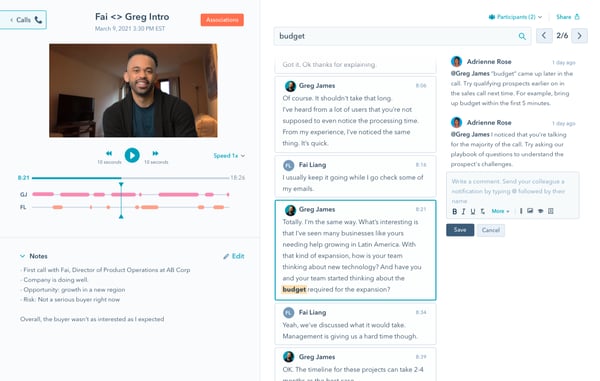
Pricing varies based on usage and feature needs, particularly as calling volume and advanced capabilities increase. Teams that rely heavily on outbound outreach may benefit from plans designed to support higher minute usage, while those with lighter calling needs can explore options that align with their expected volume. With multiple tiers available, organizations can choose a plan that fits their operational requirements and growth plans.
List updates follow a set refresh cycle, which works well for many workflows. Some reviewers noted that having a manual refresh option could provide additional flexibility for teams that prefer more immediate updates. This added control may further support day-to-day efficiency, depending on how teams manage their lists.
Overall, based on the reviews I’ve read, HubSpot Sales Hub is widely praised for its accessibility, useful sales features, and ability to help teams build a pipeline and close deals faster.
What I like about HubSpot Sales Hub:
- It feels quick and easy to set up, so teams can get going without a lot of technical hassle. G2 users seemed to notice this, too.
- The call tracking makes it simple to log conversations and outcomes, something I’ve seen mentioned often as a big time‑saver.
What G2 users like about HubSpot Sales Hub:
"What I like most about HubSpot Sales Hub is that it keeps everything organized in one place. From tracking emails to managing deals and follow-ups, it cuts down on the need to juggle multiple tools. The pipeline view is especially useful because it gives me clear visibility into where each deal stands. It has also improved accountability across the team and made forecasting a lot easier."
- HubSpot Sales Hub Review, Tushar A.
What I dislike about HubSpot Sales Hub:
- To keep the price optimal, teams that rely heavily on outbound outreach may benefit from plans designed to support higher minute usage, while those with lighter calling needs can explore options that align with their expected volume.
- List updates follow a set refresh cycle, which works well for many workflows. However, having a manual refresh option can provide additional flexibility for teams that prefer more immediate updates.
What G2 users dislike about HubSpot Sales Hub:
"While HubSpot Sales Hub is great overall, the pricing can quickly become a concern for small businesses. Many advanced features like custom reporting, multiple pipelines, or automation workflows are locked behind higher-tier plans, which can feel expensive when you're just starting out."
- HubSpot Sales Hub Review, Jackson R.
2. Salesforce Sales Cloud: Best for customizable enterprise CRM
Salesforce Sales Cloud brings together the power of humans with agents at every step of the sales cycle. It is widely adopted by growing businesses.
According to G2 Data, 53% of its users are from mid-market companies and 31% from enterprise organizations, showing that its scalability makes it well-suited for handling both complexity and growth.
One feature that comes up often is the lead organization. Many reviewers appreciate how the system automatically groups leads into hot or cold categories, helping sales teams quickly prioritize outreach. This not only saves time but also ensures reps focus on the prospects most likely to convert.
I’ve also seen strong feedback about outbound call dispositions. Users describe the process as fast and reliable, noting that logging call outcomes is straightforward and ensures follow-up details remain accurate. According to several reviews, this consistency helps teams keep their momentum throughout the sales cycle.
Another highlight is the centralized dashboard. Reviewers say it provides real-time updates on progress and performance while making it easy to share insights, track activities, and coordinate efforts across teams. This collaborative structure drives efficiency and keeps everyone aligned toward sales goals.
Customer support is another area that consistently earns praise. Multiple reviewers mention that Salesforce’s support team responds quickly with clear answers, often walking them through solutions step by step. This level of hands-on support makes both adoption and daily use smoother for sales teams.
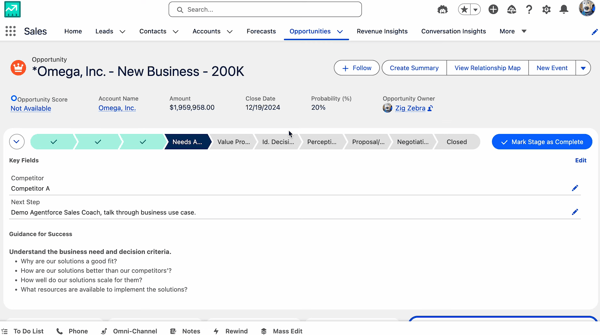
Lead prioritization experiences can vary depending on team preferences and workflows. Some users have shared that clearer visual cues, like solid colors to differentiate newer leads from older ones, could further support faster navigation. Overall, teams continue to rely on Salesforce’s lead management capabilities for their sales processes.
Getting started may require time as teams familiarize themselves with the platform’s features and workflows. As users become more comfortable navigating the system, they’re able to take fuller advantage of its capabilities. For growing sales teams, this depth of functionality can support more structured processes and long-term scalability.
Overall, based on the reviews I’ve read, Salesforce Sales Cloud is trusted for its ability to streamline sales processes.
What I like about Salesforce Sales Cloud:
- The way it organizes leads into hot and cold categories makes prioritizing outreach so much easier, something I’ve seen mentioned often in reviews.
- Customer support stands out for being quick and hands‑on, and G2 users seemed to really value how helpful the team is during setup and daily use.
What G2 users like about Salesforce Sales Cloud:
"What I like most about Salesforce Sales Cloud is how it centralizes the entire sales process in one place. It offers clear visibility into leads and opportunities, strong automation that cuts down on manual work, and customizable reports and dashboards that help sales teams make faster, data-driven decisions while improving overall productivity."
- Salesforce Sales Cloud Review, Suhaiv S.
What I dislike about Salesforce Sales Cloud:
- Clearer visual cues, like solid colors to differentiate newer leads from older ones, could further support faster navigation.
- Getting started may require time as teams familiarize themselves with the platform’s features and workflows. But once familiar, they can take full advantage of its capabilities.
What G2 users dislike about Salesforce Sales Cloud:
"Salesforce Sales Cloud is very powerful, but it can feel complex for new users due to the number of features and customization options. Some advanced features require additional configuration or add-ons, and the overall cost can be high for smaller teams. However, once set up properly, the benefits usually outweigh these challenges."
- Salesforce Sales Cloud Review, Prajwal R.
3. Nooks: Best for AI-powered parallel dialing
Nooks is an AI sales assistant platform that many reviewers say transforms how their teams work, making outreach more efficient and effective. Its focus on AI-driven productivity has earned it strong adoption among outbound sales teams looking to scale without sacrificing quality. According to G2 Data, Nooks is used by 54% mid-market teams.
One feature that consistently stands out is the Auto-Dialer. Users praise this capability for helping reps power through high call volumes without burning out. By removing dialing fatigue, salespeople can focus their energy on meaningful conversations, which significantly boosts daily productivity.
Another capability frequently highlighted is Outbound Call Tracking. Users say it provides clear performance insights that make it easier to coach reps, identify best practices, and adjust messaging in real time. This visibility supports smarter decision-making and continuous improvements in outreach quality.
Based on user feedback, what really sets Nooks apart is its Virtual Workspaces. Many describe these as digital bullpens where teams can collaborate, have shadow calls, and learn from each other in real time. Reviewers emphasize that this recreates in-office energy in a remote setting, boosting both morale and team performance.
I’ve also noticed consistent praise for the platform’s intuitive interface. Users say it feels smooth and even enjoyable to use, which is an important advantage given the demanding nature of outbound sales. This user-friendly design appears to drive higher daily engagement and adoption across teams.
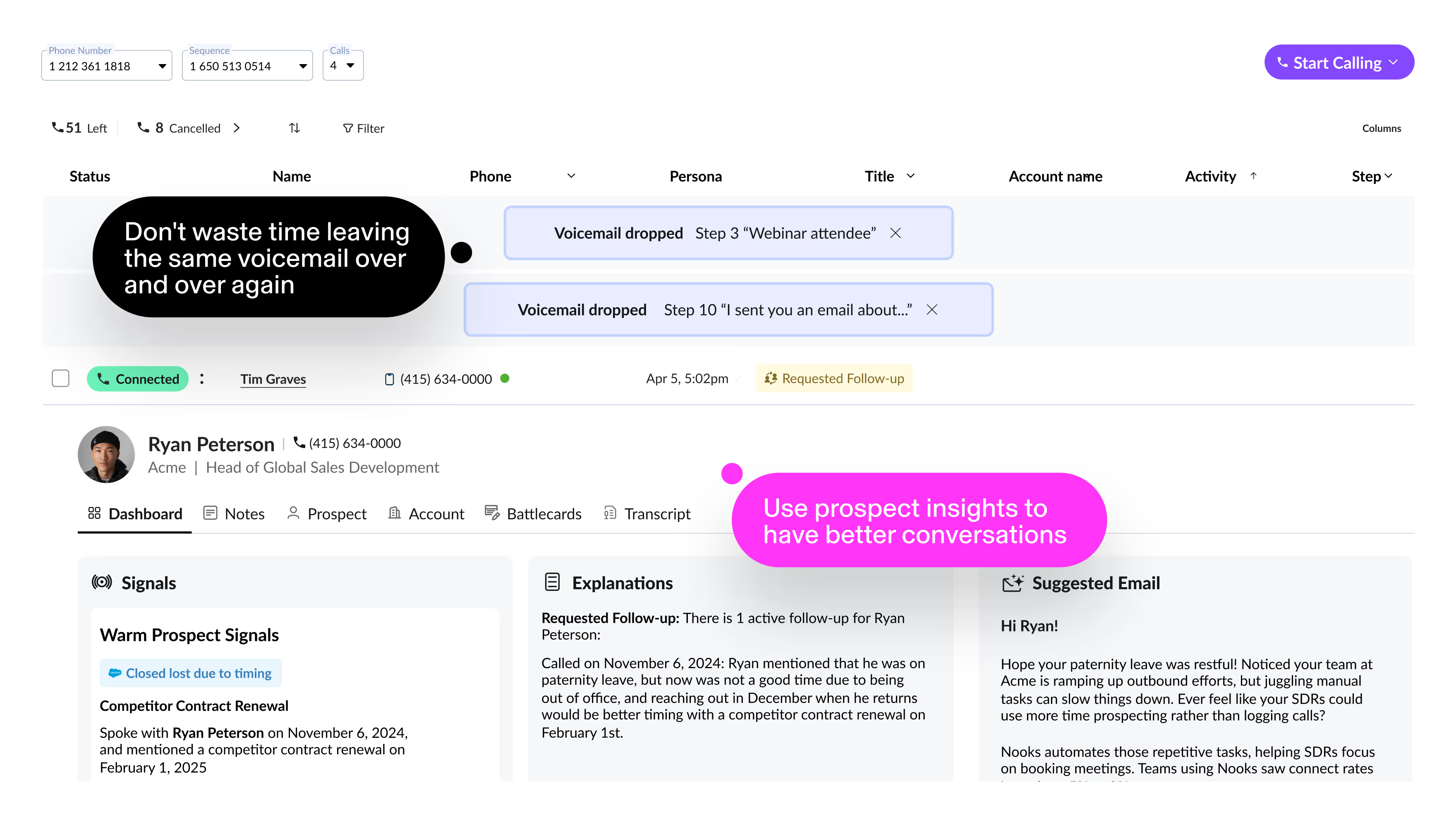
Some reviewers shared an interest in expanded number selection options for one-off or return calls, along with additional built-in emailing or scheduling functionality. At the same time, many highlight that Nooks’ integration with Outreach supports these workflows effectively within their existing sales processes.
Reviewers have also shared occasional call connectivity or disposition inconsistencies, noting that support addresses them promptly. These instances present opportunities for continued refinement while overall performance remains well supported for most teams.
Overall, based on my evaluation, Nooks stands out as a powerful solution for outbound sales teams. It combines high-volume dialing, collaboration, and coaching features in a single, easy-to-use platform.
What I like about Nooks:
- The Auto‑Dialer makes it easier to handle high call volumes without burning out, and I’ve noticed reviewers say it helps them focus more on meaningful conversations.
- I really like Virtual Workspaces, which G2 Users often highlight as a way to recreate that in‑office energy and make collaboration feel more natural.
What G2 users like about Nooks:
"The auto-dialer and parallel dialing features of Nooks have been game-changers for my cold calling workflow. I can get through my call list 3X faster than manual dialing. The real-time analytics and call disposition tracking help me optimize my approach, and the CRM integration keeps everything synced automatically."
- Nooks Review, Fin S.
What I dislike about Nooks:
- There have been occasional call connectivity or disposition inconsistencies. However, the support team addresses them promptly.
- Some reviewers shared an interest in expanded number selection options for one-off or return calls, along with additional built-in emailing or scheduling functionality.
What G2 users dislike about Nooks:
"I do wish we could have all of our SFDC details on the customer page for each person we’re calling, so we wouldn’t need multiple tabs open to keep track of where we left off with the prospect. But it’s not too bad."
- Nooks Review, Nina H.
Sync demo engagement data with your marketing automation platform to trigger timely follow-ups and personalize nurture campaigns based on what prospects actually interacted with.
4. Close: Best for built-in calling and email for inside sales
Close is a CRM that I’ve noticed is especially popular with small businesses. G2 Data shows that 77% of its users come from this segment, which makes sense given how the platform delivers efficiency without unnecessary complexity, making it a natural fit for leaner teams.
One feature that consistently earns praise is the AI note taker. Several reviewers describe how it automatically records what was discussed during calls, allowing users to focus fully on the conversation instead of worrying about taking notes. Many say this is especially helpful during longer calls, ensuring accurate follow-ups and better customer interactions.
Another standout capability is how Close boosts daily call volume. Reviewers often mention how easy the system makes it to keep dialing, helping them reach more prospects in less time. For many teams, this productivity gain is seen as a major competitive advantage.
Reviewers also highlight Close’s ability to track revenue by contact, noting how simple it is to see the income generated from each person and move them through the pipeline with clarity. This visibility into financial impact makes it easier for teams to prioritize efforts and measure success.
I frequently hear praise for the platform’s smooth integrations and simple setup. Users often point out that connecting Close with their existing tools is hassle-free, and its straightforward implementation means they can get started quickly without technical expertise. Many describe this accessibility as a key benefit for smaller teams without dedicated IT support.
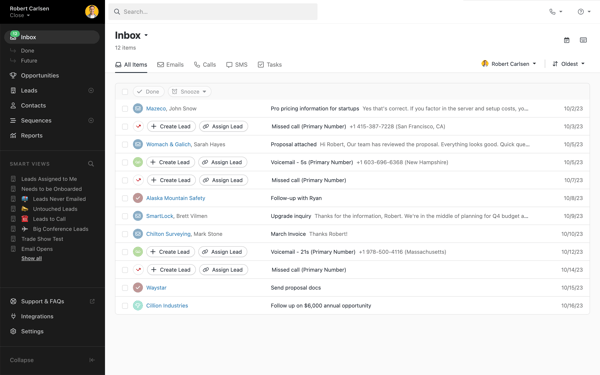
Users frequently highlight Close’s overall reliability and consistent performance in day-to-day outreach. Some have shared experiences with voicemail detection that may occasionally require a quick refresh to update status. For most teams, these moments are brief and don’t detract from the broader stability and functionality the platform provides.
Many users appreciate how Close supports outreach. However, some reviewers have shared that one-click calling directly from lead pages could further streamline their process and reduce extra steps. Enhancements in this area may add additional convenience for teams looking to optimize day-to-day efficiency.
Based on the reviews I’ve read, Close stands out for its AI-driven call notes, productivity-focused calling features, and simple integrations. These make it a strong CRM choice for small businesses that need power without added complexity.
What I like about Close:
- The AI note-taker makes it easier to stay present during calls, and reviewers say it’s especially helpful for keeping follow‑ups accurate.
- I like how the system helps boost daily call volume, something G2 users often mention as a big productivity win.
What G2 users like about Close:
"I'm fine-tuning my sales funnel at the moment, but what Close allows you to do with the people you're processing is great. You can see the income generated from each person, and for the most part, they can be moved along my process fairly easily. The best part for me is having categories where I can place leads after we've completed a job or if they haven’t closed. I also do a bit of calling with it. I purchased a number just to try it out, and I'm slowly getting used to it."
- Close Review, Rod M.
What I dislike about Close:
- Some reviewers have shared that one-click calling directly from lead pages could further streamline their process and reduce extra steps.
- I noted some experiences with voicemail detection that may occasionally require a quick refresh to update status. For most teams, these moments are brief and don’t detract from the broader stability and functionality of Close.
What G2 users dislike about Close:
"I’m looking at overall stats for reps so I can have an organized view of our metrics, for example, how many leads actually picked up the phone on a given day. I’d also like to have an overview of where the reps are throughout the day, so I know when and where to jump in and help, similar to how Salesforce provides a dashboard."
- Close Review, Jacob P.
Sales intelligence platforms provide the data needed to target the right buyers, understand their pain points, and tailor demos accordingly.
5. Quo: Best for streamlined business scaling with CRM visibility
Quo is a cloud-based business calling and messaging platform built to centralize voice, SMS, and contact management in one place. According to G2 Data, Quo is used by 90% small businesses.
One strength that consistently appears in reviews is the platform’s ease of use. Users describe the interface as clean and intuitive, making it simple to place calls, send texts, and manage conversations without jumping between tools. I’ve noticed that this usability becomes especially important for small teams where speed and simplicity directly impact daily productivity.
Another frequently praised aspect I noted is quick implementation and setup. Reviewers mention that onboarding feels straightforward and doesn’t require a long ramp-up period. For teams without dedicated IT resources, this ease of deployment seems to reduce friction and help reps begin outreach almost immediately.
Quo’s integration capabilities are another area that reviewers consistently highlight. Users appreciate how call activity and messaging logs sync automatically with CRMs, helping keep records accurate without manual updates. I’ve also seen specific praise for how well Quo integrates with marketing partners and other operational tools, making it easier to align outreach with broader campaigns.
I noted consistent praise for the call transcription and logging features. Having conversations automatically recorded and documented appears to help teams maintain context across touchpoints. For managers, this functionality supports coaching and accountability, while reps benefit from not having to rely solely on manual note-taking.
Customer support is another area where Quo receives positive feedback. Reviewers mention responsive assistance and helpful guidance when questions arise. In communication tools, where reliability matters, this responsiveness seems to add confidence for teams relying on the platform daily.
Users also highlight the convenience of multi-device accessibility, noting that they can manage calls and messages from desktop or mobile without losing continuity. This flexibility appears especially valuable for teams operating in hybrid or remote environments.
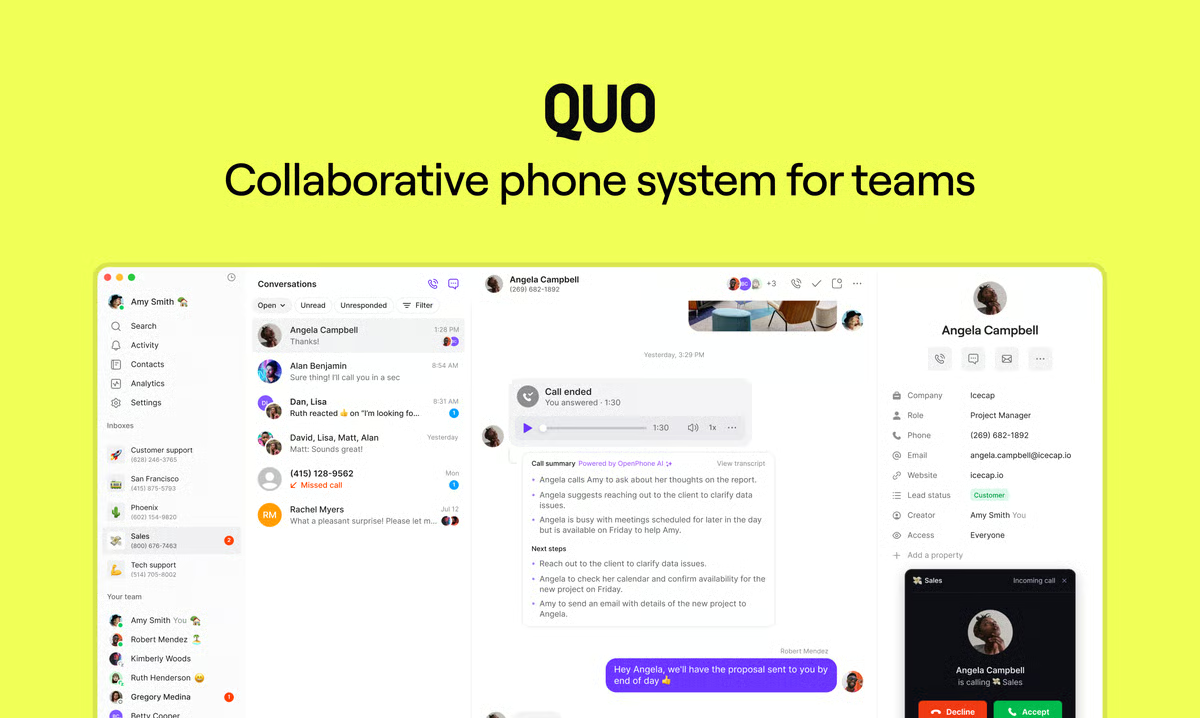
Quo covers core calling and messaging needs effectively. However, some reviewers have shared that teams with highly customized telephony workflows may want to evaluate how Quo’s feature set aligns with more advanced outbound strategies. Organizations with complex routing or enterprise-grade dialing requirements may benefit from reviewing those capabilities in detail.
Quo's pricing structure is organized into defined tiers. For teams exploring specific advanced features, it may be helpful to assess how plan options align with usage expectations and growth plans to ensure the right fit.
Overall, based on my evaluation, Quo is a structured and reliable communication platform for teams that want clarity in their outbound workflows. For growing teams looking to formalize their outreach while maintaining flexibility across devices and tools, Quo appears to offer a balanced and practical solution.
What I like about Quo:
- Having conversations automatically recorded and documented in one place helps teams maintain context across touchpoints.
- Call activity and messaging logs sync automatically with CRMs, helping keep records accurate without manual updates
What G2 users like about Quo:
"The user interface of Quo has been really helpful. I can log in from my cellphone and my desk and get all the features I need. The option to use the API is also helpful."
- Quo Review, Chris M.
What I dislike about Quo:
- The pricing structure is organized into defined tiers. For teams or individuals exploring specific advanced features, it may be helpful to assess how plan options align with usage expectations and growth plans.
- Teams with highly customized telephony workflows or complex routing needs may want to review how Quo’s feature set aligns with more advanced outbound strategies.
What G2 users dislike about Quo:
"I wish the pricing for business features in Quo were more flexible. As a one-person business, I don’t need the full enterprise-style integrations, but it would be great to have an in-between tier that includes some of those advanced features without the higher cost. A more customizable plan would make it an even better fit."
- Quo Review, Melissa B.
6. Salesloft: Best for multichannel sales cadences
Salesloft uses purpose-built AI to help market-facing teams prioritize and take action on what matters most, from first touch to upsell and renewal. According to G2 reviews, its AI-driven guidance is widely seen as a key enabler for keeping sales processes efficient and outcome-focused.
One standout capability is the automation of multi-step outreach sequences, including emails, calls, and social touchpoints. G2 Data shows a user satisfaction rating of 92% for its automated email feature and 87% for automated voicemails.
Reviewers often mention that this automation creates more consistent communication while freeing up time for higher-value conversations. Several note that it also reduces the risk of losing track of prospects in busy pipelines.
I frequently see praise for the platform’s daily to-do lists. Users highlight how these lists clearly indicate who to contact and when, giving them a focused plan for their day and helping them stay on top of pipeline activity.
Reviewers also praised Salesloft’s segmentation tools, saying they make outreach more targeted and effective. They point out that tailoring cadences by industry, persona, or deal stage helps increase response rates and improve overall engagement.
Another feature users value is calendar integration. Many describe how easy it is to schedule calls, demos, and follow-ups without switching between tools. They emphasize that this prevents double-booking and keeps workflows smooth, which saves both time and frustration.
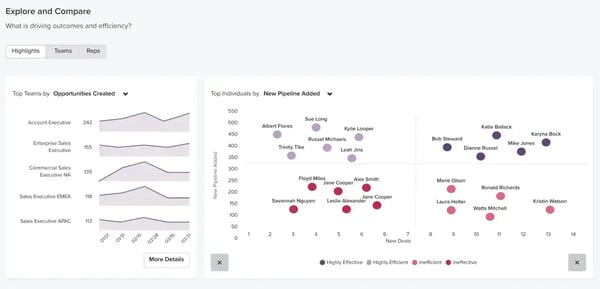
Many teams appreciate the flexibility Salesloft provides in building and managing cadences to match their outreach strategy. However, some reviewers have shared interest in more automated call-skipping within cadences, such as automatically advancing steps when a prospect can’t be reached. Users also note that the platform’s customization options allow them to adapt workflows to their processes.
Users value the platform’s notification system for keeping teams informed and responsive. Some have shared that more granular control over lower-priority alerts could make it easier to focus on the most time-sensitive updates. Additional customization in this area may further support teams in tailoring notifications to match their workflow preferences.
Overall, based on the reviews I’ve read, Salesloft stands out as a powerful partner for sales teams.
What I like about Salesloft:
- The AI guidance makes it easier to manage multiple opportunities without missing steps, something I’ve seen praised often in G2 reviews.
- I like how the daily to‑do lists give a clear plan for outreach, and G2 users seemed to value how it keeps them focused and organized.
What G2 users like about Salesloft:
"What I like most is how Salesloft keeps my day structured without making it feel robotic. The cadence view makes it clear what I should do next—call, email, or follow up—so I’m not wasting time figuring out my next move. The activity timeline is especially useful because I can see every touchpoint with a prospect in one place, which helps my conversations feel more natural and less repetitive."
- Salesloft Review, Avyan S.
What I dislike about Salesloft:
- Reviewers have shared interest in more automated call-skipping within cadences, such as automatically advancing steps when a prospect can’t be reached.
- Users value the platform’s notification system for keeping teams informed. Some have shared that more granular control over lower-priority alerts could make it easier to focus on the most time-sensitive updates.
What G2 users dislike about Salesloft:
"I don’t like how it measures personalization. I could create a cadence specifically for a certain position at a certain company, but because I don’t change the cadence itself, it marks it as not personalized. This affects how I view my data and makes it harder to improve my outreach."
- Salesloft Review, Karim H.
Evaluate the best VoIP providers that complement your outbound call tracking workflow and analytics needs
7. ZoomInfo Sales: Best for rich B2B contact and intent data
From my review of G2 feedback, I’ve noticed that ZoomInfo Sales is widely trusted for combining a company’s own data with its vast database powered by generative AI. Many reviewers say this makes it easier to uncover the right prospects and insights while cutting through the noise.
A feature that consistently stands out is automated outreach through workflows. Users highlight how creating prospect lists and setting up touchpoints saves them hours each week. I’ve read several comments noting that this prevents leads from slipping through the cracks while making outreach more consistent and scalable.
Reviewers also value the platform’s in-depth research capabilities. Having company details, org charts, and direct dials in one place means less switching between tools. According to G2 Data, 88% of users praise ZoomInfo’s daily summary and 86% praise its notes feature, which gives a clear view of pipeline progress.
I’ve also seen strong feedback for the Chrome Extension. Many reviewers mention how it provides accurate contact data right where they’re working on LinkedIn, within Outreach, or while preparing for a call. This quick access is described as a major advantage for reaching decision-makers efficiently.
Another area gaining attention is ZoomInfo’s generative AI tools. Reviewers highlight features like AI-powered call summaries, intelligent dashboards, and lead intelligence insights, which sharpen their view of the pipeline and support faster, smarter decision-making.
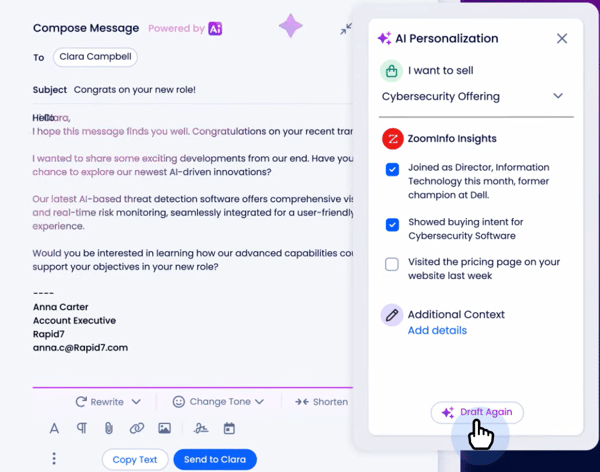
Many users rely on ZoomInfo Sales for its broad and dependable contact database to support prospecting efforts. Some have shared that data refresh cycles and verification processes play an important role in maintaining accuracy, particularly for fast-changing contact details. Continued enhancements in these areas can further strengthen confidence in the platform’s already robust data coverage.
Reviewers find that the existing CRM and call center integrations support their core workflows effectively. Some have shared interest in expanding native integrations further, which could provide additional flexibility and help teams streamline processes within a broader tech stack.
Overall, based on the reviews I’ve read, ZoomInfo Sales is viewed as a powerful tool for modern sales teams, combining expansive data, automation, and AI insights to drive more efficient and effective prospecting.
What I like about ZoomInfo Sales:
- I found Fable’s speed and flexibility impressive. G2 users say it helps teams quickly create multi-flow demos that showcase different personas, reducing the need for multiple assets.
- The support team stood out to me, and reviewers praise their responsiveness and personalized check-ins, which help users get the most out of the platform.
What G2 users like about ZoomInfo Sales:
"I've been using ZoomInfo for over 5 years, and it's truly one of my favorite tools for sales and data enrichment. The platform offers an extensive and reliable database, and during my time at Anaplan, I’ve explored it in depth, from ZoomInfo University to RingLead enrichment, setting up workflows for account and contact enrichment, and leveraging intent data. There’s so much functionality packed into a single platform, and I genuinely enjoy working with it."
- ZoomInfo Sales Review, Annpurna S.
What I dislike about ZoomInfo Sales:
- Data refresh cycles and verification processes play an important role in maintaining contact accuracy. Teams with high-volume prospecting needs may want to evaluate how update frequency aligns with their outreach expectations.
- Native CRM and call center integrations support core workflows, but teams looking to expand their tech stack may benefit from additional integration options for greater flexibility.
What G2 users dislike about ZoomInfo Sales:
"Although the contact data is typically reliable, it can occasionally be outdated, particularly for specialized roles or less prominent companies, necessitating manual checks. Furthermore, the sheer volume of features can make the platform feel daunting, and new users may face a significant learning curve as they get accustomed to it."
- ZoomInfo Sales Review, Kishor K.
8. Aircall: Best for cloud calling with CRM integration
According to G2 Data, Aircall is used by 54% small businesses and 43% mid-market teams. It integrates voice, SMS, WhatsApp, and social media channels into a single platform, with bidirectional syncing across 250+ business apps. Reviewers often praise this connected approach for helping teams manage communication more efficiently in one place.
A feature that gets frequent praise is Aircall’s intuitive interface. Many reviewers highlight how its clean design makes setup and navigation simple, saving time and reducing frustration, especially when onboarding new team members. This ease of use is often described as a major productivity booster.
Another standout is the platform’s analytics on call volume, agent performance, and customer interactions. Users praise Aircall’s daily summaries, saying they keep teams informed without needing to dig through detailed reports. These insights are valued for spotting coaching opportunities and improving overall effectiveness.
I’ve also read positive feedback on Aircall’s CRM integration. Reviewers mention that automatic logging of calls and notes eliminates manual data entry, keeping communication records accurate and saving valuable time.
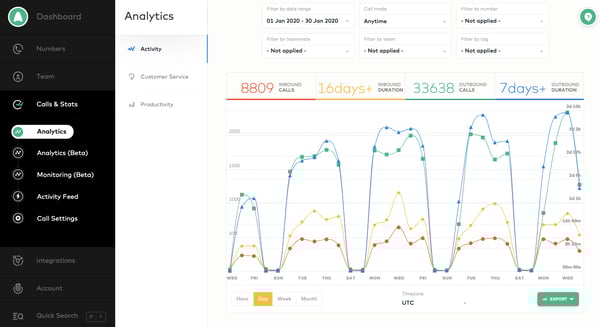
Aircall is appreciated for the ability to incorporate SMS and MMS messaging into its outreach strategy. However, some reviewers highlight that messaging usage is structured around set quotas, with options to expand capacity as needs grow. This approach allows teams to plan usage intentionally while scaling communication volumes in line with their outreach goals.
Many users value Aircall’s ability to scale as call volumes and team sizes grow. Some have observed slight variations in workflow speed during peak usage periods. Even so, the platform’s scalability and overall performance continue to support evolving team needs effectively.
Based on the trends I’ve seen, Aircall is highly regarded for its user-friendly design, powerful analytics, and seamless CRM connectivity, making it a strong choice for businesses looking to unify their communication channels.
What I like about Aircall:
- The interface is clean and intuitive, which many reviewers say makes onboarding and daily use much easier. I’ve seen this mentioned very often by G2 users.
- The analytics and daily summaries help keep teams informed without digging through reports, and G2 users seemed to find this really helpful for coaching.
What G2 users like about Aircall:
"I’m in sales and use Aircall integrated with Salesforce. Aircall has made a huge impact on my productivity. I used to make calls on a cell phone, but now I can click to call directly from the customer record on my laptop, so much less hassle. I also have the app on my phone, so if I’m on the road, I can still make and receive calls. I love that everything is recorded in the specific customer’s file. It’s made it possible for me to sell over $1.5 million a year with a lot less stress."
- Aircall Review, Michaela N.
What I dislike about Aircall:
- Messaging usage is structured around set monthly quotas, with options to expand capacity as outreach needs grow. For high-volume texting, teams may want to review how these allowances align with their expected usage.
- Some users have observed slight variations in workflow speed during peak usage periods. For teams evaluating high-volume performance, this may be an area to consider alongside the platform’s broader scalability.
What G2 users dislike about Aircall:
"I sometimes encounter network issues with Aircall, which can disrupt communication. There was an instance when I tried to reach someone, and the system incorrectly indicated that I had insufficient credits, although that was not the case. However, when I tried dialing another number afterward, it went through successfully."
- Aircall Review, Isaiah N.
9. JustCall: Best for cloud phone and SMS for sales
JustCall is an AI-powered business communication platform, especially popular with small businesses. G2 Data shows that 64% of its users come from this segment, and many reviewers say the platform feels accessible and effective from day one, which explains its strong adoption in this space.
One feature that gets frequent praise is the graph view for call counts. Users highlight how this gives them an instant snapshot of daily performance without needing to dig into detailed reports, making progress tracking simple and efficient.
Another standout is seamless CRM integration. Multiple reviewers mention that being able to dial directly from their CRM saves time and keeps all communications in one place. Many note that this streamlined workflow eliminates extra steps and makes outreach more efficient.
I’ve also noticed positive feedback on JustCall’s user-friendly interface. Reviewers often say managing contacts across regions feels straightforward, with a layout that balances ease of use and robust capabilities. For small teams, this design helps avoid overwhelm while still providing the tools they need.
Another benefit that is often mentioned is quick access to customer information and call history. Having this context readily available makes conversations more personal and informed, helping reps strengthen relationships across touchpoints.
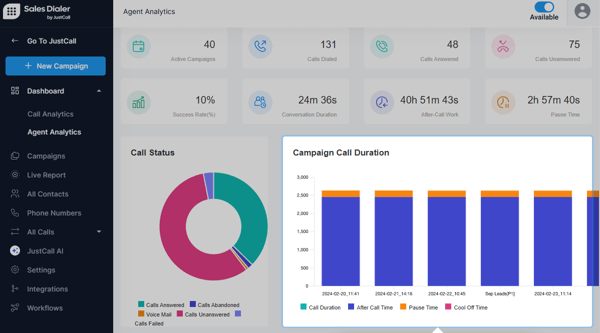
Many users appreciate the convenience of managing calls and notifications through JustCall’s mobile app alongside the desktop experience. Some reviewers mention differences in how quickly mobile call logs and notifications update. Many see this as an opportunity for continued enhancements that further align the mobile experience with the smooth performance they value on desktop.
Teams value the flexibility advanced call flows provide in customizing routing and outreach experiences. Some users have shared that additional step-by-step guidance during setup could support a smoother onboarding process and help teams unlock the full feature set more efficiently.
Overall, based on my evaluation, JustCall is seen as a strong fit for small businesses seeking a simple yet capable communication tool.
What I like about JustCall:
- The call count graphs make it easy to see daily performance at a glance, which reviewers found really helpful.
- Being able to dial right from a CRM keeps everything in one place, and I’ve seen many users say it saves them a lot of time.
What G2 users like about JustCall:
"JustCall is one of the simplest and easiest cloud-based customer assistance tools that helps in providing the best customer support online. The feature of call recording helps us in improving our overall customer support quality and training."
- JustCall Review, Abhishek K.
What I dislike about JustCall:
- There are differences in how quickly mobile call logs and notifications update. Many see this as an opportunity for enhancements that further align the mobile experience with the smooth performance they value on desktop.
- Additional step-by-step guidance during setting up advanced call flows could support a smoother onboarding process.
What G2 users dislike about JustCall:
"So far, we haven’t encountered any major issues. There have been a few instances where new code deployments caused problems with our existing pages mapped into the tool. However, we’ve seen Saleo’s roadmap includes using AI to detect and automatically remap changes. Once that’s in place, it should eliminate the need for manual QA entirely."
- JustCall Review, Ayush A.
10. CloudTalk: Best for scalable outbound calling with advanced analytics
CloudTalk appeals strongly to teams focused on outbound efficiency, performance tracking, and international reach. It’s often adopted by growing sales teams looking to scale structured calling operations across regions. According to G2 Data, this tool is used by 61% of small businesses.
One feature that consistently stands out in G2 eviews is power dialing and call automation. Users frequently highlight how the Power Dialer helps reps move through call lists faster while maintaining rhythm throughout the day. I’ve noticed that for outbound-heavy teams, this ability to reduce manual dialing significantly impacts productivity and daily call volume.
I noted that another commonly praised capability of CloudTalk is its advanced call analytics and reporting. Reviewers mention that CloudTalk provides detailed visibility into call metrics, agent activity, and outcomes. Managers rely on these dashboards to monitor performance trends, coach reps, and make data-backed adjustments to outreach strategies.
CloudTalk’s international calling support and global number availability are strong themes in user feedback. Teams operating across multiple markets appreciate the ability to purchase local numbers and establish a presence in different countries. This flexibility appears especially valuable for companies expanding internationally or running distributed sales teams.
I’ve also seen consistent praise for CRM integrations and workflow syncing. Users frequently reference integrations with tools like HubSpot, Salesforce, and other help desk platforms, noting that call logs and recordings sync automatically. This visibility supports cleaner reporting and reduces the need for manual follow-up entries.
Several users also appreciate the platform’s call routing and configuration options. The ability to design routing flows and distribute calls efficiently allows teams to align call handling with operational structure as they grow.
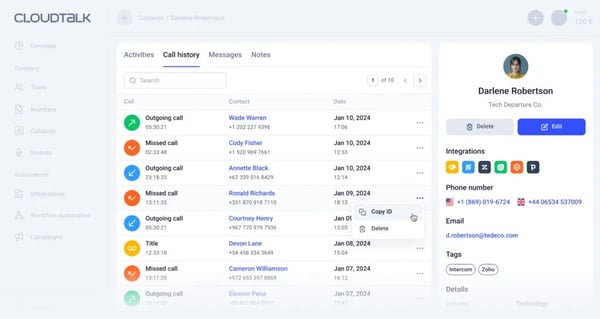
Some users have shared experiences where live call monitoring required additional troubleshooting during quality assurance checks. In these cases, support teams were responsive and worked toward resolution, and organizations that rely heavily on real-time supervision may want to review monitoring workflows during implementation planning.
Users also mention that onboarding advanced configurations can require thoughtful setup. Teams exploring more sophisticated workflows may want to allocate time to fully configure routing, automation, and reporting settings to match their processes.
Based on my evaluation, CloudTalk is a structured and performance-focused calling solution for teams that treat outbound as a measurable growth engine. For sales and support teams that rely heavily on phone outreach and want clearer insight into what’s working, CloudTalk offers a balanced mix of efficiency and operational control.
What I like about CloudTalk:
- The advanced call analytics and reporting provide detailed visibility into call metrics, agent activity, and outcomes.
- The power dialing and call automation features help reps move through call lists faster by reducing manual dialing. This also has a positive impact on productivity.
What G2 users like about CloudTalk:
"CloudTalk establishes a modern and cloud-supported calling system, which is simple to run and requires no telecom infrastructure. The app contains versatile call management features, like call queues, recording, voicemail, and others. CloudTalk has a powerful relationship with programs like CRM, marketing apps, and helpdesk, among others. The app has magnificent support for international calls, where it allows users to get local numbers and reach global customers. Calls can be remotely received by the agents, and this simplifies engagement."
- CloudTalk Review, Samantha L.
What I dislike about CloudTalk:
- Users mention that onboarding advanced configurations can require thoughtful setup, especially for teams looking for more sophisticated workflows
- Teams that rely heavily on live call monitoring for QA may want to review how supervision workflows align with their operational needs.
What G2 users dislike about CloudTalk:
"The initial set-up of CloudTalk was a bit cumbersome. I think the instructional aids need to be written more clearly, but the chatbot and live support were able to help me navigate things when I got stuck."
- CloudTalk Review, Setphanie A.
Outbound call tracking software: Frequently asked questions (FAQs)
Have more questions? Find the answers below.
Q1. Where can I find the best outbound call tracking software?
HubSpot Sales Hub, JustCall, and Aircall are some of the best platforms for tracking outbound calls. They offer features like call logging, recordings, analytics, and CRM integrations to streamline sales workflows.
Q2. Which outbound call tracking tool is the top choice for startups?
Close is ideal for startups. It combines calling, emailing, and CRM in one tool, focusing on high-velocity outbound sales and quick team onboarding.
Q3. What is the best option for tracking outbound calls?
JustCall offers one of the most comprehensive outbound tracking setups. With power dialers, call recordings, call tagging, and real-time analytics, it’s built for outbound sales teams of all sizes.
Q4. What is the best outbound call tracking software for B2B companies?
Salesforce Sales Cloud and ZoomInfo Sales are top picks for B2B. Salesforce provides deep CRM customization and tracking, while ZoomInfo adds verified contact data and intent signals for precision targeting.
Q5. What is the most reliable outbound call tracking solution?
Aircall is known for reliability, with stable call quality, CRM syncing, and live analytics. It’s trusted by both SMBs and enterprise teams for consistent performance.
Q6. What is the leading outbound call tracker for IT services?
Nooks is a strong fit for IT and tech sales teams. It uses AI-powered parallel dialing, rep coaching, and lead routing to speed up outbound activity and improve connect rates.
Q7. What is the best outbound call tracking software for a small business?
Close is the best outbound call tracking software for small businesses because it combines built-in calling, power dialing, and CRM tracking in one easy-to-use platform.
Q8. What is a popular outbound call tracking platform for businesses?
Salesloft is widely used across industries. It tracks calls within multichannel cadences, offers live performance analytics, and includes coaching features to improve rep output.
Q9. What is the best software for monitoring outbound calls in our call center?
JustCall and Aircall are built for call centers. They include features like call monitoring, recordings, analytics dashboards, agent performance tracking, and live coaching tools.
Q10. What is the top-rated outbound call tracking app?
Close and Nooks are top-rated apps for their outbound call performance. Close is valued for its ease of use and all-in-one design, while Nooks is praised for dialing speed and coaching tools.
Most outbound teams run email and calls in parallel. Here is a look at the best email tracking software that pairs well with your outbound call stack.
Calling without tracking? That’s not outreach
You’ve seen the tools, now pick one. Without outbound call tracking software, you’re missing the who, what, and how many of your sales outreach. That means blind spots in your funnel, no visibility into rep performance, and zero data to optimize your pitch. A solid tool brings the clarity your team needs to improve conversations and actually hit targets. In addition to this, pair your outbound sequences with demo automation solutions so prospects can self-explore the product instead of waiting for a scheduled call.
Once your calls are tracked and logged, pair them with conversation intelligence software to improve what happens on those calls.
.png?width=400&height=150&name=Untitled%20design%20(56).png)


.png)



.png)