


I’ll be honest and admit right away that when AI tools like DALL-E and GPTs started popping up, I was hyped. Then, in late 2022, when ChatGPT blew up and suddenly everyone was talking to AI, I knew generative AI was going mainstream, and I had to check it out.
Since then, I’ve tested AI chatbots, content generators, image creators, AI video generators, and other generative AI tools. Some were great. Others? Let’s just say I spent more time setting them up than creating (looking at you, early AI image generators).
But through all the hype and half-baked tools, I’ve kept my focus on the best generative AI tools, the ones that actually help professionals, writers, coders, marketers, and creators work smarter, not harder. It’s clear this isn’t just a passing trend; the global generative AI market was valued at USD 16.9B in 2024 and is projected to reach USD 109.4B by 2030, growing at a rapid 37.6% CAGR.
From OpenAI’s ChatGPT to Google’s Gemini, from MidJourney’s mind-blowing images to Synthesia’s AI video magic, I’ve seen how far these tools have come.

With so many tools now available, it helps to understand what generative AI is and how it powers everything from chatbots and image generators to coding assistants and AI video platforms. That foundation makes it easier to compare tools, evaluate their strengths, and choose the ones that fit your workflow.
Now, after sorting through the good, the bad, and the just plain unnecessary, I’ve put together a list of the best generative AI tools that actually deserve a spot in your workflow.
For me, generative AI tools aren’t just software. They’re creative partners, problem-solvers, and (on really busy days) lifesavers. They help me brainstorm more efficiently, automate tedious tasks, and unlock ideas I wouldn’t have thought of on my own.
At their core, these tools generate something new: text, images, code, videos, and even voices, based on what they’ve learned from massive datasets. In industry-specific use case for example they’re also powering generative AI in travel support, helping teams deliver faster, more personalized assistance across languages and time zones. But the best ones? They don’t just spit out generic results.
I’ve had moments where AI completely transformed how I approach work, and others where I’ve sat, staring at a screen, wondering why it gave me the most ridiculous output (seriously, why does AI struggle with hands?). But that’s part of the journey: finding the tools that actually make life easier, not harder.
New AI tools are released every day. To cut through the noise, I started with G2 data, utilizing their grid reports across nine categories: AI chatbots, coding tools, image and video generators, writing assistants, content platforms, content detectors, large language models, and more. I narrowed it down to the top five tools in each category.
Beyond G2, I scoured online communities to spot trending AI tools that professionals were actually using, resulting in a shortlist of 50 AI tools.
Over the next few months, my colleagues and I tested these tools within our respective domains. While I focused on AI writing assistants, chatbots, image generators, and content platforms, my colleagues, who have written extensively on AI coding tools, LLMs, content detectors, and text-to-speech apps, brought in their expertise to evaluate those categories.
To get a broader perspective, we also used AI to analyze and summarize thousands of G2 user reviews (well, didn't I say I use AI extensively in my workflow?) to understand what other G2 users like and dislike about these tools and compare their experiences with ours. The screenshots featured in this article may be a mix of those captured during evaluation and ones obtained from the vendor’s G2 page.
I also tested platforms with enterprise-grade deployment in mind. If you're offering products or digital services, the most efficient AI infrastructure software I came across offered developer APIs, deployment flexibility, and strong LLM integration, especially helpful for SaaS and AI-native teams.
With so many generative AI tools on the market, choosing the best isn’t just about picking the most popular names. My colleagues and I followed a structured evaluation process to test and compare each tool, ensuring we prioritized performance, usability, and real-world value over hype.
For larger teams or developers building new systems, I also explored the most recommended generative AI infrastructure for software companies, especially those integrating AI across their codebase, dev environments, and customer workflows.
Here’s the detailed checklist we used to separate the best from the rest.
After evaluating 50 AI tools across different categories, I narrowed it down to the 9 best generative AI tools. They're reliable and friendly and make our workflow more productive and efficient. The list below contains genuine G2 user reviews from the respective product pages on G2.
*This data was pulled from G2 in 2025. Some reviews may have been edited for clarity.
Category: AI chatbot software, AI code generation software
ChatGPT is probably the most well-known generative AI tool out there. I’ve used it for just everything from drafting blog posts and brainstorming marketing ideas to answering random late-night questions like “Why do cats knock things off tables?” (spoiler: they’re just tiny chaos agents). But like any tool, it’s got its strengths and a few quirks.
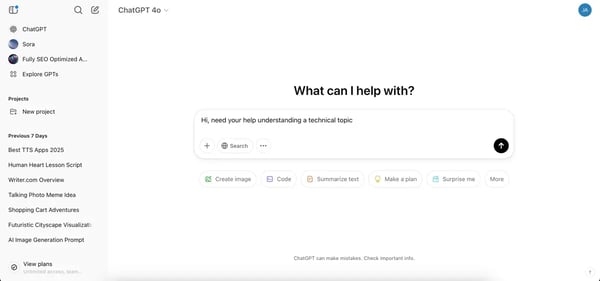
Accessing ChatGPT is super-easy now, with no login requirement. It's as simple as opening a site and starting to ask questions. But for features like voice mode or image generation, we need to sign up for either a free plan or a paid one.
Let me be frank here: I’m a ChatGPT Plus user. The upgrade makes a difference to me as I use it extensively for writing, coding, brainstorming, and research. The access to advanced models, like GPT-4o, GPT-4, and GPT-o, that are noticeably sharper, and the added perks (like access to new features) make it worth it. That said, the free version is still solid for everyday tasks.
Should you upgrade to ChatGPT Plus? I break it down in my full review: Is ChatGPT Plus worth it? Check it out to see if the extra features justify the price!
ChatGPT is fast, efficient, and surprisingly good at structuring ideas when my brain refuses to cooperate. One of its biggest strengths is how versatile it is. I can ask for a witty tweet one minute and try writing code in the next minute, and it handles both with ease. It also keeps track of context within a conversation, so I don’t have to repeat myself constantly.
My favorite feature is ChatGPT’s memory controls. I can explicitly tell it to remember things, ask what it remembers, and even reset or update its memory, either through conversation or settings.
Honestly, if I had to pick just one tool as the best generative AI infrastructure for my tech startup, ChatGPT Plus, with its advanced models, code generation, and file handling, would top the list.
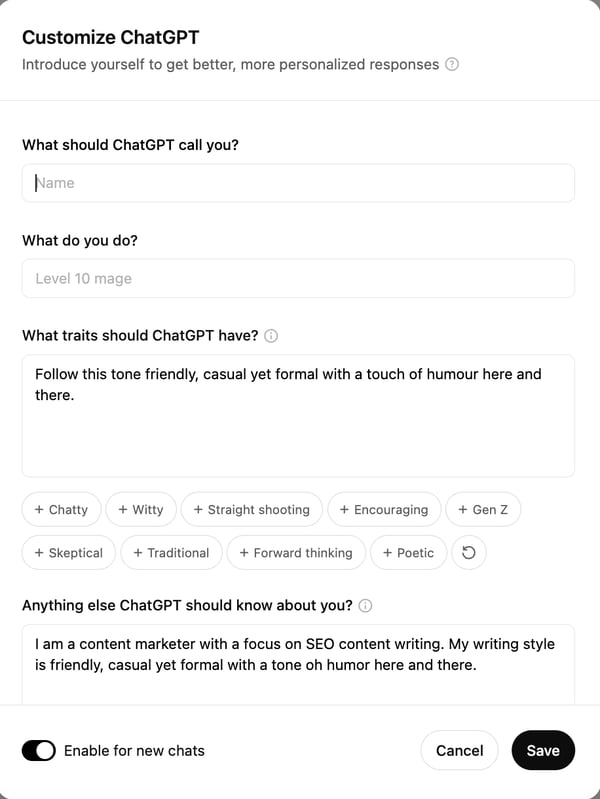
But the feature that excites me the most is the ability to build custom GPTs. Instead of a one-size-fits-all chatbot, I can fine-tune ChatGPT to behave exactly how I want, whether for a specific writing style, a coding assistant, or even an AI persona for brainstorming.
I’ve relied on ChatGPT to write HTML and JavaScript for interactive tools and web pages, ones that are now live on our website. Note that I have no experience coding at all, but that hasn’t stopped me from using it to build things that actually work. ChatGPT helps me generate full scripts, optimize code, understand algorithms, and even help with debugging.
It’s also been incredibly useful in breaking down complex datasets, writing Excel formulas I wouldn’t have figured out on my own, and even generating Pandas scripts to automate repetitive tasks. I wouldn't have thought of using these advanced methods if not for ChatGPT honestly. And did I mention that we can now browse with SearchGPT also? If I need real-time information, I just switch to browsing mode and get up-to-date search results.
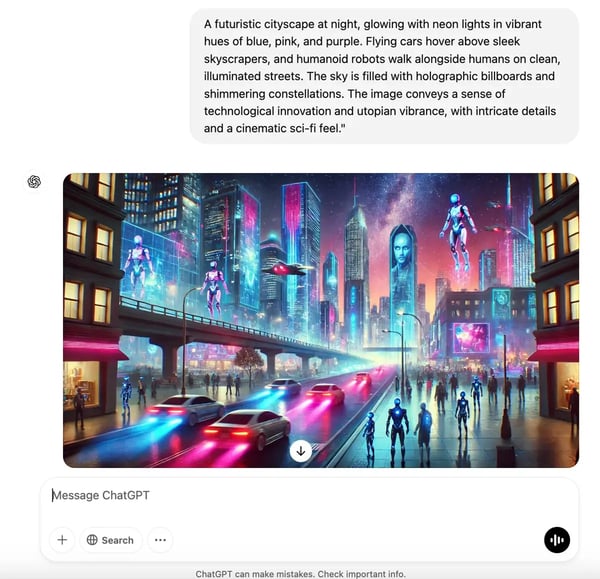
ChatGPT can also double down as an AI image generator powered by the DALL E3 model, albeit with limits on the number of images you can generate in the free tier and with fewer controls for tweaking it. I'd say there are other free AI image generators that do an even better job with more controls.
I’ve been genuinely impressed by how helpful ChatGPT is in my day-to-day work. It’s great for brainstorming ideas, breaking down complex topics, and speeding up writing or research. It really feels like having a supercharged assistant at my fingertips. That said, it does have its quirks. I’ve noticed it can sometimes sound overly confident, even when the answer isn’t entirely accurate. But once I got into the habit of fact-checking key details, it became much easier to rely on it for solid first drafts and quick insights.
ChatGPT excels at clarity, creativity, and adaptability, making it one of the best tools for writers, marketers, and anyone who needs help with brainstorming or research. While some G2 users (and my own experience) show that it can occasionally fall short on highly technical or niche topics, that’s mostly because it’s optimized for breadth rather than deep domain expertise. For everyday content, ideation, and productivity tasks, though, its accuracy and versatility shine through.
I’ve noticed that it sometimes repeats information or slightly misses the intent of a prompt, but rewording or refining questions usually leads to spot-on results. That’s part of what makes it such a powerful learning tool, the more you use it, the better you get at prompting and guiding responses effectively.
Even the free version delivers tremendous value, though it’s best suited for casual users or light research. Professionals who need faster speeds, advanced data handling, or the latest model access will find the Plus plan well worth it. Overall, ChatGPT continues to stand out as one of the most capable and time-saving AI tools available, especially for those who rely on clarity, creativity, and quick problem-solving.
"I love this tool beyond anything! ChatGPT has made my life so simple, and I can literally ask anything that comes to my mind. It is like a friend, mentor, guide, or anything you like it to be. I can ask anything, and it gives me the answers, and after a little back-and-forth, it gives me the perfect answers every time!!"
- ChatGPT Review, Sakshi S.
"Sometimes, ChatGPT struggles with deeply nuanced or highly specialized queries. It might provide answers that are too general or miss subtle details, requiring additional clarification or manual fine-tuning."
- ChatGPT Review, Shikar S.
For a detailed review of each product, you can read my article on the best AI chatbots.
Category: Large language models, AI chatbot software
If there’s one chatbot I keep open all the time, along with ChatGPT, it’s Gemini. But if I call it just a chatbot, that doesn’t do it justice. It’s one of the top-rated large language models (LLMs) out there, optimized for everything from text generation to multimodal tasks like processing images, audio, and video.
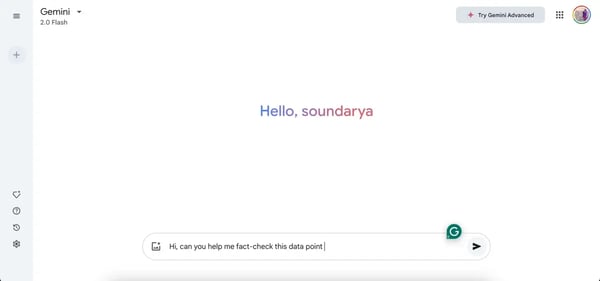
Gemini 2.0 Flash, the latest iteration, is designed for speed and versatility, while previous models like Gemini 1.5 Pro focused more on complex reasoning. From what I've seen, Google has clearly positioned Gemini as more than just a conversational AI. It’s a full-fledged LLM built to handle high-volume data processing, creative content generation, and advanced problem-solving.
It can analyze text, generate creative content, assist with coding, and even process images, making it more than just a chatbot.
With the release of Gemini 2.0 Flash, I feel it’s faster, smarter, and better at handling everyday tasks. If you’ve used Gemini 1.5 before, you’ll notice the step-up immediately. Responses feel more refined, the model understands context better, and overall, it’s just a smoother experience.
What sets Gemini apart from ChatGPT, in my experience, is its focus on natural, flowing conversation. While ChatGPT is excellent at generating text and following instructions, Gemini feels more like a true dialogue. It's less about giving commands and more about having a back-and-forth. I find myself using them for different purposes – ChatGPT for structured tasks, and Gemini when I want to explore ideas and have a more dynamic interaction.
Beyond conversation, Gemini has features that have impressed me over time. It supported real-time web browsing long before ChatGPT got that capability, which was a huge plus. The fact-check with Google feature is another favorite. I can easily verify AI-generated responses with sources from the web, making it especially useful when researching or cross-checking information.
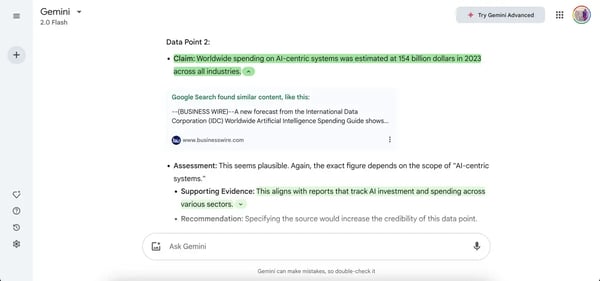
I also like its AI image generation capabilities powered by the Imagen 3 model. It's not as sophisticated as other AI image generators, but I definitely like to play a lot with it, creating a number of images, given that it has no limits on the number of images generated.
Whether you're exploring multimodal content generation or building LLM-powered systems, Gemini stands out among the top generative AI tools for enterprise use. It’s fast, well-integrated, and strong on fact-checking, which makes it a reliable choice for professional workflows.
That said, there are a few areas where it could improve. The free web version doesn’t yet support file uploads for data analysis or advanced tasks, though you can still upload images directly in the browser. File uploads are available on the mobile app, which works well for users who prefer flexible, on-the-go workflows.
Some G2 reviewers also noted that deeper integrations with Gmail, Docs, and other Google tools are currently limited to Google One AI Premium or Workspace plans. While this may segment access, it also ensures that professional and enterprise users get enhanced privacy controls and more robust collaboration features, making Gemini particularly well-suited for teams already using Google’s productivity suite.
Even so, Gemini continues to be one of my go-to AI tools. It’s fast, thoughtful, and feels more like a real assistant than just another chatbot. For research, content creation, or everyday productivity, it’s definitely worth having open alongside ChatGPT.
"It is the best assistant to have as a writer and editor. It can be used to brainstorm ideas for any work and is very helpful with innovative insights. It is one of the best research assistants, and it doesn't disappoint."
- Gemini Review, Dr. Fizza Y.
"Sometimes, Gemini will fail to provide accurate solutions, and does not accept documents, and doesn't have the ability to read and understand documents."
- Gemini Review, Suma G.
Check out our in-depth article on the best LLMs. for a detailed breakdown of their features, strengths, and use cases.
Category: AI code generation software
As I’ve mentioned before, I’m not a coder by trade. But ever since I started using generative AI tools, I’ve found myself diving into coding more than ever. And if there’s one tool that kept coming up in conversations with my developer friends, it was GitHub Copilot.
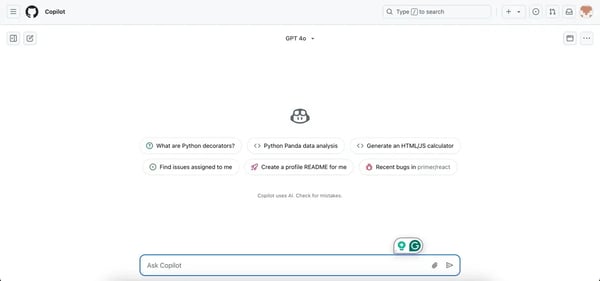
Right off the bat, I noticed that GitHub Copilot gives users the option to choose their preferred large language model (LLM) for generating code, including GPT-4o, Claude 3.5 Sonnet, and the o1 models from Azure OpenAI.
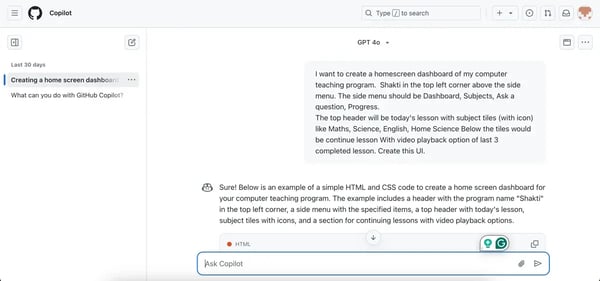
I gave the tool a try and immediately appreciated that I don’t have to start from scratch. I can describe what I need in plain English, and Copilot generates a working code snippet that I can tweak, much like ChatGPT. For someone like me, without a formal coding background, it’s been a huge confidence booster, helping me understand code structure, syntax, and logic without feeling overwhelmed.
For example, see how I used it to generate code for a home screen dashboard for my pet project. With a few tweaks here and there, I had a working dashboard.
That being said, my experience with GitHub Copilot is still at a beginner level, so I relied on insights from my colleague, who uses it extensively for development work.
From what I’ve seen and from their feedback, Copilot is a massive time-saver for developers, whether they’re writing new code, debugging, or automating repetitive tasks. Instead of spending hours searching through documentation, Copilot provides smart code suggestions that speed up the process and make development smoother.
For IT and engineering teams, these same automation benefits are also shaping generative AI in ITSM, where AI can help streamline service requests, incident response, and internal support workflows.
Most of the time, it suggests code that they would write out anyway, and if the suggestion is wrong, they just start typing what they want, and it usually figures it out pretty quickly.
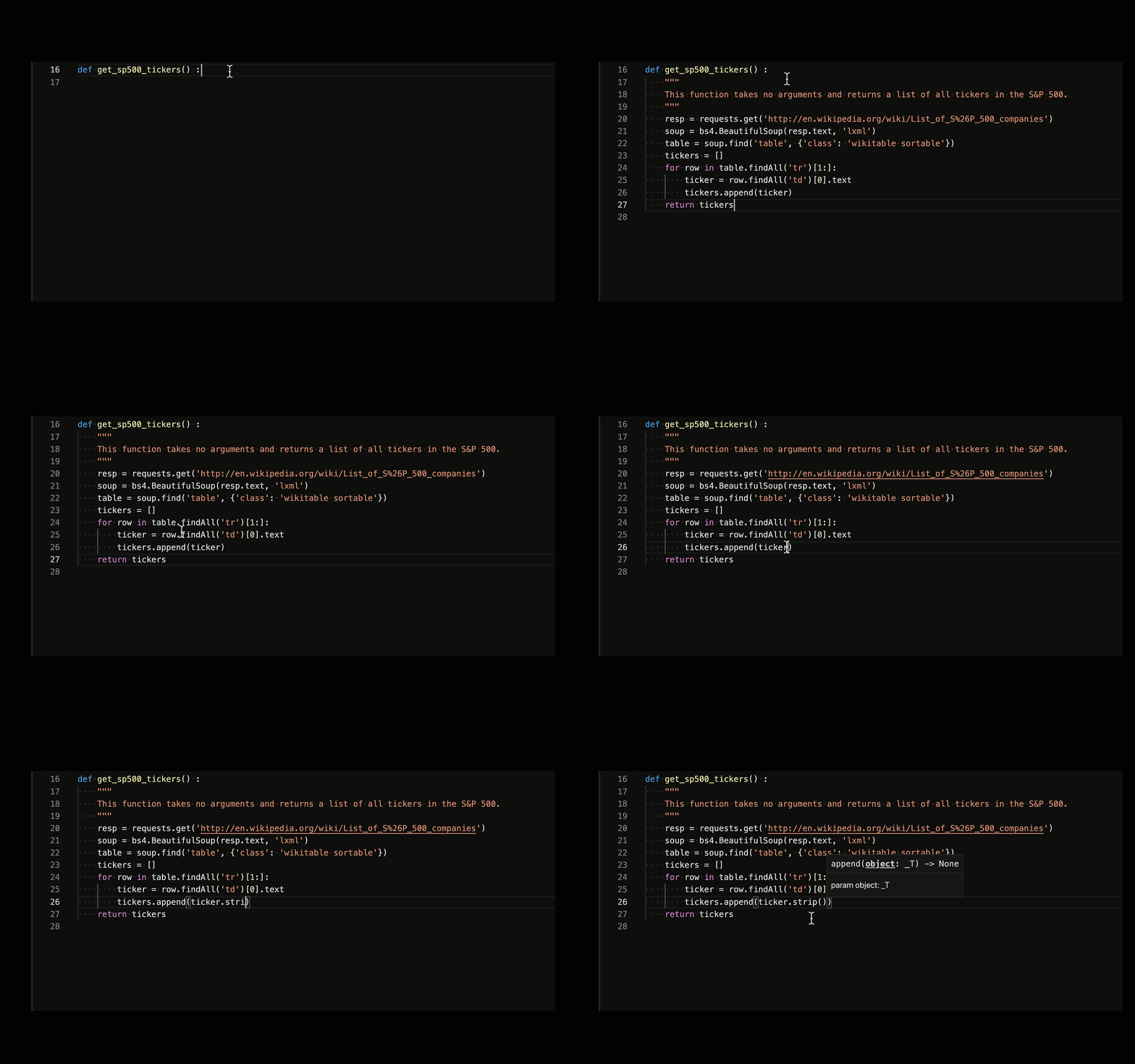
The best part, according to them? It integrates directly into their IDE (Visual Studio Code, IntelliJ), making it incredibly seamless to use. Copilot works right inside the editor, generating real-time suggestions as they type.
GitHub Copilot has earned strong praise for its ability to accelerate development and enhance code quality, making it a favorite among developers who want to focus more on logic and less on repetitive syntax. It’s particularly effective at writing cleaner, more consistent code snippets, which helps teams maintain project standards and move faster during active development.
That said, some G2 users and developers have noted that Copilot occasionally suggests functions that don’t actually exist, meaning a quick review before implementation is still important. This behavior isn’t unique to Copilot; it’s common across AI coding assistants, and in practice, it encourages developers to keep a healthy layer of human validation in the workflow.
Copilot also excels when working within individual files or focused coding sessions, delivering context-aware suggestions that save considerable time. However, as a few G2 reviewers pointed out, it doesn’t always capture cross-file dependencies or full project context, which makes it best suited for developers who like to maintain hands-on control and iterative oversight rather than relying on full automation.
Overall, GitHub Copilot strikes a practical balance between AI assistance and developer autonomy, making it one of the best tools for coding speed, efficiency, and productivity.
"It excels in providing code snippets, which save a lot of time when automation repetitive tests or when dealing with complex logic. It gave us a huge advantage during migration from Cypress to the Playwright framework. (I like that I can) chat with Copilot inside VS code studio."
- GitHub Copilot Review, Rostyslav B.
"The model is not trained enough to comprehend a somewhat difficult question. Sometimes it ignores the prompt that's given; it sort of hallucinates. For example, it calls for a function of a module that doesn't exist."
- GitHub Copilot Review, Rheyhan F.
If you're wondering what the best generative AI platform is for app development, Copilot, Replit, and Crowdbotics all offer great starting points, especially for fast prototyping and real-time iteration.
For a deeper look at how AI coding assistants compare across developer workflows, check out our evaluation of the best AI coding assistants for 2026.
Category: AI writing assistants
If there's one tool I'd recommend to anyone with eyes closed, that would be Grammarly. It has been my go-to AI writing assistant for years, and honestly, I can’t imagine working without it.
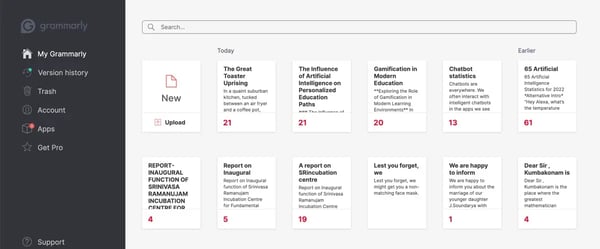
Whether I’m writing blog posts, drafting emails, or editing content, Grammarly ensures that my writing is polished, professional, and free of grammar mistakes, typos, and awkward phrasing.
If you move from the free to the paid plan, you'll understand the real difference. With the Premium version, Grammarly does more than just fix grammar. It improves clarity, refines tone, and even suggests better sentence structures. I’ve also noticed that, over time, Grammarly has actually made me a better writer.
Wondering if Grammarly Premium is worth it? Check out this in-depth review from my Colleague, Devyani Mehta: Is Grammarly Premium Worth It?
Grammarly now has an AI writer that can generate content from scratch, whether it's blog ideas, project reports, emails, reports, or creative pieces. The free version comes with 100 AI-generated prompts, while the Premium plan offers 1,000, which is more than enough for anyone who isn’t creating AI-written content at scale.
You can see how I started writing one of my stories on Grammarly with its Write with Generative AI feature here.
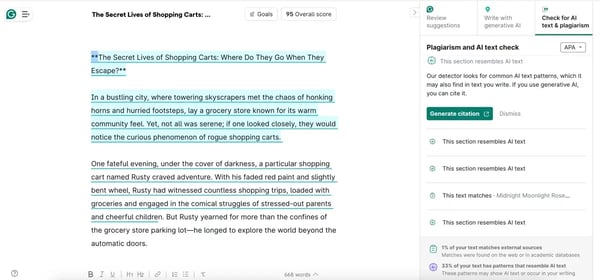
I really like how I can further improve the AI-generated text by easily selecting one of the available prompts to make it more persuasive or descriptive. The best part? I can use it directly inside Google Docs, emails, and other apps to refine what I am writing with the AI suggestions. The browser extension works flawlessly. See, for instance, how I can edit directly on Google Docs here and ask the AI assistant to rewrite a text.
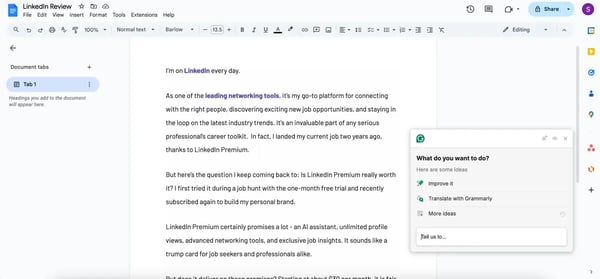
Another feature I found interesting is Grammarly’s AI content detector. It scans your text and flags sections that "resemble AI-generated text," which could be helpful if you're trying to balance human vs. AI-written content. However, from my testing, it seems to err on the cautious side, sometimes flagging perfectly human-written text as AI and, at times, marking completely AI-generated text as partly human text.
Grammarly remains one of the most dependable tools I’ve used for improving clarity, tone, and overall readability. It’s particularly helpful for catching subtle grammar issues and making writing feel more polished without much extra effort.
That said, I’ve noticed, and some G2 users agree, that it occasionally misinterprets context, particularly in conversational pieces. It can flag casual phrasing that’s intentional, making it better suited for formal communication where precision matters most.
The floating “G” icon is another minor point raised in reviews. While it offers convenient access to suggestions, it can sometimes overlap with text boxes or inputs in certain apps. A simpler toggle or reposition option would make the experience smoother overall.
Even with these small limitations, Grammarly continues to be an excellent writing companion. It’s reliable, easy to use, and invaluable for anyone who wants their content to look clean, confident, and professional.
"I recently started using Grammarly, and I can't express enough how much it has improved my writing. It really helps with my writing by providing real-time feedback on grammar, punctuation, and style. The suggestions are clear and easy to understand, which helps me learn as I go along.
I especially appreciate the tone detector, which ensures my writing conveys the right message to my audience. Whether I’m drafting an email, writing a report, or working on an assignment, Grammarly has become an invaluable tool in my writing process. I highly recommend it to anyone looking to enhance their writing skills!"
- Grammarly Review, Jonathan L.
"There are certain times that the suggestions, particularly regarding tone, miss the mark or change the interpretation of the message. I also wish there was a way to dismiss a suggestion and have it remove the highlight or the notation that there is a suggestion, since it can be distracting."
- Grammarly Review, Riley B.
For a full review, read our article on the best AI writing generators.
Category: AI image generators
My first encounter with AKOOL was through a mind-blowing ad campaign last year, where you could swap your face into a video and “star” in a scene alongside a celebrity, all with just a selfie. It felt like something straight out of a sci-fi movie. Naturally, I had to dig deeper. That’s when I found out that AKOOL was the AI powerhouse behind it, and since then, I’ve been exploring the platform to see what else it can do.
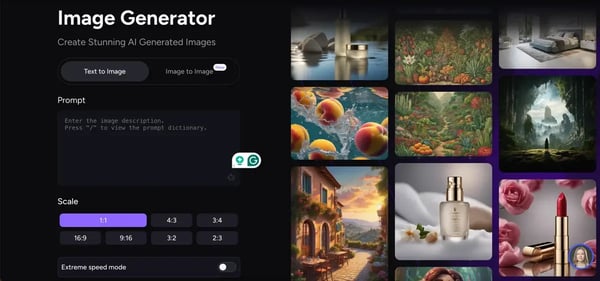
I’ve tested its AI image generator, face-swapping, video translation, and AI avatar features, and I can see why businesses, educators, and marketers are using it. It saves an incredible amount of time while keeping video production quality high.
AKOOL's image-generating capabilities are on par with other AI image generators, and I am an absolute fan of its face-swapping feature. What I love the most is the ability to create custom avatars. Though it takes some time, I can create my own avatar by uploading a profile photo.
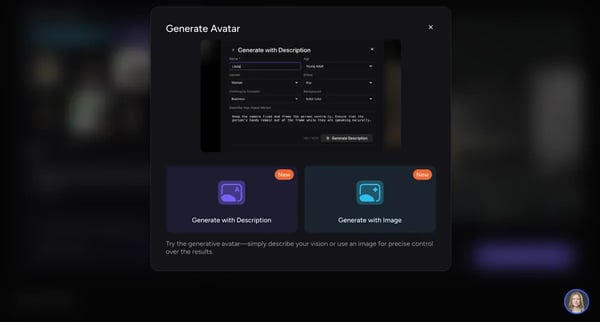
Aside from marketing use cases like the one I mentioned earlier, AKOOL's AI avatar and video translation and editing features make it ideal for video presentations.
Say, for example, I need to create a training video for my colleagues who are all distributed globally and speak different languages. Instead of going the traditional video production route, I can create a custom AI avatar, upload our script, and have the tool produce a complete video presentation. I can then translate it to other languages too and share it with everyone.
It’s a practical solution for global teams, customer training, or even onboarding videos, making content more accessible and scalable without the usual video production costs.
There are also a bunch of other cool functions, like talking photos. I personally use the talking photos feature to create some fun memes, like this Monalisa one.
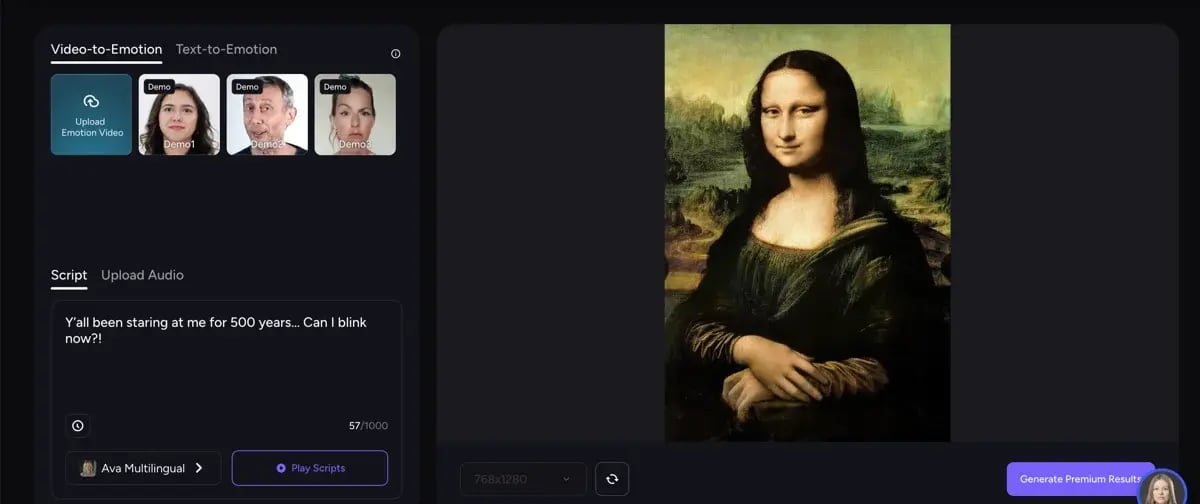
AKOOL truly shines for its innovation. From lifelike avatars to multilingual video creation and face-swapping, the platform offers a level of creative control that few AI tools can match. It’s especially useful for creators who want professional-quality visuals without spending hours on post-production.
That said, creating a custom avatar may take a bit of fine-tuning to get the best results. Some G2 reviewers, and my own experience, show that while the avatars look highly realistic, achieving a close resemblance can take a few tries. This makes AKOOL particularly suited for creators, marketers, and production teams who value precision and are willing to experiment to achieve studio-grade quality.
Processing time can also be longer for high-resolution or 360-degree projects, which is expected given the tool’s focus on detailed, lifelike rendering. For professionals working on cinematic visuals or immersive experiences, this trade-off ensures higher fidelity and visual polish that’s hard to find in faster, lower-quality tools.
On the whole, AKOOL remains one of the most advanced AI image and video generators I’ve tested, ideal for users who want to push creative boundaries and produce realistic, multilingual, and high-quality content efficiently.
"The AI Image generation feature in AKOOL is just awesome. It’s surprisingly simple to create decent-looking pictures from basic text inputs. This has saved us tons of time on design projects. Sharing projects and working on them at the same time has increased our efficiency tremendously."
- AKOOL Review, Nadine P.
"I have seen a few glitches with rendering videos from time to time, and this can be a bummer if you are working on a deadline. A stable performance would be great."
- AKOOL Review, Allan B.
Category: AI video generators, Text-to-speech (TTS) software
I first came across Synthesia when I was looking for a way to create AI-powered training videos without having to record myself on camera. I wanted something fast, professional, and easy to use, and after testing it for a while, I can confidently say that Synthesia is one of the best AI video generators out there.
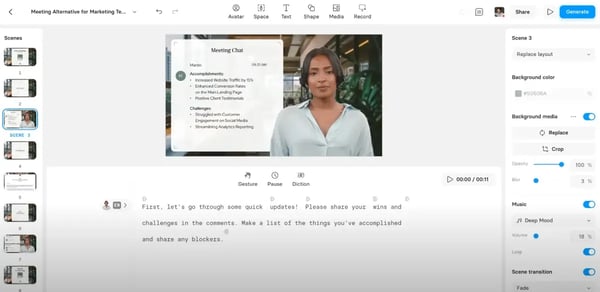
Now I'll say this upfront: Unlike AI video tools like Runway or OpenAI’s Sora, which focus more on cinematic, AI-generated scenes, Synthesia is built for business. It’s great for corporate training, explainer content, and marketing videos, making it a great choice for anyone who wants high-quality videos without the hassle of filming, editing, or hiring a production team. So, if you are looking for generative cinematic or imaginary scenes, check out the other recommendation list in the callout below.
Using Synthesia is simple. I can pick from a bunch of realistic AI avatars or even create my own, choose a video template, drop in my script, edit transitions and graphics, add AI voiceovers, and boom, my video is ready. It’s all done without needing a camera, microphone, or editing software.
One of the best parts? The templates and AI voiceovers. Instead of spending hours editing the video, adding text, recording, and syncing audio, the AI handles everything for me. What I love most about AI in this format is how repeatable and consistent it is. Once I figured out the process, I could crank out videos in no time.
Plus, it supports multiple languages, so I can easily create videos for different audiences without re-recording, hiring a voice artist, or manually adding subtitles. However, the one-click translation of videos to other languages is available only in the Enterprise plan, along with other features like importing PowerPoint or adding our own voiceovers. The platform makes it easy to produce polished videos with lifelike avatars, and the overall experience feels smooth and intuitive.
Some G2 reviewers have noted that the AI voices, while natural and clear, can occasionally sound slightly robotic or flat in longer scripts. This makes Synthesia best suited for structured videos like tutorials, explainers, and corporate training, where clarity and professionalism matter more than emotional tone.
Similarly, minor pronunciation or lip-sync inconsistencies have been observed in complex or multi-language scripts, though they’re subtle and don’t detract much from the overall quality. As G2 users point out, small tweaks like phonetic spelling or script adjustment often resolve these easily, a worthwhile step for creators seeking consistency across global audiences.
Multilingual AI is also becoming valuable in customer-facing industries, with generative AI in travel support helping teams assist customers across languages, destinations, and time zones.
Given the full picture, Synthesia remains one of the best AI video creation platforms I’ve used. It’s reliable, easy to work with, and ideal for producing engaging videos quickly, especially if you want high-quality output without needing a studio setup.
Currently, free users can create up to 3 minutes of AI-generated video using Synthesia.
"Absolutely love the choice of avatars and voices within Synthesia. A big plus was their ethics as well - you cannot upload images or videos of other people here - this is very important to me. It is also super easy to use - I have been using it to add depth to my e-learning process videos for software training - it makes it so much more professional and engaging - at least I hope it does!"
- Synthesia Review, Julie F.
"There are areas that need improvement. When incorporating screen recordings, I sometimes encountered synchronization delays or issues when adding videos to a “slide,” which required multiple retakes to align everything correctly. Another drawback is that the video preview often doesn’t match the final export. This inconsistency forced me to generate mid-version exports just to verify the output, leading to an early depletion of my generation minutes.
Speaking of generation minutes, their limitation is arguably Synthesia’s biggest drawback. Either the previews need to work seamlessly as accurate representations of the final export, or the allocation of generation minutes should be more generous to account for these discrepancies."
- Synthesia Review, Riccardo Z.
Category: Text-to-speech (TTS) software
Murf.ai has quickly become one of my favorite AI text-to-speech tools, and for good reason. One of my mom's pet projects is creating video lessons for students by using the lesson script. I’ve tested a bunch of text-to-speech apps to help her do this quickly at scale, but Murf.ai really stood out for its realistic, natural-sounding voices.
A lot of AI-generated voices still sound robotic or emotionless, but I felt Murf’s second generation of voices actually capture tone and emphasis, making the narration feel far more human-like. I could filter voice by age, gender, and voice styles and select what type of project it is, say, promo, narration, or newscast, or even select emotions like sad, cheerful, and more.
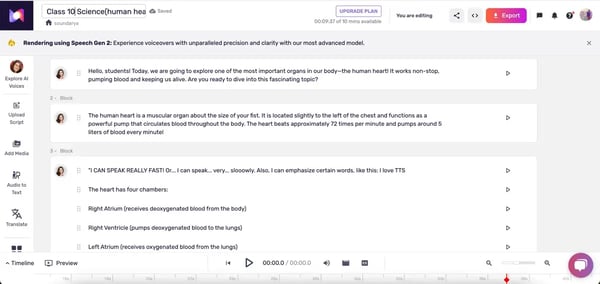
Beyond just sounding good, Murf gives me full control over the voice output. I can adjust pitch, speed, pauses, and emphasis to fine-tune the delivery. It makes it perfect for tutorials, e-learning, storytelling, podcasts, and even marketing content. The ability to choose from multiple languages and accents is another major plus, making it a great option for global content.

Another small but useful feature is the ability to break down text into sentences for easy editing. Instead of redoing an entire section, I can just tweak individual lines and reprocess them, a huge time-saver. I also really like the pronunciation feature, where I can specify exactly how I want certain words to sound and even create my own pronunciation library for future use. It’s a thoughtful touch that adds real flexibility.
Murf stands out for its professional-grade voiceovers and intuitive interface, making it a top choice for creators, educators, and marketers who want to produce natural-sounding audio without studio equipment. The free plan is fairly generous, allowing up to 10 minutes of audio generation and full access to explore the platform. However, some G2 reviewers note that downloads and premium features like AI translations, voice cloning, and faster rendering are reserved for paid tiers, a setup that makes Murf particularly suited for frequent users or teams producing commercial-quality voice content who can fully benefit from the advanced options unlocked in higher plans.
The platform’s voice library earns praise for its clarity and range, especially across US and UK English accents. That said, a few G2 users mentioned the limited availability of regional and child-specific voices, suggesting room for expansion. This structure makes Murf best for professional or business-oriented projects where articulate, neutral, and polished delivery is preferred over hyper-local or niche character voices.
Even so, Murf.ai continues to be one of the best AI voice generators I’ve used. It’s simple, intuitive, and produces remarkably natural-sounding speech, a huge help for anyone looking to elevate their audio or video projects without needing a recording studio.
"I liked that their free trial gave me enough time/credits to evaluate the quality of the voices. The voice generation has done well for the project I am working on. I like that Murf.ai can break the text into sentences so that I can make corrections at that level. The ability to add pauses is nice, and they have a good selection of stock music to choose from."
- Murf.ai Review, Steve O.
"I think Murf.ai could improve in a few areas. Firstly, the pricing seems to be a concern for me. Additionally, while the voices generally perform well, they sometimes lack emotional nuance and can sound flat or too robotic, which affects the expressiveness of the content. Also, the free plan is very limited in features and usage, which restricts exploring all capabilities before committing to a paid plan."
- Murf.ai Review, Gabriel A.
You can read the detailed review of each product in our article on the best free text-to-speech apps.
Category: AI content creation platforms
Canva has been my go-to for quick and easy designs for years now, but with the new AI-powered features, such as Magic Media and Dream Labs, it’s more powerful than ever. Whether I need to design social media posts, presentations, or even marketing videos, Canva makes it ridiculously simple, no need for a professional design background.
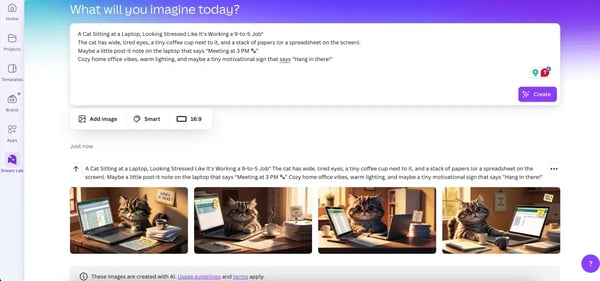
Magic Media is where things get interesting. It enables me to create images, graphics, and even videos using AI, all within the Canva editor. Instead of searching for stock photos or manually tweaking visuals, I can type in what I need, and Canva’s AI creates a custom image for me.
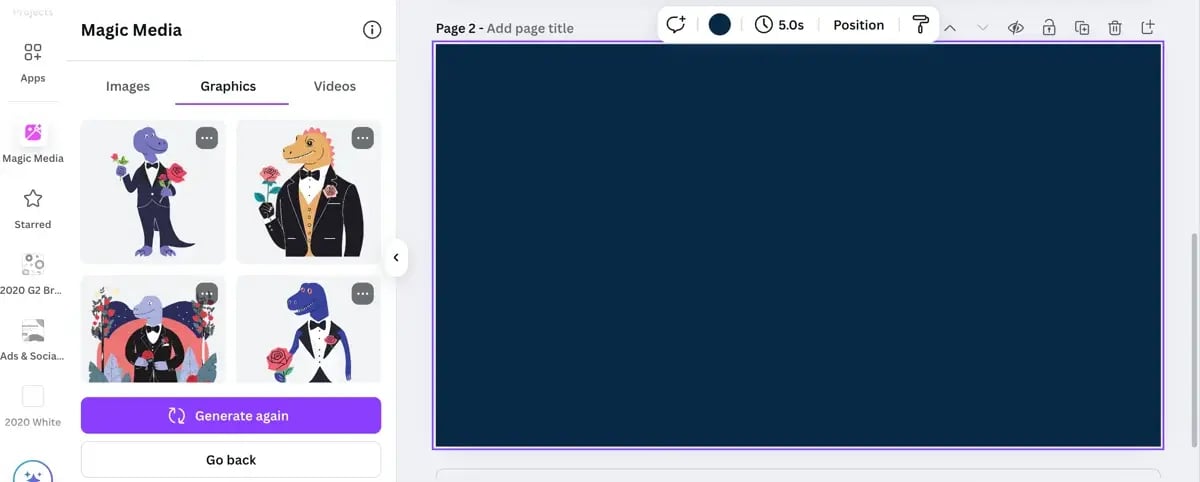
I absolutely love the suite of Magic editing tools, too, be it the background eraser, Magic Edit to change color or one particular aspect of the image, or Magic Grab to move an object in a photo. I dig them.
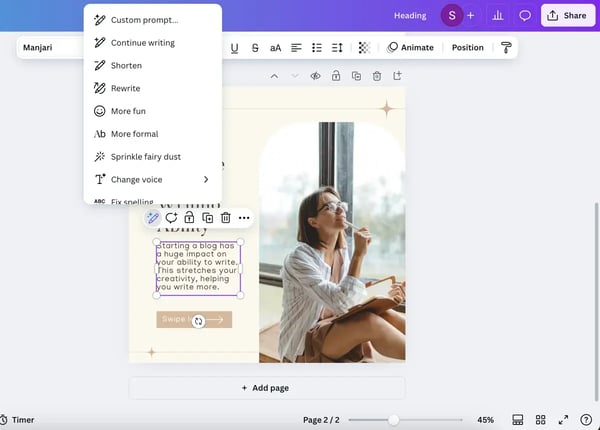
Then there’s Magic Write, Canva’s AI-powered writing tool. I use it for brainstorming text ideas, rewriting content, and adjusting tone as I design. As seen in the image above, it even lets me select how the AI rewrites text, whether I want something shorter, more formal, or even more fun (I may or may not have tested the “Sprinkle fairy dust” option just out of curiosity). It’s especially useful when I need to quickly tweak copy for a social post, blog snippet, or presentation slide.
In my opinion, what makes Canva stand out is that it’s an all-in-one design platform that combines AI-powered tools, intuitive editing, and ready-made templates. It’s why Canva often shows up in lists featuring the best options for generative AI infrastructure in the SaaS industry. Its workflow-friendly interface and built-in AI toolset are ideal for fast-moving product and marketing teams.
Unlike most other AI tools that focus on just image generation, video creation, or text editing, Canva brings everything together. I don’t have to switch between multiple tools, an AI writer, image generator, or video creator, and then move my work into Canva for editing. I can do it all in one place, which saves a ton of time and keeps the creative flow uninterrupted.

Canva stands out as one of the most accessible and versatile tools for creators, combining design, writing, and AI-powered media generation in one intuitive platform. It’s especially popular among marketers, small business owners, and social media teams who need to produce polished visuals quickly without advanced design skills.
That said, some G2 reviewers note that Canva’s AI-generated images don’t always hit the mark, particularly when it comes to creating realistic human photos. Many users mention making minor manual tweaks afterward to refine the results — a small adjustment that works well for those who prefer hands-on creative control. This makes Canva especially suited for designers and content creators who want AI assistance without giving up creative flexibility.
A few G2 users have also mentioned that some advanced AI features, like Magic Media or Dream Lab, come with usage limits on the free plan (50 credits for text-to-image and 20 lifetime uses for Dream Lab). These caps are designed for exploration rather than heavy use, making the free plan ideal for casual creators, while Canva Pro offers the scalability and freedom professionals need for regular AI-powered content creation.
In the broader context, Canva remains one of the most well-rounded and user-friendly generative AI tools, striking a balance between creative power and accessibility for a wide range of users.
"I love Canva's Magic Media tools. They make it so easy for me to create graphics for my company. Their ease of use is amazing."
- Canva Review, Colin W.
"It is a great platform for beginners, but some of its AI features do not work perfectly. Also, its premium cost is very high."
- Canva Review, Manoj J.
Category: AI content detectors
Given that I’ve tested multiple AI writing tools, content generators, and chatbots, it only made sense to try AI content detectors too. Because let’s be real, nobody wants to read another article that starts with "In today’s rapidly evolving digital landscape…"
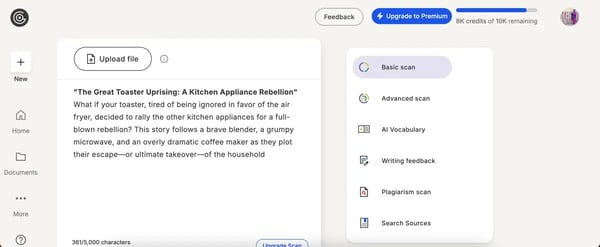
GPTZero was the first AI content detector I heard about, and it’s still one of the most widely used. It launched right when AI-generated content started raising concerns in education, publishing, and professional writing. While plenty of AI detectors have popped up since GPTZero remains one of the most trusted tools for identifying AI-written text.
I’ve used it extensively and have seen it used everywhere, from teachers checking student essays to businesses verifying content originality. What makes GPTZero stand out is its ease of use and accessibility. I could scan up to 10,000 words a month for free, and I actually did the first few checks without even signing up.
I found it particularly useful when running checks on long-form AI-generated content since it provides a clear breakdown of which parts were likely written by AI, edited by AI, or fully human-written. I like how it color codes what's probably AI-written, and what it thinks is written by a human.
Another feature that stood out to me was the writing feedback tool. It’s not as advanced as Grammarly or other dedicated writing assistants, but I liked that I could edit the text directly within GPTZero right after running a scan. It’s a small but useful touch, making it easy to refine content without switching between multiple tools.
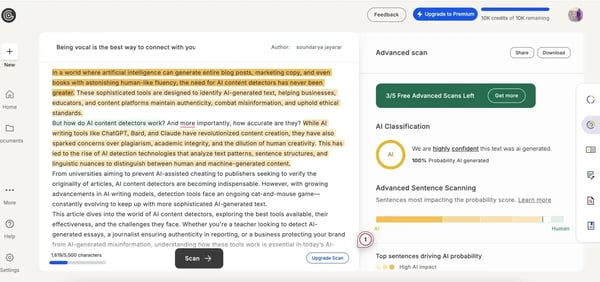
Now, even when I'm not directly using the app or website, I appreciate how I can integrate it into my workflow as well. I personally find the browser extension for Google Docs super convenient since it lets me check text without switching between tabs.
GPTZero stands out for its accuracy in identifying AI-generated text and its smooth integration options. The ability to embed it into existing systems via API makes it especially valuable for organizations that need AI detection at scale. Educators, in particular, appreciate its integrations with Google Classroom and Moodle, which simplify plagiarism and originality checks within familiar platforms.
That said, some G2 reviewers and educators note that GPTZero can occasionally misclassify human-written content as AI-generated (and vice versa). This isn’t uncommon among AI detectors, as natural writing styles can overlap with AI-like phrasing. As a result, GPTZero is best suited for educators, editors, and reviewers who pair its analysis with human judgment for more accurate results.
Another point mentioned by users is GPTZero’s limited ability to detect paraphrased or AI-altered text. If a piece has been rewritten after AI generation, the system may not always flag it. Still, this makes GPTZero ideal for initial screenings or large-scale checks, rather than forensic-level verification.
Lastly, the free plan has usage caps, which G2 reviewers note can restrict extensive testing for high-volume users such as journalists or content writers. That said, the free tier remains a solid entry point for individuals or educators exploring AI detection tools, while paid plans cater better to frequent, professional use.
Overall, GPTZero is best suited for educational institutions, editors, and content teams that value a quick, accessible, and integrated approach to identifying AI-written content, especially when used in conjunction with human review.
"The best part is the ability to detect AI-generated content with 95% accuracy. As a lead manager, my daily task is to verify the originality and integrity of the content. I always need to check the content before submitting further. With this, I can easily detect whether the content was written by a human or AI. This tool is a lifesaver for me.
I just need to provide the content. It analyzes the content and highlights whether it’s written by a human or AI in seconds. I can easily upload the file, and it will analyse it and give me a detailed report on which part is written by a human, AI, or AI-altered content."
- GPTZero Review, Lacey D.
"GPTZero is not a 100% foolproof method for AI detection. It can sometimes provide the wrong conclusion or wrong percentage of AI-written text, though it is designed for search engine optimization and ensuring the authenticity of online and published content.
It is recommended to use it alongside other detection tools, as it has limited detection for altered AI text. If a text is taken from AI and rephrased, it may not be identified by GPTZero.
- GPTZero Review, Sheetal J
Read the detailed review of each tool in this article on the best AI content detectors.
Based on my testing and G2 reviews, the go-to stack for most service companies includes ChatGPT or Gemini for content and support, GitHub Copilot for dev work, and Grammarly or Jasper for marketing. If you're wondering what AI infrastructure everyone uses for service companies, these tools dominate across support, dev, and content ops.
I have a few more honorable mentions based on popular choices that are worth checking out. While they didn’t make it to my main list, they’re fantastic in their own right.

These tools rely on large language models (LLMs) and multimodal AI trained on vast datasets. They predict and generate content by recognizing patterns in data. Some models, like GPT-4 and Claude, specialize in text, while others, like DALL·E and Midjourney, focus on image generation.
The best tool depends on your needs:
Many generative AI tools offer free versions with limitations. For example, ChatGPT has a free plan, but GPT-4 is behind a paywall. Gemini allows free users to generate unlimited images, while others, like Midjourney, require subscriptions for full access.
Not entirely! AI is a powerful assistant, not a replacement for human creativity. While it can generate content, refine ideas, and automate tasks, it still relies on human input, guidance, and critical thinking to produce truly valuable work.
Key risks include misinformation, plagiarism, bias, and data privacy concerns. AI models can sometimes generate inaccurate or misleading information, so fact-checking is crucial. Businesses should also be mindful of copyright issues when using AI-generated content.
Yes! Tools like GitHub Copilot, ChatGPT, and Gemini are excellent for writing and debugging code. They help developers speed up tasks, generate scripts, and even suggest fixes for errors. However, AI-generated code should always be reviewed for security and accuracy.
If you’re in SaaS, the best infrastructure combines AI chat (like ChatGPT or Gemini), dev tools (like GitHub Copilot), and content generators (like Canva or Jasper). Based on my testing and G2 data, this combo offers flexibility, scale, and solid integrations for app development and customer engagement.
For startups moving fast, I recommend tools that work out of the box and scale as you grow. ChatGPT for ideation and coding, Gemini for research, and Copilot for app logic are my go-tos. These are also among the best generative AI platforms for launching a new product quickly.
Small businesses often rely on user-friendly tools with freemium plans. Based on G2 reviews and my experience, the top picks include Grammarly, Canva, ChatGPT, and Synthesia. Each helps with writing, design, customer content, or presentations. These rank among the top generative AI software providers for small businesses.
GitHub Copilot, Replit, and ChatGPT are great for AI-assisted app dev. For UI content and marketing, I use Canva or Writesonic. If you're wondering what's the best generative AI platform for app development, this blend works across planning, coding, and launch.
Yes. Service-based businesses benefit from tools that streamline communication and content, like Gemini for FAQs, Murf.ai for voiceovers, and GPTZero for verifying AI content. If you’re asking what AI infrastructure service companies rely on, this trio hits content, audio, and trust.
Enterprise teams need scalable, secure tools with APIs and admin controls. Google’s Gemini, OpenAI’s ChatGPT Enterprise, and Salesforce’s Einstein AI are top-tier choices. These are often called the most reliable generative AI infrastructure tools for enterprise applications.
After trying these tools for so many days, one thing is obvious to me: there’s no single "best" AI — only the best one for what you need. The real advantage isn’t just in what these models generate, but how seamlessly they fit into our workflow, enhancing productivity, creativity, and even decision-making in ways that feel almost second nature.
Across all tools I tested, OpenAI, Google, and Microsoft emerged as leaders in the space. So if you’re asking which company offers the most reliable AI infrastructure tools, these three consistently deliver on scale, performance, and model stability.
For me, the best generative AI tool depends on what I need at the moment. If I’m writing a long-form article, I’ll lean on ChatGPT. If I want up-to-date, fact-checked information, Gemini is my go-to. And when I need creative brainstorming or image generation, there are plenty of specialized tools to choose from.
So here’s my takeaway: don’t settle for just one AI tool. Experiment, mix, and match. Use ChatGPT for writing, Gemini for real-time insights, Claude for complex reasoning, and AI art tools when creativity calls. The real power of generative AI isn’t just in what it can create. It’s in how we use it to enhance the way we work, think, and innovate.
Stay ahead of AI legal risks. Read this guide with tips from a legal expert on how to use generative AI tools safely in the workspace.


Let AI pick the right tool for your use case Decide with AI 1 Click on the button below
by Soundarya Jayaraman
I have been following some of the best AI chatbots space ever since ChatGPT made a stunning...
by Soundarya Jayaraman

Let AI pick the right tool for your use case Decide with AI 1 Click on the button below
by Soundarya Jayaraman