


Sales performance rarely falls apart all at once. I've seen it slip through the cracks when CRM data is fragmented, dashboards don't align, and coaching happens too late to change the outcome of a quarter. So I went looking for the best sales performance management software that could fix this, evaluating more than 20 platforms, including Salesforce Sales Cloud, HubSpot Sales Hub, Pipedrive, Performio, CaptivateIQ, monday CRM, Apollo.io, Salesloft, and Mindtickle.
When I look at sales performance management (SPM) software, I’m not just looking for another CRM layer. I’m evaluating how well a platform helps teams set and track quotas, improve forecast accuracy, connect rep activity to revenue outcomes, and bring incentive management into one clear system.
I analyzed verified G2 reviews and Grid rankings to determine which tools consistently deliver visibility, accountability, and measurable performance impact. Here are the best sales performance management software options for 2026 based on real user feedback and market presence.
*These best sales performance management tools are top-rated in their category, according to G2 Winter 2026 Grid Reports. I’ve added their standout features and monthly pricing to make comparisons easier.
Sales performance management (SPM) software is what I look at when revenue teams need more than just a CRM. These platforms help sales leaders set and track quotas, monitor pipeline health, forecast revenue more accurately, coach reps with real data, and connect incentives directly to outcomes.
The demand for that visibility is growing fast. The global sales performance management market is projected to reach $.53 billion by 2030, expanding at a CAGR of 16.3% from 2024 to 2030. That kind of growth tells me something important: sales teams are no longer comfortable relying solely on intuition. They want real-time insights, cleaner forecasting, and clearer links between activity and revenue.
When I looked across G2 Data and user feedback, the strongest SPM platforms consistently showed impact in a few key areas: better quota tracking, more accurate forecasting, stronger coaching visibility, and easier commission transparency. The tools below stand out because they don’t just collect data; they help revenue teams act on it.
To make sure this list goes beyond surface-level recommendations, I started with G2’s Grid Reports for sales performance management. These rankings are based on real user reviews and market presence, which helped me shortlist both established platforms and rising challengers.
Then, I used AI to analyze hundreds of verified G2 reviews from sales managers, RevOps professionals, and enablement teams. I looked for recurring themes around forecasting accuracy, reporting depth, and CRM integration pain points.
To add perspective, I reviewed insights from sales experts and cross-checked them with user feedback to ensure they matched real-world expectations.
Screenshots in this article come from vendor G2 profiles and publicly available materials.
When I evaluated the best sales performance management software for this list, I focused on what actually moves revenue, not just feature checklists.
To be included in the Sales Performance Management Software category, a product must:
*This data was pulled from G2 in 2026. Some reviews may have been edited for clarity.
Salesforce Sales Cloud is a powerful CRM and performance platform built for scale. It’s designed to give sales teams full visibility into their pipeline, activities, and goals, all from one place.
According to the G2 Grid Report Data, it's commonly used by companies in Information Technology and Services, Computer Software, and Financial Services. The platform is especially popular among mid-market businesses (48%) and enterprises (35%), making it a go-to solution for larger, growth-focused teams.
One of the most consistent positives in G2 reviews is the reporting and dashboard functionality. Users frequently highlight how easy it is to track performance, visualize metrics, and build detailed reports without needing a separate analytics tool. These dashboards allow sales managers to monitor lead conversion rates, team quotas, and pipeline movement in real time. The data isn’t just visual; it’s actionable, giving teams clarity on what’s working and what needs attention. This level of insight supports more confident forecasting and faster course corrections.
Another standout feature I observed in reviews is the platform’s ability to centralize sales activity. G2 reviewers often mention how valuable it is to manage leads, contacts, pipelines, and tasks all within a single ecosystem. Emails, meetings, and notes are automatically tracked, reducing the need for manual entry and making handoffs between reps more seamless. This all-in-one structure is especially helpful for managers trying to oversee multiple territories or remote teams.
Automation also gets positive attention from the users. Many note that Salesforce helps reduce repetitive admin work by automating follow-ups, task assignments, and data updates. These workflows can be tailored to match a team’s process, which makes it easier to maintain consistency without adding complexity. For growing teams with evolving sales structures, this kind of automation can be a major time-saver.
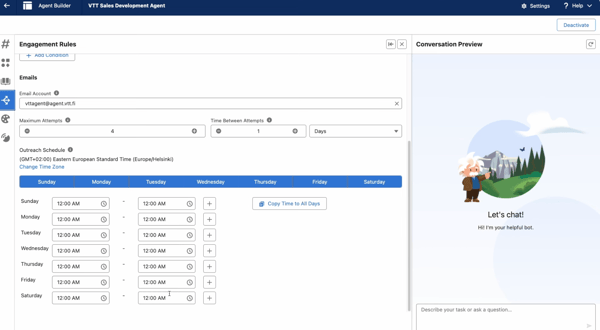
Salesforce Sales Cloud stands out for its depth, flexibility, and ability to support highly customized sales workflows. That said, several G2 reviewers note that the platform has a noticeable learning curve. New users can find the interface complex at first, especially when navigating modules or tailoring them to specific processes. For organizations willing to invest in onboarding and training, though, the payoff is a system that adapts closely to their sales operations.
G2 feedback also highlights ongoing maintenance as something to plan for. Custom dashboards, automation flows, and data structures often require regular updates, and larger teams typically rely on a dedicated Salesforce admin to keep everything running smoothly. Smaller teams without in-house expertise may find that even minor changes require extra effort, making it best suited for businesses prepared to manage and continuously optimize it.
For organizations evaluating leading sales management apps for enterprises, Salesforce Sales Cloud consistently appears in the conversation because of its scalability, customization depth, and ability to support complex, multi-territory sales operations.
“What I like most about Salesforce Sales Cloud is how it centralizes the entire sales process in one place. It offers clear visibility into leads and opportunities, strong automation that cuts down on manual work, and customizable reports and dashboards that help sales teams make faster, data-driven decisions while improving overall productivity.”
- Salesforce Sales Cloud review, Suhaiv S.
“While Salesforce Sales Cloud is extremely powerful, the platform can feel complex, especially for new users. Without proper training and governance, data entry can become inconsistent, which impacts reporting accuracy. Customization, while a strength, can also become overwhelming. Over-customization sometimes leads to cluttered layouts and fields that are not actively used, affecting usability. Additionally, reporting can require advanced configuration to get exactly what you need, and performance can occasionally slow down when handling large volumes of data. Overall, these challenges are manageable with strong internal processes, but improvements in user simplicity and streamlined reporting would enhance the experience further.”
- Salesforce Sales Cloud review, Raam K.
Related: Read G2’s interview with Stephanie Middaugh on how AI is transforming sales performance and why adapting fast matters more than ever.
HubSpot Sales Hub is a popular platform for teams that want a unified approach to CRM, sales engagement, and analytics. Built with a clean, intuitive interface, it’s often favored by users who need powerful features without the complexity. G2 Data shows 60% of its users are small businesses, particularly in industries like computer software, IT services, and marketing and advertising.
Ease of use is one of the most common positives in G2 reviews. I saw users frequently describing the platform as user-friendly, clean, and simple to navigate (even for non-technical users). It’s easy to track leads, manage contacts, and stay on top of tasks without spending hours learning the system.
Features are clearly labeled, and workflows feel intuitive, which helps new users ramp up quickly. Several reviewers noted that even team members unfamiliar with sales platforms were able to onboard with minimal guidance. That’s a big win for teams trying to move fast.
Integrations also stand out. According to G2 user feedback, HubSpot connects smoothly with tools like Gmail, Outlook, Slack, and various calendar apps. These native integrations allow reps to manage emails, schedule meetings, and log activities without constantly switching tabs. I understand why users value automatic syncing, which lowers the need for manual updates and makes sales communication smoother.
Another strong point is the platform’s automation. Reviewers say that features like task queues, follow-up reminders, and workflow automation save their team hours each week. These tools help reps stay on track while managers get more visibility into deal progression. Automating repetitive actions also reduces friction across the sales cycle, which can lead to faster closes and more consistent processes. I think it’s a solid choice for teams focused on efficiency.
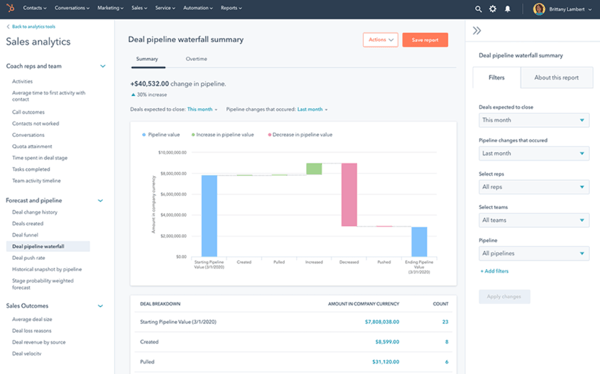
HubSpot Sales Hub is widely appreciated for its ease of use and approachable setup, especially for growing sales teams. That said, several G2 reviewers mention that while the entry-level pricing feels accessible, costs can rise as teams add advanced features or more users. That said, small businesses are scaling steadily, and the value often justifies the spend, but budget-conscious teams may want to map out future upgrades early on.
While users are able to update sequences, add contacts, and move deals forward from their phones, some mentioned that the mobile app doesn’t always deliver the same experience as the desktop version. Lag, layout quirks, and missing features were a few patterns I read about. Even so, most reviewers seemed to value the flexibility of having mobile access when away from their desks.
If you’re looking for a platform that’s approachable, flexible, and well-integrated with your existing tools, HubSpot Sales Hub is definitely worth considering. It’s also frequently considered among highly recommended sales management software services.
“What I like most about HubSpot Sales Hub is that it keeps everything organized in one place. From tracking emails to managing deals and follow-ups, it cuts down on the need to juggle multiple tools. The pipeline view is especially useful because it gives me clear visibility into where each deal stands. It’s also improved accountability across the team and made forecasting a lot easier.”
- HubSpot Sales Hub review, Tushar A.
“There have been some glitches along the way with spam filters and client profiles being overwritten due to some updates that have affected the way we use HubSpot, but our onboarding partner Blue Frog has always been there to help, provide assistance, and communicate our needs with HubSpot.”
- HubSpot Sales Hub review, Bryan M.
For additional context on how a CRM contributes to performance outcomes, explore HubSpot performance trends based on G2 reviews.
Pipedrive helps teams stay organized and focused on closing deals. It’s best known for its visual pipelines, intuitive layout, and emphasis on activity-based selling. The platform aims to simplify day-to-day sales management through customizable stages, automation options, and clear performance insights. According to G2 Data, Pipedrive is most popular among small businesses, making up 75% of its user base, with strong adoption in IT services, marketing, and software industries.
Pipedrive’s biggest strength, according to G2 reviews, is its pipeline visibility. Users consistently mention how easy it is to track deals across custom stages and quickly identify bottlenecks. The drag-and-drop layout offers a visual way to move deals forward, while filters and labels make it easy to prioritize high-value opportunities. This layout makes it clear which reps are stuck, which leads are stalling, and what’s moving through the funnel. Teams can also build multiple pipelines for different products or segments without clutter.
The tool also stands out for its dashboard and reporting experience. Sales managers can access customizable dashboards that show metrics like the number of new deals created, the amount of pipeline value added, and conversion rates by stage. These dashboards pull from real-time activity data, so users don’t have to waste time building manual reports. I saw quite a few reviewers highlight how these visual insights help them catch problems early and keep teams on target.
Ease of use is a constant theme in user feedback. Many G2 reviewers describe getting up and running with little to no formal training. The interface is clean and minimal, and the navigation feels intuitive, even for first-time CRM users. Tasks like creating a deal, assigning an activity, or logging communication are just a few clicks away. This simplicity helps drive adoption across teams and ensures the system doesn’t become a burden.
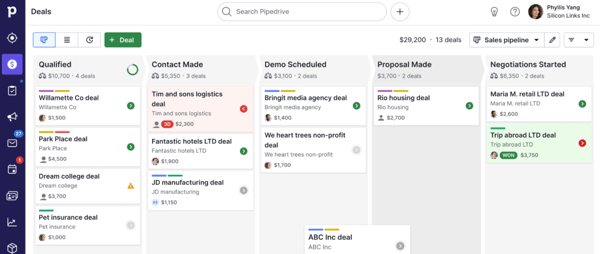
Pipedrive is praised for its clean interface and flexible pipeline management, but some G2 reviewers mention that getting fully comfortable with all its features can take time. Teams new to CRM customization may experience a short adjustment period, making it best suited for groups willing to invest a little time upfront to tailor workflows properly.
Users also note that while Pipedrive offers many integrations, syncing or customization can occasionally require extra configuration. For teams with simple tech stacks, integrations work smoothly out of the box, but organizations running more complex systems may need additional setup to ensure everything connects seamlessly.
While there’s depth to explore, Pipedrive’s visual approach helps teams stay focused, organized, and on top of every moving part in the sales pipeline. For early-stage companies comparing the best sales performance management apps for startups, Pipedrive often stands out for its simplicity, visual clarity, and quick onboarding.
“I handle daily client follow-ups and online consultation queries, so I needed one place to keep track of calls and reminders. I work as a Dietitian & Nutritionist, manage a homeopathy clinic, and also create health education content. I mainly use Pipedrive to note down client names, phone numbers, and to set follow-up calls for diet and consultation work. Earlier, I used to forget some follow-ups when work got busy. Now I just open Pipedrive and see who I need to call today. It was easy to start using it. I added a few people and made call reminders on the same day without reading any long guide. I use it regularly during the week when clients message me for diet follow-ups or when someone asks for an online consultation. It helps me keep my small daily work organised without making things complicated. The features I use are simple but useful for me, like activities for calls, contact details in one place, and a basic pipeline to track one or two consultation cases. I also connected my email and calendar so I can see reminders on time. It fits well with how I already work in the clinic and while handling health education queries, and it saves me from writing things on paper or in random notes.”
- Pipedrive Review, Ishan S.
“I have noticed that this February, we are experiencing a lot of slowness and some random errors that refresh the page and cause it to disappear. The way to better visualize the data could improve, as it is necessary to understand almost 60% of the platform to export decent content. The data export part is complex."
- Pipedrive review, Gabriele F.
Performio is designed to simplify and centralize sales commission tracking for growing teams. It’s built to give reps visibility into how they’re performing and how much they’re earning, all in one streamlined interface. It’s also frequently evaluated as the best app for sales performance tracking when commission accuracy and real-time earnings visibility are primary priorities.
According to the G2 Grid Report Data, it is used by 51% of mid-market companies and 32% of enterprises, supporting sales teams in industries such as telecommunications, IT services, and computer software.
One of the most frequently highlighted strengths in G2 reviews is how clearly the platform displays commission data. Users often describe the dashboards as easy to read and helpful for understanding payout breakdowns, reviewing historical performance, and spotting discrepancies. I noticed several reviewers valued the transparency it brings to comp plans, giving reps more confidence in their numbers and helping finance avoid disputes.
That positive sentiment extends beyond the product itself, with G2 Data showing a 94% satisfaction score for ease of doing business with, reinforcing how smooth customers find the overall experience.
It’s not just about visibility, though. G2 reviewers also pointed out that Performio makes it easy to connect earnings with performance metrics. From reviewing past commissions to tracking KPIs and seeing how team sales stack up on leaderboards, the platform helps reps understand where they stand and what’s driving their results. This level of insight is especially useful during quarter-end reviews or incentive planning.
Ease of navigation is another recurring theme. Users described Performio as intuitive and cleanly laid out. It’s built with clarity in mind, so teams don’t have to dig to find what they need. For RevOps and finance, this reduces back-and-forth with reps. For reps, it means more time focused on selling, less time chasing answers.
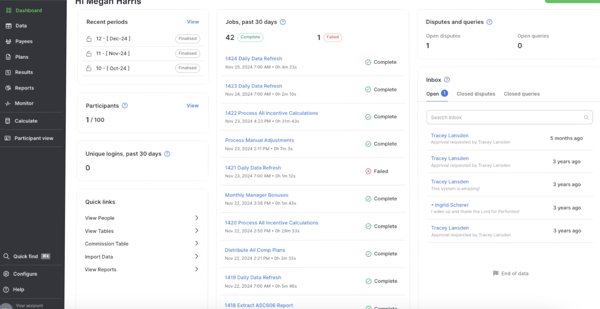
That said, some users point out that the platform can lag or take time to reflect updates. G2 reviews state that performance data may not update in real time, leading to uncertainty about whether numbers are accurate. For fast-moving teams, this can create some temporary confusion.
The mobile app is another area where expectations vary. While it’s helpful for checking basic payout info on the go, users noted that logging in can be inconsistent, and navigation feels more like a scaled-down version of the desktop site. A few reviewers mentioned they’d prefer a purpose-built mobile interface, even with limited features, to better support reps who need quick, reliable access in the field.
Still, for teams looking to manage performance and payouts in a single, transparent system, Performio makes the process more efficient, auditable, and rep-friendly.
“Performio streamlines commission tracking, making the process both simple and transparent. I rely on it regularly to check payout accuracy, forecast my commissions, and analyze deal-level metrics. The dashboard offers all the essential features I require without being overwhelming, and its integration with our CRM ensures data remains consistent. After getting used to the interface, I found it very intuitive to navigate, which has saved me a significant amount of time compared to handling reports manually. Additionally, the support team has been responsive whenever I’ve reached out with questions or needed further clarification.”
- Performio review, Preston M.
"Performio is powerful, but the initial setup can be complex and time-consuming for teams with intricate compensation plans.”
- Performio review, Archie s.
If automating incentive compensation is on your radar, explore my colleague's in-depth review of the best sales compensation software in 2026, evaluated against real G2 data to help you find the right fit for your revenue team.
CaptivateIQ stands out to me for one reason above all else: it makes commission visibility feel instant, trustworthy, and actually motivating for reps.
When I dug into G2 reviews, the most consistent theme was how clearly reps can see their earnings. Users repeatedly talk about being able to track commissions, payouts, and attainment breakdowns in one place without waiting for finance to send a spreadsheet.
That level of visibility builds confidence, and G2 Data backs that up. CaptivateIQ shows a 96% meets requirements and a 94% likelihood to recommend, which aligns closely with the strong reviewer sentiment around earnings transparency and payout accuracy. Reps aren’t guessing what they’ll get paid; they can see exactly how deals map to compensation.
Accuracy is another major strength. Reviewers frequently emphasize trust in the payout calculations and logic behind comp plans. Instead of debating numbers at the end of the month, users describe feeling confident that the system reflects their agreements correctly. That transparency reduces disputes and back-and-forth with RevOps or finance, which is critical in organizations where comp structures are complex or multi-layered.
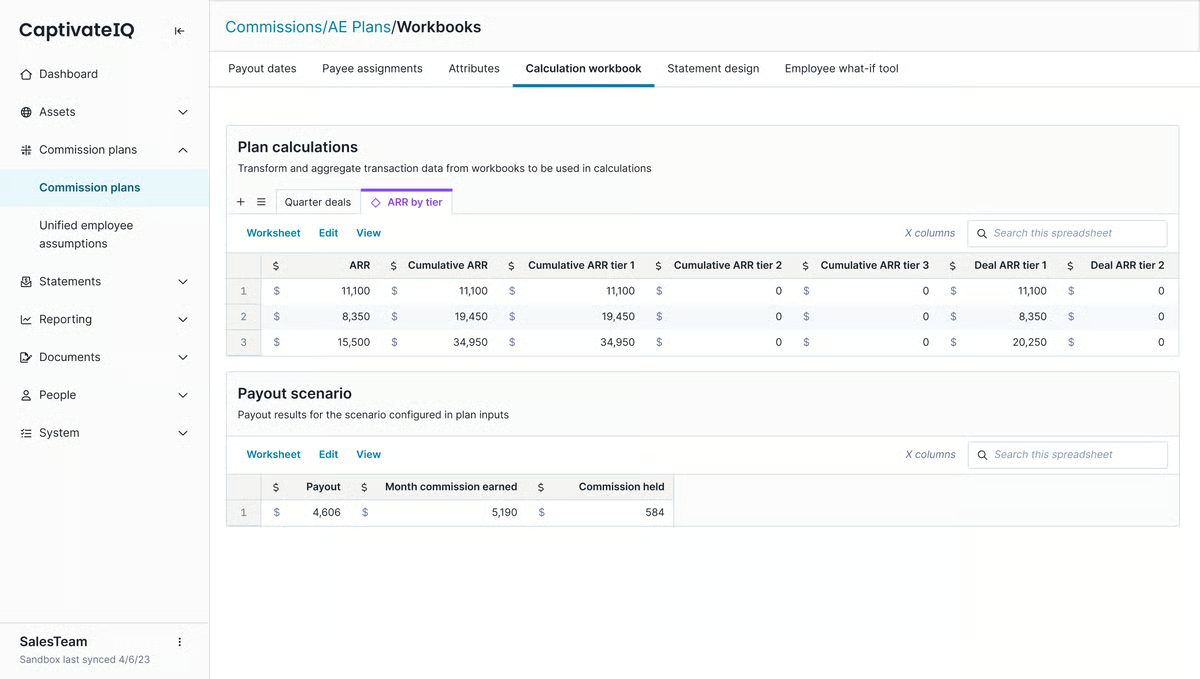
Customization also comes up repeatedly in G2 feedback. CaptivateIQ’s reporting and dashboards allow teams to tailor views by role, team, or performance metric. According to G2 Data, the platform scores 90% for custom reports and 92% for dashboards, reinforcing how much users value flexible, configurable performance views. Whether it’s tracking quota progress, payout pacing, or goal attainment, that adaptability helps both reps and leadership stay aligned without relying on static reports.
Real-time or near real-time tracking is another theme that shows up consistently. Users appreciate not having to wait for manual updates, especially during high-pressure sales cycles. Being able to log in and see updated numbers helps reps adjust their focus mid-month instead of reacting after the fact. That immediacy contributes to stronger adoption, reflected in an 82% user adoption rate and an estimated 12-month payback period.
Integrations, particularly with Salesforce, are also frequently mentioned. Reviewers call out how smoothly CaptivateIQ syncs commission and performance data with CRM systems. With 91% satisfaction around integration, it’s clear that the connection between sales activity and compensation logic is a major value driver. For teams already living in Salesforce, that tight integration reduces manual reconciliation and keeps data aligned.
Ease of use comes up over and over again in G2 reviews. Even with advanced commission structures, users describe the interface as intuitive and easy to navigate once configured. According to G2 Data, CaptivateIQ scores 95% for ease of use, reinforcing the consistent praise around usability. For both reps checking earnings and admins managing plans, that clarity makes day-to-day adoption much smoother.
For teams asking what's the best software for improving sales team performance, tools like CaptivateIQ demonstrate how compensation transparency and real-time payout visibility directly influence motivation and accountability.
CaptivateIQ really shines when it comes to handling complex, highly customized compensation plans. G2 reviewers consistently highlight how flexible the logic and rule-building can be, especially for layered commission structures. The trade-off is that the initial setup can feel more involved, particularly when configuring detailed incentive models from scratch. For organizations with RevOps or finance teams managing intricate plans, that depth is a strength, but teams with very simple compensation structures may find the configuration more robust than they actually need.
The reporting and dashboard capabilities are also widely appreciated for giving reps clear visibility into quotas and payouts. That said, some G2 reviewers mention that highly specialized or edge-case reporting scenarios can require extra adjustments to get exactly right. For most revenue teams focused on transparent tracking and alignment, the tools are more than sufficient, but analytics-heavy teams may want to plan for a bit of fine-tuning.
From the patterns across G2 reviews, CaptivateIQ feels purpose-built for organizations that care deeply about commission transparency, data accuracy, and scalable compensation management.
“I like CaptivateIQ for being up to date and accurate, especially when I need information quickly. I can rely on it for the most recent data, which helps me make real-time decisions about where to focus based on the provided information. Its usability extends to both mobile and laptop versions, where the mobile app is easy to consume information without getting lost, while the desktop version is efficient. Starting with CaptivateIQ was also very straightforward, with easy email verification and the ability to log in from any device.”
- CaptivateIQ review, Michael B.
“Overall, the platform is excellent, but at first, it can take some time to get familiar with all the features. However, once you understand how it works, the system is very easy to use, and accessing information is quick and seamless.”
- CaptivateIQ review, Ross J.
Related: Looking for data to back your enablement strategy? G2’s guide breaks down the latest sales enablement stats, from content usage to tech adoption across teams.
monday CRM is a flexible sales platform designed to give teams more control over their workflows. Built on monday.com’s popular work OS, it’s ideal for teams that want to tailor their CRM without diving into a complex technical setup. It’s quite popular with small businesses, making up 79% of its user base according to G2 Grid Report Data. The platform is also widely adopted in marketing, IT services, and construction.
One of the biggest advantages I came across in G2 reviews is how easy the platform is to use. Users state that the layout is intuitive, the learning curve is minimal, and onboarding new team members is quick. There were several mentions of how fast teams were able to build boards, assign deals, and monitor performance without formal training. It’s especially helpful for sales managers who want visibility into pipelines without sorting through multiple tools.
That ease of adoption shows up in the numbers as well, with G2 Data indicating a 73% user adoption rate, reinforcing how accessible the platform feels across teams. It’s especially helpful for sales managers who want visibility into pipelines without sorting through multiple tools.
Another strong point is how monday CRM centralizes sales activity. G2 reviewers describe using it to track leads, assign tasks, and manage contact records in one collaborative space. This kind of transparency helps teams stay aligned, especially when deals move quickly or multiple reps are involved. It also supports team-wide accountability by making sales activity more visible at every stage.
Users also frequently note how task triggers and automated follow-ups reduce manual effort and help reps stay focused. While the setup can take some experimenting, once configured, the automation streamlines repetitive workflows like lead assignments or deal updates. For teams juggling multiple stages and clients, this kind of automation can save hours each week.
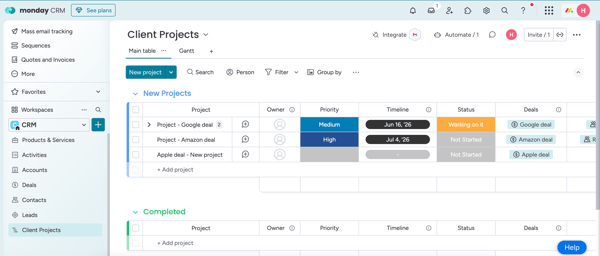
monday CRM earns praise for its clean layout and flexibility, making it easy for teams to build workflows their own way. That said, several G2 reviewers mention that while basic boards are quick to set up, more advanced dashboards and automation flows can take time to fully master. Teams willing to experiment and invest in setup tend to get the most value, while those looking for instant, plug-and-play complexity may need a bit of patience upfront.
Reviewers also appreciate the platform’s helpful documentation and accessible support, but feedback is mixed when it comes to responsiveness. A few users note occasional UI glitches or slower support replies on certain plans. For teams running highly time-sensitive workflows, that can be noticeable, whereas teams with more flexible timelines generally find the experience manageable once everything is configured.
Still, for teams that value flexibility, visibility, and a no-code approach to sales management, monday CRM offers a solid, approachable solution.
“The biggest strength of monday CRM is its flexibility and ease of customization. It allows us to build workflows that match how our marketing agency actually operates, rather than forcing us into a rigid sales structure. We can manage leads for both musicians and business clients, automate follow-ups, track deal stages, and keep everything centralized in one place. The visual layout, automations, and integrations help our team stay organized and reduce manual work as we scale.”
- monday CRM review, Christian K.
“While Monday CRM is flexible and visually intuitive, it can sometimes feel complex due to the number of options and settings. Customizing boards and automations can take time, especially for complex workflows.”
- monday CRM review, Filippo T.
Apollo.io helps B2B teams with smart sales prospecting, fast outreach, and real-time enrichment. It combines a massive contact database with built-in email and automation tools to help reps work faster and more effectively. According to G2 Data, 97% of users believe the product is going in the right direction, reflecting strong confidence in its ongoing development and feature improvements.
One of Apollo’s most performance-critical features is its lead database. I read in G2 reviews that users consistently praised the volume and accuracy of verified emails, phone numbers, and LinkedIn profiles. For sales teams measured on activity targets and pipeline volume, having instant access to enriched contact data helps reps hit daily outreach goals, create more opportunities, and keep cadences running without delay. Instead of losing time searching for leads, reps can focus on the actions that directly impact their performance metrics.
Ease of use also came through strongly in reviews. G2 users described Apollo as intuitive and quick to learn, even for teams without a lot of prior tech exposure. From contact searches to campaign setup, the interface supports fast execution with minimal friction. This ease of navigation helps reps stay focused while also reducing ramp-up time for new hires trying to get into a rhythm.
Outreach automation is another area where Apollo helps boost rep performance. I gathered from the reviews that it is simple to build multi-step email sequences, monitor engagement, and adjust messaging in real time. Because everything lives inside the platform, from email tracking to click data and contact enrichment, reps don’t have to juggle disconnected tools. It’s a workflow that supports responsiveness and smarter iteration over time.
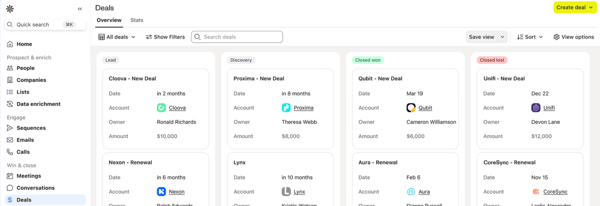
G2 users frequently highlight how fast and efficient Apollo.io feels for prospecting, especially with its built-in database and outreach automation working in one place. Because of the sheer scale of that data, though, some reviewers mention that contact accuracy can occasionally vary, with outdated details or bounced emails particularly around phone numbers. Teams running aggressive, high-volume outreach may want to layer in light verification, while smaller teams doing more targeted prospecting often find it manageable within their workflow.
And while the interface is generally described as intuitive and quick to navigate, a few users note slower load times when handling very large lead lists or moving between modules. Reps managing heavy daily activity may feel that friction more, whereas teams with moderate prospecting volumes typically experience smoother performance.
For teams looking to streamline lead gen and drive smarter outreach, Apollo.io is a powerful all-in-one tool that delivers solid results.
“Apollo.io is an essential daily tool for our team. We rely on it almost every day to find quality leads directly from company websites. The browser extension is super intuitive and makes it incredibly easy to grab contact and company details without disrupting our workflow. The best part? It integrates directly with HubSpot, no manual copy-pasting, just one click, and the contact is in our CRM with all the right details. It’s so simple to use that we've never even had to contact support. Apollo just works smoothly and efficiently.”
- Apollo.io review, Amrit L.
"What I dislike about Apollo.io is the duplication of companies and contacts across different filters, which can make list-building inefficient. Additionally, data accuracy has been a challenge. So far, roughly a third of the contact information I’ve used has been invalid, which impacts outreach effectiveness and requires extra manual verification.”
- Apollo.io review, Mannu .
Salesloft helps reps stay consistent, accountable, and productive. It’s designed for teams that rely on structured outreach and want better insights into activity performance. G2 Data shows it’s used by 56% mid-market companies, 23% small businesses, and 21% enterprises. It’s also widely adopted in industries like computer software, IT services, and marketing and advertising.
Cadences are frequently highlighted in G2 reviews as one of Salesloft’s most effective features. They make it easy to build structured, multi-step outreach that helps reps stay top of mind with prospects. Whether it’s a cold email sequence or a renewal touchpoint, cadences offer the consistency teams need to stay organized. These flows ensure no follow-up falls through the cracks, and they’re flexible enough to support both high-volume and highly personalized approaches.
Task management tools are another strength. Users often mention the daily to-do lists as helpful for prioritizing outreach and staying focused. These tasks are directly linked to cadence steps and prospect actions, so reps are guided by behavior rather than guesswork. For managers, this creates a transparent view into rep activity without constant oversight. It’s a setup that supports accountability without micromanagement.
Salesforce integration also stands out in reviews. G2 reviewers describe the connection as reliable, with contact updates, deal progress, and activity logs syncing between systems with minimal friction. It cuts down on manual entry and keeps data aligned across tools. When performance metrics depend on clean data, this kind of integration helps avoid surprises.
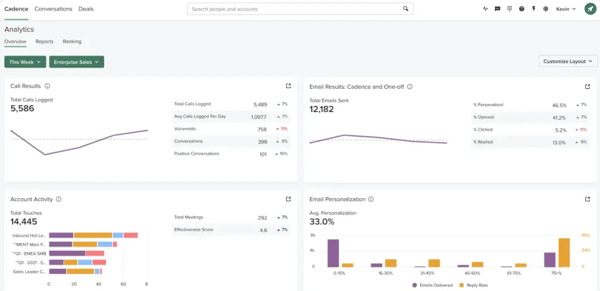
Salesloft does a great job keeping outreach structured and visible, especially with its cadence system and activity tracking. That said, some G2 reviewers mention that parts of the interface, particularly dashboards and reporting views, aren’t as intuitive as they’d like. Key metrics can take an extra moment to locate, which may slow down managers who rely heavily on at-a-glance performance insights.
And while the platform’s task system keeps reps organized, reviewers note that notifications and mobile syncing can occasionally lag, especially with heavier cadence workloads. For desk-based teams working primarily inside the desktop app, this tends to be manageable, but highly mobile reps or teams running time-sensitive follow-ups may feel the friction more.
Overall, Salesloft provides a powerful method for structured outreach and clarity in coaching reps, maintaining consistency, and scaling personalized engagement.
“This is an intelligent sales engagement platform that plays a significant role when it comes to organizing outreach efforts. With Salesloft, we are able to build exceptional relationships with our customers. This sales engagement system integrates smoothly with Salesforce and other tools. When it comes to making follow-ups, Salesloft is highly effective. Salesloft automates our manual tasks, making it a time-saving sales engagement platform. Moreover, I like this tool because it provides accurate and AI-powered recommendations that improve our conversion rates.”
- Salesloft review, Abraham S.
"Some parts of the interface can feel a bit crowded when I’m managing a large number of prospects at the same time. Also, setting up more complex cadences takes a bit of trial and error at first, especially if you’re new to sales engagement tools.”
- Salesloft review, Avyan S.
Mindtickle is a sales readiness platform that integrates microlearning, coaching, and performance tracking in one centralized space. G2 Grid Report Data shows that Mindtickle is a preferred choice for 68% of enterprise companies, particularly in pharmaceuticals, IT, and computer software.
According to G2 reviews, ease of use is one of the biggest wins. Users frequently call out the intuitive layout, quick navigation, and ease of engaging with training materials on the go. For salespeople who are juggling calls, demos, and follow-ups, a platform that doesn’t get in the way matters.
Another standout is how structured the learning environment is. Mindtickle offers a centralized hub for product training, sales pitches, and onboarding resources. G2 reviewers express that it’s helpful to have all the content in one place, especially when prepping for new campaigns or brushing up on messaging.
Talking about training, progress tracking is another strength that came up across reviews. Every video view, quiz attempt, and document read is logged and tied back to rep engagement. G2 users said this visibility helps managers offer more relevant coaching and align learning programs with performance outcomes. It’s not just about completing modules; it’s about readiness that drives results.
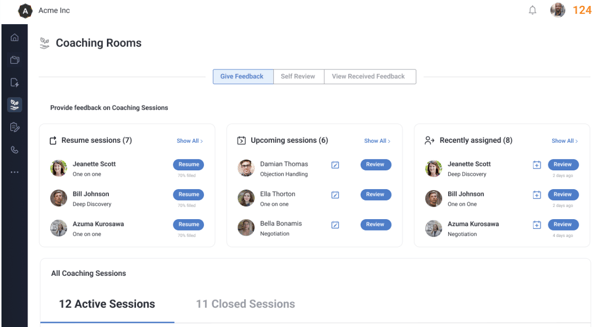
G2 users appreciate how structured and centralized Mindtickle’s training environment is, especially for onboarding and ongoing sales enablement. Because of that depth, some reviewers mention that certain modules can feel longer than expected, which may challenge focus during busy sales cycles. This tends to matter most for reps juggling heavy pipelines, while teams that value comprehensive, guided learning often see the structure as worthwhile.
Reviewers also highlight the platform’s intuitive layout, though a few note minor slowdowns when switching between materials or saving progress. For most teams, the experience remains reliable, but high-activity users moving quickly through content may occasionally notice the lag more than those working at a steadier pace.
Still, Mindtickle is a highly effective way to build and measure sales readiness for teams that value structured enablement and performance analytics.
“Mindtickle ability to gamify sales enablement while providing deep technical insights into my performance is unmatched. I love the Competency Hightlights dashboard, which gives me a transparent look at my strengths, like my 81/100 Product Knowledge score, and clearly identifies where I need to focus my next coaching sessions. The Coaching Rooms are a major efficiency booster, allowing me to manage multiple active sessions and track my progress with learners like Jacqueline Watkins in one consolidated view.”
- Mindtickle review, Avyan S.
“Mindtickle had some funky approaches when it comes to hosting live instructor lead trainings. We felt like the course build always took a while to mirror the structure we wanted for our live courses. We also we not the biggest fans of the interface when it came to purely on demand courses. It felt clunky at times and the home access pages felt outdated.”
- Mindtickle review, Nina B.
Frequently asked questions about sales performance management software
Got more questions? We have the answers.
CaptivateIQ and Salesforce Sales Cloud lead here. CaptivateIQ scores 96% for meeting requirements and 94% for likelihood to recommend on G2, reflecting how confidently reps and RevOps teams trust its numbers. Salesforce Sales Cloud is especially popular among mid-market businesses, at 48% of its user base, and enterprises, at 35%, giving sales leaders the deep reporting and pipeline visibility they rely on to run the business.
CaptivateIQ stands out, since compensation transparency and real-time payout visibility are what G2 reviewers say directly drive motivation and accountability among reps. Mindtickle approaches motivation from a different angle, tying training completion and skill readiness to performance outcomes so reps can see exactly where to focus to improve their results.
Performio is built specifically around this, with reviewers describing its commission dashboards as clear and easy to read for reviewing payout breakdowns and spotting discrepancies early. CaptivateIQ reinforces the same need at the enterprise level, where reviewers say they trust the payout calculations and comp plan logic enough to stop debating numbers with finance each month.
CaptivateIQ is the standout, since reviewers specifically credit it with reducing back-and-forth disputes between reps, RevOps, and finance, a sign of dependable, trustworthy data rather than numbers teams have to double-check. Salesloft is the other name worth flagging: reviewers describe its Salesforce integration as reliable, syncing contact updates, deal progress, and activity logs with minimal friction, though a few mention occasional lag in mobile notifications for heavier workloads.
Salesforce Sales Cloud is the closest match for true real-time visibility, with dashboards that let managers monitor lead conversion rates, quotas, and pipeline movement as they happen, so they can step in with coaching before a quarter gets away from them. Mindtickle complements this with continuously updated readiness data, such as video views, quiz attempts, and document reads, which managers can check at any point to see exactly where a rep needs coaching next.
Performio is the clearest fit, since reviewers say its commission dashboards make payout breakdowns transparent enough to catch discrepancies before they become disputes with finance.
Performio is the strongest match, since reviewers consistently credit its clear commission tracking with helping reps know exactly what they are earning and why, which builds the kind of confidence that keeps top performers engaged.
HubSpot Sales Hub, Apollo.io, and Salesloft stand out. HubSpot Sales Hub connects natively with Gmail, Outlook, Slack, and calendar apps so reps can log activity without switching tabs. Apollo.io integrates directly with HubSpot, letting reps pull contact and company details into the CRM in one click instead of copying data manually. Salesloft's Salesforce integration keeps contact updates, deal progress, and activity logs aligned across systems with minimal friction.
CaptivateIQ is the standout, purpose-built to handle layered, highly customized compensation plans, though reviewers note the initial configuration takes more effort for intricate incentive models. Performio also supports complex compensation structures, but reviewers say the setup can be time-consuming for teams with especially intricate plans.
Pipedrive, Salesforce Sales Cloud, and Apollo.io are the strongest picks. Pipedrive's dashboards pull from real-time activity data so managers can catch problems early. Salesforce Sales Cloud lets sales managers monitor lead conversion rates, quotas, and pipeline movement in real time. Apollo.io supports real-time enrichment and lets reps adjust messaging and monitor engagement as it happens.
I think strong sales performance doesn’t come from hustle alone; it comes from clarity. The right software gives your team that clarity. Whether you’re managing incentives, tracking outreach, coaching reps, or forecasting pipeline, a good sales performance management tool pulls everything into focus.
As I worked through G2 reviews and user feedback, one thing became clear: the best platform isn’t the one with the most features, it’s the one that matches your workflow. Maybe that’s an automation-heavy tool for enterprise forecasting, or maybe it’s a simple, visual pipeline for a lean sales team. The key is finding a solution that meets you where you are while still helping you grow.
I hope this guide to the best sales performance management software helps you find the right fit for your team’s goals, pace, and structure.
Double down on the training. Explore leading sales enablement platforms on G2 to support your reps with the right content, coaching, and training tools.


Messy commission processes frustrate your reps and put revenue at risk. When payouts feel...
.png) by Devyani Mehta
by Devyani Mehta

G2 Grid® Report · Summer 2026 Best Sales Engagement Software Updated May 26, 2026 View...
.png) by Shreya Mattoo
by Shreya Mattoo

Recently updatedSummer 2026 Grid® Report · published May 26, 2026 This guide was last...
 by Washija Kazim