.png?width=400&height=150&name=Copy%20of%20G2%20Image%20(1).png)


The best employee intranet software in 2026, according to the G2 Summer grid report, is Microsoft SharePoint, Workvivo, SAP SuccessFactors HCM, Connecteam, ClickUp, Assembly, and Zoho Connect.
With the rapid transformation of the corporate industry over the past years, businesses are still trying to improve their remote work policies.
Many companies continue to face challenges in managing remote workforce operations, which often result in content silos and onboarding inefficiencies. I, too, have experienced a fair share of complications, especially when searching and navigating through scattered project documentation or files that aren’t saved in a centralized company repository.
By going to tech and IT teams, I got the hang of how the best employee intranet software reduces data silos, eliminates tool fatigue, and simplifies the onboarding content collaboration for hiring teams.
To make sure that you make the right choice and automate content collaboration within internal spaces, I set out to evaluate seven of the best employee intranet software solutions. They can improve employee satisfaction and create a private network hub to exchange deliverables in a safe space.
Employee intranet solution eliminates communication silos, centralizes schedules and project workflows and simplifies internal workflows for onboarding teams.
In fact, in a recent report by Verified Market Research, the employee intranet software market size is projected to reach $43.09 billion by 2032.
As business adoption increases, this guide will help you explore the key parameters for shortlisting and aligning the right employee intranet software with your tech stack.
Employee intranet software is a centralized platform that enables teams to share information, collaborate on content, manage workflows, and streamline internal communication. It acts as a secure digital hub where employees, whether remote, hybrid, or in-office, can access documents, updates, and tools in one place.
As per my evaluation, the best intranet solutions always go beyond basic file storage. They reduce content silos, simplify onboarding, eliminate tool fatigue, and integrate with your tech stack to drive engagement and productivity.
I spent weeks evaluating the best employee intranet software. This software eliminates silos, automates team workflows, and enables centralized documentation for SOPs, HR policies, and internal news. It aims to aid higher employee satisfaction and motivation within an organization.
I used AI to shortlist and evaluate employee intranet software on G2 by factoring in real-time user reviews, highest-rated features, pros and cons, and pricing for each of these software vendors. By summarising the key sentiments and market data for these tools, I aim to present an unbiased take on the best employee intranet software in 2026.
I also consulted verified market research analysts with several years of hands-on experience to shortlist the tools. With real-time customer feedback via G2 reviews, this list of employee intranet tools is best suited for organizations that want to build hybrid and secure workspaces.
The screenshots used in this listicle are a mix of those taken from the product profiles of these software vendors and third-party website sources to maximize the level of transparency and precision to make a data-driven decision.
Below are the pointers that should top your list if you are scavenging for an employee intranet solution that automates manual workflows, increases adoption, and productivity.
My major criteria for evaluation were to analyze the best way an employee intranet software can improve employee adoption rate, internal documentation for M&A, eliminate siloed communication, and unify HR documentation and internal content on a single cloud.
Out of the total 40+ tools that I evaluated, 7 employee intranet tools stood out as best options to eliminate fragmentation of SOP, automate workflows and raise employee likeability in a remote setting. If you are looking to create a positive environment and scale branding, check these out.
The list below contains genuine reviews from the Employee Intranet Software category page. To be included in this category, a software must:
*This data was pulled from G2 in 2026. Some reviews may have been edited for clarity.
Microsoft SharePoint is an employee intranet solution that helps optimize content, manage versions, automate team messaging, and centralize internal communication workflows to maximize the efficiency and productivity of your key teams in the organization.
What I really like about SharePoint is how seamlessly it fits into the Microsoft ecosystem. For teams using Teams, Outlook, and OneDrive, SharePoint naturally complements everything. I don’t even think twice about sharing documents; everything just syncs and works.
Microsoft SharePoint is one of the leading software leaders on G2 with high ratings in three core features, namely file sharing (93%), document collaboration (91%), and version control (89%).
I feel that document management is one of the best features. SharePoint makes it easy to upload, version-control, and collaborate on files in real-time. It helps work on spreadsheets with four other people simultaneously without worrying about losing progress or overwriting changes.
I love how Microsoft SharePoint allows secure access to sensitive files, and we can set permissions down to a granular level. That’s super useful when managing cross-functional teams or dealing with external partners. It even supports metadata tagging and indexing, which makes finding documents later way less painful than with traditional shared drives.
I also wish to highlight the app flexibility with site creation. You can build project-specific pages, internal wikis, and team hubs using the out-of-the-box templates. It’s great for non-technical users like me; I don’t need to know HTML or CSS to spin up a useful, branded site. If you explore the enterprise license, specifically the Microsoft 365 E3 plan, you will get access to advanced content management, Power Automate workflows, and data loss prevention features, which make it easier to manage compliance requirements.
The site-building and templates earn praise too. Reviewers describe spinning up structured pages, subsites, and internal hubs with drag-and-drop and ready-to-use templates, no HTML or CSS needed, and integrating tools like Power BI, PDFs, and PPTs to improve internal reporting, making it easy to give each stakeholder group its own branded space.
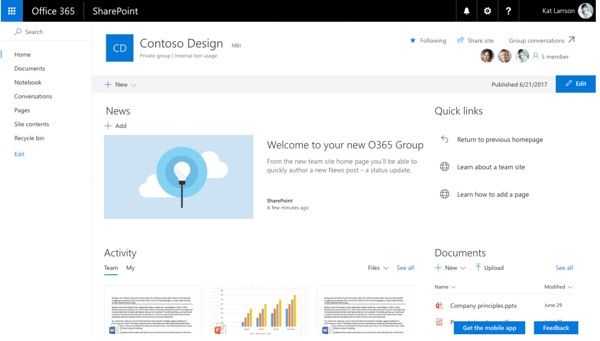
That said, SharePoint isn’t without its flaws. While many G2 reviewers appreciate its deep integration with Microsoft 365, some feel the interface could use a refresh. It’s not the most intuitive tool right out of the gate, but once you’re familiar with it, navigation becomes smoother and more efficient.
There’s definitely a learning curve, particularly for first-time users. Even so, once the basics are in place, G2 customers often highlight how powerful and customizable the platform becomes over time.
Overall, Microsoft SharePoint enables quick content creation, helps manage team spaces, search for your required files, and syncs with your task management workflows to bring more collaboration to the forefront.
"I use Microsoft SharePoint to store Excel files and integrate them with other M365 tools such as Power Automate and Power Apps. I’ve also used SharePoint document libraries to maintain shared project files and keep track of documents that my team members can easily collaborate on. A key feature for me is being able to access a stored file and connect it directly to a workflow for automation. It’s very reliable as a backend data source for Power Apps and for reporting solutions."
- Microsoft SharePoint review, Shalu M.
“What I dislike a little about Microsoft SharePoint is that initially it takes some time to properly understand the setup and navigation. Managing permissions, folders, and access settings can become confusing, especially for new users or in large teams with many shared documents.”
- Microsoft SharePoint review, Balram T.
Intranets store knowledge, but can your team actually find it? See the best enterprise search software for faster, more accurate discovery across internal systems.
Workvivo is a user-friendly employee management platform that handles content for on-field and deskless teams. It places legal placeholders, enables search and metatagging and handles traditional content to make search easier and user-friendly.
Because of its viable employee internet features, Workvivo is a leader with the highest rated features being status updates (97%), performance and reliability (97% and tagging (97%), which makes it an exhaustive and centralized workforce and intranet solution.
The first standout of Workvivo is the effortlessness of the social platform. It is not like your typical internet tool that feels more like a task than a touchpoint. Workvivo feels like a vibrant community space, where updates don’t just get pushed, they actually get noticed, commented on, and appreciated. I love how it helps you jump between channels, give a shoutout to a colleague, or even post quick updates without needing a tutorial. It’s intuitive, which is a big win for onboarding new team members.
What I appreciate most is how well Workvivo blends intranet essentials with modern engagement tools. You’ve got your core functions like document sharing, company updates, and org-wide announcements, but they’re wrapped in a familiar social media-like interface. The activity feed feels like LinkedIn meets Slack. You can follow leadership updates, respond to recognition posts, and even click through embedded videos in team channels. You can tell a lot of thought has gone into how people actually use digital workspaces today.
One of my favorite features is how deeply customizable it is. From public and private channels to interactive polls and events, it’s easy to create spaces that reflect each department's vibe. You can use it for everything, from HR updates and IT tips to fun birthday shoutouts. The recognition feature, in particular, makes it really easy to appreciate coworkers with badges and emojis; it’s small, but meaningful.
I also noticed how well Workvivo bridges desk-based and frontline teams. Reviewers describe a mobile app that's genuinely user-friendly for staff who don't have work-issued computers, with extensive translation options for diverse, distributed workforces, ensuring everyone feels part of the same culture regardless of location.
The real-time updates and scheduling drew consistent praise, too. Reviewers describe getting company news, resources, and even work schedules pushed in real time, several highlighted schedules posted weeks in advance, and HR documentation kept current for the whole organization in one place, which helps employees plan ahead and stay informed.
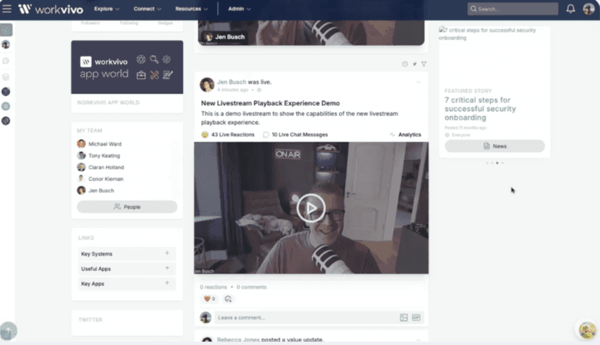
However, the platform does have a few areas where it could improve. While many G2 user insights praise how smooth and intuitive the desktop experience is, the mobile app can feel a bit non-responsive at times. Some G2 reviewers mention occasional lag when loading media-heavy posts, but even so, they’ve noted steady improvements with recent updates.
The search can also be a sticking point; a few reviewers noted that while the social feed shines, locating older documents or static resources that aren't recent news can take some digging, but still, they added that once content is well categorized, the platform stays a reliable single source of truth for company information.
Overall, Workvivo delivers more than what you'd expect from the intranet. It's a modern digital hub that actually gets used, not just accessed once a month to download a form. It is not flawless, especially on mobile, but it is closer than other alternatives that I've evaluated.
"What I like most about Workvivo is how it makes communication feel more personal and connected. It’s not just a work platform; it helps employees feel involved, recognized, and part of the company culture. I also like how easy and user-friendly it is, which makes collaboration and engagement much smoother for teams."
- Workvivo review, Vivek J.
“While the social feed is great, the search functionality can sometimes be frustrating when trying to locate older, specific documents or static resources that aren't news.”
- Workvivo review, Umesh S.
SAP SuccessFactors HCM is an AI-powered cloud HR suite that unifies core HR, payroll, talent management, learning, and analytics, giving large organizations a single, connected home for the entire employee lifecycle and the internal information that surrounds it.
As a recognized leader on G2, SAP SuccessFactors HCM has a strong tilt toward larger organizations, with 63% of the users from the enterprise segment.
According to G2 Data, its most-praised strengths cluster around core HR, performance management, and HR analytics, reflecting its depth as an end-to-end platform.
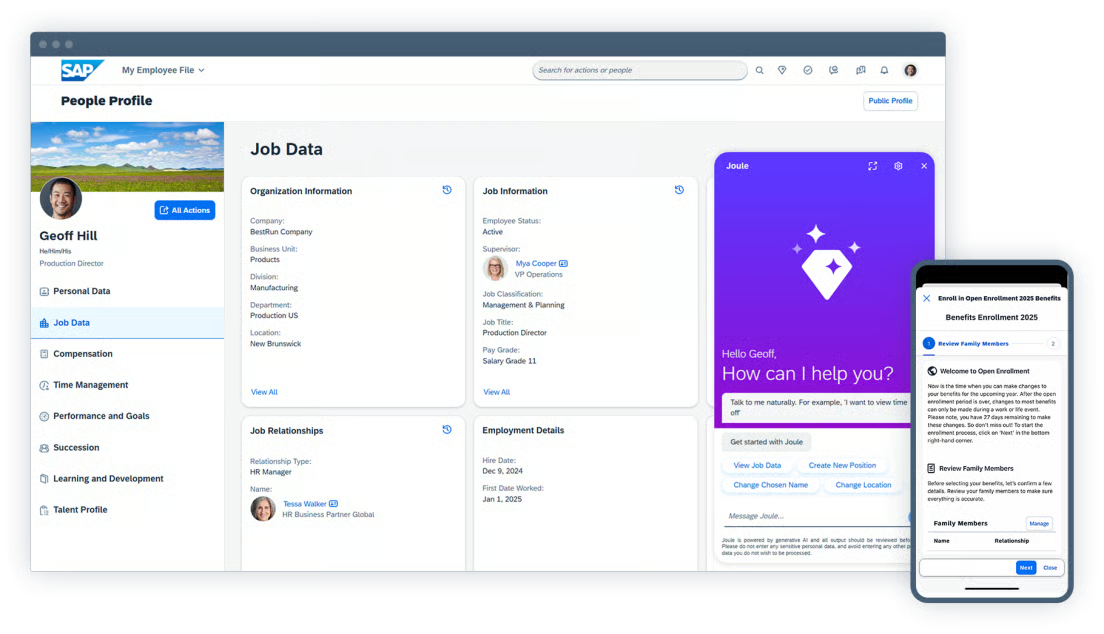
What I appreciate most is how it brings the entire employee lifecycle into one place. Reviewers describe everything from recruiting and onboarding to performance, learning, and succession being connected in a single system, which improves consistency and gives HR genuine visibility across the organization. For employees, that means leave applications, attendance, approvals, and personal data all live in one self-service hub.
The talent and performance management tools are a recurring highlight. Reviewers describe setting goals, tracking progress, and running periodic reviews efficiently, with development planning that aligns employee growth to business objectives. Several called Talent and Career Management the standout, helping them track yearly performance and career progression in a structured way.
Integration depth is another strength reviewers return to. SuccessFactors connects smoothly with the broader SAP ecosystem and third-party tools like ServiceNow, letting employee data flow across systems and cutting down on duplicate entry. For enterprises running payroll, ERP, and identity tools alongside HR, that connected data layer is a major advantage.
Reviewers also value the platform's enterprise-grade security and scale. Users managing workforces of 15,000-plus describe a trusted, globally supported system that handles onboarding through offboarding and payroll without strain, with advanced backend security that makes it dependable for large, distributed user groups.
The newer AI capabilities earn growing praise too. Reviewers point to the Joule AI assistant for conversational HR tasks — explaining a paycheck, requesting time off, surfacing internal job matches — alongside AI-assisted performance feedback and skills-based talent recommendations that automate work that used to be fully manual.
That said, the most common critique in G2 reviews is the interface and navigation: reviewers note that some modules feel dated or inconsistent and that simple tasks can take several clicks, with a real learning curve for first-time users. But still, most added that once it's configured and teams are trained, the platform becomes powerful and the consistency pays off across the organization.
The other point that surfaces is configuration complexity and cost, with reviewers noting that advanced customization often needs consultants or technical expertise and that pricing runs high for smaller teams — but the same users praise the enterprise-grade depth, and say the structured implementation, documentation, and partner support help teams reach value over time.
Overall, SAP SuccessFactors HCM is best for mid-market and enterprise organizations that want a comprehensive, secure, AI-powered platform to manage the full employee lifecycle and centralize HR information for distributed teams. If your priority is depth, scale, and connected workforce data over out-of-the-box simplicity, SuccessFactors earns its place among the best employee intranet and HR software.
"End-to-end employee lifecycle management: from recruiting and onboarding to performance, learning, and succession, everything is connected, which improves consistency and visibility across HR. Strong talent management capabilities: tools for performance reviews, goal tracking, and development planning help align employee growth with business objectives."
- SAP SuccessFactors HCM review, Bracy C.
“In user interface and navigation, some tasks require multiple clicks or switching between modules. In reporting and analytics, creating custom reports often requires deep system knowledge, and the dashboard lacks flexibility for real-time ad-hoc analysis..”
- SAP SuccessFactors HCM review, Amarpreet S.
Connecteam is a workforce management solution that helps you set schedules, retain employees, and customize daily tasks and agendas. It can aid in setting reports, onboarding teams, and optimizing security and reliability to achieve your productivity goals.
As one of the leaders in customer satisfaction, Connecteam has received a 94% rating for ease of doing business, with 76% of users from small businesses, suggesting that the tool is more ideal and effective for small business users. G2 users have rated it the highest for three features: mobile friendliness (94%), search (91%), and user, role, and access management (91%).
What stood right away is how easy it was to get my entire team onboard; even the folks who usually shy away from new tech picked it up quickly. The interface is super intuitive, both on desktop and mobile, which is a lifesaver for teams who are out in the field and heavily rely on their phones.
What I appreciate the most is the time tracking feature. Employees clock in and out right from their phones, and it logs everything down to the second. No more chasing paper timesheets or dealing with missed punches. Plus, I can see who’s working where in real time, thanks to the GPS tracking integration. We use it to manage breaks, shifts, overtime, and everything else related to attendance, and it just works. It even lets us build recurring shifts into the schedule, which is great because our workweek rarely changes.
The scheduling tool deserves its own shoutout. I can drag and drop shifts, assign roles, send out push notifications, and track when people acknowledge them. There’s even a “shift tasks” feature that lets me add what needs to be done in each shift, which helps eliminate a ton of back-and-forth.
Another feature that’s been a game changer is the built-in communication tools. Connecteam has a team chat, announcement board, and even a knowledge base where they’ve uploaded their policies, how-to guides, and safety protocols. It’s all searchable, so if someone forgets how to submit an expense report, they just look it up in the app.
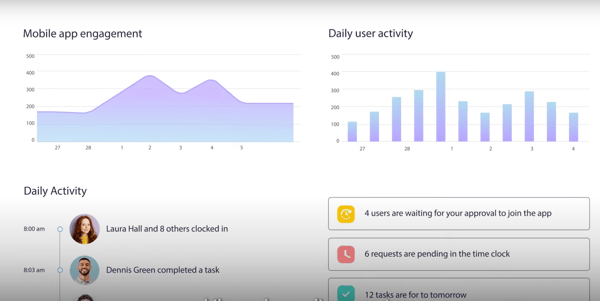
Many G2 reviewers love how much value Connecteam’s free plan offers, especially for small teams needing time tracking, scheduling, and task management without upfront costs.
That said, as teams grow, a few limitations do surface. For instance, G2 users have noted that only admins can publish shifts unless you're on a higher tier. Still, the ease of scheduling, recurring shifts, and mobile shift notifications consistently earn praise.
Advanced permissions and custom reporting are also limited on lower plans, according to several G2 customer reviews. But many still appreciate how Connecteam consolidates tasks, chats, and updates into a single app, reducing the need for multiple tools.
Overall, Connecteam acts as a centralized remote workforce content repository which helps manage HR and payroll data, project documentation, onboarding and job-related workflows and scheduling all in one place to improve employee experience.
"What I like best about Connecteam is how easy it is to keep teams organized and connected, especially when managing employees across different locations or schedules. From an account management perspective, it simplifies communication, task management, and scheduling in one platform, which helps reduce confusion and improve day-to-day coordination. The mobile app is also very convenient because employees can quickly access updates, submit forms, and stay informed without needing multiple tools.”
- Connecteam review, Verified User in Marketing and Advertising.
“I disliked how expensive it became once we needed more than 10 employees. There wasn’t a way to pay for only what we needed to stay efficient, so now that we’ve gone above 10 employees, I have to find other avenues to offset what we used before. The monthly cost for a small company like ours isn’t feasible. ”
- Connecteam review, Verified User in Construction.
ClickUp is an all-in-one work management platform that pulls tasks, docs, dashboards, chat, and AI into a single workspace — making it a strong intranet-style hub for teams that want one source of truth for both projects and internal knowledge.
ClickUp is one of the highest-rated platforms in this space on G2, holding a 4.6 out of 5 rating, with adoption skewing toward small businesses and growing teams. According to G2 Data, its most-praised strengths center on task management, workflow management, and project collaboration, reflecting how much teams lean on it as their operational backbone.
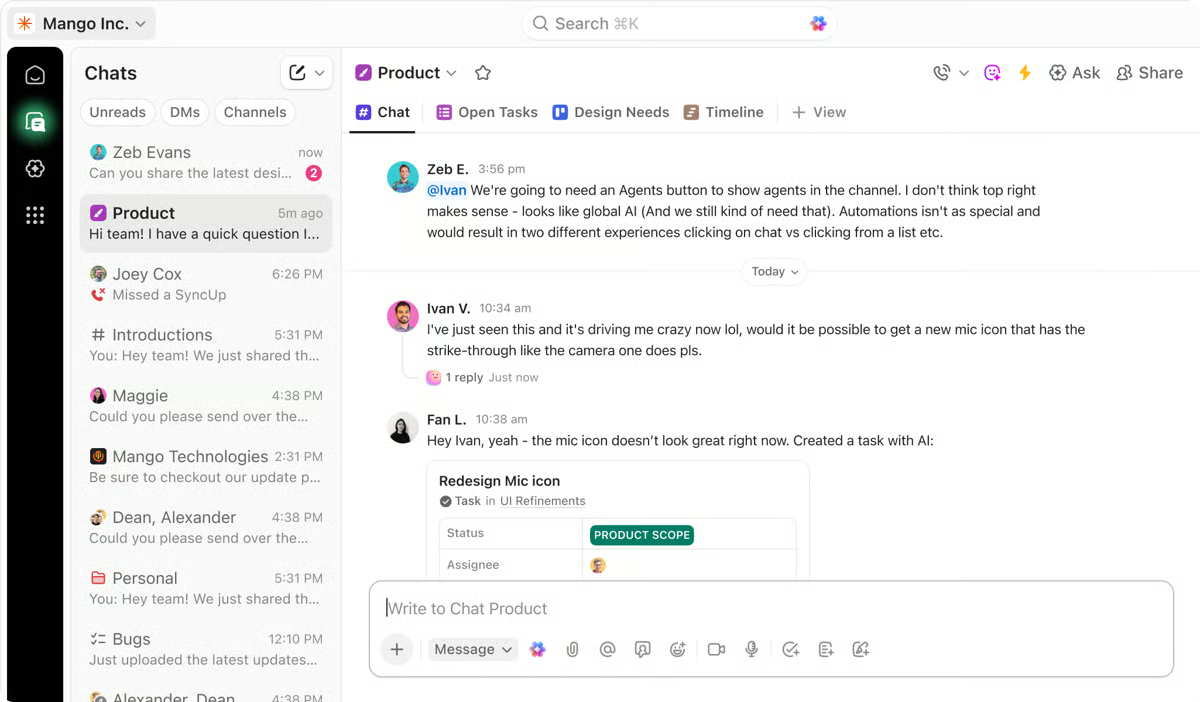
What stands out most to me is how completely ClickUp centralizes work. Reviewers describe it as a single source of truth where tasks, docs, SOPs, meeting notes, and communication all live together — several said it replaced multiple tools in their stack, cutting cost and eliminating the chaos of information scattered across email, Slack, and disconnected documents.
The flexibility and customization earn constant praise. Reviewers describe building custom workflows, dashboards, and automations without technical skills, adapting the platform to each team's process. One called it "a giant Lego set" you can shape around your operation, from daily task lists to an ERP-like system running the whole business.
Reviewers also love the integrations. ClickUp connects tightly with ecosystems like Google Workspace — Drive, Calendar, Email — and tools like Slack, so updates and files stay in sync and teams don't bounce between apps. Several highlighted how this connectivity keeps everyone, including external clients invited as guests, in the loop.
The AI features are a growing highlight. Reviewers point to ClickUp's integrated search that surfaces files across connected apps in seconds, the Brain assistant that can find almost anything in the workspace, and Super Agents that support tasks, automation, and onboarding, tools that several said genuinely speed up their day.
Reviewers also value how visible everything becomes. Users describe seeing the status of every project at a glance, with multiple views — list, calendar, workload, Kanban — so each team member can work the way they prefer while managers keep a bird's-eye view of deadlines, workloads, and progress.
That said, the most common critique in the reviews is the learning curve. G2 reviewers note that the sheer number of features and settings can feel overwhelming at first, with a busy interface that makes onboarding new users harder, though most agreed that once you get past the initial setup, it becomes seamless and well worth the effort, especially with templates in place.
The other point that surfaces is performance, with some reviewers mentioning slower load times on large lists and that the better AI capabilities sit behind separate credits or higher tiers, but the same users noted speed has improved over the years and that the core platform delivers strong value for the price, particularly for growing teams.
Overall, ClickUp is best for small businesses and growing teams that want to consolidate tasks, docs, communication, and internal knowledge into one flexible, customizable hub. If you're tired of juggling separate tools and want a single workspace that scales with you, ClickUp earns its place among the best employee intranet and work management software
"I love that it's a one-stop shop for me to use in my business as well as my clients. Once you get use to the system, it's easy to navigate with custom dashboards and use drag and drop features, and for me, I can customize it to function well for my clients and their needs. It has very little downtime, and I haven't experienced a lot of glitches. It integrates easily with Slack (the communication tool we use most), so clients and team members are kept in the loop. And the pricing works well for smaller businesses and larger, growing teams."
- ClickUp review, Gisela J.
“While ClickUp is powerful, its interface is cluttered and overwhelming, making the learning curve very steep for new users. Performance often becomes noticeably sluggish when managing complex task hierarchies.”
- ClickUp review, Verified User in Individual & Family Service.
From what I found, Assembly by Quantum Workplace is a centralized and easy-to-use employee recognition platform that offers cloud management abilities to centralize remote workforce operations, integrate with scheduling and productivity tools, and improve employee satisfaction globally.
With an average rating of 4.8 out of 5, Assembly outshines in the domain of file sharing, document collaboration, and automation for companies seeking a flexible employee intranet solution.
What stands out the most for me is how effortless recognition has become. Whether it's sending out kudos, celebrating small wins, or highlighting major achievements, the platform makes it insanely easy to give and receive appreciation. This isn’t just feel-good fluff—it genuinely boosts morale.
The peer-to-peer recognition system, powered by a robust points and rewards engine, brings an engaging, gamified layer to the workday. We can send digital “shoutouts,” tie them to core company values, and even use custom reward catalogs to redeem points, which has made appreciation feel much more meaningful.
What I love is how seamlessly Assembly fits into your existing stack. It integrates with Slack, which is used for team communication, so every shoutout or reward gets broadcast to the right channels without extra effort. That real-time visibility builds a positive team culture and nudges others to join in. You can also hook it up to Microsoft Teams and Outlook, and the notifications are well-timed—not intrusive, just present enough to keep engagement high.
The interface is clean and super user-friendly. Even less tech-savvy colleagues picked it up in minutes. I appreciate how customizable it is—you can create our own recognition badges, automate anniversary shoutouts, and even spin up polls and Q&As to gather feedback. Assembly isn’t just a recognition tool—it’s growing into a lightweight employee engagement hub, complete with workflow automation features and configurable dashboard views that help leadership monitor culture trends.
The automation and milestone features earn consistent praise too. Reviewers describe Assembly automatically celebrating birthdays, work anniversaries, and new-hire welcomes so no one gets overlooked in distributed teams, alongside an AI-powered assistant that helps employees craft personalized, values-aligned recognition messages when they're not sure what to say, small touches that keep appreciation flowing without extra effort from HR or managers
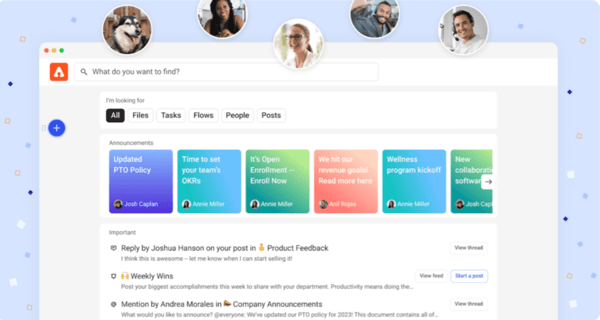
Although integrations with tools like Slack and Teams work well, some G2 reviewers report friction when connecting Assembly to legacy HR platforms or internal systems. That said, once configured, it integrates smoothly into daily workflows, as several G2 user reviews confirm.
Some reviewers also noted that the platform can feel a bit overwhelming at first, with navigating between recognition feeds, rewards, reports, and admin settings taking some time to learn, though most agreed the interface is clean overall and the learning curve smooths out quickly once teams settle into a routine.
Overall, Assembly a powerhouse for driving team culture. G2 states that free plan offers just enough to get started, and the premium tiers unlock advanced analytics, deeper customization, and workflow integrations that take it beyond basic recognition. For growing teams, those tiers are totally worth it, especially if you’re looking to tie engagement to broader HR or performance initiatives.
"One of the biggest upsides of using Assembly is how easy it makes it to recognize and appreciate others. Receiving recognition through the platform makes me feel valued and acknowledged for the work I do, which helps create a more positive and motivating work environment. I also appreciate the ability to publicly thank and reward coworkers for their support, teamwork, and contributions. It creates a culture where appreciation is shared consistently, not just from leadership but across teams as well."
- Assembly by Quantum Workplace review, Dani L.
"One downside of Assembly by Quantum Workplace is that some features can feel overwhelming at first, especially for new users who are not familiar with recognition or rewards platforms. The interface is generally clean, but navigating between recognition feeds, rewards, reports, and admin settings can take time to learn."
- Assembly by Quantum Workplace review, ILCHO I.
Zoho Connect is a modern team member experience platform and intranet that unifies people, resources, and apps, built around feeds, groups, discussions, and team spaces that make internal communication feel social and approachable rather than formal and siloed.
Zoho Connect is a well-regarded option in the intranet category on G2, holding a 4.5 out of 5 rating, with adoption concentrated among small businesses. According to G2 Data, its most-appreciated strengths cluster around its feed and discussions, groups, and ease of use, reflecting its focus on lightweight, everyday team collaboration.
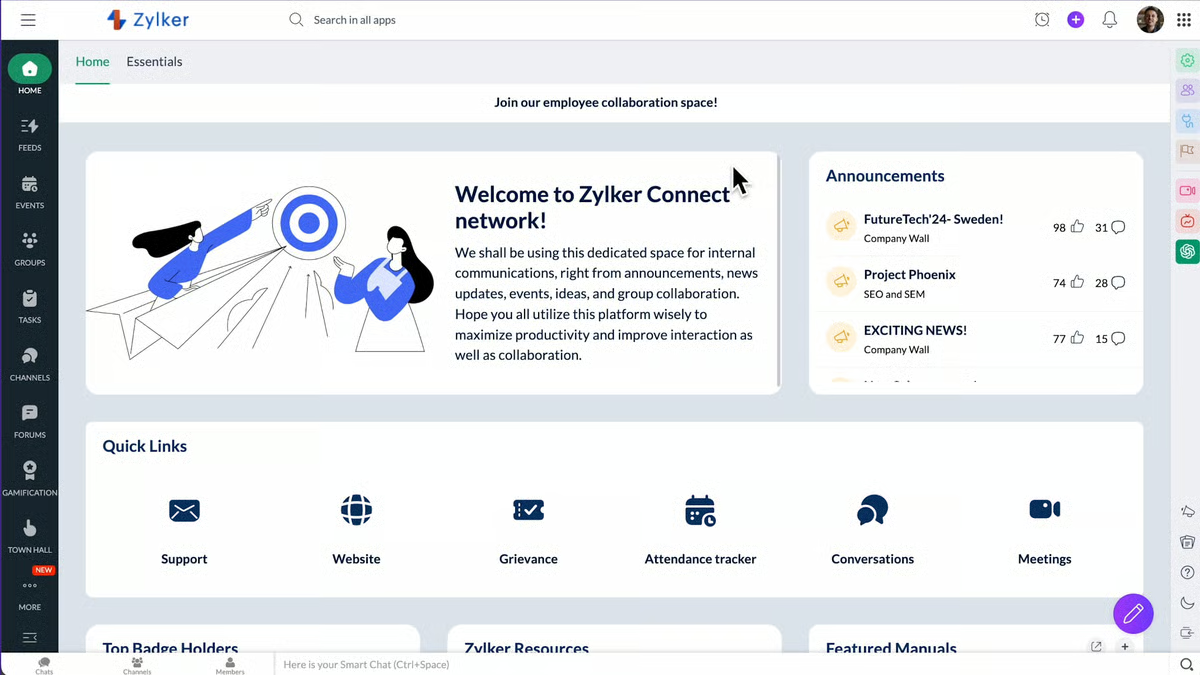
What stands out most to me is how naturally Zoho Connect breaks down information silos. Reviewers describe being able to post a question or update, tag the right people, and have everyone who needs to know see it, one said it feels less like sending a message into the void of email and more like walking over to someone's desk, which keeps knowledge out of individual inboxes.
The feed and groups earn consistent praise for keeping work organized. Reviewers describe posting updates, observations, and guidance into dedicated group spaces, then easily referring back to them later, an internal space where notes and discussions stay searchable instead of scattered across different tools or memory.
Ease of use is a recurring theme I saw. Reviewers describe simple posting and commenting, an intuitive feed, and a setup process so straightforward that several said they just started using it with no difficulty, which matters for getting an entire team, including less tech-savvy members, onboarded quickly.
Reviewers also value the built-in task and board management. Users highlight Kanban-style cards for listing and organizing work, boards for each team or project, and the ability to assign tasks to the right members, making it easy to see what's assigned to you and communicate directly with the task owner.
The knowledge base and manual management capabilities also stand out to me. Reviewers describe keeping customer success, sales, and support manuals all in one place, with Zia, Zoho's AI assistant, powering a fast search that surfaces answers quickly — turning Connect into a living internal reference rather than a static archive.
As part of the wider Zoho ecosystem, reviewers also appreciate how it ties into HR and everyday workflows. Users describe managing leave applications, attendance, and performance review forms through an easy interface, with simple navigation that cuts the time spent on routine HR tasks.
That said, the most common critique in 2026 reviews is the feed and formatting: reviewers note that the feed can get mixed when different types of posts pile up, making it take a moment to find a specific point, and that formatting options for longer posts feel limited — though they added that the system still works well day to day and a little organization keeps things clear.
The other point that surfaces is admin configuration, with a reviewer noting that some admin-side options felt restricted and that they'd like attachment support on every form — but the same feedback framed the core experience as easy and effective, with the platform meeting most everyday collaboration needs out of the box.
Overall, Zoho Connect is best for small businesses and teams that want a simple, social-style intranet to share updates, organize knowledge, and collaborate without added complexity. If your priority is approachable everyday communication and a searchable internal hub — especially if you already use the Zoho ecosystem — Zoho Connect earns its place among the best employee intranet software.
"I find Zoho Connect's interface easy to use, which makes managing HR tasks, attendance, leave, and performance straightforward. I appreciate that it connects well with HR and simplifies workflows, allowing me to do things effortlessly. I like how simple it is to move around within the tool, and it requires less time to apply for leaves and fill performance review forms. The easy setup process is another plus."
- Zoho Connect review, Aditya M.
"Sometimes the feed becomes a bit mixed when I post different types of notes, like patient observations and general updates together. It takes little time to scroll and find the exact point again. Sometimes, while writing longer posts or notes, formatting options are limited, so I have to adjust text manually to keep it clear. It works, but a little more control would be helpful."
- Zoho Connect review, Ishan S.
Workvivo is one of the best-reviewed employee communication software platforms, known for its AI-powered content creation and rich internal communication formats. Assembly is also highly regarded for unifying workplace communication with peer recognition, automation, and content-sharing capabilities.
Another strong option is Zoho Connect, praised for its simple, social-style feeds, groups, and discussions that keep internal communication approachable.
For startups seeking affordable intranet solutions, Microsoft SharePoint stands out at just $9.29/month, offering strong document management, file sharing, and automated task tracking. Zoho Connect is another budget-friendly choice, with social-style feeds, groups, and a searchable knowledge base that make internal collaboration easy from day one.
Microsoft SharePoint is the most seamless intranet software for Office 365 integration, offering native support for document management, collaboration, and task automation across Microsoft apps. It's especially effective for organizations already using the Microsoft ecosystem.
Connecteam is ideal for remote teams, especially those managing field or deskless workers, with features like file sharing, task automation, and a centralized content library. It helps streamline communication and workforce management across distributed environments.
Connecteam offers robust mobile access, making it well-suited for managing remote or deskless teams with time tracking, content sharing, and task automation on the go. Workvivo also supports strong mobile access, letting employees engage with internal communications, recognition, and company updates from anywhere.
For a small tech company, Microsoft SharePoint is a strong choice due to its affordability and seamless integration with Microsoft 365 for collaboration and task tracking. ClickUp is also well-suited, centralizing tasks, docs, SOPs, and communication in one customizable workspace at a startup-friendly price.
For large corporations, Microsoft SharePoint is highly recommended for its enterprise-grade document management, task automation, and deep Microsoft 365 integration. SAP SuccessFactors HCM is also favored for connecting core HR, talent, learning, and analytics across large, distributed teams.
Microsoft SharePoint is a top choice for easy collaboration, offering real-time document sharing and task automation tightly integrated with Microsoft 365. ClickUp also stands out with custom workflows, dashboards, and shared docs that keep tasks and communication in one place for fast-moving teams.
Workvivo consistently receives strong reviews for its engaging employee portal experience, blending AI-powered content tools with intuitive communication features. Connecteam is also well-rated for its ease of use and effective management of both field and deskless employees through a centralized mobile-friendly portal.
Connecteam is often considered the most user-friendly office intranet software, thanks to its intuitive interface, mobile accessibility, and simplified tools for task management and content sharing. It's especially effective for teams that need a quick onboarding process and minimal training.
Microsoft SharePoint and ClickUp are consistently trusted by Operations Manager teams. SharePoint's document management, version control, and Microsoft 365 integration make it a reliable backbone for ops workflows, while ClickUp's centralized tasks, SOPs, and dashboards give ops managers real-time visibility across projects and teams.
ClickUp and Assembly are top-rated by mid-market tech teams for integration ease. ClickUp connects tightly with Google Workspace, Slack, and other dev tools, while Assembly integrates with Slack and Microsoft Teams to keep recognition and communication flowing without manual effort.
Workvivo and Connecteam show strong post-rollout retention. Workvivo's social-style feed drives organic daily engagement rather than monthly check-ins, while Connecteam's intuitive mobile experience keeps field and deskless teams coming back without retraining.
Microsoft SharePoint is most cited by Operations Managers in tech for reliability, particularly for document integrity, permission controls, and uptime within the Microsoft 365 ecosystem. SAP SuccessFactors HCM is the enterprise-grade alternative for larger ops teams managing HR and workforce data at scale.
Microsoft SharePoint and SAP SuccessFactors HCM lead here. SharePoint offers real-time document collaboration with version history and granular permission controls, while SuccessFactors provides live HR analytics and workforce dashboards backed by enterprise-grade security and audit trails.
ClickUp and Zoho Connect are the strongest options for teams that want workflow automation without heavy implementation overhead. ClickUp allows custom automations and dashboards without technical skills, while Zoho Connect's out-of-the-box setup is so straightforward that reviewers report getting started with no outside help.
Connecteam and Assembly are the simplest to configure for non-technical mid-market teams. Connecteam's interface is consistently praised for fast onboarding even among less tech-savvy users, and Assembly's clean layout means most teams are up and running within minutes, not days.
ClickUp and Assembly are the top picks for tech companies prioritizing low-friction integration. ClickUp's native connections to Google Workspace, Slack, and project tools minimize setup effort, while Assembly's pre-built Slack and Teams integrations activate quickly with minimal configuration.
Workvivo and ClickUp strike the best balance between workflow capability and sustained adoption. Workvivo's familiar social interface drives habitual use, while ClickUp's flexibility lets teams build workflows that fit how they already work, reducing resistance and improving long-term stickiness.
ClickUp and SAP SuccessFactors HCM are the strongest choices for mid-market teams needing real-time visibility. ClickUp's multiple views — list, calendar, Kanban, workload — give managers an instant read on project status, while SuccessFactors surfaces HR and performance data across distributed teams through live dashboards and analytics.
After analyzing the best employee intranet tools, what really stood out as a learning is the approach you take in the software investment workflow.
Before you shortlist a product or sign up for a demo, take a long look at your existing ERP stack, tools arsenal, remote workforce challenges, and employee satisfaction metrics to have a clearer picture of the ideal employee intranet tool that will bring you closer to your goals. Building a proposal and penning down all these numbers would be the first step in making a calculated decision to purchase an employee intranet solution.
And while you are at it, take a look at this list to align your problems with the features of each tool and carve a clear strategy.
Refer to my colleagues’ analysis of the top 10 best employee recognition software in 2026 to ensure you invest in employee growth and cater to higher employee satisfaction ROI.
.png)

Recently updatedSummer 2026 Grid® Report · Published May 26, 2026 This guide was last...
 by Soundarya Jayaraman

When I was managing multiple projects at the same time, I tried different time tracking tools...
 by Keerthi Rangan

The scheduling software market is crowded, and most tools claim to do the same things.
 by Sagar Joshi