The best enterprise search software becomes critical when teams know the information exists but still can’t find it. Contracts live in one system, product decisions in another, and critical context is buried in chat threads that disappear within days. As content spreads across SaaS tools, cloud storage, and internal systems, search quality directly affects how fast work moves.
The global enterprise search market size was estimated at $4.87 billion in 2023 and is projected to reach $8.85 billion by 2030, growing at a CAGR of about 8.9%. Organizations are trying to reduce time lost to repeated questions, duplicated work, and missed context. This decision typically falls to IT leaders and digital workplace teams. Choosing the best enterprise search software doesn’t just improve access; it prevents systems from consistently surfacing the wrong information first.
My conclusions are based on patterns across large volumes of G2 user reviews and what I’ve seen from teams using enterprise search tools in day-to-day workflows. I evaluated tools on relevance across disconnected systems, connector coverage, query understanding, and whether users consistently report faster access to answers. Weaknesses in these areas don’t cause obvious failure.
They reduce trust in search, increase internal support requests, and slow onboarding. Over time, teams work around search instead of relying on it, which quietly degrades collaboration and execution.
This guide maps the best enterprise search software to specific search problems rather than treating the category as a single use case. The goal is to help you align platform strengths with your actual search needs, without relying on trial-and-error adoption.
*These enterprise search platforms are top-rated in their category based on G2’s Winter 2026 Grid Report. I’ve included their strengths and ideal use cases to help you choose the right platform for your organization’s needs.
Enterprise search software helps turn fragmented information and disconnected tools into a coherent discovery layer that teams can actually rely on. These tools help organizations understand where knowledge lives, who owns it, how fresh it is, and how access should be governed, so search stays trustworthy as systems and content scale.
What I’ve found is that the strongest enterprise search platforms go beyond basic keyword matching. They surface relevant context across conversations, documents, and systems, respect permissions by default, and reduce the need for manual cross-checking. Whether it’s retrieving answers from fast-moving discussions, indexing structured documentation, or unifying search across SaaS tools, good platforms bring clarity instead of noise.
Ultimately, a strong enterprise search platform provides what modern organizations depend on: visibility into shared knowledge, confidence in search results, and assurance that information access, relevance, and ownership don’t quietly drift as the organization grows.
I used G2’s Grid Reports to shortlist leading enterprise search platforms based on real user satisfaction scores and market presence across small teams, mid-market organizations, and enterprise environments.
I then used AI to analyze hundreds of verified G2 reviews and extracted recurring feedback patterns around what matters most in real-world search and discovery workflows. This included relevance and result accuracy, permission and access handling, indexing depth across tools, speed and freshness of results, support for structured and unstructured content, AI-assisted search and conversational interfaces, integrations with workplace and data systems, and how well search adapts as content volume and organizational complexity grow.
This helped me distinguish platforms that genuinely improve knowledge discovery from those that introduce friction as usage scales. Since I haven’t personally used every platform covered here, I cross-checked these findings with insights from engineering teams, IT administrators, knowledge managers, customer support leaders, and operations professionals who rely on enterprise search daily.
The visuals and product references included in this article are sourced from G2 vendor listings and publicly available product documentation.
After reviewing a large volume of G2 user feedback, studying real-world information workflows, and speaking with engineers, IT teams, support leaders, and operations managers, the same themes kept recurring. Here’s what I prioritized when evaluating the best enterprise search software:
Based on these criteria, I narrowed the list to platforms that consistently support teams with clarity, trust, and long-term reliability. The strongest platforms align with how information already flows inside your organization, rather than forcing artificial discovery patterns.
Below, you’ll find authentic user reviews from the Enterprise Search Software category. To appear in this category, a tool must:
This data was pulled from G2 in 2026. Some reviews may have been edited for clarity.
Slack is a product closely associated with day-to-day communication. It’s built for organizations that rely on messages, files, and integrations as primary sources of knowledge. Rather than separating search into a distinct layer, Slack keeps discovery embedded in collaboration, allowing teams to retrieve context where work already happens.
Search functions directly within active workspaces, allowing teams to narrow results by channel, person, file type, or date using faceted search rated at 92% on G2. G2 reviewers describe tracing past decisions, revisiting shared links, and recovering context from weeks or months earlier without leaving the collaboration environment.
File access is commonly referenced in G2 reviews as keeping information from connected tools searchable alongside messages. File types score 91% on G2, and teams mention previewing files directly in search results without switching applications. For teams sharing documents, spreadsheets, and media files throughout the day, that in-context access removes the need to open separate storage systems or download files before reviewing content.
Integration depth allows teams to pull context from connected platforms without leaving Slack. Integrations score 91% on G2, reflecting how consistently information from external tools surfaces alongside conversations. G2 reviewers describe managing tasks in Kanban-style lists, receiving real-time alerts, and approving requests from platforms like Jira and Salesforce without switching tools.
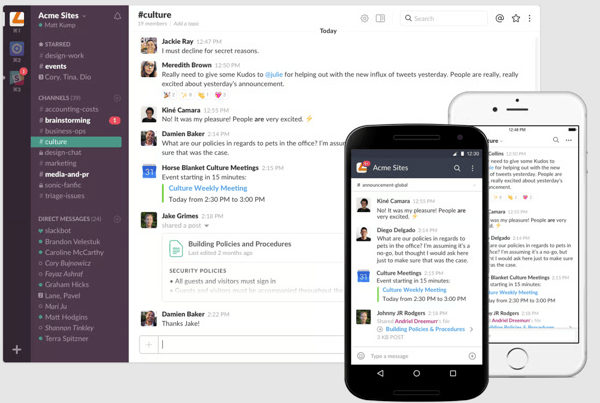
Communication structure supports clarity. Channels and threads help teams keep discussions focused and organized by topic. This organization reduces noise while maintaining visibility into conversations relevant to specific projects or teams.
Setup is described as immediate and frictionless across G2 reviews. Reviewers mention receiving an invite and starting work right away, with desktop and mobile apps staying in sync throughout the day. This accessibility supports distributed and hybrid teams that need communication to remain consistent regardless of device or location.
G2 reviewers frequently highlight improvements in speed and coordination, with faster responses, fewer delays, and reduced reliance on email. Real-time communication combined with searchable history helps teams make decisions without retracing context across tools. This impact holds across company sizes, with adoption spanning small businesses (23%), mid-market organizations (44%), and enterprises (33%), reflecting Slack’s ability to support both lean teams and large-scale coordination.
Slack does not support multi-step planning, autonomous task execution, or adaptive learning natively. Teams requiring advanced workflow automation will find these capabilities outside the platform’s scope. For communication-first teams, the focused design keeps collaboration fast, familiar, and easy to adopt.
Workspaces can become noisier and more complex to navigate as activity and integrations scale, particularly in large or fast-growing environments. This tends to be most noticeable as member counts and alert volumes increase, while teams operating with clear channel structures align more naturally with Slack’s communication-first design.
Overall, Slack remains closely associated with how teams communicate, discover information, and preserve shared context through conversation. For organizations that treat messages, files, and integrations as a living knowledge base, Slack continues to serve as a dependable system for conversational discovery, coordination, and day-to-day collaboration at scale.
“The way I work changed completely when Slack was introduced at my company. Its real-time communication system, along with its team and file organization features, has facilitated collaboration and information exchange among staff, significantly increasing productivity.”
- Slack review, William L.
“As usage grows, the workspace can feel noisy if channel discipline is not maintained. Managing integrations also requires attention; otherwise, alerts can become distracting.”
-Slack review, Anika C.
Enterprise search helps you find conversations, but where does that knowledge originate? Explore the best team chat apps powering real-time collaboration and searchable communication.
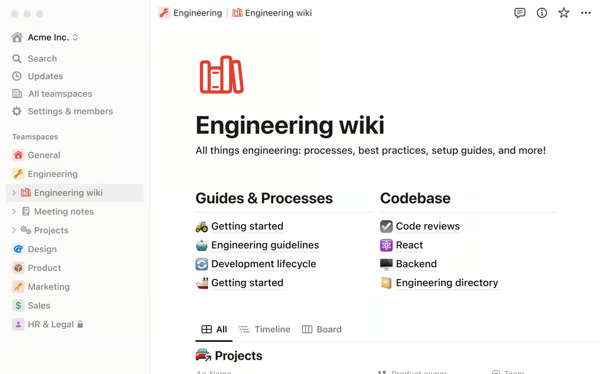
Notion is a flexible, AI-powered knowledge workspace that helps teams manage knowledge and search across documents. It is less of a single-purpose knowledge base and more of a shared operating system for work, where projects, tasks, notes, and institutional knowledge live side-by-side. Its strength comes from how easily teams shape it to match their workflows while keeping information searchable, connected, and visually coherent.
G2 reviewers frequently describe Notion as central to daily work rather than a peripheral documentation tool. Teams organize projects, tasks, and reference material in the same environment, allowing search to operate across live work and stored knowledge simultaneously. This shared structure helps reduce fragmentation between planning, execution, and documentation.
Feedback highlights how search functions across multiple content types without breaking context. Natural language search scores 83% on G2, allowing users to surface relevant pages, databases, and shared content using plain-language queries. The ability to move between documents, tables, boards, calendars, and timelines keeps information discoverable even as its format changes.
Users take Notion as a single source of truth for SOPs, playbooks, product documentation, marketing assets, and internal notes. Personalization scores 83% on G2, reflecting how effectively teams shape workspaces around their own workflows. Sharing, permissions, and teamspaces are built directly into workflows, helping teams avoid scattered folders and disconnected tools.
The AI assistant is commonly referenced as a way to navigate growing knowledge bases. G2 reviews describe using AI to locate answers, find related pages, and surface relevant context across large collections of content. This supports faster discovery as documentation expands, especially for new team members or cross-functional collaboration.
Search remains closely tied to how work evolves over time. Federated search scores 81% on G2, and teams describe updating databases, templates, and workflows without losing discoverability, since search continues to span structured and unstructured content. This allows knowledge to remain accessible as projects, priorities, and organizational structures change.
Databases in Notion can be viewed as tables, boards, calendars, timelines, or lists without rebuilding structure. G2 reviewers describe switching between views to manage tasks, track projects, and plan work in the format that fits the moment. Ease of admin is rated at 85% on G2, reflecting how straightforwardly teams manage permissions and teamspaces without dedicated IT involvement.
Notion can slow down when working with very large databases or complex relational structures. This is most noticeable for teams managing high volumes of interconnected content as page counts and database complexity grow. The platform remains well-suited to small to mid-sized workspaces and documentation-focused use cases.
Offline access is not available in Notion’s standard setup. Teams that need to work reliably without an internet connection will find this sits outside the platform’s current design, while connected, cloud-first environments align naturally with how Notion is used.
Notion remains a strong choice for teams that want enterprise-grade search woven directly into how work is created, organized, and shared. Its high satisfaction score, strong search-related capabilities, and adoption across company sizes explain why it continues to be used as a unified, searchable workspace that evolves alongside team workflows.
“I use Notion for all our product and process documentation, playbooks, whiteboard sessions, and content and marketing. It's super easy to create projects, add multiple people, and the searchability of documents is the best. Creating team spaces in Notion is great for organizing and syncing projects and folders with our calendar. The initial setup was pretty easy with an easy UI, and it's easy to invite teams.”
- Notion review, Dhara B.
“When I create pages and request the AI to help me decorate and organize it, it usually doesn't delete my current writing and replace it with new. Also, when I want to fix something, he always creates a new section instead of rewriting it. I want the AI to remove what I wrote and use its own decoration, and allow me to overwrite sections I want to redecorate.”
- Notion review, Nitsan B.
Search can surface files instantly, however managing them effectively starts at the source. See the best cloud content collaboration software for organizing, sharing, and scaling document workflows.
Guru is an enterprise search and knowledge management platform built for organizations that need fast, reliable access to internal information without disrupting day-to-day workflows. Its card-based knowledge system, browser extension, and native integrations shape how teams capture, verify, and consume information across tools.
G2 reviewers frequently describe Guru's card-based knowledge format as easy to read during live work. Faceted search scores 95% on G2, allowing teams to narrow results and surface verified answers without forcing users to search through long documents. This structure supports quick reference in high-velocity environments where responses need to be accurate and immediate.
Guru keeps knowledge accessible directly inside existing workflows. Federated search scores 95% on G2, and the browser extension allows teams to surface answers within tools like CRM systems, ticketing platforms, and internal applications. This reduces context switching and helps teams access verified information without leaving their core tools.
Search and discovery capabilities are frequently cited as central to daily usage. Search analytics scores 95% on G2, outperforming category averages, helping teams understand which information is accessed most often and where knowledge gaps exist. Users describe maintaining visibility into search behavior to improve content coverage over time.
G2 reviews mention using verification workflows to remain current and accurate as processes change. This helps teams maintain confidence that surfaced answers reflect the latest approved information rather than outdated guidance.
Knowledge capture and maintenance are closely tied to collaboration. Teams describe using Guru to document processes, product details, internal policies, and customer-facing information in a shared system. The ability to assign owners and track verification status supports accountability as knowledge bases grow. This approach is reflected in adoption patterns, with 59% of users coming from mid-market organizations where shared answers support sales, enablement, and operations teams working across multiple systems.
/Guru.webp?width=600&height=338&name=Guru.webp)
Getting a functional knowledge base running in Guru takes days rather than months. G2 reviewers describe importing existing documents, setting up collections, and starting to surface answers quickly without a large migration project. For teams that need search and knowledge access to improve rapidly, that fast implementation reduces the gap between adoption and operational value.
Guru relies on structured card creation, tagging, and verification to deliver accurate search results. This aligns well with teams that prioritize curated knowledge management and controlled content validation, while organizations building large knowledge bases from scratch may find the model more process-driven than lightweight documentation tools.
Interface responsiveness can vary during bulk edits or large-scale updates. This is most noticeable for teams reorganizing high volumes of cards or managing complex structural changes, while standard search, card retrieval, and knowledge access align well with everyday usage patterns.
Overall, Guru is best suited for organizations that want enterprise search to deliver verified answers directly within daily workflows. Its emphasis on card-based knowledge, strong search analytics, and contextual access explains why teams rely on it.
“I like how Guru provides me with the exact answer or solution that I can provide to the customer, which helps me understand the problem even more. I also appreciate how the system is responsive, giving me the information I need. The step-by-step guidelines improve my work, and I find the core articles to be well organized, which is really helpful.”
- Guru review, Dan Russel S.
"It would be wonderful to arrange cards in a more flexible manner because search results can occasionally feel a little cluttered. With improved ranking and filtering to quickly reveal the most pertinent cards, search results could be more accurate ."
- Guru review, Sakibul H.
Enterprise search connects knowledge across tools, but structured documentation still matters. Compare the best knowledge base software for building a reliable source of truth.
Google Cloud Dialogflow is a conversational AI platform designed to extend enterprise search with natural, dialogue-based interactions. It enables organizations to create conversational experiences that help users access information, receive answers, and take action through context-aware conversations.
The platform is built around structured conversational design, requiring teams to think in terms of dialogue flows rather than simple query-response patterns. This approach is reflected in its adoption, with 41% of users coming from enterprise environments where conversational search is implemented at scale.
G2 reviews frequently emphasize the accuracy of intent detection and entity extraction in daily use. Natural language scores 94% on G2, and users describe conversational interactions remaining responsive even when inputs are incomplete, loosely phrased, or ambiguous. This allows search experiences to adapt naturally to how users speak rather than requiring rigid syntax or exact keyword matching.
G2 reviews often reference how Dialogflow connects conversational interfaces to underlying systems. Faceted search scores 93% on G2, reflecting how precisely teams can handle query filtering and structured data retrieval through conversational flows. These capabilities help transform search from static results into interactive, guided exchanges.
Prebuilt templates and tooling support faster deployment of conversational experiences. Integrations score 92% on G2, and teams describe using visual flow builders and reference architectures to connect bots to support, internal search, and automation use cases. This reduces setup effort and allows teams to focus on conversation quality and business logic rather than building flows from scratch.
The visual interface plays a role in how teams collaborate on conversational design. Many users describe Dialogflow CX’s flow builder as helping teams visualize conversation paths clearly once the structure becomes familiar. This supports coordination between developers, product managers, and operations teams working on shared conversational experiences.
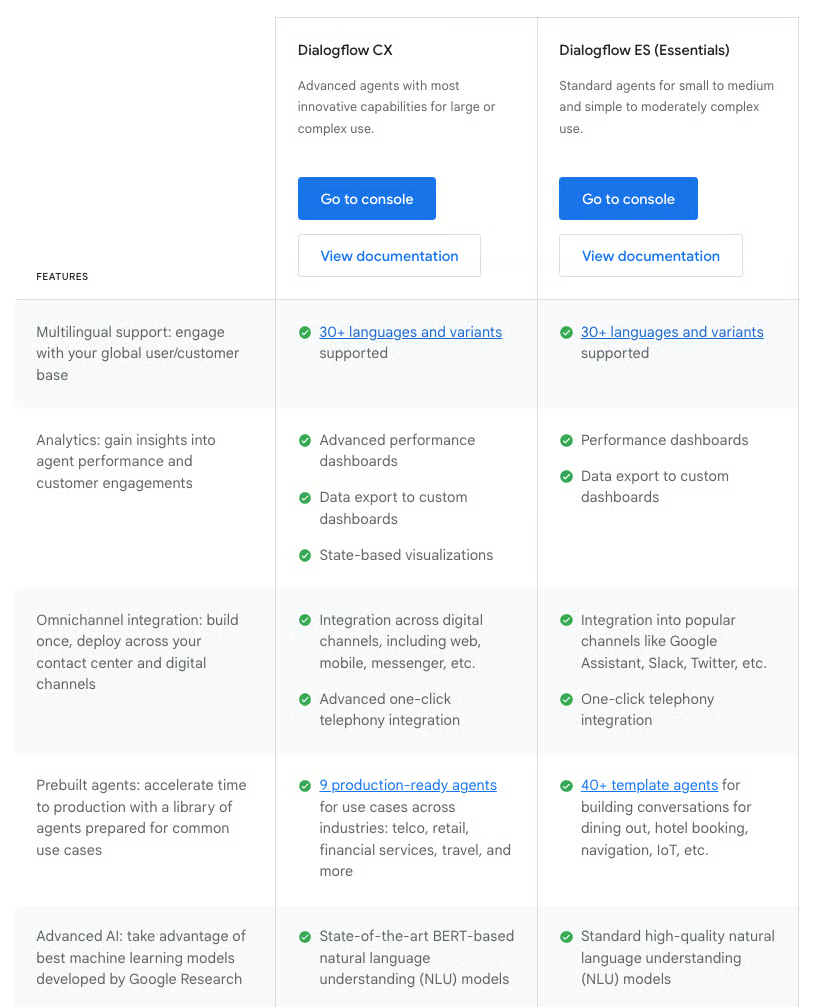
Dialogflow supports multilingual agents and deployment across web, mobile applications, and voice platforms such as Google Assistant and Alexa. This allows organizations to maintain consistent conversational search experiences across regions, channels, and customer touchpoints.
Designing conversations in Dialogflow CX involves working with states, transitions, and flow orchestration rather than simple query-response logic. This approach aligns well with teams experienced in conversational architecture, while organizations seeking more guided or template-driven chatbot design may find the model more structured.
The platform’s full feature set reflects a configuration-rich environment for building complex conversational workflows. Teams expecting a quick, lightweight setup may find the depth of options more extensive, while organizations prioritizing highly customized and scalable conversational experiences align well with this level of control.
For teams already operating within the Google Cloud ecosystem, particularly mid-market and enterprise organizations deploying conversational search at scale, Google Cloud Dialogflow fits well as a foundational platform.
“It is one of the best language processing platforms on the cloud. It has some amazing features, such as the ready-made templates for various industries that are so valuable. It is easy to use and implement. I have been using it for the past 2 years now. They provide good customer support, too.”
- Google Cloud Dialogflow review, Gurunath J.
“Dialogflow ES (the older version) is easier to start with, but Dialogflow CX, which is better for enterprise-grade bots, has a steeper learning curve. Designing conversation flows using states and transitions takes time to master.”
- Google Cloud Dialogflow review, Jemish G.
Elasticsearch is built for organizations where search is a core system capability, supported by flexible indexing, customizable relevance tuning, and strong developer control over how data is stored, queried, and delivered. That focus is reflected in its position as a widely relied-on platform for high-volume, performance-sensitive search workloads across demanding environments.
G2 users frequently describe Elasticsearch as giving teams direct control over relevance, speed, and query logic. The Query DSL allows precise combinations of filters, ranges, and relevance scoring within a single request, which supports complex search-driven applications. This level of control is commonly referenced by teams building search features where ranking behavior directly impacts user experience.
G2 reviews often highlight performance at scale as a defining characteristic. Teams report millisecond-level response times even as datasets grow into tens of millions of records. Distributed indexing and sharding allow search performance to remain stable as data volume and query load increase.
Elastic Cloud is commonly mentioned as supporting faster rollout and operational scaling. G2 users describe using managed deployment to reduce infrastructure overhead while retaining access to advanced configuration options. This approach allows teams to iterate on search behavior without giving up control as requirements evolve.
User feedback reinforces Elasticsearch's strength in relevance tuning. Synonyms score 92% on G2, well above category averages, and reviewers reference tuning relevance models and adjusting search results based on real usage patterns rather than static assumptions.
Teams reference using Dev Tools, ESQL, and APIs to experiment with queries, test relevance changes, and debug indexing behavior. Search analytics scores 92% on G2, reflecting how consistently teams analyze query behavior to improve search performance over time.
Documentation depth and support quality are frequently cited as reducing the operational burden of building and maintaining custom search implementations. Ease of doing business with is rated 91% on G2, and it is described as resolving implementation questions independently through available resources, with an active community and solution architects helping teams move faster during complex deployments.
Mid-market organizations represent 39% of users, with enterprises at 31% and small businesses at 30%. This distribution reflects use across product teams, internal platforms, and search-heavy systems where flexibility and performance are critical.
Elasticsearch reflects a configuration-driven search model, with mappings, indexing strategies, and Query DSL shaping how results are generated. This aligns well with teams experienced in search engineering and large-scale data environments, while organizations seeking more plug-and-play search solutions may find the setup more specialized.
Infrastructure costs scale alongside data volume and query load. This model aligns most naturally with teams operating high-throughput or data-intensive search environments, while smaller teams or budget-constrained use cases may find the cost dynamics more noticeable as indexing and cluster demands grow. Serverless and cloud offerings provide more flexible entry points for teams prioritizing scalability and cost control.
Even with that hands-on approach, Elasticsearch delivers consistent value for organizations that depend on fast, relevant search at scale. Its combination of expressive querying, strong analytics, and distributed performance makes it especially relevant for engineering and platform teams building enterprise-grade search experiences that must remain responsive as data volumes, use cases, and expectations expand.
“I appreciate the wealth of documentation available, which makes it easier to implement solutions on my own. Their AI support option is also excellent, and oftentimes, I do not need to lodge an actual support ticket as the AI recommendations resolved my issue. The Elastic UI is clean, intuitive, and easy to use. I find the Dev Tools feature within Elastic to be really useful, as most of my updates are managed via Elastic ESQL queries, which enables me to keep my changes within a repo.”
- Elasticsearch review, Emil K.
“It might be overkill for your smallest search needs. (That being said, the serverless option is quite affordable, so that's not a particularly good reason to not use it.)
- Elasticsearch review, Michael S.
Microsoft Bing Web Search API stands out as a developer-centric search platform built to embed web-scale search directly into applications and digital products. It’s designed for teams that need consistent, fast, and programmatic access to web content without maintaining their own crawling, indexing, or ranking infrastructure. Feedback consistently emphasizes accuracy, speed, and control, particularly for use cases where clean, ad-free search results are surfaced inside internal tools, customer-facing applications, or research-driven workflows.
G2 user feedback highlights how the API handles multilingual and region-specific queries at scale. Global Language Support scores 88% on G2, reflecting reliable handling of queries across markets and geographies. This capability supports applications that serve international audiences while maintaining consistent search behavior.
Integrations are frequently mentioned as supporting smooth implementation. Integrations score 87% on G2, and teams describe embedding search results directly into existing systems without complex middleware, keeping development timelines short and implementation straightforward.
G2 reviews often reference the flexibility of working through a single API endpoint. The API returns structured JSON across web pages, images, news, videos, and entities, allowing teams to consume multiple content types through one integration. This structure simplifies development and reduces the need to coordinate multiple search services.

G2 reviewers frequently describe using query parameters to control search behavior precisely. Market selection, Safe Search levels, freshness filters, and promoted result types allow developers to tune relevance and output based on application needs. This level of control supports content-heavy and research-oriented products where search behavior must align closely with business requirements.
Set-up experiences are commonly described as straightforward once the API structure is understood. Users mention predictable response formats, consistent relevance, and quick integration timelines. Support for image search, structured entities, and configurable query behavior allows teams to tailor search outputs without additional processing layers.
Search results returned through the API are ad-free and structured, giving developers clean output that fits directly into product interfaces without additional filtering or processing. Highlighting scores 87% on G2, helping developers present search results in readable, structured formats that fit cleanly into product interfaces. G2 reviewers describe results arriving fast and accurately, regardless of content type, whether web pages, images, news, or videos.
Free tier access is limited in query volume and feature availability. Smaller teams or individual developers will encounter these boundaries quickly as search traffic grows, while usage-based pricing aligns costs with actual demand as usage scales.
Performance can vary when the API is used across multiple layers or integrations simultaneously. Teams running complex, multi-level search implementations will notice this most, while single-layer deployments align well with everyday search use cases.
Microsoft Bing Web Search API serves as a reliable, scalable enterprise search integration backed by Microsoft’s broader search ecosystem. Its strengths in global language support, integrations, and structured result handling explain its continued use among teams delivering accurate search experiences backed by a mature, globally indexed search ecosystem.
"What I like best about Microsoft Bing Web Search API is the speed, accuracy, and flexibility it gives developers. It delivers highly relevant, ad-free search results and supports multiple content types: web, images, news, and videos, all through a single endpoint.”
- Microsoft Bing Web Search API review, Ambuj T.
“I have high-volume needs and have seen that the API can become expensive, especially compared to the free tiers or pricing models of other search APIs. There are limitations on the number of queries allowed within certain timeframes or tiers. I have experienced slow loading times for search results, impacting the responsiveness of applications built with the API.”
- Microsoft Bing Web Search API review, Sandeep B.
Dropbox Dash is designed to simplify how teams find information across the tools they already use, without forcing a major change in workflow. Rather than positioning itself as a broad enterprise search overhaul, Dash focuses on reducing everyday friction by helping users quickly locate files, emails, tabs, and documents across Dropbox, Google Drive, Microsoft tools, and browsers from a single place. The platform is primarily used by small businesses, which account for 65% of its customer base, followed by mid-market teams at 25% and enterprise organizations at 10%.
Dash brings search together across different ecosystems without requiring users to remember where information lives. Federated search scores 92% on G2, and natural language queries make it easier to move quickly between files, links, and documents without switching tools.
Consolidating browser activity into a single interface drives meaningful productivity gains for daily users. Natural language scores 90% on G2, and pinned tabs, recent pages, and open workstreams become searchable alongside files and documents. This allows Dash to function as a practical access layer rather than an additional destination that needs separate upkeep.
Connecting Dropbox, Google Drive, Microsoft tools, and email systems into one search layer removes the need to log into each service separately. File types score 90% on G2, reflecting how consistently content is retrieved across documents, calendars, messages, and creative files in a single search. Teams cite this cross-format retrieval as a reliable daily time saver.
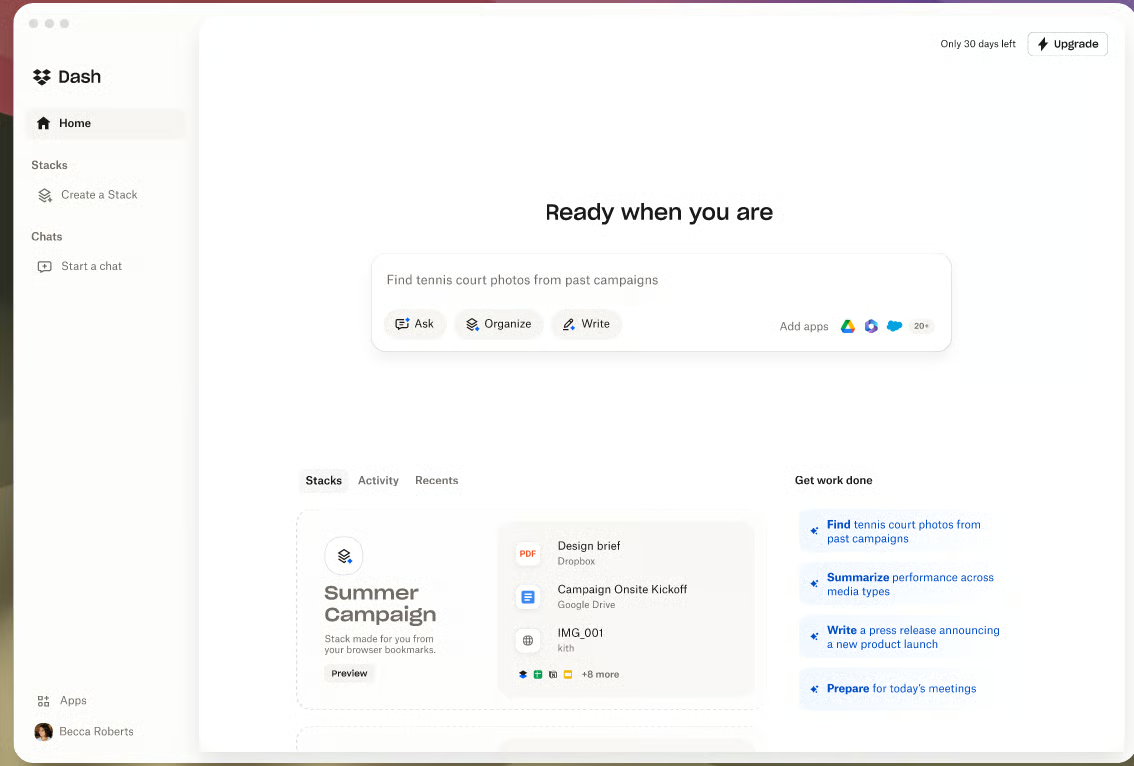
Setup experiences are commonly described as lightweight. Teams mentions minimal disruption during adoption, especially when Dropbox is already part of the workflow. The interface requires little configuration to become useful, allowing teams to start searching across connected tools quickly.
Search speed and responsiveness are recurring themes in G2 reviews. Users describe fast result retrieval even when working across multiple platforms simultaneously. This responsiveness supports frequent use throughout the day without interrupting ongoing tasks.
Dash surfaces direct answers from stored documents and connected accounts without requiring manual file navigation. G2 reviewers describe asking questions about stored documentation and receiving immediate responses, removing the need to open files and scan through content manually. For teams managing large or deeply nested file repositories, that instant retrieval reduces the time between asking a question and finding a reliable answer.
Dropbox Dash cannot restrict which files and data it scans within connected tools. Teams managing sensitive or confidential information have no way to limit visibility at a granular level, which raises data governance concerns for security-conscious organizations. For teams with standard data handling requirements, the cross-tool search delivers meaningful time savings across daily workflows.
The browser extension can stop functioning or disappear after system migrations, new device setup, or OS changes. Teams that rely on Dash as a daily access layer will need to reinstall or reconfigure the extension in these scenarios, which interrupts workflow if not addressed quickly. For teams on stable, unchanged setups, the extension runs consistently and reliably throughout daily use.
Dropbox Dash is best suited for organizations that work across multiple platforms and want faster access to information without rebuilding their entire knowledge setup. For teams overwhelmed by documents, tabs, and disconnected systems, Dash positions itself as a practical layer that brings their work closer together.
"I really appreciate how easy Dropbox Dash is to set up. It saves me an incredible amount of time by allowing me to search across various digital spaces, like Google Drive, Microsoft, and Dropbox, without having to log in to each service separately. As someone with multiple platforms and email addresses to manage, this feature significantly boosts my efficiency. The consolidated interface stands out as extremely useful, allowing for seamless navigation and management of various tasks and documents. Moreover, I find it to be a valuable resource for organizations working across multiple platforms, as it enables quick and efficient searches of all necessary files and communications in one unified place. Additionally, the integration with Google Docs and my email services is particularly handy. I also admire the calendar integrations, which showcase the potential for enhanced organization within the platform."
- Dropbox Dash review, Shagah Z.
“I worry about data privacy issues with Dropbox Dash. It seems possible that data could be sent outside of my system, which is concerning. Consequently, I don't permit the software to scan any sensitive information. To address this, I believe incorporating local hosting of the server could greatly alleviate my concerns.”
- Dropbox Dash review, Jacob Ira A.
Dashworks is considered by teams looking to search across expanding internal knowledge without disrupting daily workflows. Within the enterprise search software category, it is positioned to index and retrieve information from tools such as Gmail, Drive, Slack, and internal documentation, with an emphasis on fast retrieval and straightforward setup rather than extensive configuration.
Natural language capabilities score 92% on G2 compared to the category average of 89%, allowing users to ask questions in plain language and retrieve relevant answers without learning structured queries. Teams describe finding information faster once search stops requiring exact keyword matches or structured query syntax.
G2 reviews often mention how quickly teams see useful results after deployment. Dashworks is described as delivering relevant answers even before any AI training or refinement takes place. Slack integration is repeatedly referenced as a standout feature, allowing users to surface answers directly inside conversations and continue work without switching tools.
Teams describe Dashworks as operating like a shared knowledge layer rather than a separate destination. Federated search scores 92% on G2, and search spans office documents, emails, internal policies, and shared resources, helping reduce repeated questions across teams. This shared access supports alignment without requiring ongoing manual coordination
Productivity gains are commonly mentioned in G2 user feedback. Teams describe faster access to emails, files, historical documentation, and internal references. Built-in summarization and drafting support help users respond to questions, prepare emails, and move through tasks with less time spent searching.
File-type support feature scores 91% on G2 compared to the category average of 88%, reflecting reliable access across a wide range of internal document formats. Users mention retrieving content consistently regardless of source, which supports frequent use throughout the workday.
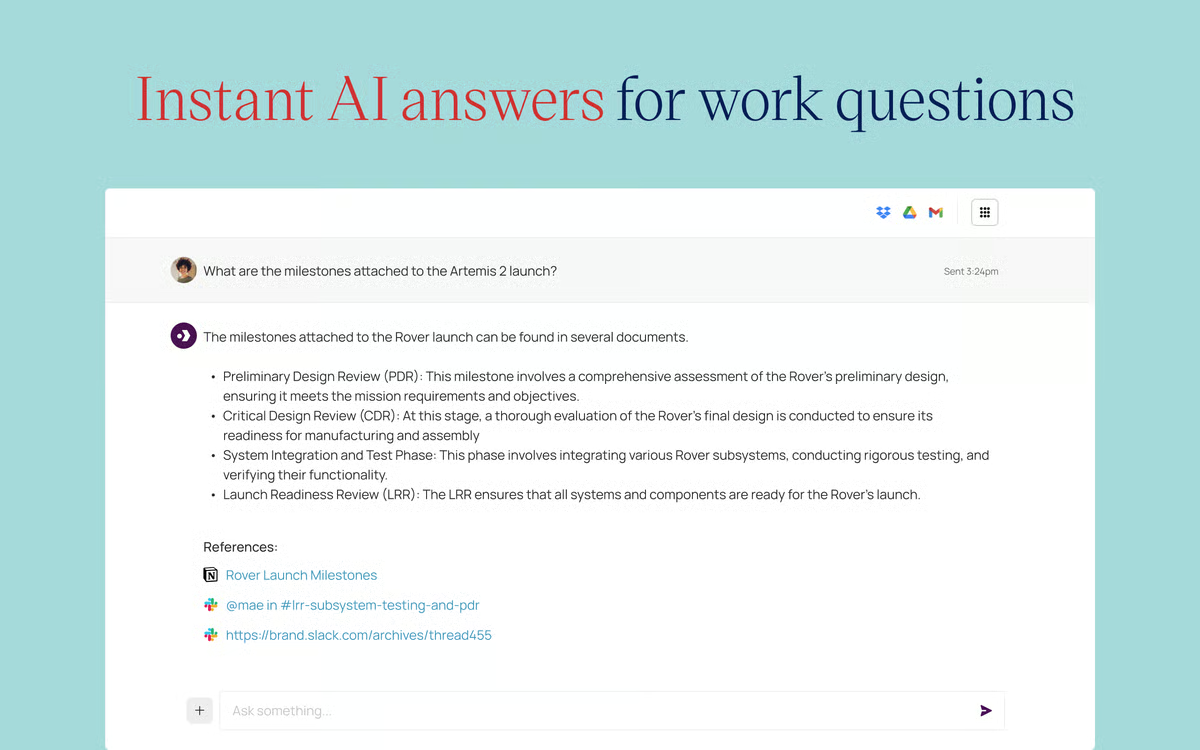
G2 reviewers describe creating quick summaries and content outputs across tools like SharePoint, Google Drive, and Confluence from a single place. For teams that regularly synthesize information from multiple sources, that capability reduces the gap between finding information and putting it to use.
Updates and improvements to connected knowledge sources are not always reflected immediately in Dashworks responses. This is most noticeable for teams relying on frequently updated or version-sensitive documentation, while more stable knowledge environments align more naturally with the platform’s indexing model.
Search results can occasionally return broader matches rather than highly precise results. This tends to be more noticeable in large or complex knowledge bases, while standard internal sources align well with everyday knowledge retrieval workflows.
Overall, Dashworks is purpose-built for organizations that want fast, reliable access to internal knowledge without heavy operational overhead. Its strengths in natural language search, federated access, Slack integration, and file handling explain its adoption across sales, support, and operations teams. For organizations aiming to centralize knowledge and reduce time spent searching across tools, Dashworks presents itself as a dependable enterprise search platform built for everyday use.
"Dashworks has been a game-changer for our support operations at Luxury Presence. As a company that serves a demanding clientele in the luxury real estate industry, maintaining efficiency and delivering exceptional customer satisfaction are non-negotiable. Dashworks has enabled us to streamline our processes, achieve a remarkable 96% CSAT, and empower our team with the tools they need to succeed."
- Dashworks review, Kris B.
“Each login has to have authenticated access to the internal resources, which makes it more challenging to give contractors access. Might be solvable with the Slack integration, which we've not set up yet.”
- Dashworks review, Chuck M.
AlphaSense supports teams that search and analyze large volumes of financial, market, and competitive information, using AI to surface relevant insights from sources such as filings, earnings transcripts, research reports, and news.
G2 users frequently describe AlphaSense as a central research workspace. Instead of switching between filings, earnings calls, news sites, and sell-side research portals, teams rely on AlphaSense to bring these sources together in one searchable environment. This consolidation helps reduce the time spent locating information before analysis even begins.
G2 reviews consistently highlight how AI-powered search accelerates research workflows. Teams mention quickly moving from raw transcripts and dense filings to relevant excerpts through automated highlighting and contextual summaries. This allows users to focus on interpretation and insight rather than manual scanning.
Strong intent recognition is another recurring theme in user feedback. Highlighting scores 88% on G2, and teams describe quickly moving from dense filings and transcripts to relevant excerpts without manual scanning. This supports more accurate retrieval across varied terminology, helping teams surface relevant passages even when language differs across sources.
Time savings show up clearly in reported outcomes. Synonyms score 86% on G2, reflecting how consistently the platform surfaces relevant content even when search terms vary across documents and sources. G2 users describe completing competitive monitoring, earnings analysis, and market research tasks in minutes instead of hours.
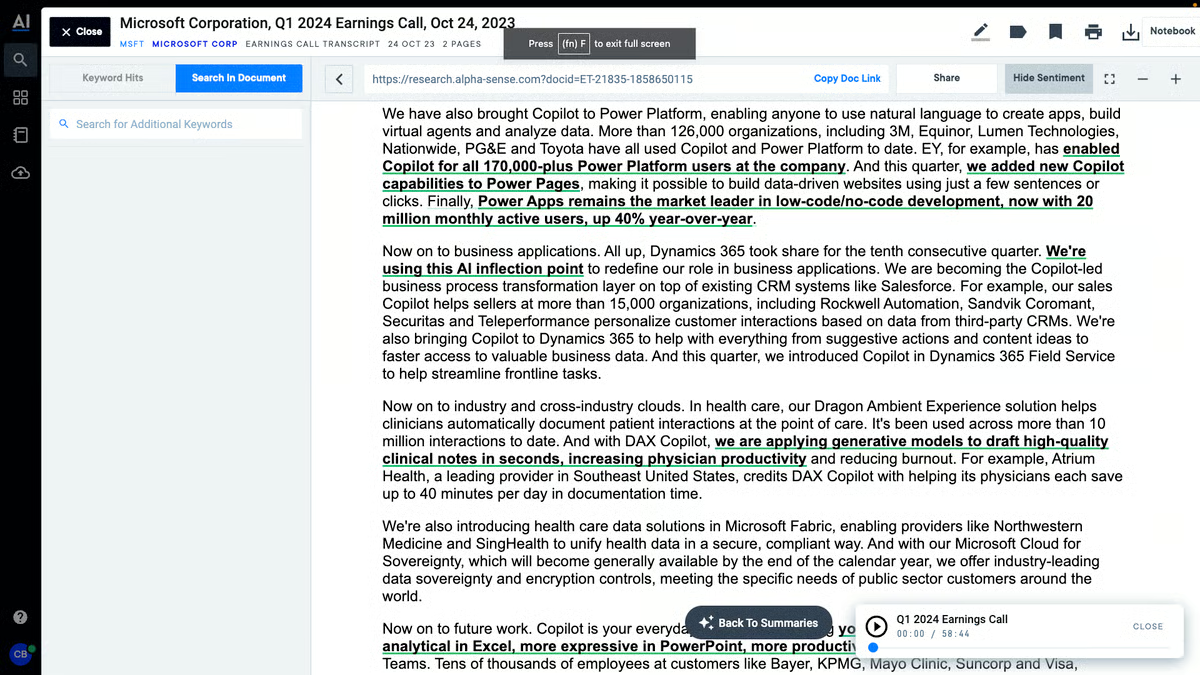
Collaboration and knowledge sharing are often mentioned as downstream benefits. Search analytics scores 85% on G2, supporting teams in understanding which sources and queries drive the most useful research outputs. Research findings are commonly exported to Excel, Google Sheets, and presentations, allowing insights to move smoothly into reporting and strategy workflows.
Getting started with AlphaSense is described as straightforward, with training sessions, onboarding resources, and dedicated customer success support helping teams reach productive use quickly. Ease of use is rated at 91% on G2, reflecting how intuitively the platform handles daily research tasks once teams are oriented.
Usage patterns reinforce AlphaSense’s role in structured research environments. Enterprise teams make up the largest portion of users, followed by mid-market organizations that rely on formal research processes. This concentration aligns with teams that require repeatable, defensible analysis supported by primary source material rather than lightweight discovery.
The advanced features, including alerts, filtering, and source navigation, require meaningful time to configure and use effectively. Teams new to enterprise research platforms will find full adoption more involved than the initial setup suggests. Once familiar, these tools support precise, repeatable research workflows that handle high volumes of market and financial content reliably.
Pricing sits at a level that can be difficult to justify for smaller teams or individual researchers with lighter usage needs. Organizations managing tight budgets will find the cost structure more suited to enterprise or mid-market teams running formal research processes. For teams where research is a core daily function, the depth of content coverage and time savings typically offset the investment.
AlphaSense serves organizations that treat research as a core operational function. Its strengths in AI-powered search, deep content coverage, and rapid insight extraction explain why it is widely used in enterprise research and competitive intelligence teams. For organizations that depend on accurate, timely analysis to support high-stakes decisions, AlphaSense provides a structured and dependable foundation for market and financial research at scale.
"I appreciate AlphaSense's AI-powered search, which quickly surfaces the most relevant insights from earnings calls, filings, and research. The ability to get summaries and key highlights saves a lot of time and makes market research much more efficient. I use it alongside Excel/Google Sheets and presentation tools to organize insights and share findings. AlphaSense acts as the core research source, making research faster and more efficient compared to using multiple separate sources. The initial setup was very easy, and the platform is intuitive, with onboarding resources that made it quick to start getting value right away."
- AlphaSense review, Venkata V.
“AlphaSense is a powerful market intelligence platform, but users have identified several areas for improvement, primarily concerning its user interface complexity, data filtering efficiency, performance issues, and limited scope for private company data. The initial setup and full adoption of the platform are often described as more involved, with a learning curve.”
- AlphaSense review, Amit V.
|
Software
|
G2 rating
|
Free plan
|
Ideal for
|
|
Slack
|
4.5/5
|
Yes
|
Conversational enterprise search across fast-moving team discussions and shared context
|
|
Notion
|
4.6/5
|
Yes
|
Structured internal knowledge bases and documentation-driven discovery
|
|
Guru
|
4.7/5
|
No
|
Verified answers and trusted knowledge embedded directly into workflows
|
|
Google Cloud Dialogflow
|
4.4/5
|
No
|
Conversational search interfaces layered on structured data and systems
|
|
Elasticsearch
|
4.5/5
|
Yes
|
Customizable, developer-driven enterprise search infrastructure at scale
|
|
Microsoft Bing Web Search API
|
4.2/5
|
No
|
Federated and external-facing search via API-driven web results
|
|
Dropbox Dash
|
4.2/5
|
No
|
Unified search across the connected workplace and SaaS tools
|
|
Dashworks
|
4.5/5
|
No
|
Internal SaaS and enterprise knowledge discovery across tools
|
|
AlphaSense
|
4.6/5
|
No
|
Research, market intelligence, and financial document search
|
*These enterprise search platforms are top-rated in their category. Most offer custom enterprise contracts or usage-based pricing, with demos or quotes available on request.
Got more questions? G2 has the answers!
Elasticsearch and AlphaSense are most often evaluated by large organizations because they scale well across complex data environments. Elasticsearch is commonly used by enterprises with strong engineering teams that need full control over indexing, security, and relevance tuning. AlphaSense is often selected by large enterprises focused on research, competitive intelligence, and market data discovery across vast content libraries.
Elasticsearch and AlphaSense are most associated with combining search and analytics. Elasticsearch is commonly chosen when organizations want to build custom analytics pipelines on top of search data. AlphaSense stands out in research-driven organizations that rely on analytics to track content usage, topic trends, and insight discovery
Slack, Notion, and Dropbox Dash are most often referenced for mobile-friendly enterprise search. Slack is commonly used when teams search conversations, shared files, and decisions directly from mobile devices. Notion is frequently chosen for searchable documentation and structured knowledge that works well on mobile. Dropbox Dash is often selected for quick file and content discovery across cloud storage on the go.
Elasticsearch, Microsoft Bing Web Search API, and Google Cloud Dialogflow are most often mentioned for indexing and retrieval. Elasticsearch is widely used for large-scale, distributed indexing across enterprise datasets. Microsoft Bing Web Search API is commonly used when organizations need to retrieve and enrich external web data alongside internal sources. Google Cloud Dialogflow is frequently used where conversational retrieval and intent-based access to enterprise information are required.
Elasticsearch and Guru are commonly evaluated for secure enterprise search. Elasticsearch is frequently used where enterprises need full control over security configurations, encryption, and compliance. Guru is commonly selected by teams that need verified, permission-aware knowledge surfaced directly within daily workflows.
Slack, Notion, and Dropbox Dash are most often described as offering intuitive search experiences. Slack is widely valued for conversational search embedded directly into communication workflows. Notion is frequently praised for its clean structure and ease of navigating searchable documentation. Dropbox Dash is often highlighted for simplifying content discovery across files, apps, and cloud tools without complex setup.
AlphaSense and Elasticsearch are most associated with AI-driven relevance. AlphaSense applies AI to surface the most relevant insights from large volumes of research and market intelligence content. Elasticsearch is commonly used by teams that implement machine learning models to fine-tune relevance at scale.
Elasticsearch and AlphaSense are frequently evaluated in compliance-heavy environments. Elasticsearch is widely used where data residency, logging, and security configurations must meet strict regulatory standards. AlphaSense is commonly chosen in financial services and research-driven industries with strong compliance and data governance needs.
Guru and Dashworks are most often referenced for intranet integration. Guru is frequently embedded into intranets and collaboration tools to surface trusted knowledge in context. Dashworks is often selected for unifying discovery across internal tools and intranet environments.
Elasticsearch, Dashworks, and Dropbox Dash are most frequently mentioned for multi-source enterprise search. Elasticsearch is preferred when organizations want to aggregate and normalize data from many systems into a custom search layer. Dashworks is commonly chosen for unified discovery across SaaS tools and internal applications. Dropbox Dash is often selected for quickly connecting and searching content across multiple cloud-based file and productivity platforms.
The true measure of an enterprise search platform is how easily teams access the knowledge they need. Strong tools deliver accurate answers across multiple systems, letting users act quickly without repeating searches or relying on colleagues for context. When relevance suffers or integrations fail, teams spend time chasing information instead of making decisions, and small inefficiencies quietly grow into larger workflow friction.
The impact shows in daily collaboration. Reliable search keeps expertise visible, speeds onboarding, and allows teams to move confidently. Weak implementations fragment trust, create duplicated effort, and encourage shadow processes to fill gaps. Over time, these workarounds slow productivity and change how teams interact with knowledge.
Choosing a platform is about maintaining operational flow rather than deploying software. Evaluate tools by how consistently they provide relevant answers across sources, teams, and evolving content. When information surfaces quickly and reliably, productivity improves. When it does not, every workflow decision carries hidden drag, and rebuilding trust in knowledge becomes a slow and costly process.
Want to expand beyond enterprise search? Explore G2’s best customer service software products that support faster issue resolution and reliable access to knowledge.


"Wait, didn’t we already document that?" If I had a dollar for every time I’ve heard or said...
 by Soundarya Jayaraman

To find the best free knowledge base software for tech startups in 2026, I looked at G2...
 by Sudipto Paul
Have you ever shied away from asking a question due to the vanity of it? Or ever dreaded...
.png) by Shreya Mattoo
by Shreya Mattoo