


As a marketer, I’ve come to realize that no amount of clever branding can outweigh a bad online reputation. People trust other people more than they trust taglines, and that reality becomes clear when customer feedback starts shaping how your brand is perceived online. To see which platforms actually help brands stay ahead, I evaluated 20+ tools to find the best online reputation management software, including Birdeye, Reputation, SOCi, Podium, HighLevel, and G2 Buyer Intent.
When reviews and brand mentions are scattered across the web, staying on top of reputation can quickly become overwhelming. That truth hits especially hard when you're refreshing review pages before a big launch or wading through Reddit threads after a product update. Reputation isn’t just a PR problem anymore; it’s a marketing reality.
I analyzed hundreds of verified G2 reviews to narrow it down to this list, which highlights the eight best online reputation management software that consistently help teams monitor reviews, manage responses at scale, and gain insights that strengthen brand trust.
*These online reputation management software are top-rated in their category, according to G2's Winter 2026 Grid Reports. You can find pricing by visiting the official websites and contacting sales. I have included it for tools with publicly available pricing.
Online reputation management encompasses everything from how your brand shows up online to how fast you respond to feedback and how consistently you build trust across every relevant channel.
That’s the lens I used while evaluating these best online reputation management tools. I wasn’t just looking for platforms that collect reviews or monitor brand mentions. I focused on how well they help teams stay proactive rather than reactive. Were users able to centralize feedback across channels? Could they respond at scale without sounding robotic? Did the tools offer insights that shaped marketing strategy or just surface noise?
And the market for these tools is only growing, projected to increase $24.96 billion by 2034, at a CAGR of 5.93%.
The tools that earned a spot on this list struck the right balance between functionality, flexibility, and usability, backed by patterns I saw across hundreds of G2 reviews.
To find the top software for managing online business reputation, I started with G2’s latest Grid Reports to pinpoint tools that consistently ranked high in customer satisfaction, ease of use, and feature depth.
From there, I analyzed hundreds of G2 reviews using artificial intelligence (AI) to surface recurring themes: which tools helped teams manage reputation at scale, where users ran into friction, and what features genuinely made a difference. I paid close attention to mentions of review response workflows, sentiment tracking, multi-platform coverage, and how the tools fit into broader marketing operations.
I also considered feedback from G2 colleagues who work with brand teams or manage our own review strategy, and cross-checked it with G2 reviews.
The screenshots throughout this article include those obtained from vendor listings on G2 and publicly available materials.
I considered the following factors when evaluating the best online reputation management tools.
The list below contains genuine user reviews from the online reputation management software category page. To be included in this category, a solution must:
*This data was pulled from G2 in 2026. Some reviews may have been edited for clarity.
Birdeye helps businesses monitor, manage, and grow their presence across review sites, social platforms, and listings. It consolidates customer feedback, streamlines response workflows, and offers automation tools to help brands manage their public image. On G2, Birdeye has an impressive 99% satisfaction score, reflecting how consistently it delivers value for reputation management teams.
One of the strongest points that stood out during my evaluation was how Birdeye brings all review activities into one place. Whether it’s reviews on Google, Facebook, or other third-party platforms, I saw consistent praise for how easily teams could respond, track sentiment, and assign ownership, all within a unified dashboard. For marketers managing dozens of listings, that level of consolidation is a huge time-saver. It also reduces the risk of missing negative feedback or delayed responses, which can damage brand trust.
Another highlight is how Birdeye is layering in AI across its platform. Features like automated review requests, sentiment tagging, and intelligent alerts help teams do more with less manual input. These tools don’t just make workflows faster; they help ensure timely and relevant responses, which is especially useful for teams managing high review volume.
Users repeatedly described Birdeye as “easy to use” or “straightforward.” The dashboard is clean, the navigation is intuitive, and most features are accessible without a steep learning curve, according to G2 reviews. Even teams without much technical expertise could confidently jump in and start managing their reviews.
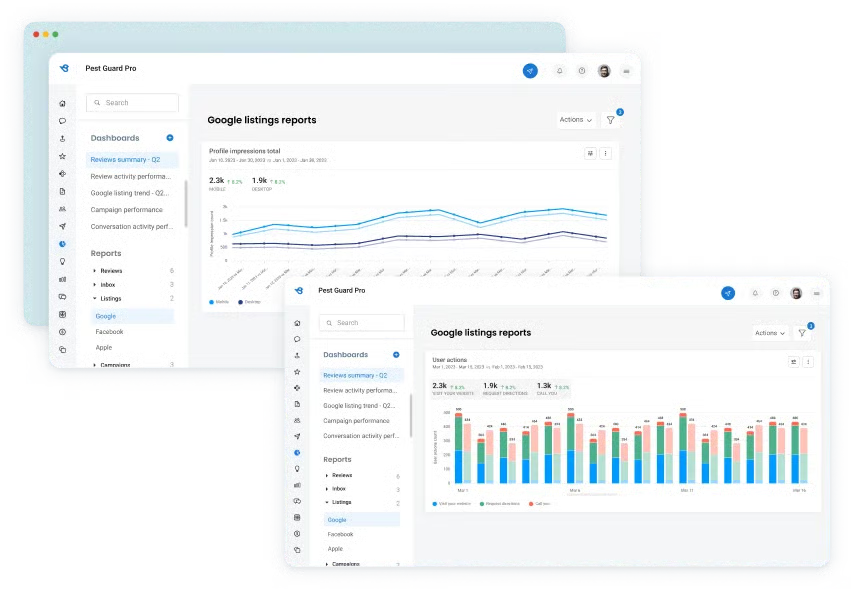
Birdeye does a strong job of centralizing review management tasks in one place, which many users appreciate when monitoring multiple platforms and responding to customer feedback quickly. However, a few G2 reviewers mentioned that the platform can occasionally log users out after periods of inactivity, especially when multitasking or stepping away briefly. For teams managing reviews continuously throughout the day, this may create small interruptions when returning to the dashboard.
Birdeye includes reporting tools that help teams track review performance and customer sentiment across channels, which many users find helpful. That said, some reviewers noted that generating more customized reports or tailoring dashboards isn’t always as flexible as they’d like. For organizations that rely heavily on highly customized analytics or reporting workflows, this may require additional tools or exported data for deeper analysis.
Overall, Birdeye remains one of the most trusted options in this space, striking a strong balance between usability, automation, and comprehensive review management.
“The most impactful part of Birdeye is the absolute control it gives us over our digital footprint through the online listing dashboard. I love that I can manage our presence on everything from Google and Facebook down to more niche sites like Yellow Pages Goes Green and MapQuest, all from one Central tab. The visual confirmation that our status is live across these directories gives me total peace of mind that our patients can find accurate information for our Coppell location.”
- Birdeye review, Priyanka T.
“I dislike how the integrations work. They require a computer to be on 24/7, which doesn’t leave much wiggle room if something malfunctions. On top of that, they depend on the strength of the WiFi connection, and that can fluctuate.”
- Birdeye review, Jonathan B.
Related: Online reviews impact far more than star ratings. Here are some stats to show just how much they shape buying decisions.
Reputation is built around the idea that "reputation" is more than star ratings; it’s about experience, responsiveness, and consistency across every touchpoint.
One of Reputation's standout strengths is its ability to centralize review management. G2 users consistently mentioned how easy it was to view, respond to, and analyze reviews from multiple platforms without switching between interfaces, and they called it one of the best ways to handle business reviews online.
Another strength is how approachable the platform feels. Many reviewers praised its clean layout and intuitive navigation, which made onboarding much easier. I noticed that teams with shared responsibilities across support, operations, and marketing found the UI particularly helpful in keeping things efficient. That usability is also reflected in the data, with 91% of G2 users rating Reputation highly for ease of use.
Reputation also goes beyond review sites by offering built-in tools for social media monitoring. This helps teams get a broader view of what’s being said about their brand, not just in formal reviews but also in social mentions and comments. I saw several G2 reviewers highlight how this gave them early warning signs of sentiment shifts or potential PR issues. The social monitoring dashboard isn't overly complex but provides just enough context to support more intelligent decisions.
Another capability that stood out in the reviews is how easily teams can generate new customer reviews. Many users mentioned features such as sending quick review request links, automated reminders, and pre-written email or text templates that make it easy to ask customers for feedback right after an interaction. Instead of manually reaching out each time, teams can send requests in seconds and maintain consistent review volume.
Another strength users frequently highlighted is how Reputation helps businesses manage listings and location data across multiple platforms. Teams with several locations appreciate being able to update business information, monitor reviews, and track performance for each location from a single dashboard. This centralized control helps ensure that business details remain accurate across platforms like Google and other directories while also making it easier for corporate teams to monitor reputation performance across multiple sites.
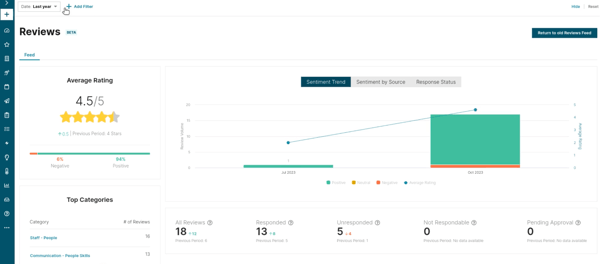
Reputation brings together reviews, social mentions, and customer feedback into a centralized interface, which many teams appreciate for managing brand sentiment in one place. That said, a few G2 users noted that switching between dashboard sections or loading analytics views can sometimes take a little longer than expected. For teams handling a high volume of responses or navigating multiple reports in a session, this may occasionally slow down their workflow.
The platform includes built-in reporting that helps teams track review performance and basic experience metrics, which works well for day-to-day monitoring. However, some G2 reviewers mentioned they would like more flexibility when customizing reports or exploring deeper analytics. For organizations that rely heavily on highly tailored reporting or advanced data analysis, it may be worth evaluating whether the existing reporting options meet their needs.
On the whole, Reputation stands out as a well-rounded platform that balances usability with broad coverage, making it a solid choice for businesses looking to combine review management with social monitoring.
“Reputation centralizes users' or customers' ratings and reviews, all collected from different platforms like Facebook, Google, among others. The app has a real-time review monitoring system that systematically provides analytical reports on trends and sentiments. The app had a direct reply option from users, and this makes it easy to follow up. Reputation captures reviews from diverse locations or outreach, and this ensures the reputation of a company is centrally controlled. The app captures accurate insights from marketing campaigns, something that guides users in SEO improvements.”
- Reputation review, Samantha L.
“I find the whole reputation score aspect challenging. It's possible to increase our score, but maintaining it is difficult due to numerous variables beyond our control. Furthermore, it's hard to encourage customers to leave detailed reviews when happy, which impacts our sentiment scores negatively.”
- Reputation review, Kim W.
Related: If your brand ever takes a reputational hit, here’s how to navigate a PR crisis without losing customer trust.
SOCi combines social scheduling, review response, and basic performance tracking into one dashboard. It gives visibility into brand activity at a local level without losing control of the bigger picture.
What stood out most in user feedback was how seamlessly SOCi combines social media and reputation management. I came across many reviews from teams that rely on SOCi to post content across Facebook, Instagram, and Google while also managing customer reviews from the same place. Review response, post-scheduling, and brand listening, all handled through a single login, definitely reduces the mental load. That strength shows up clearly in G2 Data as well, with 91% of users rating SOCi positively for social media management.
I also found that SOCi’s reporting and location-based insights frequently appeared in positive reviews. The platform gives marketing teams a clear view of how each location performs, whether tied to review volume, sentiment trends, or social engagement. G2 users appreciated the built-in reports for surfacing what’s working and where attention is needed. It may not have the deepest customization options, but the core dashboards seemed to cover what most teams needed.
Another feature that received a lot of praise was the AI-assisted features and built-in creative tools. Features like suggested post times, auto-responses, and the Canva integration, which lets users build branded content without switching platforms, were repeatedly mentioned. These small touches help streamline everyday tasks and keep social output consistent. It’s not a heavily automated platform, but it does help.
Many users described using the platform to distribute approved content templates, manage brand guidelines, and oversee social activity for dozens or even hundreds of local pages. Instead of leaving each location to manage its own messaging independently, SOCi allows corporate marketing teams to keep campaigns aligned while still giving local teams room to customize posts for their communities. This balance between centralized control and local flexibility appears to be a major advantage for multi-location organizations.
Another strength that showed up frequently in feedback is SOCi’s scheduling workflow. Users often mention how easy it is to plan posts across multiple platforms using the built-in content calendar. Being able to draft, schedule, and preview content for multiple locations from a single interface helps teams stay organized and maintain a consistent posting cadence.
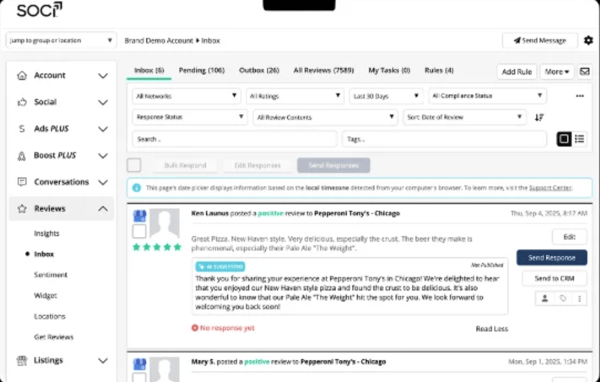
SOCi brings social scheduling, review management, and reporting into a single interface, which many teams appreciate for keeping everything in one place. That said, a few G2 users mentioned that the platform can sometimes take a bit longer to load, particularly when navigating the scheduling calendar or moving between modules. For teams managing multiple accounts or posting frequently throughout the day, this may occasionally slow down workflows during busy periods.
The platform offers customer support to help teams manage their social and reputation workflows, and several users speak positively about their interactions with the support team. However, some G2 reviewers mentioned experiencing slower response times or unresolved tickets in certain cases. For organizations that rely heavily on quick troubleshooting, it may be helpful to evaluate the available support channels and response expectations during onboarding.
Even with these minor drawbacks, G2 reviewers broadly agreed that SOCi is a reliable choice for businesses that need to balance local visibility with centralized control over brand reputation.
“SOCi stands out as an all-in-one marketing platform that makes it easy for our veterinary hospital to manage social media, online reviews, and local listings in one place. What we like best is how user-friendly and efficient it is; our team can quickly respond to client feedback, keep our information accurate across platforms, and maintain a consistent online presence without adding extra work to our day. The reporting and insights are clear and actionable, helping us understand what’s working and where we can improve. SOCi has saved us time while strengthening our connection with pet owners in our community.”
- SOCi review, Katie D.
“The search agent onboarding is not fully functional. It claims to scrape the website for details, but freezes or gives an error when you share the website. It has a lot of room for improvement. Also, we had to do a lot of onboarding work ourselves, and several 1-hour weekly meetings were a bit repetitive. The onboarding trainings could have been condensed into 1 or 2 sessions."
- SOCi review, Shannon O.
Podium helps businesses connect with customers more effectively across reviews, text, and mobile channels. The platform leans heavily into conversational commerce and customer engagement, positioning itself as more than just a reputation management tool. On G2, it holds a 93% ease of doing business score, reflecting how approachable and user-friendly the platform feels to many teams.
One of the most consistent positives I saw in user feedback was how Podium handles review management, especially with Google. Review invites can be sent via text, tracked from a central dashboard, and customized to fit different touchpoints. Several users noted how effectively it boosted response rates and improved their local SEO rankings. The integration with Google reviews, in particular, got a lot of praise, making it a go-to for businesses focused on visibility and reputation.
Text messaging is another big reason teams stick with Podium. The shared inbox setup makes it easy to manage back-and-forth communication with customers, whether requesting a review, answering a question, or following up after a visit. The ability to have meaningful conversations without relying on email or phone calls makes a real difference. For businesses that value quick, personal communication, this tool clearly delivers.
I also saw quite a bit of praise for Podium’s mobile app. G2 users described it as fast, easy to use, and just as functional as the desktop version. That’s not always the case with reputation tools, and it came up enough times to feel like a competitive edge. Being able to send messages, check reviews, or respond to customer questions on the go gives teams more flexibility.
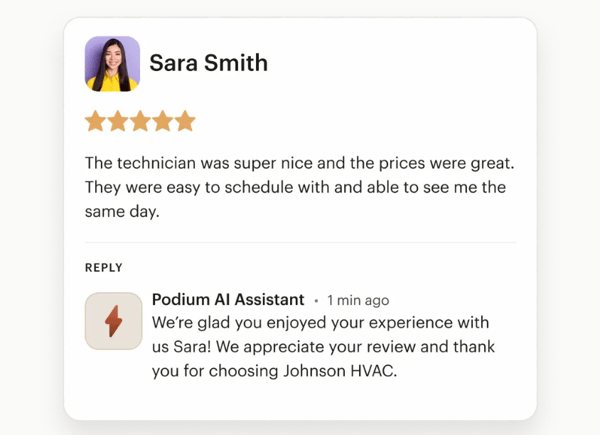
Podium does a great job keeping teams informed through alerts for reviews, messages, and customer activity, which helps ensure nothing slips through the cracks. However, some G2 users reported that notification volume can sometimes feel excessive, especially in shared inbox environments with multiple users. For businesses managing high message or review volumes, having more control over how alerts are filtered or prioritized could help streamline workflows.
Built-in dashboards give teams visibility into review performance and customer interactions, which many users find helpful for day-to-day monitoring. That said, a number of G2 reviewers noted that they would like more advanced reporting options, such as deeper filtering, stronger comparison tools, or additional export capabilities. For organizations that rely heavily on detailed reporting or long-term performance tracking, the current analytics may feel a bit lightweight.
All in all, Podium is a highly regarded platform for businesses that want to strengthen customer communication while boosting review volume and online visibility.
“Podium combines all messages from diverse channels, and this makes it effective to control them. The tool helps in reviewing all the feedback that the company gets from clients, and this ensures they get a positive reputation. Podium is brilliant in monitoring all the messages and interactions made with clients. The engagement from Podium is straightforward and faster, creating a real-time one-on-one discussion.”
- Podium review, Samantha L.
“Podium is easy to use, but there are a few things I don’t like. It can be expensive compared to similar tools, especially for small businesses. Some features feel limited unless you upgrade to a higher plan. Also, customization options are not very flexible, and integrations with other tools can”
- Podium review, Ashok S.
HighLevel’s standout capability is its ability to combine review management, customer communication, and marketing automation into one centralized system designed for agencies and service businesses. Instead of switching between multiple tools to manage customer relationships, campaigns, and feedback workflows, HighLevel centralizes those functions so teams can track and influence the entire customer journey from a single platform.
One of the strongest patterns I noticed across the reviews was how frequently users rely on HighLevel as an all-in-one marketing system. Many reviewers described replacing several separate tools with HighLevel, using it for CRM, messaging, funnels, and campaign management within a single interface. According to G2 Data, HighLevel scores 93% for meeting requirements, which reflects how often users say the platform covers most of their operational needs without requiring additional software.
Automation capabilities also stood out as one of the most praised aspects of the platform. Several G2 reviewers explained how they use HighLevel’s automation builder to create follow-up sequences, appointment reminders, review requests, and lead-nurturing campaigns. Instead of manually tracking each interaction, workflows can trigger automatically based on customer behavior. That automation layer helps teams maintain consistent communication while reducing repetitive work.
Another theme that appeared repeatedly in the feedback was HighLevel’s built-in CRM and pipeline tracking. Users frequently mention being able to monitor leads, manage deal stages, and keep track of customer conversations from within the same system where campaigns are launched. This visibility helps teams stay organized as leads move through different stages of the sales process. According to G2 Data, the platform earns 87% for team workflow capabilities, which aligns with how reviewers describe coordinating customer management tasks across marketing and sales teams.
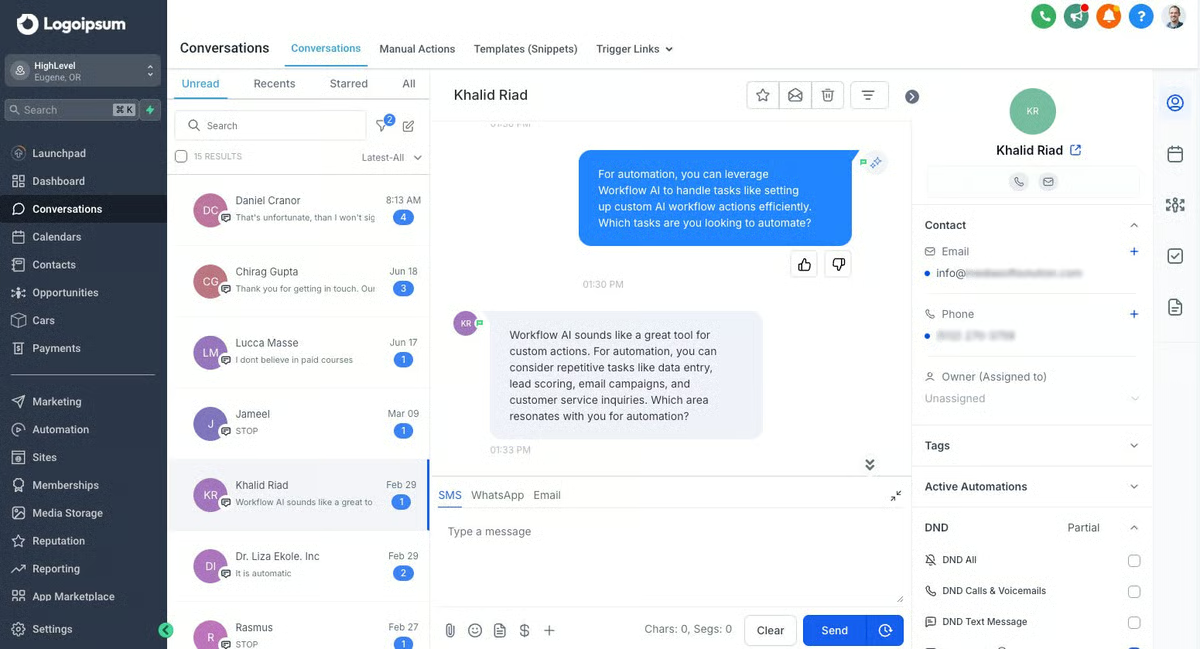
HighLevel’s funnel and campaign-building tools were also highlighted in many reviews. Users talked about creating landing pages, sales funnels, and marketing assets directly within the platform instead of relying on external website builders or funnel software. This capability helps teams launch campaigns faster and keep marketing assets connected to their lead-tracking system.
Agency-focused features were another area that reviewers brought up often. HighLevel allows users to create sub-accounts for individual clients, making it easier for agencies to manage multiple businesses within one dashboard. Teams can run campaigns, track leads, and monitor performance for different clients without needing separate systems. According to G2 Data, the platform shows particularly strong adoption among smaller organizations, with 97% of its user base coming from small businesses, which reflects how accessible the platform is for agencies serving local or mid-market clients.
HighLevel brings together CRM, automation, messaging, funnels, and client management tools into a single platform, which is one of the reasons many teams adopt it in the first place. With so many capabilities available in one interface, however, some users say the dashboard can feel a bit difficult to navigate at first. Teams that plan to build more advanced workflows typically adapt over time, but those looking for a very minimal interface may need some time to get comfortable with the layout.
Another aspect that came up in to feedback concerns the platform’s feature set. HighLevel is designed to support multiple parts of the marketing and customer engagement lifecycle, which gives agencies a lot of flexibility when managing campaigns and client relationships. That depth also means new users sometimes need extra time during onboarding to understand how the different modules connect. For organizations building more structured marketing systems, the learning investment can be worthwhile.
Across the reviews I analyzed, HighLevel comes across as a powerful platform for agencies and service-based businesses that want to combine reputation management, marketing automation, and client relationship tracking into a single system.
"HighLevel provides an all-in-one platform for managing email campaigns, automations, and client communication at scale. As a marketing agency, we use it to run email outreach, nurture sequences, and automated workflows for artists, record labels, and business clients. The ability to manage campaigns, track performance, and automate follow-ups in one system helps streamline operations and maintain consistency across multiple clients."
- HighLevel review, Christian K.
"The steep learning curve and complicated interface can be challenging, and I have found the inconsistent customer support to be frustrating. There are also potential hidden costs, particularly when it comes to third-party integrations. Additionally, the CRM features feel clunky, such as having to use multiple screens for simple tasks, and there are missing advanced functionalities that larger clients might expect, which is disappointing given its "all-in-one" promise."
- HighLevel review, Eric S.
G2 Buyer Intent is designed to help software companies increase brand visibility, capture high-intent leads, and build credibility through real customer feedback. Most of the value comes from being discoverable in the right context: on category pages, in comparison grids, and through search results tied to buyer interest. The platform earns a 94% score for quality of support, underscoring the value teams find not just in the tool but also in the guidance behind it.
One of the most consistent benefits I saw in reviews was how effectively G2 Buyer Intent boosts review visibility and category placement. Teams appreciated being featured in high-traffic areas where buyers are already comparing tools, especially when those placements are powered by strong user feedback. I came across several mentions of how this visibility helped users gain traction in competitive markets or reinforce credibility with new prospects.
Another key strength was the credibility that comes from G2 badges and Grid rankings. Several users mentioned how powerful it is to display a “Leader” or “High Performer” badge in email footers, sales decks, or landing pages. These assets do more than look nice; they provide third-party validation that buyers actually recognize. One review described them as “social proof that doesn’t need explaining,” and I can see why that resonates.
G2 users also appreciated the extended brand reach and awareness they gained from the campaigns run. Whether it was increased profile traffic, sponsored placements, or inclusion in email roundups, these features helped teams expand their audience beyond organic channels. I saw feedback from marketers who felt they were reaching new segments, buyers who hadn’t engaged through traditional advertising or paid search.
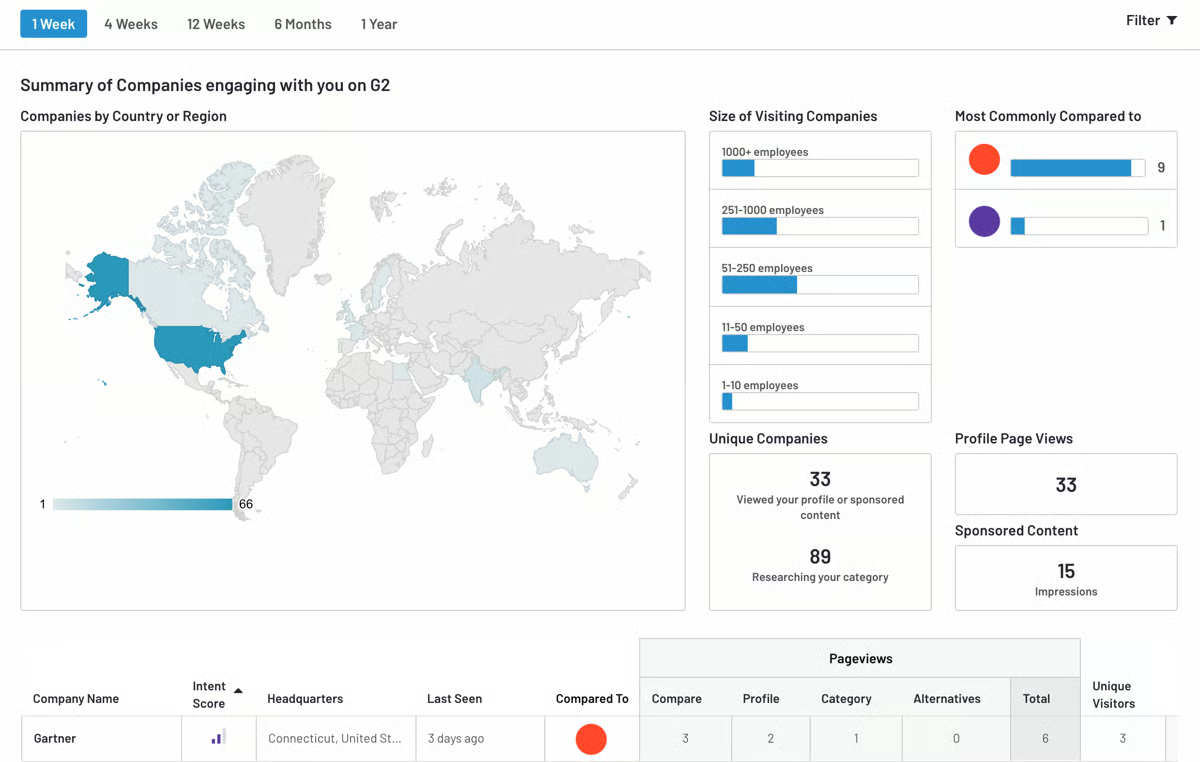
G2 Buyer Intent offers a range of tools for managing listings, monitoring category placement, and tracking campaign performance, giving teams a high level of visibility into their brand presence. At the same time, some users mentioned that navigating the interface or locating specific reporting options can take some adjustment, especially when working with newer modules or recently added features. For teams just getting started with the platform, spending time exploring the dashboard or leaning on onboarding resources can help make the experience smoother.
The platform delivers meaningful value for companies focused on visibility and lead generation, particularly when they’re actively investing in review growth and category positioning. However, a few reviewers pointed out that the pricing can feel like a significant commitment, especially for smaller organizations or teams with limited marketing budgets. For businesses evaluating the platform, it can be helpful to consider expected campaign outcomes and overall ROI before scaling up to a larger plan.
Looking at the big picture, G2 Buyer Intent remains a trusted choice for software companies aiming to amplify visibility, build credibility, and capture high-intent buyers in moments that matter.
“I love the grid that G2 Buyer Intent has for each category. It's very, very insightful. I also love that they have AI-assisted reviews.”
- G2 Buyer Intent review, Riddhy M.
"The pricing tiers can feel a bit restrictive for smaller teams.”
- G2 Buyer Intent review, Sabri S.
Related: See how G2 Marketing Solutions helps B2B brands turn buyer intent and reputation into measurable revenue impact.
Thryv is the most recommended service for managing online reviews, consolidating tools like CRM, calendar, review management, and messaging. While it’s not positioned as a pure-play reputation management solution, it includes several features that support customer interaction and feedback collection.
On G2, 97% of Thryv’s users are small businesses, the highest percentage among the tools on this list. This highlights its accessibility and fit for teams that need simplicity and centralization. For businesses looking to stay responsive and organized, Thryv offers a centralized space to engage with clients and track the full customer journey.
The first thing I noticed in the reviews was how often users described Thryv as easy to use. The platform's interface seemed approachable even for users without a technical background, and most key tools were quick to set up. That simplicity appears to be a major selling point for busy teams who don’t have time for complex onboarding.
What also came through clearly was how much users relied on Thryv's Client communication tools. The built-in inbox, SMS support, automated reminders, and appointment confirmations were frequently praised. These features help teams follow up on services, request reviews, or reschedule appointments, all without leaving the platform. That kind of consolidation reduces back-and-forth and helps keep every customer interaction documented.
Another theme that stood out more than I expected was customer support. Several G2 users shared positive experiences with Thryv’s onboarding and ongoing service. There were shoutouts to individual reps, references to quick responses, and feedback that support teams were patient and helpful when walking through new features. That level of human support seems to add a lot of value.
Another advantage that came up repeatedly was how easy it is to request and manage customer reviews. Many users mentioned that Thryv helps automate the process of collecting feedback by sending review requests through text or email after a service interaction. Instead of relying on manual follow-ups, teams can prompt customers at the right moment and keep reviews flowing consistently. For businesses that depend on online reputation, this automation makes it easier to build credibility while staying focused on day-to-day operations.
I also noticed strong feedback around how Thryv helps businesses stay organized with built-in client management tools. Several users described using the platform to track customer details, appointment history, and service interactions in one place. Having access to CRM-style records alongside scheduling and communication tools makes it easier to manage relationships over time. For small teams juggling multiple responsibilities, that level of organization helps ensure that no client interaction slips through the cracks.
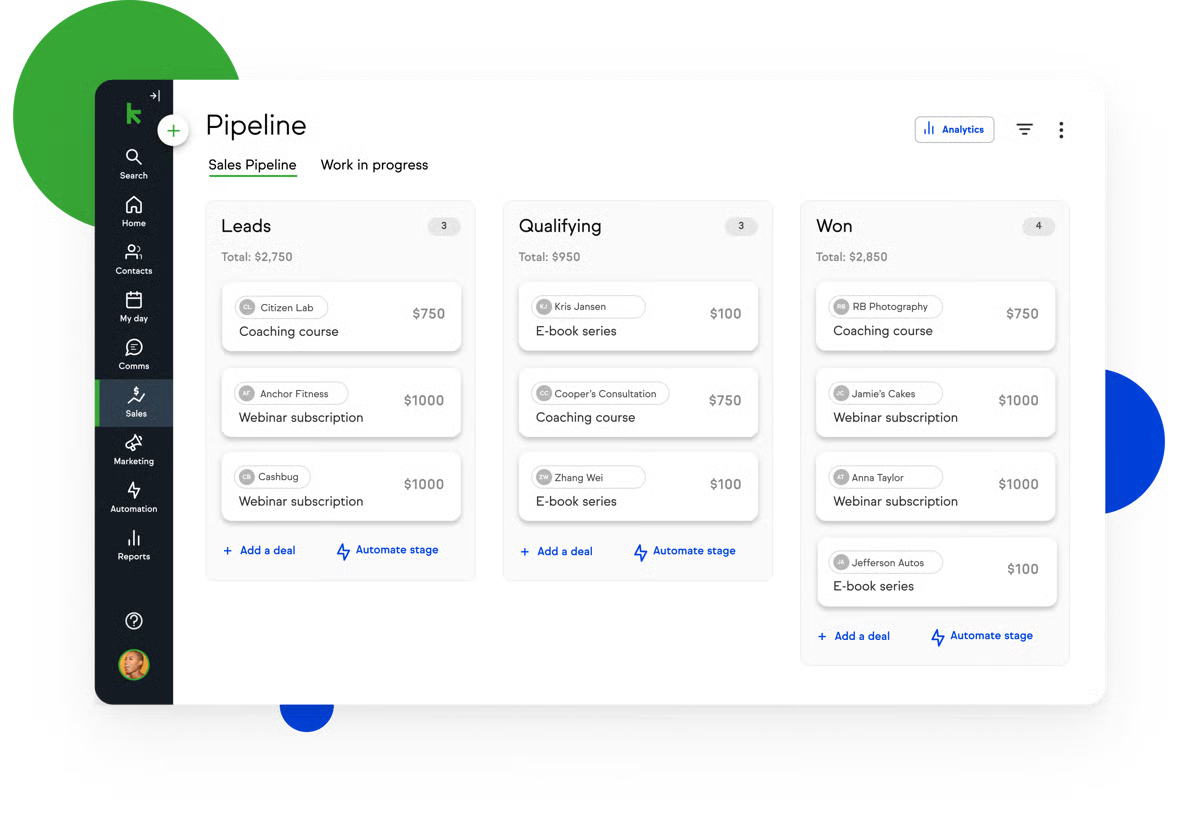
The platform brings together CRM, scheduling, messaging, and review management into a single system, which many small businesses appreciate for its convenience. That said, some users mentioned that the overall cost can feel harder to justify when only a portion of the available features are actively used. For teams that primarily need one or two capabilities rather than the full suite, it may be worth evaluating whether the platform’s bundled approach aligns with their usage.
It also covers many everyday business needs, particularly for communication and customer management. However, a few G2 users noted that certain areas, such as reporting depth, template customization, or third-party integrations, could be more flexible. Businesses with more complex reporting requirements or highly customized workflows may occasionally need additional tools or manual adjustments to fill those gaps.
To summarise, Thryv remains a top choice for small businesses, offering an accessible platform that combines communication, scheduling, and review management into one reliable system.
“I use Thryv to manage my business in one place, handling customers, appointments, payments, and marketing easily. It saves me time in scheduling and payments, keeping everything organized in one place. I like how it makes everything easier and simpler.”
- Thryv review, Nadia Solimar P.
“The learning curve was steep at first. Some features feel buried, and the price stings for a small team. Occasional glitches with calendar sync can be complex.”
- Thryv review, Gulshan D.
Pair reputation strategies with the best media monitoring software to stay ahead of brand mentions across channels.
NiceJob's core focus is review generation, primarily through automated email and text outreach after a customer interaction. The tool also offers integrations with CRMs and scheduling systems to simplify contact syncing and follow-ups.
The standout benefit I saw across reviews was how well NiceJob handles automated review collection. Once the system is set up, it sends out requests, nudges customers to respond, and directs them to platforms like Google with almost no involvement from your team. G2 users also appreciated how consistent the follow-ups were, which helped increase response rates over time. It’s one of those features that quietly runs in the background but makes a noticeable difference.
Another highlight was how quick and simple the setup process is. G2 reviewers often noted that they were able to get started without needing any technical help or custom development. Even the CRM integration and review widget felt straightforward to implement. It’s appealing to smaller businesses without dedicated tech support, which aligns with G2 Data showing that 96% of users rate NiceJob highly for ease of setup. I got the sense that the simplicity of the experience is part of what keeps people sticking with it.
Customer support also earned a lot of praise in the feedback I read. Several users mentioned fast responses, hands-on guidance during onboarding, and helpful follow-ups when something wasn’t working as expected. One reviewer even said the support team felt like a partner rather than a vendor. It’s clear that the team behind NiceJob plays an active role in helping users succeed.
NiceJob also stands out for how well it integrates with CRM and service platforms like Jobber, Housecall Pro, QuickBooks, and JobTread. These integrations automatically sync customer information after a job is completed, allowing review requests to be triggered without manual data entry and keeping feedback workflows consistent.
Another theme mentioned frequently in reviews is the noticeable increase in online reviews after implementing NiceJob. Many users reported a steady rise in Google reviews, which helped improve their online credibility and visibility when potential customers search for services.
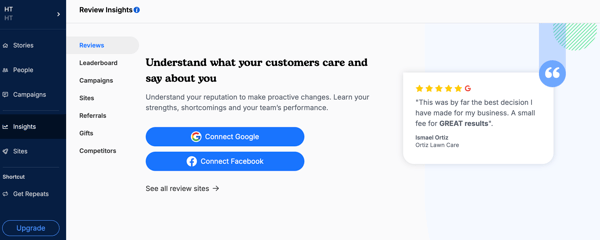
NiceJob focuses heavily on making review generation simple and automated, which works well for businesses that want a hands-off system. At the same time, a few users mentioned that certain elements, such as website widgets and automation workflows, offer limited customization options. For teams that need more control over visual design or more complex automation logic, the current flexibility may feel somewhat restrictive.
NiceJob delivers clear value for businesses looking to consistently generate reviews and strengthen their online presence. However, some users noted that the subscription cost can feel high if they’re only using the platform’s core features. For smaller teams or businesses with simpler needs, it may be worth evaluating how frequently the tool will be used before committing to a long-term plan.
Overall, NiceJobs simplifies review generation, automates follow-ups, and helps businesses consistently grow their online reputation.
“NiceJob is easily one of the best tools for our company. The number one thing we love about them is their customer service. We're connected to a live person immediately, and they are always knowledgeable and friendly. This goes a long way for us! Of course, the ability to get regular reviews from our clients is equally important. Due to an unfortunate incident before we began using NiceJob, years' worth of reviews were wiped from our Google listing. Thanks to this company, we were able to begin building them back immediately. We now have a perfect 5.0 rating, with over 55 reviews from our clients, in a matter of a few short weeks. This product is priceless.”
- NiceJob review, Midlands Landscape L.
“I have frequent issues with the NiceJob website widgets firing correctly, and often have to submit support tickets to my website host to resolve the problem and reinstall the widget code. I am told by them that it is likely an issue on the NiceJob side, as it works fine for a while and then stops working correctly.”
- NiceJob review, Jordan S.
Alongside reputation management, the best online community management software helps brands foster trust through active community spaces.
If you're still considering options for online reputation tools for businesses, I've got some FAQs for you.
Birdeye is the most trusted pick on this list, with a 99% satisfaction score on G2, the highest of any tool covered here. Reputation is also worth flagging for operations-heavy teams specifically: G2 reviewers noted that teams with shared responsibilities across support, operations, and marketing found its interface easy to keep efficient, backed by a 91% ease-of-use score.
G2 Buyer Intent is built specifically for software companies, helping them increase visibility on category pages and comparison grids, capture high-intent leads, and build credibility through verified reviews. It earns a 94% score for quality of support. If your team wants reputation management folded into a broader CRM and marketing stack rather than run as a separate integration, HighLevel centralizes review management, messaging, and campaigns in one platform and scores 93% for meeting requirements.
NiceJob stands out here. Its setup requires no technical help or custom development, and G2 Data shows 96% of users rate it highly for ease of setup. G2 reviewers describe that low-friction start as part of what keeps them sticking with the tool rather than reverting. Birdeye's 99% satisfaction score points to a similar pattern of sustained, not just first-week, value.
Birdeye leads on this measure, with its 99% satisfaction score reflecting how consistently it delivers value for reputation teams day to day (a few reviewers do mention it can log users out after periods of inactivity). For teams managing several locations at once, SOCi is a dependable pick too, 91% of users rate it positively for social media management across locations.
Reputation is the clearest match; G2 reviewers point to its real-time review monitoring and centralized dashboard, which keeps listing and location data consistent across platforms like Google. Note: Some reviewers say dashboard switching slows during high-volume periods. Birdeye offers similar real-time coverage through automated alerts and sentiment tagging, backed by a 99% satisfaction score.
NiceJob is the strongest fit: it's priced at $75/month, the lowest price on this list, and G2 reviewers say they got up and running without technical help or custom development. HighLevel, at $97/month, similarly consolidates review management, CRM, and campaigns into one system, so teams avoid stitching together and paying for multiple separate tools.
NiceJob again leads: G2 reviewers describe getting started, including CRM integration and the review widget, without needing technical help, which is part of why it appeals to smaller businesses without dedicated tech support. Birdeye is a close second; users repeatedly called it "easy to use" and "straightforward," with most features accessible without a steep learning curve.
For a software company audience specifically, G2 Buyer Intent is the most directly built for this use case, helping software companies increase visibility and credibility through verified reviews, with a 94% score for quality of support. On implementation complexity specifically, NiceJob is the standout across the whole list. G2 reviewers say they got running with no technical help or custom development, backed by a 96% score for ease of setup.
HighLevel is the best-documented example: G2 Data shows it scores 87% for team workflow capabilities specifically, on top of a 93% score for meeting requirements overall, which reviewers tie to coordinating customer management tasks across marketing and sales teams from one system. Podium is another strong fit for team-wide adoption, holding a 93% ease-of-doing-business score that reviewers connect to its shared inbox for managing messages and reviews together.
Reputation and Birdeye are the clearest picks. Reputation's real-time review monitoring and cross-platform listing management help teams catch sentiment shifts as they happen, while Birdeye pairs automated alerts and sentiment tagging with a 99% satisfaction score among G2 users.
Your brand’s reputation doesn’t live in a silo; it’s shaped by every review, response, and interaction your customers have across the web. The leading online reputation management solutions mentioned here make staying visible, responsive, and in control easier without chasing reviews or bouncing between platforms.
From automating review requests to managing feedback across dozens (or even hundreds) of locations, the tools I’ve covered here reflect what real users rely on day-to-day. I’ve sifted through the noise to highlight what works so you can focus on building trust, not troubleshooting tools.
Looking to level up your customer engagement, too? Explore the best experience management software to turn feedback into action.

Recently updatedSummer 2026 Grid® Report · Published May 26, 2026 This guide was last...
 by Yashwathy Marudhachalam

As a marketer, I’ve relied on email marketing tools to boost customer engagement for as long...
.png) by Devyani Mehta
by Devyani Mehta

I evaluated 15+ media monitoring tools to shortlist the 7 best: Meltwater, Muck Rack,...
.png) by Tanuja Bahirat
by Tanuja Bahirat