

The 5 best customer communication management software in 2026 according to G2 Summer Report are Agentforce Service, Zoho Desk, Podium, Freshdesk, and Front.
I’ve spoken with enough CX leaders, marketers, and ops folks to know one thing: managing customer conversations across too many tools isn’t just frustrating. It’s costly.
Scattered messages lead to missed leads, slower response times, and misaligned teams. And when performance metrics like reply rates or CSAT start slipping, it’s hard to know which channel or tool is to blame.
That’s why I created this list of the best customer communications management (CCM) software for 2026. The right tools don’t just unify email, chat, SMS, and in-app messaging. They help teams increase engagement, track performance across the full journey, and streamline workflows without adding more complexity.
I reviewed over 20 platforms, dug through G2 reviews, and spoke with users across startups, scale-ups, and enterprise organizations to understand what actually moves the needle.
If you’re ready to replace a messy tool stack with something more efficient and easier to measure, these are the platforms worth your time.
Whether you're in marketing, ops, or product, these picks are designed to meet the growing demand for unified, personalized communication, without the usual platform sprawl.
*These are the top-rated products in the customer communications management software category, according to the G2 Summer Grid Report 2026. I have mentioned the starting price of their monthly paid plans and standout features for easy comparison.
Most teams I spoke with were juggling a disconnected mix of tools: one platform for email campaigns, another for live chat, something else entirely for SMS, plus a CRM or helpdesk to try and stitch everything together. The result? Fragmented conversations, missed context, repeated outreach, and a frustrating experience on both sides.
But do you know that 1 in 8 customers say a company is only as good as its service, and 30% of consumers stop doing business with a brand after just one bad experience? That’s the core problem CCM tools solve.
Customer communication management software unify those communication touchpoints so your team sees the full picture. You know exactly where a customer is in their journey, what they’ve received or responded to, and what comes next, whether you're sending a campaign to thousands or handling a one-on-one conversation.
The best CCM software in 2026 goes beyond message consolidation. They’re flexible enough to adapt to your workflows, smart enough to automate without sounding robotic, and fast enough to get your team up and running without a six-month onboarding process.
To find the best customer communications management (CCM) software for 2026, I started where thousands of real users share what’s working and what’s not: G2. I dug into the CCM category, filtering for platforms with consistently high ratings.
From there, I looked closely at each tool’s feature set. I prioritized platforms that offer robust engagement capabilities, customization flexibility, actionable analytics, and built-in support for multichannel communication. I also made sure they integrate well with the broader stack, think CRMs, support tools, and automation platforms like Slack, HubSpot, Salesforce, and Zapier.
In cases where I couldn't personally test the tool due to limited access, I consulted a professional with hands-on experience and validated their insights using G2 reviews. The screenshots featured in this article may mix those captured during evaluation and those obtained from the vendor's G2 page.
Here’s what I looked for when narrowing down the top CCM platforms.
After reviewing more than 20 platforms, I narrowed it down to the 5 best customer communications management tools. While no tool checks every single box, each one brings something valuable to the table and nails the core features that matter most.
The list below contains genuine user reviews from the Customer Communications Management software category. To be included in this category, a solution must:
*This data was pulled from G2 in 2026. Some reviews may have been edited for clarity.
Salesforce is one of those tools that doesn’t need much of an introduction. It’s a staple in the enterprise tech stack, and if your team is already embedded in the Salesforce ecosystem, Agentforce Service (formerly Salesforce Service Cloud) is probably one of the strongest options on the table.
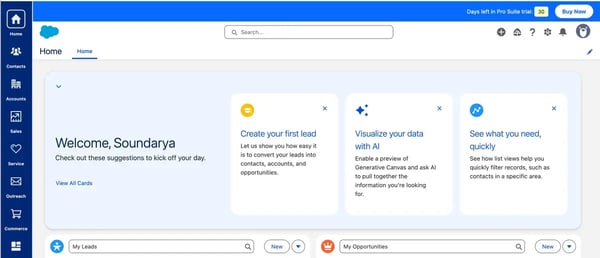
One thing that resonated immediately with me was how much ground it covers. You can integrate nearly every major channel — phone, email, web forms, live chat, SMS, WhatsApp, Facebook Messenger, Apple Messages, LINE, online communities, and help centers — all managed from one unified interface.
The case management system, in particular, impressed me. It allows teams to automate case routing so client inquiries go straight to the right reps (no manual triaging needed). I liked how macros and templates made repetitive responses easier to manage. Just one click, and agents can handle common requests much faster.
Einstein AI’s suggestions for next-best actions and reply recommendations stood out as well. I found them especially useful when thinking about how quickly new team members could get up to speed with the help of AI.
Another win? The integrated knowledge base. Agents can search and insert help articles mid-chat without switching tabs. That kind of in-flow support reduces friction and saves precious time.
To get a broader perspective, I read through dozens of G2 reviews across industries like financial services, IT, and healthcare. The consistent feedback: Service Cloud delivers when it comes to managing multichannel communication at scale.
What users love most is how comprehensive it is. The omnichannel coverage stands out. Many reviewers mentioned how seamless it felt to respond to cases and manage tickets in a single dashboard once set up.
For me, the platform’s ability to integrate tightly with the broader Salesforce CRM makes it even more powerful. For teams that need a unified view of the customer journey, this is a big deal.
A common theme in the reviews is the steep learning curve, several users noted that setup and customization can feel complex, often needing dedicated admin or developer support, especially for smaller or non-technical teams — though they were quick to add that once it's properly configured, the platform is remarkably stable and scales to handle almost anything an enterprise throws at it.
Pricing also came up, particularly for advanced features and AI capabilities like Einstein, which can add up quickly for smaller teams, but the same reviewers framed it as the trade-off for genuine enterprise-grade depth, and said the breadth of capability justifies the investment for organizations already committed to the Salesforce ecosystem.
I'd say if you’re part of a large organization or already using Salesforce CRM, Agentforce Service is an easy recommendation. With its ability to scale, seamless integrations, and robust control over customer interactions, it’s no surprise that Agentforce Service is a top-rated customer communications platform for mid-sized and enterprise teams.
"The platform makes it easier to track cases, automate repetitive tasks, and streamline day-to-day support work, which can help improve response times. I also appreciate its integration with the Salesforce ecosystem, since it keeps customer data and communication organized in one place and makes it simpler to stay on top of ongoing conversations."
- Agentforce Service review, Muhammad O.
"While the platform is powerful, it can sometimes feel complex and overwhelming, especially for new users. Certain configurations require multiple steps or deep technical knowledge, which can slow down adoption."
- Agentforce Service review, Jose P.
Are you aceing your customer communication? If not, this is for you. Explore 7 ways to facilitate positive customer interactions and get the engagement you want.
I know Zoho Desk doesn’t come with the enterprise swagger of Salesforce, but it’s gained serious traction as a smart, user-friendly customer communications management platform, especially for fast-moving teams and mid-market companies that want a balance of features, affordability, and flexibility. And when I explored, it didn't disappoint.
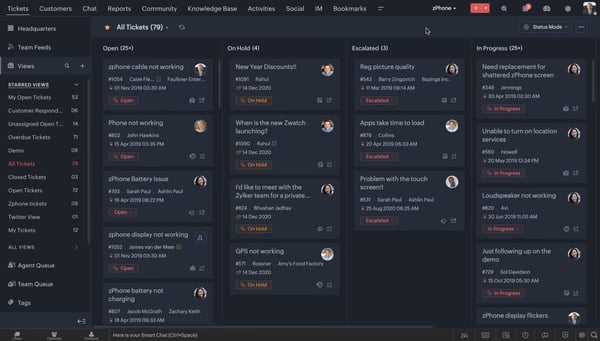
Whether someone reaches out via email, Telegram, WhatsApp, Instagram, or through our website chat, everything funnels into a single, clean thread. It’s like having a full picture of the customer’s journey at your fingertips, which makes responding so much more efficient and personal.
One of the features I really appreciated was how context-aware the ticketing system is. You can see previous interactions, internal notes, and even CRM data (especially helpful if you're also using Zoho CRM). That means you’re not going in blind when picking up a new ticket.
Canned responses and automation workflows are also a big plus. Setting up macros and rules makes you feel the system is doing a chunk of the job for you.
But what really makes Zoho Desk shine, in my opinion, is its value for money.
Compared to Zendesk or Salesforce, it's affordable, especially for small or mid-sized teams. And if you’re already in the Zoho ecosystem, it just fits. It also integrates with popular third-party tools like Slack, Google Workspace, Jira, and Shopify, making it flexible even outside the Zoho ecosystem.
What also stood out in the reviews is Zoho Desk's automation depth. Reviewers describe Blueprint workflows, SLA policies, and round-robin ticket assignment that route and escalate tickets intelligently without constant manual work, paired with the Zia AI assistant that suggests knowledge-base articles, auto-tags incoming requests, and even predicts ticket sentiment. Several called it the feature that turns a simple help desk into a proactive support engine, especially impressive at Zoho Desk's price point.
I did see some G2 reviewers note that the interface can feel cluttered and that advanced settings or automations aren't always easy to find at first, which adds a bit of a learning curve for new admins — though most agreed that once the platform is configured to their workflow, day-to-day use becomes clean and intuitive, with responsive documentation and support to lean on along the way.
A few reviewers also mentioned that some advanced reporting and analytics features sit behind higher-tier plans, which can feel limiting for smaller teams — but they were quick to add that the standard reporting covers everyday support needs well, and the overall value for money remains one of Zoho Desk's biggest strengths.
If you ask me, the positives clearly outweigh the friction points. 96% of G2 reviewers rate Zoho Desk 4 or 5 stars, which shows it’s highly capable. And with strong adoption across industries like IT services, software, and financial services, it’s proving to be a reliable option for a wide range of teams.
If you’re looking for a powerful CCM tool that doesn’t feel overwhelming or overpriced, Zoho Desk is one to seriously consider. It’s especially well-suited for small businesses and mid-sized teams that want a clean interface, multi-channel support, and just enough flexibility to grow without the complexity of a full-blown enterprise stack.
"The biggest benefit is how customizable it is — we’ve been able to set it up to match our workflow pretty closely. It keeps tickets organized, improves communication with customers, and the automation features save us a lot of time once everything is configured."
- Zoho Desk review, Danielle P.
"The initial setup and configuration can be a bit overwhelming for new users, as there are too many options and menus to navigate through. The onboarding process could be more guided and intuitive. Also, some advanced reporting features are locked behind higher-tier plans, which can be limiting for small agencies."
- Zoho Desk review, Sourabh K.
Explore the top customer success software for better retention and long-term customer loyalty
Podium was an easy addition to this list. I’ve seen it mentioned a lot in the context of local businesses and SMS-based marketing, but I didn’t realize how much more it actually offers until I dove into the G2 reviews. If you’re looking for a tool that blends messaging, reviews, and real customer interaction into one place, Podium makes a strong case for itself.

From the start, what struck me was how SMS-first it is. Everything revolves around making communication quick, personal, and mobile-friendly, which makes perfect sense if your customers prefer texting over emailing or calling.
Something to note here is that, unlike other help desk-style tools I’ve tried, Podium isn’t trying to turn messages into tickets. Instead, it focuses on real-time, conversational engagement. It felt more like chatting with customers than responding to support cases, which made it ideal for high-touch sales or service teams.
Without a doubt, users seem to love it. Podium has a 4.6/5 rating on G2, with 94% of reviewers giving it 4 or 5 stars, which speaks to how well it delivers for the right audience.
Another thing Podium nails, according to me, is reputation management. After a service visit or purchase, you can automatically send review requests via SMS and direct customers to leave feedback on Google or Facebook. It takes just a few clicks, and the results are tangible. For local or service-based businesses trying to boost online visibility, that feature alone might justify the investment.
And with top-rated features like personalization, inbound identification, and regulatory compliance, it’s not just good for customer contact — it’s built to do it responsibly and at scale.
Another thing reviewers consistently praised is Podium's AI-assisted responsiveness. Users describe its AI Employee handling missed calls and after-hours texts automatically, drafting quick replies, and following up on reviews and overdue invoices on its own, several credited it with capturing leads they'd otherwise have lost and even letting a Google campaign "run itself," which is a real edge for busy, customer-facing local teams.
A few reviewers pointed to small app glitches and navigation quirks — like message threads getting buried or not being able to filter by unread — which can be a minor hassle on busy days — though they noted the centralized inbox still keeps conversations, reviews, and payments in one place and that updates keep smoothing these edges out.
Pricing also came up, especially from smaller teams who felt the monthly cost ran a bit heavy if they weren't using every feature — but the same reviewers acknowledged the all-in-one bundle of messaging, reviews, and payments delivers clear ROI for local businesses that lean on it daily.
For me, Podium feels like the right fit for customer-facing, local, and fast-paced businesses. If your communication strategy relies heavily on SMS, reviews, and direct outreach, and you want a platform that keeps it all in one place, Podium delivers. It's built to help you meet customers where they are without adding friction for your team.
"What I liked most was how easy it made customer communication in one place. We were getting messages from different channels before, and it became messy pretty quickly. Podium help organize reviews, texts, and customer interactions without needing to jump between tools all day. The tool is very easy to use, and has a smooth interface. The review request feature also works better than I expected. We started getting more customer feedback consistently after using it for a week."
- Podium review, Neelakshi S.
"Some features can feel a bit expensive for small businesses, and a few advanced settings could be more customizable. More control over automated message timing and templates would be helpful, along with simpler pricing tiers for small businesses. Better reporting and analytics would also be a nice improvement."
- Podium review, Patel S.
Take your customer engagement further with the best CPaaS platforms that unify voice, chat, and messaging under one roof.
Freshdesk stood out to me as one of those tools that strikes a solid balance between ease of use, depth of features, and accessibility.
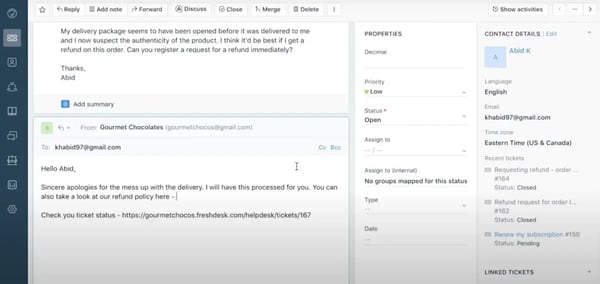
When I first gave it a spin, what struck me immediately was how clean and intuitive everything felt right out of the gate. The onboarding process for my trial was smooth, the interface wasn’t trying too hard to impress me with complexity, and within a few hours, I had a basic workflow up and running. For small teams or startups getting into customer support for the first time, that kind of ease-of-use is a big win.
Its omnichannel support is built right in. I could manage email, live chat, social, and even WhatsApp messages from one inbox. That said, while I could manage everything from one inbox, some channels, like WhatsApp or advanced live chat support, aren’t included by default.
You’ll need to upgrade to a bundled plan or add tools like Freshchat or Freshcaller separately to unlock those. It’s a similar setup to Zoho Desk and Salesforce, where multiple channels often live in connected but are priced in bundles or as add-ons.
Freshdesk also shines when it comes to collaboration tools. Features like shared ownership, parent-child ticketing, and team huddle let multiple agents collaborate without stepping on each other’s toes.
One feature I’ve come to love is Freddy AI. It’s Freshdesk’s built-in AI assistant (similar to Zia of Zoho Desk or Einstein AI of Salesforce). It’s great for things like suggesting ticket fields, spotting intent, or auto-resolving basic tickets. If you’re aiming to reduce ticket volume with automation, this definitely helps move the needle.
G2 Data reflects that, too. Freshdesk scores 90% or higher across ease of use, setup, and admin. For a startup trying to grow without getting bogged down in tech overhead or fast-moving teams who can’t afford to waste time in configuration limbo, that’s a huge plus.
I also saw a lot of love for its multichannel capabilities. The fact that users rated things like regulatory compliance, inbound identification, and multi-channel coverage among the highest speaks volumes. It’s not just easy, it’s also thoughtful in how it handles customer conversations.
That said, it’s not without a few rough edges. Some users pointed out gaps in functionality, things like limited customization options or certain advanced features that aren’t available out of the box.
I also noticed a few mentions of ticketing quirks, like confusion around ticket statuses or occasional delays in updates syncing across channels. These aren’t dealbreakers, but they’re worth being aware of, especially if you’re coming from a more complex platform or have very specific workflow needs.
All that considered, Freshdesk feels like a really dependable choice, especially for teams in industries like software, IT services, and finance. It has a solid 4.4/5 G2 rating, with 96% of reviewers rating it 4 or higher. It’s fast, it’s flexible, and it helps you stay focused on the customer instead of the backend. So, if you’re a growing startup or a small team looking for a CCM solution that’s intuitive and reliable right out of the box, Freshdesk is a smart bet.
"Freshdesk has a user-friendly interface and an efficient ticket management system. It helps support teams organize customer queries, prioritize issues, and track resolution in one place. I also appreciate its automation feature, knowledge base integration, and multi-channel support, which improve productivity and enhance the overall customer experience. I also like Freshdesk because it is easy to use, helps me manage customer tickets, and offers automation features that make customer support faster and more organized."
- Freshdesk review, Aditya S.
"The customization options are a bit limited in some cases when compared to other tools we have used, and the reporting is decent in some cases, though not as detailed as we need to undertake more detailed analysis. Delays on loading occasionally have been a slight inconvenience when dealing in high volumes of tickets."
- Freshdesk review, Sabina K.
Related: Learn how AI enhances customer self-service, support, and retention.
Front was a new find for me, and honestly, it was one of the more refreshing platforms I came across while researching this space. It wasn't as familiar as Salesforce or Zoho to me, but when I started digging into G2 reviews and user sentiment, it became clear that Front has carved out a loyal base, especially among fast-moving, communication-heavy teams.
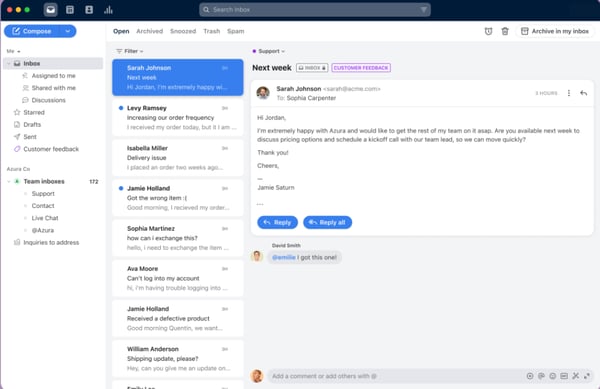
The first thing that stood out to me (and a lot of users) is how intuitive the platform is. I should say it felt different from the traditional help desk experience.
The standout feature for me is how collaborative it is. Front combines the familiarity of email with the structure of a help desk, but with Slack-style collaboration built in. You can tag teammates, chat internally on a specific message, assign conversations, and loop others in without ever forwarding an email or switching tools. That kind of real-time, behind-the-scenes communication saves a lot of “Hey, did you see this?” messages and makes follow-ups seamless.
I’d say if your customer support model is more relationship-driven, where quality matters more than quantity, Front really hits the mark.
G2 reviewers also constantly pointed to its clean interface and how easy it is to get up and running. And the scores back it up: 93% for ease of use, meets requirements, and overall support, with ease of admin and doing business sitting well above average. That kind of consistency across the board is rare.
It's no surprise that industries like logistics, IT services, and even marketing teams are leaning into it. Personalization, multi-channel coverage, and inbound identification all rank among its highest-rated features, which shows how well it balances user control with scale.
Reviewers also kept highlighting Front's automation and AI tools. Users describe rules that auto-route and assign incoming emails to the right person, macros that handle repetitive tagging and standard replies, and AI that drafts, summarizes, and adjusts the tone of responses — all of which several said noticeably cut their handling time and kept a high volume of conversations moving without things slipping through the cracks.
Some reviewers noted that email management can get tricky — tracking threads across personal versus shared inboxes, or private tags behaving unexpectedly when an email is archived or snoozed — which takes a little getting used to — though they added that once the team settles into Front's tagging and assignment flow, the shared inbox keeps everyone aligned and nothing slips through.
A few also mentioned that certain automation rules and advanced features can take some effort to set up, or sit on higher tiers, but most agreed the AI now offers step-by-step guidance that makes configuring rules far easier, and that the core collaboration experience more than earns its place.
For me, it’s a great fit for teams that care more about transparency and collaboration than deep customization. If your team is juggling a high volume of conversations and wants to manage them together, without the overhead of a traditional support platform, Front makes that possible. It’s not perfect, but it gets a lot right.
"I use Front to respond efficiently to customer emails and tickets while managing my team of customer service agents. It’s easy to navigate, and the quick, simple filters make a real difference when prioritizing tickets by urgency. With just a glance, I can see my team’s activity and manage their inboxes, which helps me allocate work more effectively."
- Front review, Adil S.
"Some emails are occasionally delayed and take a bit longer than expected to arrive. We use Front daily, so the volume of email is high. On the other hand, using private tags can sometimes be tricky. When an email is archived or snoozed, it may also be archived or snoozed within the tag folder."
- Front review, Adriana A.
While they didn’t make my final list, there are a few other standout platforms worth considering depending on your team’s needs:
Got more questions? G2 has the answers.
If you’re running a small business and need something that’s easy to set up, affordable, and still powerful, Zoho Desk and Freshdesk are strong picks. Both offer intuitive interfaces and core features like multichannel support, ticketing, and automation, without overwhelming smaller teams with complexity.
For tech and software teams, Front and Zoho Desk are popular choices. Front offers a collaborative, email-first workspace that suits fast-moving product and support teams, while Zoho Desk pairs deep automation — Blueprint workflows and the Zia AI assistant — with integrations like Slack, Jira, and Shopify.
For a unified CRM-and-communications tool, Agentforce Service (formerly Salesforce Service Cloud) is hard to beat at the enterprise level, tying customer data directly into support workflows and messaging. For smaller teams already in the Zoho ecosystem, Zoho Desk offers similar tight CRM integration at a far lower cost.
Based on user reviews and hands-on feedback, Freshdesk stands out as the most user-friendly option for startups. It’s easy to implement, quick to learn, and flexible enough to grow with your team—all without the bloat of traditional enterprise systems.
It depends on your engagement strategy, but Podium excels in real-time messaging and review generation, especially for local businesses. For more structured customer journeys and automation, Podium or Front are strong contenders for modern, high-touch engagement.
For mid-sized teams that need flexibility and scale, Front and Zoho Desk consistently rank high for usability, support, and cross-team collaboration. They strike a nice balance between powerful features and manageability, without requiring a large IT lift.
For larger organizations, Agentforce Service (formerly Salesforce Service Cloud) is the clear leader. It's built to handle high volumes, complex workflows, and multi-department collaboration at scale, with built-in Einstein AI and deep CRM integration made for enterprise-grade demands.
For SaaS teams, Front and Zoho Desk both lead the way. Front shines with a collaborative, email-first experience that suits support and success teams working together, while Zoho Desk offers scalable automation and self-service tooling to help deflect ticket volume as you grow.
If your team needs to consolidate email, chat, and SMS into a single workspace, Front is the standout, with shared inboxes, internal commenting, and assignment built in. Zoho Desk and Freshdesk are also strong for unifying multichannel conversations into a single ticketed view.
Based on G2 user reviews, Agentforce Service, Freshdesk, Zoho Desk, Front, and Podium consistently score high in ease of use, setup, and customer satisfaction.
Front tends to win over marketing and comms managers because it works the way they already do — shared inboxes, internal commenting, and assignment layered onto familiar email rather than a ticket queue. Zoho Desk and Agentforce Service are the safer institutional choices for larger, more process-driven organisations. If your managers care most about visibility into who is handling what, Front is the one to shortlist first.
Front is the natural first step if email is where your team lives today, since it keeps the inbox familiar while layering SMS, chat, and social alongside it. Zoho Desk suits teams that want the full channel spread immediately, with email, WhatsApp, Instagram, Telegram, and website chat funnelling into one thread. Freshdesk sits between the two, though WhatsApp and advanced live chat need a bundled plan or a Freshchat add-on.
Agentforce Service handles this most rigorously, with consent tracking and subscription management built into the Salesforce data model so opted-out contacts are suppressed automatically. Podium manages SMS opt-outs natively, honouring stop requests before a text goes out, which matters given how text-first it is. Worth being clear that all five are conversation platforms, so bulk list hygiene and address verification usually still sit with your dedicated email stack.
Front and Zoho Desk both send through your own authenticated domain, which is what actually protects sender reputation — your existing SPF, DKIM, and DMARC records stay in place rather than routing conversations through a shared pool. Agentforce Service adds enterprise-grade domain management on top. For high-volume campaign sending, deliverability monitoring remains the job of a dedicated email platform; these tools are built for one-to-one and small-batch conversations.
Podium triggers messages off real customer actions — a service visit, a purchase, an overdue invoice — so content adapts to what someone actually did rather than which list they sit on. Freshdesk's Freddy AI reads intent from the conversation and adjusts suggested fields and replies accordingly. Agentforce Service goes furthest here, since Einstein AI draws on the full CRM record to recommend next-best actions and tailor responses.
Agentforce Service offers the deepest analytics of the five, with reporting that holds up across departments and high volumes. Zoho Desk and Freshdesk both cover everyday reporting well, though the more granular analytics sit behind higher-tier plans on each. On A/B testing specifically, none of these five are campaign-testing tools — that is a marketing automation function, so pair one of these with your campaign platform if split testing is central to your workflow.
Podium is the strongest of the five for SMS, with scheduled and automated texts plus an AI Employee that picks up missed calls and after-hours messages. Its timing controls are fairly broad, though, so send-time optimisation is not as granular as a dedicated SMS platform. Agentforce Service handles timezone-aware scheduling more precisely through Salesforce automation.
Zoho Desk's Blueprint is the clearest fit — a genuinely visual builder where you lay out ticket stages, conditions, and escalations without touching code. Freshdesk's automation rules and Front's rule builder work similarly for routing and assignment, with less of a canvas feel. Agentforce Service has the most powerful builder in Flow, though it usually wants admin support to get the most out of it.
Agentforce Service is the most complete, with SOC 2, audit logs, granular role-based access, and GDPR tooling built in, which is part of why it holds up in financial services and healthcare. Podium and Freshdesk both handle regulatory compliance well for local and mid-market teams, including SMS consent rules. Zoho Desk and Front cover SOC 2 and GDPR fundamentals; the practical difference between them is how much configuration each expects from you.
Podium comes closest for local and service businesses, running SMS campaigns, review requests, and payment reminders from one place. Agentforce Service covers the widest channel set of the five — phone, email, web forms, live chat, SMS, WhatsApp, Facebook Messenger, Apple Messages, and LINE — all from a single interface. Note that all five are built primarily for two-way conversations rather than broadcast, so true simultaneous multichannel campaigns may need a marketing automation layer alongside.
After digging through 20+ platforms, reviewing G2 feedback, testing features, and talking to real users, I can confidently say this: customer communication isn’t just about replying fast. It’s about replying well, from the right place, with the right context. That’s the difference between managing messages and actually building relationships.
The best customer communications management software doesn’t just unify your channels. It unites your team. Whether you’re a startup just trying to stay sane in your inbox or a growing company ready to level up engagement, there’s a tool out there that won’t just fit your workflow; it’ll amplify it.
This list isn’t about picking a winner. It’s about finding the tool that’s right for your size, your style, and your stage. And if this helped cut through the noise, then hey—I guess that means it worked.
Want to take your community engagement even further? Check out our guide on customer experience strategies and learn how to turn meaningful interactions into long-term loyalty.


G2 Grid® Report · Summer 2026 Best Live Chat Software Updated May 26, 2026 View full...
 by Sudipto Paul

Zoho Desk, Freshdesk, and Zendesk are the top-rated help desk software for small business...
 by Krithika Sathyamoorthy

Recently updatedSummer 2026 Grid® Report · Published May 26, 2026 This guide was last...
by Soundarya Jayaraman