


I evaluated 20+ tools to find the best team chat apps. These are Microsoft Teams, Slack, Google Chat (Google Workspace), Zoom Team Chat (Zoom Workplace), and Webex Suite.
Some days, I swear my real job is finding the decision we already made. A teammate drops context in a channel, someone else follows up in a DM, and a third person circles back in a meeting chat I forgot existed. By lunchtime, I’m digging through threads like it’s an archaeological site, just to figure out what we agreed on and who’s doing what.
That’s why picking the best team chat app for work is a survival task. I want one place where conversations don’t vanish, updates don’t get buried, and I don’t need a meeting to get a yes or no.
But here’s the thing: the “best” instant messaging app for business depends on how your team actually works. Are you remote-first and allergic to meetings? Deep in Microsoft 365? Managing projects and chats in the same breath? Perhaps you’re debating between Slack and Teams, wondering if switching is worth the effort, or simply seeking fewer notifications and clearer collaboration, or just looking at which is the best business instant messaging platform for teams.
I’ve been there, so I looked at tens (okay, hundreds) of G2 reviews, paired those insights with my own experience using some of these tools day to day, and pulled together the options that consistently make teamwork feel lighter, faster, and way less messy.
*These business instant messaging software are top-rated in their category, according to the G2 Summer 2026 Grid Report. All pricing details mentioned in the article are based on publicly available data at the time of publication and may change.
Business instant messaging apps are the tools I rely on to keep work moving in real time: quick questions, project updates, file shares, and those tiny decisions that would otherwise die in email threads. They’re built for speed and context: channels or rooms for topics, searchable message history, easy file sharing, and notifications you can control so you’re not drowning in pings. Team chats are where modern teamwork happens, quite literally.
And people genuinely want to work this way, especially now in this remote and hybrid work culture. In fact, 64% of employees prefer chat over email and even in-person meetings, including yours truly. When chat is done right, it shortens the time between the question, the answer, and the decision, keeping work moving without another calendar invite. The best business IM apps reduce noise with smart notifications, make decisions easy to find later with strong search, and connect smoothly to the tools your team already lives in.
That’s also why ROI shows up so clearly in review data. When I looked across G2 insights, strong team chat apps tend to see high real-world adoption (around 71%) because they’re simple enough for everyone to use, not just power users. And with an estimated payback period of about 12 months, the value isn’t abstract — teams feel it in fewer meetings, faster alignment, and less “where did that info go?” scrambling.
I started with G2’s Grid® Reports to build a shortlist of the top business instant messaging software based on G2 Score, user satisfaction, and overall market presence.
Next, I dug into G2 reviews at scale using AI to spot patterns that show up consistently in real teams: where users rave, where they get frustrated, and what actually drives adoption (or makes teams abandon the tool). I paid close attention to feedback on usability, integrations, and how well each app fits into day-to-day work, not just what looks good on a feature list.
I also paired this research with my own experience using several of these tools in real work settings. For the platforms I couldn’t try first-hand, I relied on insights from people who use them every day and validated those takeaways against verified G2 reviews.
The screenshots in this article come from G2 vendor profiles and publicly available product documentation.
Here’s the lens I used to separate “pretty good” chat tools from the ones that actually make work easier.
These criteria were my guide, but not every tool checks every box, and honestly, they don’t need to. Each option here shines in different ways, depending on your team’s workflow, stack, and collaboration style.
The list below contains genuine user reviews from the Business Instant Messaging software category. To be included in this category, a solution must:
*This data was pulled from G2 in 2026. Some reviews may have been edited for clarity.
G2 rating: 4.4/5 ⭐
Love it or hate it, Microsoft Teams is one of the best team chat apps out there, and I get why it’s become the default for so many workplaces. When I’m in a Microsoft 365-heavy environment, Teams feels like the obvious home base: chat, channels, meetings, and files all live in one place, and the handoff between a quick message and a full video call is basically frictionless.
I can spin up team spaces and channels for projects, keep conversations threaded, tag people with @mentions, and hop from a message into a one-click audio or video huddle without switching tools. That flow from chat to call to screen sharing and back again is ridiculously smooth, and G2 users clearly feel the same. Teams earns 91% ratings for both video conferencing and file sharing, while audio conferencing scores even higher at 92%, making it one of the strongest performers in this category.

The other thing Teams does well is turning chats into action. Files aren’t just attachments; they live alongside the conversation with live previews and co-editing in Word, Excel, and PowerPoint, so decisions and documents stay connected. Search and message history are solid for most teams, and the app ecosystem (either native Microsoft apps or third-party connectors) helps pull updates from tools into a channel instead of leaving you tab-surfing all day. The overall user sentiment is strong, too.
For bigger orgs, I also appreciate that Teams is built for scale: admin controls, analytics, SSO, retention, and audit trails are there when you need them, and guest access makes cross-company collaboration doable without totally breaking governance. That enterprise focus seems to translate well in practice, with 91% of users saying Teams meets their requirements and 90% rating it highly for ease of use.
What I genuinely like about Teams is that it’s built to be more than a chat box. It’s an all-in-one collaboration hub, so meetings, files, and conversations stay tightly connected, especially if you’re already living in Microsoft 365. In very large orgs with tons of channels, files, and meetings running at once, it’s worth anticipating that Teams may feel a bit slower.
And while I appreciate how much control it gives you over alerts and channel activity, teams that haven’t set clear channel norms, or haven’t tuned notifications, might feel like it gets noisy faster than they’d like.
My take: Teams is a fantastic fit for Microsoft-first companies, especially mid-market and enterprise teams that want fewer tools, tighter governance, and a fast path from “quick ping” to “let’s hop on a call.”
If your work already lives in Outlook and Office, Teams will feel less like another app and more like the place where work actually happens. With more than 18,000 reviews on G2 and 88% of users willing to recommend the product, it’s also one of the most validated collaboration platforms on the market.
“What I like most about Microsoft Teams is that it keeps all team communication in one place. At work, it helps me quickly connect with colleagues, share files, schedule meetings, and collaborate on projects without switching between multiple applications. The integration with Outlook and SharePoint saves time and improves efficiency.”
- Microsoft Teams review, Rene Alejandro G.
“One common issue is performance—it can be slow to load or consume a lot of system resources compared to lighter chat tools. Another challenge is the user interface clutter, where too many channels, teams, and notifications can become overwhelming and reduce productivity.”
- Microsoft Teams review, Abhinandan Y.
G2 rating: 4.5/5 ⭐
"Let me just Slack you.” I say that in meetings all the time, and honestly, it’s become shorthand for “we don’t need to overcomplicate this.” Slack is the place I go when I want a fast answer, a clean handoff, or a decision that won’t get lost in someone’s inbox. It’s like the default connective tissue for day-to-day work: quick pings, project channels, shared files, and those tiny clarifications that keep everything else moving.
If a team chat app can make collaboration feel that effortless, that’s usually a sign you’re using the right one, and Slack is one of those right ones. It’s also one of the most widely reviewed tools in this category.
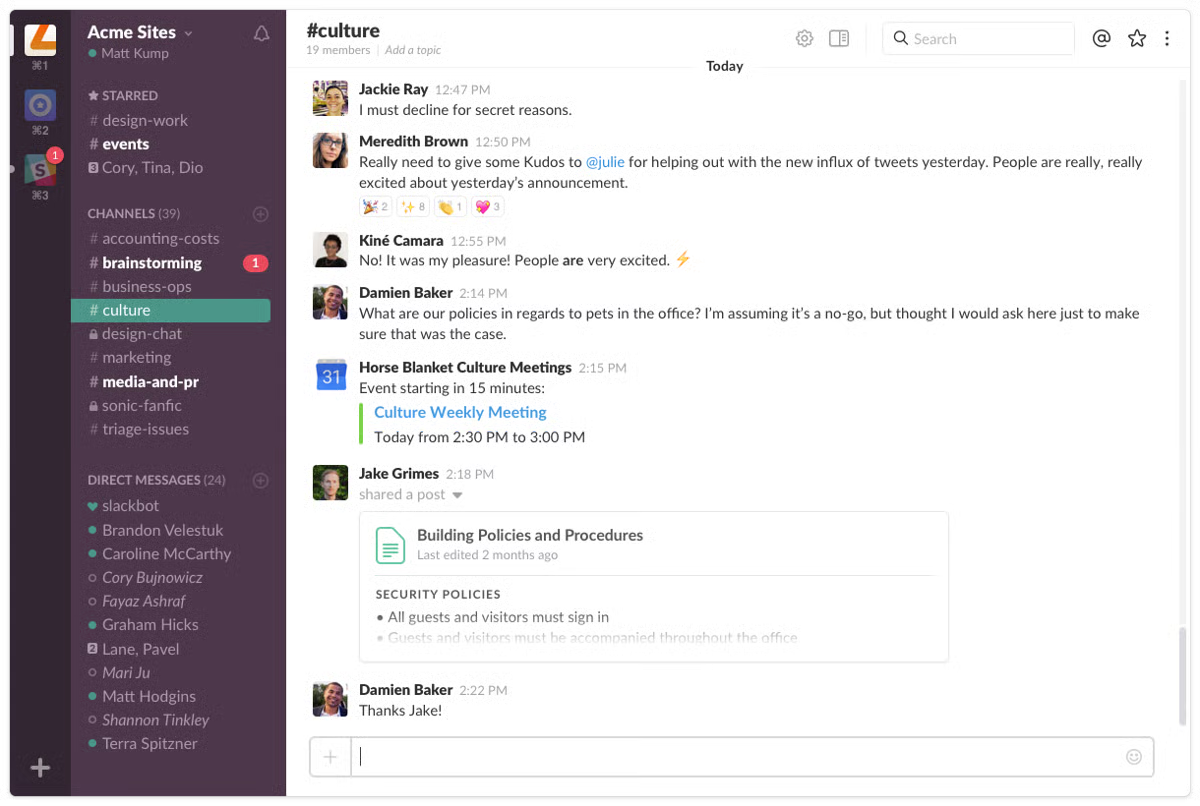
The G2 numbers line up with that everyday comfort: Slack scores 93% for both ease of use and meeting requirements, and users consistently rate its web app, file sharing, and mobile experience among its strongest features at 93%. In real life, that translates to “I can find what I need, reply fast, and keep work moving without thinking about the tool.”
What users really love in reviews, and I’ve felt this too, is the rhythm Slack supports. It’s great for async work, quick decisions, and keeping cross-functional teams in sync without forcing meetings. The platform also scores 93% for ease of setup, which helps explain why teams tend to get up and running quickly without much friction.
Integrations are a huge part of that magic: pulling updates from project tools, CRMs, docs, and support systems into channels means less tab-hopping and fewer “wait, did anyone see this?” moments. And it’s not just passive updates. Slack is great for actually doing work through integrations and workflows.
I’ve seen teams raise IT tickets right from a channel, support teams push help desk alerts where everyone can swarm fast, and sales teams get Salesforce record updates the second something changes. HR can automate weekly new-hire check-ins or onboarding nudges, managers can run lightweight pulse surveys, and project teams can spin up new Asana tasks without leaving the conversation. From creating records to sending weekly reminders, Slack makes that kind of automation feel normal instead of complicated.
The search and history also become your team’s memory, which is why Slack stays sticky once a team settles in. One thing I genuinely appreciate about Slack is how responsive it keeps teams. Messages move fast, and you rarely feel out of the loop. The flip side (and users say this on G2 too) is that if you’re in a lot of channels, notifications can stack up quickly, so teams that want a calmer, more focused chat experience should plan to fine-tune alerts and set some lightweight channel norms from the start.
And while Slack delivers real value for what you pay, the free plan does come with the usual limitations around history and features, so very budget-tight teams or ones that rely on deep message archives will want to factor that in before committing long-term. Most G2 reviewers agree the upgrade feels worth it. In fact, 91% of users say they would recommend Slack, and 95% rate it 4 or 5 stars.
My bottom line: Slack is the best pick for teams that live in channels, work async, and want fast, clean collaboration across lots of tools, especially startups, SMBs, product and marketing organizations, and hybrid or remote teams who value speed and clarity over heavyweight suites.
“What I like most about Slack is how it brings communication, collaboration, and information together in one place. Rather than dealing with long email chains, conversations happen in real time and remain organized in channels, which makes it easier to find the right context and stay aligned with the team. I also appreciate its integrations with other tools, since they help streamline workflows and cut down on the need to constantly switch between multiple applications throughout the day.”
- Slack review, Ashish B.
“For smaller nonprofits or teams with mixed levels of tech comfort, Slack may also require more training and structure than expected. If channels are not organized well, the platform can become messy and harder to manage over time.”
-Slack review, Danielle P.
If you’re already on Microsoft 365, Teams is the more seamless option, with chat, meetings, calendars, and files in one governed hub, ideal for meeting-heavy, enterprise teams. Slack is built for chat-first, async collaboration. It’s lighter, easier to adopt, and works best for teams that rely on multiple SaaS tools and integrations to get work done. The shortcut decision:
For a clear side-by-side breakdown, check out G2's Slack vs. Microsoft Teams compare page.
G2 rating: 4.6/5 ⭐
Google Chat might be one of the most underrated Google apps in the Workspace bundle. A lot of teams grab Google Workspace for Gmail and Docs, then default to some other messenger out of habit, but once you actually start using Chat inside your everyday workflow, it quietly becomes the place where quick decisions happen.
I’ve felt that shift myself: instead of bouncing between email, Docs comments, and a separate IM tool, I can just keep the conversation right next to the work. And the G2 numbers reflect why it clicks for so many people. Google Workspace earns a 94% satisfaction score for ease of use and another 94% for ease of setup, while also receiving 92% ratings for both ease of administration and meeting user requirements. In plain terms, people find it easy to get started and easy to stick with.
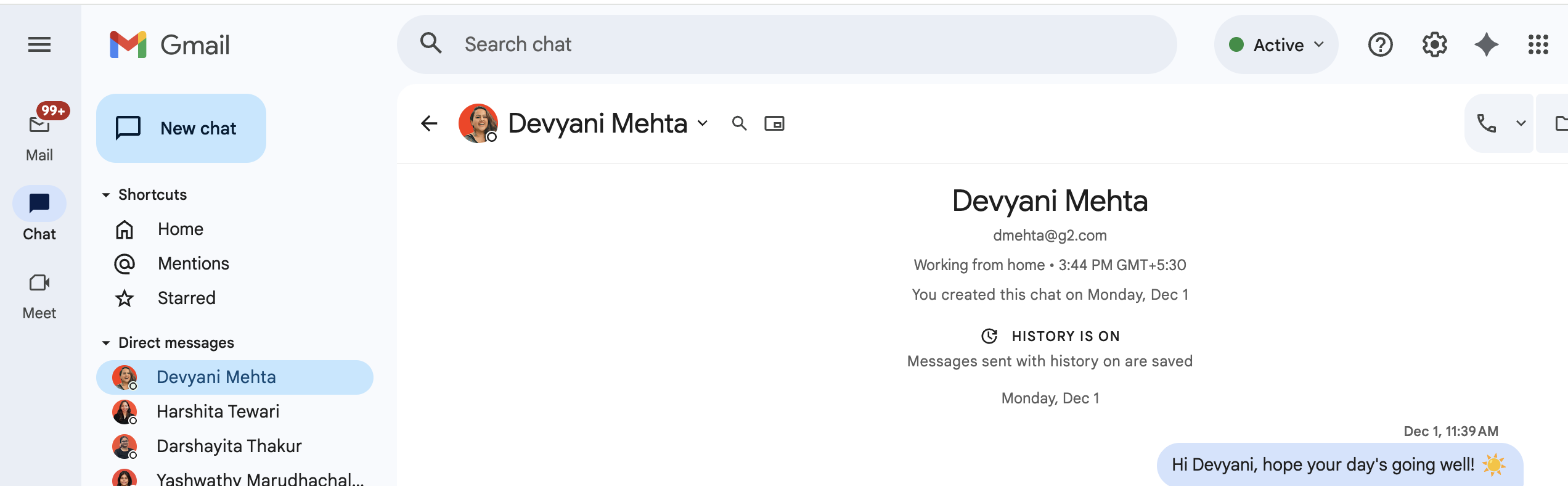
Feature-wise, Google Chat does the fundamentals really well. Spaces help me keep team and project conversations organized, threads keep replies from getting messy, and because it’s tied into Google Workspace, sharing a Doc, Sheet, or Slide feels instant and native.
The web app is one of its strongest-performing areas on G2, earning a 93% satisfaction score, and I find that’s where it shines most: fast, clean, and low-friction. The mobile experience scores nearly as well at 92%, which matters when you’re trying to stay responsive away from your desk without feeling like you need the full desktop setup.
And the Meet connection is honestly a bigger deal than it sounds. Video conferencing earns a 91% satisfaction score, and since Google Meet is already one of the best built-in video tools teams use, jumping from “can you clarify?” in Chat to a face-to-face call takes basically one click, with no app-switching or link wrangling required. If your team already runs on Gmail, Google Calendar, and Docs, Sheets, and Slides, I really think you’ll find Google Chat is the cleaner solution because it keeps your messages, files, and meetings living in the same ecosystem instead of scattered across five tabs.
G2 users often highlight how clean, stable, and easy Google Chat feels inside Google Workspace, which is exactly why it works so well for straightforward, day-to-day team messaging. The broader platform also holds a 4.6-star rating across more than 47,000 reviews on G2, with 94% of users giving it four or five stars. Because it stays intentionally simple, teams expecting a more fully loaded set of advanced collaboration features may want to lean on the broader Workspace apps as they scale their workflows.
And while the suite is generally reliable for everyday use, larger teams running long threads, big projects, or frequent Meet calls may want to be thoughtful about message length, storage needs, and connection quality so the experience stays smooth. Still, the overall sentiment is overwhelmingly positive, with 90% of users saying they would recommend Google Workspace to others.
Overall, I’d say Google Chat is best for teams already in Google Workspace who want a simple, fast, no-drama way to talk where the work already lives, especially SMBs, hybrid teams, and cross-functional groups that collaborate in Docs all day. If your stack is Google-first, Chat is the easiest win you’re probably not using enough.
“What I like most about Google Workspace is that it brings email, chat, file storage, and collaboration tools into one place. Having Gmail, Google Chat, Google meet, Drive, Sheets, Docs, and Colab together makes work more efficient, improves communication, and reduces the need to switch between multiple applications throughout the day.”
- Google Workspace (Google Chat) review, Charan B.
“The Google chat becomes disorganized and chaotic easily when multiple threads of messages are coming through from replies. The Google sheets and slides are also sometimes confusing as most people are used to working on PowerPoint and Excel.”
- Google Workspace (Google Chat) review, Whitney T.
We compared Outlook vs. Gmail to determine which platform performs best for traditional email communication.
G2 rating: 4.5/5 ⭐
Zoom has fast evolved from being one of the best video conferencing software to one of the best workplace and team collaboration tools, with the number of features and products it’s been adding over the years, and Zoom Team Chat is definitely one of them.
If you’re anything like me, your day already lives in Zoom meetings, so having chat in the same place just feels practical. Instead of treating messaging as a separate app, Team Chat lets you keep conversations, files, and quick decisions anchored to where you’re already meeting.
Users seem to agree that the foundations are strong and easy to adopt. Zoom Workplace earns 92% satisfaction scores for both ease of use and ease of setup, while meeting requirements and ease of doing business with the vendor score even higher at 93%.
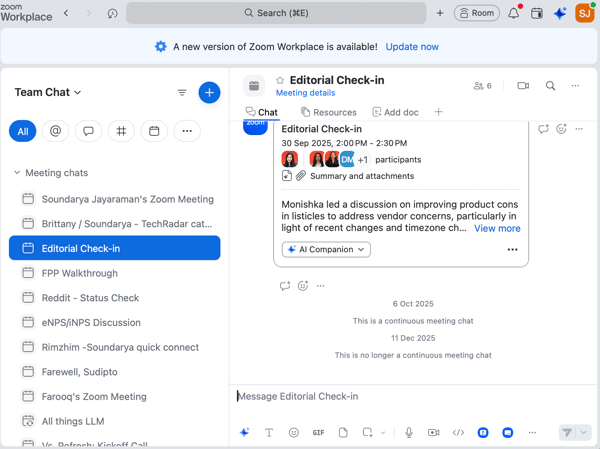
Where Zoom really wins is the chat-to-meeting loop. Starting meetings from chat is effortless, and conferencing is still Zoom’s home turf. Video conferencing is one of its highest-rated capabilities at 93%, while audio conferencing follows closely behind at 92%. In real life, that means you can be mid-thread, realize a quick call will save time, and jump straight into a huddle without link-hunting or app-switching. The web experience also scores strongly on G2, and the mobile app remains reliable enough that staying in sync away from your desk doesn’t feel like a downgrade.
I also like the momentum Zoom is building around “stay caught up” features with AI. Stop the scroll: the AI summaries of chat threads (with action items) are genuinely useful when a channel moves fast. Add in being able to automate everyday tasks, search across chat and meetings in one place, and you get a workflow that feels designed for how teams actually operate now.
A couple of things to keep in mind. Users on G2 like that Team Chat is deeply tied into Zoom Workplace, and teams expecting a super broad set of cross-app integrations may find that the ecosystem, while expanding, is still more streamlined than some alternatives. This tends to matter most for organizations that rely heavily on niche or specialized tools, while Zoom-centric teams often appreciate the tighter, more unified environment.
G2 reviewers also appreciate how many new features and tools Zoom has added lately, though some note that the pace of growth can make the interface feel a bit busy while teams get used to the updates. Teams that prefer steady evolution and a strengthening all-in-one workspace, however, often see the rapid expansion as a net benefit rather than a barrier. The overall sentiment is overwhelmingly positive, with 97% of users giving Zoom Workplace four or five stars and 91% saying they would recommend it.
On the whole, Zoom Team Chat is a strong UCaaS-style pick for teams that want messaging, meetings, and calling to feel like one continuous workspace, and the generous free plan helps you get there without a heavy commitment. If you’re already in Zoom a lot, having chat (plus handy AI thread summaries) in the same hub makes it easier to stay aligned between calls without adding yet another tool to the stack.
“Zoom Workplace delivers a reliable, high-quality communication experience for both internal team meetings and client discussions. I appreciate that it combines video meetings, team chat, calendar integration, and collaboration tools in a single platform, which helps me stay organized and keep everything in one place throughout the workday. The audio and video quality are consistently strong, and joining meetings is simple and straightforward, even for non-technical users.”
- Zoom Workplace review, Sumisha J.
“zoom has added some tools so ui at times can feel a bit cluttured, especially compared to old zoom, but nothing significantly bad, the 40 min limit can feel frustating at times, the pricing especially for team plans can feel a bit pricey”
- Zoom Workplace review, Siddharth Shivhare
If meetings are central to how your team operates, see the 7 best video conferencing software on G2 for 2026, covering platforms built specifically for real-time collaboration across teams of all sizes.
G2 rating: 4.2/5 ⭐
When people talk about team chat apps, Webex doesn’t always get mentioned first, but after digging into it, I think that’s because most teams still associate it primarily with meetings. The reality is that Webex Suite has evolved into a much broader collaboration platform, and its chat experience feels especially well-suited for organizations that want messaging, meetings, calling, and collaboration living under the same roof.
What stood out to me is how much Webex prioritizes reliability. The messaging experience isn’t trying to reinvent workplace communication or add a social-media-style layer to team collaboration. Instead, it focuses on helping teams communicate clearly, stay organized, and move quickly between conversations and meetings when needed. The G2 data reflects that practicality, with Webex earning 90% satisfaction scores for both ease of use and meeting requirements, while ease of setup and ease of doing business with the vendor both sit at 89%.
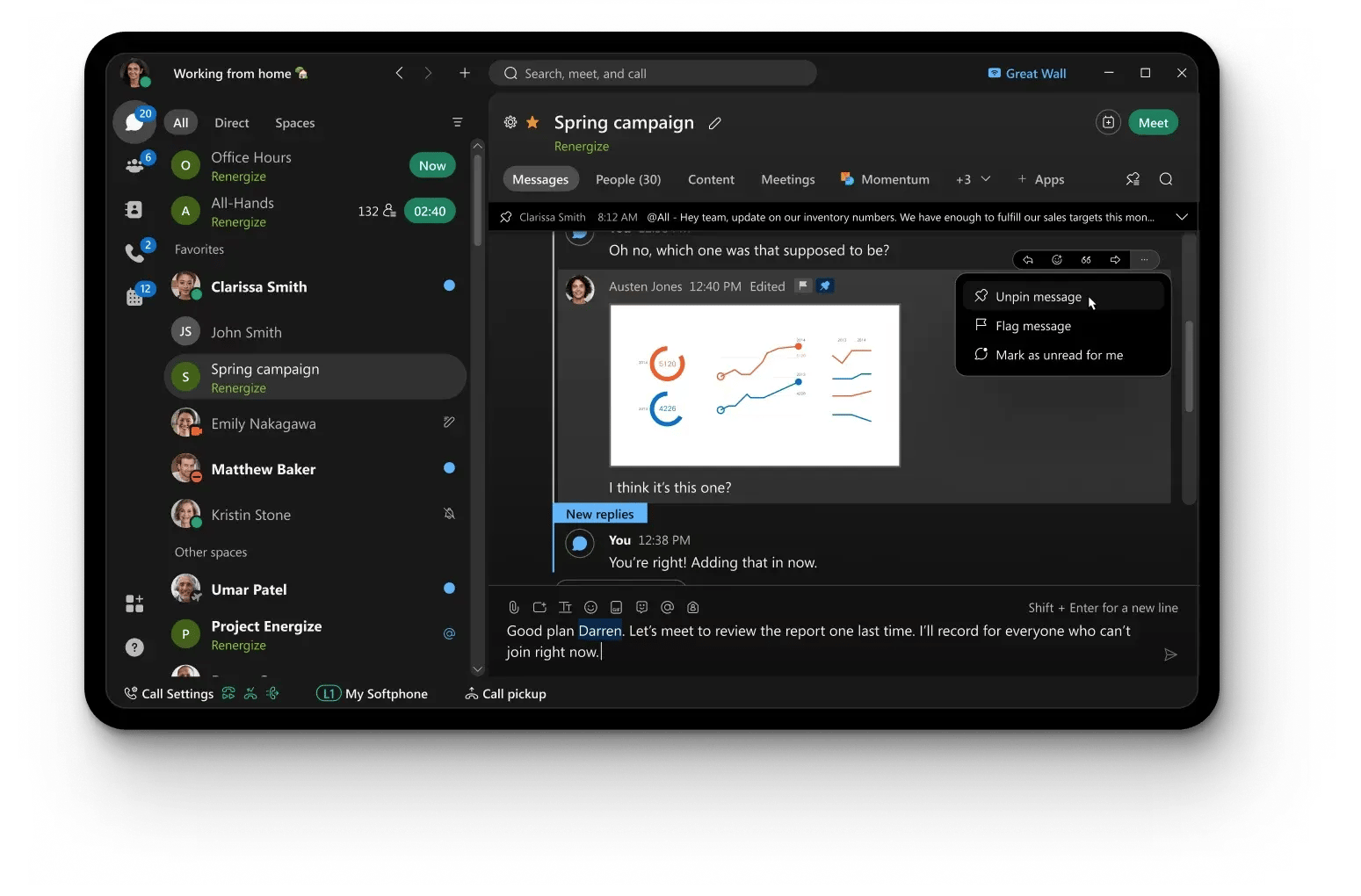 Feature-wise, the chat experience feels purpose-built for teams that need communication to stay connected to actual work. Spaces help organize discussions around projects and teams, while file sharing, messaging, and meeting history stay accessible in the same environment. I especially like how naturally conversations can escalate into live discussions. That’s where Webex continues to play to its strengths.
Audio conferencing earns one of the highest ratings among Webex capabilities at 91%, while video conferencing follows closely at 90%. In practice, that means teams can move from a quick question in chat to a meeting without disrupting momentum. The web application also scores highly with users, which helps keep collaboration consistent whether you’re working from your desktop or joining remotely.
Reading through G2 reviews, I noticed a recurring theme: users appreciate having meetings, messaging, and collaboration tools consolidated into a single platform. Several reviewers specifically mentioned that Webex helps reduce tool switching by keeping conversations, files, and project discussions together, making it easier for distributed teams to stay aligned.
Others highlighted the platform’s stability during meetings and the confidence that comes from using a solution built with enterprise-grade security and governance in mind.
A couple of things to keep in mind. G2 users appreciate how much functionality Webex brings together in one platform, but some note that it can feel a bit more feature-rich than lightweight chat tools at first. For organizations that primarily need simple messaging, that may require a little extra onboarding. Teams looking for a more unified communication experience, however, often view that breadth as a benefit because it keeps chat, meetings, calling, and collaboration connected in a single workspace.
My take: Webex Suite is a great fit for organizations that want chat, meetings, and collaboration to function as one connected experience, particularly enterprise teams, regulated industries, and businesses that value reliability, security, and governance. If your team spends as much time in meetings as it does in chat, Webex makes those two worlds feel much closer together.
“What I like best about Webex Suite is that it brings meetings, messaging, calling, and collaboration tools into a single platform. The audio and video quality are generally very reliable, and the interface is easy to navigate. Features like screen sharing, virtual backgrounds, and meeting recordings make collaboration more productive, especially for remote teams. I also appreciate the strong security and enterprise-grade capabilities.”
- Webex Suite review, Dharamveer p.
“The user interface can sometimes feel less intuitive than I’d expect, which makes certain tasks take longer to figure out. Performance also isn’t always consistent, so the experience can vary from one use to the next. Finally, the messaging features aren’t as strong as those offered by competitors, and they could use improvement to feel more complete.”
- Webex Suite review, Avijit B.
Want collaboration tools with $0 budget? Explore the best free online task collaboration platforms on G2 for your needs.
Got more questions on instant messaging for business? G2 has the answers!
Slack, Microsoft Teams, Google Chat, Zoom Team Chat, and Webex Suite are excellent choices for remote collaboration because they combine real-time messaging with channels, file sharing, video meetings, and searchable conversation history. These features help distributed teams stay aligned and make decisions without relying on long email chains.
Microsoft Teams, Slack, and Webex Suite are among the best instant messaging apps for large organizations. They offer enterprise-grade security, centralized administration, compliance controls, and structured communication features that make it easier to manage collaboration across departments and global teams.
Microsoft Teams, Slack, Webex Suite, and Google Chat are strong options for encrypted internal communications. They provide encryption in transit and at rest, along with administrative controls, user management, and security features designed for business environments.
Slack, Microsoft Teams, and Google Chat work especially well for customer support teams that need quick internal escalation and cross-functional collaboration. Their channels, threads, integrations, and searchable history help teams resolve issues faster while keeping conversations organized.
Microsoft Teams, Slack, Webex Suite, and Google Chat stand out for secure corporate messaging because they combine strong access controls, governance capabilities, and enterprise security features. They’re commonly used by organizations that need visibility, compliance, and controlled collaboration.
Microsoft Teams, Slack, Google Chat, and Webex Suite all offer strong file-sharing capabilities. They make it easy to share, preview, search, and collaborate on files while keeping conversations and documents connected in the same workspace.
Slack and Microsoft Teams are often considered the strongest options for integrations because they connect with thousands of third-party applications and support workflow automation. Google Chat, Zoom Team Chat, and Webex Suite also integrate well within their respective ecosystems.
Slack, Microsoft Teams, Google Chat, and Zoom Team Chat provide some of the strongest mobile experiences for business messaging. They make it easy to stay connected, respond to conversations, join meetings, and access files while away from your desk.
Slack, Google Chat, and Zoom Team Chat are great options for small businesses because they’re relatively easy to deploy, intuitive to use, and flexible enough to support growing teams. They provide core collaboration features without requiring extensive setup or administration.
Slack, Microsoft Teams, Google Chat, and Zoom Team Chat all offer free plans that can work well for small or early-stage teams. As organizations grow, they may eventually need paid plans for additional message history, security controls, storage, and administrative features.
Slack and Microsoft Teams are strong choices for frontline teams because they prioritize mobile-first communication and structured updates. They’re especially useful when most workers don’t sit at a laptop all day.
Webex Suite, Microsoft Teams, and Slack are commonly used for secure external collaboration. They support guest access and controlled sharing while helping organizations maintain visibility and security when working with clients, vendors, or business partners.
Slack, Google Chat, Microsoft Teams, Zoom Team Chat, and Webex Suite are among the top-rated tools for real-time business messaging. They help teams communicate instantly through direct messages, channels, and group conversations while also supporting file sharing, integrations, and collaboration across distributed teams.
Google Chat (Google Workspace), Zoho Cliq, Mattermost, and Pumble are among the few business messaging platforms that don't heavily gate AI capabilities or advanced search behind premium pricing tiers.
Slack, Microsoft Teams, Google Chat, and Webex Suite are all strong options for software engineering teams. Slack stands out for its integrations with developer tools and workflow automation, Microsoft Teams works well for organizations already using Microsoft 365, Google Chat fits teams collaborating in Google Workspace, and Webex Suite is a solid choice for engineering organizations that prioritize secure communication and enterprise collaboration.
Slack, Microsoft Teams, Google Chat, and Webex Suite all help reduce email clutter by organizing conversations into channels or spaces instead of long email chains. Features like threaded conversations, searchable history, and file sharing make it easier to keep discussions organized and decisions easy to find.
Software development teams should look beyond basic messaging and evaluate integrations with development tools, searchable conversation history, thread organization, notification controls, file sharing, and the ability to move quickly from chat to meetings. Choosing a platform that fits your existing ecosystem, whether that's Microsoft 365, Google Workspace, Zoom, or a broader integration stack, can also reduce context switching.
Slack, Microsoft Teams, Google Chat, and Webex Suite all support secure collaboration through features like guest access, file sharing, and enterprise security controls. Google Chat naturally integrates with Google Drive, while Slack and Microsoft Teams offer extensive integrations with popular project management and productivity platforms.
Microsoft Teams, Slack, Google Chat, Zoom Team Chat, and Webex Suite are all designed to centralize conversations, meetings, and file sharing in one place. By reducing the need to switch between multiple apps, they help teams stay focused and make collaboration more efficient.
Microsoft Teams, Slack, Google Chat, and Webex Suite all offer notification settings that let users customize alerts, prioritize conversations, and mute less important channels. Combined with threaded conversations, these controls help teams stay informed without being overwhelmed by constant notifications.
Microsoft Teams, Slack, Zoom Workplace, Google Workspace, and Webex Suite all extend beyond basic messaging by combining chat with meetings, file sharing, integrations, and collaboration tools. The right choice depends on whether your team prioritizes integrations, unified communications, or a specific productivity ecosystem.
Platforms like Microsoft Teams, Slack, Google Chat, Zoom Team Chat, and Webex Suite tend to see strong long-term adoption because they become part of employees' daily workflows. Their combination of messaging, meetings, file sharing, and integrations helps teams continue using them well beyond initial onboarding.
Slack, Microsoft Teams, Google Chat, Zoom Team Chat, and Webex Suite all help centralize conversations and reduce communication silos by bringing messaging, file sharing, and collaboration into a single workspace. Features like searchable history, channels, and integrations make it easier for teams to find information without relying on scattered email threads.
Microsoft Teams, Webex Suite, Slack, and Google Chat are widely trusted for secure team collaboration because they combine enterprise-grade security, administrative controls, and compliance features with modern messaging and collaboration capabilities. They're commonly used by organizations that need secure internal and external communication at scale.
From all my experience, team chat works best when it reduces decisions-per-meeting, not just emails-per-day. The right app helps your team stay in motion.
So as you pick (or rethink) your team chat app, don’t just ask, “What’s popular?” Ask: Where does your team already do most of its work?
If your world runs on Microsoft 365, Teams will feel like home. If you live in channels and integrations, Slack keeps things fast and flexible. If Google Workspace is your backbone, Google Chat is the simplest win. If your team already spends most of its day in Zoom meetings, Team Chat helps keep conversations and calls connected. And if you’re looking for an enterprise-grade platform that brings messaging, meetings, and collaboration together, Webex Suite is worth a close look.
Different tools, different strengths, but all aiming at the same outcome: less noise, more clarity, and better teamwork.
Pick the tool that removes friction from how your team already communicates. That’s how you end up with a chat app that feels less like another platform to manage and more like the place where work naturally happens.
And if you’re ready to take that flow a step further, AI is starting to change how teams plan, prioritize, and execute, not just communicate. Check out our roundup of the best AI project management tools to see how teams are using AI to work smarter across projects and collaboration.


I evaluated 7+ tools to find the best free video conferencing software for remote teams. These...
 by Krithika Sathyamoorthy

Ping! Another meeting invite lands in your inbox. You cringe, remembering the last video call...
by Soundarya Jayaraman

Published: February 2026 · Last updated: April 2026 I knew Zoom from the pandemic days. It was...
by Soundarya Jayaraman