It all started with a single, painfully awkward meeting.
You know the kind I’m talking about. Half the attendees couldn’t join because the link didn’t work, someone’s audio kept cutting out, and the screen share? Let’s just say it wasn’t sharing much. That day, I found myself thinking: there’s got to be a better way. Finding the best video conferencing software shouldn't feel like a gamble every time you schedule a call.
We all want the same thing from video conferencing: crystal clear audio, smooth video, and features that don’t make us feel like we’re wrestling with technology mid-meeting. And honestly, the questions I kept running into kept piling up too. Is Zoom still the best option in 2026? Which platform is actually the most secure for sensitive business calls? Is there anything out there that works just as well for a 5-person team check-in as it does for a 500-person webinar?
As someone who spends most of their day bouncing between virtual meetings, team check-ins, presentations, and even the occasional brainstorming sessions, I realized I’d been settling for “good enough” video conferencing tools.
I decided it was time for a change.
So I went deep. I tested and compared 20+ video conferencing platforms, analyzed G2 data, and stress-tested the top contenders across real meetings, workshops, and client calls. Each tool had its own personality. Some were sleek and sophisticated, built for large-scale corporate meetings. Others were lightweight and user-friendly, perfect for small teams or casual chats. And anything else? It never made the cut.
Whether you’re here because you’re frustrated with your current setup or you’re simply curious to see what else is out there, you’re in the right place. I’ve done the hard work, so you don’t have to. Let’s explore the best video conferencing tools from Google Meet and Zoom to Webex Suite, GoTo Meeting, and a few surprises, to find the one to make your next meeting seamless, productive, and maybe even fun.
7 best video conferencing software for 2026: My top picks
-
Google Meet: Best for calendar integration and easy scheduling
Seamlessly connects with Google Calendar for quick meeting setup and simple video conferencing. ($6/mo)
-
Microsoft Teams: Best for Microsoft 365 users
Integrates tightly with Outlook, SharePoint, and other Microsoft apps for unified collaboration. ($4.80/mo)
-
Webex Suite: Best for enterprise-grade security
Offers advanced compliance, encryption, and secure video conferencing trusted by global enterprises. ($12/mo)
-
Zoom Workplace: Best for high-quality video experiences
Delivers sharp video, virtual backgrounds, and breakout rooms ideal for hybrid work. ($13.33/mo)
-
GoTo Meeting: Best for simple webinars and reliable performance
Dependable audio and video with a straightforward setup, ideal for professional teams that want consistency without complexity. ($12/mo)
-
JioMeet: Best for unlimited free video conferencing
A free-to-use platform with no meeting time limits, built for teams looking for a simple, cost-effective solution. (Free)
-
Zoho Meeting: Best for budget-friendly video conferencing
A browser-based platform with built-in engagement tools and seamless Zoho ecosystem integration. ($1/mo)
* These video conferencing software solutions are top-rated in their category, according to the G2 Spring 2026 Grid Report. I’ve also added their monthly pricing to make comparisons easier.
7 best video conferencing software I tested (and loved)
When I first started exploring video conferencing services, I thought it was just a fancy way to make video calls. But the more I used these tools, the more I realized they’re so much more than that. The best video conferencing software and platforms are designed to bridge the gap between people, no matter where they are, by creating a virtual space for communication and collaboration.
For me, it’s like having a digital meeting room in my pocket, one that lets me not only see and hear others but also work together in real time. It’s where ideas are shared, decisions are made, and relationships are built, whether you’re running a business meeting, teaching a class, or just catching up with loved ones.
But here’s the thing: the best video conferencing software doesn’t just connect you; it makes the experience effortless and enjoyable. That’s what sets a truly great platform apart. It’s not just about video and audio. It’s about how well it supports how we interact, collaborate, and get things done.
How did I find and evaluate the best video conferencing software?
I used G2’s grid reports to identify the leaders in the video conferencing domain. Then, I put the most talked-about tools to the test myself. I hosted team meetings, ran virtual workshops, scheduled client presentations, and even organized casual online hangouts to see how these platforms handled different scenarios.
I evaluated everything from ease of setup to advanced features like screen sharing, breakout rooms, and collaboration tools. Performance was a huge factor, too — after all, a tool is only as good as its ability to deliver glitch-free calls under real-world conditions.
I also tapped into user feedback at scale. I used AI to analyze hundreds of reviews on G2, which helped me spot recurring themes, both positive and negative, that I might not have encountered in my testing alone. In cases where I couldn’t personally test a tool due to limited access, I consulted a professional with hands-on experience and validated their insights using verified G2 reviews.
The screenshots featured in this article may include both those captured during testing and those obtained from the vendor’s G2 page.
Did you know? According to Fortune Business Insights, the global video conferencing market was valued at USD 37.29 billion in 2025 and is projected to reach USD 65.72 billion by 2034, growing at a CAGR of 5.90%.
What makes the best video conferencing software? My checklist
When I set out to find the best video conferencing software, I realized it wasn’t just about ticking boxes on a feature list. The best tools excel in several key areas that directly impact how we communicate and collaborate online. Here’s what I looked for and why each factor matters.
- Collaboration: Beyond basic screen sharing, I looked for tools that offered breakout rooms, real-time whiteboards, and live polls to enhance interaction. Features like live transcription, closed captions, and translation tools were great to have, especially when collaborating with international teams. I was particularly impressed by platforms integrated with productivity apps, allowing me to share files, manage tasks, or co-edit documents directly within the meeting.
- AI and smart features: The best platforms have gone well beyond basic meeting tools. I looked for AI-powered capabilities like automated meeting summaries, real-time transcription and translation, noise cancellation, and smart action item detection. These aren't nice-to-haves anymore. For distributed teams juggling back-to-back calls across time zones, they're the difference between walking out of a meeting with clarity and scrambling to remember what was decided.
- Scalability and flexibility: Whether it’s a casual one-on-one or a webinar with thousands of participants, the software needs to scale. Customizable meeting layouts, participant management options, and compatibility with different devices—from mobile phones to an entire conference room system — proved invaluable. Platforms that could grow with my needs, offering flexible upgrades and add-ons, scored extra points.
- Ease of use: A tool can have all the features in the world, but if it’s confusing to use, it’s not worth it. One-click access through shared links, browser-based options (no downloads required), and seamless integration with tools like Google Calendar or Outlook made a huge difference. I found that intuitive layouts, clean menus, and clear instructions were essential for keeping things stress-free.
- Reliability: I tested these tools on everything from fast office Wi-Fi to less reliable coffee shop connections. The best platforms consistently delivered clear audio and smooth video, even when bandwidth was limited. Many use an adaptive streaming technology that adjusts video quality in real time to avoid lag or glitches. I also appreciated platforms with quick recovery systems for dropped calls, ensuring minimal disruption.
- Privacy and security: Security isn’t just a bonus — it’s a necessity. I looked for platforms prioritizing user safety with features like end-to-end encryption, meeting passwords, and waiting rooms to control who gets in. As someone who sometimes handles sensitive discussions, I feel these security measures provide peace of mind.
- Value for money: Price matters, but it’s not just about how much a tool costs. It’s about what you get for your money. I found that several free tiers offered impressive functionality, including unlimited calls and essential collaboration tools. However, paid plans delivered more advanced features like analytics, admin controls, and higher participant limits, which were worth the investment for larger teams or complex projects.
After testing 20+ solutions against these factors, I finally have my top 7 Video Conferencing Tools that stood out as robust, reliable, and scalable.
The list below contains genuine user reviews from the best video conferencing software category page. To be included in this category, a solution must:
- Provide online video and audio communication between two or more parties
- Allow video conference hosts to modify specifications and invite guests to meetings
- Offer features like screen sharing and chat within individual conferences
- Offer recording capabilities for future references or presentations
*This data was pulled from G2 in 2026. Some reviews may have been edited for clarity.
1. Google Meet: Best for calendar integration and easy scheduling
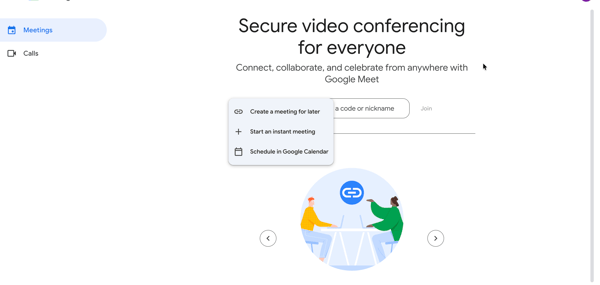
Google Meet (part of Google Workspace) is one of those video conferencing tools that quietly gets the job done without extra fluff. It is Google's dedicated video conferencing tool, built into the broader Google Workspace suite, and that connection to the wider ecosystem is arguably its biggest advantage. I’ve used it for everything from client calls to casual catch-ups with colleagues, and what stood out to me the most was how effortlessly it integrates into my daily workflow.
Since it’s part of the Google Workspace ecosystem, scheduling a meeting is as easy as sending a calendar invite. No separate apps, no extra downloads, just a simple link that pops right into my inbox or Google Calendar. It’s almost too convenient. Rated 4.6/5 based on G2 reviews, it stands as one of the leaders in the video conferencing space.
Source
I spent quite a bit of time testing Google Meet in different scenarios — team brainstorms, virtual workshops, and even a few large webinars. The video and audio quality remained pretty solid throughout, even when I had multiple participants with varying internet speeds.
I particularly liked the live captioning feature, which transcribes conversations in real time. It's not only surprisingly accurate but also super helpful when dealing with accents or background noise. Speaking of noise, Meet’s AI-powered noise cancellation did an impressive job of cutting out distractions. Goodbye, construction noise and barking dogs!
Another cool thing I discovered is how well it integrates with other Google apps. I could share Google Docs, Sheets, or Slides directly within the meeting, making it easy to collaborate without awkward screen-sharing struggles. Plus, it syncs perfectly with Google Drive, so recordings and transcripts (if you have a paid plan) are stored automatically without me lifting a finger.
One of the more impressive collaboration upgrades I noticed was the deeper Google Chat integration within Meet. In-meeting messages are now powered by Google Chat, which means the notes, links, and resources shared during a call stay accessible after the meeting ends in a shared Chat conversation. It removes that familiar scramble of trying to find something someone pasted in the chat before the window closed.
Ask Gemini in Meet is another addition worth calling out. I was using it primarily as an Enterprise feature, but it expanded to Business Standard customers in January 2026 and now supports eight languages. During meetings, it delivers pre-meeting briefs, surfaces key takeaways, flags decisions, and catches late joiners up without anyone having to stop and recap. For teams juggling back-to-back calls across time zones, that kind of built-in intelligence makes a real difference to how meetings actually end.
And then there's the speech translation update, which rolled out to Android and iOS in April 2026. It supports bidirectional translation between English and Spanish, French, German, Portuguese, and Italian in near real time. I tested it with a multilingual team, and the accuracy was genuinely impressive. For global teams, it removes a barrier that used to require a whole separate setup.
Google Meet's customization options, however, are where it shows its trade-offs. G2 reviewers note that the minimalist interface, while clean and distraction-free, leaves limited room for layout personalization, virtual background variety, or branding elements. That said, for teams where simplicity and speed matter more than visual customization, Meet's clean setup is a genuine strength, not a compromise.
Advanced capabilities like recording, breakout rooms, and now Ask Gemini are tied to paid Workspace plans, which is worth factoring in early. G2 reviewers consistently flag storage limits and pricing as pain points, particularly for smaller teams or organizations scaling up. The core platform is genuinely strong even on lower tiers, and for stand-ups, ad-hoc syncs, and everyday calls, it more than holds its own without an upgrade.
Overall, Google Meet is a dependable, low-friction choice that gets stronger the more deeply a team is embedded in Google Workspace. The expanding AI layer, the seamless calendar experience, and the recent collaboration upgrades make it a genuinely compelling option for 2026, not just a default.
What I like about Google Meet:
- Since I already live in Google’s ecosystem, everything feels connected. I love how meeting links are auto-generated in Calendar invites and how files from Drive are easily accessible without digging through tabs. It’s basically productivity on autopilot.
- I was genuinely impressed by how the Ask Gemini feature handled our meetings. Pre-meeting briefs, post-meeting takeaways, and late-join catch-ups, all without anyone having to take notes manually. It changed how our team wraps up calls.
What G2 users like about Google Meet:
“Google Meet is easy to use and is integrated into the Google suite of online software our business uses. There is hardly any implementation, with it being integrated in the package and already connected with your calendar and email. It is so easy that we have never had a need for customer support, even with us using it every day. It is easy to share the meeting link with either a weblink or call-in info for those outside the organization.”
- Google Meet (Google Workspace) review, Rob H.
What I dislike about Google Meet:
- The clean, uncluttered design keeps setup quick and distraction-free; however, G2 reviewers note it feels basic on layout options, playful virtual backgrounds, and branding elements, so engagement-heavy meetings can feel less polished. Best for teams prioritizing simplicity over deep customization.
- The free tier is solid for quick calls, but G2 feedback notes that recording, breakout rooms, and advanced host controls sit behind paid plans. Well-suited to stand-ups and ad-hoc syncs; more complex workshops or webinars typically benefit from an upgraded tier.
What G2 users dislike about Google Meet:
“The only aspect of Google Meet that is lacking is the use of background alteration, and it is missing some of the features that are in some of the other meeting apps for backgrounds and such.”
- Google Meet (Google Workspace) review, Rob H.
Want to host seamless webinars? Check out the best webinar software tested and reviewed by my team. Discover the top platforms to help you connect, engage, and impress.
2. Microsoft Teams: Best for Microsoft 365 users
When I first started using Microsoft Teams, I quickly concluded that it’s not just about meetings; it’s about creating a fully integrated digital workspace where everything happens in one place. From video calls to document collaboration, chat, and task management, it aims to be the all-in-one solution for modern professionals.
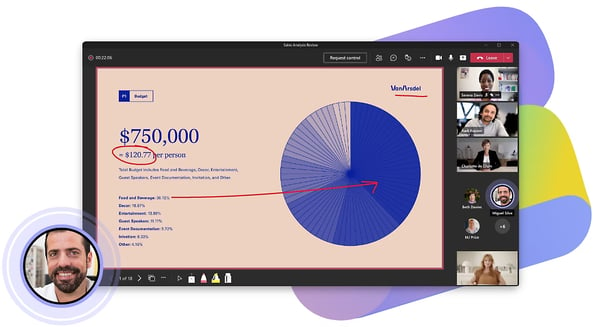
One of the first things I tested was how well it handled meetings in different settings, from quick one-on-one calls, team stand-ups, or webinars. The video and audio quality were solid throughout, and what impressed me more was how little I had to leave the platform to get anything done. Everything I needed was already there.
Source
What stood out to me the most was the Together Mode, which places all attendees in a shared virtual background, like a classroom or auditorium. This feature made meetings feel more engaging and less fatiguing than staring at the usual grid of floating faces.
Teams really shine because of its deep integration with Microsoft 365. During meetings, I could easily share and edit Word documents, PowerPoint slides, and Excel sheets without juggling multiple apps or tabs. This was especially useful in collaborative meetings, where everyone needed to make quick edits in real time. Live Chat is one of Teams' highest-rated features on G2 at 93%, and the in-meeting collaboration experience reflects exactly why.
Another standout feature is the ability to record meetings and store them directly in OneDrive or SharePoint, with searchable transcripts generated automatically. Revisiting a key discussion no longer means scrubbing through a video. You can search for a specific phrase and jump straight to it.
The Copilot Facilitator is one of the more impressive recent additions worth calling out. It joins meetings as a virtual collaborator, setting an agenda from the calendar invite, keeping conversations on track with a live timeline and smart time allocations, capturing real-time editable notes, and assigning tasks that sync directly with Planner. It's available in Teams Rooms and on mobile too, which means even impromptu hallway syncs can be captured. For teams that struggle with meeting follow-through, this changes the equation significantly.
The real-time Interpreter is another feature that has matured meaningfully. Launched in July 2025, it supports live voice interpretation across nine languages and can even simulate the speaker's own voice in translation. For global organizations running multilingual meetings, it removes a friction point that used to require separate tooling entirely.
G2 reviewers praise the breadth of collaboration features and tight Microsoft 365 integration, which power robust, multi-team workflows. At the same time, they say the interface can feel overwhelming for newcomers; with so many options, finding controls during live meetings may take extra clicks. Teams typically smooth this by customizing the toolbar and standardizing meeting presets so essentials stay front and center.
G2 users also note that Teams can be memory and CPU-intensive, particularly during large meetings with HD video and screen sharing running alongside other applications. The January 2026 architecture update has improved calling performance meaningfully, and on modern hardware with a solid connection, it runs well. Lighter modes (web client, reduced background effects) and sensible app discipline usually maintain performance while preserving the core collaboration gains.
Overall, Microsoft Teams earns its reputation as one of the most capable collaboration platforms available, especially for organizations deep in the Microsoft ecosystem. The Copilot layer is growing fast, the meeting coordination scores on G2 are strong across recording, scheduling, and screen sharing, and the breadth of what it does in one place is hard to match.
What I like about Microsoft Teams:
- Beyond just meetings, I loved having a chat, file sharing, and task management all in a single space. It made it easier to track projects without bouncing between different apps.
- I preferred that recordings get automatically saved to the cloud and that they come with searchable transcripts, making it easy to revisit essential discussions.
What G2 users like about Microsoft Teams:
“What I like best about Microsoft Teams is how it brings communication and collaboration into one place. It combines chat, video meetings, file sharing, and integration with other Microsoft 365 tools, which makes it easy to stay organized and work efficiently without switching between multiple apps. The ability to create channels for different teams or projects helps keep conversations focused, and real-time collaboration on documents is especially useful. Overall, it simplifies teamwork and improves productivity.”
- Microsoft Teams review, Meenal V.
What I dislike about Microsoft Teams:
- Teams packs a lot into one interface, and while that depth is a strength for power users, G2 reviewers consistently flag that navigating channels, managing notifications, and locating older files can feel overwhelming, especially in larger organizations with many active teams running simultaneously. The platform rewards familiarity, and teams that invest time in setting up channels and notification preferences upfront tend to get the most out of it.
- G2 reviewers note that Teams can be memory-intensive, particularly during large meetings on older devices where CPU load becomes noticeable. Microsoft's January 2026 architecture update has improved this for calling specifically, but Teams still works best on modern hardware. For enterprise teams on current devices, this is rarely an issue, but it's worth factoring in before a wide rollout.
What G2 users dislike about Microsoft Teams:
“One of the main drawbacks of Microsoft Teams is that it can feel heavy and, at times, slow—especially when I’m juggling multiple chats, meetings, and files at the same time. Performance also seems to vary depending on the device, which can affect the overall experience, particularly during calls. On top of that, the interface can feel less intuitive than more lightweight communication tools.”
- Microsoft Teams review, Marcos P.
Sharpen your virtual communication skills and make every meeting count. Check out our tips on remote work communication to stay connected, productive, and engaged, no matter where you are.
3. Webex Suite: Best for enterprise-grade security
Webex Suite surprised me the most. It's like it took the traditional video conferencing experience and rebuilt it from the ground up with enterprise teams in mind, layering in security, AI, and global collaboration features that go well beyond what most tools offer.
It’s not just a tool for meetings. It’s an entire platform designed for seamless collaboration, with video calls, messaging, webinars, and even calling wrapped into one cohesive package. Rated 4.2 out of 5 from over 18,000 reviews on G2, with 90% of users rating it 4 or 5 stars, it holds its ground as a Leader in the video conferencing space.
The meeting quality immediately stood out for me. The audio clarity was top-notch, even when participants had less-than-stellar internet connections. The built-in adaptive video resolution adjusted smoothly without interrupting the flow of the meeting. For teams with globally distributed members joining from varying setups, that kind of consistency makes a meaningful difference.
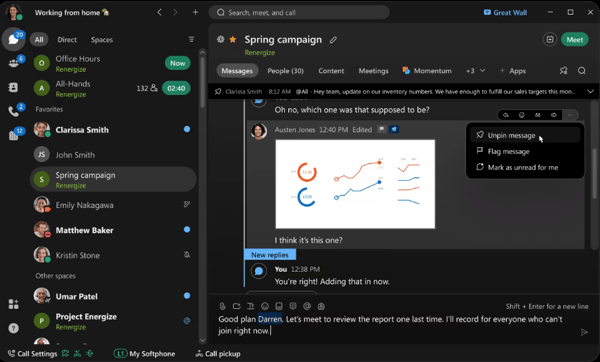
What really set Webex apart for me was its approach to security. This is a platform designed from the ground up for organizations with strict compliance requirements. End-to-end encryption, meeting passwords, waiting rooms, and sovereign controls that let enterprises manage their own encryption keys are all built in. I've used tools where security feels bolted on as an afterthought. On Webex, it clearly isn't.
The AI noise cancellation is genuinely impressive. I tested it from a busy café once, and the participants on the other end said they could only hear my voice. Not the espresso machine, not the background chatter. For anyone who's ever had a call fall apart because of ambient noise, this alone is worth calling out.
I also experimented with its real-time translation feature, which can translate over 100 languages during live meetings. It felt like having a personal interpreter on standby and was incredibly useful for global teams.
One feature that truly elevated the experience was the whiteboarding tool. It’s integrated directly into the platform and lets participants collaborate visually in real time. No need to open another app or share your screen awkwardly — it’s all right there. Plus, integrating tools like Slack and Microsoft Teams ensures it fits seamlessly into different workflows. And with screen sharing rated 92% on G2, it is clear users feel the collaboration tools hold up under real conditions.
Webex Suite’s AI-powered features also caught my attention. From People Insights, which gives you a snapshot of who you’re meeting with, to gesture recognition (yes, it picks up when you give a thumbs-up or clap), the tool feels like it’s designed to keep interactions lively and intuitive. Alongside this, Webex launched agentic AI capabilities in early 2026, including a task agent that pulls action items from meeting summaries and can create Jira tickets or schedule follow-up meetings automatically. For teams managing complex workflows across multiple tools, this is a genuinely useful step forward.
G2 users mention occasional compatibility challenges as well, including lag on older hardware or weaker connections during busy sessions. In practice, reviewers say performance stabilizes when participants use recommended system specs, limit background effects, and default to lower-bandwidth settings when needed.
Reviews also surface pricing considerations: smaller businesses and solo professionals often find that advanced capabilities (e.g., deeper analytics or webinar features) live on higher-tier plans. Teams typically right-size by starting on a core tier and upgrading selectively when those specific features will drive measurable impact.
Overall, Webex Suite continues to be regarded as a reliable, feature-rich platform for enterprise users. While streamlining the interface and improving accessibility for smaller teams could broaden its appeal, it remains a strong contender for organizations prioritizing security and scale.
What I like about Webex Suite:
- I was impressed by how Webex maintained quality even with participants on weaker connections. It dynamically adjusted video resolution without causing interruptions, making every meeting feel professional.
- Real-time translation worked well for global collaboration. I tested it with a multilingual team, and it translated live conversations seamlessly into multiple languages on the fly.
What G2 users like about Webex Suite:
“The background noise cancellation is outstanding, and it keeps communication clear even in noisy environments. I also really appreciate the high level of security and the stability it delivers during large meetings. The interface feels polished and professional, and its seamless integration with other productivity tools has noticeably improved my day-to-day workflow.”
- Webex Suite Review, Kishan G.
What I dislike about Webex Suite:
- Webex takes longer to start up than most tools on this list, and transitioning between modules like chat, calling, and meetings can feel less fluid than you'd expect. G2 reviewers flag this consistently, especially when moving quickly between workflows. Once you're in a session though, the platform is notably stable even at scale, which is precisely where Webex earns its reputation.
- Advanced features and higher webinar capacities are tied to premium plan tiers, which G2 reviewers note can feel limiting for smaller teams or those not using the full suite. For organizations running Webex at enterprise scale across multiple communication channels, most find the pricing reflects what the platform actually delivers.
What G2 users dislike about Webex Suite:
“The product is a bit heavy compared to other, more modern products, and switching between different components is not as smooth as one would wish. The product also has a number of configurations that need to be met, and this may take a while to get used to.”
- Webex Suite review, Prakash T.
4. Zoom Workplace: Best for high-quality video experiences
When it comes to the best desktop video conferencing software with good reviews, Zoom Workplace stands out for its reliable performance, intuitive interface, and consistently high user ratings. Whether you’re jumping into a quick one-on-one, running a large webinar, or collaborating with a global team, Zoom has built a reputation for being fast, intuitive, and rock-solid.
When I started using Zoom Workplace, I was curious to see if it still lived up to the hype. And I have to say, it delivers on most fronts. Rated 4.5 out of 5 from over 55,000 reviews on G2, it holds the highest satisfaction score among all the tools in this list.
One of the first things I noticed was how little time onboarding takes. Most people have used Zoom at some point since 2020, and that familiarity means new team members can join a call without any setup friction. I've run meetings where external guests joined from their browsers without downloading anything, and it just worked. For teams that regularly meet with people outside their organization, that frictionless entry point is genuinely one of Zoom's most underrated strengths.
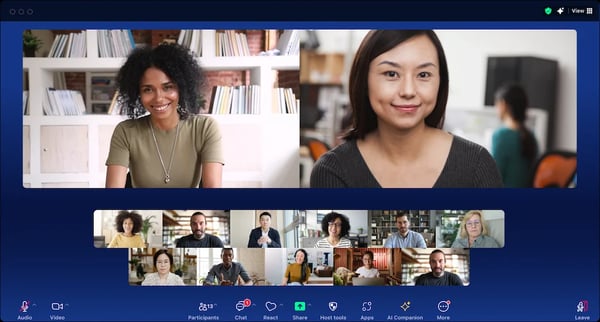
The screen sharing experience on Zoom is the smoothest I have come across in all my testing. Participants can annotate directly on shared content, highlight sections in real time, and hand over control without any awkward pauses. I tested it during a live product demo and a few training sessions, and it held up consistently. G2 users rate screen sharing at 93% for Zoom Workplace, the highest across all the tools in this list, and that reputation holds up in practice.
I loved how simple it was to set up and manage breakout rooms. Assigning participants, shuffling them between rooms, and bringing everyone back together takes a single click. For workshops, training sessions, or brainstorming sessions with subgroups, it's one of the cleanest breakout room experiences I came across, and reviewers call it out consistently as a feature that just works without getting in the way.
I also experimented with Zoom’s Smart Gallery, which uses AI to create individual video feeds for participants in shared spaces — perfect for hybrid work setups where multiple people might be joining from the same conference call room.
The virtual backgrounds and touch-up filters are another thing that set Zoom apart for me. Whether I needed to blur a cluttered background or just look a bit more polished for a client call, the options were easy to find and genuinely well-executed. It sounds like a small detail, but it comes up consistently in reviews, and it does make a real difference to how professional a call feels, especially when you're jumping between internal check-ins and external-facing meetings on the same day.
The most significant recent addition is AI Companion 3.0, launched in December 2025. What makes it distinct from the AI tools in other platforms on this list is its cross-platform reach. It doesn't just work within Zoom's own ecosystem. It connects across Google Drive, Microsoft OneDrive, Slack threads, and more, pulling context from wherever your work actually lives without requiring you to manually upload anything. It drafts follow-up emails, creates action items from call summaries, and generates documents directly from meeting discussions. For teams spread across multiple tools, that kind of ambient intelligence that follows the work rather than asking you to bring everything to it is a genuinely meaningful step forward.
G2 reviewers consistently praise Zoom’s ease of use and reliability for day-to-day meetings. That said, feedback also suggests that the free plan’s time limit constrains longer sessions, and smaller businesses often find paid tiers pricey as usage scales, teams typically right-size by mapping must-have features before upgrading.
As Zoom has grown into a full collaboration suite, add-on costs for features like webinars or larger meeting capacities can climb quickly depending on what your team actually needs. Several G2 reviewers note that pricing complexity is a real consideration at scale. For teams that map their requirements carefully before upgrading though, Zoom's broad feature set tends to justify the investment, and the included AI Companion on paid plans adds value that would cost extra on several competing platforms.
Overall, Zoom continues to be one of the most trusted and widely used video conferencing tools available, and AI Companion 3.0 signals it's serious about staying relevant well beyond the meeting room. For teams that want reliability, polish, and a platform that almost anyone can use without a tutorial, it remains a compelling choice in 2026.
What I like about Zoom Workplace:
- I loved how simple it was to manage breakout rooms during workshops, assigning participants, moving them between rooms, and pulling everyone back together with a single click. It's the kind of feature that sounds basic until you've used a platform where it isn't.
- Recording meetings and storing them in the cloud was effortless. With AI Companion now pulling summaries, action items, and follow-up drafts from those recordings automatically, I actually found myself acting on what was discussed rather than just archiving it.
What G2 users like about Zoom Workplace:
“I appreciate how Zoom Workplace integrates with my email, allowing me to set up calendar invites with my personal Zoom Workplace room already integrated. I love the way it connects my personal meeting room directly to my company and seamlessly integrates with my calendar so every invite I send automatically includes my personal meeting room. The integration with other platforms like Circle Back is also great, especially for the AI notetaking feature that joins all my meetings and keeps notes. The initial setup was very simple for our entire organization.”
- Zoom Workplace Review, Matt L.
What I dislike about Zoom Workplace:
- The free plan's 40-minute group meeting limit is the most consistent complaint across G2 reviews, and it came up in my testing too. It's tight for anything beyond a quick check-in. The paid plans are reasonably priced for what they unlock, but it's worth knowing about this gate before you hit it mid-meeting.
- Add-on costs for webinars, larger meeting capacities, and advanced features can add up as your needs grow. Mapping out your actual requirements before upgrading helps, and the core platform covers most everyday team use cases well without extras.
What G2 users dislike about Zoom Workplace:
“The 40-minute time limit on the free version is the only major headache during long study sessions. Also, the interface can sometimes feel a bit cluttered with too many icons, which takes a moment to navigate if you're in a hurry to join a meeting. It also consumes quite a bit of battery on my phone.”
- Zoom Workplace Review, Verified User.
If you’re deciding between the two big names, Google Meet vs Zoom test breaks down where each one actually wins.
5. GoTo Meeting: Best for simple webinars and reliable performance
GoTo Meeting has been a staple in the video conferencing world for years. It is known for its reliability and simplicity, especially for businesses that need a no-frills, dependable meeting solution. When I started using GoTo Meeting, I was eager to see if it could stand up to newer competitors with more feature-packed offerings.
While it doesn’t have all the flashy bells and whistles, it does deliver a solid, professional meeting experience, focusing on high-quality audio, strong security, and user-friendly controls. Rated 4.2 out of 5 from over 17,000 reviews on G2, it holds its place as a Leader in the video conferencing space.
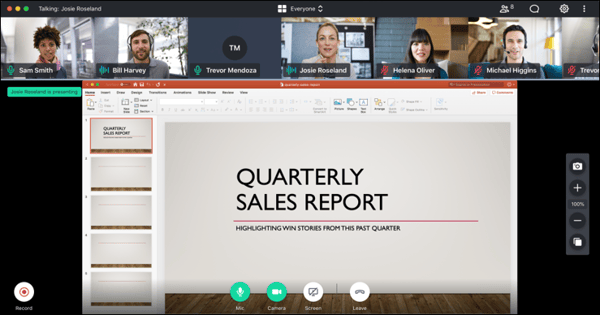
One of the first things I noticed was how lightweight and fast the platform is. Unlike some video conferencing tools that can feel heavy and sluggish, GoTo Meeting runs smoothly even on lower-end devices, which makes it great for team members who might not have the latest hardware. I tested it on both desktop and mobile, and the experience was consistent, with minimal lag or connectivity issues.
The audio quality stood out as one of GoTo Meeting’s strongest features. Powered by their proprietary noise suppression technology, the calls were clear, with little to no background noise interference, even when I was in a noisy environment. There's a quietness to a well-run GoTo Meeting call that I didn't always get on other platforms, and for professional client-facing calls, that clarity matters.
I found the Call Me feature especially useful. It automatically dials participants' phones when the meeting starts, removing the need to fumble with dial-in numbers and PINs. It automatically dials participants' phones when the meeting starts, removing the need to fumble with dial-in numbers and PINs. It's a small thing, but when you're jumping between back-to-back calls, not having to manually dial in every time adds up. Several reviewers call it out specifically as one of those features that just makes the experience feel considered.
Another feature I appreciated was the drawing tools and shared keyboard/mouse control, which made collaboration much smoother during presentations and remote troubleshooting sessions. Unlike other platforms where screen sharing can be clunky, GoTo Meeting kept it responsive even when I shared high-resolution content. Screen Sharing and Presentations both score 91% on G2, and that tracks with how polished the experience felt in practice.
GoTo Meeting is also a solid option for teams that run webinars or sessions across multiple time zones. The scheduling tools handle time zones cleanly, registration management is straightforward, and the overall setup for a webinar-style session is far less involved than on some of the bigger platforms. One reviewer specifically called out using it for webinars with underwriters across different states, and it's exactly that kind of structured, multi-participant session where GoTo Meeting quietly earns its keep.
A recent addition I'd like to mention here is the localized meeting transcripts. GoTo Meeting now automatically generates post-meeting transcripts in additional languages including Spanish, German, and Japanese, with an adaptive detection option that identifies the spoken language from the audio and transcribes accordingly. For teams working across regions where English isn't the primary language, this removes a step that used to require third-party tools.
G2 reviewers credit the platform with reliable core calling and straightforward setup that gets teams connected quickly. However, the interface feels dated compared with newer competitors, and configuring advanced options, like meeting scheduling or recording preferences, can take longer. But once learnt, it's definitely worth it.
The absence of built-in engagement tools (polls, reactions, breakout rooms) can make larger or interactive sessions feel less dynamic. Even so, reviewers say it suits individuals and small teams that prioritize simple, dependable meetings, and many address the gaps by standardizing presets and pairing it with a dedicated tool when they need high-engagement formats.
Overall, GoTo Meeting is a practical, dependable choice for teams that want consistent performance without a steep learning curve. It's not trying to be everything, and that's precisely what makes it work so well for the teams it's built for.
What I like about GoTo Meeting:
- I like that the audio quality never glitched. Participant voices came through clearly without background distractions, even in noisy environments.
- I loved how GoTo Meeting could call me directly, removing the hassle of manually dialing into meetings. It’s a minor feature, but it adds a lot of convenience.
What G2 users like about GoTo Meeting:
“GoTo Meeting is easy to use and very reliable for virtual meetings. I like how quickly I can join or host a meeting without a complicated setup. The video and audio quality are consistently clear, which makes communication smooth and professional. Features like screen sharing, recording, and meeting links are very helpful for collaboration and staying organized. Overall, GoTo Meeting saves time, improves productivity, and makes remote meetings simple and effective.”
- GoTo Meeting review, Nagesh S.
What I dislike about GoTo Meeting:
- The interface feels dated compared to newer platforms, and a few controls aren't as easy to locate as they could be. Once you're familiar with the layout though, the straightforwardness of it works in your favor for everyday meetings.
- There are no built-in engagement tools like breakout rooms, polls, or reactions, which makes it less suited to interactive or workshop-style sessions. For teams focused on clean, structured meetings rather than high-engagement formats, this rarely gets in the way.
What G2 users dislike about GoTo Meeting:
“I think GoTo Meeting should improve on the user interface. I sometimes feel it is outdated and less attractive compared to other alternatives. For example, layout controls like camera and mute are not as clear as they should be compared to other alternatives such as Zoom. The icons look outdated, so generally, I think the user interface should be made clearer and more user-friendly in that way.”
- GoTo Meeting review, Ronald K.
6. JioMeet: Best for unlimited free video conferencing
JioMeet was a surprise on this list for me. It's built by Reliance Jio, one of India's largest telecom companies, and it shows in how the platform is designed. It's built for scale and accessibility on varied network conditions, and it delivers on both counts more consistently than I expected.
The most immediately compelling thing about JioMeet is what it offers for free. Group meetings run for up to 24 hours with no time cutoff, which puts it in a completely different category from Zoom's 40-minute cap or Google Meet's 60-minute free limit. I hosted a full-day workshop session on it without hitting a single restriction, and that alone made me rethink how I'd been evaluating it against the bigger names.
Something I genuinely appreciated during testing was how well JioMeet holds up on slower connections. I ran calls on a patchy mobile data connection and the audio stayed stable, with the video adjusting gracefully rather than freezing entirely. For teams working across regions where internet infrastructure varies, this isn't a minor convenience. It's often the difference between a usable meeting and a frustrating one.
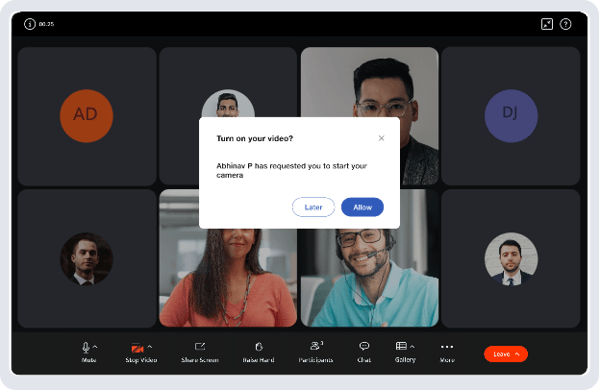
The WhatsApp integration caught me off guard in the best way. You can send meeting reminders and allow participants to join directly from WhatsApp, which is particularly useful in markets where WhatsApp is the primary communication channel. I've never seen this on any other platform in this list, and for teams coordinating across India or Southeast Asia, it removes a friction point that usually goes unaddressed.
Multi-language support is another angle that sets JioMeet apart. The platform supports regional Indian languages, which matters for teams with mixed-language workforces where not everyone is comfortable in English. Combined with the WhatsApp integration, it's clear this is a platform designed with real operational context in mind rather than just feature parity with Western tools.
For participants who haven't downloaded the app, JioMeet supports browser-based joining without any installation required. What I also found practical was the safe driving mode, which switches the interface to audio-only with minimal visual elements when you're on the move. It's a small but thoughtful feature that reflects how and where JioMeet's user base actually uses the product.
The privacy and security controls are solid and clearly considered. Waiting rooms, password protection, and host controls for muting and managing participants are all included without needing a paid tier. For professionals handling sensitive discussions or educators managing student access, having those controls on the free plan is a genuine advantage.
Connectivity can be inconsistent during longer sessions or when more participants join simultaneously, and this comes up regularly across G2 reviews. It's worth being aware of heading into anything high-stakes, particularly if participants are on weaker networks. For everyday team syncs and routine meetings, the stability is generally solid, and most reviewers say it handles day-to-day use well without major disruptions.
Third-party integrations are limited compared to the other tools on this list. There's no native Google or Microsoft SSO, which makes scheduling slightly less smooth for teams already working inside those ecosystems. JioMeet works best as a standalone or as a complement to tools within the Jio and Reliance ecosystem. For teams with complex multi-tool workflows that rely on tight calendar and CRM connectivity, this is worth factoring in before committing.
Overall, JioMeet is a strong, genuinely free option that earns its place on this list by solving real problems for a specific kind of team. If you need unlimited meeting duration, reliable performance on variable networks, and a free tier that doesn't feel stripped down, it's hard to beat at this price point.
What I like about JioMeet:
- The 24-hour meeting limit on the free plan is something I hadn't seen done quite like this anywhere else. Running a full-day session without watching the clock is a genuinely different experience, and it changes how you can use the platform for longer-format collaboration.
- The WhatsApp integration is one of those features that sounds simple but changes the whole onboarding experience for participants. Meeting reminders and one-tap joining directly from a chat they're already in removes a step that trips people up more often than it should.
What G2 users like about JioMeet:
“I like that JioMeet provides high-grade tools while being budget-friendly and allows me to stay connected for 24 hours without any call cuts. The ability to integrate with WhatsApp, switch easily between multiple devices, and its low data optimization are great features. It's made in India, which is a plus for me. Beyond the big 24-hour limit, there are also hidden gem features like the safe driving mode, the no-install guest experience, and the WhatsApp bot. Setting up JioMeet was the easiest among the apps I've used before, which made a good impression.”
- JioMeet review, Sakshi K.
What I dislike about JioMeet:
- Connectivity can get choppy during longer sessions or when more participants join at once. It's worth running a test call before anything important, especially if your team is on varying network quality. For regular day-to-day meetings, most reviewers say it holds up reliably well.
- There's no native Google or Microsoft sign-in, and third-party integrations are limited compared to most other tools on this list. For teams already working inside a Google or Microsoft ecosystem, this can add a little friction to scheduling and invites. JioMeet works best for teams that don't need deep cross-platform connectivity.
What G2 users dislike about JioMeet:
“I have issues with audio and video lag on JioMeet; sometimes the audio lags and the video stutters. Also, I can't integrate it with many other tools, which might be beneficial. CRM integration and AI summary and note-taking features would be useful.”
- JioMeet Review, Pranshu R.
7. Zoho Meeting: Best for budget-friendly video conferencing
Zoho Meeting was one of those tools I hadn't spent much time with before putting this list together, and I'll be honest, I wasn't expecting it to impress me as much as it did. It's not trying to compete with Zoom or Teams on features or scale. What it does instead is make video conferencing genuinely accessible, affordable, and surprisingly capable for the teams that need it most.
Rated 4.5 out of 5, with 97% of users rating it 4 or 5 stars, it holds its place as a Leader in the video conferencing space and earns that recognition for good reason.
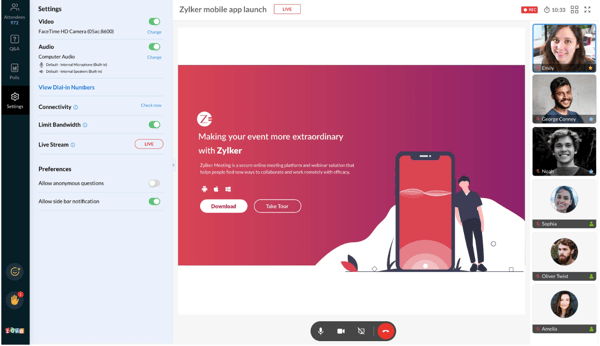
The first thing that struck me was how frictionless the entry experience is. Zoho Meeting is entirely browser-based, which means participants can join a high-definition call in seconds without downloading a single thing. I've lost count of how many times I've had an external guest fumble with an installer before a call, so removing that barrier entirely changes the dynamic. You share a link, they click it, and they're in. That's it.
The integration with the wider Zoho ecosystem is where it really clicks for teams already using Zoho tools. I could connect meetings directly to Zoho CRM, Calendar, and Bookings without any manual setup. For a sales team that lives inside Zoho CRM, being able to schedule and launch client calls without switching tools is a genuine workflow advantage. The integration feels native rather than bolted on, which isn't always the case with similar tools.
What I found genuinely useful for interactive sessions was the built-in engagement toolkit. Zoho Meeting includes polls, Q&A, hand raising, and live chat all out of the box, without needing a third-party add-on. I ran a training session using the polls feature and had responses in seconds. For educators, trainers, and anyone running structured group sessions, having these tools built in rather than patched together from different platforms makes a real difference.
Zoho Meeting also handles webinars well, supporting more than 100 participants without the kind of setup complexity you get on heavier platforms. The webinar tools include registration management, attendee controls, and engagement features, and the whole process from scheduling to hosting is considerably more straightforward than I expected for the price point.
The pricing is genuinely hard to argue with. Plans start at $1 per month per host billed annually, and the free plan comes with no meeting time limits, which puts it in a different category from Zoom's 40-minute cap. For small teams, early-stage companies, or anyone who needs a solid meeting tool without a big software budget, Zoho Meeting offers real value that the bigger names simply can't match at this tier.
Audio and video quality can be inconsistent, particularly when multiple participants have their cameras on or connections are less than ideal. Several G2 reviewers flag this, and I noticed it too during testing. For everyday internal meetings and small group calls, it holds up well. For high-stakes external presentations or large video-on sessions, it's worth testing your setup in advance and managing expectations around bandwidth.
The interface, while clean and easy to navigate, does feel less polished than the more established platforms on this list. Reviewers note it lacks some of the visual refinement, and a few UI quirks, like the occasional app download prompt for guests, can add friction at the wrong moment. For teams already inside the Zoho ecosystem though, the tradeoff is a reasonable one given everything else the platform delivers.
Overall, Zoho Meeting earns its place on this list for teams that want a capable, affordable, and genuinely easy-to-use video conferencing tool without the overhead of the enterprise platforms. It's a smart pick for Zoho users in particular, and a surprisingly competitive option for anyone watching their software spend.
What I like about ZohoMeeting:
- The browser-based experience is one of the cleanest join flows I tested. No downloads, no installs, no last-minute fumbling. Participants are in the meeting in seconds, and that alone removes a surprising amount of pre-call friction.
- The automatic transcript with every recording changed how I approached post-meeting follow-up. I had a full text record of the conversation ready before I'd even closed the tab.
What G2 users like about ZohoMeeting:
“What stands out most about Zoho Meeting is how simple and practical it is, especially for teaching and small-group collaboration. It’s easy to use, runs directly in a browser without requiring any installation, and includes the essential tools I need screen sharing, chat, recording, and polls, which are particularly helpful for keeping sessions interactive. It also feels cost-effective compared to many competitors, making it a strong choice for educators and small organizations. The flexibility for participants to join from different devices, along with basic security controls, adds to its appeal as a reliable, user-friendly meeting platform.”
- Zoho Meeting review, Verified User
What I dislike about ZohoMeeting:
- Audio and video quality can dip during sessions where many participants have cameras on or connections are inconsistent. It's worth running a test call before anything high-stakes, especially with external guests on varying networks. For everyday internal meetings, it holds up reliably well.
- The interface is functional and clean, but it doesn't have the same visual polish as some of the other tools on this list, and occasional prompts to download the app can interrupt the otherwise smooth browser-based experience. Teams inside the Zoho ecosystem will barely notice this.
What G2 users dislike about ZohoMeeting:
“My only complaint about using Zoho Meeting is the lack of consistent quality on the platform when in a meeting. I frequently experience audio and video quality issues which is frustrating.”
- Zoho Meeting review, Ashley P.
Comparison of the best video conferencing software
| Software |
G2 Rating |
Free plan |
Best feature |
Ideal for |
| Google Meet |
4.6/5 |
Yes, 60-minute limit |
Ask Gemini AI and seamless Calendar integration |
Quick and simple meetings with seamless integration to Google Workspace |
| Microsoft Teams |
4.3/5 |
Yes, with basic features |
Copilot Facilitator and deep Microsoft 365 integration |
Collaboration for large teams and integration with Microsoft 365 |
| Webex Suite |
4.2/5 |
Yes, limited features |
Enterprise-grade security with real-time translation across 100+ languages |
Secure, enterprise-level meetings and webinars |
| Zoom Workplace |
4.5/5 |
Yes, 40-minute limit |
AI Companion 3.0 with cross-platform agentic retrieval
|
Versatile meetings with advanced collaboration features |
| GoTo Meeting |
4.2/5 |
No |
Reliable audio with Call Me dial-in and localized transcripts
|
Simple, dependable meetings for professional teams without a steep learning curve |
| Zoho Meeting |
4.5/5 |
Yes, no time limit |
Browser-based joining with built-in polls, Q&A, and Zoho ecosystem integration |
Budget-friendly conferencing for small teams and Zoho ecosystem users |
| JioMeet |
4.4/5 |
Yes, 24-hour limit |
Unlimited free meetings with WhatsApp integration and low-bandwidth optimization |
Cost-effective video conferencing for teams needing long sessions without time caps |
Frequently asked questions (FAQs) about video conferencing software
Have more questions? Find more answers below.
Q1. What is an affordable video conferencing platform with great audio?
JioMeet and Zoho Meeting are both strong picks. JioMeet offers unlimited free meetings with no time cap, while Zoho Meeting starts at just $1 per month per host. Both deliver reliable audio quality without a heavy software budget. GoTo Meeting is worth considering too if you need proprietary noise suppression and a more professional setup.
Q2. What is the best desktop video conferencing software with good reviews?
Zoom Workplace leads here with over 55,000 G2 reviews and a 4.5 out of 5 rating. Its desktop application scores 93% on G2, and reviewers consistently praise its reliability and polish. Microsoft Teams is another strong contender for teams already running on Windows and Microsoft 365.
Q3. What is the best-rated video calling software for international communication?
Webex Suite stands out with real-time translation across 100+ languages and AI summaries translatable into 120 languages post-meeting. Google Meet's speech translation, now available on mobile across several major languages, is a strong option for lighter international use. JioMeet's multi-language support including regional Indian languages makes it a practical choice for teams across South and Southeast Asia.
Q4. What is the best video conferencing app for small businesses?
Google Meet is a strong starting point for small businesses already using Google Workspace, since scheduling and meetings are built into tools they're likely already using. Zoho Meeting is worth considering for teams watching their software spend, with a free plan and paid tiers starting at $1 per month. GoTo Meeting is a solid fit for small businesses that need reliable client calls without complexity.
Q5. What is an easy-to-use video conference solution for our office?
Google Meet consistently earns top marks for ease of setup and one-click Calendar integration. Zoom Workplace is another natural answer given its near-universal familiarity, which cuts down on the "how do I join" friction that slows offices down. JioMeet also scores 94% on both Ease of Use and Ease of Setup on G2, making it one of the least intimidating options for teams with mixed technical comfort levels.
Q6. What are the top video conference software for remote teams?
Webex Suite is built specifically for enterprise scale, with end-to-end encryption, compliance features, and a strong track record in regulated industries. Microsoft Teams is the other strong enterprise pick for organizations already standardized on Microsoft 365. Zoom Workplace also handles large organizations well.
Q7. What are some recommended video conferencing tools for startups?
Zoho Meeting is a natural fit for startups on tight budgets, with a genuinely functional free plan and paid tiers starting at $1 per month. Zoom Workplace is a strong pick for startups that need a platform clients and investors will already be comfortable joining. Google Meet works well for early-stage teams already on Google Workspace, where video conferencing comes built in at no extra cost.
Q8. What is a secure video conferencing software for legal firms?
Webex Suite is the strongest option here, with end-to-end encryption, compliance controls, and sovereign key management trusted across regulated industries. Microsoft Teams is another solid choice for firms already on Microsoft 365, with robust data retention and compliance frameworks. Both platforms are designed with the kind of data protection requirements that sensitive legal discussions demand.
Q9. What are the top video conference software for remote teams?
Zoom Workplace is the most widely used platform for remote teams, with breakout rooms, AI Companion summaries, and cross-platform reliability across time zones. Microsoft Teams is the stronger choice for teams standardized on Microsoft 365, where chat, files, and video all live in one place. Google Meet is a practical lightweight option, particularly when external participants are involved, since its browser-based access requires no downloads.
Q10. Which video call software is best for customer meetings?
Zoom Workplace is widely recognized for external-facing calls, with polished virtual backgrounds and a professional presentation experience clients are already familiar with. Google Meet is another strong option thanks to its browser-based join flow, which means clients can join from a link without downloading anything. For high-stakes client interactions where security matters, Webex Suite's enterprise-grade features make it a credible choice.
The meeting is adjourned, and here's your verdict
For me, choosing the best video conferencing software was like finding the perfect virtual handshake. I wanted it to be smooth, professional, and ideally glitch-free.
Whether you're looking for a free and easy solution like Google Meet, an all-in-one collaboration hub like Microsoft Teams, or the gold standard in video calls with Zoom, there's a platform on this list that can meet your needs. And if budget is the priority, Zoho Meeting and JioMeet prove you don't have to spend much, or anything at all, to run a solid meeting.
Each tool brought something unique to my virtual table. Webex Suite impressed me with its enterprise-grade security and real-time translation. GoTo Meeting quietly delivered some of the cleanest audio I tested. Zoom's AI Companion changed how I think about post-meeting follow-through. And JioMeet genuinely surprised me with how much it offers for free.
For me, the key was figuring out what matters most: ease of use, seamless integrations, or rock-solid reliability. The good news is that whatever your answer, there's a tool on this list built exactly for that.
You now have all my insights to make the right call, whether you're hosting team huddles, giving client presentations, or running a workshop with participants across six time zones.
So, take your pick and meet with confidence — just don’t forget to unmute yourself!
Explore the exciting world of VR conferencing and discover how immersive technology can revolutionize collaboration and connection.