Note: Responses are AI-generated and may contain inaccuracies.
Your customers are talking about your brand right now, on Twitter, Reddit, LinkedIn, TikTok, and a dozen other channels. The question is: are you hearing them?
Social media listening isn’t just about tracking mentions or counting likes. It’s about tapping into unfiltered conversations to understand how people really feel about your product, your competitors, and your category. It’s one of the most powerful ways to spot trends early, catch issues before they escalate, and shape smarter campaigns rooted in real-time feedback.
But not all tools are built equally. Some surface noise instead of insights, while others offer depth but lack usability. That’s why I researched and compared thebest social media listening tools on the market, reviewing G2 feedback, core features, and how real teams use them to stay ahead. I took a closer look at some of the leading tools on the market, including Sprout Social, Hootsuite, Meltwater, Vista Social, Brandwatch Consumer Intelligence, BrandMentions, Reputation, Agorapulse, YouScan, and Brand24.
This guide will help you find a platform that aligns with your goals, whether you aim to monitor brand sentiment, track emerging conversations, or extract audience insights that inform better decisions.
10 best social media listening tools: My picks for 2026
Sprout Social: Best for deep listening insights and reporting Offers advanced keyword tracking, sentiment analysis, and competitive insights, alongside publishing and customer care tools (free trial available, premium pricing starts at $199/mo/user)
Hootsuite: Best for all-in-one social media management Let’s you monitor brand mentions, schedule posts, and analyze performance across multiple platforms from one dashboard (30-day free trial, premium pricing starts at $99/mo/user)
Meltwater: Best for global media and social monitoring Tracks millions of online sources in real time to surface trends, measure sentiment, and manage brand reputation at scale (available on request)
Vista Social: Best for affordable monitoring and scheduling Combines social listening with publishing tools, making it a good fit for lean teams or agencies (free trial for 14 days, premium pricing starts at $64/mo)
Brandwatch Consumer Intelligence: Best for AI-powered consumer intelligence Analyzes large volumes of online conversations to uncover patterns, trends, and audience sentiment (available on request)
BrandMentions: Best for real-time web and social mention tracking Monitors brand mentions across social media, blogs, news, and forums with real-time alerts, sentiment analysis, and competitor tracking (free trial available, premium pricing starts at $99/mo)
Reputation: Best for combining social listening with review management Brings together social mentions, customer reviews, and survey responses to give a 360° view of brand health (available on request)
YouScan: Best for visual social listening and image recognition Uses AI to analyze photos and videos in user-generated content, making it ideal for identifying logo usage, brand moments, and trends ( starts at $499/mo)
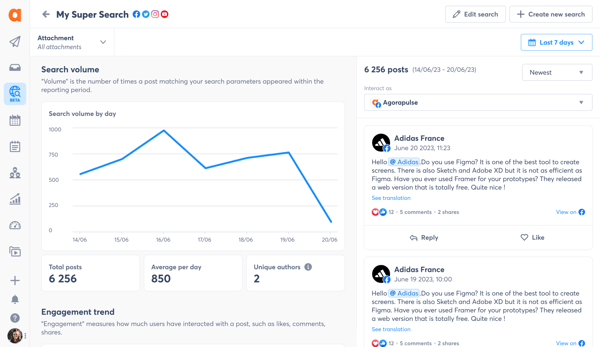
Agorapulse: Best for smart listening with built-in scheduling Offers filtered listening streams, sentiment tagging, and quick reporting, wrapped in a user-friendly platform (free for 30 days, premium pricing starts at $79/mo/user)
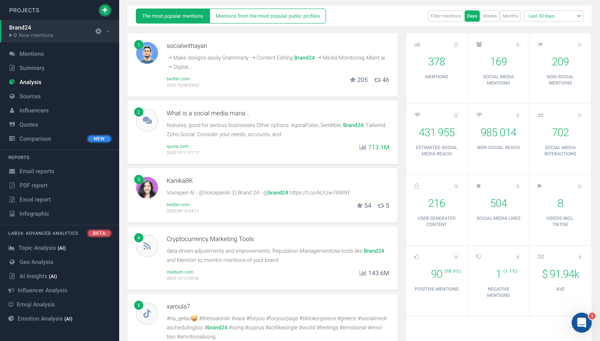
Brand24: Best for real-time alerts and sentiment analysis Captures brand mentions across web and social, helping teams respond quickly and spot emerging issues (14-day free trial, premium pricing starts at $149)
* These best social media listening tools are top-rated in their category, according to G2's Spring 2026 Grid Reports. I’ve added their standout features and pricing details for easier comparison.
My 10 picks for the best social media listening tools in 2026
While comparing these tools, it became clear how much they improve brand monitoring, uncover real-time customer insights, and help marketing teams stay ahead of important conversations.
According toGrand View Research, the global social listening market is projected to reach $20.18 million by 2030, with a CAGR of 14.3%, reflecting its growing importance in digital strategy. Adoption is accelerating as well, with 66% of businesses now using social listening tools and seeing an average ROI period of around 11 months.
If you're wondering which tool PR teams trust during a crisis, which one surfaces competitor insights fastest, or which platform offers the most intuitive dashboards, these tools consistently lead the pack in accuracy, depth, and usability.
How did I find and evaluate the best social media listening tools?
To identify the top social media listening tools, I analyzed real user reviews on G2 to understand how these platforms perform across different marketing and brand monitoring workflows.
I evaluated how each tool supports key use cases, whether it's tracking brand mentions in real time, analyzing sentiment, identifying trends, or uncovering competitor insights.
I also used AI to sift through user feedback and G2 Spring 2026 Grid® Reports to compare ease of use, data accuracy, dashboard quality, and overall satisfaction across platforms. This guide includes screenshots from vendor G2 pages to show what these tools actually look like in use.
I’ve curated this list to help marketing, PR, and customer experience teams find the right solution for listening to what really matters, so you can make smarter decisions, respond faster, and stay ahead of conversations that shape your brand.
What makes the best social media listening tools worth it: My opinion
When evaluating the best social media listening platforms, I focused on features that directly impact brand monitoring, real-time audience insight, and cross-functional value for marketing, PR, and product teams.
Comprehensive channel coverage: The best tools go beyond Twitter or Instagram. In modern social computing environments, meaningful conversations also happen across forums, blogs, news sites, Reddit threads, and YouTube comments.
Real-time alerts and sentiment analysis: Speed and context are everything in social media. I prioritized tools that offer instant alerts for spikes in mentions, shifts in sentiment, or trending topics. Built-in sentiment analysis (especially with support for multiple languages) helps teams respond proactively to praise, complaints, or potential crises.
Audience and topic segmentation: It’s not just about what people are saying, it’s about who’s saying it. I looked for tools that let you filter by demographics, location, influence, or interest segments. The best platforms help you zero in on priority audiences and uncover trends across different customer groups.
Competitive and market benchmarking: Top-tier social listening tools don’t just show your own mentions. I valued platforms that provide side-by-side comparisons with competitors, track share of voice, and monitor broader industry keywords. This helps teams benchmark performance and identify whitespace opportunities.
Insight visualization and reporting: Data is only useful if it’s digestible. I looked for tools with customizable dashboards, shareable reports, and visualizations that make it easy to tell a story with social data. Whether it’s for an exec deck or a campaign post-mortem, great reporting matters.
Compliance and data access transparency: Social data is subject to changing platform policies and privacy regulations. I favor tools that are transparent about how they access and store data, and that remain compliant with APIs and user consent standards. Trustworthy data handling is a must, especially for enterprise teams.
The list below contains genuine user reviews from our best Social Media Listening Tools Category page. To qualify for inclusion in the category, a product must:
Identify thought leaders and influencers within relevant industries
This data was pulled from G2 in 2026. Some reviews have been edited for clarity and accuracy.
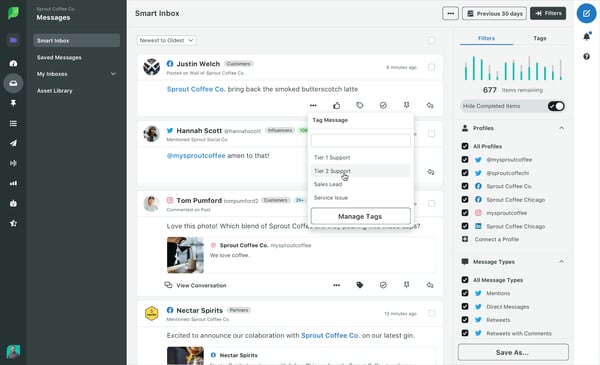
1. Sprout Social: Best for deep listening insights and reporting
According to G2 Data, I found thatSprout Socialis used by 43% of small-business and 38% of mid-market teams to effectively engage audiences, streamline content publishing, and derive actionable insights from social media interactions.
One feature that stood out to me is its intuitive user interface. Many reviewers noted that transitioning from previous social scheduling platforms was quick and seamless, and that the UI made it easy for teams to find features and become fully integrated into the platform.
I noticed that Sprout Social offers extensive educational resources, including in-depth masterclasses on social media growth strategies. Users mentioned that these resources were incredibly helpful in improving team skills and making social campaigns more effective.
Another common theme I saw in reviews was praise for analytics capabilities. Reviewers said that the platform presents data in an easy-to-interpret way, and that features like campaign tagging and reporting reduce the need to spend hours analyzing individual posts. Many highlighted how exciting it is to check performance metrics because they’re comprehensive and actionable.
Publishing and scheduling tools were frequently mentioned as a major plus. Users appreciated the ability to plan content in advance across multiple channels, helping to maintain consistency and engagement.
I noticed reviewers praising collaboration features. Tools like shared calendars, task assignments, and team workflow management were called out for making it easier to coordinate campaigns across distributed teams.
Sprout Social’s social listening and monitoring tools were also highlighted. Users mentioned that being able to track brand mentions and audience sentiment helped them stay on top of engagement trends and respond proactively.
Another benefit that comes up often is responsive customer support. Reviewers noted that Sprout Social’s support team is quick and helpful, providing assistance with setup, troubleshooting, and guidance on advanced features.
Pricing can be steep, particularly for small teams or startups. Many users noted that the platform’s advanced features and analytics justify the cost, especially for teams seeking comprehensive social media management.
Some advanced tools, such as granular competitor analysis or automation workflows, may require time to fully utilize or necessitate higher-tier plans. Still, users who invested in exploring these features found the efficiency gains and actionable insights from automation and reporting well worth the effort.
Overall, based on my review of G2, Sprout Social is widely regarded for its intuitive UI, educational resources, advanced analytics, publishing tools, collaboration features, social listening capabilities, and responsive support, making it a trusted choice for teams seeking to effectively grow and manage their social media presence.
What I like about Sprout Social:
I appreciate that Sprout Social has an intuitive user interface, making it quick and easy to transition from other platforms. Users on G2 also second this.
Its analytics, publishing tools, and collaboration features help teams work smarter and stay organized, a feature that G2 users also highlight.
What G2 users like about Sprout Social:
"For me, I really love the unified inbox. I am able to view all of the messages, comments, mentions from Facebook, Instagram, TikTok, LinkedIn, etc. All in real-time, in one spot, so I do not have to switch tabs back and forth. Even though I am currently on the couch, I was able to clear my entire inbox without having to open one single application. I also really love the automation of DMs, because it does handle a lot of the repetitive, FAQ-based messaging I send out, without needing me to babysit it. Honestly, I was very impressed with the social listening feature as well."
The pricing can be steep for small teams or startups, as G2 users have mentioned; however, they also believe the advanced features make it worthwhile.
G2 users noticed that advanced tools, such as granular competitor analysis, may require time to fully utilize or necessitate higher-tier plans. Still, users who invested in exploring these features found efficiency gains.
What G2 users dislike about Sprout Social:
"There are just a lot of features, so there is a bit of a learning curve. Even just knowing how to use the basics still makes this a superior tool, but a few months in I am still learning new features and analytics to dive into. Nothing confusing, just a ton of things to mess with. Their online chat feature makes it super easy to navigate."
Listening is powerful, but it’s only part of the workflow. See how leading social media suites combine listening, publishing, and analytics into a single platform.
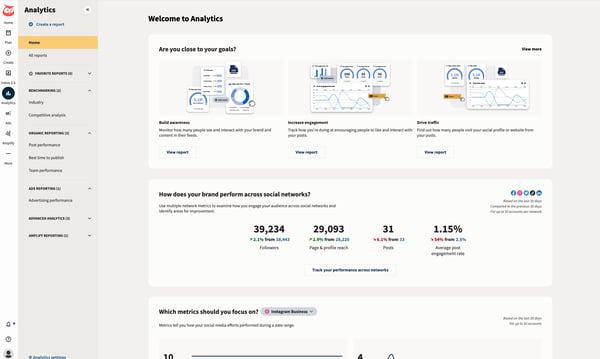
2. Hootsuite: Best known for all-in-one social media management
According to G2 Data, I found thatHootsuite helps 56% of enterprise and 29% of mid-market marketing teams manage content scheduling, engagement, and analytics across various platforms, including Instagram, TikTok, Threads, X (formerly Twitter), Facebook, LinkedIn, Pinterest, and YouTube, efficiently.
One feature that stood out to me is the ability to schedule across platforms. Many users have reported that it saves them hours each week, allowing them to plan and publish posts across multiple networks without needing to switch between tools. They frequently mention that being able to manage both organic and paid content in one dashboard makes coordinating social strategies much easier.
Reviewers consistently praise Hootsuite’s integrations. Users highlighted how smoothly it connects with different social media channels and marketing tools, which helps teams maintain a consistent brand voice and simplifies workflows.
Another common thread I saw was appreciation for AI-powered post creation. Reviewers mentioned that the AI features help them generate ideas, create engaging captions, and save time, especially when managing high-volume content.
Inbox 2.0 also came up frequently. Users said it effectively consolidates messages from multiple platforms into one unified inbox. I read that features like User Notes, Resolve, and Assign make managing team communication much easier, helping teams respond to customers efficiently.
Several reviewers highlighted the analytics dashboard, noting that it provides clear metrics and actionable insights, thereby simplifying campaign performance tracking. Collaboration tools, such as shared calendars and role-based permissions, also emerged as a major plus, enabling teams to coordinate campaigns smoothly.
On the other hand, I identified a couple of common drawbacks that users mention. Built for multi-network publishing, Hootsuite centralizes your workflow. Because Instagram doesn’t carry over alt text from third-party tools, accessibility may need a quick manual check on Instagram. Still, users appreciated being able to rely on customer support. Many reviewers mentioned the quick and helpful responses they received during setup or when they encountered connection issues.
Reviewers highlighted pricing, which some feel is high if you’re mainly using Hootsuite as a scheduling tool. But the use of its advanced features, such as robust integrations, AI content tools, Inbox 2.0, and team collaboration features, seems to justify the cost for many users, highlighting the platform’s speed, flexibility, and actionable insights.
Overall, based on my review of G2, Hootsuite is widely regarded for its cross-platform scheduling, AI enhancements, unified inbox, analytics, and team collaboration tools, making it a trusted choice for teams managing social media across multiple channels.
What I like about Hootsuite:
Hootsuite makes cross-platform scheduling and managing both organic and paid content so much easier, and users on G2 agree.
Features like Inbox 2.0, AI-powered post creation, and analytics dashboards help teams stay organized and make smarter content decisions, a benefit also highlighted by G2 users.
What G2 users like about Hootsuite:
"I like how easy Hootsuite is to use and how quickly I can just pop a post in and it's there. The AI feature is really amazing because it lets me plan posts, gives me ideas, and even provides a caption, which is very useful. Forbs stats is also great because I can easily extract the stats needed for tracking.."
G2 users felt that sometimes the alt text doesn’t transfer to Instagram. Although they also think the platform’s overall content management features make up for it.
The pricing seems high if you primarily use it for scheduling, and G2 users have also noted this. However, they believe the advanced features justify the cost.
What G2 users dislike about Hootsuite:
"One small point I noticed is that when managing multiple scheduled posts, the dashboard can take a few seconds to load at times. It is not a major issue, but during busy hours even small delays are noticeable. Apart from this, the platform works well for regular posting, and once everything is set up, it runs smoothly in daily use.."
Explore top brand protection tools to safeguard your identity, detect impersonators, and shut down threats before they spread.
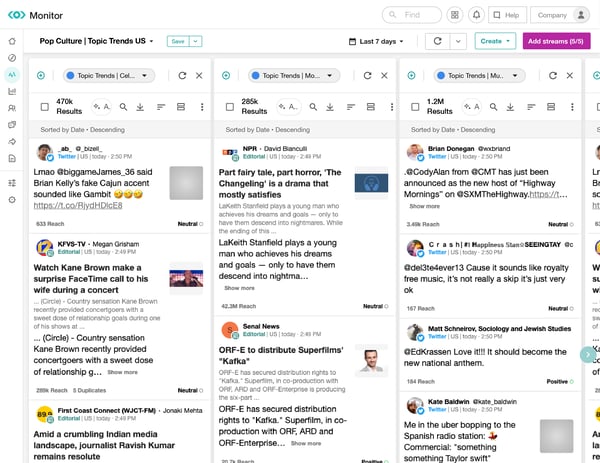
3. Meltwater: Best for global media and social monitoring
Meltwateris widely recognized as a powerful all-in-one platform for PR and social media management. It is used by 36% small business and 42% mid-market teams.
Many users highlight its ability to monitor online conversations, track trends, and optimize engagement, making it a go-to solution for teams seeking actionable insights.
One feature that consistently gets praise is the Explore function. Reviewers frequently mention using it to track discussions about their organization, follow relevant topics, and compare competitor activity. Several note that analyzing trends over different time periods helps them understand the broader context and make more informed strategic decisions.
I’ve noticed that G2 users often call out the “best time to post” recommendations in the Engage function. According to multiple reviews, this feature analyzes audience activity and suggests optimal posting times, leading to noticeably higher engagement on social media campaigns. Users describe it as a practical tool for making content more effective and data-driven.
Another commonly appreciated element is Meltwater’s intuitive interface and workflows. Many reviewers mention that even those with prior experience in similar tools find the platform easy to navigate, allowing them to get started quickly without a steep learning curve.
Users frequently highlight the platform’s analytics and reporting capabilities. Reviews note that Meltwater allows them to track performance metrics, measure engagement trends, and visualize data in ways that simplify strategic planning and decision-making.
A feature that I found noteworthy from reviews is the contact management database. Many users mentioned that Meltwater provides enough contact information to support outreach efforts, even if some emails occasionally need to be supplemented with manual follow-ups. This helps streamline PR campaigns and saves time for teams managing multiple contacts.
Examining broader review trends, the search function is generally regarded as robust. Some reviewers mention minor limitations, such as the inability to use an AND operator for beats, but most feel that the tool still provides the insights they need without relying heavily on external solutions.
On the flip side, I’ve come across dissatisfaction around contact management. Some reviewers have noted missing or incorrect emails and gaps in the database, which can impact targeted outreach efforts. That said, many also point out that Meltwater provides enough baseline information to support campaigns, often supplemented with manual follow-ups or other tools.
Users also mention the email sending feature. Some report that it lacks full customization for bulk emails, which can limit flexibility and may not suit teams expecting advanced personalization. Even so, most reviewers agree that the feature still supports effective outreach through streamlined workflows and adequate contact information, making it a better match for teams that prioritize simplicity over intricate email design.
Based on feedback I gathered from G2 users, Meltwater is valued for its Explore function, best time to post recommendations, intuitive interface, analytics and reporting, robust search, and contact management features. Its combination of actionable insights, data-driven recommendations, and user-friendly design makes it an indispensable platform for PR and social media management.
What I like about Meltwater:
Meltwater makes it easy to monitor conversations, track trends, and optimize engagement, and users on G2 second this.
Features like the Explore function, “best time to post” recommendations, and the intuitive interface help teams make data-driven decisions and get started quickly, a feature that G2 users also highlight.
What G2 users like about Meltwater:
"The Meltwater tool has a lot of features, so many so that it may feel overwhelming at first, but they are clearly demarcated in the software. Particularly useful for us are the Media Relations tool, which allows us to quickly find journalists active across the world, as we are active and invest in multiple countries. The other features that are incredibly useful not just for our stakeholder management team, but also other internal stakeholders, are the automated Daily news Alerts, which provides a comprehensive overview of where we've been mentioned in the media, so much so that we were able to cancel another subscription we used for media monitoring and allocate those resources elsewhere."
Several users have noted that contact records aren’t always accurate, with occasional missing or outdated email addresses. G2 users acknowledged this but mentioned that the platform still provides enough information to support outreach.
Users have noted an issue with the email sending feature, as it lacks full customization for bulk emails; however, they also believe that the workflows remain effective for outreach.
What G2 users dislike about Meltwater:
"The dashboarding tools are somewhat frustrating compared to competitors. They are very rigid. I know they're working to improve them, and they have improved, but they are still too rigid. I wish the charting and dashboarding options were more like a business intelligence tool instead of being constrained by set combinations of metrics and dimensions. This primarily affects power users like myself. Additionally, access to platforms like TikTok, Facebook, and Instagram is limited, but that's common across the field, not Meltwater's fault."
Your online reputation shapes first impressions. See which ORM tools help you monitor mentions, manage reviews, and stay in control of your brand narrative.
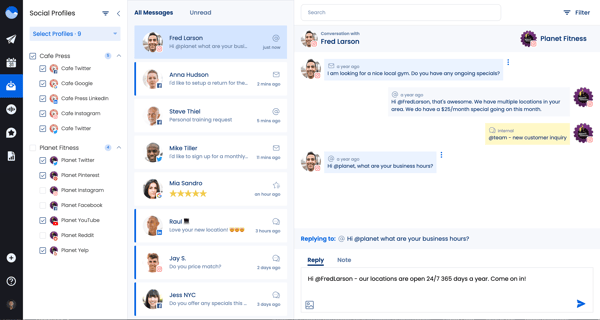
4. Vista Social: Best for affordable monitoring and scheduling
Vista Socialis recognized as a modern all-in-one social media platform. Many users rely on it to centralize engagement, automate responses, and generate actionable insights across multiple social channels. It is mostly used by mid-market teams, accounting for around 66% of users.
One feature that frequently stands out is centralized inbox management. Reviewers often mention that it’s easy to view messages and reply to comments or DMs across Facebook, Instagram, TikTok, LinkedIn, and Threads from a single dashboard, helping teams manage communications more efficiently.
I’ve noticed that users frequently praise automated responses. According to feedback, having this feature built directly into the platform saves significant time and eliminates the need to use multiple apps for message management.
Another commonly highlighted strength is analytics and reporting. Many reviewers note that Vista Social’s in-depth analysis tools help teams understand which content is performing best, measure engagement, and optimize social media strategies effectively.
Content scheduling and publishing also receive positive mentions. Users highlight that planning and posting content across platforms from one platform improves consistency and reduces manual effort, making campaigns easier to manage.
Collaboration features are often praised as well. Reviewers frequently mention that team workflows, task assignments, and shared dashboards make coordinating campaigns and managing multiple contributors more efficient.
Ease of navigation, once familiar, is another recurring theme. While G2 users initially take some time to get used to the tool, they appreciate the training videos, pop-ups, and responsive support that help them get up to speed quickly.
I’ve noticed some users express concerns around the initial setup and error handling. Setting up profiles isn’t always intuitive, and fixing errors can be confusing at first. However, many reviewers highlight how-to guides, training videos, and pop-ups make onboarding manageable.
Another point to consider is the inbox feature. Some reviewers report that LinkedIn comments can occasionally be misclassified as messages, and new engagement updates may be slightly delayed. Even so, most users note that these issues don’t significantly impact overall workflow or engagement management.
Overall, based on feedback I gathered from G2 users, Vista Social is widely valued for its centralized inbox, automated responses, in-depth analytics, content scheduling, collaboration features, and ease of navigation.
What I like about Vista Social:
The centralized inbox makes it easy to manage messages and comments across multiple platforms, and many G2 users seem to feel the same.
Automated responses save time and reduce the need for multiple apps, a feature that reviewers frequently highlight.
What G2 users like about Vista Social:
"The interface for scheduling and calendar management gives a premium feel and is very easy to use! I also love that I can see and respond to messages and comments in real time, and set up DM automations in case I'm offline. Such a gamechanger for me! The listening feature is also amazing and is usually just seen on more expensive platforms. Customer support is also great, they respond quickly so it saves me so much time. Now that I tried Vista Social, I just know that I could never go back to other platforms."
G2 users have mentioned that the initial setup and error handling can be confusing. However, they also note that training videos and guides make onboarding more manageable.
LinkedIn comments can sometimes be misclassified, and engagement updates may be slightly delayed. Reviewers have pointed out these issues, but most feel that they don’t significantly disrupt workflows.
What G2 users dislike about Vista Social:
"Platform is feature-rich so for new user breadth of functionality feel overwhelming in the beginning , especially for teams that are new to such advanced inbox management and DM automation. some features take time to fully understand. But it can be overcome by support team and available guidance."
5. Brandwatch Consumer Intelligence: Best for AI-powered consumer intelligence
BrandwatchConsumer Intelligenceis recognized as a comprehensive solution for monitoring social media, advertising, publishing, audience analytics, and customer data. Many users (36% mid-market,35% enterprise, and 29% small business teams) note that teams rely on it to track brand mentions, measure campaign performance, and generate actionable insights across multiple channels.
One feature that frequently stands out is the ease of integration with existing workflows. Users often mention that after some initial training, the platform fits seamlessly into management processes, allowing teams to adopt it without major disruptions.
I’ve noticed that reviewers consistently praise analytical capabilities. Many highlight the ability to generate detailed reports and track content performance across multiple channels, which enables teams to make data-driven decisions and optimize their campaigns.
Another commonly mentioned strength is the Engage module. Users note that it enables monitoring of brand mentions and conversations they might otherwise miss, helping teams maintain timely and relevant engagement with their audience.
Content publishing and scheduling also receive positive mentions. Reviewers highlight that managing multiple social accounts from a single platform saves time and ensures consistent messaging across channels.
Collaboration features are also frequently praised. Many users note that team roles, shared dashboards, and task management make it easier to coordinate campaigns and maintain alignment across teams.
Customizable dashboards and reporting are another area where reviewers see value. According to feedback, these dashboards make insights easy to interpret and actionable, effectively supporting KPI tracking and leadership reporting.
Some reviewers mention that new users may need time to get comfortable with Brandwatch’s analytics and reporting features. Many also note that the platform’s training resources and support help make this transition smoother.
Several users have reported occasional lag or syncing issues with specific social platforms. While this can briefly disrupt workflows, most users consider these issues minor compared to the overall value of the platform, and say they become easier to manage with regular use.
All in all, based on feedback from G2 users, Brandwatch is widely appreciated for its seamless integrations, analytical capabilities, Engage module, content publishing, collaboration tools, and customizable dashboards.
What I like about Brandwatch:
Brandwatch integrates smoothly into existing workflows, and it appears that G2 users share a similar sentiment about how easily teams can adopt it.
Analytics and reporting capabilities help track content performance and optimize campaigns, something reviewers frequently highlight.
What G2 users like about Brandwatch:
"I love the tags & categories management and the easiness to create customizable reports with Brandwatch Social Media Management. It helps me diversify our creative assets and makes it easy to schedule and organize our publications. The initial setup was very easy and enjoyable. Our decision to switch to Brandwatch Social Media Management was driven by the aim to have a one-in-all platform, especially since we already had Consumer Research with Brandwatch. The customer service and the overall positive experience with the platform were also incentives."
I noticed that new users may need time to become comfortable with analytics and reporting, and G2 reviewers have also highlighted this. Many also mentioned that Brandwatch’s training resources and support make the transition easier.
I also observed occasional lag or syncing issues with certain social platforms, which reviewers noted; however, most consider these minor and manageable, given the platform’s overall value.
What G2 users dislike about Brandwatch:
"It would be great to have access to some live courses that show how to excel on the platform and make the most of its features."
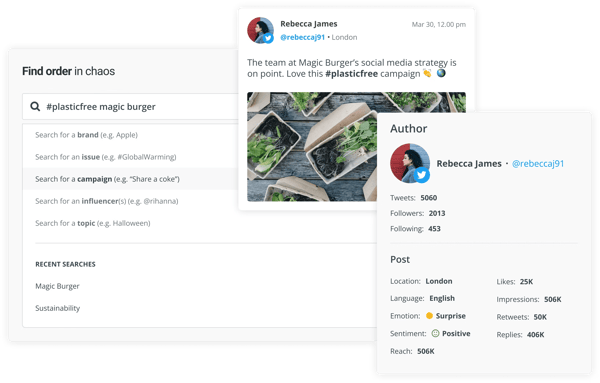
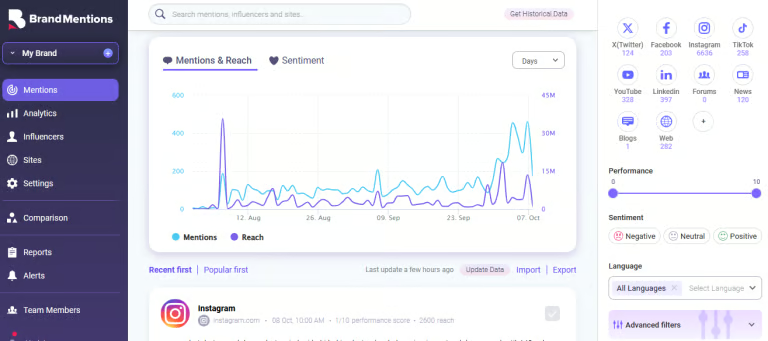
6. BrandMentions: Best for real-time web and social mention tracking
BrandMentions is a real-time monitoring platform that tracks brand conversations across social media, blogs, news sites, Reddit, LinkedIn, and more. Based on the G2 user reviews, it helps marketing and PR teams quickly spot important mentions, reduce manual tracking, and turn scattered conversations into actionable insights.
Its real-time alerting is a standout feature. Reviewers, especially small businesses (44% of users), say the platform surfaces new mentions quickly to respond before issues escalate. Spike detection is another highlight, helping teams catch sudden surges in mentions or negative sentiment early.
BrandMentions also performs well in Reddit and niche web coverage. Users frequently mention its ability to surface deep threads, smaller blogs, and less visible discussions that other tools miss. This makes it useful for uncovering candid, unfiltered feedback.
Sentiment and emotion analysis is another strength. Beyond basic positive or negative labels, the platform adds context to how people feel. Reviewers say this is especially helpful during sensitive moments, when understanding tone matters as much as volume.
Reporting and customization were also highlighted as major benefits. I found that users appreciated being able to generate branded, client-ready reports without spending hours manually pulling data together. Features such as white-label reporting, metric customization, and channel-level visibility were often cited as practical advantages, especially for agencies or teams that need to present polished updates to clients or leadership.
I also saw consistent praise for filtering and usability. Reviewers mentioned that features like domain exclusions help clean up the feed and keep monitoring focused on relevant mentions instead of clutter. At the same time, many users described the dashboard as straightforward enough to start using quickly, making the platform feel approachable even when handling large volumes of data.
On the flip side, I came across some feedback about workflow and interface limitations. A few reviewers noted that the inbox can feel crowded when the tool pulls in a high volume of mentions, especially from lower-authority sources, and that stronger AI-based triage would make it easier to prioritize the most important results. Others mentioned smaller usability issues, such as an overly wide sidebar, small email font, or the absence of a dark mode for long monitoring sessions.
Another drawback I noticed is that some users would like more flexibility around integrations and exports. While the core monitoring and reporting experience appears strong, reviewers noted that adding more native third-party integrations or additional export options for insights and clusters would make the platform easier to integrate into broader workflows.
Overall, BrandMentions is widely valued for its real-time alerts, strong Reddit and niche web discovery, emotion-based sentiment analysis, customizable reporting, filtering options, and ease of use. It seems especially well-suited for teams that want fast, practical visibility into brand conversations and need a tool that helps them catch emerging issues, uncover honest feedback, and report on insights without a lot of manual effort.
What I like about BrandMentions:
BrandMentions delivers real-time alerts and spike detection, making it easier to catch emerging conversations and respond before issues escalate.
The sentiment and emotion analysis adds useful context beyond simple positive or negative labels, helping teams better understand how audiences actually feel.
What G2 users like about BrandMentions:
"BrandMentions for global sentiment analysis, monitoring brand perception across multiple markets, and identifying critical customer interactions that require immediate attention. The platform consolidates conversations from various digital channels into a single, unified dashboard, supporting over 100 languages, which eliminates the need for multiple tools and offers a clear, real-time overview of how the brand is perceived. For an enterprise-level brand, moving beyond basic sentiment classification into deeper emotional context is a significant advantage. It allows us to quickly identify high-risk interactions and prioritize outreach where it has the most impact. The multilingual reporting capability is highly valuable, especially when working with international stakeholders. The initial setup was smooth with a user-friendly interface that takes less time to set up."
I noticed that the inbox can sometimes feel cluttered, especially when tracking broader keywords, and prioritizing the most important mentions may require manual filtering.
Some users mention that integrations and export options are somewhat limited, which can make it harder to plug BrandMentions into more complex marketing or analytics workflows.
What G2 users dislike about BrandMentions:
"One area that could improve is the number of native integrations. While BrandMentions works well for monitoring and reporting, having more built-in integrations with additional third-party tools would make it even easier to connect with different workflows."
Enterprise social teams managing listening alongside publishing often evaluate both together. Here's how the top social media management tools rank on G2 across satisfaction, support, and ease of use.
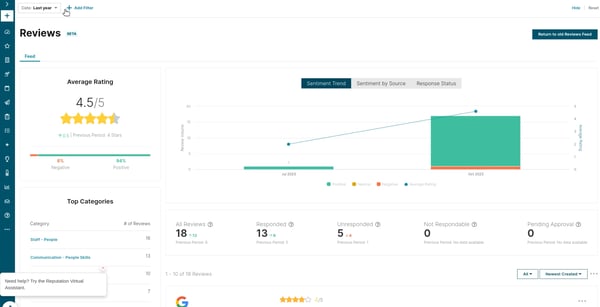
7. Reputation: Best for combining social listening with review management
Reputationis widely recognized for helping companies measure, manage, and scale their brand performance in real-time. Many reviewers highlight that teams use the platform to streamline review management, monitor brand sentiment, and gain actionable insights that improve customer trust and loyalty.
One feature that frequently receives praise is automated review gathering. Users, mostly ranging from mid-market teams (49%) and enterprise teams (27%) note that it’s easy to collect reviews across multiple platforms, ensuring feedback is captured promptly. The review feed itself is often described as clean and intuitive, allowing teams to view and manage incoming feedback efficiently.
I’ve noticed that G2 users often call out the platform’s report filtering capabilities. Being able to quickly filter sections of reports allows teams to focus on the insights that matter most, saving time and reducing effort in navigating irrelevant data.
Another commonly appreciated element is customer support. Reviewers frequently describe the team as responsive, knowledgeable, and proactive in assisting with setup, troubleshooting, and best practices, which adds value to the overall experience.
Many users highlight real-time reputation tracking as a standout feature. Being able to monitor changes in sentiment and ratings as they happen helps teams respond quickly to both positive and negative feedback, giving them an edge in maintaining a strong brand image.
Ease of use and an intuitive design are also commonly mentioned. Dashboards and navigation are often described as straightforward, enabling new users to get started quickly without extensive training or onboarding.
Integration with core business tools is another benefit reviewers note. While some users would like even more integrations, such as connecting with platforms like Glassdoor, current integrations with CRM and marketing systems are seen as sufficient to tie reputation metrics to broader business outcomes.
On the flip side, I’ve seen some users mention issues with performance and dashboard responsiveness. Dashboards can be slow to load, and selecting dates may feel unintuitive at times. These comments are more common among teams expecting instant responsiveness. Many reviewers note that the platform’s overall design still allows access to key insights without major disruption.
Reputation is valued for its automated review gathering, clean review feed, report filtering, responsive customer support, real-time tracking, and intuitive design.
What I like about Reputation:
Automated review gathering makes it easy to collect feedback across platforms, and it appears that many G2 users share a similar sentiment about the time it saves.
Real-time reputation tracking and intuitive dashboards help teams respond quickly to changes in sentiment, something I’ve seen reviewers highlight often.
What G2 users like about Reputation:
"It has everything related to reputation in one place, so there’s no need to jump between different software throughout the day. The surveys integrate with Yardi, which means they can go out automatically. The team is always helpful when support issues come up, and they also help with improving our online reputation. Overall, it delivers high returns and saves time for a relatively small cost. I also really enjoy the new AI features, they feel forward-looking and focused on the future."
I noticed that dashboards can sometimes be slow, and selecting dates isn’t always intuitive. It appears that other G2 users have mentioned similar issues, although they still find the insights accessible.
I noticed that integrations could be expanded beyond the current CRM and marketing systems, and reviewers also mention this. Still, many users, especially small to mid-sized teams, find that the platform meets most of their business needs.
What G2 users dislike about Reputation:
"Sometimes it could be a little glitchy. I think it's mostly because of my browser. Sometimes I don't see all of the data right away. And that's might be just a lag. Due to Internet connection activity or something like that. But I have noticed a little bit of a lag in jumping right into it when I need to. And then it's not necessarily the problem of Reputation, but I'm not sure."
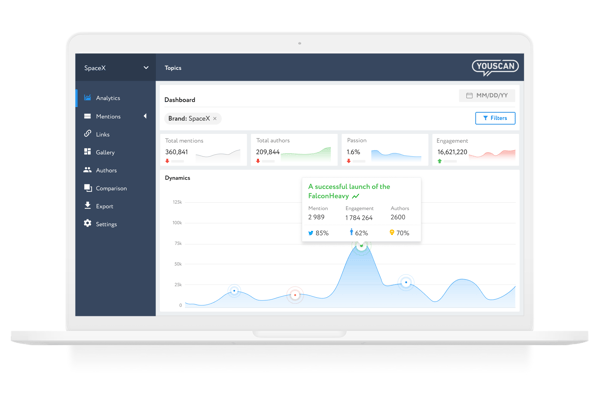
8. YouScan: Best for visual social listening and image recognition
YouScanis recognized as a next-generation, AI-powered social listening platform. With 47% of the users from small business teams, many of them rely on it to monitor brand reputation, track competitors, and derive actionable insights for campaigns across multiple channels.
One feature that frequently stands out is reputation monitoring. Reviewers often mention that the platform enables quick responses to mentions across social media and online media, helping teams maintain brand trust and engagement.
I’ve noticed that users frequently praise competitor tracking. Many reviewers highlight that monitoring competitors’ activity allows them to adopt best practices or avoid potential pitfalls in their own campaigns.
Another commonly appreciated element is analytics dashboards. Users note that YouScan’s deep analytics and visually intuitive dashboards make it easier to understand trends, measure performance, and build strategic communication plans efficiently.
Sentiment analysis is also frequently mentioned as a valuable feature. According to G2 Data,89% usersvalue that it allows teams to quickly gauge public perception and adjust messaging accordingly.
Collaboration features are another strength reviewers highlight. Many mention that sharing insights and coordinating responses across teams helps streamline social listening efforts and ensures alignment.
Ease of data visualization came up repeatedly in reviews. Users often praise clear, customizable graphs, charts, and dashboards that help teams quickly translate insights into actionable strategies.
I’ve noticed that some users express concerns about the accuracy of sentiment analysis. Occasionally, the system misinterprets the emotional tone of comments, necessitating manual intervention, which may be more significant for teams that rely heavily on precise emotional categorization. Still, reviewers emphasize that the overall insights remain highly valuable.
Another aspect to consider, mentioned by some reviewers, is the lack of a native response feature. Currently, YouScan excels at monitoring, but the ability to reply directly to mentions from within the platform would enhance its utility. That said, users consistently highlight that monitoring and analytics capabilities are highly effective on their own.
Overall, according to G2 feedback, YouScan is widely valued for its reputation monitoring, competitor tracking, analytics dashboards, sentiment analysis, collaboration features, and data visualization.
What I like about YouScan:
Reputation monitoring enables teams to respond quickly to mentions and maintain brand trust, and it appears that many G2 users agree.
I like that competitor tracking, analytics dashboards, and sentiment analysis provide actionable insights and support strategy, something reviewers frequently highlight.
What G2 users like about YouScan:
"YouScan is a very smart, powerful platform. A good choice for media monitoring and analytics. In my opinion, it has advanced capabilities for both quick and advanced text data analysis. Wide coverage of different media and a high depth of historical data if professional retro analysis is required. Very good user-friendly interface. High-class customer service and technical support – quick and comprehensive feedback even on complex non-standard requests."
G2 feedback notes that sentiment analysis can occasionally misinterpret tone; however, most say the overall insights remain valuable.
Some users mention that there’s no native response feature within the platform, which may be a concern for teams seeking an all-in-one engagement tool. But many feel that monitoring and analytics capabilities are highly effective on their own.
What G2 users dislike about YouScan:
"The tagging process can be quite manual, especially with large datasets, so more automation or smarter tagging would be useful. Additionally, having more customization options for charts on the platform, like converting a pie chart into a bar graph or choosing between stacked versus unstacked views, would be great. I'd like to add more metrics or attributes, such as breaking sources down by social channel. There's a bit of a learning curve with the initial setup, as YouScan uses its own set of operators that differ from standard query systems."
9. Agorapulse: Best for smart listening with built-in scheduling
Agorapulseoffers publishing, reporting, monitoring, and team collaboration tools, making social media management simpler and more efficient.
According to G2 Data,86% usersappreciate being able to access custom reports and dashboards to measure social activity and engagement opportunities. I found that many teams, especially small business teams that make up 71% of users, rely on it to consolidate social media metrics, streamline content planning, and manage audience engagement from a single platform.
One feature that consistently stood out to me is reporting. Many reviewers mentioned that the customizable weekly and monthly reports allow them to consolidate metrics across all platforms, making it easy to present clear, actionable data to leadership.
I noticed frequent praise for scheduling capabilities. Users highlighted how planning content days in advance, rather than posting in real time, saves significant time and ensures consistency across channels.
Another common thread in reviews is the mobile app. Users said it allows them to capture and share content on the fly, making it invaluable for teams that need to post timely updates or answer quickly to trends.
Monitoring and inbox management also received positive mentions. Many reviewers appreciated how Agorapulse centralizes messages, comments, and mentions, helping teams stay on top of engagement efficiently.
Collaboration features are another strong point. Users noted that shared calendars, team roles, and task assignments make it easy to coordinate campaigns and manage multiple contributors seamlessly.
Finally, the platform’s ease of use was highlighted. Reviewers noted that the interface is intuitive, reducing the learning curve for even new team members to social media management platforms.
I noticed a couple of common drawbacks across G2 reviews. One is that some advanced metrics and report customization options are limited, particularly for comparative or segmented reports. While this may not meet the needs of highly data-driven teams, many users appreciated that the core reporting features remain clear, actionable, and easy to use for most scenarios.
Another area reviewers highlighted is that message response workflows and content suggestions could be enhanced, for example, with AI-driven topic ideas based on social networks, positioning, or target audience. Even so, Agorapulse still helps teams efficiently manage engagement and plan content.
Overall, G2 reviewers value Agorapulse for its reporting, scheduling, mobile app, monitoring, collaboration tools, and ease of use.
What I like about Agorapulse:
Reporting is customizable and helps consolidate metrics across platforms, and many G2 users seem to agree that it makes presenting data easier.
Scheduling, mobile app features, and inbox management streamline content planning and engagement, something reviewers frequently highlight.
What G2 users like about Agorapulse:
"What I like best about Agorapulse is how everything is centralized in one place, making daily management much easier. The moderation features allow us to categorize incoming messages, which helps qualify conversations and adds valuable KPIs for client reporting. It’s intuitive, easy to use, great for sharing calendars with clients, offers clear analytics, and the customer support team is always responsive and helpful."
Advanced metrics and report customization can be limited, and G2 users have also mentioned this. Others note that the core reporting features are still clear and actionable, making them a good fit for teams that prioritize straightforward visibility over complex dashboards.
Message response workflows and content suggestions could be strengthened, and reviewers point this out as well; however, they also note that the platform still helps teams manage engagement effectively.
What G2 users dislike about Agorapulse:
"The platform can feel a bit rigid when it comes to custom workflows, especially if you're managing a high volume of content across teams. Sometimes the approval process feels clunky, and there have been occasional lags when loading large asset libraries or switching between client workspaces. Integration options are decent, but I’d love to see more automation flexibility."
10. Brand24: Best for real-time alerts and sentiment analysis
Brand24is recognized as an advanced social media monitoring tool that provides AI-powered reports and actionable insights. Many users, 65% of them from small business teams, rely on it to track brand mentions, analyze feedback, and optimize campaigns across multiple channels.
One feature that frequently stands out is centralized brand monitoring. Reviewers often mention that having all brand mentions in one place makes it easy to stay on top of conversations and manage reputation efficiently.
I’ve noticed that users often praise the real-time feedback and response capabilities. According to multiple reviews, the platform allows teams to quickly analyze customer sentiment and respond promptly, helping to improve engagement and trust.
Another commonly highlighted strength is the use of automated reporting and AI-powered insights. Reviewers frequently note that these features save significant time on manual analysis, optimize campaigns, and support the creation of customer-focused content.
Keyword and filter customization is also frequently mentioned as a pro. Users highlight that the ability to fine-tune monitoring parameters ensures the most relevant data is captured for actionable insights.
Collaboration features also receive positive mentions. Many reviewers note that team sharing, coordinated responses, and aligned reputation management strategies make working together more efficient.
Ease of integration with other tools is another strength reviewers mention. Connecting Brand24 with reporting or analytics systems helps streamline workflows and ensures insights are actionable across teams.
Some users mentioned that the platform’s reporting options can feel limited for highly detailed or segmented analysis. Even so, reviewers note that Brand24’s core reporting features remain clear, actionable, and easy to use for most scenarios.
Another minor concern is the limitation of historical data. Brand24 stores collected mentions for about a year, which may restrict long-term analysis. Even so, many users find that the platform provides sufficient data to manage reputation and optimize campaigns effectively.
Overall, based on feedback from G2 users, Brand24 is widely valued for its centralized brand monitoring, real-time feedback, automated reports, keyword customization options, collaboration features, and seamless integration capabilities.
What I like about Brand24:
Centralized brand monitoring makes it easy to track mentions and manage reputation, and it appears that many G2 users share this sentiment.
Real-time feedback, automated reports, and AI-powered insights help teams save time and optimize their campaigns, a feature reviewers frequently highlight.
What G2 users like about Brand24:
"I like how easy Brand24 is to use and how quickly it delivers real-time insights. The alerts and sentiment analysis are especially helpful for reacting fast and making better communication decisions. The alerts notify us instantly when new mentions appear, so we can react quickly to both positive and negative feedback. Sentiment analysis helps us prioritize responses and understand the overall tone of conversations, which is especially valuable during campaigns. The initial setup was very easy and quick."
Setting up keywords and filters can have an initial learning curve, and G2 users have also pointed this out; however, most say the platform becomes intuitive once it is properly configured.
G2 reviewers mention that historical data is limited to about a year, but many feel there’s still enough information to manage reputation and optimize campaigns effectively.
What G2 users dislike about Brand24:
"The data from some social platforms can be limited due to API restrictions, and historical data access is restricted in the lower-tier plans. Also, while the interface is clean, it could benefit from a bit more customization when it comes to filtering and visualizing large amounts of data. That said, it still delivers great value overall."
Social media listening tools: Frequently asked questions (FAQs)
Have more questions? Find the answers below.
Q1. What are the best-rated social media monitoring tools?
Top-rated tools include Sprout Social, Brandwatch, and Meltwater. These platforms are praised for accurate sentiment analysis, multi-platform coverage, and detailed reporting dashboards.
Q2. What are the best social media listening tools for small businesses?
Vista Social and Brand24 are great picks for small businesses. They offer core monitoring features, such as brand mentions, sentiment tracking, and competitor analysis, at accessible price points.
Q3. What are the top social media tracking apps for marketing teams?
Hootsuite and Sprout Social lead here. Both tools help marketing teams track brand performance, campaign hashtags, and audience engagement, all from a unified dashboard.
Q4. What are the top-rated apps for social media monitoring?
Highly rated platforms include:
Agorapulse: Known for strong engagement and inbox tools
Brandwatch: Great for advanced data analysis
Reputation: Ideal for multi-location businesses managing brand reputation
Q5. What’s the best software for tracking social media mentions?
Brand24 is highly effective at real-time mention tracking. It scans news sites, blogs, forums, and social platforms to alert you whenever your brand, competitors, or keywords are mentioned.
Q6. What is highly recommended social media listening software?
Meltwater and Brandwatch are frequently recommended for their comprehensive global data coverage, AI-powered insights, and ability to track trends across news and social media in real-time.
Q7. What is the best platform for social media listening for agencies?
Sprout Social is agency-friendly, offering features such as client reporting, approval workflows, and team roles. Statusbrew is also popular among agencies for its scalable listening and publishing capabilities.
Q8. What is an affordable social media listening service?
YouScan and Vista Social offer strong core features, such as sentiment analysis, visual recognition, and reporting, at a lower price point—ideal for teams with tight budgets. best rated social media monitoring tools
Q9. Which social media listening tool is best for retail?
Reputation is purpose-built for retail and multi-location brands. It focuses on managing customer reviews, local social mentions, and store-level sentiment across channels.
Q10. What are the best social media analytics tools for 2026?
The top analytics tools for 2026 include:
Sprout Social: Comprehensive insights across platforms
Agorapulse: Detailed performance and ROI tracking
Brandwatch: Advanced analytics powered by AI and visual dashboards
Q11. Which are the most trusted social media listening tools solutions for operations manager teams based on user reviews?
Reviewers consistently point to Sprout Social, Reputation, and Agorapulse for reliability and responsive support, the qualities operations-focused teams tend to prioritize. G2 reviews highlight fast, knowledgeable support and consistent day-to-day workflows across all three, which helps teams keep monitoring running without disruption.
Q12. Which are the highest rated social media listening tools for mid-market technology companies focused on easy integration delivery?
Brandwatch and Hootsuite earn frequent praise for connecting smoothly with existing tools and workflows, and both see meaningful mid-market adoption. Meltwater is also widely used by mid-market teams (42%), with reviewers valuing how quickly it fits into established processes after initial training.
Q13. Which social media listening tools do teams actually keep using beyond rollout instead of reverting?
Vista Social and Meltwater show strong stickiness in reviews. One Vista Social reviewer noted they could not go back to other platforms after switching, and Meltwater users mention consolidating and cancelling competing subscriptions once it became their primary tool, both signals that teams stay on-platform well after onboarding.
Q14. Which are the most reliable social media listening tools based on reviews from operations manager managing technology company operations?
Sprout Social, Reputation, and Brand24 are commonly cited for dependable performance and steady support. Reviewers describe centralized monitoring, real-time alerts, and quick support responses that keep reputation and engagement workflows running smoothly for teams managing high volumes.
Q15. What are some social media listening tools supporting real-time visibility without sacrificing system stability and overall data integrity?
Brand24, BrandMentions, and Meltwater lead on real-time monitoring. Reviewers note these platforms surface new mentions and sentiment shifts quickly, with instant alerts and spike detection that help teams respond before issues escalate.
Q16. Which social media listening tools provide streamlined workflow without expensive implementation costs or outside consulting?
Vista Social, Agorapulse, and Brand24 are noted for straightforward setup and centralized workflows that teams can run without heavy configuration or outside consulting. Vista Social in particular stands out for combining listening and scheduling at an accessible price point.
Q17. What are some social media listening tools with the simplest configuration and onboarding for non-technical teams in Mid-market?
Vista Social and Agorapulse are frequently praised for guided onboarding. Reviewers highlight training videos, in-app pop-ups, and responsive support that help non-technical teams get up to speed quickly, along with intuitive dashboards that reduce the learning curve.
Q18. Which are the top social media listening tools platforms for technology companies seeking easy integration and minimal implementation complexity?
Brandwatch, Brand24, and Hootsuite are commonly recommended for smooth integration and low setup friction. Reviewers describe easy connections to existing reporting and analytics systems, which keeps insights actionable across broader workflows.
Q19. Which social media listening tools solutions deliver streamlined workflow while maintaining strong user team adoption?
Agorapulse, Vista Social, and Sprout Social are valued for collaboration features that support adoption, including shared calendars, task assignments, and role-based permissions. Reviewers note these tools make it easy to coordinate campaigns across contributors while keeping the interface approachable.
Q20. Which are the best social media listening tools platforms for mid-market organizations that require real-time visibility effectively?
Meltwater and Brandwatch combine strong mid-market adoption with real-time monitoring, and reviewers value their trend tracking and analytics depth. Brand24 is another fit, offering real-time alerts and sentiment analysis that help mid-market teams respond quickly to emerging conversations.
Stop! Don't tweet into the void!
Skipping a social media listening tool means you’re flying blind while your customers are practically yelling their opinions online.
Without it, you miss trends, ignore feedback, and let competitors swoop in with better responses. The right tool helps you tune in, spot patterns, and actually hear what your audience cares about.
Devyani Mehta is a content marketing specialist at G2. She has worked with several SaaS startups in India, which has helped her gain diverse industry experience. At G2, she shares her insights on complex cybersecurity concepts like
web application firewalls,
RASP, and
SSPM. Outside work, she enjoys traveling, cafe hopping, and volunteering in the education sector. Connect with her on
LinkedIn.
.png?width=400&height=150&name=Untitled%20design%20(56).png)



.png)



/DarshayitaThakur-OrangeBG.webp)