


I’d pick Monday Work Management as the overall winner. It has the strongest mix of high G2 rating, native Salesforce integration, bidirectional sync, real-time workflow visibility, ease of use, and automation. It is the safest all-around pick for teams that want Salesforce activity to flow into project boards without a lot of technical setup.
Other options to consider:
If you've ever closed a deal in Salesforce and then had to manually copy all that customer info into a separate project management tool, you know how painful it is. Most teams are stuck jumping between two worlds — Salesforce for the sales side and another tool to actually run the work. Nothing stays in sync, things fall through the cracks, and someone's always updating a spreadsheet they shouldn't have to.
It’s a bigger problem than most teams realize. According to Salesforce’s MuleSoft connectivity benchmark report, 81% of IT leaders say data silos are slowing digital transformation, while 95% report integration challenges that make it harder to adopt AI and move work forward. For teams managing projects in Salesforce, that disconnected data can quickly turn into missed updates, duplicate work, and slower handoffs.
In this guide, I've broken down the best 5 project management tools that integrate with Salesforce so you can stop copy-pasting between apps and actually focus on the real work.
These top-rated project management tools offer varying levels of Salesforce integration, from native no-code connectors to third-party sync solutions. Monday work management, Smartsheet, and Asana provide stronger native integration options, while Jira relies on third-party connectors, and ClickUp offers partial native Salesforce support with broader automation via Zapier.
| Software | G2 rating |
Starting price of Salesforce integration |
Type of integration |
| Jira | 4.3 ⭐ | $9.05/user/mo (Standard) + connector cost | Third-party only (Getint, Exalate). Bidirectional sync, custom objects, comment sync, custom field mapping |
| Asana | 4.4 ⭐ | $30.49/user/mo (Advanced, monthly) | Native rules-based. One-way sync (SF→Asana), auto-create tasks, trigger automations, no-code setup |
| Smartsheet | 4.4 ⭐ | Custom pricing (Advanced work management) | Native connector. Bidirectional per-field sync, custom objects, filter conditions, no-code workflow wizard |
| Monday Work Management | 4.7 ⭐ | $14/month(low integrations) | Native. Bidirectional sync, 8 standard + custom objects, workflow builder, auto-create items, people field mapping |
| ClickUp | 4.6 ⭐ | $10/user/mo (Unlimited, monthly) | Partial native (Biz+ for full sync). Accounts & Opportunities sync, task auto-creation, Universal Search, and Zapier for broader coverage |
*Based on G2’s Summer Grid Report 2026, these PM tools are among the top-rated in their category. I’ve included each product's features, pricing, and sync behavior. Images have been taken from the respective G2 product page. Pricing information reflects the current pricing details as of 4th June, 2026.
Salesforce-integrated project management tools help teams turn CRM activity into trackable work across sales, customer success, operations, and delivery. Across Jira, Asana, Smartsheet, monday Work Management, and ClickUp, G2 reviewers most often value better visibility, workflow automation, cross-functional handoffs, and fewer manual updates between Salesforce and project execution.
Recommended reading: Managing campaigns across multiple teams and channels? Explore our roundup of the best marketing project management software to find tools that help streamline campaign planning, content production, approvals, and cross-functional collaboration.
G2 rating: 4.3/5
Jira’s Salesforce integration helps teams connect customer-facing activity with project execution, making it easier to turn sales, support, and customer success inputs into trackable work. As I reviewed user feedback, I found that buyers value Jira most when Salesforce-connected requests need clearer ownership, better visibility, and more automated follow-through across teams.
Key Salesforce integration features to highlight:
What stood out to me most was how often users connected Jira with better project visibility. G2 reviewers described being able to track Salesforce-driven work through tickets, boards, dashboards, filters, and status updates, giving sales, support, customer success, product, and engineering teams a clearer shared view of progress. From a buyer’s perspective, this makes Jira a strong fit for teams that want fewer handoffs lost between CRM conversations and delivery workflows.
I also noticed consistent praise for Jira’s flexibility and automation potential. Users pointed to workflows that help route customer issues, trigger onboarding or implementation tasks, standardize repeatable steps, and keep sprint or project work organized. While Jira may take some setup, the reviews suggest that once teams configure it around their process, it can make Salesforce-connected work easier to manage and scale.
Jira can feel complex, especially for non-technical users or teams building more advanced Salesforce workflows. Some buyers may need admin support, training, or clearer governance to get the most from it. Still, after reviewing the feedback, I’d frame Jira as a powerful, visibility-focused PM tool for teams that want Salesforce-connected work to move through clear, automated, and accountable project workflows.
Recommended reading: Looking for a project management platform beyond Salesforce integrations? Explore our guide to the 9 best project management software solutions for 2026 to compare features, pricing, strengths, and the ideal use cases for each tool.
G2 rating: 4.4/5
Asana’s Salesforce integration helps teams connect sales activity with project execution, making it easier to turn CRM-driven work into tasks, projects, and cross-functional workflows. It can support use cases like triggering Asana work from Salesforce record changes, syncing customer or opportunity context, and helping sales, customer success, marketing, and delivery teams coordinate follow-through in one shared workspace. For buyers comparing Salesforce-integrated PM tools, Asana is especially useful when teams want an easy-to-use project layer that brings more visibility, ownership, and automation to Salesforce-connected work.
Key Salesforce integration features to highlight:
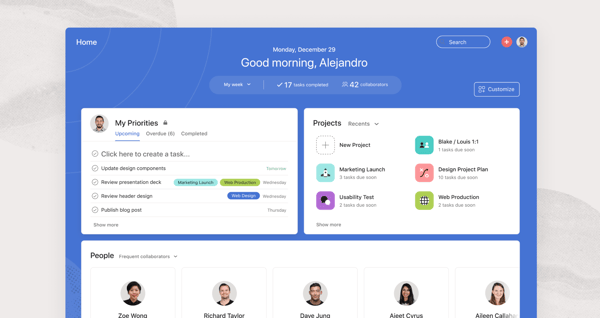
What stood out to me positively is that reviewers who mention Salesforce often connect it with better project visibility. One G2 reviewer specifically said Asana helped provide “visibility of workflow across the wider teams” alongside Salesforce integration, while others described using Asana to track opportunities, meetings, client work, implementation projects, and cross-team progress. For buyers, this suggests Asana’s Salesforce value is less about replacing CRM work and more about helping teams turn Salesforce-related activity into visible, accountable execution.
I also saw positive feedback around ease of use and collaboration. Reviewers described Asana as intuitive, easy to adopt, and helpful for keeping teams aligned through tasks, boards, timelines, ownership, deadlines, and status updates. When paired with Salesforce, that ease of use matters because sales and customer-facing teams need a project layer that does not feel overly technical. Some reviewers also highlighted integrations with Salesforce, Slack, Google Workspace, Microsoft 365, and other tools as helpful for keeping work connected across departments.
Asana can be a strong Salesforce-connected PM tool for teams that want to turn CRM activity into organized project work. One drawback to consider is that some G2 reviewers want a deeper native Salesforce experience, especially around syncing opportunities, visibility of notes, and setup. That said, Asana’s rules-based Salesforce integration can still help teams automate task creation, connect sales activity to project workflows, and reduce manual follow-up.
G2 rating: 4.4/5
Smartsheet’s Salesforce integration helps teams connect CRM activity with project tracking, reporting, and workflow automation. It can support use cases like syncing Salesforce data into sheets, turning sales or customer activity into actionable project work, and giving teams visibility through dashboards, reports, alerts, and shared views. For buyers comparing Salesforce-integrated PM tools, Smartsheet is especially useful when teams want a flexible, spreadsheet-style workspace to manage Salesforce-driven work across sales, operations, customer success, and project teams.
Key Salesforce integration features to highlight:
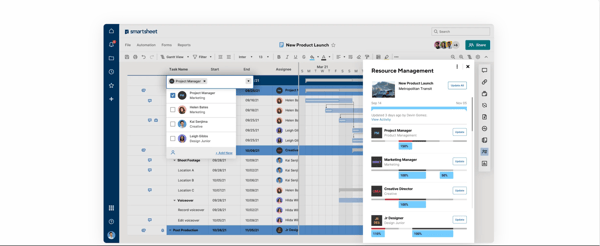
What stood out to me is that G2 reviewers frame Smartsheet as a visibility layer around Salesforce. Some users describe connecting Smartsheet to Salesforce and Slack to import workflows, upload Salesforce forms, track progress, and receive task notifications. Others mention using Smartsheet to pull data from Salesforce for revenue projections, project plans, load-out forecasting, customer requests, or implementation work. In those cases, the value is less about Salesforce record management itself and more about turning Salesforce-related activity into visible, organized, and trackable work.
I also saw positive Salesforce-specific feedback around collaboration and ease of use. G2 reviewers mention Smartsheet’s familiar spreadsheet-like interface, shareable sheets, dashboards, real-time updates, reminders, and automation as helpful for getting teams aligned. A few reviewers specifically describe Salesforce integration as “great,” “simple,” or useful for creating a single source of truth across teams. For buyers, this suggests Smartsheet can be especially helpful when sales or customer data needs to be shared with project managers, operations teams, leadership, or external stakeholders in a format that is easier to manage than Salesforce alone.
Smartsheet’s Salesforce integration can add real value by connecting CRM-driven work with shared project visibility and automation. One piece of feedback to consider is that it may require extra setup: some reviewers mention limits around syncing and configuration. That said, its native connector, bidirectional sync, and no-code workflow setup can make it a strong option for teams that need structured Salesforce-to-project management visibility.
Monday Work Management is a strong choice for teams that want Salesforce activity to flow directly into shared project boards, workflows, and dashboards. Its Salesforce integration helps teams turn records, files, sales updates, and customer-related actions into trackable work, reducing manual handoffs between sales, operations, delivery, and project teams.
G2 rating: 4.7/5
Key Salesforce integration features to highlight:
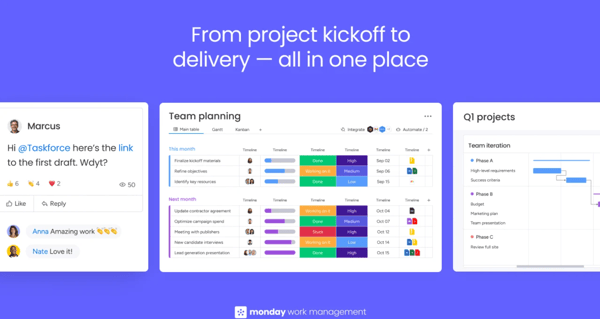
What stood out to me positively is that G2 reviewers often connect Salesforce integration with better workflow visibility. Some users describe Monday as helping teams move away from scattered notes, spreadsheets, and CRM-only task tracking by giving everyone a shared place to see project status, ownership, deadlines, and next steps. For Salesforce-connected teams, that visibility can make it easier to track customer follow-ups, campaign work, sales handoffs, implementation steps, and internal requests.
I also saw strong positive feedback around ease of use and automation. Reviewers describe Monday as intuitive, visual, customizable, and easy for teams to adopt, which matters when sales and customer-facing teams need a project layer that does not feel overly technical. Several Salesforce-related comments also mention automations, integrations, webhooks, dashboards, and connected workflows as useful for keeping work moving and reducing repetitive manual updates.
Monday Work Management can be a highly visual and flexible way to turn Salesforce activity into organized project execution. While Salesforce integration may not always feel deep or seamless out of the box, buyers who validate sync depth, automation rules, plan requirements, and field-mapping needs can still find it a strong fit for the right workflow.
Recommended reading: Working with a limited budget? Check out our guide to the 10 best free project management software tools to compare features, limitations, and the best options for startups, small teams, and growing businesses.
G2 rating: 4.6/5
ClickUp’s Salesforce integration helps teams connect CRM activity with project execution by bringing Salesforce-related work into tasks, lists, dashboards, custom fields, and automated workflows. Teams can use it to sync or reference customer and account context, route sales or support handoffs, track implementation and onboarding work, and automate updates across sales, customer success, support, and delivery teams. For buyers comparing Salesforce-integrated PM tools, ClickUp is especially useful when teams want a customizable workspace that can turn Salesforce-driven activity into visible, trackable, and automated work.
Key Salesforce integration features to highlight:
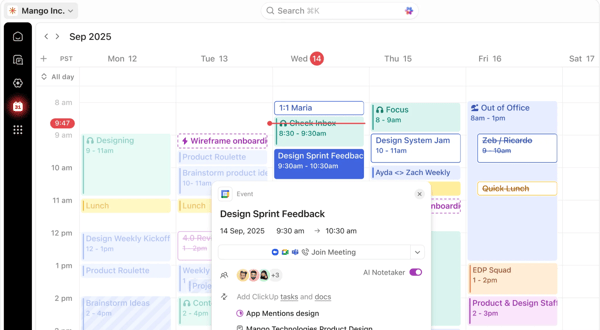
What stood out to me is that Salesforce-related G2 reviewers often connect ClickUp with better operational visibility. One reviewer described building a custom Salesforce integration to support communication between delivery and support teams, while another mentioned integrating ClickUp with Salesforce, Power BI, and SQL to automate data extraction and synchronize project tracking in real time. This suggests ClickUp can work well for teams that need Salesforce data or activity to move into a more flexible project execution layer.
I also noticed good feedback around customization and workflow automation. G2 reviewers describe ClickUp as adaptable, visual, and useful for structuring delivery processes, assigning work, tracking implementation progress, creating dashboards, and centralizing customer-related information. For Salesforce-connected teams, that flexibility can help bridge the gap between CRM activity and day-to-day execution across sales, customer success, support, and project teams.
Some G2 reviewers wanted smoother information transfer between ClickUp and Salesforce, and fewer workarounds through tools like Zapier. Still, ClickUp offers useful Salesforce-related capabilities, including account and opportunity syncing, task creation, Universal Search, and automation support.
Choosing the right PM tool is about finding an integration that actually holds up when your team is using it every day. Here are the six things that separate a smooth Salesforce integration from one that creates more work than it saves.
Connecting Salesforce to a PM tool typically takes a few hours to a few days, depending on your setup. The basic process is: install your chosen tool's native connector or AppExchange app, authenticate both accounts, map your Salesforce fields to the corresponding fields in your PM tool, set your automation triggers, and run a test before going live. Getting that preparation right is what separates a clean integration from one your team has to work around.
Integrating a PM tool with Salesforce comes with a few predictable hurdles, from data syncing delays and messy field mapping to heavier admin setup than most teams expect. Knowing what to look for before you pick a tool can save you a lot of frustration down the line.
Have more questions? Find the answers below.
Yes. ClickUp, Jira, and Asana offer free plans. ClickUp is the most generous, with unlimited users and tasks plus Salesforce connections through Zapier. Jira is free for up to 10 users and works well for dev teams through MuleSoft. Asana is free for up to 15 users, but after its direct Salesforce connector shut down in early 2026, you’ll need Zapier or another third-party tool.
Not exactly. Salesforce supports basic task tracking but lacks core PM features like Gantt charts, dependencies, and resource planning. For project management inside Salesforce, use an AppExchange tool like Inspire Planner or Mission Control. For standalone PM tools, connect platforms like Monday or ClickUp through APIs or automation tools.
Salesforce connects sales data with project delivery. Teams use it to create project records, automate task updates when deal stages change, and track pipeline and delivery in one place. This helps prevent handoff gaps after a deal closes.
Monday Work Management is a strong choice. It syncs Salesforce opportunity data into project boards in real time, helping sales and delivery teams stay aligned without manual updates. Its visual workflow builder and broad integration library also make it easy for non-technical teams to use.
Yes. ClickUp supports billable and non-billable time tracking at the task level and can create tasks from closed Salesforce deals. Smartsheet tracks time against assignments and can push cost and billing data into Salesforce, which is useful for services teams tracking profitability.
ClickUp is the best fit for most early-stage teams. Its free plan includes unlimited users and tasks, while paid plans add Gantt charts, sprint planning, and workload tracking. For engineering-heavy teams, Jira is better for backlog management, velocity tracking, and agile reporting.
Jira is a strong mobile option. Its iOS and Android apps support sprint management, issue tracking, and notifications, with Salesforce sync available through MuleSoft or Exalate.
Most tools can create projects when a Salesforce opportunity moves to “Closed Won.” Monday Work Management and Jira handle this through workflow automation. ClickUp and Asana typically use Zapier, while Smartsheet supports alerts and data imports. Before choosing a tool, confirm it can map Salesforce opportunity fields into your project templates.
You've done the research; now it comes down to fit. If real-time two-way sync and minimal setup matter most, Monday Work Management is your safest bet. Teams with technical workflows and dev involvement will get more mileage from Jira, while Asana works well when you need an intuitive, easy-to-adopt layer for cross-functional collaboration. For visibility-heavy operations that rely on reporting and dashboards, Smartsheet brings Salesforce data into a familiar spreadsheet format that non-technical stakeholders can actually use. And if budget is a constraint, ClickUp's free tier gets you connected without any upfront investment.
Before you finalize anything, pressure-test three things with the vendor: how custom fields are mapped, whether sync is live or batch-based, and how much admin effort the initial setup actually requires. Get those answers right, and you'll have an integration that works quietly in the background rather than one your team has to work around.
Explore the 10 best AI project management tools on G2 to find smarter ways to automate work and keep teams aligned.


I evaluated 10+ tools to find the best free project management software for software teams....
 by Washija Kazim

Keeping projects on track didn't always seem difficult to me. I still remember my first big...
 by Jaya Bordoloi

I evaluated 15+ tools using G2 data and reviews to finalize the six best marketing calendar...
.png) by Tanuja Bahirat
by Tanuja Bahirat