


The email that costs you the most is never the campaign that underperformed. It's the order confirmation that silently stopped delivering for three days before anyone noticed. Or the onboarding sequence that fired twice. Or the password reset that landed in spam during your biggest launch week.
Choosing the best transactional email software matters more than most teams realize until something breaks. The difference between platforms only becomes clear under pressure, when volume scales, when an integration breaks mid-launch, or when a triggered message arrives too late and the user has already left. If you're a growth, lifecycle, or engineering team making this decision, this guide is for you
I evaluated 8 top tools against the criteria that actually determine production reliability. I analyzed G2 data and hundreds of reviews to find the very best. Customer.io stood out for event-driven lifecycle messaging, Brevo for combining transactional and marketing email in one platform, and Netcore Cloud Email API for high-volume API-driven delivery. Dotdigital excelled at connecting transactional messaging with broader customer journeys, while WebEngage focused on retention-driven engagement. Omnisend and edrone were strongest in e-commerce environments, with Omnisend aligning transactional and promotional messaging and edrone emphasizing personalization. MoEngage earned its place for product-led customer engagement and lifecycle messaging.
*These transactional email tools consistently surface as leading options based on aggregated review patterns in G2's Winter 2026 Grid® Report. I’ve highlighted their strengths.
The platforms below were built with triggered messaging as the primary use case, not an add-on. Where they differ is in how they approach it. Some are built around developer-first API control, where the assumption is that your team wants full ownership of the logic layer. Others lean into lifecycle orchestration or ecommerce event alignment, where the platform does more of the heavy lifting on workflow structure. Neither approach is universally right. It depends on where your engineering bandwidth actually sits and how much of that layer you want to own versus delegate.
What I was looking for in the G2 data was consistency, not peaks. Any platform looks capable in a best-case review from someone in their first month. What's more useful is where the feedback holds up over time and where it starts pointing to the same operational limits repeatedly. That's what the mapping below reflects. The tradeoffs are visible upfront, before they become yours to manage in production.
I started with G2’s Winter 2026 Grid® Reports to build an initial shortlist, focusing on platforms with strong verified review volume across small business, mid-market, and enterprise segments.
From there, I used AI-assisted analysis to identify patterns across hundreds of G2 reviews, looking specifically at how teams describe platform behavior under pressure: what breaks during onboarding surges, where logs fall short during incidents, and which integrations create ongoing maintenance debt.
Where I lacked direct exposure, I cross-referenced feedback from growth, engineering, and lifecycle teams running these tools in production. Product visuals and capability references come from G2 vendor profiles and public documentation.
The criteria below reflect the issues that consistently surfaced in G2 reviews and not just feature checklists.
Each platform brings different strengths to the table. So, the best choice depends on how your team approaches messaging, the complexity of your workflows, and the role transactional email plays in your broader customer experience.
Below, you’ll find authentic user feedback from the transactional email software category. To appear in this category, a tool must:
*This data was pulled from G2 in 2026. Some reviews may have been edited for clarity.
Customer.io is an event-driven messaging platform that connects product data with automated communication workflows. It is built for growth-stage products and lifecycle teams that treat automated communication as a core part of the product experience rather than a standalone marketing function.
G2 reviews make a pretty compelling case for me, and it starts with how Customer.io lets teams translate behavioral events into targeted communication logic. No rigid campaign templates, no workarounds. It is the kind of flexibility that 90% of G2 reviewers rate highly, specifically for email segmentation. Users describe building automation flows directly from product signals, covering onboarding emails, transactional alerts, and lifecycle updates in a way that feels genuinely structured. That alignment cuts manual coordination and gives product and marketing teams much clearer messaging ownership.
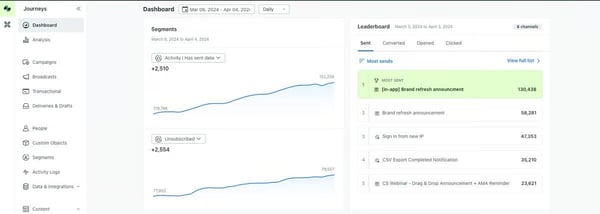
What struck me while going through Customer.io reviews is how consistently delivery reliability comes up, teams sending high-volume transactional emails without disruption, a pattern backed by a 90% feature score for Performance and Reliability. This consistency supports onboarding flows, account notifications, and other time-sensitive communications where timing and deliverability directly affect user experience.
Customer.io’s multichannel communication capabilities further expand its role beyond standard email infrastructure. Digging into G2 reviews, I noticed that teams often combine email with push notifications, SMS, and webhook-driven interactions to maintain consistent messaging across user touchpoints. This integration-first approach allows Customer.io to operate as a central orchestration layer for transactional and lifecycle communication workflows, where Webhooks reach 88% on G2.
A lot of positive reviews poured in on the campaign builder and design environment for supporting both visual and technical workflows. Users frequently mention reusable components, preview functionality, and the ability to toggle between visual and code editing modes, enabling cross-functional collaboration. This design flexibility helps teams maintain brand consistency while adapting transactional templates to varied product events and customer journeys.
What I kept finding as I went through Customer.io's review data was how deeply teams integrate it with their product and analytics stacks, connecting messaging logic to tools like Snowflake to run campaigns based on real behavioral context rather than static lists. This integration depth allows teams to centralize lifecycle communication while keeping customer attributes, events, and messaging logic aligned across systems.
Managing multiple brands or product lines becomes more structured through distinct workspace environments and reusable assets. What I appreciate here is that this prevents campaign overlap while preserving segmentation clarity. Agencies and SaaS businesses running parallel messaging programs benefit directly from this structure, keeping campaign logic clean across distinct product lines.
Some G2 users note that expanding automation structures can make large workflow maps harder to navigate. Complex branching logic and multiple triggers require closer attention in detailed lifecycle journeys. This is most noticeable in highly customized automation setups. However, this is not an issue for teams building sophisticated, multi-step customer flows. The platform’s depth supports advanced lifecycle journeys at scale.
Reporting capabilities are described as clear for core campaign metrics, though G2 reviewers flag this as a consideration for teams with advanced operational-focused analytical requirements. This reflects a fit-for-purpose reporting model that supports day-to-day monitoring while aligning well with teams that extend analysis through broader data ecosystems. The structure provides a reliable foundation for campaign visibility and performance tracking.
So to sum it up, Customer.io presents itself as a transactional messaging platform that combines dependable delivery with flexible, data-driven automation. I find the strong satisfaction levels among growth-stage SaaS and digital product teams hard to ignore. It has carved out a clear role as a reliable infrastructure layer for event-based communication, especially for teams managing complex lifecycle messaging at scale.
“I like using Customer.io for its excellent speed in delivering communications. It's great how fast the platform shares the communication I want with our community. The initial setup of Customer.io was the best I've ever seen, with plenty of recorded and one-on-one sessions and superb support. I also appreciate the startup program onboarding despite not having to pay initially, and the regular emails from representatives checking if I have questions. Overall, it's been an amazing platform that provides everything I want.”
- Customer.io review, Mojeed A.
“As workflows grow larger, they can become harder to navigate and audit at a glance, especially when multiple branches, delays, and reentry rules are involved. Better visualization or tooling to summarize logic at a higher level would make ongoing maintenance easier.”
- Customer.io review, Tony S.
Ready to extend beyond transactional email into full lifecycle journeys? Explore the best marketing automation software on G2.
Brevo Marketing Platform is a platform focused on managing triggered, system-driven communications such as confirmations, alerts, and lifecycle notifications. SMB and mid-market teams consolidating their communication stack into a single environment will find it sits at the intersection of transactional reliability and marketing coordination.
While reviewing G2 Data, I noticed dependable inbox placement and stable sending behavior for time-sensitive notifications. Feature ratings reinforce this pattern, with performance and reliability sitting at 90%. This reliability supports everyday operational workflows where transactional messages function as product infrastructure.
G2 reviews describe a workspace where email creation, segmentation, and automation setup feel approachable without extended onboarding. What I found across G2 reviews is that teams commonly mention faster campaign build times and structured list management. This supports triggered messaging across multiple customer groups. The usability contributes to the smoother day-to-day execution of transactional communication workflows.
What I kept finding as I went through G2's reviews is that developer-oriented capabilities add weight and value to Brevo's transactional positioning. Feedback often references the Mail Send API and software development kit (SDK) availability as enabling flexible integration across applications, websites, and automation pipelines. The mail send API is rated at 90% on G2 by multiple reviewers. These tools support retry handling, spam filtering logic, and message tracking within technical environments.
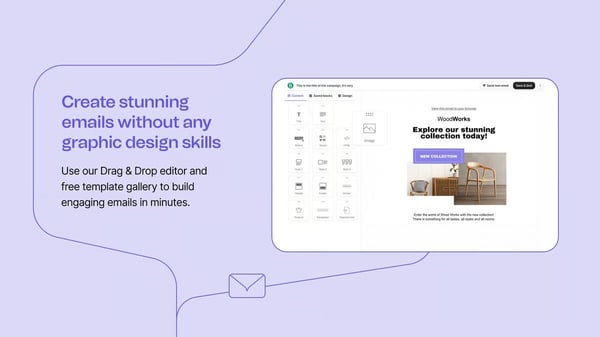
What I found, which is notable in G2 reviews, is clearer r automation journeys and improved visibility into contact behavior across transactional and campaign messaging. Combining segmentation, follow-ups, and triggered events within one platform reduces fragmentation between systems. This integration supports continuity across onboarding, retention, and engagement communications.
Tracking and domain management features further contribute to deliverability control and brand consistency. Custom tracking domains and reporting visibility help teams monitor transactional performance and identify failure patterns, supported by a 90% G2 score for custom tracking domains.
Many reviewers describe pricing structures that support consistent transactional communication as contact lists expand. Some also mention unlimited sending allowances and flexible tiers as practical for growing audiences. Because of this, Brevo becomes a dependable choice for teams balancing infrastructure reliability with cost efficiency.
Advanced template customization and granular segmentation require extra configuration steps beyond the core onboarding experience, most noticeable when campaigns move beyond standard transactional workflows. The additional setup is most pronounced in highly tailored multi-audience environments. Core notification delivery and routine automation continue to run smoothly across everyday messaging programs.
DNS configuration and domain authentication require deliberate setup during onboarding, with several verification steps that users across G2 flag as more involved than expected. The process demands focused attention before any sending can begin. Once completed, these settings underpin deliverability stability and sender reputation across all outgoing campaigns.
In my opinion, Brevo maintains strong relevance for SMBs and growth-focused teams that depend on reliable transactional messaging without heavy infrastructure overhead. Dependable delivery and stable sending performance, reinforced by its highest-rated Performance and Reliability capabilities, support its positioning as a practical choice for unified transactional communication workflows.
"Perfect for email marketing! Brevo ensures that transactional emails are reliably delivered to recipients' inboxes. This reliability is crucial for critical communications like order confirmations and password resets. It is also really great at being an all-in-one CRM package.”
- Brevo Marketing Platform review, Nick C.
"I would say the domain confirmation and the DNS configuration could be simpler than what we currently experience on Brevo Marketing Platform.”
- Brevo Marketing Platform review, Babatunde O.
On a budget? Browse the best free email marketing software on G2 to find capable options without the cost.
Transactional email platforms operate behind key user actions, and Netcore Email API is positioned as a delivery infrastructure built to support alerts, confirmations, and automated lifecycle communication at scale. Engineering-led teams embedding notification logic directly into application workflows find an API-first architecture purpose-built for that use case.
The thing I noticed pretty quickly in Netcore's review data is how teams describe running bulk campaigns and triggered alerts concurrently without throughput dropping. This capacity supports traffic spikes and onboarding surges, allowing communication workflows to grow alongside application usage without requiring additional infrastructure adjustments.
Infrastructure reliability surfaces as a consistent advantage in Netcore reviews — high-volume email bursts and continuous transactional streams run concurrently without noticeable degradation, reflected in a 90% G2 score for performance and reliability. This stability contributes to predictable communication flows, particularly in environments where confirmation emails and alerts are tightly linked to user actions.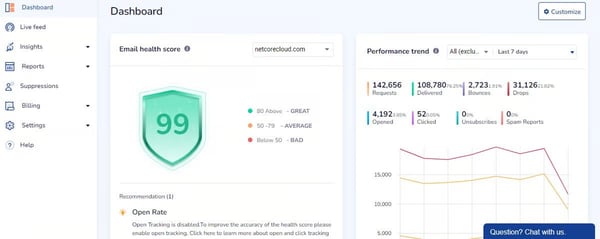
While going through Netcore's reviews, documentation, and onboarding kept coming up as a genuine differentiator, and it's not hard to see why. Engineering teams describe connecting application logic with messaging infrastructure efficiently, without the implementation cycles that tend to haunt the rest of the category. You could say Netcore skips the "lost in translation" phase entirely, less time wrestling with setup, more time actually shipping.
Now, coming to my favorite part: Analytics visibility appears as a complementary capability supporting operational awareness. Reviews reference dashboards and reporting that provide insight into delivery status, response trends, and campaign outcomes. This level of monitoring helps teams observe communication performance without introducing separate tooling, aligning with the category expectation for built-in feedback loops.
Domain flexibility further strengthens operational control, reflected in the 89% rating for Multiple Domains. For organizations managing multiple brands or environments, I’ve seen the importance they give to the ability to separate communication streams without compromising sender reputation. This capability contributes to structured email governance across production, staging, and promotional contexts.
Prompt ticket resolution and accessible UI workflows are recurring themes in Netcore reviews, enabling campaign execution and personalization with minimal onboarding friction, as reflected in 92% of G2 users rating the Mail Send API among the platform's strongest capabilities. Honestly, for teams trying to balance technical depth with day-to-day operational ease, Netcore seems to hit that sweet spot pretty naturally.
Template creation in Netcore covers functional transactional layouts. That said, teams needing extensive design variation or advanced visual customization may find the scope a bit limiting. I’ve seen this pattern surface consistently across G2 review data. It's most apparent for organizations juggling multiple brand identities or highly styled email programs. What's worth noting, though, is that delivery reliability and API performance hold strong regardless of template complexity. That kind of consistency at the infrastructure level counts for a lot.
Netcore's reporting does not extend to advanced analytics configuration or AI-driven segmentation, a gap that G2 feedback consistently surfaces for teams running complex marketing programs. Funnel analysis beyond standard delivery metrics and predictive audience modeling requires external tooling to execute. Operational monitoring, delivery tracking, and day-to-day campaign visibility remain consistently accessible within the platform.
If you're running a SaaS or digital service that lives and dies by automated communication, Netcore Email API is worth a serious look. I'd point to dependable delivery, straightforward integration, and scalable throughput as the reasons it holds up. And if you ask me, the highly rated Mail Send API feels less like a feature and more like a quiet backbone, keeping your event-driven messaging and user engagement running without a hitch.
“It is smooth and best in terms of user experience they also have great customer care team who helps to resolve issues instantly via tickets, the panel is very easy to understand and it can execute multiple campaigns at a time they also have various features of personalisation of content with the help of attributes and has maker and checker at every step so there is no scope of any error on the pane. Overall, a great platform to drive user engagement in terms of activation, retention, and win-back."
- Netcore Email API review, Aditya K.
"One drawback of Netcore Email API is that the dashboard can feel a bit complex at first, especially for new users. At times, detailed analytics or advanced settings take extra clicks to access, and occasional delays in real-time reporting can occur, though not frequently.”
- Netcore Email API review, Divyanshi S.
Evaluating the broader email landscape? My colleague's guide to the best email marketing software covers the full category.
Dotdigital operates in transactional email workflows, handling triggered notifications, system alerts, and lifecycle messaging with consistent delivery control. Retail and B2C brands commonly choose it when transactional messaging needs to sit within a broader cross-channel customer journey rather than operate as a standalone sending layer.
Based on what I've seen in G2 reviews, teams tailor notifications based on purchase activity, lifecycle stage, or engagement signals, and it genuinely improves relevance without adding operational complexity. The reviews also highlight that email segmentation scores as high as 90% on G2, making it especially valuable in transactional environments where precision directly shapes the customer experience.
Conditional workflow design draws consistent attention in Dotdigital's G2 reviews. Teams keep mentioning that it makes architecting sequences by connecting triggers, delays, and decision points a breeze. This makes managing multi-step customer journeys more straightforward. The visual workflow structure contributes to operational clarity, helping teams understand how triggered emails interact within broader lifecycle messaging.
What stood out to me is how much time teams save with drag-and-drop builders and reusable layouts. Reviewers on G2 talk about adapting existing templates instead of building from scratch. This keeps design consistent across confirmations, alerts, and automated messages. Faster iteration and branding consistency are things reviewers clearly value, and Template Creation being rated at 87% on G2 reflects that.
Message delivery stability across automated workflows is a consistent strength for the users. Consistent delivery timing, reflected in an 89% G2 score for Performance and Reliability, contributes to operational predictability. This is a key requirement for transactional messaging, where missed or delayed emails disrupt user workflows.
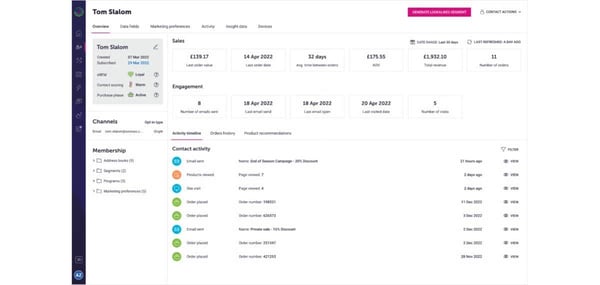
With training materials and account guidance, Dotdigital helps teams reach operational confidence. Onboarding does not become a cause of resistance for new users. Goes without saying that this usability foundation further supports ongoing transactional operations while reducing reliance on external documentation or manual troubleshooting.
Connections with e-commerce and CRM systems allow transactional triggers to reflect up-to-date customer data. In my reading of the G2 reviews, I came across multiple mentions of the integration layer supporting centralized visibility across notifications and lifecycle messaging without requiring fragmented workflows. Teams commonly reference improved coordination between marketing and system-driven communications when data flows are consolidated within the platform.
G2 reviews for Dotdigital consistently bring up the time it takes to set up advanced automation logic and segmentation, especially when multiple data conditions and triggers are involved. Not a dealbreaker, but worth knowing going in. Highly complex workflow environments are where this friction is most felt. The platform's journey orchestration and behavioral targeting continue to deliver precise, event-driven messaging once workflows are mapped and validated.
Connecting external CRM and data systems to Dotdigital's event pipeline requires considerable implementation effort, with a 24-hour delay before new API contacts become available for sending, a friction point that G2 feedback repeatedly highlights. Teams dependent on real-time data imports feel this most acutely. Webhook reliability and event tracking performance hold steady within environments where integration groundwork has been laid.
Dotdigital combines dependable delivery with strong segmentation and journey orchestration, making it particularly relevant for e-commerce and growth-focused teams managing high-volume transactional messaging. Its precise, behavior-driven notification capabilities support consistent customer communication at scale, reinforcing its relevance for teams where targeting accuracy directly shapes transactional outcomes.
“What I like most is how intuitive yet powerful the automated programs are. Setting up complex, multi-channel customer journeys is incredibly straightforward. The drag-and-drop builder saves a massive amount of time, and the ability to seamlessly.”
- Dotdigital review, Mathias B.
“There has to be a 24-hour delay from new API data being imported to sending new contacts an email.”
- Dotdigital review, Verified User in Sports
WebEngage blends triggered messaging with behavioral engagement workflows. For mobile-first and consumer app teams, transactional notifications are expected to function as part of a continuous retention strategy. To me, this is WebEngage’s biggest differentiator.
Behavioral and attribute-based segmentation enables transactional messages to adapt dynamically to user actions, improving relevance across onboarding, account activity, and lifecycle notifications. This targeting depth registers 89% for email segmentation on G2, aligning with teams that treat transactional email as part of personalized engagement methods.
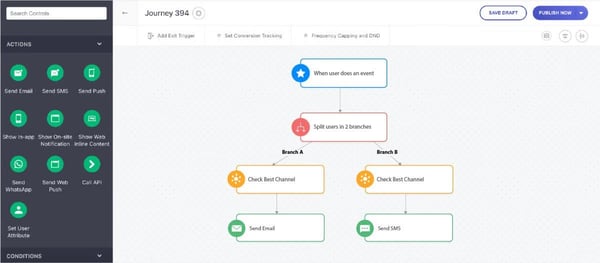
What I noticed in WebEngage's review data is how tightly event signals are tied to send timing, with teams automating confirmations, alerts, and follow-ups immediately after user actions, and the event tracking API registering 88% across reviewers. For product-led environments, this connection between event tracking and email delivery supports responsive messaging without manual coordination.
Template flexibility is one of those things that can move the needle for companies building a custom automation workflow, and it's called out time and again by G2 reviewers. The 88% score for template creation reflects what I picked up across G2 reviews: adaptable templates that support branded transactional messaging while maintaining consistency across journeys. For organizations balancing operational notifications with marketing-aligned standards, that flexibility is doing real work.
What I find compelling across G2 reviews is how rarely transactional email in WebEngage operates alone. Email, SMS, push, and in-app notifications are routinely coordinated within a single journey, helping teams maintain continuity of communication across touchpoints without managing separate messaging tools.
Feedback tied to behavioral insights and journey reporting suggests teams use WebEngage to monitor how transactional emails influence engagement patterns and retention outcomes. This analytical layer positions transactional messaging as a measurable engagement driver.
While evaluating WebEngage's review data, I kept coming across the same theme: integration breadth connecting transactional email delivery to CRM, product analytics, and engagement platforms. It enables data synchronization without fragmenting the automation workflow. This interconnected approach supports consistency across customer communication workflows.
Server-level log visibility and delivery diagnostics are narrower than engineering-led teams expect for deep infrastructure monitoring, a gap that surfaces across WebEngage's G2 feedback. Teams requiring detailed bounce categorization or delivery path tracing feel this most acutely. Still, what holds up well in my reading of G2 reviews is journey orchestration and behavioral automation, both of which continue to operate consistently across standard transactional and lifecycle workflows.
Preset template availability and spam filter testing offer less coverage than teams expecting a ready-made validation layer, a gap that review data across WebEngage's G2 profile points to consistently. Organizations managing large template libraries or requiring pre-send deliverability checks will need to supplement these capabilities externally. However, cross-channel orchestration and behavioral segmentation remain strong across the core engagement workflows the platform is built around.
Overall, what G2 review patterns make clear is that WebEngage connects transactional email with lifecycle engagement through behavior-driven messaging and journey orchestration. SaaS, eCommerce, and product-led teams running personalized, event-triggered communication are where it lands best, and that focus is precisely what makes it worth considering.
“The separate channel for email delivery is helpful, especially for instant email delivery. Journey creation is smooth and straightforward.”
- WebEngage review, Shreyansh C.
"I find that WhatsApp, as a channel, is not very efficient through WebEngage. It should be smooth, rather than adding templates twice. WebEngage should focus on this channel as a priority because this is one of the top-most channels today.”
- WebEngage review, Monika K.
The behavioral data behind MoEngage's segmentation often lives in a customer data platform (CDP). Explore the best customer data platforms on G2 to see where that layer fits in your stack.
Online retailers often adopt Omnisend to manage order updates and lifecycle communication in one place, reflected in strong SMB traction across G2. Growing ecommerce brands that need transactional and revenue-driving messaging coordinated without managing separate tools find a unified workspace built around that workflow.
Switching email platforms is rarely painless. Across Omnisend's G2 reviews, though, the onboarding story is notably consistent. G2 reviewers point to structured setup processes, smooth transitions, and support that actually answers configuration questions fast. This transition reliability supports uninterrupted transactional messaging when switching tools and reduces operational disruption. For growing ecommerce teams, this onboarding consistency contributes to faster platform adoption and workflow stabilization.
I'll be honest — the design flexibility in Omnisend's G2 reviews caught me off guard. Reviewers reference a combination of ready-made templates and custom HTML editing that enables brand-aligned transactional communication without external design tooling. This balance supports both quick deployment and granular customization of order confirmations, updates, and notifications, contributing to cohesive customer communication while maintaining execution speed.
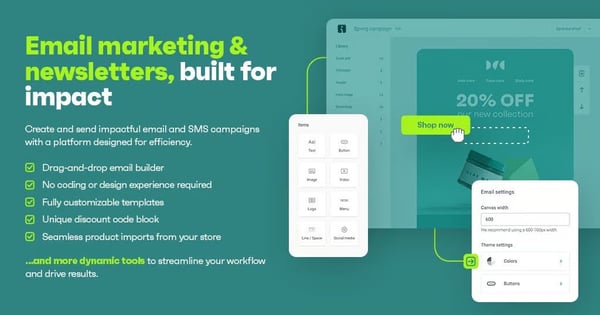
What I also find striking in the reviews is how much multi-storefront portability comes up for agencies and multi-brand retailers. Reviewers describe reusing entire flows and templates across accounts without rebuilding from scratch — and I read that as a meaningful operational advantage. This portability reduces repetitive configuration and helps maintain consistency across transactional messaging programs. Operational reuse also simplifies scaling communication frameworks as e-commerce portfolios expand, supported by a 90% G2 score for custom unsubscribe across varied sending environments.
Omnisend consolidates email, SMS, forms, automation, and segmentation within a single platform, replacing the need for separate tools and reducing coordination overhead, a breadth of capability that contributes to a 91% G2 score for Performance and Reliability. Teams gain clearer workflow visibility while simplifying stack management across transactional and lifecycle messaging.
Segmentation is where G2 reviewers get specific, and the feedback is worth paying attention to. Behavior-based grouping that cuts manual audience prep, tightens campaign timing, and makes notifications feel earned rather than generic. Email segmentation hitting 92% on G2 only confirmed what I was already reading in the reviews. This capability compounds the longer teams use it.
E-commerce integration signals reinforce the platform's transactional messaging alignment. G2 reviewer references to Shopify connectivity and activity tracking indicate strong data flow between storefront events and messaging triggers. Order activity and behavioral signals feed into automated notifications, supporting confirmations, shipping updates, and engagement follow-ups.
G2 reviewers note that the drag-and-drop editor carries placement restrictions that make fully unique email layouts difficult to achieve, with limited support for custom code insertion. Teams managing distinct brand identities or requiring advanced design control feel this most directly. Core ecommerce triggers, post-purchase sequences, and standard transactional flows run without friction within the existing template environment.
When it comes to integrations, G2 reviewers flag that native CRM connectivity is narrower than expected. The email open tracking does not reliably capture automatic opens from certain email clients. Organizations managing complex CRM data flows or requiring precise open-rate measurement will notice these boundaries most. Segmentation, automation, and e-commerce messaging execute without friction across the platform's primary sending environment.
I came away from Omnisend's G2 reviews with a clear picture. This is not a platform trying to serve everyone. It is built for SMB ecommerce teams that need transactional messaging and lifecycle automation running together without the overhead of managing separate tools. The review patterns do not leave much room for ambiguity on that. Workflow portability, stack consolidation, segmentation that actually holds up at scale. For growing online retailers, that combination is harder to find than it sounds.
“We love how smooth the migration from Klaviyo was. The whole process is clearly well thought out; you can tell the team put real effort into removing friction. Everything was easy to follow, and whenever we had a question, support was there, replying within a few minutes."
- Omnisend review, Marion M.
“I think for me, at first, it was hard to make a template from zero. It was like a website-building thing. But then I managed to learn it. I'm actually a graphic designer, so I thought it would be easy, but I struggled a bit.”
- Omnisend review, Zeyneb A.
MoEngage enables event-based lifecycle messaging across email and mobile channels, blending behavioral targeting, automation, and multi-channel delivery within structured engagement workflows. Mid-market product and app teams adopt it when transactional email is one part of a broader cross-channel retention architecture rather than a standalone sending requirement.
I kept coming across the same pattern in MoEngage reviews, messaging workflows tied directly to real customer behavior, allowing transactional updates to align closely with lifecycle moments. This structure supports communication across events such as order progress, onboarding milestones, and re-engagement triggers. Mapping messaging logic to user journeys keeps notifications contextually relevant, producing a transactional experience that feels integrated with broader customer engagement strategies.
The platform's event tracking capabilities let users segment and message based on granular user actions. With email segmentation sitting at 95% on G2, the numbers back it up. I'd describe this behavioral approach as less "spray and pray" and more "right person, right moment." It helps organizations personalize transactional notifications without sacrificing automation efficiency. Teams consistently connect this data model to stronger campaign relevance.
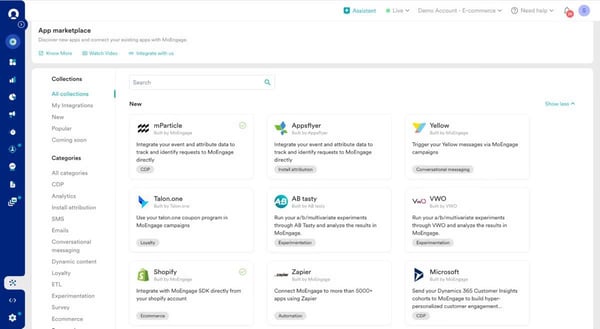
Configuration depth in MoEngage does not translate into heavy day-to-day overhead; triggered campaigns launch without extensive manual steps once workflows are established. Integration with service providers is commonly described as straightforward, helping teams embed messaging workflows within existing product and marketing stacks, supporting consistent operational continuity across engagement programs.
What I found while studying MoEngage's review data is how consistently teams reference the analytics layer as a decision-making tool rather than just a reporting pane. Dashboards are customized by role across marketing, product, and growth teams. This centralized visibility helps teams interpret campaign impact, identify behavioral trends, and adjust messaging logic more efficiently, underpinned by a 93% G2 score for performance and reliability.
MoEngage is commonly used to consolidate transactional communication across email, SMS, push, and messaging apps, reducing fragmentation between channels. This orchestration layer helps maintain consistent messaging logic and shared data utilization across touchpoints, where notifications reach 92% on G2. Such consolidation supports continuity in customer communication without requiring separate delivery platforms.
Another part I found most compelling is that responsive support and guided onboarding are two things I kept noticing in MoEngage feedback. And I mean consistently, particularly during those initial integration and campaign setup phases. Dedicated assistance and accessible learning resources smooth out feature exploration and speed up workflow activation, building operational confidence that lasts.
Some G2 reviews mention that triggered campaigns in MoEngage can fail when event sources switch between SDK and server-side implementations. Data mapping needs to be right from day one; otherwise, errors pile up fast. This hits hardest during initial setup for teams without clearly documented event schemas. That said, when event architecture is clearly defined, behavioral segmentation and lifecycle automation deliver consistent execution across the full messaging stack.
Template variety and conversational messaging capabilities are still maturing, with monthly active users (MAU) based billing overcounting users who switch browsers — gaps that recur across MoEngage's G2 feedback. Teams designing specialized conversational journeys feel both constraints most directly. Standard lifecycle engagement and transactional workflows remain well covered within the platform's current capabilities.
If you're a mid-market or product-led team leaning on behavioral segmentation and lifecycle automation, MoEngage is one I'd point you toward. The retention and order-based communication use cases are where I think it really earns its place. And with highly rated segmentation capabilities backing it up, delivering personalized transactional engagement at scale comes naturally.
“I like the interactive campaigns we can have at different stages of the order journey and the number of channels it supports, including WhatsApp and email. The ease of platform use and customization at different stages of the order journey made us choose MoEngage. The initial setup was quite seamless with dedicated support from the tech team.”
- MoEngage review, Aviral G.
“Segment conditions can become complex and hard to maintain if naming conventions aren’t strict.”
- MoEngage review, Neeraj J.
Within the Transactional Email Software category, edrone appears in G2 discussions as an e-commerce-focused platform combining transactional messaging with marketing automation and customer data. For SMB ecommerce teams, having triggered notifications and personalization operate from a single system rather than across fragmented point solutions is what makes edrone a practical fit.
One thing that genuinely stood out to me while going through the G2 reviews is how often reviewers bring up the interface. Navigating across campaigns, automation flows, and customer insights feels straightforward, and teams seem to appreciate that. In transactional messaging contexts, where triggered emails need to be monitored alongside marketing journeys, that clarity matters. Reviewers also point to clean reporting views and a simple scenario setup as things that help teams stay on top of operations without juggling multiple systems.
Something that caught my attention while going through the G2 reviews is how often reviewers mention edrone's unified customer timeline. Browsing activity, purchases, and campaign interactions all appear in a single view, and teams seem to find that genuinely useful. From what I read, that visibility leads to more context-aware triggered emails and sharper lifecycle targeting.
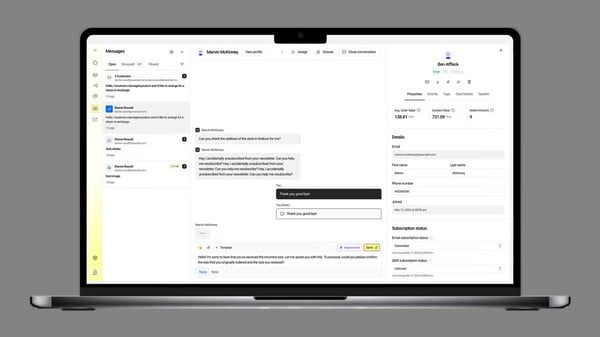
Something that kept popping up is just how much teams appreciate the automation capabilities. Abandoned cart reminders, product follow-ups, behavior-based engagement, the ecommerce triggers cover a lot of ground, and honestly, it shows based on how reviewers talk about it. Once configured, these scenarios just run. Manual campaign management becomes much less of a burden, and retention initiatives benefit from that consistency. Notifications hitting 93% on G2 backs this up, and in transactional email, timely delivery and contextual messaging make all the difference.
edrone quietly does something clever by bringing CRM data and triggered messaging under one roof. Teams stop guessing and start actually understanding customer behavior, sending sharper follow-ups based on real browsing and purchase activity. Custom unsubscribe hitting 93% on G2 tells me that personalization is landing well. And the best part, as I see it, transactional emails stop being just system notifications and start doing the real work of building lasting relationships.
Repeat purchase rates and customer retention improvements appear consistently in edrone feedback, with organizations connecting these outcomes directly to triggered messaging and remarketing workflows. These results suggest that edrone's transactional messaging does more than deliver notifications; it actively supports the commercial outcomes that ecommerce teams are measured against.
Campaign flexibility and scenario customization are highlighted as operational advantages, enabling teams to tailor triggered communication based on user behavior and product interactions. This adaptability, where Template Creation sits at 94% on G2, supports varied e-commerce messaging needs, from order confirmations to personalized recommendations. The strength of creative configuration reinforces campaign execution consistency.
G2 reviews note that managing larger contact groups requires routing requests through the helpdesk rather than handling them directly within the platform, and the panel can feel unintuitive during initial use. Teams running ops-heavy workflows where frequent list updates are routine will notice this boundary earlier than others. That said, once familiar with the interface, reviewers describe day-to-day campaign navigation and automation scenario execution as straightforward and predictable.
Notification delivery from admin accounts can behave inconsistently, with cart activity triggers occasionally failing to fire correctly, a pattern that appears repeatedly in edrone's user feedback. Organizations running high-frequency triggered notifications across multiple product lines feel this most. Core campaign automation and behavior-based lifecycle messaging maintain consistent execution across the platform's core ecommerce environment.
All in all, edrone maintains strong relevance for SMB ecommerce teams looking to combine transactional messaging with lifecycle automation in one environment, with its highly rated template creation and notification capabilities reinforcing dependable, personalized customer communication.
“Edrone is an incredibly intuitive and powerful platform tailored perfectly for e-commerce businesses. I appreciate its user-friendly interface and comprehensive suite of tools, which allow us to automate email campaigns, personalize customer journeys, and analyze customer behaviors effectively. The system integrates seamlessly with our online store, enabling us to boost customer engagement and retention. Their customer support is also excellent – responsive and always ready to assist with any questions.”
- edrone review, Marcin C.
“The interface can feel a bit complex at first, and setting up advanced workflows takes some learning. Reporting could also be more flexible in certain areas.”
- edrone review, Saurabh B.
|
Software |
G2 rating |
Free plan |
Best for |
|
Customer.io |
4.4/5 |
No (Free trial available) |
Product and growth teams orchestrating event-driven onboarding, alerts, and usage-based notifications |
|
Brevo Marketing Platform |
4.5/5 |
Yes |
SMB and mid-market teams coordinating marketing and transactional email in one environment |
|
Netcore Cloud Email API |
4.4/5 |
No (Pricing available on request) |
E-commerce and digital platforms are sending high-volume notifications via API-driven delivery |
|
Dotdigital |
4.4/5 |
No (Pricing available on request) |
Retail and B2C brands extending transactional email into broader cross-channel journeys |
|
WebEngage |
4.5/5 |
No (Pricing available on request) |
Mobile-first and consumer apps linking transactional alerts with retention and lifecycle automation |
|
Omnisend |
4.6/5 |
Yes |
Online retailers aligning order updates and shipping emails with revenue-focused automation |
|
MoEngage |
4.5/5 |
No (Pricing available on request) |
SaaS and app teams synchronizing transactional emails with push and in-app messaging |
|
edrone |
4.8/5 |
Yes |
E-commerce stores combining transactional notifications with AI-driven personalization and retention flows |
*These transactional email tools consistently surface as leading options based on aggregated G2 review patterns in G2's Winter 2026 Grid® Report.
Got more questions? G2 has the answers!
Platforms like Customer.io and Dotdigital surface in review patterns for handling complex automation and cross-channel journeys, while Netcore Cloud Email API is referenced for high-volume delivery reliability. The best enterprise fit typically depends on whether teams value lifecycle orchestration depth or infrastructure-centric API control.
Customer.io, MoEngage, and edrone appear most often in this context, enabling triggered messaging based on user activity, attributes, and journey stage. These platforms allow transactional notifications to adapt dynamically, improving relevance across onboarding, retention, and post-purchase communication.
Netcore Cloud Email API and Customer.io surface for stable sending behavior under scale, while Brevo Marketing Platform is referenced for dependable inbox placement and sender reputation management. The strongest outcomes align with tools emphasizing bounce monitoring and queue stability during traffic spikes.
Brevo Marketing Platform, Dotdigital, and Omnisend are commonly referenced for reusable layouts and drag-and-drop editing that simplify confirmation and alert creation. These tools help teams deploy branded transactional messaging quickly while maintaining consistency across recurring workflows.
Netcore Cloud Email API is frequently referenced for structured APIs, logging visibility, and controlled delivery environments, aligning with compliance-sensitive use cases such as fintech or SaaS authentication flows.
Omnisend and edrone are practical options due to strong storefront integrations and automation triggers tied to purchase events. Brevo Marketing Platform also appears for unified messaging environments where confirmations, alerts, and lifecycle communication run from the same workspace, reducing tool fragmentation for online retailers.
Platforms with built-in observability and reporting capabilities stand out in review feedback. Netcore Cloud Email API, Customer.io, and MoEngage are commonly referenced for dashboards showing delivery status, engagement trends, and workflow performance. This visibility helps teams troubleshoot failures quickly and optimize triggered messaging without relying entirely on external analytics tools.
Netcore Cloud Email API surfaces consistently for application-level messaging without heavy campaign tooling, while Customer.io offers a strong API layer for teams combining developer control with lifecycle orchestration.
Scaling transactional email depends on queue stability, retry handling, and infrastructure resilience. Review patterns point to Customer.io, Netcore Cloud Email API, and Brevo Marketing Platform as platforms that maintain consistent delivery during onboarding surges or seasonal spikes. Tools with strong observability and failure diagnostics help teams manage volume increases without silent delivery gaps.
It depends on your needs. Dedicated platforms like Focus are built for critical system emails, while tools like Brevo Marketing Platform and Dotdigital combine transactional and marketing messaging in one platform. The best choice comes down to whether you value specialized reliability or a unified workflow.
Transactional email is moving closer to the product layer, and from what I've seen in G2 review patterns, the buying decision is shifting with it. Observability, event reliability, and API predictability are becoming the primary criteria; template flexibility and campaign features are increasingly secondary.
Over the next 12 to 24 months, I expect the platforms that pull ahead to be those that make failure visible faster and fit cleanly into modern data and event architectures. AI-assisted anomaly detection, tighter webhook reliability, and real-time delivery intelligence are on their way to being baseline expectations rather than differentiators.
The question I'd push any buyer to sit with isn't which platform has the most features. It's which one still fits how your stack operates two product cycles from now, when volume is higher and tolerance for debugging is lower?
Want to expand beyond transactional notifications into campaigns and lifecycle journeys? Explore leading email marketing software on G2.


Your customers experience your brand. And when the email says one thing, the website shows...
 by Sagar Joshi

I've watched e-commerce teams spend a bomb on personalization and still end up with the same...
.png) by Rajanya Ghosh
by Rajanya Ghosh

G2 Grid® Report · Summer 2026 Best WhatsApp Marketing Software Updated May 26, 2026 ...
.png) by Tanuja Bahirat
by Tanuja Bahirat