


If you're a small business owner, marketing has to fit in between inventory, invoices, and everything else that requires your attention that day. For email marketing, among other things, you need a tool that handles the heavy lifting without stretching your budget.
To see which free plans are actually useful, I evaluated 10 free email marketing software tools that made sense for a small business. In my tests and review analysis, one thing stood out: the free plan felt okay until the contact list grew. Then the price climbs fast, and the features you actually wanted turn out to sit a tier higher. Choosing the wrong platform often means migrating later, rebuilding automations, and paying for features you assumed were included.
To highlight the best tools in the free tier, I went through the free email marketing software category on G2 and observed what holds up for a small team with a growing business. What follows is where each software shines, where its wall sits, and who it fits.
Tools are listed alphabetically. These tools offer free trials, free forever options, or freemium models.
Here's a side-by-side look at free plan limits and pricing before diving into the full reviews.
| Tool | G2 rating | What the free plan covers | Paid starts at |
|---|---|---|---|
| Brevo Marketing Platform | 4.5/5 ⭐ | • Free forever: unlimited contacts stored • 300 emails per day • Drag-and-drop builder, signup forms, Brevo branding on emails |
$9/month |
| Campaign Monitor | 4.1/5 ⭐ | • 30-day free trial, no free-forever plan • Send to up to 500 people, max 100 emails/day • Full trial access to builder, templates, customer journeys |
$13/month (+10% annual discount) |
| Constant Contact | 4.1/5 ⭐ | • 30-day free trial, no credit card, no free-forever plan • Full feature set during trial (email, social, automation, reporting) • Paid plan required after 30 days |
$12/month |
| GetResponse | 4.3/5 ⭐ | • Free forever: up to 500 contacts • 1 published landing page, signup forms, savable drafts • First 14 days: add premium features, then limited |
$19/month (18% discount on yearly purchase) |
| Intuit Mailchimp Email Marketing | 4.3/5 ⭐ | • Freemium: 250 contacts • 500 emails per month • 1 audience, basic templates, Mailchimp branding on emails |
$13/month |
| MailerLite | 4.6/5 ⭐ | • Free forever: 250 active subscribers (reduced from 500 on 2026-06-16) • 2,500 emails per month • Automation and welcome sequences included on free, MailerLite branding |
$12/month |
| Moosend | 4.6/5 ⭐ | • 30-day free trial, no credit card, no free-forever plan • Trial includes builder, automation, segmentation, A/B testing, landing pages • Paid plan or email credits required after trial |
$9/month |
| Robly | 4.5/5 ⭐ | • 14-day free trial, no credit card, no free-forever plan • All features on all plans during trial (OpenGen auto-resend, AI send-time) • Paid plan required after 14 days |
$19/month |
| Systeme.io | 4.8/5 ⭐ | • Free forever: up to 2,000 contacts • Unlimited email sends • 3 sales funnels, 1 course/blog, automation rules, 1 custom domain |
$17/month |
| Zoho Campaigns | 4.3/5 ⭐ | • Free forever: up to 2,000 contacts • Up to 6,000 emails per month • Drag-and-drop editor, segmentation, Zoho CRM/Forms integration |
$4/month |
All pricing details mentioned in this article are based on publicly available data at the time of publication and are subject to change.
I started on G2's free email marketing software category page, which gathers tools that offer free plans, free trials, or freemium models. I took the top products as they appear on that page and put each free plan or trial through the same test: how fast a non-specialist gets from sign-up to a sent campaign. I looked into whether the free tier holds up to real month-after-month use, whether any automation works without paying, whether emails actually land in the inbox, and where each plan's wall sits.
I then cross-referenced verified G2 user reviews for each tool to capture real-world patterns a single evaluation would miss. All G2 review data referenced throughout was pulled in 2026 (some from 2025), filtered by the small-business segment.
The screenshots featured in this article may be a mix of those taken from the vendor's G2 page or from publicly available materials.
A small business needs the handful of features that make a free plan hold up without a specialist on payroll. These are the six that shaped my evaluation.
To be included on this list, a tool must:
This data was pulled from G2 in July 2026. Some reviews may have been edited for clarity.
Brevo built its business on a pricing inversion. Nearly every competitor charges you for the contacts you store; Brevo, the platform many owners still remember as Sendinblue, charges for the emails you send. On the Brevo Marketing Platform G2 reviews page, small-business owners describe it as an affordable hub where email, SMS, WhatsApp, and a light CRM share a single login. That inversion is what makes the free plan worth a closer look.
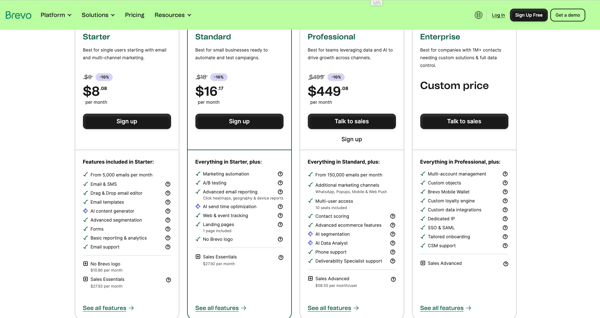
Early goodwill comes from setup. Several small-business reviewers sent their first campaign within an hour of signing up, helped by a left-hand menu that keeps every tool in plain sight.
For a business that has spent years collecting emails, unlimited free contact storage is the headline, since nobody pays just to keep a list on file.
That 300-a-day cap is the wall. One newsletter to 400 engaged subscribers blows past the free ceiling before lunch. The Starter plan at $9/month swaps the daily cap for a higher monthly volume, removes the Brevo logo (at a nominal additional cost), and adds fuller reporting, a sensible first step once your list outgrows a few hundred people and you want your own branding on every send.
"Brevo is an overall suite that offers solid functionality with less complexity and lower pricing. Its email campaigns are easy to learn, set up, design, and analyze. Domain setup is quick, and the audience segmentation is helpful when building email automation drip campaigns."
- Brevo Marketing Platform review, Bhavya D.
Best for: Businesses with a large contact list who want to store everyone for free and only pay as their sending volume grows.
Not ideal for: Owners who need deep e-commerce behavior tracking or Klaviyo-level automation out of the box.
"I do feel like designing emails is a little bit clunky. Sometimes the drag and drop doesn't work so well, but that's really my only complaint."
- Brevo Marketing Platform review, Amanda S.
Some tools try to be everything. Campaign Monitor decided to be one thing: the email tool for people who care how their emails look. In Campaign Monitor's G2 reviews, small-business marketers and agencies praise its template-driven builder and its refusal to bloat into an all-in-one solution. For a small business without an in-house designer, that narrow focus cuts both ways.
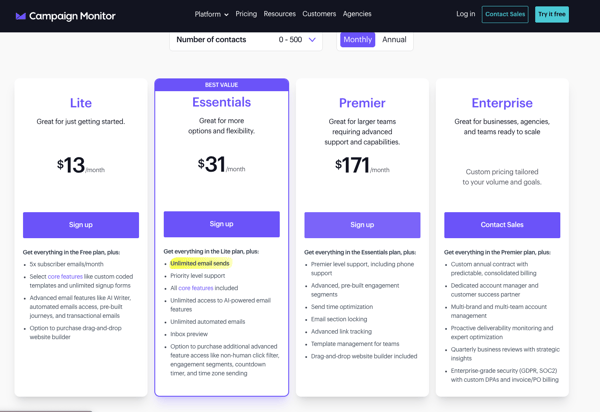
Ship a professionally designed newsletter without touching code. It's the promise, and reviewers back it up, crediting the drag-and-drop builder and ready-made templates for making non-designers look good. List management and segmentation earn steady praise too. What you won't find is a free-forever tier. You get a full 30-day trial, then a decision, and reviewers flag that cost-per-send climbs as the list grows. The design polish has to earn its price.
Because Campaign Monitor is trial-only, the upgrade decision is built in. A small business moves to a paid plan when the 30 days end or the 500-email trial allowance runs out. The Lite plan at $13/month is the entry point, unlocking ongoing sending, higher volume, and core automation; the right step for a team that confirmed during the trial that the design quality justifies the per-contact pricing.
"The best part about Campaign Monitor is how easy it makes it to segment my email marketing list. It also has a simple, easy-to-use interface, supports client billing, and integrates smoothly with other landing page sites."
- Campaign Monitor review, Anum R.
Best for: Design-conscious small businesses and nonprofits that want polished, on-brand newsletters and clean segmentation without hiring a designer.
Not ideal for: Bootstrapped teams that need a permanent free plan or the lowest possible cost-per-send at scale.
"The cost per send is quite high; we would like to see more package solutions available. I've also found the support team to be slow when needed."
- Campaign Monitor review, Shannon H.
When I scroll across Constant Contact reviews, a picture forms of who depends on it: nonprofits, churches, clinics, local shops, and community organizations. Users talk about reliability and human support, the quiet reassurance that when a volunteer coordinator gets locked out on a Sunday, someone actually picks up the phone.
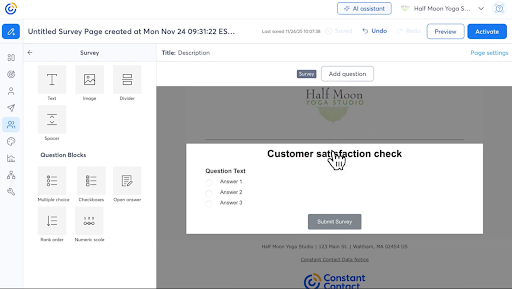
Local businesses and nonprofits sit at the heart of the audience, the ones sending newsletters, managing events, and reaching people without a marketing hire. The drag-and-drop editor and ready templates earn their praise on G2, but the responsive human support is what keeps non-technical owners loyal.
The trigger is simply the end of the 30-day trial. To keep sending, a small business moves to the Lite plan at $12/month, and from there the price scales with contact count. Teams that need real automation, more users, or SMS will feel the pull toward Standard ($35/month) or Premium ($80/month), but for a local business or nonprofit that mostly sends newsletters and event invites, Lite is the natural landing spot.
"The designer is pretty good, and I think the flow from making an email to sending it out is fairly easy."
- Constant Contact review, Kaylee S.
Best for: Local small businesses and nonprofits that value hand-holding support and want a proven, easy tool for newsletters and events.
Not ideal for: Budget-first startups that want a free-forever plan or the most modern, design-flexible editor.
"The one thing that is a little inconvenient is the ability to automatically send emails when a blog post is written requires an RSS feed add-on, as it does not come as a natural connection between the website and Constant Contact."
- Constant Contact review, Charles J.
On GetResponse G2 reviews page, I observed owners describe running email campaigns, landing pages, autoresponders, and even webinars from a single login. It makes it one of the most complete platforms a small business can start on for free. For anyone who wants room to grow past newsletters, the breadth is the whole draw.
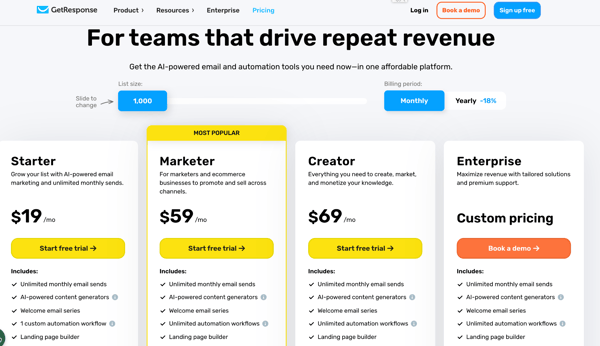
Think of it as an email tool that doubles as a lightweight marketing suite, with landing pages, forms, and automation alongside the newsletter. Reviewers on G2 rate the drag-and-drop editor, the template library, and the fast support, and several single out the pricing as unusually transparent. The free plan covers a lot but caps at 500 contacts, and it hands you a 14-day taste of the premium automation before the advanced pieces lock again.
Two things push a small business off the free tier: the 500-contact cap, and the moment the 14-day premium window closes and the automation you were testing locks up. The Starter (Email Marketing) plan at $19/month for up to 1,000 subscribers restores unlimited monthly sends, a welcome email series, and a custom automation workflow. Make the move once your list reaches 500, or when you decide the automation is worth keeping.
"I like the organization and the visuals for GetResponse. It makes it easy to ensure I'm sending emails to the right people and to track my campaigns. The analytics are very efficient. I appreciate how GetResponse makes it easy to get organized when communicating with customers, especially for sending promotions, software updates, or special product releases. The pricing is very clear, with non-confusing tiers, which makes it easy for me to know what to choose as a business owner. GetResponse was pretty solid for the price compared to other services I've used before, like Kit, Constant Contact, and ActiveCampaign."
- GetResponse review, Christopher H.
Best for: Businesses that want email plus landing pages and light automation on one free plan and expect to grow into a fuller marketing suite.
Not ideal for: Solopreneurs who only need a simple newsletter and would rather not manage a broader all-in-one tool.
"Large batch contact imports often break our custom compliance fields and require tedious manual fixes. There are no formal templates suited for policy brief newsletters, and German-speaking support only works standard hours—no help available for after-hours GDPR disclosure emergencies."
- GetResponse review, Cyrie K.
Mailchimp is the name most small-business owners reach for first, and close to 13,000 reviews on the Intuit Mailchimp G2 reviews page explain why. Mailchimp packages email campaigns, automation, landing pages, and AI suggestions so a non-marketer can run them.
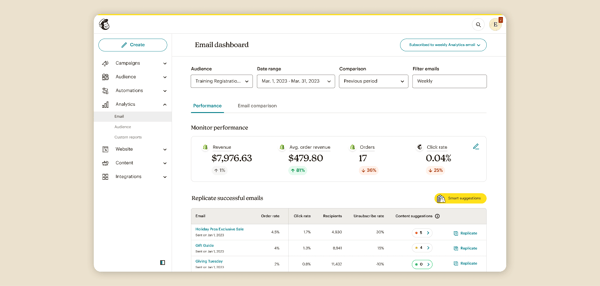
The drag-and-drop builder, AI subject-line and content suggestions, and a huge integration library let a beginner build a decent campaign fast, with analytics clear enough to act on. Cost is the recurring counterweight. The free plan stops at 250 contacts, and reviewers note that the price scales quickly as the audience grows.
At 250 contacts, this is the tightest free ceiling in the roundup, and a small business hits it almost immediately once the list grows past a couple hundred people. The Essentials plan at $13/month lifts the contact and send limits (Essentials monthly sends run 10x your max contact count), unlocks more templates, scheduling, and A/B testing, and removes some branding. That's the practical first upgrade the moment free runs out of room.
"Mailchimp makes it simple to design emails that look professional without spending too much time on technical details. I like the templates; they give me flexibility to adjust visuals so they still feel creative and on-brand. The performance is top-tier and fast, and whenever I have problems, I can simply reach out to Mailchimp support."
- Intuit Mailchimp Email Marketing review, Ivy M.
Best for: Teams that want the most polished, beginner-friendly platform and the widest integration library, and can start within a 250-contact free cap.
Not ideal for: Cost-sensitive teams with a fast-growing list, or anyone who only wants email and finds the all-in-one feature set overkill.
"As my email lists and contacts continue to grow, managing audiences and tags becomes increasingly confusing and harder to keep refined and organized. Some of the design builder functions for the emails themselves, especially when it comes to formatting images and text, are also difficult to use when I'm trying to create more complicated builds."
- Intuit Mailchimp Email Marketing review, Alphonse T.
Curious how Mailchimp stacks up against cheaper options? See our Mailchimp alternatives guide.
MailerLite went the opposite direction from the all-in-one crowd. Lean, clean, and cheap is the whole identity, and it earned the tool a devoted following of new business owners, bloggers, and solopreneurs, plus a 4.6-star average that sits among the highest in this roundup.
Reviewers on the MailerLite G2 reviews page describe it as the tool that got them sending without the overwhelm. One change deserves attention up front: in mid-2026, the free plan's subscriber allowance was halved, from 500 down to 250.
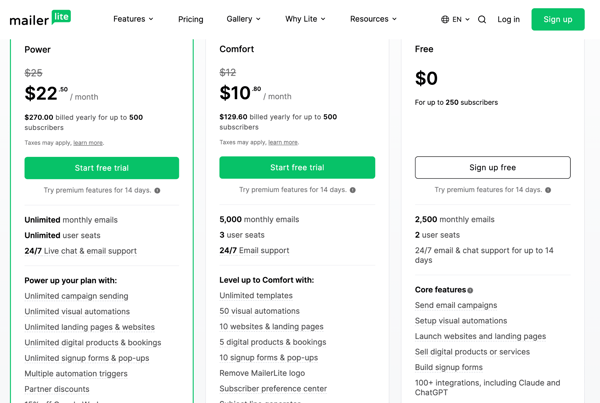
The pitch is a simple tool that still includes automation on the free plan, and that second part is rarer than it sounds. Welcome sequences and funnels work without paying, which reviewers single out alongside the clean interface and short ramp-up.
The 250-active-subscriber cap, halved in June 2026, arrives fast for anyone actively growing a list, and the itch to remove MailerLite branding tends to follow. The Comfort plan at $12/month lifts the subscriber ceiling and send limits, unlocks unlimited templates, auto-resend, multivariate testing, and the AI writing assistant, and strips the branding. Upgrade once your list crosses 250 or you want your own footer on every email.
"I really like MailerLite's MCP server because it lets me use it with my internal team's AI agent. With that setup, I can create campaigns and send them instantly through my AI agent, which is why I'm such a fan of their MCP server."
- MailerLite review, Manish C.
Best for: Solopreneurs on tight budgets who want free automation and a clean, simple builder, and can stay under 250 active subscribers.
Not ideal for: Teams needing deep, branching automation, advanced segmentation, or an agency-grade feature set.
"MailerLite is quite slow when switching between different tasks. The user interface is also slow and could be more intuitive, as it's sometimes hard to operate due to different buttons and features that are a bit confusing. Improvements in making the user interface clearer and simpler would help."
- MailerLite review, Akanksha M.
Moosend is the sleeper on this list. It carries a 4.6-star average, one of the lowest paid entry prices in email marketing, and automation with a reputation for punching above its weight. On the Moosend G2 reviews page, small-business owners and self-described non-coders talk about building visual automations in minutes, with helpful human onboarding layered on top. The free-forever plan is gone, but a 30-day trial is long enough to find out whether the reviews hold up.
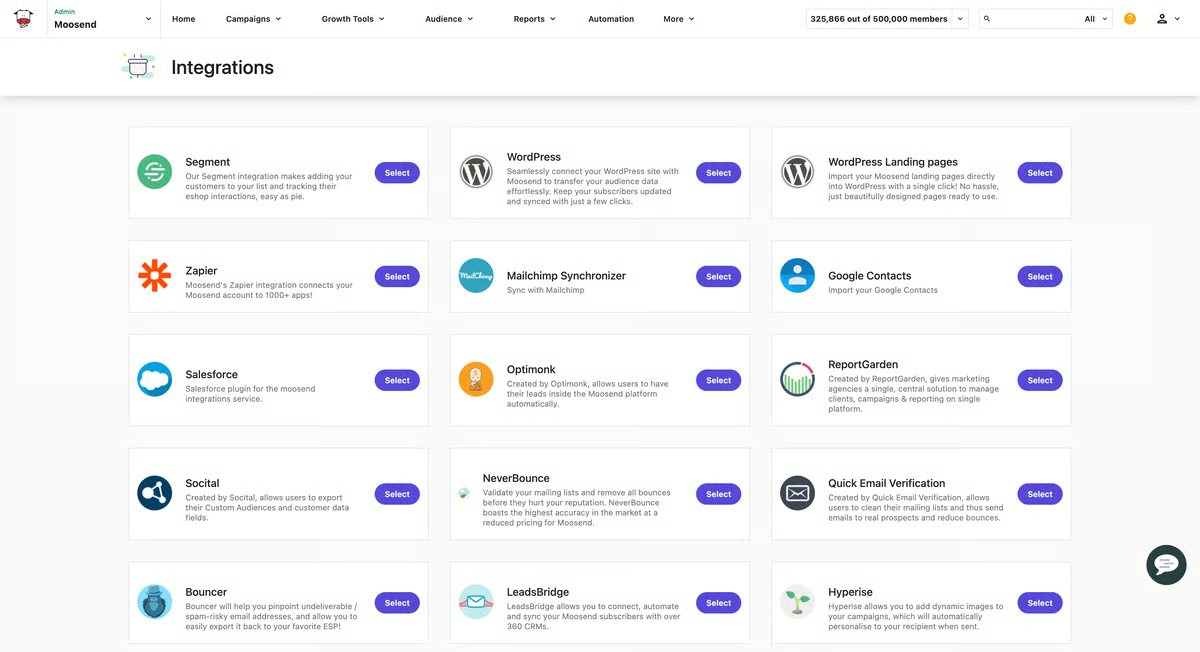
What you get is real automation without a big price tag or a long ramp-up. Reviewers describe the drag-and-drop builder and visual automation flows as fast and non-intimidating for non-coders, and they rate the analytics (click maps, locations, revenue) as unusually granular for the money. On the flip side, pricing has shifted over time and can feel unpredictable, and integrations and segmentation run thinner than enterprise tools. Since the free option is a 30-day trial rather than a forever plan, a small business gets the full toolset in front of it before committing at $9/month.
Moosend is trial-only, so the upgrade point is built in. When the 30 days end, a small business moves to the Pro plan at $9/month, one of the cheapest entry prices here, or buys email credits to keep sending. Pro suits a lean team that confirmed during the trial that Moosend's automation and analytics cover its needs and wants the lowest ongoing cost.
"I use Moosend to create and manage email campaigns for both my own brands and my clients, and it takes care of some of the biggest headaches in email marketing. What I like most is how simple and clean the platform is. The interface is intuitive, and the automation features are powerful enough to launch campaigns quickly without unnecessary complexity. It strikes a great balance between ease of use and functionality. I can set up campaigns quickly, automate key workflows, and let everything run without constantly second-guessing or overcomplicating. It genuinely saves me time and removes a lot of friction from my process."
- Moosend review, Fouad B.
Best for: Budget-minded small businesses that want strong, visual automation and detailed analytics at the lowest ongoing price.
Not ideal for: Teams that require a free-forever plan or a broad native-integration library and advanced segmentation.
"There are two areas where I'd love to see improvement. Some of the "Create" or "Create New" buttons are placed in odd spots, sometimes way at the bottom of a long page or tucked up in a corner where you wouldn't expect them. It breaks the flow a bit when you're trying to work quickly. I've also noticed that certain global settings don't always stick, so I occasionally have to re-set preferences I thought were already saved."
- Moosend review, Nikki M.
Robly makes one promise and organizes everything around it: more people opening your emails. Two features carry that promise, and reviewers on the Robly G2 reviews page name them constantly. OpenGen automatically re-sends a campaign to the people who skipped it the first time, and AI send-time optimization fires each email when a given contact is most likely to be active.
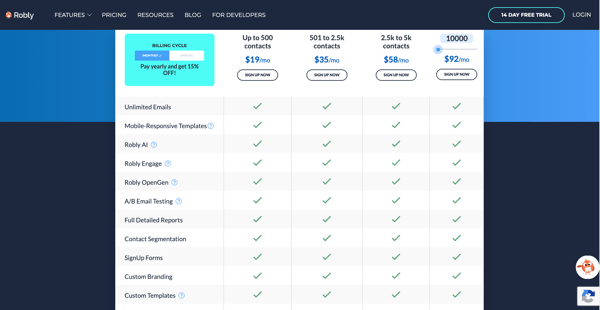
Reviewers single out the send-time AI and OpenGen auto-resend as the features that actually move engagement. They describe the builder and segmentation as simple enough for a non-technical team.
Robly is trial-only, so the trigger is the end of the 14-day trial. To keep sending, a small business moves to the entry subscriber tier at $19/month (up to 500 subscribers, all features, unlimited emails), and the price scales with subscriber count from there (for example, up to 1,000 subscribers at $35/month). Because every feature ships on every plan, the upgrade is about list size and ongoing sending, not unlocking capabilities.
"Easy to manage/upload contacts. It shows the rate of opened and unsubscribed contacts."
- Robly review, Tonya H.
Best for: Businesses with no email specialist that want automatic open-rate lifts (send-time AI, auto-resend) from a simple tool.
Not ideal for: Teams that need deep reporting, rich native integrations, or a free-forever plan.
Native integrations are thin on Robly, so Zapier ends up doing most of the automation work, per what G2 users describe. Complex, multi-app stacks will feel that extra layer of setup. But if Zapier is already your automation hub, it works as a flexible bridge connecting Robly to just about everything else you use.
"Despite the fact that the editor is very easy to use, I would like the templates to be even more customizable."
- Robly review, Rocio C.
Calling Systeme.io an email tool undersells it. It's an entire online business platform that happens to include email, and for the right small business, that's precisely the appeal. In Systeme.io G2 reviews, I see solopreneurs, coaches, and course creators describe running funnels, landing pages, and email automation from one dashboard, and they give it a 4.8-star average rating. The free plan's email headline is the unusual part: unlimited sends to up to 2,000 contacts, with no daily cap.
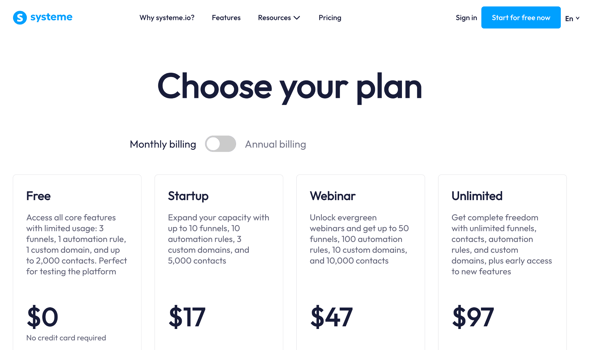
Sellers are where this one earns its place: the small businesses moving digital products, courses, or memberships who want email sitting next to funnels and checkout rather than in a separate tool. Reviewers credit the simplicity, the all-in-one convenience, and a generous free plan.
The wall here isn't email volume, since sends are unlimited even on free. It's the three-funnel and one-course limit, or crossing 2,000 contacts. The Startup plan at $17/month raises the contact ceiling to 5,000 and adds more funnels, funnel steps, and courses. Make the jump once you're selling enough to need more than three funnels or one course, or once your list grows past 2,000.
"I like the simplicity of use, and the free trial is fair, and pricing is good for a crm and email marketing platform. Also, the integration was easy with no complications. The automation is working as expected; it is a fast platform. I used AI to segment subscribers, and it was nice."
- Systeme.io review, Kamal B.
Best for: Solopreneurs, coaches, and course creators who sell digital products and want unlimited free email built into funnels and checkout.
Not ideal for: Businesses that want a polished, design-flexible newsletter tool or large multi-product stores.
"I think the templates in Systeme.io are very simple and could be more customizable and premium. Also, the deep funnel analysis feels limited, and I wish it offered more in-depth analysis at each stage of the funnel. It doesn't really make premium-looking pages."
- Systeme.io review, Prajval C.
Two words repeat across the Zoho Campaigns G2 reviews: affordable and integrated. For small businesses already living inside Zoho's ecosystem, where the CRM, the forms, and now the email share one login and one contact database, the appeal writes itself.
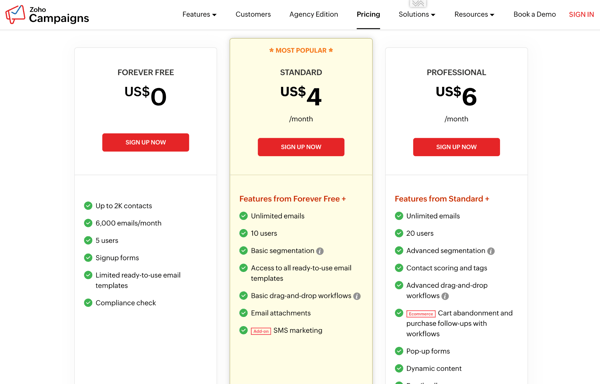
Budget-conscious teams are the natural home here, especially teams already on Zoho CRM, who want email, segmentation, and basic automation without a premium price. The low cost, the clean automation workflows, and the seamless Zoho integrations draw the praise on G2.
The wall is the 2,000-contact and 6,000-email monthly ceiling, or the point where you need advanced segmentation and the 25-plus component workflows the free plan restricts. The Standard plan starts at just $4/month (around 500 contacts, scaling by contact count), unlocking advanced segmentation, deeper automation, and higher sends. It's one of the cheapest upgrade paths in this roundup once your list or your automation needs outgrow the free tier.
"It makes email marketing easy to manage for a marketing and tech development agency like HeyBlynk. The templates, automation, audience segmentation, and campaign reports help us run cleaner email campaigns for clients without too much manual work. It is especially useful for keeping outreach organized and tracking what is actually working. It is more affordable than any other platform out there."
- Zoho Campaigns review, Kiran C.
Best for: Budget-first small businesses, especially those already using Zoho CRM, that want a generous free plan and the lowest upgrade price.
Not ideal for: Teams that want a modern, design-flexible interface, rich templates, or advanced AI content tools.
"Maybe the interface could use a bit of an update. Also, every email campaign needs to be approved, and sometimes it takes a couple of minutes to get the green light before I can send it."
- Zoho Campaigns review, Ed G.
Have more questions? Find more answers below.
The best free tool depends on what you send. For the most generous free-forever plans, Systeme.io (2,000 contacts, unlimited sends, and a 4.8 rating) and Zoho Campaigns (2,000 contacts, 6,000 emails per month, and a $4 upgrade) lead the pack. If you mainly want simple newsletters with automation baked in, MailerLite is the pick. Match the tool to your list size and whether you need selling and funnels or just plain campaigns.
Systeme.io is the most generous overall, pairing 2,000 free contacts with unlimited sends. Zoho Campaigns is close behind at 2,000 contacts and 6,000 emails per month. Brevo takes a different route, storing unlimited contacts but capping you at 300 emails per day. At the tight end, Mailchimp's free plan stops at 250 contacts, the smallest ceiling in this roundup.
On upgrade price, Zoho Campaigns is the cheapest at $4/month, followed by Moosend and Brevo at $9/month. If you would rather stay free longer, Systeme.io gives you unlimited sends and Zoho gives you 2,000 contacts before any bill arrives. For a budget-first startup, those four are the strongest starting points.
Moosend and MailerLite are the automation standouts for lean teams. Moosend lets non-coders build visual, multi-step flows in minutes, and MailerLite is rare in letting welcome sequences run on the free plan. Robly takes a narrower angle, automating open-rate lifts through OpenGen and AI send-time. GetResponse is also worth a look, since its free plan opens a 14-day window into premium automation.
Campaign Monitor suits multi-client work well, with clean templates and strong list management and segmentation across separate audiences. Zoho Campaigns is another fit, affordable enough to run many client campaigns and singled out by an agency reviewer for keeping client outreach organized. If an agency wants more than email, GetResponse's all-in-one breadth adds landing pages and automation under one roof.
Brevo fits e-commerce nicely, combining email, SMS, and a light CRM while billing by sends rather than by contacts stored. Systeme.io suits sellers of digital products, with funnels, checkout, and unlimited free sends in one place. If you run a storefront on another platform, Mailchimp's large integration library (around 300+ apps) connects to most popular store builders.
Constant Contact is the one reviewers single out most for support, with fast, human phone help that non-technical owners can actually reach. Moosend also earns praise for hands-on human onboarding during the trial, and MailerLite reviewers frequently mention how quick and helpful its support team is. For an owner who wants a real person when something breaks, those three stand out.
By G2 rating in this roundup, Systeme.io leads at 4.8, followed by MailerLite and Moosend at 4.6, then Brevo and Robly at 4.5. GetResponse, Mailchimp, and Zoho Campaigns each sit at 4.3, with Campaign Monitor and Constant Contact at 4.1. Ratings are one input, but pairing them with your actual use case matters more than chasing the highest number.
For straightforward newsletters, MailerLite is hard to beat, staying clean and simple while including automation for free. Brevo is another strong pick, letting you keep an unlimited contact list at no cost. If you run a local business or nonprofit and value support, Constant Contact handles newsletters and event invites with human help on call.
Moosend has the most granular analytics for the price, with click maps, location data, and revenue tracking. Campaign Monitor and GetResponse both give clean, readable open and click reporting that a small team can act on without a data analyst. Robly surfaces opens, clicks, and unsubscribes clearly, though its reporting stays basic beyond those core metrics.
Zoho Campaigns has the tightest CRM fit, plugging natively into Zoho CRM so email and sales share one login and one contact database. Brevo includes a light built-in CRM, which keeps contacts and campaigns together without a separate tool. Mailchimp connects broadly instead, using its roughly 350-app library and marketing-CRM basics to link with whatever CRM you already run.
Here's a test no comparison table can run for you. Sign up for the free email marketing software that fits your list size, send this week's newsletter through it, and pay attention to one thing: how often the software makes you stop and think about the software. The right pick fades into the background within days. The wrong one keeps tapping you on the shoulder.
A week of real sends will settle what a month of research never could. Your list, your schedule, and your patience are the only benchmarks that matter.
And once email starts running itself, the next bottleneck shows up in everything around it: the follow-ups, the handoffs, the campaigns that still live in your head.
Explore the best marketing automation software on G2 to hand those off too.


Recently updatedSummer 2026 Grid® Report · Published May 26, 2026 This guide was last...
 by Bhoomika Pawar
As a marketer, you know the inbox is a competitive place. Your email is just one of dozens,...
 by Holly Landis

I evaluated 20+ free tools using G2 Data and reviews to finalize the 8 best free marketing...
 by Mahima Chavan