.png?width=400&height=150&name=Rajanya%20Ghosh%20-%20G2%20profile%20image%20(1).png)


Based on verified G2 reviews and the latest Grid® placement.
*Liked and disliked highlights are summarized from verified G2 user reviews.
The tools below have also been exhaustively tested and evaluated, and continue to hold their place among the best E-Commerce Personalization Software on G2.
I've watched e-commerce teams spend a bomb on personalization and still end up with the same problem: a storefront that treats every visitor like a stranger. The cart abandonment rate stays high. Product recommendations get missed. And the data exists to fix all of it. It's just scattered across tools that don't talk to each other.
The market hasn't made choosing the best e-commerce personalization software easier. There are dozens of platforms, and most of them claim to do everything.
In this guide, I analyzed hundreds of G2 reviews and the Winter 2026 Grid Report to build this list. I reviewed 20+ tools and narrowed it to 10 that hold up under real operational pressure: Insider One for AI-driven omnichannel personalization, ActiveCampaign for automated cross-channel engagement, AB Tasty for experimentation and A/B testing, ContactPigeon for cart recovery, MoEngage for customer lifecycle engagement, Luigi's Box for product search and discovery, Netcore for unified cross-channel messaging, edrone for CRM and automation tailored to smaller stores, NotifyVisitors for behavior-driven multi-channel campaigns, and Bloomreach for enterprise personalization at scale. Whether you're running a lean team or managing campaigns across multiple storefronts, this guide will help you find the right fit faster.
*These e-commerce personalization tools are top-rated in their category based on G2’s Winter 2026 Grid Report. I’ve included their strengths and ideal use cases to help you choose the right platform for your team.
The e-commerce personalization software category is crowded, and most platforms tend to have one thing in common: they claim to do everything. But feature lists rarely tell you what actually separates the capable ones from the rest. After going through hundreds of G2 reviews, I kept coming back to two factors that made the real difference.
The first is data unification. A platform that pulls from multiple sources but can't bring them together into a single customer view leaves marketers making decisions on incomplete signals. The campaigns go out, but they never quite land the way they should.
The second is execution speed. A well-built segment or journey is only as good as how quickly it can go live. Platforms that need heavy technical involvement for routine updates slow teams down in ways that quietly compound across every campaign cycle. G2 reviewers flag this more than almost anything else.
The tools on this list clear both bars. They bring customer data together reliably, give marketing teams the room to move fast, and deliver results that show up in revenue, not just dashboards.
“I've been helping e-commerce teams evaluate personalization platforms that actually drive online sales, the kind that tie customer behavior, product recommendations, and automated campaigns together.”
Read full thread →I started with G2's Winter 2026 Grid Reports for the e-commerce personalization category, using satisfaction scores and market presence ratings to build an initial shortlist. This gave me a pool of tools with verified traction across small, mid-market, and enterprise teams.
From there, I used AI to analyze hundreds of verified G2 reviews and surface the patterns that matter in day-to-day use: how teams actually experience onboarding, where workflows break down at scale, which features get used versus ignored, and what support looks like six months in. I paid particular attention to reviews from practitioners in marketing, e-commerce, and product roles, people who live inside these tools, not just evaluate them.
My conclusions reflect that aggregated real-user experience rather than hands-on personal testing of every platform. Product visuals and references are drawn from G2 vendor listings and publicly available documentation.
Not every tool that markets itself as a personalization platform is built for e-commerce realities. Here's the specific criteria I applied when deciding what made the final list.
Choosing the right e-commerce personalization tool comes down to understanding your team’s unique needs. Every organization will have different priorities, so it’s essential to align your choice with your specific goals.
Category Inclusion Requirements:
This data was pulled from G2 in 2026. Some reviews may have been edited for clarity.
Unifying personalization, messaging, and customer data in one platform sounds straightforward until you try it. Insider One is one of the few tools where G2 reviewers describe it actually working. Segmentation, journey orchestration, AI-driven decisioning, and campaign execution operate together so brands can react to behavior in real time.
What stands out to me first is how well web personalization lands in real storefront activity. With 97% for web, Insider One clearly outperforms, and G2 reviewers repeatedly mention how quickly personalization ideas turn into live experiences that can actually be measured. Real-time behavior, previous purchases, and onsite activity can all shape what a visitor sees, which gives campaigns a much more timely feel.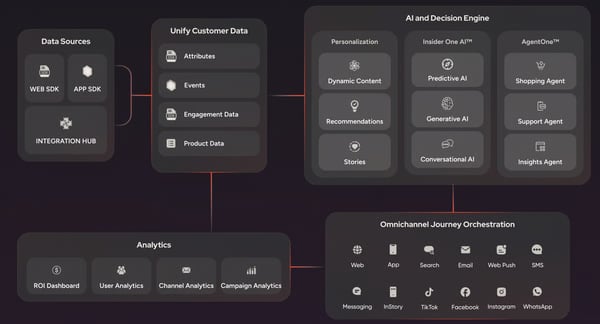
Recommendation quality is another clear strength, especially for brands that want relevance without constant manual tuning. What I find compelling is how G2 reviewers describe it: showing the right products, messages, and offers to different audiences without heavy intervention. This lines up neatly with its 97% recommendation score. Customer profiles, predictive signals, and segmentation logic all feed into the same experience layer, making product discovery genuinely more contextual.
A/B testing at 97% is the kind of score that makes you pay attention. Across Insider One's G2 reviews, experimentation doesn't feel like a feature someone added later. G2 reviewers describe testing as part of everyday execution, not a separate step. This means teams running web templates, journeys, and cross-channel messaging in parallel get to move from idea to rollout with a lot more confidence and a lot less guesswork.
Another reason the platform earns such strong praise is the way it handles orchestration across channels. I noticed one of the G2 reviewers described it as especially effective for setting up flows with a wide range of triggers, from user attributes to live behavior and predictive AI, which speaks to how naturally campaigns can move across web, mobile, email, messaging, and more. Rather than feeling stitched together, those journeys come across as coordinated from the start.
Complex personalization programs stall when support slows down. Across Insider One's G2 reviews, I’ve rarely seen that happen. Fast responses, strategic guidance, and knowledgeable help around integrations or campaign setup appear again and again, with one user noting that tickets are often picked up within hours and resolved fully. That service quality compounds over time, keeping teams moving forward without the friction that typically builds around complex platform configurations.
Insider One also deserves credit for making sophisticated execution feel genuinely accessible, whatever your team looks like. If you're not particularly technical, you can still build visually appealing templates and launch scenarios without pulling in engineering every five minutes. If you are the more advanced type, there's plenty of room to go deeper with segmentation logic, integrations, and custom journeys.
G2 users note that advanced campaign setups involving multiple placements, teams, or rule sets require more upfront coordination before everything runs cleanly. I’ve seen this show up most for brands managing style consistency and messaging frequency across several functions at once. However, reviewers consistently note that once the initial structure is in place, the system operates with a high degree of control and flexibility.
Some G2 reviewers point to specific workflow areas where the experience could feel smoother, including export handling from analytics panels and visibility into web test variants for later audience building. Teams running complex, multi-region programs at scale are more likely to notice these gaps than those operating simpler campaigns. For brands managing multi-region programs, reviewers note the system stays dependable even as campaign complexity grows.
Taken as a whole, Insider One comes across as a high-confidence choice for brands that want personalization to operate as a central revenue function rather than a side project. It combines strong execution on web experiences, recommendations, testing, and journey design with a support model that users clearly value. For teams ready to run more relevant customer experiences across channels, Insider One looks every bit like a category leader.
“I really like how Insider One facilitates data-driven customer engagement, allowing us to scale without any problems and efficiently scale our teams. The system supports customer engagement using real behavioral and transaction signals, not just demographics, to decide who gets what message, on which channel, and when. This CPD upgrade from our mobile app, CRM, and transaction system creates a unified customer profile that helps us build dynamic segments based on actual behaviors. I appreciate the automated journey setup, which grounds every campaign in a real customer context rather than assumptions. Plus, Support for native channels like Vietnam's widely used app, Yellow, ensures messages are delivered through the channels customers check most frequently. It's been particularly effective for time-sensitive communications like card activation reminders, resulting in higher open and response rates across channels.”
- Insider One review, Linh K.
“The platform has a learning curve, particularly around the more advanced segmentation and automation features. New team members need some ramp-up time before they can fully utilize everything Insider offers. A more structured in-platform onboarding guide would help. Also, certain reporting exports could be more customizable for our internal BI requirements — a minor but recurring inconvenience.”
- Insider One review, Merve
Enterprise teams scaling personalization beyond e-commerce into CRM, push, email, and real-time journeys often need a broader platform. See which personalization platforms enterprises rate highest on G2.
ActiveCampaign fits e-commerce teams that want customer communication, sales follow-up, and automation in one place. It blends email marketing, segmentation, CRM functionality, and workflow building so brands can keep outreach timely without turning every task into a manual job. Its appeal comes from making structured journeys feel manageable for everyday use. That balance gives smaller teams a practical way to stay organized as contact lists grow.
Email is where I would typically start when I analyze ActiveCampaign's G2 reviews, because the feedback is remarkably consistent. Reviewers are not just saying email works; they are describing follow-ups that feel personal and land at the right time without anyone manually triggering them. That consistency shows up in an 87% G2 score for email, and I can see exactly why teams stay on the platform once they have it running.
Sifting through G2 reviews, it's clear that what gives the product real momentum is the way campaigns can be built into repeatable systems. G2 reviewers describe funnels, lifecycle messaging, and behavior-based sequences as easy to create, and the marketing campaign's score of 87% reflects that dependable day-to-day value. Instead of sending one-off blasts, teams can shape journeys that respond to tags, actions, and stages in the customer relationship.
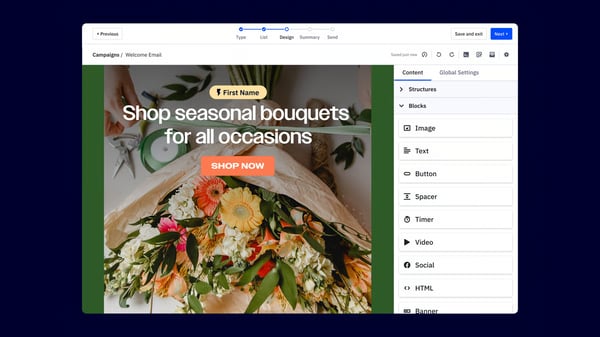
Another bright spot I noticed in G2 reviews is how naturally the platform connects with surrounding tools. CRM syncing, workflow triggers, and outside system connections are a routine part of how customers describe using ActiveCampaign, even with integrations rated at 83%. One G2 reviewer specifically praised how intuitive those connections felt during onboarding, which says a lot about how quickly the platform can become part of an existing stack.
One of the lesser-known features happens to be the CRM, where G2 reviewers kept describing contact management, lead tracking, and email all running in one place without a separate sales tool bolted on. Marketing activity and pipeline movement share the same environment. That is a different kind of efficiency, one that shows up in how teams operate week to week rather than in a feature comparison.
The number that stuck with me from ActiveCampaign's G2 reviews was 70,000. That is the contact volume mentioned while still describing the platform as reliable and easy to manage day to day. Lead nurturing, onboarding, re-engagement, and sales records are all running in one environment without the system showing strain. When scale stops being a talking point and starts being a Tuesday, that is worth noting.
ActiveCampaign's G2 reviews suggest they double down on their strengths. Automation, email, and campaign building sit at the center, and everything else supports that core without crowding it. Some of the supporting features worth calling out are guided selling, product recommendations, structured follow-up, and relationship-building.
G2 reviewers note that ActiveCampaign's full value takes time to surface, particularly for teams that are still mapping out automations, forms, and sales workflows. This is more noticeable for users who are new to structured marketing automation rather than those already familiar with building campaign logic. I will say this, though: G2 reviewers who work through that early phase consistently describe stronger organization and better time management on the other side.
Support response speed shows some variation across the review set, with a small number of G2 reviewers noting they would have preferred faster resolution during time-sensitive account situations. From my understanding, teams running critical or high-volume campaigns are more likely to feel this gap than those using the platform for routine outreach. Teams running routine outreach consistently describe onboarding as smooth, with support that holds up well outside of time-critical moments.
The pattern I kept seeing in ActiveCampaign reviews is that the teams getting the most out of it are the ones who treated setup as an investment rather than a one-time task. Once the automations, forms, and sales workflows are properly mapped, the platform stops feeling like something you manage and starts feeling like something that works for you. That shift is what the strongest reviews are really describing.
“It is easy to use and makes managing email campaigns feel straightforward.
I like how reliable it is, especially when sending automated emails and follow-up sequences. The automation features are really useful and save a lot of time.
It helps keep contacts organized, so it’s easier to send the right message to the right people. The reporting and tracking tools are clear, which makes it simple to see what’s working.”
- ActiveCampaign review, James P.
“ Pricing scales aggressively once you cross contact tiers, which can make it a harder sell for small service-based clients just getting started. The reporting dashboards are functional but feel a step behind competitors — exporting campaign data for client-facing reports usually means pulling into a separate tool. A few of the newer AI features felt more like add-ons than deeply integrated capabilities at launch, though they've improved. Onboarding for clients new to email marketing also has a learning curve; we typically build a custom guide to bridge it.”
- ActiveCampaign review, Lila S.
AB Tasty is built for teams that want to improve digital experiences through testing, personalization, and behavioral insight. The platform gives marketers and product teams a way to launch experiments, adjust journeys, and study visitor actions without turning every update into a development request.
A/B testing is what got my attention, being rated 93% on G2 and sitting at the top of AB Tasty’s strongest capability. Reviewers repeatedly describe the testing experience as intuitive, where non-technical teams can launch experiments with very little training. That mix of accessibility and control makes it easier to validate ideas before pushing changes across the full site.
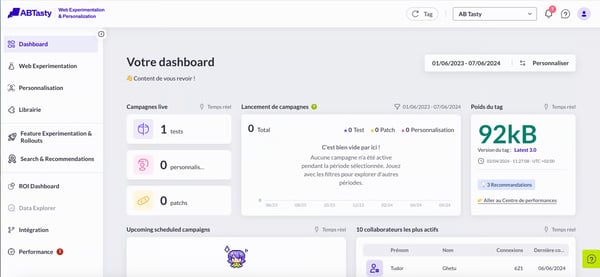
AB Tasty makes ongoing site improvements feel genuinely manageable, and that kept ringing true across multiple G2 reviews. Optimization sits at 85% on G2, and reviewers often mention how quickly they can test ideas, understand what visitors are doing, and decide what to keep or change. Rather than relying on instinct, teams get clearer answers based on real user behavior, which makes everyday decisions feel more confident and grounded.
When it comes to storefront personalization, I noticed in G2 reviews that the platform offers enough flexibility to keep campaigns aligned with customer behavior. Its web feature is rated at 84%, and that shows up in campaign launch speed, widget usability, and how cleanly personalization flows come together. Adjusting content and journeys also feels straightforward once patterns in user behavior start to become clear.
One thing I kept seeing across G2 reviews was how approachable AB Tasty feels for teams that prefer working independently without relying heavily on technical support. The interface allows experiments, campaign variations, and site changes to be managed directly, which helps keep things moving during active testing periods. When teams can act quickly on new insights, optimization naturally becomes more effective.
A noticeable advantage comes from how well AB Tasty fits into existing tools and workflows. Connections with analytics and marketing platforms make it easier to use experiment results alongside campaign data and reporting. Many G2 reviewers mention this smooth integration, especially when talking about how insights flow into their broader strategy.
Support is another area where AB Tasty proactively delivers. Quick replies, easy chat access, and guidance that actually moves you forward. G2 reviewers are pretty vocal about this one. When you're mid-experiment, that matters more than people think. Nobody wants to pause, wait, and lose momentum. With support like this, teams keep testing, keep launching, and keep going.
G2 reviewers flag that React-based setups, mobile testing flows, and detailed campaign structures require significant preparation upfront. If you skip that prep, reviewers mention campaigns don't run cleanly. If you're in a React environment or running mobile-first testing, you'll feel this gap more than most. That said, once the groundwork is done, the core testing capabilities hold up well, and the overall vibe stays pretty constructive.
G2 reviewers flag that the visual editor and QA mode can behave inconsistently in specific environments, including cross-browser testing and React-based setups, which adds steps to the validation process before a test goes live. Teams running complex technical configurations notice this more than those working within standard web environments. Once the edge cases are scoped, the core experimentation workflow holds up reliably and keeps campaign velocity high.
AB Tasty comes across as a strong choice for e-commerce teams that want experimentation to shape the customer experience in a measurable way. Testing depth, optimization flow, usability, and support are where I think the platform consistently proves its value in conversion-focused environments. For brands ready to treat site improvement as an ongoing practice rather than a one-time fix, AB Tasty more than earns its place, I'd say that much is clear.
“How easy it is to make changes to the website for testing variables without any web development knowledge. Additionally, I love how well connected it is to platforms such as Google Analytics or Hotjar to get additional insights from the tests. Very user-friendly and intuitive as well! ”
- AB Tasty review, Ana M.
“It is difficult to use the editor with a React site.”
- AB Tasty review, Patrick M.
ContactPigeon brings email, onsite messaging, and push notifications into one system where journeys, triggers, and audience data stay connected in a structured way. When multiple campaigns run in parallel, that unified setup keeps everything aligned without requiring teams to switch between tools.
User data sits at a perfect 100% in the G2 reports. Reviewers on G2 talk about grouping audiences by behavior, purchase history, and interaction signals with impressive precision. Campaigns stop feeling like mass blasts and start getting personal and maybe even creepy in the best way. Stronger engagement and more meaningful communication across customer groups just follow naturally. That perfect score does not lie.
Mobile communication is where things get really interesting. Push notifications and automated triggers reconnect visitors after key actions, and G2 reviewers are very clear about how much they value that. The 100% mobile rating reflects that too, with customers hearing from the brand at exactly the right moment without being pushy.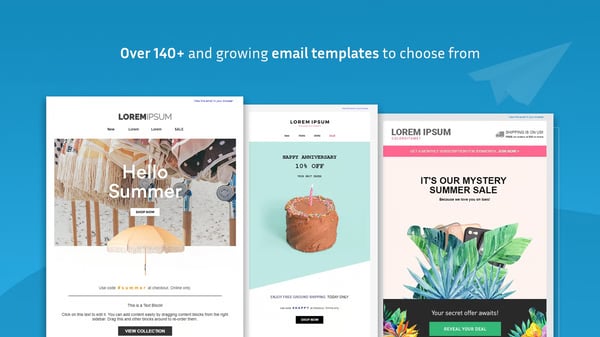
On-site personalization plays an equally important role in guiding shoppers through their journey. With web capabilities also rated at 100%, features like pop-ups, recommendation widgets, and behavior-based prompts appear at the right moment during browsing sessions. Many G2 users describe these interactions as helpful nudges that guide attention toward relevant products or offers while keeping the experience smooth. This connection between onsite behavior and campaign logic helps create a more cohesive shopping experience.
Automation is where ContactPigeon earns its keep, and trust me, the G2 reviews make that very clear. Abandoned cart reminders, welcome journeys, and price drop alerts. Once these flows are configured, they just run without needing to babysit the workflow. Reviewers consistently highlight how these automated processes keep brands engaged while communication stays timely and structured. For marketing teams that need reliable day-to-day execution without the extra effort, this is where ContactPigeon delivers.
What struck me while going through the review data was how many businesses were running multiple brands or storefronts from a single ContactPigeon dashboard. Some G2 reviewers describe managing several e-commerce environments from a single dashboard, with campaigns, automations, and messaging strategies aligned across each one. That level of centralization helps maintain consistency while reducing the time spent coordinating separate tools or systems. It also allows teams to scale their operations more smoothly without losing control over messaging.
While going through the G2 reviews, I see support quality also stands out across user feedback and contributes to the tool’s overall experience. Teams often highlight quick responses, proactive suggestions, and ongoing collaboration with account managers who stay involved throughout the process. That level of involvement helps businesses refine campaigns, explore new features, and continuously improve their strategies. The relationship feels more like an ongoing partnership than a one-time setup.
G2 reviews note that building more advanced automation flows requires structured thinking during the initial setup phase, particularly when campaigns involve multiple triggers, conditions, and audience segments. This complexity surfaces most for marketers building layered journeys across multiple channels, while single-channel or straightforward outreach stays accessible throughout. That said, once the initial structure is mapped out, ContactPigeon's automation builder handles multi-step complexity without losing its logical flow.
If you’re new to ContactPigeon, its feature extensivity can take time to get fully comfortable with. Exploring capabilities beyond the initial setup requires structured onboarding, something that surfaces consistently across G2 reviews. Teams expanding into unfamiliar features feel this more than those working within familiar workflows. As familiarity builds, G2 reviewers describe the platform as easy to manage and rewarding in regular use.
What struck me most reading through ContactPigeon's reviews is how often users come back to the support relationship rather than individual features. The perfect segmentation and mobile scores are notable, but what keeps teams on the platform longer term seems to be the ongoing account involvement that turns initial setup into something that keeps improving. That kind of partnership dynamic is harder to replicate than any single feature.
“ContactPigeon’s platform offers a wide range of powerful features. For now, we primarily use it for sending newsletters, and we have activated a lot of automated flows, pop-ups, and Viber campaigns. The interface is easy to work with, so this makes our day-to-day smoother.”
- ContactPigeon review, Lydia Iliana M.
"Despite the overall quality, at times, the platform feels a bit outdated in certain areas. For example, scheduling future campaigns can be confusing."
- ContactPigeon review, Charalampos A.
MoEngage is built for brands that want customer engagement to feel timely across every stage of the order journey, combining automation, messaging, and behavioral insight in one environment. It brings campaigns, segmentation, dashboards, and multi-channel outreach into a single working environment. That setup gives teams a clearer way to connect customer actions with follow-up communication.
Mobile engagement scores 95% on G2, and what I kept finding in the reviews comes back to the same things: push notifications that land well and outreach that matches where a customer actually is in their journey. That kind of precision matters when someone pauses before checkout, and you want back in the conversation.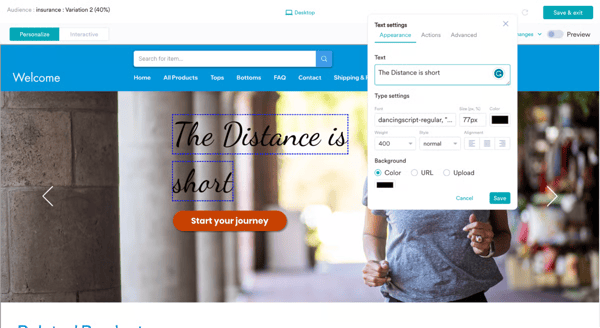
Campaigns are also easy to get off the ground and keep running. G2 users rate marketing campaigns at 93%, and the feedback describes quick setup, smooth execution, and dependable use for recurring outreach across WhatsApp and email. If your team runs frequent promotions or retention journeys, that ease removes a lot of the friction that builds up when every send becomes its own project.
What stood out to me is how MoEngage turns customer behavior into something your team can actually act on. Dashboards, campaign summaries, user tracking, and engagement analysis feel like part of everyday work rather than bolt-on reporting. When those tools are built into the same workflow you're already using, acting on the data stops feeling like a separate task.
The platform also holds up well in everyday use, which sounds basic but genuinely matters. When campaign creation and segment setup feel straightforward, teams stay engaged with the platform rather than finding reasons to delay. Personalization only works if people actually build it, and MoEngage makes that part easier than most.
Getting started is fairly smooth, too. Several reviewers mention a clean initial setup supported by a dedicated technical team, and ongoing customer success support comes up regularly in the feedback. Integrations score 90% on G2, and from what I found in the reviews, it tends to fit naturally into a broader marketing stack rather than requiring workarounds to get there.
Email holds up well inside the platform as well. With a 93% score, it covers segmented messages, lifecycle communication, and triggered sends tied to user actions. If you're already using MoEngage for segmentation and campaign logic, the email channel feels like a natural extension of that work rather than a separate tool you have to manage.
A few reviewers mention that support response times could be faster, particularly during time-sensitive sends. If your team runs high-frequency campaigns where turnaround matters, it's worth factoring in. That said, the broader support feedback is positive, with most users describing day-to-day help as accessible and the platform as productive to work in.
On pricing, smaller businesses should take a closer look at how the structure and AI add-ons map to their actual scope before committing. Teams with a clear engagement strategy tend to get up to speed faster than those still figuring out their approach. If you know what you want to build, MoEngage gives you a well-structured environment to build it in.
From my evaluation, MoEngage earns its place for e-commerce brands that want multi-channel engagement driven by real customer behavior. Mobile messaging, campaign execution, email orchestration, and clear performance reporting are where it consistently delivers. If you're ready to build more responsive customer journeys, this one's worth a serious look.
“I like the interactive campaigns we can have at different stages of the order journey and the number of channels it supports, including WhatsApp and email. The ease of platform use and customization at different stages of the order journey made us choose MoEngage. The initial setup was quite seamless with dedicated support from the tech team.”
- MoEngage review, Aviral G.
“Funnels with very high data volume sometimes take a bit longer to load. If event names are not standardized well, funnel building becomes messy, which puts pressure on teams to maintain strict naming discipline.”
- MoEngage review, Ravindra N.
If you've ever watched a customer search for something on your store and come up empty, you already understand what Luigi’s Box is solving for. The platform sharpens search, surfaces relevant products, and gives retailers a clearer picture of what shoppers are actually after. Product discovery stops being a background feature and starts doing real commercial work.
At the center of the platform is a search engine that clearly delivers. Search is rated 95% on G2, and what I found in the reviews points consistently to the same strengths: typo tolerance, synonym handling, and smart autocomplete. This helps customers find what they're looking for rather than bouncing. If your catalog runs deep or your product names aren't always intuitive, that kind of precision earns its keep quickly.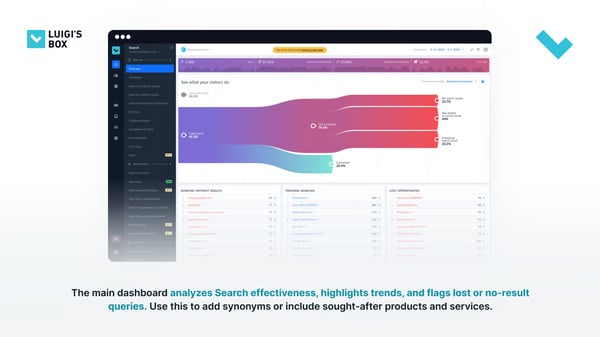
Product suggestions are another area where Luigi's Box performs with real confidence. G2 reviewers describe stronger average order values and more relevant discovery paths, which tracks with the platform's 95% recommendation score. What stood out to me is how these suggestions feel shaped by actual customer behavior rather than generic merchandising logic, making recommendations feel responsive rather than random.
Day-to-day administration is another area worth flagging. Heatmaps, product boosting, listings, and sorting tools all live inside a clean admin experience that reviewers describe as easy to manage once the platform is in place. Supporting features like customization (89%) and A/B testing (88%) round out the picture without drawing attention away from where Luigi's Box is strongest: discovery and conversion.
Getting up and running with Luigi's Box tends to go smoothly, at least according to the G2 feedback. Support teams show up actively during setup rather than leaving stores to work through configuration alone, and that involvement clearly helps teams get to value faster. Good search software needs to be set up well to show what it can do, and the onboarding here seems to reflect that.
The analytics side is where I'd point anyone who wants to do more than just improve search results. Reports and analytics score 95% on G2, and that visibility into search behavior gives your merchandising team something concrete to act on. Refining search terms, filling catalog gaps, and adjusting how products are presented all become decisions grounded in what shoppers are actually doing.
One thing worth noting is how the platform adapts over time. As teams refine search terms, add synonyms, and watch how the system responds to real purchase behavior, the discovery experience gets progressively more tuned to what your shoppers actually want. It's a feedback loop that rewards staying engaged with the data.
Some G2 feedback flags that deeper configuration asks for more involvement in specific cases. A few users mention that API consistency and highly tailored search or recommendation behavior can take extra attention during implementation. That said, reviewers consistently describe the process as well-guided and manageable at each stage, so it reads more as complexity worth preparing for than a persistent friction point.
Conversion attribution could offer more granularity on the analytics side, and a few reviewers note a short lag between admin changes and what appears on the live site. For teams running fast merchandising cycles or detailed attribution tracking, that matters more than it will for those working on longer optimization timelines. The overall review picture still lands positively, with most users finding the Luigi’s Box reliable and straightforward in daily use.
For e-commerce brands that want product discovery to become a stronger commercial engine, Luigi's Box makes a compelling case. Search accuracy, recommendation quality, and behavioral insight that feeds continuous improvement are where it consistently earns its reputation. If making the right product easy to find is a priority for your store, this one deserves a serious look.
“The Luigi's Box Search is very practical for us, and we particularly appreciate the information it provides about customer behavior. Access to detailed data about what users are searching for allows us to better understand their needs and tailor the user experience to them. It is a powerful tool that effectively guides customers to the right products.”
- Luigi’s Box review, David V.
“Sometimes there is a lack of more advanced scenarios when configuring certain solutions.”
- Luigi’s Box review, Ariel N.
Netcore Customer Engagement is designed around the idea that messaging, automation, and customer insight should work together rather than live in separate tools. The platform combines journeys, segmentation, analytics, and multi-channel outreach across email, SMS, WhatsApp, push, and web. That makes it easier to react to customer behavior as it happens and keep engagement flowing across the full lifecycle.
Analytics and reporting add real depth to the platform, and what I like is how approachable it feels. Customized dashboards, campaign summaries, and customer behavior tracking become part of everyday decision-making rather than something saved for monthly reviews.
Another appealing aspect is how many teams describe the product as practical for cross-channel execution right away. Email performance, SMS, APN, web messages, and automation all sit inside the same ecosystem. Add in responsive support and strong AMP email capability, and the platform comes across as especially helpful for brands that want both reach and operational clarity.
Segmentation is one of my favorite things about this platform. You can build audience groups using opens, clicks, push activity, and uploaded attributes without breaking a sweat. When customer signals turn into clear segments that fast, your campaigns start feeling more relevant almost instantly.
Natural interaction feels stronger than expected here. With a 91% score on G2 for marketing campaigns, the platform keeps things simple with clear workflows and an interface that feels easy to get used to, even for someone new. That makes it much easier to build journeys, run experiments, and look at campaign results without things feeling too heavy at the start.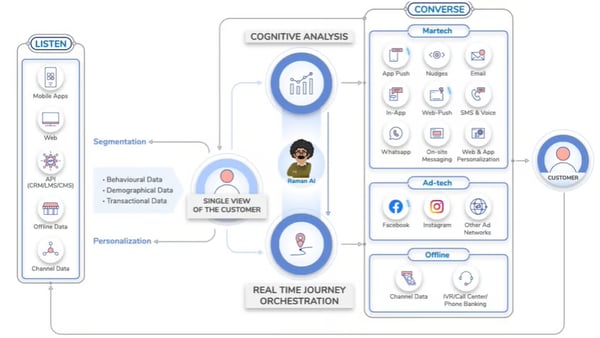
Personalized outreach is another major strength, and 92% on G2 for personalized messaging is not a number you ignore. G2 reviewers frequently call out behavior-based journeys across email, SMS, WhatsApp, and website touchpoints. When you can keep customer communication consistent across that many channels, the gap between real-time behavior and campaign delivery basically closes itself.
One thing I couldn't overlook in G2's review data was how journey orchestration came through as a revenue-focused capability rather than a simple workflow feature. The channel and condition logic is easy and effective. At the same time, some reviewers highlighted instant campaign execution and stronger conversions once journeys were fully active. That kind of orchestration is valuable for stores that want retention, upsell activity, and engagement running from one central engine.
A few reviewers mention that larger data uploads and some reporting views can take a little time to fully appear in the panel. Some comments also bring up deeper analytics or more intricate journey work that require a bit more orientation at first. This is mostly applicable to teams exploring the fuller power of the platform. Even so, the overall tone stays positive because users regularly mention that support remains available and helpful during those moments.
Interface polish is where G2 reviewers feel there is room to grow. Slower report loading, the odd small glitch, and a wish for more proactive follow-up around account needs come up across the review set. These things are worth knowing going in. Although most reviewers are quick to put it in perspective, where ease of use, channel coverage, and strong engagement results tend to be where people land, and that says something. The overall experience clearly resonates, and that is what keeps the sentiment so consistently positive.
Bottom line, Netcore Customer Engagement Platform is a capable, well-rounded option for brands that want to centralize messaging and act on customer behavior fast. Segmentation precision, personalized journeys, and multi-channel execution are where you really feel the difference. If your team is ready to make engagement more coordinated and more responsive, this one is worth your time.
“The platform’s intuitive interface, advanced segmentation, and AI-driven personalization make it incredibly easy to deliver the right message to the right audience at the right time. Campaign creation is quick, analytics are robust, and integrations with multiple channels work flawlessly.”
- Netcore Customer Engagement Platform review, Ashish M.
“One challenge is that its interface and navigation can feel complex for new users, which creates a noticeable learning curve. It also offers fewer third-party integrations and somewhat limited analytics compared with some competing martech platforms. That said, its automation features and omnichannel engagement capabilities still make it a strong tool for lifecycle marketing.”
- Netcore Customer Engagement Platform review, Rishabh P.
edrone is one of those platforms that clearly knows its audience. Built with smaller retail businesses in mind, it pulls customer data, campaign execution, and behavioral analytics into one place.
Once you've set up your automation scenarios in edrone, they largely take care of themselves. Abandoned cart recovery, post-purchase follow-ups, birthday messages, and replenishment reminders are all configured once and run without manual involvement. G2 reviewers consistently describe the scenario builder as approachable, even for non-technical users, which is exactly what small teams need.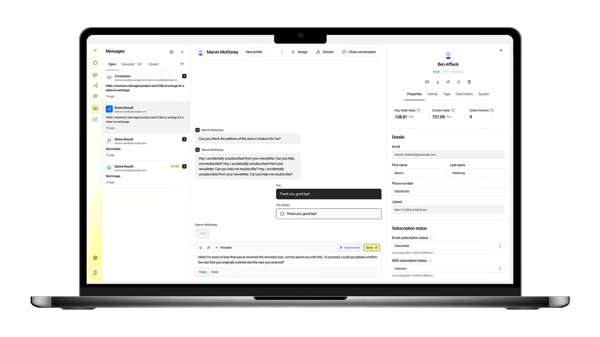
edrone doesn't send the same message to everyone, and that's the point. It uses purchase history, browsing activity, and engagement signals to tailor what each customer sees and when. G2 reviewers rate personalized messaging at 95%. For smaller retailers competing against bigger budgets, that relevance gap is hard to close any other way.
RFM analysis gives teams a useful picture of where each customer stands. You can see who your loyal, high-value buyers are, who is losing interest, and who just came in for the first time. That clarity makes it easier to focus your best offers on the people most likely to respond, rather than sending the same message to everyone and hoping for the best.
Here is where edrone earns some additional credit from me: product recommendations. Most recommendation engines default to what is popular. edrone takes a different approach, and the results show. Suggestions are built from each customer's browsing history, purchases, and engagement, so what they see actually connects to what they care about. G2 reviewers rate product recommendations at 95%, and the mobile experience holding up just as well is something I think smaller retailers will particularly appreciate.
A lot of platforms promise support and deliver documentation. edrone's onboarding team gets called out specifically in G2 reviews for being the opposite: present, responsive, and willing to walk teams through setup step by step. For businesses without a dedicated marketing function, that hands-on involvement is often what turns a promising platform into one you will actually want to stick with.
Monitoring scores 95% on G2, and in practice, that means campaign performance stays visible without complex reporting setups. User data feeds directly into this layer, tracking behavior shifts and engagement trends over time. That ongoing feedback loop is what keeps results building steadily rather than flattening out after the first few campaigns.
Deeper platform features and advanced workflow configurations take time to get right. G2 reviewers flag this especially for teams new to automation platforms. Smaller teams covering multiple roles tend to feel it more than those with a dedicated marketing function. edrone's onboarding support softens this considerably. G2 reviewers find the interface logically laid out, and with the right guidance early on, most teams find their footing faster than expected.
G2 reviewers point out that reporting flexibility has a defined scope, and those with more specific or complex analytical needs would welcome additional custom views. Teams with advanced analytics requirements are more likely to notice this than those running standard campaign reporting. That said, I think it is worth noting that reviewers broadly rate the core reporting as clear and straightforward for routine use.
edrone does not try to overwhelm you, and that restraint is part of what makes it work. Strong automation, sharp personalization, and support that actually shows up combine into a platform that earns its place in a small retailer's stack. For e-commerce businesses ready to stop doing things manually and start letting their tools do the heavy lifting, edrone is a genuinely solid place to land.
“edrone is a company that definitely stands out in the market in terms of its customer approach. What I appreciated most was the professionalism and openness in dealing with the staff. Communication was very clear, and important information was provided in an accessible and understandable way. It is also worth emphasizing the readiness of the team to help - you could always count on their support and involvement in solving problems. An additional advantage was the way in which the employees addressed the customers - polite, partner-like, and trust-building. This approach makes cooperation with edrone a pleasure! I recommend with full conviction.przekonaniem.”
- edrone review, Marek B.
“The interface can feel a bit complex at first, and setting up advanced workflows takes some learning. Reporting could also be more flexible in certain areas.”
- edrone review, Saurabh B.
If you've ever wished your marketing tools would just talk to each other, NotifyVisitors gets it. It pulls customer communication, segmentation, and campaign execution into one place, connecting email, SMS, push notifications, web personalization, and WhatsApp in a single environment. The whole platform is built on one core belief: relevant outreach should follow customer behavior, not eat up your time with constant manual input.
Multi-channel reach is where NotifyVisitors gets the most love from its users. The platform connects email, SMS, push notifications, WhatsApp, in-app messages, and web personalization into one workflow, so you're not stitching together five different tools just to reach your customers where they are. G2 reviewers point to campaigns that trigger correctly across channels without separate configuration for each, and that kind of reliability across touchpoints is exactly what teams tend to remember.
I noticed a pattern pretty quickly in G2's reviews: segmentation sits at the core of how the platform drives relevance. With monitoring rated at 96% on G2, building audience groups based on behavior, purchase history, tags, and triggered events is accessible even for users new to the platform. Reviewers describe the process as straightforward, with granular audience logic that helps campaigns reach the right people without requiring complex manual setup.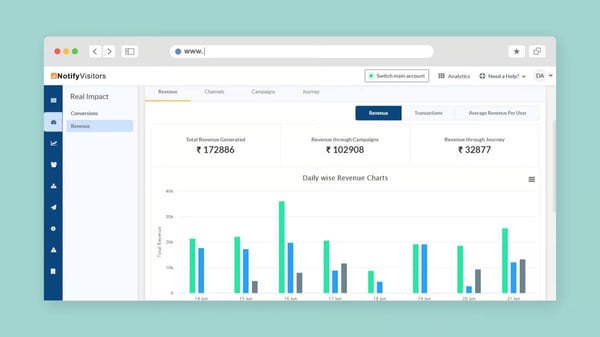
Automation workflows take the repetitive grunt work off your team's plate. Once you've set up flows like abandoned cart recovery, welcome sequences, and post-purchase follow-ups, they just run, freeing everyone up to focus on strategy rather than babysitting manual sends. G2 reviewers find the workflow builder intuitive for common use cases, with drag-and-drop email creation and behavior triggers that make building journeys accessible even if your team isn't particularly technical.
Personalization is where NotifyVisitors really shines in the reviews I’ve read, and the numbers back it up. A 96% personalization engine score on G2 is not something you see every day. Reviewers point to behavior-based messaging, pop-up targeting, and dynamic email content as the features that make your communication feel less like a broadcast and more like a conversation. For stores juggling varied product catalogs or multiple audience segments, that kind of flexibility means your outreach actually keeps up with what customers are doing on your site, without having to micromanage every message.
Nobody has time to dig through five nested menus just to find out if their last campaign worked. With reporting and analytics rated at 96% on G2, NotifyVisitors clearly agrees. Opens, clicks, cohort behavior, engagement trends, all of it surfaces without a setup saga. Reviewers say tracking performance across campaigns, channels, and user behavior actually feeds into faster decisions, which is the whole point of having data in the first place.
Support quality adds a dependable layer to the overall experience. G2 users describe responsive help, smooth onboarding, and accessible account guidance. For teams getting started with automation for the first time, that support infrastructure shortens the path from setup to active campaign delivery without prolonged ramp-up.
Some G2 reviewers note that advanced features and deeper configuration options ask for a more structured approach during the initial learning phase, particularly for users new to multi-channel automation platforms. The onboarding resources, documentation, and responsive support team reduce this gap meaningfully for users.
A few recurring themes in G2 reviews suggest that dashboard load times and reporting customization could be smoother, especially for teams managing large contact volumes or running high-frequency campaigns. This focus on core engagement capabilities keeps the platform lean and purposeful for teams whose primary need is reliable campaign delivery across channels. The platform's core campaign interface is described as reliable and easy to work with day to day.
Nvecta's NotifyVisitors is a strong fit for e-commerce teams that want segmentation, automation, and multi-channel execution running from one place. Behavior-driven campaigns, cross-channel reach, and responsive support make it a practical choice for growing retailers looking to consolidate their engagement stack and drive more consistent results as their customer base expands.
"I really like the multi-channel marketing automation feature of NotifyVisitors. It effectively creates seamless customer journeys across various channels, which is a big plus for our e-commerce website. The initial setup was relatively simple and convenient, without any difficulties or challenges."
–Nvecta's NotifyVisitors review, Isabella G.
"The platform keeps updating its features, and it gets difficult to keep up with the updates."
– Nvecta's NotifyVisitors review, Ritu G.
Bloomreach is designed for e-commerce teams that want personalization, campaign execution, and customer insight connected in one place. I found in G2 reviews that it blends email, targeting, automation, recommendations, and analytics so brands can shape more relevant storefront and messaging experiences from a unified system.
Campaign execution is one of the first things that stand out when you explore Bloomreach. G2 reviewers consistently describe faster campaign launches, smoother optimization cycles, and a unified messaging tone across channels like email, push, and in-app messaging, which aligns with its strong 92% rating for marketing campaigns. I think what makes that combination valuable is how much easier it becomes to stay consistent while still tailoring content for different audience segments.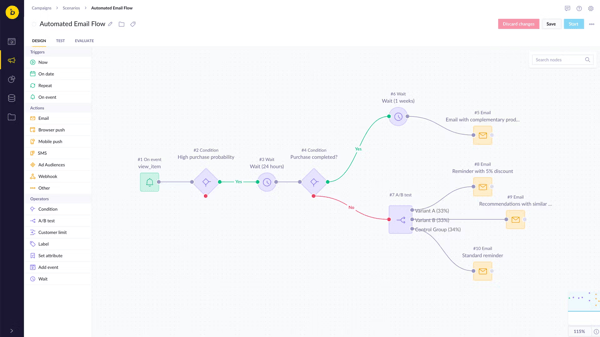
Email is another area where Bloomreach pulls its weight. G2 users regularly highlight how messages can be shaped around real browsing, search, and purchase behavior, and that shows up in its 92% score for email. I particularly like the dynamic recommendations feature, which keeps outreach feeling relevant without piling on extra manual effort on your end.
What I found consistently across G2 reviews is that customization in Bloomreach goes beyond surface-level adjustments. Reviewers describe having genuine flexibility to shape their setup around specific goals, with testing tools and performance insights that refine campaigns over time rather than locking teams into a fixed approach.
What became clear to me while reading G2 reviews is that targeting is where Bloomreach really starts to stand out. Its ability to turn anonymous visitor data into detailed personas, backed by a 90% targeting score, allows brands to shape experiences with a high level of precision. Features like interest breakdowns and behavioral mapping make it easier to clearly see what customers are engaging with and adjust experiences accordingly.
Another compelling aspect is how Bloomreach connects online and offline data into a single customer view. That unified perspective helps teams make faster decisions when building journeys or adjusting campaigns, and it becomes particularly valuable as engagement strategies grow more complex.
Automation quietly strengthens the overall workflow once journeys are in place. Several reviewers describe how triggers and scenarios continue running reliably in the background, reducing manual involvement while keeping customer communication timely. That consistency helps maintain engagement without requiring constant intervention.
Customization also adds flexibility for teams with specific goals. I see G2 users mention having a wide range of options to shape their setup, supported by AI-driven insights and testing tools that refine campaigns over time.
G2 users note that getting started with deeper features takes thoughtful planning, particularly when setting up advanced journeys or configuring reporting. The platform offers significant depth, and that depth tends to reward teams that approach implementation with a clear structure. Once you've got a clear structure in place, users consistently describe the system as highly capable and effective.
Everyday usability around reporting views and collaborative workflows has a steeper path than some G2 reviewers expected, with specific areas like viewing sent communications and tracking scenario changes feeling less streamlined than the core personalization features. G2 reviewers who work through that complexity consistently point to the platform's personalization depth as the payoff that makes the effort worthwhile.
Bloomreach is a strong pick for e-commerce brands that want targeting, email, and campaign orchestration working from a single customer-centered foundation. Where it really shines is personalization depth, audience intelligence, and the ability to turn real customer behavior into relevant action across channels. If your goal is to make every interaction feel more informed and more timely, I think Bloomreach is well worth serious consideration.
“I use Bloomreach for sending out BAU newsletters to customers and starting journeys that are integrated with our site, like welcome and retention journeys. I find the reporting tools really easy to use, helping us track data that we previously couldn't access or display. I like Bloomreach's versatility; the email building feature is full of great tools, and the product row settings help us set up different things. We were able to integrate Bloomreach with our site to pull information through, which helps create different product selectors and saves us a lot of time when building emails.”
- Bloomreach review, Charlotte W.
“What I dislike about Bloomreach is that it is not always as user-friendly as it could be, especially for users who are less technical. Some tasks require coding or a stronger understanding of logic and syntax, which can make the platform feel less intuitive at first. While the flexibility is valuable, it can also create a steeper learning curve.”
- Bloomreach review, Sophie M.
|
Tool name |
G2 rating |
Free plan |
Best for |
|
Insider One |
4.8/5 |
Yes |
Teams wanting strong omnichannel personalization and data‑driven experiences |
|
ActiveCampaign |
4.4/5 |
No |
Businesses focused on automated engagement across email/SMS with personalization |
|
AB Tasty |
4.4/5 |
No |
Teams prioritizing experimentation and A/B testing alongside personalization |
|
ContactPigeon |
4.9/5 |
Yes |
E‑commerce teams focused on automated messaging and cart recovery |
|
MoEngage |
4.5/5 |
No |
Brands seeking deep lifecycle engagement and multichannel personalization |
|
Luigi’s Box |
4.8/5 |
Yes |
Stores that want strong search & product discovery personalization |
|
Netcore Customer Engagement Platform |
4.5/5 |
No |
Marketers looking to unify messaging with personalization |
|
edrone |
4.8/5 |
Yes |
E‑commerce teams wanting easy CRM + personalized automation |
|
Nvecta's NotifyVisitors |
4.8/5 |
No |
Growing retailers with an expanding customer base and scope |
|
Bloomreach |
4.6/5 |
No |
Larger teams need enterprise‑grade personalization with data unification |
*These e-commerce personalization software products are top-rated in their category, based on G2’s Winter 2026 Grid® Report. All offer custom pricing tiers and demos on request.
Got more questions? G2 has the answers!
Real-time product personalization requires tools that can adapt quickly to user behavior and data. The top platforms for this include Insider One, MoEngage, and ContactPigeon. These tools allow you to deliver personalized product recommendations, promotions, and content based on customer activity as it happens, ensuring a relevant and dynamic shopping experience that drives conversions.
For Shopify and Magento, the top-rated platforms tend to seamlessly integrate with these e-commerce giants. ActiveCampaign and Insider One are both highly praised for their deep integrations with these platforms, offering powerful customer segmentation, email automation, and personalized recommendations that enhance the shopping experience. Both tools make it easy to leverage existing Shopify/Magento data to drive targeted marketing campaigns.
The best e-commerce personalization platform for online retailers is one that blends automation, advanced segmentation, and real-time personalization. Insider One and MoEngage stand out, providing features tailored to high-conversion optimization, such as personalized product recommendations, real-time behavioral tracking, and multi-channel engagement. These tools empower retailers to create personalized shopping experiences that drive both sales and customer loyalty.
For dynamic content personalization in online stores, AB Tasty and Bloomreach are the best tools to consider. Both platforms offer robust A/B testing and dynamic content optimization features, allowing you to tailor on-site content in real-time based on customer behavior, preferences, and previous interactions. This approach increases user engagement, encourages repeat purchases, and optimizes conversion rates.
ActiveCampaign and Bloomreach offer some of the most powerful ROI tracking features in the e-commerce personalization space. Both platforms provide in-depth analytics and performance tracking, allowing you to measure the effectiveness of personalized campaigns in terms of revenue, conversion rates, and overall engagement. By linking customer interactions directly to sales metrics, these tools help businesses understand their ROI in real time.
For multi-channel personalization, MoEngage, Insider One, and Netcore Customer Engagement Platform are top choices. These platforms excel in delivering personalized experiences across multiple touchpoints like email, web, mobile, and social. With integrated campaign orchestration, they ensure a seamless and cohesive customer journey, driving higher engagement and sales across all channels.
Insider One, MoEngage, and ActiveCampaign are among the best platforms for boosting online sales through personalization. These tools leverage customer data to drive tailored experiences that resonate with users, such as personalized product recommendations, discounts, and retargeting strategies. By offering customers relevant content and timely offers, they help increase conversion rates and overall sales.
The top tools for personalized product recommendations include Bloomreach, Luigi’s Box, and Insider One. These platforms utilize AI and machine learning to analyze customer preferences and behavior, offering tailored product suggestions that increase the likelihood of conversions. Whether it’s through recommendation widgets, dynamic pop-ups, or email campaigns, these tools ensure your product offerings are always relevant to your customers.
Insider One and MoEngage are leading the way with AI-driven targeting. These tools use advanced machine learning algorithms to analyze customer data in real time, helping you target the right audience with the right message at the right moment. By offering predictive recommendations, dynamic content, and personalized messaging, these tools make customer interactions more intelligent and impactful.
For personalizing email campaigns, ActiveCampaign and MoEngage stand out. Both platforms offer sophisticated email automation and personalization features, allowing you to create targeted email sequences based on customer behavior, preferences, and lifecycle stage. With features like dynamic content blocks, personalized subject lines, and triggered email workflows, these platforms help increase open rates, click-throughs, and conversions.
Picking the right personalization platform is harder than it looks, and I say that after going through 20+ of them. The demos are always impressive. The gaps show up later, when your actual customer data is in the system, your team is trying to launch a campaign without developer help, and the support ticket is sitting unanswered.
What I'd tell any team before they commit: ignore the feature list for a moment and look at the fit. Where does your customer data actually live right now? Which channels are driving real conversions for your business? Does your team have the bandwidth to manage a complex setup, or do you need something closer to ready out of the box? The answers to those questions will tell you more than any comparison table, including this one.
I'd also push you to think past this quarter. The platforms I've seen hold up long-term are the ones built around first-party data. Privacy regulations are tightening, third-party cookies are disappearing, and tools that rely on those data sources are already losing ground. The platform you pick now should be moving in the right direction on this, not catching up.
My honest recommendation: shortlist two or three tools, then run a proof of concept on your real data before signing anything. A vendor demo will always look clean. Your actual catalog, your actual customer segments, and your actual campaign logic will tell you what the platform can really do.
Getting personalization right is easier when the rest of your e-commerce operation is running smoothly too. Check out how other teams are tackling common e-commerce challenges across their operations.
.png)

When you work in marketing, you're constantly making decisions that could go either way....
 by Soundarya Jayaraman

The email that costs you the most is never the campaign that underperformed. It's the order...
 by Somya Jain

The other day I was shopping for a basic pair of running shoes online, and I ended up...
by Soundarya Jayaraman