


To find the best free AI content creation tools for marketers, I tested nine platforms and narrowed them down to: AKOOL, AirOps, Beautiful.ai, Canva, Creatify AI, Jasper, Lapis, Picsart, and Scalenut.
As a marketer, I’ve learned that AI tools are easy to evaluate in isolation but much harder to assess in context. Generating a single social post or blog intro is simple. The real test comes when you try to plan a week of content, draft an SEO article, build a presentation, create ad assets, and keep everything aligned with a brand voice.
That’s where most free tools start to break down. On paper, nearly every platform offers a “free” plan. In practice, that could mean anything from a usable feature set to a short-lived trial or a heavily restricted version of the product. The challenge isn’t finding AI tools anymore; it’s figuring out which free plans actually hold up once you move beyond experimentation and start building campaigns.
For this guide, I tested each product using real workflows, reviewed official pricing pages, and analyzed recent G2 feedback to understand what you can realistically do without upgrading. I focused on how far each tool gets you before limits start to interfere with productivity, whether that’s usage caps, missing features, or workflow restrictions.
One thing became clear quickly: some tools remain genuinely useful on their free plans, while others are designed to push you toward paid tiers early. I’ve highlighted those differences throughout so you can decide which option best fits your workflow, budget, and expectations before committing.
1. AKOOL: Best for AI avatar-led marketing videos
For marketers testing realistic AI presenters, face swaps, and multilingual video campaigns before investing in large-scale video production.
2. AirOps: Best for programmatic SEO and AI search content operations
For SEO and content teams building scalable workflows for content production, optimization, and AI search visibility.
3. Beautiful.ai: Best for client-ready presentations with minimal design work
For marketers who need polished decks, sales presentations, and stakeholder reports without spending hours on formatting.
4. Canva: Best for creating marketing assets across channels
For marketers who need a permanent free solution for social posts, presentations, videos, and branded creative assets in one place.
5. Creatify AI: Best for AI video ad creation from product URLs
For e-commerce and performance marketers, creating AI-generated ad variations before scaling campaign production.
6. Jasper: Best for maintaining brand voice across AI-generated content
For marketing teams evaluating long-form content creation, campaign assets, and AI writing workflows with stronger controls for brand consistency.
7. Lapis: Best for performance ad creative generation
For marketers and agencies producing on-brand ad creatives, testing campaign concepts, and generating paid media assets quickly.
8. Picsart: Best for rapid social content editing and repurposing
For social media marketers who need quick AI-powered tools for editing, enhancing, and adapting visual content across platforms.
9. Scalenut: Best for AI-assisted blog creation and SEO optimization
For content marketers exploring AI article drafting, keyword-focused content planning, and SEO optimization without an upfront investment.
*Tools are listed alphabetically. These tools offer free trials, free forever options, or freemium models.
Here's a side-by-side look at free plan limits and pricing before diving into the full reviews.
| Tool | G2 Rating | What the free plan covers | Paid plan starts at |
| AKOOL | 4.8/5 ⭐ |
|
$21/seat/month |
| AirOps | 4.7/5 ⭐ |
|
Custom pricing |
| Beautiful.ai | 4.7/5 ⭐ |
|
$12/month |
| Canva | 4.7/5 ⭐ |
|
$120/user/year |
| Creatify AI | 4.8/5 ⭐ |
|
$33/month |
| Jasper | 4.7/5 ⭐ |
|
$59/seat/month |
| Lapis | 4.9/5 ⭐ |
|
$99/month |
| Picsart | 4.5/5 ⭐ |
|
$13/month |
| Scalenut | 4.7/5 ⭐ |
|
$24/month |
*All pricing details mentioned in this article are based on publicly available data at the time of publication and are subject to change.
According to G2’s Summer 2026 Grid Report, the average user adoption rate across 38 AI content creation platforms is 57%, with an estimated time to ROI of 7 months. The broader marketing industry is moving in the same direction. In a survey of 879 marketers, Ahrefs found that 87% use AI to help create content. As more teams rely on AI, free plans have become more capable, but they're also more carefully limited, making it important to understand what you can realistically accomplish before upgrading.
I started with G2’s free AI content creation tools category page and evaluated the products selected for this list using their free plans, free trials, or freemium offerings. From there, I reviewed official pricing pages, plan documentation, and product resources, focusing on what marketers can actually accomplish without paying.
For tools where hands-on testing was possible, including Canva, Picsart, Creatify AI, and AKOOL, I also explored the free versions to evaluate usability, feature availability, and practical limitations as part of my research.
I also reviewed recent G2 feedback from marketers and marketing-related industries to understand how these tools perform in real-world content workflows. Beyond feature lists, I looked at what users consistently praise, where they encounter limitations, and whether the free experience aligns with the product's marketing claims.
The screenshots featured in this article may be a mix of those taken from the vendor's G2 page or from publicly available materials.
Testing the best free AI content creation tools side by side quickly reveals that free plans aren't all designed for the same purpose. Some are generous enough to support real marketing work, while others function more like product demos. Here's what I paid the most attention to during my evaluation:
To qualify for inclusion in the AI Content Generation category, a product must:
*This data was pulled from G2 in 2026. Some reviews may have been edited for clarity.
AKOOL is one of the few free AI content creation tools that let me evaluate multiple AI video workflows without running into feature roadblocks right away.
I created talking-avatar videos, image-to-video content, translated videos, and face swaps from the same workspace, and the outputs were polished enough for social campaigns, ad concepts, and internal marketing drafts. The interface also made it surprisingly easy to switch between different AI models without slowing down the creative process. That practical experience mirrors broader user sentiment on G2, where AKOOL earns 96% for ease of use and 96% for meets requirements.
While the credits don't last long, I found the free tier substantial enough to make an informed decision before upgrading.
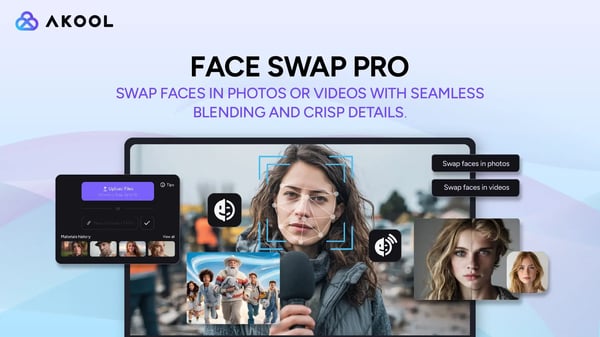
I would upgrade from AKOOL’s free plan when the available credits no longer cover my regular video-creation needs, especially for longer avatar videos, localized content, or multiple creative variations. The Pro plan makes more sense for ongoing AI video marketing needs because it offers more monthly credits, higher-quality video, and watermark-free exports.
“The Faceswap feature blew me away. It’s not just a fun gimmick, it actually produces clean, realistic results that stand out compared to anything else I’ve tried. For me, the best part is how accessible it is. You can hop on a free trial, test the waters, and the results pretty much speak for themselves. On top of that, they’ve made an API available, which is a big deal if you’re building projects or want to integrate this tech into your own work. Customer support deserves a mention too, the team is quick and responsive (Discord replies are almost instant). As a developer, I found the integration fairly straightforward. It’s not perfect yet, but it’s solid and keeps improving.”
- AKOOL review, Hamza K.
Best for: Marketing teams creating avatar videos, localized campaigns, product explainers, training content, social video assets, or AI-generated spokesperson content across multiple channels.
Not ideal for: Content marketers focused primarily on blog production, SEO content, or long-form editorial workflows where AI writing and optimization matter more than video generation.
“Little bit expensive in my opinion, not like other AI tools that give you a free limit, in this case I need to wait a long time to try.”
- AKOOL review, William S.
Need a tool that's better suited for blog creation, long-form content, and SEO workflows? Explore our guide to the eight best AI writing generators in 2026.
AirOps is designed for marketers who want to scale content operations, not just generate individual assets. During the free trial, I spent less time writing prompts and more time building reusable workflows that connected SEO research, brand knowledge, and publishing tasks. Once a workflow was in place, creating additional content became noticeably faster because I didn't have to rebuild the same process each time.
I also found the templates, Academy resources, and onboarding guides genuinely useful; they reduced the time it took to build my first workflow and made the platform feel less intimidating than I initially expected. That long-term value is reflected in G2, where 99% of users rate AirOps 4 or 5 stars and 95% say they would recommend it.
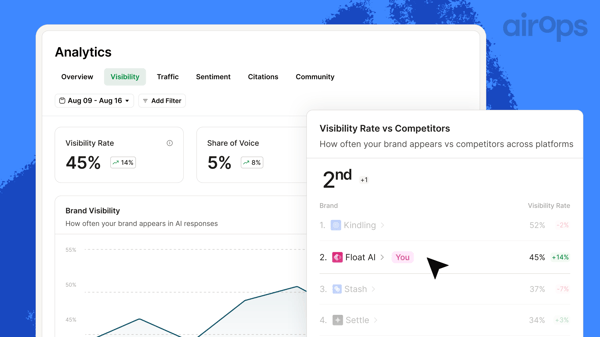
I would upgrade from AirOps’ free plan when I need to build multi-step automations, publish content at scale, or manage larger SEO programs. The Solo plan makes more sense once AI-driven content operations become a regular part of my workflow because it provides significantly more task volume and workflow capacity.
“AirOps lets me build systems instead of chasing individual prompts. Most AI tools help you write faster; AirOps helps you produce smarter by turning SEO/AEO into repeatable workflows you can scale across dozens or hundreds of keywords. The free trial is also a huge plus; you can actually test the platform properly before committing. You understand the value once you use it. Another thing I really appreciate is the Content Engine course. It teaches you how to think like a Content Engineer, with simple, practical lessons that show you how to build real workflows. The Brand Kit + Knowledge Base setup feels like having your own style content system. It keeps everything consistent and factual. It’s a small thing that makes a massive difference in quality. I love Power Agents because they save me hours of work while I learn!”
- AirOps review, Laura D.
Best for: SEO teams, content operations managers, agencies, and marketing teams building repeatable AI-powered workflows across large content programs.
Not ideal for: Solo marketers, small teams, or anyone looking for a simple AI writing tool that works primarily through prompts rather than structured workflows.
“Interface can be initially daunting if you're just starting off. Though a free plan is available, you can quickly absorb the 1000 tasks given per month. Plans are geared towards companies with budgets and can be unaffordable for solopreneurs or those with smaller budgets. Experimentation/testing within workflow(s) take up credits.”
- AirOps review, Courtney H.
Curious how AI-generated answers are changing search visibility? Read how AI overviews are quietly rewriting the rules of search to understand how search behavior is evolving and why content teams are rethinking their SEO strategies.
Beautiful.ai made the most sense once I stopped treating it like presentation software and started using it as a faster way to communicate ideas. During the 14-day free trial, I built presentation decks for campaign proposals and internal strategy updates, and Smart Slides handled most of the formatting decisions automatically. Instead of adjusting layouts slide by slide, I could stay focused on refining the narrative and visuals, which made the workflow noticeably faster.
The trial includes full access to the Pro plan, so I never felt like I was evaluating a stripped-down version of the product. That made it easier to decide whether the workflow justified paying after the trial ended. The experience also reflects in G2 Data, with 93% ease of use, 93% ease of setup, and 94% ease of admin scores, reinforcing Beautiful.ai's strength as a presentation tool that's quick to adopt and easy to manage.
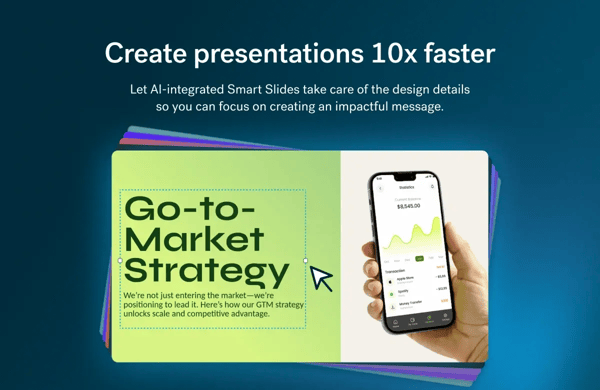
I would upgrade from Beautiful.ai's free plan once the 14-day free trial ends and I want to continue creating presentations. Since there is no permanent free plan, the Pro plan is the practical next step when presentations become a recurring part of my marketing workflow.
“I like the AI feature inside Beautiful.ai as it saves me a lot of time, allowing me to focus on content rather than graphics. The availability of free graphics and icons on the internet is also a highlight. There is a huge variety of pre-created layouts that I can use, which is quite handy. Additionally, the occasional trainings for beginners are beneficial, and the setup was very easy. The ability to create professional-looking presentations in under an hour is really helpful for me.”
- Beautiful.ai review, Krzysztof P.
Best for: Marketing teams, consultants, agencies, and client-facing professionals who regularly create presentations and want professional-looking decks without spending hours on design.
Not ideal for: Teams looking for a permanent free plan or marketers who require extensive slide-by-slide customization and complete design flexibility.
“My colleagues and everyone I tell about Beautiful.ai thinks it's going to be just like PowerPoint SmartArt and they are not interested in looking into it. You need to forget everything you think you know about creating presentations with other software and sign up to the free trial to use this. It will change your life.”
- Beautiful.ai review, Anne-Marie M.
Presentation software extends beyond slide creation. Explore G2's guide to the eight best presentation software tools to compare additional options for collaboration, storytelling, and client-facing presentations.
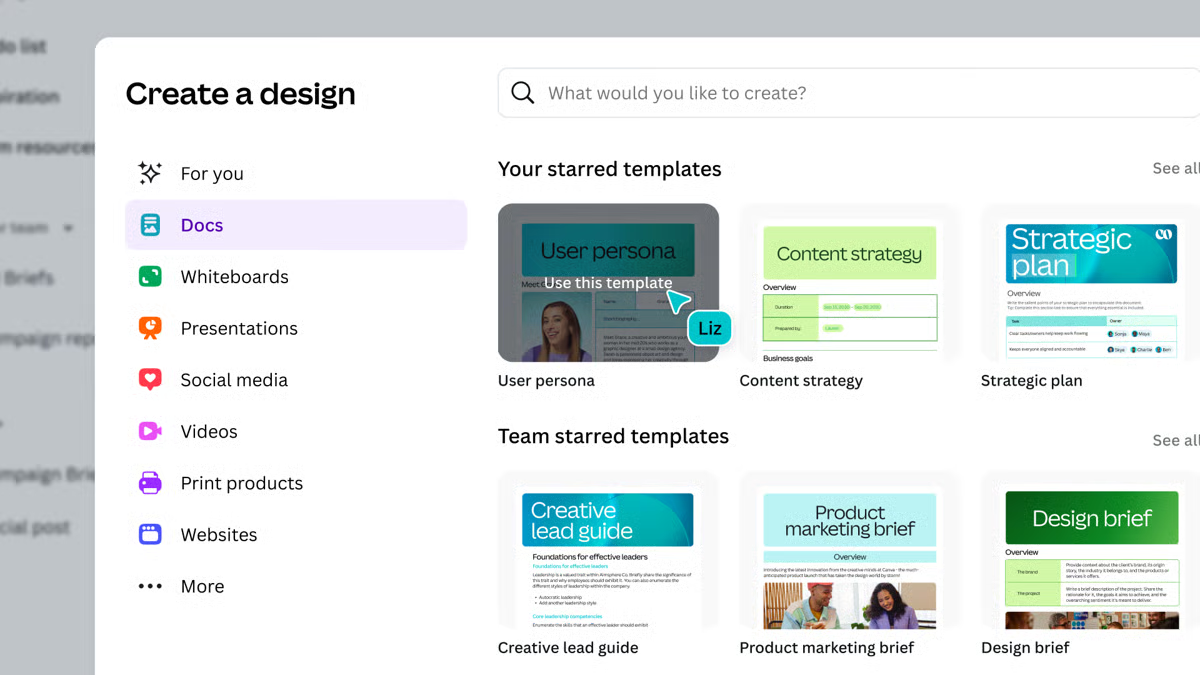
For marketers looking for a free AI content creation tool they can keep using beyond a trial, Canva is one of the strongest options I tested. I created social graphics, presentations, short-form videos, and campaign assets from the same workspace without constantly running into paywalls, making it easy to move between different content formats. Canva also has the largest Market Presence in G2's AI Content Creation Platforms category, reflecting its widespread adoption by marketing teams.
With hundreds of thousands of free templates, built-in AI features, and a large library of free assets, I rarely had to start from scratch while creating day-to-day marketing content. I could comfortably build social posts, presentation decks, and creative assets before reaching a point where the Pro plan felt necessary.
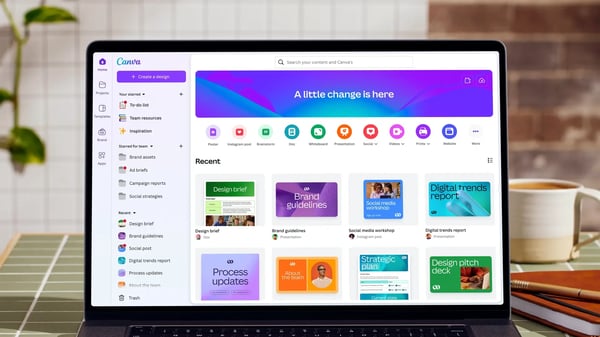
I would upgrade from Canva’s free plan when content production starts scaling and I need premium templates, background removal, one-click resizing, and the ability to create assets for multiple channels or brands. Canva Pro makes sense when these features would save me significant time and streamline my marketing workflow.
“What I love most is how fast and easy it is to customize templates. You can adjust text, colors, and images in seconds, and everything looks professionally designed. The video editing features are surprisingly powerful too, great for creating content without switching between multiple tools. Highly recommend Canva for anyone who needs to create quality visuals quickly and affordably”
- Canva review, Pradeepa M.
Best for: Solo marketers, social media managers, content creators, and small teams that need a permanent free platform for creating visuals across multiple channels.
Not ideal for: Marketing teams that require advanced design control, extensive brand governance, or large-scale content production workflows where premium features become essential.
“The only thing I dislike about Canva is that a lot of the best features, templates, and design elements are locked behind the paid subscription. The free version is still very good, but it can be frustrating to spend time creating something and then realize certain graphics, resizing tools, or brand features require Canva Pro. Other than that, I honestly don’t have many complaints because the platform itself is very user-friendly and consistently makes design work faster and easier.”
- Canva review, Payton W.
If Canva's free plan fits your workflow, upgrading is the next natural step. Read if Canva Pro is worth it to see how users evaluate the paid features, pricing, and overall value before making the switch.
Marketers creating video ads often spend more time scripting, editing, and coordinating production than actually testing creative ideas. Creatify AI removes much of that work by turning a product URL into multiple AI-generated video ads in minutes.
During my evaluation, I could generate scripts, swap AI avatars, and produce different ad variations quickly enough to compare creative concepts instead of building each video from scratch. It's no surprise that Creatify AI has the highest satisfaction score (99% of users rated it 4 or 5 stars) in G2's AI Content Creation Platforms category, especially for marketers focused on video-first campaigns.
The free plan is clearly designed for evaluation rather than production, but I still found it useful for understanding the platform's capabilities. The available credits were enough to evaluate avatar quality, script generation, and overall workflow before deciding whether it fit my marketing needs. Watermarked exports limit real campaign use, but the experience gave me enough confidence to judge whether the paid plan would be worthwhile.
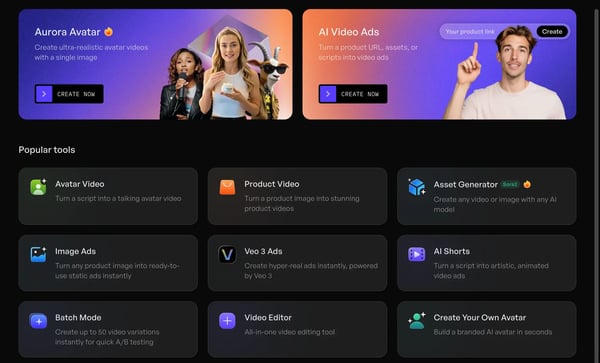
I would upgrade from Creatify AI’s free plan when I need to publish videos externally without watermarks, create content consistently, or test a higher volume of ad creatives across campaigns. A paid plan makes sense once the free credits are no longer enough for regular creative production and experimentation.
“I recently started using Creatify AI and my experience has been excellent. What sets it apart from competitors is the ability to create several videos for free before committing to a subscription. You can actually evaluate the results first, which I really appreciated. The creation process is remarkably intuitive with clear step-by-step guidance, though honestly Creatify AI handles most of the heavy lifting for you. Their AI-generated UGC videos are truly magical, and they look super cool, professional, and polished. I also love having dozens of customization options for each video, giving you plenty of creative flexibility."
- Creatify AI review, Ann P.
Best for: E-commerce marketers, DTC brands, affiliate marketers, and performance marketing teams that need to generate UGC-style video ads and test multiple creative concepts quickly.
Not ideal for: Content teams focused on blog creation, SEO content, long-form editorial content, or marketers looking for a free video platform they can use for ongoing campaign production.
“I wish the free version of Creatify AI had access to more avatars and didn't include a watermark. While I understand the need for some restrictions, these limitations prevent a full trial of the software. This makes it challenging to decide whether to purchase the full version because I can't fully experience what I'm potentially buying.”
- Creatify AI review, Sinead R.
If AI-generated video is part of your marketing roadmap, our guide to AI video in B2B marketing explores how businesses are putting it to work across real campaigns.
The free trial of Jasper is one of the better ways to evaluate whether AI can consistently write in your brand's voice before committing to a paid plan. I used it to create blog content, emails, landing page copy, and social posts while testing Brand Voice and Canvas. Once my brand guidelines were configured, the outputs felt noticeably more consistent across different content formats, reducing the amount of editing I typically need to do with AI-generated copy. That experience is reflected in G2 data, where Jasper earned a 93% ease of use score and a 94% ease of setup rating.
With the seven-day trial, I could test templates, refine long-form content, and compare outputs across multiple campaigns without feeling rushed. While the trial isn't long enough to evaluate an entire content strategy, it provides a realistic understanding of how Jasper fits into day-to-day marketing workflows before upgrading.
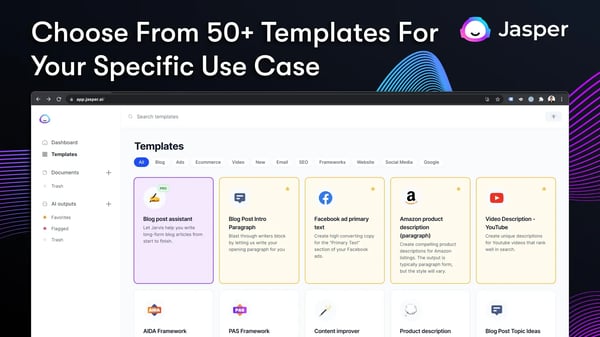
I would upgrade from Jasper’s free trial when I need to create blog posts, landing pages, emails, ad copy, or social media content regularly. A paid plan makes sense when Jasper’s Brand Voice features and marketing workflows save me enough time in production to justify the cost.
“Jasper is a great IA partner! It speed up our contents creators in creating non critical contents. On critical contents it gives great ideas upon our contents creators can do their job faster. In particular is great for social post and adv, it give the opportunity to reduce significantly spending time.”
- Jasper review, Orlando C.
Best for: Marketing teams, content managers, agencies, and brands that need consistent AI-generated content across blogs, email campaigns, landing pages, advertising, and social media.
Not ideal for: Marketers looking for a permanent free plan, occasional users with limited content needs, or small teams that cannot justify a premium AI writing subscription.
"I'd love a free plan or a lower-tier plan for those that don't need to use it as much."
- Jasper review, Ellen L.
AI writing platforms promise faster content creation, stronger outputs, and less manual work. Read our analysis to learn where they deliver the most value for marketers.
Most AI content creation platforms aim to do a little bit of everything. Lapis takes the opposite approach by focusing on one workflow: helping marketers generate on-brand ad creatives faster. I used the five free monthly credits to create campaign variations across different formats, and they were enough to judge both the creative quality and the platform's realistic production-time savings. That focused approach is reflected in G2 reviews, with 99% of users saying they'd recommend Lapis.
Rather than generating generic marketing assets, Lapis consistently adapted existing brand elements into campaign-ready creatives. The Brand Intelligence feature preserved logos, colors, and visual identity more accurately than most general-purpose AI design tools I tested, making the free plan a practical way to evaluate whether the platform could support ongoing paid media workflows before investing.
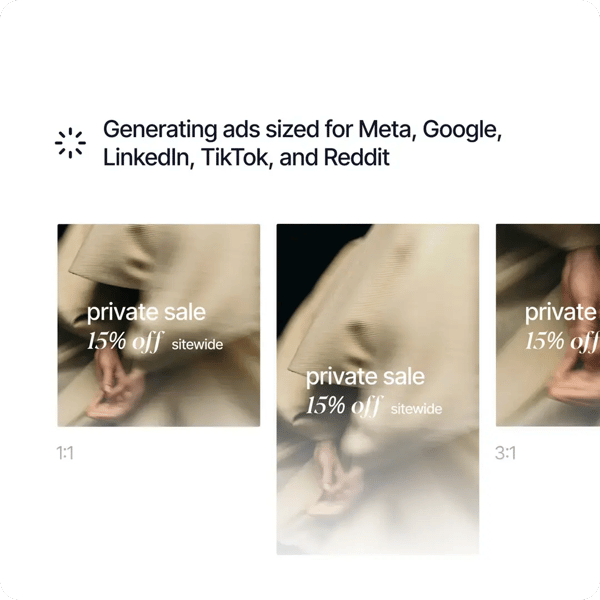
I would upgrade from Lapis’ free plan when five credits are no longer enough to support regular campaign creation and testing. A paid plan makes sense once I am running multiple paid campaigns, promoting several products, or creating multiple variations for ongoing A/B testing.
“Previously, producing enough creatives for different audience segments often required significant coordination with design resources. The AI-generated ads provide a strong starting point and generally stay aligned with our brand guidelines. I particularly appreciate the automatic resizing feature, which saves time when preparing assets for different ad placements. The template library has also been helpful during seasonal campaigns and product-focused promotions where speed is important. Another feature I find valuable is the ability to create multiple creative versions for A/B testing. It allows the team to experiment with different messages and visuals without extending campaign timelines.”
- Lapis review, Abir D.
Best for: Performance marketers, paid media teams, agencies, and brands that need to generate large volumes of on-brand ad creatives across multiple advertising platforms.
Not ideal for: Teams focused primarily on long-form content, SEO, email marketing, video production, or broader content creation workflows beyond advertising.
“Free credits are exhausted quickly when conducting high-volume tests. Occasionally, complex layouts require additional refinement requests. No direct ad manager auto-upload available."
- Lapis review, Michael L.
Want to understand the business behind digital content? Read what content creators do to learn how creators build audiences, monetize content, and grow sustainable revenue streams.
When you need to turn a rough idea into a social-ready visual quickly, speed matters as much as creativity. That's where Picsart worked well for me. Its free plan lets me edit photos, remove backgrounds, generate AI images, create graphics, and make quick video edits from a single workspace, so I didn't have to jump between multiple tools.
That ease of creating and repurposing content is reflected in G2 reviews too, where 98% of users rated Picsart 4 or 5 stars. I could create social graphics, experiment with AI edits, and polish visuals without having to hit paywalls right away. The limits mainly showed up once I started relying on premium assets and AI credits for larger batches of content.
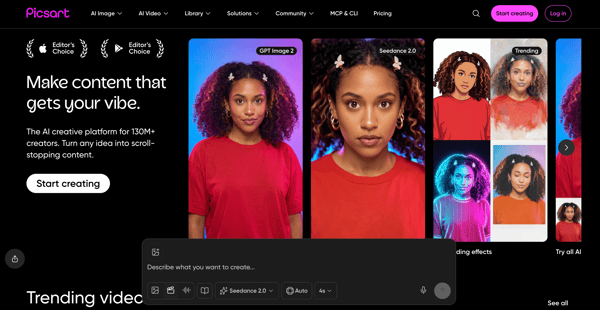
I would upgrade from Picsart’s free plan when AI editing, premium assets, or advanced editing tools become essential to my regular content workflow. A paid plan makes sense once usage limits start slowing production, especially when I am creating and repurposing social media graphics and content daily across multiple channels.
“I like Picsart for its all-in-one creative toolkit that combines photo editing, design, and AI features in a very user-friendly interface. The background remover, AI tools, and wide range of filters and effects save a lot of time while still allowing creative flexibility. As a designer, I also appreciate the availability of ready-to-use templates, fonts, and assets, which make it easy to create social media content quickly. It’s especially useful for fast edits on mobile without compromising too much on quality.”
- Picsart review, Raviraj Singh S.
Best for: Social media managers, content creators, freelancers, and marketing teams that need quick access to photo editing, AI enhancements, and mobile-friendly creative tools.
Not ideal for: Teams that require extensive commercial-scale creative production, advanced design workflows, or unrestricted access to AI tools and premium assets.
“The main limitation for me is the weekly AI credit limit on the free plan. When I’m working on multiple client visuals in the same week, I can reach the limit quickly and have to wait for credits to reset before continuing AI-based edits. Aside from that, the core editing tools work smoothly and meet most of my daily needs..”
- Picsart review, Tarun K.
Picsart is one of many creative editing tools available. Explore our guide to the best photo editing software to compare more options for image enhancement, design, and content creation.
Content marketers focused on organic search need more than an AI writer; they also need keyword research, content optimization, and SEO insights. Scalenut's free trial let me explore the entire workflow on a single platform. I could research keywords, analyze SERPs, generate articles, and optimize drafts without switching between different tools, which made the writing process much more structured. That approach has resonated with users on G2, too, where 99% rated Scalenut 4 or 5 stars.
The free plan isn't designed for publishing content at scale, but it's enough to understand how the platform works. Features like Cruise Mode, content scoring, and built-in SEO recommendations helped me move from research to an optimized first draft more quickly, making it a practical option for marketers creating search-focused content.
I would upgrade from Scalenut’s free trial when SEO content production, keyword planning, and content optimization become recurring parts of my workflow. A paid plan makes sense once I need to use Cruise Mode and content optimisation across a full content calendar rather than for occasional testing.
“Customer support is knowledgeable and friendly. They react in time and always give you the impression they are happy to help you and that they are proud of the tool and want you to succeed in your endeavors.
I have been using it for quite a while and it has only been improving over time with all the added features. I use scalenut for basically all of my content creation and the more you use it the more you appreciate it.”
- Scalenut review, Gerard V.
Best for: Content marketers, SEO specialists, bloggers, and agencies that want AI-assisted content creation combined with keyword research and optimization tools in a single platform.
Not ideal for: Teams focused primarily on social media content, visual content creation, ad creatives, or marketers looking for a genuinely usable free plan they can rely on long term.
“I have been using Scalenut for a while now and the only single thing that bothers me is that it requires some editing before publishing the content on your content marketing channels. This feature has a positive side as well as allows you to correct more of the possible mistakes that you may have made during your writing session. The good thing is that Scalenut is continuously updating itself and becoming more and more efficient with each passing day. I believe this one aspect will also be optimized in no time and we will see Scalenut outgrow its competition very soon.”
- Scalenut review, Dawood A.
AI search is changing what successful SEO looks like. Read redefining SEO success metrics in the age of AI search to see how marketers are adapting their content strategies.
Free AI content creation tools work best for marketers testing new workflows, small teams operating with limited budgets, or businesses evaluating whether AI-generated content fits their process before committing to a subscription. Canva, Picsart, Lapis, and AKOOL offer enough functionality to support ongoing use within certain limits, while tools like Jasper, Beautiful.ai, and AirOps are better viewed as evaluation environments that help you determine whether the paid version is worth the investment.
The upgrade triggers were surprisingly consistent across most of the tools I evaluated. For Canva, Picsart, Lapis, AKOOL, and Creatify AI, the limits usually appeared when content volume increased. Free credits, AI usage caps, watermarks, and premium asset restrictions became harder to work around once content creation shifted from occasional use to an active marketing workflow.
For Jasper, AirOps, Beautiful.ai, and Scalenut, the challenge wasn't necessarily content generation. It was scale. As soon as multiple team members, brand guidelines, SEO workflows, collaboration features, or higher publishing volumes came into play, the free plans began functioning more like trial experiences than long-term solutions. My recommendation is simple: use the free tier to validate output quality and workflow fit first. Most of these tools make their strengths and limitations clear within the first few days of active use.
Have more questions? G2 has the answers!.
Jasper and AKOOL stood out among the best AI marketing tools for personalization. Jasper maintains brand voice across campaigns, and AKOOL helps create personalized video content with AI avatars and multilingual localization.
Scalenut and AirOps are strong AI tools for content marketing and SEO. Scalenut combines keyword research, content scoring, and AI writing, while AirOps helps teams build repeatable SEO content systems for larger-scale content operations.
Canva offers the broadest template library among free AI tools for marketing, covering social posts, presentations, videos, and brand assets. Beautiful.ai excels at presentations, while Jasper offers templates for blogs, ads, emails, and landing pages.
Canva is one of the best social media AI tools for free users because it combines templates, design tools, and AI-assisted features. Picsart is another strong option for mobile-first editing, image enhancements, and quick content repurposing.
Jasper produced the most natural-sounding marketing content during my evaluation. Its Brand Voice feature helps reduce generic AI phrasing, making it a strong AI content generator for teams that need consistent tone, messaging, and campaign copy.
There isn’t one best platform for every marketer. Canva is the strongest all-around free option, Jasper excels at marketing copy, Scalenut supports SEO content, and Lapis specializes in ad creative generation. The right choice depends on your goals.
Scalenut and Jasper are strong AI tools for content creation when it comes to long-form articles. Scalenut pairs article generation with SEO optimization, while Jasper’s Canvas editor and Brand Voice tools help marketers create detailed blog posts and guides.
Lapis and Jasper are effective AI marketing tools for ad production. Lapis generates on-brand ad creatives for paid campaigns, while Jasper provides marketing-specific templates for ad copy, landing pages, and campaign messaging across channels.
Scalenut, AirOps, and Jasper are useful AI tools for content marketing teams scaling blog production. Scalenut streamlines SEO workflows, AirOps supports content operations, and Jasper helps maintain consistency through templates, Brand Voice, and long-form writing tools.
After evaluating these platforms, I found that the best free AI content creation tools aren’t the ones with the most features. They’re the one that fits the type of content you create most often. Canva stood out for visual content, Scalenut for SEO-focused articles, Jasper for brand-consistent writing, and AKOOL for AI-powered video creation.
The biggest limitation wasn't usually content quality. It was scale. Free plans worked well for testing workflows and creating occasional content, but credits, collaboration features, brand controls, and production limits became harder to work around as content demands increased.
My advice is simple: use the free plan to answer one question: Would I still use this tool if the trial ended tomorrow? The strongest platforms made themselves useful within a single campaign, content sprint, or publishing cycle. If a tool can't prove its value before the free access runs out, it's probably not the right fit for your marketing stack.
Ready to build a complete content workflow? Explore the best content marketing tools for planning, creating, managing, and measuring content across your marketing program.

Recently updatedSummer 2026 Grid® Report · Published May 26, 2026 This guide was last...
 by Yashwathy Marudhachalam

Recently updatedSummer 2026 Grid® Report · Published May 26, 2026 This guide was last...
 by Soundarya Jayaraman

I evaluated 20+ best content creation software to identify the seven platforms that...
by Shubham Gupta