


This guide was last updated on April 9, 2026. A newer report has since been published. The tools below reflect the scores from G2's Summer 2026 Grid® Report.
Based on verified G2 reviews and the latest Grid® placement.
*Liked and disliked highlights are summarized from verified G2 user reviews.
The tools below have also been exhaustively tested and evaluated, and continue to hold their place among the best AI video generators on G2.
I'll be honest: When I first started testing AI video generators, I was skeptical. For years, producing high-quality video meant expensive gear, a dedicated editor, and turnaround times that made you want to scream. I've been there.
But the category has genuinely changed, and I wanted to find out which tools are actually worth your time versus which ones are riding the hype cycle.
So I did the unglamorous work: I personally tested more than 20 of the best AI video generators, from the popular tools like Synthesia and HeyGen to newcomers like Veo and Runway, and ran every shortlist candidate through G2 reviews from real users. The tools that made my final list earned it. Not just for the impressive demos, but for what they actually deliver when you're working against a deadline.
Whether you're a marketer or a business owner trying to scale video content without scaling headcount, a creator looking to publish faster, or an L&D team turning dry training material into something people actually watch, this guide is for you.
My top picks for best AI video generators 2026: Synthesia, HeyGen, Canva, Creatify AI, VEED, AKOOL, and AI Studios, each chosen for a different reason, which I'll break down below.
*These AI video generators are top-rated in their category, according to the G2's Spring 2026 Grid® Report for AI Video Generators. I’ve also added their starting price for the monthly plans to make comparisons easier for you. Most tools provide a free plan or trial to test them out.
If you’re evaluating how AI fits into your broader creation stack, explore our roundup of the best AI content creation platforms to see which tools go beyond video into writing, design, and multi-format content.
When I first started paying attention to AI video generators back in the Imagen days, the idea of typing a few words and watching a fully formed video appear on screen felt like something out of science fiction.
Early models like Imagen Video were impressive but limited: short clips, lower resolution, and quirky motion that gave away the AI’s hand. Still, they planted the seed for what we now call AI video generation: using machine learning to automate the most time-consuming parts of video creation.
Today, when I say “AI video generator,” I’m talking about a tool that lets you go from text, images, or existing footage to a polished video with minimal manual editing.
These platforms combine multiple AI capabilities like text-to-speech, avatars, scene generation, motion synthesis, and automated editing, to do in minutes what used to take hours or even days. It’s not just research anymore; it’s software built for marketers, educators, and creators who need to produce a lot of content quickly.
The global AI video generator market was valued at $788.5 million in 2025 and is projected to reach $3.4 billion by 2033, reflecting how fast demand is growing for these tools. According to G2 Data, organizations using these platforms see an estimated ROI payback period of about seven months, underscoring how quickly they can start delivering value once adopted.
That kind of growth and ROI explains why AI video generators are no longer just shiny demos but essential parts of a content toolkit. They compress what used to be hours of production into minutes while maintaining quality and freeing up teams to focus on strategy rather than execution.
One shift worth calling out: the best platforms listed below are no longer built on a single model. Tools like VEED, Creatify AI, and AKOOL now give you access to multiple generation engines — Kling, Seedance, Google Veo, Luma Ray — inside one interface, so you can pick the right model for the job rather than being locked into one output style.
“One thing I'd make sure of is what personalized actually means in your specific use case; some teams just mean localizing the same video.”
Read full thread →To start, I turned to G2’s AI Video Generators category page, grid reports, and product reviews to create an initial list of contenders.
From there, I ran the same prompts or scripts through the AI video generators that offered a free trial or a free plan to get an apples-to-apples comparison of speed, quality, and usability.
To supplement my findings, I also used AI-driven analysis to sift through thousands of G2 reviews, looking for patterns in what people genuinely loved and their common pain points about those tools.
In cases where I couldn’t personally test a tool due to limited access, I consulted a professional with hands-on experience and validated their insights using verified G2 reviews.
The screenshots featured in this article may be a mix of those captured during my testing and those obtained from the vendor’s G2 page.
One of the biggest questions I hear from teams is ‘which AI video generator has the best text-to-video capabilities?’ or ‘which AI video generation platform offers the fastest rendering?’ That’s exactly what I looked at when testing these tools. Here are the criteria I used to evaluate them and why:
Not every product on my list checks every single box I’ve listed out here. Some excel in quality but have limited customization options, while others are lightning fast but less realistic. I’ve tried to be transparent about those trade-offs so you can decide which tool best fits your needs rather than chasing a mythical “perfect” AI video generator.
For a deeper dive into how these trade-offs show up across different tools, check out my colleague's article on the reality of AI video generators.
The list below contains genuine user reviews from our AI video generator software category page. To qualify for inclusion in the category, a product must:
* This data was pulled from G2 in 2026. Some reviews may have been edited for clarity.
Before using these AI chatbots, hear from our legal expert on how to use gen AI tools like AI chatbots and the resulting content safely and legally.
I first discovered Synthesia when I was searching for a way to create AI-powered training and product videos without recording myself on camera. I needed something fast, professional, and easy to use, and after testing it for a while, I can confidently say it’s one of the best AI video generators for business content, and, as a matter of fact, it's also ranked a Leader on the G2 AI Video Generators Grid.
Unlike AI video tools like OpenAI’s Sora, which focus on cinematic, generative scenes, Synthesia is built for organizations. It’s especially strong for corporate training, explainer content, and marketing videos, essentially any use case where you want high-quality, on-brand videos without the cost or hassle of filming, editing, or hiring a production team.
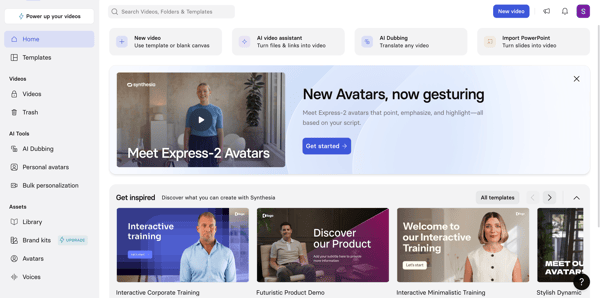
Using Synthesia feels refreshingly simple. I can pick from dozens of realistic AI avatars, or even create my own, choose a template, drop in my script, edit transitions and graphics, add AI voiceovers, and have a video ready to publish.
In fact, Synthesia has a G2 satisfaction score of 92% for ease of use and a score of 93% for ease of setup, which lines up almost perfectly with my own experience of being able to make my first video in under an hour.
What I personally love most are the variety of templates, AI voiceovers, and AI avatars. Something I discovered during my testing was how flexible Synthesia’s avatar system is.
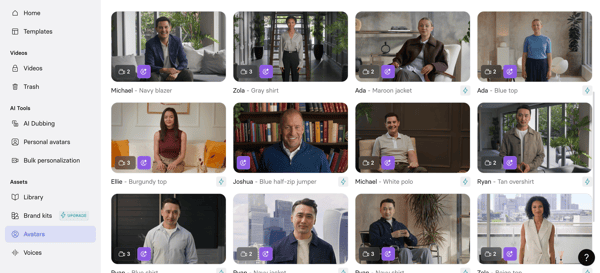
I liked the fact that we could use the avatar builder to tweak the features of the AI presenter, even add our brand logo to the costume, with just a few clicks. The AI video assist is another feature I appreciate a lot, as I could just upload a link or a document and get a video out of it.
Synthesia also includes features you’d normally expect to piece together from multiple tools: realistic AI voiceovers, one-click translation, AI dubbing, the ability to use multiple avatars in the same scene, and even embedding interactive questions within videos. This combination makes it feel less like a simple video generator and more like an AI-powered presentation and training platform.
Also, another standout feature I saw was bulk personalization — being able to spin up hundreds of custom videos from a CSV lets you combine scale and personalization, which many tools can’t match. I could think of multiple use cases in recruitment, sales, and customer outreach where this bulk personalization feature can be used to create personalized AI videos.
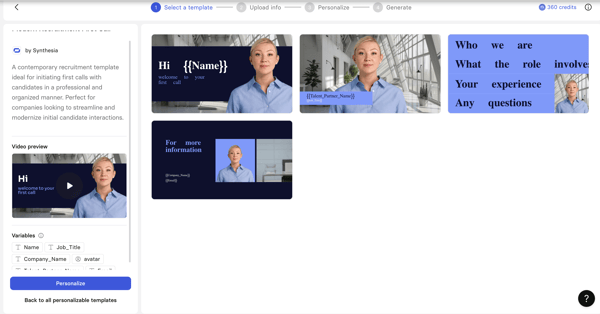
Instead of spending hours editing, adding text, recording, and syncing audio, the AI handles everything. It’s repeatable and consistent, which means once you learn the flow, you can crank out videos quickly. The platform also supports 140+ languages, which makes it easy to produce localized content for different audiences.
G2’s highest-rated features also reflect this: users give Synthesia high marks for video creation, multilingual support, and file exporting, the very things that make it ideal for turning scripts into polished content at scale. Industries like computer software, consulting, e-learning, IT, and marketing and advertising all feature heavily among its users, exactly the kinds of teams that need scalable, professional video production.
That said, there are a few areas where Synthesia could improve. G2 reviewers note that Synthesia’s AI voice, while clear and professional, tends to favor consistency over emotional range — meaning some voices or avatars may sound slightly uniform or flat in longer, narrative-heavy scripts. This trade-off keeps delivery clean and predictable, though users sometimes say fine-tune phrasing or spell words phonetically to achieve a more natural rhythm.
The lip-syncing is impressively accurate for most scenarios, but with complex or multi-clause sentences, occasional micro-misalignments can appear, according to G2 user reviews. These are typically minor and don’t disrupt comprehension, but they highlight the challenges of achieving perfect sync in fully automated video generation.
Even with those caveats, Synthesia remains one of the strongest AI video generators I’ve used for business content, with a 4.7 out of 5 G2 rating.
If you’re a marketing team, HR department, trainer, or small business that wants to produce professional videos without filming or hiring a production crew, Synthesia is an easy recommendation.
"I really like how Synthesia makes video creation faster, more efficient, and easier to manage. It stands out by allowing us to create polished videos from simple scripts without needing cameras or presenters. This is especially valuable for training, onboarding, and internal communication, where consistency and speed are important. It helps simplify the production process while still delivering professional and engaging content.
I value the AI and text-to-video workflow, along with the wise customization options and simple editing capabilities, which reduce the effort normally required for video production while allowing us to create clear and professional content. The flexibility in editing makes it easier to keep content updated as information changes.
Additionally, the initial setup of Synthesia was fairly straightforward and easy to manage. The onboarding experience was smooth, and it didn't take long to start producing useful video content."
- Synthesia review, Vinay P.
"The avatars feel too close to real without being real enough. The consistent feedback I get is that they come across as “creepy,” and the mouth movements don’t always match up well. That said, it does seem to be improving with each iteration. Using this for Japanese, which is one of our primary needs, has been very difficult at best and requires a significant amount of rework. Beyond those issues, the other major challenge is cost. It seems to increase much faster than the ROI. We would definitely use more of what you offer, but for a company our size, and with a limited budget for our department, we can’t leverage the full product.
Right now, I’m on a single-user version and end up doing all of the content creation that requires Synthesia. This slows us down a lot and doesn’t allow the rest of the team to be fully utilized in content creation."
- Synthesia review, Ron C.
I’ve used Canva for years for quick design work, so whenever it launched an AI feature under Magic Media like an AI image generator or video generator, I immediately tried it.
Canva actually gives you two ways to generate AI videos: the latest one, powered by Google’s Veo 3 model, which turns a text prompt into an 8-second, 16:9 clip with synchronized audio (dialogue, sound design, and music included), and another through its Magic Media tool, which taps into Runway’s technology to generate video clips directly inside Canva. This dual approach means you can experiment with both cutting-edge text-to-video generation without leaving the Canva interface.
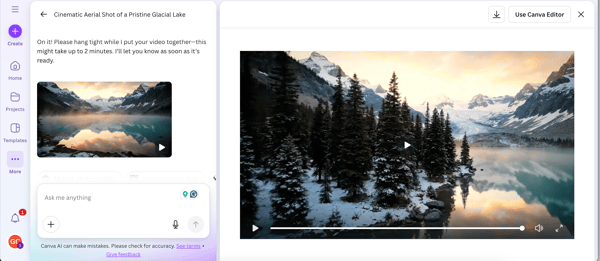
I tested it by generating four very different videos in both models: a cinematic nature clip, a sleek product demo, a close-up shot, and a playful social media shot. Each one came together in under a few minutes. With Veo, the text-to-video part is solid for visuals and audio.
But what makes Canva unique is how seamlessly those clips flow into the rest of its toolkit. If you’re already comfortable with Canva’s editor, brand kits, templates, and animations, adding AI-generated video feels like just another creative step rather than a new skill to learn.
This really sets Canva apart, in my experience. It rolls so many creative functions into one place. Instead of juggling a design tool, Photoshop platform, AI writer, separate image generator, and video generation and editing tool, and then importing everything into a design program, I can do it all inside Canva. It’s a full-fledged AI-powered creative platform. For fast-moving product and marketing teams, having a single, workflow-friendly interface with built-in AI saves an enormous amount of time and context switching.
/AI%20generated%20video%20using%20Canva-1.webp?width=600&height=337&name=AI%20generated%20video%20using%20Canva-1.webp)
G2 reviewers echo this story. Canva’s scores for ease of use (95%), ease of setup (96%), and ease of admin (95%) are all above category averages, which matches my experience of producing and editing a video with minimal friction.
The highest-rated features — file exporting, file storage, and content creation — show how well Canva handles not just making assets but managing and repurposing them across campaigns. Users from higher education, marketing and advertising, IT services, and small software companies feature prominently among its reviewers.
Another reason why Canva’s AI video generator feels different to me from other tools is its smart editing features. For example, with background remover, I can shoot a product clip without a green screen and swap the backdrop in one click. Magic Animate lets me add smooth animations and transitions automatically, so my videos look polished. With Magic Switch, I can instantly resize a video for TikTok, Instagram, or Facebook, ensuring it fits each platform perfectly.
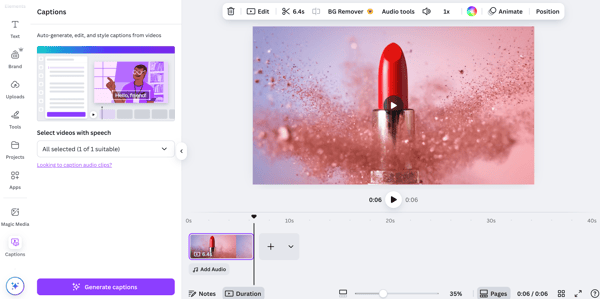
But while Canva’s built-in editor is excellent for quick adjustments, several G2 reviewers, particularly those who often use more professional and technical video editing tools, point out that its video editing features can feel a bit limited compared to dedicated video production software. But in my opinion, Canva’s user-friendliness more than makes up for that trade-off for any beginners or non-designers.
Also, reviewers on G2 note that Canva’s paid plans include usage caps for AI video generation with Veo 3 and Magic Media. These tiered limits help balance access and performance, though teams producing high volumes of video may reach them faster and want additional credits to support ongoing scale
Still, Canva’s AI video features remain one of the most seamless ways to experiment with text-to-video generation and fold it into a larger creative workflow. It’s best for marketers, educators, and small teams that already rely on Canva for design and want to experiment with AI videos without learning new software.
With a G2 rating of 4.7/5, Canva’s AI video generator delivers a good mix of usability, breadth, and time-saving power.
"I use Canva for easy social media content creation and it really speeds up my creation and design process, allowing me to post quicker on different platforms. I also benefit from the AI text to image and voice to image functions when I'm pressed for time. The support is quick and very helpful. Canva is user-friendly, and my designs make me look like a pro graphic designer with many years of experience. Creating short video content and adding audio has never been this easy. The initial setup of Canva was extremely easy and fast."
- Canva review, Kevin K.
"For a tool that now offers AI video and image generation, the output is often surprisingly low-res. The issue: AI-generated videos are often capped at 1366 x 768, which isn't high enough for professional 4K workflows. The fix: Canva needs to allow for higher-resolution upscaling upon export, especially for their "Magic Media" tools, so the content is actually usable for billboard-sized prints or high-end TV ads."
- Canva review, Soyel G.
Looking for all-in-one platforms like Canva? Explore the top AI content creation tools on G2.
HeyGen has always been on my radar as one of the top Synthesia alternatives, but when I saw it ranking as a leader on the G2 Grid for video generators continuously, I knew I had to give it a serious try.
In my opinion, HeyGen is one of the most versatile AI video generators out there. It isn’t just another “make a talking head” tool. It’s designed to help teams create professional, multi-purpose videos at scale, from corporate training and sales enablement to product placements, creative B-roll, and even two-speaker AI podcasts.
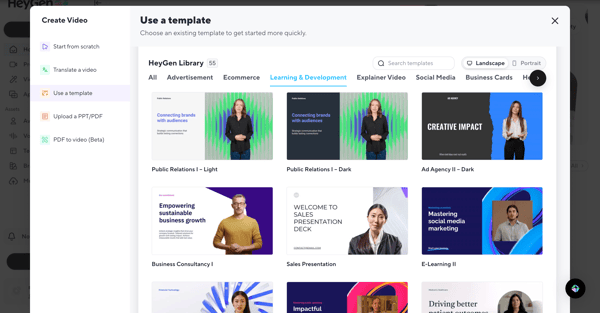
When I stepped into the platform, it didn’t feel like yet another dashboard. I could start from one of their many templates or build from scratch. The collaborative features were particularly impressive. I can collaborate with my team directly inside the platform, commenting, tagging, and making edits simultaneously. It feels less like a single-user editor and more like a shared workspace for video creation, which is something most other platforms don’t pull off this smoothly.
/HeyGen%20AI%20generated%20video.webp?width=600&height=338&name=HeyGen%20AI%20generated%20video.webp)
In my testing, HeyGen’s breadth of features stood out. It’s not just avatar-based videos for professional or corporate settings. Like Creatify AI, it also lets you create videos with product placements and match them with additional B-roll footage to go with the A-roll.
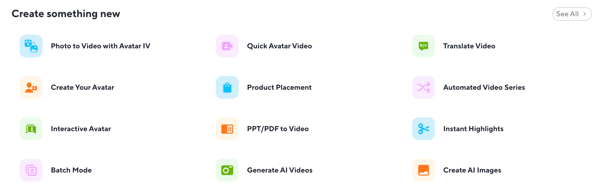
There’s built-in PPT/PDF-to-video conversion and even URL-to-video, so you can turn existing content into polished clips without extra software. I was also able to experiment with its two-speaker AI podcast feature, which can generate side-by-side conversations with different avatars. And with over 700 stock video avatars and support for 175+ languages and dialects, the scale and flexibility are obvious.
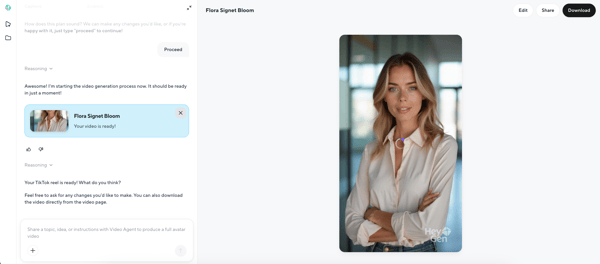
I especially enjoyed trying out HeyGen’s new Video Agent feature, which is currently in beta. It let me chat with the platform the way I would with an AI chatbot to brainstorm ideas for the script and plan the entire video. Once I had a solid plan, I could hand it off to the agent to actually produce the video, no tab-hopping or copy-pasting required. It felt like having a built-in creative assistant inside the editor.
The video it produced for me combined an AI avatar presenting my chosen product with self-generated images of the product paired with additional B-roll it suggested. It wasn't perfect, especially since I didn’t supply reference images or a detailed brief, but I was genuinely impressed by how much it managed to create on its own.
On G2, HeyGen scores in the 90s for ease of use, ease of setup, and quality of support, all above category averages, which matches how quickly I was able to get a polished output without feeling lost. Its highest-rated features are custom avatars, languages, and avatar quality, which reflect the realism and range I saw in my own projects. Most reviewers come from marketing and advertising, consulting, e-learning, higher education, and animation industries that need to produce a lot of professional-looking videos fast.
That said, a few recurring themes in G2 reviews highlight how teams are using HeyGen at different stages of scale. The free and entry-level plans work well for smaller projects and testing, while growing teams producing a higher volume of videos may prefer more flexible credit options or higher monthly allowances to match their expanding needs.
Avatar realism also evolves with use. While HeyGen’s avatars are consistently praised for quality and range, teams aiming for highly expressive or cinematic results may want to experiment with different styles or settings to achieve the most natural look — something common across fast-advancing AI video tools.
All things considered, HeyGen lives up to its reputation. A 4.8 out of 5 on G2 isn't just a vanity metric. It reflects something I noticed firsthand: users genuinely get value out of it, fast.
What makes it more than just an avatar tool is the depth underneath the clean interface. Product placements, B-roll generation, multilingual output, a collaborative workspace — it's built for teams who need to move quickly without sacrificing quality.
For marketers, e-learning teams, consultancies, and creators who want real production value without a production crew, HeyGen is one of the few tools I'd recommend without hesitation.
"I found the generated digital twin to be natural, authentic. It passed all our tests to see if the avatar could garner the same if not more engagement than that of a traditionally produced executive video. The UI was intuitive, and only a few times did I need to do a Google search for specific instructions.
In our case, we voice cloned on ElevanLabs and connected to HeyGen through an API. Easy, secure. I should say our use case was to be able to generate company founder videos on a regular basis, at a time when the founder was not readily available, but 1-2 times. HeyGen gave us leverage to film once and feed scripts for future videos."
- HeyGen review, Jonathan B.
"Because YouTube videos tend to be longer (8–15 minutes), it can eat through my credit limits pretty quickly. Also, for longer videos, the avatar's idle gestures can occasionally feel repetitive, so I have to get creative with cutting to B-roll to keep the visual pacing dynamic."
- HeyGen review, Said B.
Planning to build with HeyGen rather than use it through the interface? Our HeyGen API pricing breakdown covers per-second billing by avatar type, prepaid wallet mechanics, and what high-volume production actually costs through the API.
Creatify AI was a new find for me. I tested it out because it’s a leader on G2’s grid for AI video generation, and I have to say it’s probably one of the best AI video ad makers I’ve used. Creatify isn’t just another text-to-video toy; it’s built for marketers, e-commerce teams, and small businesses that want to turn products into scroll-stopping videos without a production crew, from social reels to full product videos.
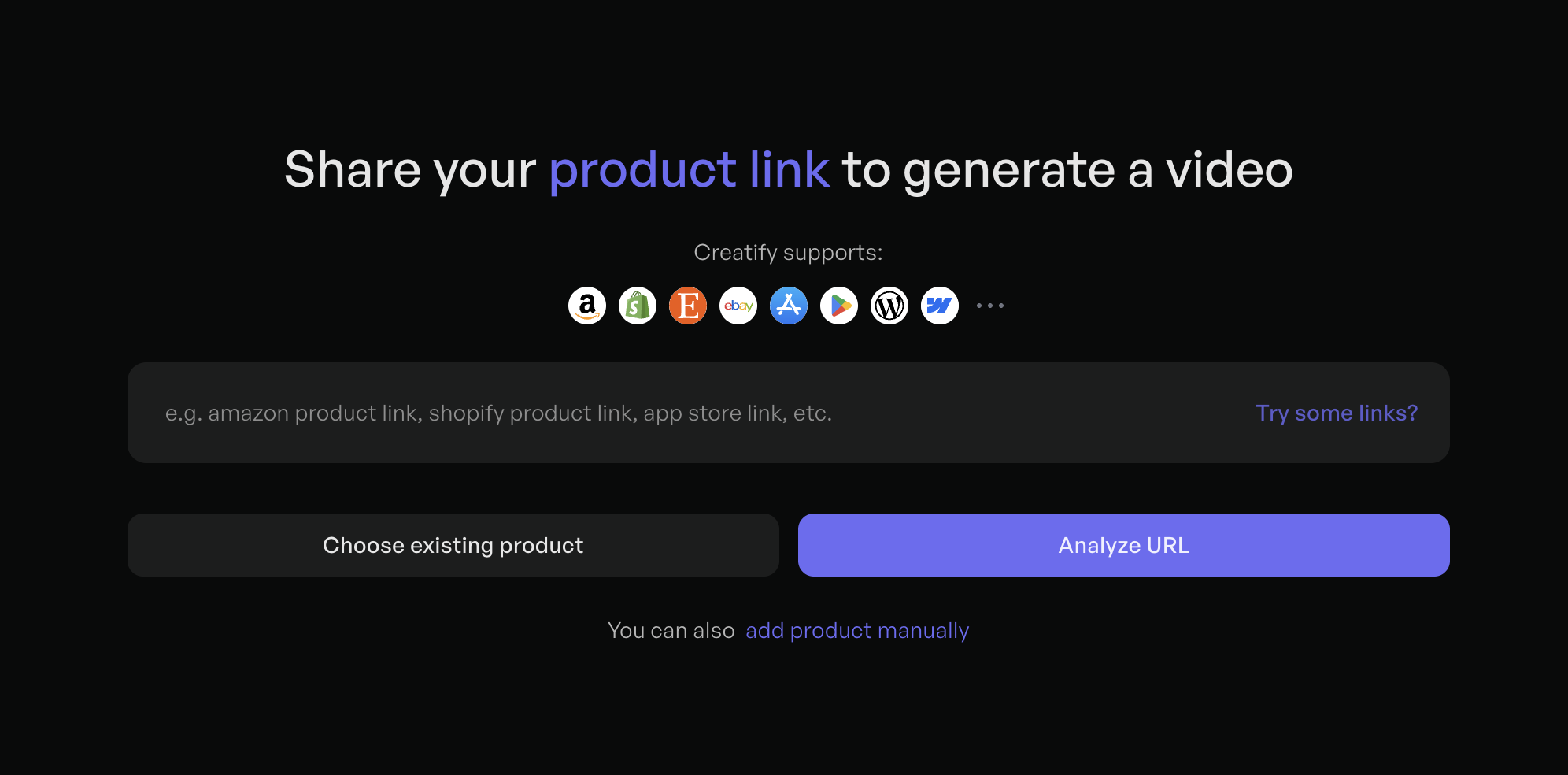
When I explored the platform, it felt refreshingly straightforward. I created a mock product of floral jewelry to test it. After adding product photos, descriptions, and USPs, plus choosing the video type I wanted, Creatify instantly generated multiple ad scripts in different tones like Gen Z, engaging, or formal, and I could either pick one or drop in my own copy.
Switching tone in one click and seeing the scripts change in real time was super-cool. That was the moment I realized how Creatify slashes the time and hassle of testing ad concepts, especially for social media. It makes it effortless for e-commerce teams and marketers to spin up eye-catching videos on the fly and experiment with different ideas without needing a production crew.
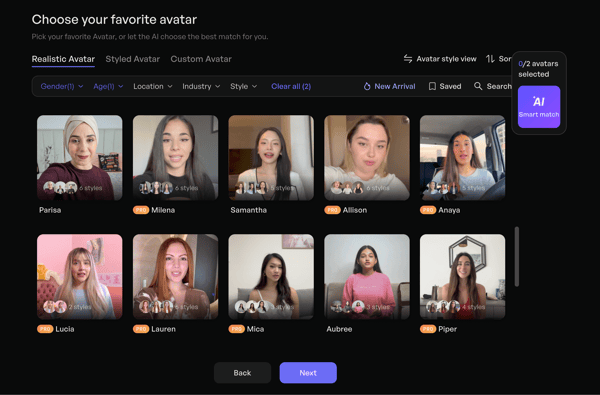
Once I’d chosen my script, Creatify opened up a wide range of AI avatars, realistic, styled, or even custom, and then built the ad around my choices. Creatify has also rolled out its new Aurora model, which takes a single image and audio clip to generate more lifelike, expressive avatar videos, adding an extra layer of realism to the ads you create.
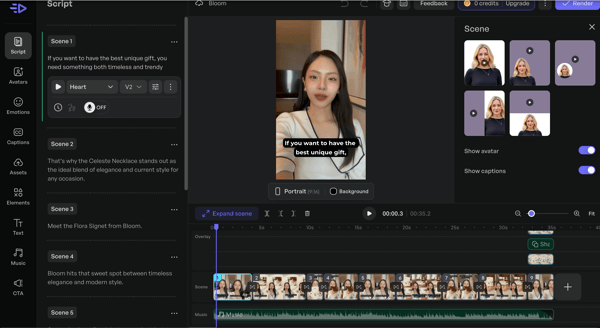
In my test, I created a full social media ad video with an AI avatar in under five minutes, complete with captions and music, and I could even edit it right inside Creatify’s timeline. That all-in-one workflow made it feel more like an ad studio built for marketers than a complicated editing suite.
I was especially impressed by how Creatify can turn plain product images into cinematic shots or avatar videos with a single click, a huge time-saver for e-commerce sellers.
My experience perfectly lines up with how Creatify is rated on G2: its highest-rated features are video creation, AI text generation and speed of video generation. It also makes sense that most of Creatify’s reviewers come from marketing and advertising, retail, and IT/software, the same kinds of teams I imagine would benefit most from this speed.
Even with all its strengths, there are a couple of things to note. Creatify AI’s avatars are designed for fast rendering and ease of use, enabling quick video generation, but may occasionally result in minor inconsistencies in some avatars' expressions or motions. I didn’t run into this personally. But users suggest that teams prioritizing ultra-realistic visuals may choose to re-render for greater precision.
The platform’s pricing and credit model are structured to align with different levels of content production. While some G2 reviewers mention that heavier usage or scaling campaigns may require an upgrade, many still view the tool’s ad-optimized capabilities and creative efficiency as delivering strong value relative to cost.
Those caveats aside, my overall experience lines up with the 4.7/5 Creatify holds on G2, and it's deserved. So, if your job is to produce scroll-stopping ad creatives fast — whether you're a solo marketer, an e-commerce brand, or a small team without a production budget Creatify AI is one of the best AI video generation platforms for social media content and ad campaigns I tested.
"The image-to-video capability is the clutch feature for me. I can take a product image and turn it into a polished video clip without shooting anything on camera — the AI keeps the output visually accurate to the actual product, which matters when you're creating content around specific items. The interface is clean and straightforward; I didn't need a tutorial to figure out the workflow from upload to export. It fits neatly into my production pipeline since I can download the clips and drop them straight into CapCut or Descript for final assembly with voiceover. For a solo creator, the pricing makes sense — the time I'd spend sourcing and editing stock footage easily justifies the cost. Turnaround on renders is fast enough that I can iterate on multiple product clips in a single session without it becoming a bottleneck. Support has been proactive and friendly."
- Creatify AI review, Caleb M.
"What I dislike about Creatify AI is that the credit system can feel limiting, especially when working on multiple campaigns or testing different creative variations. As a brand, I often want to experiment and iterate quickly, and running out of credits too fast can interrupt that workflow."
- Creatify AI review, Wesley E.
I’ve known and used VEED for years as a straightforward, browser-based video editing tool, so when its AI video generation features rolled out, I was curious to see how they stacked up.
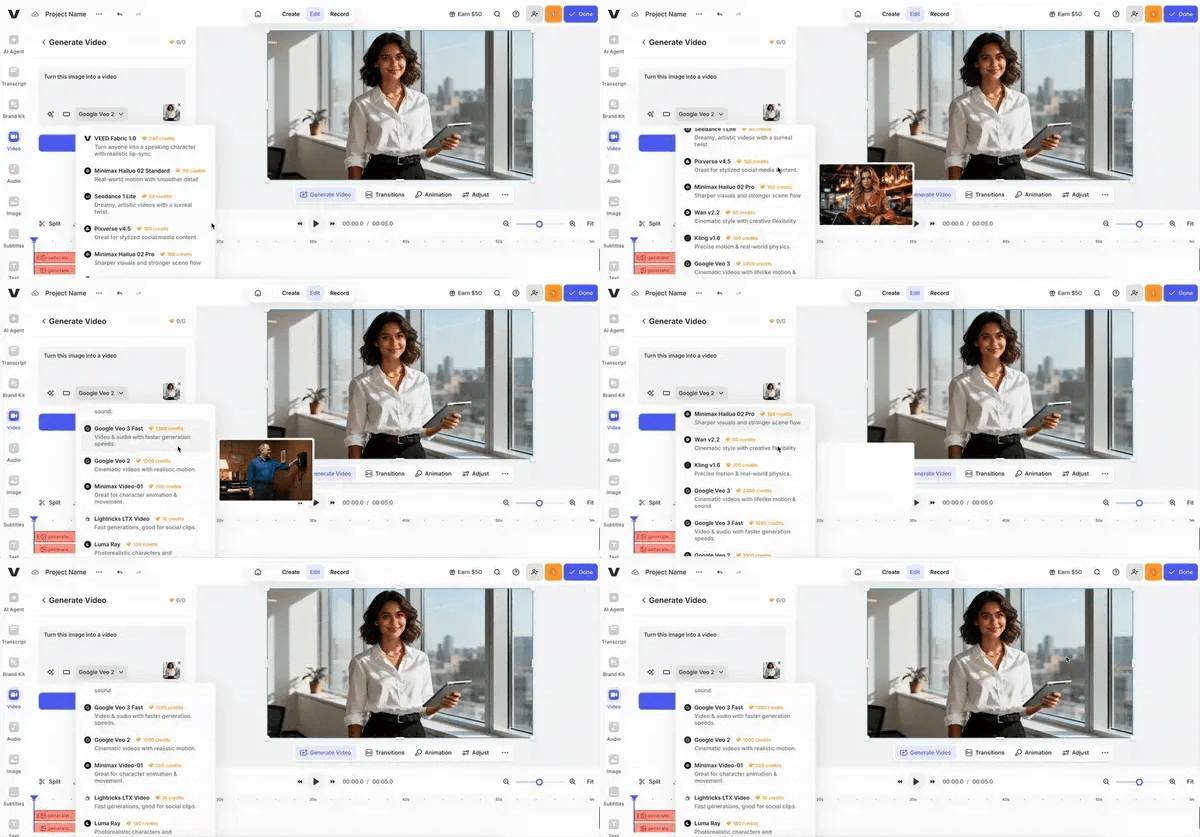
What struck me immediately was the sheer number of state-of-the-art AI video models VEED gives access to on a single platform. Instead of relying on just one engine behind the scenes, I could pick from multiple AI video generation models from its in-house VEED Fabric 1.0 as well as Minimax Hailou, Seedance, Pixverse, Google Veo, Luma Ray, and more.
Depending on the style of video I wanted, I could choose the model best suited for it. I loved that flexibility because it felt like I was getting the best of each engine inside one platform. I could generate AI avatars by describing them, uploading a photo, or using VEED’s own collection of avatars.
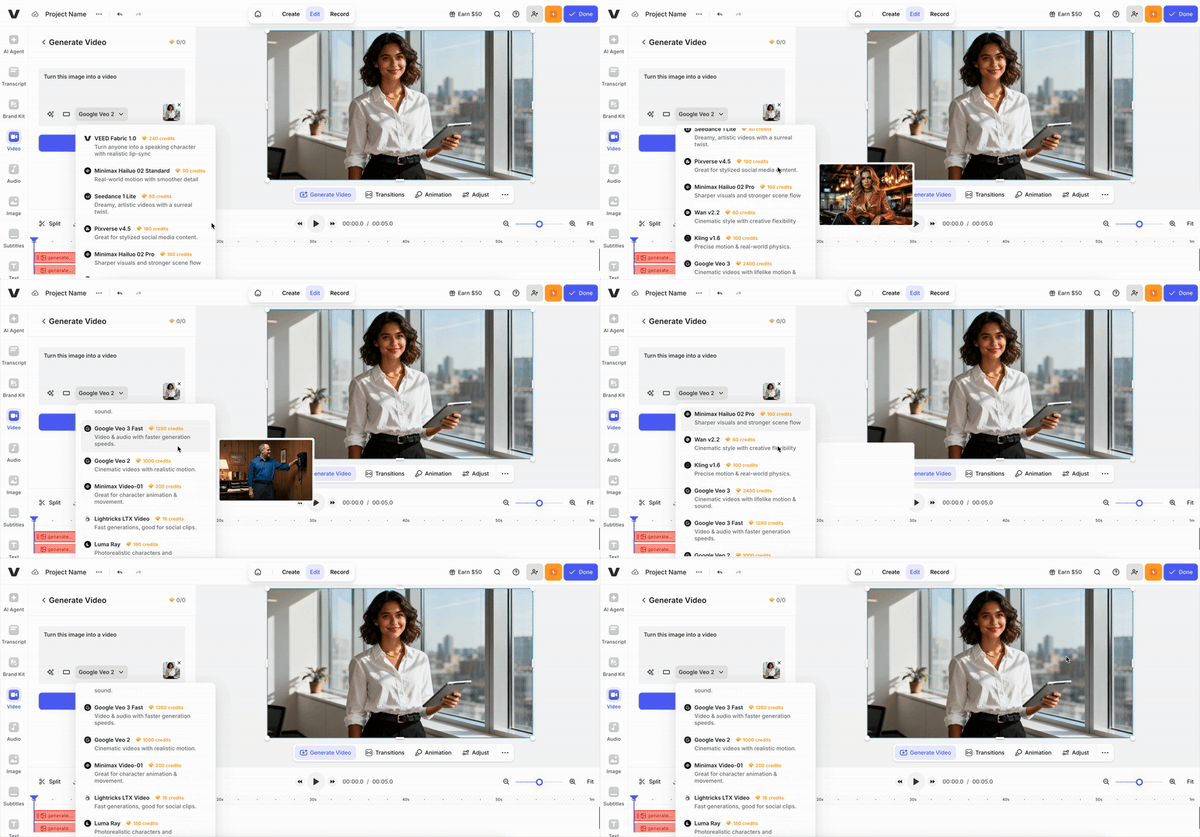
Like HeyGen, VEED also has an AI agent that acts as a creative assistant, only here it comes with pre-loaded prompts like adding auto-subtitles, correcting eye contact, and other common editing tasks. In practice, this made producing an AI-driven video feel faster and more guided.
When I tested it with a prompt for a floral necklace, the short-form video VEED created honestly outperformed what I’d seen from other tools. It combined the right AI-generated avatar footage with complementary B-roll and perfectly timed captions that matched the visuals. It felt polished enough that I could post it directly to my social channels without extra work.
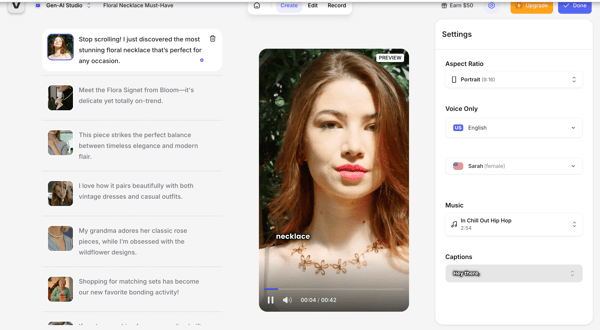
What really makes VEED stand out, though, is its editing DNA. Once a video is generated, I can jump straight into one of the video editors around to refine, trim, add overlays, captions, or swap B-roll without switching platforms. Built-in AI tools like auto-subtitles, noise removal, eye-contact correction, background cleanup, and more mean I can polish a clip without hopping between apps.
Not just this, with VEED’s AI Clips feature, I could also take long videos and instantly generate short, shareable reels from them. For someone who posts across multiple platforms, that’s a huge time-saver.
On G2, VEED scores 93% for ease of use, 94% for ease of setup, and 93% for ease of admin, all above or matching category averages, which explains why I was able to get polished results so quickly. Its highest-rated features are file exporting, file uploading, and video editing capabilities (all at or near 90%), the strengths I also noticed in my own workflow. Most reviewers come from marketing and advertising, computer software, consulting, health and wellness, and IT services.
However, there are a couple of recurring themes in the G2 reviews. VEED’s browser-based setup is built for speed and simplicity, making it ideal for quick edits and short-form projects. Teams working with longer or more complex videos may find that processing takes a bit more time, reflecting the platform’s focus on accessibility.
The platform’s tiered plans are structured to let users explore core tools on the free tier and scale up as their needs grow. Reviewers note that the teams producing a higher volume of AI-generated content often move to paid plans to access the full creative toolkit and expanded export options.
On the whole, VEED more than earns its reputation. By pairing a multi-model AI generation engine with one of the cleanest browser-based editors, it gives teams a genuinely fast way to go from idea to finished clip. It holds a 4.6/5 rating on G2.
For marketers, educators, and small teams already familiar with VEED’s editing workflow, adding model-agnostic AI video generation inside the same platform feels like a natural and powerful next step.
"The AI video ads are getting created in a very few minutes. Its extremely fast. Good voice-over videos, avatars are also good. Automatic video snippets are also relevant to the topics."
- VEED review, Suvankar R.
"Sometimes, if you record long videos, the performance is not the best."
- VEED review, Diego P.
AKOOL surprised me with how much it packs in. It goes beyond standard avatar-based presentations, and what stood out to me immediately was how much creative flexibility it offers compared to more “corporate-first” platforms that focus on presentations and learning videos.
The avatar library is extensive. For me, the avatars looked sharp and realistic, and there was a noticeable range in styles and settings (office, casual, outdoor, etc.), which made it easier to match the tone of the video. This aligns closely with G2 data, where AKOOL scores 98% for realism and 97% for custom avatars, both significantly above category averages.
The feature breadth impressed me the most: face swap, video translation, talking avatar, voice clone, image-to-video, and a dedicated e-commerce product ads feature that I found genuinely impressive. You can drop in a TikTok or Amazon product link, and AKOOL automatically pulls the product details to build the ad around it. It's a real time-saver for performance marketers.
Where AKOOL really differentiates itself, though, is with features like face swap and character swap. I found the face swap capability especially impressive — it opens up use cases in personalized marketing, creative campaigns, and even entertainment-style content that most business-focused tools don’t support as well. It’s the kind of feature that shifts the tool from “just another AI video generator” to something much more experimental and versatile.
Even for more standard workflows like video creation, the platform holds up well. With a 93% G2 rating for video creation and an overall 4.8 out of 5 rating, it’s clear that users are getting consistent value, especially if they’re working on content that blends marketing, social media, and AI-generated visuals.
That said, there are a few things to note based on what I saw on G2 reviews. Some G2 reviewers mention that rendering times can vary, especially when generating multiple high-resolution videos in a short span. While the platform is built for scalable video creation, performance may slow slightly under heavier workloads, which is worth factoring into tighter production timelines.
G2 feedback also highlights that voiceovers, while clear and functional, can sometimes feel a bit generic or lack emotional depth. Reviewers note that minor adjustments to pacing, phrasing, or tone can help improve the final output, particularly for more narrative-driven content.
That said, these limitations are relatively minor in the context of what AKOOL offers. For teams looking to create personalized, AI-driven video content at scale, the platform is one of the most capable AI video marketing suites.
If you're a marketer, an e-commerce team, or anyone producing high volumes of personalized or product-led video, AKOOL will be in my shortlist of recommended AI video creators.
"Akool’s AI avatar feature helped us create a professional video walkthrough for heavy machinery without having to shoot on the factory floor. The text-to-video tool turns our spec sheets into engaging clips in minutes. Multilingual voiceovers in Hindi, Gujarati, and English have also helped with outreach to regional buyers. The template library is well suited for B2B product highlights."
- AKOOL review, Sara J.
"Voiceovers occasionally need manual pacing adjustments and a few tweaks."
- AKOOL review, Karthick M.
AI Studios was a new discovery for me, and I only tried it after noticing how high it ranks on G2. From the moment I logged in, the layout felt intuitive. Everything from avatars and voices to templates was easy to find, so I could jump straight into creating without hunting through menus.
It has all the core features you’d expect from an AI video generator, like AI avatars, dubbing, voice options, and ready-made templates.
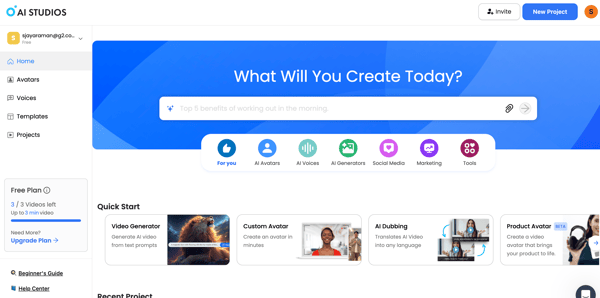
But the standout for me was its “Product Avatar” feature. Similar to what I’d seen in Creatify, I could upload a product photo, pick an AI avatar, and have the avatar actually hold or wear the product in the generated video.
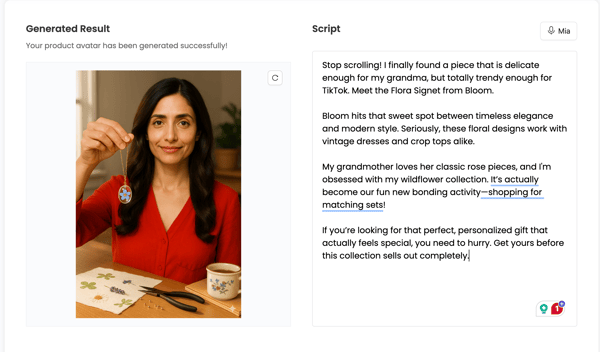
All I had to do next was drop in a script, and the platform produced a UGC-style clip that looked ready for TikTok or Instagram. That workflow felt especially useful for small businesses, ecommerce brands, or marketers who want short reels and social content without booking a shoot.
It also helped that AI Studios has templates for just about every type of video. In my free plan, I saw a wide range: formal corporate explainers, onboarding and e-learning templates, and social media–focused layouts for YouTube, TikTok, and Instagram, available in both portrait and landscape mode. I could even use the AI video generator to generate the creative B-roll footage I wanted.
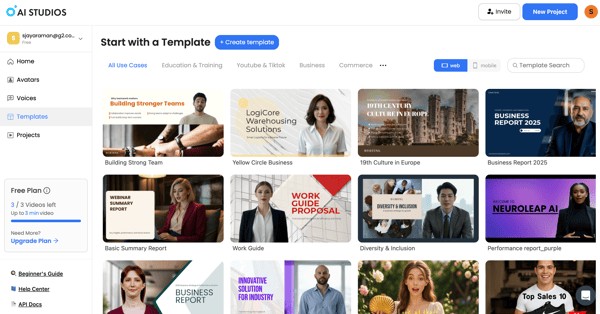
This flexibility lines up with what I’m seeing on G2, where its highest-rated features include content creation, file creation, and file uploading. Reviewers also give it solid marks for ease of use and ease of setup, not as high as some competitors, but still in a comfortable position. The top industries represented on G2 are animation, education management, marketing, entertainment, and IT.
While my overall experience with AI Studios was positive, there are a few caveats worth noting from both my own testing and G2 feedback. In my testing, AI Studios handled standard videos smoothly but took a bit longer to render multi-scene projects — something several G2 reviewers also note with more complex clips. This likely reflects the platform’s emphasis on visual quality and detailed scene transitions over raw processing speed.
Lip-sync performance is generally solid, though in longer videos, I noticed (and a few reviewers echoed) that mouth movements can fall slightly out of sync with narration. This appears to be a common behavior across AI video tools and can often be fine-tuned by adjusting pacing or re-rendering specific scenes.
These issues aside, AI Studios holds a 4.2 out of 5 rating on G2, reflecting how much value users find in it overall. I'd say give AI Studios a try if you’re a marketer, educator, or small business looking for a straightforward way to turn scripts and product shots into AI avatar videos.
"The easy-to-use tools and the platform interface are the highlights, and the final video output is very clear,, like a cherry on top. With this, I can create fast and creative videos regularly according to my ideas."
- AI Studios review, Rafee N
"Although it renders videos very fast, it struggles with long videos because we had to split and render our full video in sections and later join them. Additionally, the voices are robotic; they don't sound human."
- AI Studios review, Robert K.
Got more questions? Here are the answers.
From my testing, HeyGen, Synthesia, and Canva’s Magic Media (powered by Google’s Veo 3 and Runway tech) all excel at turning scripts or prompts into polished videos quickly. If you’re focused on short, snappy social content, Creatify and AI Studios also offer strong text-to-video performance geared toward marketing and UGC-style clips.
Creatify AI, AKOOL and AI Studios are designed for exactly this. They make it easy to upload a product, pick an avatar, and instantly create scroll-stopping short-form ads for TikTok, Instagram, or YouTube Shorts. Canva stands out for letting you generate AI clips directly inside its editor and then use its brand kits, templates, and animations to make those ads ready to publish.
In my experience, HeyGen, Canva, and Synthesia produce standard avatar videos quickly, while Creatify’s Product Avatar feature is one of the fastest ways to create social ads. Most platforms slow a bit with multi-scene or high-resolution clips, but these four consistently rendered faster than others I tested.
HeyGen, Canva, AKOOL, Creatify AI and AI Studios all support personalization at scale. HeyGen’s Video Agent can plan and produce videos with you, Canva’s dual AI video generators make it easy to match your brand look and feel, and AI Studios’ Product Avatar lets you showcase your own products. For marketing campaigns, Creatify AI is one of the top tools for creating product demo videos and personalized ad creatives quickly.
Synthesia is best for structured, high-volume training and marketing videos with bulk personalization. HeyGen shines for team collaboration, creative flexibility, and its Video Agent feature that plans and produces videos with you.
If you're looking to plug AI videos into your existing marketing stack, tools like Synthesia, and HeyGen are strong options. Synthesia work well for structured workflows like training and onboarding, while HeyGen and Creatify are better suited for campaign-driven use cases like personalized outreach and ad creatives. For broader marketing workflows, Canva also stands out thanks to its integrations and ease of exporting branded assets.
From my experience, Synthesia and HeyGen are the most purpose-built for training content. Synthesia is great for scalable, multilingual corporate videos with consistent formatting. If you want something more flexible or creative, tools like HeyGen can work.
For product demos, Creatify AI, AKOOL, and AI Studios are some of the strongest options. Creatify makes it incredibly easy to turn product links into ready-to-publish videos, while AKOOL adds more creative flexibility with features like face swap and avatar customization. AI Studios is a good middle ground if you want polished demos with a slightly more traditional presentation style.
For marketing campaigns, it really depends on your goal. Creatify AI and AKOOL are ideal for high-volume ad creatives and social campaigns, especially if you're working with e-commerce or UGC-style content. HeyGen is great for personalized outreach and storytelling, while Canva is a strong all-in-one option if you want to design, edit, and publish campaigns in one place.
Based on both my testing and G2 data, AKOOL stands out for realism, with a 98% rating for realism and 97% for custom avatars, which is well above category averages. HeyGen and Synthesia also offer high-quality avatars, but AKOOL feels slightly more flexible and lifelike, especially for marketing and creative use cases.
If your focus is structured, scalable training content, Synthesia is one of the smartest choices. It's built for consistency, multilingual delivery, and bulk video production. That said, if you need more interactivity or LMS integrations, Colossyan is worth considering, and if you want more creative flexibility, HeyGen or AKOOL might be a better fit.
If you like Synthesia but want alternatives, HeyGen, AKOOL, and AI Studios are all strong options. HeyGen offers more creative control and collaboration features, AKOOL leans into realism and experimental features like face swap, and AI Studios provides a more presentation-style experience similar to Synthesia.
HeyGen is one of the best tools for sales outreach, especially because of its personalization features and Video Agent, which helps plan and generate content quickly. However, tools like Synthesia (for structured messaging) and Creatify AI (for product-led outreach) can also work well depending on your use case.
Synthesia and HeyGen are both strong here. Synthesia supports 140+ languages and is ideal for structured, global training content, while HeyGen offers more flexibility in voice and presentation. Other tools support translation, but these two are the most reliable for high-quality multilingual output at scale.
Yes. VEED is one of the most beginner-friendly browser-based editors out there. The interface is clean, the AI tools like auto-subtitles, noise removal, and eye-contact correction are one-click, and you don't need to download anything. Canva is the closest competitor for ease of use, but if video editing (rather than design) is your primary need, VEED has the edge.
After testing all of these platforms, one thing became clear to me: the “best AI video generator” isn’t only about who has the flashiest avatars or the most languages, it’s about how well the tool fits into your workflow.
The real time-saver is being able to go from idea to script to finished clip inside one platform, with built-in editing, personalization, and export options tuned to your team’s needs. If you pick a platform based on where you spend the most time now, like planning scripts, rendering, editing, localizing, or distributing, you’ll feel the biggest payoff.
If you’re curious about expanding your AI toolkit beyond video and want a trustworthy place to start, check out G2’s guide to the best generative AI tools.


Recently updatedSummer 2026 Grid® Report · Published May 26, 2026 This guide was last...
 by Sudipto Paul

AI video generators are having a moment. Tools like Synthesia, Veed, HeyGen, Canva, and ...
by Sudipto Paul

That celebrity endorsement? Fake. The news clip you just watched? AI-generated. The podcast...
by Soundarya Jayaraman