.png?width=400&height=150&name=My%20project-1%20(1).png)

This guide was last updated on April 23, 2026. A newer report has since been published. The tools below reflect the scores from G2's Summer 2026 Grid® Report.
Based on verified G2 reviews and the latest Grid® placement.
*Liked and disliked highlights are summarized from verified G2 user reviews.
The tools below have also been exhaustively tested and evaluated, and continue to hold their place among the best AI voice assistants on G2.
Choosing the best AI voice assistant in 2026 isn’t just about convenience. It’s about finding one that fits seamlessly into your daily workflow, whether you’re managing tasks on your phone, automating your smart home, or using voice commands at work. I’ve found that the right assistant can save hours each week and make everyday interactions faster, while the wrong one adds friction, misunderstands context, and slows you down.
Since I regularly rely on voice assistants across devices, I decided to evaluate the best AI voice assistants, ones that actually deliver in real-world use. If you’ve ever wondered which AI voice assistant is the most accurate, which one works best across multiple devices, or whether they’re worth it beyond basic commands, you’re not alone. These are the same questions I see come up across forums and user discussions, so I set out to answer them with real data.
I evaluated the best AI voice assistants on G2, including tools like Retell AI, Genesys Cloud CX, Synthflow, and ElevenLabs, looking at how real users interact with them across smartphones, smart speakers, and business tools using verified G2 reviews and performance insights.
According to G2 reviewers, the best AI voice assistants don’t just respond to commands. They understand context, adapt to your habits, and work consistently across devices.
Whether you want a voice assistant for productivity, hands-free control, or a fully connected smart home setup, I’ve broken down the top options based on what real users value most, including natural language processing, privacy, and responsiveness. After evaluating 15+ AI voice assistants on G2, I’ve narrowed this list down to the ones that consistently stand out.
Let’s dive in!
*These work management tools are top-rated in their category, according to G2's Spring 2026 Grid Report. For pricing details, please contact the sales team directly via their official website.
From what I’ve seen, Voice assistants are a faster, more natural interface for getting real work done across phones, smart devices, and customer touchpoints. The right tools reduce friction: they understand context, follow multi-step requests, and hand off seamlessly between channels.
As I evaluated tools in this category, one thing became clear: adoption isn’t slowing down anytime soon. The AI voice assistant market is currently valued at $44.26B and is projected to reach $158.74B by 2035. It’s driven by better language models, multilingual support, and tighter ecosystem integrations.
The best AI voice assistants go beyond wake words. They personalize responses, remember preferences, and integrate with calendars, CRMs, and smart-home or contact-center stacks, automating tasks like call routing, lead qualification, appointment booking, and follow-ups. The result: faster resolution, lower manual workload, and more consistent experiences.
What really stood out to me is how these platforms are shifting voice from basic command execution to something more conversational and adaptive. The strongest tools adjust tone, understand intent, and suggest next actions across devices and teams. That’s what makes the best AI voice assistants worth considering, whether you’re using them for personal productivity or scaling customer operations.
“I keep wondering if the biggest value is actually in voice, or just in the automation behind the scenes.”
Read full thread →To build this list, I analyzed top-performing products in G2’s AI Voice Assistants software category, focusing on ratings, G2 Grid Report placements, and detailed user feedback.
To go beyond rankings, I used AI-assisted analysis to review hundreds of G2 user reviews. This helped me uncover recurring themes around speech recognition accuracy, response latency, context awareness, multilingual support, and integrations across devices like smartphones, smart home systems, and contact center platforms.
In cases where hands-on testing wasn’t possible, I relied on insights from market research and validated them against verified G2 reviews to ensure consistency and accuracy.
By combining G2 data, AI-driven review analysis, and real-world use cases, I narrowed down the best AI voice assistants that consistently deliver reliable performance, strong integrations, and meaningful time savings.
All product details and screenshots featured in this article are sourced from G2 listings and publicly available materials.
Here’s what I prioritized while evaluating the best AI voice assistants.
The list below contains genuine user reviews from the AI Voice Assistants Software category page. To be included in this category, a solution must:
*This data was pulled from G2 in 2026. Some reviews may have been edited for clarity.
Retell AI ranks among the highest-rated tools in the AI Voice Assistants category, earning a 4.8 out of 5 on G2 from hundreds of verified reviewers. It’s especially popular with small and mid-market businesses, and from what I’ve seen in the reviews, that comes down to how well it balances developer control, voice quality, and deployment speed. It’s commonly used to build human-sounding agents for inbound and outbound calls, particularly across support, sales, and scheduling workflows.
As I analyzed G2 reviews and user feedback, one thing stood out immediately: how natural the conversations feel. Reviewers repeatedly describe Retell AI’s speech flow as “shockingly natural” and “almost indistinguishable from a real person.”
I noticed that users specifically call out its ability to handle interruptions, maintain tone, and respond contextually. Many also mention that this level of realism improves customer trust and reduces hang-ups during longer calls, which is critical for teams replacing traditional IVR systems.
Call fluidity and timing are crucial in voice automation, and Retell AI stands out here. In fact, 85% of G2 users rated the voice recognition features highly. Across reviews, I found consistent mentions of near-instant response times and minimal lag, describing the system as “faster than human response in most cases.” This low latency helps conversations feel organic and eliminates the awkward pauses common with older AI systems. Teams in customer service and appointment scheduling repeatedly credited this with improving satisfaction scores and reducing handling times.
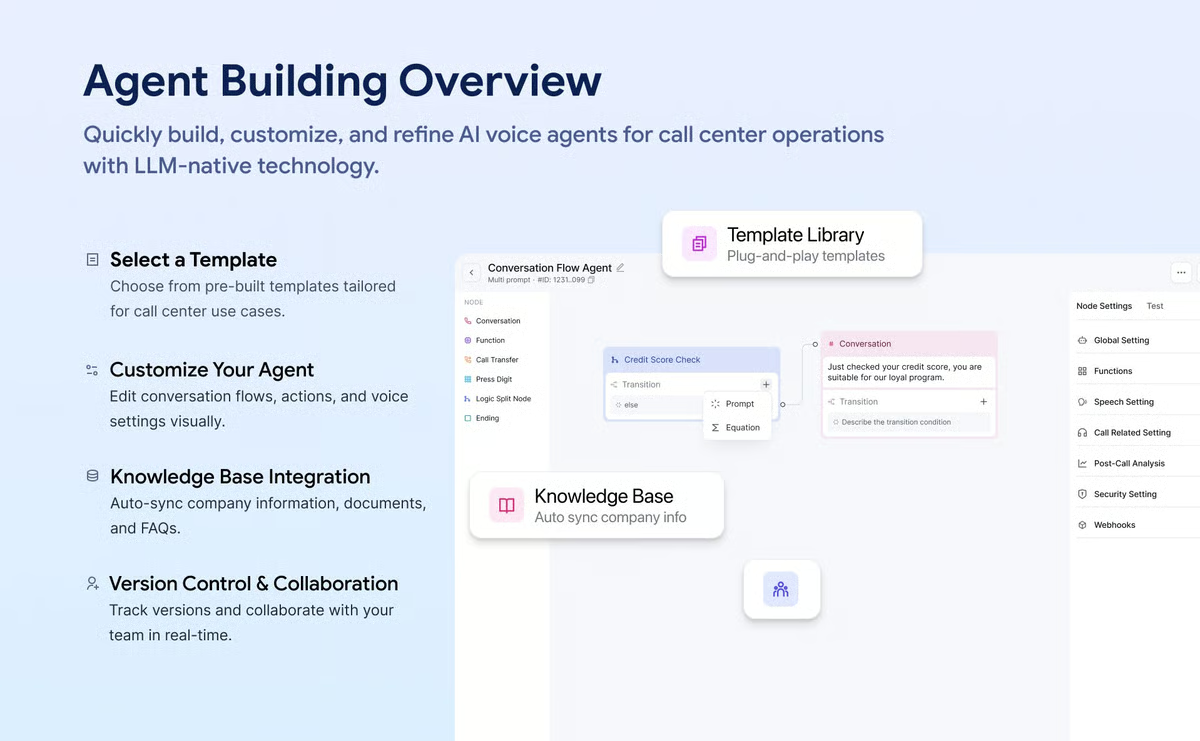
Retell From an implementation standpoint, I found that Retell AI is clearly built with developers and operations teams in mind. G2 reviewers often highlight its API-first architecture, which gives teams the flexibility to choose their preferred LLMs, design call flows programmatically, and build custom logic. This makes it a strong fit for more specialized use cases like compliance workflows, appointment confirmations, or outbound sales outreach. Many reviewers describe it as “developer-friendly without being overly complex,” which reflects that balance well.
Retell AI’s MCP Node and webhook actions enable smooth integration with tools like Zapier, HubSpot, and custom APIs. G2 users mentioned using these triggers to fetch customer data mid-conversation or log outcomes directly into CRM systems. These integrations reduce manual data entry and make it easier to connect voice workflows with existing sales or support pipelines. Many reviewers said this capability saved them hours in post-call administration.
I also came across positive feedback around its multilingual capabilities. Reviewers across industries mention successful deployments in English, Spanish, French, and Hindi, with consistent tone and natural pronunciation. For teams operating in global markets, this seems to be a key advantage when scaling customer communication.
Retell AI follows an API-first design, which means most customization is done through SDKs, webhooks, and programmatic prompts rather than a full drag-and-drop builder. Teams that prefer a predominantly visual, no-code experience will find a platform like Synthflow more familiar. Retell AI is better suited for those who want precise, long-term orchestration control — and that same developer-forward approach is exactly what makes it so powerful for teams building complex, production-grade voice systems.
Costs can increase with higher call volumes under the usage-based pricing model, which is worth factoring in early for teams scaling quickly. That said, the majority of reviewers describe the pricing as justified given the platform's performance and reliability — particularly in production environments where every interaction carries measurable business value.
Overall, from everything I evaluated, Retell AI combines human-sounding interactions, ultra-low latency, robust integrations, and builder-grade flexibility into a single platform. For organizations ready to operationalize voice automation across departments, it remains one of the most capable and trusted platforms in this category.
“Retell AI makes it incredibly easy to connect AI voice agents to real phone numbers. The SIP trunking integration with Twilio works seamlessly, and the dashboard makes it simple to assign agents to inbound numbers. The agent builder and prompt configuration are intuitive, and the call quality is excellent.”
- Retell AI review, Tom I.
“The pricing model can become expensive when scaled to a very high call volume, especially when compared to "in-house" implementations of open-source models. Additionally, there is a lack of flexibility to customize certain parameters of proprietary voice models without relying entirely on their closed infrastructure.”
- Retell AI review, Timothy N.
Explore top NLU tools on G2. See how the best natural language understanding software interprets human intent with precision.
Synthflow is one of the highest-rated no-code AI voice automation platforms on G2, maintaining an impressive G2 rating of 4.5 out of 5 across verified reviews. As I went through tools in this category, Synthflow stood out as one of the few that truly leans into no-code without making the experience feel limited. It’s built for teams that want to deploy AI-powered voice agents without writing a single line of code, offering simplicity without sacrificing sophistication.
The most frequently mentioned strength in G2 reviews is how quickly users can build and deploy AI voice agents. What I found interesting here is how often speed came up as a deciding factor. Many described setting up their first multilingual agent within hours. The drag-and-drop interface, paired with intuitive flow logic, eliminates the steep learning curve often associated with voice AI.
Training, testing, and launching agents can be handled within a single workspace, which keeps the experience accessible to non-technical teams. The way this is structured makes advanced voice automation feel far less intimidating than you’d expect.
Reviewers consistently highlighted Synthflow’s natural speech output and accurate comprehension. The platform supports dozens of languages and dialects, enabling global businesses to automate calls in English, Spanish, French, Hindi, and more. Many noted that the agents sound “remarkably human,” with smooth transitions and appropriate pauses. This linguistic flexibility makes Synthflow particularly valuable for international companies that need localized voice support without managing separate systems.
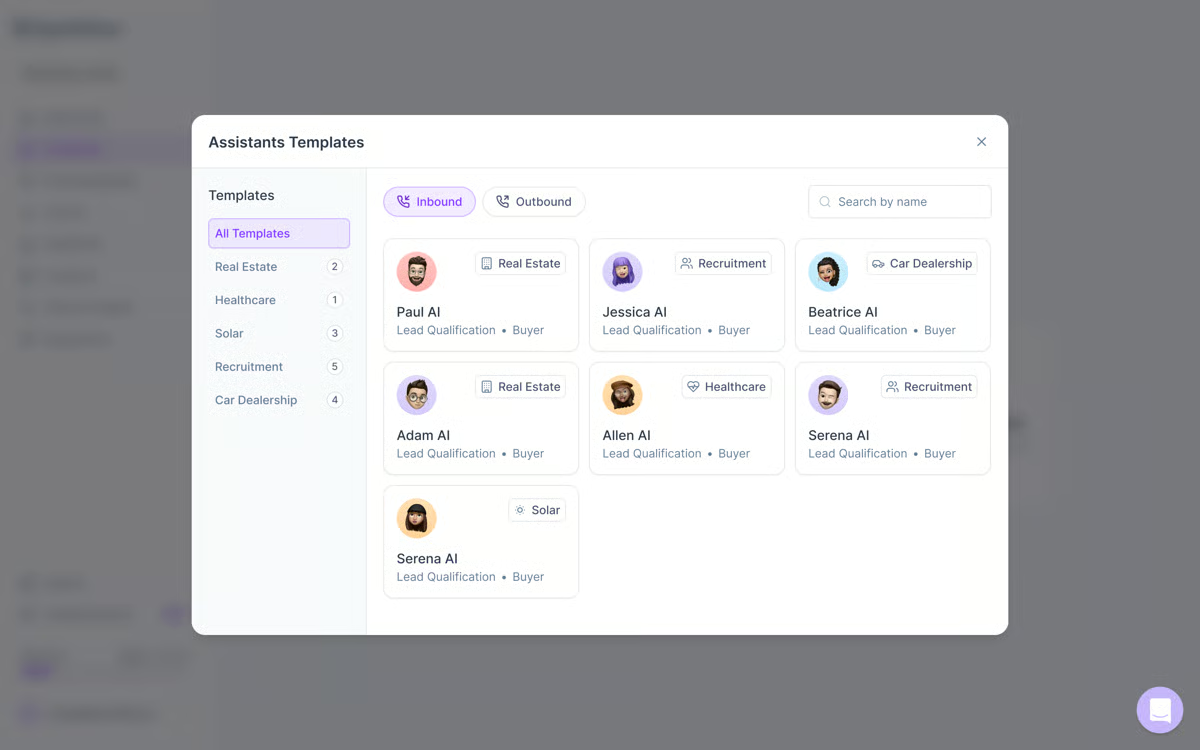
A recurring theme among G2 users is Synthflow’s ability to connect easily with CRMs and automation tools. Integrations with HubSpot, Google Sheets, and Zapier were praised for streamlining data handoffs between voice calls and backend workflows. Users said these connections cut down on manual updates and reduced the risk of missed leads. The platform’s open webhooks and API endpoints also allow advanced users to build deeper custom workflows, a balance between ease of use and extensibility that many reviewers appreciated.
Teams love that Synthflow scales smoothly as call volume grows. Several reviewers mentioned starting with a few automated calls and expanding to thousands per day without performance drops. The platform’s cloud architecture allows for instant scaling, and its real-time reporting provides visibility into agent performance. For growing teams, this combination of flexibility and speed is a key differentiator.
Synthflow’s customer support frequently appears in positive G2 comments. Going through these reviews, the tone around support is consistently strong. Users describe the support team as responsive, friendly, and deeply knowledgeable. Many noted that representatives provide personalized help, often walking users through flow creation or troubleshooting in real time. The documentation and tutorials were also commended for being clear and beginner-friendly.
Synthflow offers fewer deep customization options compared to API-first platforms like Retell AI. Advanced builders who want granular control over middleware, orchestration logic, or custom integrations will find the no-code canvas more restrictive. For business users who prioritize speed and accessibility over developer-level control though, this is precisely what makes the platform approachable and fast to deploy without engineering overhead.
Synthflow's integration library does not yet cover niche or region-specific tools, focusing instead on mainstream connectors like popular CRMs, calendars, and automation bridges. Teams that rely on less common or highly specialized systems may find the coverage limiting. That said, this focused approach keeps data handoffs reliable and performance consistent, which matters most for teams scaling call volumes on widely adopted SaaS stacks.
Synthflow’s intuitive interface, realistic speech synthesis, and dependable integrations make it a standout choice for teams that want fast, multilingual automation without relying on developers. After going through how teams actually use it, it’s clear the platform is designed to balance simplicity, power, and scalability in a way that supports real-world growth.
“Synthflow makes it very easy to build and manage AI voice agents without a heavy technical setup. I really like how intuitive the interface is, how quickly agents can be configured, and how well it integrates with phone providers like Twilio. The prompt system and real-time actions are very powerful for creating realistic, business-ready voice workflows.”
- Synthflow review, Jose M.
“One downside is that some advanced customisation options are still limited. While the core functionality is easy to use, more complex workflows can require workarounds or aren’t as flexible as more mature tools.”
- Synthflow review, Usman J.
Compare leading NLG platforms on G2. Discover natural language generation tools that power AI writing, summarization, and automated content creation.
ElevenLabs holds a 4.5 out of 5 overall G2 rating with consistently positive sentiment from creators, developers, and enterprises alike. As I worked through this category, ElevenLabs felt like one of the few platforms where voice quality isn’t just a feature, it’s the core product. It’s widely adopted across media, gaming, localization, and e-learning industries, where natural, expressive voice quality is critical. The platform’s combination of studio-grade realism, multilingual support, and flexible APIs has positioned it as a category leader in text-to-speech (TTS) and voice cloning technology.
Across hundreds of G2 reviews, the most common theme is voice quality. Many highlight how subtle vocal nuances, such as intonation, pacing, and emotional tone, make generated voices indistinguishable from human recordings. Production studios and content creators emphasized that the platform dramatically reduces time spent on narration and re-recording, without compromising quality.
G2 reviewers praise ElevenLabs’ broad language coverage, which currently spans 30+ languages. I found it especially interesting how often localization comes up as a core use case rather than an add-on. Many users said the ability to localize content quickly, whether dubbing films, podcasts, or training materials, has made the platform indispensable for international operations. 84% of G2 users appreciate ElevenLabs for its customizable speech capability. The AI model not only translates speech but maintains consistent speaker identity across languages, a feature frequently cited as a major competitive edge for global teams.
ElevenLabs’ VoiceLab allows users to clone voices securely and ethically with full consent, producing replicas that match tone and style with striking precision. G2 users in audio production and gaming note how this feature helps them preserve brand consistency or extend character voices without multiple recording sessions. Developers also mentioned that the cloning process is intuitive and compliant with content ownership safeguards, giving creative teams flexibility while maintaining responsible controls.
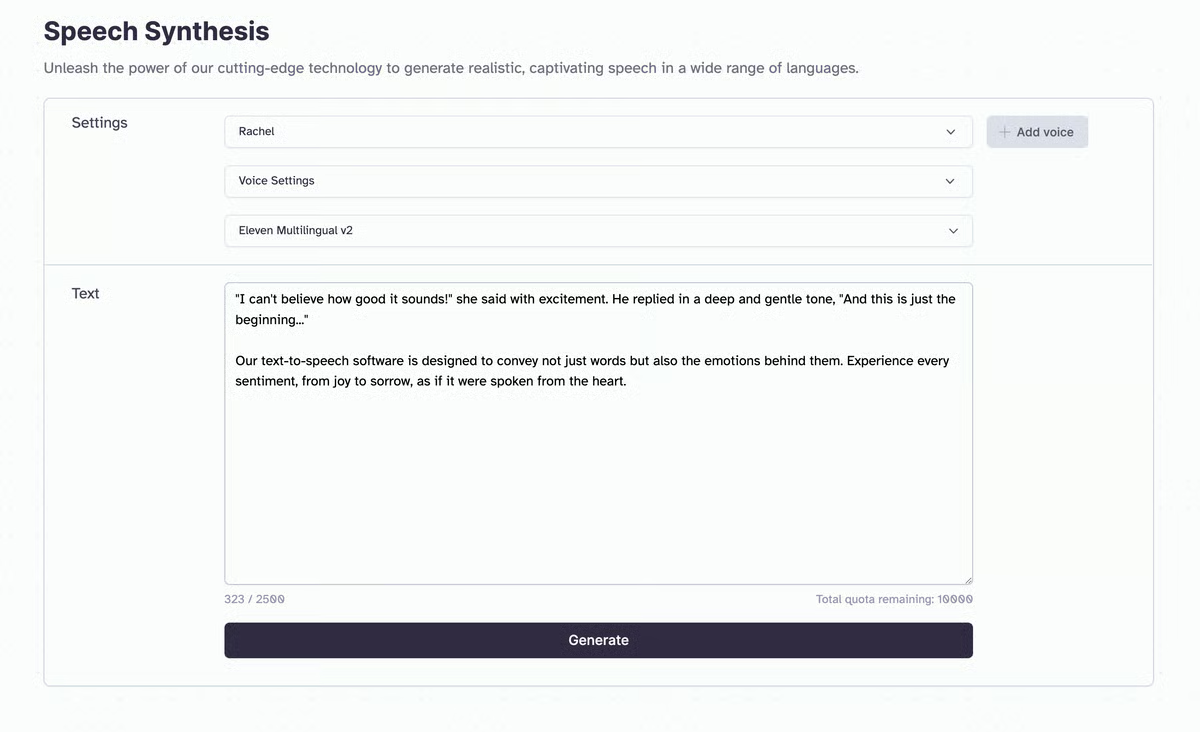
Another strength is the robust API, which reviewers describe as simple yet powerful. As I looked at developer feedback, the emphasis was less on complexity and more on how quickly teams can get something working. Teams integrate ElevenLabs into content pipelines, customer support systems, and voice-enabled products using only a few lines of code. The API documentation is praised for being clear, well-structured, and constantly updated. For developers building AI assistants, educational apps, or dubbing platforms, this openness enables quick prototyping and reliable scaling.
Reviewers repeatedly mention the low latency and fast rendering speeds, particularly compared to legacy TTS systems. ElevenLabs generates full-length voice outputs in seconds, making it practical for both real-time and batch workflows. For agencies and studios, that speed translates directly into faster turnaround times and higher productivity.
ElevenLabs is optimized for production audio where fidelity and expressive control matter most, and teams focused on quick utility-style output will find the platform's depth more than they need for those purposes. For use cases where voice quality is the actual deliverable, such as dubbing, localization, and game voice-over, this production focus becomes a distinct advantage rather than a limitation.
The usage-based pricing model, charged per character or minute, sits at a premium compared to simpler TTS tools. Teams running hobby projects or low-volume internal prototypes may find it harder to justify the cost at smaller scales. For production pipelines where cost maps directly to quality and volume, the model makes budgeting straightforward and reinforces accountability for deliverable standards across agencies and enterprises.
Overall, ElevenLabs delivers high-impact, professional-grade audio fast. After looking at how teams actually use it, the gains are consistent across voice quality, turnaround time, and maintaining consistency across languages and projects.
“I really like how easy ElevenLabs is to use. It offers a good amount of customization and is very user-friendly, making it easy to figure out how to use it even as a new user. I enjoy creating video content and narrating stories with it because it has a variety of different voices and saves me a lot of time. The initial setup was very easy.”
- ElevenLabs review, Carl W.
“Sometimes it takes a bit of trial and error to get the tone exactly how you want it, especially if you’re aiming for something very specific. I also wish some of the advanced features were more affordable for small teams or students working on side projects. But overall, the value is definitely there.”
- ElevenLabs review, Abdelrahman E.
Genesys Cloud CX is one of the most established platforms in the AI voice assistant category, earning a 4.4 out of 5 rating on G2 across thousands of verified reviews.
As I worked through this category, it was hard to miss how widely Genesys Cloud CX is used across enterprise and mid-market teams, particularly in telecommunications, financial services, and healthcare sectors. The platform’s combination of omnichannel orchestration, conversational AI, and in-depth analytics makes it a top choice for organizations that want to modernize customer service while maintaining governance, scalability, and performance.
Genesys Cloud CX stands out for unifying voice, chat, email, and social channels into a single customer experience platform. G2 reviewers frequently praised how effortlessly the tool consolidates communication across departments. Contact center leaders highlighted that agents can move between channels without losing context, which boosts resolution speed and improves consistency. Many reviewers also emphasized the system’s reliability, particularly how it maintains uptime during high-volume events like product launches or seasonal surges.
AI-based routing is one of the most praised features on G2. As I looked closer at how teams describe it, I realized the value shows up in outcomes more than the feature itself. The platform automatically matches customers to the right agent based on skill set, availability, and sentiment data. Reviewers say this improves first-contact resolution rates and reduces escalations, especially in large organizations that handle thousands of inquiries daily.
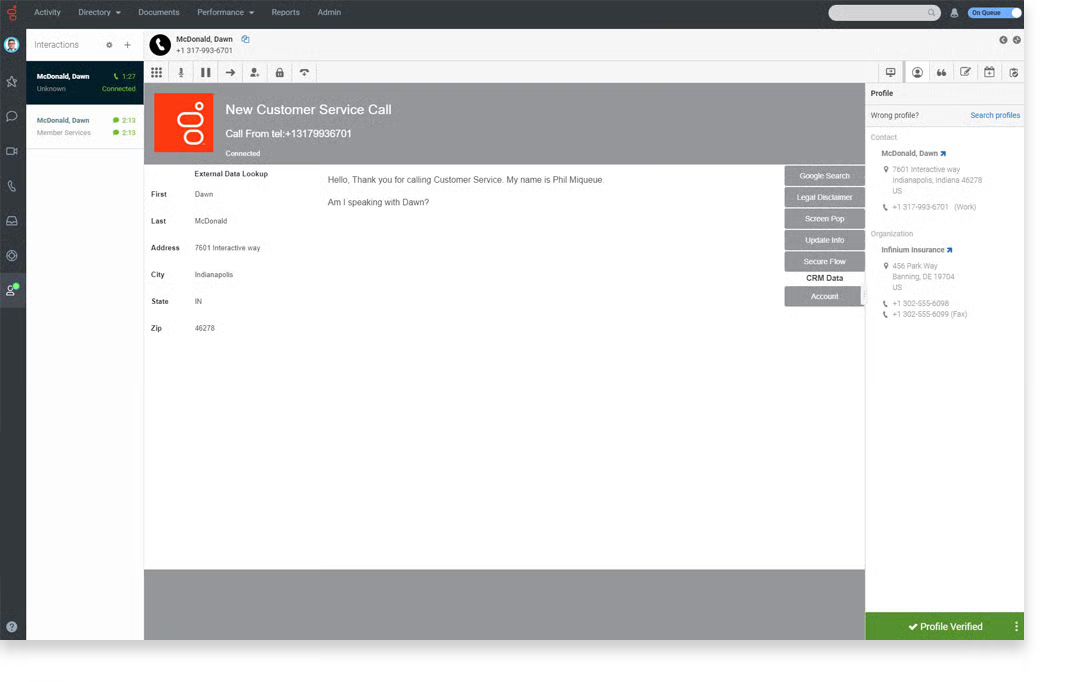
Several highlighted that automation handles repetitive tasks, like call categorization, follow-ups, and ticket creation, freeing agents to focus on complex issues. In fact, 91% of G2 users rate the conversational AI features highly. According to G2 Data, this automation directly correlates with shorter average handle times and higher customer satisfaction scores. What stood out to me here is how consistently this ties back to efficiency.
Genesys Cloud CX’s analytics and reporting tools were mentioned in over half of recent reviews. Supervisors appreciate real-time dashboards that visualize key KPIs like call volume, agent occupancy, and sentiment trends. The sentiment analysis feature, in particular, helps leaders identify friction points and coach agents effectively. Many reviewers described the analytics as “comprehensive and actionable,” allowing operations teams to make data-driven staffing and workflow decisions.
The platform’s deep integrations with Salesforce, Microsoft Teams, Zendesk, and HubSpot are another recurring highlight. Reviewers said these connections allow agents to view customer history, update tickets, and log interactions without switching applications. IT teams appreciated the open API framework, which enables custom integrations with proprietary systems — a critical factor for enterprise deployments that rely on multiple data sources.
Genesys Cloud CX is designed for large-scale contact centers, and reviewers regularly cite its uptime and global infrastructure as differentiators. I found it especially relevant how enterprises with distributed teams across continents praise its cloud-native design, which enables consistent performance regardless of geography.
Genesys Cloud CX favors depth. Its configuration canvas is extensive and can feel complex at first. Reviewers, however, feel that this could act as a strength for enterprises that need precise control over routing logic, permissions, data retention, and analytics across high-volume, multi-team environments.
There’s also an implementation effort. Setting up an omnichannel contact center and connecting multiple systems demands planning and coordination, especially in global or legacy-heavy stacks. Reviewers note this upfront lift as part of choosing an enterprise platform: the payoff is long-term stability, scale, and governance that holds up under real operational load.
Genesys Cloud CX delivers enterprise-grade AI voice and omnichannel automation backed by deep analytics and CRM connectivity. Its architecture supports complex, high-volume operations while maintaining ease of use and reliability.Genesys Cloud CX delivers enterprise-grade AI voice and omnichannel automation backed by deep analytics and CRM connectivity. After evaluating how it performs across different use cases, I’d say its architecture is clearly built to support complex, high-volume operations while still maintaining ease of use and reliability.
“Architect is a standout feature, allowing us to design complex customer journeys across voice and digital channels with reusable logic and integrations. It enables real-world use cases such as after-hours callback scheduling, dynamic routing, and seamless bot-to-agent transitions. The API-first design is another major strength, making it easy to integrate with external systems, automate workflows, and extend functionality using Data Actions and webhooks. I also value the strong omnichannel capabilities and built-in AI features, such as knowledge surfacing and automation, which improve both customer experience and agent productivity. Overall, it provides a powerful, scalable platform that supports both simple and highly complex use cases effectively."
- Genesys Cloud CX review, Phaneendra A.
“Something that I dislike about this is that the UI can feel a bit overwhelming at first. Too many options and settings for someone new, and not everything is intuitive. Also, some reporting and historical data views could be more straightforward you sometimes need extra clicks to get simple insights. Rest everything works perfectly fine.”
- Genesys Cloud CX review, Furkan K.
Jotform AI Agents feels like one of the more approachable ways to get started with AI in this space. It maintains an impressive 4.5 out of 5 rating on G2 and is particularly popular among small businesses (88%), especially in marketing, e-commerce, and customer operations. Built on Jotform's no-code foundation, AI Agents let teams design custom voice and chat assistants that automate workflows, collect data, and interact across multiple channels, all without writing code. I'd describe it as a tool that prioritizes accessibility without stripping away core functionality.
The ease of getting started comes through clearly in G2 reviews. Many users describe building and launching a functional assistant in less than a day using the drag-and-drop interface. Because it ties directly into existing Jotform forms and approval workflows, teams can automate customer interactions, feedback collection, and ticket generation without rethinking their entire setup. For non-technical departments, this removes the usual dependency on IT and makes conversational AI feel far more accessible than it typically does.
Jotform AI Agents work across websites, chat widgets, and embedded form pages to handle inbound queries and automate responses. Reviewers highlighted that the same setup also supports internal processes like employee requests or onboarding assistance. Across reviews, there is a consistent link between this channel flexibility and improved engagement, along with fewer manual follow-ups from support teams, particularly for smaller companies managing multiple communication streams simultaneously.
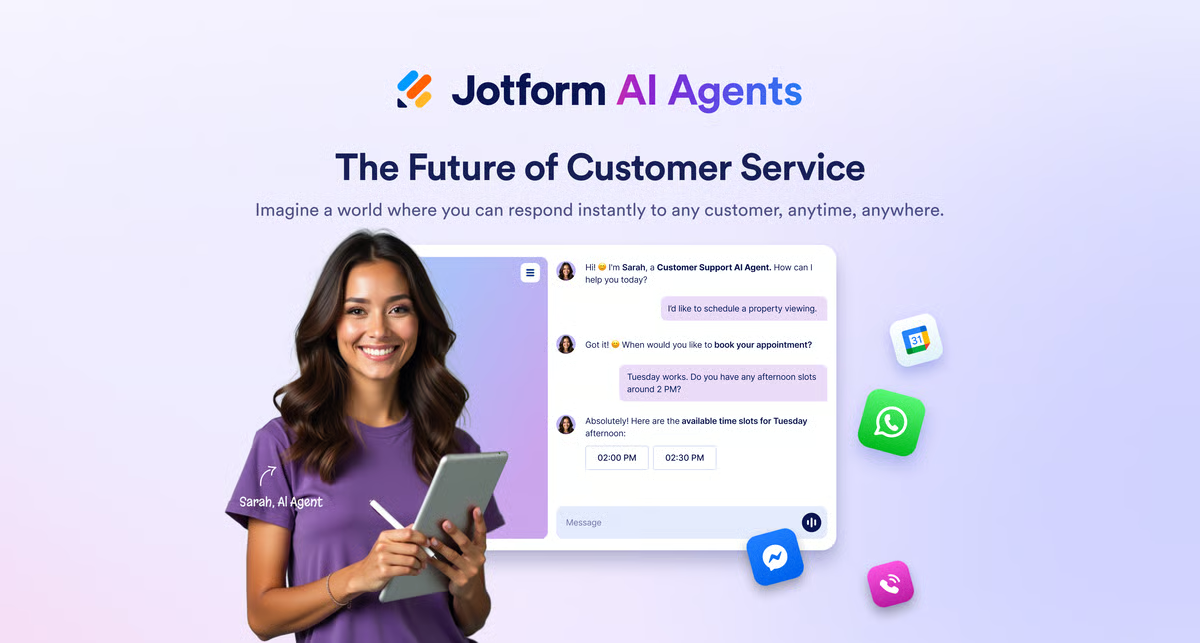
Many reviewers pointed out that Jotform AI Agents' greatest strength lies in its native connection to Jotform's database and automation tools. The agents can gather form inputs, qualify leads, and trigger conditional workflows instantly. Teams appreciated how responses are stored, analyzed, and visualized automatically within the Jotform environment. Reviewers said this tight integration helps them turn voice or text interactions directly into actionable data, streamlining both reporting and next steps without any additional tooling.
The platform also integrates smoothly with CRM and collaboration tools like HubSpot, Slack, and Google Workspace. 89% of G2 users agree that the integration capabilities are great. Users praised these connections for eliminating manual data transfer and improving workflow visibility. Several noted that integrating agents with existing forms and calendars allowed them to automate appointment bookings and support ticket routing with minimal effort and without disrupting existing processes.
Reviewers highlighted how the assistants adapt to context, enabling personalized interactions with customers. Businesses use it to tailor responses based on form inputs, previous interactions, or stored data, which improves response accuracy and customer satisfaction. For teams handling repeat interactions or structured workflows, this context awareness directly reduces the number of redundant exchanges and keeps conversations moving toward resolution.
Jotform AI Agents are built around the Jotform ecosystem, which means teams that need deep API-level orchestration or highly bespoke conversational logic will find the customization options limited. For existing Jotform users who want to automate workflows quickly without engineering overhead, this tight ecosystem focus is precisely what makes it so efficient and fast to adopt.
The platform's voice capabilities prioritize natural tone and responsiveness over studio-grade tuning or fine-grained voice control, which can feel restrictive for teams with advanced multilingual or voice customization requirements. For most day-to-day customer workflows such as intake, FAQs, and bookings, this approach keeps conversations smooth and easy to manage without requiring specialized setup or ongoing maintenance.
Overall, Jotform AI Agents bring no-code intelligence to voice and chat automation, enabling teams to engage customers, collect data, and streamline workflows with minimal effort.
“I really enjoy using Jotform AI Agents because they support the Hindi language, which helps us connect with more users. I find the training process to be easy, allowing my team to set up the agents quickly. The beautiful platform UI and UX enhance my experience, and the integration process is smooth, letting me manage website, WhatsApp, and Instagram from one place seamlessly. I appreciate that the same agent can integrate with multiple channels, which is very effective and easy to use. Switching from Tidio to Jotform AI Agents resulted in faster response times, better lead collection, and improved customer engagement. The initial setup was smooth and easy, better than other options I've tried.”
- Jotform AI Agents review, Nitesh R.
“The issues I've run into are, you know, you have to test a lot on the same sort of questions, and you have to provide more guidelines than I would think it would need. For example, we have a form called the Parent/Guardian Consent form. When I asked an agent who had a list of the forms for the "parent consent form" (and not the Parent/Guardian consent form), it could not give me information on the form. I had to specifically add the wording for "parent consent form" to be used interchangeably with "Parent/Guardian Consent Form." If the reading of documents and providing or understanding context improves, I think that'll make the AI agents perform better."
- Jotform AI Agents review, Mark B.
Discover top voice recognition software on G2. Find the most accurate and scalable tools for speech-to-text and voice-enabled applications.
Kore.AI is built for enterprises that want conversational AI to feel dependable at scale. As I worked through enterprise-focused tools in this category, Kore.AI stood out for how deliberately it’s designed around scale and control rather than just ease of use. Instead of juggling separate bots by channel, teams design once and deploy across voice, chat, web, and mobile, with the governance, security, and analytics leaders expected in regulated industries. The draw isn’t just automation; it’s how Kore.AI keeps context across journeys, plugs into core systems like CRM and ITSM, and turns high-volume requests into consistent, measurable outcomes for customers and employees alike.
G2 reviewers consistently praise Kore.AI for its omnichannel orchestration. Users note that a single assistant can be deployed across voice, chat, web, mobile, and social media without building separate bots for each channel. Enterprise users highlighted how this consistency improves both customer experience and internal support efficiency. Reviewers also emphasized that Kore.AI’s automation engine handles high call volumes seamlessly, maintaining conversational continuity and accuracy across diverse interaction types.
A recurring theme across G2 reviews is Kore.AI’s industry-leading natural language capabilities. What I find especially valuable here is how often users talk about real-world complexity rather than simple queries. Reviewers describe how its NLU models understand complex queries, intent variations, and regional dialects. Many users cited its ability to interpret context across multi-turn conversations, keeping responses relevant even when topics shift. In enterprise use cases, this context retention helps streamline customer journeys by eliminating redundant questions and minimizing handoffs to human agents.
Non-technical users frequently mention that Kore.AI’s visual bot builder makes it easy to design and modify conversational flows. G2 reviewers said the drag-and-drop interface allows teams to quickly prototype new intents or workflows without coding. They also appreciated the platform’s modular templates, which shorten time-to-launch for common scenarios such as banking transactions, service ticketing, or HR inquiries. According to reviews, this usability enables faster iteration and reduces dependency on development resources.
Recent reviewers have highlighted Kore.AI’s integration of generative AI features, which enhance flexibility in response generation and personalization. What stands out to me here is how this extends beyond just automation into more adaptive interactions. The platform also connects with leading CRMs, ERP systems, and collaboration tools, including Salesforce, ServiceNow, Microsoft Teams, and Zendesk. Users found these integrations particularly valuable for creating connected workflows where assistants can trigger or update records in real time. Reviewers also appreciated the prebuilt connectors and open APIs, noting that these reduce deployment complexity while maintaining enterprise-grade data security.
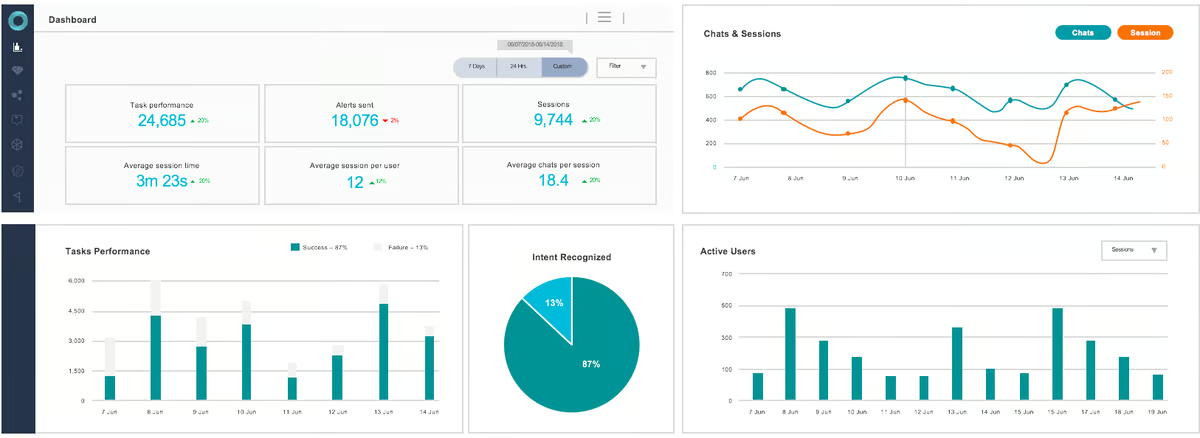
Kore.AI’s analytics and performance dashboards earned strong praise for providing granular insights into customer sentiment, intent accuracy, and automation ROI. The reporting system is regarded as comprehensive yet easy to interpret, helping leadership teams evaluate performance and efficiency across large deployments. Additionally, compliance-conscious organizations valued Kore.AI’s strong security and governance features, including role-based access controls and detailed audit logs.
Kore.AI's advanced configuration options can feel overwhelming for new users approaching the platform for the first time. The sheer number of settings, permissions, and routing controls requires time to navigate before teams feel confident. For enterprises managing large-scale operations across multiple departments and channels, this same depth of configuration is what enables the precise governance and control that high-volume environments demand.
Getting Kore.AI fully operational requires meaningful coordination across IT and business teams, particularly when connecting to legacy systems or complex enterprise stacks. This upfront investment in planning and cross-department alignment is real and should be factored into the implementation timeline. For organizations where long-term stability, compliance, and scalability are the priority, reviewers consistently describe this structured setup process as what underpins the platform's reliability at scale.
The bottom line is that Kore.AI combines powerful conversational intelligence, generative AI, and enterprise integration to deliver scalable automation across industries. Its NLU accuracy and governance capabilities make it a standout choice for organizations seeking to modernize communication at scale, especially when consistency and control are just as important as capability.
“It offers no-code, drag-and-drop features, along with extensive support for deploying the app across various channels. AI is smart enough to understand messy, natural language rather than just acting like a basic FAQ bot. The ROI is clear: it deflects a ton of manual support tickets, making the investment well worth it for any team looking to scale. The training support was amazing."
- Kore.AI review, Achyuth K.
“While Kore.AI is a powerful platform, it does come with a few drawbacks. The most notable is its steep learning curve—especially for users who are new to conversational AI or enterprise-level platforms. Despite offering a low-code interface, mastering the full feature set (like advanced NLP configurations, custom integrations, and conversation flows) can take time and often requires technical expertise."
- Kore.AI review, Chetan P.
Got more questions? G2 has the answers!
For hands-free task management, tools like Synthflow and Retell AI stand out for automating end-to-end voice workflows, from capturing inputs to triggering actions. Jotform AI Agents are especially useful when tasks involve forms, approvals, or data collection, while Smith.ai combines AI with human support for scheduling, intake, and call handling.
Field service teams benefit from tools that handle scheduling, updates, and customer communication without manual input. Smith.ai is commonly used for call answering and appointment booking, Retell AI helps automate reminders and inbound triage, and Jotform AI Agents streamline data capture and workflow automation directly from voice interactions.
For customer service, Genesys Cloud CX is a leading choice with omnichannel routing, analytics, and enterprise-grade automation. Retell AI supports inbound and outbound voice agents, while Jotform AI Agents help automate ticket creation and workflows. Smith.ai is also widely used for 24/7 call answering and intake.
If your goal is to turn conversations into actions, Retell AI and Synthflow are strong options for building voice-driven workflows that trigger downstream tasks. Jotform AI Agents excel when workflows involve forms, approvals, or data collection, while Genesys Cloud CX standardizes automation across multiple channels at scale.
For workplace automation, Retell AI and Synthflow help teams automate repetitive voice workflows, while Jotform AI Agents connect conversations to internal processes like approvals and ticketing. Enterprises often rely on Genesys Cloud CX to manage these workflows with added governance, reporting, and scalability.
For transcription and conversation insights, Genesys Cloud CX offers built-in transcription with sentiment and topic analysis. Retell AI supports real-time transcription within voice workflows, while Smith.ai provides call recording and searchable transcripts for business use cases.
Genesys Cloud CX offers deep CRM integrations, especially with platforms like Salesforce, enabling routing, transcription, and analytics within existing workflows. Retell AI and Synthflow provide API-based integrations for connecting with CRMs, while Jotform AI Agents sync conversation data with forms and connected tools.
For advanced natural language processing, Kore.AI stands out with strong NLU capabilities designed for enterprise use cases. Retell AI leverages modern LLMs for more conversational interactions, while Synthflow offers accessible NLU features within a no-code environment.
ElevenLabs leads in language coverage for text-to-speech and dubbing, supporting 30+ languages with consistent voice quality. Synthflow and Jotform AI Agents also offer multilingual support for voice workflows, while Genesys Cloud CX supports multiple languages for enterprise voice and contact center environments.
For enterprise productivity, Genesys Cloud CX is a strong foundation with omnichannel orchestration, analytics, and governance. Many organizations complement it with Retell AI for specialized voice workflows and ElevenLabs for high-quality voice generation and localization.
Assistants aren’t just novelties anymore; they’re how people get things done. As expectations rise for instant answers, hands-free workflows, and natural conversations, the best AI voice assistants are less about clever commands and more about delivering trust through accuracy, context, and seamless integrations.
The platforms featured here: Retell AI, Genesys Cloud CX, Synthflow, Jotform AI Agents, ElevenLabs, and Kore.AI stood out in user feedback for their real-world impact. Whether it’s contact-center automation, 24/7 receptionist coverage, or multilingual outreach, each of these tools helps teams reduce manual work and create consistent experiences across channels.
If your customer interactions still depend on long queues or manual call handling, it’s time to upgrade. Modern voice assistants move you from reactive support to proactive, conversational service, improving satisfaction while lowering costs and operational drag.
Want to power these assistants with natural, studio-quality voices? Explore our guide to the best text-to-speech software.
.png)
Recently updatedFall 2026 Grid® Report · August 25, 2026 This guide was last updated on...
 by Preksha Buttan

Recently updatedSummer 2026 Grid® Report · Published May 26, 2026 This guide was last...
 by Yashwathy Marudhachalam
Key Findings According to G2's 2025 State of AI in AI Voice Assistants Survey, and based on...
 by Nathan Calabrese