

This guide was last updated on January 27, 2026. A newer report has since been published. The tools below reflect the scores from G2's Summer 2026 Grid® Report.
Based on verified G2 reviews and the latest Grid® placement.
*Liked and disliked highlights are summarized from verified G2 user reviews.
The tools below have also been exhaustively tested and evaluated, and continue to hold their place among the best AI Agents for Business Operations on G2.
Managing business operations today goes far beyond answering messages or organizing tasks. Most teams I talk to are juggling customer inquiries across multiple channels, dealing with repetitive work that drains hours each week, and trying to keep workflows moving as demand grows.
That’s why so many operators and small business teams are now turning to AI agents for business operations, not as experimental tools, but as practical systems that can take on real operational work at scale. Many started with spreadsheets, scattered apps, or manual follow-ups, only to hit a breaking point as their business expanded. That’s usually when they begin looking for AI agents that can actually reduce workload, speed up response times, and handle routine tasks without constant oversight.
In my research, I found that conversational and voice-based agents are now automating hundreds of interactions, from scheduling and follow-ups to answering FAQs and collecting information, freeing teams to focus on work that truly requires human attention. Across the thousands of G2 reviews I analyzed, the same themes kept showing up: natural conversation quality, dependable workflow automation, strong integrations, and reliable day-to-day performance.
To help you choose the right fit, I’ve curated the six AI agents that consistently stand out in 2026, tools that deliver meaningful automation, adapt to real workflows, and help teams operate faster with far less manual effort.
*These AI agents for business operations are top-rated in their category, according to G2's Fall 2025 Grid Report. I’ve also included their monthly pricing to facilitate easier comparisons for you.
Recommended reading: Deploying AI agents at scale? Learn how AI API pricing impacts your overall operating costs.
AI agents have quickly become one of the most practical additions to modern business workflows. Rather than acting as simple assistants, these tools are increasingly used as operational partners that help automate conversations, streamline support, qualify leads, and keep business processes moving without constant supervision. As adoption grows across teams and industries, AI agents are proving their ability to bring greater consistency, speed, and efficiency to everyday operations. That momentum also reflects how AI agents are delivering value for business operations.
During my in-depth evaluation of today’s AI agent platforms, I found that the best ones go far beyond simple chat or voice automation. They adapt to real customer conversations, integrate with the systems teams already use, and handle tasks that used to demand hours of manual effort. Whether it’s scheduling appointments, responding instantly to inquiries, routing conversations to the right teammate, or collecting the data a business needs, AI agents now play a central role in using AI to enhance business operations across teams of all sizes.
And this surge in usefulness reflects a much bigger shift I’m seeing across real business teams, not just market forecasts. According to G2 Data, 40% of companies now have an AI agent budget of over $1 million, and 1 in 4 large enterprises plan to spend $5 million or more on AI agents over the next 12 months. That level of investment signals a clear transition: AI agents are no longer experimental tools. They’re becoming a core operational layer for businesses that want faster response times, more consistent workflows, and scalable automation across teams .That trend also lines up with broader buyer sentiment around AI agent, based on G2 data.
“I am a small business owner of a retail brand, and together with my team, I am exploring the best AI agent platforms to automate workflows and streamline business operations using conversational intelligence.”
Read full thread →I started by reviewing G2 Grid Reports to shortlist the top AI Agents for Business Operations platforms, then spent weeks digging through verified user reviews to understand how each tool performs in real workflows. I focused on the features that matter most to operators: conversation quality, workflow automation, setup experience, integrations, and how well each agent reduces repetitive manual work.
To get a clearer picture of day-to-day performance, I spoke with professionals who use these tools across support, operations, and admin roles. Their firsthand experiences helped me see where each platform excels, where it may fall short, and which use cases it’s best suited for.
I then validated those insights against G2 Data and category rankings to make sure everything aligned with broader user patterns. The screenshots featured in this article may be a mix of those obtained from the vendor’s G2 page or from publicly available material.
When I evaluate AI agents, I’m not just looking for flashy features; I am looking for tools that actually step in and lighten the operational load. After evaluating 12 different AI agent platforms and narrowing them down to the 6 that genuinely delivered, I found myself returning to the same core criteria.
These factors helped me understand where different tools stand, something that’s becoming increasingly important as more organizations look to AI strategy consulting to guide their automation roadmap.
Considering all of this, I reviewed more than 12 AI agent platforms over the past few weeks, and the 6 included here are the ones that truly stood out to me. They consistently delivered strong conversational performance, practical automation, and reliable day-to-day value, the kind of tools that don’t just promise efficiency but actually make business operations smoother.
The list below contains genuine user reviews from AI Agents for Business Operations. To be included in this category, a solution must:
*This data was pulled from G2 in 2025. Some reviews may have been edited for clarity.
Something I consistently see highlighted in Microsoft Copilot reviews is how naturally it integrates into their existing Microsoft 365 workflow. People describe it as something that seamlessly integrates into their workspace, appearing wherever they need it, whether that’s Outlook, Word, Excel, Teams, or even across custom-built internal applications.
According to G2 Data, both the ease of setup and ease of use are rated at 92%, which supports why many enterprise teams now view Copilot as one of the best AI agent solutions for enterprise task automation, particularly for automating writing, summarization, research, and repeatable productivity workflows. That kind of frictionless integration becomes the foundation of the entire experience.
Building on that, reviewers constantly return to how well Copilot handles real work, writing emails, refining documents, generating summaries, and helping them communicate more clearly. Many mention that it makes them a better communicator, offering edits, rewrites, and explanations that feel practical rather than generic. This is also where personalization shows up strongly, with 91% of reviewers noting that Copilot tailors responses based on context. It’s clearly a major reason people trust it for day-to-day tasks, especially when they're deep in a project and need fast, reliable language support. Great for organizations looking for AI automation for business that streamlines document creation, research, and routine tasks.
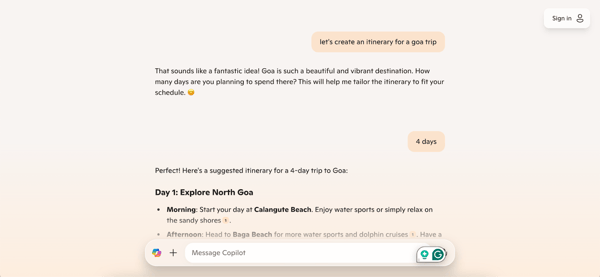
G2 reviewers highlight its strength in automating communication, summarization, and document creation, making it a dependable productivity partner for most business users. However, some reviewers mentioned that Copilot feels less capable in highly specialized or deeply technical work, such as generating complex code or performing advanced development tasks. This makes it better suited for refining and expediting everyday operations rather than serving as a full-scale engineering assistant, a distinction that helps teams match Copilot to the right use case rather than expecting end-to-end technical automation.
Many G2 users also appreciate how Copilot simplifies report generation and helps create visuals within Word, Excel, and PowerPoint. That said, a few reviewers noted that it may lag behind competitors in producing highly customized visual outputs, such as intricate graphs, detailed tables, or advanced data layouts. This matters most for analytics-heavy or visualization-focused roles, while for most users who rely on Copilot for text, summaries, and everyday reporting, it remains a reliable and time-saving AI assistant that fits naturally into existing workflows.
All things considered, Microsoft Copilot shines for businesses already invested in Microsoft 365 who want an AI agent that feels native, context-aware, and genuinely helpful in speeding up everyday work. It’s the kind of tool that blends into your routine and supports you across writing, research, coding, and operational workflows without disrupting how you prefer to work.
“I love Microsoft Copilot because it is a comprehensive tool that supports my role as a technical recruiter in numerous ways. It effectively helps me understand complex technical job descriptions, craft compelling selling summaries for candidates, and conduct thorough research on a multitude of technical skills. Its capability to generate concise Boolean search strings is a standout feature, significantly improving my workflow. Being free and providing accurate, factual responses according to my prompts adds immense value, allowing me to interact with it continuously throughout the day. The synchronization feature between my desktop and mobile devices ensures seamless access to my conversations and data across platforms, enabling versatility when I'm away from my keyboard. Additionally, I appreciate how easy it was to set up; simply downloading, installing, and creating an account allowed me to start using its wide-ranging functionalities immediately. These features collectively elevate my efficiency and effectiveness, making Microsoft Copilot an indispensable companion in my professional toolkit.”
- Microsoft Copilot review, Thang S.
“At times, I find that Copilot’s responses can be less adaptable or imaginative than those from Perplexity or ChatGPT, particularly when dealing with topics that require more nuance or context. Adjusting the tone or tailoring the output often requires a bit more work as well.”
- Microsoft Copilot review, Paul B.
Want to scale your automation beyond AI agents? Check out this quick guide to business process management and learn how to streamline end-to-end workflows in just five steps.
What stands out most from reviewers is how quickly Synthflow helps them turn an idea into a working AI agent. People talk about signing up, opening the dashboard, and being able to build their first voice workflow in a matter of hours rather than days. According to G2 Data, ease of use (86%) and ease of setup (85%) reflect exactly what reviewers describe: a clean interface, straightforward configuration, and a builder that doesn’t require technical expertise. For many small teams, that immediate sense of momentum is what makes the platform feel so productive from day one.
As reviewers spend more time with Synthflow, they focus heavily on how natural the conversations feel. Instead of the rigid, menu-driven phone trees they’ve dealt with before, they describe agents who speak fluidly, respond in real time, and adapt well to the way callers phrase their questions. This is a major reason small teams consider Synthflow among the best AI tools for managing repetitive operational tasks, since it reliably offloads dozens, sometimes hundreds, of daily routine calls such as appointment booking, lead qualification, or FAQs without sacrificing caller experience.
Another recurring theme in the reviews is how easily Synthflow fits into the tools businesses already use. Many users talk about connecting it to their CRM, scheduling tools, or contact platforms with minimal friction. Rather than forcing teams to rethink their workflows, Synthflow tends to slot into the systems they already rely on, which is one reason it resonates so strongly with small businesses, a group that makes up 92% of its user base. Because it integrates smoothly into these existing setups, teams can automate call handling without rebuilding their processes or managing complicated data flows.
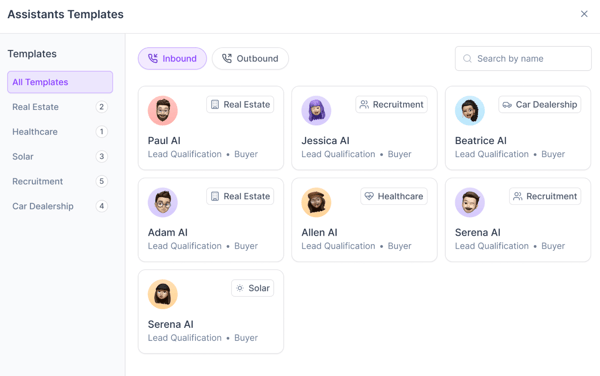
Synthflow is often chosen for how quickly teams can launch voice automation, thanks to its no-code setup and natural conversational experience. As call traffic increases, though, some G2 reviewers point out that call-minute limits can start to feel tight, especially for teams handling higher volumes day after day. For small to mid-sized teams with steady, predictable demand, this typically isn’t an issue, but larger call centers may need to plan usage more carefully.
The platform’s no-code builder is another area users frequently praise, making it easy to design and deploy voice workflows without technical effort. When workflows become more complex, however, a few users note that achieving deeper customization can require extra work or trade-offs. In practice, Synthflow shines most in straightforward use cases, such as appointment scheduling, lead qualification, and routine customer calls, where its strong onboarding and responsive support help teams move quickly.
Looking at the big picture, Synthflow shines as a voice AI platform for small businesses that want fast setup, natural-sounding agents, and seamless integrations that easily fit into their existing tools. It brings meaningful efficiency to high-volume, repetitive call workflows, and does so without requiring technical teams, heavy customization, or lengthy implementation cycles.
“As someone who just signed up for Synthflow.ai, I have to say I am seriously impressed. My initial experience, right from the registration process, was incredibly smooth. It was fast, painless, and immediately gave me access to the platform without any friction. That first step is often a hurdle, and Synthflow made it feel like walking through an open door.
Once inside, the dashboard is clean and intuitive. For a tool this powerful that’s dealing with complex conversational AI and voice flows, I expected a steep learning curve, but the system is genuinely user-friendly. The clean layout and templates give me confidence that building my first voice flow will be incredibly simple. The ability to quickly select an AI voice and immediately hear how clear and natural it sounds is honestly a game-changer.
The potential here is huge. I’m already picturing how much time and resources this platform will save us. It feels less like a complex piece of software and more like a smart partner ready to handle tedious customer interactions. I came looking for a solution, and within the first hour of using it, I feel like I've found a whole ecosystem.
I haven't spent a lot of time so far, but if this level of ease and quality holds up, Synthflow.ai is definitely going to become an essential tool. Highly recommended for anyone needing powerful, yet simple, AI voice automation!”
- Synthflow review, Gary S.
“The platform would benefit from more detailed documentation and advanced examples, especially for users building more sophisticated automations. Some integrations feel a bit limited or require workarounds that slow things down. The analytics could also be more robust to give deeper visibility into call performance and agent behavior without exporting data elsewhere. While the core system is strong, rounding out these areas would make Synthflow even more powerful for long-term use”.
- Synthflow review, Travis W.
Want context on where AI agents fit in the bigger picture? Explore the latest data on how many companies are using AI, and what they're using it for.
Podium’s biggest strength is its ability to centralize customer communication into a single, clean, and unified space. Instead of jumping between email, texts, missed calls, and multiple apps, the platform pulls everything together, allowing teams to manage real conversations from a single hub. This simplicity reinforces why many businesses view Podium as one of the top AI automation platforms for cross-department workflows, especially since sales, support, and operations teams can all collaborate inside a shared communication hub. With messages, reviews, and follow-ups living in one place, teams avoid duplicated effort and maintain faster, clearer responses across departments.
As users move deeper into the platform, they highlight how well it supports quick and reliable customer engagement. Many say that messaging, requesting reviews, and following up become far easier because everything is accessible, whether they’re in the office or on the go.
This flexibility closely aligns with Podium’s high scores in personalization and natural language understanding, both exceeding 90% on G2, and it enables teams to maintain timely communication without unnecessary steps. When customers need support or updates, Podium gives businesses a way to stay consistently present and responsive.
Team collaboration is another area where Podium stands out. Reviewers point out that coworkers can jump into conversations, hand off tasks, and stay aligned because everything lives in one shared space. Podium’s human-in-the-loop rating of 93% reflects this strength. The platform helps prevent missed messages or duplicated effort, making it easier for teams to coordinate and deliver smooth, unified customer service.
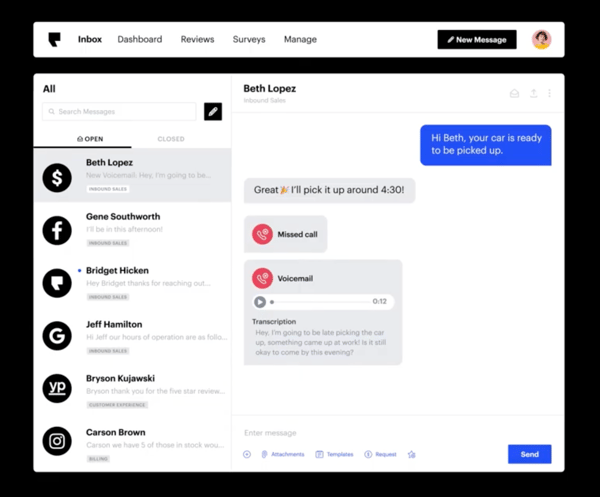
Podium’s biggest advantage is how it centralizes customer conversations, reviews, and messaging into a single platform that’s easy to manage day to day. As teams start layering in more tools, though, some G2 reviewers note that integrations can require extra time and coordination, particularly for mid-market businesses with more complex systems. Smaller teams with leaner stacks usually experience a faster setup, and Podium’s strong quality-of-support score (89%) helps smooth out any bumps along the way.
Teams also value Podium’s mobile-first experience, which makes responding to customers on the move simple and convenient. In high-volume environments, however, a few users mention that mobile notifications don’t always arrive instantly, which can affect teams that depend on real-time alerts. For most small and mid-sized businesses, these delays tend to be minimal and don’t outweigh Podium’s overall efficiency in keeping everyday communication organized.
Ultimately, Podium is most effective for small and mid-sized businesses that depend on fast and organized communication with their customers. It turns scattered conversations into a streamlined workflow, making it easier for teams to respond promptly, collaborate efficiently, and maintain strong customer relationships.
“I appreciate Podium for its ability to save our business time by handling the initial outreach to customers and following up on those who don't respond, allowing us to focus on more intricate tasks. The inclusion of AI to initiate customer interactions is particularly beneficial, as it relieves some of the workload and ensures prompt contact with both potential and existing clients. Furthermore, the fantastic support from Podium's team stands out. They are quick to address any questions or changes we need, ensuring that any concerns are handled effectively. This efficiency and responsiveness from the support team greatly enhance our experience with Podium. Additionally, I find the initial setup of Podium to be incredibly easy, which speaks to the product's user-friendliness and accessibility”.
- Podium review, Erinn L.
“Setting up the integrations with your CRM or Point of Sale (POS) system can be a multi-week process. If the integration isn't "native," you might find yourself doing more manual work than promised during the sales demo.”
- Podium review, Jadeisabella M.
If AI agents are helping you handle operations, take your efficiency even further with this 8-step guide to building smarter, automated workflows.
ClickUp’s biggest strength is the way it brings customization to the center of everyday work. G2 reviewers repeatedly describe how easy it is to tailor tasks, workflows, and project spaces to match exactly how their team operates. They often point out that they can structure projects however they want, sorting, grouping, filtering, and adjusting views until everything feels intuitive.
According to G2 Data, ClickUp meets requirements at 90%, which mirrors the level of flexibility users praise throughout the reviews. Instead of forcing teams into rigid structures, the platform adapts to them, which is why many people say they can manage everything from step-by-step tasks to large cross-team projects without losing clarity.
Reviewers often highlight how effectively ClickUp improves daily operations. Many mention that it keeps tasks organized across teams, minimizes back-and-forth communication, and provides a reliable place to check progress. This is why growing teams often describe it as one of the best AI tools for business operations in a broader sense, for reducing manual workload.
This day-to-day efficiency is strengthened by ClickUp’s strong personalization rating of 97% on G2, one of the highest in the category, showing how well the platform adjusts to individual and team needs. Whether it’s updating tasks, reviewing project stages, or collaborating on deliverables, users repeatedly emphasize that the platform brings order to work that would otherwise feel scattered.
Another strength reviewers focus on is ClickUp’s collaborative environment. They talk about how teammates can easily share updates, assign tasks, and communicate directly within the platform, which reduces the need for long email threads or multiple tools. The Conversation Editor, rated 94% on G2, supports this collaborative flow, ensuring that project discussions remain organized and connected to the work itself. For smaller teams or growing businesses that rely heavily on internal coordination, this built-in collaboration becomes a core part of why ClickUp helps them move faster and stay aligned.
ClickUp stands out for its flexible customization and all-in-one workspace, which many teams rely on to shape projects and workflows around how they actually work. That same depth, though, means fast-moving teams occasionally notice small interruptions, such as refresh delays or minor update issues, particularly when managing complex, real-time projects. For smaller teams or those with lighter workloads, these moments tend to be less disruptive.
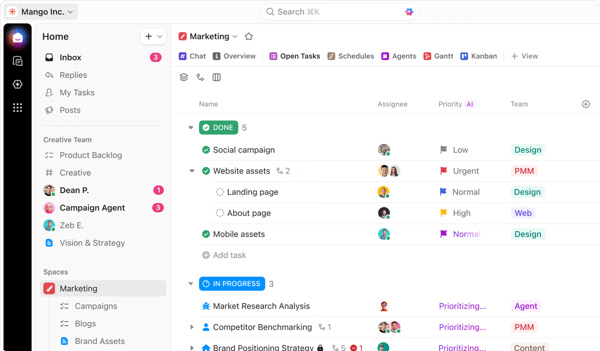
Users also appreciate ClickUp’s robust notification system, which ensures visibility across projects. Still, a few G2 reviewers noted that alerts, especially email notifications, can stack up quickly for teams managing high task volumes. This makes ClickUp a great fit for teams that prefer structured organization and are comfortable fine-tuning their notification settings to match their communication style.
Looking at it from end to end, ClickUp is best suited for small and growing teams that need a flexible, centralized workspace to manage tasks and collaborate with greater clarity. It gives users the structure they need to stay organized while still allowing them to customize their workflows at a level that many other platforms can’t match. For businesses looking for a single place to plan, track, and coordinate their work, ClickUp consistently proves to be a dependable choice.
“ClickUp is an interesting platform that supports productivity, both individually and within a team. With this tool, I can organize not only my work but also my personal life. I found it quite intuitive, featuring a pleasant and user-friendly interface. It’s simple to add reminders, appointments, meeting plans, documents, and generally manage daily activities directly from the dashboard.
Additionally, setting up and integrating ClickUp with other tools and apps is straightforward. So far, I haven’t needed to contact the Customer support, but I have read that many users have reached out without any issues.
Since downloading the app, I’ve been using ClickUp regularly, adding new notes and tasks almost every day, mostly to help organize my personal life”.
- ClickUp review, Osvaldo B.
“The interface can feel challenging for new users, with so many features competing for attention. The learning curve is noticeable, and onboarding requires time and guidance. Additionally, performance issues occasionally arise—certain views can be slow to load, and syncing across devices isn’t always seamless. More intuitive navigation and a lighter UI would make the experience smoother and more accessible for everyone.”
- ClickUp review, Om J.
Looking for AI agents built specifically for customer conversations and lead generation? Compare the best conversational marketing software for AI-powered engagement, routing, and conversion workflows.
Retell AI’s core strength lies in its ability to handle voice conversations naturally. Reviewers consistently praise its realistic AI voice assistant, smooth voice quality, which makes interactions feel human and responsive. Because it automates such a high volume of real-time calls with strong conversational accuracy, many teams consider it one of the top AI-powered business operations automation tools, especially for companies that rely heavily on voice communication to manage bookings, support inquiries, or onboarding workflows.
As reviewers spend more time with the platform, they highlight how easy it is to work with. Many describe it as simple, intuitive, and approachable, even for those who aren't technical. This aligns with its high ease-of-setup and ease-of-use ratings, both around 90% according to G2 Data. Users emphasize that they can build or adjust a voice agent quickly and don’t feel challenged by the interface, which makes Retell AI accessible for small teams that need powerful results without a steep learning curve.
Another common theme in the reviews is the platform's flexibility in terms of integration and voice configuration. Users appreciate being able to integrate call flows or choose from different voice options without complicated steps, and they often note that the platform seamlessly integrates into their existing workflows. With an integration score of 86% on G2, Retell AI appears to work smoothly with the tools and systems that small businesses already rely on, reducing friction and helping teams automate calls immediately.
Retell AI stands out for its natural, human-like voice quality and fluid conversational flow, which many teams rely on to automate real-time customer interactions at scale. That same real-time capability, though, means costs can rise with higher call volumes, something fast-growing or call-heavy teams may notice more quickly. For smaller businesses or teams with predictable, moderate call activity, this is typically far less of a concern.
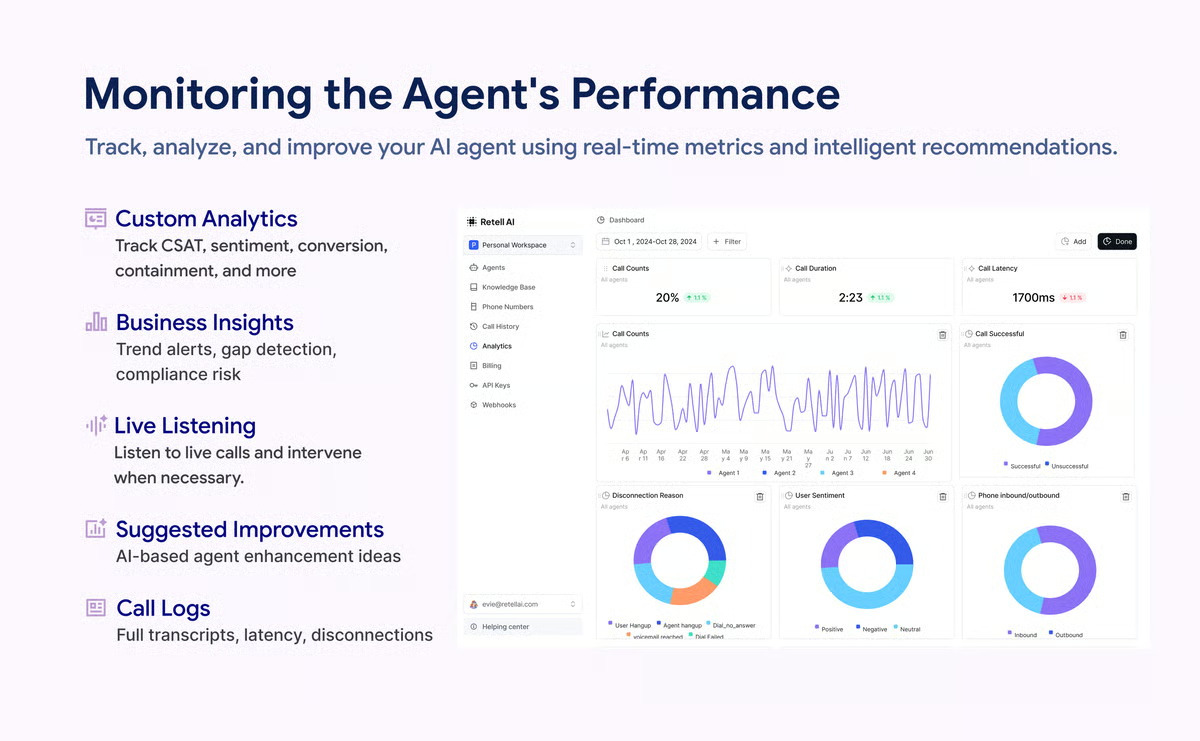
It is also valued for its simple, intuitive setup that helps teams get voice automation up and running quickly. That streamlined approach, however, can feel limiting for teams that need advanced phone number support, complex routing, or highly customized assistant configurations. For everyday call automation and standard workflows, most small businesses find the available flexibility more than sufficient.
All things considered, Retell AI works best for small businesses that want fast, natural-sounding voice automation without heavy setup demands. Its realistic voices, simple workflow, and reliable integration make it a strong fit for teams looking to improve call handling and deliver smooth, responsive customer interactions.
“The platform is incredibly intuitive to use, even for someone without a technical background like me. I was able to set up and deploy AI voice agents without needing to write code or constantly bug our developers. The voice quality is natural, and the conversations flow smoothly, which is crucial for our customer interactions. Plus, their documentation is clear, and their support team has been responsive whenever I've run into questions.”
- Retell AI review, Ashish G.
“I am extremely challenged with Retell AI because of the issue with saving custom function names. Despite my persistent and time-consuming efforts, I have been unable to save the names, which is incredibly irritating. It has severely affected my patience and made progress difficult, especially considering I rely on custom functions for my work with AI agents for clients. This problem is so disruptive that it makes me reconsider recommending the product, as it is a major source of dissatisfaction and inefficiency in my workflow.”
- Retell AI review, Muhammad W.
Sobot Omnichannel Suite centralizes chat, email, social, and voice, which is why it belongs on this list as a true omnichannel automation platform. What stands out most in the reviews is how reliably Sobot brings every customer interaction into one place. Teams describe it as the system that finally replaces scattered inboxes and disconnected tools with a single, steady workspace for managing email, chat, social messages, WhatsApp, and voice support. Once agents understand the layout, day-to-day work becomes noticeably smoother, an experience that aligns with Sobot’s 99% ease of use rating on G2. Many reviewers noted that the platform performed well during the busiest seasons of their year, whether it was peak travel months, banking surges, or retail holidays.
The intelligence behind the platform is another recurring theme. Reviewers describe how the AI handles multilingual conversations naturally, manages routine questions with confidence, and can even support technically specific queries when needed. Examples range from identifying missing database indexes to responding in regionally appropriate French, all supported by Sobot’s 99% natural language understanding score. And when an agent needs to step in, the transition feels seamless.
Many users also point to how well Sobot supports structured, multi-team operations. Whether it's coordinating across QA, R&D, operations, finance, or customer support, the platform creates a shared environment where work feels more organized and traceable. For companies operating in regulated sectors, this structure is even more important. Reviewers repeatedly mention Sobot’s reliability and the responsiveness of its support team, a sentiment reflected in its 98% quality of support rating. Teams appreciated how Sobot guided complex integrations, fine-tuned chatbot flows, or helped adjust tone and language to better reflect their brand.
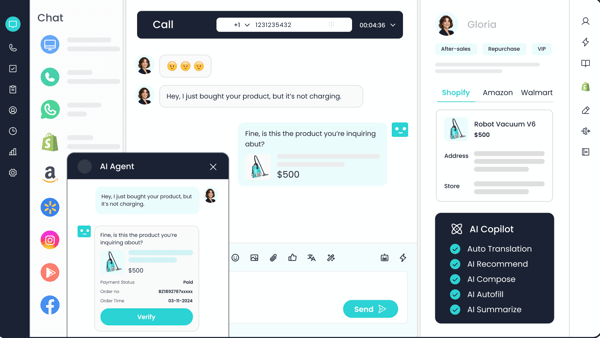
There are, however, a couple of things teams keep in mind. Building advanced workflows or tailoring intricate automation rules often requires time, especially for organizations without a dedicated technical admin. It’s manageable, but it means the platform works best for teams that are prepared to invest in a thoughtful setup.
Several reviewers also wished that the analytics tools were more customizable, particularly when they required deeper segmentation or industry-specific reporting. These points tend to matter most for data-driven organizations that rely heavily on fine-grained operational insights.
Looking at the big picture, Sobot comes through as a platform that strengthens how teams manage conversations across channels. It lightens the load of repetitive work, keeps departments aligned, and gives agents the visibility they need to respond quickly and confidently. For organizations seeking an AI-powered system that can unify high-volume communication into a controlled and consistent workflow, Sobot naturally fits into this category.
“As an executive sponsor overseeing our customer experience transformation, what stands out most is Sobot’s consistent stability and seamless integration across channels.
The platform’s intelligent routing, automation workflows, and real-time dashboards help us maintain high operational efficiency while ensuring personalized service. The ability to track team performance, customer satisfaction, and interaction trends in one place has elevated our decision-making and accelerated service delivery.”
- Sobot review, Olivia R.
“The admin interface could use more guided setup for complex workflows. It’s functional, but the initial configuration requires some exploration. Once set up, though, everything runs smoothly with minimal intervention”.
- Sobot review, Neel S.
Have more questions? Find more answers below.
AI business agents are increasingly used to improve productivity by reducing manual work, streamlining communication, and enabling faster decision-making.
Microsoft Copilot and ClickUp are commonly rated highly for day-to-day productivity improvements. Microsoft Copilot enhances efficiency across emails, documents, and meetings, while ClickUp acts as an AI-powered work management agent that helps teams plan, track, and execute tasks more efficiently.
For process optimization focused on workflows, task management, and operational efficiency, ClickUp stands out. Its AI-driven task automation, documentation, and project visibility help teams standardize processes and reduce operational friction.
For conversational process optimization, such as lead handling, customer engagement, or appointment workflows, Synthflow and Retell AI are strong options, enabling businesses to automate voice and chat interactions.
Tools that quickly reduce human effort and repetitive tasks tend to deliver the fastest ROI.
Integration depth varies based on operational needs:
For end-to-end workflow automation, ClickUp is one of the strongest platforms, covering task management, documentation, approvals, and AI-assisted execution.
For conversational and voice-based automation, Synthflow and Retell AI excel at automating customer interactions, lead qualification, and support workflows.
For customer engagement and messaging automation across channels, Podium and Sobot Omnichannel Suite are well-suited for operational scalability rather than internal task automation.
After analyzing thousands of reviews and speaking with professionals who rely on AI agents every day, one thing became clear: there’s no single definition of the “perfect” AI agent, but there is a perfect fit for every team’s operational needs.
Some businesses need lifelike voice automation, others need a unified messaging hub, and many simply need a reliable way to eliminate repetitive tasks that slow their teams down. What all six tools on this list share is the ability to lighten the operational load, improve response times, and create more consistency in daily workflows.
As demand grows for AI strategy consulting and broader AI automation for business adoption, the real question isn’t whether your business should adopt AI agents; it’s which platform aligns best with your processes, team structure, and customer-experience goals. Whether you're prioritizing faster response times, stronger integrations, or the ability to automate multi-step workflows, the tools in this guide provide a solid foundation for modernizing your operations.
If you're unsure where to begin, start with the agent that solves your highest-friction workflow first. Even small automations, a faster follow-up, a smoother handoff, and a smarter voice flow can compound into meaningful time and cost savings.
Want to build a broader automation ecosystem around your AI agents? Check out the best business process management tools on G2 for platforms that help map, optimize, and automate end-to-end business workflows.


Recently updatedSummer 2026 Grid® Report · Published May 26, 2026 This guide was last...
by Yashwathy Marudhachalam

Recently updatedSummer 2026 Grid® Report · Published May 26, 2026 This guide was last...
.png) by Tanuja Bahirat
by Tanuja Bahirat

Recently updatedSummer 2026 Grid® Report · Published May 26, 2026 This guide was last...
.png) by Devyani Mehta
by Devyani Mehta