

This guide was last updated on March 30, 2026. A newer report has since been published. The tools below reflect the scores from G2's Summer 2026 Grid® Report.
Based on verified G2 reviews and the latest Grid® placement.
*Liked and disliked highlights are summarized from verified G2 user reviews.
The tools below have also been exhaustively tested and evaluated, and continue to hold their place among the best Text to Speech software on G2.
You can have a well-written script, polished visuals, and a clear message, but if the voice delivering it sounds robotic or unnatural, the entire experience falls flat. That’s a problem I kept running into while evaluating the best text-to-speech software.
Many tools promise human-like voices and studio-quality narration, but in practice, the differences between them become obvious once you start using them for real content, especially when it comes to tone control, pronunciation accuracy, scalability, and pricing.
While researching the best text-to-speech software, I looked closely at how these platforms perform using G2 data and user reviews. I compared platforms built for different use cases — creators producing marketing voiceovers, teams developing training and e-learning content, companies localizing media across languages, and developers embedding voice into applications.
The goal wasn’t simply to find tools with the most features, but to identify which platforms consistently deliver reliable voice quality, practical workflows, and predictable pricing for teams ready to invest in text-to-speech software.
What stood out to me while reviewing this category is how much expectations around text-to-speech have evolved. Teams now look for voices that sound natural across longer scripts, offer control over delivery and emphasis, and hold up in customer-facing content. That’s what I focused on for this article.
I evaluated tools that are highly rated on G2 and consistently mentioned in reviews for voice quality, usability, and reliability. The platforms in this list stand out for solving specific text-to-speech use cases effectively, whether it’s narration for marketing videos, training content, or product integrations.
*These text-to-speech tools are top-rated in their category, according to G2 Winter 2026 Grid Reports. I’ve also included their starting pricing to make comparisons easier.
Text-to-speech software used to feel like a shortcut, something you turned to only when recording a voiceover yourself wasn’t an option. That’s changed. Once I started using the right tools, text-to-speech quickly became part of my everyday workflow, especially for videos, demos, training content, and anything that needs to be published quickly and at scale.
That shift is reflected in the market itself. The global text-to-speech market was valued at around 2.83 USD Billion in 2024 and is projected to reach nearly 11.07 USD Billion by 2035, according to recent industry data.
A few years ago, slightly robotic audio might have been acceptable. Today, it isn’t. If a voice sounds unnatural or awkward over more than a few sentences, people notice immediately. The tools that work best now are the ones that hold up over longer scripts and give you meaningful control over pacing, tone, and emphasis — not just a way to read text out loud.
I also noticed how closely text-to-speech has started to overlap with video and localization workflows. Teams are using these platforms to narrate explainers, translate videos, and roll out the same content across multiple languages without re-recording everything from scratch. As voice becomes more embedded in video-first workflows, consistency and quality matter far more than raw feature lists.
For me, the best text-to-speech tools are the ones that fade into the background once they’re set up. When pronunciation is accurate, pacing feels natural, and the editor doesn’t get in the way, you stop thinking about the tool and focus on the content itself. That’s where these platforms actually save time instead of adding friction, and judging by user feedback, more teams are starting to prioritize that difference.
To build this list, I started with the G2 Grid Reports for text-to-speech software to identify products that consistently perform well across customer satisfaction and market presence. From there, I reviewed a broad set of verified G2 user reviews to understand how these tools are actually used across different teams and use cases.
I analyzed how each platform supports text-to-speech in real-world workflows, including long-form narration, video voiceovers, multilingual localization, and product or application integrations. Some tools are built primarily for creators, others for video production or enterprise development. Each product was evaluated based on how effectively it delivers voice generation within its intended context, rather than on feature breadth alone.
To further validate these findings, I used AI-assisted analysis to surface recurring themes in user feedback, focusing on voice quality, customization controls, language support, ease of use, pricing transparency, and overall reliability. The tools that made this list consistently delivered natural, usable audio while maintaining performance as usage scales.
The screenshots featured in this article may include a mix of G2 product profile page screenshots and vendor website screenshots.
As I went through G2 reviews and compared different text-to-speech tools side by side, a few clear patterns kept coming up. Users care far less about flashy demos and far more about how voices actually sound once they’re used in real content. Support for multiple languages and tools that fit naturally into existing workflows mattered much more than novelty features.
These priorities shaped how I evaluated each text-to-speech platform in this list.
I evaluated more than a dozen text-to-speech tools while researching this article, and six solutions made it to my final list. These are the platforms that consistently performed well across G2 Grid positioning, user satisfaction, and real-world text-to-speech use cases.
The list below contains genuine user reviews from the text-to-speech (TTS) category. To be included in this category, a product must:
*This data was pulled from G2 in 2026. Some reviews may have been edited for clarity.
Based on G2 Data, ElevenLabs is widely adopted across small and mid-sized teams, with growing enterprise use.
This distribution felt significant out to me because it reflects how approachable the platform is for individual creators and small teams, while still being robust enough for organizations that need scalable, professional voice generation.
When I looked more closely at how ElevenLabs is used in practice, its focus on voice realism became very clear. The platform’s text-to-speech engine is designed to account for context, pacing, and tone rather than simply reading text aloud. This makes a noticeable difference in long-form narration, where unnatural emphasis or flat delivery quickly becomes distracting. From what I saw across G2 reviews, this is a big reason teams rely on ElevenLabs for audiobooks, voiceovers, training content, and other voice-forward media.
Voice cloning is another feature that consistently comes up across reviews. With a relatively short audio sample, ElevenLabs allows users to create custom AI voices that closely resemble a real speaker. In G2 feedback, this capability is often tied to use cases like maintaining a consistent brand voice, personalizing recurring content, or reducing the need for repeated voice recordings. For teams producing content at scale, this can significantly cut down production time without sacrificing consistency.
I also noticed that ElevenLabs shows up across a wide range of team types. While G2 reviews don’t break usage down into exact percentages by role, the platform is commonly used by content teams creating narration and localized media, marketing teams producing explainer videos and audio ads, education teams building e-learning materials, and developer teams integrating text-to-speech into applications and products. That breadth of adoption suggests the platform works well across both creative and technical workflows.
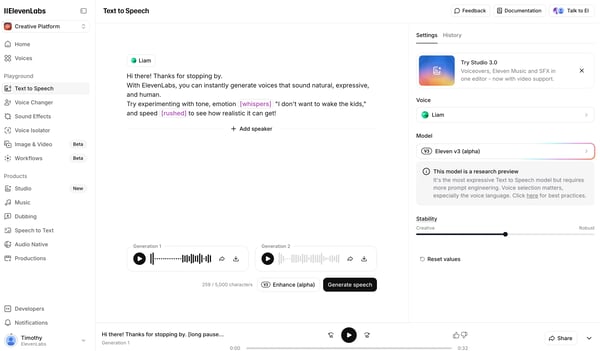
Ease of use was another recurring theme across G2 reviews. Despite the sophistication behind the scenes, ElevenLabs feels approachable in day-to-day use. Users can move quickly from script to usable audio, manage longer projects without much friction, and make adjustments without needing technical expertise. API access and mobile apps also make it easier for teams to use the platform across different workflows.
According to G2 feedback, ElevenLabs has great audio quality. The generated voices sound clean and natural enough for customer-facing and commercial content, which reduces the need for additional polishing. For teams publishing or monetizing audio, this reliability matters more than technical specifications. That said, ElevenLabs is best suited for teams that plan to use it regularly and at scale.
Based on G2 reviews, pricing and credit usage become more noticeable as production volume increases, particularly for teams experimenting with multiple voices or making frequent revisions. For teams producing highly polished audio projects, ElevenLabs often becomes the voice generation layer within a broader production workflow, with specialized tools supporting final editing while ElevenLabs handles the core narration.
Overall, ElevenLabs comes across as one of the strongest options for expressive, natural-sounding voice generation. It’s particularly well-suited for creators, marketers, educators, and developers who rely on voice as a core part of their content or product experience and want a platform that balances realism, flexibility, and scalability.
“Personally, for me, it is the best TTS out there (I mainly use the TTS), with the highest control in terms of style, emotions, and speed and voice/accent options. I look forward to using STT for my voice assistant that I plan on using.”
- ElevenLabs review, Kush A.
“The pricing structure can feel somewhat limiting for users with high-volume needs. Credits tend to be used up quickly, particularly when trying out various voices or making small adjustments to scripts. Another source of frustration is that, on most plans, unused credits do not carry over to the following month. This means that if you have a slower production period, you end up losing credits you’ve already paid for.”
- ElevenLabs review, Jamie Antonio G.
If you want a deeper look at how expressive text-to-speech is used in real, interactive experiences, this guide on the best AI voice assistants explores how teams apply AI-generated voices in conversational and assistant-driven workflows.
When I looked at G2 Data and usage patterns for Synthesia, what I observed was how strongly the platform skews toward mid-market and enterprise teams, especially those producing training, enablement, and internal communications content. Synthesia tends to show up in organizations that need to publish video consistently, often across multiple regions, without relying on traditional filming or production resources.
Synthesia approaches text-to-speech differently than most tools in this category. Rather than focusing on audio output alone, it centers voice generation within an AI-driven video workflow. Users start with a written script and generate presenter-led videos using AI avatars, complete with lip-syncing and on-screen delivery. From what I saw across reviews, this makes Synthesia especially useful for teams that think in terms of finished videos rather than standalone voice files.
Synthesia’s strength in structured, repeatable video use cases. Training teams use it to build onboarding and compliance modules, while internal communications and enablement teams rely on it for announcements, walkthroughs, and product updates. The platform’s support for over 140 languages is frequently mentioned as a reason teams choose it for global rollouts, since the same script can be reused across markets without re-recording content.
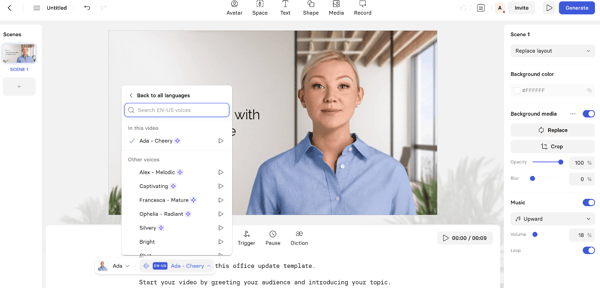
Ease of use is another area that consistently comes up across G2 user reviews. Synthesia runs entirely in the browser, and the workflow from script to exported video is intentionally linear. Based on user feedback, non-technical teams are able to get up and running quickly, even without prior video production experience. Features like subtitles, brand templates, and LMS integrations further support teams managing video at scale.
That said, Synthesia is optimized for structured, presenter-led video content rather than expressive or emotionally nuanced delivery. Based on G2 feedback, the avatars work well for clear, informational messaging but can feel stiff or limited in range when teams want more dynamic storytelling or emotional variation. This makes the platform better suited to repeatable communication and training use cases than highly expressive video formats.
Another limitation mentioned in G2 feedback is the level of avatar customization available. While Synthesia provides a wide range of AI presenters, some users note that options for tailoring gestures, expressions, or regional avatar diversity can feel limited when teams want more personalized or brand-specific presentations.
Overall, Synthesia proved to be a strong fit for organizations that need to produce professional video content efficiently and at scale. It’s best suited for training, enablement, and internal communications teams that value speed, consistency, and multilingual support over creative flexibility.
“I work as a dietician and nutritionist and also manage a homeopathy clinic, where I guide patients on different diet routines based on their condition. Each health issue needs a specific diet plan, and Synthesia helps me create clear videos to explain these routines in a simple way.
For patients, these videos make it easier to understand daily food habits, timings, and basic instructions without confusion. At the same time, when I teach students online, Synthesia helps me explain diet concepts clearly without needing a camera or complex setup. I can prepare short educational videos and use them during sessions or share them later for revision.
The platform is easy to use and quick to set up. I use it regularly for education and awareness content.”
- Synthesia review, Ishan S.
“The avatars still don’t feel fully human. Sure, they’re getting better, but there’s something a little off, something robotic that you just can’t ignore. And when you’re delivering safety training, especially on life-or-death topics like fatal incident prevention, that artificial vibe gets in the way. People pick up on it. The urgency, the real concern, the way someone’s voice changes when they talk about workplace fatalities, AI just doesn’t nail that. You lose the subtlety, the weight of the message, the feeling that someone genuinely cares.”
- Synthesia review, Wayne M S.
If you’re weighing Synthesia against more traditional video tools, this guide to the best AI video generators helps put AI-generated video platforms into context.
When I reviewed Murf.ai alongside other text-to-speech tools, its usage leaned heavily toward content, marketing, and education teams that rely on structured voiceovers rather than highly expressive narration. Based on G2 usage patterns, Murf.ai is especially common among teams producing explainer videos, presentations, and training materials where clarity and consistency matter more than dramatic delivery.
What defines Murf.ai for me is the level of control it gives over how a voice sounds. Instead of focusing primarily on emotional range, the platform emphasizes precision. Users can adjust pitch, speed, emphasis, and pronunciation at a granular level, which makes it easier to align narration closely with scripts, slides, or visual cues. This shows up repeatedly in G2 reviews from teams that need predictable, repeatable audio output.
Murf.ai is frequently used in narration-heavy workflows. I saw it come up often in reviews that talk about use cases like e-learning modules, product demos, and slide-based presentations, where timing and pacing are critical. Because users can fine-tune delivery sentence by sentence, Murf.ai works well when the voice needs to fit tightly around structured content rather than carry the story on its own.
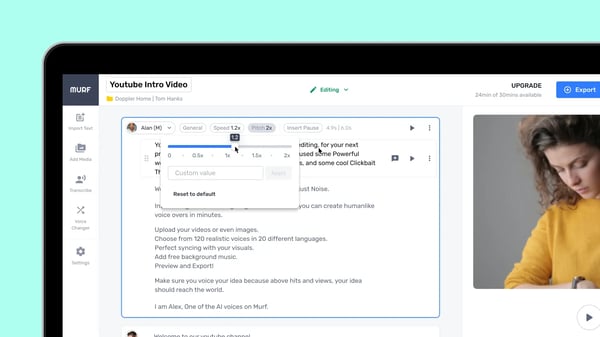
The platform also supports voice cloning and AI dubbing, which extends its usefulness for teams localizing content. From G2 feedback, these features are commonly used to maintain a consistent voice across languages or adapt existing content for new markets without re-recording audio. For organizations producing repeatable or global content, this can significantly reduce production effort.
From a usability standpoint, Murf.ai feels approachable without being simplistic. The browser-based interface makes it easy to upload scripts, preview voices, and edit audio directly in the platform. Collaboration features support team workflows, and integrations with tools like Canva and Google Slides help Murf.ai fit naturally into existing content creation processes.
As usage scales, Murf.ai’s pricing structure becomes more relevant. The platform offers a free tier for experimentation, with paid plans that unlock higher usage limits, commercial rights, and advanced features. This makes it accessible for individual creators while still supporting teams that need consistent output for ongoing projects.
That said, Murf.ai is best suited for polished, controlled narration rather than highly expressive or conversational audio. While the voices sound professional and clean, they may feel less emotionally dynamic than platforms optimized specifically for expressive speech. Teams focused on storytelling or character-driven content may prefer a different approach.
Overall, Murf.ai is a strong choice for teams that value control, clarity, and consistency in voiceovers. It’s particularly well-suited for marketing, training, and education teams producing structured content where delivery needs to be precise and repeatable.
“I love this platform more for its user-friendly interface. This platform supports a wide variety to feature for content creation, which is much needed for content creation purposes. I really like the way it extracts its audio with ease. The audio can also be customized to our needs. I also love the feature that converts audio to text. This assists a lot in understanding long meetings and extracting key points of the meeting with ease. I have also seen that the translation was also done with accuracy while supporting the main languages all over the world, which is really awesome!”
- Murf.ai review, Konjengbam A.
“The free plan is extremely limited, so you have to pay if you want to use it effectively. It also sometimes misinterprets certain words, names, or accents, which means you’ll need to spend extra time manually correcting those errors.”
- Murf.ai review, Subhajeet S.
If Murf.ai is just one piece of your content stack, this roundup of the best generative AI tools explores how teams combine voice, video, and text generation across different workflows.
When I looked at VEED alongside more traditional text-to-speech tools, it was immediately clear that voice generation isn’t the main event here — it’s part of a broader video creation workflow. Based on G2 usage patterns, VEED is most commonly adopted by marketing, social media, and content teams that need to produce videos quickly and collaboratively, rather than teams focused solely on audio output.
VEED positions text-to-speech as a supporting feature within its browser-based video editor. Users typically rely on it to add narration to social videos, explainers, or short marketing content, often alongside auto-generated subtitles, background noise removal, and basic video editing tools. From what I saw in reviews, this makes VEED especially useful when speed matters more than deep voice customization.
Collaboration is where VEED really differentiates itself. I consistently saw feedback from teams that value being able to edit videos together, leave time-stamped comments, and share drafts without exporting files or switching tools. For distributed teams or fast-moving marketing workflows, this real-time collaboration removes much of the friction from the review and approval process.
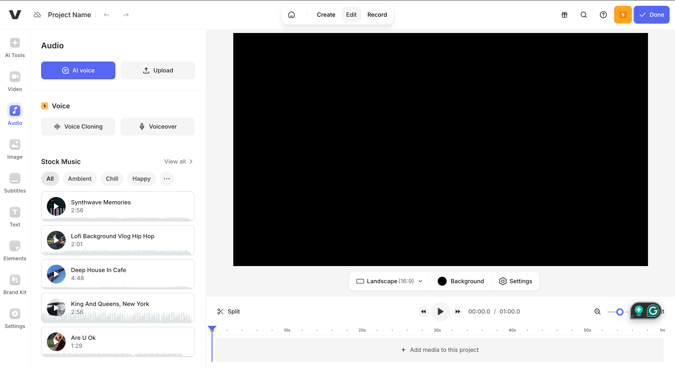
One capability that I noticed while reviewing VEED is its built-in subtitle and captioning system. Users frequently highlight how quickly they can generate accurate captions and translate them for different audiences. For teams publishing on social media or creating accessible marketing content, this feature saves significant editing time and helps ensure videos are ready for multiple platforms without additional tools.
When I looked at how text-to-speech is used within VEED, it became clear that it’s mainly suited for straightforward narration rather than expressive storytelling. The voices work well for clear, functional voice-overs, especially when paired with subtitles or visual cues. Based on G2 feedback I reviewed, VEED’s TTS is usually treated as a convenience feature within a broader video workflow, not a replacement for specialized, audio-first tools.
As I dug into how teams scale their usage, pricing, and feature tiers became an important consideration. VEED offers a free tier for basic experimentation, while paid plans unlock watermark-free exports, higher quality output, and full access to AI features and collaboration tools. From what I saw in reviews, this structure works well for teams that want to test the platform before committing to regular video production, especially when speed and collaboration matter more than deep customization.
Overall, VEED is a great practical option for teams that want text-to-speech as part of an all-in-one video workflow. It’s best suited for marketing and content teams that value simplicity, collaboration, and fast turnaround over deep audio control.
“What I appreciate most about VEED is its simplicity and accessibility. I can quickly trim videos, add subtitles, adjust audio, and make small visual improvements without needing advanced editing skills or external software. This has been especially helpful when working with teaching content, short exhortations, and longer-form videos where clarity and flow matter more than heavy effects.
The subtitle and text features have been particularly useful for YouTube content, as they help improve engagement and accessibility. VEED makes it easy to add captions and format them in a way that feels natural rather than distracting. For ministry and educational content, this is a big plus.”
- VEED review, Anthony O K.
“The audio editing process isn't as intuitive as the video editing process. I also think the AI features aren't quite there yet. They're only useful for a few things, like removing filler words, but other tasks, like adding or changing backgrounds or fixing people's eyes, have been inconsistent. The subtitle generator leaves a lot to be desired, and I wish it were more accurate and didn't require as thorough a review on my part.”
- VEED review, Josh K.
If VEED fits into your day-to-day marketing or content workflow, this analysis of AI video in B2B marketing shows how teams use browser-based video tools to move faster without adding production complexity.
When evaluating HeyGen, I found that teams use HeyGen to create presenter-led videos without relying on traditional filming or voice recording. Based on G2 usage patterns, HeyGen is most commonly adopted by marketing, training, and enablement teams that need to produce consistent video content at scale, often across multiple regions.
HeyGen’s workflow centers on converting scripts into avatar-driven videos, combining text-to-speech with realistic lip-syncing and facial expressions. Users can select from a large library of avatars or create custom avatars from a single photo. In practice, this makes it easier to maintain a recognizable on-screen presence without coordinating cameras, actors, or studio time.
Localization plays a major role in how teams use HeyGen. The platform supports a wide range of languages and accents, and many teams rely on it to translate and adapt the same video for different markets. Across G2 feedback, this capability is frequently tied to global marketing campaigns and distributed training programs, where speed and consistency are more important than producing region-specific videos from scratch.
The editor is designed to keep production simple and repeatable. Scripts are entered directly into the platform, scenes are managed through a timeline-based layout, and brand elements such as logos, colors, and fonts can be applied consistently. Collaboration features support review and feedback workflows, which helps when multiple stakeholders are involved in approving video content.
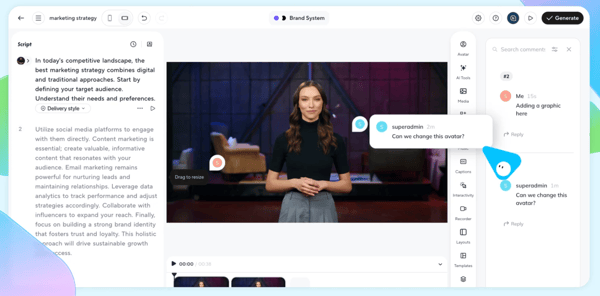
Another strength that I noticed while reviewing HeyGen is how quickly teams can move from script to finished video. Because the platform handles avatar delivery, voice generation, and scene structure in one place, teams don’t have to coordinate filming, voice recording, or editing tools separately. In G2 feedback, users often mention that this reduces production turnaround time significantly, especially for organizations producing frequent announcements, explainers, or training updates.
As teams scale their usage, HeyGen tends to fit best into structured, repeatable workflows. Marketing teams use it for product explainers and announcements, while HR and enablement teams rely on it for onboarding and internal communications. The ability to generate similar videos quickly without increasing production overhead comes up often in user feedback.
That said, HeyGen is optimized for structured, avatar-led video workflows. Based on G2 feedback, teams often need to adjust scripts and pacing to match how avatars deliver lines and gestures, which can add iteration time during production. This isn’t a blocker for repeatable marketing or training content, but teams working on longer or frequently revised videos may notice slower turnaround when fine-tuning delivery.
Pricing can also become a consideration as teams scale usage. Based on G2 feedback, longer videos or frequent revisions can consume credits quickly, which means teams producing high volumes of content may need to monitor usage more closely when planning budgets.
Overall, HeyGen works well for teams that prioritize efficiency, consistency, and multilingual reach in video production. It’s best suited for organizations that rely on presenter-style videos and want a scalable way to deliver the same message across regions without adding production complexity.
“The most interesting thing about HeyGen is that it turns an avatar into an operational communicative interface, not a visual effect. It allows you to control tone, rhythm, and presence without technical friction, making it useful for institutional prototypes, narrative impact testing, and a "wow effect" validation without deploying complex infrastructure. It doesn't provide intelligence; it provides framing, body, and timing to the message, which is exactly what's needed when the priority is public perception and symbolic activation, not technical complexity.”
- HeyGen review, Pedro M.
“The credit consumption tends to be quite high when working with longer videos, which can make frequent use rather costly. Additionally, the customization options for avatars are somewhat restricted, especially when compared to the flexibility you get with real actors. At times, the AI-generated gestures may appear a bit unnatural, so I often have to adjust my scripts carefully to keep the overall presentation believable.”
- HeyGen review, Evgenii B.
If you’re curious about how tools like HeyGen are used beyond one-off videos, this overview of AI video generator insights explores where avatar-based platforms tend to work best for marketing and training teams.
When evaluating Google Cloud Text-to-Speech, I approached it very differently from the creator- and video-first tools in this list. This platform is clearly designed for teams embedding speech directly into products, services, and automated systems, rather than for hands-on content creation. Based on G2 Data, it’s most commonly used by developer, product, and enterprise teams working at scale.
Google Cloud Text-to-Speech is built around Google’s neural voice models, including WaveNet, which are designed to produce clear, consistent speech across a wide range of use cases. The service supports hundreds of voices across more than 75 languages and variants, making it a practical option for applications that need broad language coverage rather than expressive performance.
Customization happens through SSML, which allows teams to control pronunciation, pauses, pitch, and speaking rate programmatically. In practice, this level of control is especially valuable for use cases like IVR systems, virtual assistants, accessibility tools, and automated customer interactions, where clarity and predictability matter more than emotional nuance.
One area where this platform performs reliably is high-volume and long-form synthesis. Google Cloud Text-to-Speech supports asynchronous audio generation and multiple output formats, which makes it easier to generate speech at scale without slowing down applications. For teams managing large workloads or variable traffic, this reliability is often more important than having a visual editor or creative controls.
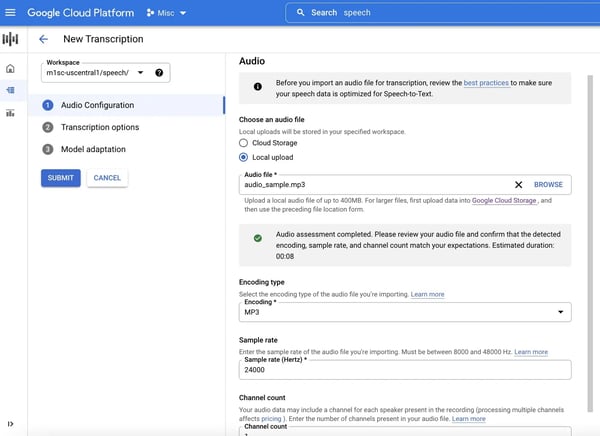
Integration is another core strength. Because it’s part of the broader Google Cloud ecosystem, the service fits naturally into existing infrastructure for teams already using Google Cloud for storage, analytics, or application hosting. This reduces overhead when building or maintaining voice-enabled features across products.
Pricing follows a usage-based model, with a free tier that allows teams to test the service before committing to higher volumes. Beyond that, costs scale based on character usage and voice type. This model offers flexibility, but it also means teams need to monitor usage carefully as applications grow.
That said, Google Cloud Text-to-Speech isn’t designed for collaborative content creation or manual editing. There’s no visual workspace for scripts or projects, and getting the most out of the platform typically requires technical expertise. Teams looking for quick voiceovers or creative experimentation may find creator-focused tools easier to work with.
Overall, Google Cloud Text-to-Speech fits best in environments where speech generation needs to be reliable, scalable, and deeply integrated into applications. It’s a strong choice for developer-led teams and enterprise use cases where infrastructure, performance, and language coverage take priority over hands-on audio production.
“The voice synthesis delivers consistent and natural results across various languages, with a particular strength in Indian languages. Setting up deployment is simple, as API integration involves minimal configuration. The output quality remains reliable even under heavy load. Latency is so low that it can be used in production environments without the need for extra buffering.”
“I find that there needs to be more natural language processing because there are times when the language becomes more robotic. For example, if I’m asking it to read something to me that is more academic in nature, the pronunciations are off. Also, it struggles with context, especially with words that are pronounced differently depending on the context, and names that aren't in Google’s database might not be pronounced correctly.”
- Google Cloud Text-to-Speech, Ruth J.
If you’re exploring text-to-speech as part of a broader voice workflow, this guide on free voice recognition software takes a closer look at tools teams use for speech-to-text, accessibility, and voice-driven applications.
Have more questions? Find more answers below!
For accessibility-focused use cases, ElevenLabs is a strong option due to its natural-sounding voices and API access, which makes it easier to embed speech into web and mobile experiences. Murf.ai can also work for accessibility-driven narration when teams need clear, controlled delivery for instructional content.
For multilingual e-learning, Murf.ai and Synthesia are well-suited. Murf.ai offers precise control over narration, which works well for structured training modules, while Synthesia makes it easier to pair voiceovers with avatar-led videos across multiple languages.
ElevenLabs is often preferred for marketing narration because of its expressive delivery and natural pacing. For teams producing video-first content, VEED and HeyGen work well when voiceovers are part of a broader video creation workflow.
Among the tools covered, ElevenLabs and Google Cloud Text-to-Speech offer API-driven integration, with Google Cloud typically favored for large-scale, infrastructure-based deployments. Q5. What are the best affordable or free TTS apps for SMBs starting voice content creation?
SMBs just getting started often choose ElevenLabs, Murf.ai, or VEED, all of which offer free tiers or low-cost entry plans. These tools allow teams to experiment with voice content before committing to higher-volume usage.
For podcast-style narration, ElevenLabs and Murf.ai are strong options. ElevenLabs works well for expressive, conversational audio, while Murf.ai offers fine-grained control over pacing and delivery for more structured formats.
Within this list, ElevenLabs is the most commonly used option for enterprise voice applications due to its API access and multilingual support. That said, teams building large-scale IVR systems may still need to pair it with dedicated telephony or contact-center infrastructure.
ElevenLabs stands out for audiobook-style narration thanks to its natural delivery over long-form content and support for high-quality audio output. It’s especially useful for turning written material into listenable formats quickly.
For audio ads, ElevenLabs is often used for its expressive tone and emotional nuance. Teams creating video-based ad content may also rely on VEED or HeyGen when the narration needs to closely align with the visuals.
Among the tools covered, ElevenLabs is most closely associated with expressive AI voices and emotional control. Its ability to handle emphasis, pacing, and tone makes it well-suited for storytelling, narration, and brand-driven audio content.
You no longer need studio time, voice actors, or complex production workflows to add high-quality voice to your content. The text-to-speech platforms covered here make it easier to turn written material into natural-sounding audio, whether that’s for videos, training programs, podcasts, or voice-enabled applications.
What really came through is how differently these tools support voice-driven teams. Some focus on expressive, human-like speech for narration and storytelling. Others are built around video creation with avatars or collaboration at scale. And a few are clearly designed for developer-first use cases, where reliability, language coverage, and integration matter more than hands-on editing.
I evaluated their strengths and trade-offs so you can skip the trial-and-error phase. Now it’s about choosing the text-to-speech software that fits how your team works, whether you’re creating content, localizing it across markets, or embedding voice directly into your product experience.
If you’re looking to pair voice generation with transcription or automation, it is definitely worth checking out the best AI transcription tools to see how teams combine voice technologies across their workflows!


That celebrity endorsement? Fake. The news clip you just watched? AI-generated. The podcast...
 by Soundarya Jayaraman

Recently updatedSummer 2026 Grid® Report · Published May 26, 2026 This guide was last...
by Soundarya Jayaraman

I researched the best presentation software and shortlisted Google Slides, Canva, Microsoft...
by Soundarya Jayaraman