

If you work in a customer-facing role, outbound calling is probably part of your daily routine. You pick up the phone, dial a number, wait to see if someone answers, and repeat the process over and over again.
The best auto dialer software removes that manual step. Instead of dialing each number yourself, the software automatically calls contacts from a list and connects you only when someone picks up.
That might sound like a small change, but it adds up fast. When you’re no longer spending time dialing, waiting on busy signals, or listening to unanswered rings, you can focus entirely on the conversation itself.
For teams that rely on outbound calls, whether in sales, support, or call centers, the best auto dialer software does exactly that: it handles the dialing so your reps can spend more time talking to real people.
Keep reading to learn what an auto dialer is, how it works, and how to decide if it’s the right fit for your outbound calling strategy.
An auto dialer automatically calls phone numbers from a list and connects answered calls to a live agent or a prerecorded message. Businesses use auto dialers to increase outbound call volume, reduce manual dialing, and improve agent productivity.
Auto dialers are used in work settings that include a lot of repetitive phone conversations, including sales, call centers, healthcare, hospitality, and even education.
The purpose of software like an auto dialer is to eliminate the need for users to spend pointless time manually dialing each phone number they need to call. This way, they can focus more on the content and the successful delivery of their message.
To fully benefit from an auto-dialer, users need a computer, a voice modem, and an active telephone line. However, depending on the tool you select to implement, there are also cloud-based auto dialer options.
Auto dialers automate outbound calling by handling dialing, call detection, and routing, so agents don’t have to manage each step manually. Behind the scenes, the system follows a simple sequence to move calls from a list to a live conversation.
Auto dialers handle the repetitive tasks of dialing, screening, routing, and logging calls, allowing teams to focus on live conversations rather than manual call management.
Streamline every outbound call with the best CPaaS platforms built to integrate auto dialers, IVR, and multichannel communication.
Autodialers are commonly used by sales teams that rely on outbound calling to generate and qualify leads. By automating dialing and skipping unanswered calls, they help reps make more calls per day, reduce idle time, and follow up with prospects faster and more consistently.
Call centers and contact centers use autodialers to manage high-volume outbound campaigns and keep agents continuously engaged. Autodialers route live calls automatically, improving agent utilization, while built-in analytics help teams track performance and optimize outreach efforts.
Financial services and debt collection teams use autodialers to efficiently reach large contact lists while maintaining structured, documented calling processes. Features like call pacing, retry logic, and automated call logging help improve contact rates and support regulatory compliance.
Industries such as real estate, healthcare, and political organizations also use autodialers for fast, large-scale outreach. Real estate teams use them to quickly contact leads and schedule appointments, while healthcare providers and campaigns rely on autodialers for reminders, follow-ups, and time-sensitive communication at scale.
You should use an auto dialer if your team makes high volumes of outbound calls and wants to reduce manual dialing while increasing live conversations.
Auto dialers aren’t one-size-fits-all. Depending on your team size, sales strategy, and call complexity, there are three main types to choose from: preview, power (or progressive), and predictive.
Each dialer works a little differently, and choosing the right one can make or break your outbound calling efficiency.
| Dialer type | Best for | How it works | Pros | Cons |
| Preview | Personalized, research-heavy calls | Let the user view contact details and choose whether to initiate the call | Greater context, better for high-value convos | Slower pace, more manual effort |
| Power/Progressive | Steady, fast-paced outreach | Automatically dials the next number once a call ends | Efficient for medium-to-large teams | No time to prep between calls |
| Predictive | High-volume teams & call centers | Uses pacing algorithms to dial multiple numbers and connect based on availability | Maximum efficiency, less downtime | Less control, not ideal for complex convos |
A preview dialer allows users to view customer information before placing a call. Users can decide whether to make the call, skip it, or take a moment to prepare, making it ideal for teams focused on high-touch outreach or nuanced conversations (like B2B sales or follow-ups).
If your calling strategy values quality over quantity or involves complex customer situations, a preview dialer gives you the breathing room to make each interaction count.
Power dialers, also called progressive dialers, remove the “should I call this person?” decision. As soon as one call ends, the next begins. There is no downtime, and no manual clicking.
This option is great if you want to reach as many people as possible without sacrificing too much control. Especially useful for sales teams that still want live conversations but don’t need to prepare much before each one.
Predictive dialers take automation to the next level. These tools use pacing algorithms to dial multiple numbers at once, then connect reps only when someone picks up. The goal? Maximize talk time and reduce idle time.
Predictive dialing is a powerhouse for high-volume call centers that prioritize speed over personalization. But if your conversations require a little more human touch or background prep, this probably isn’t the right fit.
With outbound calls, the task is usually the same: manually dialing numbers, risking misdials, and repeatedly getting sent to voicemail, all of which slow reps down and eat into productive selling time.
Unlike a manual dialer, where agents must dial each number themselves and manage call pacing independently, an auto dialer automates the entire calling process. They place calls automatically, skip busy signals or voicemails, and connect reps only when a live person answers.
As a result, auto dialers eliminate repetitive manual work and give reps back valuable time, allowing them to focus less on logistics and more on having meaningful, high-quality conversations with prospects.
| Aspect | Auto Dialer | Manual Dialing |
|---|---|---|
| Dialing effort | Automatically dials numbers from a list or CRM | Reps manually search for and dial each number |
| Time spent dialing | Minimal; reps move straight into conversations | High; time lost to dialing, misdials, and setup |
| Voicemail & bad number handling | Detects voicemails, busy signals, and unproductive numbers automatically | Reps must wait, listen, and decide what to do |
| Call efficiency | Focuses effort on reachable, higher-value leads | Significant time wasted on unanswered or low-quality calls |
| Call volume | High outbound volume per rep | Limited by manual pace |
| Data tracking | Automatically logs call outcomes, duration, and connection rates | Data often entered manually or inconsistently |
| Performance insights | Built-in reporting reveals patterns like peak call times and conversion trends | Limited visibility unless manually analyzed |
| Rep focus | More time spent on conversations and relationship-building | More time spent on logistics and admin |
| Scalability | Easily scales outreach without adding headcount | Scaling requires more reps and more manual effort |
| Best use case | High-volume outbound sales, call centers, and campaigns | Low-volume or highly personalized outreach |
Anyone who works on the phone most of the day knows the rules and regulations regarding telemarketing, set by the Federal Trade Commission and the Do Not Call Registry. Auto dialers are no exception to these rules.
If not used correctly, they can lead to Telephone Consumer Protection Act (TCPA) violations, as they may dial numbers on the National Do Not Call Registry or at prohibited times.
Implementing and maintaining an auto dialer system can be costly, especially for smaller businesses. Additionally, technical difficulties can sometimes impact call quality and potentially lead to dropped calls.
To mitigate these limitations, businesses should ensure compliance with TCPA regulations, strategically use auto dialers in combination with human agents, monitor performance and make adjustments as needed, carefully consider costs and benefits, and address technical issues promptly.
Automatic dialers are full of features that will help you have as many meaningful customer conversations as possible. When selecting a product, ensure it has the following features for the optimal experience.
Auto dialer technology can tell when a phone number on your list isn’t worth calling, whether it sends numbers to voicemail, an answering machine, or just a busy line. Unproductive number detection is a huge time saver. You don’t have to remove the number from your list entirely, but this way, you know that your time would be best spent calling someone else for the time being.
Plenty of people will be asked to be put on your do-not-call (DNC) list. You must respect those wishes as a business that doesn’t want to spoil its relationships. Luckily, auto dialers can filter your lists so people on your DNC list won’t be contacted from that point forward.
Auto dialers can integrate with other software that manages customer contact information, the most important of which is your customer relationship management (CRM) solution. CRMs are tools businesses use to track customer data, including past interactions with your business, preferences, and their place in the buyer’s journey. Valuable information is shared during customer phone calls. When integrated with a CRM, auto dialers can update customer data based on the conversation.
Auto dialers also have the ability to manage your contact list, including segmentations. If you are using a cloud-based system, you can upload customer contact information from other databases. The most up-to-date way to reach a customer is important for efficiency, and auto-dialers can handle that for you.
There are already so many debates about the best time to call a prospective customer, and factoring in time zones is just another headache inducer. However, if you’re using an auto-dialer, you can simplify this by adjusting the time zone so you call customers only when it's appropriate.
The workforce is currently scattered, and you might not have access to your office phone. Or perhaps your job is to qualify a customer before they start a conversation with another person within your business. Either way, if you need to transfer a call to another device or person, auto dialers can do that.
As mentioned before, certain types of autodialers can enter a phone number before you’ve even finished your current phone call. This is a great feature, but it can be a bit presumptuous regarding how much time the user needs between each conversation. Luckily, users can also customize their auto dialer’s speed based on the needs of their outbound sales campaign.
In addition to streamlining the outbound calling process, auto dialers can deliver prerecorded messages once the receiver answers the call. Businesses can, and likely will, have more than one broadcasting message that they can implement depending on the nature of the call.
After that broadcast message, the conversation might require action on the part of the person receiving the call. Auto dialers give users the option to offer a menu to their customers, depending on the action they want to take to move forward. For example, this might sound like: “Press 1 to be connected with a sales representative.”
Auto dialers provide an overview of an outbound calling campaign's progress through real-time dashboards. This way, both users and managers can see the overall performance of the efforts, activity levels, and statistics.
Have you ever heard a robot-sounding voice say something about the message being recorded or monitored for quality assurance when calling a business? That’s called the call monitoring feature, and it can be extremely helpful for optimizing your outbound calling efforts.
Managers might want to listen in on a conversation (giving both parties a warning beforehand, of course) to gather insights into the interaction, assess the caller's performance, and determine areas for improvement. They can do this live with monitoring or later with call recording.
You won’t reach everyone on the first attempt. Auto dialers recognize this issue and combat it by scheduling follow-ups or callbacks. If someone doesn’t answer your call, the auto dialer will just re-add them to the list, increasing the chances of connecting with and speaking to a customer.
Lastly, like many software solutions in your organization, security is one of the most important features. Your conversations may include valuable private information, and a breach will most likely ruin your relationship with your customers and potentially even your reputation.
Auto dialers implement security measures to keep customer information and data safe from unauthorized users, making your customers feel more secure and more willing to trust you.
G2 has analyzed reviews, ratings, and market trends to identify the leading tools in this category. To be included in this list, a product must:
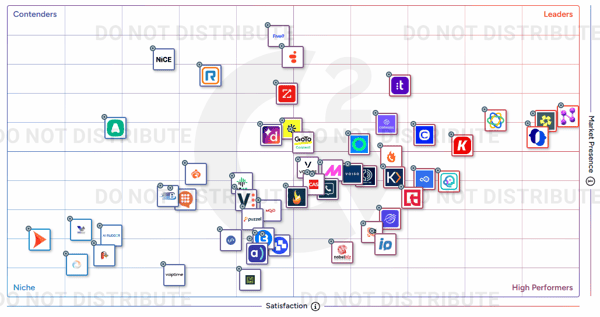
*Below are the five leading auto dialer solutions from G2's Winter 2026 Grid® Report. Some reviews may have been edited for clarity.
Nooks positions itself as more than just a power dialer — it’s designed as a full sales engagement platform that blends automation with real-time insights. Unlike many dialers that focus only on speed, Nooks seems to understand the broader needs of sales teams, especially regarding coaching and performance tracking.
“It is such an incredibly intuitive platform, from the ability to filter out office hours to the summary of conversations for coaching, using Nooks has meant calling has gone from taking hours in the day to maybe 1/2 hours max. It's an amazing way to collaborate with teammates and learn from one another on an interactive floor. It was extremely easy to enroll & link with our CRM, which meant daily tasks were actually done on the day itself. I can definitely see this being my go-to tool of choice every day.”
- Nooks review, Ruth C.
“Occasionally, the connection time is longer than ideal. However, I understand this is a metric the Nooks team always tries to reduce. If the AI notes could populate from callbacks and the one-off dialer, it would be very helpful, rather than just the autodialer.”
- Nooks review, James D.
Orum is an AI calling and coaching platform built to help sales teams connect with more prospects and convert conversations into a qualified pipeline. Orum serves more than 1,200 sales organizations, from fast-growing startups to global enterprises, including IBM, Samsung, Epicor, SentinelOne, Ramp, and Crunchbase.
"Orum provides a very user-friendly experience. The platform is intuitive, easy to adopt, and requires minimal ramp time for reps. The Orum team is also extremely responsive — whenever we’ve needed support or had questions, they’ve been quick to help and proactive in offering solutions. Implementation was straightforward thanks to the tool's well-designed interface, and both our account manager and customer success representative helped make the process seamless from start to finish. Integration with other tools has been just as easy. We use Outreach, and the two work very well together."
- Orum review, Reilyn G.
"I think Orum could be improved by incorporating more advanced live coaching features. Currently, while basic AI role-plays are available for practice, having bots specifically customized for the company would allow for more effective practice of cold calls and discovery. This would enhance the user experience by providing tailored, realistic scenarios that better prepare users for actual calls."
- Orum review, Meera M.
JustCall helps streamline high-volume call management in a way that really benefits sales and support teams. Users frequently mention that it eliminates the hassle of manual dialing, allowing agents to focus more on conversations rather than punching in numbers.
“We have had just a heckin' rough time getting our telephony in Salesforce sorted out. JustCall is the one that actually lets us to review the sales team's calls easily and quickly. The transcription feature is genuinely useful. It was pretty painless, at least at a basic functionality level. Customer support is genuinely helpful, though it can take a minute to reach them. But they've never failed to resolve my issues.”
- JustCall review, Jonathan Killstring H.
“I wish that the transcription of calls were easier to view from the call filtering page. Right now, you have to open a tab, download the call, and open it in a separate window to view the transcription. In CallRail, you can immediately view transcriptions for each call when you highlight an individual call, which would be much more convenient. Also, it would be nice to see customization options for Incoming Calls, call flows to record a voice for menu options, and give the Incoming Callers a Dial-by-number menu that leads to different recordings and routes to different Users/Phone numbers.”
- JustCall Review, Matt Z.
Close is a platform designed to streamline outreach and deal management. With built-in calling, SMS, and email automation, Close enables teams to centralize communications, track pipelines, and close deals faster. Features like predictive dialing, email sequences, and real-time reporting help sales reps stay focused on selling while reducing manual tasks.
“It's the ease of use and having the most important data at a glance. The logical layout of the overview. Very good assistance, such as when creating templates. In our call center, we use Close as a CRM for multiple clients. We spend hours daily with this simple system. New employees can start working with Close within minutes. If something doesn't work or a feature is missing, the support team is very helpful and quick to assist. Useful suggestions are implemented promptly. Adding new customers is very quick and requires no extensive background knowledge. This is due to the logical structure of the CRM."
- Close review, Stephan U.
“I would really like the ability to use my Close number to send as an iMessage. Nearly all of our clients have iPhones, and sending green texts looks bad and makes people think you're texting a robot. And that person-to-person connection with our clients is super important. Also, I'd really like more functionality for workflow triggers. It seems pretty basic, and a lot of what we're trying to automate can't be done only in Close with the current native triggers. We have to integrate other services to get it to do what we want."
- Close review, Nate E.
Talkdesk simplifies customer call handling in a way that resonates with many users. The setup process appears to be quick, and the learning curve isn’t steep, which helps teams get up and running without much friction.
“Since implementing Talkdesk, our team at JK Moving Services has experienced a remarkable shift in how we handle customer interactions. The platform has streamlined our communication process, allowing us to provide faster, more efficient service to our clients. The intuitive interface and seamless integration with our CRM make it easy for my colleagues and me to track, manage, and follow up with customers, leading to better engagement and higher satisfaction rates.”
- Talkdesk review, Natalie H.
“Not very often, but yeah, at times I face lag in service providers, maybe this is because of ample requests going on, on which providers are busy solving and managing problems, but I really wish this could also be solved.”
- Talkdesk review, Priyanka A.
Got more questions? We have the answers.
A power dialer is actually a type of auto dialer. While “auto dialer” is the umbrella term for software that automates outbound calling, a power dialer specifically refers to a system that automatically dials the next number right after the previous call ends, with no manual input needed. It's built for efficiency, but not quite as fast (or automated) as a predictive dialer.
Yes! Most modern auto dialers can detect when a call hits voicemail and are programmed to leave a pre-recorded message without needing a rep to do it manually. This feature helps reps move quickly through call lists without wasting time on unanswered calls.
Yes, many cloud-based auto dialers are designed to integrate seamlessly with VoIP platforms and modern UCaaS tools like Zoom Phone, RingCentral, Aircall, and others. This makes setup easier and enables advanced features such as click-to-call and real-time call analytics.
They use answering machine detection (AMD), a technology that analyzes background noise, speech cadence, and response delay to determine whether a real person or a voicemail was picked up. Some platforms also use AI to refine detection accuracy over time.
Absolutely. Most auto dialer platforms now offer cloud-based access, allowing remote teams to log in from anywhere with an internet connection. With features like browser-based calling, call transfer, CRM sync, and real-time dashboards, remote reps can operate just as efficiently as in-office teams.
Pricing varies based on the number of users, dialer type (preview vs. predictive), features, and integrations. Entry-level plans for small teams start around $25–$50/user/month, while more advanced, enterprise-grade dialers with AI and compliance features can cost $100+/user/month.
Yes, auto dialers are a popular tool for cold calling because they speed up dialing, screen out bad numbers, and help reps reach more people in less time. Paired with CRM insights and call scripts, they’re a major asset for outbound lead gen teams.
If your team spends a large part of the day dialing numbers instead of talking to customers, that’s a signal, not a badge of hustle. Manual dialing doesn’t improve conversations, close more deals, or build better relationships. It just eats up time and energy that could be better spent on the people who actually pick up.
Auto dialers exist to remove that friction. When used correctly and compliantly, they help teams reach more people, stay focused on live conversations, and scale outreach without burning out reps or adding unnecessary headcount.
The key isn’t just automating calls, it’s choosing tools that fit your call volume, conversation style, and compliance needs.
Scaling outbound calls across your team? Explore the best outbound call center software built for high-volume sales and outreach workflows.
This article was originally published in 2020. It has been updated with new information.

Recently updatedSummer 2026 Grid® Report · Published May 26, 2026 The 10 best Auto...
 by Harshita Tewari
I evaluated 20+ tools using G2 Data and reviews to finalize the 7 best audio conferencing...
 by Gunisha
You can have the best sales pitch in the world, but if you don’t know what happens after your...
.png) by Devyani Mehta
by Devyani Mehta