.png?width=400&height=150&name=My%20project-1%20(1).png)


If you’re here, chances are your communication workflows aren’t working anymore. Maybe your developers are juggling multiple vendors, your support team is stuck with unreliable messaging tools, and scaling globally feels like a logistical nightmare. These inefficiencies pile up quickly. That's why I set out to evaluate the best CPaaS platforms on the market today, breaking down leading solutions like Dotdigital, Telnyx CPaaS, Wati, Sendbird, Vonage Communications APIs, and Webex Connect to see how they stack up in real-world use cases.
CPaaS has shifted. It’s no longer just SMS APIs and programmable voice; it’s a full stack of communication services that empower IT leaders, marketing teams, and customer support to move faster with fewer tools in the mix.
The best CPaaS platforms don’t just promise flexibility but actually deliver reliability, compliance, and cost savings where it matters most. It isn’t just about adding channels; it’s about creating a unified strategy that lowers costs, increases customer engagement, and frees your teams from constant firefighting.
This list will help you cut through the noise and find the solution that’s built to scale with your business.
These best CPaaS platform tools are top-rated in their category, according to G2's 2026 Grid Reports. Contact the sales team for accurate pricing details.
Through CPaaS platforms, businesses can embed real-time communications such as voice, video, messaging, and authentication directly into their applications without the overhead of building and maintaining telecom infrastructure. Instead of juggling multiple vendors or dealing with legacy systems, CPaaS offers a flexible, API-driven approach that puts scalability and control back in your hands.
In practice, the best platforms go far beyond basic SMS or voice delivery. They integrate seamlessly with CRMs, support desks, and marketing automation tools, enabling teams to create unified, context-aware customer experiences across every channel.
With built-in analytics, global carrier connectivity, and AI-powered orchestration, CPaaS solutions help companies cut costs, improve response times, and engage customers where it matters most. This shift is fueling rapid industry growth, with the global CPaaS market projected to expand from $12.5 billion in 2022 to $45.3 billion by 2027 at a CAGR of 29.4%.
As I evaluated the market, I focused on platforms that deliver more than just flashy APIs. After reviewing user feedback, exploring product capabilities, and seeing how teams across industries are putting these tools into action, I identified CPaaS providers that truly stand out.
I started with G2’s Grid Report, which ranks tools based on real user reviews and market presence, to move past surface-level comparisons. The Grid gave me a strong foundation that highlighted both established leaders and innovative challengers in the CPaaS category.
I then used AI-assisted analysis to dig into hundreds of verified G2 reviews. I paid close attention to patterns around reliability of messaging and voice delivery, ease of integration, global scalability, and the overall developer experience. This helped me see what sales, support, and IT teams actually value most.
To bring the data into a real-world context, I also connected with fellow G2’ers who work with CPaaS providers across different industries. Their experiences validated the themes I found in the reviews and shed light on implementation speed, setup complexity, and the day-to-day impact these platforms have on both internal teams and customer engagement.
All product screenshots featured in this article come from official vendor G2 pages and publicly available materials.
Not every CPaaS platform is built for the same level of reliability and flexibility. Some simply provide basic SMS and voice APIs, while others offer global carrier connectivity, omnichannel orchestration, AI-driven automation, and enterprise-grade compliance.
Here’s what I prioritized when evaluating the best CPaaS platforms:
With these criteria in mind, I identified six CPaaS platforms that consistently deliver reliability, scalability, and customer-first communication. Let’s take a closer look at what each provider is best for.
The list below contains genuine user reviews from the CPaaS Platforms category. To be included in this category, a solution must:
*This data was pulled from G2 in 2026. Some reviews may have been edited for clarity.
Dotdigital is a leading CPaaS and marketing automation platform used by businesses for global customer engagement. According to G2 Data, it is used by 50% of mid-market teams.
I noted that reviewers consistently highlight how intuitive the platform is, making it accessible for teams with different levels of technical expertise. New users find it quick to adopt, and seasoned marketers rely on its straightforward workflows to build and manage campaigns efficiently.
A recurring theme across reviews is Dotdigital’s customer support and onboarding experience. Users frequently mention how reliable and friendly the support team is, whether it’s through live chat, email, or dedicated account managers. For many businesses, this responsiveness has been key to getting the most out of the platform, especially when setting up automations or working with more advanced reporting features.
Reviewers frequently highlight Dotdigital’s automation capabilities, particularly its ability to create triggered campaigns and nurture sequences. Many teams use these workflows to automatically send messages based on customer actions, helping them deliver more targeted communications without constant manual effort.
I observed that users also appreciate the platform’s integrations with e-commerce platforms, CRMs, and other marketing tools, which help consolidate customer data and connect campaigns across systems. Integrations with platforms like Shopify, Magento, and CRM solutions make it easier for teams to sync customer information and run coordinated marketing workflows.
Reviewers also point to Dotdigital’s reporting tools as helpful for tracking campaign performance. Several users mention that the platform provides insights into how campaigns perform and how audiences engage, giving teams better visibility into marketing results.
Another point reviewers emphasized was the ease of building campaigns. 91% of G2 users rated its email campaign feature highly. Dotdigital’s drag-and-drop templates, test-send features, and reporting dashboards were consistently cited as helpful in designing effective communications without heavy design or coding resources. For many teams, this balance of simplicity and power was central to why they’ve used the platform long-term.
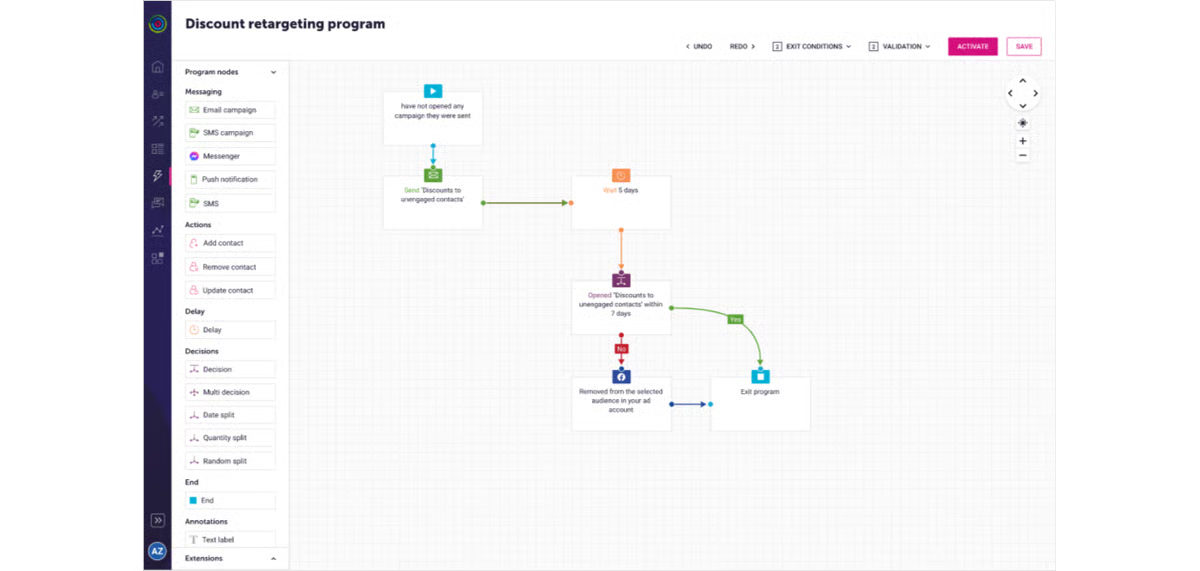
Because Dotdigital emphasizes streamlined campaign creation, some reviewers mention that it follows a structured template approach. Teams that want to experiment with highly customized layouts may spend additional time exploring the editor’s design options and available components. With familiarity, many organizations find ways to adapt templates to fit their brand and campaign goals.
Dotdigital’s reporting and analytics features provide reliable visibility into performance, which most users found effective. Some users highlighted interest in capabilities such as expanded revenue attribution visibility, enhanced bot-click filtering, richer transactional reporting, link-level A/B insights, and faster data exports. For teams seeking more advanced analysis, exported data can be combined with other analytics tools to build customized reporting views.
Overall, Dotdigital earns strong praise from users for being intuitive, supportive, and scalable. Its mix of easy-to-use design, automation depth, and reliable integrations makes it a trusted choice for organizations looking to grow and streamline their customer communications.
“Dotdigital is definitely the ESP that I have found easy to pick and run with, much more user-friendly than some of their competitors. Can easily create campaigns, segmentations, and journeys that businesses would need. Also, their chatbot AI is actually really helpful, and when they're not, their customer support team is really responsive.”
- Dotdigital review, Henry O.
“There are a few areas where Dotdigital could improve. Some of the more advanced features, like automation and segmentation, can feel a bit complex to set up and troubleshoot, especially when you're in a hurry or dealing with multiple data points and conditions. When things don't work as expected, it can take time to pinpoint where the issue is, and clearer diagnostic tools or at-a-glance troubleshooting would make it easier. Some tasks involve more steps than expected, so streamlining workflows and making navigation more intuitive would help everyday efficiency. Also, while support is excellent, having more practical, scenario-based guidance in-product, like templates or best practice prompts for common automations and transactional setups, would make onboarding new users and building confidence faster.”
- Dotdigital review, Scott T.
Unify voice, video, and chat. Explore the top UCaaS platforms for seamless collaboration.
Telnyx CPaaS is widely recognized by users for combining developer-friendly APIs with reliable performance and competitive pricing. This is better understood by the fact that, according to G2 Data, Telnyx CPaaS is used by 79% small businesses.
Across reviews, the platform is praised for how easy it is to integrate SMS, voice, and SIP functionality into applications. Developers consistently highlighted the simplicity of setup through APIs and webhooks, with many noting that the Mission Control Portal made managing numbers, messaging, and call features straightforward.
One of the most frequent positives I noted is customer support quality. Reviewers repeatedly mentioned fast response times and knowledgeable engineers available through live chat and in-house support channels. Unlike many CPaaS competitors, users valued that Telnyx offers 24/7 support and actually resolves issues quickly, giving businesses confidence to rely on it for mission-critical communication. 91% G2 users are satisfied with the tool's professional support.
Pricing transparency is another recurring strength. Users appreciated the pay-as-you-go model and clear rate decks, with several noting that Telnyx was cheaper than alternatives while still providing strong reliability. Businesses running call-heavy or international operations emphasized how cost savings paired with voice quality made Telnyx a standout choice.
Voice performance also received consistent praise. Users described high call quality, low latency, and reliable uptime on both local and international connections. Many noted that real-time voice applications ran smoothly, making Telnyx particularly appealing for SaaS providers, call centers, and global teams.
Reviewers also valued the flexibility and control Telnyx offers. Businesses liked being able to customize caller ID, ringtones, and routing, capabilities that made managing customer outreach and compliance much easier. Several reviewers described Telnyx as empowering them to take full control of their calling environment without needing heavy technical overhead.
Users highlighted quick connections with platforms like Microsoft Teams, SIP softphones, and internal applications. Some small business owners noted how easy it was to plug Telnyx into existing dialers, while larger teams appreciated the scalability across messaging, programmable calls, and call recording.
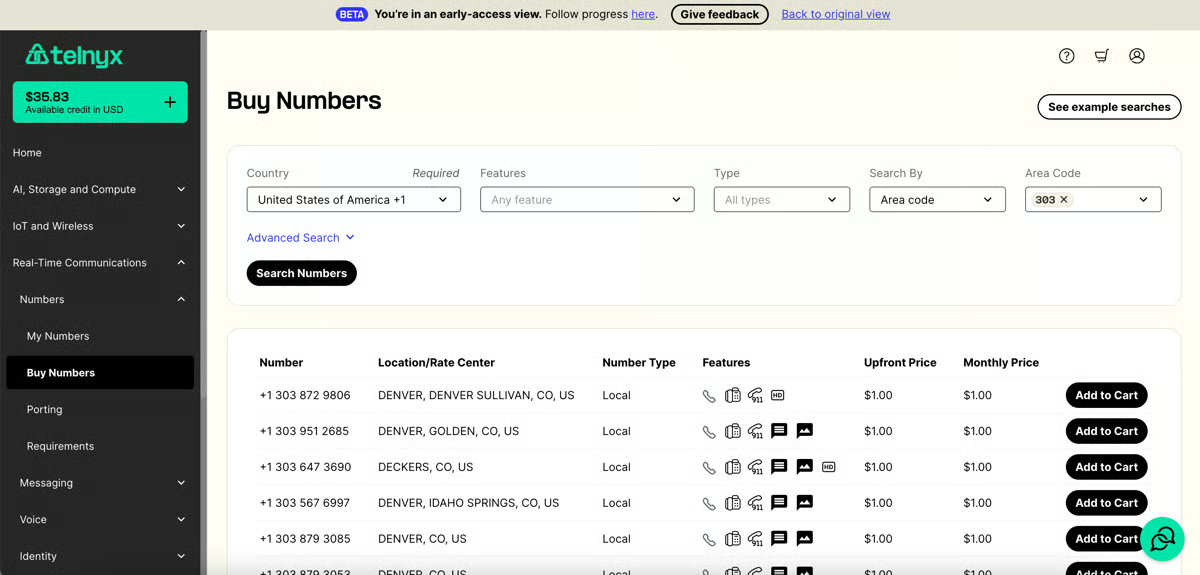
Advanced features like call control, fax configuration, and multi-tenant setups for MSPs offer a high degree of flexibility, supported by comprehensive APIs and technical documentation. Reviewers noted that this depth can feel dense for beginners, and areas such as CloudUCM PBX may require additional guidance, but the design ensures complex environments can be tailored to specific needs.
Because Telnyx offers a wide range of communication services, some reviewers mention that understanding the pricing structure may take a little time initially. For teams evaluating multiple services, spending time reviewing the pricing documentation helps clarify cost differences and optimize usage. Once familiar with the model, many organizations appreciate the flexibility and control the pricing structure provides as they scale.
Overall, based on my evaluation, Telnyx CPaaS stands out for its balance of developer-friendly APIs, excellent support, transparent pricing, and reliable performance. For teams that need cost-effective communications with the flexibility to customize, Telnyx is frequently recommended as one of the most dependable CPaaS providers available today.
“The first time I registered with Telnyx, I immediately tried the AI Assistant. I didn't expect Telnyx's AI assistant to produce assistance agents that closely resembled real humans. Furthermore, there are many models to choose from, ranging from those that connect directly to Telnyx or via API. It also includes connections to other voice providers like elevenlabs, though I'm still experimenting with Telnyx's voices.”
- Telnyx CPaaS review, Abdul G.
“The thing that I want from Telnyx to build is an SMS feature. They have an SMS feature, but it's difficult to set up with any tool, like an iPhone or other devices, since they’re not conversational SMS. If the company can add this feature and make a system to easily set up this thing, then, according to me, they are a gem.”
- Telnyx CPaaS review, Hassan Ali N.
Secure every login, find trusted multi-factor authentication (MFA) software to protect your business.
Webex Connect is a CPaaS platform that users consistently praise for its breadth of features, omnichannel communication capabilities, and ability to streamline customer interactions. According to G2 Data, this CPaaS tool is used by 38% small businesses and 43% mid-market teams.
Across reviews, I noted how Webex Connect enabled users to communicate with customers across multiple channels, including SMS, WhatsApp, voice, chat, and video, while automating routine tasks that previously required manual effort. 92% of users highly rated its communication varieties.
One of the strongest recurring themes in reviews is Webex Connect’s automation and flow-building capabilities. Users frequently highlighted the ability to deploy chatbots quickly and customize customer communication flows without needing deep technical expertise. The drag-and-drop flow builder stood out as a feature that made creating automated experiences both simple and powerful, allowing teams to scale responses while keeping control of customization.
Another area where Webex Connect shines is integration and collaboration. Reviewers praised how it connects seamlessly with CRMs, databases, and other enterprise systems, enabling real-time call transfers, data synchronization, and improved collaboration across teams. Many emphasized that the platform not only handled external customer communication but also made internal teamwork smoother, thanks to its support for chat, file sharing, and video conferencing.
Users also highlighted reporting and analytics as a key strength. Several reviews noted the detailed dashboards that provide insights at the template and campaign level, giving businesses visibility into customer interactions and engagement. For many, these reporting features made it easier to measure outcomes and refine communication strategies.
Customer support and reliability came up often as well. Users described the platform as highly stable, with excellent call quality and strong enterprise-grade infrastructure. The responsiveness of the support team was another consistent theme, with multiple reviewers praising Webex Connect for providing dedicated resources and timely assistance.
I noted that reviewers appreciate the platform’s security posture (SSO/RBAC-style access, audit-friendly workflows), which helps larger teams manage permissions and governance without slowing delivery. Users also call out solid APIs/SDKs, webhooks, and a reliable test/sandbox experience, making it easier to build, version, and ship flows without deep vendor lock-in.
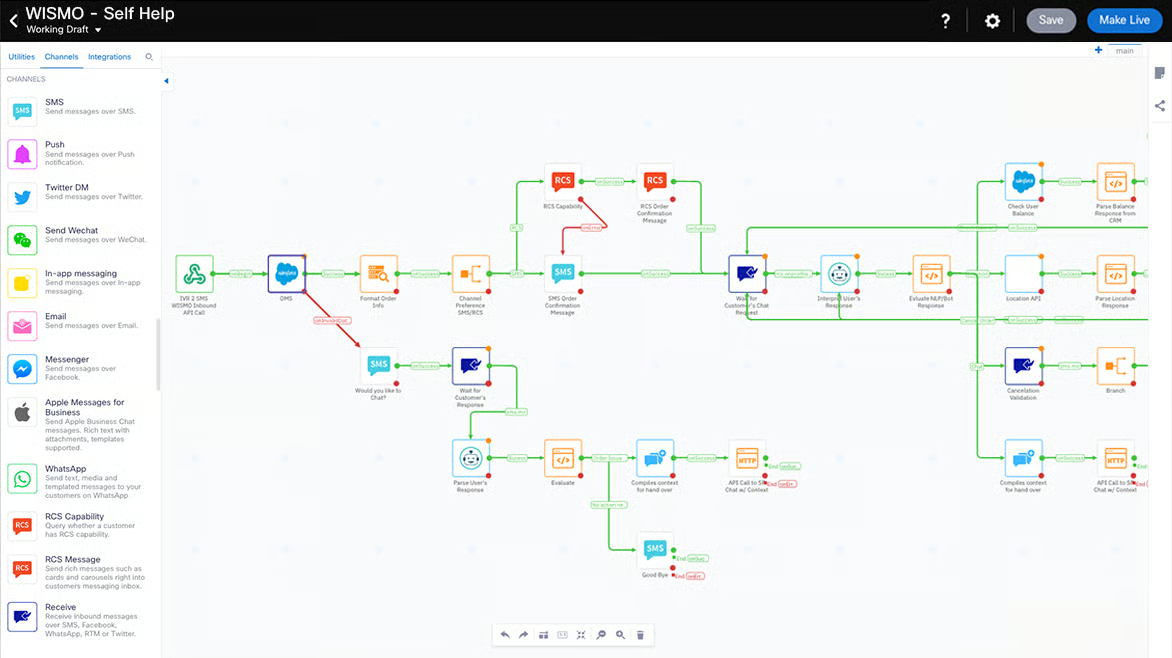
Reviewers highlighted that the platform’s wide integration surface area supports complex enterprise environments, especially those connecting legacy systems or advanced SDK paths. These scenarios can require additional configuration upfront, but enterprise teams typically streamline the process with standardized connectors, environment checklists, and partner or SE guidance.
G2 users also note that comprehensive docs support diverse scenarios, but newer teams may prefer step-by-step “first project” guides or quick-start templates to accelerate initial adoption before diving into the full reference.
Overall, Webex Connect earns high marks from users for delivering robust omnichannel communication, strong automation features, reliable infrastructure, and responsive support.
“I like the automation capability of Webex Connect and its support for multi-channel messaging, which allows us to send SMS or WhatsApp notifications automatically based on system events. This is extremely helpful for improving our support process's reliability. I also appreciate how it helps us automate communication between our network system, both for customer and internal support teams, sending real-time alerts and service notifications. This streamlines communication, reduces the need for manual follow-ups, and improves efficiency. The ability to integrate messaging directly with our systems and automate alerts really boosts operational efficiency and improves our response times.”
- Webex Connect review, Hiday A.
“What I don’t like about Webex Connect is that it can feel a bit complicated at first. There’s a learning curve, especially if you’re new to automation or multi-channel messaging. Some parts of the interface also feel outdated, and it’s not always obvious where to find certain settings. It’s powerful, but I think it could be easier to use.”
- Webex Connect review, Fathy M.
Wati is a WhatsApp-first CPaaS platform that businesses rely on to centralize customer conversations, automate follow-ups, and run marketing campaigns at scale. According to G2 Data, Wati is used by 78% small businesses and 21% mid-market teams.
I observed that reviews consistently highlight how deeply optimized Wati is for WhatsApp Business, making it a standout choice for companies whose customers prefer engaging over chat. One of the most distinctive strengths G2 reviewers called out is Wati’s team inbox and collaboration features. Multiple reviewers said the ability to assign chats to team members meant no customer query went unanswered.
Quick replies and shared dashboards made conversations faster, reduced missed opportunities, and helped teams handle high volumes of WhatsApp messages without confusion. In fact, the bulk WhatsApp messaging feature is highly praised in G2 reviews.
I noted that robust automation and flow builder also receive consistent mentions. Reviewers repeatedly highlight how easy it is to build automated sequences and rule-based flows for follow-ups and FAQs, helping teams scale without adding headcount. G2 users also frequently note smooth connections to Shopify, CRMs, and APIs/webhooks, which makes it simple to sync orders, audiences, and events into WhatsApp journeys
Another consistent theme was customer engagement at scale. Users appreciated how easy it was to send marketing broadcasts, trigger automated follow-ups, and run campaigns directly inside WhatsApp. For many, this translated into higher sales and smoother customer experiences, since they no longer had to switch between multiple tools or rely on manual processes to keep conversations moving.
Reviewers also noted how simple it was to integrate Wati with platforms like Shopify, set up the dashboard, and onboard new team members. Even users who were nervous about handling APIs or automation said they were surprised by how quickly they were able to start using advanced features.
G2 user feedback also emphasized Wati’s commitment to innovation. They described a steady stream of new features supported by webinars, tutorials, and detailed knowledge base articles. Several highlighted how these resources, complete with visuals and step-by-step guides, helped their teams stay current and make the most of the platform.
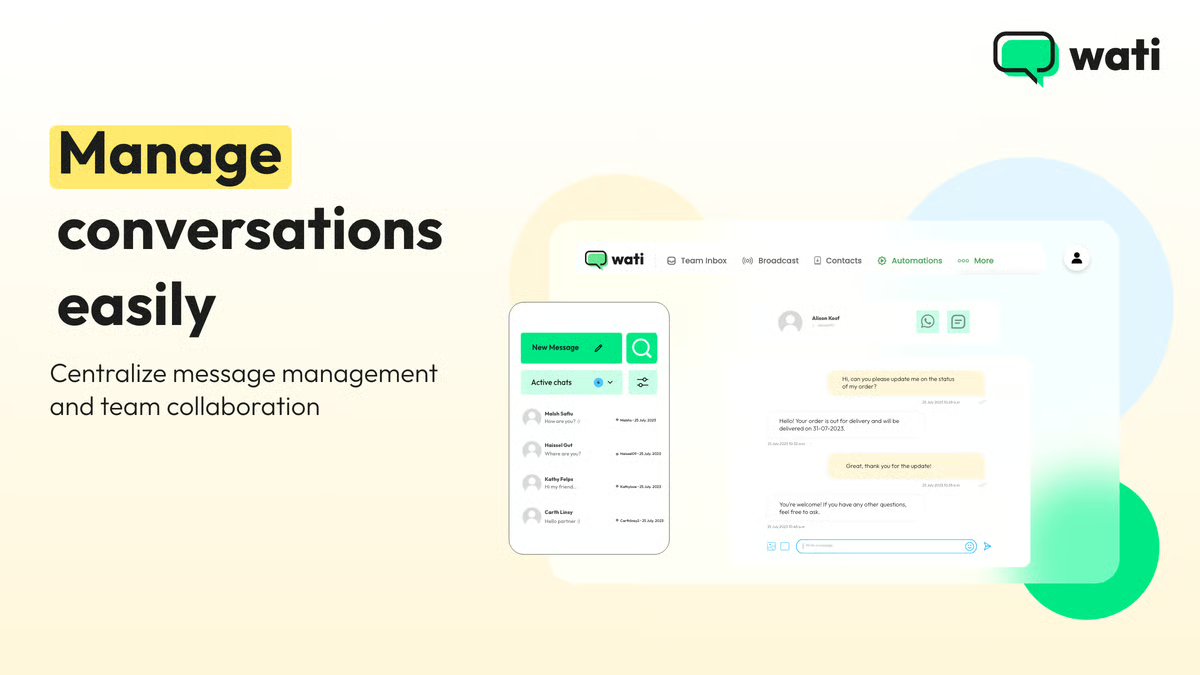
Some reviewers mention that Wati’s more advanced analytics and automation capabilities are available in higher-tier plans. For many smaller businesses, the core plans provide the essential tools needed to run effective WhatsApp conversations, with the option to upgrade as their automation and campaign orchestration needs grow.
Some G2 reviewers highlight that the interface prioritizes stable message delivery, so newly arriving chats may occasionally appear after a quick manual refresh during high-volume periods. This design works well for teams managing structured support queues, and enabling routing rules, along with simple refresh habits, helps agents stay responsive during busy conversations.
Overall, Wati stands out as a strong CPaaS choice for businesses that want to make WhatsApp the center of their customer engagement strategy.
“What I value most about Wati is the native integration it has with Shopify and the ease of creating 'Broadcasts' (mass messages). The flow builder is very visual and allows us to automate basic responses without knowing how to program, which saves the team a lot of time.”
- Wati review, Angel B.
“I'd say that the only thing that probably wasn't that great was the cost per bot. If you're not using many of them as I do, you'd have no problems at all. I really met few to no challenges using WATI for the last 6 to 8 months.”
- Wati review, Charaf E.
Ready to scale your outreach? Explore the best SMS marketing software to boost engagement.
Vonage Communications APIs stand out for their ease of use, flexibility, and strong performance across voice, video, and messaging. Ease of adoption was a recurring theme, making Vonage a popular choice for businesses of different sizes. According to G2 Data, this CPaaS tool is used by 68% small businesses.
One of the most consistent strengths mentioned in reviews is integration and API usability. Users praised the clarity of Vonage’s APIs and how simple it was to extend them into existing applications.
Several reviewers emphasized that building new communication features from scratch was straightforward, with minimal setup barriers. The ability to easily embed calls, video conferencing, and messaging into workflows was a major benefit.
Another area where Vonage earned praise is voice and video quality. Multiple reviewers mentioned crystal-clear call experiences, low latency, and reliable connections, even when running features like screen sharing or multi-user video conferencing.
Businesses appreciated how the platform scaled for large meetings and maintained strong audio-visual quality across geographies. In fact, Vonage Communications API earns a strong satisfaction score, with 90% users appreciating its communication varieties.
Vonage’s programmable communication model was also frequently highlighted. Users valued that the platform made advanced features like video, voice, and messaging available through APIs, which allowed them to innovate and expand services without being tied to legacy infrastructure. For many, this flexibility positioned Vonage as a future-proof solution.
Reviewers also mentioned customer experience and reliability. Several described using Vonage early on in their operations, praising its dependability. Others noted positive interactions with support, describing the company as responsive and willing to adapt and improve its offerings.
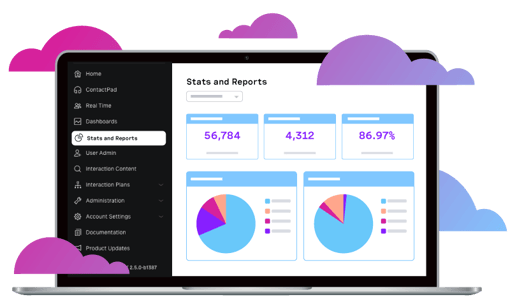
The platform delivers a rich set of features and broad international reach, with pricing that reflects both API usage and geographic coverage. A few reviewers noted that SMS and international rates have room to be more transparent at first glance, and per-message costs may be higher than some competitors, but the structure ensures flexibility across markets and use cases.
The documentation gives teams everything they need to get started, favoring depth and autonomy over rigid instructions. Some first-time users said that adding guided walkthroughs could further accelerate early success, but many appreciated the freedom to experiment.
Overall, Vonage Communications APIs is consistently described as a dependable, innovative CPaaS solution that helps businesses deliver seamless communication experiences.
“Vonage Communications has a diverse set of API's to communicate with your clients via Phone call, SMS, WhatsApp, and Video. It is very easy to integrate into your product, and also offers phone number availability.”
- Vonage Communications APIs review, Carlos C.
“The only thing is that the charges are a bit expensive. It would be better if the charges could be a bit cheaper."
- Vonage Communications APIs review, Roger R.
Sendbird is an omnichannel AI agent platform that enhances customer experience by facilitating autonomous support and sales conversations. According to G2 Data, Sendbird is used by 49% mid-market teams.
One of the most frequently praised capabilities is Sendbird’s chat APIs. Reviewers highlighted how the platform enables developers to quickly implement one-to-one messaging, group chats, and open channels within applications. This flexibility allows teams to create communication experiences that fit a wide range of use cases, from customer support chats to social or community interactions.
Another strength reviewers often mention is integration. Sendbird provides SDKs for multiple environments, including iOS, Android, JavaScript, and other modern frameworks, which helps engineering teams integrate messaging into existing products without major architectural changes. Many users noted that the APIs are structured in a way that makes extending features such as reactions, message threading, and notifications relatively straightforward.
I observed reviews highlighting how Sendbird supports fast message delivery and low-latency communication, which is especially important for applications where users expect immediate responses. Businesses running interactive services such as marketplaces, communities, or support platforms appreciated the reliability of message synchronization during active conversations.
Sendbird also earns praise for its customization capabilities. Developers can tailor chat interfaces, add interactive elements, and connect messaging workflows with backend systems through APIs and webhooks. This flexibility enables companies to build communication experiences that match their product design and user engagement strategies.
Sendbird’s scalability is another major advantage highlighted by users. The infrastructure is designed to handle large volumes of users and messages, allowing companies to grow their communication features without constantly rebuilding their messaging stack. Businesses running global applications particularly valued the platform’s ability to maintain performance across large user bases.
The platform receives recognition for its moderation and control tools. Administrators can configure content filters, user roles, and moderation workflows to manage conversations at scale. For organizations hosting large communities or customer interactions, these controls help maintain safe and well-structured communication environments.
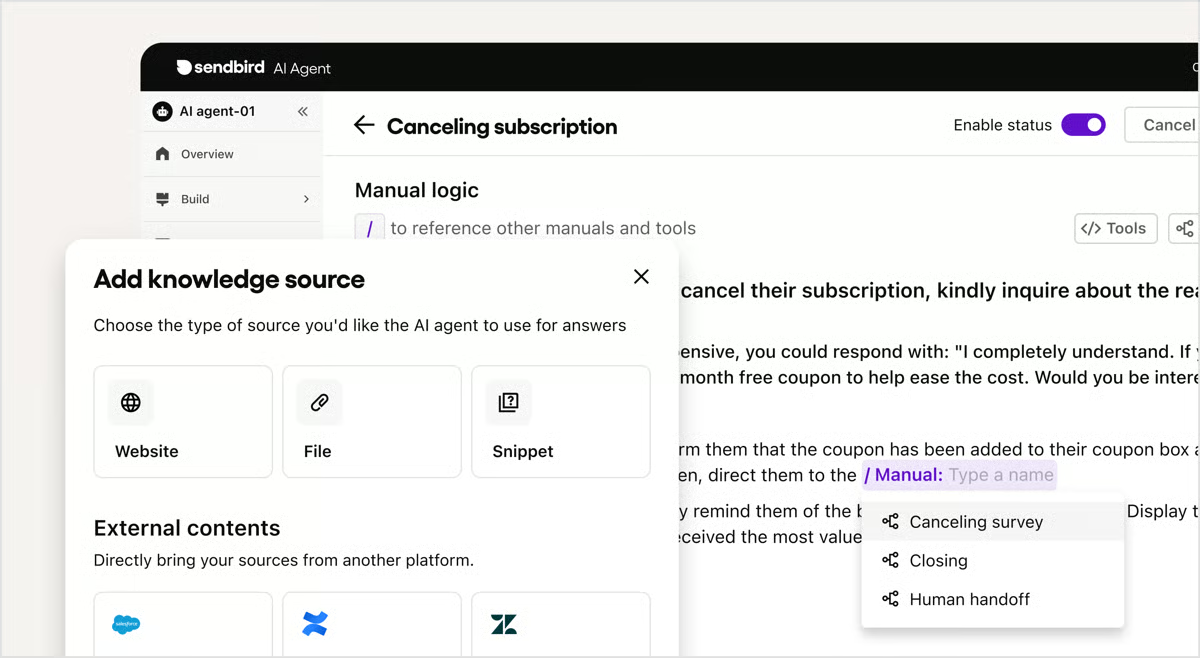
Because Sendbird is designed as a developer-first messaging platform, some reviewers mention that interface customization often benefits from frontend development experience. For teams building highly tailored chat interfaces, investing time in UI customization helps unlock the platform’s full design flexibility. This approach works especially well in product-led environments where engineering teams actively shape the user experience.
Sendbird’s feature-rich messaging environment also means that analytics capabilities are typically expanded through integrations or additional tools when teams require deeper engagement insights. Many organizations start with core messaging metrics and later connect external analytics platforms to build more advanced reporting frameworks, especially in large-scale applications focused on product engagement.
Overall, Sendbird is frequently described as a powerful CPaaS solution for businesses that want to embed messaging directly into their applications. Its developer-friendly APIs, scalable infrastructure, and flexible chat capabilities make it a strong option for organizations building interactive digital products.
“I've built two implementations on top of Sendbird and never encountered an issue with their service or technology, which handles hundreds of thousands of users per day. Every time I've needed to consult their documentation, I've found it to be flawless and with great examples. They provide downloadable demo code for most of their features, which makes it easy to build on top of. Their team has been fully responsive to new feature requests and/or ideas - all the way up to their CEO!”
- Sendbird review, Jonah H. H.
“I sometimes encounter issues with Sendbird where chats are not sent, and notifications are not triggered. This is a major concern because losing customer chats is a significant issue, even though it's reported by only a few users. To address these problems effectively, it would be beneficial to have trails or logs for all chats sent and received so that troubleshooting can be more straightforward.”
- Sendbird review, Adeel K.
Have more questions? Find the answers below.
Enterprises typically look for global scalability, security, and compliance. Leading CPaaS platforms in this space include providers like Dotdigital, Telnyx CPaaS, and Vonage Communications APIs, which offer carrier-grade reliability, multi-channel orchestration, and enterprise-level SLAs. These solutions excel at handling high-volume communications while meeting regulatory standards like GDPR, HIPAA, or SOC 2.
Developers value clean APIs, SDKs, and quick integration. Telnyx CPaaS and Sendbird are strong choices because they’re designed for developer-first use cases, offering messaging, voice, and in-app communication that can be embedded into mobile and web apps with ease.
Tech companies often need scalability and advanced features. Sendbird and Webex Connect stand out for their omnichannel capabilities and enterprise integrations, while Telnyx CPaaS appeals to engineering teams for its strong developer ecosystem.
Small businesses benefit from platforms that are affordable and easy to set up. Wati is a great fit for SMBs focused on WhatsApp Business and customer engagement, while Dotdigital offers marketing automation features that help smaller teams unify email, SMS, and chat communications without a heavy technical lift.
Based on G2 scores, Dotdigital ranks as a leader with high satisfaction and a strong market presence. Telnyx CPaaS also ranks consistently high, particularly for businesses that need reliability across messaging and voice.
Sendbird is a strong option thanks to its in-app chat and messaging APIs. Wati is another standout for mobile developers working specifically with WhatsApp as a customer engagement channel.
SaaS companies need platforms with uptime guarantees and scalability. Sendbird is a go-to provider for APIs and reliability, while Telnyx CPaaS offers strong global coverage and robust APIs that suit SaaS integrations.
For internal and external company communication, Webex Connect and Vonage Communications APIs are strong choices. Both support voice, video, and omnichannel messaging that integrate well with collaboration and support tools.
Telnyx CPaaS and Sendbird are highly rated by developers for their strong APIs and flexibility. Dotdigital also earns high satisfaction scores for teams that want CPaaS capabilities blended with marketing automation.
Startups often prioritize cost-effectiveness and fast deployment. Wati is a strong option for early-stage teams looking to engage customers over WhatsApp, while Sendbird provides easy-to-integrate chat and messaging APIs that help startups scale communication without heavy infrastructure.
After evaluating the CPaaS platforms above, one truth stood out: communication is no longer just an operational necessity; it’s a growth driver. Before shortlisting a platform, it’s worth taking a hard look at your current communication workflows, integration points, and compliance requirements. Once you understand where your team spends time and where customer interactions are breaking down, you’ll be in a stronger position to assess how these tools deliver ROI.
Each provider in this list is designed to simplify, scale, and secure communication in a way that drives measurable results. And if you’re ever unsure about the next step, this guide will always be here to help you compare options and find the right fit.
For a deeper dive into related tools, explore VoIP Providers on G2 to round out your communication strategy.
.png)

As a sales associate in my early professional days, I've gathered hands-on experience working...
.png) by Shreya Mattoo
by Shreya Mattoo

App developers like you must move smart today to meet customers’ expectations of instant,...
 by Sudipto Paul

Your customers experience your brand. And when the email says one thing, the website shows...
 by Sagar Joshi