


If you’re choosing the best HR analytics software and are in a complete conundrum, I totally understand you.
Many organizations are shifting to an AI-first mindset, and I’ve seen HR leaders coming under increasing pressure to adopt a more data-driven approach to managing human capital. It’s no longer enough to simply track headcount or turnover.
Finding the right tools that deliver the metrics your company needs and help you turn them into actionable insights can be a challenge. This spans factors such as retention, DEI, performance, recruiting, labor costs, benefits, payroll, and more.
Now, I’m not an HR professional, but I evaluate software for a living. Backed strongly by G2 Data and grid reports, I approached this category with a clear lens and aimed to evaluate tools that go beyond the surface level and actually provide insight. I mainly tried to look for tools that collect people data across key HR performance indicators, auto-generate customizable dashboards, evaluate workforce risks and costs, monitor development goals, and even model theoretical scenarios to predict how policy or cultural changes might impact performance.
If you’re ready to replace fragmented spreadsheets with centralized, actionable people intelligence, these tools are definitely worth your attention. At a quick glance, my top seven tools are Rippling, Hibob HRIS, ADP Workforce Now, Deel Payroll, Culture Amp, Remote, and Employment Hero.
*I found these to be the top-rated HR analytics tools in their category as per the G2 2026 Winter Grid Report. I've included all their standout features and the starting prices of their paid plans, where applicable, to make comparisons easier for you.
At a foundational level, HR analytics software helps HR teams collect and analyze people data across key performance indicators like retention, performance, DEI, recruitment, labor, payroll, and benefits. You can think of it as the layer that connects workforce activity to business impact. Instead of stitching together spreadsheets from multiple systems, these tools centralize people data, auto-generate customizable dashboards, evaluate workforce risks and costs, and transform operational metrics into strategic insight.
What separates the best HR analytics software from the rest is how effectively it moves beyond just static reporting. Strong platforms don’t just display headcount or turnover figures; they monitor workforce development goals, generate predictive insights, and help leadership teams model how policy, structural, or cultural changes could influence morale and productivity. The goal isn’t just visibility, it’s decision support. The best tools make workforce data understandable for HR, finance, and executives alike.
On G2, HR analytics software serves a broad range of organizations, with customers averaging 22% small businesses, 50% mid-market companies, and 27% enterprise organizations. That distribution reflects how workforce intelligence is especially critical for scaling teams that need structure and forecasting, while still delivering value to both lean HR departments and complex global enterprises.
As expectations around workforce planning, retention strategy, and HR ROI continue to rise, HR analytics software is no longer just an operational add-on. It’s becoming a core strategic layer that helps organizations manage human capital more intelligently, reduce inefficiencies, and make confident, data-backed decisions about the people driving business performance.
I started with G2’s Grid® Report to build a shortlist of the top HR analytics platforms based on G2 Score, user satisfaction, and overall market presence. That gave me a clear, data-backed baseline for which tools are consistently performing well for HR leaders, People Ops teams, and workforce planning stakeholders.
From there, I analyzed G2 review data at scale with the help of AI tools to identify recurring themes in real-world usage. Reviews were especially useful for understanding whether a tool merely surfaces data or genuinely helps organizations evaluate risks, monitor progress toward development goals, and model the impact of policy or structural changes.
Throughout the evaluation, I focused on how well each platform supports the core requirements of the HR Analytics category on G2: collecting people data across key HR KPIs, auto-generating customizable reports, evaluating workforce costs and risks, monitoring workforce development, and generating forward-looking insights.
The result is a practical, buyer-focused list grounded in verified user feedback and performance data, not just feature checklists or vendor claims.
I’d also like to note that all screenshots in this article are from G2 vendor profiles and publicly available documentation.
After combing through G2 Data, category requirements, and hundreds of verified user reviews, I kept seeing some very common priorities surface across roles such as HR leaders, people ops managers, and workforce planning teams.
Not every platform excels in every category. But the best HR analytics software consistently delivers where it matters most: centralized visibility, customizable reporting, actionable insights, and forward-looking workforce intelligence that helps organizations make confident, data-backed people decisions.
The list below includes genuine user feedback from the HR Analytics software category on G2. To qualify for inclusion in this category, a product must:
*This data was pulled from G2 in 2026. Some reviews may have been updated by users.
⭐G2 rating: 4.8/5
Right off the bat, I will say that Rippling stands out as one of the best HR software solutions, with strong analytics tools, and is frequently praised in G2 reviews. I’ve read quite a lot on how to make complex HR processes feel surprisingly simple.
The first thing that consistently comes through is how intuitive and user-friendly the platform is. I see reviewers talk about how easy it is to log in, navigate between modules, and find exactly what they need without having to dig through layers of menus. Whether it’s clocking in and out, requesting time off, reviewing benefits, or checking payroll information, the experience feels streamlined and organized.
The same ease of use extends to implementation as well. Several users mention that the initial setup is straightforward, with clear instructions that help teams get up and running quickly. This basically gives it one of the highest scores on G2 for ease of setup, coming with a 90% approval rating.
Another theme I notice is how much people appreciate Rippling’s ability to centralize HR, IT, and payroll in one place. Instead of juggling multiple systems, teams can manage employee data, benefits, time tracking, payroll, and even device management from a single platform. That consolidation seems to make a real difference in day-to-day efficiency for users.
Operational experience further strengthens Rippling’s analytics appeal. Scoring a 91% for quality of support and 90% for ease of admin, the platform performs above category averages in the areas that directly impact rollout and day-to-day management. HR analytics tools only deliver value when they’re implemented smoothly and maintained easily, and satisfaction signals suggest Rippling performs reliably on both fronts.
Another thing I’ve seen frequent mention of in recent reviews is how Rippling’s automation significantly reduces the administrative workload for HR and operations teams. Users mention that tasks which once required multiple manual steps — such as payroll processing, employee data updates, and compliance documentation — are all streamlined through automated workflows. Features like automated payroll runs, centralized employee records, and built-in approval workflows help reduce repetitive data entry and administrative back-and-forth. As a result, HR teams can spend less time managing operational tasks and more time focusing on strategic initiatives like employee experience, workforce planning, and organizational growth.
Rippling’s breadth of functionality is another reason it earns strong praise. Users frequently describe it as powerful, capable of handling everything from time tracking to advanced workflows. For organizations that want more than just a basic HRIS, this depth makes it feel like a scalable solution that can grow alongside the business.
Rippling’s analytics features are some of the highest rates as per G2 scores, with features such as dashboards (91%), graphs and charts (90%), filtering (91%), levels of measurement (90%), and transformation (91%). This reinforces exactly how well Rippling handles real-time updates and workflow automation. Users mention that changes in payroll, benefits enrollment, or employee status automatically reflect in reporting views, reducing manual reconciliation. That kind of built-in data transformation helps ensure workforce insights stay accurate without requiring extra administrative effort.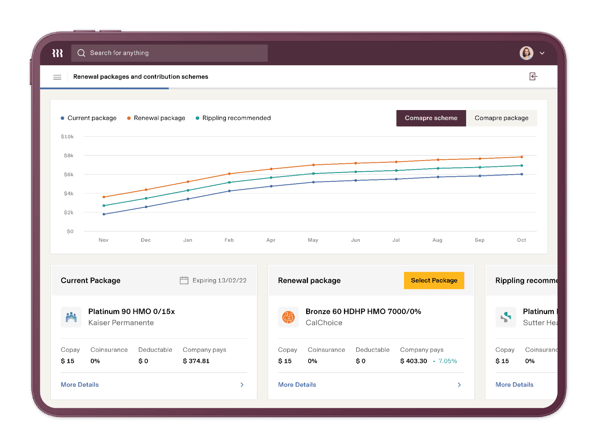
For teams looking for a very simple, lightweight solution, it’s worth accounting for a short learning curve. Rippling is a robust platform with multiple modules and deep customization options, so fully exploring everything it can do may take some time upfront. For growing mid-market organizations or enterprises planning to scale, that depth tends to be an advantage rather than a hurdle.
Another theme I noticed from G2 reviews is how people talk about Rippling’s default automated alerts and reminders. While many have stated that these are quite helpful for keeping HR processes on track, they can sometimes result in a high volume of notifications. This is particularly during periods like onboarding, benefits enrollment, or compliance-related updates. Some teams mention that the number of system emails or alerts can feel cluttered at times. That said, I’ve noticed how many organizations and reviewers do view this as a trade-off of Rippling’s highly automated system, and teams that take time to adjust notification preferences or workflow settings can often streamline how updates are received.
Overall, I’d recommend Rippling for growing companies and mid-market to enterprise teams that want to unify HR, payroll, IT, and workforce data into one cohesive system. It delivers the most value for organizations ready to streamline operations, reduce system sprawl, and empower both admins and employees with a modern, all-in-one people platform.
“What I like most about Rippling is how seamlessly everything connects. Headcount planning and compensation bands really stand out for me; they are super intuitive and have a strong structure, making budget chain and compensation reviews much easier. I also like the approval workflows, which are highly customizable and helped us fix bottlenecks in talent acquisition and compensation processes. I love the course builder and learning automation; they are great for onboarding and compliance, and very user-friendly.
The integrated ATS with all the other modules of the system gives us full visibility from requisition to onboarding without losing data along the way. Rippling has a strong side for analytics and custom dashboards, enabling real-time insights across people, compensation, and customer experience. Overall, I like that Rippling provides a single source of truth for people data while keeping the experience clean and easy to use.”
- Rippling review, Lucas M.
“Some advanced configurations, such as payroll rules, benefits setup, and permission controls, come with a learning curve and take time to configure correctly. Because the platform includes many modules, navigation can feel overwhelming at first, and it isn’t always obvious where certain settings are located. A few workflows also require referencing documentation or reaching out to support to complete them efficiently. Reporting and analytics are helpful for standard needs, but they can feel limited when you’re trying to build highly customized reports or pull cross-module insights.”
- Rippling review, Dhara B.
Related: Looking for HR tools that require lower investment? Check out the best free HR software for 2026
⭐G2 rating: 4.5/5
Hibob HRIS stands out for delivering a modern HR experience that feels intuitive without sacrificing depth. Based on the G2 data, the platform holds a 92% ease of use rating, which aligns closely with how often reviewers describe the interface as clean, visually engaging, and easy to navigate.
That usability matters in analytics specifically, when dashboards and reports are simple to access and understand, adoption tends to extend beyond HR to managers and leadership. For organizations that want workforce data to actually be used in decision-making conversations, that accessibility is a real advantage.
Another strength that shows up consistently is Hibob’s ability to balance core HR operations with culture and engagement insights in one connected system. Users frequently mention onboarding workflows, performance management, and engagement tracking living side by side with workforce data. Instead of analytics being an isolated reporting module, it feels embedded in everyday HR activity. That integration supports better visibility into headcount trends, goal progress, and employee lifecycle milestones, thus making workforce insights more contextual and actionable.
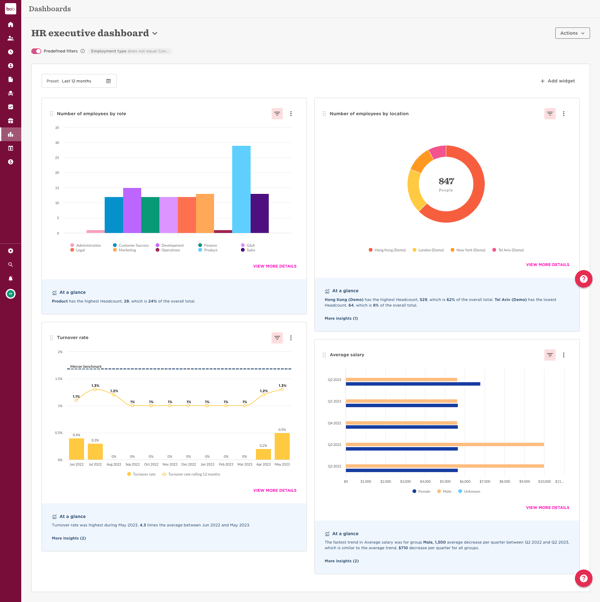
Filtering and customization capabilities also reinforce its analytics value. Filtering is one of Hibob’s highest-rated features on G2, with 84%, and customizability follows closely at 83%. Reviewers appreciate being able to slice data by department, region, manager, or demographic segment, which is especially useful for tracking metrics like turnover, diversity representation, and engagement scores. That flexibility allows HR leaders to tailor insights for executive reporting, board discussions, or departmental reviews without relying heavily on external BI tools.
Dashboards, which are rated at 82%, further support centralized visibility. G2 users have highlighted how helpful it is to have headcount, performance, and workforce metrics consolidated into one visual layer. For many growing companies, simply replacing fragmented spreadsheets with unified dashboards is a major step forward. The ability to monitor workforce trends in real time — and connect them to performance or engagement signals — strengthens Hibob’s position as a practical HR analytics platform rather than just an operational HRIS.
Operationally, Hibob also performs well in satisfaction metrics that indirectly impact analytics success. With 89% ease of admin and 90% ease of doing business with, users say the system is manageable for HR teams with minimal overhead. Even the quality of support, at 88%, gives companies a reliable and hassle-free experience while implementing and scaling the platform. When analytics tools are easy to administer and supported properly, teams are more likely to maintain accurate data structures, which directly improves reporting reliability.
Hibob is designed to support structured, insight-driven HR teams, so organizations looking for a very lightweight or entry-level solution may want to plan for some initial configuration. According to G2 reviewers, its flexibility and customization options are strengths, but they deliver the most value when workflows, dashboards, and reporting structures are set up thoughtfully from the start.
I also noticed a few G2 users talking about specific use cases for organizations that rely on highly specialized or deeply technical analytics frameworks with AI-driven insights. Such users might need to allocate additional time to refine reports and tailor dashboards to match very specific internal standards. The platform provides strong reporting foundations, and teams with advanced requirements may simply need to invest a bit more effort in configuration to fully align outputs with their expectations.
Taken together, Hibob’s usability, filtering flexibility, customizable workflows, centralized dashboards, and embedded engagement analytics make it especially compelling for growing and mid-market companies looking to build a more data-driven HR function without overwhelming complexity.
“HiBob is strong because it consolidates core HR processes (employee data, time off, onboarding, performance) into one intuitive platform, with flexible workflows and automations that reduce manual effort. The modern UI drives high adoption, while reporting and analytics give leadership clear visibility into key people metrics for faster, data-driven decisions.”
- Hibob HRIS review, Angelos C.
“While HiBob HRIS is a strong and user-friendly platform overall, there are a few areas where improvements could enhance the experience further. Some advanced reporting and analytics features have a learning curve and could benefit from more flexibility or simpler customization for complex data needs.”
- Hibob HRIS review, Preeti Y.
⭐G2 rating: 4.2/5
If you’re looking for a structured, enterprise-ready system where workforce data, payroll, benefits, and compliance reporting all live in one connected environment, ADP Workforce Now might be a great fit for you.
Many users talk about how much they value having payroll, benefits administration, time tracking, and HR data all connected in one platform. That consolidation is a major advantage for analytics-driven teams, as reporting becomes more reliable and audit-friendly. It’s not surprising that users continue to trust it for payroll accuracy in particular, especially in regulated or multi-state environments where clean reporting and documentation matter.
I also frequently see praise for payroll processing in particular, with reviewers noting that it feels dependable and well-structured, giving teams confidence in each pay cycle.
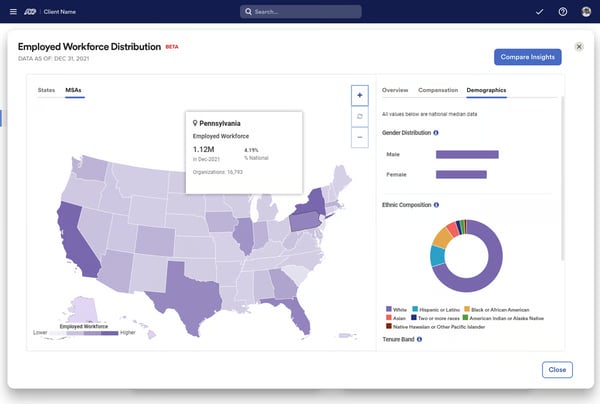
Reporting and dashboards are central strengths. Dashboards are rated at 85% in G2, making them the highest-rated feature. Users consistently emphasize the value of clear, structured reporting views. HR teams can generate headcount reports, turnover analyses, compensation summaries, and benefits cost breakdowns without relying on disconnected spreadsheets.
Filtering (83%) and data transformation (83%) also score strongly, supporting deeper segmentation and customized reporting. These capabilities make it easier to refine workforce data, tailor views by department or location, and prepare exports for executive decision-making.
Compliance reporting is another meaningful advantage. ADP’s depth in payroll processing, tax documentation, and benefits administration enables teams to generate structured, audit-ready reports with confidence. This is especially relevant for industries such as healthcare, financial services, nonprofit management, and HR services. For organizations operating in regulated environments, having reliable reporting tied directly to payroll and benefits data reduces risk and strengthens governance.
The breadth of modules further enhances workforce analytics. Because performance management, time tracking, benefits, and payroll data are integrated within the same ecosystem, organizations gain a more holistic view of workforce costs and productivity. HR leaders can correlate overtime, benefits utilization, and compensation data alongside headcount and turnover trends, supporting more informed workforce planning and budgeting decisions.
Many users have mentioned that the thorough and feature-rich system can be overwhelming for lightweight users. This creates a learning curve as the platform prioritizes depth and functionality to support comprehensive use cases.
While ADP offers a broad, well-established support infrastructure, some users report that response times can vary depending on the issue's complexity or the support tier. That said, many teams note that once connected with the right specialist, issues are typically resolved thoroughly.
Overall, I’d recommend ADP Workforce Now for mid-market to enterprise organizations that need strong payroll, structured HR processes, and detailed workforce reporting in one dependable system. It delivers the most value for established teams that prioritize compliance, data visibility, and operational consistency across a growing or complex workforce.
“ADP Workforce Now provides a centralized and reliable platform for managing core HR, payroll, and employee data. The payroll processing is accurate and compliant, and the integration between HR, time tracking, and benefits reduces manual work and data inconsistencies. The reporting and analytics features are useful for monitoring workforce trends and ensuring regulatory compliance.”
- ADP Workforce Now review, Anto R.
“The limited customization options and overall inflexibility are noticeable drawbacks. Additionally, the interface feels somewhat outdated, which can make navigation challenging at times. Another issue is the inability to utilize data analytics, which further restricts the software's usefulness.“
- ADP Workforce Now review, Rosie C.
Also read: Looking for a comprehensive guide to choose an employer of record (EOR) software? Check out the six best EOR platforms on G2.
⭐G2 rating: 4.7/5
If you want to think global, think Deel Payroll. Deel Payroll really stands out as a purpose-built platform for companies that hire and pay talent across borders. The strongest theme I notice is how much users appreciate having global payroll, contractor management, and compliance support all in one platform. Instead of piecing together local providers or navigating country-specific regulations on their own, teams describe Deel Payroll as a centralized solution that simplifies international expansion.
User satisfaction data reinforces this experience. Deel Payroll earns 95% for ease of use, 93% for ease of admin, and 93% for ease of setup. That shows up clearly in reviews describing a smooth onboarding process for both internal HR teams and international contractors. The interface is frequently described as intuitive and well-structured, with dashboards that provide quick visibility into contracts, payroll timelines, invoices, and compliance documentation. I also frequently see praise for how easy it is to onboard contractors and employees in new regions, generate localized contracts, and handle payments in different currencies without juggling separate systems. For globally distributed teams, that clarity reduces administrative friction and makes cross-border workforce management feel far more manageable.
Analytics and reporting are another area where Deel Payroll receives strong praise. Dashboards are one of its highest-rated features at 90%, as reported by G2. Graphs and charts scored 89%, indicating that users value the platform’s ability to turn global payroll and contractor data into visual, decision-ready insights. HR and finance leaders can track headcount distribution by country, monitor contractor costs, and review payroll expenses in a consolidated view — critical for organizations managing distributed workforces across multiple currencies and legal frameworks. Customizability is rated at 87% and indicates teams that need tailored reporting for leadership updates or compliance documentation.
Support quality is another differentiator, reflected with a 92% rating for support quality. Reviews frequently mention responsive guidance when navigating country-specific regulations, which is especially important for organizations expanding into unfamiliar legal territories.
Users frequently mention that payments are processed quickly and consistently, with clear visibility into payment status and transfer timelines. At the same time, the platform offers multiple withdrawal options and supports different currencies, giving contractors flexibility in how they access their earnings. Together, these capabilities help simplify cross-border payments, making it easier for organizations to pay global workers while giving individuals convenient control over how and when they receive their funds.
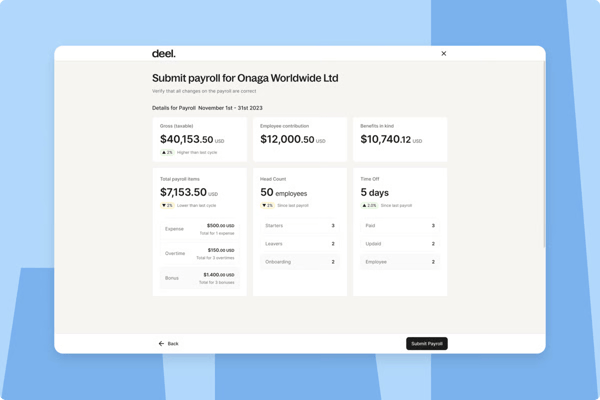
For teams seeking a deeply specialized, standalone HR analytics platform with highly advanced or heavily customized dashboards, it’s helpful to view Deel Payroll primarily as a global payroll and workforce management hub with strong built-in reporting. Its analytics are well-suited for tracking international payroll, contractor costs, and cross-border workforce insights, but organizations with highly technical BI requirements or niche reporting frameworks may need to supplement it with additional analytics layers.
Deel Payroll is purpose-built for companies operating across multiple countries, so its feature depth reflects that global focus. Organizations hiring and paying talent exclusively within a single country may want to evaluate whether they require the full range of international compliance, multi-currency, and cross-border capabilities that Deel Payroll is designed to deliver. For globally scaling teams, that breadth is a major advantage, but purely domestic operations may not need the entire scope of functionality.
Overall, that combination of strong usability, structured reporting, and dependable support makes Deel Payroll feel less like just a payroll processor and more like a global workforce operations hub, one designed to help distributed companies scale with structure, clarity, and data-backed oversight. I’d recommend it to remote-first companies, and it delivers the most value for teams expanding internationally who need clarity, structure, and confidence in managing a distributed workforce at scale.
“What I like best about Deel Payroll Payroll is how it removes the complexity of paying a global workforce. It brings everything — compliance, local tax regulations, contracts, and payments — into one platform, so companies can hire and pay people in different countries without worrying about legal or payroll risks. It also gives both employers and workers transparency, fast payments, and reliable support, which builds trust and efficiency across teams.”
- Deel Payroll review, Kimberly V.
“Overall, Deel Payroll works very well, but there are a few areas that could be improved. The reporting and analytics section could be more customizable to allow deeper insights into payments and contractor activity. Sometimes, smaller configuration changes or updates take a bit longer to reflect across the system. Additionally, the pricing can be slightly high for smaller teams, especially when scaling globally. However, these are minor compared to the overall convenience, reliability, and support the platform provides.”
- Deel Payroll review, Shivam V.
⭐G2 rating: 4.5/5
One thing that impressed me about Culture Amp was how many users have mentioned they benefited from the analytics and insights it provided. Culture Amp was built for employee experience and to help organizations understand their people on a deeper level, and it clearly shows.
This is a people analytics platform designed to turn employee feedback into structured, decision-ready insight. Satisfaction ratings from users reflect that strength, with 90% for quality of support, 90% for ease of use, and 89% for meeting requirements. Users frequently highlight how intuitive it is to design and launch engagement surveys, whether company-wide or targeted to specific teams.
The platform’s dashboards, rated at 87%, make it easy to visualize engagement trends, participation rates, and sentiment shifts over time. HR teams often mention that they don’t need advanced data skills to interpret results, which lowers the barrier to embedding analytics into everyday decision-making.
Another strength that comes through clearly is the depth of people analytics. Filtering and segmentation capabilities (rated 86%) also stand out in reviews, especially for organizations that want to slice results by department, tenure, location, or demographic groups. Users describe being able to quickly identify patterns in engagement, inclusion, and team health, then drill down into specific drivers.
The “levels of measurement” feature, rated at 85%, indicated this depth by enabling more structured analysis across different cohorts and timeframes. Together, these capabilities position Culture Amp as more than a survey tool — it functions as a centralized employee listening system with built-in analytical rigor.
The benchmarking capabilities also receive strong appreciation, as teams can compare their results against industry standards and use those insights to guide strategy. I get the sense that HR teams value how the platform translates feedback into recommended actions, making it easier for managers to move from data to meaningful change. Rather than viewing feedback in isolation, organizations can understand how they stack up and where targeted action may drive the most impact.
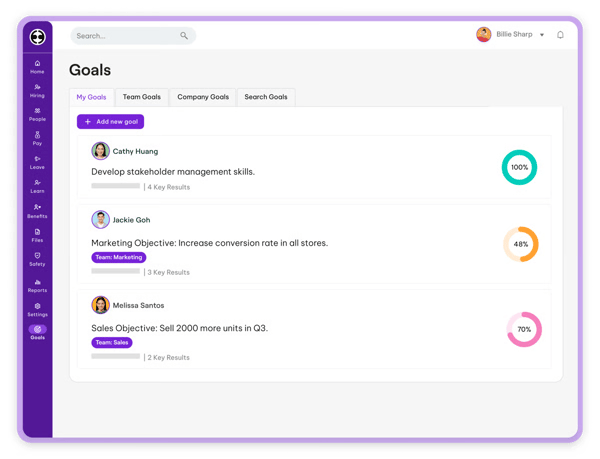
Performance management tools are another area where Culture Amp earns positive feedback. Reviewers describe structured goal tracking, continuous feedback features, and performance review workflows that feel aligned with modern, growth-focused organizations. The integration between engagement surveys and performance conversations appears to help teams create a more cohesive people strategy rather than treating feedback and development as separate processes. For companies that prioritize culture and employee voice, this combination seems to be a major differentiator.
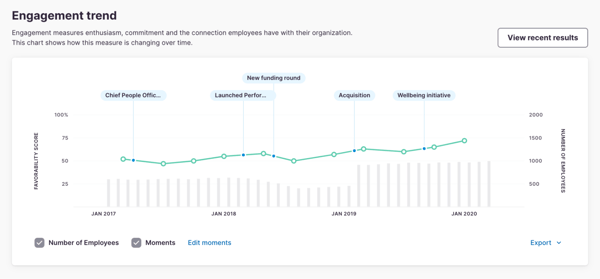
For organizations seeking a fully unified HRIS that includes payroll, benefits administration, and core employee data management, it’s helpful to view Culture Amp as a specialized people analytics and engagement layer rather than an all-in-one HR system. Its strengths are intentionally centered on engagement, performance, and feedback intelligence, so many teams pair it with an existing HRIS to create a more complete ecosystem.
Similarly, while the platform is intuitive to use, teams looking for extremely lightweight, one-click survey tools may want to plan for a bit of upfront configuration. Culture Amp’s advanced survey design, benchmarking, and analytics capabilities are most powerful when set up thoughtfully. This is an investment that typically pays off in deeper, more actionable insights over time.
Overall, I’d recommend Culture Amp for mid-market and enterprise organizations that are serious about measuring engagement, strengthening culture, and using people data to guide leadership decisions. It delivers the most value for HR and people teams that want robust analytics, meaningful benchmarks, and actionable insights to drive long-term employee experience and performance outcomes.
“I appreciate Culture Amp for its robust 360-degree process in performance reviews, which helps streamline the process significantly. The AI function is particularly impressive as it summarizes reviews and feedback comprehensively for each employee participating in the review process. As for the data analytics from surveys, I find it incredibly easy to access, and the AI's ability to summarize survey results adds immense value to my analytical tasks. Culture Amp's foundation in people science is something I truly like, as it adds depth and credibility to their methodologies. Furthermore, the platform's integration with Google Calendar is seamless, making one-on-one session scheduling with employees efficient and preventing missed appointments. The initial setup was remarkably easy, and the support received was invaluable, especially the office hours offered by the support team, which proved to be very helpful.”
- Culture Amp review, Sharlene S.
”Report writing can be confusing about adding fields in the report and how they are displayed.”
- Culture Amp review, Mike K.
⭐G2 rating: 4.5/5
Remote is built for simplifying hiring beyond its home borders, and the G2 reviews clearly praise it for how efficiently it achieves this.
The most consistent praise centers on how straightforward it feels to hire, onboard, and pay employees and contractors across multiple countries. Users consistently highlight how Remote centralizes global hiring, payroll, contractor management, and compliance into one structured system. Instead of juggling country-specific vendors or interpreting local labor laws independently, Remote acts as a reliable framework for issuing localized contracts, managing statutory benefits, and ensuring compliance across jurisdictions.
Ease of use is another recurring strength. Remote earns high marks for usability, with satisfaction scores reflecting strong performance in ease of use (90%), ease of setup (90%), and ease of administration (90%). Reviewers frequently highlight the clean interface and intuitive workflows, especially when it comes to onboarding new hires, submitting documents, and managing payroll details.
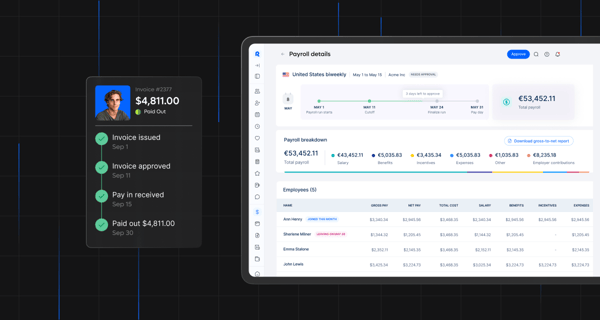
I’ve read that the centralized dashboard gives HR and finance teams visibility into employment status, compensation details, and compliance timelines across countries, without needing to switch systems. That simplicity appears especially valuable for distributed organizations that need global coordination without adding administrative complexity.
I’ve also noticed that reporting and visibility also play an important role in Remote’s value proposition. While the platform is primarily known for global employment infrastructure, users note that it provides consolidated insight into international headcount distribution, contractor costs, and payroll spend across currencies.
Features like dashboards (87%) and filtering (86%) are among its higher-rated capabilities, suggesting that teams find the analytics accessible and actionable. For leadership teams planning global workforce growth, centralized data helps connect hiring decisions with financial oversight in a more structured way.
I also see positive sentiment around support and guidance, with a 90% approval rating for its quality of support. Many users reference helpful customer support and clear documentation that make navigating international employment processes feel more manageable. For organizations that may not have deep in-house expertise in global labor laws, that added layer of structure and responsiveness appears to be a significant value driver.
One theme that appears in reviews is that Remote’s reporting capabilities are primarily designed to support global employment operations rather than functioning as a deeply specialized standalone HR analytics platform. Teams that require highly customizable dashboards, predictive workforce modeling, or specialized analytics frameworks may benefit from pairing Remote with additional analytics tools to extend reporting depth. For organizations focused on managing global teams efficiently, however, the built-in visibility Remote provides is often more than sufficient to support strategic workforce decisions.
Another consideration mentioned by reviewers relates to how the platform is positioned for global workforce management. Remote is primarily built to to help organizations hire, onboard, and manage employees across multiple countries without establishing local entities. Organizations operating primarily within a single country may want to evaluate whether they need the full scope of international compliance and entity management features the platform offers. For companies expanding internationally, however, these capabilities often become one of the platform’s strongest advantages.
Overall, I’d recommend Remote for startups, scale-ups, and distributed companies that want to hire internationally without the operational complexity of setting up local entities. It delivers the most value for teams expanding across borders who need a compliant, centralized, and easy-to-manage solution for global employment and workforce data.
“Remote's user-friendly interface makes onboarding international employees straightforward. The platform handles payroll, taxes, and compliance seamlessly, reducing administrative burdens. Their customer support is prompt and knowledgeable, ensuring smooth operations across different countries.”
- Remote review, Filippo F.
“While the platform is robust, some HR reporting features could be expanded. It would be helpful to have more customizable data exports and analytics dashboards. Also, customer support response times can vary depending on your account level, though responses are always professional when received.”
- Remote review, Mouhcine G.
Ready to explore the key features to look for in a core HR platform? Check out my colleague's breakdown, including compliance, reporting, and dashboards across top-rated tools based on G2 Data.
⭐G2 rating: 4.3/5
Employment Hero consistently comes through in reviews as a practical, all-in-one HR platform designed for growing organizations that want structure without unnecessary complexity. I’ve seen many users highlight how much they value managing recruitment, onboarding, leave, payroll, and employee records from a single system. Many reviewers specifically call out the recruitment and onboarding modules as major wins, saying they streamline hiring workflows and reduce manual back-and-forth.
The ability to create a centralized hub for HR teams helps the platform perform solidly across satisfaction metrics, with 88% for ease of use and 87% for ease of admin, reinforcing the sentiment that day-to-day HR tasks feel manageable rather than overwhelming.
When it comes to reporting and dashboards, I see a clear value proposition. This is especially the case for SMB-focused HR teams that want built-in visibility without investing in a separate analytics tool. The highest rated analytics features, such as dashboards (79%), transformation (78%), and graphs and charts (76%), are reflective of dependable, functional reporting.
Users frequently mention being able to track leave balances, payroll data, headcount changes, and employee records in one place. For teams that primarily need operational workforce insights rather than advanced predictive modeling, the reporting layer appears to deliver clear, usable data that supports day-to-day decisions.
Ease of navigation is another theme that shows up again and again. Users frequently describe the platform as intuitive, well laid out, and accessible even for non-technical teams. Employees can log in to access payslips, submit leave, update personal details, and complete onboarding tasks without much guidance. For HR admins, automation features around document management, workflows, and approvals help save time and create consistency.
Payroll integration is also a major differentiator. Many reviewers appreciate having payroll natively connected to HR data, which reduces duplicate entry and strengthens compliance. The system meets requirements with an 84% satisfaction score, suggesting that while it may not be built for highly complex enterprise scenarios, it reliably covers the needs of its core audience.
 For organizations that require highly advanced customization across every module, it’s helpful to plan for some initial configuration time. Employment Hero offers flexibility across workflows, templates, and performance features, and teams that invest time in setting these up thoughtfully tend to get the most value from the platform. For businesses seeking a very plug-and-play experience with minimal setup, a short planning phase can help ensure everything aligns with internal processes from the start.
According to G2 reviewers, teams that rely on tightly synchronized integrations with external payroll or accounting systems may want to review integration workflows during implementation. While the platform supports integrations, organizations with more complex finance processes or layered approval structures may benefit from aligning integration configurations early to ensure reporting and payroll data flow smoothly across systems. Many users note that once integrations are aligned with internal workflows, the platform supports consistent and reliable HR and payroll operations.
Based on the review patterns, I’d confidently recommend Employment Hero for small to mid-sized businesses that want to centralize HR, payroll, recruitment, and workforce reporting in one cohesive platform. It delivers the most value for growing teams that prioritize ease of use, operational efficiency, and having reliable people data all in one place without overcomplicating their tech stack.
“I find the Recruitment module in Employment Hero to be highly efficient and comprehensive. It covers all hiring scenarios, from role creation and advertising to shortlisting, screening, and coordinating interviews. The quality of data it provides is especially valuable, gathering all candidate information, analytics, and progress, which significantly simplifies decision-making. I also appreciate the AI-driven insights that streamline the screening process and reduce time spent on manual reviews. Overall, it transforms recruitment into a more structured, data-supported, and time-efficient workflow. Additionally, the initial setup was relatively easy, intuitive, and had clear guidance on which steps to take next during onboarding.”
- Employment Hero review, Violina S.
“What I dislike about Employment Hero is that some workflows and configurations can feel rigid, particularly when managing more complex or high-volume recruitment processes. Reporting and analytics are functional but limited without manual workarounds, and deeper customisation often requires admin intervention rather than being intuitive for end users. There are also occasional performance and UX inconsistencies between modules, which can break the flow and slow things down.”
- Employment Hero review, Jarrad D.
Still have questions about HR analytics tools? G2 has the answers!
For enterprise HR teams, ADP Workforce Now stands out for its structured payroll analytics, compliance reporting, and scalability across complex organizations. Rippling is also a strong option for enterprises looking to unify HR, payroll, and IT data into a centralized reporting environment. For large organizations prioritizing engagement and performance analytics, Culture Amp delivers enterprise-ready benchmarking and insight depth.
If DEI tracking is a priority, platforms like Hibob HRIS and Culture Amp offer strong reporting around engagement, demographic trends, and workforce insights tied to culture and performance. These tools help HR teams analyze representation, sentiment, and inclusion patterns across departments and leadership levels.
The best platform depends on your definition of “workforce insights.” For holistic HR + payroll + operational data, Rippling provides unified visibility. For engagement and performance-driven insights, Culture Amp leads. For global workforce visibility across countries, Deel Payroll and Remote are strong fits.
Culture Amp is particularly strong for performance tracking combined with engagement analytics. Hibob HRIS also offers structured performance management workflows with customizable reporting. For payroll-linked performance visibility at scale, ADP Workforce Now supports more structured reporting environments.
Most modern platforms offer dashboard customization, but Hibob HRIS and Rippling are especially strong in allowing teams to tailor reports by department, manager, or metric. Enterprise-focused teams using ADP Workforce Now can also configure structured reports, though setup may require more configuration.
If clean, intuitive data visualization is a priority, Culture Amp and Hibob HRIS stand out for their modern dashboards and visual reporting. Rippling also provides clear workforce data views that unify payroll, HR, and operational metrics in one place.
For predictive retention insights tied to engagement and feedback data, Culture Amp is a strong choice. Platforms like Rippling and ADP Workforce Now help analyze turnover patterns through payroll and workforce reporting, while global platforms like Deel Payroll and Remote help monitor attrition trends across distributed teams.
Most leading HR analytics platforms integrate with HCM and payroll systems. Rippling offers built-in integration since it functions as a unified HR and payroll platform. ADP Workforce Now integrates deeply within its ecosystem. Tools like Culture Amp and Hibob HRIS integrate with broader HR tech stacks for performance and engagement analytics.
For predictive planning and scenario modeling, ADP Workforce Now and Rippling support structured workforce forecasting tied to payroll and headcount data. Culture Amp contributes predictive engagement insights, while Deel Payroll and Remote help forecast global workforce expansion costs.
AI-driven insights are most visible in platforms that incorporate predictive modeling and automated recommendations. Culture Amp leverages benchmarking and engagement insights to guide action. Rippling and ADP Workforce Now support automation and structured reporting that enable data-backed decision-making. Global workforce platforms like Deel Payroll and Remote use automation to simplify compliance and cost visibility across countries.
So at the end of all this, you might be wondering what the main takeaway is. Basically, even the best tools don’t magically “fix retention” or “prove HR ROI” on their own. What they can do is help you view workforce signals more easily and connect people metrics to business outcomes. They can also help teams shift from reactive reporting to proactive decisions without living in spreadsheets. Moreover, the best HR analytics software for your organization depends on what your workforce complexity and requirements are.
I’ve also noticed while comparing these tools that G2 reviews have reflected a shift in expectations for them over the last five years. AI is set to play a pivotal role in HR analytics, moving the category beyond backward-looking dashboards toward real-time visibility and predictive intelligence. According to the industry trend, AI-powered analytics can actually help forecast turnover risks, identify skill gaps, and model future workforce needs so leaders can act before any problems escalate. I see many tools mentioned on this list delving into AI reporting — something that is set to be more prevalent in the future. Many organizations also use talent intelligence platforms alongside HR analytics platforms to gain deeper visibility into workforce skills, succession planning, and future hiring gaps.
For HR teams, the real opportunity is learning how to pair these AI insights with irreplaceable human judgment. Many organizations that succeed with AI in HR typically invest in data quality, train managers to interpret predictive insights, and establish governance frameworks that ensure transparency and fairness. Find the right tool for your match, and HR analytics can go from being a monthly reporting scramble to a strategic advantage.
Looking for a tool to help with overall human capital management? We’ve compiled a list of the best HCM tools on G2 for easy comparison based on your needs.


I recently celebrated my second anniversary at G2, and it got me thinking back to my first few...
 by Harshita Tewari

Recently updatedSummer 2026 Grid® Report · Published May 26, 2026 The 10 best...
 by Sagar Joshi
I know you are here because your performance cycle is probably broken.
 by Soundarya Jayaraman