


The first international hire is exciting. The paperwork that follows isn’t.
I speak regularly with HR leaders, founders, and ops teams managing global workforces, and the pattern is almost always the same: too many moving parts, unclear compliance requirements, and way too much manual coordination between legal, payroll, and finance. That’s exactly why I dug into the best EOR software on G2 to see which tools actually make global hiring simpler in real-world scenarios.
The teams I looked at wanted faster onboarding, built-in compliance coverage, reliable global payroll, and a way to manage everything without setting up local entities. Especially for startups scaling globally or enterprises expanding into new markets, the cost and risk of getting this wrong is high.
If you’re responsible for hiring, managing, or paying international employees, this guide is designed to help you reduce compliance risk, simplify global hiring, and scale your workforce with more confidence.
I’ll walk you through the six best employer of record (EOR) software solutions for 2026, including global leaders like Deel Hire, Remote, and Rippling, as well as enterprise-focused platforms like G-P, all backed by 1,000+ G2 user reviews and product satisfaction data.
Deel Hire: Best for global hiring with built-in compliance and payroll support
End-to-end global employment platform with automated compliance, flexible payments, and centralized workforce management (Starts at $599 per employee/month)
Remote: Best for fully owned global infrastructure and compliance-first hiring
Fully owned global entities with strong compliance coverage, localized benefits, and reliable payroll processing (Starts at $699 per employee/month)
Rippling: Best for unified HR, IT, and global workforce management
All-in-one platform combining HR, payroll, IT provisioning, and automation with strong integrations like QuickBooks (Starts at $499 per employee/month)
Multiplier Employer of Record: Best for fast global hiring with localized payroll and compliance
Quick onboarding workflows with localized compliance, payroll support, and strong customer guidance (Starts at $400 per employee/month)
G-P: Best for enterprise-grade global hiring with deep compliance expertise
Robust compliance infrastructure with centralized global employment management and dedicated support teams (Custom pricing)
Payoneer Workforce Management: Best for managing global contractors and employees with integrated payments
Unified workforce management with seamless cross-border payments and strong onboarding support (Starts at $199 per employee/month)
*These tools are top-rated in their category, according to the G2's Spring 2026 Grid® Report for EOR Software. I’ve added their monthly pricing to make comparisons easier for you.
Employer of record software is designed to handle the legal and operational side of hiring employees in other countries. Instead of setting up local entities, companies can rely on an EOR provider to act as the legal employer while managing payroll, taxes, benefits, and compliance with local labor laws.
What stands out to me is how these platforms turn a complex, multi-step process into a much more structured one. Hiring internationally typically involves navigating country-specific regulations, setting up payroll systems, and ensuring compliance at every step. The best EOR services for hiring international staff typically bring all of that into a single system, making it easier to manage employees across regions without stitching together multiple solutions.
At scale, this becomes less about hiring and more about consistency. Teams need a reliable way to onboard employees, process payroll across currencies, and stay aligned with local requirements without constant manual intervention. That’s where EOR software plays a bigger role — it standardizes how global employment is handled across countries.
This has led to a rise in adoption rates. Industry data from Market Growth Reports shows that over 65% of multinational companies use EOR services to manage compliance and payroll, with hiring through these platforms spanning more than 180 countries.
Even from a user perspective, the value is clear. According to G2 Data, 93% of users say leading EOR software meets their requirements, and 93% highlight ease of setup as a key advantage. The best EOR companies help companies run international operations in a more predictable and manageable way.
To start, I explored G2’s EOR category page, G2 Grid® Report, and product reviews to build an initial list of platforms.
From there, I used AI-assisted analysis to go through large volumes of verified G2 reviews, focusing on themes like global hiring speed, compliance coverage, payroll accuracy, etc.
I also cross-referenced insights from professionals managing global teams and validated those perspectives against real user feedback. The goal was to understand not just feature sets, but how these tools actually perform in day-to-day operations.
The screenshots featured throughout the product sections come from vendor G2 profiles or publicly available sources.
To identify the best employer of record software, I focused on what HR, finance, and operations teams consistently look for when scaling internationally. Here’s what I prioritized when evaluating these tools:
No single platform excels at everything, but the best ones consistently perform well when it comes to reducing complexity, ensuring compliance, and enabling teams to scale globally without friction.
The list below contains genuine user reviews from our Employer of Record Software category page. To qualify for inclusion in the category, a product must:
*This data was pulled from G2 in 2026. Some reviews may have been edited for clarity.
If you're focused specifically on compensation and payouts, dedicated payroll management software may be worth a look.
G2 rating: 4.8/5 ⭐
Deel Hire is one of the most reliable EOR software solutions, and in my opinion, it sets itself apart by offering unmatched financial flexibility, including fast global withdrawals, early paycheck access, and seamless USD spending with the Deel Card.
Compliance support is another major strength. Reviewers frequently highlight how Deel automatically generates compliant contracts and handles country-specific regulations in the background. This reduces legal overhead and gives teams confidence when expanding internationally without needing in-house expertise.
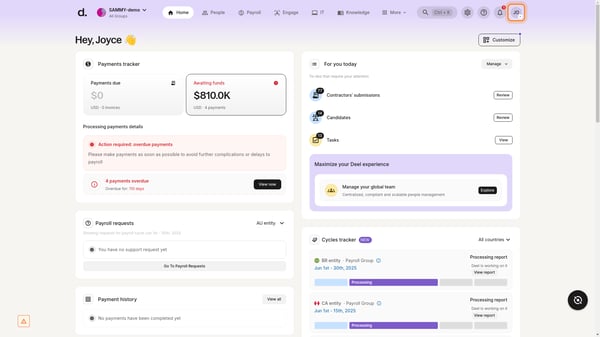
Deel Hire also simplifies onboarding. Users often mention how structured and intuitive the process feels, with clear workflows that reduce delays and errors. This makes a strong first impression on new hires while helping teams move faster.
From what I observed, reliable, fast payments, along with flexible withdrawal options such as bank transfers and PayPal, are another of Deel’s major strengths. This is backed by strong satisfaction metrics on G2, including 92% ease of admin and 93% ease of doing business, which signal consistent performance across core workflows.
Another interesting detail I noticed across reviews is the value of financial flexibility features for contractors. Users frequently call out tools like the Deel Card, which lets them to spend earnings globally or make purchases in USD without additional transfers or extra fees.
I’ve also seen strong appreciation for Deel Advance, which gives workers early access to their earnings before the scheduled payout date. While these aren’t the primary reasons companies adopt the platform, they clearly improve the day-to-day experience for distributed teams and contractors managing international payments.
One thing to note is that Deel Hire can introduce some interface complexity, and navigation may feel crowded at times, especially when trying to locate specific information or complete detailed tasks, but this is largely a trade-off for its ability to handle complex global processes and workflows.
While many users see value in the platform, some mention that fees, especially around withdrawals and currency conversion, can add up. This tends to matter more for smaller teams or contractors, whereas larger organizations often see it as a necessity for global infrastructure.
Deel Hire stands out as a strong choice for companies looking to scale internationally without getting slowed down by compliance and operational complexity. Its strength lies in bringing everything into one system that’s built for global hiring at scale.
“I love how easy Deel Hire makes global hiring. Everything, from contracts to compliance and payroll, is handled in one place, so you don’t need to chase multiple providers or figure out local laws. It saves a lot of time and removes stress from international onboarding.”
- Deel Hire review, Aaron L.
“While Deel's core service is excellent, my biggest dissatisfaction is around the fee structure and its lack of transparency, particularly for contractors. The service fees and currency exchange markups, especially when using instant withdrawal options or certain payment methods, can feel unjustifiably high. When you factor in the transfer fees on top of the base cost, the total expenditure for paying our global team ends up being significantly more expensive than we initially budgeted for. I wish the platform provided a clearer, all-in-one fee summary before the transaction is initiated.”
- Deel Hire review, JUN H.G2 rating: 4.5/5 ⭐
Remote helps companies hire, pay, and manage international employees with built-in compliance and payroll support.
From the reviews I evaluated, Remote stands out for its fully owned global infrastructure, which sets it apart from providers that rely on third-party entities. This ownership model shows up consistently in feedback, with teams highlighting how it brings more consistency and control when hiring across multiple countries.
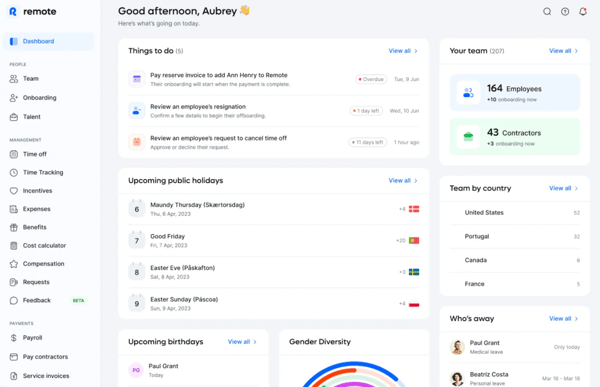
Remote also provides industry-leading compliance and legal coverage. Reviewers frequently point out that Remote handles local labor laws, taxes, and statutory requirements behind the scenes, which removes much of the uncertainty when expanding into new regions. This compliance-first approach builds confidence for teams managing international hiring.
Another capability that gets a lot of attention is its AI-powered support experience. The built-in chatbot is available 24/7 and provides quick answers to common questions without waiting for support teams. According to G2 Data, 74% of users report actively using Remote’s AI features, signaling strong adoption for a feature often treated as secondary. Reviewers often highlight how quickly the AI retrieves relevant documentation and links, making it easier to navigate policies or resolve basic queries. This is helpful, especially for new users who need immediate guidance early on.
There’s also steady appreciation for employee self-service functionality. There’s a reason 94% of users find Remote easy to use, according to G2 Data. From what I’ve seen in reviews, employees can easily access contracts, benefits, and payment details without relying heavily on HR teams. This reduces back-and-forth and makes it easier to manage distributed teams at scale.
Localized benefits management is another area that gets attention. Reviewers highlight how Remote supports country-specific benefits, helping companies stay competitive while aligning with local regulations. This seems especially valuable for companies hiring across multiple regions with different expectations.
I also came across consistent feedback around onboarding and contract workflows. Users describe the process as structured and straightforward, with clear steps that help reduce delays. This is reflected in G2 Data, with 91% users being satisfied with the ease of setup, suggesting teams can get started quickly without a steep learning curve.
There were discussions around customer support variability in complex scenarios. While support is generally responsive, some users mention occasional delays or a lack of deep local context when handling more nuanced issues, especially without a dedicated account contact. The structure ensures a consistent support experience for all users, rather than varying heavily based on account size or location.
Another point that comes up is pricing clarity and expense workflows. Some reviewers note that costs can feel high for smaller teams, and reimbursement processes may require stricter documentation or take longer than expected, though this is often aligned with maintaining compliance and accuracy across global financial operations.
Overall, I see Remote as a strong fit for companies that prioritize compliance, control, and long-term global hiring infrastructure. Its owned-entity model and consistent payroll performance make it a reliable choice for scaling international teams.
“The most helpful part for me as a new employee using remote was having full access to all my compliance documents, like my contract, timesheets, and payslips which makes it very easy in case I have a query, dispute, or need clarification on anything. Another very handy feature is having access to my EOR, as that quite helped in easing my anxiety as a new starter.”
- Remote review, Anelisa N.
“I think it's too expensive. Especially for us who do not have many people working remotely, it's expensive, and it's also expensive compared to other EORs. I think that could be really improved by them. And we do not have a direct person to talk to, like a customer agent who would take care of all our problems. We do not have that anymore.”
- Remote review, Johannes K.
G2 rating: 4.8/5 ⭐
Rippling is a unified workforce platform that brings HR, payroll, IT, and finance systems into one place to manage employees globally.
Based on the G2 reviews I went through, Rippling is often described as a platform that replaces multiple tools rather than adding another layer on top. Teams use it to manage core HR, payroll, and IT workflows together in one place. This unified system is especially useful for distributed teams, as it reduces duplication and makes it easier to maintain consistent records across regions.
Many users also rely on Rippling for automation across the employee lifecycle. Onboarding and offboarding trigger actions across systems, such as assigning apps, provisioning devices, and setting up payroll in a single step. Because the data is centralized, updates don’t need to be repeated across tools.
Where it starts to feel different from typical EOR platforms is in IT and device management. Reviews frequently highlight how software access, permissions, and hardware can be managed alongside HR workflows. Features like automated app provisioning, SSO, and the RPass password manager make it especially useful for teams handling remote employees at scale.
Another area that comes through clearly is flexibility. Rippling doesn’t force teams into fixed workflows. Users mention being able to customize processes and connect external tools like QuickBooks Online, which helps keep payroll and financial data aligned without extra reconciliation work. For a platform with this level of functionality, usability holds up well. Rippling scores 95% for ease of use and 91% for ease of setup, according to G2 Data.
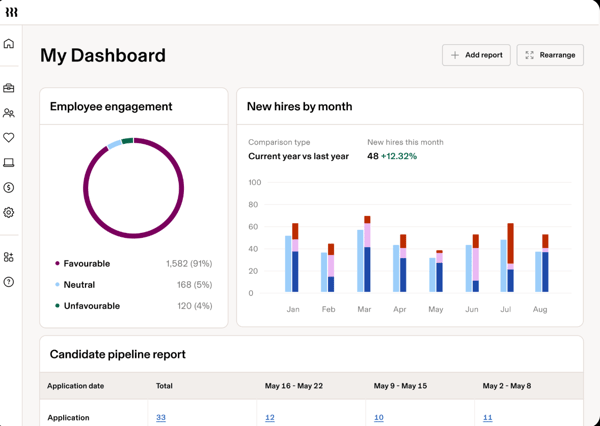
One capability that adds another layer of confidence is its automated tax and compliance handling. Rippling manages federal and state tax filings, supports registrations, and maintains audit-ready documentation aligned to specific regions. From what I’ve seen in reviews, this goes beyond basic compliance checks and gives teams more certainty when operating across regulated environments or multiple jurisdictions.
Another aspect that stands out is the mobile app experience. Users frequently mention how easy it is to upload receipts, track expenses, and stay on top of payment timelines directly from their phones. The app also sends proactive reminders for missing documentation, which makes it especially convenient for employees and contractors managing tasks on the go.
That said, getting everything set up can take some adjustment. Some reviewers mention that the platform feels dense at first, particularly when navigating multiple modules or configuring workflows for the first time, though this reflects the depth of functionality available.
Support feedback is generally positive, but not without a few caveats. A few users note that more complex or technical queries can take time to resolve, especially when multiple systems are involved, though support is typically thorough once engaged.
Rippling stands out for companies looking to consolidate systems rather than manage a growing tool stack. I strongly recommend it for teams that want automation, flexibility, and visibility across HR and IT in one platform.
“What I like most about Rippling is that it brings everything I need into one place, which makes my day-to-day work much simpler and easier to manage. Rather than switching between different tools for payroll, benefits, and other tasks, I can handle everything from a single platform, which saves time and cuts down on confusion. I also appreciate how fast and smooth the system feels, especially when I’m completing important tasks like onboarding or checking information. It helps me stay focused on my work without unnecessary delays.”
- Rippling review, Varun K.
“Because Rippling offers so many features, it can feel overwhelming at first. There is a learning curve, especially when configuring workflows, permissions, and automation rules correctly. Some advanced customizations require deeper platform knowledge, and occasional updates can change navigation or settings. While support is responsive, more step-by-step implementation guides for complex use cases would be helpful.”
- Rippling review, Matthew M.
If your focus extends beyond global hiring into day-to-day HR operations, take a look at these HR software platforms.
G2 rating: 4.7/5 ⭐
Multiplier Employer of Record is an EOR platform designed to help companies hire, onboard, and pay international employees quickly while staying aligned with local regulations.
Across the reviews I analyzed, Multiplier’s speed comes up again and again. Teams consistently highlight how quickly they can bring in talent from new countries without getting stuck in entity setup or legal delays. That time-to-hire advantage is a big reason companies choose Multiplier early in their global expansion. This momentum carries into everyday usability.
Multiplier scores 95% for ease of use and 94% for ease of setup on G2, and the user feedback reflects that. Most teams describe it as straightforward to navigate, even when managing employees across multiple regions.
Compliance handling is another area where the platform earns trust. I noticed that most users rely on it to manage local labor laws, taxes, and statutory benefits in the background. Instead of manually tracking country-specific requirements, teams can focus on hiring while the system handles the regulatory layer.
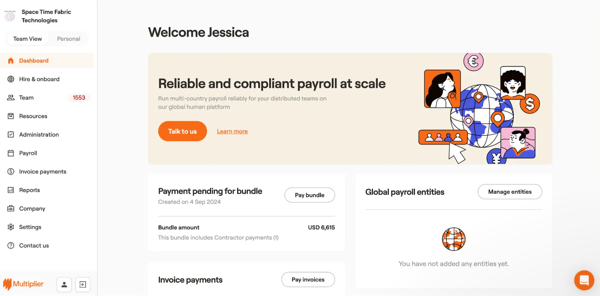
On the employee side, the experience feels equally structured. Reviews frequently mention how easy it is for employees to access contracts, payslips, and requests through a centralized dashboard. That visibility reduces dependency on HR and keeps things moving without unnecessary back-and-forth.
As teams scale, this setup continues to hold up. I came across many users pointing out that managing employees across several countries doesn’t add much overhead, which makes it easier to expand into new markets without rebuilding processes each time.
Customer support is another area where Multiplier performs well. With a 95% quality of support score in G2, users often describe quick responses and clear guidance when working through onboarding or compliance-related questions.
Payroll also holds steady across regions. Users highlight accurate salary processing, consistent payouts, and clear invoicing, which helps both employers and employees stay aligned on compensation.
There are a couple of areas where expectations need to be set. When issues get more nuanced, especially around region-specific compliance, some users experience longer resolution timelines, even if initial responses are quick, but support tends to stay engaged until issues are resolved.
Another pattern that comes up in some reviews is around system responsiveness. Certain updates, such as onboarding status or invoice changes, don’t always reflect instantly, which can require an extra check or follow-up. This is typically part of maintaining system accuracy across processes, especially in environments where financial or onboarding data needs to be validated before updating.
If I were advising a team, I’d say Multiplier makes the most sense for teams that value speed and clarity. It’s a strong option if your priority is getting global hiring up and running quickly without adding unnecessary complexity.
“I really value how straightforward Multiplier is. The platform takes the complexity out of international hiring, making the whole process feel much more manageable and less daunting. Its user-friendly design stands out as well. Getting started with Multiplier is easy, and using it on a daily basis is simple. After the initial setup, everything, including payroll and compliance, operates seamlessly, which makes it effortless to use regularly.”
- Multiplier Employer of Record review, Shubham Kumar S.
“The resolution time for HR concerns can be slow, especially for certain employees. For example, we have a team member in the Philippines who has had issues with their pay. When they reach out via chat, the CSR is not a native Filipino and often doesn’t know the basic labor laws that apply in the country, which makes it harder to resolve the issue quickly. It would be very helpful if you could assign chat support team members who are actually knowledgeable about HR and familiar with the specific country’s labor laws. That way, cases like this wouldn’t get stuck, and the overall resolution time would be shorter.”
- Multiplier Employer of Recordreview, Cenon Marco M.
Also evaluating multi-country payroll tools? Compare the compliance and data consolidation features of top platforms, including Native Teams, Remote People, and Global Expansion.
G2 rating: 4.4/5 ⭐
G-P is an enterprise-focused EOR platform designed to help companies hire, onboard, and manage international employees with strong compliance coverage across regions.
When I went through reviews, G-P’s ability to accurately manage compliance across countries with different regulatory environments stood out. This focus shows up early in the hiring process. Before companies even enter a new market, users mention getting clear visibility into the full cost of employment, including taxes, benefits, and statutory requirements. That upfront clarity seems to remove much of the guesswork, especially for teams expanding into unfamiliar regions.
Once employees are onboarded, the experience shifts toward structured global workforce management. Contracts, onboarding steps, payroll, and compliance workflows are organized in a way that keeps things consistent across countries. This is why G-P has got an 89% satisfaction rating when it comes to ease of setup.
That flexibility carries into senior hiring as well. For companies bringing in leadership roles, G-P allows customization of executive-level benefits, which gives more control when structuring offers for key positions.
I also came across feedback that’s particularly relevant for smaller teams. Some users highlight G-P's ability to scale and expand small to medium-sized businesses gradually. G2 Data reflects this, with 51% of G-Ps customers being in the mid-market segment (51-1000 employees). This makes the platform more accessible for startups that want to grow internationally without committing to large-scale hiring from day one.
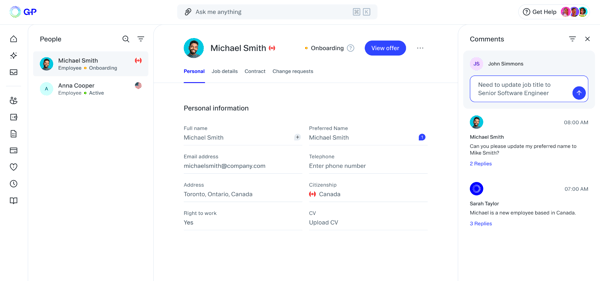
On the compliance side, there’s a noticeable emphasis on local HR advocacy for employees. Instead of just handling employer requirements, in-country teams help ensure employees receive the benefits they’re entitled to under local laws. That added layer of support seems to build trust on both sides and contributes to a 89% rating for quality of support, according to G2 Data.
The product experience receives regular quality-of-life and feature updates. I saw recent reviews where users mention a mobile-friendly interface that makes routine tasks like tracking time more convenient, along with newer AI-driven support tools that help surface information quickly and reduce manual effort.
There are a couple of trade-offs that come up alongside these strengths. Some users mention that time and leave tracking can feel tedious in certain cases, such as needing to log time off in multiple steps or manually verify leave balances, but these processes are typically structured to ensure accurate record-keeping.
Another thing to note is that time and expense workflows rely on external tools, such as integrations like Zoho. This can make the experience feel disjointed, as it involves switching platforms and managing separate logins, although it also allows flexibility through integrations with established tools.
My recommendation is to use G-P if your team prioritizes compliance depth, employee experience, and structured global operations over speed or lightweight workflows.
“I really like G-P's platform because it's very intuitive, and the employment generator contract is great and easy to use, which helps refine talent operations processing for hiring new FTE employees. We've been using G-P for over four years, and I've noticed growth and development in their platform, especially with the use of AI. The support they provide for our co- FTE employees is also fantastic. We love our account manager, Fernanda, because she's always lovely, responsive, and helpful.”
- G-P review, Jess B.
“I don't like the toggling between Zoho and G-P First. Certain employment items make it really tricky. The dashboard isn't very user-friendly, and it's a bit finicky.”
- G-P review, KM R.
G2 rating: 4.6/5 ⭐
Payoneer Workforce Management (formerly Skuad) feels built for teams that want global hiring to work without needing constant follow-ups. From what I’ve seen across G2 reviews, the platform stands out for combining payroll, compliance, and onboarding into a workflow that’s easy to manage even across multiple countries.
Users really value the support experience. Instead of just handling tickets, teams describe working closely with account managers who stay responsive across time zones — even outside standard hours. That level of involvement aligns with its 94% quality of support satisfaction score on G2, which reflects how consistently this shows up in feedback.
Another area where the platform stands out is its hands-on onboarding process. Beyond contracts and documentation, users mention support with logistics, such as visa coordination, medical tests, and appointment scheduling. That level of execution removes a lot of the operational burden from internal teams.
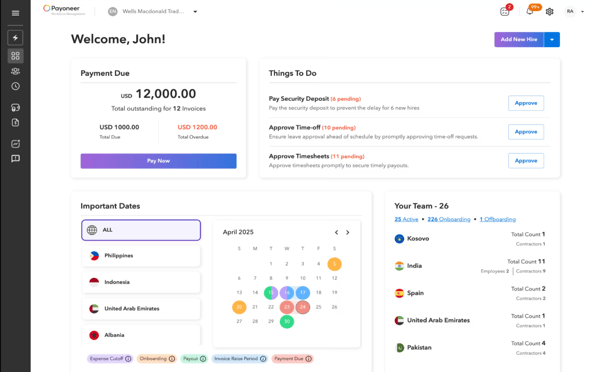
On top of this, day-to-day operations feel centralized. The platform brings time tracking, leave management, and expense management into one place. For small teams, this often translates into fewer systems to manage and less dependency on dedicated HRIS resources. It also explains why 95% of users rate its ease of use highly, especially when handling routine workflows.
Billing simplicity is another detail that often comes up in reviews. Instead of juggling multiple invoices across regions, teams highlight the ability to manage everything through a single consolidated invoice each month. That structure makes financial tracking much cleaner for distributed teams.
Pricing is where I see a clear differentiator. In a category where costs can scale quickly, users repeatedly call out Skuad as “reasonable” and “good value for the cost.” For growing companies, especially those hiring across multiple regions, that balance between capability and affordability seems to matter just as much as feature depth.
The platform handles classification, local labor laws, and regulatory requirements in the background, allowing companies to hire in new countries without setting up entities or building in-house expertise. Combined with its 94% ease of setup score, it suggests teams can get up and running easily
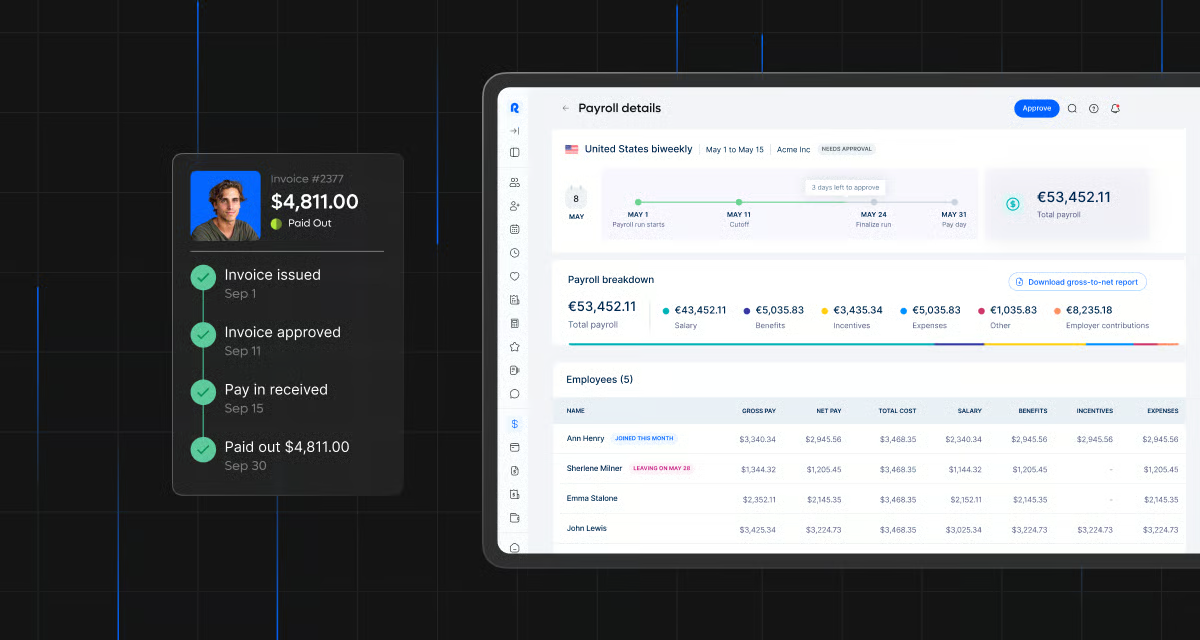
Some users report issues with delayed invoices, unclear charges, or exchange rate discrepancies. In a few cases, resolving these required extended back-and-forth, which can slow down finance teams. Although, the process creates a clear audit trail, which can be valuable for finance teams that need traceability and compliance in their records.
Other reviewers note that financial workflows feel less refined in some areas. Expense reporting, especially for travel, can be less intuitive, and payroll adjustments aren’t always easy to manage, with limited currency flexibility, but this often reflects the need to accommodate varying regional requirements and compliance needs.
Overall, Payoneer Workforce Management stands out for teams that want a more guided, hands-on approach to global hiring. It’s especially well-suited for companies that value strong onboarding support, simplified billing, and cost-effective global expansion.
“I like how straightforward everything is with Payoneer Workforce Management. The platform is clean, organized, and easy to navigate, so I don’t get lost looking for basic things. They’re also quick when it comes to support. Whenever I have a concern, someone actually responds and resolves it. Overall, it just makes the whole remote work setup feel smooth and hassle-free.”
- Payoneer Workforce Management review, Ronilo V.
“I just don't know if the salary incentives and holidays are being credited at the right time.”
- Payoneer Workforce Management review, Vanezza Fe V.
While the tools above cover most global hiring needs, a few other EOR platforms are worth exploring for more specific use cases, such as budget-conscious hiring, regional expertise, or U.S.-focused compliance.
Have more questions? I’ve answered some of the most common ones below based on what I’ve seen in G2 reviews and real-world use cases.
The main difference between an Employer of Record (EOR) and a Professional Employer Organization (PEO) comes down to legal responsibility.
With an EOR, the provider is the full legal employer, taking on compliance, tax obligations, and employment risk in that country. With a PEO, the relationship is co-employment, meaning your company still needs a legal entity in that region.
If you’re hiring internationally without entities, EOR is usually the more practical option.
Most teams turn to EOR software when they want to:
From what I’ve seen in reviews, it’s especially useful for startups expanding globally and enterprises testing new markets before committing to entity setup.
EOR software can be expensive, depending on the provider and the level of service.
Many platforms charge a per-employee monthly fee, and costs can vary based on country, benefits, and compliance requirements. Based on G2 feedback, teams often see it as a trade-off between cost and convenience — paying more upfront to avoid legal risks and operational overhead. For smaller teams or early-stage companies, pricing is often a major consideration.
For mid-sized software companies, platforms like Deel Hire, Rippling, and Remote consistently stand out in G2 rankings. According to the 2026 Mid-Market Grid® Report for Employer of Record (EOR), these tools lead the category with G2 scores of 98, 97, and 95, respectively.
From what I’ve seen, these platforms align well with how mid-market tech teams operate. They combine global hiring capabilities with reliable payroll, compliance coverage, and scalable workflows, which makes them a strong fit for companies expanding across regions without adding operational complexity.
Yes, most modern EOR platforms support both contractors and full-time employees within the same system.
From what I’ve observed, this flexibility is a big advantage for companies with mixed workforce models, since they can manage contracts, payments, and compliance in one place instead of using separate tools.
In many cases, onboarding can happen within a few days to a couple of weeks, depending on the country and compliance requirements.
According to G2 reviews, speed of onboarding and ease of setup are among the biggest reasons teams adopt EOR platforms, especially when compared to setting up a local entity, which can take months.
The biggest benefits I’ve seen across reviews include:
For most teams, it comes down to saving time and avoiding costly mistakes when hiring internationally.
From what I’ve seen across user demographics, platforms like Deel Hire, G-P, Pebl (formerly Velocity Global), Remote, and Multiplier consistently stand out for software and IT teams.
Across these tools, industries like Computer Software and Information Technology and Services show up most frequently in their user bases, which tells me they’re well-aligned with how tech teams operate.
A common theme in feedback is reliability and ease of use. Teams often highlight platforms like Deel Hire for their intuitive interfaces that “just work,” without slowing down hiring or onboarding workflows.
For development teams managing both employees and systems, Rippling stands out as one of the top Employer of Record software for small app development companies. Its IT automation makes onboarding developers easy by instantly provisioning access to tools such as GitHub, Jira, and Slack through single sign-on (SSO).
If your setup leans more toward freelancers or contract-based work, Deel Hire is a trusted EOR software for a freelance app development business. It simplifies contractor agreements, compliance, and global payments, while also offering flexible withdrawal options that work well for distributed developer teams.
If you are looking for one of the top recommended EOR apps for new tech companies, Rippling comes up frequently here, especially among startups that want a mature platform with strong automation and support without adding operational overhead.
Another option is Remote People (Horizons). It’s commonly praised in G2 by startups for its flat-rate pricing and hands-on support, which makes it easier to scale global hiring without significantly increasing burn. Teams also highlight how smoothly it handles onboarding and contracts for developers across regions like Eastern Europe and Asia.
For smaller teams looking for the best EOR providers for small businesses, Justworks is often described as hitting the right balance. It offers the core payroll, compliance, and HR features most teams need without feeling overly complex or heavy.
For companies expanding internationally, Remote People (Horizons) and Remote are both strong options. Remote People is often noted as one of the best EOR providers for a digital services company due to its scalability as teams grow, while Remote provides a more structured global infrastructure. The main trade-off I’ve seen mentioned is cost, especially as team size increases.
After going through all these tools, here’s what stands out: global hiring isn’t the hard part anymore. Running it smoothly is.
Most of these platforms — whether it’s Deel Hire, Remote, Rippling, Multiplier, or G-P — can get you across the finish line on hiring. You can onboard employees in new countries, run payroll, and stay compliant without setting up entities. The infrastructure is there, and it works.
Where things start to diverge is after that first hire. How easily can your team manage payroll across countries? How much manual coordination is still required between HR, finance, and legal? Can you rely on the system without constantly double-checking compliance or chasing updates? The real challenge lies in keeping everything consistent once you’ve expanded — across payroll cycles, benefits, local regulations, and day-to-day operations. I’ve seen teams scale quickly, only to slow down because their processes couldn’t keep up.
So yes, go global. But choose a platform that keeps your operations as stable as your hiring pipeline.
If you’re not hiring internationally but still need support with payroll, benefits, and HR within an existing entity, explore the best PEO providers to find alternatives.


Let AI shortlist the best tool for your use case Ask AI 1 Click on the button below2...
 by Soundarya Jayaraman
HR leaders, People Ops managers, CFOs, and business owners evaluating best PEO providers are...
 by Disha C
Paying one contractor is easy. Paying 25 across five countries, in three currencies, with...
by Soundarya Jayaraman