.png?width=400&height=150&name=My%20project-1%20(1).png)


If your HR team is still relying on spreadsheets, outdated tools, or disconnected systems, the cracks will eventually show. Onboarding drags, payroll errors slip through, compliance risks multiply, and employees get frustrated when simple requests take too long.
Without the best core HR software in place, critical employee data is scattered across systems, reporting becomes manual, and HR teams spend more time fixing issues than focusing on strategic initiatives. The result? Poor employee experiences, difficulty retaining talent, and limited ability to scale smoothly. The right platform can flip that script by automating routine work, unifying data, and freeing your team to focus on high-value initiatives.
While I don’t work in HR myself, I’ve spoken to HR reps and have done the heavy lifting by reviewing G2 Data, user feedback, and comparing feature sets. The result is this curated list that contains top-rated tools, including Rippling, RUN Powered by ADP, Gusto, BambooHR, HiBob HRIS, Paylocity, and HROne. If you want your HR team to spend less time wrestling with admin tasks and more time driving company success, these are the solutions worth considering.
Apart from my own analysis, these core HR software solutions are rated among the top solutions in G2’s Spring Grid Report and have strong foundations in customer satisfaction and market presence.
Core HR software helps companies centralize employee data, automate HR workflows, and manage essential processes like onboarding, time-off tracking, and payroll from a single system. It gives HR teams better visibility, improves compliance, and significantly reduces time spent on manual administrative work.
The core HR software market is growing steadily, and it is projected to grow from a market size of USD 26.9 billion in 2025 to USD 68.7 billion by 2034. This growth reflects how organizations are moving away from manual HR processes and investing in systems that improve efficiency, compliance, and workforce visibility. Looking at the G2 Data, Core HR tools are most commonly adopted by mid-sized organizations, with an average customer distribution of 52% mid-market (51–1000 employees), 35% small businesses, and 13% enterprise customers.
From my evaluation, the best core HR platforms go well beyond basic recordkeeping, streamlining the entire employee lifecycle while integrating seamlessly with payroll, benefits, and performance tools to support more efficient, data-driven HR operations.
I spent weeks evaluating and comparing core HR software platforms from the G2 Grid report, narrowing down the best options based on features, ease of use, pricing, and real user feedback. I also used AI-driven research to analyze software updates, buyer preferences, and common challenges to ensure these recommendations are as accurate and helpful as possible.
When I couldn’t personally explore a tool due to limited access, I consulted HR professionals with hands-on experience and validated their insights with verified G2 reviews. The screenshots featured in this article may include both those captured during evaluation and those obtained from the vendor’s G2 page.
Each tool on this list is reliable, easy to use, and designed to help HR teams centralize employee data, automate workflows, and streamline key processes — whether you’re managing onboarding, payroll, compliance, or the entire employee lifecycle. My research and analysis are also based on real-time buyer sentiment and the proprietary G2 scores awarded to each of these core HR solutions.
When I set out to evaluate core HR software, I focused on what actually helps HR teams work more efficiently, reduce manual effort, and improve accuracy. Here’s what I prioritized:
Using these factors, I evaluated core HR tools based on how well they simplify HR operations and support long-term growth. While not every tool checks every box, the ones on this list stand out for delivering strong value across these areas.
The list below contains genuine user reviews from the Core HR software category. To be included in this category, a solution must:
*This data was pulled from G2 in 2026. Some reviews may have been edited for clarity.
G2 Rating: 4.8/5
Rippling stands out as an all-in-one platform that unifies core HR, payroll, benefits, EOR, and even IT management in a single interface. This consolidated approach makes it easier to manage employee data, payroll, and compliance without switching between multiple tools.
Personally, I found its automation workflows extremely useful for saving time on routine HR tasks like onboarding and data syncing. Many G2 reviewers echo this sentiment, particularly when it comes to workforce management, with features like time, attendance, and PTO earning a strong 95% rating.
A recurring strength mentioned in reviews is how Rippling centralizes HR functions. I appreciate being able to manage employee data, benefits administration, compliance, and performance in one place without juggling multiple systems. Users also note that this centralization makes training easier for new team members and helps them quickly find and access the information they need.
Payroll management is another area where Rippling performs well. Reviewers frequently highlight how efficiently it handles payroll processing, tax compliance, and employee payments, helping reduce errors and improve overall accuracy. Performance management capabilities are also well received, with performance features earning a 95% rating, and users describing benefits enrollment as smooth and requiring minimal manual effort.
The platform’s dashboard is another highlight. I liked how task summaries, pending approvals, and alerts are visible at a glance, and many G2 users say this visibility helps them stay on top of priorities without digging through multiple menus, improving day-to-day efficiency.
Rippling also offers a smooth setup and onboarding experience, allowing teams to get up and running quickly. This is reflected in its 93% ease of setup rating, with users noting that implementation is relatively straightforward compared to other enterprise HR systems.
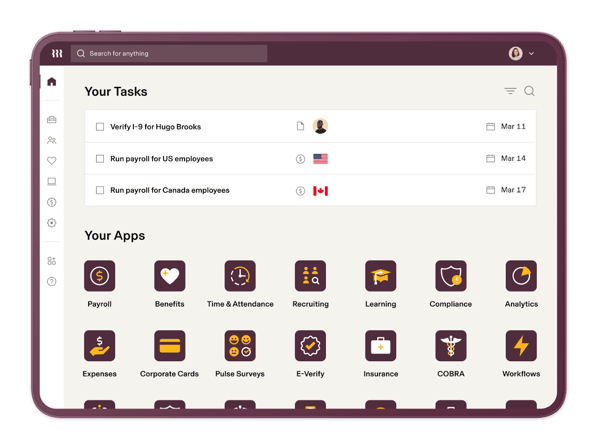
That said, reviewers mention that some areas could be improved. A few users noted that certain features or settings can be harder to locate initially, especially when navigating the platform for the first time. This can make the experience feel slightly less intuitive and overwhelming in the early stages, but most users find that once they become familiar with the layout, it becomes much easier to move through workflows efficiently.
Some reviewers also mentioned that the mobile app experience isn’t as comprehensive as the desktop version, particularly when it comes to accessing detailed reports or admin-level settings. However, it still works well for quick actions like approvals and basic checks, making it a useful companion for on-the-go tasks.
Even with these trade-offs, Rippling remains a top choice for businesses that want a flexible, automation-friendly core HR solution. Its ability to unify HR and IT functions, paired with strong performance and a highly rated user experience, makes it particularly well-suited for distributed and fast-growing teams.
“I use Rippling for payroll and HR self-service, and I really appreciate its intuitive dashboard that consolidates everything I need for my employment. It saves me from waiting on HR for tasks like viewing pay stubs, updating personal information, or signing documents. I love how user-friendly Rippling is, especially with its 'all-in-one' convenience that manages payroll and benefits through a single mobile app or website. The total transparency and autonomy it offers are invaluable, as I don't have to rely on someone else to manage my details, which lets me focus fully on my work. The integration with existing tools like Slack and the Single Sign-On feature is a major timesaver. Also, the initial setup was incredibly easy, taking just about 10 minutes with clear instructions, allowing me to handle everything from payroll to benefits effortlessly.”
- Rippling review, Jonh Carlo J.
“Because Rippling offers so many features, it can feel overwhelming at first. There is a learning curve, especially when configuring workflows, permissions, and automation rules correctly. Some advanced customizations require deeper platform knowledge, and occasional updates can change navigation or settings. While support is responsive, more step-by-step implementation guides for complex use cases would be helpful.”
- Rippling review, Matthew M.
Looking for tools that provide in-depth HR reporting? Check out our best HR analytics software.
G2 Rating: 4.6/5
RUN Powered by ADP goes beyond being just a payroll processor. It functions as a core HR platform that helps businesses manage employee records, time tracking, tax compliance, and HR documentation in one place, making it especially useful for small businesses that want a reliable, all-in-one solution without added complexity.
What stood out to me is how RUN helps with managing employee information. From maintaining staff records to tracking hours worked, it gives businesses a dependable way to stay organized without relying on multiple tools, while also making it easy to access and update data when needed.
Many G2 reviewers also pointed out that the step-by-step prompts make it easy to follow HR workflows like onboarding and recordkeeping without missing key details. This built-in guidance helps reduce errors and allows newer HR staff to get up to speed quickly, which aligns with its strong usability ratings, including ease of use (94%) and ease of admin (94%).
Compliance management is built into the system, and features like compliance tracking consistently receive positive feedback, with compliance rated at 93%. It helps businesses stay aligned with state-specific requirements, generates necessary HR and tax forms, and provides timely alerts for upcoming deadlines, reducing the burden of managing regulations manually.
Another major strength is its payroll reliability. RUN Powered by ADP consistently handles payroll processing, tax calculations, and filings with accuracy, which is critical for small businesses that need dependable payroll without constant oversight.
Timekeeping integration also adds value, making it easier to log, approve, and track hours directly within the platform. This ensures employee data flows seamlessly into payroll and other HR functions, improving efficiency and reducing manual work.
I also liked how RUN centralizes core HR data, so reports, employee records, time logs, and compliance documents are all accessible in one place. Reviewers often mention that this consolidation reduces the need to switch between systems and helps minimize errors caused by manual data transfers.
Getting started with the platform is relatively straightforward. This is supported by the G2 Data, with ease of setup getting a 92%. This allows teams to implement and begin using the system quickly. In addition, customer support is frequently highlighted as helpful and accessible, with quality of support (91%), which adds confidence for teams that may need guidance along the way.
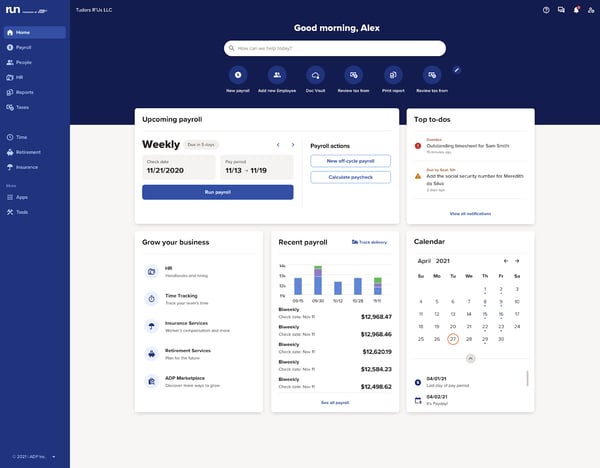
Now, there were some instances where users felt the experience could be even stronger. Reviews mentioned that report layouts and customization options can feel limited, especially when trying to tailor reports to specific business needs. Users mentioned that while the platform offers a wide selection of standard reports, creating highly customized reports or adding specific data fields can require extra effort, often involving exporting data and making manual adjustments. However, for teams with straightforward reporting requirements, the existing reports are still functional and cover most day-to-day needs.
The reviews also mention that the pricing can feel higher than that to similar tools, particularly for small businesses as they scale or add more features. While many acknowledge the reliability and compliance support the platform provides, a few feel that certain advanced capabilities or add-ons can increase overall costs over time.
Overall, RUN Powered by ADP remains a trusted solution for small businesses that need simple, reliable core HR functionality. By combining employee records, time tracking, and compliance management in one easy-to-use system, it helps teams stay organized without adding complexity.
“I use the ADP Run app every day. Easily integrates the timecard and employee data in real time, and is accurate. All the forms are filed quarterly and annually in a timely manner. It is very easy to use, and the data is safe. I have found it easy to implement for new employee onboarding. Customer service is great. The agents are smart and able to solve the issue right then and there. I would recommend ADPRUN because payroll is so important to get right the first time.”
- RUN Powered by ADP review, Daniel F.
“I wish there were more flexibility in customizing reporting, along with a more modern interface in certain areas. The ability to customize reports more easily based on the exact data needed. It would be helpful to really add in the data I want for internal review instead of just standard templates to customize. More filtering options would be helpful so I don't need to do extra cleanup after I export the reports. On the interface side, certain workflows can feel a bit click-heavy, and it's not always obvious where to find things.”
- RUN Powered by ADP review, Jennifer P.
Related: Our curated list of the best payroll software on G2.
G2 Rating: 4.6/5
Gusto has been built to simplify payroll and HR for small businesses. It’s more than just a payroll tool; it’s often recognized as an all-in-one platform that manages payroll, benefits administration, tax compliance, and core HR workflows in one place, making it especially appealing for small teams that want simplicity without sacrificing functionality.
According to G2 reviews, payroll processing is one of the most valued features, making it easier to pay employees accurately and on time without extra manual effort. Benefits administration is seamlessly integrated with payroll, so deductions and enrollments are automatically synced, reducing repetitive tasks and helping maintain compliance.
A commonly praised aspect is Gusto’s user-friendly interface. I found it easy to navigate, and even new users seem confident running payroll after just a short time. The platform guides users through key steps, which align with its strong usability ratings, including ease of use (95%) and ease of admin (94%), making complex HR processes feel more approachable.
I also noticed that time, attendance, and PTO tracking stand out, with time, attendance, and PTO rated at 91% by G2 users. It simplifies leave requests and scheduling so managers and employees don’t have to rely on manual spreadsheets.
Gusto helps automate recurring HR tasks. From onboarding new hires to running regular payroll cycles, the platform reduces manual steps and makes it easier to stay consistent across processes. The onboarding experience is particularly straightforward, supported by ease of setup (93%), allowing teams to get started quickly without heavy configuration.
Compliance and tax management are another strong area. Gusto automatically handles tax filings, deductions, and reporting, which reduces the burden on small teams and ensures accuracy across payroll processes. Many users highlight this as a key reason they trust the platform for day-to-day operations.
Many G2 reviews also point out that Gusto’s benefits management tools are a big plus for small businesses. Being able to manage employee benefits in the same system as payroll feels seamless and prevents errors that often come from disconnected systems, reinforcing its value as an integrated HR solution.
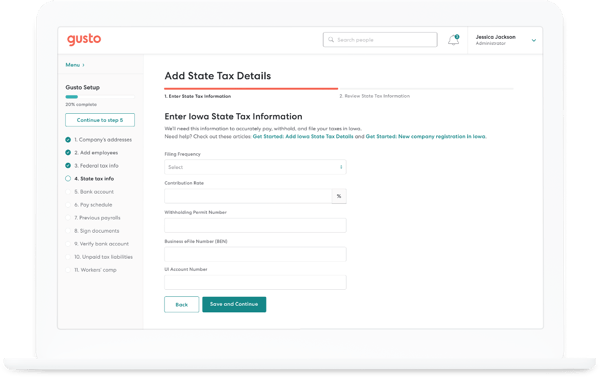
A few areas where users noted improvements would benefit their overall experience. Based on G2 reviews, some users mention that while the platform works well for standard HR and payroll workflows, customization options can feel limited when teams need more flexibility across reports, workflows, or data configurations. This is particularly noticeable for businesses with many complex requirements or those looking to tailor the system more closely to their processes. However, for most businesses with straightforward needs, the existing setup is generally sufficient and easy to manage.
Users also state that while it is a very reliable solution for payroll processing, there are minor road bumps that add barriers. Mainly, certain payroll and tax workflows, such as multi-state filings or correcting payroll errors, can involve extra steps. While these scenarios don’t affect everyday use, they can require additional effort in more complex cases, though most users still find the platform reliable for regular payroll processing.
At the end of the day, Gusto offers a simple yet effective platform for managing payroll, benefits, and HR processes in one place. Its intuitive design and automation make it an excellent choice for small businesses looking to handle HR tasks efficiently without dedicated HR teams.
“I like how many features Gusto has built in, which makes it very useful for handling various tasks. The interface is intuitive and user-friendly, which helps me save time and focus on other tasks. I also love the dashboard on the home screen that shares reminders and prompts for action, which is especially helpful because it means I don't need another platform to keep track of these tasks. Additionally, the initial setup was very easy, which made starting with Gusto a breeze.”
- Gusto review, Dionte G.
“One thing I dislike about Gusto is that there are limited customization options for notifications, so sometimes I would like more control over how and when I receive updates. Also, some sections, like tax documents or payment details, can take a few extra clicks to find at first. It’s not a major issue, but improving navigation and making certain information more accessible would make the experience even better. Overall, these are small inconveniences compared to how reliable and easy the platform is to use.”
- Gusto review, Solange S.
Looking specifically at what mid-sized companies rate highest on G2? Check out the most reliable HR software for mid-sized companies in 2026, ranked by user satisfaction, support quality, and likelihood to recommend.
G2 Rating: 4.4/5
BambooHR is often praised for being simple and approachable, making it easy for HR teams and employees alike to get started without a steep learning curve. I find the platform’s interface intuitive, and many G2 users agree. It’s frequently described as easy to navigate and user-friendly, which aligns with strong usability ratings like ease of use (94%).
One of the most valued features is time-off and PTO management. I like how it streamlines leave requests, approvals, and tracking, removing the need for manual spreadsheets or email chains. G2 reviewers often mention that both HR teams and employees find the process smoother, since approvals flow quickly and records stay updated automatically. This is supported by time, attendance, and PTO (89%), reflecting consistent satisfaction in this area.
Organization management is another strong point. Organization management (89%) highlights how effectively the platform visualizes reporting structures and employee data. From my perspective, this makes it much easier to maintain clarity around hierarchies and team relationships, which is especially useful for growing businesses.
Performance management also earns praise from users. I’ve found it simplifies review cycles and goal tracking by giving managers and employees a central place to align on performance. Reviewers say this helps make feedback more consistent and transparent across teams.
Beyond these, BambooHR’s customization capabilities are well-received. HR teams value the ability to create tailored PTO policies, assign role-based access, and build custom forms to fit their workflows. This flexibility allows businesses to adapt the platform to their processes without needing extensive workarounds.
The employee self-service portal is another highlight. I like how it allows employees to access their own records, request time off, and update details without always going through HR. Many reviewers noted this reduces administrative back-and-forth and saves HR staff significant time, reinforcing its role as a centralized system for employee data and access.
Finally, BambooHR’s applicant tracking system (ATS) integration with company websites streamlines hiring. Job postings flow directly into the system, and candidates can be tracked through the pipeline with less manual effort. Reviewers consistently note how this reduces duplicate data entry and keeps the hiring process more organized. Getting started with these workflows is also relatively straightforward, supported by ease of setup (90%), which helps teams implement the system quickly.
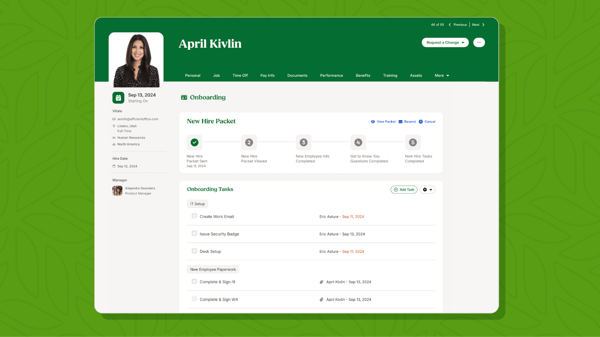
However, some users do see areas for improvement. Based on G2 reviews, a recurring con is that customization across reports and certain workflows can feel limited, especially for teams looking for more advanced analytics or tailored configurations. While this may require some workarounds in more complex scenarios, the platform still covers most standard HR needs effectively.
Some reviewers also mention that the mobile app offers fewer capabilities than the desktop version. It works well for quick approvals and basic tasks, but accessing more advanced features or detailed information is often easier on a desktop. That said, for day-to-day use on the go, many still find the mobile experience convenient and reliable.
To sum it up, BambooHR provides a user-friendly and people-focused HR platform that simplifies employee management, PTO tracking, and performance processes. It’s a great fit for growing businesses that want an intuitive system to manage HR operations while improving employee experience.
“I use BambooHR for work to view my pay stubs and request PTO. It's easier to request PTO and see what days I have available. I really like the ease of use and being able to see when my coworkers are out of the office. The PTO calculator is also great because it helps me know how much time I have available.”
- BambooHR review, Arianna S.
“One of the main drawbacks of BambooHR is that some features can feel limited compared to more advanced HR systems, especially when it comes to customization and complex reporting. There are also occasional delays or performance issues when handling larger datasets.
Additionally, certain functionalities, such as payroll or advanced integrations, may require additional modules or third-party tools, thereby increasing overall costs. Improving flexibility and expanding built-in features would make the platform even more effective.”
- BambooHR review, Bashayer A.
Want to boost employee growth and alignment? Explore the best performance management software to streamline reviews and goal tracking.
G2 Rating: 4.5/5
HiBob HRIS is built to be a modern HR platform focused on streamlining core HR processes like organization management, time-off tracking, payroll entry, and performance reviews for users across the globe. Many users appreciate this consolidated approach because it reduces the need for multiple systems and helps HR teams save time across the entire employee lifecycle, from onboarding to performance management.
One of its strongest features is organization management, with organization management (89%) reflecting how positively users rate its ability to map reporting lines, visualize team structures, and maintain updated employee records without the clutter of spreadsheets. From my perspective, this makes it much easier to maintain clarity around hierarchies and team relationships.
Payroll administration is another highlight. I’ve found that it simplifies both salary and hourly payroll, cutting down on manual effort and reducing errors. G2 reviewers often point out that having payroll tied directly into employee records makes processing faster and more reliable, especially for small HR teams.
Many users also call out integration with collaboration tools like Slack and Microsoft Teams. I like this because it makes HR updates and approvals easier to track without constantly switching platforms. Reviewers mentioned that having reminders and notifications show up in tools employees already use every day helps boost adoption and cuts down on missed requests.
Another appreciated strength is the performance review module, which streamlines goal-setting and feedback cycles. From my perspective, this makes it easier for managers and employees to stay aligned, with performance features earning strong feedback at performance (87%), helping keep performance conversations structured and consistent.
A commonly praised aspect of HiBob HRIS is its intuitive and user-friendly interface. Many users mention that navigating the platform feels straightforward and approachable, even for first-time users. The clean design and overall usability, supported by ease of use (91%), give HR teams confidence that they can manage both day-to-day and long-term workforce processes without heavy training.
HiBob also provides useful reporting and workforce insights, allowing HR teams to track employee data, performance trends, and organizational metrics through dashboards and reports. This helps teams make more informed decisions while maintaining visibility across the workforce.
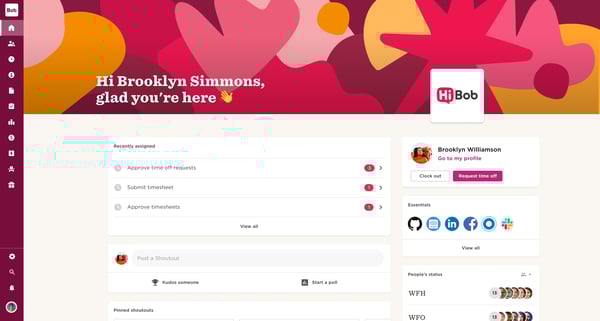
However, some user reviews paint a more balanced picture. Based on G2 reviews, a recurring minor limitation is customization across workflows, reporting, and certain configurations. Workflows and features can feel limited or require additional effort, especially for organizations with more complex or highly tailored processes. That being said, the platform offers strong core functionality and still works well for teams with more standardized HR processes.
Some reviewers also mention that integrations with certain third-party tools can take extra effort to configure, particularly for teams using more niche applications. While HiBob supports a wide range of integrations, setting them up can require additional time or technical input, though most users still find the platform reliable once everything is in place.
Taking the larger picture into consideration, HiBob HRIS delivers a modern and flexible HR platform that supports organization management, performance tracking, and integrations across tools. It’s ideal for companies looking for a scalable solution that adapts to evolving HR needs and supports distributed teams.
“I find HiBob HRIS useful for managing employees and updating their data efficiently. I like the contact list feature and the ability to integrate with other apps. Additionally, HiBob offers lots of extra data points and statistics, which I find valuable. I also appreciate the interaction features, like showing shared hobbies and residents, as well as the ability to access colleagues' phone numbers and emails. The 'fun facts' provided add a nice touch.”
- HiBob HRIS review, Gili L.
“I think HiBob could really benefit from expanding its customization options, especially within workflows, reporting, and time‑off configurations. I also think the platform would be stronger with more robust integrations, particularly with payroll and ATS systems, since many users still rely on manual workarounds. Overall, I think addressing these areas would make the platform more scalable and improve the overall user experience.”
- HiBob HRIS review, Lindsey P.
Need a more unified approach to HR? Dive into our list of the best HCM software for complete workforce management.
G2 Rating: 4.5/5
Paylocity is a comprehensive HR and payroll platform that brings together employee management, payroll processing, time tracking, and workforce engagement tools in one system. It’s particularly suited for organizations that want a single platform to manage multiple HR functions without relying on separate tools.
Paylocity offers a well-rounded set of features that support core HR operations, from onboarding and payroll to benefits and workforce management. Many users appreciate having these capabilities in one place, which helps reduce manual work and improves overall efficiency.
The platform is relatively easy to navigate for everyday tasks, with users highlighting its intuitive layout and structured workflows. This is reflected in its usability ratings, including ease of use (88%) and ease of admin (86%), showing that teams can manage routine HR processes without excessive complexity.
Payroll processing is a key strength. Paylocity handles employee payments, tax calculations, and compliance requirements within the same system, helping reduce errors and improve accuracy. This makes it a dependable choice for organizations that need consistent payroll performance.
Another advantage is its onboarding and implementation experience. Users often highlight the structured onboarding experience and training resources, which help teams get started more efficiently and understand how to use the platform effectively.
Paylocity also provides strong reporting and dashboard capabilities, allowing HR teams to access workforce data, track key metrics, and monitor employee activity in one place. Features like dashboards are well received, with dashboards (88%), helping teams stay informed without relying on external tools.
The platform extends beyond core HR with additional features like performance management, learning tools, and employee engagement capabilities. This makes it easier for organizations to manage the full employee lifecycle within a single system.
Mobile access is another useful addition, enabling employees and managers to handle tasks like approvals, time tracking, and updates on the go. This is supported by mobility (86%), making it convenient for teams that need flexibility outside the desktop environment.
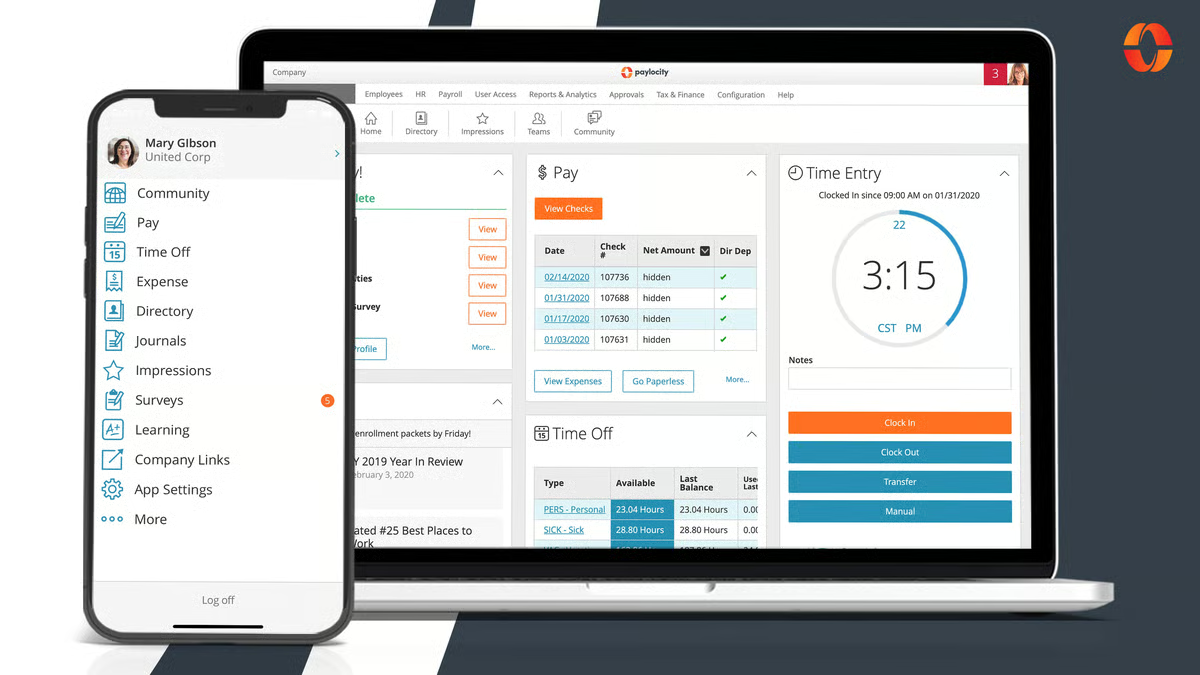
On the other hand, users mention that the experience across different modules can feel inconsistent at times, with certain features behaving differently or requiring extra steps to complete similar tasks. This can create some friction when navigating between workflows, especially for teams using multiple modules regularly. That said, once users become familiar with the platform’s structure, many still find it manageable for day-to-day HR and payroll operations.
Some reviewers also note that customer support experiences can vary depending on the complexity of the issue. At the same time, many users describe the support team as helpful and knowledgeable; a few mention that resolving more detailed or time-sensitive queries can take longer than expected. However, for most standard requests, users still find the available support resources and guidance sufficient.
That said, reviewers do raise a few areas for improvement. G2 reviewers mention occasional system slowdowns, especially during peak usage, which can briefly interrupt workflows. Finally, a smaller group of users noted that reporting and filtering options could be more customizable, particularly for those needing deeper analytics.
Paylocity still offers a comprehensive platform that brings together payroll, HR, and workforce management tools into one system. It’s well-suited for organizations that want broad functionality and the ability to manage multiple HR processes within a single platform.
"I like that Paylocity is easy to use and user-friendly. Even though I've only been using it for a little over a year, I find it really easy to navigate. I enjoy Paylocity because it's easy to use and to navigate."
- Paylocity review, Mark Lester M.
"Various modules have different support teams, and even though some modules may interact with each other, like benefits, ACA, and COBRA, their teams do not, and sometimes it's difficult to get assistance with things that cross over."
- Paylocity review, Laura H.
G2 Rating: 4.8/5
HROne is designed to simplify day-to-day HR operations by combining attendance tracking, payroll, employee management, and performance workflows into a single platform. It’s particularly useful for organizations that want to automate repetitive HR tasks while maintaining visibility across their workforce.
One of HROne’s strongest capabilities is attendance and leave management. The platform makes it easy to track employee attendance, manage leave requests, and monitor daily activity, helping teams maintain accurate records without manual intervention. Features like attendance tracking are highly rated, with time, attendance, and PTO (96%), reflecting strong user satisfaction in this area.
Payroll processing is another key strength. HROne supports salary management, payroll calculations, and related HR processes within the same system, reducing the need for external tools and improving overall efficiency. This integration helps ensure smoother payroll operations and minimizes errors.
Automation is a major advantage of the platform. HROne reduces manual workload by streamlining HR processes like attendance tracking, leave approvals, and employee data updates. This allows HR teams to focus more on strategic tasks rather than routine administrative work.
The platform also offers strong employee data management capabilities, enabling HR teams to track, update, and organize employee information in one centralized system. This improves visibility and ensures that records remain consistent across different HR functions.
HROne includes additional modules such as performance management and learning tools, which extend its functionality beyond core HR tasks. These features help organizations manage employee development and track performance without relying on separate systems.
Another benefit is its ease of use for daily workflows. Users often highlight how the platform supports routine HR activities without adding unnecessary complexity, making it suitable for teams that need a practical and efficient solution for managing HR operations.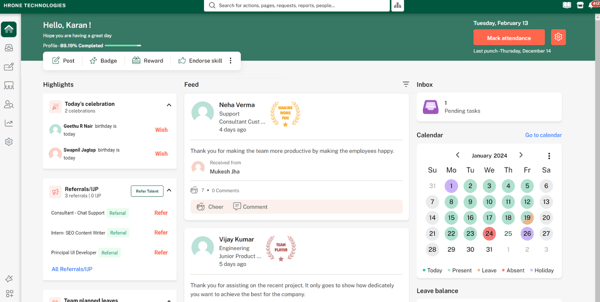
While the platform is overall quite helpful for Core HR, I did find some instances where users had feedback. Reviewers state that some users mention that reporting and customization options can feel limited, particularly when trying to generate more detailed or tailored insights. While the platform handles standard reporting needs well, more advanced use cases may require additional effort.
Some reviewers also note that certain actions or pages can take longer to load, especially when working with larger datasets or more detailed reports. This can occasionally slow down workflows, but for most day-to-day tasks, users still find the platform responsive enough to manage routine HR operations effectively.
All that being said, if you’re looking for a practical and automation-focused HR solution that simplifies attendance, payroll, and employee management workflows, HROne stands as a solid option. It’s a strong option for teams looking to reduce manual effort and maintain efficiency in day-to-day HR operations.
“HR-One has strong automation that reduces manual work and improves efficiency.”
- HROne review, Chandraket R.
“The mobile app covers all essential functions well, but some of the more detailed performance management and audit features are more limited on mobile compared to the web version. Power users who manage workflows on the go may find themselves switching to a desktop for complex tasks. Custom notifications could be more flexible. Right now, alerts are mostly standard. Being able to tweak which actions trigger which notifications (email + push + in-app) for different roles would reduce noise and improve accountability. Search across employee records could be faster and deeper. Basic search works well, but advanced filters and saved searches for compliance audits or workforce reports would save time for HR.”
- HROne review, Waldon S.
Have more questions? G2 has the answers!
BambooHR, Gusto, and Rippling consistently rank as top-rated HR apps for managing employees. They provide centralized dashboards where HR teams can oversee employee records, track attendance, manage leave requests, and handle payroll from one interface. G2 reviewers frequently highlight their ease of use, making them ideal for businesses that want to manage day-to-day HR tasks without complexity.
HiBob often receives high marks for customer support. Users praise its responsive service teams, helpful onboarding specialists, and detailed guidance during troubleshooting. While response times can vary across the industry, the platform stands out for pairing technical assistance with a personalized approach.
BambooHR, Rippling, and HiBob HRIS are among the most praised platforms for automation according to G2 user feedback. They cut down on repetitive work by automating tasks like payroll processing, time-off approvals, benefits enrollment, compliance tracking, and onboarding workflows.
For startups, Gusto and Rippling are standout choices. They offer simple setup, affordable pricing, and a mix of payroll, benefits, and compliance features that grow with the business. Justworks also handles HR administration as a managed service, which is appealing to early-stage teams without a dedicated HR department.
RUN Powered by ADP and Gusto excel in this category. These tools combine payroll processing, tax filing, and benefits administration in one place. Users appreciate their accuracy, compliance features, and the convenience of syncing benefits data directly with payroll.
BambooHR and Rippling integrate strong applicant tracking systems (ATS) with onboarding tools. This allows recruiters to source candidates, manage interviews, and move new hires directly into the HRIS without duplicate data entry.
HiBob, and RUN Powered by ADP are favored by mid-sized businesses for their stability, scalability, and compliance management features. Users value their robust reporting tools and ability to handle multi-location or multi-state workforces without performance issues.
There’s no one-size-fits-all answer, but G2 reviewers consistently rank Rippling, BambooHR, and HiBob among the top HR systems due to their usability, automation, and breadth of features covering the full employee lifecycle.
BambooHR, HiBob HRIS, and RUN Powered by ADP are leading options for managing employee data, offering secure storage, clear organization structures, and integrated workflows that keep records, payroll details, and compliance documents accurate and easy to access.
The best core HR software for small businesses depends on your needs, but tools like Gusto, RUN Powered by ADP, and BambooHR are among the top choices. Gusto is great for simple, all-in-one payroll and benefits management, RUN Powered by ADP is ideal for reliable payroll and compliance, and BambooHR stands out for its intuitive, people-focused features. For growing teams needing broader functionality and automation, Rippling is also a strong option. Ultimately, the right choice depends on whether you prioritize simplicity, payroll accuracy, or a more comprehensive HR solution.
After thoroughly evaluating the best core HR software, I’ve seen how the right platform can completely transform how HR teams work. Each solution brings something unique, whether it’s automating onboarding, centralizing employee data, integrating payroll, or improving compliance. With so many strong options out there, there’s a solution for every team size, growth stage, and industry.
But here’s the truth: even with great HR practices, relying on spreadsheets or outdated systems leads to bottlenecks, errors, and compliance risks. Without reliable software, HR teams get stuck in repetitive admin work instead of focusing on people and strategy. With the right tool, though, you can streamline workflows, keep data accurate, and give your team time back to focus on what really matters. But HR doesn’t stop there. Once you’ve set up a strong core system, the next step is choosing the right background check software. Reliable screening tools help you stay compliant, move faster on offers, and protect your organization.
Ready to take the next step? Check out my colleague’s guide to the best background check software and see which tools can make your hiring process even smoother.
.png)

I recently celebrated my second anniversary at G2, and it got me thinking back to my first few...
 by Harshita Tewari

Choosing the right HR software is tough enough, but figuring out the pricing? That’s a whole...
 by Sudipto Paul

I know you are here because your performance cycle is probably broken.
 by Soundarya Jayaraman