


Hiring teams have more talent data than ever, but turning it into better decisions is still easier said than done.
Recruiters and talent leaders are under pressure to source qualified candidates faster, improve hiring accuracy, support internal mobility, and plan proactively for workforce needs. But with dozens of talent intelligence tools claiming to use AI, automation, and workforce data, it can be hard to tell which platforms actually make hiring easier and which ones just add more noise.
That’s why I compared 20+ best talent intelligence software tools to shortlist the top options. I looked for platforms that help teams source and match talent faster, uncover meaningful candidate or workforce insights, automate repetitive recruiting tasks, integrate smoothly with applicant tracking systems, and stay easy to use in day-to-day hiring and talent operations.
The global Talent Intelligence Software market is projected to exceed a valuation of USD 27.82 billion by 2033, which says a lot about how seriously businesses are taking this shift. What matters now is finding a platform that actually helps your team source faster, surface useful insights, and fit into your existing hiring workflow.
According to G2 reviewers, the top-rated talent intelligence software does more than add AI to recruiting or talent management. It helps teams move faster, work with more confidence, and make smarter decisions using data that feels useful rather than overwhelming.
Whether you’re trying to improve candidate discovery, support internal mobility, streamline interview workflows, or build a more proactive talent strategy, this guide is designed to help you find the best AI talent intelligence tools for the way your team works.
TL;DR: Based on my deep dive and G2 reviews, the best talent intelligence software are Metaview, Andela, Gem, CoRecruit (formerly Quil), HireEZ, 365Talents, Loxo, and Popp
These talent intelligence tools are top-rated in their category, according to G2's Spring 2026 Grid Report. I’ve also added their monthly pricing (billed annually) to make comparisons easier for you.
Talent intelligence tools promise a lot, but after going through the reviews, what stood out to me was that users are not looking for AI to run hiring for them. They want software that helps them make better decisions, faster. In practice, that usually means finding stronger candidates sooner, reducing repetitive admin work, and getting a better view of internal workforce opportunities.
There are already strong signals that this shift is paying off. Some conversations indicate that the companies using talent intelligence see better workforce planning outcomes and double the retention rates for high performers compared to those relying on traditional methods. This is, unquestionably, a wake-up call for hiring teams.
What stood out to me is that this category covers two very different but connected needs. On one side, there are tools designed to improve recruiting workflows through sourcing, outreach, matching, and interview support. On the other hand, there are platforms focused more on internal talent visibility, skills intelligence, and workforce planning. The best products are the ones that make all of this information easier to act on, not harder to interpret.
The business case is also becoming harder to ignore. According to G2 Data, talent intelligence software sees an average user adoption rate of 71% and an average estimated ROI timeline of 9 months. That suggests companies are not just experimenting with these tools; they are adopting them at a meaningful rate and seeing value within a year.
For me, that is where talent intelligence software proves its value. It does not remove the human element from hiring or talent management. It gives teams better inputs, so the human decisions at the center of both can be made with more confidence.
I started with G2’s Grid® Reports to build a shortlist of the best talent intelligence tools based on G2 Score, customer satisfaction, and market presence.
From there, I analyzed G2 reviews at scale using AI to uncover the patterns that matter most in real-world talent teams: what users consistently praise, where they hit limitations, and which capabilities actually improve sourcing, talent mapping, and hiring workflows. I paid especially close attention to feedback on data quality, usability, integrations, search functionality, and how well each tool supports strategic recruiting efforts beyond surface-level feature claims.
I also looked closely at how talent intelligence tools work across sourcing, talent mapping, interview support, internal mobility, and workforce planning use cases. Since I couldn’t test these products directly, I relied on insights from professionals who use these tools every day and validated those perspectives against verified G2 reviews.
The screenshots featured in this article may include both those captured during research from publicly available material and those obtained from the vendor’s G2 page.
After going through G2 reviews, a few things became clear pretty quickly about how to use talent intelligence for hiring more effectively. People are not looking for a platform that just stores candidate or workforce data. They want something that helps them find the right talent faster, surface insights they would have missed on their own, and reduce the manual work that slows hiring and talent decisions.
That’s what guided my evaluation of the tools in this list.
The list below contains genuine user reviews from G2’s Talent Intelligence Software category page. To qualify for inclusion in the category, a product must:
*This data was pulled from G2 in 2026. Some reviews may have been edited for clarity.
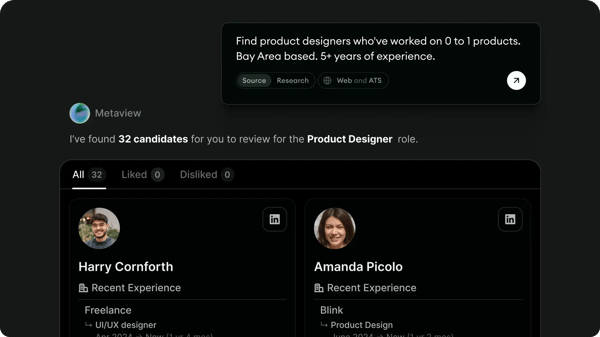
If your interview process often feels slowed down by note-taking and post-call admin, Metaview stands out as a tool designed to remove that friction. It’s built for teams that want interviews to feel like conversations first and documentation second.
I see Metaview as a practical way to make interviews easier to run, document, and share with the wider hiring team. The strongest pattern here is simple: people feel like they get time back.
Reviewers regularly say Metaview reduces manual note-taking, speeds up feedback capture, and makes it easier to move from interview to recap without the usual scramble to write everything up afterward. For teams running a high volume of interviews, that efficiency clearly stands out.
Just as important, users say that once note-taking fades into the background, they can stay more present in the interview itself. I can picture how this can help them to listen more closely, stay engaged with candidates, and focus on the conversation rather than split their attention between asking questions and taking notes. That shift shows up as one of Metaview’s most valued strengths.
Another theme I kept seeing is ease of use. Reviewers often describe the platform as intuitive, simple to navigate, and easy to adopt with minimal explanation. That matters because tools like this only work when hiring managers and recruiters actually use them. Along with this, there is also a high appreciation that Metaview fits into interview workflows without creating much friction. That’s also reflected in G2 Data, where Metaview scores 100% for ease of doing business and 97% for ease of setup, reinforcing how quickly teams can get started.
The summaries and transcripts get a lot of praise, too. Users consistently highlight how helpful it is to have structured notes, searchable records, and AI-generated recaps that make it easier to revisit conversations and share insights with hiring managers. Instead of relying on scattered notes or memory, teams have a centralized source of truth for every interview. That level of structure not only saves time but also makes it easier to maintain consistency across interviews, especially when multiple stakeholders are involved in the hiring process.
I know firsthand how important accurate notes are during time-sensitive meetings. Luckily, Metaview is a great help for this. Users frequently mention that it captures conversations reliably, even in more detailed or fast-paced interviews, which reduces the need for heavy manual corrections afterward. That level of accuracy builds trust in the output and allows recruiters and hiring managers to rely on the summaries with more confidence. Over time, this makes the tool feel like a dependable extension of the interview process itself.
In addition to this, Metaview creates a searchable memory across all interviews, not just within a single conversation. Users can quickly look up specific keywords, skills, or past candidate responses across multiple interviews, which makes it far easier to revisit examples, spot patterns, or compare candidates without digging through individual notes. This kind of cross-interview visibility is something traditional note-taking simply can’t offer, and it becomes increasingly valuable as hiring volume grows.
One area where reviewers see room for refinement is in how AI-generated output performs in more nuanced or highly technical conversations. For most standard interviews, users are comfortable relying on the summaries and transcripts and consistently highlight the time savings. In more specialized scenarios, some note that a quick human pass helps fine-tune terminology or context. Still, the automation gets teams most of the way there, and that combination of speed plus light refinement makes the overall workflow significantly more efficient.
Metaview already seems to fit naturally into how many teams interview today, and some users mention they’d love to see that same convenience extend further through things like mobile access, broader integrations, or additional communication channels.
Overall, I see Metaview as a tool people rely on to save time, stay present in interviews, keep cleaner records, and share feedback faster. For teams that want interview conversations documented without pulling attention away from the candidate, Metaview makes the process feel more organized and easier to scale.
“Metaview has become an essential tool in my hiring process. It allows me to focus fully on my conversations with candidates, knowing that it will capture both key takeaways and important details for me. The summaries are clear and structured and save me a significant amount of time. The tool is also directly implemented to all candidates' calls. I now use it on all my calls, and it has truly improved my workflow. Highly recommend!”
- Metaview review, Marie-Sophie G.
“AI does not always transcribe information initially on summary document, but can pull additional data with prompts."
- Metaview review, Tom Z.
Want to evaluate talent more consistently? Explore a roundup of the best talent assessment tools.
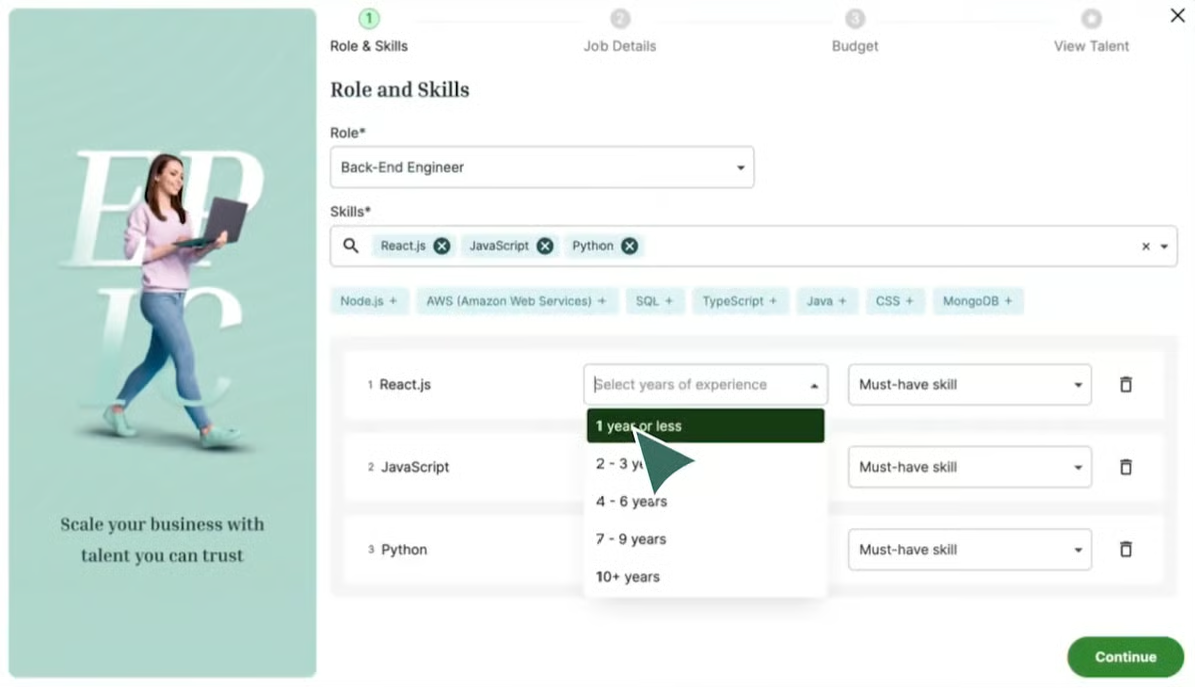
Hiring globally sounds great in theory — but execution is where most teams struggle. This is why Andela stands out the most for how well it supports talent and hiring teams throughout the engagement. What came through clearly in the reviews is that Andela is not just positioned as a marketplace for connecting talent and companies, but also as a hands-on partner that helps make global hiring and remote work feel more manageable.
One of the strongest themes I found is the level of support users receive once they get started. Reviewers frequently mention responsive communication, regular check-ins, and a sense that the team stays involved instead of disappearing after the initial match. For me, that matters because strong support can shape the entire experience, especially when hiring across borders.
That experience is backed by G2 Data as well, with Andela scoring 97% for ease of doing business and 95% for ease of setup.
Another big strength is access to global and remote opportunities. Reviews consistently highlight Andela’s ability to connect people and businesses across regions, making the platform feel especially relevant for companies seeking broader access to talent and for professionals seeking exposure to international work. That global reach is one of the reasons users see the platform as valuable.
I also noticed that users often speak positively about the quality of talent and the matching process. They describe Andela as a strong source of qualified professionals, and several call out the platform’s vetting and screening as helpful for narrowing the field. The overall impression is that Andela helps reduce major friction that typically comes with finding the right fit.
Ease of use is another theme that often appears in the reviews. Users describe the platform and process as smooth, straightforward, and relatively easy to navigate, which is important for a product handling something as operationally heavy as talent sourcing and engagement. Even when reviewers note that multiple steps are involved, they usually frame the experience as organized rather than chaotic.
Andela helps reduce hiring friction. Reviewers often describe the experience as smoother compared to traditional sourcing methods, particularly when it comes to narrowing down candidates and moving through the early stages of hiring. By handling much of the coordination and filtering upfront, the platform makes the process feel more efficient and less time-consuming, which is especially valuable for teams hiring across regions or managing multiple roles at once.
Another point that came through clearly is that Andela’s value extends beyond simple introductions. Reviews reference a more complete experience that can include sourcing, screening, onboarding support, and payment or contract management. That fuller-service feel seems to make the platform especially appealing for teams that want structure around distributed hiring rather than a one-off directory of profiles.
At the same time, I found that Andela works best when users go in with clear expectations around pace. Some describe parts of the process as taking a little more time than they first expected, especially around matching, updates, or next steps. Still, once things move forward, the support and structure behind the experience make the extra coordination feel worthwhile.
Pricing is seen as a constraint for some teams. In context, I read this less as a mismatch in the product’s core value and more as a reminder that Andela is likely to resonate most with teams and professionals who align with its marketplace and engagement model.
Andela is a strong option for companies seeking access to vetted global talent and for professionals seeking remote opportunities backed by real support. The reviews point to a platform that is valued for its responsiveness, international reach, quality matching, ease of use, and growth potential. If you’re looking for a hiring and talent platform that combines global access with a more guided experience, Andela looks like a strong fit for that kind of workflow.
"What I like best about Andela is its strong focus on connecting talented professionals with global opportunities. The company’s commitment to nurturing skills, supporting remote work, and fostering continuous learning really stands out."
- Andela review, Rameshkumar R.
“The only downside is that sometimes the process feels slower than expected — whether it’s feedback, onboarding, or accessing some features. It’s good, but a bit more speed and clarity would make the whole experience even better..”
- Andela review, Deepak S.
Building a stronger interview process? These common interview questions can help hiring teams structure better conversations.
Gem is built for recruiting teams that want more control and visibility across candidate sourcing, outreach, and pipeline activity. According to G2 Data, it makes recruiting workflows easier to track, measure, and scale.
It stands out as a recruiting platform built to make sourcing and outreach feel much more organized, measurable, and efficient. Users find it easy to use, even with a wide range of recruiting workflows, making it easier to adopt across recruiting teams.
Another theme that comes through strongly is how Gem supports sourcing and outreach. The biggest strengths I see are candidate sourcing, outreach automation, sequences, and follow-up workflows. For recruiters managing high volumes of outreach, that kind of structure can make a meaningful difference in maintaining consistency and responsiveness without adding more manual work.
I also saw a lot of appreciation for how Gem connects different parts of the recruiting workflow. Its integrations with ATS tools, LinkedIn, and browser-based workflows help teams keep activity moving without constantly switching between platforms. That connected experience is especially valuable for teams that want sourcing, outreach, and tracking to feel more unified.
Analytics and visibility are another major strength. Gem provides clearer insight into pipeline activity, recruiting performance, and outreach results, offering a helpful way to add more structure and measurement to talent teams. For teams trying to understand where candidates are or how outreach is performing, that visibility appears to be a meaningful advantage.
This structured approach is also reflected in its G2 scores, with 95% for ease of admin and 94% for multi-step planning, highlighting how well it supports complex recruiting workflows.
Efficiency is another recurring theme in the reviews. Users regularly describe Gem as a time-saver that reduces repetitive work and helps streamline day-to-day recruiting tasks. That shows up not just in outreach automation, but also in the way the platform helps recruiters stay organized and move faster through sourcing workflows.
I also noticed growing appreciation for Gem’s AI capabilities. In areas like candidate matching, resurfacing existing talent, resume review, and AI-assisted screening, these are highly valued. What I like the most about it is helps recruiters work faster and uncover strong-fit candidates they may have otherwise missed.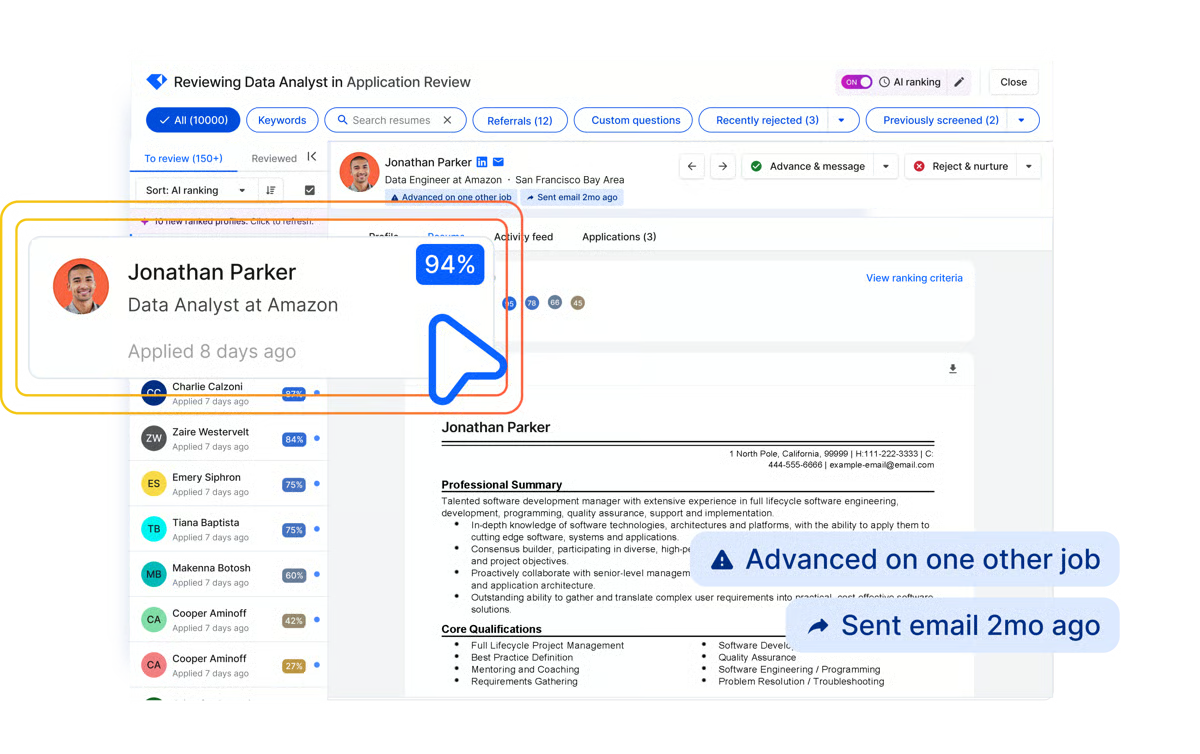
Reporting is one area where some users see room for improvement, particularly around customization. While Gem offers strong visibility into pipeline activity and outreach performance, a few reviewers note that adjusting reports to fit specific needs, such as modifying filters, formats, or views, can be somewhat limited. Even so, the platform still delivers clear, actionable insights that teams rely on to track recruiting performance.
Integrations are another area where the experience seems to depend on how a team’s systems are set up. Reviewers clearly appreciate how well Gem connects across the recruiting stack, though some note that syncing and extensions can require a bit of tuning in more complex environments. In practice, that still reinforces one of Gem’s core strengths: it is built to sit close to the systems recruiters already use every day.
Overall, I would recommend Gem for recruiting teams that want to automate outreach, organize sourcing, and bring more visibility into performance, especially for teams ready to centralize more of their recruiting motion in one platform.
“I use Gem for recruitment and talent management, and it really helps streamline the entire hiring process by bringing multiple tools into one platform. I like the easy pipeline management and the automation features, which include timely follow-ups, personalization at scale, automated out sequence, and workflow consistency. It's great to have strong analytics and the ability to integrate with other tools if needed. I also appreciate the candidate engagement features. Additionally, setting up Gem was fast and easy.”
- Gem review, Kiruthika M.
“There is a bit of a learning curve when first setting up Gem, especially with workflows and outreach sequences for new users not familiar with sourcing automation tools. Some reporting features can feel slightly complex when trying to pull very specific or customized insights. Occasionally, syncing delays with integrations occur, which sometimes requires a manual refresh to ensure candidate information is fully up to date. I would also appreciate more flexibility in customizing dashboards and reporting views to match different hiring team needs.”
- Gem review, Stefan J.
According to G2 Data, I found that CoRecruit (formerly Quil) is used by teams to streamline recruiter note-taking, reduce post-call admin, and keep hiring workflows moving without extra manual documentation.
My take is that CoRecruit stands out for how naturally it fits into live recruiting workflows, especially during interviews and candidate conversations. Rather than pulling recruiters away from the moment, the platform works in the background, allowing them to stay focused on the interaction itself without constantly switching between listening, note-taking, and managing tools. That seamless integration into real-time conversations is what makes the workflow feel lighter and more manageable.
The theme I saw most often in reviews was how seamlessly CoRecruit fits into the natural flow of recruiting conversations. Rather than adding another step to the process, users describe it as something that works alongside them, making interviews and meetings feel more structured without adding extra effort. That ease of integration into day-to-day workflows is a big part of why the tool feels so practical for recruiters managing multiple conversations throughout the day.
Many recruiters hesitate to use technical tools due to their reputation for being complex. Hence, CoRecruit (formerly Quil) stood out to me for how approachable the platform feels. Many reviewers describe it as easy to use (with a 93% score on G2) and easy to do business with (with a 96%score on G2), even for recruiters who are not especially technical.
I also saw a lot of praise for how smoothly CoRecruit (formerly Quil) fits into the systems recruiters already rely on. Reviewers frequently mention calendars, ATS platforms, CRMs, and Microsoft Teams, which makes the product feel less like a standalone note-taking tool and more like a practical extension of the recruiting stack.
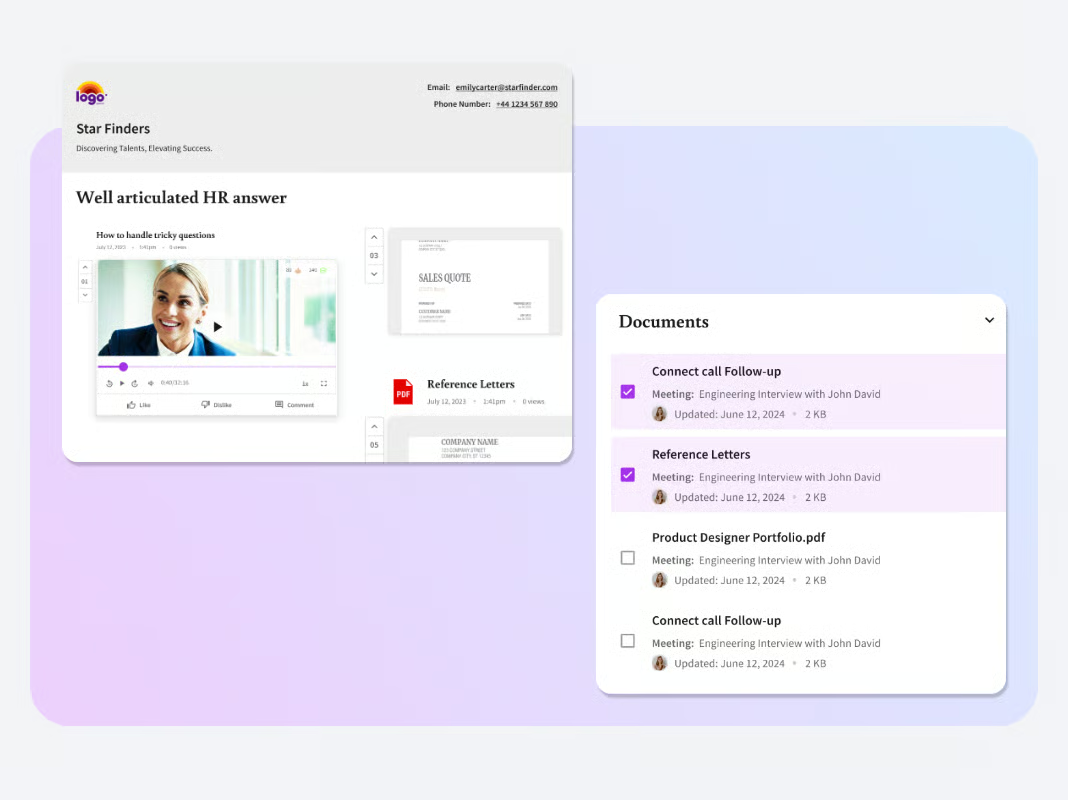
The quality of the summaries and documentation is another strong point in the feedback. Users often describe the notes as detailed, useful, and easy to reference later, especially when they need to revisit a conversation without relying on scattered handwritten notes.
That same workflow benefit seems to carry into the conversation itself. Several reviewers mention that CoRecruit helps them stay more focused and present during calls, allowing them to engage more naturally with candidates. Instead of splitting attention, they’re able to listen more closely, ask better questions, and have more meaningful interactions throughout the interview.
Because the platform is built so closely around live recruiting workflows, teams that want every call captured seamlessly, especially in more spontaneous situations, may find a short adjustment period as they fit it into their process. However, reviews suggest that inbound and just-in-time call scenarios work best with a little planning beforehand.
I also found that a quick review for AI- generated summaries is needed to help refine names, company references, or smaller conversation details before finalizing notes. But they are most effective and time-saving when treated as a strong first draft.
Overall, I‘d recommend CoRecruit to teams that want to save time, document conversations more consistently, integrate with the tools they already use, and stay more present with candidates and clients. Besides this, for staffing teams, recruiters, and search professionals who spend a large part of their day on calls and need clean notes without extra admin, it feels like a strong fit.
“The limiting factor is the user, especially when it comes to the initial setup and understanding how the prompts really work in the background. If you are tech/AI savvy, it can probably produce better results in a faster turnaround, rather than the trial and error of amending/changing prompts to get the desired form and content of notes. But it's a very much user-led issue and it's still been a really positive experience of seeing the caliber of notes completely improve.”
- CoRecruit review, Peter C.
If your goal goes beyond recruiting, here’s a look at workforce management software that helps teams plan more proactively.
Sourcing the right candidates often means jumping between tools, tabs, and databases. I dug through recent G2 reviews to find that HireEZ aims to simplify that experience by bringing discovery, outreach, and workflow management into a more connected system.
One of the clearest strengths in the reviews is HireEZ’s ability to fit into existing recruiting operations. Users repeatedly mention integrations with ATS and recruiting tools, saying the platform makes it easier to move candidate information smoothly and keep sourcing activity aligned with the rest of the hiring process.
Another major theme is sourcing reach. Reviewers consistently appreciate being able to find passive candidates beyond LinkedIn and search across multiple channels from a single platform. That broader visibility makes HireEZ especially appealing for teams hiring for specialized or hard-to-fill roles. It also reduces the need to rely on multiple sourcing tools, helping recruiters consolidate their efforts and spend more time engaging with the right candidates instead of searching across fragmented systems.
Outreach automation is another standout. Users frequently call out email sequencing, drip campaigns, and campaign management as features that make it easier to engage candidates at scale while keeping communication organized. This structure helps recruiters maintain consistent follow-ups without losing track of conversations, which can be especially valuable when managing high volumes of outreach. Over time, that consistency can also improve response rates and overall candidate engagement.
Ease of use also comes through strongly in the reviews. Even with a robust feature set, many users describe the platform as intuitive, user-friendly, and easy to navigate, which makes day-to-day sourcing feel more manageable. That usability is particularly important for teams adopting new tools, as it lowers the barrier to entry and speeds up onboarding. As a result, recruiters can start seeing value from the platform without a long ramp-up period.
Support and onboarding leave a strong impression as well. Several reviewers specifically praise the implementation process, training, and responsiveness of the support team, suggesting that HireEZ does a good job helping teams get up and running with confidence. That level of guidance can make a meaningful difference, especially for teams adopting more advanced sourcing and outreach workflows. It also reinforces trust in the platform as teams scale their usage over time.
That aligns closely with G2 Data, where HireEZ scores 96% for both ease of setup and ease of doing business, along with 94% for quality of support.
I also noticed positive momentum around HireEZ’s AI-driven matching and talent insights features. Some reviewers highlight these capabilities as an added layer of efficiency, helping them surface relevant candidates faster and make better use of the platform’s data. For teams working with large talent pools, this kind of support can reduce manual effort and improve prioritization. Over time, it helps recruiters focus more on high-quality candidates rather than spending time filtering through low-fit profiles.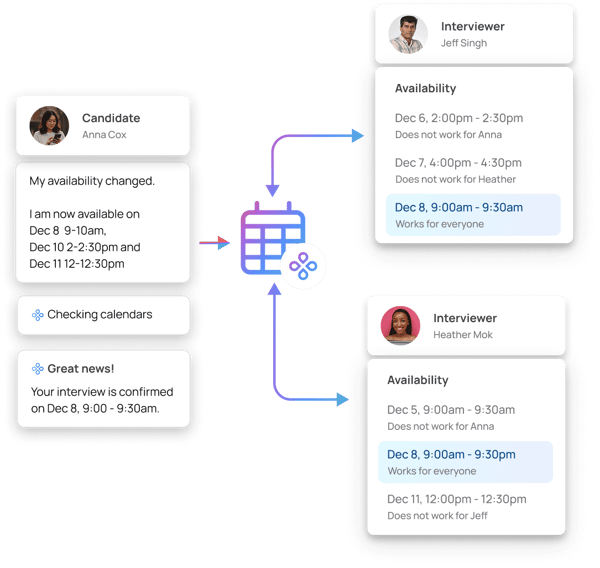
Because HireEZ offers a lot of functionality, some users note that advanced workflows such as filters, project setup, and sequencing can take a little time to get fully comfortable with, though that same depth is part of what makes the platform appealing for teams that want more control in their recruiting process.
And while users clearly value access to contact information, some reviews suggest that email addresses and phone numbers are not always fully reliable and may require occasional verification. In practice, this means recruiters may need to double-check certain details before outreach, especially when working at scale. That said, most users still see the data as a strong starting point, particularly when combined with standard sourcing and validation practices.
Overall, HireEZ is a strong fit for recruiting teams looking for broader candidate discovery, built-in outreach, and improved workflow integration across sourcing and ATS processes. From what I saw in the reviews, its biggest strengths are sourcing reach, integrations, automation, usability, and support, with the clear top opportunities centered on getting the most out of its feature depth and validating contact data as part of the recruiting process.
“I found the implementation process with hireEZ smooth and on schedule. Namrata and Desmond have been great partners during the testing and implementation phase, and Desmond has done a fantastic job of training our team. The support we receive from them is very responsive and supportive, which has made it easy for our team to quickly adopt the solution. I like that hireEZ is very user-friendly, and I appreciate having a supportive and responsive team to work with us on any queries.”
- HireEZ review, R.J. L.
“Sometimes search results include duplicate profiles, which adds cleanup time. Also, there’s a learning curve with all the advanced filters, especially for newer users.”
- HireEZ review, Sameer. D
365Talents is used by teams to make skills more visible across the organization, support internal mobility, and connect employees with relevant opportunities. Because most organizations have more talent than they realize — they just struggle to see it.
After going through recent 365Talents reviews, my impression is that the platform’s biggest strength is how clearly it helps organizations understand the skills they already have. Users repeatedly describe it as a practical way to map internal expertise, surface hidden talent, and give both employees and managers a better view of where strengths, gaps, and opportunities exist across the business.
Another theme that stood out to me is how naturally 365Talents supports internal mobility. Reviewers consistently point to its ability to connect people with projects, roles, missions, and learning opportunities that support employee development. Instead of treating talent data as static, the platform feels more like a living system that helps people move, grow, and be discovered internally.
Ease of use is another major plus. For a platform handling something as layered as skills intelligence and workforce development, reviewers often describe 365Talents as intuitive, user-friendly, and well-organized. That matters because it suggests teams can get meaningful value from the platform without feeling like they are navigating something overly technical or hard to adopt.
I also noticed that AI-driven matching is a big part of the product’s appeal. Reviewers frequently mention recommendations, matching logic, and the ability to guide employees toward relevant next steps. Whether the goal is identifying skills, spotting development opportunities, or connecting people with internal roles, the intelligence layer seems to be one of the reasons the platform feels proactive rather than purely administrative.
Another strong point is the support experience behind the software. Reviewers often mention that the 365Talents team is responsive, helpful, and engaged throughout implementation and ongoing use. I always pay attention to that because strong software becomes even more valuable when customers feel supported, listened to, and guided as they roll it out across the organization.

Implementation and integration also come through as meaningful strengths. Several users describe onboarding and rollout in positive terms, which signals to me that 365Talents is not just compelling in concept but also workable in practice. For HR and talent teams trying to connect skills data with broader workforce processes, that kind of usability matters.
At the same time, a few reviews suggest that more of the effort sits on the administration side, particularly when teams are setting up skill repositories or configuring advanced workflows. For some users, this can mean additional time and coordination during initial setup, which may delay time-to-value and slow early adoption across teams. That said, once this foundation is in place, many teams find it enables more structured and scalable talent programs, making the upfront effort worthwhile.
Some users note that certain changes, particularly around integrations and system adjustments, may require vendor support, which can limit how independently teams can operate. Still, the platform shows more depth as teams move further into configuration, especially around skill frameworks and advanced workflows. That depth seems to be part of what makes the platform powerful.
With 97% scores in G2 for both ease of use and ease of doing business, along with a 94% performance, 365Talents comes across as a modern talent intelligence platform that helps organizations make skills visible, support internal mobility, and connect people with more relevant opportunities. Between the intuitive experience, AI-powered matching, strong support, and clear value for skills-based workforce planning, it looks especially well-suited for companies that want to take a more structured and forward-looking approach to internal talent development.
“I appreciate the intuitive interface of 365Talents which allows me to easily modify and enrich my profile. There are many features, and the embedded AI is relevant most of the time, especially for suggesting skills to add to my profile. I also like being prompted at a regular but not excessive pace to log in and keep my profile active. The platform for viewing open internal job offers is also very useful for exploring opportunities within the group.
- 365Talents review, Rehana S.
“Customization complexity: Deep customizations (custom skill taxonomies, advanced workflows) sometimes require vendor support or professional services.”
- 365Talents review, Alejandro C.
Hiring across regions or through external talent networks? These staffing trends help explain where the market is heading.
Used by 93% of small businesses, Loxo stands out as a recruiting platform built to help teams move faster without making the workflow feel heavy. Reviewers appreciate being able to manage multiple parts of the recruiting process in one system. That practicality shows up in G2 Data as well, with Loxo scoring 94% for meeting requirements and 93% for ease of administration.
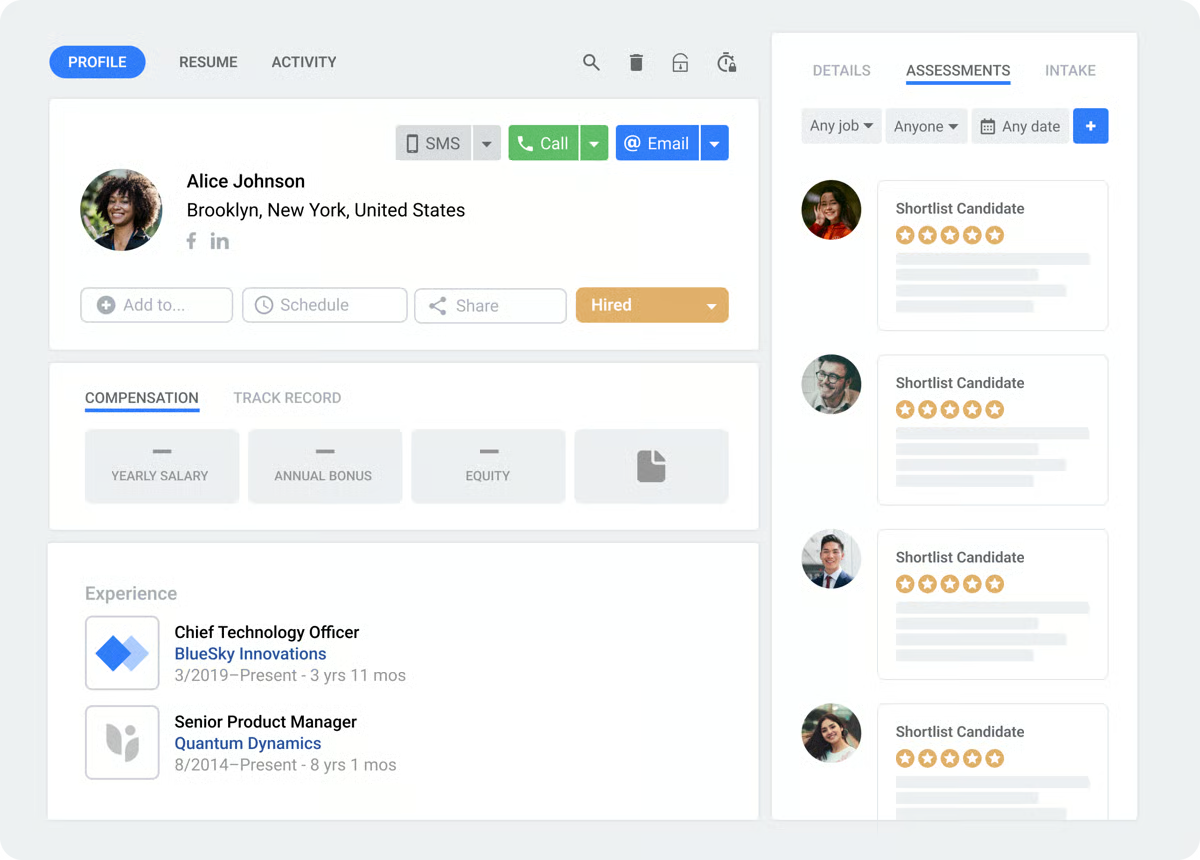
What comes through most clearly in the reviews is that users see it as a platform that brings sourcing, CRM, ATS, and outreach into one place, making it easier to maintain momentum from first touch to placement. That unified experience also makes Loxo a strong example of how startups use talent intelligence platforms when they want sourcing, ATS, CRM, and outreach in one system.
Reviewers also repeatedly describe the platform as intuitive, straightforward, and easy to navigate, which matters a lot in recruiting software where speed and clarity can make or break adoption. Even with a broad feature set, I can see that the layout feels approachable rather than overwhelming.
Another standout is Loxo’s sourcing and candidate matching functionality. Across the reviews, users consistently point to the AI-powered sourcing experience as one of the platform’s strongest differentiators. It is impressive how quickly it helps them surface relevant candidates and narrow their search without spending unnecessary time digging through low-fit profiles.
The platform's all-in-one nature is another major strength. Reviewers appreciate being able to manage multiple parts of the recruiting process in one system rather than stitching together separate tools for applicant tracking, candidate relationship management, and outreach. That unified experience seems to make day-to-day recruiting feel more organized and easier to manage at scale.
Automation also comes through as a real advantage. Users frequently mention that Loxo helps reduce manual work through workflow automation, communication tools, and streamlined processes that keep recruiters moving. From what I saw in the reviews, this is one of the reasons the platform feels practical for busy teams that want efficiency without sacrificing visibility.
Integrations are another part of the value story. Reviewers call out the platform’s ability to fit into the tools they already use, especially around sourcing workflows and recruiter productivity. That flexibility makes Loxo feel less like a standalone destination and more like a system that supports the broader recruiting motion.
I also noticed that customer support is a meaningful plus. Several reviewers mention responsive, helpful support, which adds confidence to teams adopting a platform with this much recruiting functionality. For software that touches multiple parts of the hiring workflow, that kind of support can make the overall experience feel much smoother.
At the same time, Loxo is a feature-rich platform, and that depth tends to work best when teams give themselves a little room to settle in. While many users find the day-to-day experience intuitive, some reviewers suggest that getting fully comfortable with every capability can take a bit of orientation at first. Once teams get into the flow, though, that depth often becomes part of the long-term value.
Another point that comes through in some reviews is that contact data from the sourcing tool isn’t always fully reliable on its own. While users value the speed and reach of the sourcing engine, a few note that they still need to verify candidate details externally, which adds an extra step to the workflow. For teams expecting fully validated data out of the box, this can create some friction, even though it generally aligns with standard recruiting practices.
Overall, Loxo is a strong choice for recruiting teams looking for an intuitive platform, AI-powered strategic sourcing, workflow automation, and an all-in-one system that keeps recruiting activity connected. If you want software that helps recruiters move quickly while keeping search, outreach, and pipeline management under one roof, Loxo makes a compelling case.
“I like that everything in Loxo is fully integrated and user-friendly, making processes like emails, outreach, updating, and sourcing candidates fast and easy. It's great that everything is on one screen instead of using multiple apps and websites. The platform saves me time and budget as I'm not wasting money on massive job boards and advertising anymore, since I can do my headhunting more effectively with Loxo and its sourcing tool. The user-friendliness makes life much easier since I don't have to contact support for everything, though the support is great if needed. The integration allows setting up outreach searches and tasks outside regular hours, which is super helpful as I recruit across multiple time zones. ”
- Loxo review, Thais C.
“The reporting leaves a lot to be desired. Even though it's actually improved quite a bit since I became a user several years ago, about two-thirds of the more complex KPIs that we need to track, especially for business development, are missing. It doesn't really function as a true CRM, so when it comes to managing the sales process, we have to keep track of that outside of Loxo.”
- Loxo review, Greg F.
If speed matters most in the earliest stages of hiring, Popp immediately feels relevant. G2 Data suggests it is used by teams looking to streamline screening, outreach, and shortlisting, which makes its value proposition feel very clear from the start.
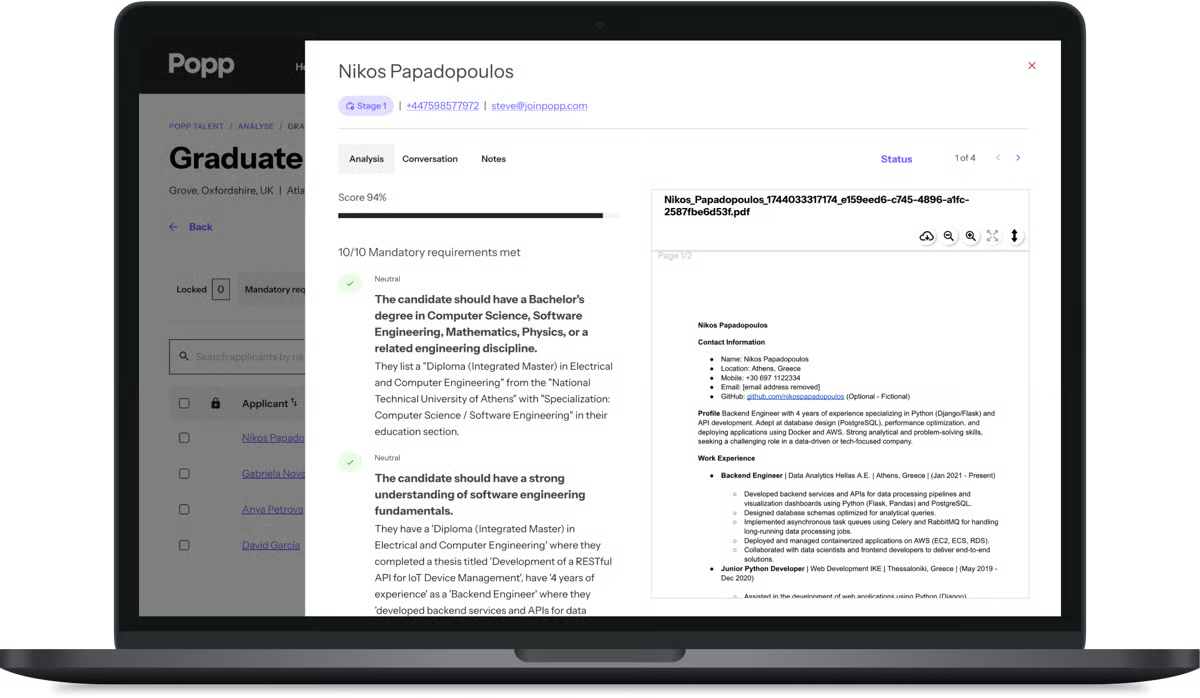
Popp stands out as a recruiting workflow platform built to save teams time where it matters most: early-stage screening, candidate communication, and shortlisting. The strongest pattern I saw in the reviews is that users consistently describe it as a tool that helps them do more with less manual effort, especially when they are managing high application volume.
One thing that stood out to me right away is how often reviewers talk about speed. Users repeatedly say Popp helps them reduce time spent on manual screening, cut down on unnecessary calls, and surface stronger-fit candidates faster. For teams trying to move quickly without sacrificing structure, that efficiency is one of the platform’s biggest strengths.
Another clear theme in the reviews is ease of use. Users frequently describe Popp as intuitive, straightforward, and easy to navigate, which makes a difference for teams that want to start using a platform quickly rather than spend too much time figuring out how everything works. That simplicity seems to make the platform accessible even as it supports more advanced recruiting workflows.
I also noticed how often reviewers connect Popp’s value to candidate communication. Users like that it helps them reach applicants quickly, keep conversations moving, and engage candidates at scale without needing to be online around the clock, improving the overall candidate experience. That speed and consistency in outreach seem especially useful for lean teams that want a more responsive recruiting process.
Every recruiter knows the real pain when it comes to screening a large number of candidates.
Thankfully, Popp supports screening and shortlisting by helping them assess fit earlier, prioritize better candidates, and move promising applicants forward with more confidence. Rather than just automating busywork, the product seems to help users make faster hiring decisions with more structure. And that is every recruiter’s dream.
Support is another area where Popp seems to leave a strong impression. Many reviewers go out of their way to mention the team’s responsiveness, hands-on guidance, and willingness to help during onboarding and implementation. I always pay attention when customer support comes up repeatedly in reviews, and here it reads like a real part of the product experience, not just an add-on.
I also found a meaningful theme around the conversational quality of the platform. Some users note that interactions feel natural and human enough that candidates do not feel like they are being pushed through a robotic process. For hiring teams that care about efficiency but still want to preserve a personal feel, this is a wonderful advantage.
Because Popp supports structured workflows and campaign-based processes, a little orientation up front appears to go a long way. A few reviewers suggest that the first round of setup can take some getting used to, especially when teams are defining campaigns or learning how to frame inputs well, but that learning period seems to become much more manageable once the workflow is in place.
Along similar lines, users who want maximum flexibility in campaign editing may want to map their process thoughtfully before launch. Some reviewers suggest that certain workflow changes are easier to make upfront than midway through, which makes the platform feel best suited to teams that benefit from a more deliberate setup. Once that structure is established, the efficiency gains seem to become much more apparent.
Overall, Popp is a strong fit for recruiting teams looking to save time, improve candidate response speed, and introduce more structure to screening and shortlisting without adding unnecessary complexity. Based on the reviews, its biggest strengths are efficiency, ease of use, candidate engagement, and highly rated support, making it a compelling option for teams that need to move fast while keeping the hiring experience organized and responsive.
“I really appreciate how Popp offers a simplified process that is easy for us to understand and use. The platform's straightforward, user-friendly design stands out, making it accessible and efficient for our needs. Setting up Popp was a breeze, and its capabilities to clearly highlight candidates who have completed processes versus those who haven't have been incredibly helpful in organizing our workflow. This feature effectively alleviates the previous struggle of differentiating between candidate statuses."
- Popp review, Ciara C.
“I found the analysis sector not very user-friendly, which can be confusing when setting up a campaign and an analysis. The confusion arises from the separation between these two processes, which I believe should be integrated to streamline the workflow.”
- Popp review, Thomas E.
Have more questions about talent intelligence tools? Find more answers below.
365Talents is the strongest fit if your goal is identifying high-potential employees through internal mobility, skills visibility, and talent mapping. It stands out for helping organizations surface hidden strengths, connect employees with opportunities, and build a clearer picture of internal capability.
Loxo is one of the strongest options for SMBs because it combines sourcing, ATS, CRM, outreach, and tracking in one platform, which can reduce the need for multiple tools. Metaview is also worth considering for smaller teams that specifically want a lower-cost way to reduce interview admin and improve documentation. CoRecruit can be another practical choice for SMBs that spend a lot of time on calls and want cleaner recruiter notes without adding operational complexity.
365Talents is one of the best fits for enterprises, especially for organizations focused on workforce intelligence, skills visibility, and internal mobility at scale. Gem is also a strong enterprise option for recruiting teams that want deeper sourcing, outreach, pipeline visibility, and analytics. If the enterprise's need is more about external talent access across geographies, Andela is another relevant option.
Gem, HireEZ and 365Talents are good options for platforms that integrate talent intelligence with HR systems. Gem works for teams that want talent intelligence connected to their recruiting stack, especially through ATS-linked workflows, pipeline visibility, and coordinated outreach. HireEZ also stands out here because reviewers frequently mention its ATS integrations and connected sourcing workflows. For internal talent use cases, 365Talents is worth considering when the goal is to connect skills data with broader workforce processes.
Andela and HireEZ can provide real-time labor market data integration. Andela gives companies access to global talent markets and broader geographic reach, while HireEZ helps teams respond faster to external talent availability through sourcing and search.
365Talents is the strongest fit because it is closely tied to internal mobility, skills development, and career growth, all of which are important levers for retention. Besides this, Gem can support retention-related visibility on the recruiting side through analytics and pipeline measurement, but it is not as directly tied to internal employee development.
365Talents and GEM offer accurate workforce insights. 365Talents focuses on internal skills visibility, talent mapping, and mobility opportunities in a structured way, while Gem provides useful recruiting insights through pipeline and outreach analytics.
Gem is the most analytics-forward recruiting platform, especially for visibility into recruiting performance and funnel activity. HireEZ also supports broader candidate discovery efforts that can help diversify pipelines.
HireEZ and 365Talent both provide AI-powered talent mapping features. HireEZ is the stronger option for external talent mapping, using AI to surface and match candidates from broader talent pools. 365Talents, on the other hand, is built for internal talent mapping, helping organizations understand employee skills and connect them to opportunities within the business.
When I look at all these tools together, what stands out to me is that the right choice depends on where your biggest recruitment process bottleneck is today. If your team is spending too much time on sourcing and outreach, I’d lean toward tools like Gem, HireEZ, or Loxo. If the bigger challenge is improving interview quality and reducing administrative work, Metaview or CoRecruit is a much better fit. And if your focus is internal mobility and long-term workforce management, 365Talents is where I see the most value.
One trend that became clear to me while going through the reviews is that talent intelligence is moving toward more connected workflows. Teams are no longer looking for standalone tools; they want platforms that bring sourcing, insights, and decision-making together across the entire recruitment process without adding more complexity.
From here, I’d keep the next step simple: shortlist the tools that match your immediate use case, look closely at how they fit into your existing stack, and prioritize the ones your team will actually use day to day. In my experience, the best choice isn’t the one with the most features — it’s the one that fits naturally into your workflow and supports better decisions across both hiring and workforce management.
Looking to go beyond hiring? Explore the best workforce planning software.


Recently updatedSummer 2026 Grid® Report · Published May 26, 2026 This guide was last...
/DarshayitaThakur-OrangeBG.webp) by Darshayita Thakur
by Darshayita Thakur

Recently updatedSummer 2026 Grid® Report · Published May 26, 2026 This guide was last...
 by Harshita Tewari

I've been on both sides of the screen. I've sat in my fair share of video interviews nervously...
 by Soundarya Jayaraman