/DarshayitaThakur-OrangeBG.webp?width=400&height=150&name=DarshayitaThakur-OrangeBG.webp)


I’ve seen firsthand how messy hiring can get when teams start growing quickly. Candidate information is spread across spreadsheets, emails, and notes. As a result, the follow-ups get missed, and strong applicants slip through simply because there’s no structured way to stay in touch. LinkedIn research found that 94% of talent say being contacted by their prospective manager can make them accept a job offer faster.
That’s what pushed me to evaluate the best candidate relationship management software, not just as a researcher, but as someone who’s seen how these gaps impact real hiring outcomes. I wanted to go beyond surface-level features and understand which tools actually help recruiters work better.
So I dug into candidate relationship management (CRM) software G2 reports, analyzed user satisfaction and adoption data, and went through hundreds of verified reviews to see what recruiters consistently value, where tools fall short, and which platforms genuinely make hiring more manageable.
After evaluating 20+ tools, I finalized a list of the 10 best recruiting CRM. These include Greenhouse, BambooHR, 100Hires, ADP Comprehensive Services, Handshake for Employers, ADP Workforce Now, Workable, ZoomInfo Talent, Sense, and Hireology.
If you’re dealing with growing pipelines, missed follow-ups, or disconnected hiring workflows, this listicle will help you find a candidate relationship management tool that fits how your team actually hires.
Greenhouse: Best for structured and collaborative hiring workflows
Combines structured interview tools, centralized feedback, and strong reporting to help teams run a more consistent hiring process. (Custom pricing)
BambooHR: Best for centralized HR management and employee self-service
Brings employee records, HR workflows, and self-service tools together in one system for teams that want simpler day-to-day people operations. ($10/employee/month)
100Hires: Best for all-in-one ATS with automation for high-volume hiring
Stands out for combining recruiting workflows, pipeline visibility, and automation in a way that supports fast-moving, high-volume teams. ($49/month)
ADP Comprehensive Services: Best for HR support with payroll and workforce administration
Pair workforce software with managed HR support, making it a strong fit for organizations that want operational help alongside payroll and HR administration. (Custom pricing)
Handshake for Employers: Best for campus recruiting and early talent outreach
Helps employers connect with students across schools at scale, with targeted outreach features built specifically for early talent recruiting. (Custom pricing)
ADP Workforce Now: Best for unifying payroll, HR, and workforce operations in one platform
Connects payroll, benefits, reporting, and HR administration in a single system for organizations that want broader workforce visibility. (Custom pricing)
* These candidate relationship management platforms are top-rated in their category, according to G2's 2026 Spring Grid Report. I’ve added their pricing details to make comparisons easier.
I think the best candidate relationship management software helps recruiters do three things well: keep talent organized, stay consistently engaged, and move faster without losing the personal side of hiring. After reviewing G2 Data and product feedback across the category, I found that the strongest tools are those that make sourcing, outreach, collaboration, and pipeline management feel easier day-to-day, not heavier.
What stood out to me is that the category isn’t defined by one single type of platform. Some tools are better for structured hiring and team collaboration, while others are built for high-volume outreach, passive candidate sourcing, campus recruiting, or broader HR-connected workflows. That’s why the best choice depends less on a generic best overall label and more on what part of the recruiting process your team is trying to improve.
According to G2 Data, 90% of users say leading customer relationship management tools meet their requirements, 91% are happy with the quality of support these platforms provide, and another 90% are likely to recommend these CRM for recruiting.
To build this list, I started with G2’s Grid® Report for candidate relationship management software to create a shortlist, using a mix of user adoption data and market presence as my guide. This helped me identify tools that balance strong user feedback with meaningful adoption across recruiting teams.
From there, I evaluated each platform on how effectively it supports candidate sourcing, talent pool segmentation, automated outreach, recruiter collaboration, analytics, and integrations with the broader hiring tech stack.
I also used AI to analyze hundreds of verified G2 reviews, focusing on what recruiting teams valued most, where workflows felt most efficient, and which tools consistently delivered measurable impact across candidate engagement and pipeline management.
The screenshots featured in this article come from G2 vendor listings and publicly available product documentation.
After digging into G2 Data and evaluating how modern recruiting teams operate, I noticed a few themes that consistently stood out. Here’s what I focused on when evaluating the best candidate relationship management software:
While not every tool excels across every criterion, each one stands out in areas that matter most to specific teams and use cases.
The list below contains genuine user reviews from our Candidate Relationship Management Software category page. To qualify for inclusion in the category, a product must:
*This data was pulled from G2 in 2026. Some reviews may have been edited for clarity.
Greenhouse is widely used by growing companies and recruiting teams that want a structured, data-driven approach to hiring. According to G2 Data, this platform is used by 66% mid-market teams and has an average user adoption rate of 72%.
One of the first things I noticed while reviewing user feedback is how intuitive the platform feels for both recruiters and hiring managers. The interface is clean, logical, and easy to navigate, making it simple to locate candidate profiles, interview feedback, and hiring pipeline information without digging through multiple screens. Many teams highlight that even new users can get comfortable quickly because the workflows mirror how hiring actually happens day to day.
Another area where Greenhouse shines is its structured hiring framework. I found that reviewers consistently praise the platform’s interview kits, customizable scorecards, and standardized evaluation templates. These tools help hiring teams stay aligned on what they’re looking for in a candidate and gather consistent feedback across interviewers. The result is a hiring process that feels more objective, organized, and easier to scale as teams grow.
Greenhouse also stands out for how effectively it supports collaboration between recruiters, hiring managers, and interviewers. Features like shared notes, activity feeds, and centralized candidate profiles make it easy for everyone involved in the process to stay informed. Instead of tracking candidate conversations across emails, spreadsheets, and chat tools, teams can review everything, from interview feedback to scheduling details, in one place.
I also noticed that automation plays a big role in how teams use Greenhouse. Recruiters frequently mention automated interview scheduling, templated emails, and task workflows that reduce manual work throughout the hiring cycle. These automations help teams move candidates through stages more quickly while keeping communication consistent and timely.
The candidate relationship management platform has a strong ecosystem of integrations and APIs. Greenhouse connects easily with job boards, HR systems, scheduling tools, and interview platforms, allowing companies to build a recruiting tech stack that works seamlessly together.
Many users mention how dashboards and built-in reports help translate recruiting activity into metrics that leadership teams can easily understand. Having this visibility allows talent teams to move beyond reactive hiring and instead support more strategic workforce planning conversations, using real data to evaluate sourcing channels, measure recruiting efficiency, and continuously refine the hiring process.
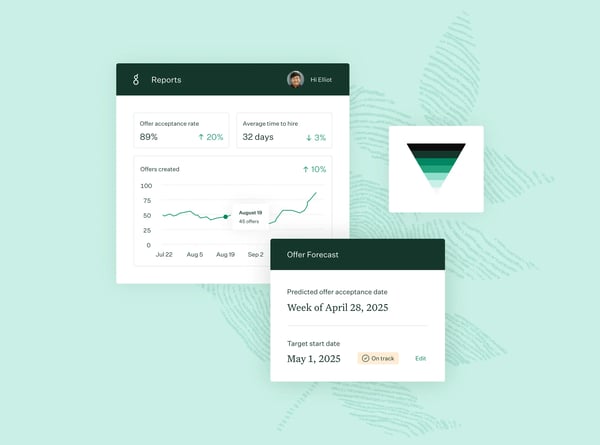
Some G2 reviewers note that the platform’s extensive capabilities can require a bit of exploration at the start, especially when configuring workflows, permissions, or reporting views. With a thoughtful setup and some familiarity with the system, teams typically find that the platform’s flexibility allows them to tailor hiring processes exactly to their needs.
Because Greenhouse is designed to promote consistent hiring practices across teams, some organizations find that certain configuration areas follow predefined structures that guide how recruiting processes are set up, which can feel restrictive. For many teams, this framework supports alignment and consistency across hiring stages, while also encouraging thoughtful configuration of workflows, reporting fields, and candidate evaluation criteria to match their broader recruiting strategy.
Overall, based on my evaluation, Greenhouse stands out as a powerful recruiting platform that blends usability, collaboration, and data-driven insights. Its strengths lie in structured interviewing tools, automation that reduces manual work, and an integration ecosystem that allows recruiting teams to build a connected hiring workflow.
"Greenhouse provides a very structured approach to recruitment. The interview pipeline is easy to customize, which helps keep hiring processes consistent across teams. Collaboration between hiring managers, recruiters, and interviewers is smooth because feedback is centralized and easy to track. I also like the integrations with other HR and productivity tools, which make it easier to manage the entire hiring workflow in one place."
- Greenhouse review, Manuel T.
"Some of the back-end configurations can be difficult to navigate, and the talent filtering and resume review experience can feel less intuitive than expected. While the platform offers strong customization overall, there are areas where additional flexibility would better support more complex or evolving hiring workflows."
- Greenhouse review, M’Kenzy W.
BambooHR is widely used by teams that want a simple way to manage core HR processes in one place. The platform stands out for how effectively it centralizes employee data, hiring workflows, and everyday HR operations into a single, easy-to-navigate system. According to G2 Data, this tool is used by 31% small businesses and 64% mid-market teams, with an average user adoption rate of 88%.
One of the first things I noted while reviewing user feedback is how intuitive the interface feels for both HR teams and employees. The layout is clean and organized, making it easy to access employee records, documents, time-off balances, and company information without navigating through complex menus. Many users mention that the system feels approachable even for people who are not particularly tech-savvy, which makes adoption across teams much smoother.
BambooHR receives praise for centralizing employee data. I found that reviewers frequently highlight how helpful it is to have employee profiles, job history, performance information, and documents stored in one system of record. This centralized database helps HR teams avoid juggling spreadsheets or multiple tools while ensuring that employee information remains organized and easy to retrieve.
BambooHR makes routine HR tasks more efficient through its employee self-service features. Employees can update their personal information, request time off, access documents, and review company information without needing constant assistance from HR. This self-service approach reduces administrative work while giving employees greater visibility into their own data and requests.
Hiring and onboarding workflows are another strong aspect of the platform. BambooHR allows teams to post jobs, track applicants, and move candidates through hiring stages while keeping the entire process visible to hiring managers. Once a candidate is hired, onboarding tools help organizations manage documentation and transitions smoothly, ensuring new employees have a structured start.
I noticed that teams appreciate how BambooHR supports everyday HR operations like time-off management, approvals, and internal communication. Managers can quickly view team availability, approve requests, and keep track of important milestones or employee updates. These operational features help HR teams maintain visibility into workforce activity without needing multiple systems.
G2 reviews also praise BambooHR’s ability to simplify reporting and administrative oversight. HR teams can generate reports, review workforce data, and track important HR metrics from within the platform. This visibility allows organizations to stay informed about employee records, compliance requirements, and workforce trends while maintaining organized documentation.
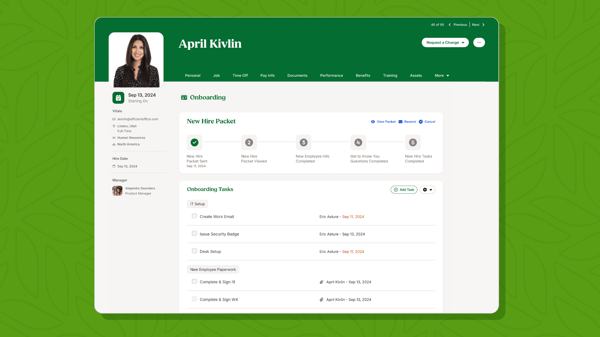
Some teams mention that when working through specific support requests or edge-case scenarios, it can take a bit of follow-up to reach a complete resolution. However, BambooHR provides multiple support channels along with a knowledge base and self-service resources, and many users find that once they are familiar with the platform, they can handle most day-to-day tasks independently while using support for more specialized guidance.
While BambooHR offers helpful automation for core HR tasks like onboarding, approvals, and notifications, more advanced workflow automation scenarios may involve additional configuration or complementary tools. That said, the built-in automation handles most day-to-day HR processes effectively, and teams with more complex workflows can extend it through integrations or tailored setups.
Overall, based on my evaluation, BambooHR provides a well-balanced HR management system that helps teams stay organized while keeping employee information accessible and easy to manage.
"The BambooHR interface is clean and pretty intuitive once you get the hang of it. Employee records, time off tracking, and onboarding workflows are all in one place, which makes things way easier to manage. The self-service portal for employees is also a big plus. It saves a lot of back and forth with HR. Overall, the UX is solid, and the reporting features are decent. We use it mainly for tracking headcount and time-off balances, and it does that really well."
- BambooHR review, Nolan T.
"One thing I dislike is the lack of a live connection to Microsoft Azure for the PTO calendar. Because there isn’t a real-time sync, PTO visibility requires a cumbersome workaround. A more dynamic or automated connection would make it easier to keep calendars aligned across systems."
- Bamboo HR review, Joe V.
Related: Need an HR tool without the added cost? Explore the best free human resource management software.
100Hires helps teams and agencies that need a fast and structured way to manage hiring at scale. According to G2 Data, 100Hires is used by 51% small businesses and 39% mid-market teams and has an average user adoption rate of 66%.
A differentiating factor is that 100Hires functions as a full-fledged applicant tracking system (ATS). It provides a clear, visual pipeline that makes it easy to track candidates across stages, manage applications, and maintain visibility across multiple roles. Reviewers frequently highlight how this structured approach helps them stay organized, especially when hiring volume increases.
I observed praise for 100Hires’ ability to simplify high-volume recruiting workflows. Users appreciate how the platform keeps everything, from candidate profiles to communication history, in one place. This centralized approach reduces back-and-forth across tools and allows recruiters to focus on moving candidates forward instead of managing scattered information.
I also noted users praising 100Hire’s automation capabilities. Features like automated job posting, candidate communication, and workflow updates help reduce manual effort significantly. For teams handling multiple roles simultaneously, this makes a noticeable difference in maintaining speed and consistency across hiring processes.
Reviewers mention that collaboration is built naturally into the platform. Hiring teams can share feedback, leave notes, and track candidate progress within a single system. This makes it easier to stay aligned and reduces miscommunication, particularly when multiple stakeholders are involved in decision-making.
Another standout capability is its sourcing and integration ecosystem. 100Hires connects with job boards and external platforms, allowing recruiters to publish roles and source candidates quickly. Some users also highlight AI-assisted features for refining job descriptions and supporting candidate evaluation, which adds an extra layer of efficiency to the hiring process.
100Hires offers useful visibility into pipeline activity and recruiting performance. While not overly complex, these insights help teams monitor hiring progress, track candidate movement, and stay on top of recruiting goals, especially in fast-paced hiring environments.
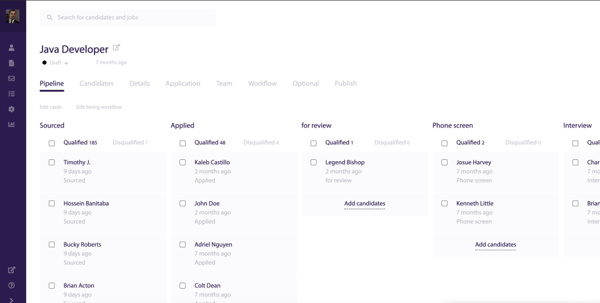
Some G2 reviewers note that configuring workflows and exploring advanced features may take a bit of initial setup, particularly for teams new to structured ATS systems. Once teams are familiar with the platform, they generally find that its intuitive design supports smooth and scalable hiring operations.
100Hires’ use of color within the interface can feel less distinct when teams are scanning stages quickly at scale. However, this more uniform visual style also keeps the platform clean and structured, which can work well for teams that prioritize simplicity over a more heavily segmented pipeline view.
Based on my evaluation from G2 reviews, 100Hires delivers a practical and efficient recruiting solution by combining ATS structure with automation and ease of use. Its strengths lie in helping teams stay organized, move faster, and manage hiring workflows without unnecessary complexity.
"What I really like about 100Hires is the way the workflows are shown in a clear and objective way to understand the process. The filters are very useful in the different sections, like candidates, and during the process. Finally, the reporting part is so important to analyze the data during the whole process from the start until the end.”
- 100Hires review, Mayra R.
"The design, font, and colors could be improved."
- 100Hires review, Aleksandra B.
An applicant tracking system (ATS) manages the hiring process after a candidate applies. It helps recruiters organize applications, move candidates through interviews, collect feedback, and manage hiring decisions for open roles.
On the other hand, CRM software helps recruiters build talent pipelines before a candidate applies. It supports sourcing, talent pooling, nurture campaigns, and ongoing engagement with passive or past candidates.
In simple terms, ATS is built for managing applicants, while CRM is built for building candidate relationships. Many teams use both together: CRM helps attract and nurture talent, and ATS helps convert that talent through a structured hiring process.
Looking for the right ATS to pair with your recruiting strategy? Explore these best applicant tracking systems.
ADP Comprehensive Services is used by organizations that want HR, payroll, benefits, and talent workflows supported by both software and outsourced expertise. According to G2 Data, this candidate relationship management tool is used by 69% mid-market teams, and has an average user adoption rate of 71%.
ADP Comprehensive Services performs well as an employee self-service platform. Reviewers frequently value being able to access workforce information without routing every routine task through HR. Such accessibility helps reduce administrative burden while giving employees a more organized way to manage everyday HR needs.
This tool emphasizes designated strategic support, administrative relief, and access to committed professionals across HR, payroll, benefits, and talent functions. The service layer gives the platform a different value proposition from lighter self-serve tools, especially for teams that want operational support alongside technology.
Reviewers often describe the platform as straightforward for everyday payroll and HR tasks, with information that is easy to access and a user experience that has become more seamless over time. Ease of usability is especially valuable in a managed-services platform, where teams want the benefits of broader HR support without making routine workforce administration feel overly complex.
The platform adds value with its reporting and analytics features. Many users appreciate being able to monitor workforce data and turn operational information into more decision-ready insights. For HR leaders who want visibility beyond transaction processing, that reporting layer helps support broader workforce planning conversations.
Reviewers repeatedly point to payroll administration, tax support, and compliance-related workflows as central reasons companies rely on the platform. This ability is a meaningful differentiator for organizations that need confidence in accurate, timely pay and regulatory alignment.
ADP Comprehensive Services supports HR, talent management, benefits administration, payroll, and onboarding through the same broader environment, and also integrations with tools such as QuickBooks Time, Relias Assessments, and Sage Intacct. For organizations that want a central workforce platform with room to connect adjacent systems, that breadth adds long-term value.
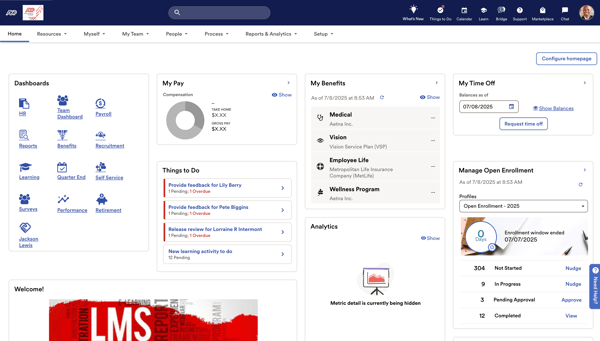
Some G2 reviewers note that support quality can feel less consistent when requests require deeper follow-up across service areas such as payroll, tax, or compliance. However, ADP Comprehensive Services remains appealing for organizations that value having software and managed HR support combined in one broader operating model.
Users also mention that there can be a learning period at the start, particularly when teams are getting familiar with the platform’s broader functionality and service structure. A more layered experience tends to align best with organizations looking for operational depth and guided support rather than a lighter-weight, point-solution approach.
Overall, based on my evaluation, ADP Comprehensive Services stands out as a strong fit for organizations that want more than HR software alone. Its strengths lie in centralized workforce administration, payroll dependability, managed support, employee self-service, and broader HR coverage that help teams run more connected people operations.
"I use ADP Comprehensive Services for payroll information and W-2 documents, and I've been a user for five years. ADP was the first service offered to me, and I find it very user-friendly. It has greatly improved all facets of my work, particularly with payroll, onboarding, and W-2 generation. I really appreciate how readily available the information is, and the frequent updates make it seamless. The bugs that had lagged ADP have been improved, and the user interface has improved dramatically. I like every facet of it currently and wouldn't change a thing."
- ADP Comprehensive Services review, Nikolas K.
"The only downside I can think of is that the process to get the services up and running took about a year, and can be challenging if you are an HR or admin Department of one or smaller."
- ADP Comprehensive Services review, Taylor I.
Handshake for Employers is used by organizations that want to connect with students and recent graduates through a platform built specifically for early talent recruiting. According to G2 Data, it is used by 44% mid-market teams and 42% enterprises.
Handshake receives praise for its targeted sourcing and campaign outreach. Reviewers call out the ability to search for students by factors such as major, interests, school, and graduation timing, while the platform’s campaign features help employers organize school outreach and promote opportunities more strategically. Together, those capabilities make it easier for teams to focus on relevant student segments rather than taking a broad, one-size-fits-all approach to early talent engagement.
While reviewing user feedback, I also noted how effective Handshake is at expanding employer reach. Reviewers frequently mention that it helps them connect with students across multiple schools and geographic regions, including campuses they would not typically visit in person. That broader access is especially valuable for teams trying to build internship or early-career pipelines without depending entirely on travel-heavy recruiting programs.
Handshake stands out for its ease of use. Users often describe the platform as well-organized, visually straightforward, and easy to post jobs on, which helps recruiting teams get campaigns live quickly without a lot of operational friction. It matters because campus recruiting often involves multiple stakeholders, seasonal hiring cycles, and high volumes of outreach, so a platform that feels approachable can make execution much smoother.
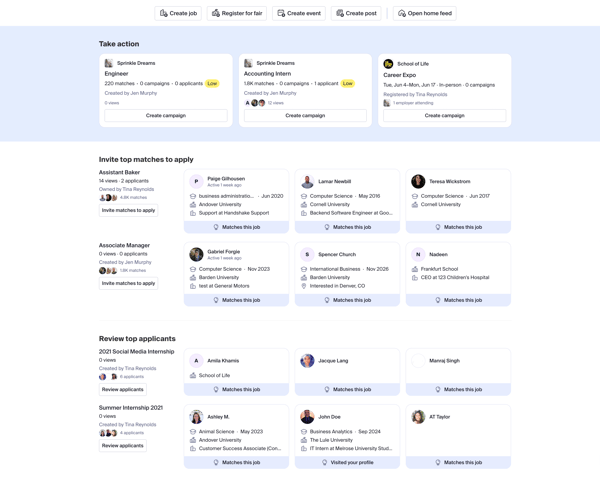
Support is also a strong point that comes up frequently in user feedback. Many reviewers mention having access to a responsive and knowledgeable team that helps with onboarding, campaign setup, and overall platform usage. An added layer of guidance can be especially useful for refining campus recruiting strategy or looking to get more value from outreach efforts over time.
Some G2 reviewers note that filter accuracy can be inconsistent in certain targeting scenarios, which can make outreach feel less precise when teams are trying to engage very specific student segments. That said, Handshake still works well for employers whose priority is broad campus reach and student engagement across schools rather than highly granular sourcing.
Overall, Handshake for Employers stands out as a strong fit for organizations building internship, campus, and early-career talent pipelines.
"I really like how easy it is to connect with a large pool of qualified students from different schools. The platform makes it simple to promote roles, manage applicants, and reach the right audience. I’ve hired most of my interns through Handshake, so it’s definitely been a great tool for early-career recruiting."
- Handshake for Employers review, Luccas L.
"I think the sheer number of listings on Handshake can sometimes make it difficult for students to find our internship offer. That said, we still see results, and students remain interested in our internship opportunities."
- Handshake for Employers review, Michele S.
ADP Workforce Now is used by organizations that want payroll, HR, benefits, and talent workflows connected in a single system. It is an all-in-one, cloud-based HR suite built on a single database. According to G2 Data, this candidate relationship management tool is used by 63% mid-market teams and has an average user adoption rate of 82%.
Users consistently highlight ADP Workforce Now for the convenience of managing payroll, benefits, time tracking, employee records, and HR administration in one place. Instead of switching between disconnected tools, teams can manage core people operations within a single system, which helps reduce manual handoffs and keeps workforce data more consistent across the employee lifecycle.
Another major strength is payroll reliability. Reviewers often point to payroll processing, tax calculations, and compliance-related workflows as some of the platform’s strongest capabilities. For organizations that need confidence in recurring pay runs and multistate payroll administration, operational consistency is a meaningful advantage.
ADP Workforce Now acts as an employee self-service platform. I noted users frequently mention that employees can access pay statements, tax forms, benefits details, and personal records without depending on HR for every update or request. That accessibility helps reduce administrative burden while giving employees a more organized way to manage routine workforce tasks.
The platform adds value with its reporting features. Many reviewers mention using ADP Workforce Now to pull workforce reports, monitor HR data, and support decision-making across payroll and people operations. For HR leaders who need better visibility into workforce activity, these reporting capabilities help turn day-to-day operational data into more useful business insight.
Based on my evaluation of G2 reviews, the breadth of the platform is also a differentiator. ADP Workforce Now includes a wide range of modules, giving organizations room to manage more than just payroll. Its coverage across benefits, talent, time, and related HR workflows makes it a practical fit for teams that want one system capable of supporting multiple functions as their needs grow.
With support for integrations across major ERP platforms, ADP Workforce Now gives teams more flexibility to connect their existing HR and business tools without completely rebuilding their processes. For organizations that want a platform that can fit into a broader tech stack while still serving as a central HR hub, that connectivity adds meaningful long-term value.
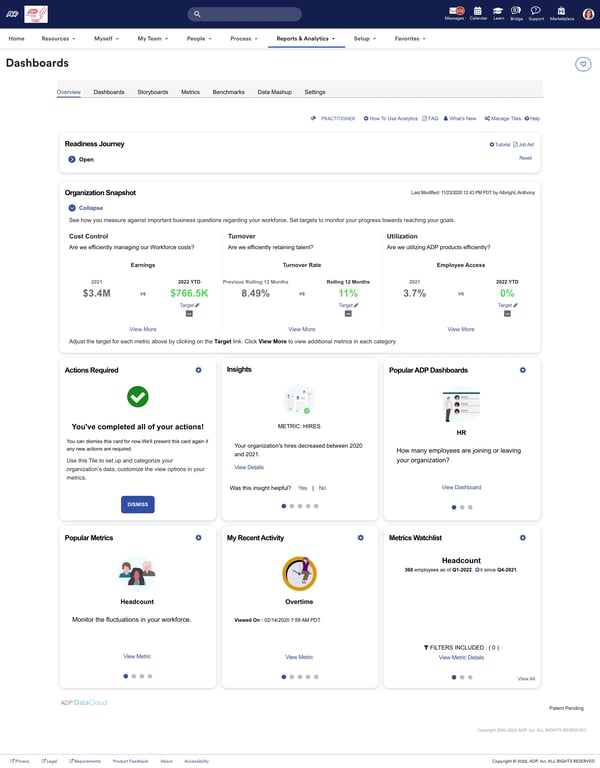
ADP Workforce Now’s breadth can make navigation feel more layered for users moving between modules or handling less frequent tasks. However, that more structured interface reflects the platform’s all-in-one design and tends to work better for organizations that prioritize operational depth across payroll, benefits, time, and HR workflows over a lighter-weight experience.
Some G2 reviewers note that support experiences can vary by issue, especially when requests require more detailed guidance or cross-functional follow-up. That trade-off is more noticeable in a platform with broad payroll and HR coverage, though many teams still find ADP Workforce Now valuable for keeping essential workforce operations centralized in one system.
Overall, based on my evaluation, ADP Workforce Now stands out as a strong fit for organizations that want operational depth across payroll, HR, and workforce management rather than a narrower point solution.
"What I like best about ADP Workforce Now is how it centralizes core HR functions—payroll, benefits, time tracking, and talent management—into one integrated system. It streamlines administrative processes, reduces manual errors, and provides real-time reporting that supports better decision-making. I also appreciate its compliance support and automation features, which help ensure payroll accuracy and regulatory alignment. Overall, it saves time and allows HR professionals to focus more on strategy and employee engagement rather than administrative tasks."
- ADP Workforce Now review, Mhel N.
"Slow customer support and system navigation are the top two things I would rank as not good about ADP. Support overall isn’t great, but support for state tax matters is especially painful and overly complex. On the administration side, navigating the system is even more frustrating and makes routine tasks harder than they should be."
- ADP Workforce Now review, Jayson R.
Workable helps teams centralize sourcing, applicant tracking, and hiring collaboration without adding too much operational overhead. According to G2 Data, it is used by 28% small businesses and 61% mid-market teams, with an average user adoption rate of 71%.
Workable stands out for its job distribution and sourcing reach. Reviewers frequently highlight how quickly they can post roles across multiple job boards and expand visibility without adding manual work. That broad distribution is one of the reasons the platform fits fast-moving hiring teams so well: it helps them get roles in front of more candidates quickly while keeping job advertising tied to the rest of the recruiting workflow.
I noted that users repeatedly describe the interface as clean, easy to navigate, and simple to adopt without extensive training. That usability matters because it helps teams bring non-recruiters into the process more easily, whether they are reviewing candidates, leaving feedback, or moving applicants through stages for the first time.
Workable also performs well as a collaborative hiring system. I found consistent praise for its shared notes, scorecards, internal comments, and centralized candidate tracking, all of which help recruiters and hiring managers stay aligned. Instead of splitting feedback across inboxes, calendars, and spreadsheets, teams can review candidate history, evaluations, and communication in one place, which makes the hiring process feel more transparent and easier to manage.
Users regularly mention templates, automated communication, interview scheduling, reminders, and AI-assisted features that reduce repetitive work across the hiring cycle. These capabilities are especially valuable for teams hiring at volume or across multiple roles at once, because they help maintain speed and consistency without making the process feel scattered.
The platform connects with a wide range of job boards, calendars, HR systems, and other recruiting tools, making it easier for teams to fit Workable into their existing tech stack. Based on my evaluation of G2 reviews, this flexibility is especially useful for organizations that want a connected hiring workflow rather than another standalone tool.
Another strength is how well Workable supports a streamlined recruitment process. Users frequently mention that the platform helps bring sourcing, screening, scheduling, and evaluation into one organized workflow, making it easier to move candidates forward without unnecessary friction.
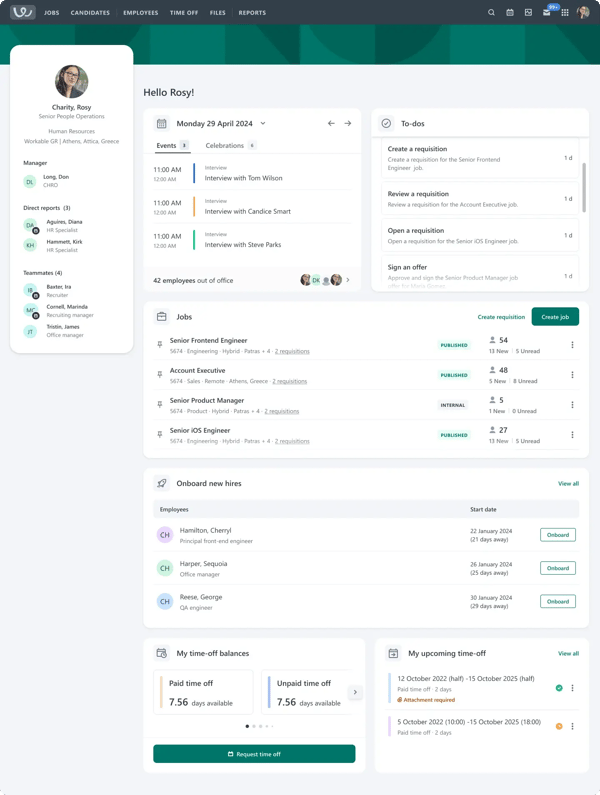
Workable’s reporting tools support day-to-day recruiting visibility well, but teams looking for more highly customized analytics or deeper reporting flexibility may find the platform better suited to standardized hiring insights than more specialized reporting use cases.
At higher application volumes, moving between candidate profiles or larger talent pipelines can take a bit more time, particularly for teams managing fast-paced hiring at scale. That said, the candidate relationship management platform’s centralized structure still works well for keeping candidate activity, feedback, and pipeline movement organized in one place.
Overall, Workable stands out as a strong recruiting platform for organizations that want to hire quickly, collaborate easily, and keep candidate workflows centralized.
"Workable’s integration with so many of the hiring platforms makes it very easy to get a job posted widely across the hiring universe. The workflows and templates make it much quicker to move applicants through the customizable stages. The built-in asynchronous interview video questions/responses are great for remote hiring to get a feel for someone's energy/tone/presence that words on a screen cannot convey. The Zapier integration is also nice to kick off automations at every stage."
- Workable review, Lloyd W.
"While Workable is a powerful tool, there are a few areas that could be improved. The reporting and analytics features, for example, can feel somewhat limited when trying to generate more customized or in-depth insights. Additionally, some users may find the learning curve a bit steep at first, especially when managing multiple roles or integrating with other HR systems. More flexibility in customization and better support for niche use cases would make it even more effective."
- Workable review, Ayesha K.
ZoomInfo Talent is used by recruiting teams that want access to a large candidate database, verified contact information, and sourcing workflows built for speed. According to G2 Data, the tool is used by 47% small businesses and 39% mid-market teams.
ZoomInfo Talent has a massive candidate database. Reviewers repeatedly highlight how much candidate and contact data the platform gives them access to, which makes it easier to source across a broader range of roles, industries, and geographies. For teams that rely on outbound recruiting, that scale gives ZoomInfo Talent a clear advantage as a sourcing engine.
The platform has a user-friendly interface. Users frequently describe it as easy to navigate, with a simple layout that makes sourcing feel more efficient from the start. Ease of usability is especially valuable for recruiters who need to move quickly between searches, candidate lists, and outreach workflows without spending extra time learning the system.
ZoomInfo Talent also adds value through the level of detail available in candidate profiles. I noted G2 reviewers call out access to employment history, skills, education, and direct contact information as a practical benefit when evaluating potential candidates. A deeper profile view helps recruiters move from discovery to qualification more quickly, without having to piece together information from multiple sources.
Users can export candidate data into an ATS or other ZoomInfo products like Engage. Reviewers mention this specifically as a helpful part of their workflow because it reduces manual steps between sourcing and follow-up. Export flexibility helps keep the process connected rather than fragmented for recruiting teams working across multiple systems.
A distinct strength that also comes through in G2 reviews is advanced search. Users highlight how easy it is to locate the right individuals, and the platform supports precision targeting with advanced search filters. That makes ZoomInfo Talent particularly useful for recruiters who need to narrow searches by title, skills, location, experience, or other role-specific criteria instead of relying on broad candidate lists.
Reviewers describe being able to upload and download lists, create tags and projects, and source candidates more efficiently through the platform. Recruiters managing multiple open roles at once appreciate that a combination of search speed, workflow organization, and list management helps reduce manual sourcing effort and keeps pipelines moving faster.
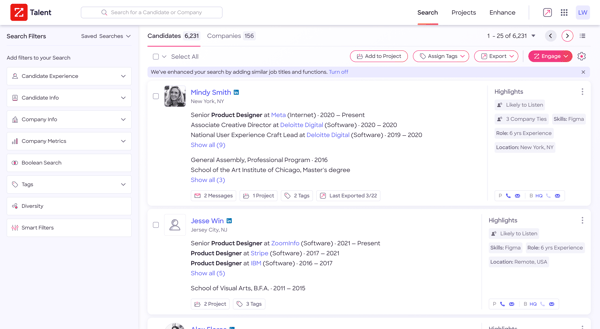
Some G2 reviewers note that profile data can occasionally vary in freshness or accuracy, especially when teams are sourcing highly specific contacts and want every detail to align closely with real-time outreach needs. However, ZoomInfo Talent remains especially valuable for recruiters who prioritize broad candidate discovery, fast search, and access to detailed contact information at scale.
Users also mention that pricing is better aligned to teams that rely heavily on outbound sourcing and database-driven recruiting as a core part of their hiring strategy. For organizations that place a premium on passive candidate reach, search efficiency, and contact access, that investment often maps more naturally to the platform’s value.
Overall, based on my evaluation, ZoomInfo Talent is a strong fit for teams that want to source faster, reach passive talent, and work from a deep candidate database with verified contact information.
"I like ZoomInfo Talent for its depth of the candidate database and the accuracy of the information provided. Having access to reliable profiles and contact details makes outreach much easier. Another standout feature is the advanced search and filtering, which helps us quickly narrow down candidates based on skills, experience, and location. This saves a lot of time and helps the HR team focus on connecting with the right talent instead of spending hours searching."
- ZoomInfo Talent review, RamyaG.S G.
"ZoomInfo information was not as accurate as the other platforms we are using now. Emails were not validated."
- ZoomInfo Talent review, Rohini P.
Sense is used by recruiting teams that want to automate outreach, keep candidate communication organized, and engage talent across multiple channels. According to G2 Data, this platform is used by 33% small businesses and 54% mid-market teams, with an average user adoption rate of 80%.
One of the clearest strengths of Sense is how much easier it makes large-scale candidate communication. While evaluating user feedback, I found repeated praise for bulk messaging, campaign management, and the ability to reach candidates quickly without relying on manual outreach. That matters for teams running high-volume recruiting or staffing workflows, where speed and consistency can directly affect response rates and recruiter productivity.
Reviewers consistently describe the platform as intuitive, straightforward, and easy to learn, which helps recruiters get productive quickly without a heavy onboarding lift. These reviews highlight ease of use as one of the product’s most frequently mentioned strengths, reinforcing that accessibility is a meaningful part of the platform’s appeal.
Sense performs well for campaign-based recruiting engagement. I noticed that users often mention being able to run several campaigns at once while keeping communication organized and consistent. For teams managing multiple roles, talent pools, or business lines at the same time, the ability to coordinate outreach at scale makes the recruiting process feel much more controlled.
I observed how well Sense fits into existing recruiting workflows. G2 lists several integrations for the platform, including ATS connections with Bullhorn, Greenhouse, ICIMS, SmartRecruiters, Workday Recruiting, and SAP SuccessFactors. Reviewers also frequently mention that these integrations reduce manual work by making it easier to pull candidate information directly into communication workflows.
Sense emphasizes real-time, omnichannel candidate engagement. The platform supports texting, WhatsApp campaigns, email workflows, and interview scheduling, all within the same broader talent engagement experience. For recruiting teams that want to stay top of mind with candidates instead of relying on a single outreach channel, that breadth gives Sense a more proactive CRM feel than a simple messaging add-on.
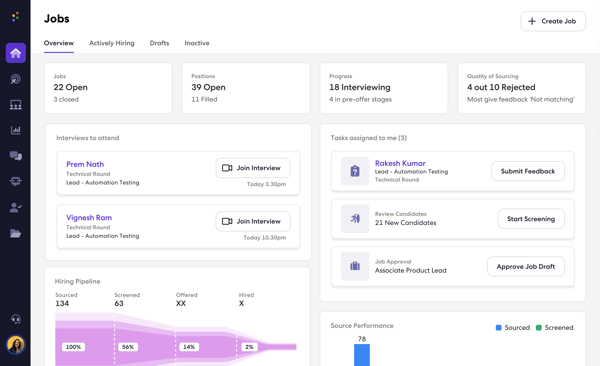
Some G2 reviewers mention that messaging workflows can occasionally feel less seamless when teams are managing large-scale outreach, particularly when they want more precision in how messages are delivered, tracked, or surfaced in conversation history. Even so, Sense remains especially valuable for recruiting teams that prioritize centralized outreach and consistent candidate engagement across channels.
Users also note that performance can slow down at times, especially during bulk activity, larger campaigns, or more search-heavy workflows. However, many teams still value how much time Sense saves by bringing campaigns, messaging, and candidate engagement together in one place.
Overall, based on my evaluation, Sense stands out as a strong fit for teams that want to scale candidate communication without losing structure. Its strengths lie in bulk outreach, ease of use, campaign management, integrations, and omnichannel engagement that help recruiters stay efficient while keeping talent pipelines active.
"Sense greatly simplifies communication and increases efficiency. I can send messages to a large group of candidates at once, which saves me a lot of time compared to reaching out manually. The platform is intuitive and straightforward, so I didn’t need much training to get started. One of its key strengths is the ability to run and manage several campaigns at the same time, which keeps candidate engagement organized and consistent. Overall, Sense streamlines the outreach process and boosts my productivity. I use Sense for messaging about 80% of the time in my daily work. It’s also easy to implement and doesn’t require a complicated setup. Customer support is very friendly and resolves the query. Integration of Sense with ATS and Job is very easy and also reduces the time for messaging."
- Sense review, Amit S.
"The most disliked aspect of using Sense is that it can occasionally become glitchy and laggy. There are times when searching for a talent's profile doesn't yield any results, which makes it difficult to send them messages and, at times, even prevents any communication altogether."
- Sense review, Amaan K.
According to G2 Data, Hireology is used by 26% small businesses and 66% mid-market teams. The candidate relationship management tool has an average user adoption rate of 76%. It is mostly used by teams that want to bring applicant tracking, candidate communication, job posting, and onboarding into one system.
Hireology stands out for its ability to centralize candidate management. Users repeatedly mention having applicants, notes, interview feedback, communication history, and hiring stages in one place, which makes it easier to track progress and reduce the back-and-forth that often happens when recruiting is spread across inboxes, spreadsheets, and job boards.
From my evaluation of user feedback, I noted how easy the platform feels to use. Reviewers consistently highlight intuitive navigation, clean candidate views, and a setup process that feels approachable. This matters because it helps hiring managers participate in the process without needing a heavy learning curve.
I found repeated praise for texting, email templates, interview notes, and the ability to contact candidates directly within the platform. For busy hiring teams, especially those managing multiple openings at once, that built-in communication layer helps keep follow-up faster and more consistent.
Hireology also performs well in job distribution and applicant flow. Reviewers frequently mention being able to post jobs across multiple boards from one place and bring candidates back into a centralized pipeline. That combination helps teams save time on sourcing while giving them better visibility into who has applied and where each candidate stands.
Time savings come up often in the feedback. Users describe Hireology as a way to reduce double work, cut down on manual follow-ups, and move from application to onboarding with fewer disconnected steps. That operational efficiency seems especially valuable for multi-location or higher-volume hiring environments where consistency matters as much as speed.
Users praise how well Hireology supports structure and visibility across the hiring process. Reviewers call out applicant scoring, candidate categorization, interview workflows, and reporting visibility as useful for keeping teams aligned and making hiring decisions more consistent. For organizations that want a more controlled process rather than an informal one, that structure is a meaningful strength.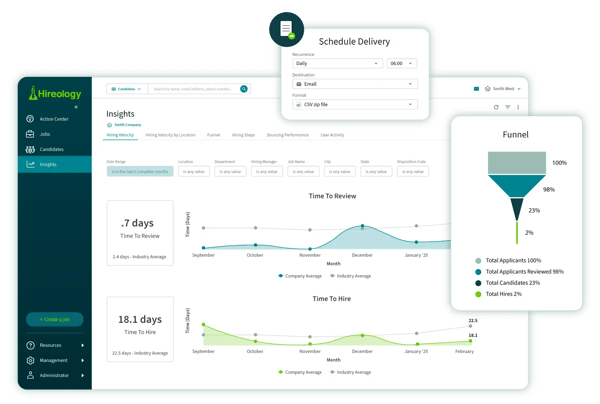
Hireology’s mobile experience could offer more depth for teams that want to manage a larger share of hiring activity on the go. The platform still works well as a centralized hiring system for organizations that primarily run recruiting workflows from desktop and value consistency across locations and teams.
Users also mention that access settings can feel more structured in cases where organizations want broader self-serve control over certain actions or administrative tasks. That same structure can be a better fit for teams that prefer more controlled permissions and standardized workflows across a distributed hiring process.
Overall, based on my evaluation, Hireology stands out as a strong fit for organizations that want to centralize hiring across teams, locations, and recruiting stages.
"Hireology posts on multiple job boards at once, saving our company time. I appreciate being able to communicate with candidates via text using a generic number."
- Hireology review, Stacey H.
"I feel that the mobile app is not an added benefit when it truly needs to be. Messages and candidate tracking have not consistently worked on my mobile app. We brought this up to our Hireology representative and made adjustments to my access, but I am still having problems receiving candidate communications or candidate information."
- Hireology review, DYLAN H.
Related: Candidate relationship management helps you build stronger pipelines, but automation helps you move faster. Check out the best recruiting automation tools to simplify repetitive hiring tasks.
Got more questions? G2 has got the answers.
Sense and ZoomInfo Talent stand out for agencies. Sense is well-suited for high-volume outreach and automated engagement, while ZoomInfo Talent is useful for sourcing passive candidates with detailed contact data.
Greenhouse and Hireology are strong options for tracking candidate interactions. Both centralize notes, feedback, communication history, and candidate progress in one place.
Sense is one of the strongest options for automating candidate engagement. Greenhouse and Workable also offer useful automation for scheduling, communication, and workflow management.
Greenhouse is a top choice for collaborative recruitment workflows, especially for structured hiring teams. Workable and Hireology also support strong collaboration through shared notes, scorecards, and centralized candidate management.
Greenhouse, Workable, and Hireology are all strong for managing candidate pipelines. They help teams organize applicants, track progress by stage, and keep hiring activity visible across the team.
Greenhouse, ADP Workforce Now, and ADP Comprehensive Services are well-suited for enterprise hiring needs. They offer broader operational depth, structured workflows, and stronger support for scale.
Greenhouse stands out for recruiting analytics, especially around pipeline health and sourcing performance. ADP Workforce Now is also a strong option for workforce and HR reporting tied to broader people operations.
Workable, Greenhouse, and Hireology all integrate well with job boards. These platforms make it easier to distribute jobs widely and manage incoming applicants in one workflow.
Greenhouse is one of the best all-around options for recruiting teams because it balances structure, collaboration, automation, and reporting. Workable is another strong fit for teams that prioritize ease of use and speed.
Sense is one of the strongest options for talent nurturing because of its campaign workflows, bulk messaging, and omnichannel engagement. Handshake for Employers is also useful for nurturing early talent pipelines through targeted student outreach.
Based on my evaluation of G2 reviews, candidate relationship management software plays a critical role in helping teams move from reactive hiring to proactive talent engagement. The best tools centralize candidate data, streamline communication, and create structured workflows that make hiring more consistent, scalable, and data-driven.
Each platform in this list serves a different hiring need. Some, like Greenhouse and Workable, focus on structured workflows and collaboration. Others, like Sense and ZoomInfo Talent, are built for high-volume outreach and sourcing. Tools like Hireology and ADP solutions bring broader HR operations into the mix, while platforms like Handshake specialize in early talent engagement.
The right choice ultimately depends on how your team hires. If your priority is pipeline visibility and structured interviews, look for platforms with strong workflow and reporting capabilities. If you’re focused on outreach and nurturing, prioritize automation and engagement features. And if you’re scaling across teams or locations, consider tools that centralize operations and support consistency.
Once your hiring workflows are organized, communication is streamlined, and candidate data is unified, recruiting teams can shift their focus from managing tasks to building meaningful candidate relationships and long-term talent pipelines.
Looking to attract candidates before they even enter your pipeline? Check out these best recruitment marketing platforms to discover tools that help you strengthen your sourcing strategy.
/DarshayitaThakur-OrangeBG.webp)

I recently celebrated my second anniversary at G2, and it got me thinking back to my first few...
 by Harshita Tewari

Recently updatedSummer 2026 Grid® Report · Published May 26, 2026 This guide was last...
by Harshita Tewari

Scheduling delays don't just slow hiring; they also lose candidates. I've evaluated dozens of...
 by Somya Jain