


Scheduling delays don't just slow hiring; they also lose candidates. I've evaluated dozens of interview scheduling tools, and the gap between the best interview scheduling software and an average one shows up the moment a panel changes, a candidate needs to reschedule, or a hiring push hits faster than the process can handle.About 42% of job seekers abandon hiring processes when scheduling takes too long. Coordination failures tend to compound quietly: a missed panel confirmation becomes a rescheduled interview, which becomes a stalled decision, which becomes a lost hire. The right tool doesn't just book time slots; it keeps the pipeline moving when things get complicated.
In this guide, I map tools to the real scheduling problems teams are trying to solve. For speed and self-serve booking, Calendly Sales removes back-and-forth without adding process overhead. For teams that want scheduling embedded inside their ATS rather than bolted on, Ashby keeps everything in one system.
*These interview scheduling tools are widely recognized in their category based on the recent G2's Winter 2026 Grid® Report. I’ve highlighted their primary strengths and available pricing details to help you evaluate which platform best fits your recruiting and hiring workflows.
Interview scheduling software helps teams turn back-and-forth emails, calendar conflicts, and last-minute changes into a structured workflow that keeps hiring moving. The right tool does more than book time. It brings order to coordination, reduces delays, and keeps candidates and interviewers aligned without constant manual follow-ups.
What I see consistently in G2 review patterns is that the strongest interview scheduling platforms go beyond basic calendar links. They handle panel complexity, time zone differences, recover cleanly from reschedules, and maintain visibility into where interviews stall. Most teams adopt these tools quickly, which reduces recruiter load before scheduling friction compounds into delays.
This value isn’t limited to large hiring organizations. G2 Data shows adoption is spread across small teams, mid-market companies, and enterprises, all dealing with different hiring volumes but similar coordination pressure.
That gap becomes obvious the moment something changes, a last-minute panel swap, a candidate who needs to reschedule, or a sudden hiring push that the existing process wasn't built for.
I started with G2's Winter 2026 Grid® Report to shortlist leading interview scheduling platforms based on verified user satisfaction and market presence across small teams, mid-market companies, and enterprises.
Next, I analyzed hundreds of verified G2 reviews using AI to surface recurring patterns around what actually matters in day-to-day hiring workflows. The signals I focused on included scheduling reliability under panel complexity, speed to confirmed interview slots, ease of rescheduling, ATS and calendar integrations, candidate communication, and visibility into stalled interviews.
I cross-checked these patterns against insights from recruiting operations leaders, talent teams, and hiring managers who work with these tools in live environments. All visuals and product references are sourced from G2 vendor listings and publicly available documentation.
While evaluating thousands of G2 user reviews and studying how Interview Scheduling Software operates inside real recruiting and hiring workflows, the same patterns surfaced repeatedly. Here’s what I prioritized when evaluating the best Interview Scheduling Software:
No tool is strong in every area. The right choice depends on whether your priority is speed, structure, volume handling, or candidate experience.
Below, you’ll find authentic user G2 reviews from the Interview Scheduling Software category. To appear in this category, a tool must:
This data was pulled from G2 in 2026. Some G2 reviews may have been edited for clarity.
Calendly Sales suits teams that need to reduce coordination overhead without adding process complexity. Review patterns show it is most often adopted when interview volume increases, and manual back-and-forth begins slowing hiring cycles. Teams use it to establish a predictable scheduling layer that keeps recruiters, candidates, and interviewers aligned with minimal effort.
G2 users frequently highlight intuitive availability controls, configurable working hours, and automatic buffers as reasons scheduling remains fast and reliable, even with heavily booked calendars.
Candidates can book, reschedule, and confirm interviews without recruiter involvement by selecting from real-time availability. This removes the coordination step entirely for standard scheduling scenarios. I see multiple G2 reviewers describe sending a single link and receiving confirmed slots within minutes, keeping hiring moving without requiring calendar negotiation at every stage.
Configurable buffers, daily meeting limits, and precise working hour windows give recruiters control over how their availability is presented to candidates and interviewers. Reviewers with heavily booked calendars describe these controls as essential for preventing back-to-back bookings and protecting time between interviews. The result is a scheduling layer that holds its shape even when volume increases.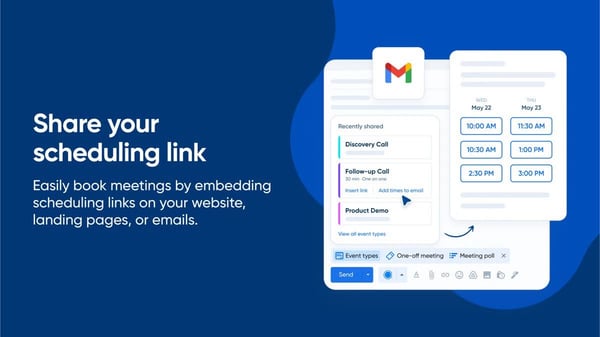
Teams frequently rely on multiple event types with distinct rules to handle screening calls, technical interviews, panels, and stakeholder conversations. This flexibility allows recruiting teams to scale scheduling logic across different interview stages without relying on human coordination.
What I noticed in G2 reviews is that Calendly Sales’ integrations with calendars and video conferencing tools are a practical strength in interview workflows. Automatic meeting creation with platforms like Zoom, Google Meet, and Microsoft Teams helps ensure interview details are shared instantly without manual setup. With a performance score of 95% on G2, this integration reduces coordination errors and keeps candidates and interviewers aligned once time slots are confirmed.
Features like booking are rated at 96%, reinforcing confidence in the platform’s ability to handle scheduling consistently under load. Review sentiment connects these scores to fewer scheduling errors, faster confirmations, and reduced candidate drop-off caused by coordination delays.
Automated reminders and notifications are also commonly cited as a benefit in G2 reviews. Teams note that confirmation emails and reminder alerts help reduce no-shows and last-minute confusion for both candidates and interviewers. This automation supports smoother interview execution without requiring recruiters to manually follow up on each scheduled meeting.
Recruiters can manage scheduling directly from their phones without needing desktop access. G2 reviewers highlight this as particularly useful during active hiring periods when availability changes quickly, and responses need to happen fast. The mobile experience keeps coordination moving even when recruiters are away from their desks.
Reporting supports common scheduling metrics such as bookings and attendance, though teams seeking highly customized reporting or deeper hiring analytics may find those needs sit outside the product’s core focus. G2 reviewers note that for day-to-day scheduling visibility and confirmation tracking, the reporting layer delivers clear, actionable outputs without added complexity.
International scheduling is supported at a functional level, but organizations managing complex multi-region hiring across time zones, languages, or region-specific constraints may need additional coordination compared to tools built specifically for global scheduling orchestration. G2 reviewers point out that the platform handles cross-timezone coordination reliably and without significant friction when scheduling needs are straightforward.
Calendly Sales suits recruiting teams that value fast execution, flexible availability logic, and dependable booking performance as hiring volume grows
“Calendly makes scheduling effortless with intuitive availability tracking, customizable working hours, and built-in buffers between meetings. The user experience is clean and straightforward, which helps both our team and candidates book time quickly without unnecessary back-and-forth.”
- Calendly Sales review, M’Kenzy W.
“Nothing major. It's a simple tool that does one thing. However, I prefer to use AI in my calendar. Calendly doesn’t provide much context around meetings themselves, which means it often needs to be paired with other tools for preparation or follow-up, and for rearranging everything.”
- Calendly Sales review, Samanta J.
ADP Workforce Now is for organizations that want interview scheduling embedded directly alongside payroll, benefits, and employee records. Interview coordination sits inside core HR processes rather than operating as a standalone recruiting tool.
Built-in automation handles notifications, templated email communication, and data syncing across recruiters, hiring managers, and HR teams, reducing manual coordination in active hiring cycles, as reflected in automation rated at 87%. These capabilities perform most reliably when aligned with consistent, repeatable processes, which reflects how most teams in this segment run ongoing hiring. G2 reviewers describe predictable execution and stable performance as primary reasons the platform holds up across regular recruiting workflows.
With ease of use rated at 84%, the platform is designed for daily use across HR functions. What I found consistently across G2 reviews is that administrators and employees describe the interface as straightforward to learn, with common tasks completed without technical workarounds. Data pulls are fast, and preset configurations are built directly into the system. This reliability reduces training overhead and keeps HR teams focused on execution rather than troubleshooting platform behavior.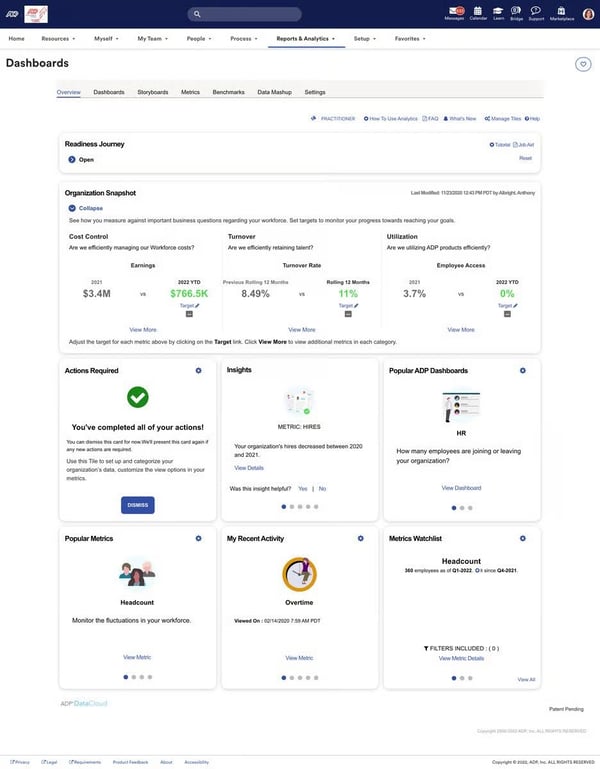
Payroll, benefits, time and attendance, talent management, and recruiting workflows sit within a single platform. With a performance rated at 83% on G2, teams describe this consolidation as removing the need to log into multiple systems to gather or update employee information. G2 reviewers highlight how this reduces administrative overhead and keeps HR data consistent across functions without manual reconciliation.
Employees can access pay stubs, request time off, manage benefits, and update their own information directly through the platform or mobile app. Managers gain visibility into their teams without routing every request through HR. G2 reviewers describe this self-service layer as one of the most practical time-savers, particularly for HR teams managing a growing headcount.
The platform supports structured onboarding workflows, including documentation uploads, electronic Form I-9s, and training records in one place. Teams describe this as replacing manual spreadsheet tracking and paper-based steps with a repeatable digital process. G2 reviewers note that employees find the onboarding setup straightforward to complete on their end, which reduces back-and-forth during new hire processing.
Built-in reporting tools give HR teams clear access to workforce data across payroll, benefits, and performance without needing advanced technical knowledge. G2 reviewers highlight salary benchmarking insights and data analytics as particularly useful for supporting leadership decisions and compensation reviews. Reports are described as fast to generate and reliable for routine HR analysis.
Candidate evaluation and screening tools are designed to support foundational use cases rather than advanced grading or AI-driven assessments, and customization is available within defined boundaries. G2 reviewers note that the platform delivers reliable, well-integrated coordination across hiring, HR, and payroll data without requiring advanced configuration.
Getting timely responses from support can be slower than expected, particularly for teams dealing with complex or urgent issues outside standard processes. G2 reviewers point out that the platform's knowledge base and community resources resolve most common questions independently, reducing reliance on live support for routine issues.
Workforce Now suits mid-market and enterprise teams that prioritize consistency and dependable execution across HR processes, particularly where interview scheduling needs to stay connected to payroll, benefits, and compliance workflows.
"I like the ease of use of ADP Workforce Now. It's very clear and precise using the bridge. It's also very easy to use and is good for questions and answers, helping others. The initial setup was fairly easy for the most part, and though there were some bumps, we got through those and are now humming right along with it. I find that it provides me with clear reports and easy-to-use reports. Also, the time and attendance feature for a certain group of employees is really easy to use and easy to set up.”
- Workforce Now review, Chris T.
"The only downside I experienced with ADP was that some support agents were outsourced, which at times made communication challenging. Occasionally, it felt difficult to fully convey the complexity of certain issues or to ensure they were clearly understood. That said, I did not encounter many downsides overall, as most issues were straightforward and easy to resolve.”
- Workforce Now review, Lisett F.
Grayscale is a good fit for hiring teams that prioritize candidate response speed over calendar mechanics. While analyzing G2's review data, I kept coming back to one consistent signal: the platform reduces lag between recruiter messages, candidate replies, and interview coordination. It is typically used as a communication-first layer that helps maintain scheduling momentum, particularly in hiring workflows where speed and engagement influence conversion and time-to-hire.
Real-time text communication emerges as the primary driver of daily usability. Teams highlight how direct SMS interactions shorten response cycles and make interview coordination more immediate compared to email-based outreach, reflected in a performance score of 93% on G2. This speed helps recruiters keep candidates engaged during active hiring windows without repeated follow-ups.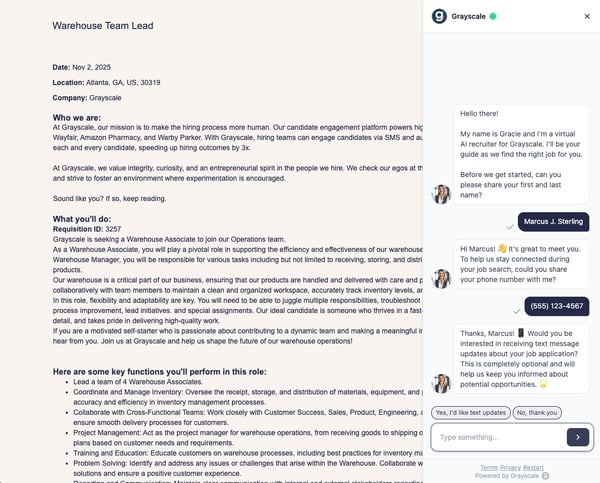
Shared visibility into candidate conversations and automated follow-ups help reduce reliance on individual recruiters' inboxes as hiring volume grows. Teams describe this structure as supporting smoother handoffs between recruiters and maintaining continuity when multiple stakeholders are involved in coordination.
Mobile texting and browser extensions keep recruiters responsive without depending on a desktop ATS environment, supported by a mobility score of 92% on G2. G2 reviews associate this flexibility with faster coordination for distributed or fast-moving teams, prioritizing access to candidate conversations across devices.
Grayscale’s seamless ATS integration further enhances workflow continuity. G2 reviewers frequently mention integrations with platforms like Greenhouse and Lever that allow recruiters to send texts and follow-ups directly from within their applicant tracking system. This capability eliminates needless context switching and ensures candidate communication remains visible and tracked alongside other hiring workflow data.
Pre-built templates allow recruiters to send consistent, professional messages without writing from scratch every time. Scheduled messages can be set up in advance, keeping candidate outreach running even during off-hours or busy periods. G2 reviewers mention templates as one of the most practical daily time-savers, particularly when coordinating interview confirmations and follow-ups across a high volume of candidates.
Recruiters communicate with candidates through a dedicated platform number rather than their personal phone. This keeps personal contact details separate while still allowing candidates to text back directly. G2 reviewers highlight this as particularly valued by recruiting teams where maintaining professional boundaries and privacy during active outreach is important.
Messaging is optimized for concise, real-time exchanges, which may require adjustment for teams accustomed to longer-form communication that covers more complex candidate contexts. However, G2 reviewers note that the concise format keeps candidate responses fast and coordination moving without delays between outreach and confirmation.
Bulk messaging, media handling, and large candidate imports are not central to the platform’s core workflow, making Grayscale better aligned with conversational recruiting models than campaign-style or content-heavy engagement. The platform keeps real-time candidate communication structured, responsive, and consistently tracked across the recruiting workflow.
Grayscale suits mid-market and enterprise recruiting teams that prioritize response speed and consistent candidate engagement over deep scheduling configuration.
“I really like the real-time communication with candidates via direct text messaging on Grayscale, as it's very efficient and improves engagement. Its easy-to-use interface is a plus for me. The mobile texting feature is a game-changer for recruiters on the go, and the Chrome extension integration with Greenhouse simplifies workflows. I appreciate how automation and shared visibility in Grayscale enhance teamwork and consistency.”
- Grayscale review, Abhishek C.
“Basically, the message character limit feels restrictive for detailed communication. No keyboard shortcut to send messages makes texting a bit slower, I would say. Importing a candidate list is time-consuming. Lack of group chat or bulk message features. Lack of ability to receive media, for example, photos and messages.”
- Grayscale review, Abhishek C.
Ashby centralizes interview scheduling, interviewer coordination, and feedback workflows within a single ATS-driven system. It is most often evaluated by teams that want to reduce scheduling overhead without introducing a separate tool alongside their applicant tracking process.
G2 users describe interview setup, availability management, and multi–time zone coordination as predictable and easy to maintain, which reduces back-and-forth during active hiring cycles. This reliability aligns with Ashby’s high performance rating of 97%, reinforcing confidence in its ability to handle scheduling consistently as interview volume increases.
Ashby releases new features at a pace reviewers consistently describe as faster than comparable ATS platforms. Product updates are communicated clearly and arrive with immediate practical value, meaning teams benefit from capability improvements without waiting for major version cycles. Reviewers cite this cadence as a key reason they recommend Ashby to other recruiting teams evaluating the category.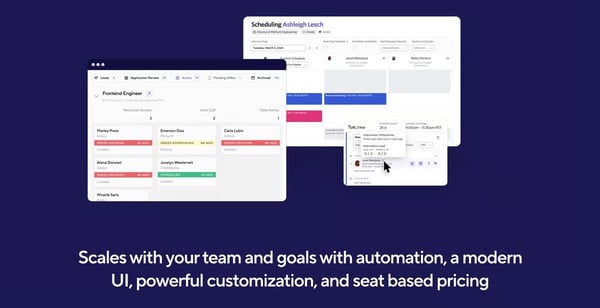
Structured post-interview workflows further support recruiter efficiency. G2 reviewers highlight built-in feedback forms, AI-assisted note capture, and interview recordings as helping teams consolidate evaluation inputs without manual follow-up. These tools reduce administrative overhead after interviews and keep feedback aligned within the same hiring workflow.
Features like email templates are rated 96% on G2, reflecting strong confidence in standardized candidate and interviewer messaging. Teams often associate this with fewer coordination gaps and clearer expectations as interviews move through different stages.
Automation across recruiting stages removes a significant portion of manual coordinator work. Teams describe being able to customize workflows, triggers, and feedback steps to match their exact hiring process without relying on workarounds. What struck me while going through the review data is that the combination of automation and customization is one of the primary reasons they choose Ashby over more rigid ATS platforms, particularly when hiring volume increases.
The pipeline view gives recruiters a clear, structured look at where every candidate sits across active roles. G2 users describe it as clean and easy to read, reducing the risk of candidates falling through the cracks during busy hiring periods. Visual reminders and stage progression tracking help teams prioritize follow-ups without manually reviewing every open role.
The support team earns strong marks for speed and depth, with reviewers describing fast response times and being willing to find solutions when answers are not immediately available, highlighted in the quality of support rated at 96%. G2 reviewers also highlight the knowledge base and onboarding resources as detailed enough for solo recruiters to self-configure and launch the platform independently. That combination reduces reliance on external implementation support during setup.
G2 reviews indicate that reporting is designed around predefined, structured views that support standardized recruiting metrics. Teams that rely on highly exploratory analysis or frequently customize reporting logic may find the experience more oriented toward consistency and repeatability than open-ended analysis, though G2 reviewers note that the reporting layer delivers clear, reliable outputs across hiring metrics, pipeline performance, and stage conversion without requiring significant manual configuration.
The interface is optimized primarily for recruiters, which means hiring managers who interact with the platform less frequently may find navigation less intuitive than the recruiter-facing experience. G2 reviewers point out that hiring manager participation in feedback and scheduling runs smoothly and requires minimal ongoing support from the recruiting team.
Ashby fits best for small and mid-market recruiting teams that want interview scheduling to stay tightly integrated with their ATS and hiring workflows. Its strengths in dependable scheduling performance, structured feedback, and automation-driven coordination make it especially relevant for organizations focused on sustained, process-led hiring rather than ad hoc interview management.
“Generally, it is easy to use and meets the criteria for a solid ATS platform. Interview scheduling is relatively easy, and the UI is better than most ATS platforms."
- Ashby review, Michael R.
"There are a number of features that are not intuitive. Reporting is challenging even for the basics, and candidate duplicate management is poor.”
- Ashby review, Michael R.
Workstream is a platform designed to manage candidate communication, interview coordination, and onboarding in high-volume hiring environments. Teams with ongoing frontline or hourly hiring needs use it to keep applicants moving through interviews without managing conversations across emails or phone calls. The platform goes beyond calendar coordination by linking scheduling directly to downstream hiring steps, reinforcing momentum throughout the hiring process.
Workstream supports continuous, high-volume interview coordination. Interview scheduling is closely tied to candidate communication and onboarding workflows, reducing manual handoffs as applicants move between stages. This structure helps teams manage large applicant pools while maintaining consistent progress across interviews and hiring steps.
G2 review data highlights how features like built-in messaging and email templates, rated 97%, allow teams to maintain consistent outreach across roles and locations while reducing recruiter effort. Review feedback often associates this with clearer candidate expectations and fewer missed messages in fast-moving hiring environments.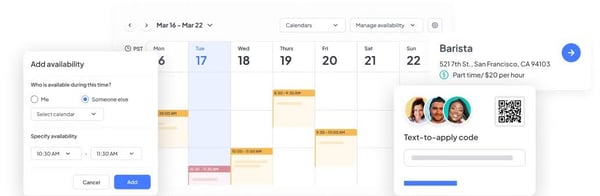
By replacing paper-based steps with structured digital processes, Workstream helps HR teams manage multiple sites and roles in parallel. This capability reduces administrative overhead and ensures candidates can transition smoothly from interview to onboarding without delays.
Automated outreach ensures new applicants are contacted quickly, which helps teams engage candidates early in the hiring cycle. This emphasis on momentum is reflected in its highest-rated capabilities, including rescheduling (97%), which support rapid adjustments when candidate availability changes. These features align well with hiring teams that prioritize throughput and reduced coordination overhead.
G2 reviewers also praise the platform’s candidate engagement visibility. Workstream surfaces confirmations, opens, and engagement indicators that help hiring teams see whether candidates have acknowledged messages or taken scheduled actions. This real-time visibility supports faster follow-up and reduces uncertainty in busy hiring environments where missed candidate responses can slow cycles.
Offer letters, compliance forms, and onboarding documents can be completed digitally through e-signature, removing the need for paper files or in-person document handling. Users managing multiple locations describe this as one of the most practical time-savers in the platform. G2 reviewers highlight how quickly new hires can complete paperwork on their end, which shortens the gap between a confirmed hire and their first day.
Support teams are consistently described as fast, helpful, and easy to reach, as reflected in the quality of support G2 rating at 95%. I noticed in G2 reviews that issues are typically resolved within minutes through chat support, which reduces downtime during active hiring periods. For HR teams managing multiple locations without dedicated technical resources, that responsiveness is frequently cited as a deciding factor in staying on the platform.
Job postings reach multiple hiring platforms simultaneously, expanding the applicant pool without requiring recruiters to manage each board manually. Reviewers describe attracting significantly higher applicant volumes after switching to Workstream, with sourcing running in parallel to scheduling and onboarding workflows. This breadth of reach is particularly useful for frontline and hourly roles where candidate supply directly affects hiring pace.
G2 reviews indicate that role-based views, such as admin versus team access, may require a short orientation period for organizations with layered responsibilities or distributed hiring ownership. G2 reviewers note that once team members are clear on their respective access, day-to-day navigation becomes straightforward and the role separation supports cleaner coordination across locations.
The platform occasionally experiences technical glitches that can interrupt active hiring workflows, including issues with candidate profiles, scheduling sync, and the employee app. G2 users note that the support team responds quickly when issues are reported, and most problems are resolved within a short timeframe without lasting disruption to hiring progress.
Workstream suits organizations that treat interview scheduling as an operational process tied to hiring speed and onboarding continuity, particularly in retail, hospitality, and frontline environments.
“I like how Workstream automates the entire hourly hiring workflow around SMS texting. It enables us to handle everything from job postings to applicant screening, interview scheduling, reminders, and follow-ups, all in one unified dashboard. This means we don't have to jump between emails, spreadsheets, job boards, and calendars, which cuts out almost all of the repetitive busywork and lets us respond to candidates quickly.”
- Workstream review, Furcron H.
“First, the customization options for shift scheduling templates are somewhat limited. We run rotating shifts across warehouse and logistics operations with varying weekend and holiday coverage, and the system doesn’t allow for fully flexible, repeatable templates that match our complex rosters. This means we still spend extra time manually adjusting schedules each week. Second, the reporting and analytics dashboard offers useful insights but lacks industry-specific metrics for logistics, such as turnover rates for shift workers, time-to-fill for warehouse roles, and labor cost per shift. Exporting data can also be slow when pulling large sets of employee or hiring information.”
- Workstream review, Huang C.
Sense is focused on candidate communication at scale. It supports interview coordination by enabling rapid outreach across large candidate pools without complex calendar orchestration. Its role is to maintain timely responses and continuity across early and mid-stage hiring workflows.
Bulk texting, campaign-based outreach, and simultaneous messaging are Sense's most consistently cited strengths. These workflows reduce coordination friction by allowing recruiters to reach large candidate pools quickly without relying on repetitive one-to-one follow-ups, with performance rated at 94% on G2, supporting faster response cycles during active hiring.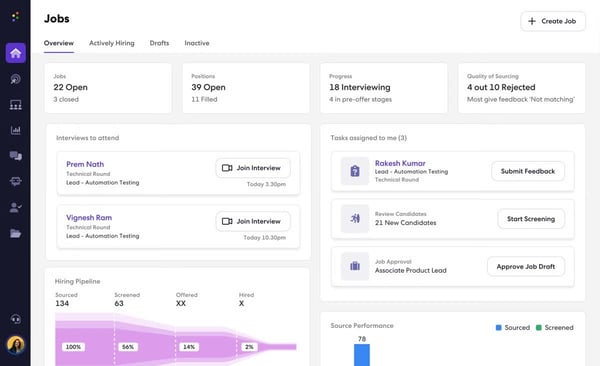
Connecting Sense to existing ATS platforms keeps candidate data flowing without manual copy-pasting between systems. Recruiters describe how the integration with platforms like JobDiva and other ATS tools means outreach history, contact details, and engagement status stay aligned across systems. G2 reviewers highlight this as reducing the administrative overhead that typically comes with managing candidate communication outside a primary recruiting system.
The Chrome extension allows recruiters to send messages and collect candidate contact details directly from their current browser tab without switching to a separate application. From what I noticed in G2 reviews, this is one of the features teams mention most when describing how Sense fits into daily sourcing and outreach sessions without adding tool-switching friction.
Multiple recruiters can manage candidate conversations from a shared inbox, which prevents messages from being siloed in individual accounts. Teams mentions this as particularly useful when coverage is needed across shifts or when a recruiter is unavailable, and a colleague needs to pick up a conversation, backed by a user, role, and access management score of 94% on G2. G2 reviewers highlight how this visibility keeps candidate communication consistent and reduces the risk of gaps in follow-up during busy hiring periods.
Automated responses can be configured to keep candidates engaged even when recruiters are unavailable. Teams use this to maintain communication continuity during off-hours, weekends, or high-volume periods without requiring manual follow-up for every incoming message. This reduces candidate drop-off caused by delayed responses and keeps the hiring pipeline moving outside standard working hours.
Getting started with Sense does not require extensive onboarding or technical configuration. G2 reviewers consistently describe the platform as intuitive from day one, with most team members able to use core messaging and campaign features without formal training sessions. That low setup friction makes it practical for recruiting teams that need to get outreach running quickly without investing time in implementation.
Message personalization in bulk outreach follows a structured model, which limits how individually tailored each message can feel at scale. G2 reviewers note that the platform handles campaigns reliably and without significant manual effort, delivering consistent outreach across large candidate pools.
The platform can experience slower load times during large campaigns or periods of high usage, particularly on the mobile app and when handling bulk messaging actions. However, G2 reviewers point out that core messaging functionality stays dependable and responsive across daily recruiting workflows.
Sense suits small and mid-market recruiting teams that rely on high-volume candidate messaging to keep interview coordination moving.
“Sense has a lot of great features. We’ve used their chatbot, SMS, marketing campaigns for workers, and scheduling functionality. I’d say their SMS functionality has strong organizational aspects, which makes it very recruiter-friendly and helps us stay on top of communication with workers. The marketing campaigns also helped us build consistent communication with our applicants.”
- Sense review, Cally W.
"It updates automated notes to the ATS a little delayed and is usually displayed automatically after 25-30 minutes."
- Sense review, Yasir K.
Pinpoint keeps interview logistics, candidate movement, and stakeholder involvement aligned as hiring complexity grows.
G2 user feedback suggests Pinpoint emphasizes predictable, low-friction interview workflows. Clear stage progression, dependable notifications, and straightforward interview re-booking help reduce follow-up overhead and missed handoffs.
Equitable hiring support stands out clearly in review sentiment. Anonymization tools, structured scorecards, and candidate queues help teams evaluate applicants more consistently across screening and interviews. Templates support repeatable evaluation processes across roles and departments, while still allowing teams to adapt workflows to internal hiring standards. These strengths align with Pinpoint’s highest-rated G2 features, including user, role, and access management, each rated at 92%.
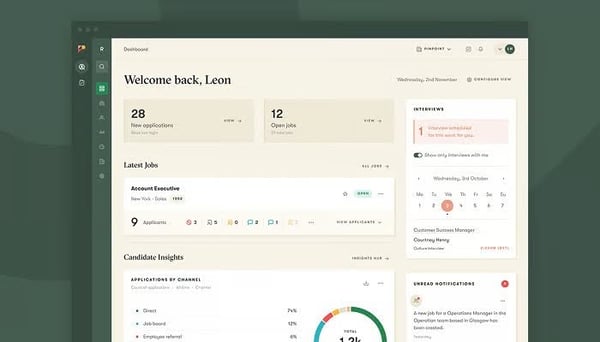
Pinpoint is often seen as a stable choice during periods of organizational change. Its structure adapts to different team needs, evolving hiring priorities, and shifting approval flows without constant rework. This makes it a reliable scheduling setup for teams scaling their hiring without disrupting ongoing interview coordination.
Automations can be built across candidate communication, stage progression, and internal workflows without requiring technical expertise. Recruiting coordinators describe offloading routine task work simply by configuring triggers and templates within the platform, without needing technical support to set them up. What I picked up while studying G2's review data is how quickly these automations deliver visible time savings, with some teams reporting a return on investment within the first few months of use.
Support response times are consistently described as among the fastest that G2 reviewers have experienced across ATS platforms, reflected in a quality of support rating of 97% on G2. Live chat responses typically arrive within minutes, and the support team is described as knowledgeable, genuinely invested, and willing to follow through on complex queries. I observed in review patterns that G2 reviewers frequently cite support quality as a key reason they stay on the platform rather than switching to alternatives.
The platform includes a connected careers site that can be updated directly from within the back end without relying on an external web team. Teams describe the candidate application experience as clean and easy to navigate, which supports a stronger first impression during active hiring. G2 reviewers note that since moving to Pinpoint, candidate engagement with job postings and the talent pipeline has increased noticeably.
Reporting tools surface recruitment performance data across pipeline stages, giving teams visibility into where applications slow down and where hiring decisions are being made efficiently. Users describe using Pinpoint's analytics to track metrics and improve hiring processes over time. G2 users highlight dashboards as accessible without technical configuration, making data available to both recruiters and leadership without manual extraction.
The platform takes a measured approach to AI-driven functionality, prioritizing stable, human-led workflows over automated generation or summarization features. However, G2 reviewers note that the platform delivers consistent, structured hiring workflows with clear human oversight built into every stage.
Reporting outputs cover core recruiting metrics but require manual manipulation after being pulled before they can be used for deeper analysis. G2 reviewers point out that the available data is detailed and genuinely useful, and the support team is responsive when help is needed navigating reporting options.
Pinpoint suits mid-market teams managing growing hiring complexity that need collaborative, bias-aware workflows with strong access controls and shared scheduling visibility.
“I like that Pinpoint provides ease of access to candidates and significantly reduces unnecessary paperwork. The notifications are super helpful as they keep me updated in real time regarding correspondence that needs attention. Additionally, I find it great that I can re-book interviews and involve colleagues in roles to assist with the interview process. The initial setup was easy, and overall, it's very helpful for organizing recruiting processes.”
- Pinpoint review, Keisha S.
“The insights and reporting would work better if they were more customizable and easier to tailor to my needs.”
- Pinpoint review, Daniel G.
|
Software |
G2 Rating |
Free plan |
Best for |
|
Calendly Sales |
4.7/5 |
Yes |
Fast external interview scheduling across candidates, hiring managers, and external stakeholders at scale |
|
Workforce Now |
4.2/5 |
No |
Interview scheduling is embedded within core HR, payroll, and workforce management systems |
|
Grayscale |
4.5/5 |
No |
Interview scheduling aligned with people operations, workforce planning, and internal mobility |
|
Ashby |
4.7/5 |
No |
ATS-centric scheduling with structured hiring workflows and end-to-end recruiter visibility |
|
Workstream |
4.7/5 |
Free trial available |
High-volume hourly and frontline hiring with speed-focused scheduling coordination |
|
Sense |
4.5/5 |
No |
Candidate communication-led scheduling with reminders and conversational engagement |
|
Pinpoint |
4.6/5 |
No |
Collaborative hiring workflows with shared scheduling ownership and visibility |
*These interview scheduling tools are top-rated in their category, based on G2’s Winter 2026 Grid® Report. Most offer custom pricing tiers, with demos or trials available on request.
Got more questions? G2 has the answers!
Calendly Sales stands out for flexible availability rules, buffers, and time-zone handling, making it well-suited for fast external scheduling across regions. Ashby also performs reliably in multi-timezone coordination, particularly for teams managing structured interview workflows across distributed hiring teams.
Look at how reminders are triggered, customized, and recovered after reschedules. Workstream consistently receives strong feedback for automated reminders that reduce no-shows and manual follow-ups, especially in high-volume frontline hiring workflows. Sense also performs well here, with automated responses and scheduled outreach keeping candidates engaged without manual intervention between stages.
Ashby and Workforce Now offer deep ATS and HRIS integrations that keep scheduling aligned with hiring stages, interviewer assignments, and candidate records. These tools are best suited for teams that want scheduling embedded directly into their recruiting or HR operating model.
Ashby supports structured panel interviews with strong ATS alignment, interviewer coordination, and consistent stage visibility across the hiring funnel. Calendly Sales also supports round-robin interviewer assignment and distribution controls, allowing teams to manage how interviews are allocated across recruiters based on availability or priority.
Focus on how easily candidates can book, reschedule, and confirm interviews without recruiter involvement. Calendly Sales is most commonly chosen for clean, self-serve booking experiences where candidates select from real-time availability without back-and-forth. Ashby also supports candidate self-scheduling within a more structured ATS-driven workflow, keeping the booking experience connected to hiring stages and feedback loops.
High-volume hiring benefits from fast outreach, automated rescheduling, and clear communication. Workstream, Sense, and Grayscale perform well in environments where candidate responsiveness and throughput matter more than deep scheduling configuration or analytics.
Most interview scheduling platforms focus on operational visibility rather than advanced analytics. Workforce Now and Ashby both provide structured reporting aligned with recruiting metrics, giving teams clear outputs across hiring stages, pipeline performance, and workforce data without requiring significant manual configuration.
Pinpoint and Ashby support reusable interview templates, structured workflows, and standardized evaluation steps. These tools work well for organizations that prioritize consistency, governance, and repeatability across roles and departments.
Grayscale and Sense are frequently highlighted for mobile-friendly workflows, especially SMS-based coordination. These platforms help recruiters stay responsive without relying on desktop ATS access, making them suitable for fast-moving or distributed hiring teams.
Evaluate how tools surface conflicts, manage shared availability, and recover from changes. Ashby and Calendly Sales consistently perform well in reducing scheduling collisions, handling interviewer constraints, and maintaining momentum when availability shifts.
Hiring timelines are getting shorter, candidate expectations are rising, and recruiting teams are being asked to do more with leaner coordination capacity. Scheduling is where those pressures land first. AI-assisted availability matching, automated interviewer load balancing, and deeper ATS integrations are already moving from premium features to baseline expectations in this category. Teams that build their scheduling infrastructure now, before volume or complexity increases, tend to adapt faster when those shifts hit.
The practical next step is narrower than it might seem. Identify where your current process loses time most often: Is it panel coordination? Candidate confirmation speed? Rescheduling recovery? That bottleneck should drive the evaluation, not feature breadth. A tool that solves the right problem for your team's actual workflow will outperform a more capable platform that adds friction in the wrong places.
Start with the G2 reviews most relevant to your company size and hiring volume. The signals from teams in similar operating conditions will tell you more than any vendor comparison.
Want to reduce hiring coordination friction? Explore the best recruiting automation software on G2 with built-in interview scheduling.


I’ve seen firsthand how messy hiring can get when teams start growing quickly. Candidate...
/DarshayitaThakur-OrangeBG.webp) by Darshayita Thakur
by Darshayita Thakur

Recently updatedSummer 2026 Grid® Report · Published May 26, 2026 This guide was last...
 by Harshita Tewari

The scheduling software market is crowded, and most tools claim to do the same things.
 by Sagar Joshi