

When I started researching the best workforce management software, I realized the challenge goes far beyond building shift schedules or tracking employee hours. Workforce management today is about balancing staffing, time tracking, PTO management, labor forecasting, compliance, and employee productivity without creating operational bottlenecks for HR and business teams.
I kept seeing the same problems surface across reviews: missed shifts, scheduling conflicts, payroll errors, and managers spending more time fixing workforce issues than optimizing operations. That’s what pushed me to look beyond marketing claims and dig into how real users evaluate workforce management tools in day-to-day operations, ultimately to answer the question: what's the best staff scheduling tool for managing fast-moving teams without adding operational friction?
To understand what actually works, I analyzed G2 reviews for 8 top platforms: Rippling, BambooHR, UKG Ready, Connecteam, HROne, ADP Workforce Now, Paylocity, and UKG Pro.. I focused on what HR leaders, operations managers, and growing businesses consistently praised, from AI-powered scheduling and workforce analytics to time tracking, payroll integration, and workforce automation, along with the limitations they called out most often.
The best workforce management software for businesses improve employee scheduling, streamline workforce operations, reduce administrative overhead, and make smarter staffing decisions with less manual effort.
*These workforce management solutions are top-rated in their category, according to G2's Spring 2026 Grid Report. I’ve also added their standout features and monthly pricing to make comparisons easier for you.
If you think workforce management is just about scheduling shifts, you haven’t seen what happens when the system behind it breaks down.
Missed shifts, payroll errors, overtime overruns, compliance gaps, and PTO confusion can quickly disrupt operations, especially for businesses managing hybrid teams, multiple locations, or changing staffing demands. Workforce management today is less about staffing alone and more about maintaining operational efficiency and workforce productivity.
That shift is driving rapid adoption of workforce management software, with the market projected to grow from $9.76 billion in 2026 to $12.04 billion by 2031. Modern workforce management platforms now combine team member scheduling, time tracking, payroll integration, workforce analytics, labor forecasting, compliance management, and AI-powered workforce planning into a single system.
When evaluating the best workforce management software, I looked beyond basic scheduling features and focused on what actually helps HR and operations teams manage workforce complexity with less manual effort. That included workforce automation, AI-driven scheduling, attendance tracking, real-time workforce visibility, labor cost control, and ease of use across fast-moving teams.
The tools on this list consistently balanced flexibility, usability, and workforce optimization without introducing operational friction. Whether you need workforce management software for a small business or an enterprise workforce management platform, the best tools help teams improve scheduling, streamline workforce operations, and make smarter staffing decisions at scale.
I started with G2’s latest Workforce Management Software Grid Report, which ranks tools based on real user feedback around satisfaction, ease of use, and support. That gave me a solid shortlist of high-performing platforms used by HR teams across industries.
From there, I used AI-powered analysis to mine hundreds of G2 reviews for patterns. I paid close attention to what users said helped them save time, reduce errors, or regain control of scheduling and compliance. I also looked for friction points, places where tools either fell short or made everyday tasks harder than they needed to be.
To validate what I was seeing, I cross-checked trends across industries and company sizes and looped in insights from professionals who’ve implemented or managed workforce tools directly. This helped me understand what each platform does and what it feels like to manage a team through it, day in and day out.
The screenshots throughout this article include a mix of verified visuals from vendor listings on G2 and publicly available material.
I considered the following factors when exploring the best workforce management software.
The list below contains genuine user reviews from the WFM software category page. To be included in this category, a solution must:
*This data was pulled from G2 in 2026. Some reviews may have been edited for clarity.
Rippling, while often known for automating payroll and benefits, also delivers a surprisingly flexible experience for managing time tracking, scheduling, and workforce data. On G2, it holds a 100% satisfaction score, highlighting how well it resonates with users across industries.
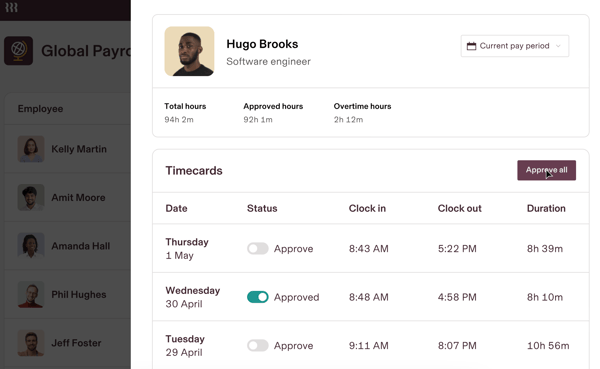
One of the most consistent themes I found in user feedback was how much people appreciated Rippling’s payroll and time-tracking features. G2 users frequently mentioned how easy it was to approve timesheets, monitor PTO, and access pay-related information without having to toggle between tools. The system also offers granular visibility into hours worked, with built-in controls for accuracy and compliance. What’s more, Rippling helps reduce redundancy by automatically syncing hours and attendance data into payroll, saving time and reducing the risk of errors.
Many HR teams also mentioned that once everything’s set up, running payroll through Rippling becomes more of a background task than a manual operation. To further reduce back-and-forth, companies often integrate Rippling with help desk software, so employees can raise payroll or benefits tickets without switching systems.
Another area where Rippling earns high marks is integrations. It frequently comes up as one of the best all-in-one workforce platforms for companies that want to handle payroll, time tracking, and HR operations in a single system. According to G2 Data, Rippling scores 90% for integration APIs and 91% for customization, reflecting how well it adapts to diverse tech stacks.
According to G2 reviews, it connects easily with a wide range of third-party apps, from communication platforms like Slack to HRIS and accounting tools, without much friction. The API flexibility and modular architecture also came up often, allowing companies to tailor how they manage workforce operations without sacrificing cohesion.
Self-service capabilities stood out as another recurring positive. Rippling scores 94% for self-service capabilities on G2, reflecting how effectively employees can handle routine tasks, checking schedules, submitting PTO, and updating personal details without needing to loop in an admin. That autonomy frees up HR teams to focus on higher-value work instead of fielding repetitive requests.
Workforce analytics also earned solid marks. With a 92% score for workforce analytics on G2, Rippling gives HR leaders the dashboards and reporting tools they need to track labor trends, spot coverage gaps, and make staffing decisions backed by real data rather than guesswork.
Rippling's modular design is one of its biggest strengths; teams can activate exactly the capabilities they need rather than paying for a fixed bundle. That said, G2 reviewers noted that as more modules are added, costs can accumulate faster than initial estimates suggest, with several users pointing out that the final scope of a full deployment often runs higher than the sales quote could indicate. For organizations that fully leverage the automation and integrations though, reviewers consistently said the platform earns its price.
Also, several G2 reviewers mentioned that Rippling's volume of action-required emails and in-app alerts can feel relentless, particularly for users who check in less frequently and return to a backlog of reminders. Notification settings can be adjusted, and most teams find a configuration that works, but it's worth building that into the rollout plan rather than discovering it post-launch.
Even with these small hurdles, Rippling stands out as a dependable workforce platform that combines payroll, HR, and automation into a single, cohesive experience.
“The best part of Rippling is that everything is in one place. On top of that, their products are pretty good. Payroll is world-class. Each other's product is 80% as good as the leading product, and together, that builds a pretty compelling set of tools.”
- Rippling review, Brice D.
“Training on new features and new capabilities. There are a lot of available modules in Rippling, and sometimes it is difficult knowing how to navigate through the different views to get to the features that you want.”
- Rippling review, Clark P.
Related: Need to manage field teams and dispatch work smarter? Check out the best field service management software for keeping operations on track.
BambooHR offers a clean, user-friendly platform for key HR functions, such as time-off tracking, employee data management, onboarding, and document storage. G2 users have rated its ease of use at 94%, which explains its prominent position at the top of the category leader list.
One of BambooHR's biggest strengths, as highlighted in user feedback, was its employee self-service capabilities. Employees can easily access and update their personal information, request PTO, view company documents, and track their own records without having to ping HR for every little thing. The visibility into personal data also builds a greater sense of transparency across teams.
Another highlight was the ease of onboarding. BambooHR makes it simple to welcome new employees with customizable templates, clear checklists, and automated workflows that keep everything moving. G2 users praised how BambooHR made the first days feel organized without overwhelming new hires, from paperwork completion to benefits enrollment. It’s beneficial for growing companies that want to standardize their onboarding without making it feel robotic.
User-friendliness rounded out the strengths that kept showing up. That’s a big reason BambooHR often comes up as a user-friendly workforce app for companies that want intuitive self-service options for employees and admins alike.
BambooHR’s clean design and intuitive navigation were major positives across different company sizes and industries. Tasks like approving time-off requests, pulling reports, or updating job titles didn’t require deep system knowledge or hours of training.
Time and attendance tracking also performs well, earning an 85% score on G2. While it may not match the depth of enterprise-grade platforms, BambooHR covers the essentials, clock-in/out, timesheet approvals, and PTO balance visibility, in a package that's easy for employees to adopt. Its 87% average user adoption rate on G2 reflects how quickly teams get comfortable with the system.
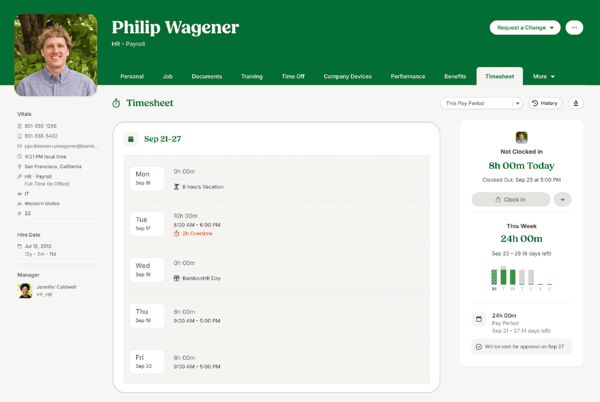
Leave management is another area where BambooHR delivers consistently. The platform scores 91% for absence and leave management on G2, making it easy for employees to submit requests and for managers to maintain coverage without manual tracking.
On the flip side, I did notice consistent feedback around customer support responsiveness. While BambooHR's support team is generally helpful, users mentioned that response times could lag during peak periods or when dealing with more complex requests. It's not a major flaw, but for time-sensitive issues like system access problems, a faster turnaround would make a difference.
Customization also came up in some reviews. Users note that although BambooHR allows some tailoring, especially for onboarding and documents, G2 reviewers said they sometimes felt slightly standardized when modifying workflows or reports. Teams with more layered approval chains or reporting needs may want to evaluate this area closely.
Overall, BambooHR is a well-regarded workforce management solution, particularly for companies seeking intuitive tools that employees can easily adopt.
“I like that BambooHR streamlines data collection points and keeps things current and up to date, which helps us stay connected as an organization. It does what it needs to do and functions as it's supposed to. I find the allocation of time used for vacation requests, business travel requests, and the calculation of vacations earned to be probably the most functional feature.”
- BambooHR review, Ryan B.
“Some of the fillable sections limited the amount of text, so I wasn't able to print my entire name or job title. The password kept expiring before I would even get around to using it.”
- BambooHR review, Pressly M.
Related: Want a deeper dive into how time and attendance tracking can transform workforce operations? Here's everything you need to know.
UKG Ready integrates time tracking, payroll access, scheduling, and basic HR functions into a standard system. Its goal is to make day-to-day workforce management more efficient.
Time clock functionality was one of the most praised aspects across user reviews. Employees could clock in and out and check their hours quickly without needing extra steps or approvals. Managers liked the visibility into attendance and timecard status, which helped reduce errors and last-minute payroll adjustments. G2 users also noted that the clocking process was consistent whether they accessed it from a desktop or designated kiosks. UKG Ready earns a 93% score for time and attendance tracking on G2, reinforcing its reliability in this core area.
Access to employee information also stood out as a positive theme. HR teams and employees alike appreciated being able to view pay stubs, update personal information, and manage tax documents from a single login. Several users mentioned that having one place to handle everything from direct deposit changes to benefits enrollment saved time and reduced the need for back-and-forth emails with HR.
Labor forecasting and cost control also earned strong marks. UKG Ready scores 84% for labor forecasting and 84% for succession planning on G2, making it a solid option for HR teams trying to plan ahead. UKG Ready stood out as one of the leading workforce management services for midsize companies, especially for HR teams trying to balance headcount planning and compliance. With 56% of its G2 reviewers from mid-market companies and 34% from enterprise organizations, it clearly serves teams that need depth beyond basic scheduling.
Managing paid time off was another area where UKG Ready earned high marks. The system allows employees to submit time-off requests easily and view their PTO balances. From an HR ops perspective, users liked how PTO accruals, requests, and approvals all synced automatically with scheduling and payroll. Several G2 reviewers noted that a clear, transparent PTO system helped reduce miscommunication and last-minute surprises when managing coverage.
Shift scheduling capabilities round out UKG Ready's workforce management strengths. With an 85% score for shift scheduling on G2, the platform helps managers build and adjust schedules without excessive manual work, particularly useful for multi-location teams that need consistent coverage across sites.
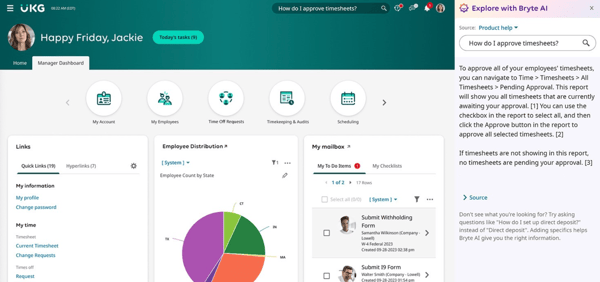
UKG Ready covers a wide range of workforce functions reliably, and its core time and attendance capabilities are among the strongest in this list. Navigation across some of its modules, however, can feel less consistent than users expect from a modern HRIS. G2 reviewers described certain menus as requiring more clicks than necessary, and the interface, in places, looks more dated compared to newer platforms. Most users found their footing once they spent time in the system, and the depth of functionality available makes the adjustment period worthwhile.
Building custom reports is where G2 reviewers ran into friction; filtering options were described as limited compared to tools like Excel, and accessing specific report types often requires knowing the right codes or paths upfront. Teams with straightforward reporting needs will be well covered; those needing highly tailored outputs may want to factor in some extra configuration time.
UKG Ready is a strong choice for companies that want a single system to cover time tracking, payroll, and workforce planning, with the scalability to support growing teams.
“Its user-friendly interface and how it brings everything, time tracking, scheduling, payroll, all into one place. It also makes it easy to manage work hours and adjust timings according to the needs.”
- UKG Ready review, Deepthi N.
“Sometimes the system can be slow or lagging, and mess up employees' clock-in time with the system being slow.”
- UKG Ready review, Tiffany S.
Related: If you’re looking for more tools with time tracking capabilities, explore our list of the best time and attendance software.
When it comes to managing a deskless or shift-based workforce, Connecteam is a name that often comes up. It offers a centralized way to handle time tracking, scheduling, communication, and workforce management, all in one streamlined app. On G2, Connecteam scores a 92% likelihood to recommend rating with an estimated ROI payback period of just 5 months, which is the shortest among this tool list.
Time tracking stood out as a significant strength across user reviews. Employees can easily clock in and out via the app, often with GPS tagging to confirm locations when necessary. Users appreciated that timesheets were automatically generated, reducing manual time collection and corrections. Some G2 reviewers also called out the convenience of setting restrictions, such as clocking in only when within a certain geofence, which helps reduce time fraud. The platform earns a 92% score for time and attendance tracking on G2, confirming the consistency of this experience.
The mobile app itself earned a lot of positive feedback. Connecteam regularly gets mentioned among the top-rated workforce management apps because of how well it handles scheduling, clock-ins, and communication in one place. With 84% of its G2 reviewers from small businesses (50 or fewer employees), it's clear the platform resonates particularly well with smaller, mobile-first teams.
Users liked having a single place to clock in, view schedules, receive company updates, and request time off. The app's clean layout made it easier for employees to handle HR tasks independently without needing frequent reminders or IT support. Teams especially appreciated the mobile experience's responsiveness for everyday essentials, like submitting timesheets or approving changes on the fly.
Another feature that got a lot of love was Connecteam's built-in chat functionality. Instead of switching between external messaging apps and work tools, teams could communicate directly inside the platform. This centralized communication helped managers distribute schedules, send updates, or gather quick responses without losing context. The internal chat tool was highlighted as a real operational advantage, especially in industries like construction, retail, and logistics, where immediate updates can make a difference.
Shift scheduling also earned strong marks. Connecteam scores 92% for shift scheduling on G2, reflecting how well the drag-and-drop scheduling and recurring template features work for teams managing rotating or variable shifts.
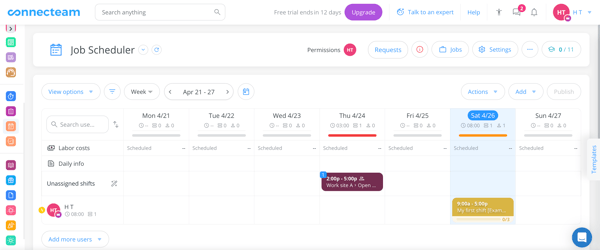
Employee self-service also contributes to the platform's appeal. Connecteam scores 90% for self-service capabilities, allowing frontline workers to check schedules, swap shifts, and submit time-off requests without going through a manager for every small change.
That said, some G2 users reported performance issues. The app could sometimes load more slowly, particularly when performing more intensive tasks. It isn't a constant problem, but it can occasionally slow teams trying to move quickly between tasks.
Connecteam's mobile-first design is central to its appeal, and the core daily actions, clocking in, messaging, and checking schedules, work well on the app. Some scheduling tasks, however, aren't available in the mobile app and require switching to a browser; G2 reviewers specifically pointed out that duplicating a shift, for example, can only be done on the desktop version. Most teams build this into their scheduling workflow naturally, treating the browser as the setup environment and the app as the daily driver.
All in all, Connecteam is a top choice for organizations that need reliable scheduling and communication in one mobile-first platform.
“I find Connecteam incredibly useful for chatting and updating clients and making quick announcements whenever needed. The mobile-friendly aspect of the software is amazing for our staff working in the field. The feature of clock in and clock out, along with GPS tracking, is unique and valuable for ensuring our employees' attendance is real and for tracking the field team's specific work locations. The initial setup was quite smooth and simple, which I really appreciated.”
- Connecteam review, Prem L.
“The mobile app is pretty glitchy and doesn't have all the same features as the web browser. For instance, I can't duplicate a shift on the mobile app, so setting up a shift is best done on the web browser, which isn't necessarily convenient. There was a lot of learning curve and confusion around the icons and symbols used. It's very difficult to see whether a shift was actually claimed and published. The initial setup was extremely challenging."
- Connecteam review, Fancy F.
Related: Looking to boost visibility into employee productivity? Explore the best employee monitoring tools that help teams stay focused and accountable.
HROne provides HR and operations teams with a more organized way to manage employees without getting bogged down in manual processes. Its platform aims to modernize workforce management while staying approachable for growing organizations. On G2, HROne earns a 96% likelihood to recommend score and a 96% ease of use rating, reflecting the strong value users find in its employee lifecycle features.
Attendance management was one of the strongest positive themes across user reviews. Teams appreciated how easy it was to move away from spreadsheets or manual punch clocks and into a centralized system for tracking attendance and work hours. Users mentioned that employees could clock in and out reliably, view their attendance history, and track time-off balances. Several reviewers also noted that the attendance workflows help ensure better compliance with labor policies and reduce errors when processing hours. HROne scores an impressive 96% for time and attendance tracking on G2, the highest among all tools in this list.
Employee management also earned consistent praise. Beyond tracking hours, G2 users highlighted how HROne consolidates employee profiles, making it easier to manage everything from shift schedules to time-off approvals in one place. With a 94% score for skills management on G2, the platform also supports tracking employee competencies alongside day-to-day workforce operations.
Another strength frequently mentioned was ease of use. HROne's interface is clean and straightforward, with navigation that most users found intuitive after a short adjustment period. Tasks like approving leave requests, checking attendance records, or updating employee information didn't require much technical training. At 96% for ease of setup on G2, the platform is one of the fastest to deploy in the category.
Workforce analytics round out HROne's strengths. The platform scores 95% for workforce analytics on G2, giving HR teams the reporting depth they need to track attendance trends, monitor workforce patterns, and make data-informed decisions. Its 95% reporting score further supports teams that rely on clear dashboards for daily operations.
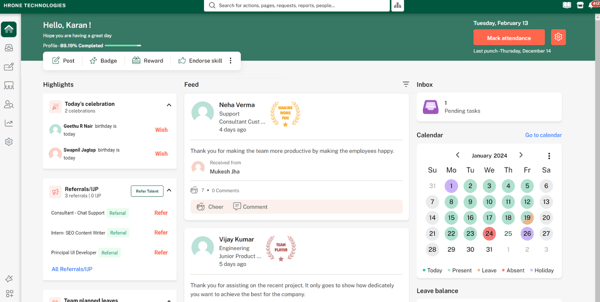
Shift scheduling and labor forecasting also perform well. HROne scores 95% for shift scheduling and 94% for labor forecasting, making it a capable choice for organizations managing multi-shift operations or variable staffing needs.
Succession planning is another area worth highlighting. HROne earns a 93% succession planning score on G2, which is valuable for organizations looking to tie workforce data to longer-term talent development and continuity planning.
HROne's structured payroll workflow is designed to protect data integrity across attendance and salary processing, a real asset for teams managing high employee volumes. The trade-off is that once attendance has been processed, payroll component amounts can't be adjusted without rolling back the payroll run, which adds steps when corrections are identified late in the cycle. For most standard payroll cycles this rarely becomes an issue, and the approval-gated workflow helps teams catch discrepancies before they reach that point.
Reporting flexibility came up as another consideration. G2 users noted that while standard reports meet most day-to-day needs, creating more customized or detailed analytics sometimes felt limiting. Teams looking for deeper insights across departments or attendance trends might need additional configuration, though the platform still covers the essentials for most HR operations.
In the end, HROne is a dependable workforce management platform that shines in attendance tracking and employee lifecycle management, particularly for teams looking for simplicity backed by high user satisfaction.
“Easy to use software and all windows are easy to access form log-in to updating the employee data in the database.”
- HROne review, Kaluram R.
"What I dislike about HRone is the AI features in the Time Office module.”
- HROne review, Akshay A.
Scheduling is the foundation of effective workforce management. Explore the best employee scheduling software for automating shift creation, swaps, attendance tracking, and labor forecasting.
ADP Workforce Now brings payroll, benefits, HR management, and time tracking together in one integrated platform, making it a go-to for mid-market organizations that want to reduce the number of tools they juggle. With 70% of its G2 reviewers from mid-market companies, it's clear the platform is built for teams facing growing operational complexity.
Payroll processing is where Workforce Now consistently shines. G2 reviewers highlighted how the platform handles multi-state payroll, tax filings, and compliance-related deductions with accuracy and minimal manual intervention. Several users noted that running payroll felt less like a manual process and more like an automated routine once everything was configured. The system's built-in compliance engine was called out as particularly valuable, automatically keeping HR teams up to date on tax code changes so they don't have to chase updates themselves.
Reporting and analytics also earned strong marks. G2 users frequently praised the custom reporting capabilities, with many noting the "field grabber" functionality made it easy to pull exactly the data they needed. The platform scores 84% on G2 for reporting, reflecting the depth of its standard and custom report options. Users who regularly process payroll for multiple entities or FEINs found the reporting tools especially useful for balancing, auditing, and decision-making.
The all-in-one design was another recurring positive. Instead of switching between separate tools for payroll, benefits, time tracking, and HR records, Workforce Now brings it all under one login. Users appreciated the reduction in duplicate data entry and the consistency that comes from having everything connected. G2 Data shows the platform scoring 88% for meeting requirements, suggesting it covers the range of HR needs most mid-market teams expect.
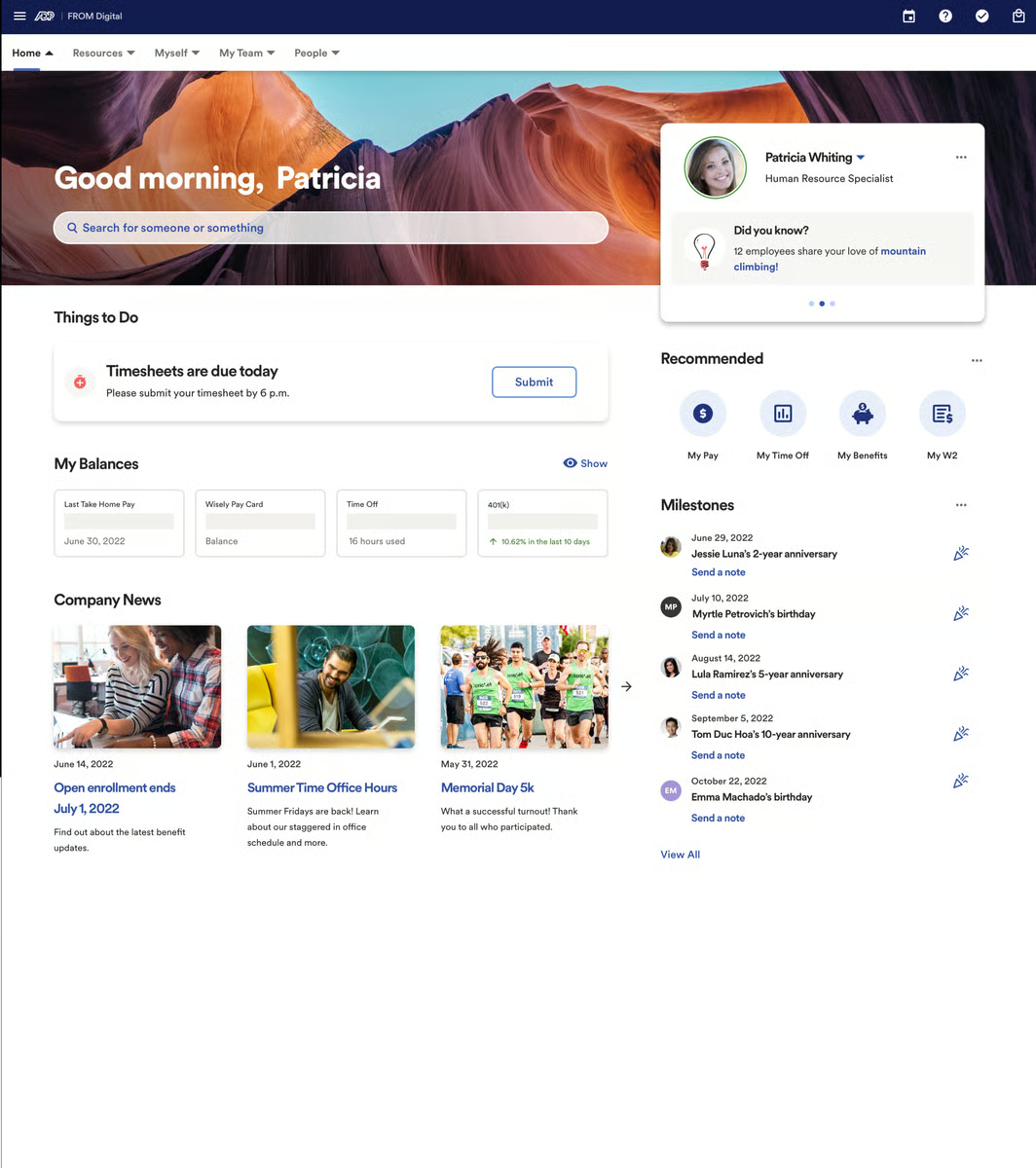
Self-service capabilities also contribute to the platform's appeal. Employees can update their own W-4s, manage direct deposit changes, and enroll in benefits without needing to contact HR. Several G2 reviewers mentioned that the employee portal saves administrators significant time by letting staff handle routine changes themselves. The platform scores 87% for self-service capabilities on G2.
Implementation support is another area where Workforce Now earns solid feedback. Several users praised the onboarding process and the availability of dedicated service representatives who helped them configure the system. ADP's support structure, including "The Bridge" community for questions and peer learning, was called out as a real differentiator for teams new to the platform.
Time and attendance integration rounds out the platform's core value. Workforce Now scores 88% for time and attendance tracking on G2, and users appreciated how clock-in data syncs directly with payroll, reducing reconciliation work and minimizing errors during processing.
That said, navigating the platform's breadth of features can take some getting used to. G2 users mentioned that the system is feature-rich, but certain administrative tasks require multiple steps or deeper familiarity with the interface. There is a ramp-up period, but users noted it gets noticeably easier once the initial configuration is complete.
Custom reporting, while powerful, was another area where some users noted a learning curve. Although the platform offers deep reporting capabilities, building non-standard reports may require additional training or trial and error. For teams that primarily rely on standard report templates, though, the out-of-the-box options generally cover core needs effectively.
Workforce Now is a strong choice for mid-market organizations looking to consolidate payroll, HR, and compliance into one trusted platform with deep service support.
“I use ADP Workforce Now for HRIS, including document execution, employee demographics, and payroll. I love having everything in one place and having an employee file cabinet. The field grabber option really stands out because it allows me to customize reports fully on any fields available, giving me exactly what I need. Reporting is so strong; it's a game changer for me.”
- Workforce Now review, Danniela L.
“I wish I could compare more things when doing payroll. I have to keep a lot of internal processes/checklists up-to-date when processing payroll, just to ensure that any changes that have taken place from one payroll to the next look correct. It would be so beneficial to be able to see that in the system quickly without having to run a report or compare pay summaries on individual profiles.”
- Workforce Now review, Reba R.
Time and attendance are often evaluated as part of a broader workforce management decision. Here's how the best time and attendance tools for enterprise teams rank on G2.
Paylocity facilitates workforce operations through time tracking, labor management, compliance support, and employee self-service. On G2, it scores 89% for ease of use and 87% for likelihood to recommend, positioning it as a dependable option for teams that want integrated payroll and workforce management in one platform.
Managing labor needs came through as a major strength in G2 user feedback. Many teams noted that Paylocity makes it easier to track staffing levels, forecast labor needs, and identify potential overtime issues before they become costly. I noticed managers liked having better real-time insights into coverage without having to jump between systems. Paylocity scores 77% for labor forecasting on G2, which, while not the highest in the category, still supports core planning needs for most teams.
Attendance tracking also earned strong marks. Users frequently noted how easy it is for employees to clock in and out, review their timecards, and submit PTO requests. On the admin side, I found that HR teams appreciated the visibility into absences and attendance patterns, especially since it helped them manage compliance without digging through separate spreadsheets or disconnected systems. The platform scores 87% for time and attendance tracking on G2.
Another thing that stood out was how Paylocity handles compliance in the background. Several G2 reviewers highlighted that overtime rules, break policies, and other labor law requirements are automatically factored into scheduling and attendance workflows. This behind-the-scenes enforcement helps HR teams stay compliant without adding manual checkpoints to their process.
Platform usability was another area of consistent praise. Paylocity scores 89% for ease of doing business with on G2, and multiple reviewers highlighted how the implementation process felt well-supported. The dedicated support teams and regular platform updates were called out as differentiators, especially for teams making the transition from legacy systems.
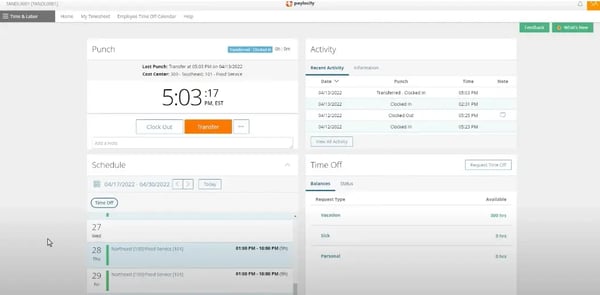
Self-service capabilities contribute to everyday efficiency as well. Employees can check pay stubs, update personal information, and submit time-off requests through the portal without needing HR assistance. With an 88% score for self-service capabilities on G2, the platform covers the day-to-day interactions that free up HR teams to focus on higher-priority work.
Integration flexibility helps Paylocity fit into existing tech stacks. The platform scores 81% for integration APIs on G2, allowing it to connect with HRIS, accounting, and communication tools. With 77% of its G2 reviewers from mid-market companies, it's a natural fit for growing organizations that already have other systems in place.
Paylocity's implementation support and onboarding experience drew consistently positive marks from G2 reviewers, with many teams pointing to their dedicated contacts as a key reason the transition felt smooth. Post-go-live support quality, however, showed more variability; reviewers noted that response times and rep expertise could differ depending on the issue type, with tax-related questions in particular sometimes taking longer to resolve. The platform's self-serve documentation is thorough enough that most teams can work through common questions independently, and once established, ongoing support relationships tend to stabilize.
Customization appeared to be another consideration. G2 users noted that while Paylocity supports standard workflows well, teams with complex scheduling or layered approval rules sometimes needed extra setup effort to tailor the system fully. For most organizations, though, the built-in flexibility covers everyday workforce needs effectively.
Paylocity is a strong choice for businesses that want integrated payroll and workforce management, delivering solid compliance tools and reliable labor insights in one unified system.
“Paylocity has made our payroll process much easier and more streamlined compared with the platform we were using before.”
- Paylocity review, Lynn P.
“The fact that time and labor does not talk to HR and Payroll and vice versa. Also, being able to send notifications other than just a missing punch notification would be great. We have to manually load from our other software, so no integration is a downside. We are still finding kinks almost a year into it.”
- Paylocity review, Ashley B.
Alongside workforce scheduling and attendance, the best multi-country payroll software makes it easier to process payments for employees worldwide.
UKG Pro brings a comprehensive suite of HR, payroll, benefits, and talent management capabilities into one unified platform, targeting larger organizations that need depth and coverage across the employee lifecycle. With 53% of its G2 reviewers from mid-market companies and 41% from enterprise organizations, it's clearly built for teams managing operational complexity at scale.
The all-in-one architecture is what stood out most across G2 reviews. Users frequently praised having payroll, recruiting, onboarding, benefits administration, and performance reviews all centralized in a single system. Several reviewers highlighted how this consolidation eliminates the need for multiple logins, reduces duplicate data entry, and gives HR teams a unified view of employee data. For organizations managing large headcounts across departments or locations, that cohesion makes a meaningful difference.
Employee self-service earned consistent positive marks. G2 reviewers appreciated that employees can access pay details, view schedules, request time off, and update personal information through one portal. The platform scores 87% for self-service capabilities on G2, and multiple users noted that employees could handle routine tasks independently without needing guidance from HR. That autonomy reduces the volume of administrative requests HR teams handle daily.
Timekeeping and attendance management also performed well. Users mentioned that clocking in and out was reliable, and having timesheets connected directly to payroll simplified processing. The platform scores 85% for time and attendance tracking on G2, and several reviewers called out how the real-time visibility into hours worked helped managers stay on top of scheduling and approvals.
The platform's support structure resonated with many reviewers. Users specifically noted access to dedicated account representatives who could help with configuration, troubleshooting, and ongoing optimization. That level of hands-on support was a differentiator for teams going through initial implementation or scaling into more advanced features. UKG Pro scores 83% for quality of support on G2.
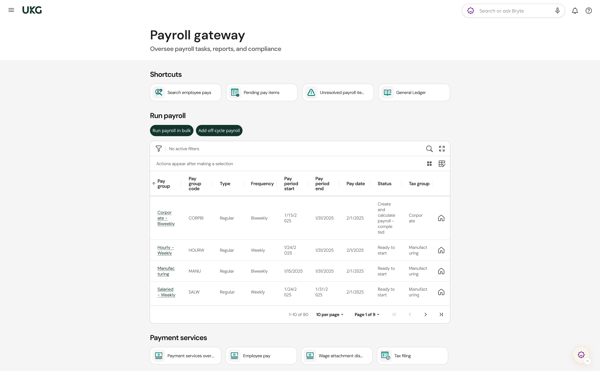
Training resources also got positive attention. G2 users highlighted the availability of training videos, recorded walkthroughs, and learning modules that helped administrators and employees get up to speed. For enterprise teams rolling out the platform across multiple sites, having self-serve training content available around the clock helps smooth out adoption.
Reporting and dashboards round out the platform's strengths. UKG Pro scores 85% for reporting and 84% for dashboards on G2, giving HR leaders access to workforce analytics without needing to build everything from scratch. Standard reports cover common needs, and the data centralization across modules means reporting pulls from a single source of truth.
That said, some G2 reviewers noted that the platform can feel complex to navigate, particularly for newer or infrequent users. The interface houses many features across multiple modules, and some users found that certain tasks required more steps than expected. The system rewards familiarity but does take time to learn. Users who spent time exploring the interface generally found it efficient once they knew where things were.
UKG Pro's reporting depth across HR, payroll, and workforce analytics is a genuine differentiator for enterprise teams, with G2 users praising the breadth of data available across modules. For organizations that need a unified cross-functional view, however, it's worth noting that WFM timekeeping data and core HR analytics operate through separate reporting systems, pulling a report that combines both often requires working across two environments. Enterprise teams that plan for this architecture upfront generally find the data granularity available in both systems more than adequate for their needs.
UKG Pro is a strong fit for enterprise and upper-mid-market organizations that need a single, comprehensive system to manage HR, payroll, and workforce operations at scale.
“UKG Pro makes my job easier because everything I need, pay, schedules, time off, and updates, is in one place, so I don’t have to chase down information.”
- UKG Pro review, Mapy B.
“The fact that there's two different UKG apps, UKG Ready and UKG Pro, that need to be toggled between to do similar tasks. It seems a little redundant. It'd be nice if it was all in one location.”
- UKG Pro review, Sarah R.
Got more questions? Get your answers below!
Rippling, UKG Ready, ADP Workforce Now, and Paylocity are among the most trusted workforce management platforms by operations managers based on user reviews, valued for centralized payroll, attendance, and scheduling data in one system.
UKG Pro and UKG Ready are highly rated for labor cost optimization and efficiency, offering labor forecasting, overtime monitoring, and workforce analytics that help managers control staffing costs.
If the key requirement is that employees can accept available schedules while the system automatically enforces fairness, compliance, and eligibility, UKG Pro Workforce Management and Connecteam stands out.
Rippling, ADP Workforce Now, and UKG Ready are considered the most reliable workforce management systems based on reviews from operations teams, citing consistent time tracking, payroll syncing, and attendance accuracy.
UKG Ready, UKG Pro, and Paylocity are workforce management solutions that handle complex scheduling rules and employee preferences specifically, supporting multi-location coverage, recurring templates, and compliance-based shift rules.
UKG Ready, ADP Workforce Now, and Paylocity give operations managers real-time visibility into schedule compliance gaps through automated overtime alerts, break enforcement tracking, and attendance dashboards.
UKG Pro and Paylocity are workforce management systems that reduce labor costs without sacrificing service levels specifically, combining labor forecasting with real-time staffing visibility to avoid both overstaffing and coverage gaps.
UKG Pro, UKG Ready, and HROne are top workforce management solutions with demand forecasting and automated intelligent scheduling, using historical labor data to predict staffing needs and auto-build shift schedules.
ADP Workforce Now and UKG Pro are best suited for companies managing complex scheduling and contracts, given their depth in multi-entity payroll, compliance management, and enterprise-grade HR administration.
Rippling, UKG Pro, and Paylocity are among the best workforce management platforms for optimizing labor costs effectively, pairing time-tracking accuracy with labor forecasting and workforce analytics to cut payroll errors and overtime spend.
Keeping a workforce running smoothly takes more than schedules and spreadsheets. It takes the right tools behind the scenes. When time tracking, attendance, and team management work together, operations stop feeling like a scramble and start feeling like a real advantage.
The tools I covered here aren’t just packed with features; they reflect what real users value when managing time, people, and daily compliance. I dug through the feedback so you can skip the guesswork and find a platform that helps your workforce move faster.
The platforms I’ve reviewed here are consistently ranked as the best-rated workforce management solutions by G2 users across industries, balancing usability, automation, and scalability.
Don't stop at time tracking, lock down payroll, too! Check out the best payroll software to power up your operations.


After watching an HR team juggle onboarding paperwork, payroll runs, performance reviews, and...
.png) by Shreya Mattoo
by Shreya Mattoo

The scheduling software market is crowded, and most tools claim to do the same things.
 by Sagar Joshi

Our HR team reminds us constantly — clock in, clock out, don't forget to log your leave. At...
 by Shashank D Shastry