


I evaluated 10+ tools to find the 5 best eDiscovery software in 2026. These include Relativity, Everlaw, Epiq Discover, Logikcull, and DISCO Platform.
If you've ever tried to sort through thousands of emails, chat logs, PDFs, and the occasional "mystery.zip" under a tight deadline, you already know why choosing the right eDiscovery software matters. Legal teams are managing more data than ever, dealing with unpredictable review costs, and often working with tools that slow them down rather than help.
I'm not a lawyer, but I research complex software for a living, and eDiscovery is one of the more demanding categories I've looked at.
I evaluated these platforms the way I approach any high-stakes tool: comparing products side by side using G2 Data, working through thousands of real user reviews to see what holds up under pressure. I focused on what actually matters in litigation: defensible review, search precision, processing speed at scale, and predictable costs.
The result: I evaluated 10+ eDiscovery platforms and shortlisted five for in-depth review. The tools that most consistently help legal teams stay accurate, defensible, and efficient when it counts.
I've included five additional eDiscovery tools toward the end that are worth considering, so you can weigh alternatives based on your team's size, workflows, and priorities.
Relativity: Best for large enterprises and complex, high-stakes litigation
Unifies legal hold, processing, AI-powered review, analytics, and production at massive scale, extensible across cloud, on-premises, and hybrid deployments. (Pricing available on request)
Everlaw: Best for collaboration-heavy teams that prioritize support
Cloud-native platform pairing fast search and AI review with collaborative case-building tools (StoryBuilder) so distributed teams can work a matter together end to end. (Pricing available on request)
Epiq Discover: Best for teams that want self-service software backed by expert services
Cloud-based platform that handles the full discovery process, from collection through review and production, with a built-in AI assistant and Epiq's legal-services team available for extra support. (Pricing available on request)
Logikcull: Best for small and mid-sized teams handling straightforward matters
Self-service, drag-and-drop eDiscovery that automates processing, search, tagging, redaction, and production with minimal training and unlimited users. (Pricing available on request)
DISCO Platform: Best for AI-driven, fast document review
Cloud-native platform built for speed, combining near-instant search with AI tools for review, timelines, and depositions all in a single platform. (Pricing available on request)
*These eDiscovery tools are top-rated in their category, according to G2’s Summer 2026 Grid Report. All offer custom pricing and a demo on request.
When I talk about eDiscovery software, I’m referring to the tools legal teams use to find, collect, review, and produce electronically stored information during investigations or litigation. In simple terms, it helps you make sense of massive amounts of digital evidence like emails, chats, documents, cloud files, video, and more, without losing time or missing something critical.
The biggest expense in a case often isn't the argument in court; it's the sorting that happens before it. Here's what makes that cost more consequential: 2% of organizations only collect the right amount of data. When the evidence is this scattered, the platform a legal team picks has an outsized effect on both budget and defensibility.
From my research, the best eDiscovery software is the kind that actually reduces review time, improves accuracy, and keeps costs predictable. The tools that consistently stand out are fast, easy to use, and strong on AI-assisted review, search precision, and automation. Plus, they help legal teams move quickly without sacrificing thoroughness, compliance, or collaboration.
I used G2’s Grid® Reports to build a shortlist of the top eDiscovery platforms based on G2 Score, user satisfaction, and overall market presence. This gave me a clear, data-backed starting point for comparing tools that legal teams actually rely on.
That starting point is credible because of how the G2 Grid is scored. A product's G2 Score is the average of two equally weighted components: market satisfaction and market presence. More importantly, the placement is determined algorithmically and scores are normalized within the category, meaning each platform is measured against its actual eDiscovery competitors.
I then analyzed over 1,000 G2 reviews using AI to identify the patterns that matter most to real users, like search accuracy, review speed, automation quality, ease of use, pricing transparency, and how well each platform handles large, complex data sets.
The G2 reviews I analyzed come from attorneys, litigation support specialists, and eDiscovery staff describing how each tool holds up under real pressure. For each platform, I looked for the capabilities reviewers praise often, the limitations that show up, firmographics, and the matters and workflows that come up most often.
The result is a shortlist of five products grounded in what verified users report.
The screenshots in this article come from G2 vendor profiles and publicly available product documentation.
Between G2 Data and hundreds of user reviews from legal practitioners, I found consistent signals about what separates good eDiscovery tools from great ones. These are the factors that shaped my evaluation:
I looked at 10+ tools before landing on the five that genuinely stood out. They don’t each hit every criterion perfectly, but these eDiscovery tools are the ones that repeatedly proved their value across different teams and use cases.
The list below contains genuine user reviews from the eDiscovery Software category. To be included in this category, a solution must:
*This data was pulled from G2 in 2026. Some reviews may have been edited for clarity.
Relativity is the closest thing the eDiscovery market has to a default. I’d point a large legal team to it when matters are big, complex, and high-stakes, say, bet-the-company litigation, a global investigation, or anything where data volume and defensibility can't be compromised.
On G2, it holds a 4.6 out of 5 rating across more than 600 reviews. Roughly a third of its reviewers come from organizations of 1,000+ employees, and nearly half are from mid-market companies (51-1,000 employees). G2 reviewers describe Relativity as powerful, flexible, and able to handle virtually any type of case.
The first thing I look for in an enterprise tool is whether it can carry the whole matter, and Relativity runs collection, processing, search, analytics, review, and production on one platform. The reviews I read on G2 consistently point to its ability to turn very large data volumes into a manageable, trackable, and defensible process. In G2 Data its document review feature scores 93%, above the 90% category average, which reflects a system built to carry an organization's biggest matters end to end.
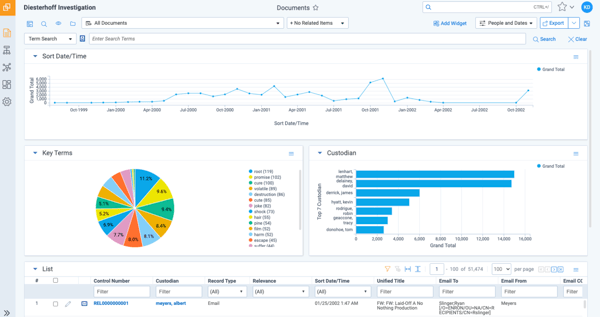
A clean, familiar review interface is the first thing I noticed reviewers respond to. The document-review screen is the most-praised aspect across the G2 reviews I analyzed, with users calling it intuitive to navigate once a matter is loaded. For associates and contract reviewers working to a deadline, I'd expect that clarity to keep them on the documents rather than the tool.
When I dug into how teams actually cut review time, search and analytics did the heavy lifting. Advanced search operators, persistent highlighting, and built-in analytics help reviewers surface and code the documents that matter faster, a strength they raised often. For high-volume matters, I see that precision as what keeps a review defensible without ballooning hours.
Beyond review itself, I was struck by how far Relativity reaches across the data sources legal teams deal with. Teams can collect ESI directly from Microsoft 365, Google Workspace, and Slack, translate files into more than 100 languages, and turn audio and video into searchable text.
I also noticed that power users really appreciate how customizable Relativity is. Everything from workspace layouts to review queues to automated batching can be tailored to meet very specific workflows. For many reviewers, especially administrators, the level of flexibility and the ecosystem of add-ons is a major advantage.
Where I think Relativity pulls ahead for demanding teams is the pairing of AI capabilities and market maturity. Newer tools like aiR for Review bring generative AI into the review workflow, and I noticed reviewers increasingly cite automation and analytics as time- and cost-savers.
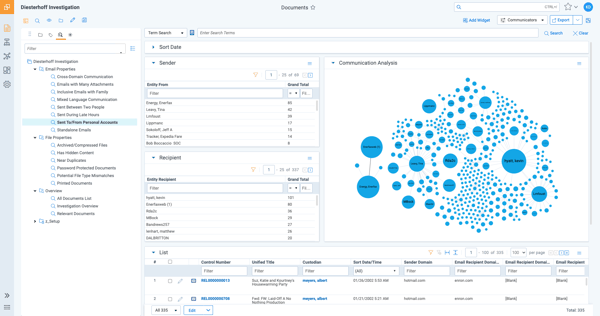
Based on what I saw in G2 reviews, Relativity offers impressive depth and flexibility across the entire review workflow, but teams wanting a more lightweight or plug-and-play experience might spend some additional time setting up, especially when configuring workspaces, permissions, or advanced AI-driven features.
Relativity is built for high-stakes, high-volume litigation, and for that work most G2 reviewers feel the capability earns its price. Still, I saw some users describe the pricing as a heavy investment, which can make it harder to justify for smaller firms or lighter caseloads. For enterprise and large mid-market teams running frequent, complex matters, I'd say the cost tracks the value.
On balance, Relativity is the most complete eDiscovery platform I evaluated, and the data backs that up: it has the category's largest market presence on G2 and strongest user adoption rate (75% versus 56% average).
"Relativity’s biggest advantage is its ability to turn large volumes of data into a manageable, trackable, and defensible review process, while also saving time and reducing costs through automation and analytics.”
- Relativity review, Christopher K.
“Relativity’s main downsides are its complexity and cost. Administrative tasks can be difficult to manage without formal training, and the platform’s premium pricing makes it a heavy investment. Still, those challenges stem from its vast capabilities, which deliver powerful functionality once mastered.”
- Relativity review, Alicea S.
If you’re also evaluating legal case management tools, check out G2’s roundup of the best legal case management software for law firms, great for seeing how eDiscovery fits into the broader legal tech stack.
Everlaw has quickly become one of the go-to eDiscovery platforms for legal teams that want serious capability without the heaviness, and after digging into the G2 data, I’m not surprised. It pairs a fast, modern review experience with the kind of support that gets a team productive quickly. If multiple people need to work on a matter at once, it's the platform users rave about.
Everlaw holds the highest satisfaction score of any product in the eDiscovery category in G2 Data, a 4.7 out of 5 rating across 720+ reviews, with 99% of users rating it 4 or 5 stars. The reviewer base is concentrated in law practice and legal services teams and skews small-to-midsize companies.
What stood out to me first wasn’t just the power of the tool, but how often reviewers talked about its ease of use. Everyone, from first-time users to 30-plus-year litigators, describes Everlaw as incredibly easy to use. People repeatedly said things like “simple,” “intuitive,” “no lag,” and even “the most user-friendly by a long shot.” In G2 Data, Everlaw's Ease of Use sits at 90% against an 86% category average.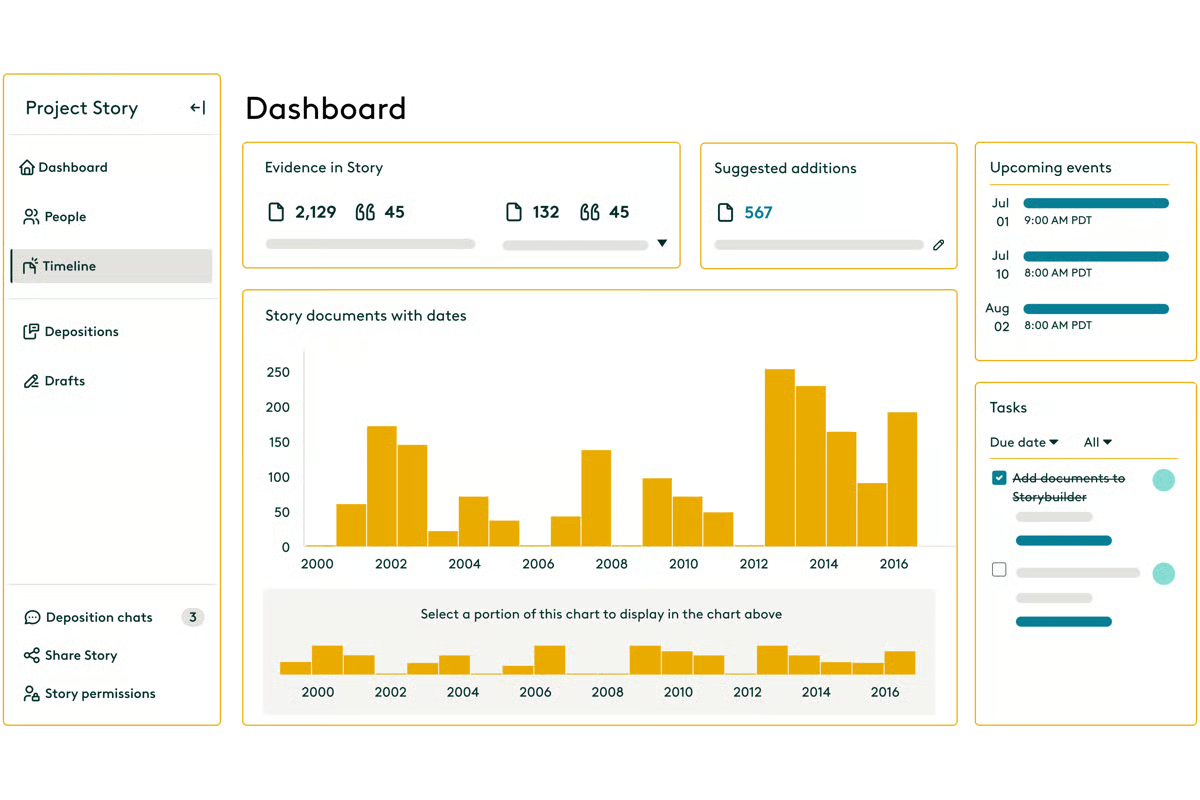 Teams talk about being able to upload, review, tag, and produce documents all within one platform, without feeling overwhelmed or buried in menus. Even features that are usually intimidating, like predictive coding, analytics, redactions, or email threading, feel approachable here.
That lines up with Everlaw’s design philosophy: the color-coded search builder, drag-and-drop uploads, fast document processing, and a clean review layout make the platform feel fast and modern without sacrificing depth.
When I dug into G2 reviews, Everlaw’s search experience stood out on its own. Reviewers like how customizable queries are, how quickly results load on large datasets, and how easily they can filter out noise without getting buried in false positives. The color-coded search builder also makes advanced search feel less intimidating, which matters when multiple reviewers need to apply the same logic consistently.
Processing speed is another strength reviewers point to. Everlaw can process up to 900,000 documents an hour, helping teams move from upload to review faster when deadlines are tight. It also handles messy evidence types well: audio and video transcription, plus translation into more than 135 languages, help turn mixed-media evidence into searchable text.
Everlaw also leans into the work teams do together. StoryBuilder lets a team assemble facts, exhibits, and narrative in one shared space, while batch coding helps reviewers stay consistent. For collaboration-heavy matters, this is where Everlaw turns review from individual document-clicking into a shared case-building effort.
Another theme that comes up constantly is customer support. Almost every review I looked at described it as responsive and hands-on: support a phone call away, live training built into onboarding, and customer success managers (CSMs) who help teams structure smarter workflows rather than just answer tickets. That kind of support isn’t just a perk in this category; it directly affects how quickly a legal team can get a review off the ground. G2 Data puts Everlaw's quality of support at 95%, five points above the category average.
Everlaw is approachable overall, but I noticed a few specific workflows take getting used to at first. Some G2 reviewers point to how the homepage is organized, or how email-and-attachment productions behave once filters are applied, noting these aren't immediately intuitive. Tellingly, the same reviewers often add that once they figured it out, the workflow felt smooth, and Everlaw's support tends to close the gap quickly.
A few reviewers find the pricing model harder to predict than the platform itself. The most common aspect I noted is uncertainty about when AI features cost extra versus when they're included, along with questions about how data-based pricing adds up. This matters most for teams budgeting tightly or sharing costs with clients, so I'd clarify exactly what's included and how usage is billed before signing.
Based on everything I analyzed, I’d recommend Everlaw for teams that want a fast, intuitive, single-platform solution with excellent support and modern AI features.
“Being able to have documents tagged and organized in folders allows me to keep working efficiently. The tool allows me to do this efficiently with just one click. Everlaw is much more user-friendly, giving us a consistent workflow across our projects that all our teams can use, making document review, tagging, and production more efficient. The initial setup was very easy.”
- Everlaw review, Ashley B.
“Everlaw is backed by AI power, but it’s confusing to tell when the AI features cost extra versus when they’re included. And when they do cost more, it’s still unclear how much additional cost to expect.”
- Everlaw review, Ashley K.
Everlaw vs. Relativity: Which is better for eDiscovery?
Everlaw is often praised for its fast, intuitive experience and hands-on support, while Relativity stands out for its depth, customization, and ability to handle complex, large-scale matters.
Want a deeper side-by-side? Check out the full comparison of Everlaw vs Relativity on G2.
Epiq Discover is a cloud-based, end-to-end eDiscovery platform built to carry the full discovery lifecycle, from legal holds and collection through review, analysis, and production. When I looked at it through G2 reviews and its core capabilities, what stood out was how intentionally it lets a single team run all of those stages in one place.
Epiq Discover earns a 4.3 out of 5 on G2, with 89% of reviewers rating it 4 or 5 stars. Its reviewer base is concentrated in legal services and law practice teams and skews small-to-midsize. The recent feedback I read is consistent about what the platform does well: get data in fast, keep teams self-sufficient, and back them with responsive support.
When I assess a self-service platform, my first question is whether one team can run a matter without handoffs, and Epiq Discover is built around that. Reviewers on G2 mention using it for everything from early case assessment and data processing to analysis and production. Users also highlight how easy it is to bring data in, organize it by metadata, and start reviewing right away, which aligns with Epiq’s strengths in document collection, review, and production, its highest-rated features on G2.
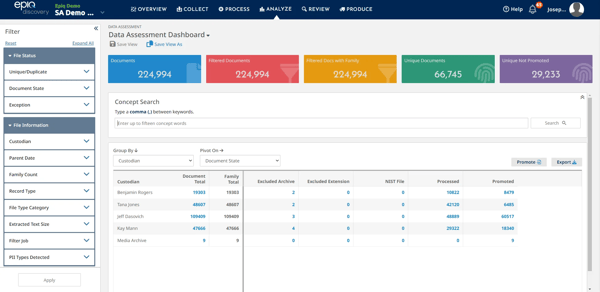
What really stood out in the reviews was how self-sufficient the platform allows people to be. Several users mentioned that they don’t have to wait for a separate team to collect or process anything. They can run their own collections, sort materials quickly, apply tags, and move straight into review. That independence seems especially valuable for the legal services and law practice teams that make up the bulk of Epiq’s user base.
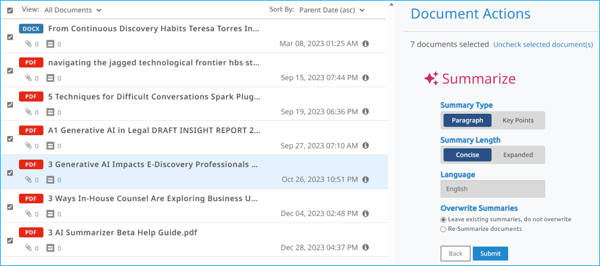
And it fits with the product’s design: behind the scenes, Epiq Discover handles early data assessment, deduplication, indexing, and automated prep so reviewers can get to work faster. The platform also supports analytics like concept search, email threading, near-duplicate identification, and even predictive AI summaries to help teams understand patterns early.
The other half of Epiq's pitch, expert services behind the self-service, comes through clearly. Support is the single most common thing reviewers praise, describing the team as responsive, easy to reach, and genuinely helpful. What I found interesting is that the backing goes beyond the help desk. Because Epiq Discover comes from Epiq, a global legal-services provider, teams can call on managed review, project management, and consulting when a matter outgrows their in-house capacity. To me, that backing is what makes a self-service model workable for teams without a deep eDiscovery bench.
Epiq Discover also reaches the data sources legal teams increasingly have to account for. G2 reviewers point to collections from mobile devices, Microsoft 365, chat apps like Slack and WhatsApp, and Microsoft Teams messages with modern attachments. For matters where collaboration data is now the hard part, that breadth is what keeps collection defensible.
I also found Epiq’s newer AI advances worth calling out. Recent reviewers single out AI-powered document classification, technology-assisted review, and search that surfaces relevant documents fast, and the platform's Epiq Chat assistant that lets reviewers ask questions and get fact-based answers with citations directly in the workspace. For teams trying to make sense of large or fast-moving matters, I find that conversational layer a useful way to get oriented quickly.
Epiq Discover's core review experience is strong, so the gaps G2 reviewers raise sit in the layers around it, particularly customization. Recent feedback points to advanced-filter or settings options that some teams wish went deeper to fit specific workflows. For teams focused on daily review, this rarely surfaces; for those that depend on heavily tailored configurations, I'd confirm the platform flexes the way you need before committing.
Also, while day-to-day review feels efficient, a handful of reviewers note that certain production-side tasks — QC of productions and some export steps — take more manual effort than the rest of the workflow. It's a narrower, more technical point and recent reviews suggest the flow has been getting smoother.
On the whole, Epiq Discover is a strong fit for law firms and corporate legal teams that want an intuitive, end-to-end workflow they can run themselves. Recent feedback is consistent, and for teams that value self-sufficiency backed by real support, it earns its place.
"I use Epiq Discovery for litigation and compliance matters to process and review large amounts of data. I appreciate the AI-powered document classification and technology-assisted review, which help with efficiency in my work. It produces the outcomes I want in a very quick timeframe. The initial setup was easy and quick.”
- Epiq Discover review, Jessica R J.
"Some features—such as advanced search building or filtering—can also take a bit of time to fully understand for new users. Improved performance and clearer guidance within the platform would make the overall experience even smoother.”
- Epiq Discover review, Verified G2 user in legal services.
Logikcull is one of the few eDiscovery platforms that really leans into simplicity without sacrificing power, and the G2 reviews make that clear. After digging through user feedback, I was impressed by how consistently people describe it as intuitive, fast, and genuinely easy to work with, whether they’re attorneys, paralegals, solo practitioners, or city agency teams working across FOIA or PRA requests.
It earns a 4.7 out of 5 on G2, and its reviewer base is mostly small-business (55%) and midsize teams (31%) in law practice and legal services.
The first thing I noticed across Logikcull's reviews is how rarely anyone complains about the learning curve. The recurring story across reviews is speed and predictability without a steep learning curve, which is why I see it as a strong default for teams that want to run discovery themselves rather than staff up for it. In G2 Data, ease of use sits at 92% against an 86% category average.
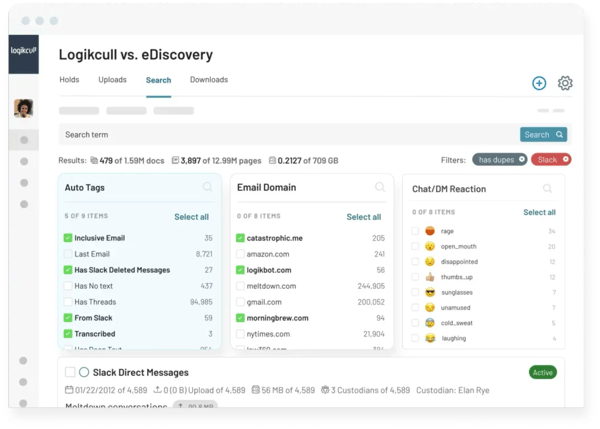
A lot of that usability comes from how Logikcull handles data from the start. Direct integrations with Google Vault, Slack, Microsoft 365, Box, and other core sources mean teams don’t have to wrestle with manual exports or third-party tools just to begin a project.
Its culling intelligence automatically analyzes and organizes your data by factors like date, custodian, recipient, document type, and even potential privilege, making it easy to quickly cull out irrelevant material before you ever start reviewing. It’s a big reason Logikcull scores so highly on document processing and document review, both sitting at 94%, well above category averages.
Once you’re in review, the workflow feels designed for speed. Reviewers mention being able to move through large batches quickly with tagging, redactions, commenting, and collaboration tools that make it easy to streamline back-and-forth work.
Support comes up almost as often as ease of use. Reviewers single out Logikcull's in-app chat, a team member a couple of clicks away, as fast and genuinely helpful, with no IT middleman. That tracks with G2 Data, where quality of support reaches 96% and ease of doing business hits 96%, both well above category averages.
Where Logikcull rounds out the picture is legal holds. Logikcull Hold automates hold notices, reminders, and tracking, even within Slack, so the preservation step doesn't fall through the cracks. Paired with everything upstream, it gives small and midsize teams a genuinely end-to-end workflow for the straightforward-to-moderate matters they handle most, without the overhead of a heavier platform.
Many reviewers love Logikcull’s simplicity and intuitive layout, but teams wanting very advanced review controls or deep customization may want to be aware that some features, such as more extensive field displays or richer analytics, come up occasionally as “nice to have” additions, so groups handling highly complex productions may want to confirm workflow requirements in advance.
Also, users consistently appreciate the core review experience of Logikcull, but a few flag rough edges around exports and productions specifically. For example, exported data not carrying certain notes or building a download feeling less intuitive than the rest of the tool. This matters most for teams with detailed production or downstream-handling needs, so I'd walk through export and production workflow during a trial to be sure it captures everything you need.
Logikcull is the platform I'd recommend to small and midsize legal teams, solo practitioners, and public-sector groups handling FOIA or public-records work, anyone who values speed and predictability over maximum configurability. It knows exactly who it's for, and it serves them well.
“As a small law firm, Logikcull is perfect for me. It is very user-friendly, billing is clear and easy as it bills you by project/matter, and customer service is very responsive. It makes document review and running productions easy and I haven't had any issues with it. Would highly recommend.”
- Logikcull review, Farah T.
"I have found that the saved search option being the only way to create a download/production is clunky. Most attorneys in our office who have little to no experience with e-discovery software find Logikcull clunky and too difficult to navigate.”
- Logikcull review, Mia D.
DISCO Platform covers everything you’d expect from a modern eDiscovery platform, and the G2 reviews make it clear why so many legal teams keep it in their toolkit. The throughline is speed, and the read I came away with is that DISCO is built to keep review moving when a matter gets big. This makes DISCO Platform one of the top tools for reducing review time.
DISCO earns a 4.6 out of 5 on G2, with 96% of reviewers rating it 4 or 5 stars. Its reviewer base concentrates toward small-to-midsize firms, and the consistent message across reviews is that it's fast, built for lawyers, and its AI capabilities genuinely save time.
Speed runs through DISCO's reviews more than any other capability. Users talk about fast search and document loading, and the ability to move through even large or complex datasets without disruption. In G2 Data, document review is DISCO's highest-rated feature at 95%, the strongest of any tool in this roundup. For teams racing a production deadline, I read that speed as the core reason DISCO keeps earning a place in their toolkit.
What makes that speed usable is an interface built for lawyers, not data engineers. The G2 reviews I read describe clear menus, sensible tagging, and workflows that feel designed by people who understand litigation, and several say onboarding new users is quick as a result. For litigation teams with rotating staff or contract reviewers, I see that learnability as a real advantage.
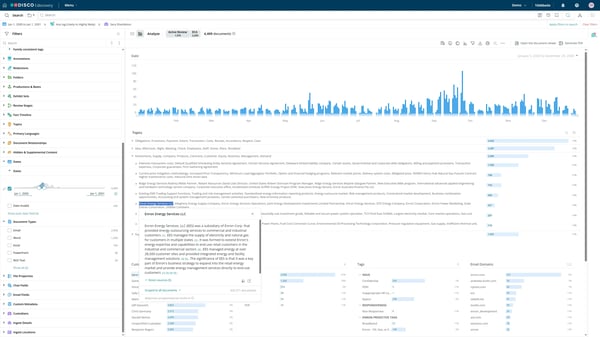
DISCO's AI is where G2 reviewers see the clearest time savings. They point to AI-generated summaries, relevance ranking, and ask-and-answer search, including the ability to pose questions scoped to a single custodian to prepare for a deposition. That shows up in G2 Data, where decision making scores 91% against an 81% category average, one of the widest gaps I saw across the category. For teams trying to reach key evidence faster, this is DISCO's most forward-looking strength.
Case Builder, DISCO’s trial-prep tool, also gets a lot of love for organizing deposition materials, timelines, and exhibits in a way that feels built for actual legal work rather than just data management.
Day to day, DISCO also handles the messier mechanics of modern review. Reviewers note it keeps email threads together, manages short-message data cleanly, and batch-organizes files. For matters heavy on chat and email, I see this as the quiet workhorse layer beneath the flashier features.
Support earns near-universal praise. Reviewers describe DISCO's team as among the most responsive they've worked with, backed by DISCO University training resources, and G2 Data puts quality of support at 94%, above the category average. For a platform that moves this fast, I see responsive support as what keeps teams confident they won't get stuck mid-matter.
There are a few areas where teams might want to plan ahead. While search overall feels fast and reliable, some reviewers noted that advanced queries, like Bates lookups or long-form doc-number searches, take a bit of practice, so teams wanting an instant, Google-style search experience may want to build in a short adjustment period.
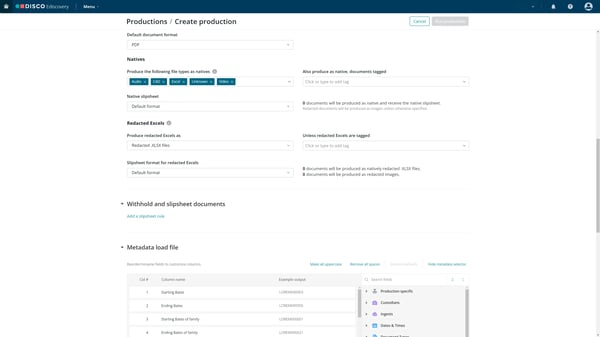
A handful of reviewers point to friction in setting up and exporting productions. For example, managing document versions when producing exhibit sets, and limited options for exporting operational lists. It's a back-office concern more than a daily-review one, and it surfaces mostly for teams running frequent, high-volume productions. So, I'd walk through a full production cycle before committing.
Overall, the sentiment is overwhelmingly positive. DISCO's blend of speed, a lawyer-friendly interface, and genuinely useful AI makes it feel lighter and faster than many traditional platforms.
"I find DISCO eDiscovery intuitive and easily manipulable if you have a working knowledge of boolean terms. It helps me sift effectively through large document productions. I'm very happy with the product.”
- DISCO Platform review, Alexander D.
“We had some issues with document versions when producing exhibit sets. I think there could be some streamlining about setting preferences for which version is more important than another when a document comes through multiple sources (plaintiff files vs defendant files vs expert files etc). That's a very specific issue, otherwise we were extremely happy with the platform.”
- DISCO Platform review, Wesley B.
DISCO Platform vs Logikcull: Which fits your team?
Both are cloud-native and quick to pick up, but DISCO leans toward AI-driven speed for litigation teams handling demanding matters, while Logikcull is built for small and midsize teams that want simple, self-service review.
Want a side-by-side? Compare DISCO Platform vs. Logikcull on G2.
If you’re still exploring options beyond the tools reviewed above, here are a few more strong contenders worth checking out:
Explore the top 6 legal practice management software reviewed by my colleague Tanuja Bahirat.
Got more questions? We have the answers.
Everlaw and Relativity are the most trusted, based on G2 user reviews. Everlaw holds the eDiscovery category's highest satisfaction score, with 99% of reviewers rating it 4 or 5 stars; Relativity carries the largest market presence and a 91% recommend rate. For paralegals, both signal proven reliability on high-stakes, deadline-driven matters.
Relativity is the highest rated for complex, enterprise-scale review, with roughly a third of its G2 reviewers from organizations of 1,000+ employees and a document review feature scored at 93% in G2 Data, above the 90% category average. Everlaw is the strongest alternative. Relativity's depth and customization handle multi-custodian matters without buckling.
Relativity and Everlaw lead for large-scale organization and strategic review. Relativity's analytics, customizable workspaces, and persistent highlighting structure massive datasets, while Everlaw's StoryBuilder turns review into shared case-building with facts, exhibits, and timelines. For paralegals, this means moving from sorting documents to building the narrative a case actually turns on.
Transparency is inconsistent: AI capabilities are often gated behind add-ons or usage-based fees rather than bundled in. G2 reviewers of Everlaw, for example, note it's unclear when AI features cost extra. Before signing, confirm in writing which AI tools (summaries, predictive coding, and generative review) are included versus billed separately, since those costs escalate quickly.
DISCO, Logikcull, and Everlaw are the easiest to adopt, each scoring above the 86% category average for ease of use in G2 Data (DISCO 93%, Logikcull 92%, Everlaw 90%). Reviewers describe lawyer-friendly interfaces that onboard new staff quickly. For paralegals on rotating teams, that learnability means productive review without weeks of training.
Relativity is the most relied-on for defensible review, with reviewers crediting its ability to turn large data volumes into a "manageable, trackable, and defensible" process through audit trails, chain-of-custody tracking, and permissioned access. DISCO is a strong cloud-native alternative. For paralegals, defensibility means every review decision holds up if a production is later challenged.
Relativity and Everlaw handle annotation-driven review best. Relativity's persistent highlighting carries search-term highlights across documents, while Everlaw's shared workspaces support commenting, tagging, and batch coding across reviewers. For paralegals, filtering by these annotations keeps a multi-reviewer review consistent and makes flagged documents easy to resurface during case prep.
Logikcull leads on early culling: its culling intelligence automatically organizes data by date, custodian, recipient, document type, and potential privilege, and it scores 94% for document processing in G2 Data, above the category average. Epiq Discover is a strong alternative. Culling irrelevant data first directly cuts the review hours that drive eDiscovery cost.
DISCO and Logikcull combine a clean interface with fast production. DISCO holds this guide's highest document review score at 95% in G2 Data, with reviewers citing near-instant search; Logikcull's culling and quick productions speed output. Because document review is the largest cost in discovery, faster review translates directly into lower matter costs. That said, both note some production or export friction, so teams with frequent, high-volume productions should test a full production cycle before committing.
Everlaw and Relativity are best for high-volume batch review. Both offer batch coding, bulk tagging, and customizable review queues, and each scores at or above the 90% category average for document review (Everlaw 94%, Relativity 93%). For paralegals, efficient tagging across large batches keeps a thousand-document review from becoming a thousand separate decisions.
Match the platform to your caseload, not the reverse. Relativity and Everlaw suit large, data-heavy matters needing advanced analytics and AI; Logikcull and DISCO fit teams wanting cloud-native simplicity and predictable pricing; Epiq Discover works for self-service backed by managed services. Prioritize workflow fit, search strength, security, data volume, and total cost of ownership.
eDiscovery pricing varies widely by model. Cloud-native tools like Logikcull and DISCO often charge per matter or per user; enterprise platforms like Relativity typically use per-GB hosting and review fees. Extras, AI review, translations, analytics, managed review, add up fast. Since review drives most discovery spend, a tool that culls irrelevant information early often lowers total cost more than a low sticker price.
Leading platforms, Relativity, Everlaw, Epiq Discover, DISCO, and Logikcull, build in encryption, audit trails, chain-of-custody tracking, and role-based access. Look for recognized certifications such as SOC 2, and FedRAMP for government work, rather than marketing claims. For legal teams, defensibility starts with storage: if custody and access can't be proven, the evidence itself becomes contestable.
After comparing all of these platforms side-by-side, the biggest surprise for me wasn’t just how different the feature sets are, it’s how each tool quietly reshapes the culture of review inside a legal team. Some platforms push teams toward faster, more iterative searching because of how quickly they surface documents. Others shift teams toward cleaner project management by stripping away anything that slows you down.
The real takeaway, at least for me, is this: the “best” eDiscovery software isn’t the one with the longest feature list, it’s the one that changes how your team thinks, collaborates, and moves through a matter. When the right platform is in place, review stops feeling like a bottleneck and starts feeling like a strategic advantage.
If you’re exploring more ways to modernize your legal workflow, I recommend checking out G2’s guide to the best AI legal assistants next. It’s a great follow-up read that pairs perfectly with choosing the right eDiscovery platform.


Recently updatedSummer 2026 Grid® Report · Published May 26, 2026 The 10 best AI...
 by Harshita Tewari

I evaluated 15+ tools to find the 9 best legal case management software in 2026. These include...
by Soundarya Jayaraman

I evaluated 20+ tools using G2 Data and reviews to finalize the 6 best legal practice...
.png) by Tanuja Bahirat
by Tanuja Bahirat