

This guide was last updated on August 5, 2026. A newer report has since been published. The tools below reflect the scores from G2's Fall 2026 Grid® Report.
Based on verified G2 reviews and the latest Grid® placement.
*Liked and disliked highlights are summarized from verified G2 user reviews.
The tools below have also been exhaustively tested and evaluated, and continue to hold their place among the best AI Content Detectors on G2.
I tested several tools, and based on my findings, the best AI content detectors are Originality.AI, GPTZero, AI Image Detector, ZeroGPT, Undetectable AI, Content At Scale, Winston AI, and Humbot.
As a content writer with over a decade of experience, I’ve spent countless hours perfecting my craft, carefully choosing words, and shaping stories that resonate with readers. That experience has also made me curious about the best AI content detectors and whether they can genuinely distinguish human writing from machine-generated text.
It is a question that has become increasingly difficult to answer as the line between human creativity and artificial intelligence continues to blur. I remember a time when writing was entirely a human endeavor, driven by emotion, intention, and nuance. Today, AI writing tools can generate entire articles in seconds, mimic different styles, and produce text that is almost indistinguishable from human writing.
So, how do we trust the authenticity of the content we read? AI content detectors aim to expose the hidden hand of machines behind the written word. These tools look beyond surface-level patterns to identify deeper, more subtle markers of artificial authorship. As we rely more on AI to generate ideas, draft content, and even create narratives, we must ask ourselves: can we still trust the words we read?
In my journey to answer these questions, I tested some of the best AI content detectors available, evaluating their performance across metrics such as accuracy, response time, and adaptability to different AI writing models. These tools use techniques ranging from statistical sentence structure and syntax analysis to machine learning algorithms that identify patterns unique to AI-generated text. Some detectors even employ deep learning models trained on large datasets to differentiate between human and machine writing.
I rigorously tested these tools, comparing their detection capabilities across AI models such as GPT-3, GPT-4, and others. In this article, I’ll share my findings and help you identify the most reliable and effective AI content detectors.
I use AI content detectors to determine whether a piece of writing was created by an AI rather than a human. These detectors work by analyzing specific patterns in the text, like sentence structure, word choice, and overall flow. AI-generated content often has certain characteristics, such as repetitive or unnatural phrasing, that stand out to these tools.
I explored various AI content detectors and tested everything from basic tools for identifying AI-generated content to advanced platforms with machine learning-powered analysis. I also spoke with real-world users to understand how these tools perform across different scenarios. I evaluated their core features, identified pain points, and used AI to analyze hundreds of G2 reviews for deeper insights.
Additionally, I cross-referenced my findings with G2’s Grid Reports, assessing each AI content detector based on ease of use, accuracy, and overall value for money.
In cases where I couldn’t personally test a tool due to limited access, I consulted a professional with hands-on experience and validated their insights using verified G2 reviews.
The screenshots featured in this article may include both those captured during testing and those obtained from the vendor’s G2 page. After this comprehensive research, I’ve curated a list of the best AI content detectors.
On a technical level, I’ve seen that many AI content detectors use machine learning models trained on large datasets of both human and AI-written text. This allows the tool to identify subtle differences that may not be immediately obvious to the human eye.
Some detectors even go deeper, using deep learning algorithms to examine linguistic features more thoroughly and pinpoint the telltale signs of AI writing. In my testing, I’ve found these tools invaluable for maintaining content authenticity, especially as AI continues to improve and blur the lines between human and machine-created text.
is the projected value of the AI detection tool market by 2033, driven by the rapid growth of generative AI tools like GPT, DALL-E, and other large language models that have made content creation easier but also raised concerns around misinformation, plagiarism, deepfakes, and content authenticity.
Source: Verified Market Reports
Here’s how I tested and compared the best AI content detectors while writing this article.
During my testing process, I evaluated over 20 AI content detectors, thoroughly examining each one against the critical key factors for effective content detection. I tested them for accuracy, adaptability to different AI models, multilingual support, and ease of integration into my workflow.
I also paid close attention to their user experience, customization options, scalability, and cost-effectiveness. Each tool was put through rigorous real-world scenarios to assess its reliability and performance across various types of content. After extensive testing, I’ve narrowed it down to the top 8 best AI content detectors that stand out based on these comprehensive criteria.
These tools aren’t just feature-rich. They’re also some of the most-reviewed and highest-rated AI content detection tools on G2, based on real user feedback and performance across categories like accuracy, ease of use, and overall satisfaction.
To be included in the AI content detector category, a product must:
*This data was pulled from G2 in 2026. Some reviews may have been edited for clarity.
Originality.AI offers a free AI content detector for ChatGPT, GPT-4o, Gemini Pro, Claude 3.5, and Llama 3.1. For me, it worked best as a practical tool for checking written content quickly, especially when I had multiple pieces to review.
One thing that stood out was how detailed the reports are. The platform doesn’t just flag content and leave me guessing. It offers in-depth analysis that helps me understand why certain parts of the content were marked as AI-generated, which makes it easier to act on the findings.
The quick processing time also made a difference. Results came back in just a few minutes, so I could move through articles, essays, blog posts, and other content types without slowing down my workflow.
Another strength is how well Originality.AI catches subtle signs of AI authorship. Many AI content detection tools struggle when the content doesn’t obviously look machine-written, but this one did a better job of identifying more nuanced indicators.
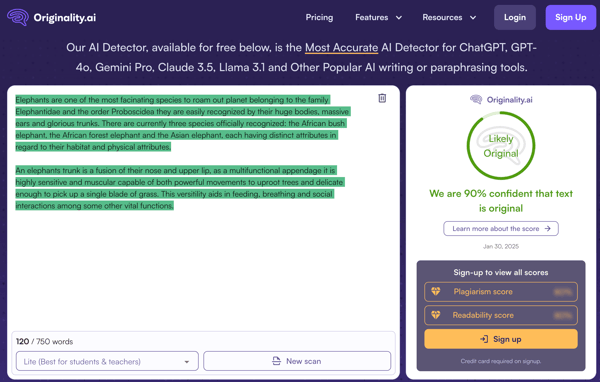
During testing, though, not all AI-generated content was caught. Some pieces written by newer models, like GPT-4, slipped through the cracks. This matched what I saw in several G2 reviews, where users noted that advanced AI-generated text could sometimes bypass detection.
False positives were another issue. Human-written content was occasionally flagged as AI-generated, especially when the writing had a clear structure or repeated phrasing. That can be troublesome for writers, students, or freelancers whose work may be questioned unfairly.
Still, Originality.AI performs well overall, especially for bulk content checks. I’d just use it with a second layer of review when accuracy really matters.
“Understanding the right model to choose was a bit challenging. I used a model that was too sensitive and produced high false positives. But with a different model, I was able to get a more accurate and nuanced report.”
- Originality.AI Review, Mel N.
GPTZero felt especially useful for academic or formal writing, where originality is a major concern and quick verification can save a lot of time.
Its ability to differentiate between human-written and AI content was one of the biggest positives for me. This is particularly helpful in academic settings where original work is critical, and in professional environments where plagiarism or AI misuse can create real concerns.
Speed is another area where GPTZero does well. The tool gives instant feedback on whether the content is likely AI-generated, which is useful in fast-paced workflows like newsrooms, classrooms, or editorial review processes.
The customization features also add flexibility. I could adjust sensitivity to AI patterns or fine-tune detection parameters based on the kind of writing I was checking. For creative writing, for example, a less aggressive setting made more sense because stylistic choices can sometimes resemble AI-generated text.
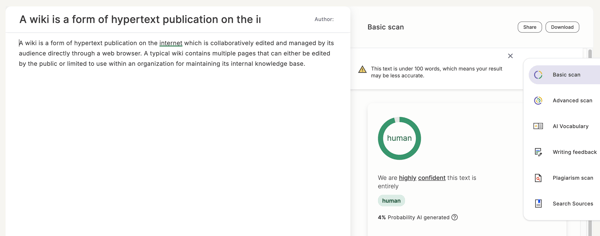
Accuracy is where I had to be more careful. GPTZero sometimes flagged human-written content as AI-generated, especially when the writing was structured or polished. On the flip side, it also missed some AI content from newer models like GPT-4.
Non-English content was another weak spot. While GPTZero performed fairly well with English text, the accuracy dropped when analyzing other languages. G2 users mentioned similar issues with French and Spanish, so I wouldn’t rely on it heavily for multilingual reviews.
Despite these limitations, GPTZero is still useful as a starting point. I wouldn’t treat it as a final verdict, but for quick checks and preliminary reviews, it’s a helpful tool to have in the workflow.
“One thing that I dislike about GPTZero is that it can sometimes be overly cautious and flag human-written text as AI-generated. This can be frustrating when you know the content is original. I also wish the free version allowed slightly larger text limits for testing.”
- GPTZero Review, Akki B.
AI Image Detector by Copyleaks was helpful when I needed a quick way to check whether an image was AI-generated or human-made. As synthetic visuals become harder to spot manually, having a simple first-pass tool felt useful.
The speed was the first thing that stood out. I could upload an image and get a result in seconds, without any complicated setup or technical steps. The drag-and-drop interface made the whole process feel simple.
File support was practical too. AI Image Detector works with JPG, PNG, WEBP, and HEIC files up to 20MB, which covered most of the images I tested. That saved me from having to convert files before running a scan.
The probability score also made the results more useful. Instead of giving a simple yes-or-no answer, the tool shows how likely it is that an image was AI-generated. That gave me more context before deciding whether to trust the image or investigate further.
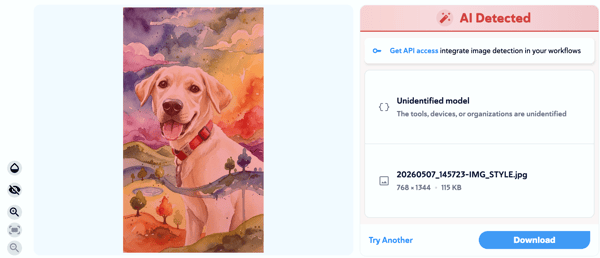
That said, accuracy was not always consistent. Edited images, heavily stylized photos, and realistic AI-generated images could confuse the tool. In some cases, real images were flagged as AI-generated, while some synthetic images were missed.
The lack of explanation behind the score also felt limiting. A probability score is helpful, but the tool doesn’t clearly explain which visual patterns, artifacts, or signals influenced the result. For anything high-stakes, I’d want more detail.
Overall, AI Image Detector is a useful first-pass tool for visual verification. It’s fast and easy to use, but I wouldn’t rely on it as the final answer for important image analysis.
"One thing I didn’t like about the AI image detector is that its accuracy can feel inconsistent, especially with more complex or subtly edited images. At times, it labels real images as AI-generated or fails to detect images that clearly look artificial, which reduces trust in its results. Another drawback is the lack of detailed explanation behind its decisions—it often gives a verdict without clearly showing how it reached that conclusion."
- AI Image Detector Review, Poorvaa M.
ZeroGPT is one of the simpler tools I tested for quick AI content detection. It’s easy to use, fast, and works well when I need a quick read on whether something might be AI-generated.
The processing speed is a clear advantage. ZeroGPT delivers fast results in situations where time is a critical factor, such as content moderation or academic plagiarism checks.
Its algorithms are also built to recognize patterns and structures common to AI-generated text. That helped reduce false negatives in many of my tests and made the tool feel dependable for basic content checks.
Longer content was easier to handle than I expected. Unlike some AI detection tools that struggle with bigger inputs, ZeroGPT handled lengthy articles with ease. The multilingual support was also useful when working with non-English content.
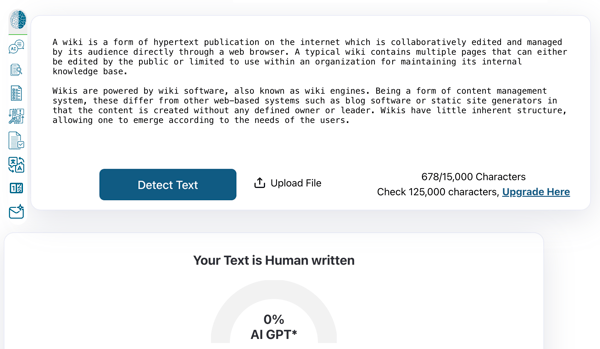
The first issue I noticed was false positives. Completely human-written content was sometimes flagged as AI-generated, which meant I had to double-check the original work before trusting the result.
Customization is also limited. There’s no way to adjust sensitivity or fine-tune which markers the tool should prioritize. That made it harder to adapt ZeroGPT to different writing styles or more specialized content.
Even with these limitations, ZeroGPT is still a solid option for quick checks. For high-stakes or nuanced content, I’d pair it with a more flexible tool or a manual review.
“It sometimes flag a human written content as AI generated, which causes frustration especially while we are on a deadline.”
- ZeroGPT Review, Namrata G.
Looking to write using AI? Check out the best AI writing generators for 2026.
Undetectable AI stood out as a fast, lightweight option for checking AI-written text. It felt especially useful when I was reviewing English content and needed results quickly.
Speed matters when dealing with a large number of articles, and this is where Undetectable AI performs well. The tool processes content quickly without making the workflow feel heavy, so I could check for AI-written text in real time.
It also keeps up with a wide range of AI models. I saw it work with GPT-based systems, transformer models, and other newer AI tools, which is helpful as AI writing continues to get better at mimicking human writing.
Another useful part is how it looks at patterns, language use, and sentence structure. These signals can be subtle, like repeated phrasing or sentences that feel too polished, but they helped me understand whether a piece of content felt authentic or not.
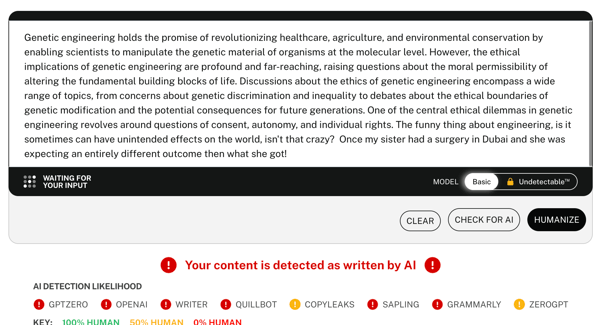
The tool isn’t perfect, though. Human-written content can sometimes be flagged as AI-generated, especially when the writing is formal or highly structured. I had to verify several pieces manually because the tone or sentence flow resembled AI patterns.
It also struggled with vague, complex, or non-English content. When the writing was poorly structured or written in languages like Spanish and German, the results became less reliable.
Undetectable AI still holds value if you’re looking for a fast detection tool focused mainly on English content. I’d just be cautious with anything multilingual, ambiguous, or high-stakes.
“I don’t enjoy how much you must pay to use the software. There are a lot of other AI detection tools that are cheaper to use.”
- Undetectable AI Review, Verified User in Higher Education
Content At Scale felt more advanced than a basic AI checker. It makes the most sense for users who need AI detection along with content refinement and are willing to spend some time learning the platform.
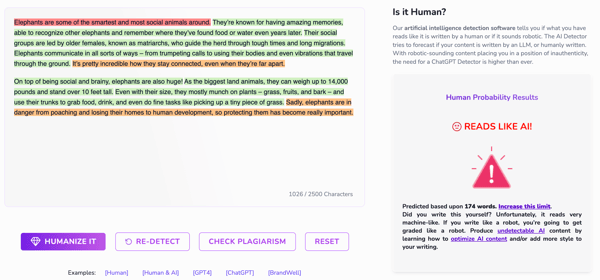
The AI detection itself was strong. Content At Scale uses advanced algorithms to analyze content and provide insight into whether the writing may be AI-generated. That’s helpful when I want to maintain authenticity and avoid publishing content that feels overly automated.
Versatility was another plus. The tool can detect AI content across articles, blog posts, and even social media captions. Whether I was working with short-form content or long-form articles, it still delivered useful insights.
The built-in customization and editing tools also stood out. They allowed me to modify detected content and make it feel more human-like, which is useful when refining AI-generated drafts to better match a specific voice or brand tone.
The initial setup was overwhelming, especially as a first-time user. There’s a steep learning curve if you’re looking for something quick and easy, and I had to spend time exploring settings, reviewing documentation, and tweaking configurations.
Non-English content was another limitation. While the tool performed reasonably well in English, my tests with German and Portuguese text produced inconsistent results.
Content At Scale can be valuable for organizations that need powerful, customizable AI detection. It just may not be the best fit for users who want something simple and plug-and-play.
“The tool is highly complex to set up at first. Users would need time to learn and get comfortable using it.”
- Content At Scale Review, Amelia G.
Winston AI is built for more than quick one-off AI checks. What stood out most was how useful it feels for teams that need to document, explain, and share detection results.
The shareable PDF report was one of the strongest features. Instead of just showing an AI score on the screen, Winston AI creates a formatted report that can be sent to a client, editor, or team member. That’s especially helpful for content teams, SEO agencies, and educators.
The interface is also easy to work with. The dashboard is clean, and the color-coded results make the analysis simple to understand. AI-generated sections are highlighted in red, while human-written text appears in green, which made it easier to review longer documents.
Team-based workflows are another area where Winston AI feels practical. Features like team management, built-in word counting, shareable reports, and the Chrome extension make it more useful for content operations than a basic AI detector.
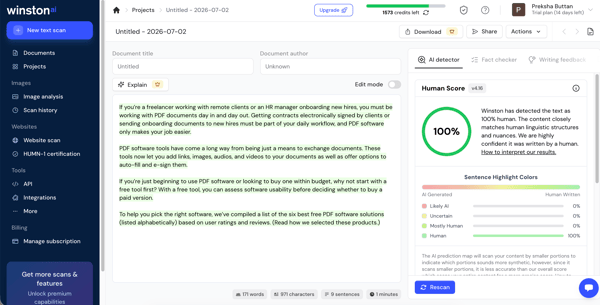
The biggest issue is the word limit per submission. Winston AI has a 1,500-word processing limit, which can be inconvenient when checking long-form content like blog posts, whitepapers, or academic essays.
Pricing is also a drawback. Some useful features, including plagiarism detection, are only available on higher-tier plans, which can make the tool feel expensive for individual users or smaller teams.
Overall, Winston AI is a strong option for teams that need AI detection results they can share and document. The word limits and pricing are the main things I’d watch before committing.
"Prices of paid plan has been increased a lot which makes it somewhat expensive now due to which it lacks behind for beginners to use it."
- Winston AI Review, Robert T.
Humbot takes a slightly different approach from most AI detectors I tested. Instead of focusing only on detection, it helps rewrite AI-generated content so it sounds more natural and human-written.
The first thing that stood out was how easy it was to use. I could paste AI-generated text, click the humanize button, and get a rewritten version in seconds. There was no complicated setup or learning curve, which made it practical for quick checks and rewrites.
The rewritten content usually kept the original meaning intact while improving the flow. In my testing, it felt more natural than a basic synonym swap, which is helpful for blog posts, marketing copy, social media captions, and other AI-assisted drafts.
The detection and humanization workflow was useful too. Humbot can show which parts of the content are likely to be flagged as AI-generated before rewriting them. That helped me focus on the sections that actually needed improvement instead of rewriting the entire document.
.gif?width=600&height=338&name=humbot%20(1).gif) Source: Humbot
Source: Humbot
The word limit was one of the biggest limitations. Paid plans allow only around 1,000 to 1,200 words per submission, while the free plan is much more limited. For long-form articles, research papers, or whitepapers, I had to split content into smaller sections.
Output quality was not always consistent with complex or nuanced writing. While Humbot worked well for simpler content, some sections still sounded slightly AI-generated after rewriting, so a manual review was still necessary.
Overall, Humbot is useful for content creators and marketers who need to quickly improve AI-generated drafts. The main value is in the humanization workflow, but I’d still review the final version before publishing.
"Humbot is a little costly and when we tried the free version during the trial period, we could only paste up to 300 words atr once. This made the procedure a little cumbersome, but it was still quite beneficial."
- Humbot Review, Sohan C.
Using AI for content editing? Get your guide to AI content editing.
GPTZero, OpenAI's AI Text Classifier, and Turnitin's AI detection system are widely regarded for their effectiveness in identifying AI-generated text. These detectors use different algorithms and training data to assess patterns and inconsistencies typical of AI writing.
Yes, AI detectors can be wrong. They may falsely identify human-written text as AI-generated, or vice versa, especially when the text is highly polished or uses advanced language. False positives and negatives can occur due to variations in writing style or the limitations of the detection algorithms. Therefore, no AI detector is perfect, and results should be interpreted with caution.
Based on my research, GPTZero, Writer, ZeroGPT, Undetectable AI, and Corrector App are some of the best AI content detectors.
Originality.AI, Copyleaks, Undetectable AI, and Content at Scale offer some of the best free AI content detectors.
For teachers, Turnitin’s AI detection tool is a top choice, especially since it works seamlessly with its plagiarism checker to spot AI-generated content in student work. It’s trusted in schools and gives solid reports. GPTZero and OpenAI’s AI Text Classifier are also good, but Turnitin tends to be more thorough for academic use.
As a content creator, I’ve always prided myself on the human touch: the emotion, intention, and nuance behind every word. But in a world where AI can now generate entire articles in seconds, it’s getting harder to distinguish between human creativity and machine-made text. That’s where AI content detectors come in. These tools help me uncover the hidden presence of AI, diving into sentence structures and subtle patterns that set machine-generated content apart from my own.
No detector is perfect, but they’re essential for keeping my writing authentic, especially at a time when the question "Who wrote this?" is more important than ever. A growing trend in G2 is user pain points with tools not keeping pace with newer AI models. Many reviews note that while GPT-3 content is easy to catch, GPT-4 and Claude 3.5 are much harder to flag reliably. This gap is driving demand for hybrid models that blend detection with human review.
Read the truth about AI writing productivity to separate the hype from reality and see what AI can genuinely improve in modern content workflows.

How do you know if what you're reading was written by a person or a machine? \n
 by Alyssa Towns
As writers, we all want our work to stand out as genuinely our own. But with the internet...
 by Harshita Tewari

Plagiarism isn’t an academic word that disappears once you graduate. Neither is it as simple...
by Harshita Tewari