


Published: February 2026 · Last updated: April 2026
If you’ve ever sat in a meeting watching two stakeholders argue about agile workflows versus pretty timelines, you’ve already experienced the Asana vs. Jira debate. It’s the classic office standoff in project management software: the engineering team that refuses to leave their complex ticket backlogs, and the marketing team that just wants a colorful board they can actually understand.
Choosing the right tool is high-stakes. Jira and Asana are currently ranked #1 and #2 in the G2 grid report for the project management category, meaning thousands of teams have already stress-tested both platforms in the real world.
So instead of repeating the usual feature lists, I approached both tools with one question in mind: which one helps teams move faster without creating more overhead?
As I tried and tested Asana and Jira across common project scenarios, the contrast became clear fast. I didn’t go in as a power user of either tool, but that made the differences even more obvious.
Asana is best for business, marketing, and creative teams that want intuitive task and calendar management, while Jira is built for software and IT teams that need deep Agile issue tracking. Because they serve different needs, many organizations use both; developers work in Jira, while leadership tracks progress in Asana.
In this comparison, I’ll break down what stood out during my experience, where each tool excels, and which type of team is more likely to benefit from Asana or Jira in practice.
| Feature | Asana | Jira (Atlassian) |
| G2 rating | 4.4/5 | 4.3/5 |
| Best for | Marketing, creative, operations, and HR teams for project management and cross-functional workflows | Software development, engineering, IT, and product management teams with agile/DevOps workflows |
| Strengths | User-friendly and simple interface, fast onboarding, visual timelines, and broad team adoption | Deep Agile tooling (Scrum/Kanban), powerful issue tracking, and extreme workflow customization |
| Ease of use |
8.6/10 G2 rating; Clean, intuitive, low setup overhead |
8.1/10 G2 rating; Generally easy and powerful, but requires setup |
| Free plan |
|
|
| Pricing and plans |
|
|
| Task and issue tracking | Great for task management for non-technical teams with simple task lists; provides good visibility | Robust issue tracking with custom fields, statuses, and automation |
| Agile support | Lightweight boards and sprint-style planning | Full Scrum and Kanban support with backlogs, epics, and sprint controls |
| Customization and automation | Useful rules and flexible automations | Extensive customization across workflows, permissions, and automations |
| Reporting and metrics | Visual dashboards that work well out of the box | Advanced Agile reports like burndown, velocity, and cycle time |
| Integrations | Strong integrations with common business tools | Deep integrations with developer tools and CI/CD pipelines |
| Customer segment (G2 Data) |
|
|
Note: Both Asana and Atlassian roll out new updates to their software. The details here reflect the most current capabilities as of April 2026, but may change over time.
For pure software development teams, Jira is the better choice. It's built for issue tracking, backlogs, and sprints, with stronger G2 scores on project management (8.4 vs. 8.2) and issue tracking (9.2 vs. 8.1). For mixed teams where product, marketing, design, and operations all need visibility into the same work, Asana is easier to adopt and maintain, with higher G2 scores for ease of use (8.6 vs. 8.1) and ease of setup (8.6 vs. 8.0). Choose Jira for engineering execution; choose Asana when cross-functional alignment matters as much as dev workflow depth.
To understand the real split between these two, you have to look at their origin stories. Asana was founded by Facebook ex-executives to solve "work about work," making coordination smoother for everyone. Jira’s journey began as a tool specifically for bug tracking among support teams. That DNA still dictates how they feel today: Asana assumes you want flexibility and clarity; Jira assumes you want structure and data.
The real differences between Asana and Jira didn’t show up on pricing pages or feature grids. They showed up once I started running the same projects in both tools.
Despite their differences, these tools share a solid foundation. For many teams, either platform can get the job done, at least at a basic level.
Asana is the easier default for cross-functional teams. Jira is the stronger engine for software development. Choose Asana for cross-functional work where non-technical stakeholders need visibility. Choose Jira for software development teams that need structured engineering workflows.
To make sure this was a fair comparison, I used both Asana and Jira to manage the same types of projects, following the same workflows I’d use in real work — no special configurations, no edge cases. I tested both tools across the following areas:
Here’s the thing: I wanted this to be as realistic as possible, so I approached both tools the same way — same projects, same expectations, no tweaking one to make it look better than the other. I evaluated my experience based on:
To add another perspective, I also cross-checked my observations with G2 reviews to see how other teams experience Asana and Jira in real-world use.
Disclaimer: I share my experience testing the two tools as of April 2026. If you read this after a few months, some features and functionality might have evolved. The companies will be able to give you the most up-to-date information.
This is where theory met reality. Below, I share what stood out as I used Asana and Jira side by side, who did what better, where each tool fell short, and my verdict for each task.
Project management tools are all about creating tasks, updating statuses, and trying to keep work moving without friction, and this test focused on how that starts with project setup.
In Asana, getting started was seamless. I hit create project and could immediately choose from a wide range of templates, import a spreadsheet, start from a blank project, or even use AI to generate a structure.
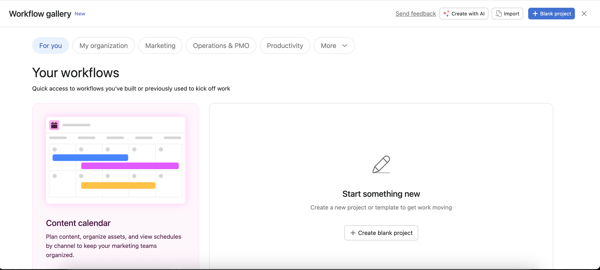
I went straight for the templates, the best cheat code for adopting any new project management (PM) tool. I selected a "Content Calendar" template, and I simply loved it. It wasn't just a blank board; it was pre-populated with everything I actually needed, like example tasks, content stages, and content types, all the things I’d expect to track in a real editorial workflow.
It even showed me how to convert a task into a template for reuse. I could decide who to share it with immediately, and the board was practically ready for my teammates to join and start using right away, with just a few light edits.
Jira’s setup experience felt more deliberate and more demanding right from the start. Projects are called Spaces, and while I could create a new Space using templates, the process required more upfront decisions.
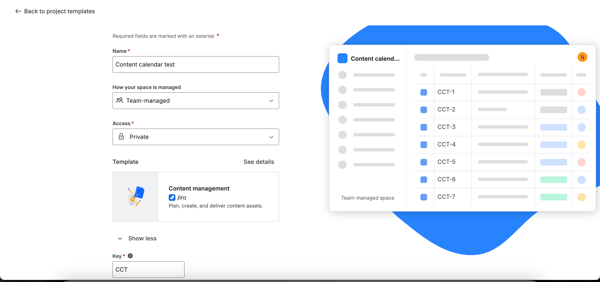
Early on, Jira asked me to choose how the project would be managed: team-managed or company-managed. Team-managed projects are simpler to get started with, but they’re more siloed. Company-managed projects allow for shared workflows and deeper customization, but they come with admin-level complexity. We also get a "Project Key," which dictates how every task is named forever. But honestly, the templates left me wanting more.
While Jira’s content-focused template included fields like content type and publication date, I struggled to figure out how to create task templates or easily clone existing work. Jira definitely had a lot of customization options to set up a great content calendar, define and monitor even the smallest details of a project and task, but it took time to understand how to use them effectively.
For project setup, Asana was the clear winner for me. I could go from idea to a usable project in minutes, largely because the templates were practical, thoughtfully structured, and easy to adapt.
Winner: Asana
G2 users rate Asana 8.6/10 for ease of use compared to Jira's 8.1/10.
In Asana, managing tasks felt fluid and personal. The "My Tasks" and “Home” were my command centers. It automatically pulled everything assigned to me across all projects into one clean list. I loved the ability to customize my Home with widgets like adding project boards, tasks I’ve assigned to others, goals, and even a private notepad. It effectively turned the software into a daily planner tailored exactly to my needs to manage my time effectively.
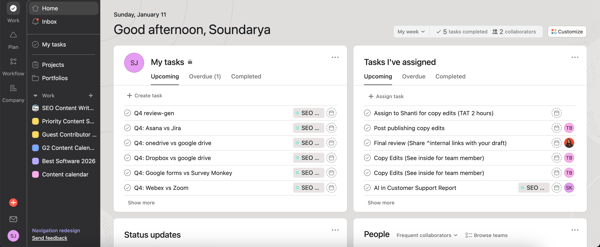
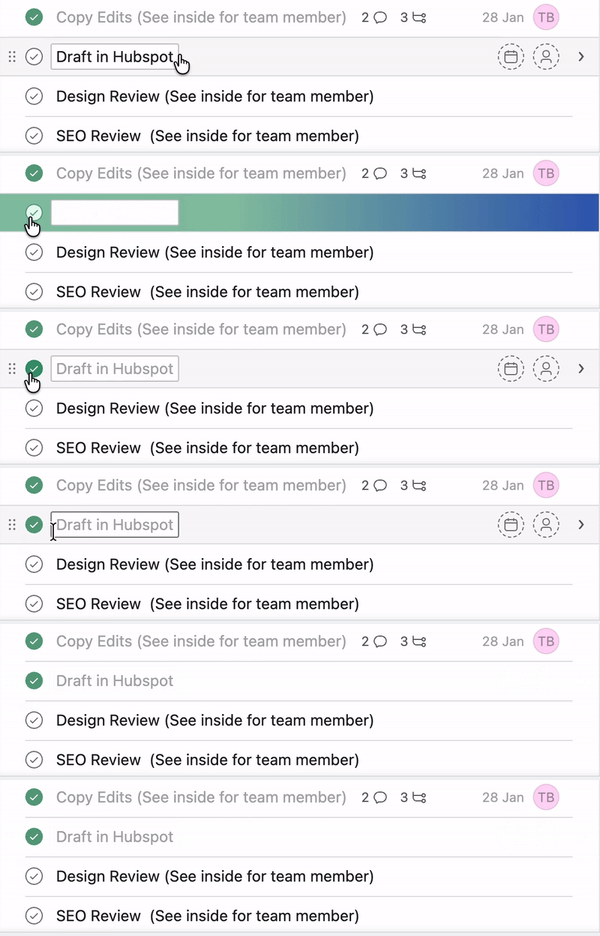
Creating a task was as fast as typing a line in a notebook and hitting enter. The best part, however, is the friction-free execution: completing a task is just a single click on a checkmark. It sounds trivial, but that binary, instant "check" gave me a sense of momentum that I actually looked forward to.
Jira, by contrast, made task management feel more like data entry. The "For You" section felt simplistic, showing only recent spaces or starred items, with almost no room for customization compared to Asana.
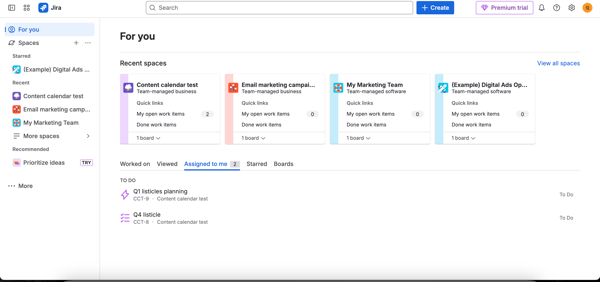
That said, Jira’s work items and subtasks are far more structured. Depending on how the project is configured, you often can’t move a task to the next stage without completing specific required fields. While this makes the process feel heavier than Asana’s quick-entry style, it also ensures that every piece of work — no matter how small — captures the necessary information before moving forward.
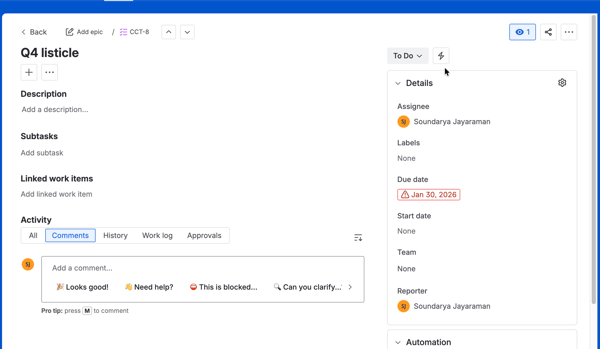
Each Jira work item also includes dedicated tabs for Comments, History, Work Logs, and Approval, making it easy to track time and changes over a period. Asana shows similar information, but it’s consolidated under the “All activity” tab and “Comments” tab.
One feature I genuinely liked in Jira was Linked Issues. While Asana handles simple dependencies through its Dependencies field, Jira lets you define more explicit relationships like blocks, is blocked by, or a clone of. Jira also surfaced a lot of contextual information at once — project keys, space names, and issue types — which makes sense for execution-heavy teams.
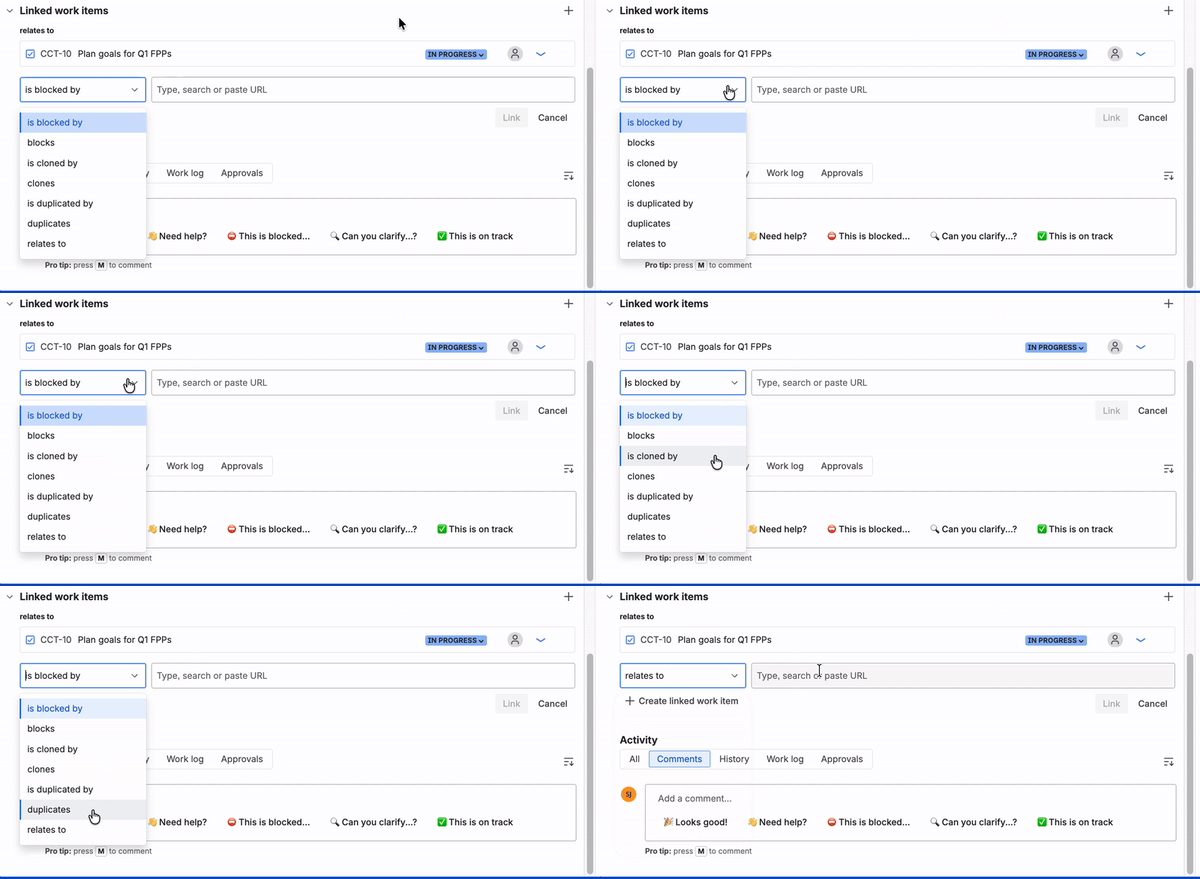
My biggest friction point? I couldn’t simply "check" things off. You have to transition items — selecting a dropdown to move status from "In Progress" to "Done" or dragging a card across a board. It feels like a formal status update to a database record rather than crossing an item off a to-do list. While great for organizational tracking, it felt heavier for me.
For task management, the winner is split. Asana works better for personal and day-to-day task management. The combination of My Tasks, a customizable Home, and friction-free completion minimized mental overhead and helped me move faster without thinking about the system behind the work.
Jira, on the other hand, shines when task management needs structure and enforcement. Required fields, linked issues, detailed histories, and explicit status transitions ensured every task carried the right context and data, which is invaluable for teams that prioritize accountability, traceability, and strict workflow execution.
Winner: Split
Users on G2 rate Jira 8.4/10 for its project management capabilities compared to Asana's 8.2/10.
This is where both tools moved beyond task tracking and into how teams actually stay aligned day to day.
Asana covered all the collaboration basics I needed, such as assigning tasks, tagging teammates in comments, and getting notified when someone replied to or mentioned me. What stood out, though, was that collaboration wasn’t limited to individual tasks.
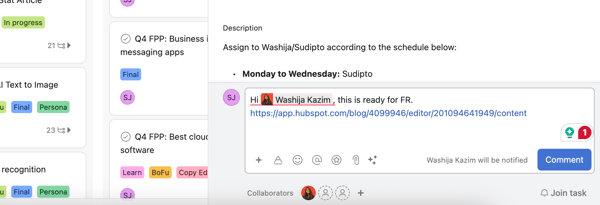
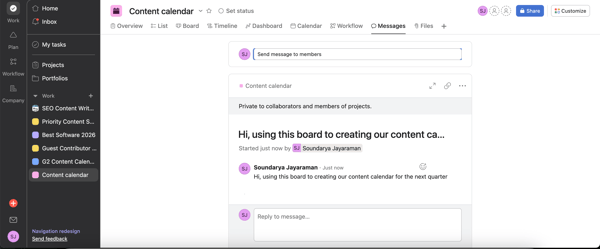
Beyond task and subtask comments, I could also message directly on the project board. For teams that don’t rely heavily on a dedicated instant messaging tool, this felt genuinely useful. Project-level messages made it easy to share updates, set context, or explain changes in one place, without burying important information inside a single task.
I also found Asana’s Proofing feature to be a hidden gem for creative work. When a designer attached an image or PDF, I could leave comments directly on specific areas — like “change this color” — pinned to the exact spot. That turned feedback into clear, actionable updates and saved a lot of back-and-forth explaining changes.

Another big advantage was cross-team visibility. In Asana, I could add a single task to multiple projects at once. For example, a “blog post” task could live in my content marketing calendar, Q1 goals, and an email marketing campaign simultaneously. When I updated it in one place, it automatically synced everywhere else. That made it much easier to keep different teams aligned without duplicate work.
Jira also supports the essentials, such as comments, mentions, and notifications, but the experience felt more transactional. Conversations were tightly tied to issues, status changes, and execution updates. Commenting to flag blockers or dependencies felt natural, but broader collaboration stayed scoped to individual work items.

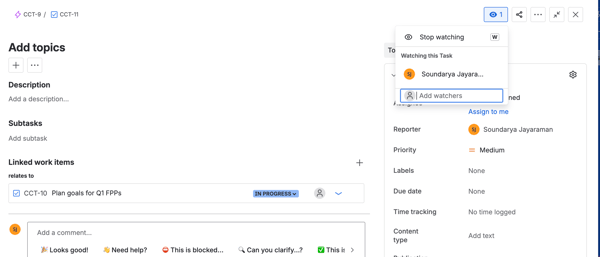
One feature that I found surprisingly useful was the Watcher list. In Asana, I’m either a collaborator or I’m not. In Jira, I could explicitly watch a task or a ticket to get notifications on every status change without being the Assignee or Reporter. It allowed me to shadow critical tasks passively, ensuring I knew exactly when they hit Done without pestering the person.
That said, Jira tasks are strictly tied to one project or Space. While I could clone a work item to put it on another board, that created a duplicate copy rather than a synced instance, meaning updates in one didn't reflect in the other. I missed the ease of Asana’s ability to let one task live in two places, which made keeping cross-functional teams on the same page much harder in Jira. I could have used Linked Items for the purpose, but it lacks the flexibility of Asana.
For communication and collaboration, Asana worked better for me, especially in cross-functional settings. Project-level messaging, proofing tools, and synced tasks across projects made collaboration feel fluid and transparent. Jira handled execution-focused communication well, particularly with features like Watchers, but Asana made it easier to keep everyone aligned without extra coordination overhead.
Winner: Asana
This is where the target audience for each tool became undeniably clear.
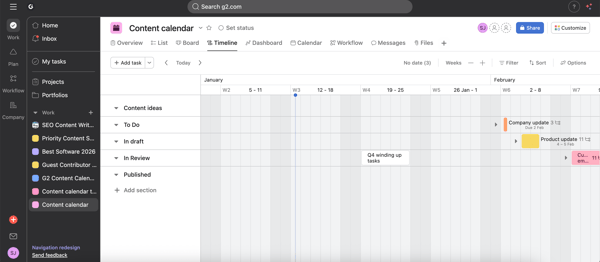
In Asana, the standard views like List, Board, Calendar, and Timeline are visually polished right out of the box. The Timeline view was my favorite. It felt modern and fluid, letting me see sections laid out clearly across weeks. I could drag the task across dates and watch the schedule adjust automatically for all dependent tasks. It was intuitive enough that I could screenshot the view and drop it straight into a slide deck for a client or leadership update without needing to clean it up.
I also loved the Portfolios feature. It lets me group multiple projects into one high-level dashboard. Seeing a simple red/yellow/green “traffic light” status for each project gave me the executive summary I needed at a glance. It answered the question “Are we on track?” in about five seconds, without forcing me to dig into task-level detail.
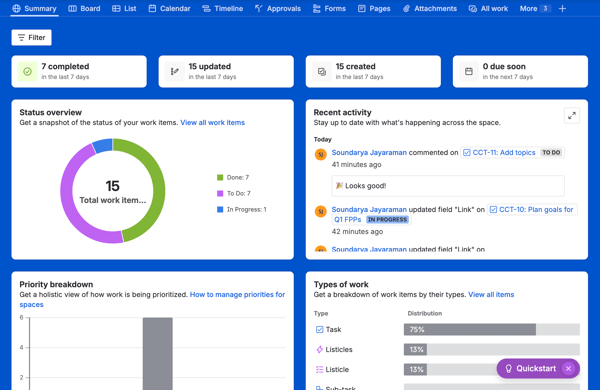
Jira covers the same fundamentals with Board, List, Calendar, and Timeline views. I actually found myself preferring its Summary page over Asana’s Overview. It gave me a fantastic, data-dense snapshot of exactly where things stood: a Status overview pie chart showing work distribution, a Priority breakdown bar chart, and a live Recent activity feed showing who updated or commented on what. It also clearly broke down types of work across the project. I could surface similar insights on Asana, too, through dashboards, but I had to manually add and configure widgets to get there.
Where Jira clearly took over was when I switched to software development or IT-related templates. Now, I’ll be honest. I’m not an engineer, and I don’t have deep Agile or Scrum expertise, but even without that background, the shift in power was obvious. Suddenly, I had access to views like Backlog and Active Sprints that unlocked a different level of operational visibility. The reporting here was extensive. It had burndown charts, velocity reports, and analytics like created vs. resolved issues, resolution time, time since issue, etc, to help spot bottlenecks.
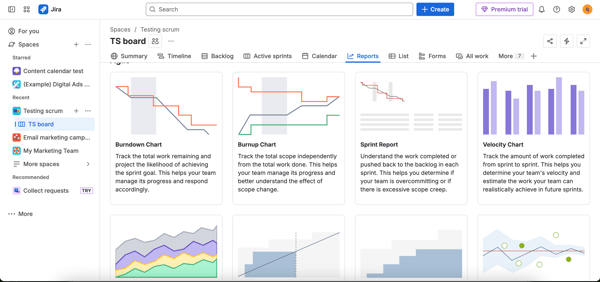
To be clear, Asana also provides good reporting and analytics. From the Reporting section, I could import existing dashboards from my projects or create my own, adding charts and widgets to track progress, workload, and status across projects. I had control over what I wanted to see in both tools.
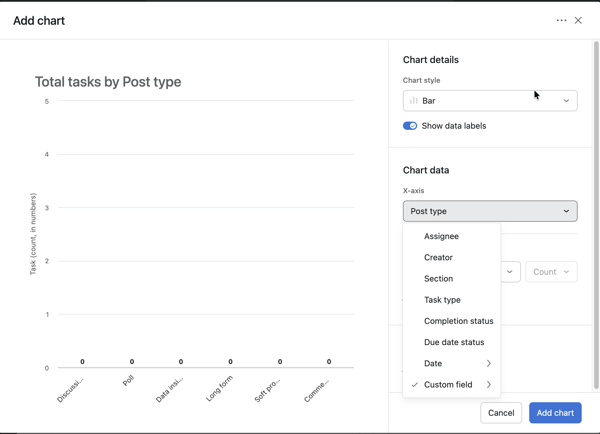
For me, the real difference came down to variety. Jira simply gave me more report types and analytical views to choose from, especially for engineering and IT workflows. Asana’s reporting felt flexible and presentation-friendly, while Jira’s breadth made it better suited for deeper performance analysis when teams need to inspect how work is moving, not just where it stands. So, the winner for me here is Jira.
Winner: Jira
Users on G2 rate Jira 8.6/10 for its views, giving it a slight edge over Asana's 8.5/10.
This is the section I didn’t think I’d care much about at first until my projects started filling up with tasks, comments, and moving parts.
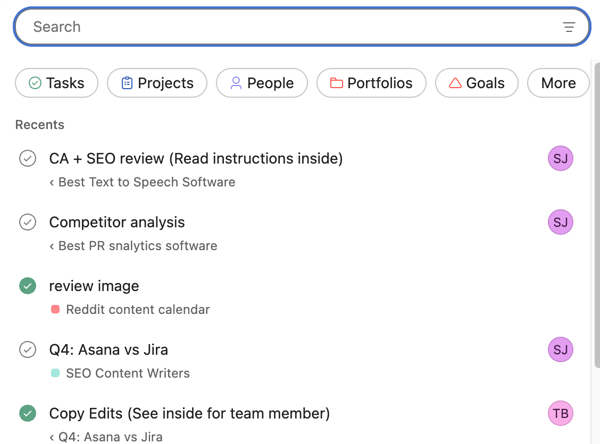
Searching in Asana felt straightforward and forgiving. I could quickly find tasks by name, assignee, due date, or project, and the filters were easy to layer without feeling overwhelming. Even when I didn’t remember the exact task name, I could usually narrow things down fast enough to get where I needed to be.
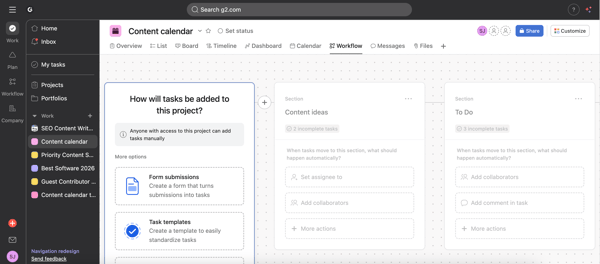
Where Asana really helped was in how approachable its automation felt. Using Workflow, I could set up simple workflows in a project, starting from how tasks get added in a project to how it’s assigned, triggers to move to a section on the board, what happens when a task is completed, updating custom fields automatically, or nudging tasks forward when dependencies are completed. It’s easy and pretty straightforward to use it. Asana also has Asana AI, which I could ask about the summary or status of a particular project or a task.
Search in Jira was far more powerful, but also more demanding. I could slice work in almost any way imaginable — by status, assignee, issue type, priority, or custom field. But the real superpower and the feature that intimidated me at first is JQL (Jira Query Language). While Asana has a nice visual search bar, Jira lets you write code to find anything. Once I started using advanced filters and JQL, I could search for things in any way I want. For large projects or long-running initiatives, that depth is incredibly useful.
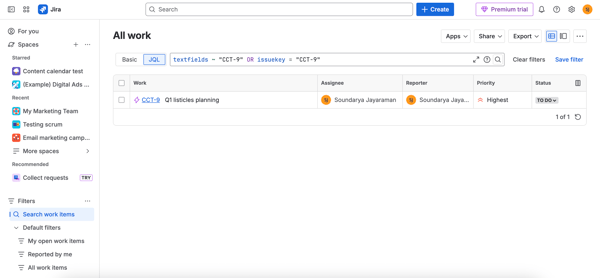
That same theme carried into automation. Jira’s automation rules let me build complex, multi-step workflows — triggering actions based on status changes, conditions, or field updates. It’s powerful, but it also requires more upfront thinking. I had to be clear about the logic I wanted to enforce, or risk creating workflows that were hard to understand later.
For search and automation, my verdict is split. Asana worked better for me when I wanted to quickly find work and automate the obvious things without much setup. Jira excelled when I needed advanced filtering and highly specific automations, especially in complex or process-heavy environments.
If your priority is reducing busywork with minimal effort, Asana feels easier to live in. If your priority is control, visibility, and precision at scale, Jira’s search and automation capabilities go much further.
Winner: Split
This is where it becomes clear how well each tool fits into a broader software stack.
Asana offers a strong set of 100+ integrations, many of which are available even on its free plan. This makes it appealing for small teams and cross-functional workflows, where connecting everyday tools like Slack, Google Drive, and design software matters. Asana’s integrations are designed to reduce context switching. For example, allowing tasks to be created from Slack messages or keeping file collaboration centralized without forcing teams to leave the tools they already use.
Jira operates at a much larger scale. With access to 3,000+ apps through the Atlassian Marketplace, it’s more likely to support niche or highly specialized use cases. More importantly, Jira’s real strength lies in its developer and IT ecosystem. Native integrations with tools like GitHub, GitLab, Bitbucket, CI/CD platforms, and service desk software tightly connect project tracking with code, deployments, and incidents.
In practice, this allows Jira to function as a system of record for technical teams, surfacing commits, builds, and operational data directly within work items — a level of integration depth that general project management tools like Asana don’t aim to replicate.
When it comes to integrations, Jira wins on depth and ecosystem breadth, especially for engineering and IT environments. Asana integrates well with common business tools and supports cross-functional teams effectively, but Jira’s developer-first integration network is in a different category.
Winner: Jira
Pricing is one of the clearest differentiators between Asana and Jira, not just in terms of cost, but in how quickly teams hit paywalls as they scale.
Both tools offer free plans, but they’re designed for very different levels of usage. Jira generally stays more affordable per user, while Asana’s pricing reflects its emphasis on usability, visibility, and cross-functional adoption.
| Feature | Asana free plan | Jira free plan |
| User limit | Up to 2 users | Up to 10 users |
| Tasks | Unlimited | Unlimited |
| Projects | Unlimited | Unlimited |
| Messages/comments | Unlimited | Unlimited |
| Views | List, board and calendar views | Backlog, board, list, summary, timeline |
| Storage | Unlimited (100 MB/file) | 2 GB total |
At the free tier, Jira is the better option for small teams, while Asana’s free plan is better suited for individuals or very small collaborations.
| Plan tier | Asana pricing (per user/month) | Jira pricing (per user/month) |
| Entry paid tier | Starter: $10.99 | Standard: $7.91 |
| Mid-tier | Advanced: $24.99 | Premium: $14.54 |
| Enterprise | Custom | Custom |
Asana’s pricing scales quickly, but it unlocks features aimed at cross-functional teams, goals, advanced reporting, automation, and portfolio-level visibility. For organizations prioritizing usability and adoption across departments, the higher cost can be easier to justify.
Jira remains more budget-friendly as teams grow. Even at lower price points, it offers strong workflow control, reporting, and integrations, particularly for software development and IT teams. The trade-off is that teams often spend more time on setup and configuration to fully realize that value.
From a pure pricing perspective, Jira offers better value for teams, especially at the free and entry-level paid tiers. Asana is more expensive, but that premium reflects its focus on usability, collaboration, and visibility across non-technical teams.
If cost efficiency is the priority, Jira has the edge. If ease of adoption and cross-team clarity matter more, Asana’s pricing may still make sense despite the higher cost.
Winner: Jira
| Task | Winner | Why |
| Setting up projects | Asana🏆 | Faster time to value with practical templates, minimal upfront decisions, and an easy path from setup to real work. |
| Task management | Split | Asana excels at personal and day-to-day task flow with low friction, while Jira wins for structured, process-driven execution with enforced fields and traceability. |
| Communication and collaboration | Asana🏆 | Project-level messaging, proofing for creative feedback, and synced tasks across multiple projects make cross-team collaboration smoother. |
| Views and analytics | Jira🏆 | Jira provides more extensive execution-level reporting and operational analytics, with specialized views designed for Agile, Scrum, and IT workflows. |
| Search and intelligence | Split | Asana is easier to search and automate for common workflows, while Jira offers more powerful filtering and advanced automation for complex environments. |
| Integrations | Jira🏆 | A significantly larger ecosystem and deep native integrations with developer and IT tools make Jira stronger for technical stacks. |
| Pricing | Jira🏆 | More generous free plan and lower per-user pricing make Jira more cost-effective, especially for growing teams. |
I also looked at G2 review data to understand where Asana and Jira stand out across satisfaction, adoption, and feature strength. Here’s what stood out:
Got questions? G2 has got the answers.
Jira offers a more generous free plan for small teams, supporting up to 10 users with unlimited projects and tasks. Asana’s free plan is more limited but still works well for individuals or very small teams.
Both Asana and Jira are leading project management software, consistently ranking near the top of the project management category on G2. Asana leads in cross-functional adoption, while Jira dominates software development and IT workflows.
Asana is one of the best collaborative project management platforms, especially across non-technical teams. Features like project-level messaging, proofing, and synced tasks across projects make collaboration more fluid.
Asana is one of the most popular project management software for consulting firms, and is often preferred because it’s easy to present to clients, manage timelines, and collaborate across functions. Jira is less common outside technical consulting engagements.
Medium-sized businesses tend to rate Asana highly for usability and adoption across departments. Jira is rated strongly by mid-sized engineering and IT-led organizations that value process control.
Asana generally receives stronger feedback for its mobile experience, thanks to a cleaner interface and easier task updates. Jira’s mobile app is powerful but feels more utilitarian.
Jira is one of the best project management apps with time tracking. It offers native time tracking and work logs, making it better suited for teams that need built-in tracking. Asana typically relies on integrations for time tracking functionality.
Asana is widely considered more user-friendly, especially for non-technical teams. Its interface, terminology, and workflows require far less onboarding than tools like Jira.
Jira is one of the top project management tools for software development. Its Agile views, sprint management, issue tracking, and deep integrations with developer tools make it purpose-built for engineering teams.
It depends on the team makeup. Startups with engineering-heavy workflows often choose Jira, while those focused on marketing, product, and operations tend to prefer Asana for faster adoption.
Jira wins on integration depth, offering thousands of apps and native connections to developer and IT tools. Asana integrates well with common business apps and is easier to set up for cross-functional teams.
Asana is easier to learn and use, while Jira is more powerful and customizable. Asana fits simpler, cross-functional workflows better, and Jira fits more structured, process-heavy teams better.
Jira is better for software development teams. It is built for issue tracking, Agile workflows, and engineering-heavy project management.
Jira is generally the more budget-friendly option. Asana costs more, but that premium goes toward a cleaner experience and easier adoption for non-technical teams.
If we are strictly keeping score, Jira edges out a victory with wins in views and analytics, integrations, and pricing, while Asana takes the crown for ease of use, setting up projects, communication, and collaboration features. But picking a project management tool isn't a sports match. You don't win by having the most points; you win by having the tool your team actually uses.
And after trying both, the distinction is clear. Asana is the office I want to work in. It’s bright, open, and easy to navigate. It’s built for flow. If your team values speed, needs to present pretty roadmaps to clients, or works in creative fields like marketing and design, Asana will feel like a breath of fresh air. It gets out of the way so you can just work.
Jira is the workshop I need when things get complex. It’s built for control. It’s messy and full of sharp tools, but it allows you to build anything with precision. If you are running a software team, managing strict compliance workflows, or need deep data on how your team performs, Jira is non-negotiable.
Ultimately, the best tool is the one that fits your culture. If the software is too rigid, your team will go back to spreadsheets. If it’s too loose, things will slip through the cracks. Choose the one that matches how your brain and your team work best.
Still exploring your options? If neither of these feels like the perfect fit, or if you want to see how automation is changing the game, check out our guide to the best AI project management tools to see what else is out there.


Choosing between Asana and Monday can be tricky. These project management software programs...
 by Sagar Joshi

Recently updatedSummer 2026 Grid® Report · Published May 26, 2026 This guide was last...
 by Krithika Sathyamoorthy

I evaluated 10+ tools to find the best free project management software for software teams....
 by Washija Kazim