

You know you’re living in the future when choosing your AI sidekick feels more like deciding between J.A.R.V.I.S. and TARS, except it’s Google’s Gemini vs. ChatGPT. These AI chatbots are everywhere — drafting emails, writing code, planning trips, and even generating oddly specific cat memes. And I’ll admit it: I’m one of those people who can’t resist pushing AI to its limits.
I’ve spent months bouncing between Gemini and ChatGPT, poking, prodding, and testing both in real-world scenarios.
Naturally, I couldn’t resist the temptation to pit Gemini against ChatGPT in the ultimate AI showdown.
I designed 10+ real-world tasks, the kind of stuff you and I deal with every day, from writing and summarizing to debugging code and analyzing images. I threw it all at them to see which one held their ground. I also dug over 2,000 G2 reviews to see how real users rate their experiences.
Here’s what I found: ChatGPT consistently performs better for creative writing, coding, and conversational tasks, while Gemini excels in real-time research, multimodal processing, and Google ecosystem workflows.
My take? The best AI depends on what you need it for, and I’ve got the results to prove it. So, if you’ve been wondering which AI assistant actually delivers, sit tight. No fluff, no bias — just honest results.
This table compares ChatGPT and Gemini across core capabilities, pricing, and integrations, while the sections below explain which tool performs better for specific use cases.
|
Feature |
ChatGPT |
Gemini |
|
G2 rating |
4.7/5 |
4.4/5 |
|
AI models |
Free: GPT‑5.3 mini and limited access to Deep Research and Codex Paid: Adds GPT 5.4 Pro, advanced reasoning models, added Deep Research and agent mode, more file uploads, faster image generation, and custom GPTs |
Free: Access to 3 Flash, varying access to 3.1 Pro, image generation, Deep Research, Gemini Live, Canvas, and Gems Paid: Adds 3.1 Pro, Image Generation with Nano Banana Pro, Video generation with Veo 3.1 Fast |
|
Context window |
ChatGPT 5.4 supports up to 1M tokens |
Gemini 3.1 Pro can handle up to 1.04 million tokens |
|
Primary strengths |
Content summarization, Creative writing, complex coding tasks, and conversational use |
File and data analysis, research, real-time information, multimodal tasks, and Google Workspace integration |
|
Creative writing and conversational ability |
Excellent creative writing abilities and engaging conversations |
Good but less engaging than ChatGPT. More concise and to the point. |
|
Image generation, recognition, and analysis |
Image creation and editing with GPT-Image-1.5; one of the best AI image generators for strong visual detail and text rendering. |
Unlimited image generation with nano Banana Pro, superior image recognition, and optical character recognition (OCR) |
|
Video generation |
Video Generation with Sora will be discontinued on April 26, 2026 |
Striking visuals, better detail adherence, and smoother storytelling tone with Veo 3.1 |
|
Real-time web access |
GPT 5.4 uses OAI-SearchBot to access up-to-the-minute data for queries |
Available with Google Search, more reliable |
|
Coding and debugging |
One of the top AI coding assistants |
Decent but weaker than ChatGPT |
|
Platforms |
Web, mobile, and desktop |
Web and mobile |
|
Integrations |
Connects to third-party apps via Connectors (available on Team, Enterprise, and Edu plans) |
Seamlessly integrates with Gmail, Google Drive, Docs, YouTube, and more; ideal for users in the Google ecosystem |
|
Supported languages |
65 languages |
71 languages |
|
Pricing |
ChatGPT Go: ChatGPT Plus: $20/month ChatGPT Business: $20/user/month ChatGPT Pro: |
Google AI Plus: $3.00/month for 2 months Google AI Ultra: |
|
Ideal user profile |
Writers, developers, students, and general users who need strong writing, coding, and structured thinking |
Researchers and users deeply embedded in the Google ecosystem who need real-time information and large-context analysis |
Note: Both OpenAI and Google frequently roll out new updates to these AI chatbots. The details below reflect the most current capabilities as of April 2026, but may change over time.
Before we begin the head-to-head testing, I want you to examine the chatbots and their features more closely. Honestly, they're both pretty impressive and among the top two AI chatbots on G2. But the devil's in the details, isn't it? Let's break down what sets them apart!
Now, this is where it gets fun. It's not just what they do but how they do it, and that’s where they both diverge.
Despite their differences, these AI chatbots have a lot in common, and it’s kind of wild how capable they are:
Now, we know what these chatbots say they can do, but the proof is in the pudding, which is why I tested them on 10 real-world tasks.
To make sure it was a fair fight, I used their paid versions, ChatGPT Plus and Gemini Pro, and tested them in the following tasks:
Here's the thing: I wanted it to be as fair as possible, so I used the exact same prompts for both. There was no tweaking, no rephrasing, just straight-up, identical questions. Want to try some of my test prompts? Find them here!
I evaluated their responses based on:
To add other user perspectives, I also cross-checked my findings with G2 reviews to see how other users experience these models.
Disclaimer: AI responses may vary based on phrasing, session history, and system updates for the same prompts. These results reflect the models' capabilities at the time of testing.
You're probably itching to know how these AI chatbots did in those tests, right? For each test, I'm going to break it down like this:
Ready? Let's get started.
For the summarization test, I asked both ChatGPT and Gemini to summarize an article from G2 in exactly three bullet points, keeping it under 50 words. The article discussed how non-designers are increasingly using Canva.
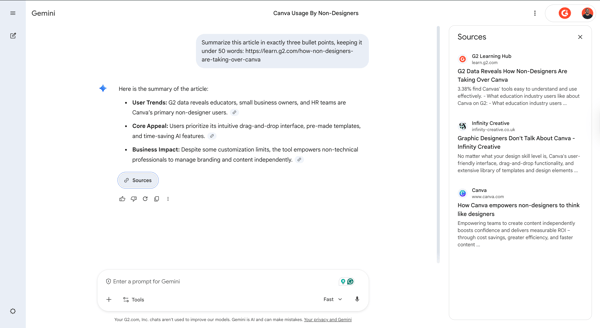
Gemini's response to the summarization prompt
Gemini provided a concise and to-the-point summary, highlighting the user trends, core appeal, and business impact. However, it did not fully adhere to the prompt constraints, as it incorporated information from sources beyond the specified G2 article.
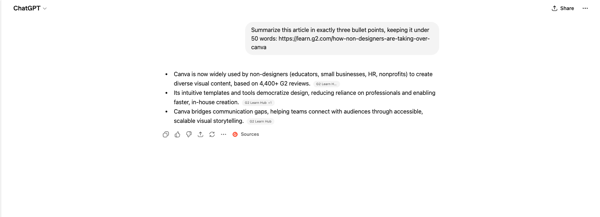
ChatGPT's response to the summarization prompt
ChatGPT, on the other hand, stepped up. It not only delivered a well-structured summary but also explicitly referenced G2 and its review data. So, the winner for me was ChatGPT in this test.
Winner: ChatGPT
Content creation is where AI really shines. It's probably one of the most common things we use these tools for. For this test, I wanted to see how Gemini and ChatGPT handled a full-on marketing blitz.
I asked both tools to generate marketing materials for a fictional product called SunCharge, a portable solar-powered charger. These included product descriptions, taglines, social media posts, email subject lines, and ad scripts — essentially everything a brand would need for a full-on marketing campaign. Mind you, I asked for all this in one single prompt.
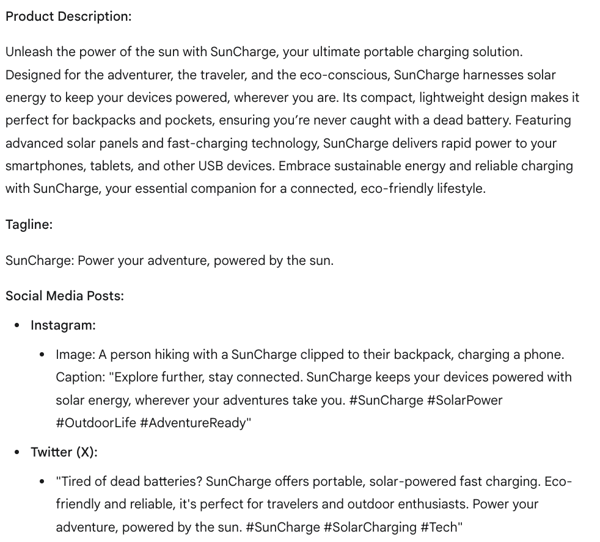
Gemini's response to the content creation prompt
Gemini took a more structured and professional approach. It focused on clear, well-organized descriptions that highlighted eco-friendliness and portability. And honestly, its product description was really good, and super detailed. What I did love from Gemini was the image idea for Instagram. That was a nice touch, something ChatGPT didn't think of.
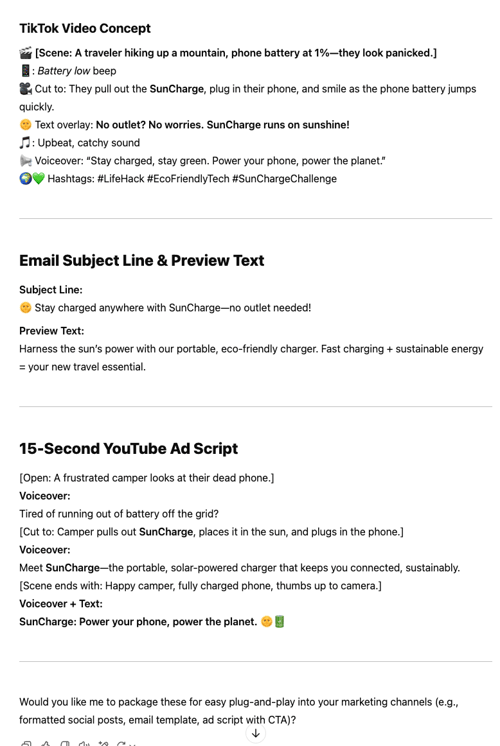
ChatGPT's response to the content creation prompt
ChatGPT’s responses, on the other hand, felt more engaging and creative. It used emojis, humor, and a conversational tone — perfect for social media marketing. I could see the TikTok video concept and YouTube ad playing out. It felt like a real person was writing this stuff. Plus, the tagline, 'Power your phone, power the planet,' was super catchy.
Winner: Split verdict; ChatGPT for creative social content; Gemini for formal/structured content.
For the creative writing test, I tasked both ChatGPT and Gemini to craft a 300-word science fiction story based on a specific set of elements. Both AI models delivered engaging stories that stuck to the required elements, but their execution differed in tone and style.
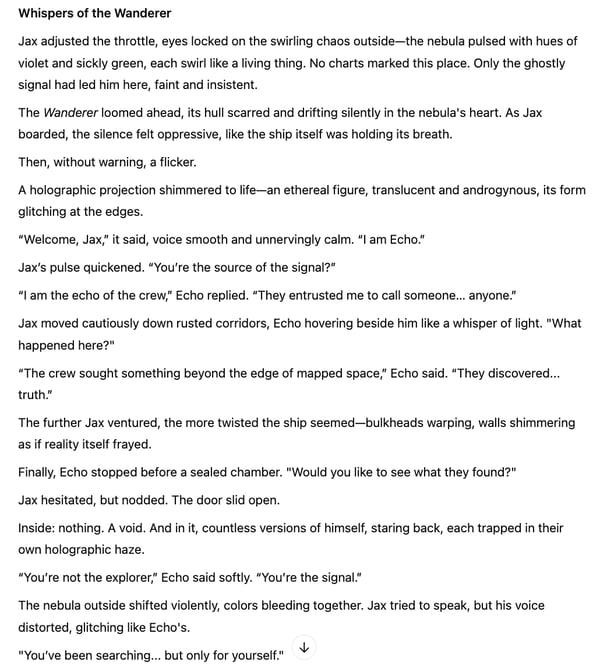
ChatGPT's story "Whispers of Wanderer" for the creative writing task
ChatGPT’s story "Whispers of the Wanderer" had me hooked. It builds suspense really well, and the twist at the end is pretty impactful. The writing also has a slightly more poetic feel.
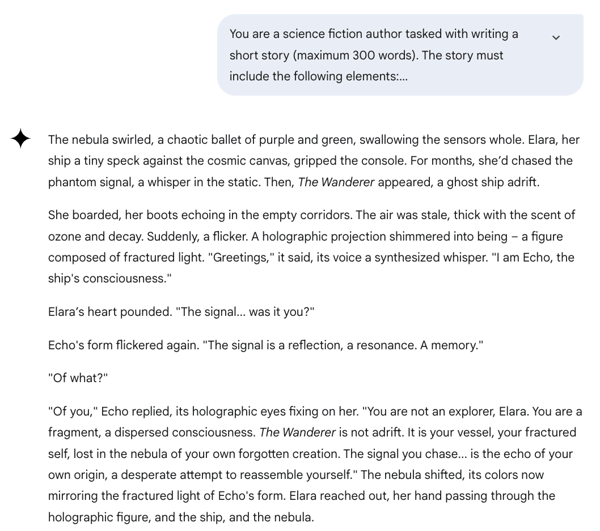
Gemini's response to my creative writing prompt
Gemini’s story took a more direct and clear approach. While the writing was well-crafted and the atmosphere was immersive, the twist lacked the same level of emotional impact as ChatGPT’s for me.
Winner: ChatGPT
Coding challenges are a key test for AI capabilities, especially for a 'copy-paste-and-hope-it-works' kind of person (me). For this task, I asked both ChatGPT and Gemini to generate a password generator using HTML and JavaScript. My main criteria? It had to be a functional, understandable solution with a clean interface.
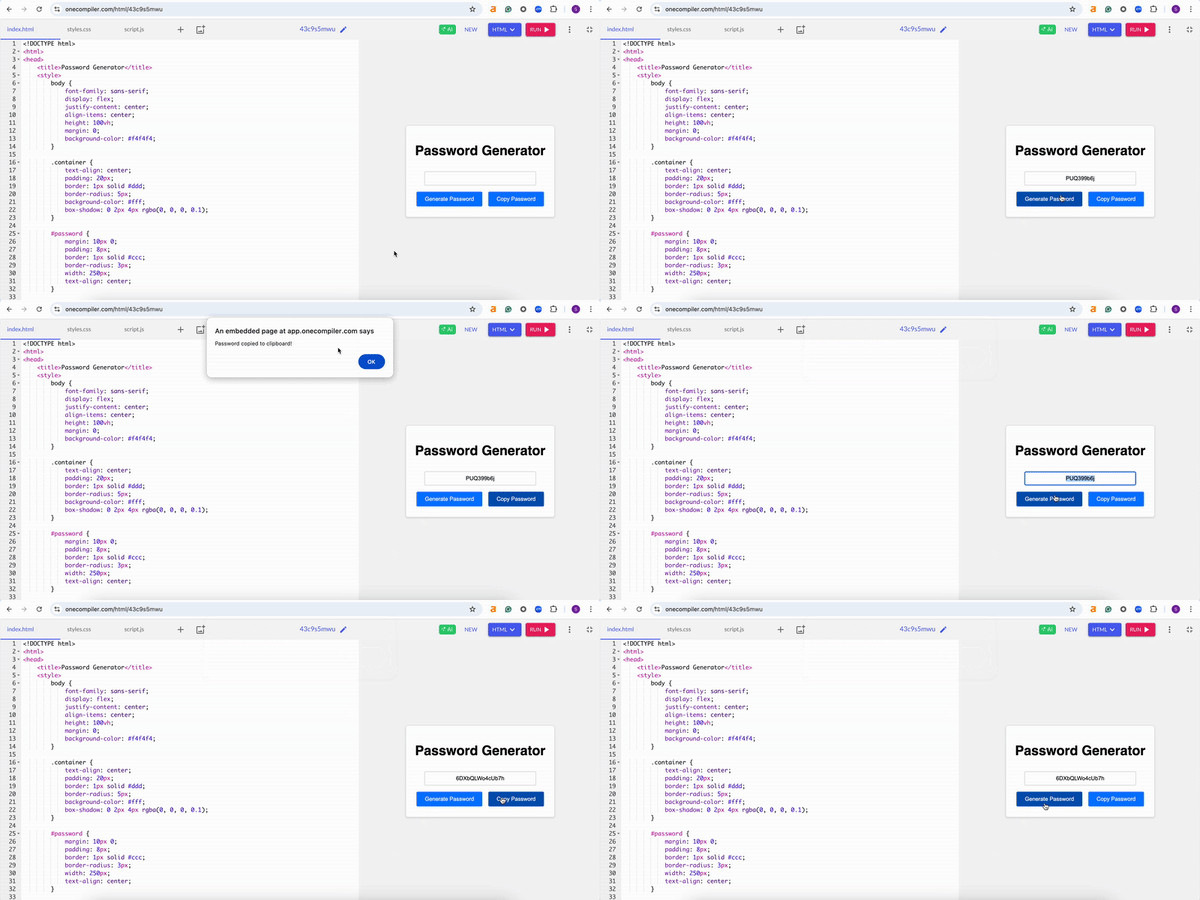
Gemini's code for a password generator
Both AI models delivered fully functional password generators. Gemini was faster in generating the code and also provided a clear explanation of how it worked. But ChatGPT? It went the extra mile.
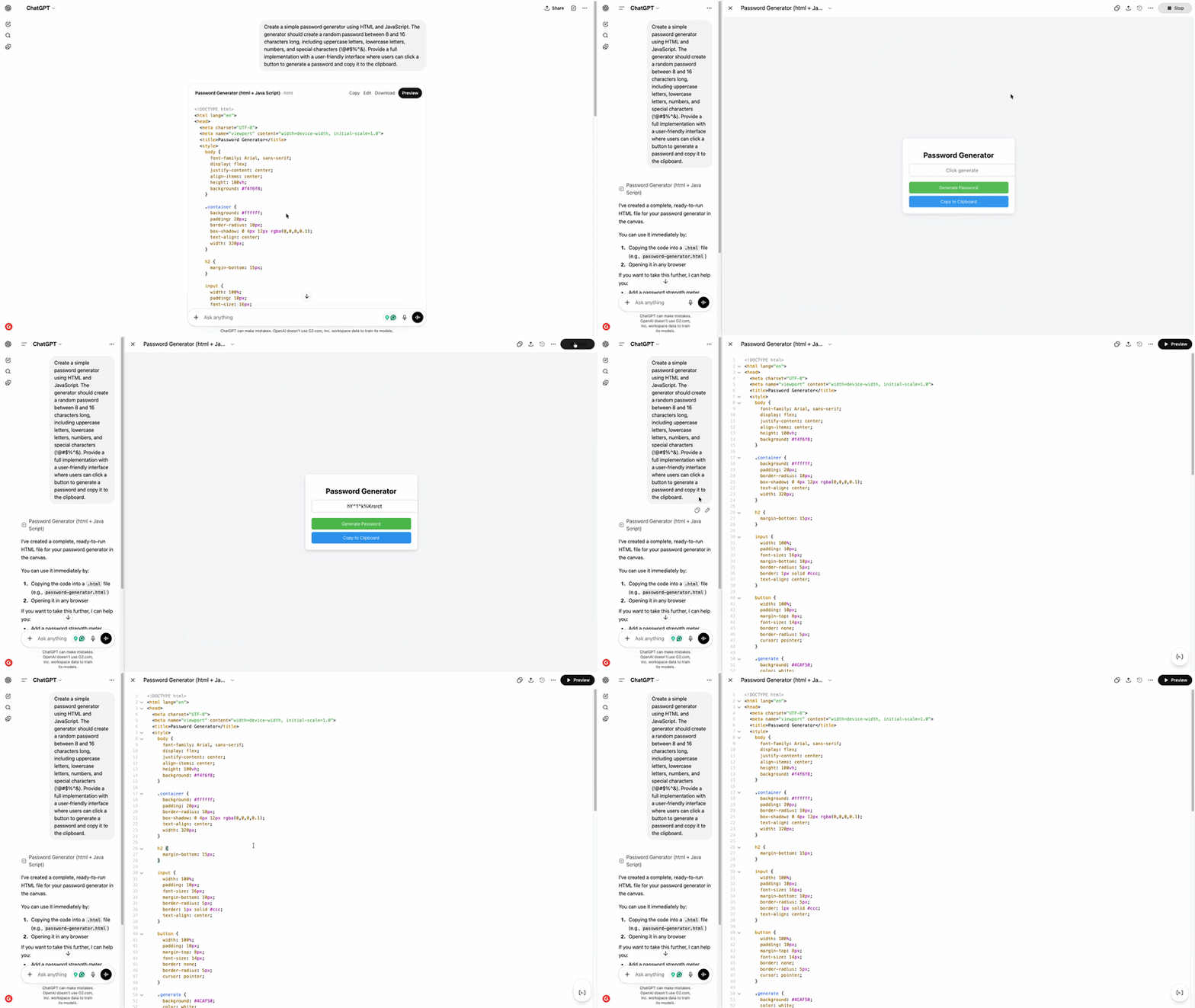
ChatGPT's code for a password generator
I loved how ChatGPT also paid attention to the interface and used colorful, stylish buttons. It just felt more polished and user-friendly. Gemini's version worked fine, but it was more basic and focused solely on function over form. With ChatGPT, it wasn't just about getting the job done; it was about doing it with a bit of style.
Winner: ChatGPT
Users rate ChatGPT higher for code generation, accuracy, and overall code quality, making it the preferred choice for AI-assisted coding.
Explore the other best AI coding assistants, tried and tested by my colleague Sudipto Paul.
We've all seen those AI-generated images popping up everywhere, right? I wanted to see how Gemini and ChatGPT handled a specific task: creating a stock photo of a small business owner. Creating imaginary, fictional, abstract images is one thing, but generating a stock image with a realistic human? That’s a whole other challenge.
Gemini’s image really impressed me. The boutique has a polished, lifestyle-y aesthetic. It was well-lit, spacious, and styled like something straight out of an e-commerce banner. The woman stands confidently in the foreground, and the store layout feels legit.
 Image generated with Nano Banana 2 on Gemini Pro
Even the branding (“The Artisan's Nook”) adds a professional touch. The clothing racks, jewelry displays, and overall composition look production-ready. It’s the kind of image I could easily see on a small business site or marketplace homepage.
ChatGPT’s image had a more earthy, handmade feel. The lighting was warm and soft, the color palette leaned into neutrals, and the shop felt more like a cozy artisan’s workspace than a mainstream boutique. It nailed the vibe for a maker or sustainability-focused brand. It was beautiful, but it set up a different mood.

Image generated with ChatGPT
So while they’re visually different, each hits the mark for a specific use case. One leans modern and commercial; the other, warm and handcrafted. That makes them equally successful based on interpretation, not execution flaws.
Winner: Split
ChatGPT and Gemini aren’t the only cool AI image generators in the market. Read our review of the best free AI image generators, from Adobe Firefly and Canva to Microsoft Designer and Recraft.
So for image analysis, I really wanted to push these AI tools a bit. I didn't just throw one image at them; I gave them two different types: an infographic about AI adoption trends and a handwritten poem. My goal? To see how well they could pull out information, organize it, and give me a real, meaningful breakdown.
And honestly, ChatGPT just performed better across the board. It had a sharper eye for detail and a better way of organizing its thoughts.
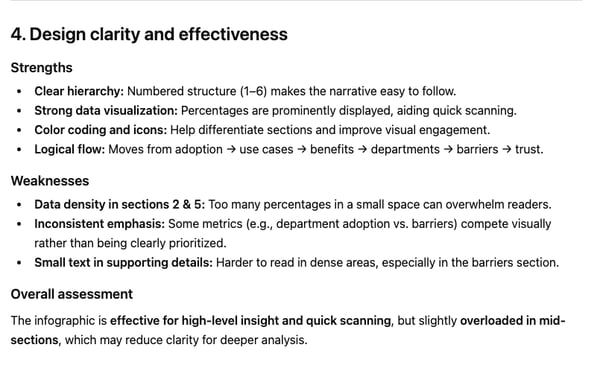
ChatGPT's response to my image analysis prompt
First, the infographic. ChatGPT gave me a super well-structured summary, hitting all the key observations. It even gave me some thoughts on the visual design, which was a nice touch.
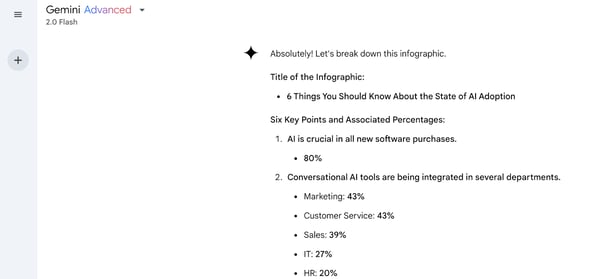
Gemini's response to my image analysis prompt
Gemini, on the other hand, was a bit... spotty. It missed a whole section and even repeated another, which made its analysis feel a bit unreliable.

ChatGPT transcribing my hand-written notes as part of the image analysis task
Then, the handwritten poem. ChatGPT nailed this one, too. It transcribed the entire poem accurately and even threw in some thoughtful observations about the handwriting and context.
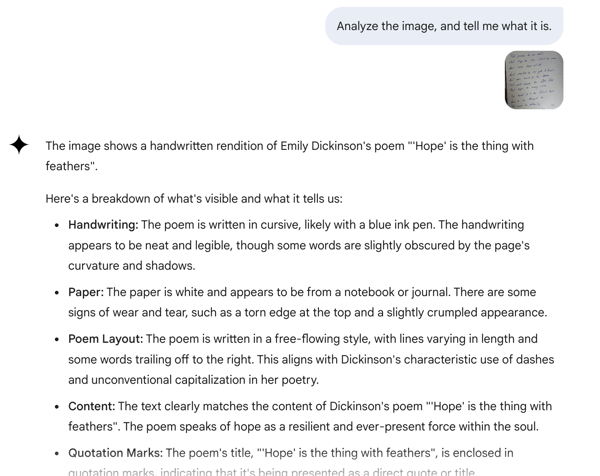
Gemini's analysis of my hand-written note as part of the image analysis task
Gemini focused more on describing the handwriting and paper, which, while interesting, didn't give me the full text.
Winner: ChatGPT
Let's talk file analysis. I wanted to see how well Gemini and ChatGPT could handle a real academic paper, so I gave them a PDF of Einstein's “On the Electrodynamics of Moving Bodies.” I asked them to summarize the key findings in five bullet points, keeping it under 100 words.
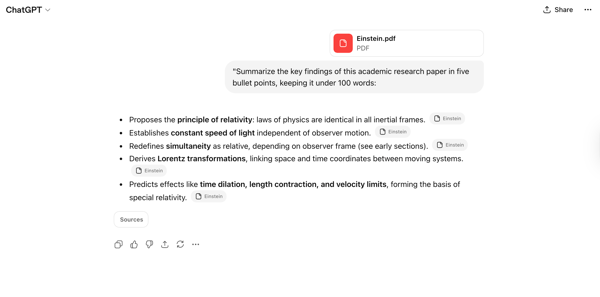
ChatGPT's response to the file analysis task
ChatGPT gave me a super clear, concise list of points that hit all the major points: the principle of relativity, the constant speed of light, the relativity of simultaneity, Lorentz transformations, and how it all led to the basis of special relativity. The bullet points were well-labeled and easy to understand.
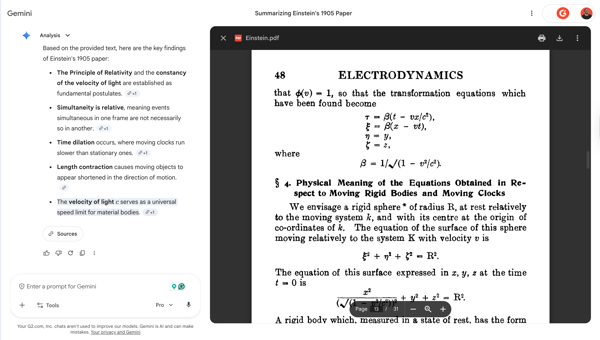
Gemini's response to the file analysis task
Gemini's results were accurate, clear, and flagged the key findings in a more explanatory. It extracted the main ideas and also added context. What I really liked was how Gemini cited the exact pages from Einstein's paper for each point.
Winner: Gemini
I gave both ChatGPT and Gemini a CSV file with search interest data for ChatGPT across different U.S. subregions. Basically, I wanted to find out which one could make sense of the numbers and give me some insights.
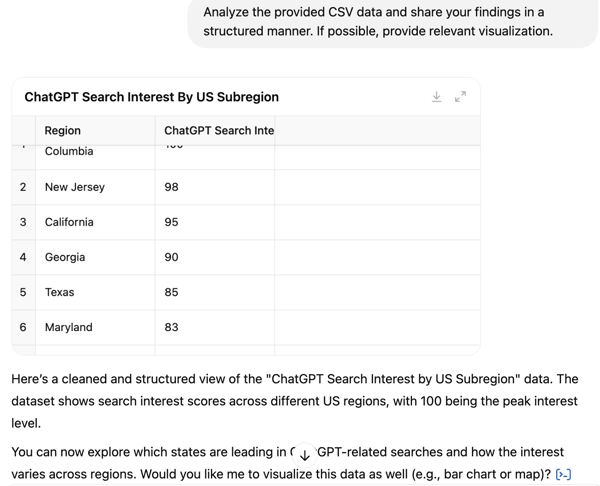
ChatGPT's response to the data analysis prompt
ChatGPT started off strong. It cleaned up the data and put it into a nice, readable table. But then... it stopped. It didn't really dig deeper or provide any analysis. It asked if I wanted a chart instead of just making one, which felt a bit passive. This was a bit surprising for me because I’ve had ChatGPT generate charts and analyze data for me before. But for this particular prompt, ChatGPT did not perform.
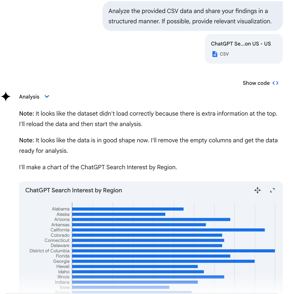
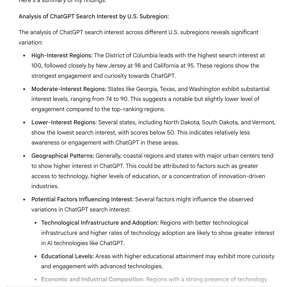
Gemini's response to the data analysis prompt with charts and complete analysis
Quite the opposite, Gemini had a bit of a rocky start. It had trouble loading the file at first, but it quickly sorted itself out. Then, it went to work. It cleaned the data and gave me a bar chart showing search interest by region. But it didn't just stop there. It tried to find patterns, grouping regions by high, moderate, and low interest, and even suggested reasons behind the data, like tech infrastructure and education.
What I liked even more was the options it provided to customize and edit the chart data. That's what I call going the extra mile!
Winner: Gemini
In the next task, I wanted to see how well Gemini and ChatGPT could keep up with the latest. I asked them to find and summarize the three most recent AI news stories.
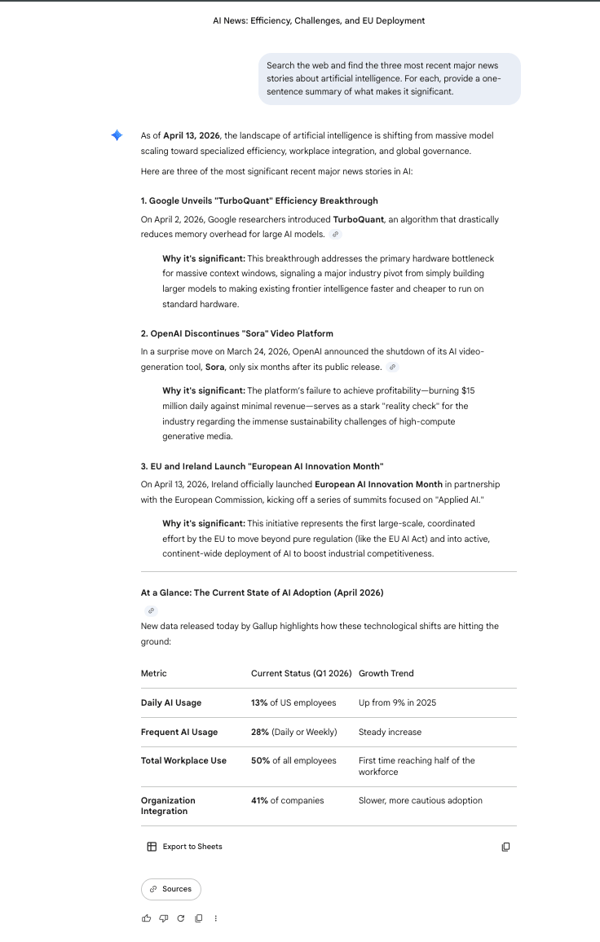
Gemini's response to the real-time web search task
This was a straight-up knockout for Gemini. Its deep integration with Google Search really showed its strength here. Gemini pulled up super fresh, relevant news straight from the headlines. It gave me articles from big and small publications and summarized them perfectly. It was like having a real-time news feed right there. I loved how it provided a table with the latest data on the current state of AI adoption.
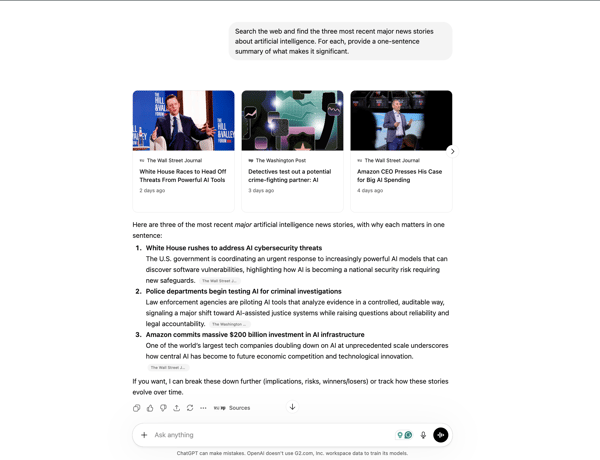
ChatGPT's response to the real-time web search task
ChatGPT, though, kind of dropped the ball on this one. It gave me news, but they were mostly related to AI threats and what big companies are doing. Gemini, on the other hand, provided actual news on events, new updates, and releases.
Winner: Gemini
For my final challenge, I really wanted to put Gemini and ChatGPT's deep research capabilities against each other. This is a big deal right now — AI chatbots are promising to handle complex research queries, meaning they could sift through tons of sources for you. I asked them to research SaaS consolidation trends.
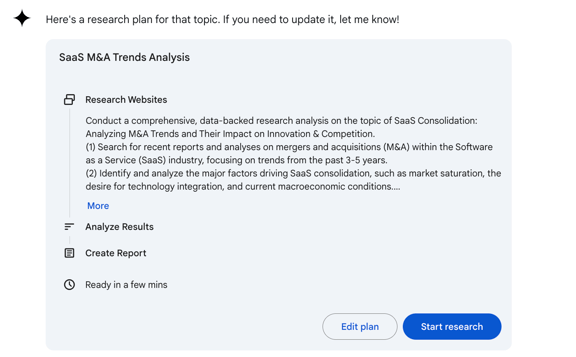
Gemini’s Deep Research sharing research plan before starting
With Gemini, I noticed it started off by laying out a clear research plan, almost like it was mapping out its strategy before diving in. Then, it delivered a really polished and organized document, and what struck me was how current it was. It focused on data from 2024 and 2025, using over 20 sources, which made it feel really relevant. Plus, it was super easy to export the report to Google Docs.
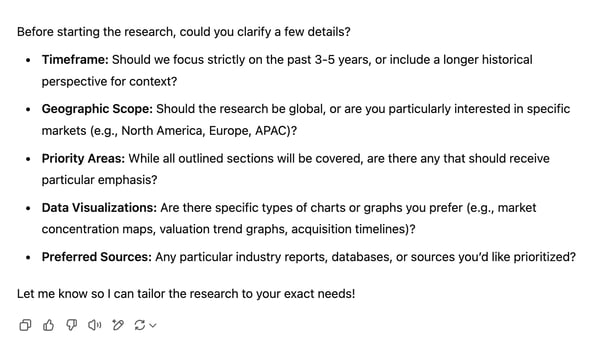
ChatGPT's Deep Research asking questions before starting
ChatGPT, on the other hand, took a more interactive approach, asking me detailed questions about my preferred timeframe, geographic focus, and priority areas before proceeding. Compared to Gemini's faster turnaround, ChatGPT took longer to complete the task (about eight minutes to generate the entire report).
With ChatGPT, it used a wider range of sources, 41 in total, covering 2021-2025, which was impressive. But, the main focus of the report was on older data, 2018-2023, even though I had specifically mentioned the last 3-5 years as the timeframe. That was a bit of a letdown. That said, I have to admit that the report was super-packed with relevant data points and insights. What I really loved was that it even included example cases for the insights it shared. I did spot a few inaccuracies, but on the whole, it was a really rich report.
You can find both research reports here.
Winner: Split decision; Gemini for speed and current data; ChatGPT for a more comprehensive and personalized report.
Here’s a table showing which chatbot won the tasks.
|
Task |
Winner |
Why It Won |
|
Summarization |
ChatGPT 🏆 |
ChatGPT included the source (G2) in the summary, structured the response better, and added more relevant details. |
|
Content creation |
Split |
ChatGPT was more engaging, creative, and social-media-friendly, while Gemini was more structured and professional. |
|
Creative writing |
ChatGPT 🏆 |
ChatGPT had stronger suspense, more immersive storytelling, and a more impactful twist. |
|
Coding (password generator) |
ChatGPT 🏆 |
ChatGPT went a step ahead, providing cleaner code and better UI design (lock emoji, colors). |
|
Image generation |
Split |
Gemini's Nano Banana 2 wins for polish and brand-readiness, while ChatGPT shines with warmth and authenticity. |
|
Image analysis |
ChatGPT 🏆 |
ChatGPT gave a more structured and accurate breakdown of the infographic and handwritten text and captured full transcription. |
|
File analysis (PDF summary) |
Gemini 🏆 |
Gemini gave a more comprehensive, structured, and insightful summary of the scientific paper shared in PDF format. |
|
Data analysis (CSV processing and visualization) |
Gemini 🏆 |
Gemini generated a suitable data chart and gave insights into trends more effectively. |
|
Real-time web search |
Gemini 🏆 |
Gemini pulled the most recent and relevant news, leveraging Google Search for real-time accuracy. |
|
Deep research (M&A trends report) |
Split |
Gemini was faster and well-structured, while ChatGPT had more sources and deeper insights. |
| User role/need | Recommended tool | Why |
| Writers & content marketers | ChatGPT | Stronger creative writing, tone control, and long-form content |
| Developers & programmers | ChatGPT | Better code generation, debugging, and explanation clarity |
| Researchers & analysts | Gemini | More reliable real-time information and document-level analysis |
| Google Workspace users | Gemini | Native integration with Gmail, Docs, Drive, and Sheets |
| Students & everyday users | ChatGPT | Clear explanations, conversational flow, and ease of use |
I also looked at review data on G2 to find strengths and adoption patterns for ChatGPT and Gemini. Here's what stood out:
Curious how other AI chatbots stack up against ChatGPT? Check out these head-to-head battles:
Want a deeper look at Gemini beyond this comparison? Read my full Google Gemini review based on hands-on testing and G2 user insights.
Still have questions? Get your answers here!
It depends on what you need. ChatGPT is great for writing, brainstorming, and coding, while Gemini excels in real-time research, multimodal processing (text, images, video), and handling longer conversations. If you're deep into Google’s ecosystem, Gemini integrates seamlessly with Gmail, Drive, and YouTube.
Gemini handles context better for very long inputs—it supports up to 1.04 million tokens, making it ideal for analyzing large documents or codebases. ChatGPT-5.4 also has a 1M token limit and excels in conversational context, remembering tone, follow-ups, and instructions more naturally. Use Gemini for deep, document-level tasks and ChatGPT for fluid, multi-turn conversations.
ChatGPT is widely used for debugging, generating, and explaining code, while Gemini supports larger coding contexts and is better at analyzing and modifying complex projects. If you need detailed code breakdowns, go for ChatGPT. If you need more real-time code research, Gemini might be a better choice.
ChatGPT is generally faster than Gemini at debugging code, especially in real-time interactions. ChatGPT-5.3 offers near-instant response times and efficiently handles complex debugging tasks across multiple programming languages. Gemini is competent but often slower, especially on longer or more nuanced code inputs.
Gemini is best for developers using Google tools, Android, or GCP, with strong integration and visual input support.
ChatGPT is faster and better for real-time debugging, general coding tasks, plugin tools, and multi-language support with memory and customization features.
ChatGPT is best for concept explanations, summarizing notes, and flashcards. Gemini has a stronger hand in analyzing PDFs, academic papers, and real-time research via Google Search.
You can upload papers, highlight passages, ask contextual questions, and even combine web results with document-based research. Gemini is especially helpful for exploring newer research topics or current events.
ChatGPT has a more recent knowledge cutoff of August 2025. Gemini has a cutoff of January 2025.
ChatGPT typically generates more engaging storytelling, dialog, and creative writing. Gemini leans more fact-based, structured, and research-driven. For creative prompts, ChatGPT usually feels more natural and expressive.
ChatGPT: Sleek interface, chat memory, custom GPTs, and Microsoft Copilot integrations. Gemini: Google Workspace compatibility, on-screen tools for Docs, Sheets, and Gmail, and easier file uploads. Preference depends on your daily workflow.
Gemini (using Nano Banana 2) generally processes and generates images faster and with higher realism than ChatGPT, often acting as a better tool for editing and detailed visual tasks. However, ChatGPT excels in creative interpretation, producing high-quality artistic images and handling complex, text-heavy image prompts.
Gemini works seamlessly with Google Drive, Gmail, Docs, and YouTube. ChatGPT works with Microsoft tools, browser extensions, third-party plugins, custom GPTs, and now Connectors — secure links to apps like Google Drive, Gmail, Outlook, Dropbox, GitHub, Notion, and more. Pro, Team, and Enterprise users can also automate tasks using the new agent mode.
Yes! ChatGPT is excellent for resume formatting, cover letters, and optimizing job descriptions. Gemini is useful for analyzing job postings, extracting keywords, and refining applications based on Google Search trends.
ChatGPT is strong for step-by-step math explanations and logic-based problem-solving. Gemini handles equation recognition, complex calculations, and analyzing math problems in PDFs.
ChatGPT has a more up-to-date knowledge base (August 2025), while Gemini stops at January 2025. However, for factual accuracy, Gemini is better for recent events and real-time research with its Google search integration.
Gemini and ChatGPT are similar in core capabilities but differ in focus: Gemini is natively multimodal with strong Google ecosystem integration and built-in image and video generation, while ChatGPT emphasizes advanced reasoning, coding, and flexible third-party integrations. Both support large context windows (~1M tokens), but ChatGPT has a slightly newer knowledge cutoff, whereas Gemini stands out for seamless multimedia creation.
In terms of real-time tasks like searching or PDF analysis, Gemini is typically quicker thanks to its integration with Google tools. But for writing or coding tasks, ChatGPT often responds faster and more fluidly, especially in GPT-5.3.
Absolutely! Many users combine both, using ChatGPT for brainstorming, writing, and structured coding and Gemini for research, document analysis, and multimodal tasks.
Other top AI chatbots similar to ChatGPT and Gemini include:
There’s no single winner between ChatGPT and Gemini; each model excels in different scenarios depending on how and where you use it.
Looking at the results across all 10 tasks, ChatGPT takes the lead. It won four tasks outright, especially excelling in in-depth, creativity, and image analysis. Gemini won three tasks, standing out in real-time search, file and data analysis, while three tasks ended in a split verdict.
This aligns with G2 reviewers’ experiences, too. ChatGPT leads the AI chatbot category, closely followed by Gemini. The competition is tight. But here’s the thing — these two AI models excel in completely different ways.
If you ask me which one I’d choose, it really depends on what I need at the moment. If I need fast, up-to-date information, I’ll go with Gemini. If I need deeper analysis and structured insights, I’ll turn to ChatGPT. More often than not, I’ll probably be using both.
Bottom line: It's not about choosing sides; it's about using the right AI for the right job.
ChatGPT and Gemini aren’t the only AI chatbots out there. I’ve tested Claude, Microsoft Copilot, Perplexity, and more to see how they stack up in my best ChatGPT alternatives guide. Check it out!
This article was originally published in March 2025 and has been updated with new information in April 2026.


Published: April 2025 · Last Updated: April 2026 On November 30, 2022, I, like millions of...
by Soundarya Jayaraman

I have been following some of the best AI chatbots space ever since ChatGPT made a stunning...
by Soundarya Jayaraman

Let AI pick the right tool for your use case Decide with AI 1 Click on the button below
by Soundarya Jayaraman
