


I typed a request into Google Gemini that would normally mean opening three tabs and running multiple searches: Check my emails from the last week for any mention of ‘article reviews’ and summarize them in a list.
There were no fireworks. Gemini took a few seconds, scanned my cluttered Gmail inbox, and returned a clean list of forgotten action items, saving me fifteen minutes of scrolling. That’s the real appeal here.
Two years ago, I wouldn’t have expected that. My early experience with Bard lowered my expectations enough that I tried the AI chatbot once and moved on. But over time, I kept coming back to it. After using it regularly for my work, I’ve got a clear sense of where it genuinely helps and where it still falls short.
In this article, I share my Google Gemini review based on nearly two years of use, with insights from 1,000+ G2 reviews.
Whether you are a deep Google Workspace user looking to connect the dots between your apps, or a skeptic who wrote off Bard years ago and wants to know if it's safe to come back, I’ll tell you exactly where Gemini fits.
Google Gemini is one of the powerful AI chatbots with deep Google ecosystem integration, strong research and coding capabilities, and useful free features. Gemini has a G2 rating of 4.4/5 and is rated #3 in G2’s AI chatbot category.
Google Gemini is Google’s AI chatbot, built on the Gemini family of AI models, replacing Bard, its predecessor. It is designed to help users research, write, summarize, analyze information, and complete everyday tasks directly inside Google products like Gmail, Sheets, and Docs.
Built to handle multimodal inputs like text, code, and images, Gemini is available in both free and paid tiers. It functions as a core intelligence layer across Google’s ecosystem, designed to assist you directly within your daily workflows rather than just serving as a standalone chatbot.
| Metric | G2 score | Insight |
| G2 rating | 4.4 / 5 | Strong overall satisfaction, especially for productivity, research, and Google Workspace–centric workflows. |
| User adoption | 66% | High adoption rate indicates Gemini is being used regularly rather than tested once and abandoned. |
| Time to ROI | 13 months | Users typically see measurable productivity gains within the first year, especially when embedded into daily workflows. |
| Customer segment served | SMB 37% Mid-market 40% Enterprise 23% |
Balanced adoption across company sizes, with strongest traction in mid-market teams using Google Workspace. |
| Ease of use | 94% satisfaction | Users consistently highlight Gemini’s intuitive interface and low learning curve. |
| Ease of setup | 97% satisfaction | Minimal configuration required, especially for users already inside the Google ecosystem. |
Beyond simple conversation, the platform transforms daily workflows through the following specific functionalities:
This review draws on nearly two years of hands-on use with Google Gemini, spanning both the free experience and the paid plans. To pressure-test my own impressions, I didn’t rely on personal use alone; I dug into hundreds of reviews on G2 and discussions to see what other users are saying.
I evaluated Gemini through three practical lenses:
Disclaimer: I share my experience testing Gemini as of January 2026. If you read this after a few months, some features and functionality might have evolved. The official website can provide you with the most up-to-date information.
Now that we know what it costs and what it claims to do, let’s look at what it actually does. I tried Gemini across key categories to see where it shines and where it stumbles.
If you want something that isn't as robotic as ChatGPT or as overly "safe" and flowery as Claude, Gemini currently hits a practical middle ground. It feels casual yet professional as an AI writing assistant, often skipping the annoying "Sure, I can help with that" preamble to just give you the text you asked for.
I've used to write a lot of things, from my DMs and emails to colleagues to my project documents, blogs, articles, marketing copies, social media posts, and more.
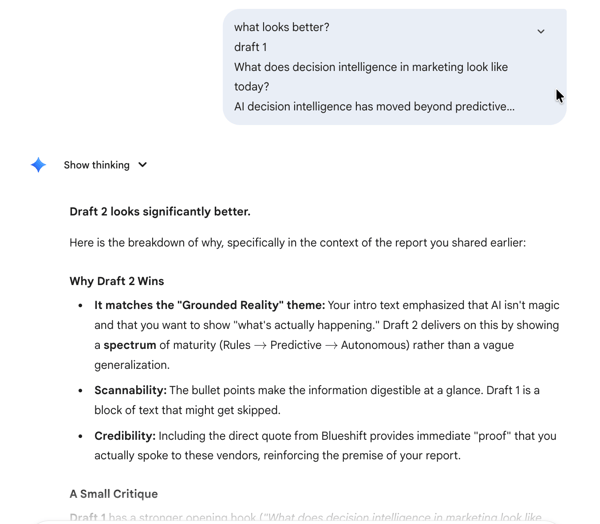
Now, where Gemini wins is in the workflow itself. For many people, writing often involves a mix of drafting, revising, and polishing ideas, and this is where the Google Docs integration becomes a killer feature. Instead of the tedious copy-paste routine between a browser tab and your document, I can highlight a clunky paragraph, click the Gemini button, and instantly refine and insert another variation into the document.
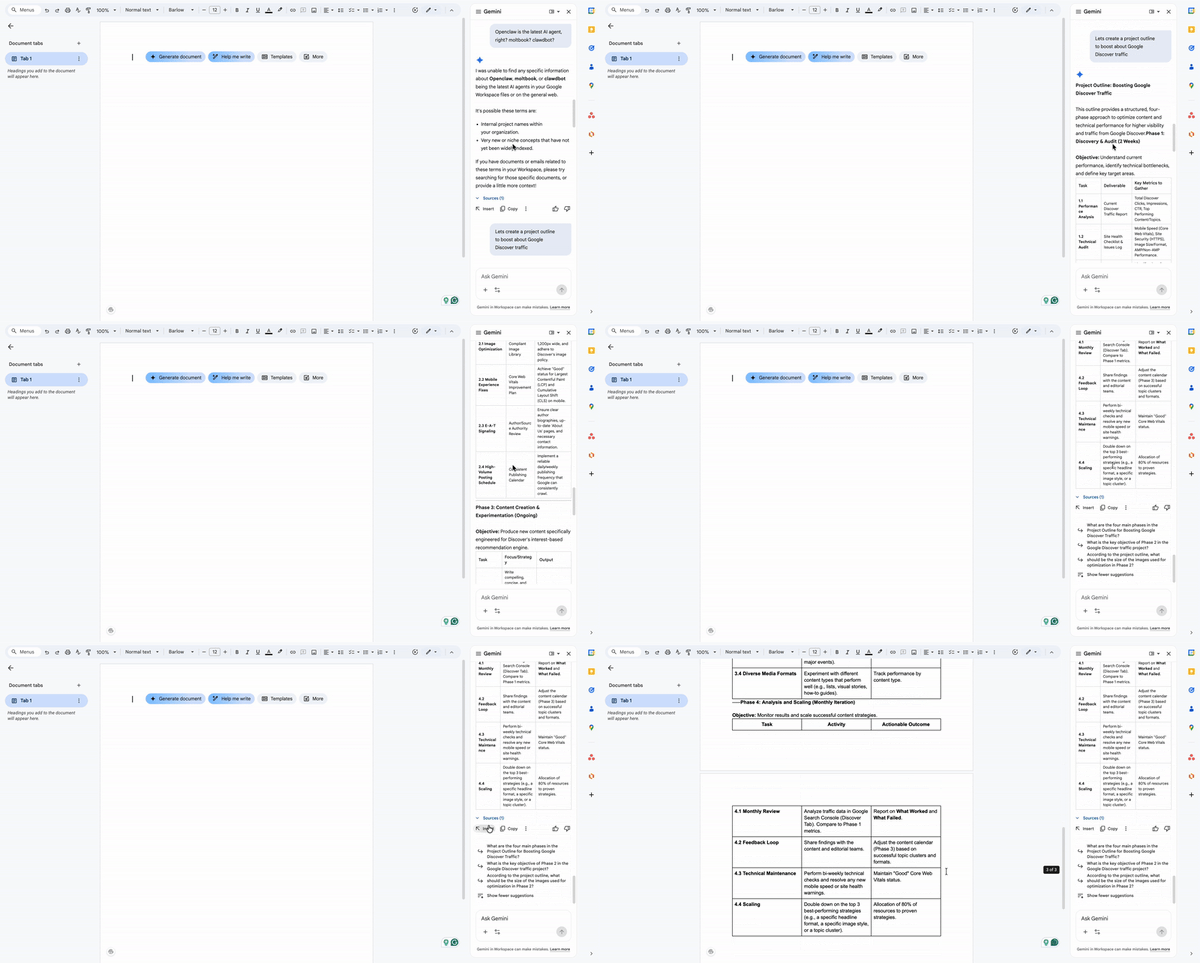
This same efficiency extends to my inbox. I simply use Gemini to draft my replies, make a quick edit, and hit send. The real power here is the context awareness. Because Gemini is embedded directly in Gmail, it reads the full thread history before I even prompt it. I can just type a shorthand instruction like "polite decline, suggest next quarter," and it understands exactly who I'm replying to and what the tone should be. For any professionals, this is a time-saver.
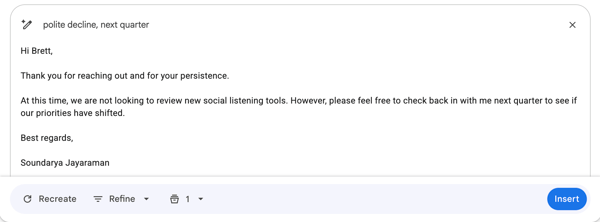
Of course, there are times when it can get verbose, and there are moments where it misses the nuance of what I asked, especially when I’m specific about tone or format. I’ve also had it ignore instructions like “don’t use bullet points” or drift from the style I requested, which means I still need to review and edit carefully. The upside is that these issues feel more like rough edges.
I am not a software engineer. I treat code like a foreign language I can sort of read but definitely cannot speak fluently. My workflow usually involves generating a generic boilerplate script, like a Python automation for a spreadsheet or some CSS for a website, and then panicking when it doesn't run.
For this specific "copy-paste-pray" loop, Gemini is excellent. When I paste a messy error message, it just identifies the logic gap and hands me the corrected block, ready to copy. For someone who just needs the script to work so I can get back to my actual job, it is an invaluable unblocker.
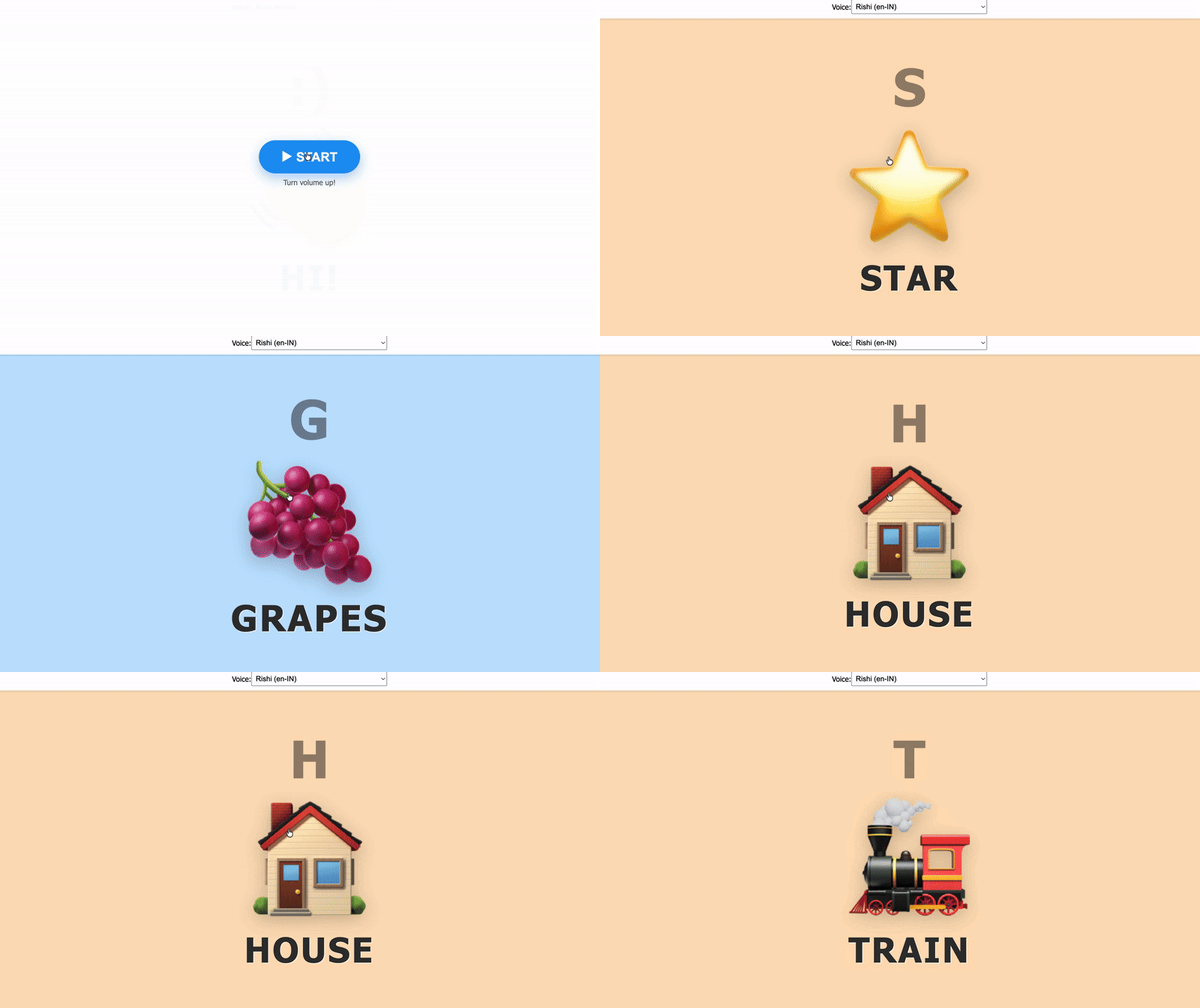
Outside of work, Gemini has become my “make it real” button for side projects. I’ve used it to prototype a toddler typing app (big letters, silly sounds, instant feedback), a dictation app for kids (simple prompts + gentle corrections), and a bunch of small tools I can publish on my website, like calculators, generators, and little interactive widgets,just to test ideas fast.
Now, if you actually write code for a living, Gemini is directly integrated into the IDE via Gemini Code Assist, and this is where it competes with other AI code generators like GitHub Copilot, Claude Code, and ChatGPT. For developers, Gemini Code Assist’s IDE-level integration makes it more practical for day-to-day coding than chat-first tools that live outside the editor.
There is a third capability that sits between the chatbot and the full-blown IDE that I dig for, the AI studio. It is most useful for non-coders, students, creators, and developers to rapidly prototype, test, and build applications. I like to call it the "builder's workbench," where you can describe a tool, for example, a spreadsheet cleaner, and the system will not just write the code and show you how it works. You can iterate on a working prototype in real-time without ever opening a code editor or installing an environment.
If you are into vibe coding, you should definitely explore it.
I research constantly. My workflow isn't just casual Googling; it is a deep dive into dozens of tabs, dense PDFs, and hour-long lectures. The problem isn't finding information. It's synthesizing it without losing my mind.
For this "information-overload" workflow, Gemini is my synthesizer. Instead of manually skimming a 50-page report for one specific statistic, I upload the file and ask it to extract the data points I need. The biggest advantage is the real-time web search and the ability to double-check the responses.
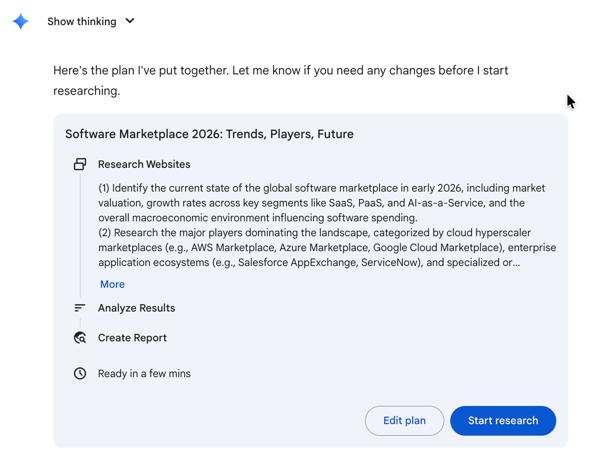
When I need to delegate rather than just search, Gemini Deep Research acts as an autonomous agent that spends thirty minutes browsing and cross-referencing thousands of sources to compile a fully cited report while I step away.
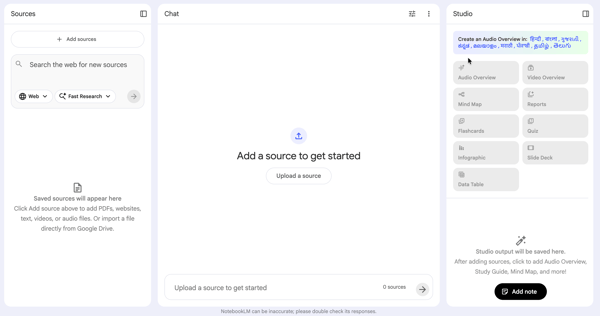
For those who need to go even deeper, the ecosystem offers specialized tools that fundamentally change how we consume information. Google also has a separate product called NotebookLM based on the Gemini model. It's designed specifically to "ground" its answers in your uploaded documents rather than the open web, ensuring zero hallucinations. As a podcast fan, my favorite feature is the "Audio Overview," which generates a surprisingly engaging discussion between two AI hosts about the material I uploaded.
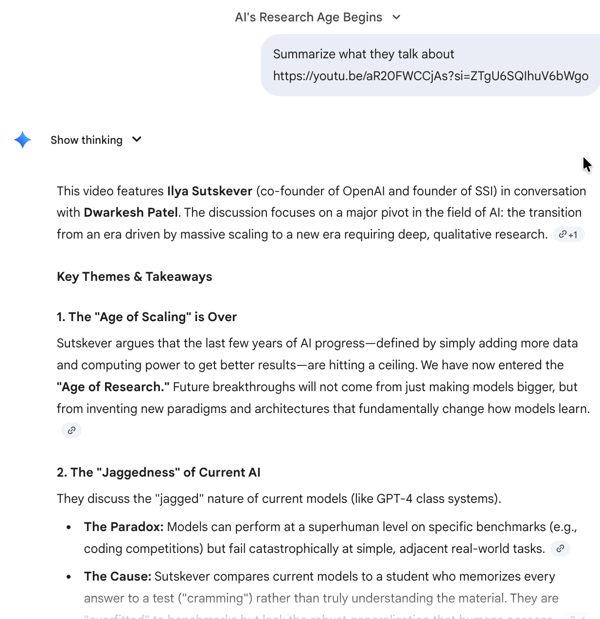
The multimodal nature also means video is no longer a black box. I can paste a URL for a 2-hour Dwarakesh Patel interview and instantly get a summary of exactly what Ilya Sutskever said about "superalignment" without having to watch the whole thing.
Now, despite the 'grounding' features, Gemini can sometimes confidently hallucinate, so I never skip the 'double-check' step. Even with those caveats, Gemini remains one of the best AI chatbots I’ve used for making dense, long-form, and multimodal information genuinely usable, along with citations.
I have tried a number of AI image generators, from MidJourney to ChatGPT. A year or so back, Gemini really wasn't at the top of my list, but this year, it blew me away with its recent Nano Banana Pro model (yes, that's the real name).

Gemini can create any image — photorealistic pictures, graphics, cartoons, complex infographics, data charts, and allows me to edit them simply by chatting, without ever moving a pixel.
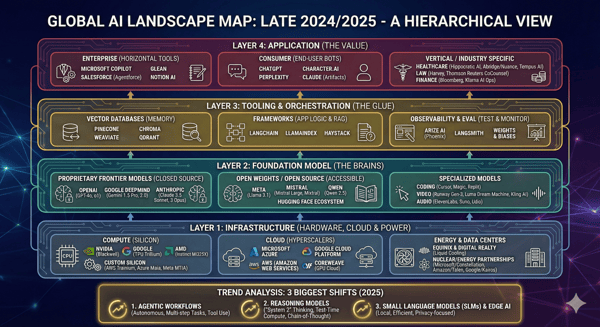
And the use cases are umpteen — product photos, marketing collaterals, stock photos, presentations.
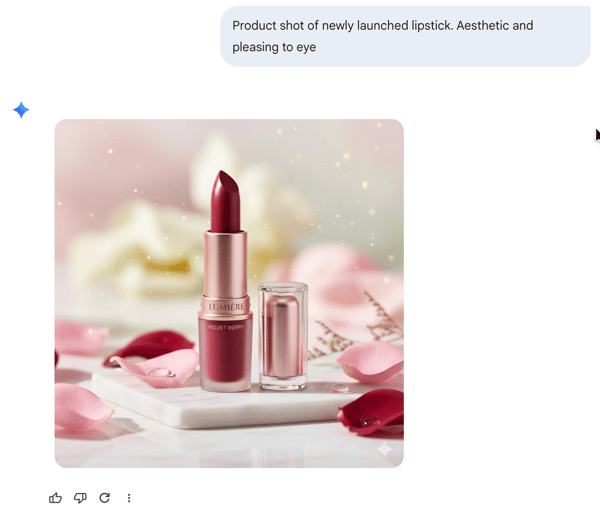
The number of times I have used it directly inside Google Slides to instantly beautify a slide with a custom visual is countless. It’s also incredibly fun to try out on personal pictures in Google Photos.
Maybe it can get some logos or text wrong in text-heavy images. But even if I don't use that image in its original form, I use it as a starting point before refining it in a proper design tool.
Overall, Gemini has become my go-to AI image generator for speed and experimentation. Even when the final asset needs polishing elsewhere, it consistently gets me 70–80% of the way there faster than any other tool I’ve tried.
This visual power extends to video as well with the Veo model, which is underrated to the core. It generates high-quality 8-second clips in both vertical and horizontal formats, complete with synchronized audio.
/Video%20generated%20with%20Veo%20in%20Gemini.webp?width=600&height=338&name=Video%20generated%20with%20Veo%20in%20Gemini.webp)
What impresses me most is the consistency — I can provide image references or anchors, and it respects them perfectly. I've dabbled in it myself, but I've seen creators build full-blown ads and UGC marketing content just using this tool.
The biggest advantage, according to me, is that it’s accessible directly inside Google Vids. It is a massive unlock for marketers and business owners who need studio-quality assets without leaving Workspace. I have used it to create full-fledged YouTube videos with AI avatars, and I think it's highly underrated. And if you want to explore further, Flow, its experimental filmmaking tool, specifically catering to creatives.
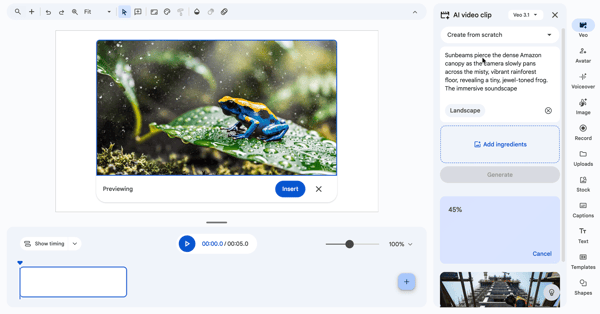
Admittedly, it isn't flawless yet; I can sometimes spot the AI signature in human speech, where mouth movements might still drift slightly into the uncanny valley. But even with those occasional tells, the utility is undeniable as an AI video generator.
Gemini is my on-demand analyst. When I upload a spreadsheet and ask, "What is the average website traffic trend excluding weekends?", Gemini actually writes a Python script in the background, runs it on my data, and shows me the result.
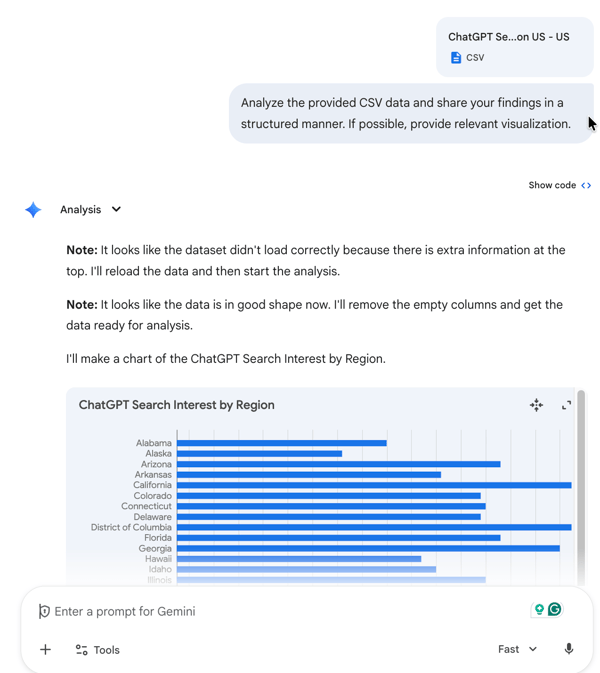
I use it constantly for the grunt work. I can paste a messy list of names (e.g., "John Smith," "smith, john," "J. Smith") and just say, "Standardize these into First Name / Last Name columns," and it cleans the data. It is also surprisingly good with visuals; instead of fighting with chart settings in Excel, I just ask for a graph, and I love how many options it gives me to edit them on the fly.
It isn't perfect. Sometimes it can lose context in long threads, and sometimes it struggles with really large files for data analysis, but even then, it’s hard to overstate how much time it saves compared to doing the same work manually.
If you are on Android, Gemini isn't just an app; it actually replaces Google Assistant. This means I can long-press my power button to ask questions about what’s currently on my screen, whether it’s a YouTube video, a map, or a text message. It feels less like opening a chatbot and more like having a smart layer over my entire phone.
But the real "wow" factor is Gemini Live.
This is the voice mode, but it’s not the clunky "Hey Google" of the past. It is a fluid, two-way conversation. I can interrupt it mid-sentence, change the topic, or ask it to "speak faster," and it adapts instantly. The killer feature here is visual context: I can share my screen (or my camera) and have a live conversation about what we both see.
I’ve used this to troubleshoot a weird error message on my laptop just by pointing my phone camera at it. Now, the voice does feel slightly robotic at times. But the utility outweighs it.
After using Gemini across all these tasks, I don’t think of it as “just” a chatbot anymore. It feels more like a productivity layer quietly speeding up the work I already do inside Google’s ecosystem.I keep it open all the time because it consistently saves me time across writing, research, data work, and creative tasks.
My testing is just one data point (n=1). To see if my experience holds up at scale, I analyzed user sentiment from G2 to see what the "wisdom of the crowd" says about Google's Gemini in 2026.
Reading through the positive reviews on G2, I found a clear consensus that mirrors my own experience. Users generally agree that while other models might win on raw "creativity" benchmarks, Gemini wins on utility. The prevailing sentiment is that Google didn't build the best chatbot; they built the best integrated productivity tool.
“I love how effortlessly Gemini connects with my Google Workspace—summarizing my emails, drafting Docs, and organizing my Drive in seconds. My massive context window also lets me "read" entire books or analyze long videos all at once, providing deep insights that save me hours of manual work.”
- Gemini review, Tyler B.
G2 user feedback I saw highlights some consistent challenges, too. The primary concerns often revolve around reliability rather than capability.
“One thing about Gemini that could improve is its consistency. Sometimes it gives very accurate, detailed responses, and other times it gives very generic responses or misses important context. It could improve its ability to track details consistently throughout longer conversations, as sometimes it forgets earlier conversations or shifts its understanding midway, which affects the flow. It would help if the model had stronger memory continuity, clearer grounding in user-provided information, and more precise handling of India-specific or niche industry queries.”
- Gemini review, Mitali V.
Unlike ChatGPT, which is mostly a single subscription, Google bundles Gemini with storage and Workspace features. This makes the pricing confusing, but potentially much higher value if you are already paying for Google One or Google Workspace.
Here’s a breakdown of Gemini pricing for personal plans.
| Plan | Price | Best for | What you get |
| Gemini Free | $0 | Casual users | Basic access to Gemini in chat interface, standard reasoning and writing help, limited multimodal support, and usage limits |
| Gemini AI Plus | ~$2.17–$4.00/month | Light AI users (region-specific) | Enhanced Gemini access (higher limits than free), multimedia generation tools, 200 GB storage, and 200 AI credits per month for Flow/Whisk, Gemini in Gmail, Docs, Vids, and more |
| Gemini AI Pro | $19.99/month | Professionals and heavy users | Higher access to Gemini’s smarter models, Deep Research, video/image creation tools, 2 TB storage, 1,000 AI credits/month for Flow/Whisk, and advanced NotebookLM features |
| Gemini AI Ultra | $249.99/month | Power users and advanced workflows | Maximum model access, Deep Think, Gemini agent, 25,000 AI credits for Flow/Whisk, 30 TB storage |
For teams and organizations, Google Gemini is available through Google Workspace plans, where AI features are bundled directly into productivity tools like Gmail, Docs, Sheets, Slides, and Meet. Pricing is based on a per-user, per-month model and scales with team size, security needs, and admin controls.
Here’s how current Workspace plans compare:
| Plan | Price | Best for | What’s Included |
| Business Standard | ~$14 / user/month | Small teams and startups with 10-100 users | Gmail and Workspace apps with Gemini AI features, standard admin controls, shared drives, and collaboration tools |
| Business Plus | ~$22 / user/month | Growing companies (up to 300 users) | Everything in Business Standard, plus enhanced security, compliance features, and expanded storage with Gemini AI |
| Enterprise | Custom | Large organization that needs robust security, compliance (HIPAA, FedRAMP), and scalability | Advanced security, compliance, data controls, custom AI usage policies, and enterprise-grade Gemini capabilities |
Here’s how I’d recommend choosing the right Gemini plan based on how deeply you use Google Workspace and how heavy your workloads actually are.
If you’re wondering whether Gemini is right for you, G2 data and my experience point to these user profiles.
| User group | Why | Best for | G2 review insight |
| Students and Researchers | Search-connected research and summarization | • Summarizing long PDFs or papers • Explaining complex concepts • Cross-checking recent information |
Reviews frequently mention Gemini’s usefulness for research summaries and information gathering, especially when freshness matters. |
| Developers and engineers | Structured reasoning for coding and logic tasks | • Generating and explaining code • Debugging and refactoring • Translating logic between languages |
G2 feedback highlights solid reasoning and explanation quality, with some caveats around edge cases and complex instructions. |
| Business professionals | Native Google Workspace integration | • Drafting emails in Gmail • Summarizing Docs and Sheets • Creating agendas and outlines |
Reviewers consistently call out productivity gains from working directly inside Workspace without switching tools. |
| Content creators | Multimodal understanding across text and visuals | • Brainstorming content ideas • Writing captions or descriptions • Refining drafts with context |
G2 users often describe Gemini as “good enough with light edits” for everyday content and ideation tasks. |
| Travelers and planners | Direct access to Maps and travel data | • Building itineraries • Finding nearby hotels or attractions • Estimating routes and timing |
Reviews mention Gemini’s advantage when planning logistics using Google Maps and related tools. |
| General power users | Handling large inputs and long workflows | • Analyzing long documents • Managing multi-step projects • Synthesizing large volumes of information |
Power users on G2 value Gemini’s ability to process long inputs, while noting usage limits on lower plans. |
Curious how other AI chatbots stack up against Gemini? Check out these head-to-head battles:
Here are common FAQs, answered concisely based on our review.
Yes. The standard version of Gemini is completely free and includes the capable Gemini 3 model, unlimited chat (within reason), and standard image generation. It is more than enough for everyday questions, planning, and summarization.
For 90% of people, Free is sufficient. You should only pay for Gemini Advanced (AI Pro) if you need the 2 TB of cloud storage, deep integration into Google Docs/Gmail, or the advanced "Deep Research" features for handling massive documents.
It depends on where you work. If you live in Google Docs and Drive, Gemini is better because it integrates with your files. If you want a creative partner for brainstorming or complex reasoning tasks unrelated to your personal data, ChatGPT often still has a slight edge on "smartness."
For fact, mostly, but always double-check its sources, as it can hallucinate. For privacy, yes, if you use the Enterprise/Business plan, where Google guarantees your data is not used for training. On the personal (free) version, your chats can be reviewed to improve the model, so avoid sharing sensitive info there.
Google Gemini is one of the best AI writing assistants to create first drafts, be it stories, marketing copies, blogs, reports, emails, and more. It’s also one of the best editor as it shines at refining emails, summarizing reports, and cleaning up messy drafts inside Google Docs.
Gemini is great for outlining and SEO research. Its default writing style tends to be generic, so you have to provide it with custom instructions and prompts to get the brand voice you want.
For rapid ideation and mockups, Google Gemini is one of the best AI image generation platform, supported by the Nano Banana model. Its ability to iterate quickly inside Google Slides is unmatched. However, for final, high-gloss production assets, specialized design tools generally offer more stylistic control.
Yes. Google Gemini with Nano Banana Pro and Veo 3.1 is one of the best AI image generators for creating social media visuals. The speed and ease of use, especially the ability to generate images directly in a chat or slide deck, make it perfect for the "quantity over quality" demands of daily social media posting.
Absolutely. Gemini, with Nano Banana Pro, is the most accessible. You don't need to learn Discord commands (like Midjourney) or install software. You just ask for a picture, and it makes it.
For debugging and "vibe coding" (prototyping), Google Gemini is excellent. It is one of the best AI coding generators in the market.
On raw intelligence, the gap between Gemini, ChatGPT, and Claude has narrowed to the point of being negligible for most daily tasks.
The real differentiator today isn't IQ; it’s integration.
And this is where Gemini wins. Google didn't just build a model; they built a utility layer that sits on top of the tools you already use. The killer feature isn't asking a chatbot to write a poem; it’s highlighting a paragraph in Google Docs to rewrite it, cleaning a messy spreadsheet in seconds, or pointing your phone camera at a problem to get a voice answer. And even with all its quirks today, I can only imagine it getting better in the coming days.
Should you pay for it?
No, if you are just a casual user who needs a sounding board. The free version is more than capable, and if you prefer a "creative partner" for writing, Claude is still the artist's choice.
Yes, if you live in the Google ecosystem. If you use Gmail, Docs, and Google Workspace, it’s a massive upgrade to your entire system.
Still exploring your options? Check out G2’s breakdown of the best AI chatbots to compare Gemini with other top tools based on real user reviews.


Let’s be real for a second: do we really need another AI tool? My browser tabs are already a...
by Soundarya Jayaraman

Let AI pick the right tool for your use case Decide with AI 1 Click on the button below
by Soundarya Jayaraman

I’ve been glued to ChatGPT since the day it launched in November 2022.
by Soundarya Jayaraman