


I evaluated 12+ tools to find the six best free workforce management software best for small businesses: BambooHR, Connecteam, Employment Hero, greytHR, Humanity Schedule by TCP, and Keka.
I've learned that workforce management is easy to get right when you have five employees and a predictable schedule. It gets much harder when shifts change daily, time-off requests overlap, and payroll depends on accurate time tracking. Plenty of platforms promise a free plan, but that can mean anything from a genuinely usable product to a short trial that expires before you can decide if it fits your business.
For this guide, I tested each product's free plan or trial, reviewed official pricing pages, and analyzed recent G2 feedback to understand what small businesses can realistically accomplish before upgrading. Some tools stayed useful well beyond the evaluation stage, while others reached their limits much sooner. I've called out those differences throughout, so you can choose the free workforce management software that fits your team without paying for more than you need.
1. BambooHR: Best for growing small businesses, streamlining HR and workforce management
For small businesses that want to centralize employee records, time-off management, onboarding, and workforce operations before investing in a larger HR platform.
2. Connecteam: Best for managing deskless teams with a permanent free plan
For small businesses, scheduling shifts, tracking time, and communicating with frontline employees from a single mobile-first platform.
3. Employment Hero: Best for combining workforce management with HR and payroll
For growing businesses looking to manage employee scheduling, leave, payroll, and HR processes from one connected system.
4. greytHR: Best for attendance tracking and HR administration
For small businesses that need an affordable way to manage attendance, leave, employee records, and payroll workflows as their teams grow.
5. Humanity Schedule by TCP: Best for employee scheduling and shift optimization
For businesses creating recurring schedules, managing shift swaps, and improving staffing coverage while reducing scheduling conflicts.
6. Keka: Best for employee attendance and leave management
For small businesses wanting to simplify attendance tracking, leave approvals, and everyday workforce administration with an intuitive interface.
*Tools are listed alphabetically. These tools offer free plans, free trials, or freemium options.
Here's a side-by-side look at free plan limits and pricing before diving into the full reviews.
| Tool | G2 Rating | What the free plan covers | Paid Starts At |
| BambooHR | 4.4/5 ⭐ |
|
From $10/employee/month |
| Connecteam | 4.6/5 ⭐ |
|
From $29/month |
| Employment Hero | 4.4/5 ⭐ |
|
From $10/month |
| greytHR | 4.4/5 ⭐ |
|
From ~$26.28/month (₹2,495/month for up to 50 employees; India Essential plan) |
| Humanity Schedule by TCP |
4.3/5 ⭐ |
|
Custom pricing |
| Keka | 4.4/5 ⭐ |
|
Custom pricing |
*All pricing details mentioned in this article are based on publicly available data at the time of publication and are subject to change. greytHR’s USD estimate converts its India Essential price at approximately ₹94.95 per US dollar (October 23, 2026); local prices, taxes, and exchange rates may vary.
Across G2 reviews, workforce management software for small businesses shows a 90% likelihood to recommend and 92% ease of doing business with. For tools that control schedules, time tracking, and payroll inputs, those numbers matter. These are systems teams rely on daily, not something they tolerate. When they work, they quickly replace spreadsheets, manual rosters, and back-and-forth coordination.
The category is growing steadily as more small businesses formalize their employee management. The market is expected to reach $15.38 billion by 2033, up from $11.90 billion in 2026. Most teams don’t start with a full system. They begin with a free plan, use it to fix scheduling gaps or inaccurate timesheets, and upgrade only when those workflows become part of everyday operations.
I started with G2's free workforce management software category and evaluated each product through its free plan, free trial, or freemium offering. I then reviewed official pricing pages, plan documentation, and product resources to understand what small businesses can realistically manage before paying.
Where hands-on evaluation was possible, I tested everyday workforce workflows such as building schedules, tracking attendance, managing PTO and leave requests, reviewing timesheets, and using employee self-service features to see how practical each free experience was for a small team.
To validate those observations, I analyzed recent G2 reviews from operations and HR professionals, specifically filtering for feedback from small businesses, and cross-checked them against the G2 Summer 2026 Small-Business Grid Report for Workforce Management. This helped me identify consistent patterns around scheduling, time and attendance tracking, leave management, workforce visibility, ease of use, and the practical limitations small businesses should consider before upgrading.
Some screenshots in this article are sourced from vendor pages or publicly available materials.
*Tools included in this list were selected based on their presence in the free category page at the time of writing and may change over time.
Testing free workforce management software quickly shows that most tools are not built for sustained use on the free tier. Here’s what I focused on during my evaluation:
To qualify for inclusion in the Workforce Management category, a product must:
*This data was pulled from G2 in 2026. Some reviews may have been edited for clarity.
BambooHR gave me a clearer way to handle the HR tasks that tend to scatter as a small business grows. I used it to organize employee records, track PTO, and manage onboarding workflows that might otherwise sit across spreadsheets and emails. The free trial gave me enough access to test these workflows in real scenarios, not just explore the interface.
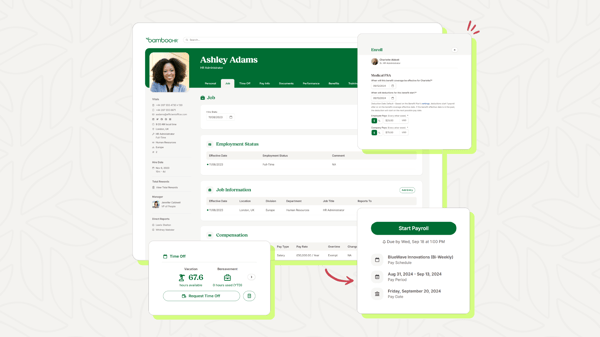
What stood out was how quickly routine tasks became predictable without adding administrative overhead. Time-off requests, approvals, and employee updates followed the same workflow, reducing manual coordination. That aligns with G2 Data, where BambooHR scores 93% for ease of use and 93% for ease of doing business with. It isn't designed for shift-heavy teams, but for small businesses that want workforce management tied closely to employee data; it behaves more like structured core HR software and holds up well during evaluation.
I'd move to a paid BambooHR subscription when the trial ends, and employee records, PTO approvals, and onboarding need to run continuously. If payroll processing or employee time tracking becomes part of that workflow, I'd evaluate BambooHR's Payroll or Time & Attendance add-ons rather than relying on separate systems.
“BambooHR sets the standard for user experience with a clean, intuitive dashboard that employees can navigate with virtually zero training. Thanks to a fantastic employee self-service app, team members can instantly log hours, check the company directory, or request PTO right from their phones. It’s a win-win that keeps employees autonomous and saves HR teams from a mountain of routine questions.”
- BambooHR review, Shubham M.
“Reporting customization could be more flexible—building specific custom reports sometimes takes more clicks than expected, and a few export formatting options feel limited. Onboarding took a little longer than anticipated since some of the setup steps weren't immediately obvious, though support was responsive when we had questions. The AI-driven features (like suggested insights) are useful but still feel a bit basic compared to what I'd hoped for.”
- BambooHR review, Ben E.
If you want to make employee setup more consistent beyond the BambooHR trial, see how to automate the onboarding process for practical ways to connect new-hire tasks and approvals.
Connecteam felt very different from the moment I started using it. Instead of building workflows around employee records, everything revolves around what your team is doing during the day. I used it to schedule shifts, track hours, assign tasks, and communicate with team members directly from the same app. For small businesses managing frontline or field teams, the free plan isn't just for testing. It is something you can actually run operations on.
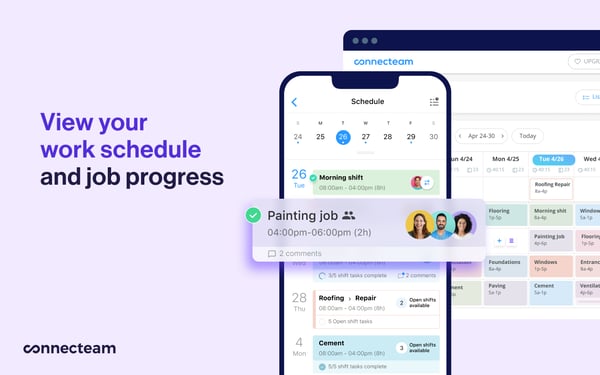
I would upgrade once my business grows beyond 10 employees or needs more advanced automation, reporting, and workforce management capabilities. Paid plans start at $29/month, extending the same mobile-first experience to larger teams and more complex operations.
“I use Connecteam to schedule my team for my event planning business, and it makes it much easier for me to see who can work. It's seamless for my team to know when they are scheduled. I love the ability to keep shifts open for my team to bid on. With my event planning business, I can put the events in, indicate how many assistants I need, and it allows my team to look at the date and location of the event and bid on it if they're interested in working. The initial setup of Connecteam was very easy.”
- Connecteam review, Kristen C.
“The mobile app is pretty glitchy and doesn't have all the same features as the web browser. For instance, I can't duplicate a shift on the mobile app, so setting up a shift is best to do on the web browser, which isn't necessarily convenient. There was a lot of learning curve and confusion around the icons and symbols used. It's very difficult to see if a shift was actually claimed or not, and if it was published. The initial setup was extremely challenging.”
- Connecteam review, Fancy F.
Employment Hero brings employee data, payroll, and compliance into the same workforce workflow, rather than treating time tracking as a separate task. I used it to manage attendance, onboarding, and payroll inputs all in one place, which is where simpler tools usually start to break down. Beyond its $0 recruiting/ATS plan and region-specific free offerings, the free trial let me evaluate how its broader HR and workforce workflows connect in real-world scenarios.
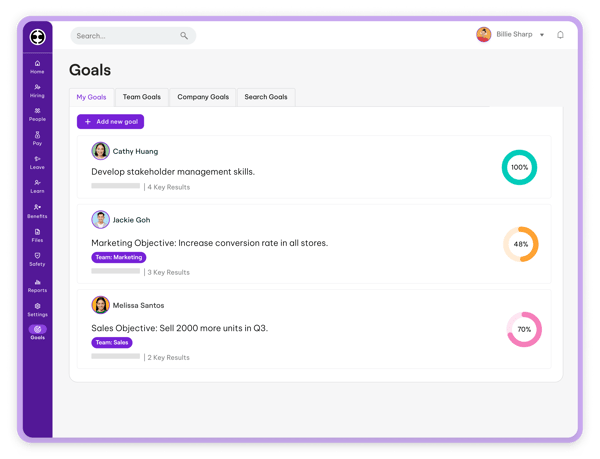
I would upgrade once I needed HR, payroll, and workforce management beyond the free recruiting or region-specific offerings. Paid plans start at $10/month, making the upgrade easier to assess when ongoing employee management, compliance, and automation become necessary.
It's free (I am using the Free Payroll option), and it's simple to set up and use. It connects to HMRC, so it keeps us compliant. The support is excellent - I had to ask for help a couple of times and got prompt and helpful responses.
- Employment Hero review, Helen L.
“The biggest downside is that there is a steep learning curve when you first start using the platform. With so many features and customization options available, it can feel overwhelming for new users, and it takes time to understand how all the different modules work together.”
- Employment Hero review, Jess D.
If you’re evaluating how platforms like this scale beyond small-team workflows, explore the HCM software category to compare how these systems evolve as organizations grow.
greytHR stood out in my evaluation for how it connects attendance and leave records to payroll inputs. I used it to log attendance, track leave balances, and generate payroll-ready data, which are the workflows small teams usually manage manually. The free trial let me test these processes under regular use, especially compared to broader onboarding software that focuses more on employee setup than ongoing operations.
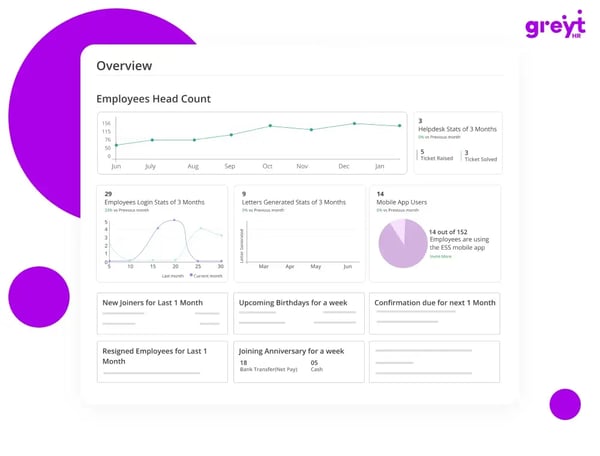
The difference shows up in consistency. Attendance logs, leave approvals, and payroll calculations stay aligned without constant adjustments. G2 Data reflects this, with absence and leave management at 93% and time and attendance tracking at 91%, compared with 87% for mobility and 82% for team communication. It does not try to do everything, but for teams evaluating the best free workforce management software for small businesses, it works where accuracy matters most.
I would upgrade from greytHR's trial once attendance tracking, leave management, and payroll processing are part of regular business workflows. A paid plan makes more sense then because it supports ongoing payroll operations, compliance, reporting, and employee administration from one platform. In India, Essential starts at about $26.28/month for up to 50 employees; the Growth tier with advanced attendance and shift management starts at about $47.34/month.
“I’ve had a great experience using greytHR. It simplifies and automates HR operations in one platform. The interface makes it easy to manage attendance, leave, payroll, onboarding, employee records, and compliance with minimal effort.”
- greytHR review, Abhijith M.
“Well, I don't want greytHR to show all of this on the home page. I mean, I can literally see in one click my payslips and all on the home page. Personally, I feel some sensitive things like salary-related details don’t need to be directly visible on the front page and can instead be managed somewhere inside the sidebar or another section.”
- greytHR review, Varun U.
Humanity Schedule by TCP put scheduling depth at the center of my testing, especially for recurring rosters and coverage changes. I used it to build weekly rosters, manage shift swaps, and track coverage without relying on spreadsheets or constant follow-ups. The free trial gave me enough time to test how schedules hold up when multiple people make changes simultaneously.
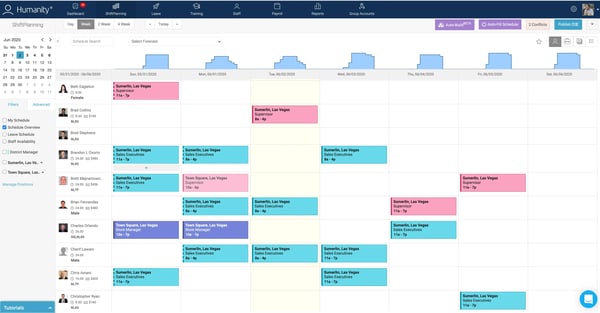
What became clear is that the platform is built around scheduling depth rather than general HR workflows. Creating recurring shifts, adjusting coverage, and managing availability felt structured and predictable. That aligns with G2 Data, where shift scheduling scores 93%, and time and attendance tracking reaches 90%, compared with 82% for reporting and 80% for integration APIs. It works best when scheduling is the priority and broader workforce processes come later, rather than trying to replace a full workforce planning software setup from the start.
I would upgrade once shift scheduling becomes a recurring operational need or my team requires long-term workforce planning. Paid plans use custom pricing, so I’d request a quote when ongoing scheduling, availability management, and time tracking justify the investment.
“Before I started using TCP, I was scheduling manually. Now I can build schedules weeks in advance, make changes in real time, and my team gets updates instantly. It has made scheduling far more manageable.”
- Humanity Schedule by TCP review, Patricia J.
“It can feel a little clunky for team members who don’t have set schedules. Overall, the product is good and performs well. I’ve struggled with support—when something goes wrong, it’s hard to reach the right person who can correct it, though I have seen some improvement.”
- Humanity Schedule by TCP review, Suzette K.
If you want to compare more tools focused purely on scheduling depth and team coordination, browse the employee scheduling software category to see how different platforms approach shift management.
Attendance logs and leave balances were the first things I checked in Keka, because those are the records small teams often struggle to maintain in spreadsheets. I used it to check attendance logs, review leave balances, and process payroll inputs in one place, which made day-to-day tracking far less scattered.
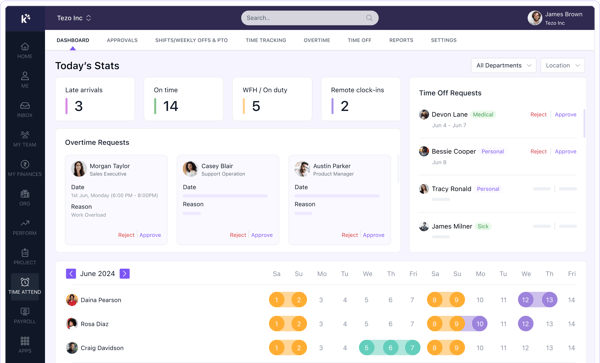
It also keeps routine workforce information visible without adding unnecessary admin work for a small team. Attendance data, leave requests, and reports are easy to access from the same dashboard, reducing follow-ups. G2 insights reinforce these strengths, with reporting and self-service at 94% and absence management at 93%. Integration APIs earn 88%, while customization sits at 86%, suggesting slightly less flexibility for businesses with more specialized requirements. For small businesses that value clarity over extensive configuration, Keka fits well within the broader absence management software space.
I would upgrade from Keka's trial once attendance, leave management, and payroll become part of my team's daily HR processes. A paid plan makes more sense because it provides ongoing access to reporting, employee management, payroll, and HR workflows without changing the experience I've already built.
“Overall, every feature is a 10/10, but I especially like the onboarding and payroll features. They’ve been exceptionally helpful to our team, and they’ve also played a vital role in our professional development.”
- Keka review, HR D.
“One area where Keka could improve is the level of customization available for certain reports and workflows. At times, generating highly specific reports or configuring unique approval processes can require extra effort. Additionally, occasional performance slowdowns during peak usage and limited flexibility in some modules could be enhanced to provide an even better user experience.”
- Keka review, Kiran S.
If you're looking beyond the best free workforce management software for small businesses listed above, these tools are also worth considering. Some offer permanent free plans, while others let you experience their workforce management capabilities before deciding whether they're the right fit.
Homebase's Basic plan is free for one location with up to 10 employees and includes scheduling, time tracking, point-of-sale integration, and optional payroll add-ons. G2 reviewers consistently describe the free plan as generous for small businesses, especially those managing a single location. As your team expands or you need HR, compliance, and advanced reporting, upgrading builds on the same scheduling workflow. (paid plan starts at $24/month)
Deputy's 14-day free trial includes scheduling, timesheets, time clocking, labor compliance, shift swaps, demand forecasting, labor optimization, payroll integrations, and workforce planning tools. G2 reviewers consistently praise Deputy for simplifying everyday scheduling. As workforce planning becomes more sophisticated, upgrading provides continued access to advanced optimization features. (paid plan starts at $5/user/month)
Zoho People's forever-free plan supports up to five users and includes employee records, leave management, and document management. G2 reviewers frequently describe it as a cost-effective solution for small businesses because it delivers practical HR functionality without overspending. As your workforce or HR processes grow, upgrading unlocks more automation and advanced workflows. (paid plan starts at $1.25/user/month)
Hubstaff's 14-day free trial includes full access to time tracking, activity monitoring, screenshots, app and URL tracking, reports, and project budgets without requiring a credit card. G2 reviewers consistently highlight how easy it is to get started and begin tracking work. As tracking becomes part of your daily operations, upgrading provides ongoing access to reporting, scheduling, and workforce insights. (paid plan starts at $4.99/seat/month)
Access PeopleHR's 14-day free trial, which includes employee records, document management, absence tracking, onboarding, e-signatures, an AI-powered HR assistant, analytics, and employee communication tools. G2 reviewers comment on the platform's value and straightforward implementation. As your HR operations become more structured, upgrading gives you continued access to these connected employee management capabilities. (paid plan starts at £3)
Free workforce management tools make the most sense when your biggest problem is visibility, not optimization. I found them useful when teams are trying to answer basic questions consistently: who’s working, who’s off, and whether hours match what gets paid. At this stage, even simple scheduling and attendance tracking replace a surprising amount of manual follow-up. For teams comparing free employee management software, employee records and leave approvals may matter just as much as shift coverage.
They also work when ownership is still informal. If one person is managing schedules, approvals, and payroll inputs without dedicated HR support, free plans can hold up longer than expected. The moment responsibilities are split across roles or locations, coordination starts to break, and that’s where limitations show up quickly.
The first breaking point isn’t features. It’s exceptions. Free plans handle standard schedules well, but once you start managing shift swaps, last-minute changes, or uneven workloads, manual fixes are needed again.
The second is payroll dependency. As soon as attendance data needs to be trusted for salary calculations, gaps in approvals, reporting, or audit trails become risky rather than merely inconvenient.
The third is operational scale. Not just team size, but how often decisions depend on the system. When managers rely on it daily rather than occasionally, limitations in automation and visibility stop being small inconveniences and start affecting how work gets done.
Have more questions? G2 has the answers!
Connecteam and BambooHR are strong options for reliable, trusted software, based on G2 feedback from small-business users. Connecteam earns praise for accessible scheduling and daily team coordination, while BambooHR is valued for straightforward employee administration and ease of use.
Connecteam and greytHR can help small businesses control labor costs through better scheduling, attendance accuracy, and time tracking. Their free access is useful for reducing manual errors, although deeper labor optimization and analytics typically require an upgrade.
Connecteam and Humanity Schedule by TCP support employee-driven scheduling workflows such as viewing availability, claiming shifts, or handling schedule changes. Their free plan or trial helps small businesses evaluate whether self-service scheduling can reduce conflicts and manager follow-ups.
BambooHR, Connecteam, and greytHR address different everyday needs during free access. Connecteam covers scheduling and frontline operations, greytHR focuses on attendance and leave, while BambooHR helps growing small businesses evaluate structured employee records and HR administration.
Humanity Schedule by TCP is particularly relevant for small businesses testing complex scheduling. Its trial lets teams evaluate recurring shifts, employee availability, coverage changes, and shift management before deciding whether the scheduling depth justifies a paid subscription.
Connecteam gives small teams visibility into schedules, attendance, and employee activity through its permanent free plan. Humanity Schedule by TCP is another option for testing shift coverage and availability during its trial before committing to ongoing scheduling software.
Humanity Schedule by TCP is the strongest fit here for evaluating scheduling depth during a free trial. Small businesses can assess automated scheduling and coverage workflows before paying, although advanced demand forecasting typically requires continued access to paid capabilities.
Humanity Schedule by TCP is better suited to businesses testing recurring shifts, availability, and coverage requirements, while Connecteam works well for smaller deskless teams. Both provide free access, allowing businesses to assess scheduling fit before committing financially.
Among the best free workforce management software for small businesses, Connecteam is useful for scheduling and time tracking, while greytHR strengthens attendance and payroll accuracy. The better choice depends on whether scheduling efficiency or payroll-ready attendance data matters more.
After going through these tools, the difference wasn’t in features. It was in how long each platform stayed useful once workforce management became part of daily operations. Connecteam held up well for small, deskless teams, greytHR and Keka kept attendance and payroll inputs consistent, while Humanity handled scheduling depth better than most during evaluation.
The limitation wasn’t capability. It was dependency. Free plans worked when scheduling, attendance, and approvals were occasional tasks. The moment payroll accuracy, shift coverage, and employee coordination became routine, gaps in automation and reporting started to matter.
My takeaway is simple: use the free plan to answer one question. Can this tool support how your team actually works every day? If it does, upgrading becomes a decision, not a risk. That’s where the best free workforce management software for small businesses proves its value.
Ready to simplify payroll and workforce operations? Explore the best payroll software to manage employee pay, compliance, and reporting more efficiently.


When I started researching the best workforce management software, I realized the challenge...
 by Harshita Tewari

Thebest employee intranet softwarein 2026, according to the G2 Summer grid report, is ...
.png) by Shreya Mattoo
by Shreya Mattoo

Recently updatedFall 2026 Grid® Report · August 25, 2026 This guide was last updated on...
 by Keerthi Rangan