


Tired of lost bug reports and endless email threads?
Inefficient bug tracking can be a major struggle for development and quality assurance teams. Without an efficient system, chaos can quickly settle in, from grappling with code issues to drowning in bug reports.
Implementing a bug tracking system is one such solution to transform chaos into order, ensuring every bug is captured, assigned, and resolved. The best part? You don't need a big budget to deploy these platforms.
If you’ve ever wondered Which is the best bug tracking software for development teams? Or searched for top tools for managing and prioritizing software bugs, you’re not alone. Choosing the right platform can directly impact delivery speed, collaboration, and product quality.
That’s why I’ve compiled an extensive list of the best free bug tracking software to help prevent slowed progress and product failures. This list contains the leading providers, key features they offer, and their pros and cons, all backed by real reviews from G2 users.
*The software list is arranged alphabetically. These tools offer free trials, free forever options, or freemium models.
If you’re comparing the best bug tracking software with detailed analytics or asking which platform is best for cross-platform issue tracking, this table breaks down the essentials at a glance:
| Best free bug tracking software | G2 Rating | Free plan | Paid plan |
| ClickUp | 4.7/5 ⭐ | Free forever with limited features | Starting at $7/user/month |
| GitHub | 4.7/5 ⭐ | Available with community support | Starting at $4/user/month |
| GitLab | 4.5/5 ⭐ | Available for limited users | Available on request |
| Jira | 4.3/5 ⭐ | Available for 10 users | Starting at $7.53/user/month |
| LogRocket | 4.6/5 ⭐ | Available with limited features (+ free trial for paid plans) | Starting at $69/month |
| monday dev | 4.7/5 ⭐ | 14-day free trial available | Starting at $10/user/month |
| Teamwork.com | 4.4/5 ⭐ | Available for limited users | Starting at $10.99/user/month |
| Wrike | 4.2/5 ⭐ | Available with limited features | Starting at $10/user/month |
*All pricing details mentioned in the article are based on publicly available data at the time of publication and are subject to change.
The bug tracking market is growing faster than ever, and it’s easy to see why. As software teams ship faster and adopt more agile tasks, the need for reliable, centralized issue management has become non-negotiable. And the numbers back this up. The bug tracking software market is expected to grow to $28.86 billion by 2035, driven by a strong 17.72% CAGR between 2025 and 2035.
With that level of growth, teams are actively searching for the best platforms for integrating bug tracking with CI/CD, analytics-driven debugging, and collaboration-first workflows.
Below are the eight free bug tracking tools I’ve personally evaluated that stand out for their usability, collaboration features, and overall reliability. These platforms offer issue tracking, workflow management, and team coordination capabilities that rival many paid solutions, helping me keep projects on track and bugs under control without stretching my budget.
To build this list, I started by exploring G2’s free bug tracking category. I paid close attention to products that showed steady user satisfaction and meaningful adoption among development, QA, and product teams. This helped me identify platforms that aren’t just popular, but genuinely dependable over time.
Once I had a solid shortlist, I dug into each tool’s core features, workflows, and documentation to understand how they hold up in real development environments. I also reviewed verified G2 user feedback to see how real teams use these platforms for reporting issues, collaborating, prioritizing, and managing releases.
Because this guide focuses on free options, I paid close attention to what the free plans actually offer. I checked whether essentials like unlimited issues, team collaboration, integrations, and automation are included without upgrading, and whether the free tier is truly usable long-term or just a trial.
Any screenshots displayed in this article may originate from vendor G2 profiles or publicly available product resources.
The list below contains real user reviews from the best free bug tracking software category page. It’s important to note that in the context of this list, vendors offering a free trial are also considered free. To be included in this category, a solution must:
*This data was pulled from G2 in 2025. Some reviews may have been edited for clarity.
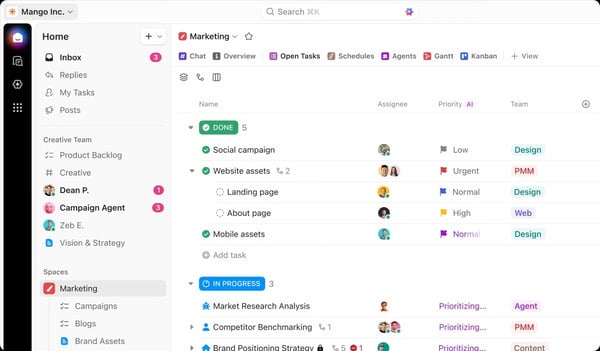
If you’re evaluating top tools for managing and prioritizing software bugs, ClickUp stands out for how flexible and configurable it is across teams. It’s an all-in-one project management platform that doubles as a powerful bug tracker, making it ideal for development teams that want visibility without juggling multiple tools. The software can cater to various methodologies, making it adaptable to different development styles, which is particularly beneficial for teams with dynamic workflows.
The free forever plan provides access to limited but key features like time tracking, automation, and more. According to G2 Data, it ranks as the 7th easiest to use tool.
| Pros of ClickUp | Cons of ClickUp |
| Highly customizable with multiple views and features | Some users may find the user interface to be cluttered |
| Facilitates real-time updates and collaboration | Initial setup and customization can be time-consuming |
| Allows users to track bugs and manage projects through a single platform | The platform may face occasional performance lags |
“It’s good for task management and bug tracking. We can easily change the task's status, and its grid view is very good, where we can easily move the tasks.”
- ClickUp review, Padala L.
“It can easily get very disorganized, users can override required steps, and there is a lack of customization with integration features.”
- ClickUp review, Alyssa C.
Want to reduce recurring customer-reported bugs? Explore the top contact center QA tools that help teams catch issues earlier, improve agent accuracy, and strengthen overall product feedback loops.
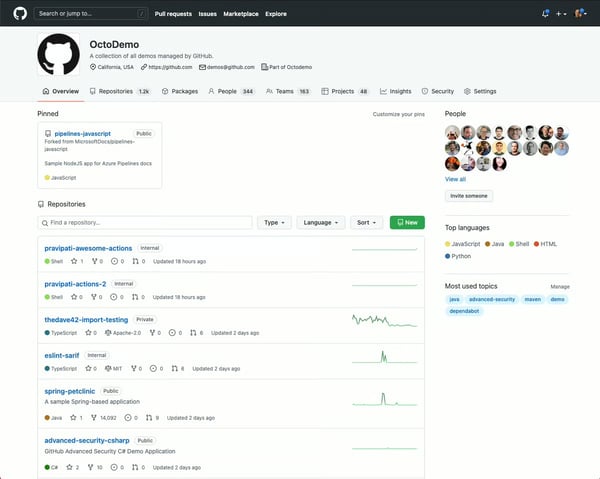
GitHub is often the first answer when teams ask which bug tracking platform integrates with version control. Through GitHub Issues, bugs are directly tied to repositories, commits, pull requests, and releases, creating a seamless workflow for engineering teams. The simplicity and efficiency of GitHub Issues make it a favorite among developers who prefer to manage their projects and track bugs within the same ecosystem. According to G2 Data, it ranks as the 2nd easiest to use software.
The free version is available to all, with flexible features that adapt to any workflow.
| Pros of GitHub | Cons of GitHub |
| Directly links bugs to specific code changes | May face visibility overload in larger repositories, making it challenging to prioritize bug fixes |
| Easily integrates with various integrated development environments (IDEs) and tools | Primarily designed for development teams, making it unsuitable for non-technical users |
| Helps automate testing and deployment processes | New users may need time to learn most functionalities |
“It has the most helpful bug tracking and issue-resolving feature, which supports handling code versions with various updates. We have integrated Visual Studio and other IDE tools, where all the newly developed source code is directly committed and pushed onto GitHub. It supports continuous integration and continuous deployment (CI/CD) for regression testing and provides a compare and pull request where the reviewer can check all the changes in the code. Users don't have to invest in security because GitHub itself handles all the security-related stuff.”
- GitHub review, Mahesh S.
“It is a little bit complicated to understand at first, mostly because of the lot of features it has. You can get lost in its interface if you are new to GitHub. The UX is not as intuitive as you could expect, but if you use it for a long time, you get used to it.”
- GitHub review, Mauricio G.
Bugs often start with hidden performance issues. See the best APM tools that help you detect slowdowns, crashes, and errors before they impact users, and before they fill up your bug tracker.
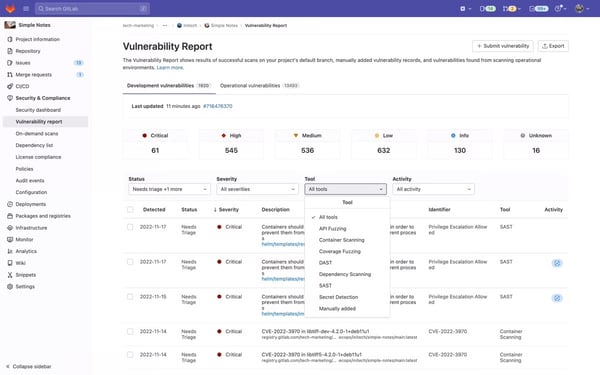
GitLab appeals to teams searching for top-rated tools for automated bug detection within a full DevOps lifecycle. Designed to support the entire software development lifecycle, GitLab enables teams to track bugs efficiently, linking them directly to code, commits, and merge requests. Its customizable workflows and CI/CD integration make it a favorite for teams looking for a seamless debugging experience within their development pipeline.
The free plan for GitLab is available for up to five users with access to basic features.
| Pros of GitLab | Cons of GitLab |
| Links bugs directly to code changes and merge requests, providing clear traceability | May experience slower load times and sluggish navigation |
| Integrates bug tracking with its CI/CD pipeline, enabling automated testing | The issue tracking system can sometimes lag in large repositories |
| Allows users to define workflows and templates, enhancing the bug tracking process | The extensive features might be excessive for small projects |
“The part where the entire DevOps lifecycle is covered by the comprehensive tool and feature set offered by GitLab is the best. My teams may combine the modifications made by different groups working on other features or bug fixes, thanks to GitLab. It also has features like code reviews, issue tracking, and merge requests.”
- GitLab review, Abhijit M.
“In our integration, we lack several features available on other git clients such as GitHub. The inline rendering of notebooks on GitHub, as well as the much simpler ability to share with external users, is a huge plus for getting feedback and usage information. Additionally, there are no trending repositories to see any cool new ideas people have come up with, which is a drawback. Furthermore, the ease of linking issues/repos/pull requests across other posts is less clear.”
- GitLab review, Varun B.
Support tickets turning into bug reports? Check out the top help desk platforms that streamline ticket intake, triage, and escalation.
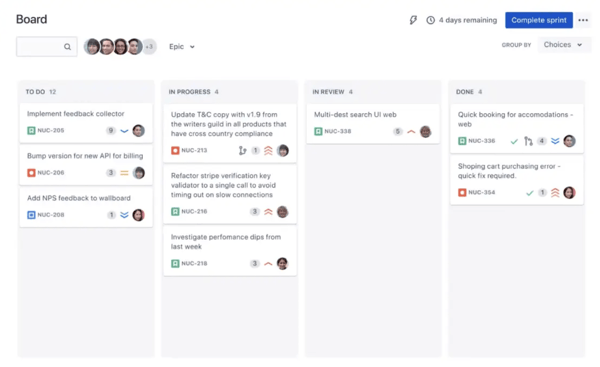
Jira, by Atlassian, is a powerhouse in bug tracking and project management. It facilitates issue tracking, agile project management, and seamless team collaboration. Jira is often the go-to answer for teams asking best bug tracking software for agile workflows. Built specifically for Scrum and Kanban methodologies, Jira allows teams to track bugs alongside stories, epics, and sprints with structured workflows. According to G2 Data, it ranks as the 5th easiest to use tool.
The free forever plan is available for up to 10 users and supports unlimited development projects, goals, and reports.
| Pros of Jira | Cons of Jira |
| Allows teams to define custom workflows for bug tracking | Occasional lag with large data sets or extensive customizations |
| Offers vigorous reporting capabilities that analyze and understand bug trends | Some advanced bug-tracking features are only accessible through paid plans |
| Integrates effortlessly with a wide range of development tools | Steep learning curve for new users due to its complex interface |
"Jira's user interface is intuitive and user-friendly, which is beneficial for QA teams who often deal with numerous test cases and bug reports. Jira seamlessly integrates with various test management systems, enabling QA teams to create, manage, and track test cases directly within Jira and providing a centralized platform for all testing activities.”
- Jira review, Mircea C.
“We cannot perform a post activity on the cases or records we are tracking. Once my tickets are closed, I need to post-process them. For that, I have two options: either integrate with Salesforce or move everything to Salesforce(tracking part also). The biggest drawback of JIRA is it does not have automation tools built in.”
- Jira review, Kartik C.
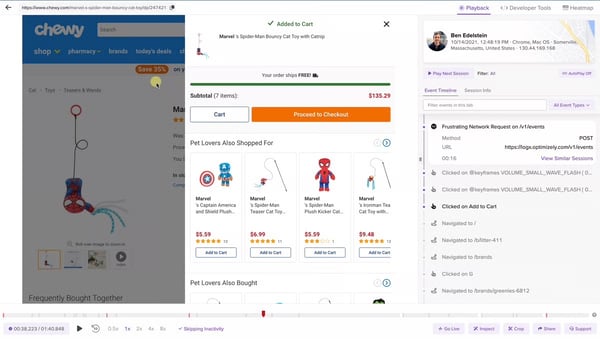
LogRocket is a cutting-edge bug tracking and user analytics tool tailored primarily for web applications. It stands out by offering session replay, performance monitoring, and error-tracking features. With LogRocket, you can replay user sessions to see exactly what led to a bug, helping teams diagnose issues rapidly and accurately. This innovative approach provides a unique dimension to bug tracking by combining user experience insights with traditional debugging. LogRocket is a strong choice for teams researching top-rated tools for automated bug detection combined with real user context.
The free plan includes issue frequency analysis, JavaScript errors, integrations, and compliance. According to G2 Data, it ranks as the second-highest software in this category.
| Pros of LogRocket | Cons of LogRocket |
| Allows session replays for events that led to a bug | Session replays can be resource-intensive |
| Monitors application performance metrics | Primarily focused on web applications, making it unsuitable for other platforms |
| Provides detailed error logs and stack traces | Advanced features and integrations may be limited to paid plans |
“Logrocket is fast and reliable in integrating with large-scale React-based software projects, and it is simple to use. Our project provided accurate user activity data, and our requirements included tracking user activity and bug analysis for network requests. So far, it has provided accurate user session tracking for understanding what user pain points are in UX, and network request logs are really helpful in solving many failing network requests on different user devices.”
- LogRocket review, Ravi V.
“The error tracking is not very feature-rich. I don't think there is a way to assign people to issues, leave comments, mark them as resolved, etc. I think Sentry is a lot more feature-rich for error tracking, but it lacks screen recordings. LogRocket nails the screen recordings better but lacks features for error tracking.”
- LogRocket review, Christian B.
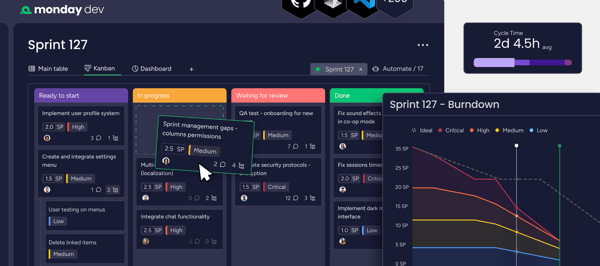
monday dev (part of the monday.com suite) is a comprehensive project management and defect tracking tool designed for development teams. It is ideal for teams comparing which bug tracking tool has the most intuitive interface?. Its visual boards, color-coded statuses, and automation-driven workflows make bug tracking easy to understand across technical and non-technical teams. The platform's emphasis on collaboration and transparency makes it easier to communicate and resolve issues quickly.
The platform comes with a 14-day free trial that provides access to features like boards, tasks, and issue trackers.
| Pros of monday dev | Cons of monday dev |
| Features engaging and visually appealing boards for issue tracking | Requires elaborate initial setup to tailor workflows |
| Offers powerful automation features to facilitate repetitive bug tracking tasks | Lower tiers may not be suitable for larger teams |
| Integrates with tools like GitHub, Slack, and Trello to fit bug tracking into existing workflows | Limited advanced bug tracking features compared to specialized tools |
“The flow and UI, the customization, the ease at which everything works together while still allowing department separation... but the thing I love most about Monday is the customer support. Whether it's a bug, a suggestion, or a user error, they are always fast, knowledgeable, and courteous. They always follow up afterward as well. It is something my company strives for, so I appreciate it greatly in others. Oh, and the Monday labs! Great add-ons to even further customize your experience.”
- monday dev review, Amanda B.
“Program planning templates are a bit bulky, hard to change, and less intuitive than the backlog and bug tracking ones we use. Improving them and simplifying the usage to be more familiar but still simple, as in MSP, will be great.”
- monday dev review, Daniel K.
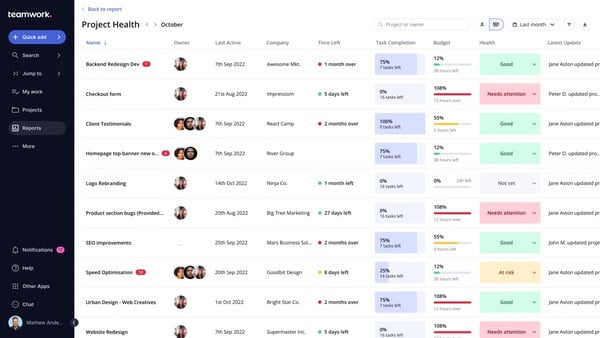
Teamwork.com is a comprehensive project management suite that includes bug tracking features to improve team productivity and issue resolution. While it excels at providing a unified platform for all types of project tasks, its bug tracking capabilities allow teams to log, prioritize, and track issues from creation to resolution. Teamwork.com is best suited for teams asking which platform is best for cross-platform issue tracking. within client-driven or service-based projects.
The free plan is available for up to five users and has access to key integrations and features.
| Pros of Teamwork.com | Cons of Teamwork.com |
| Simple and user-friendly UI | Reporting capabilities could be more robust and detailed |
| Enables teams to log the time spent on bug fixes | Bug tracking features may lack details, such as automatic bug categorization |
| Integrates bug tracking with other project management tools | For teams only needing bug tracking, the platform may feel bloated and go unused |
“Teamwork’s bug report tool is amazing and easy to use.”
- Teamwork.com review, Tanu S.
“The free plan offered by Teamwork.com has limitations on the number of users and projects, which may not be sufficient for larger teams or organizations with complex project requirements.”
- Teamwork.com review, Ravindra T.
Apart from being a flexible project management software, Wrike also serves as an effective bug tracking solution. It offers a wealth of features to help teams manage tasks, track bugs, and simplify workflows. Wrike appeals to teams exploring top tools for linking bugs to project management boards while maintaining visibility across timelines and dependencies. Its Gantt charts and Kanban boards allow teams to track bugs in relation to broader project goals.
The free plan is available to all users and provides access to features such as automation, collaboration, and reporting.

| Pros of Wrike | Cons of Wrike |
| Offers multiple views for managing bug tracking tasks | Handling bugs can be time-consuming, often requiring multiple tickets and communication |
| Diverse collaboration features like real-time editing and bug resolution | May lack some advanced bug resolution features compared to dedicated solutions |
| Provides customizable dashboards that can be tailored to highlight bug metrics | The interface may get cluttered with large projects |
“I come from a world of Software QA testing, and I knew my team would benefit from a bug tracking system. They were already familiar with managing tasks in Wrike, so rather than introduce a different tool to them, I referred to a Wrike article with tips on creating a "Ticket System" with colored folders to work as 'tags', building more visible information about a bug into a nice, sortable list. Most recently, Wrike unveiled subtasks, which are already improving my team's productivity as they transition into a more agile development process.”
- Wrike review, Josh C.
“The user experience in Wrike is clunky. Managing the system from the backend is frustrating. Blueprint templates don't always work. Dashboarding is incredibly difficult and not intuitive. All of the features I've wanted to use have had issues and errors. The bug reporting process takes too much time. I don't have an account representative who has the answers; I have to open multiple tickets to process issues, and I struggle to keep up with all the communication. It's disappointing because I truly believe Wrike could be a great contender.”
- Wrike review, Sage R.
Have more questions? Find your answers below!
Most reputable free bug tracking tools adhere to strict security protocols, including data encryption, regular backups, and compliance with standards like the General Data Protection Regulation (GDPR). However, it's crucial to review each tool's specific security measures to ensure they meet your requirements.
Yes, several free bug tracking tools cater specifically to mobile development by providing features tailored to mobile app environments. For example, Instabug excels in collecting detailed mobile bug reports, complete with device logs and user feedback.
Small teams do well with tools that offer flexibility, ease of use, and minimal setup. ClickUp and monday dev are great for teams that want visual boards, simple workflows, and built-in collaboration without a steep learning curve. Jira is another strong option if your team wants more structured software development practices from day one. GitHub and GitLab work especially well for small engineering teams that rely heavily on repositories and already collaborate through pull requests.
Jira is one of the strongest free options for agile teams because it offers boards, backlogs, sprints, and issue hierarchies tailored specifically for Scrum and Kanban workflows. ClickUp also works well for agile development thanks to customizable statuses, sprint-style views, and powerful task management features. GitLab and GitHub both support agile workflows through issue boards and milestone tracking, making them great choices if your team prefers to stay within a code-centric environment.
Students and learners tend to benefit from tools that are both simple and deeply integrated with their coding projects. GitHub is often the top choice because it supports issue tracking directly alongside repositories, making it ideal for class assignments and personal projects. GitLab offers a similar experience with more built-in CI/CD learning opportunities. ClickUp is also a strong option for students who want a visual tool that helps them stay organized while learning how to manage larger projects.
GitHub is the most widely used bug tracking tool for open-source projects because its issue system is directly tied to repository activity and community collaboration. GitLab is another excellent choice, offering a more integrated DevOps workflow with issue tracking, code reviews, and CI/CD in one place. For maintainers who want a richer debugging context, Instabug and LogRocket can help surface user-reported issues or app behaviors that are harder to catch during development.
Most free issue tracking software efficiently handles small—to medium-sized projects. However, as your project scales, some platforms may impose limits on issues, users, and project sizes in their free tiers. To overcome these limitations, consider exploring paid bug tracking solutions that offer more extensive support for larger projects.
Most free plans offer powerful collaboration tools, but there may be restrictions on the number of users, comments, or shared projects. While free tiers typically allow core team functionalities, features for larger teams, like shared dashboards and detailed logs, may require a subscription.
Choosing the right free bug tracking software is a critical step in optimizing your development process. When you have a tool that fits your workflow, everything moves faster and feels more organized. That’s why I've put this list together to help you find a solution that improves your process, strengthens communication, and maintains high product quality without stretching your budget.
I hope this guide brings you one step closer to the bug tracking tool that works best for you.
Integrate the best continuous delivery tools with your bug tracking system to automate and expedite the deployment of bug fixes.
Edited by Monishka Agrawal
This article was originally published in 2024. It has been updated with new information.


If there’s one thing I’ve learned from working with product, engineering, and QA teams, it’s...
 by Gunisha

I evaluated 10+ tools to find the best free project management software for software teams....
by Washija Kazim

Recently updatedSummer 2026 Grid® Report · Published May 26, 2026 This guide was last...
 by Krithika Sathyamoorthy