


I evaluated 20+ tools using G2 Data and reviews to finalize the 10 best website security software. These are Cloudflare Application Security and Performance, FortiAppSec Cloud, Intruder, Pentest-Tools.com, Invicti, AppTrana, Acunetix by Invicti, Astra Pentest, GoDaddy Website Security, and WP Ghost by AISQ (formerly Hide My WP Ghost).
Picture this: It's 11 PM. Slack is buzzing louder than ever, and nobody can tell if the site is having a bad night or actively being attacked. Jeff, who set up the security tool, left eight months ago to co-found a startup. The docs haven't been updated since 2022. And somewhere out there, a customer is already tweeting about it. Is it too late to request Jeff to get on a call?
The honest answer to that last question: probably not on time. That is exactly why finding the best website security software before you're in that situation matters more than most teams realize.
Here is the genuinely unhinged part. According to IBM, the average organization takes 181 days to realize something went wrong, and another 60 to stop it. That is 241 days of a problem living rent-free in your environment, while everyone assumes the tool is handling it.
The options do not make this simple. WAFs, vulnerability scanners, DDoS protection, malware detection, pen testing platforms: same search, roughly identical pitch, and most vendors are not rushing to explain the gaps. So teams pick something, feel covered, and find out later what their tool actually protected.
I went through G2 review data with one question: which platforms actually catch things versus which ones just produce a tidy incident report after the fact. False positive rates, alert quality, deployment friction, and performance under scale. That is what separated the useful ones from the expensive wallpaper. Each pick below is matched to the problem it solves best.
*These tools are top-rated in their category based on G2's 2026 Winter Grid Report. I've added their features to help pick the tool that works best for your needs.
What separates genuinely useful website security tools from the ones that just add overhead is signal quality. Anyone can build a dashboard that lights up. Fewer platforms can tell a team which of those alerts actually matter and which ones can wait.
The ten platforms below all earned strong satisfaction scores on G2, but they solve different versions of that problem. Some are built around perimeter defence and traffic filtering at scale. Others go deeper on vulnerability detection, penetration testing, or compliance-ready reporting. A few are purpose-built for teams without dedicated security staff, where deployment speed and low maintenance overhead matter as much as detection depth.
G2 Data shows these tools have moved well beyond enterprise-only territory. Small teams, mid-market companies, and large organisations are all running them, and for consistent reasons — uptime matters, compliance pressure is real, and a site going down costs more than the software ever would. Most platforms on this list are built to deploy quickly, because slow implementation is a security gap in itself.
I started with G2's 2026 Winter Grid Reports to build the shortlist. Satisfaction scores and market presence across small teams, mid-market, and enterprise gave me a starting filter: tools that real teams are actually running in production, past the evaluation stage.
From there, I ran AI-assisted analysis across hundreds of verified G2 reviews, looking for patterns that recur in day-to-day operations. Signal quality, alert noise, vulnerability-detection accuracy, deployment friction, automation depth, and how well each platform integrates with existing infrastructure. That is what told me which tools reduce exposure and response time, and which ones quietly become a problem as environments grow.
Where I have not personally deployed a tool, I cross-referenced findings with security, engineering, and IT teams using these platforms in live workflows. Visuals and product references are pulled directly from G2 vendor listings and publicly available product documentation.
My evaluation is based on hundreds of verified G2 reviews. What teams run into six months after deployment tells you more than any sales deck, and that is what shaped every criterion below. These are the features I kept in mind while evaluating the best website security software:
No website security software gets everything right. Some go deep on analysis and ask more of your team to operate them. Others cast a wide net and miss things in the process. The call comes down to what your team actually needs day to day, and that answer often looks nothing like what shines in a procurement doc.
To be included in this category, Website Security Software must meet the following criteria:
This data was pulled from G2 in 2025. Some reviews may have been edited for clarity.
See the threat landscape by the numbers: Explore the latest malware statistics to understand how attack volumes, targets, and delivery methods are changing.
Cloudflare brings DDoS mitigation, WAF, DNS, bot management, and a global CDN together in a single layer that sits in front of existing infrastructure. As I worked through the G2 reviews, one theme kept emerging: teams consistently value how little day-to-day attention the platform demands once it's in place. Protection and delivery operate together at scale without requiring broader infrastructure changes.
The firewall and DDoS protection scores 96% on G2 for good reason. Traffic gets filtered at the edge before it ever reaches the origin, and teams running high-volume environments report stable incident rates and consistent throughput as a result. Protection holds steady without anyone actively maintaining it, which is exactly what production stability requires.
CDN, smart routing, and edge caching running on the same delivery layer as security is where the performance combination becomes operationally meaningful. Load times improve across regions without per-region configuration, and verified reviews on G2 specifically credit this for resolving latency complaints from international users, a real operational outcome rather than a theoretical benefit.
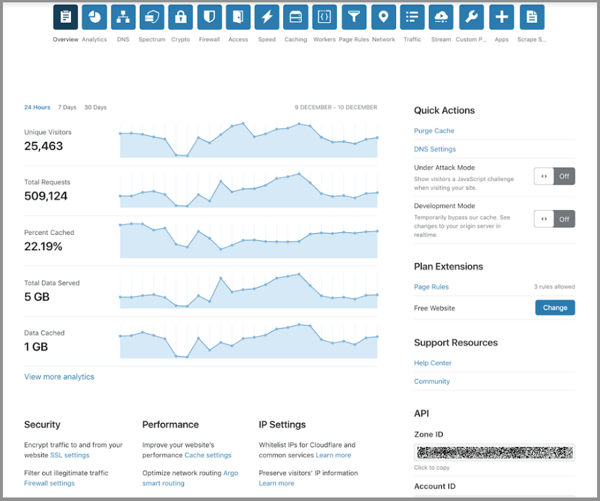
As I worked through G2 reviews, DNS reliability emerged as one of Cloudflare's most consistently praised operational strengths. Fast resolution, clean traffic routing, and dependable uptime keep appearing as reasons teams trust it in high-stakes production environments. DDoS protection scores 93% on G2, and teams that rely on it tend to shed separate traffic management tools entirely, keeping the stack tighter.
What stands out repeatedly across G2 reviewer accounts is how cleanly Cloudflare sits in front of existing hosting providers, CMS platforms, and deployment pipelines without touching the infrastructure underneath. Smaller organisations adopt it early and carry it forward as they scale specifically because it doesn't conflict with the stack already in place, a compatibility characteristic that becomes more valuable rather than less as infrastructure complexity grows.
Based on my evaluation, I saw that bot management is where the platform earns genuine respect in review feedback. Rate limiting, credential stuffing controls, and managed WAF rules block automated abuse before it reaches origin, and teams with lean security resources get broad coverage without committing to constant manual rule updates. Built-in protections handle recurring attack patterns, freeing up human attention for the edge cases that actually need it.
The analytics dashboards and rule-based configurations give teams visibility into traffic patterns and threat behavior, backed by a dashboard and reporting score of 92% on G2. Once configured, these controls stay stable and rarely demand intervention, and the visibility layer supports ongoing tuning without a full security operations function sitting behind it. For teams that want oversight without overhead, that's a meaningful return.
Reviewer feedback on G2 flags that WAF rule tracing isn't straightforward; pinpointing which rule triggered a block requires deeper log analysis than most teams anticipate during incident troubleshooting. This surfaces most for teams deploying Cloudflare selectively as a single protection layer. The core protection layer including DDoS mitigation, CDN delivery, and firewall coverage operates reliably from day one without requiring that same level of configuration investment.
Review patterns on G2 also point to advanced bot policy tuning and broader configuration capabilities not performing at their best out of the box. Teams committing to full-stack deployment get the most from that configuration investment, with protection depth and consistency improving materially once the setup covers the complete environment rather than a single layer.
Cloudflare is the strongest fit for teams that need security and performance running together at scale. DDoS mitigation, WAF coverage, smart routing, and bot management that hold steady without demanding constant attention across high-volume, multi-region production environments.
"I really like that I can use the Cloudflare platform for high-level security with DDoS protection. The DNS service is compatible with my needs, and I also appreciate other features such as analytics and performance, which enhance the speed of the site. I drastically use Cloudflare to protect my websites. Incorporating different features like this is key when I build websites using fullstack tools and technologies."
- Cloudflare Application Security and Performance review, Kyle P.
"Fine-tuning WAF rules and bot management settings can take time to avoid false positives, particularly for complex or highly dynamic applications."
- Cloudflare Application Security and Performance review, Bhanuka L.
Want only WAF-focused tools? Explore the best firewall software on G2 to find platforms built specifically around network and application-layer traffic control.
FortiAppSec Cloud handles automated threat detection, cloud-based policy enforcement, and Fortinet ecosystem integration within a single managed layer. What I found consistently across G2 reviewer accounts is that it earns its positioning not just at deployment but over time, reviews describing it as reliable and low-friction to operate across months of real production use, which is a more meaningful signal than initial setup experience alone.
Ease of admin scores 98% on G2 and what that score reflects is something teams feel across sustained operational use rather than just during onboarding. Monitoring and management are consolidated in a single interface with no jumping between disconnected processes, and automated detection quietly handles the routine threat load while keeping security team attention where it belongs.
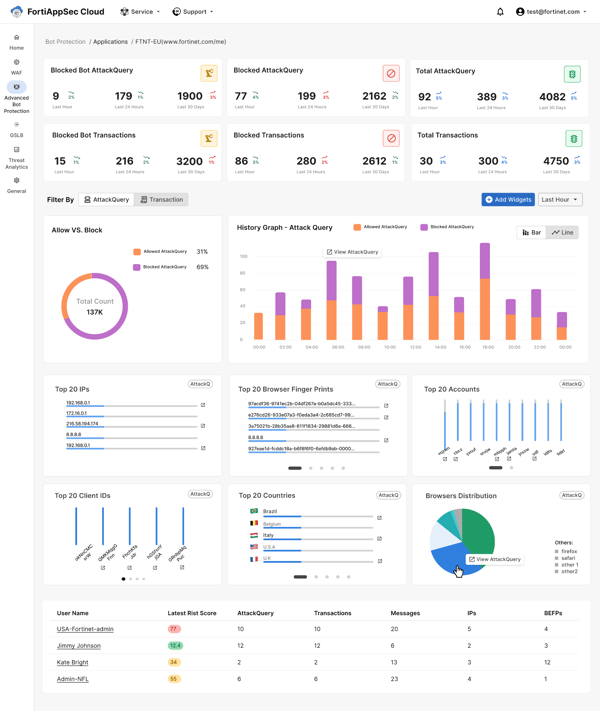
URL filtering and content routing are about more than simply blocking threats. What stood out to me in the G2 reviews is how often teams describe using these controls to enforce everyday access policies with greater precision. Administrators can define exactly which URLs are allowed or restricted without relying on separate tools. Backed by a 94% meets requirements score on G2, the feature consistently aligns with the operational security needs reviewers describe.
One thing I noticed across G2 feedback: the unified dashboard genuinely reduces the cognitive load of daily security monitoring. Attack types, traffic sources, and blocked requests all appear in one view, and reviewers describe the interface as accessible enough that lean teams can handle monitoring without a specialist dependency. Reading security posture at a glance accelerates both routine checks and incident triage in a way that compounds over time.
Ease of setup scores 96% on G2. Verified reviews state that implementation is manageable even for teams new to cloud-based environments, and the platform scales automatically as traffic grows, removing capacity planning entirely. Once deployed, the managed layer runs with minimal ongoing involvement, freeing security staff without introducing fragility into the coverage model.
For security teams managing growing application estates, I keep seeing the same three qualities cited in reviews: compliance readiness, Fortinet integration stability, and automated protection that covers a wide surface reliably. That consistency across changing conditions is what mid-market security programs actually need from a managed platform.
Users on G2 note that initial configuration takes longer than teams without prior WAF experience may expect because of the range of available policy options. This is more noticeable for organizations newer to web application security, while teams with established security processes align well with the platform's configuration model. Once deployed, reviewers consistently describe the automated threat detection and managed delivery layer as reliable and low-maintenance.
Feedback across G2 highlights that advanced customization follows a more structured process than teams expecting rapid policy iteration may prefer. This is more noticeable for organizations that heavily tailor security rules, while teams prioritizing automated protection align well with the platform's managed approach. The policy enforcement and threat detection layers continue to operate consistently without requiring constant manual adjustment.
FortiAppSec Cloud is the strongest fit for mid-market and security-led organisations that need reliable, low-friction web application security; automated threat detection, unified monitoring, and Fortinet ecosystem integration built in from the start.
"What I appreciate most about FortiAppSec Cloud is its intelligent and automated approach to web application security, which makes the entire process much simpler. The AI driven threat detection is particularly impressive, as it can identify and block attacks in real time. This not only reduces the need for manual intervention but also ensures robust and consistent protection. Overall, I find it reliable, efficient, and straightforward to manage offering everything necessary for securing modern applications."
- FortiAppSec Cloud review, Jamshina P.
"The initial configuration and setup for complex rules can be tricky, which is challenging for first-time users. Also, the UI and UX could be improved, particularly with richer incident storytelling like timeline-based views and smarter risk scoring. Sometimes, there's a bit of performance issue during peak traffic, and there's a lack of detailing in incident reports."
- FortiAppSec Cloud review, Shiv A.
If your security validation goes beyond scanning into active exploitation testing, the best penetration testing tools on G2 may be worth a look.
Intruder is the security tool that keeps working even when your team has completely forgotten about it. It scans websites, applications, and infrastructure on a recurring basis, catching weaknesses before they become incidents. The remediation guidance is clear enough that your developers can act on findings directly, without a security specialist translating anything for them.
As I worked through the G2 reviews, the implementation experience consistently came across as one of Intruder's practical strengths. Teams already running layered environments describe authentication, cloud integrations, and existing firewalls fitting into the deployment without requiring significant rework. Reviewers frequently mention being operational within hours, which explains why lean organizations with limited deployment time often choose the platform.
The 97% alerting score on G2 immediately caught my attention. Reading through the reviews, I found a consistent emphasis on notifications that are timely, relevant, and focused on genuine risks rather than overwhelming teams with noise. That signal quality is one of the platform's strongest differentiators because it helps security teams stay responsive without constantly second-guessing alerts.
Another pattern I kept noticing across the review data was the impact of automated scanning tied to emerging threats. Reviewers describe new vulnerabilities triggering scans automatically as attack patterns evolve, removing much of the manual monitoring burden. For lean security teams without the capacity to watch threat feeds continuously, that automation consistently comes through as one of the platform's most valuable capabilities.
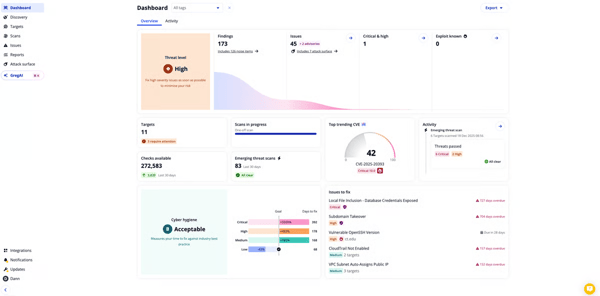
Remediation guidance is one of the more practical strengths in this category, and G2 reviews back that up directly. Findings include precise vulnerability details alongside fix guidance that developers can implement immediately. This is reflected in a vulnerability assessment score of 97% on G2. Rescan workflows confirm that a fix is actually in place, turning vulnerability management into a repeatable cycle for teams carrying security alongside a full list of other responsibilities.
For teams where client-facing reporting or audit readiness is part of the job, you don't need to bolt on extra tools. G2 reviews reference Intruder specifically for PCI requirements, managed service offerings, and external security reviews, and the structured output handles those use cases without extra configuration. That reporting layer shows up repeatedly in renewal decisions, which speaks to how reliably it performs when the audience is external and the stakes are real.
Where I've seen this platform earn genuine loyalty is in organizations where security is one of many responsibilities. G2 users describe automated discovery, prioritization, and validation replacing the manual tracking that typically burdens these teams. Backed by a dashboard and reporting score of 93% on G2, it lets non-specialist teams maintain consistent security visibility without expanding headcount. That depth of automation at an accessible entry point is what separates Intruder from tools that assume a full security operation sitting behind them.
Intruder's scans are comprehensive, and scan completion times can be longer than teams expecting rapid ad hoc assessments may prefer. This is more noticeable for organizations that rely on quick spot checks, while teams running structured vulnerability management programs align well with the platform's scanning model.
Reporting depth is strong for compliance and remediation workflows, but navigating it confidently can take time for teams new to structured vulnerability management. This is more noticeable for organizations without established vulnerability prioritization processes, while teams with mature security workflows align well with the platform's reporting approach.
Intruder is the strongest fit for small and mid-sized teams carrying security alongside a full list of other responsibilities — where automated scanning, precise remediation guidance, timely alerting, and compliance-ready reporting need to operate without a full security operations function behind them.
"Easy to use and super useful service. The UI is really nice, easy to set up even though what it does super complex."
- Intruder review, Bence L.
"One thing I could comment on is that the scan times (at least on our projects) did take a bit longer than I originally expected. We did a simple external scan on one platform and it took nearly 16 hours to complete. That said, the time does also show how comprehensively it is testing, and now we know what to expect we can build it that sort of time into our schedule."
- Intruder review, Andy M.
Want protection that follows the user, not the office? Check out the best cloud edge security software to enforce consistent policy across remote, branch, and cloud traffic.
Pentest-Tools.com gives teams a cloud-based way to run offensive security checks without scheduling a full manual penetration test every time you need to know where you stand. It combines reconnaissance, scanning, and auditing into one cloud-based interface focused on producing findings your team can actually act on. Validate your external security posture regularly, on your own schedule, without waiting for a compliance deadline to force the conversation.
What I find telling in G2 reviews is how consistently they describe the interface as accessible across a range of skill levels, welcoming security engineers, developers, and compliance stakeholders equally. They all access and interpret results without heavy translation in between. Responsibility for remediation is naturally distributed across roles, which keeps security validation from becoming a bottleneck for a single person in organizations that can't afford to.
Quick onboarding, simple asset configuration, and schedulable recurring scans mean teams maintain coverage without dedicating significant time to setup or ongoing maintenance. G2 users describe the implementation process as straightforward, and organizations across reviews report being operational fast enough that setup never becomes a reason to delay getting started.
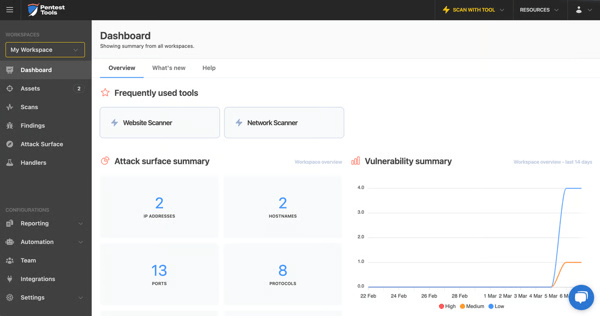
What I pay close attention to in G2 review data is how platforms behave between major security events, and alerting consistency is one of the stronger aspects here. Automated scans running on a defined cadence keep exposure visible between formal review cycles, with alerting scoring 88% on G2. Teams rely on that structure to build a rhythm of ongoing hygiene, staying prepared well before any compliance window opens.
I also kept seeing the quality of remediation findings come up across reviews as a reason teams trust the platform beyond initial setup. With a vulnerability assessment score of 93% on G2, guidance is laid out clearly enough for developers to act on directly, and rescan workflows confirm fixes held, removing the guesswork for engineering teams.
You don't need to rebuild evidence from scratch every time a client due diligence request or compliance review lands on your desk. White-label reports and evidence-backed findings meet ISO 27001, GDPR, and RFP requirements directly, supported by a dashboard and reporting score of 89% on G2. This shows up across reviews as a reason the platform stays in the stack, cycle after cycle.
What I appreciate about Pentest-Tools.com is how light it sits on day-to-day operations. Teams use it to uncover exposure, confirm fixes, and document posture without disrupting development or pulling security staff into maintenance work. For organizations where security competes with a full list of other operational priorities, that low-maintenance profile makes a real difference.
According to G2 reviews, the interface navigation becomes harder to manage as asset counts grow. This is more noticeable for teams switching frequently between large numbers of targets or managing expanding environments, while organizations focused on recurring assessments across a defined asset base align well with the platform's workflow.
Pricing is one of the more common gripes among verified G2 reviews, with some teams finding subscription costs higher than comparable alternatives. This is more noticeable for organizations with variable or rapidly growing asset footprints, while teams with stable security validation requirements align more naturally with the platform's licensing model.
Pentest-Tools.com is for small and mid-sized organizations that need to quickly and consistently demonstrate their security posture. The on-demand scanning, audit-ready reporting, and structured remediation guidance add up to something genuinely practical.
"The vulnerability assessment tool uses a lot of databases to identify vulnerabilities with ease and the sniper tool is just one of the best tools to automate the exploitation process making our penetration testing project easy. The auto generated report provides a detailed overview of the client network making it easy to understand the weakness and recommendation to strengthen the security."
- Pentest-Tools.com review, Dr. June J.
"If there's one thing I'd change, it would be the user interface and navigation. While the tools themselves are excellent, the UX could be more intuitive when switching between scans, assets, and reports. I'd also love to see more integrations with GRC platforms, not just Vanta, so the results can fit more naturally into different compliance ecosystems. Adding some AI-assisted features for prioritizing vulnerabilities or generating remediation summaries would also make it even more powerful."
- Pentest-Tools.com review, Omar B.
Running pentests across your payment stack? Explore the best payment gateway software to find solutions built with PCI compliance and transaction security in mind.
Invicti is the answer to a question most development teams are quietly dreading: when did we last actually check what's vulnerable in production? It combines automated dynamic scanning, low-noise validation, and clear remediation into a continuous testing workflow that fits alongside your release cycle. Web applications and APIs stay under scrutiny as they evolve, without your team having to manually schedule that scrutiny every time something ships.
One pattern I kept noticing across G2 reviews is how often teams mention Invicti's low false positive rate. That's one of the capabilities that has the biggest downstream impact because developer trust in scan results is what ultimately drives remediation. Invicti verifies exploitable vulnerabilities before surfacing them, keeping engineering queues focused on issues that genuinely need attention. Backed by a 94% vulnerability assessment score on G2, reviewers consistently describe spending less time validating findings and more time fixing them.
What caught my attention in the reviews is how scheduled scanning changes the day-to-day security workflow. With a 94% security auditing score on G2, reviewers describe vulnerabilities being identified consistently without relying on manual reviews for every code change. That repeatable scanning cadence helps security stay embedded in fast-moving development environments instead of competing with release deadlines.
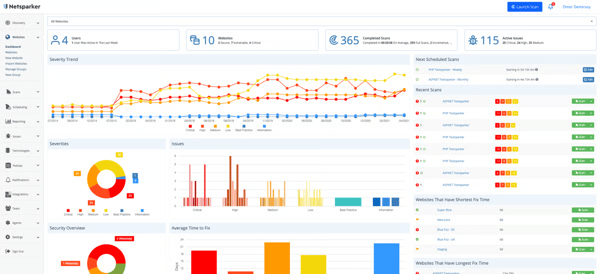
The reporting model is another area that stood out to me. Executive summaries and developer-focused technical reports are generated from the same scan results, reflected in a 96% dashboard and reporting score on G2. Security teams can communicate risk to stakeholders while developers receive actionable technical detail from the same output, eliminating much of the manual translation that typically slows remediation.
Scan profile flexibility is where the platform separates itself from tools that force a standardised approach across every environment. Vulnerability checks are tunable to reduce noise and focus coverage on what matters for each application, and verified reviews on G2 describe this configurability as keeping the platform practical across diverse architectures.
CI integration is one of the cleaner implementations in this category, and teams on tight release cycles feel the difference. APIs and CI integrations let scans run alongside releases, keeping validation a continuous checkpoint woven into the release process. G2 feedback consistently reports that early detection comes without a development slowdown, which is exactly what engineering teams need when shipping cadence and security coverage must move together.
Responsive support appears as a distinct theme across Invicti reviews, most notably in accounts of complex CI implementations and deep pipeline integrations. G2 reviews describe the support team as fast to engage, willing to join screen shares, and capable of escalating quickly when standard resolution paths fall short.
Some users in the G2 review pool note that API scanning can pose alignment challenges for non-standard implementations, requiring additional setup to ensure consistent coverage. Organizations with complex API architectures feel this most during initial configuration.
Support response times and update cycles draw mixed feedback on G2, particularly from teams in critical tuning or troubleshooting phases. However, automated DAST, CI/CD integration, and reporting continue to operate independently, keeping testing running without escalation.
Invicti is the strongest fit for enterprise development teams that need security testing running continuously alongside every release — with false positive rates developers actually trust, scan profiles flexible enough for diverse architectures, and reporting that serves both engineers and leadership without additional preparation overhead.
"I appreciate the simplicity of the platform, especially the report generation options. These features are particularly helpful when we require different reports for various scenarios."
- Invicti review, Pranav K.
"We have some issues with API scanning and so can not use this app for that purpose. This is something that we do differently to the way Invicti looks at APIs so we could never get it to work even with the great support offered."
- Invicti review, Chris M.
AppTrana is the rare application security platform that comes with actual humans watching your back around the clock. It pairs WAAP technology with a 24x7 managed security team, wrapping prevention, detection, and remediation into one layer that treats security as something executed. Your dashboard stays quiet because the work is already being done.
The firewall performance is one of the first things that caught my attention in the G2 reviews, backed by a 98% firewall score. Teams consistently describe real-time attack mitigation, rapid virtual patching, and strong false-positive control without requiring constant manual intervention.
WAF, bot protection, and malware detection work together across multiple threat vectors, and reviewers repeatedly connect that breadth of coverage to more stable applications under sustained attacks and emerging threats. From my evaluation, it's one of AppTrana's clearest differentiators.
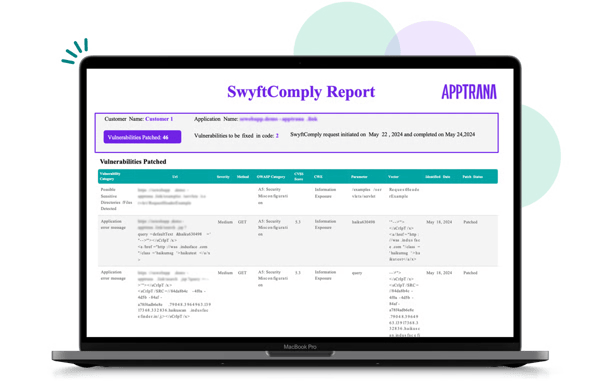
Another theme I kept seeing in the review data is the value of the 24x7 managed security team. More than just a support feature, reviewers describe it as operating like an extension of their own security operations. With a 95% alerting score on G2, organizations consistently point to reduced monitoring overhead, fewer after-hours responsibilities, and continuous protection without relying on internal teams to watch dashboards or tune rules around the clock.
For API-heavy applications, you're getting bot protection and API security that go beyond what standard rule-based systems typically cover. A recurring call-out on G2 is that the bot mitigation is effective against sophisticated, customized attacks that simpler systems miss. It comes with both positive and negative security models operating from the same managed layer. That dual-model approach gives teams precise control over what gets through without having to choose between blocking too much or leaving abuse pathways open.
What the onboarding aspect tells me is that AppTrana absorbs the operational complexity that self-managed WAF deployments typically dump on internal teams. Reviewers describe implementation as manageable, with the managed layer handling what would otherwise require dedicated staff. Once familiar with the workflows, teams describe day-to-day operation as needing minimal ongoing involvement, and security stops quietly draining engineering bandwidth between incidents.
The compliance layer is where AppTrana's 99% vulnerability assessment score on G2 starts to make real sense. Reviewers describe organizations demonstrating active remediation without restructuring their release process. External security commitments stay on track while avoiding added pressure on engineering teams.
AppTrana solves a problem I rarely see addressed well in this category: enterprise-grade WAF protection at a price point that actually works for SMB teams. Most options at this level assume internal capacity that smaller teams simply don't have. What I keep seeing on G2 is that reviewers call it an accessible entry point for teams that need serious protection without the cost structure of larger platforms.
Users across G2 flag that certificate management workflows take time to become familiar with, particularly for teams handling frequent changes across multiple environments. That said, the core managed security layer — real-time attack mitigation, virtual patching, and 24x7 SOC coverage — operates independently and delivers consistent, always-on protection throughout.
G2 users note that navigating the dashboard and drilling into detailed analytics requires an initial adjustment, particularly for teams expecting instant-read visibility into traffic data. However, WAF, bot protection, vulnerability assessment, and malware detection all score well above category averages on G2, reflecting that core protection consistently performs well regardless of interface familiarity.
AppTrana is the clear choice for SMBs and security-led teams that want managed, always-on web application security without building an internal SOC. Round-the-clock expert monitoring, real-time attack mitigation, and compliance-ready remediation in one layer.
"The value the product brings to the table is simply unbelievable. As in having a 24*7 SOC team, getting zero false positive guarantees, bundled pen testing, protection from all the latest vulnerabilities, zero days and DDoS/bot attacks makes the entire proposition value for money."
- AppTrana review, Dhananjaya K.
"Installation and replacement of third party certificates is difficult and not well documented. The parts of a certificate that are required are difficult to figure out on your own."
- AppTrana review, Scott B.
Acunetix by Invicti continuously scans websites and APIs, validating every finding before it reaches the engineering queue, then feeds results directly into the CI/CD pipelines and issue trackers teams already use daily. Vulnerabilities get caught, confirmed, and fixed inside the same workflow used to ship, which is the specific integration depth that distinguishes Acunetix from scanners that surface findings and leave remediation entirely to engineering.
The scheduled and recurring scan model delivers coverage that stays current as applications evolve, without anyone having to actively maintain it. The security auditing score sits at 85% on G2, and teams that need ongoing assurance between releases get it without standing up manual processes to fill the gaps.
The prioritisation layer is one of the more underrated strengths in the G2 data. Findings are ordered so teams know exactly where to act next, with reviewer feedback noting that the clarity reduces coordination overhead between security and engineering. The dashboard and reporting score of 93% on G2 reflects how consistently that structured output works across teams with different technical backgrounds.
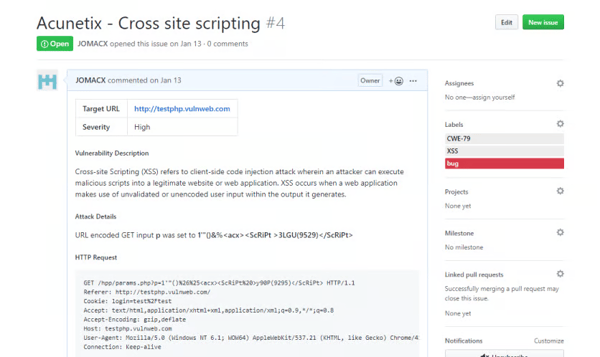
Vulnerability detection covers SQL injection, XSS, misconfigurations, and API weaknesses, backed by an 89% vulnerability assessment score on G2. Findings are confirmed before reaching developers, reducing the manual verification that typically slows remediation. That higher level of confidence in scan results helps teams move through triage more efficiently instead of spending time questioning whether a finding is actionable.
Another pattern I kept noticing in the reviews is how well Acunetix fits into existing development workflows. CI/CD integrations and Jira connectivity come up repeatedly as practical advantages because findings flow directly into established pipelines and issue trackers rather than creating a separate security process. Continuous scanning becomes part of the release cycle, allowing teams to identify vulnerabilities early without slowing rapid development.
If you're running frequent security assessments across multiple applications, the consolidated workflow here removes overhead that adds up fast. Scan initiation, results, and fix verification all reside within a single interface, with everything from detection to remediation handled without tool switching.
I consider shared dashboard access one of Acunetix's strongest advantages for organizations where security and engineering share responsibility for remediation. The clean, intuitive interface is accessible to both developers and security professionals working from the same findings. That shared visibility is what keeps fix cycles short, allowing vulnerabilities to move from detection to resolution without the usual handoff delay.
Users across G2 note that deep scans can be resource-intensive for larger applications, especially for teams working against tight release windows. Scan windows need careful planning to avoid conflicts with release schedules.
Licensing and configuration options align most naturally with stable application inventories; a boundary G2 feedback from smaller teams or those managing frequently changing targets reflects. Teams with dynamic environments need more deliberate planning around scan scope.
Acunetix by Invicti is the strongest fit for teams embedding continuous vulnerability assessment into active development, where CI/CD integration, prioritised remediation guidance, and shared dashboard access need to keep security and development moving together without the usual handoff delays.
"Acunetix is a powerful tool for security scanning and its ease of use and setup. I frequently use this because this helps identify vulnerabilities like SQL injection, along with its ease of implementation and integration with CI/CD and it easily integrates with the web application in hand. The customer support is great and provides answers to queries quickly."
- Acunetix by Invicti review, Deepesh V.
"At times, scans can be quite resource-intensive and may take longer to complete when working with large applications. Additionally, I feel that the pricing structure could be more accommodating, especially for smaller teams or projects with a limited scope."
- Acunetix by Invicti review, Kaushal D.
Your next SOC 2 or ISO 27001 audit does not have to be the thing that keeps your engineering team up at night, and Astra Pentest is exactly how you get there. It runs automated vulnerability scanning alongside manual testing by real security professionals, producing findings that are confirmed, severity-ranked, and detailed enough for your developers to act on immediately. The certification reports, compliance workflows, and re-scan support are all included, so you are not starting from scratch every time an audit window opens.
Astra's 94% quality of support score on G2 is one I'd highlight for any team that's been burned by slow security vendor responses before. Reviewers credit direct access via Slack or within the platform as meaningfully accelerating remediation. Teams resolve questions during the fix process, with live contact to clarify findings when needed, and that responsiveness is a reason teams trust the process as much as the output.
The setup experience is where you'll feel the difference between Astra and a traditional pentesting engagement. A theme I noticed across G2 reviews is that the initial setup is straightforward, with the platform configured and testing underway quickly without the back-and-forth that typically delays external security engagements. Ease of doing business scores 96% on G2, and for teams working against compliance deadlines or sprint cycles, that speed at the front end matters more than most vendors acknowledge.
The review feedback on the pentesters themselves is what I find most distinctive about Astra's G2 profile. Users consistently praise the security professionals as highly knowledgeable and thorough, ensuring every aspect of the assessment is covered and never just running through a surface-level checklist. For organizations where the depth of human expertise behind the test matters as much as the tooling, that distinction carries real weight when defending findings to an auditor or a board.
If you've ever handed a pentest report to an engineer and watched them stall on interpretation, this is where Astra addresses that directly. Every issue is recorded with its location, the reason it exists, steps to reproduce it, and clear guidance on how to resolve it. Users across G2 reviews attribute this level of detail as one of the platform's strongest differentiators. It removes the back-and-forth between the testing team and developers and makes remediation faster and less dependent on security expertise to interpret what needs fixing.
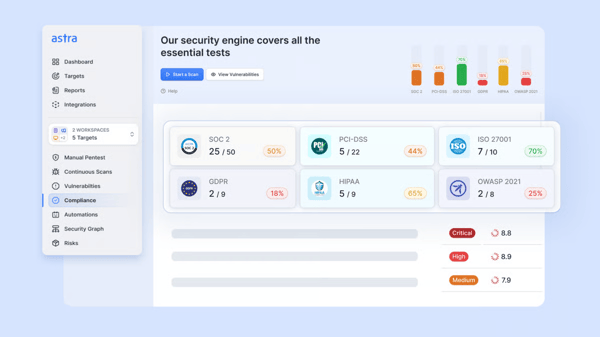
The compliance workflow feedback is where Astra's 95% meets requirements score on G2 makes the most sense. Teams reference ISO 27001, SOC 2, and client security requirements as key use cases, and pentest certificates, structured reports, and re-scan support let organizations demonstrate due diligence across compliance cycles without repeating manual work each time a new audit window opens.
False positives are filtered before findings reach engineering, and results hold up under scrutiny when reports are used for client due diligence or certification submissions. Users report that the combination gives them confidence that what they are fixing is real and that what they are submitting will pass review.
A few G2 users note that first-time engagements require more alignment before testing becomes productive, with the initial cycle feeling less structured than subsequent ones. Teams newer to collaborative pentest workflows feel this most.
Report navigation and dashboard layout take initial adjustment, particularly for teams encountering structured pentest output for the first time. Still, support responsiveness and clearly structured findings remain a reliable constant, providing a dependable foundation for compliance submissions and client-facing reporting.
Astra Pentest earns its place by bringing automated scanning, manual validation, compliance reporting, and security expertise together in one workflow. For small and mid-sized teams, that combination removes much of the operational friction around security and compliance.
"I appreciate Astra Pentest for its timely response and efficient issue identification, especially for conducting VAPT for our web applications. The simplicity of the initial setup further enhances its usability. It's clear that the product is reliable and delivers results, which is why I feel confident in recommending it, giving it a top score of 10 out of 10 for likelihood to recommend to a friend or colleague."
- Astra Pentest review, Vijay Shankar Raj M.
"Initially, I found the report format a bit difficult to navigate, but the Astra Pentest team was quick to address the feedback and improved it significantly."
- Astra Pentest review, Shudhanshu S.
Running a small business website means security is probably the last thing on your mind, and GoDaddy Website Security is perfectly fine with that. It quietly handles malware scanning, removal, firewall protection, and SSL management so you never have to think about any of it. For site owners who want protection that holds without requiring their attention, this is where that search ends.
I noticed something in the malware detection reviews that stood out from the usual capability claims. The platform scans sites up to four times daily and sends alerts the moment anything is flagged, with ease of use scoring 88% on G2. What makes it genuinely worth calling out is that removal is handled completely and directly. Users don't get handed a problem to solve; they get told it's been solved.
You're getting a Web Application Firewall that site owners describe as effortless to rely on day-to-day. Teams describe it as a continuous barrier that blocks incoming threats and hardens the site over time, and for anyone managing a site that handles customer data, this forward-looking coverage is one of the strongest reasons to consider the platform over point solutions that only respond to active threats.
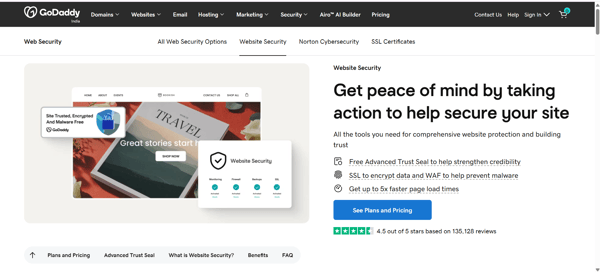
What I appreciate about the inclusion of the SSL certificate is that it does two jobs at once. Every plan includes SHA-2 and 2048-bit encryption, and review data on G2 shows the Google rankings benefit as a practical win they didn't always expect going in. Data protection combined with a measurable SEO advantage makes this punch above its weight compared to standalone SSL options that deliver only one of the two.
What strikes me about the Advanced Trust Seal is how much conversion weight a security feature can carry. It confirms to site visitors in real time that the site is encrypted, malware-free, and firewall-protected. Reviews from G2 users call it a visible confidence signal on pages where visitors are deciding whether to share personal or payment information, and that kind of active reassurance is difficult to replicate with copy alone.
Continuous monitoring is the feature I'd point smaller teams to first. Reviewers return to it repeatedly when explaining why the platform feels reliable over time, which meets requirements scoring 89% on G2. Blocklist status, SEO spam, SSL changes, and website uptime are all tracked without any manual input, so you stay informed about the health indicators that actually affect how your site performs and ranks.
Support is also an area I watch closely for SMB-focused tools, and GoDaddy's 88% for website security on G2 holds up under scrutiny. Users dealing with security incidents or setup questions report fast responses and practical guidance that resolves issues without extended back-and-forth.
Reviews on G2 flag that GoDaddy Website Security operates as a foundational protection layer, but there is no NOC or SOC behind it. That means no managed monitoring layer, no threat analyst access, and no incident response capability for teams that need a deeper dive into issues. Still, the WAF, daily scanning, and automated alerts all hold up without needing hands-on management from the site owner.
Some reviewers note that the SSL monitoring feature alerts on certificate changes and renewals, but provides no advance warning before expiration. That leaves site owners tracking renewal dates manually, and for anyone managing multiple domains, an expiring certificate can catch you completely off guard.
GoDaddy Website Security gets a lot of things right. Daily malware scanning, automated removal, WAF protection, and SSL management with no security expertise required to keep it running. For small business owners who need consistent, low-maintenance protection and want to stay focused on everything else, this one delivers and then some.
"I like how easy it is to use and set up, and the customer service has been great. I also haven't had any security issues on any of the websites where I use it."
- GoDaddy Website Security review, Johnny M.
"the cost is a bit high but the security for me is priceless."
- GoDaddy Website Security review, Stever Jose G.
Chasing a SOC 2 or ISO 27001 certification? Read through the best security compliance software on G2 to find platforms built around audit readiness and continuous control monitoring.
Automated attackers targeting WordPress sites are lazy and opportunistic and WP Ghost by AISQ (formerly Hide My WP Ghost) takes that opportunity away. It obscures WordPress-specific paths, fingerprints, and access points that automated scanners rely on to identify and probe installations. Before any attack gets started, your site has already stopped looking like a target worth pursuing.
I think of it as a set-and-forget security layer, and reviews I came across on G2 describe exactly that experience. Once configured, the plugin runs quietly without frequent adjustments, complementing hosting-level protections or other WordPress plugins without adding monitoring overhead. Teams describe it as delivering value consistently without demanding regular attention, which is exactly the profile small business site owners need when security is one item on a long list.
The G2 feedback on automated probing reduction is where this plugin's core promise clicked for me. Blacklist and whitelist controls score 95% on G2, and administrators spend less time reviewing noise and more time focused on site content and performance. That shift in where attention goes is one of the most consistently mentioned outcomes across recent reviews.
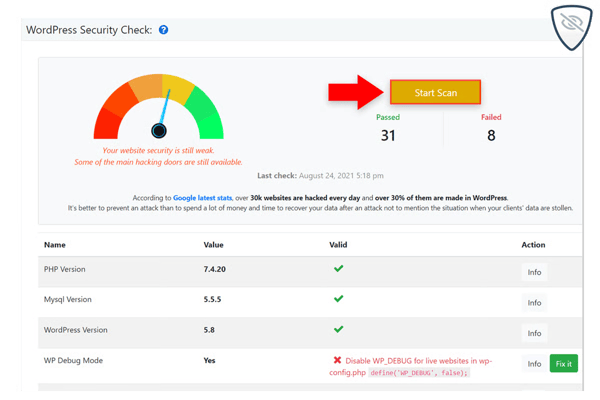
If you're setting this up on a site that's been attracting background-probing traffic, the impact tends to show up quickly. Installation is quick, configuration is minimal, and masking default WordPress paths alongside blacklist and whitelist rule enforcement reduces automated attack traffic often within the first hours of setup. The firewall scores 94% on G2, which reflects how consistently this protection holds across diverse WordPress environments.
I'd point to the interface as one of the more thoughtfully designed aspects of this platform. Dashboard and reporting score 97% on G2, and the interface supports quick navigation and clear visibility into what the plugin is doing without requiring interpretation. The design is aligned with the platform's core goal: straightforward hardening for site owners who want control without complexity.
Support responsiveness is also well-executed here, making setup and ongoing use smoother. Teams frequently mention hands-on assistance from the development team during configuration or when resolving plugin interactions with hosting environments. That guidance helps avoid misconfigurations that could affect site accessibility, and the team's willingness to go beyond standard support expectations appears as a recurring theme across reviews.
Teams in the G2 reviews talk about immediately gaining capabilities that weren't available before. These include changing the login URL, hiding themes and plugins, and obscuring the fact that the site runs on WordPress at all. You get that breadth of hardening without layering tools on top of each other, and reviewers describe it as the reason the plugin holds its position as a standalone security layer.
WP Ghost by AISQ does not include guardrails or validation checks during configuration. An incorrect setting can lock administrators out of their own site, something users on G2 flag when setup steps are skipped or rushed. Site owners without prior experience modifying WordPress access structures tend to feel this most. However, administrators who follow the documentation carefully and test on staging before going live rarely run into this issue.
G2 users note that malware scanning, active threat detection, and traffic filtering fall outside the plugin's scope entirely, a boundary that surfaces when teams expect full security coverage from a single tool. High-traffic sites or those dealing with active infections tend to notice this gap most. That said, within its defined scope, the plugin delivers consistent exposure reduction by obscuring WordPress-specific fingerprints and tightening access paths.
WP Ghost by AISQ is best suited to WordPress sites that prioritize reducing their attack surface without managing a full security stack. Obscured fingerprints, hardened access paths, and blacklist controls work quietly in the background, making it a strong fit for small businesses focused on preventative protection.
"The support! Peter is highly responsive and very helpful."
- WP Ghost by AISQ review, Cyn A.
"You've got to be careful to follow the instructions carefully, otherwise you might lock yourself out of the site."
- WP Ghost by AISQ review, Mark D.
| Software | G2 rating | Free plan | Ideal for |
|---|---|---|---|
| Cloudflare Application Security and Performance | 4.5/5 | Yes | Organizations needing integrated WAF, DDoS protection, and performance optimization at global scale |
| FortiAppSec Cloud | 4.4/5 | No | Mid-market and enterprise teams using Fortinet ecosystems for managed cloud WAF and application protection |
| Intruder | 4.8/5 | No | Small to mid-sized teams looking for automated, continuous vulnerability scanning with minimal setup |
| Pentest-Tools.com | 4.8/5 | Free trial available | Security teams and consultants needing fast, audit-ready vulnerability and penetration testing workflows |
| Invicti (formerly Netsparker) | 4.6/5 | No | Organizations running regular DAST and API security testing as part of structured SDLC programs |
| AppTrana | 4.8/5 | No | Teams wanting managed WAAP, virtual patching, and SOC-backed protection without building in-house security ops |
| Acunetix by Invicti | 4.1/5 | No | Development and security teams integrating automated web vulnerability scanning into CI/CD pipelines |
| Astra Pentest | 4.6/5 | No | Teams seeking combined automated and manual penetration testing for compliance and ongoing security assurance |
| GoDaddy Website Security | 4.1/5 | No | Small business site owners needing reliable automated malware protection, firewall coverage, and SSL management |
| WP Ghost by AISQ (formerly Hide My WP Ghost) | 4.8/5 | Free trial available | WordPress site owners focused on hardening and reducing automated attack exposure |
*These software products are top-rated in their category, based on G2's 2026 Winter Grid® Report.
Got more questions? G2 has the answers!
For long-term website security commitments, compliance support should be built in rather than bolted on. Astra Pentest covers SOC 2, ISO 27001, and client security requirements directly — structured reports, pentest certificates, and re-scan support are all included, so teams can demonstrate due diligence across audit cycles without rebuilding evidence each time. Pentest-Tools.com produces reports that meet ISO 27001, GDPR, and RFP requirements, and FortiAppSec Cloud supports compliance readiness through automated policy enforcement and a managed protection layer. AppTrana's 99% vulnerability assessment score on G2 supports active remediation documentation throughout a contract term. Before a multi-year commitment, verify that the platform generates compliance-ready output for your specific certification requirements and includes re-scan support to validate remediation — not just initial findings.
Business continuity depends on platforms that continue operating reliably under attack conditions, not just in ideal circumstances. Cloudflare's globally distributed DDoS mitigation and edge-based filtering absorb attack traffic before it reaches origin servers, maintaining uptime when it matters most. DNS reliability and consistent throughput are among the most consistently praised strengths in G2 reviews, specifically because they hold steady during traffic spikes and attack scenarios. AppTrana's 24x7 managed security team handles real-time attack mitigation and virtual patching without waiting for internal teams to intervene, providing a response layer that functions even when internal resources are unavailable. For teams evaluating long-term commitments, the strongest business continuity case belongs to platforms that reduce time between detection and containment and operate reliably without constant internal management.
Start with how a platform handles false positives. Invicti validates exploitable vulnerabilities before surfacing them, backed by a 94% vulnerability assessment score on G2 — developers trust the output and act on it immediately without spending time verifying whether findings are real. Intruder scores 97% on vulnerability assessment and includes remediation guidance developers can implement directly, with rescan workflows confirming fixes held. Acunetix confirms findings before they reach engineering queues, with CI/CD integration that keeps vulnerability management inside the release cycle. Astra Pentest combines automated scanning with manual validation by security professionals, filtering false positives before findings reach engineering. Beyond false positive rates, assess whether the platform prioritizes findings clearly, integrates remediation into existing workflows, and produces output developers can act on without translation from a security specialist.
Cloudflare (4.5/5 on G2) is consistently cited for reliability at scale: DDoS protection scores 96% on G2, and teams running high-volume environments report stable incident rates and consistent throughput under pressure. For e-commerce sites handling transactions and customer data, AppTrana (4.8/5 on G2) adds a layer that Cloudflare alone does not: a 24x7 managed security team with WAAP, bot protection, and virtual patching specifically rated for catching sophisticated bot attacks like credential stuffing, which directly target login and payment flows. GoDaddy Website Security (4.1/5) prioritizes ease of use for smaller e-commerce operations — SSL management, malware scanning, and an Advanced Trust Seal that signals site safety to visitors at the point of transaction are all included with minimal setup.
Intruder, AppTrana, Pentest-Tools.com, and WP Ghost by AISQ each hold 4.8/5 on G2, the highest ratings in the category. Among security managers specifically, Intruder consistently earns loyalty from teams carrying security alongside a full list of other responsibilities: automated scanning, 97% alerting accuracy, and remediation guidance clear enough for developers to act on without specialist translation. AppTrana earns trust from teams without in-house security operations — the 24x7 SOC coverage removes monitoring overhead and after-hours responsibilities that would otherwise fall to a stretched security manager. Invicti earns trust specifically for its low false-positive rate, which G2 reviewers describe as the capability with the biggest downstream impact because it determines whether developers trust and act on findings.
Security certification does two jobs as teams grow: it satisfies external auditors and compliance requirements, and it signals credibility directly to customers at the point of transaction. GoDaddy Website Security includes an Advanced Trust Seal that shows visitors in real time that the site is encrypted, malware-free, and firewall-protected — G2 reviewers describe it as a visible confidence signal specifically on pages where visitors are deciding whether to share personal or payment information. SHA-2 and 2048-bit SSL encryption is included with every plan, protecting data in transit while improving search rankings. For teams pursuing formal certifications, Astra Pentest's structured pentest reports and compliance documentation meet SOC 2 and ISO 27001 requirements, and the outputs hold up under scrutiny when submitted to enterprise clients or certification bodies. As teams scale into new markets or take on enterprise customers, that certified audit trail becomes a requirement rather than a differentiator.
AppTrana leads on managed incident response. Its 24x7 security operations team handles real-time attack mitigation and virtual patching without waiting for internal intervention, operating like an extension of the team's own security operations. The alerting score is 95% on G2. Cloudflare's analytics dashboard scores 92% on G2, providing visibility into traffic patterns and threat behavior across edge infrastructure. FortiAppSec Cloud's unified dashboard consolidates attack types, traffic sources, and blocked requests in a single view, which G2 reviewers describe as reducing the cognitive load of daily security monitoring and accelerating incident triage. For organizations that need managed response rather than just visibility, AppTrana is the clearest fit. For teams that want strong visibility without managed operations, Cloudflare and FortiAppSec Cloud are the strongest options.
The practices that hold up as teams scale are the ones embedded in day-to-day operations rather than triggered by specific audits. Deploy edge-based filtering to stop threats before they reach origin servers — Cloudflare filters at the edge and teams running high-volume environments report stable incident rates without ongoing maintenance. Run continuous vulnerability scanning to catch weaknesses before they become incidents — Intruder automates this with alerts focused on genuine risk, not noise. Use managed bot protection to block credential stuffing and automated data scraping targeting customer accounts — AppTrana's WAAP and bot mitigation catch sophisticated attacks that simpler rule-based systems miss. Maintain SSL encryption on every customer-facing page, and ensure certificate management is handled without manual renewal gaps. Tie vulnerability findings to clear ownership so issues move toward resolution rather than stalling between security and engineering teams.
Cloudflare leads on perimeter-level threat detection, with firewall and DDoS protection scoring 96% on G2 and traffic filtered at the edge before reaching origin servers. AppTrana's threat detection spans WAF, bot mitigation, and malware detection across multiple vectors simultaneously — G2 reviewers specifically credit the bot mitigation for catching sophisticated, customized attacks that simpler rule-based systems miss. Intruder scores 97% on alerting accuracy, with automated scanning tied to emerging threats and notifications focused on genuine risk rather than noise. Invicti validates exploitable vulnerabilities before surfacing them, with a 94% vulnerability assessment score that keeps developer queues focused on issues that actually need attention. For organizations comparing vendors on detection quality, the clearest differentiator is whether findings are validated before reaching engineering or handed off raw — that distinction determines how much time a team spends acting on results versus questioning them.
Online businesses face a consistent set of attack types regardless of industry. DDoS attacks overwhelm infrastructure to disrupt availability — Cloudflare's edge-based filtering absorbs these before they reach origin servers. Bot attacks including credential stuffing target login and payment flows — AppTrana's dual positive and negative security models catch sophisticated variants that standard rule-based WAFs miss. Malware injection and defacement compromise site integrity — GoDaddy Website Security scans up to four times daily and handles removal automatically. SQL injection and cross-site scripting (XSS) target application layers — Acunetix covers these alongside API weaknesses and misconfigurations. Zero-day vulnerabilities and emerging exploits require intelligence-backed response — AppTrana's managed security team responds without waiting for rule updates, and Intruder automatically triggers scans as new attack patterns emerge. WordPress-specific fingerprinting and path probing are a distinct category — WP Ghost by AISQ obscures these access points before automated scanners can identify them.
Picking the wrong tool is a slow burn. It shows up three months later, when alert fatigue sets in, or six months later, when a vulnerability remains unresolved because nobody knows who owns it. The teams that get this right are often the ones who were honest about how they actually operate before they bought anything.
The hard part is finding a capable platform that holds up in production. There are strong options at every price point and team size, but the ones that look impressive in a demo have a way of becoming friction once they're live. A tool your team trusts enough to act on is worth more than a tool with a longer feature list that nobody fully configures.
Start with your real exposure, your team's actual capacity, and the workflows already in place. Everything else follows from there.
Want stronger website protection? Explore Web application firewall (WAF) on G2 to block malicious traffic and secure critical applications.

Most hosting platforms look reliable at launch. The real differences appear later, during...
 by Disha C

The build vs. buy question on infrastructure is already closed for you. What you're deciding...
 by Disha G

APIs are now at the center of most modern applications, which makes securing them a lot more...
by Gunisha