.png?width=400&height=150&name=Copy%20of%20G2%20Image%20(1).png)

Based on verified G2 reviews and the latest Grid® placement.
*Liked and disliked highlights are summarized from verified G2 user reviews.
The tools below have also been exhaustively tested and evaluated, and continue to hold their place among the best Voice Recognition on G2.
I evaluated 20+ tools to find the 9 best voice recognition software for 2026. These include Deepgram, Google Cloud Speech-to-Text, Krisp, AssemblyAI - Speech to Text API, Otter.ai, IBM Watson Speech to Text, OpenAI Whisper, Azure AI Speech, and Amazon Transcribe.
Whenever I am driving across the city, I always resort to voice recognition-based GPS navigation to get directions right. Just like me, more consumers have switched to conversational voice agents or virtual assistants like Siri or Alexa to vocalize their tasks and improve productivity. But what goes into the making of these?
As the world becomes more inclusive and artificial intelligence reaches further into daily life, people will prefer more voice-friendly tools and services to make efficiency the new norm. This intrigued me enough to analyze 20+ best voice recognition tools and see how the companies at the forefront of building them solve challenges like voice data management, accent issues, multi-language inputs, and lack of data privacy while designing new voice recognition products.
Out of all tools, I compare the nine best voice recognition software that stood out for their accuracy and AI features, based on G2 Data and user feedback. Let's get into it.
Deepgram: Best for developers needing fast, accurate transcription APIs
Transcribes live and pre-recorded audio through low-latency APIs and custom-trained models. (starts from $0.0065/minute)
Google Cloud Speech-to-Text: Best for teams on Google Cloud scaling multilingual, real-time transcription
Converts audio to text in real time across 100-plus languages, integrated with Google Cloud's data and AI services. (starts from $0.024/minute)
Krisp: Best for remote teams removing background noise from live calls
Cancels background noise, transcribes meetings, and adds summaries on top of any conferencing or dialer tool. (starts from $8/user/month, billed annually)
AssemblyAI - Speech to Text API: Best for product teams adding AI audio intelligence like summarization and sentiment
Provides built-in models for summarization, sentiment, speaker detection, and LLM-based audio analysis. (starts from $0.21/hour)
Otter.ai: Best for professionals capturing and searching automated meeting notes
Records, transcribes, and summarizes meetings in real time, with speaker identification and searchable notes for business and education users. ($4.17/user/month, billed annually)
IBM Watson Speech-to-Text: Best for deep learning and speech recognition
Transcribes audio with custom language models and offers accurate speech-to-text capabilities. (starts from $0.02/minute)
OpenAI Whisper: Best for builders who want free, open-source multilingual model
Transcribes and translates audio across dozens of languages, self-hosted or via API. (Open-source; API starts from $0.017/minute)
Azure AI Speech: Best for Microsoft-stack enterprises needing customizable speech and voice
Provides speech-to-text, text-to-speech, and translation with custom models and enterprise compliance inside the Microsoft Azure ecosystem. (starts from $1/hour)
Amazon Transcribe: Best for AWS teams adding transcription and call analytics to pipelines
Converts speech to text within AWS, with call analytics, medical transcription, and automatic content redaction. (starts from $0.006/minute)
According to Mordor Intelligence, the global voice recognition market reached USD 22.51 billion in 2025 and is forecasted to advance at a 22.38% CAGR to attain USD 61.78 billion by 2031.
When I analyzed this category, I treated it as a productivity layer buyers pay for. As I worked through the user feedback, one hurdle came up more than any other: storing and interpreting voice data across multiple languages. Accents, code-switching, and noisy rooms are where most tools still stumble, and that gap is what separates a clean demo from something a team can rely on daily.
In that context, large language model integration changes the math. LLMs provide the capacity to interpret audio and video text, improve the operational efficiency of the algorithm, and fine-tune the vocabulary of the software algorithm. Integrating these large language models with the main voice interface improves voice dictation and reduces the noisy backgrounds from voice inputs to type accurate sentences. How well a tool pairs its speech model with a language model increasingly sorts the leaders from the rest.
I focused on how each tool handles language inclusivity and voice interpretation for day-to-day operations. To shortlist the nine below, I weighed a few factors.
I spent weeks evaluating voice recognition software and shortlisted the best based on market parameters, pros and cons, latest features, and recent user reviews.
To build a shortlist, I started with G2's Voice Recognition Software Grid Report, reading how they score on usability, scalability, and core features, alongside satisfaction, customer segment, and time-to-go-live.
I also included AI in my research process to sift through distinct software updates, reviewer likes and dislikes, and common usage patterns, so the opinions here reflect patterns users consistently report.
All product screenshots in this article come from official vendor G2 pages and publicly available materials.
What I weighed comes down to one question: can the tool turn messy, real-world speech into accurate, usable text fast enough to act on? That matters whether a business is tracking warehouse operations, a person relies on an assistive device, or a customer just wants a faster answer from support.
As I compared the nine tools across G2 reviews and G2 Data, these are the factors that separated them.
Over the several weeks, I researched 20+ voice recognition tools. I narrowed down the best 9 based on conversational intelligence, audio and video integration, and robust transcription abilities, and I am presenting them in this listicle for you and your teams to consider.
The list below contains genuine user reviews from the voice recognition category page. To be included in this category, a solution must:
*This data was pulled from G2 in 2026. Some reviews may have been edited for clarity.
Deepgram is a developer-first speech-to-text platform that turns recorded audio and live streams into fast, accurate transcripts through a single API, then lets you format, search, or pipe that text into other tools. It's the use case I kept seeing it built for as I worked through its reviews.
It earns the highest satisfaction score (93 on 100) in the category. Across more than 400 G2 reviews, it holds a 4.6 out of 5 rating, with 98% of users rating it 4 or 5 stars and 91% saying they'd recommend it. G2 Data rates its developer API and SDK at 95%, the strongest of this functionality in this roundup.
I'd start with accuracy, because it's the theme reviewers raise most. In the recent G2 reviews I analyzed, the common note is clean output on clear English audio, including technical jargon and domain terms that trip up other engines, which means less time correcting transcripts before they're usable.
The API is the part developers single out first. Reviewers describe it as clean and quick to wire up, the kind of interface you call from your own app without fighting it, which lowers the cost of building speech-to-text into a product.
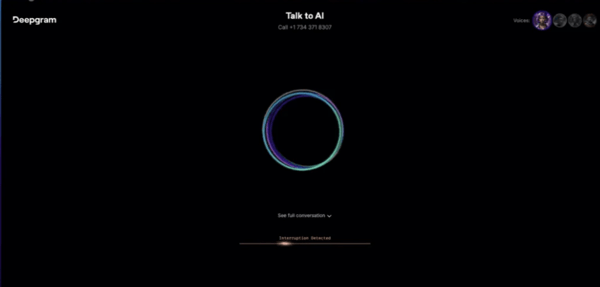
What stood out as I compared the field is real-time performance. Low latency is Deepgram's single most distinctive theme in the reviews; reviewers describe near-instant streaming transcription with no noticeable lag, which is what live captioning and voice agents actually need.
Getting started is unusually quick. Reviewers repeatedly call the initial setup easy, and G2 Data agrees: installation and setup is one of its top-rated capabilities, and it's one of the quickest tools here to get live. Teams can prove it out before committing real engineering time.
The model options let teams tune for their use case. Reviewers point to streaming and prebuilt models they can fine-tune for customer-service calls, technical audio, or niche vocabularies, so one platform covers very different workloads.
I noticed reviewers who've run other engines tend to rate Deepgram the better deal. A recurring recent note compares it favorably with others on this list, like Azure, Google Cloud, and Whisper, on speed, word-error rate, and price, the trade-off a developer weighs most.
English is where Deepgram is strongest, and that cuts both ways. It handles English, including accented English, very well, but a meaningful number of reviewers note regional and Indic languages and broader multilingual detection still lag, and G2 Data scores multilingual recognition as its weakest feature. If your work is English-first this rarely surfaces; if you transcribe across many languages, some teams pair it with a second engine, so test it on your own language mix first.
I'd also highlight speaker handling for multi-party recordings, since single-speaker audio is rarely affected. Across recent G2 reviews, some users find diarization mixes up voices when people talk over each other and can't always name speakers or add timestamps without extra work, and G2 Data puts speaker differentiation below category average. For clean single streams it won't slow you down but for meeting and group-call transcription it's worth a check.
For teams building English-language voice features who care most about speed and accuracy, Deepgram is the one I'd shortlist first. It pairs a clean developer API with real-time performance reviewers rate at the top of this category.
"The fast transcription rates significantly improve time management by transcribing hours of audio in seconds, streamlining my workflow and enabling more interviews. Moreover, Deepgram's API is straightforward to integrate, creating an effortless experience for developing independent tools. The quality of transcriptions is greatly enhanced, and the ability to catalog based on efficiency, success rate, and accuracy is invaluable. Overall, Deepgram is not only reliable and cost-effective but is also a de facto choice for speech-to-text models. It's clearly a 10 for me, and I've already recommended it to colleagues because of the ongoing improvements and planned developments."
- Deepgram review, Muhammad A.
“Sometimes the multi-language support doesn't work perfectly. When calling customers who speak Indonesian or Dubai dialects, it doesn't detect their language well."
- Deepgram review, Aman S.
Check out the best and most free voice recognition software to integrate audio content with your content strategy and improve customer experience.
Google Cloud Speech-to-Text is Google's cloud transcription API that turns audio and live streams into text across 125+ languages, using Google's own speech models (now the Chirp family) and tight integration with the rest of Google Cloud. It's the option I kept seeing global, cloud-based teams reach for.
It carries the largest market presence in the category and across more than 200 G2 reviews it holds a 4.6 out of 5 rating, with 97% of users rating it 4 or 5 stars. In G2 Data, software integration (100%) and multilingual recognition (98%) sit at the top of its card.
What I'd put first is the language coverage. G2 reviewers point to support for well over 100 languages and dialects, the reason it's a default for global teams transcribing client calls or building multilingual products. G2 Data rates multilingual recognition among its strongest features.
It handles context, not just words. Reviewers describe it correcting mispronunciations, adding punctuation, and reading meaning from the surrounding sentence, so transcripts need less cleanup before they're usable.
Integration is where I saw it score highest. Several reviewers say it slots cleanly into other Google Cloud services and third-party tools, and G2 Data puts software integration at the top of its features, which matters when transcription is one step in a pipeline feeding chatbots or search.
I saw real-time streaming transcription come up often, with reviewers relying on it for live, multi-accent audio where they need text as people speak.
Speaker diarization separates voices in group calls and meetings, and G2 Data scores speaker differentiation among its highest features, so multi-party transcripts come back labeled rather than as one block.
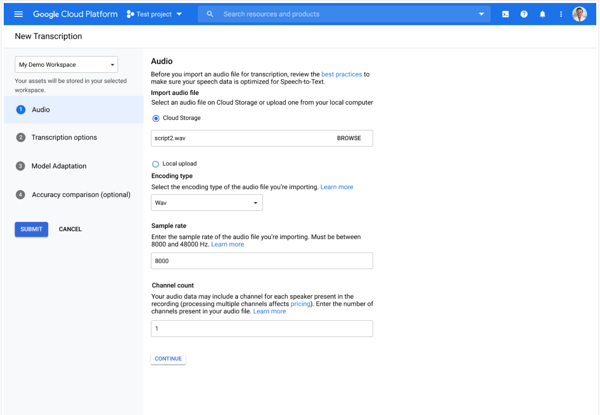
It ingests varied inputs, calls, video meetings, and recordings, and converts them reliably, which G2 reviewers credit for fitting different workflows without extra tooling.
I’d plan usage before moving past the free credits. It can feel inexpensive during testing, but reviewers say costs climb once transcription becomes a recurring, high-volume workflow. The upside is that the pricing scales with usage, so teams with predictable audio volume can model spend before rollout instead of staffing or maintaining transcription infrastructure themselves.
Accuracy is strongest on clear audio, but the area I’d test carefully is messy input. Reviewers note that heavier regional accents, including some noisy recordings or can require more correction, and G2 Data scores accuracy in noisy settings as its weakest feature (at 83% against category average of 88%). For clean recordings, meetings, interviews, and controlled audio, that issue is much less likely to show up. For call-center audio or mixed-accent environments, I’d run a sample set first so the team knows how much review time to expect.
Many global teams already on Google Cloud see it as a dependable, enterprise-ready solution. For projects that need broad language coverage and clean integration, Speech-to-Text is one of the most capable options here.
"I have noticed that transcription accuracy can sometimes become slightly lower in noisy environment or when background sound is not very clear, especially in longer educational recordings or webinar style audio. In some cases I need to make small manual corrections if speaker speed changes frequently or multiple audio variations are present together."
- Google Cloud Speech-to-Text review, Ishan S.
Learn the basics of voice recognition and its applications to develop a robust and accessible voice engine or assistant.
Krisp is an AI voice-clarity app that sits on top of whatever calling or meeting tool you already use, cancels background noise in real time, and transcribes and summarizes the conversation. It's the tool I'd hand to anyone who lives on video calls from a less-than-quiet space.
It holds 4.7 out of 5 rating across more than 1,100 reviews, where 99% of users score it 4 or 5 stars and 95% say they'd recommend it. On G2 it shows up in three categories at once, noise cancellation, AI note-taking, and meeting assistants, which I saw people actually use it: to clean up their audio, capture the notes, and summarize the call.
I'd start with the noise cancellation, because it's what makes Krisp distinct. It's the only tool in this roundup built around stripping background sound from a live call, and reviewers describe it blocking everything from open-office chatter to, in one case, a screeching parrot, so you sound clear without needing a quiet room. G2 Data rates its accuracy in noisy settings above the category (at 92% against the category average of 88%).
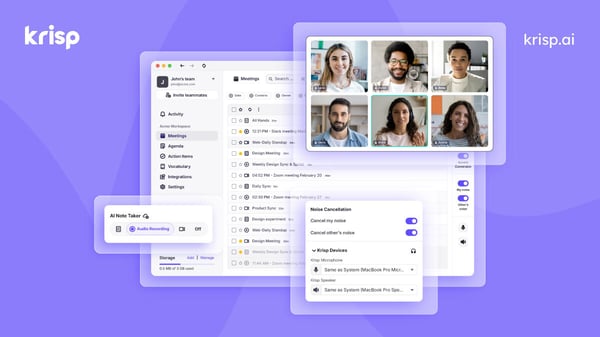
It works on top of whatever app you already run, which is the first thing I look for in a tool like this. Reviewers on Zoom, Teams, Google Meet, and dialers say Krisp transcribes calls regardless of platform, so a team doesn't have to standardize on one tool to get clean audio and a transcript.
Meeting transcription with searchable notes is the most-praised capability in the reviews I analyzed. Users describe getting a full, searchable record of each call they can revisit later, the difference between remembering a decision and reconstructing it.
What I saw reviewers lean on next is the AI summaries and action items. Beyond the raw transcript, Krisp pulls out a summary and the to-dos, so a back-to-back caller can act on what was agreed without rewatching.
Accent and voice clarity is a quieter strength I'd name. Reviewers who work across borders mention Krisp adjusting tone and pronunciation so they come through more clearly on international calls, which matters for distributed and offshore teams.
I also noticed Krisp can capture a call without sending a bot into the meeting. Reviewers value that it records and transcribes in the background rather than joining as a visible participant, which feels less invasive to clients and still leaves a searchable recording.
Reviewers say Krisp’s desktop app is still the fuller experience, while the mobile app doesn't yet support phone-call transcription in the way some users want. If most of your calls happen from a laptop, this rarely gets in the way. If your team captures calls on the go, I’d check the mobile feature set first; for desktop-first meetings and calls, Krisp’s core noise cancellation and transcription workflow remains the stronger fit.
Krisp installs in minutes and runs cleanly for most setups, so the narrower thing I’d still watch is audio-device detection. A few reviewers mention needing to reselect a microphone, restart the app, or troubleshoot when using non-USB headsets or juggling multiple audio devices. I’d treat that as a small hardware-routing check rather than a setup blocker: once the right mic is selected, Krisp generally stays easy to run in the background.
For remote and client-facing teams who spend their days on calls from imperfect spaces, Krisp is the one I'd reach for first. It does the unglamorous work, clean audio, a reliable transcript, and a usable summary, with so little setup.
"I use Krisp for meetings in Teams and what I most like about it is the main function which blocks all sounds around me and keeps my voice clear. Since I work from home, it is really important that no sounds other than my voice come through, and Krisp does its job well. I am happy with the service and enjoy using it. The initial setup was real easy, which is great because it adds to its convenience. I recommended Krisp to a couple of people who also work from home because it's important to cut all sounds, and Krisp does it effectively."
- Krisp review, Ivan M.
"Sometimes it doesn't adapt my mic when I'm not using a USB device. I can say the setup is medium because you really have to be a little tech or I need to assist them to set it up. It would be helpful if Krisp could create a short video on how to set up or connect the correct device to make sure the noise canceling is correct."
- Krisp review, Jennith Freny B.
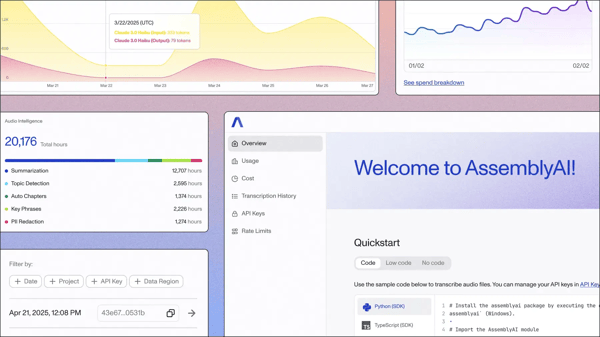
AssemblyAI - Speech to Text API is a speech-to-text API built for developers, with a layer of AI models, summarization, speaker labels, topic and entity detection, sitting on top of the transcript. It's the option I'd point product teams to when they want understanding, not just text.
It's rated 4.6 out of 5 across more than 100 reviews, where 98% score it 4 or 5 stars. Its reviewer base skews technical, with Computer Software and IT among the leading industries, and G2 Data shows one of the faster reported paybacks in the category at 6 months.
What I'd point to first is the transcripts, since nothing downstream survives if those are wrong. Reviewers say they hold up where audio gets hard, technical jargon, several voices on one call, the occasional heavy accent, and in the reviews I read, that reliability is the part they stop worrying about.'
What made the developer experience stand out to me was how quickly reviewers said they could get moving. AssemblyAI is built for API-first teams, and reviewers describe getting from signup to a working call without much friction. G2 Data also rates its developer API among the stronger features, which fits the use case: this is for teams that want to integrate transcription into a product, not manually upload files one by one.
The bigger reason I’d choose AssemblyAI over a plain transcription endpoint is the prebuilt model layer. Speaker labels, summaries, topics, entities, and redaction come through one API, which saves teams from building and maintaining that logic themselves. For call analysis, meeting intelligence, media search, support workflows, or research tools, that prebuilt structure is what makes the output immediately more useful.
Documentation rarely earns a mention, so it stands out that reviewers raise it on their own. Reviewers bring up the docs as clear and easy to follow, which is worth calling out because bad API documentation can slow even a strong product. Here, the documentation seems to reduce the usual integration drag and helps explain why first tests move quickly.
Source: AssemblyAI
I also noticed the privacy-adjacent features make it useful in more sensitive workflows. Anonymous speaker labels and redaction help teams keep transcripts usable without exposing every name, entity, or speaker detail in the final output. That is especially relevant for teams working with healthcare, therapy, finance, or other audio where the transcript needs to be useful but handled carefully.
The product momentum is another real advantage. Reviewers describe AssemblyAI as a vendor that ships often, with newer models like Universal and Slam-1 coming up in G2 user feedback. That makes it feel like a safer API bet for product teams because improvements to accuracy and understanding can keep arriving without the team rebuilding the audio stack themselves.
I’d model cost before moving it into a high-volume product. Reviewers like that AssemblyAI is cheap and easy to start with, especially with the free tier and trial credits, but several say spend climbs once usage grows or advanced models stack up. For prototypes and controlled workloads, that low-friction start is a strength; for production teams, pricing it early keeps the bill tied to the value the API is creating.
Speed is the tradeoff I’d test at the edges. A few G2 reviewers say ordinary recorded clips are fine, but hour-long files, very large jobs, and live conversation can feel slower or more batch-oriented than some teams expect. For standard async audio workflows, that should not get in the way; AssemblyAI is strongest when you want accurate recorded-audio transcripts with intelligence layered on top.
Hand a developer AssemblyAI when they want the transcript to arrive sorted, speakers identified, topics tagged, a summary ready to use.
"AssemblyAI’s Speech-to-Text API was quick for our team to integrate, and it delivers accurate transcription results even with long audio files and conversations involving multiple speakers. The documentation is easy to understand, and the setup process was smooth end to end. Features such as speaker identification, summarization, and real-time transcription saved us a lot of development time because we didn’t have to build those capabilities ourselves. In regular use, the API feels fast, reliable, and straightforward to work with. It also scales well, which makes it a good fit for both small projects and larger production applications."
- AssemblyAI - Speech to Text API review, Kiran Kumar O.
"I wish it was faster, identified speakers better, and cost less. Speed is the biggest thing, my product doesn’t work well with longer podcast episodes (over an hour) because it takes so long to transcribe it sometimes times out or fails in Vercel."
- AssemblyAI - Speech to Text API review, Matt V.
Related: Building transcription into sales or support workflows? Compare conversation intelligence software that records, transcribes, and analyzes team calls.
Otter.ai is an AI meeting assistant that joins your calls, transcribes them as they happen, and hands back a summary, the key points, and the action items, all searchable later. I'd point to it for people who'd rather pay attention in a meeting than scramble to write it down.
Across more than 100 G2 reviews, it holds 4.4 out of 5 rating. Its reviewer base leans heavily toward individuals and small teams (78% small business in G2 Data). What stood out to me is how little it asks to get going: G2 Data shows one of the shortest times to go live in the category, often within a week.
As I read it, the pitch for it is simple, and reviewers keep repeating it: Otter shows up to the meeting so you don't have to run the recorder. It joins the call, captures everything, and frees you to listen, which many describe as the reason they stopped taking notes by hand.
Transcription happens live, word by word as people talk, synced to the audio so you can jump back to any moment. In the reviews I read, that real-time capture across Zoom and Meet is what people lean on during the call itself.
After the call, the summary and action items are the payoff I'd point to. G2 reviewers describe getting key points, a recap, and a to-do list generated automatically, the part that turns an hour of talking into something a team can act on without rewatching.
It fits the tools meetings already run on. I saw reviewers connect it to Zoom, Teams, Google Meet, and their calendar, so it captures the right meetings on its own rather than waiting to be switched on.
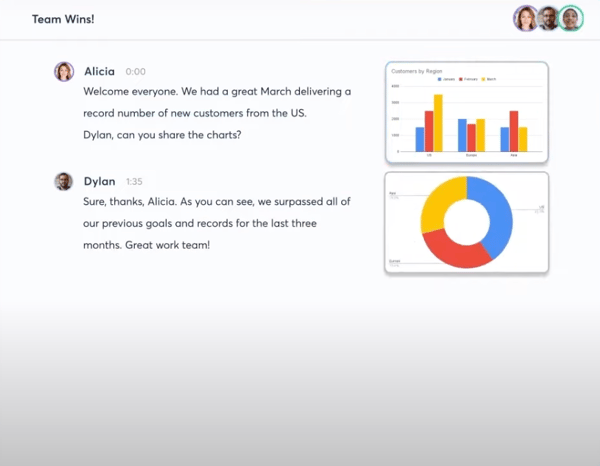
Its quiet advantage, to me, is recall: everything Otter captures is searchable and shareable. Reviewers describe finding a decision from weeks ago by searching a word, then highlighting or commenting on the transcript for teammates, instead of scrubbing a recording.
I'd add that it stays approachable. Reviewers call it user-friendly and quick to learn, which matches its largely non-technical, small-team audience: no admin lift, productive on day one.
The friction I'd flag first is the free plan's ceiling. The free tier is genuinely usable for light note-taking, but its monthly transcription cap and the features held back for paid tiers push heavier users to upgrade sooner than they expected, and a few find the tiers confusing at first. For light use, it’s a good way to test whether Otter fits your meeting workflow; once recording becomes routine, a paid plan makes more sense because the limits stop shaping how often you can use it.
The other I'd raise is speaker labeling. When everyone's on a clean, separate connection it does fine, but reviewers in busy rooms, several people on one account, freelancers dialing in from phones, overlapping voices in a brainstorm, find Otter mislabels who said what, and fixing it means manual editing before the notes are shareable. That may mean a quick cleanup before sharing notes from a busy brainstorm. For clearer meetings, the labels save time by giving teams a usable first pass instead of a blank transcript to sort through manually.
For individuals and small teams who want to stay present in a meeting and still walk away with an organized, searchable record, Otter earns its place.
"Otterai makes it much easier to keep track of meetings without taking notes manually. I can review transcripts later, search for important discussions, and check action items whenever I need them. It helps me stay focused during meetings instead of worrying about writing everything down."
- Otter.ai review, Muzammil M.
“The speaker identification defaults to "Speaker 1" whenever our freelance writers join from their phones. In addition, any overlap in brainstorming sessions results in cluttered transcripts."
- Otter.ai review, Anders C.
IBM Watson Speech-to-Text pairs deep-learning and NLP models to transcribe speech, read the context behind it, and adapt to your own vocabulary and audio. It's the option I'd associate with established organizations that need speech to fit inside their own systems.
G2 Data puts its natural-language interaction functionality at 97%, among the strongest in this lineup (+7 points above category average). Where it trails the newest tools on polish, it leads on the engine and the enterprise groundwork, which is what its buyers tend to weigh. It holds a 4.1 out of 5 rating on G2, and 83% of reviewers would recommend it.
The strength I'd put first is the recognition engine itself. Its natural-language understanding and adaptive recognition are among the highest-rated capabilities in this roundup, and reviewers back that up, describing transcripts that read context and tone rather than just matching words, the difference between a transcript you can act on and one you have to interpret.
Its working feature set is built for production transcription. Many reviewers point to real-time recognition, keyword spotting, and the option to bring custom models, the controls a team needs when transcription feeds a live system rather than a one-off file.
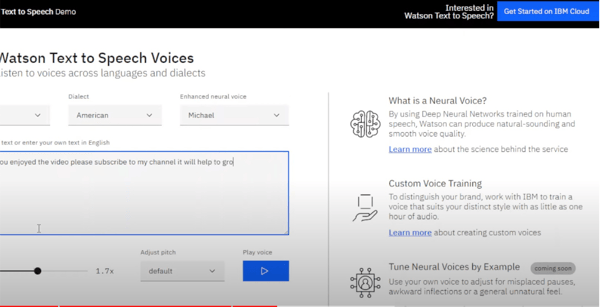
Where I'd give it real credit is customization. Per IBM's docs, you can train a custom language model on your own vocabulary and adapt an acoustic model to your audio's conditions, so a healthcare or legal team can tune accuracy for their own terms instead of accepting a general model.
It's built to run at volume. G2 Data puts its high-volume scalability at 93%, and reviewers describe putting it to steady, high-throughput work, clinical and contact-center transcription among the examples, where consistency matters more than novelty.
For regulated work, security is a real differentiator. G2 Data rates its secure communication at 93%, and IBM's docs describe encryption in transit and at rest, role-based access, and data isolation, governed through Cloud Pak for Data, which is why it turns up in healthcare, financial, and other compliance-driven settings.
It also runs where your data is. It deploys behind your firewall or on any cloud, public, private, hybrid, or on-premises, and G2 Data shows it used on-premises about as often as in the cloud, the option that matters for organizations that can't send audio to a public service.
I'd be upfront about setup: it isn't plug-and-play. Recent G2 reviewers describe a complex interface and documentation that takes work, and say you may need a developer to stand it up. G2 Data shows one of the longest times to go live in this set. For a team with engineering support that's a one-time hurdle; for a small team wanting something running quickly, it's worth knowing up front.
Language breadth is the other limit. IBM's newest, most accurate Large Speech Models currently cover only English, Japanese, and French, and the wider language list trails the big cloud providers. If your work centers on English or those core languages it won't surface; for broad multilingual coverage, check the current list against your needs first.
Even so, reviewers keep choosing IBM Watson for its reliability, its ability to scale, and dependable performance on complex transcription workloads.
"it has very complex interface which is laggy too and also the software sometimes gets hanged during a session it suddenly displays message like connection lost and also its language support is very less like it only have few languages integrated in it."
- IBM Watson Speech-to-Text review, Dharmik V.
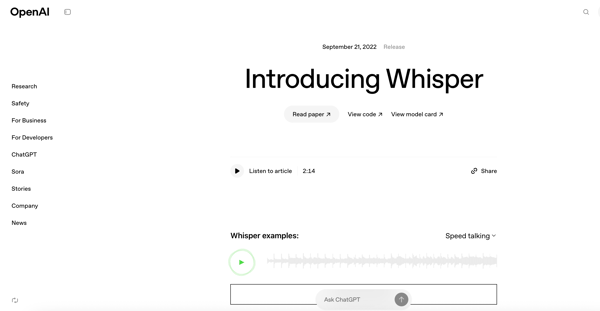
OpenAI Whisper is OpenAI's open-source speech recognition model, i.e. you can call it through the API or download and run it yourself, and it transcribes across dozens of languages. I'd point builders to it when they want a capable model they control rather than a packaged product.
On G2, it holds 4.6 out of 5 rating, and 92% say they would recommend it. It's less a finished product than a model teams build on, which is exactly how its reviewers, mostly developers and small teams, treat it.
What I'd lead with is that it's open-source. Several reviewers say they just download and self-host it without API keys or credits, modify it, and run it on their own machines, which removes the vendor lock-in the rest of this list carries. Many praise it for being able to tweak it, integrate it with different applications, and customize it directly from the web according to the business needs.
Cost follows from that: self-hosting is free, and reviewers who use the API call its price-to-quality the best around, a fraction of a cent per minute.
In the reviews, I found integration to be its other strength. Developers describe dropping it into workflows and apps quickly, from n8n automations to video-subtitle pipelines to custom voice features.
Its multilingual range is real, trained on a very large, varied audio set, and reviewers use it across many languages, which is why it turns up in so many international projects. It isn't just a basic voice-to-text tool; it has been trained on 680,000 hours of audio, covering a huge range of languages and accents.
Transcription quality holds up for an open model. It combines advanced natural processing with audio and video file compatibility. Several G2 reviewers describe it working well on clear audio and even some noise, with some calling it a pioneer that worked extremely well for auto-subtitles.
I'd also note its range of uses. Reviewers reach for it on meeting recordings, interviews, subtitles, and voice-app input, one model covering jobs that would otherwise need several tools.
The aspect I'd check first is long-form and live audio. Whisper is built around short segments, so reviewers find very long files slow and prone to needing a split, and real-time streaming isn't its strength, one describes it cutting speakers off mid-sentence. For hour-long files, live conversation, or streaming-style workflows, I’d plan the pipeline carefully so Whisper’s accuracy can still be used without expecting it to behave like a fully managed live transcription service.
The other is that it's a model, not a managed service, and that cuts both ways. There's no support desk, no built-in speaker labeling, the occasional made-up word to catch, and performance depends on the machine or infrastructure running it. So, reviewers without engineering resources find it harder to adopt. For a team that can host, tune, and maintain it, that extra ownership is also what gives Whisper its appeal: more control over cost, deployment, privacy, and how transcription fits into the product.
For developers and technical teams who want a capable, low-cost model they can host and shape to their own needs, Whisper is a standout, and the open-source freedom is exactly why they choose it. Bring the engineering to handle long files and hosting, and it does the core job as well as tools that cost far more.
"OpenAI Whisper is one of the best open source STT model that is very is to integrate into our applications. Implementation of Whiper is also very easy as we can use it without any api keys or credits. We can simple download the model and access the services simply."
- OpenAI Whisper review, Sai Pavan Kumar D.
"It’s been a lifesaver for turning audio into text, but it can also be frustrating. It often can’t tell who’s speaking, sometimes makes things up, and really needs a powerful computer to run smoothly."
- OpenAI Whisper review, Abderrahmane Mohamed N.
Azure AI Speech is Microsoft's speech service: speech-to-text, text-to-speech with natural-sounding voices, and translation, all in one Azure product you can shape to your own data. I'd point teams already living in Azure and Microsoft tooling to it first.
It holds 3.9 out of 5 rating across 60+ G2 reviews, and recent users point to accuracy, customization, and Microsoft-stack alignment, while G2 Data shows multilingual voice recognition scoring above the category average.
The reason most reviewers opt for it is the Microsoft fit. Reviewers describe Azure AI Speech as easier to justify when the team already works in Azure, because speech becomes another service managed through the same cloud environment rather than a separate vendor to wire in. That matters most for enterprises that already have Azure governance, developer resources, and internal approval paths in place.
What I'd single out is how far you can customize it. Reviewers train its custom speech models on their own domain vocabulary and build custom voices, which is what lets a team tune accuracy for their industry instead of taking the model as-is. Microsoft also supports phrase lists for domain-specific terms, proper nouns, and uncommon words. For industries with product names, medical terms, internal acronyms, or specialized vocabulary, that makes Azure AI Speech quite adaptable.
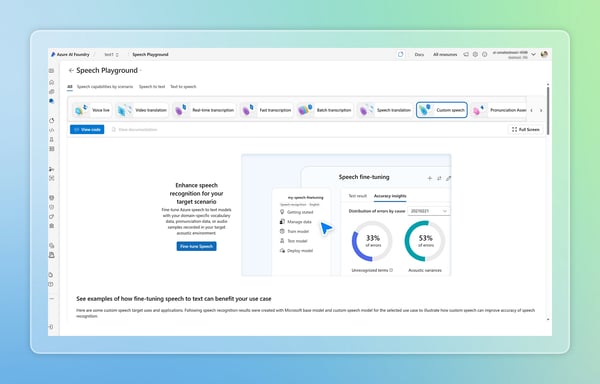 Source: Microsoft Azure
It's also more than transcription. Several reviewers use speech-to-text, natural-sounding text-to-speech, and translation from the same service, some wiring it into voice agents and automated audio pipelines. That breadth is useful when one team needs transcripts, another needs synthetic voice, and another needs translation, but all of them need to stay inside the same Microsoft ecosystem.
Language coverage is broad, and reviewers working across languages rate its multilingual recognition among its strongest features in G2 Data.
On clear audio, I'd call its voice recognition dependable. Reviewers describe accurate transcripts that identify speakers and catch words reliably, with add-ons like sentiment there when needed.
I'd also weigh how it deploys. Multiple SDKs and APIs speed integration, and G2 Data shows it running on-premises far more often than the other cloud tools here, which matters when speech has to stay inside your own environment.
The trade-off I'd flag first is complexity. Reviewers say setup, configuration, custom-model training, and pricing can take time to understand, and G2 Data backs that up with slower go-live and lower adoption compared with simpler tools in the set. For a small or non-technical team, that ramp can feel heavy. For an Azure-experienced team, though, the setup is easier to justify because the payoff is a speech layer that fits existing cloud, security, and development workflows.
Accuracy holds up on clean audio, so this is about hard inputs. Reviewers note real-time accuracy slipping with strong accents, background noise, and several people talking at once, and G2 Data scores accuracy in noisy settings among its lower marks. For clear, mostly standard speech it rarely shows; for noisy, multi-speaker, or heavy-accent audio, test on your own samples first.
For teams already invested in Azure who want speech they can customize, in both directions, and keep inside their own environment, Azure AI Speech is a strong fit.
"What I like most about Azure AI Speech is how accurate its real-time speech-to-text is, along with its natural-sounding text-to-speech output. It also supports multiple languages, translation, and custom voice models, which makes it flexible for a wide range of real-world applications. On top of that, the straightforward integration with other Azure services and the developer-friendly SDKs make it efficient to build AI voice solutions that can scale as needed."
- Azure AI Speech review, Verified G2 User in Telecommunications
"Setup and configuration can be complex for new user."
- Azure AI Speech review, Carlos C.
Amazon Transcribe is AWS's speech-to-text service, built for developers who want to add transcription to the applications and data pipelines they already run on AWS. It's the option I'd reach for when your stack already lives there.
On G2, it holds 3.9 out of 5 rating, and its reviewer base skews nearly evenly between small (40%) and mid-size (33%) businesses. Recent reviews keep coming back to two practical strengths: its fit inside AWS workflows and its accuracy on clear English audio.
The biggest reason Amazon Transcribe makes sense is the AWS pipeline fit. Reviewers already using AWS describe it as easier to wire into the systems they already manage, especially when audio files are stored in S3 and the transcript needs to feed another AWS service or downstream workflow. That makes it feel less like a standalone transcription app and more like a speech layer inside an existing cloud setup.
Accuracy is another strength reviewers cite. Several call it more precise than other speech-to-text services they've tried, particularly on clear English audio. That matters for teams using transcripts in searchable archives, support workflows, accessibility, compliance review, or AI-driven call analysis, where too much cleanup can erase the time saved by automation.
Many mention the output is useful for builders, not just readers. Amazon Transcribe returns JSON with the transcript plus word-level metadata, including start time, end time, and confidence score for each word. For teams building searchable video libraries, call review tools, or internal transcript viewers, those timestamps make the transcript easier to navigate and connect back to the source audio.
For multi-speaker audio, speaker diarization is another useful layer. Reviewers mention Amazon Transcribe can separate speakers in batch and streaming transcription, labeling speaker turns so teams can see who said what without manually marking every exchange. AWS documents support for up to 30 speakers.
Reviewers in technical or specialized fields say they can add custom vocabularies for domain-specific terms such as brand names, acronyms, proper nouns, and words the service is not rendering correctly. This is the kind of feature teams need when transcribing technical, legal, marketing, or product-specific language.
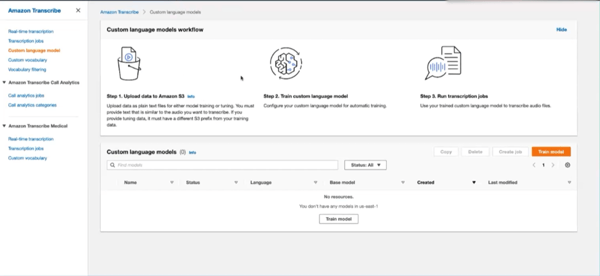
It also supports a wide range of audio and video formats out of the box, which many reviewers note saves a conversion step before transcription. For batch transcription, AWS lists formats including AMR, FLAC, M4A, MP3, MP4, Ogg, WebM, and WAV; for streaming, it supports formats such as FLAC, Ogg Opus, and PCM encoding.
Cost is the trade-off reviewers raise most. The AWS pay-as-you-go model is flexible and transparent at low volume, but for teams transcribing large amounts of audio daily, the bill climbs, and one reviewer weighed a self-hosted model instead for that reason. For occasional or moderate usage, its usage-based model is easy to absorb; for production pipelines, it’s worth estimating monthly audio volume before rollout so the cost scales with the value of the workflow rather than arriving as a surprise.
Accuracy slips on names and language variants. Reviewers note it can miss proper nouns and named entities, and one localization team flagged that it lumps regional variants like Brazilian and European Portuguese together. For general English transcription and domain terms, it's reliable; for regional or name-heavy material, I’d test it on your own samples first.
Overall, reviewers view Amazon Transcribe as a reliable way to automate workflows, create transcripts at scale, and feed speech-to-text into AI-driven processes. For teams prioritizing flexibility and scale inside AWS, it remains a solid choice.
"I believe Amazon Transcribe can make my tasks easier and have a positive impact on my projects due to its artificial intelligence capabilities."
- Amazon Transcribe review, Melliard Lloyd B.
"If you have large amount of daily data to transcribe then it may incur huge costing per year."
- Amazon Transcribe review, Ranu S.
For enterprise organizations, IBM Watson Speech to Text and Google Cloud Speech-to-Text earn the most trust. IBM rates high on security, compliance, and high-volume scalability in G2 Data, while Google holds the category's largest market presence. Azure AI Speech is a third option for teams standardized on Microsoft.
Krisp and Otter.ai fit very small teams best, especially if you need no-code, ready-to-use SaaS. Krisp is mostly used for clearing call noise and summarizing meetings, while Otter.ai automates meeting notes with no setup project. Small developer teams building voice into a product fit Deepgram and AssemblyAI, which rate highest for developer APIs and skew heavily to small-business users in G2 Data.
Deepgram and Krisp rate most reliable. Deepgram earns the highest customer satisfaction score in the category in G2 Data and deploys in about a month, while Krisp holds one of the top user ratings at 4.7 out of 5. Both pair quick implementation with consistently strong reviewer marks.
IBM Watson Speech to Text, Google Cloud Speech-to-Text, and Amazon Transcribe hold up best under heavy workloads. IBM rates 93% on high-volume scalability in G2 Data, and Google and Amazon run on cloud infrastructure built for high throughput. All three suit steady, high-volume transcription where consistency matters most.
AssemblyAI and Otter.ai return value fastest with little setup. G2 Data shows both among the quickest paybacks in the category, close to six months, and both work out of the box: AssemblyAI through prebuilt audio-intelligence models, Otter.ai through automatic meeting notes. Neither needs custom engineering to pay off.
Otter.ai and Krisp are easiest for non-technical teams. Otter.ai joins meetings and produces notes with no setup project, and reviewers call it usable on day one; Krisp installs in minutes to clean up calls. Both avoid the developer work the API-based tools in this list require.
Azure AI Speech, Google Cloud Speech-to-Text, and Amazon Transcribe integrate most cleanly. Azure fits the Microsoft stack, Google scores 100% on software integration in G2 Data, and Amazon wires into AWS services like S3 and Comprehend. Each suits teams already standardized on that cloud platform.
Otter.ai, Krisp, and Deepgram reach value quickest. G2 Data shows the fastest go-live times in the lineup: Otter.ai within about a week, Krisp and Deepgram within roughly a month. Each produces usable transcripts or summaries almost immediately, well inside a three-month window.
Otter.ai and Krisp remove the most manual effort. Otter.ai auto-captures meetings into summaries and action items, so no one takes notes by hand, while Krisp transcribes and summarizes calls in the background. Reviewers credit both with reclaiming the time teams used to spend writing up meetings.
Otter.ai and Krisp work best for teams without dedicated IT. Both run on their own, Otter.ai needs no admin setup and Krisp is ready in minutes, whereas IBM Watson, Azure AI Speech, and the developer APIs expect engineering help. For lean teams, the self-serve options are the safer bet.
Modern voice recognition runs on deep neural networks and transformer-based models, which have largely replaced the older Hidden Markov Models. OpenAI Whisper is a well-known transformer-based example, trained on a large, varied audio set. These architectures are what let current tools handle accents, context, and background noise.
OpenAI Whisper is the best free option, open-source and free to run on your own hardware. If you'd rather not self-host, Google Cloud Speech-to-Text, Azure AI Speech, Krisp, and Otter.ai all offer free tiers with monthly limits. Whisper suits developers; the others suit lighter, occasional use.
Amazon Transcribe and Google Cloud Speech-to-Text fit call centers best, both offering scalable real-time transcription and multilingual support for customer calls. IBM Watson Speech to Text is a strong third option where security and compliance are priorities. All three handle the high call volumes contact centers generate daily.
Otter.ai is the strongest pick for business meetings, joining calls to produce live transcripts, summaries, and action items teams can search and share afterward. Krisp is a close alternative, adding noise cancellation to its meeting notes. Both target the recurring-meeting workflows most teams run each week.
Deepgram, AssemblyAI, Google Cloud Speech-to-Text, and OpenAI Whisper are the most developer-friendly. Deepgram and AssemblyAI rate highest on developer API and SDK quality in G2 Data, Google offers broad language coverage, and Whisper is open-source for full control. Each exposes clean APIs for building speech into products.
Real-time tools stream audio in small chunks and process it on optimized models and GPUs, returning text as someone speaks rather than after they finish. Deepgram is built around this low-latency streaming, which is why reviewers reach for it on live captioning and voice-agent work.
When I'm weighing a voice recognition tool, two things matter more than any feature list: how well it fits the workflows your team already runs, and the kind of audio data you handle.
Get those right and the tool scales with you; get them wrong and no feature set makes up for it.
Before you compare tools in detail, list the work that would benefit most, the recurring meetings to capture, the calls to clean up, the audio you need to make searchable. Whether you're analyzing tone, context, and sentiment or building a conversational agent, treat my shortlist as a starting point and test the tools against your own use case.
And if you want to round out your voice stack, I'd point you to our roundup of free text-to-speech software, the natural companion to speech-to-text for turning text back into spoken audio.
.png)
Written content doesn't always serve the purpose; people are switching more to voice...
 by Samudyata Bhat
Recently updatedSummer 2026 Grid® Report · Published May 26, 2026 This guide was last...
.png) by Tanuja Bahirat
by Tanuja Bahirat
Recently updatedSummer 2026 Grid® Report · Published May 26, 2026 The tools below reflect...
by Tanuja Bahirat