


Our HR team reminds us constantly — clock in, clock out, don't forget to log your leave. At first, it feels like admin noise. But when you dig into why it matters, it makes complete sense.
Untracked hours, missed leave entries, and shift discrepancies don't just create paperwork headaches — they compound into payroll errors, unexpected labor cost overruns, and compliance risks that are frustratingly hard to trace back to a root cause. That's why I put together this guide to the best time and attendance software for 2026, because the bigger headache isn't just inaccurate hours, it's the downstream cost of finding out too late.
What most HR teams and executives really want to know is which tool actually fits how their workforce operates — especially when you're managing shift workers, remote employees, PTO policies, and payroll integrations all at once, and the manual work in between is quietly adding up.
I research software for a living, and for this list, I dug into G2 Grid® Reports, satisfaction signals, and review patterns across tools built for time tracking, workforce scheduling, and attendance management. I looked at what teams are actually struggling with: automating time tracking, managing absences and PTO, reducing payroll errors, controlling labor costs, and getting time data to sync cleanly with payroll systems.
Using these factors, I narrowed in on these top 6 tools addressing those problems: UKG Ready, Rippling, RUN Powered by ADP, Deel Payroll, Remote, and Connecteam. So If you're ready to stop leaving money on the table due to time-tracking gaps and manual workarounds, here's what stood out when I compared them.
*I found these to be the top-rated time and attendance software in their category as per the G2 2026 Winter Grid Report. I've mentioned their standout features and the starting prices of their paid plans to make comparisons easier for you.
I’ve read about many enterprises that underestimate the extent of labor cost leakage caused by inaccurate time tracking, unmanaged overtime, and manual payroll adjustments. Many of these issues usually occur due to the lack of an automated time and attendance tracking system.
Time and attendance software addresses that gap directly. It centralizes hours worked, overtime, paid time off, and scheduling data into a single system of record, and allows users to punch in and punch out with ease. In practical terms, it replaces fragmented spreadsheets and disconnected time clocks with real-time visibility into where labor dollars are going and what is driving them.
The strongest platforms go well beyond basic time capture. They move into structured reporting, overtime trend analysis, absence tracking, policy enforcement controls, and automated integrations with payroll and HRIS systems. From a business perspective, this category matters because labor remains one of the largest controllable expenses. Even small inaccuracies in time and attendance capture can scale into significant payroll variances and inefficient staffing.
While these challenges apply across organizations of all sizes, I’ve seen a particularly strong impact among SMBs and mid-market companies. G2 data shows that most users fall within the small business (43%) and mid-market (45%) segments, with enterprise customers making up about 12%.
Exploring the tools covered in this guide in the right way can deliver measurable value by reducing payroll errors, strengthening compliance, improving scheduling transparency, and providing actionable labor insights.
I started with G2’s Grid® Report to identify leading time and attendance platforms based on G2 score, customer satisfaction, and market presence. This ensured the shortlist reflects products that are both highly rated by users and established within the category, creating a data-backed foundation rather than a perception-based ranking.
Next, I analyzed G2 reviews at scale with AI assistance to uncover consistent patterns across enterprise environments. The focus was on reporting strength, analytics depth, payroll integration reliability, compliance support, overtime visibility, and scalability. Particular weight was given to how effectively each platform transforms raw time data into actionable workforce insights for HR, finance, and operations leaders.
Finally, recurring strengths and limitations were evaluated through aggregated review sentiment. Platforms that consistently delivered measurable operational visibility and administrative efficiency were prioritized, while commonly cited friction points were noted to maintain balance and credibility. This approach positions the final selection as evidence-driven and grounded in real user outcomes.
All the screenshots in this article are from G2 vendor profiles and publicly available documentation.
After reviewing the G2 category definition and analyzing product-level satisfaction data, a few consistent themes kept surfacing.
Not every tool excels in every criterion. But the best time and attendance software performs consistently where it matters most for HR leaders, finance teams, and operations executives: accurate workforce management data, actionable labor analytics, seamless payroll alignment, and automation that improves decision-making without adding complexity.
The list below contains genuine G2 user reviews from the Time and Attendance software category. To be included in this category, a solution must:
*This data was pulled from G2 in 2026. Some reviews may have been edited for clarity.
G2 rating: 4.4/5
UKG Ready earns its position as a strong time and attendance platform for enterprise and mid-market customers. It gets consistent satisfaction performance, with 93% of users confirming it meets requirements on G2. I observed many reviewers talking about how the platform is clearly aligned with enterprise expectations around accurate time capture, policy enforcement, and payroll readiness. One of the main points of praise I see is how its time and attendance feature actually contributes to ensuring payroll accuracy and compliance.
Built as a dedicated HCM, one of UKG Ready’s most differentiated strengths lies in its workforce data governance capabilities. Its employee information feature is rated at 92% at G2, while user access and user role access both score at 91%. For organizations operating across multiple locations, departments, or compliance frameworks, these controls are foundational. Role-based access and structured employee data management reduce administrative risk, improve audit defensibility, and ensure that time data remains reliable as it flows into payroll and financial systems.
Coming to its time and attendance tracking abilities, one of the main areas of praise I see from users is how it centralizes time and attendance alongside other features. At the same time, it gets heaps of praise for how easy it is to manage timesheets, schedule shifts, and handle PTO. In fact, time tracking is one of its most praised features, with 280+ dedicated reviews mentioning its positives on G2.
Adding to this, many users highlight the usefulness of the mobile app as well, especially for clocking in and out, checking schedules, and reviewing PTO. The repeated references to mobile device access suggest to me that there is a strong adoption among non-desk and hybrid employees.
The above benefits would not be possible without a sleek, easy-to-use interface. I see praise for UKG’s simple interface and easy-to-use tool, which makes time tracking with the tool easier and smoother. I don’t find it surprising that it gets an 88% approval for ease of doing business and ease of setup.
While not positioned as a highly customizable BI engine, UKG Ready also delivers dependable workforce reporting. It supports overtime monitoring, attendance tracking, and payroll validation. For HR and finance leaders focused on labor cost transparency and compliance readiness, this level of reporting clarity provides actionable oversight without requiring heavy external tooling.
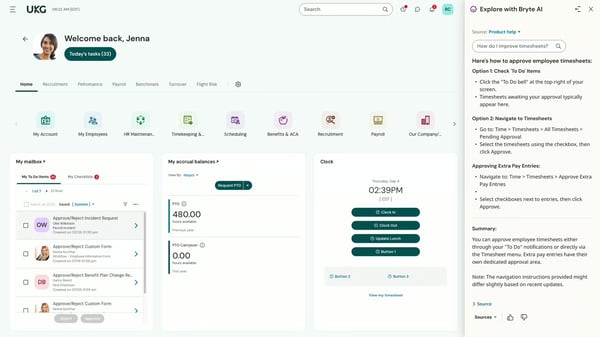
While UKG Ready offers solid reporting functionality, I’ve seen some users mention that navigating certain reports can feel less intuitive than expected. A few reviewers noted they would prefer a clearer list of available reports or a more direct path to access specific reporting views. That said, the reporting capabilities themselves are present and functional — once users become familiar with the layout, they’re generally able to access the information they need for payroll and attendance oversight.
I’ve also come across feedback related to session management and occasional system responsiveness. Some users mention having to sign in more frequently than they’d like or experiencing minor syncing delays within the app. These appear to be intermittent usability frustrations rather than systemic issues, and overall, the platform remains reliable for core time tracking and approval workflows.
UKG Ready positions itself as a governance-focused time-and-attendance platform. Its strengths in compliance alignment, structured access controls, and dependable workforce visibility make it particularly well-suited for regulated, multi-location, and shift-based enterprises where accuracy and auditability directly influence financial outcomes.
“I really appreciate how intuitive UKG Ready is for our organization, as it makes entering time requests, reviewing punches, and correcting exceptions easy. This usability supports accuracy and adoption across our workforce. From my perspective as an employer, the strong and reliable reporting of UKG Ready is invaluable. It enables timely approvals, clear visibility into labor data, and efficient compliance management. The system balances ease of use with robust reporting and controls, which is crucial for evaluating time and attendance technology. The reporting tool is particularly useful as it allows our administrators and leaders to quickly and efficiently create and share reports, saving us significant time. I also value the customization options for setting up automated report releases. Overall, the ease of the system from both an employer and employee perspective is what stands out most to me.”
- UKG Ready review, Ornella L.
“While UKG Ready is a robust and comprehensive platform, there are some areas that could be improved. Certain workflows are not always intuitive and can require additional training, especially for managers and new users. System updates or configuration changes sometimes impact processes unexpectedly, requiring follow-up adjustments. Additionally, report customization can be time-consuming, and extracting specific data is not always as straightforward as expected.
Despite these challenges, the overall benefits of UKG Ready outweigh the drawbacks, and the system continues to support our core HR, payroll, and compliance needs effectively.”
- UKG Ready review, Benedick N.
Related: Looking for ways to measure time and attendance along with other HR analytics? Check out our list of the best HR analytics software and get started today.
G2 rating: 4.8/5
Rippling is like that one tool that promises to solve all your HR needs, and actually delivers for its core user base. Being one of the highest-rated HR platforms on G2, it extends beyond time and attendance into unified workforce and IT management. Right off the bat, it scores above average satisfaction scores of 96% for ease of use and 96% for meeting user requirements.
From a time and attendance standpoint, I see clear strengths in how smoothly clock-in and leave management workflows operate. Users frequently mention clocking in and out without friction, and PTO visibility is a recurring positive theme. Many reviewers consistently mention being able to view PTO balances and submit time-off requests easily. This gives Rippling’s employee leave management an approval rating of 95%, reinforcing that time-off tracking and approvals are structured and reliable. For organizations that want time data to flow directly into payroll without manual reconciliation, that integration is a meaningful operational advantage.
Rippling’s workforce data architecture also appears to be a differentiator. Employee information scores 96%, and user access scores 95%, indicating strong control over permissions and centralized employee records. When time tracking, payroll, and HR data live in one system, it reduces fragmentation and strengthens compliance oversight. I see this as particularly valuable for companies scaling headcount while maintaining governance consistency.
Now, when a system handles HR, payroll, and time tracking together, usability becomes critical. Thankfully, Rippling was not built with that in mind, and users agree. I see repeated references to how “easy” Rippling feels suggest strong day-to-day adoption across employees and administrators. Ease of setup is rated at 93%, and ease of admin sits at 92%. These signals suggest implementation is structured yet manageable, and ongoing system management does not become operationally burdensome. For growing organizations, minimizing setup friction while maintaining control protects ROI.
The quality of support is also above average at 94%, and users who faced issues have confidently stated they received quick, efficient assistance.
Another thing that performs strongly is its scheduling and workforce coordination feature. Schedule creation tools are rated at 92%, which, while categorized among the lower-rated features, is still much above average compared to other time and attendance software. In practice, this suggests that scheduling is dependable and integrated within the broader workforce framework, though enterprises with highly complex shift modeling requirements may want to validate advanced customization scenarios during evaluation.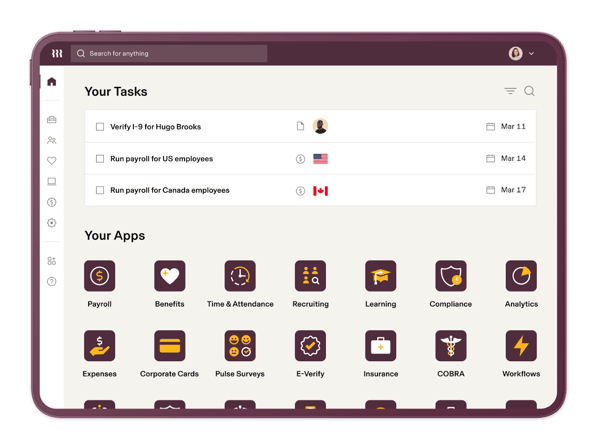
While many users praise Rippling across the board, some users note that certain areas around custom reporting and broader system configuration may require additional setup to fully align with internal processes. While the platform offers strong flexibility and depth, optimizing workflows and tailoring reports to specific organizational requirements can take time during implementation. That said, once properly configured, many teams find that the structured environment supports long-term scalability and centralized control.
I’ve also come across feedback suggesting that because Rippling is a feature-rich core HR platform, certain workflows can feel slightly overwhelming at first. While this depth is often viewed as a strength, new users may need a short acclimation period to become fully comfortable navigating the broader system. Over time, however, many reviewers indicate that the structured environment ultimately supports centralized workforce management.
Overall, Rippling presents a governance-forward, integration-driven approach to time and attendance, with strong satisfaction performance across usability, compliance, and administrative control. For enterprises prioritizing system consolidation, automation, and cross-functional data visibility, it offers a scalable foundation for workforce management modernization.
“What I think the "why" Rippling is best is because they specialize in simplifying organizing business needs and management, tracking worker attendance, and time tracking for part-time workers to clock in/out. No add-ons and extra implementation are needed, all is readily available as soon as you log in to the system.”
- Rippling review, Habibah N.
“Occasionally, the clock-in/clock-out feature can be sensitive to connectivity or location issues, which may require a reattempt. Rippling could improve reliability by allowing a short offline grace period where punches are saved locally and synced automatically once the internet connection is restored.”
- Rippling review, Manoj S.
G2 rating: 4.6/5
Coming from ADP’s global HR ecosystem, RUN Powered by ADP demonstrates consistent strength across usability, administrative controls, and compliance execution. It positions it as part of a payroll service aligned with time and attendance solutions for organizations that prioritize accuracy and regulatory compliance.
The main theme I see is around the platform's simplicity. In terms of operational simplicity, reviewers frequently mention being able to navigate the platform easily, approve time quickly, and manage workforce records without unnecessary complexity. This aligns with its 93% ease-of-admin rating, suggesting that managers can maintain operational control without extensive configuration.
This simplicity also extends to how easy it use to use the platform. With an ease of use score of 94%, and 93% saying it meets requirements, it only reinforces what I already see in the reviews: Praise for the platform as straightforward, intuitive, and reliable for everyday workforce tasks. For organizations that prioritize accurate time capture feeding directly into payroll processing, usability reduces friction and accelerates adoption.
Time tracking is a clear functional strength. Many users regularly reference clocking hours and managing attendance within the system as useful features. The ability to capture employee time directly inside a payroll-aligned platform reduces duplication and supports more accurate wage calculations. For small and mid-sized businesses, the tight integration between time tracking and payroll simplifies workforce administration.
Payroll functionality remains a central advantage. Positive mentions of payroll dominate the review language, indicating that compensation processing is dependable and closely integrated with recorded work hours. When time data flows directly into payroll calculations, it reduces reconciliation errors and improves financial predictability.
Its other strength is compliance execution. Compliance monitoring and regulations enforcement both score 91%, signaling structured oversight of wage-and-hour policies and statutory requirements. For businesses operating in regulated or labor-intensive industries, embedding time data within a compliant payroll framework reduces audit exposure and strengthens regulatory confidence.
Workforce data integrity is another validated advantage. Employee information holds a 94% satisfaction score, reinforcing dependable employee record management and structured time data capture. And this only gets more powerful when combined with reporting functionality, which is frequently referenced in reviews. Many mention that the tool provides clearer oversight of attendance and payroll metrics within a single, controlled system.
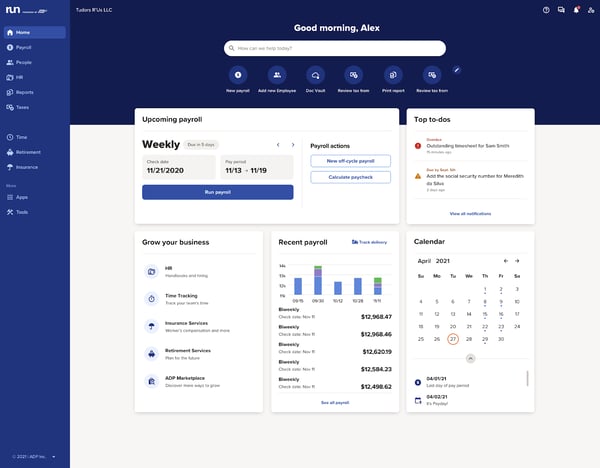
Some users mention occasional confusion around payroll timing, reporting visibility, or how time entries are reflected within payroll cycles. Given that RUN is built around payroll-first workflows, this feedback appears to stem more from clarity in processing rather than gaps in functionality. With some familiarization and configuration, many teams are still able to rely on the system for consistent payroll and time data alignment.
Another recurring theme involves customer service responsiveness. A few users note that resolving certain issues can take longer during peak periods or more complex scenarios. That being said, I’ve observed users face this issue more during peak periods, with support generally trying their best to be helpful. Many organizations continue to rely on ADP’s structured service model for ongoing assistance and issue resolution.
Overall, RUN Powered by ADP positions time and attendance as an extension of payroll accuracy and compliance assurance. Its strengths in usability, administrative simplicity, and regulatory alignment make it particularly suitable for growing businesses and compliance-sensitive industries that prioritize dependable payroll integration and operational stability over advanced workforce analytics complexity.
“It makes my job run smoother. ADP is the platform you need if you want to stay organized with payroll functions, HR, attendance, and all other reports.”
- RUN Powered by ADP review, Stephanie H.
“I think the time and attendance feature isn’t as easy to use as I’d like, but maybe I just need a tutorial to get the hang of it.“
- RUN Powered by ADP review, Katrina D.
G2 rating: 4.7/5
If you’ve ever needed a tool for global time and attendance management, Deel Payroll is built just for you. The attendance solutions are tailored for globally distributed teams. Looking at the satisfaction metrics reinforces that alignment: ease of use and meets requirements both score 95%, while ease of setup also stands at 95%. That consistency reflects what reviewers repeatedly describe — a platform that feels intuitive despite the inherent complexity of international workforce management.
Time tracking is a clear strength in the review data and users highlighting how straightforward it is to log and review hours worked. For contractors and distributed teams, having clear visibility into recorded time improves payment accuracy and reduces disputes. Rather than functioning as a standalone clock tool, Deel Payroll integrates hour tracking directly into payroll workflows, reinforcing operational clarity.
Payments and transfers are where Deel Payroll clearly differentiates itself. Positive mentions around payments dominate the review language, reinforcing that cross-border transfers are reliable and predictable. When tracked hours flow directly into international payouts, I see a measurable reduction in administrative complexity and fewer reconciliation headaches for finance teams.
Payroll integration is another strength I can’t ignore. Deel Payroll is often described as reducing stress and simplifying global compensation management. When time tracking and payroll execution sit within the same ecosystem, it strengthens financial consistency and minimizes the need for manual intervention across systems.
Compliance control also stands out to me as a strategic advantage. Employee information (95%), regulations enforcement (94%), and user role access (94%) all score strongly. For organizations operating across countries with varying labor laws, having structured governance controls embedded in daily workflows helps reduce regulatory exposure and supports audit defensibility.
Finally, administrative efficiency appears consistent across the data. Ease of admin (93%) and ease of doing business with (94%) say that workforce management tasks remain manageable as organizations scale. Schedule creation tools (92%) and employee leave management (92%) further suggest reliable PTO tracking and coordination across distributed teams. While Deel Payroll isn’t positioned as a complex shift-optimization engine, I see it as a stable, integrated solution for global time tracking and workforce management within a broader compliance-driven framework.
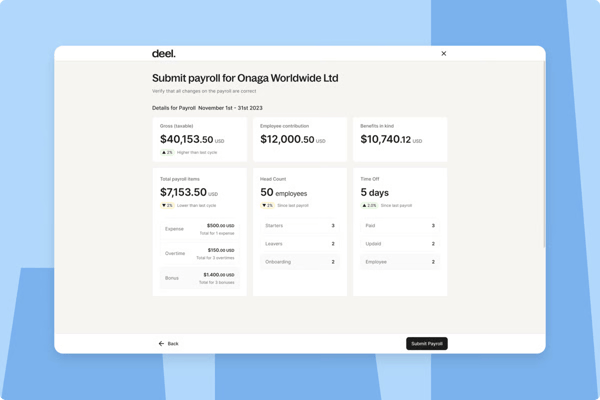
Some users mention that fees, exchange rates, and overall pricing structures can impact final payout amounts, particularly in cross-border transactions. Given the inherent complexity of international payments and currency conversions, these differences are often tied to external financial systems rather than the platform alone. That said, Deel Payroll continues to be valued for its ability to simplify global payments overall, with many users still finding the convenience and reliability of its payment infrastructure outweigh these cost considerations.
I also notice some mentions around support responsiveness, particularly when dealing with more complex or country-specific queries. While many users describe the support team as helpful and knowledgeable, a few indicate that resolution timelines can vary depending on the nature of the request. Given the complexity of global compliance and payroll scenarios, this is somewhat expected, and overall, users still value the support provided for navigating international workforce challenges.
Overall, Deel Payroll presents as a globally oriented time and attendance platform with pronounced strength in compliance monitoring, structured access management, and administrative efficiency. For enterprises managing remote or international teams, its alignment with regulatory governance and centralized workforce visibility positions it as a strategic foundation for cross-border workforce management.
“I find Deel Payroll incredibly user-friendly, making it easy to use from anywhere, which adds immense flexibility to my work routine. I am particularly pleased with how effortless it is to navigate, filled with all the necessary information and updates, making it a comprehensive platform for my needs. One feature I truly appreciate is the email confirmation regarding my salary, which reassures me and provides clarity about my payments. Additionally, the ability to withdraw my salary anytime I want is a significant convenience. Compared to previous systems I've used, Deel Payroll is a superior choice because it requires only a single click to access detailed information, saving me time and enhancing my efficiency. For my HR-related needs, such as checking attendance or leave balances, Deel Payroll proves to be an excellent and reliable resource.”
- Deel Payroll review, Alvin.
“As a user, I find that one of Deel Payrol’s main drawbacks is the withdrawal fees, along with occasional delays that can happen depending on the payment method I choose. On top of that, the exchange rates offered are sometimes not the most favorable. While the platform generally runs smoothly, I’ve also noticed that customer support can be slow to respond during periods of high traffic, which is frustrating when issues come up, and I need help quickly.”
- Deel Payroll review, Fernanda M.
Enterprise time and attendance requirements go well beyond basic tracking. See which time and attendance tools enterprise teams trust most on G2.
G2 rating: 4.5/5
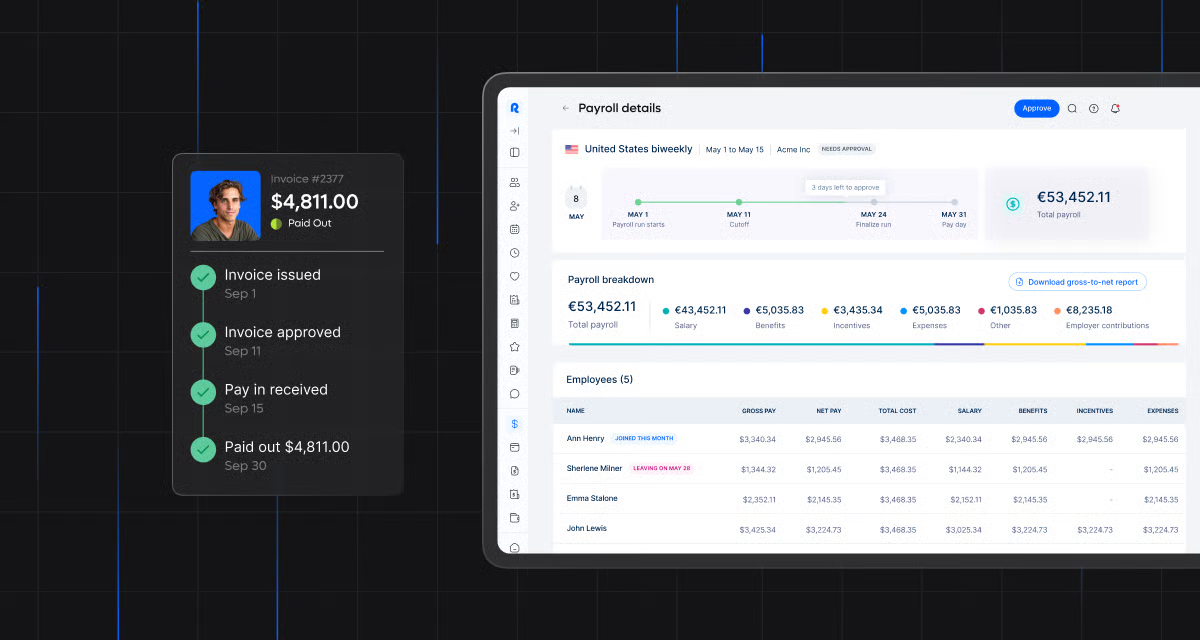
Remote positions itself as a globally focused time and attendance platform designed to support distributed teams and cross-border employment models. Ease of use (95%) and meets requirements (92%) both score strongly, reinforcing what I see reflected in review language — the platform feels intuitive even when handling cross-border payroll and compliance layers. Ease of setup (92%) further suggests that onboarding international employees or contractors doesn’t become unnecessarily complex, which is critical when managing multi-country operations.
From a time and attendance perspective, I see dependable functionality around time visibility and payroll alignment. Users reference the tracking of time and hours within the system as useful tools. When time capture feeds directly into global payroll workflows, it reduces manual reconciliation and strengthens compensation accuracy. For distributed teams working across time zones, that alignment between hour tracking and payout processing becomes operationally significant.
Remote’s governance and role-based controls are another area that reinforces its positioning. Employee information (91%), user access (90%), and user role access (90%) indicate structured workforce record management and clear permission boundaries. In international employment environments where data segmentation and access controls are essential, those controls support compliance, integrity, and reduce administrative risk.
Administrative manageability also performs consistently. Ease of admin (91%) and ease of doing business with (93%) suggest that HR and operations teams can manage distributed workforce data without excessive friction. For organizations scaling across jurisdictions, maintaining operational clarity while minimizing overhead is essential to protecting ROI.
Compliance and country-specific handling further strengthen the platform’s global positioning. Review themes frequently mention Remote’s ability to navigate local employment requirements, which is especially important for organizations hiring internationally without establishing local entities. I see Remote as a stable, compliance-focused platform that integrates time tracking, payroll execution, and workforce governance within a unified global framework.
While Remote is generally viewed as reliable, I do see recurring feedback around support accessibility, particularly for country-specific or localized employment questions. Some users mention wanting more direct support channels or faster resolution when navigating complex regional scenarios. While response speed and depth of localization guidance can vary depending on the issue, the overall assistance appears helpful.
I also notice consistent mentions around time-off configuration and localization depth. A few reviewers highlight that recurring PTO entries or region-specific holiday calendars may require manual setup rather than automated defaults. For organizations managing complex leave policies across multiple jurisdictions, it may be worth validating how deeply time-off automation aligns with internal policies before full rollout.
Overall, Remote presents a globally oriented time and attendance solution built around distributed workforce governance and ease of use. Its strengths in usability, administrative clarity, and structured employee data management make it particularly well-suited for organizations prioritizing international compliance and remote team coordination.
“Remote.com is a highly user-friendly platform that is simple, intuitive, and easy to navigate. The interface is well-organized, making it easy to understand features and complete tasks efficiently without unnecessary complexity. Overall, it provides a smooth and reliable user experience, even for first-time users.”
- Remote review, Brenda B.
”I have to fill out my attendance/vacation in Remote.com *and* my company's HR platform. That's not Remote's fault, though. That's just part and parcel of working through an EOR.”
- Remote review, Andrew S.
Related reading: Our picks of the top seven EOR platforms for your global hiring needs.
G2 rating: 4.6/5
What I like about Connecteam is how it positions itself as a mobile-first time-and-attendance platform tailored to frontline, field-based, and shift-driven teams. What I like about Connecteam is how clearly it leans into its mobile-first identity, especially for frontline and shift-based teams.
That positioning is reinforced by strong satisfaction metrics, including ease of use (92%) and meets requirements (92%), which signal dependable day-to-day usability. With ease of admin (92%) and ease of setup (92%), the platform appears to balance operational functionality with administrative simplicity. Quality of support (94%) and ease of doing business with (95%) further indicate a stable vendor relationship, which matters when workforce tools sit at the center of payroll and scheduling workflows.
From a time and attendance standpoint, I see Connecteam as particularly strong for hourly and shift-driven environments. Positive mentions around time tracking, clocking in and out, and managing shifts suggest that users rely on it for structured hour capture. When time tracking and scheduling operate within the same system, it reduces discrepancies between assigned shifts and recorded hours, supporting payroll accuracy and minimizing disputes.
Scheduling depth is another meaningful advantage. Reviews frequently reference shift management and workforce coordination, indicating that managers use the platform to assign and oversee shifts efficiently. For organizations with rotating staff, retail teams, or field operations, this integration between scheduling and attendance tracking strengthens operational control.
Workforce governance also performs consistently. User access (92%), employee information (92%), and user role access (92%) suggest reliable role-based controls and centralized workforce record management. For multi-location environments, structured permissions directly contribute to accountability and data integrity.
Communication consolidation is a differentiator I can’t ignore. Review frequency around chat and in-app communication indicates that Connecteam doubles as an operational coordination hub. Instead of toggling between separate messaging tools and scheduling systems, teams can manage updates, time tracking, and workforce messaging within one ecosystem.
What’s more, payroll alignment adds practical value. Users reference payroll workflows alongside time tracking, suggesting that recorded hours transition cleanly into compensation processes. When time capture integrates with payroll workflows, it reduces administrative reconciliation and supports financial accuracy — a key ROI driver for shift-based organizations.
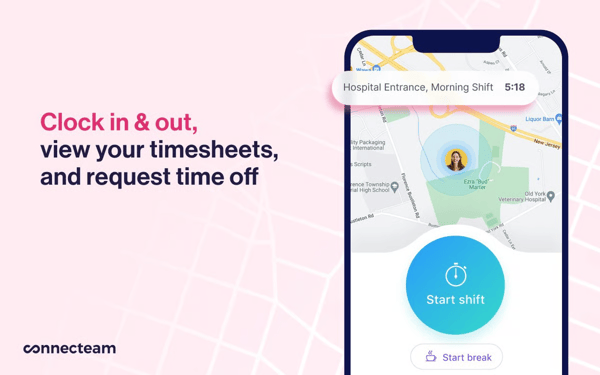
While Connecteam is widely appreciated for its mobile-first design, I do come across some feedback around occasional app and cross-device experience inconsistencies. A few users mention minor friction when moving between mobile and desktop workflows or navigating certain in-app features. These appear to be situational rather than widespread issues, and overall, the platform continues to deliver a strong mobile experience for day-to-day workforce management.
I also notice some mentions around time tracking and shift configuration nuances. In a few cases, users highlight that more complex scheduling scenarios or advanced configurations may require additional setup or workarounds. That said, for most standard time tracking and scheduling needs, the platform performs reliably, and many teams find it effective for managing frontline and shift-based operations.
Overall, Connecteam delivers a mobile-first, usability-driven time and attendance solution designed for operational environments where field coordination, access control, and administrative efficiency are priorities. Its strength lies in accessibility, workforce visibility, and frontline adoption, making it well-suited for construction, retail, and service-based organizations seeking structured time tracking without enterprise system complexity.
“It has workforce and compliance tracking, which allows swift distribution of food safety guidelines, SOPs, and quality control checklists directly to our production staff via their mobile phones. It’s training, and onboarding modules ensure that our staff are aware of food safety protocols
Its ability to track shift schedules and attendance allows for qualified persons to be assigned in quality monitoring sections and roles or the critical areas.”
- Connecteam review, Lina V.
“I wish there were a feature in Connecteam that would allow me to set shift times for my staff. If employees don't clock in or out during their scheduled shifts, it would be helpful if the system could send them a notification to remind them to clock in or out.”
- Connecteam review, Christine M.
While the six tools above are the best for time and attendance tracking, here are four other really exceptional tools that I feel could add value to your team.
Got more questions? G2’s got the answers for you!
Solutions like UKG Ready and Rippling are frequently selected for enterprise environments due to their scalability, governance capabilities, and workforce visibility.
For distributed and global teams, platforms such as Deel Payroll and Remote are well-suited for tracking remote employee hours. They combine time tracking with global compliance oversight, centralized employee data, and support for international payroll structures.
UKG Ready and Rippling provide structured scheduling tools that support shift planning, role-based assignments, and workforce coordination. Organizations with complex or rotating shift models should evaluate customization flexibility during vendor assessments.
RUN Powered by ADP is often selected by small and mid-sized businesses seeking payroll-aligned time tracking with compliance oversight. SMBs typically value ease of setup, administrative simplicity, and predictable operating costs.
RUN Powered by ADP, Rippling, and UKG Ready offer strong payroll integrations that automate time data transfer, overtime calculations, and regulatory checks. These integrations reduce payroll errors and minimize manual reconciliation efforts.
UKG Ready and Connecteam are well-suited for managing multi-location workforces. They provide centralized visibility, structured access controls, and reporting tools that enable oversight across distributed sites and teams.
Connecteam is particularly strong in mobile-first workforce management, making it ideal for frontline and field-based employees. Deel Payroll and Remote also provide mobile-accessible platforms for distributed teams.
UKG Ready and Rippling offer structured dashboards and reporting tools that highlight overtime trends, absenteeism patterns, and workforce utilization metrics. Organizations seeking deeper analytics should evaluate reporting customization during product demonstrations.
Enterprise-focused workforce platforms such as UKG Ready commonly support biometric time clock integrations. Businesses requiring fingerprint or facial recognition verification should confirm hardware compatibility during evaluation.
Deel Payroll and Remote are strong options for cross-border labor compliance, while RUN Powered by ADP and UKG Ready provide structured compliance monitoring and policy enforcement for domestic regulatory requirements.
While carrying out this exercise, I realized that time and attendance software is no longer just about tracking hours. It has evolved into a control layer for workforce operations — improving payroll accuracy, reducing compliance risk, strengthening reporting visibility, and giving HR and operations leaders real-time insight into labor costs and workforce utilization. At the same time, innovations such as mobile-first adoption and AI-powered cloud platforms are making time tracking more accessible for distributed teams and enabling more predictive workforce analysis.
If you’re evaluating options, I recommend shortlisting two to three tools that align with your operational model, requesting tailored demos based on your actual workflows, and assessing them against a structured framework. This includes compliance strength, reporting clarity, integration depth, automation impact, and scalability.
At the end of the day, the best time and attendance software doesn’t just track time. It strengthens how your workforce operates by reducing manual corrections, enforcing policies consistently, and equipping leadership with reliable data for forecasting and workforce planning.
While tracking time and attendance is helpful, many teams today require more comprehensive HR suite features. If this is you, we’ve compiled a list of the best HCM Tools on G2 to help you out.


When I started researching the best workforce management software, I realized the challenge...
 by Harshita Tewari

If you’re choosing the best HR analytics software and are in a complete conundrum, I totally...
by Shashank D Shastry

The scheduling software market is crowded, and most tools claim to do the same things.
 by Sagar Joshi