


I compared more than 15 platforms to finalize the 6 best third-party risk management (TPRM) software of 2026: Vanta, UpGuard Vendor Risk, Descartes Denied Party Screening, Secureframe, IBM OpenPages, and Creditsafe.
A vendor gets breached. You find out two weeks later. Now you're stuck answering to leadership with nothing but an outdated spreadsheet and a half-finished risk score. Nobody wants that. That’s why I evaluated over 15 platforms to find the best third-party risk management (TPRM) software for 2026: tools that detect issues early, automate assessments, and keep vendor risk under control without chasing paperwork.
And the data backs its use case. 73% of organizations feel pressure to improve their TPRM programs. Furthermore, 64% are already using dedicated platforms to do it. That kind of consensus shows how critical these tools have become for risk, compliance, and procurement teams alike.
The six platforms that made this list stood out for their automation, flexible frameworks, and ability to support everything from security audits to procurement-led reviews. Whether you’re handling 20 vendors or 200, these tools are built to help you stay compliant without slowing the business down.
Risk doesn’t stop after onboarding. A vendor might pass the initial checks but fall out of compliance six months later, and if you don’t catch it, your team is on the hook.
That’s what makes third-party risk management software worth the investment. It’s not just about organizing vendor data; it’s about staying informed. The right platform helps you spot changes in vendor risk early, automate follow-ups, and avoid surprises during audits or board reviews.
It also saves time. Instead of chasing status updates across departments, TPRM software gives you a shared system for assessments, scoring, and approvals. That means fewer delays, clearer accountability, and less room for things to slip through the cracks.
I started with G2’s Grid Report to identify the leading third-party risk management software based on user satisfaction and market presence. From there, I filtered for tools with strong traction in the category, focusing on platforms built for risk, compliance, and procurement use cases.
Next, I used AI-assisted analysis to break down verified G2 reviews. I focused on patterns around real-time monitoring, automation, usability, and regulatory support. This helped surface the features risk managers rely on most, and the friction points that still exist.
Finally, I cross-checked vendor websites and spoke with peers who’ve worked with these tools. It helped validate themes I saw in the reviews and gave me a clearer picture of usability, rollout experience, and the impact of these platforms.
All product screenshots featured in this article come from official vendor G2 pages and publicly available materials.
Not every platform that claims to manage vendor risk is built for the real-world pressure that comes with it. I considered the following factors when evaluating the best third-party risk management software.
The list below contains genuine user reviews from the Third-party & Supplier Risk Management Software category page. To be included in this category, a solution must:
*This data was pulled from G2 in 2026. Some reviews may have been edited for clarity.
Vanta is widely known for its governance, security, and compliance (GRC) automation capabilities. While it's not built solely for vendor risk management, many G2 users rely on it to bring third-party visibility into their compliance programs. According to G2 Data, Vanta is most commonly used by small businesses (50%) and mid-market companies (48%), with adoption concentrated in software, IT services, and financial services.
Reviewers frequently highlighted Vanta’s automation capabilities. Tasks like vendor discovery, evidence collection, document analysis, and risk scoring could all be handled with minimal manual input. Vanta AI played a big role here, helping teams save time by responding to security questions and triggering follow-ups automatically.
The questionnaire builder also earned praise for speeding up assessments. Some teams used the built-in templates, while others preferred crafting their own forms. In either case, reviewers felt the tool made it easier to get the right answers quickly when evaluating vendors across different risk tiers.
Usability stood out as another strong point. Many reviewers described the interface as clean and intuitive, allowing both technical and non-technical stakeholders to collaborate on tasks like vendor reviews, compliance checks, and audit prep without needing constant support.
Additionally, Vanta’s growing network of Trust Centers helped users verify first-party data directly from their vendors, making it easier to validate security claims, cut down on back-and-forth, and maintain a more accurate, up-to-date view of third-party risk.
A theme that's grown louder in the reviews is how much Vanta now centralizes the wider GRC program around vendor oversight. Reviewers describe running vendor risk, access reviews, a risk register, and policy management from one connected platform, which makes it easier to spot gaps that would otherwise hide between disconnected tools. For teams building third-party governance alongside their compliance program, having it all in one source of truth is a real advantage.
Reviewers also point to Vanta's task assignment and delegation as a quiet workflow win. Managers describe being able to route specific tests and remediation items to the right owners across the team, which keeps vendor reviews and compliance checks moving without one person becoming the bottleneck. Several added that Vanta AI now helps verify the quality of evidence submissions, giving teams confidence they're on the right track.
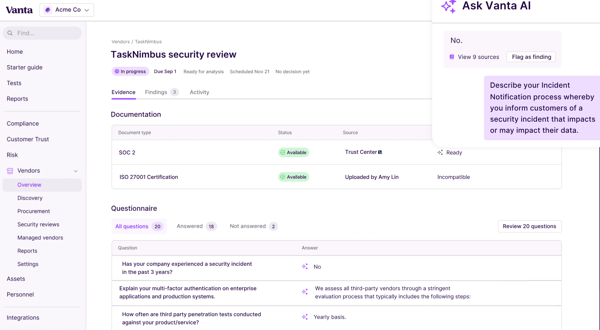
Most reviewers felt Vanta offered solid value out of the box, especially for core compliance needs. That said, pricing came up as a sticking point for some. A few users noted that advanced features, like enhanced vendor workflows or added automation, required higher-tier plans, which could stretch budgets for smaller teams. Even so, the fact that half of Vanta’s G2 reviewers come from small businesses suggests that many teams still find the platform accessible and worth the investment.
The interface can also take some getting used to, a few reviewers noted that moving between related items, like jumping from a failing test to the action that resolves it, can take more clicks than expected. But most agreed the trade-off is a clean, uncluttered dashboard that keeps day-to-day monitoring clear.
Despite these gaps, most agreed that Vanta offered a strong foundation for scaling vendor compliance, particularly for companies growing their GRC capabilities alongside third-party oversight.
“Vanta’s ability to automate continuous compliance monitoring is a significant operational asset. The platform’s integration with our tech stack allows for real-time evidence collection, which has drastically reduced the manual administrative burden that usually accompanies security audits. I particularly value the centralized dashboard for tracking framework progress; it provides clear visibility into our security posture across SOC 2 and other standards, making it much easier to coordinate internal tasks without relying on fragmented spreadsheets or constant status meetings.”
- Vanta review, Digvijay C.
“Some user flows are hidden deep inside specific pages and not easy to find from the main menu. I get that they want to keep the menu clean, but it takes too many clicks to go from a failing test all the way to, say, removing a computer from an employee that left the company.”
- Vanta review, Rogerio G.
Related: If procurement is part of your vendor oversight process, this list of best purchasing software can help streamline buying decisions and approvals.
UpGuard Vendor Risk is a third-party risk management platform that helps organizations monitor and evaluate vendor security posture at scale. According to G2 Data, it’s most commonly used in financial services, IT services, and software, with the majority of users coming from mid-market (37%) and enterprise (55%) companies.
One of UpGuard Vendor Risk's most commonly mentioned benefits is the visibility it provides into vendor security. Reviewers said the platform helped them stay ahead of vulnerabilities by highlighting expired certificates, DNS issues, and other potential exposures across their supply chain. This made it easier to assess which vendors posed the most risk and required immediate attention.
UpGuard’s automated risk scoring was another standout. Several users appreciated that the tool could quickly evaluate and rank vendors based on external risk signals, making it easier to prioritize their review process. Teams managing a large volume of vendors found this especially valuable during onboarding and periodic reassessments.
Customer support also earned consistent praise. Many G2 users described the support team as responsive, knowledgeable, and easy to work with. Several highlighted onboarding experiences where UpGuard Vendor Risk’s team helped guide them through implementation and offered tailored advice for setup and best practices.
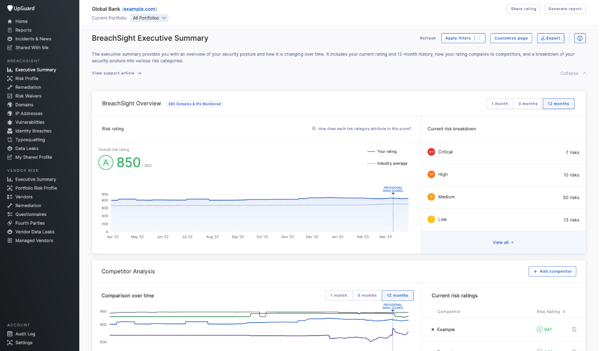
The interface itself was often described as intuitive and easy to navigate. Reviewers noted that even team members without a technical background could quickly understand how to view vendor risk scores and drill into specific issues. The clarity of the dashboard was frequently highlighted as one of the platform’s top usability strengths.
Something reviewers highlight repeatedly is UpGuard Vendor Risk's external attack surface visibility. Users describe seeing exposed subdomains, SSL issues, open ports, and even leaked credentials laid out clearly in one place, which previously took multiple tools and a lot of manual work to assemble. For teams that need to explain third-party exposure to non-technical stakeholders, that at-a-glance picture is exactly what makes risk conversations land.
Reviewers also value how much the questionnaire automation cuts repetitive work. Users describe the platform reusing answers from past questionnaires to spin up new ones quickly, alongside AI-powered document analysis that reviews vendor evidence in minutes rather than hours. Several noted this let a single analyst manage a vendor portfolio that would otherwise need a much larger team.
That said, a few reviewers noted that some reports can feel high-level and that the initial setup takes time to configure for their specific needs, but most added that once it's dialed in, the platform gives them a clear, reliable view of external risk that's easy to act on.
Customization also came up as a common request. Some users wanted more control over how risk scores were calculated or how notifications were configured for different risk events. The built-in scoring logic worked well for general vendor reviews, but teams in highly regulated industries or with unique risk models found themselves wishing for more flexibility. Still, most agreed that the default setup provided a solid foundation for tracking external risk across a growing vendor base.
UpGuard Vendor Risk is a strong fit for mid-market and enterprise teams that want external risk monitoring and clear visibility into third-party security posture, without sacrificing ease of use or support quality.
“It’s easy to use and offers really good tools, like Excel export/import and the AI assistance. The UI looks good and feels intuitive. Login and security are also straightforward and sufficient for a due diligence service. I also really like that it remembers past questionnaires we’ve done for other clients, which makes it much easier to create a new one.”
- UpGuard Vendor Risk review, Sebastián P.
“Some reports can feel a bit high-level, so more detailed insights would help, and the initial setup can take some time to fully configure for specific needs.”
- UpGuard Vendor Risk review, Sourav S.
Related: For broader visibility and control over your supplier ecosystem, explore top-rated vendor management software that complements your TPRM workflows.
Descartes Denied Party Screening helps organizations screen suppliers, partners, and other third parties against global watchlists to stay compliant with trade regulations. Based on G2 Data, it’s most widely used in highly regulated industries like aviation, aerospace, and defense, with 32% of reviewers from mid-market companies and 52% from enterprise organizations.
One of the most consistent strengths reviewers mentioned is the platform’s screening accuracy. Many users said Descartes made it easier to vet suppliers against denied party lists and global sanctions databases, helping them minimize risk during onboarding or ongoing due diligence.
This accuracy was further amplified by automation. Instead of manually tracking entries across multiple lists, users described how Descartes runs continuous background checks that flag potential risks without disrupting workflows. For teams managing large vendor volumes, this automated screening helped reduce errors while saving significant time.
Real-time alerts were another recurring highlight. Several users noted how quickly the system flagged risks, giving compliance and trade teams enough time to respond before a transaction progressed. And with built-in ERP and trade system integrations, Descartes was able to deliver these alerts as part of users’ existing workflows.
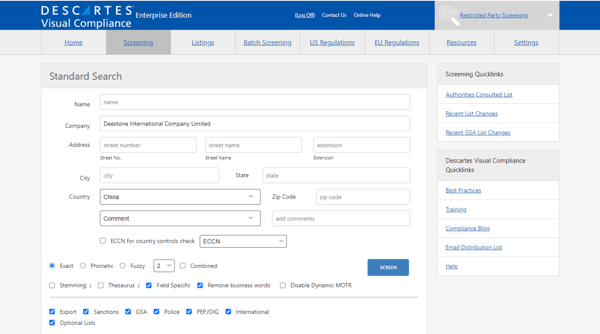
Support also earned praise. Many noted that the team was quick to assist with configuration questions and helped users confidently navigate the more complex aspects of denied party screening.
A standout in G2 reviews is how seamlessly Descartes fits into existing ERP and trade systems. Reviewers describe Dynamic Screening automatically sending newly created partners from their ERP to Descartes for daily background checks, so screening runs continuously without anyone kicking it off manually. Oracle GTM users in particular call out how cleanly the integration delivers up-to-date results inside their existing workflow.
Reviewers also appreciate the consistency and traceability the platform brings to compliance. Users describe screening being done the same way every time, with a clear record of what was checked and why something was flagged, which makes audits far easier to defend. Several also highlighted the fuzzy-screening option for catching name variations across non-Latin alphabets, reducing the risk of a missed match.
Having said that, a few reviewers pointed out that false positives were a recurring challenge. In some cases, overly sensitive matching logic triggered unnecessary investigations, especially when working with global entities that had similar names. Still, users appreciated that match rule thresholds could be fine-tuned with help from support to reduce these occurrences.
A few others mentioned that the interface felt dated and could be more intuitive for first-time users, though they acknowledged that once the system was configured, it ran smoothly with minimal intervention.
Descartes Denied Party Screening is a strong fit for compliance and risk teams in regulated industries who need reliable watchlist coverage, responsive support, and automated screening workflows to minimize third-party exposure.
“I like Descartes Denied Party Screening for its real-time automated alerts, which scan vendors and transactions instantly against global watchlists, catching risks before they impact our ERP system at Indus Towers. The seamless integration with our systems is another standout feature; there are no clunky workarounds, just smooth flagging of denied parties or sanctions hits right in our workflow.”
- Descartes Denied Party Screening review, Ankita R.
“While Descartes Denied Party Screening works well for compliance checks, there are a few areas that could be improved. Sometimes the search results can show multiple similar matches, which requires additional time for manual review and confirming the correct records. Another area for improvement could be a more user-friendly interface and clearer filtering options, which would make it easier to navigate and analyze results quickly."
- Descartes Denied Party Screening review, Niveditha A.
Related: Looking to scale your risk program beyond vendors? Check out our guide to the best enterprise risk management platforms for a more holistic strategy.
Secureframe is best known for helping teams stay audit-ready, but G2 users also rely on it to manage vendor risk more confidently. According to G2 Data, Secureframe is primarily adopted by small businesses (65%) and mid-market companies (31%), most commonly in computer science, IT services, and financial services.
From what I gathered in reviews, one of Secureframe’s most appreciated features is its centralized vendor dashboard. Users mentioned being able to access everything from vendor profiles and assessment results to attached documents and history logs in a single tab. For teams managing multiple vendors, this visibility seemed to make a big difference.
I also saw a lot of praise for the platform’s continuous monitoring capabilities. Several users highlighted how Secureframe helps flag unapproved services accessed via SSO, catching shadow IT vendors before they slip through the cracks. Many also mentioned setting up recurring vendor reviews, tiered by risk level, with tasks and notifications routed through tools like Slack and Jira. That automation felt particularly valuable for fast-moving teams trying to keep up with policy checks.
Another feature that stood out was Comply AI, which helps extract relevant responses directly from vendor documents like SOC 2 reports or security policies. The platform then pre-fills security questionnaires with suggested answers, giving teams a head start on vendor evaluations while saving hours on manual reviews.
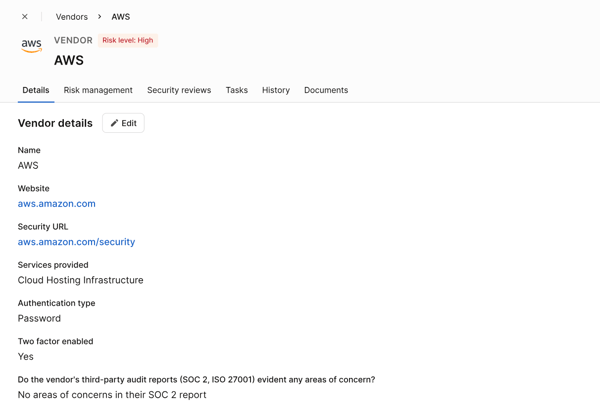
Ease of use came up frequently as well. Reviewers across technical and non-technical roles said Secureframe made it easy to navigate audits, assessments, and vendor workflows without needing extensive onboarding. I also saw multiple mentions of a helpful and responsive support team, which added to the overall ease of adoption.
A theme that comes through strongly in reviews is how much Secureframe's automation removes manual evidence work. Reviewers describe it pulling evidence directly from their tech stack like AWS, GitHub, and cloud tools, and mapping a single control across multiple frameworks like SOC 2 and PCI DSS, which eliminates redundant effort and turns audit prep from a fire drill into a background process.
Reviewers also single out the support and onboarding experience as a genuine differentiator. Users repeatedly name their customer success managers directly and describe responsive, hands-on help during implementation that got them set up properly and unblocked quickly. For teams new to compliance or vendor risk, that guidance is often what makes adoption stick.
That said, a few G2 users noted limited flexibility in vendor management workflows, particularly when trying to tailor processes for different supplier tiers. Others wished the questionnaire module offered more customization options, like dynamic scoring or conditional logic, to better match complex risk requirements. Still, most reviewers felt Secureframe offered a solid foundation for vendor risk tracking, especially for teams earlier in their third-party governance journey.
If you’re looking for an accessible yet capable TPRM solution that combines automation, AI support, and ongoing monitoring, Secureframe is worth considering.
“As a person who is assisting in getting our framework certifications using SecureFrame, I really enjoy how SecureFrame includes templates and examples for specific fields that auditors would want to see. This came in handy when uploading evidence for our SOC 2 framework. SecureFrame is pretty easy to navigate and pretty self-explanatory.”
- Secureframe review, Lucy L.
“Sometimes Secureframe feels kind of rigid, like it wants you to do things its way, even if your setup doesn’t quite match. The automation helps a lot, but you still end up doing manual work and explaining things more often than you’d expect.”
- Secureframe review, Vadzim H.
IBM OpenPages is an enterprise-grade GRC platform that includes robust support for third-party risk management. According to G2 Data, it’s most commonly adopted in industries like computer software, IT services, and financial services, with most users coming from small (37%) and mid-sized businesses (43%).
Several reviewers appreciated how configurable the platform was regarding vendor risk processes. I read in reviews that teams were able to adapt workflows to match their own internal policies, regulatory needs, and preferred scoring methodologies. This flexibility extended into how users tracked risk severity, mitigation plans, and related issues across vendor relationships, allowing for more detailed risk modeling without forcing a one-size-fits-all structure.
OpenPages helps teams manage the entire vendor questionnaire process in one place, from creating assessments to sending reminders and reviewing responses. Several users said this reduced the manual back-and-forth and made it easier to stay consistent across vendors. The ability to score responses also provided teams with a clearer way to evaluate third-party risk and decide who to work with.
Another key theme I noticed was how useful the reporting and dashboard features were for large-scale visibility. Some users said they could group vendors by geography, tier, or business unit, which made it easier to spot patterns or investigate specific issues. This was helpful for companies handling many third parties, where having a centralized view of vendor hierarchies and risk metrics made oversight simpler.
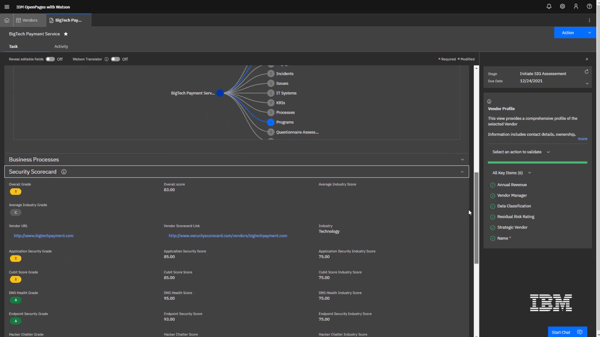
In terms of technical capability, OpenPages was also noted for its integrations. It can connect with both enterprise and external systems to pull in vendor data, helping consolidate third-party information into a unified repository. That consolidation gave users a clearer picture of their entire vendor landscape and improved efficiency in areas like onboarding and performance tracking.
A point reviewers return to is the early visibility OpenPages gives into risk across the business. Users describe being able to spot trends and see where controls are breaking down before issues become problems, rather than reacting after the fact, which shifts vendor and risk oversight from firefighting to genuinely proactive management.
Reviewers also value how well the platform holds up across complex, multi-layered organizations. Users describe it handling multiple business units, risk categories, and regulatory frameworks without feeling patchy, and creating a clear, lasting trail of decisions, actions, and ownership that keeps teams aligned through audits even as people and requirements change.
The learning curve did come up as a tradeoff in several reviews. While G2 users valued the platform’s depth, they noted that it required some ramp-up time, especially for those without prior experience in risk or compliance systems. Despite that, most agreed the effort was worthwhile once teams became familiar with the system.
Pricing was another area where opinions varied slightly. A few reviewers found the cost to be relatively high for smaller teams. Even so, it seems many companies continued to rely on OpenPages for its long-term scalability and the level of control it offers for vendor risk management.
If you’re looking to build a mature, centralized program for tracking vendor risk, IBM OpenPages offers extensive customization, strong technical integrations, and support for complex third-party governance.
“What I like best about IBM OpenPages is its ability to centralize governance, risk, and compliance management in one platform. It provides powerful dashboards, automation, and analytics that help organizations identify risks early and ensure regulatory compliance efficiently.”
- IBM OpenPages review, Shivaramakrishna C.
"One area that could be improved is usability. IBM OpenPages is powerful, but it can feel heavy and complex, especially for new users or teams that only use it occasionally. There’s a learning curve, and some workflows take more clicks than they probably should.”
- IBM OpenPages review, Charlotte W.
Creditsafe is a business credit and risk intelligence platform that helps teams check the financial health of customers, suppliers, and partners before extending terms or onboarding them. According to G2 Data, it's most widely used in manufacturing, accounting, and construction, with the largest share of reviewers coming from mid-market companies (49%), followed by small businesses (37%) and enterprise teams (15%).
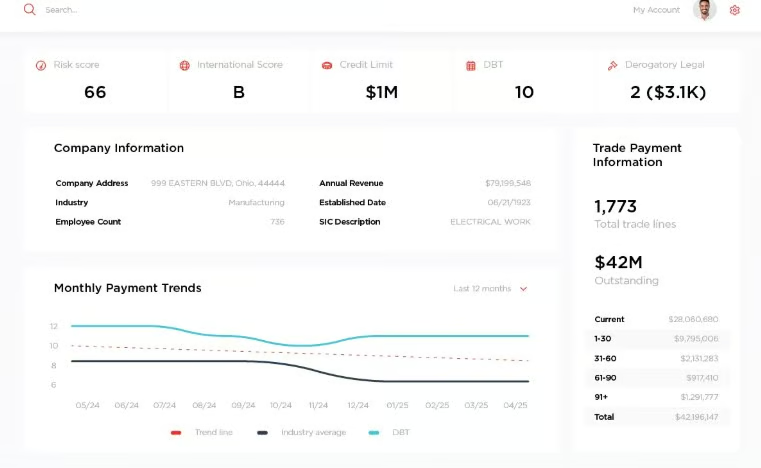
What comes through most strongly in reviews is how fast and easy Creditsafe makes a credit check. Reviewers describe typing in a company name, address, or even a phone number and pulling up a clear, color-coded risk score and summary in seconds, then drilling into payment history, credit limit suggestions, and officer details from there. For credit and finance teams running dozens of checks a week, that speed turns a once-tedious task into a few clicks.
Reviewers consistently single out the clarity of the reports. Rather than wading through pages of raw data, users say the ratings, graphs, and payment-trend visuals let them grasp a company's standing at a glance, and several appreciate being able to download or email a PDF to keep on the customer file as evidence behind a credit decision. That readability is a recurring reason teams prefer it to heavier alternatives.
Value for money is a theme that keeps surfacing. Many reviewers describe switching from Dun & Bradstreet or pay-per-report services and finding Creditsafe delivers comparable depth at a noticeably lower cost, often with no per-report fee for repeat checks. For teams running ongoing reviews across hundreds or thousands of accounts, that pricing model makes routine monitoring genuinely affordable.
The monitoring and alerts feature earns particular praise. Reviewers describe getting automatic daily updates and early warnings, sometimes flagging a bankruptcy or a dip in a customer's profile well before other sources, which lets them adjust credit limits or terms proactively rather than reactively. One reviewer noted the monitoring identified a customer's bankruptcy filing in time to shift them to a prepay status.
Global coverage is another standout. Users highlight that Creditsafe spans well over 30 countries, which helps teams vet US, Canadian, and international businesses from one platform and confirm exactly what kind of entity they're dealing with. For companies onboarding dealers or suppliers across borders, that breadth removes the need to juggle multiple regional sources.
Support and onboarding come up almost as often as the data itself. Reviewers repeatedly describe dedicated account managers who respond quickly, walk them through platform updates, and connect them with helpful partners, with setup that several called "easy peezy" and quick to complete. That hands-on relationship is clearly a big part of why teams stay.
That said, the most common critique in the reviews is search: when company names are similar, abbreviated, or spread across multiple locations, it can take extra digging to confirm they've landed on the right record — though most add that a quick review of the payment history and linked entities gets them there, and that account managers will run a fresh-report request when a profile isn't surfacing.
The other point that surfaces is data freshness and coverage in specific cases, with a few reviewers noting that an address occasionally lags behind or that newer, private, or very small businesses aren't always in the database yet, but the same users point out that Creditsafe will pull a fresh report on request, and that gaps like these are the exception across an otherwise deep and dependable database.
Overall, Creditsafe is best for credit, finance, and procurement teams that want fast, affordable, easy-to-read credit intelligence to vet customers and suppliers and monitor them over time. If your risk lens is financial health and creditworthiness rather than cybersecurity posture, and you want strong support without enterprise-level pricing, Creditsafe earns its place among the best third-party risk management software for keeping credit decisions confident and well-documented.
“Creditsafe is a resourceful and intelligent solution that gives hs the creditworthiness and financial health of a company before arriving to a specific decision. We obtain detailed company reports, demonstrating risk indicators, credit scores, and financial insights in a very understandable manner. The software gives us the advantage of having an extensive global data access, and this helps companies articulate different possible tasks”
- Creditsafe review, Luciana S.
“I feel like sometimes the information is inaccurate when the company has more than one location or is a larger entity like a freight forwarder, because they have international locations as well sometimes. I wish there were a way for an "overall" credit report for including all of the company's locations.”
- Creditsafe review, Lora L.
Got more questions? We have the answers.
Tools like UpGuard Vendor Risk, Vanta, and Creditsafe are considered the most trusted third-party and supplier risk management by marketing managers at enterprise organizations based on user reviews, as they frequently show up in G2 reviews for managing third-party suppliers. Each supports core capabilities like vendor assessments, automated tracking, and risk monitoring, depending on whether your focus is security posture, compliance, or financial risk.
Among the most reliable third-party and supplier risk management solutions based on implementation success and user satisfaction ratings, UpGuard Vendor Risk, IBM OpenPages, and Vanta consistently receive positive feedback. They help organizations automate vendor assessments, prioritize risks, and maintain ongoing visibility across third-party relationships.
Yes. Based on G2 feedback, platforms like Vanta, Secureframe, and Creditsafe are often considered the best third-party and supplier risk management solutions for non-technical teams requiring minimal training and implementation time. G2 reviewers frequently mention their intuitive interfaces, guided onboarding, and automation that reduce manual work for procurement, compliance, and finance teams.
In tech-driven industries like software, tools that integrate easily with cloud systems and automate compliance tasks are essential. If you need third-party and supplier risk management software generating measurable return on investment without extensive customization services, Vanta, Secureframe, and UpGuard Vendor Risk are strong options. Users highlight faster audit preparation, automated compliance workflows, and reduced manual vendor assessments that deliver business value quickly.
According to G2 reviews, the top third-party and supplier risk management solutions that reduce manual processing and improve team productivity quickly include Descartes Denied Party Screening (4.8), Secureframe (4.7), and Vanta (4.6). These have strong marks for accuracy, automation, and customer support. UpGuard Vendor Risk and Creditsafe (both 4.5) are close behind.
Mid-market companies tend to prioritize scalability, support, and usability. Based on G2 usage data and reviews, the highest-rated third-party and supplier risk management platforms for 51–200 employee companies optimizing operational workflows at scale are UpGuard Vendor Risk, Vanta, and Creditsafe.
Small organizations looking for best third-party and supplier risk management platforms for teams managing complex workflows without dedicated IT staff often choose Vanta, Secureframe, or Creditsafe. These platforms are praised for ease of implementation, automation, and straightforward workflows that don't require large security or IT teams.
For organizations with limited technical resources, Vanta, Secureframe, and Creditsafe are frequently described in G2 reviews as intuitive platforms with guided onboarding, user-friendly dashboards, and automation that reduces the learning curve for procurement, finance, and compliance teams. These tools take less than two months to go live.
Many organizations prioritize integrations when selecting TPRM software. Vanta and Secureframe connect with cloud infrastructure, identity providers, and collaboration platforms, while IBM OpenPages supports enterprise data integrations. Descartes integrates with ERP and trade management systems, and UpGuard Vendor Risk connects with existing security workflows to simplify vendor oversight.
According to G2 Data, platforms like Vanta, UpGuard Vendor Risk, Creditsafe and Secureframe are fastest to implement, within two months and are frequently recognized by users for helping reduce manual work and improving vendor visibility shortly after implementation.
Automation is one of the biggest drivers of productivity in TPRM software. Vanta automates evidence collection, UpGuard Vendor Risk streamlines vendor assessments, Secureframe simplifies recurring reviews, and Descartes automates denied-party screening, allowing teams to manage more vendors with less manual effort.
Organizations managing large vendor ecosystems typically need platforms built for enterprise scale. IBM OpenPages, UpGuard Vendor Risk, and Vanta are frequently recognized for supporting complex workflows, centralized governance, continuous monitoring, and multiple compliance frameworks while maintaining reliable performance across enterprise deployments.
If there’s one thing I took away from digging into these tools, it’s that no two TPRM platforms are built the same. Some, like UpGuard Vendor Risk, lean into external security signals. Others, like Vanta, prioritize compliance and vendor privacy. IBM OpenPages stood out for its complex and customizable workflows, while Creditsafe offered broad supplier coverage and credit-driven risk scoring. Even tools like Secureframe and Descartes demonstrated how vendor visibility and denied-party screening fit into the broader risk picture.
Across the board, G2 users consistently valued automation, visibility, and scalability, but they also surfaced real challenges around pricing, integrations, and learning curves. So, whether you're a fast-growing mid-market team or part of a large enterprise, the best choice comes down to what you need to manage: vendor compliance, security posture, or regulatory risk.
Now that you’ve seen what’s out there, it’s just a matter of choosing the tool that fits your risk lens best.
If you’re thinking beyond vendor risk, here’s our guide to the best GRC tools to complete the picture.
```html

I evaluated 10best IT risk management software in 2026 using G2 Data. These are UpGuard,...
 by Disha G

Business Continuity Management
I teamed up with IT team members and cybersecurity experts to evaluate 40+ tools to find the...
.png) by Shreya Mattoo
by Shreya Mattoo

I evaluated 10+ tools to find the 8 best operational risk management software. These are...
by Shreya Mattoo