.png?width=400&height=150&name=Copy%20of%20G2%20Image%20(1).png)


I teamed up with IT team members and cybersecurity experts to evaluate 40+ tools to find the six best business continuity management (BCM) software. These are Everbridge 360, Sprinto, SafetyCulture, IBM OpenPages, Copla, and BC in the Cloud.
Are you an IT manager, risk officer, or compliance lead struggling to manage potential business risks and track compliance requirements for your organization?
Till now, your team might have invested time in manual risk assessment or spreadsheet-based compliance monitoring. But due to growing disaster recovery concerns and threat readiness concerns, you are now evaluating business continuity management (BCM) software to launch recovery tests, drills, incident prevention workflows, and audit and compliance scrutiny.
With these tools, you can manage ISO 22301, ISO 31000, HIPAA, and PCI DSS compliance and implement a proper disaster recovery mechanism for potential risks or threats. So, which BCM software best fits your compliance needs? Tools like Sprinto are built for SOC 2 and ISO automation, while IBM OpenPages suits enterprise-wide GRC and regulatory audit trails.
As your risks mature, you need a proper defensive mechanism, and the right tool depends on your team size, compliance frameworks, and whether you need incident alerting, inspection workflows, or full program lifecycle management. I evaluated this list based on its proprietary G2 scores, real-time peer reviews, customer segments, pros and cons, and pricing.
According to G2 Summer 2026 Grid Report, these business continuity software programs are top-rated in their category.
According to a 2026 report by The Business Research Company, the global business continuity management market will grow to $1.45 billion in 2026 and is projected to reach $2.41 billion by 2030, expanding at a CAGR of 13.5%. Rising cybersecurity threats, stricter regulatory requirements, and the increasing frequency of disruptions are driving this growth.
As the data speaks for itself, businesses are now investing in mobile-oriented, cloud-native, and comprehensive business continuity management tools to automate their audit and compliance workflows and strategically manage business risks.
Business continuity management software helps organizations prepare for, respond to, and recover from disruptive incidents with centralized risk assessments and threat prevention functionalities. It ensures operational resilience and regulatory compliance to continue your business operations without any accidents.
Research on business continuity tools indicates that organizations benefit when they move beyond traditional disaster recovery as a service (DRaaS) or ad hoc backup features and adopt a structured approach.
When evaluating options, look for solutions that offer in-depth crisis management, procedure templates, incident workflows, and third-party risk and compliance support, along with proper peer validation and market data. As your business risks grow in volume, working with comprehensive and reliable business continuity software will help identify vulnerabilities, implement recovery mechanisms, and aid in the smooth functioning of business workflows overall.
I spent weeks evaluating 40+ business continuity software tools, diving into G2 Data on the highest-rated pros and cons, pricing, customer segments, market presence, and ease of use to compare providers and list key differentiators in an unbiased way.
I also used AI to summarize key features, user sentiments, and internal data points, and factored in review volumes, cost-effectiveness, and likelihood of recommendation to capture market behaviour and vendor feasibility.
In cases where I couldn't use the tool, I teamed up with market research analysts and cybersecurity experts who have first-hand experience mitigating risks and managing governance, risk, and compliance (GRC) to collect first-party insights. Each app was evaluated in real scenarios, including disaster management, anomaly detection, compliance monitoring, and audit tracking.
The screenshots in this article are a mix of those taken from product websites and the G2 product page.
According to me, a suitable business continuity management tool automates the entire disaster recovery process, from planning and drilling events to crisis activation. While you're shortlisting your options, look for agile security and compliance-based policy frameworks as non-negotiables for your tech stack.
Below are some features to consider while evaluating your options for BCM software:
Along with these features, factors such as enterprise size, budget, and configuration ease should be considered when evaluating business continuity management tools against customized risk mitigation requirements.
Out of 40+ tools that I initially evaluated, 6 BCM solutions stood out in terms of third-party risk support, GDPR and compliance, and data encryption for your business workflows. To qualify for inclusion in the Business Continuity Management Software category, a product must:
*This data was pulled from G2 in 2026. Some reviews may have been edited for clarity.
Everbridge 360 is a secure and reliable BCM tool for catching exceptions, sending error-free messages, maintaining team collaboration, and automating and tailoring recovery responses to regularize business workflows and maintain compliance and regulatory policies.
Everbridge 360 has been recognized as a G2 category leader, with a customer satisfaction score of 88 and a market presence score of 78. 98% of G2 users have rated it 4 or 5 stars, and 91% are likely to recommend it to others.
What really stood out was how seamlessly it integrates into users' ecosystems. From API connections to alert automation, Everbridge 360 works with email, SMS, mobile push, pop-ups, and even voice calls to instantly push notifications across channels. G2 reviewers consistently highlight how the pre-defined contact groups and scenario templates mean there is no rebuilding the wheel when a real incident occurs. You fill in the details and send, with near real-time delivery tracking showing exactly who has received and acknowledged each notification.
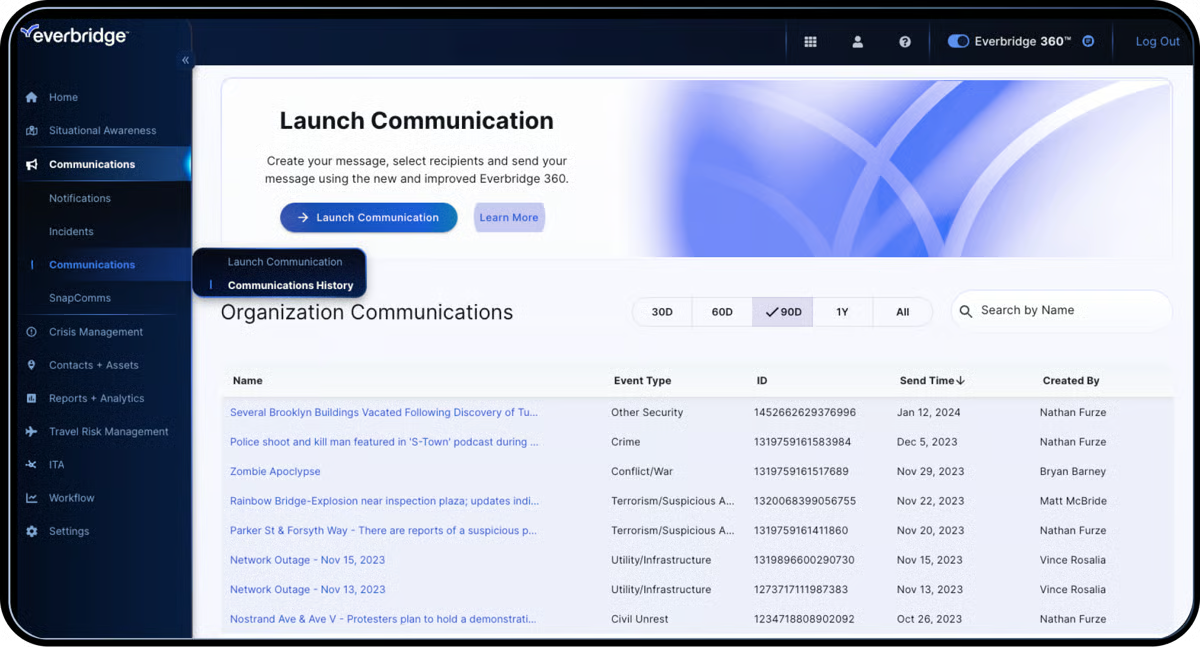
The geolocation intelligence layer adds a level of precision that most BCM platforms simply cannot match. G2 users describe using the watch zone feature to draw specific shapes on maps and trigger automated responses when assets or personnel enter a high-risk area during a critical window. The geo-targeting capability means teams can send notifications only to the people who are actually affected, rather than raising the alarm for the entire organization, which is a significant advantage when managing distributed enterprise workforces.
One of my favorite aspects was how well it scales. Distributed teams on G2 report that Everbridge provides enterprise-wide coverage while remaining stable as user bases grow. Plus, the fact that it works with small and rural organizations too, not just large enterprises, says a lot about its adaptability.
Several G2 reviewers point out that configuring the platform beyond basic use, including setting up alert criteria, building automation rules, and managing asset associations, can be complicated and time-consuming. Teams that lack dedicated admin support often find themselves needing ongoing training just to use advanced features consistently. For organizations with dedicated BCM admin resources, this complexity becomes a manageable setup investment; for leaner teams, planning for additional configuration support upfront makes the experience considerably smoother.
Overall, if your organization manages distributed teams across multiple sites and needs a reliable system to reach the right people fast during a critical event, Everbridge 360 is one of the strongest options I've come across in this category.
"Everbridge 360 CEM has truly changed the way that our organization identifies and responds to crisis events. It helps us to geo-locate incidents in relation to our people and assets to ensure that we are receiving information on events that are relevant and actionable for our business. It filters out the 'noise' of risk events that are outside of our scope of responsibility while still ensuring that we are aware of major events that have a global impact."
- Everbridge 360 review, Jeffrey W.
"Some parts of Everbridge Critical Event Management are more complicated than they should be, especially when you're trying to fine-tune alert criteria, manage asset associations, or build automation rules. In reality, most teams end up needing ongoing training and support just to use these features effectively and consistently."
- Everbridge 360 review, Jalel G.
Learn how to conduct a business impact analysis to measure current operational safety and segregate critical operations to ensure smooth functioning.
Sprinto is a security compliance platform that offers continuous endpoint protection, anomaly monitoring, and risk mitigation to ensure complete threat readiness and take preventive measures for smooth functioning. With Sprinto, you can manage compliance triggers, set policy regulations, access procedural templates, and manage critical incidents without interruption.
Based on verified G2 reviews, Sprinto has received a customer satisfaction score of 97. 100% of users have rated it 4 or 5 stars, and 96% are likely to recommend it to others.
Based on my evaluation, the compliance automation capabilities are what immediately distinguish Sprinto from other tools in this category. Whether it is SOC 2, ISO 27001, or GDPR, Sprinto automates the heavy lifting, including continuous control monitoring, evidence collection, and mapping to frameworks, so teams are not buried in spreadsheets anymore. G2 reviewers in 2026 consistently report completing SOC 2 Type 1 certifications in record time, specifically crediting the structured step-by-step guidance and automated evidence gathering that removes the guesswork from complex audit preparation.
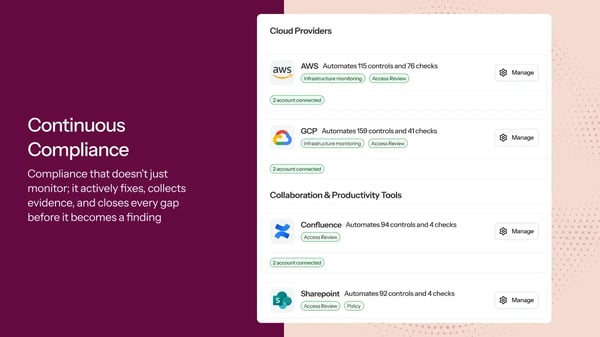
G2 users say it integrates effortlessly with their existing tech stack. Users report that connecting Sprinto to systems like AWS, GSuite, and Jira takes just a few clicks. From there, it pulls in configurations and begins mapping controls. The real-time dashboards offer excellent visibility into compliance posture, and the progress tracking is transparent, especially during vendor risk assessments and internal audits.
Their support team deserves a shout-out. They're fast, friendly, and genuinely knowledgeable, not just about Sprinto, but about the intricacies of compliance. In fact, "great support," "responsive team," and "helpful onboarding" came up repeatedly in G2 user feedback. Even when new features are rolled out (which happens frequently), users never feel lost because their customer success team always has context and answers.
Some G2 user insights note a desire for more flexibility in customizing workflows or integrating with third-party tools outside Sprinto's standard connectors. Reviewers mention that certain integrations, including Microsoft 365 and some MDM tools, require manual workarounds to get evidence recognized correctly, which adds friction to an otherwise smooth process. For most use cases, the default structure gets teams audit-ready without much setup, and the roadmap actively addresses new integrations as demand grows.
Overall, if your team is working toward SOC 2, ISO 27001, or GDPR certification and wants to get there without hiring a dedicated compliance team, Sprinto is one of the most efficient paths I've seen to getting audit-ready.
"We completed our SOC 2 Type 1 audit in a very short timeframe, and Sprinto made that possible. The platform is intuitive, comprehensive, and well-structured. It's clear it was built by people who understand how compliance actually works in practice, not just in theory."
- Sprinto review, Ignacio B.
"Not sure what happened, but in my second year with Sprinto I was told that they wanted to swap out my auditors due to a broken relationship. Messages seem to be going into a black hole, and my CSM seems to have gone AWOL. The platform is still solid and works well, but the customer service has seriously declined."
- Sprinto review, John S.
Check out my peer's analysis of the best GRC software and explore her individual takeaways for every platform to strategize your risk management issues wisely.
SafetyCulture is a consolidated platform that gives you knowledge tools, continuity planning, and risk mitigation functionalities to work smoothly and build a strong foundation for your business. With SafetyCulture, you can track business impact analysis, measure progress, align with policy and compliance measures, and actively audit your data to ensure that it is free of vulnerabilities.
SafetyCulture has been recognized as one of the G2 category leaders. 96% of G2 users also said that they are likely to recommend it to others.
What immediately stood out during my evaluation was how SafetyCulture has simplified the inspection and safety process. The platform now layers AI-powered capabilities on top of its already strong inspection foundation, with readymade AI prompts, voice-to-text input, and automated report generation that significantly cut the time needed to complete audits in the field. G2 reviewers in 2026 specifically highlight how these AI features enable faster, more accurate inspections without requiring users to leave the mobile interface.
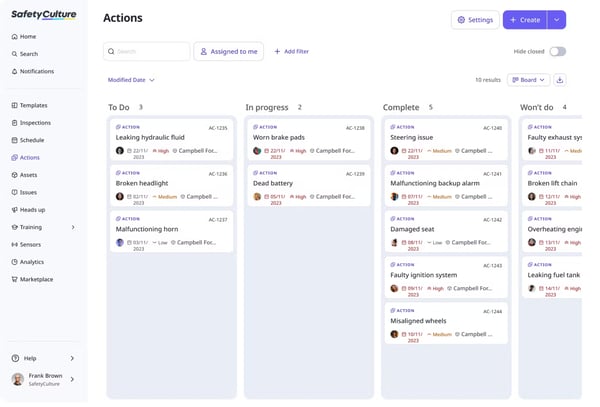
What I also appreciate is how flexible the inspection templates are. The drag-and-drop feature offers different field types, such as checkboxes, signature blocks, or image fields, to build detailed checklists. Reviewers note that the modular structure makes it easy to divide audits into parts, capture annotated photos directly from a phone, and generate standardized reports the moment an inspection is complete.
The reporting tools are another strength I've noticed across G2 feedback. Real-time dashboards and automation features like recurring inspections and task assignments give operations managers genuine visibility, with the ability to detect recurring issues across sites, track resolution progress, and hold specific team members accountable without chasing updates manually.
Several G2 customer reviews point out that many advanced capabilities, especially analytics, logic branching, and deeper workflow customization, are gated behind premium or enterprise plans. The cost can add up quickly if you're managing large teams, but the platform's flexibility and the time it saves on inspections and reporting help justify the investment for teams that can fully leverage its capabilities.
Overall, SafetyCulture is a platform I'd confidently recommend to safety teams and operations managers who need structure and speed in the field without sacrificing the flexibility to adapt workflows as their programs mature.
"SafetyCulture changed the management and brought more order to our equipment and tool inspections. We can delegate specific tasks to other users within the platform, and it's very easy to detail the activities to be performed, set deadlines, and follow up. In SafetyCulture, inspections have a modular structure that makes it easy to divide audits into parts, record the status of different equipment, add detailed notes, and upload photos directly from the phone."
- SafetyCulture review, Nick P.
"Basic use is easy, but advanced setup (dashboards, workflows) can be confusing and hard to build. Needs more advanced features like a live checklist or issue tracking from online. Initial setup is quite difficult."
- SafetyCulture review, Verified G2 User in Information Technology and Services.
Find out how your business size impacts your impression and helps you attain government validation and legal status to function properly in the market.
IBM OpenPages is an AI-powered and robust GRC management platform that enables audit control, data loss prevention, anomaly detection, risk identification, and disaster recovery planning. It centralizes your events and maintains different document versions to keep track of business operations and run tests or plans.
Based on verified G2 review data, IBM OpenPages has a market presence score of 96 and 97% of users have rated it as 4 or 5 stars, and 87% are likely to recommend it to fellow users.
What struck me most during my evaluation is how IBM OpenPages functions as a long-term system of record for compliance. G2 reviewers describe being able to go back to a regulatory inspection from two years prior and find every decision, every control change, and every approval exactly where it was left, because the platform maintains a structured audit trail that never drifts. That kind of process consistency and role-based access control is what makes it the platform teams trust not just during day-to-day work but specifically when auditors and regulators come knocking.
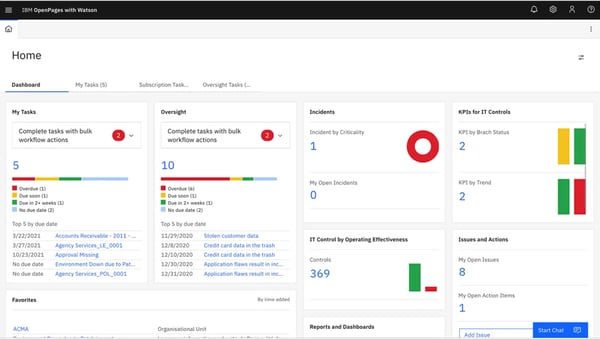
Customization is one area I've consistently noticed standing out in G2 reviews. You can tailor workflows to fit your org structure, and the automation options let you assign issue ownership dynamically or set up review processes without manual intervention. G2 reviewers specifically value the ability to adapt dashboards, objects, and reports to specific BCM needs without requiring developers for every change.
The analytics and dashboards are another capability I've come across repeatedly in positive reviews. Rather than reacting to issues after they become problems, G2 users highlight how OpenPages lets teams spot trends early and see where controls are breaking down, presenting risk to leadership in a way that makes sense beyond technical terms. That kind of visibility across business units, risk categories, and regulatory frameworks is what makes it a genuine decision-making tool rather than just a compliance repository.
A recurring theme in G2 user reviews is that the user interface feels heavy and complex, especially for new users or teams that only use it occasionally. Workflows can involve more clicks than necessary, and the learning curve is real. Once you understand how things are structured, it is actually quite efficient for managing complex risk environments, and the depth and control OpenPages provides outweigh the growing pains for teams committed to enterprise-level GRC.
OpenPages delivers where it matters. If you're serious about enterprise GRC at scale, the platform's precision and breadth make it a compelling long-term investment.
"What I like best about IBM OpenPages is its ability to centralize governance, risk, and compliance management in one platform. It provides powerful dashboards, automation, and analytics that help organizations identify risks early and ensure regulatory compliance efficiently."
- IBM OpenPages review, Shivaramakrishna C.
"One area that could be improved is usability. IBM OpenPages is powerful, but it can feel heavy and complex, especially for new users or teams that only use it occasionally. Reporting, in particular, could be more intuitive. You can get the data you need, but it sometimes takes extra effort to build reports that are clean and easy to use without relying on technical expertise."
- IBM OpenPages review, Charlotte W.
For small businesses where backup is part of a broader continuity strategy, here's how the top-rated online backup tools for small businesses compare on G2 on satisfaction, support, and ease of use.
Copla is a cybersecurity compliance platform that centralizes risk management, documentation, and compliance activities to give organizations a clear, connected picture of where they stand at any given time. With Copla, you can manage controls, evidence, risks, and policies in a single environment, eliminating the coordination overhead that comes with juggling multiple disconnected tools.
Copla has been recognized as a G2 High Performer, with a customer satisfaction score of 84. 100% of users have rated it 4 or 5 stars, and 99% are likely to recommend it to others.
The most consistently praised strength is how Copla replaces scattered tools with a single source of truth. G2 reviewers describe moving away from three to five separate systems for risks, controls, and documentation, and finding that the consolidation alone saves significant time and reduces coordination errors.
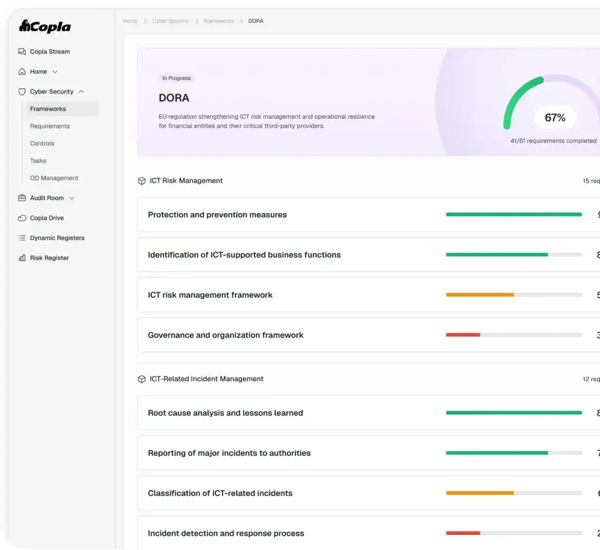
What also stood out to me is how Copla connects risks, controls, and evidence in a traceable chain. G2 users describe being able to trace from a risk directly to the related controls and supporting evidence without switching systems, which gives reviewers and auditors a far more complete picture during assessments. That interconnected structure cuts down on duplicate work and surfaces gaps early rather than waiting until an audit is imminent.
One of the stronger differentiators that I noticed is how the platform adapts to existing workflows rather than forcing teams into rigid templates. G2 reviewers note that Copla mirrors how their systems, controls, and processes actually operate in practice, which made adoption noticeably smoother. Rather than maintaining a separate compliance process alongside day-to-day work, teams can manage compliance within the workflows they already follow.
The platform's structured, step-by-step guidance is one of its core strengths, but a few reviewers note that stakeholders who want a quick status read sometimes find the level of detail more than they need. Teams that surface compliance status to leadership benefit from taking time early in implementation to configure summary views that match how their audience prefers to consume information, which keeps the platform's depth from becoming friction at the executive level.
Overall, if your team is managing compliance across multiple frameworks and spending more time coordinating between disconnected tools than actually closing gaps, Copla is one of the most focused solutions I've come across for bringing that work into a single, traceable environment.
"One of the biggest improvements we've seen with Copla is that it helped us move away from relying on multiple disconnected tools. With Copla, those processes are centralized, which gives us a much clearer picture of where things stand at any given time. As a result, collaboration across teams has become noticeably easier."
- Copla review, Julie R.
"A few dashboards needed minor adjustments before they aligned with how we prefer to report internally. The setup itself wasn’t difficult, but it did take a bit of tuning to better match our workflows and reporting preferences."
- Copla review, Clover F.
Explore the best enterprise risk management software to identify and mitigate simmering risk factors and enhance the data security and encryption of your tech stack.
BC in the Cloud is an all-in-one resilience planning platform that enables organizations to identify impact and manage response across the entire business continuity lifecycle, from planning and testing through incident management and recovery. With BC in the Cloud, you can unify business continuity and disaster recovery planning, surface hidden interdependencies between processes and systems, and keep compliance documentation organized and audit-ready.
BC in the Cloud has been named a G2 Contender. 96% of users have rated it 4 or 5 stars, and 90% are likely to recommend it to others.
Analyzing the G2 user reviews, it is clear to me that BC in the Cloud is built specifically for organizations that need to manage the entire business continuity lifecycle in one place. G2 reviewers describe using it across business impact assessments, recovery plan generation, incident management, exercise tracking, and gap analysis without ever leaving the platform. That breadth is rare in this category, and for teams building or maturing a formal BCMS program, it means every phase from planning through recovery is connected rather than handled across separate tools.
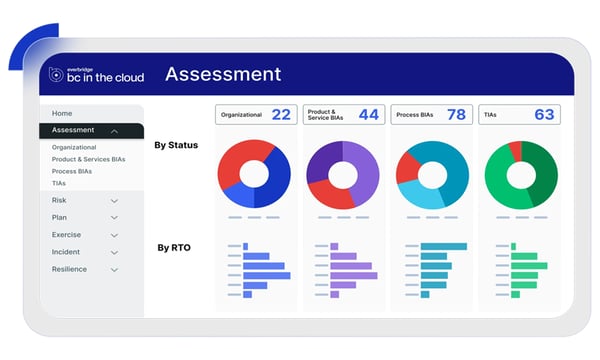
Something I've noticed consistently across G2 feedback is how much reviewers rely on the platform's dependency mapping capabilities. The ability to link processes to applications and applications to infrastructure gives BC teams a precise, visual picture of what would actually be affected during a disruption before it happens.
The support team deserves particular mention. G2 reviewers describe the TAM and support team as solutions-oriented partners who are not afraid to think outside the box, actively working to ensure the platform fits their processes rather than the other way around. Whether it's customizing templates or working through implementation steps, reviewers say the team operates as a genuine extension of their own BC function.
Interfaces are not fully consistent across assessment types, with impacts and dependencies using different UI conventions that can require adjustment when moving between modules. The approval portal is also limited in terms of read-only access for end users who need to view historical BIAs and plans without direct edit access. These are areas the product roadmap is actively addressing, and teams with a dedicated BC admin in place tend to work around them without significant disruption.
Overall, if your organization is serious about building a structured, auditable business continuity program and needs a platform that maps real operational dependencies rather than just storing plans, BC in the Cloud is one of the more capable tools I've come across in this space.
"I like the usability, flexibility, and overall workflow of the software. The customer service team, TAM, and support team are top notch, very solutions-oriented, not afraid to think out of the box, and are partners in ensuring we have a product that supports our processes and our business need, not a product that requires a change to our processes."
- BC in the Cloud review, Verified User in Information Technology and Services.
"Navigation can be a bit problematic when going in and out of edit mode. I find it annoying that the page doesn't show where I was in view mode. Also, reporting layers need some work. I have to look for ways to get from one object to another if there's no direct relationship created between them. It can be a bit of a hassle."
- BC in the Cloud review, Erica V.
Explore the best policy management software to keep compliance documentation accurate, visible, and under control across your organization.
Everbridge 360 is widely regarded as a highly reliable BCM platform, especially for organizations needing robust critical event management, omnichannel alerting, and consistent uptime. Users often highlight its dependability during real-world incidents and its audit trail capabilities that support post-incident reviews.
SafetyCulture is the top-rated BCM software for small businesses. It is praised for its mobile-first design, ease of use, and real-time incident tracking, making it ideal for field teams and smaller operations. A free plan is available for teams of up to 10 users, and the Premium plan starts at $24/seat/month.
Leading BCM software providers include Everbridge 360, Sprinto, and BC in the Cloud. Everbridge 360 is trusted for geolocation-based critical event management, Sprinto stands out for compliance automation across SOC 2, ISO, and GDPR, and BC in the Cloud specializes in full-lifecycle BCMS program management.
User-friendly BCM tools for medium enterprises include SafetyCulture, Copla, and BC in the Cloud. SafetyCulture is ideal for teams needing mobile-first, on-site risk monitoring with real-time reporting. Copla simplifies compliance and risk traceability with a clean, connected platform, while BC in the Cloud adds structured workflows for BIA, recovery planning, and exercise management.
SafetyCulture is a top affordable BCM option, with a free plan available for teams of up to 10 users and a Premium plan starting at $24/seat/month. It offers mobile-first risk monitoring, real-time reporting, and flexible workflows, making it ideal for small teams starting their continuity planning.
Sprinto is the best BCM software for tech startups, focusing on automating SOC 2, ISO, and GDPR compliance, which are key needs for growing tech companies. G2 users value its real-time anomaly detection and streamlined audits, making it a smart choice for security-conscious startups.
The best tools for business continuity planning include Everbridge 360, BC in the Cloud, and Copla. Everbridge 360 excels at critical event notification and real-time coordination. BC in the Cloud offers strong BIA and recovery planning, while Copla provides centralized risk and compliance traceability for a clear operational picture.
BC in the Cloud is among the strongest BCM platforms with disaster recovery features. G2 users highlight its full-lifecycle coverage, from BIA and recovery plan generation through incident management and gap analysis, making it well-suited for organizations building formal DR programs.
IT professionals frequently recommend Everbridge 360 and Sprinto. Everbridge 360 is praised for its omnichannel alerting, geolocation capabilities, and enterprise-grade scalability, while Sprinto is valued for its automated compliance monitoring across SOC 2, ISO, and GDPR frameworks.
Sprinto is the best BCM app for a SaaS company. G2 users in the tech and SaaS sectors recommend it for automating SOC 2, ISO, and GDPR compliance, and its real-time anomaly detection strengthens continuity and security from day one.
IBM OpenPages and BC in the Cloud stand out for IT directors at financial institutions. IBM OpenPages is valued for its enterprise-grade GRC capabilities, regulatory compliance mapping, and AI-driven risk classification, while BC in the Cloud is recognized for its structured BCMS program management, audit-ready documentation, and DR testing support in regulated environments.
Everbridge 360 is the highest-rated BCM platform for enterprises focused on minimizing recovery time. Its pre-configured incident templates, omnichannel mass notification, and real-time delivery tracking are designed to accelerate response the moment a critical event occurs, reducing the manual coordination that typically extends recovery windows.
IBM OpenPages and BC in the Cloud are both strong options for financial services organizations with regulatory DR testing requirements. IBM OpenPages offers integrated compliance mapping to frameworks like ISO 22301 and supports audit trail documentation required by financial regulators, while BC in the Cloud provides structured exercise tracking, recovery plan versioning, and gap analysis that align well with DR testing obligations.
Everbridge 360 maintains audit trails of all notification and response activity during critical events, while BC in the Cloud links processes to applications and infrastructure to give teams a clear view of dependencies before and during a disruption. Both platforms are designed to reduce manual coordination in high-pressure scenarios where data accuracy matters most.
Everbridge 360 handles high-volume notification and response coordination reliably as organizations grow, while IBM OpenPages scales across business units, regulatory frameworks, and geographic regions, making it a strong fit for enterprises with complex compliance structures.
BC in the Cloud is designed specifically for managing recovery objectives, with BIA tools that help organizations define and track RTOs and RPOs across critical processes. Everbridge 360 complements this with the alerting and coordination layer needed to execute recovery plans quickly when failover scenarios occur.
IBM OpenPages consistently receives strong reviews from financial services users for audit preparation. G2 reviewers in this segment highlight its ability to centralize risk, controls, and policy documentation into a single audit-ready environment, with AI-assisted risk classification that reduces errors in regulatory submissions.
IBM OpenPages is a strong fit for financial institutions managing multi-region failover and compliance, supporting multiple languages, user profiles, and regulatory frameworks within a single platform. Everbridge 360 adds the critical event notification and coordination layer needed to execute multi-region response plans at speed.
Sprinto automates continuous control monitoring and evidence collection, which simplifies audit preparation and removes the need for manual proof maintenance. BC in the Cloud provides structured exercise tracking and automated plan generation, enabling teams to run and document DR tests without relying on manual scheduling.
Everbridge 360 leads on incident notification with omnichannel mass alerting across SMS, email, voice, mobile push, and social media, combined with geo-targeting, pre-built templates, and real-time delivery tracking. Sprinto handles compliance-related notifications through automated alerts, while BC in the Cloud supports stakeholder coordination through structured recovery plan workflows and exercise documentation.
After researching and analyzing these solutions, I realized how pivotal it is to have a comprehensive business continuity plan to mitigate risks for your company. The right BCM software doesn't just store your recovery plans; it keeps them live, tested, and tied to real-time threat intelligence so your team can act with confidence when it matters most.
Before you dive into the software shortlisting process, you have to be sure of allocating your time and resources in this direction. Take your time, adjust your goals, and categorize your current risk processes to get a clearer picture of what you want in an ideal solution. Whether you're looking to strengthen incident alerting, automate compliance workflows, or build a mature BCMS program from the ground up, each tool on this list is built to solve a specific version of that problem well.
If you're looking to go deeper on risk visibility, my analysis of the best operational risk management software covers the top tools and how they help to build a proper mitigation strategy to protect your sensitive data.
.png)

I evaluated 10+ tools to find the 8 best operational risk management software. These are...
by Shreya Mattoo

I evaluated 10best IT risk management software in 2026 using G2 Data. These are UpGuard,...
 by Disha G

I compared more than 15 platforms to finalize the 6 best third-party risk management (TPRM)...
 by Harshita Tewari