


As someone who has been part of the content ecosystem for a while, I know firsthand that finding the best SEO tools is harder than it should be.
SEO budgets and ROI are under more scrutiny than ever, and when I talk to teammates and SEO managers, the conversation almost always comes back to the same tension: price versus impact, and whether any single tool is actually worth it.
The honest answer in 2026 is that no single platform does everything well. Most teams end up switching between multiple tools just to piece together a complete picture: keyword insights, content performance, technical health, and backlinking. And with many platforms still catching up on how to measure performance in AI-driven search experiences, the confusion is only widening.
I put this guide together after evaluating a broad pool of G2 Data and user reviews, and combining that with my own SEO experience and conversations with my team. The goal was straightforward: to help content marketers, technical SEO teams, off-page specialists, and marketing managers cut through the noise and find the best SEO tool that actually fits how they work.

What follows is a detailed guide to help you find the seven best SEO tools to turn insights into action and make sense of how your content is performing in a landscape that keeps shifting. My main SEO tools include Semrush, Google Search Console, Birdeye, Conductor, Google Trends, Wincher, and last but not least, Ahrefs.
*These SEO tools are top-rated in their categories, according to the G2 Spring 2026 Grid Report. I've highlighted the varied strengths of each tool and their starting price to make the comparison easier
I've created a quick comparison table that shows how each of the seven best SEO software performs on core SEO capabilities, based on G2 feature ratings. This is how SEO tools rank for features such as link building, keyword research, SERP rank tracking, localization, and content insights.
| SEO Tool | Link building | Keyword research | SERP rank tracking | Localization | Content insights |
| Semrush | 84% | 93% | 90% | 85% | 87% |
| Google Search Console | 75% | 83% | 84% | 80% | 81% |
| Conductor | 76% | 92% | 91% | 82% | 89% |
| Google Trends | 75% | 90% | 77% | 85% | 86% |
| Ahrefs | 93% | 90% | 87% | 81% | 84% |
| Wincher | 81% | 88% | 89% | 83% | 84% |
Want more SEO benchmarks? Our roundup of SEO statistics for 2026 reveals that 65% of businesses are already seeing stronger SEO performance with AI, alongside data on rankings, traffic, lead generation, and search behavior.
While the way people search in the age of AI is evolving, SEO fundamentals still take a large share of the cake as of 2026. Google continues to be the most used search engine, with nearly ~90% market share, and organic search still accounts for 53% of all website traffic.
From what I've seen and discussed across different SEO teams, one of the biggest gaps today is connecting all this data into a single, clear picture. You might know what's ranking and what's broken, but tying that back to actual content performance or business impact isn't always straightforward.
The best SEO tools in 2026 help solve this problem by giving you features to accurately track traditional SERP performance, while also integrating new-age features for tracking AI visibility. This gives you a centralized view, allows you to make informed decisions, and stay future-ready as SEO expands into the era of AI-driven search and answer engines.
That's where the right mix of tools makes a difference. This also shapes how these tools are implemented across organizations. With 72% of users coming from small businesses, 21% from mid-market, and just 7% from enterprises, most platforms are designed for quick onboarding and minimal setup. On average, SEO tools see around 66% user adoption with an estimated ROI payback period of 9 months, which reinforces how quickly teams expect to start seeing value after implementation.
Bottom line: the best SEO tools are worth it when they help you move from data to decisions faster and fix technical issues before they impact visibility. When that happens, SEO stops being reactive and becomes a consistent, scalable growth channel.
I'd also like to make one thing clear: when I define an SEO tool, I'm talking about visibility across traditional SEO, along with AEO features. These differ from AEO tools, which are separate tools used solely to provide visibility and optimization across AI-generated answers, conversational interfaces, and AI-curated search results.
I started with the latest G2's Grid® Reports to build a shortlist of the best SEO tools based on G2 Score, user satisfaction, and overall market presence. That gave me a clear, data-backed baseline for which platforms are actually performing well across content teams, SEO specialists, and marketing organizations.
Next, I dug into G2 reviews for these products to understand how these tools perform in real workflows to avoid any personal bias. I looked for consistent feedback around keyword research accuracy, content optimization, technical SEO capabilities, reporting, and ease of use. I also paid close attention to how teams use these tools together, since no single platform covers every aspect of SEO effectively.
Beyond reviews, I layered in my own experience as a content marketer and conversations with SEO teams to understand the features and experiences reviewers mentioned. This was especially important when looking at newer gaps. The idea was to see how well these tools support AI-driven search visibility while ensuring their core traditional SEO features work well.
I've also included screenshots in this article from G2 vendor profiles and publicly available product documentation.
After spending years using SEO tools, digging into G2 Data, and layering in my own research, I kept seeing the same priorities come up across reviews and conversations with SEO teams.
Not every tool excels in every category. But the best SEO tools consistently perform where it matters most for content marketers, SEO specialists, and marketing teams: actionable insights, reliable data, and workflows that help turn strategy into results.
The list below contains genuine user reviews from the SEO Tools category. To be included in this category, a solution must:
*This data was pulled from G2 in 2026. Some reviews may have been edited for clarity.
Note: This list reviews the best tools, both paid and free. If you're looking for free tools, check out our detailed list of the best free SEO tools we have tested.
G2 rating: 4.4/5
Having used Semrush, I can confidently say this is the right tool if you're looking for a serious, all-in-one SEO software that fits into your workflow. At its core, I would describe Semrush as a brand visibility platform that helps marketers to command their online presence.
Instead of jumping between different platforms for keyword research, competitor analysis, audits, and content optimization, Semrush pulls most of these into one place. From what I've seen, it's often the default for SEO software teams when they want a single system to manage everything end-to-end, especially as workflows become more layered.
What stood out to me first was the breadth of features. You're not just getting keyword data. You get access to competitor insights, domain analytics, backlink tracking, and content optimization tools, all layered into a single environment. That range makes it easier to move across different parts of SEO without constantly switching tools.
Keyword research is another area where Semrush consistently holds up. The platform provides detailed insights into search volume, difficulty, and related queries, which makes it easier to plan and prioritize content. This is strongly corroborated by its keyword research (93%) rating on G2 Data, which reflects how reliable users find this part of the tool.
That same consistency carries into technical SEO. Features like site audits and issue tracking are built into the workflow, helping teams identify and fix problems without relying on separate tools. You can see this in its ratings for SEO audit score (92%) and its technical SEO score (90%), which reinforce its strength on the technical side.
Competitor analysis is where Semrush starts to stand out even more. Teams rely on it to understand what's working for others in their space, whether that's identifying keyword gaps, tracking rankings, or uncovering backlink opportunities. Its competitor analysis (91%) rating aligns closely with how frequently this capability comes up in reviews.
On the reporting and tracking side, it also holds up well. It offers features such as SERP rank tracking (90% approval) and data visualization (88% approval), which gives teams a fairly clear view of performance without needing additional reporting tools. That balance between depth and usability is something many teams seem to appreciate when sharing insights across stakeholders.
More broadly, Semrush also performs strongly on overall usability and satisfaction. It 90% users mention it meets requirements, with users highlighting how well the platform supports day-to-day SEO workflows. Combined with the ease of use score (88% approval), this reinforces its position as a tool that balances depth with accessibility.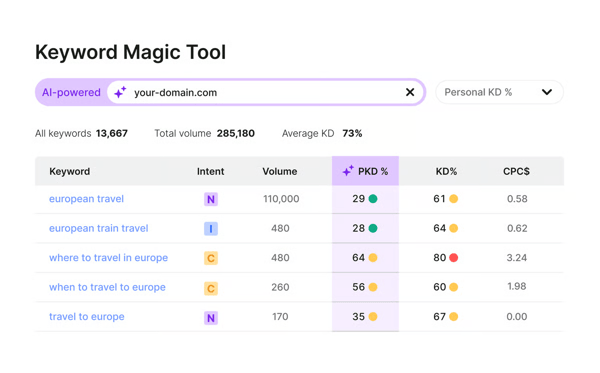
At the same time, the reviews reflect a natural trade-off that comes with feature-rich SEO platforms. Because Semrush brings so many capabilities into one place, some users mention that it can take a bit of time to fully get comfortable with the platform, especially when exploring more advanced features. That said, most feedback suggests the core workflows are relatively intuitive, and teams tend to get more value as they spend time with the tool.
Also, while reviewers recognize the value of having a comprehensive SEO platform in one place, some note that costs can feel higher as usage expands or additional features are unlocked. Many users point out that consolidating multiple SEO tools into a single platform can actually warrant that investment over time.
In conclusion, I would say that Semrush definitely comes across as one of the best SEO tools for teams that want a single platform to handle multiple parts of the SEO process. If you're managing content, tracking competitors, and trying to build a scalable SEO workflow without stitching together multiple tools, Semrush is a strong contender based on what users consistently describe.
"What I like most about Semrush is honestly the amount of data it gives you. The keyword tools like Keyword Magic and Keyword Overview are really helpful when you are trying to find question-type searches, long tail stuff, or just gaps in content you can target. I also use it a lot for competitor research. It makes it pretty easy to see what other sites are doing and how they structure their content to show up in search results. Looking at things like featured snippets, PAA questions, and search intent changes has been really useful for planning content. Overall, it just saves a lot of time compared to trying to piece all this together from different tools."
- Semrush review, Nariman H.
"It's just a lot on the platform that I don't use. And, also, the pricing is very expensive, so I'm not able as a small agency to use all the capabilities because I can't afford it. I wish it were more affordable. There are some new AI tools out there that are coming up, and they're more affordable. And I've been complementing with additional subscriptions."
- Semrush review, Lucy K.
Related: Looking for cheaper alternatives to Semrush? We've found the best Semrush alternatives that can offer value.
G2 rating: 4.7/5
Google Search Console (GSC) is a completely free Google web service that enables website owners to monitor, maintain, and troubleshoot their site's presence in Google Search results. I've personally use GSC to track and analyze my web pages, and I'd say this is a tool you simply can't do without if you're serious about understanding how your content performs on Google.
Unlike most SEO tools that rely on modeled or third-party data, GSC pulls everything directly from Google. That's probably the biggest reason I keep coming back to it. When I want to know what queries are driving clicks, how pages are performing, or whether something has dropped off, this is usually the first place I check.
Something I find myself extensively relying on GSC for is performance tracking, especially for measuring impressions, CTRs, and average positions for specific queries and pages. The G2 reviews also back this claim up, as I see many users relying on it to validate whether their SEO efforts are actually working. SERP rank tracking has an 84% satisfaction rate, and keyword research is rated at 83% on G2, which reflects how dependable users find its performance data.
That same strength carries into technical SEO. I find it to be an essential tool for monitoring indexing, identifying crawl issues, and understanding site health, as do many reviewers. It's one of the few tools that gives you direct visibility into how Google is interacting with your site, which is reflected in its technical SEO (88%) and SEO auditing (86%) scores.
Ease of use is another area where GSC stands out. I find the interface is relatively simple, and most core insights are easy to access without much setup. G2 Data aligns with this, as it gets an ease of use score of 92%. This helps explain why it's widely adopted across different types of teams.
Another thing that comes through clearly is how accessible it is. Since it's completely free, teams of all sizes, ranging from startups to enterprise organizations, use it as a foundational SEO tool. It also integrates well with other Google products like Analytics and Looker Studio, making it easier to build reports and dashboards. That broader usability is reflected in its meeting requirements (93%) scores, which reinforces how well it fits into everyday SEO workflows.
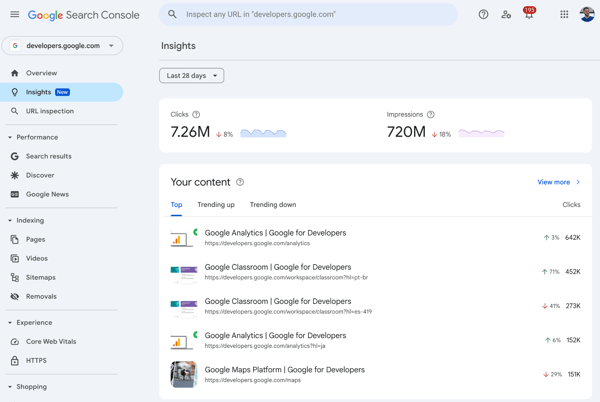
From what I've seen in G2 reviews, users generally view Google Search Console as a strong foundation for SEO insights, especially when it comes to performance and technical visibility. At the same time, some reviewers mention that it tends to offer a higher view compared to paid SEO tools, particularly for deeper keyword analysis or competitive insights. For many teams, this simply means pairing it with another tool to build a more complete picture.
Data freshness also comes up occasionally in feedback. A few users note that updates aren't always fully real-time, which can make it slightly harder to validate very recent changes or short-term performance shifts. That said, for most ongoing SEO tracking and trend analysis, the data is still considered reliable and useful.
Overall, Google Search Console reads like one of the best SEO tools to build your foundation on. If you want reliable, first-party data directly from Google to track performance and monitor site health, it's indispensable, but most teams will still pair it with other tools to get a more complete view of their SEO strategy.
"I really like Google Search Console's ability to compare keyword performance on a daily, weekly, or monthly basis and provide crawl statistics. Crawl statistics allow us to see if there are any issues on the website, helping us improve SEO. I find the keyword statistics valuable, as they let us know which keywords to invest more in and where we are performing well or weakly, which is useful for client reporting and when creating content for SEO. The setup was very easy, and it integrates well with other tools like Google Trends, enriching our strategic planning by allowing simultaneous trend data comparison for the keywords we're working with."
- Google Search Console review, Suayip Can O.
"Google Search Console could improve by offering more granular keyword data, longer historical reports, faster data updates, and clearer explanations for ranking or indexing drops, especially for large or fast-changing sites."
- Google Search Console review, Nabin P.
Overwhelmed with the vastness of SEO features? Read about how to use the 10 most important SEO features to make the most out of your best SEO software.
G2 rating: 4.7/5
My first thought about Birdeye is that it is a platform that differs in its approach to SEO. The approach is less about keywords and rankings, and more about visibility through reputation, customer engagement, and local SEO expertise. As a tool, it is packaged as an agentic marketing tool and is mostly reliable for its local SEO visibility.
Instead of focusing solely on traditional SEO workflows, Birdeye brings together reviews, listings, and customer interactions across platforms such as Google and Facebook. From what I've seen in the reviews, it's often used by businesses that want to improve how they appear in local search without juggling multiple tools for feedback, messaging, and listings.
What stood out to me first is how central review management is to the platform. Teams rely on Birdeye to collect, monitor, and respond to reviews across multiple channels, all from a single dashboard. That centralized approach makes it easier to stay on top of customer feedback, which directly impacts local SEO visibility.
That strength is supported by how users rate the overall experience. Birdeye scores highly on usability, with ease of use rated 94% and ease of setup rated 94% in G2, which reflects how quickly teams can get started and manage day-to-day tasks without much friction.
Another theme that comes through clearly is how well it handles multi-platform presence. Users highlight the ability to manage listings and interactions across different channels in one place, which is especially useful for businesses with multiple locations. The platform also performs strongly in overall satisfaction, with quality of support at 95% and ease of doing business at 96%, reinforcing its reliability from a customer experience standpoint.
Automation is another area where Birdeye adds value. Features like automated review requests through email and SMS help teams increase review volume without adding manual effort. While it's not positioned as a traditional SEO software, this kind of automation plays a key role in improving visibility in local search results over time.
Reviews also expand on Birdeye's AI-powered features as a standout strength. From AI-generated review responses to social media content creation, reviewers frequently mention how these tools reduce the time spent on repetitive communication tasks. Users highlight how the AI cycles through response templates to keep replies varied and professional, while still allowing for manual edits when a more personal touch is needed. This kind of AI-backed content generation appears to make a meaningful difference in keeping engagement consistent without adding to the team's workload.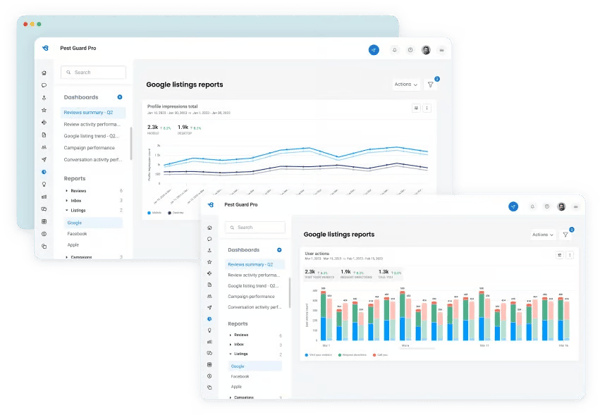
On the flip side, there are a few areas where some teams seek more flexibility. While Birdeye offers a wide range of features, some G2 users note that certain workflows could be less structured, more flexible, particularly for teams with highly specific or customized requirements. For most use cases, though, the platform's built-in approach seems to work well without requiring much configuration.
Also, based on G2 reviews, some users note occasional platform glitches, including dashboard inconsistencies, review syncing delays, and conversations disappearing mid-thread. These tend to surface during higher-volume periods or when managing multiple locations simultaneously. That said, many reviewers also point out that these issues are intermittent rather than persistent, and Birdeye's support team is frequently praised for resolving technical problems quickly when they do arise.
At the end of the day, Birdeye is a powerful AI-powered SEO tool that is suitable for businesses focused on reputation management and local visibility. If your goal is to manage reviews, improve customer engagement, and strengthen your presence across multiple platforms, it's a strong fit based on what users consistently describe.
"Birdeye brings reputation management, customer communication, and marketing into one central place, which directly supports Whywait's "trusted, reliable, local" positioning on the Gold Coast. Automated review requests sent after jobs help steadily increase Google and Facebook reviews without adding extra admin, strengthening local SEO, and building "social proof" for a service business like plumbing. It has been a straightforward implementation, with support from Birdeye as needed."
- Birdeye review, Gary M.
"Sometimes it glitches, but the support team is fast."
- Birdeye review, Marie S.
G2 rating: 4.5/5
Conductor is ideal if you're an enterprise or mid-sized organization seeking a content-led SEO platform. It feels less like a typical SEO tool and more like a platform built to help teams turn search data into content decisions at scale. Based on G2 Data, the customer base confirms this, with 37% adoption among enterprises and 32% among mid-market businesses.
Instead of focusing only on rankings or audits, it leans into how SEO connects with content strategy, planning, and performance. From what I've seen in the reviews, it's often used by larger marketing teams that need a clearer way to align SEO insights with what they create, publish, and report on across the business.
What stood out to me first was how frequently users talk about the depth of data and insights. Conductor is often valued for providing a more complete view of search performance, especially for large sites with complex content ecosystems. That's reflected in its keyword research (92%) and SERP rank tracking (91%) scores, which show how consistently it performs across core SEO analysis.
That same strength carries into content optimization. Many users highlight how the platform helps identify what content to improve and where new opportunities exist, rather than just showing what's already ranking. It gets an 89% for content insights, which reinforces this, making it easier for teams to connect SEO data directly to content planning.
Another theme that comes through clearly is reporting. Users often mention the ability to build detailed dashboards and share insights with stakeholders, which is especially important for enterprise teams. This is supported by its scores for SEO auditing (90%) and SEO change tracking (90%), which help teams monitor performance and communicate impact over time.
Customer support is another area where Conductor consistently stands out. Several reviewers mention responsive support teams and dedicated account management, which seem to play a big role in helping teams get value out of the platform. Users unsurprisingly rated its quality of support at 95%, reinforcing how strongly it performs on service and onboarding.
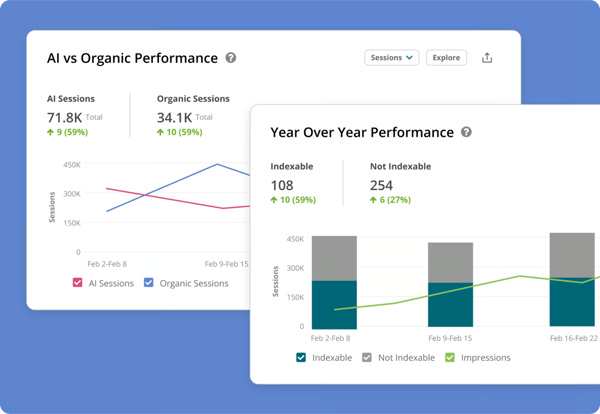
At the same time, the feedback reflects a natural learning curve that comes with more advanced, enterprise-focused SEO platforms. Because Conductor is built for depth and scale, some users mention that it can take time to fully get familiar with all its capabilities, especially for teams newer to enterprise SEO workflows. That said, many reviewers also note that once teams are onboarded, the platform becomes easier to navigate and more valuable over time.
There are also occasional mentions of flexibility in certain areas. While Conductor offers a broad set of features, some users feel that a few capabilities could be more customizable to better fit highly specific workflows. For most teams, however, the existing structure seems to provide a strong foundation for managing SEO and content strategy effectively.
All in all, Conductor reads like one of the best SEO tools for enterprise teams that need deep insights, strong reporting, and a tighter connection between SEO and content strategy. If you're managing SEO across large sites or multiple teams and need a platform that supports both analysis and planning, it's a strong fit based on what users consistently describe.
"One of the best aspects of Conductor has been the ease of use and user experience. The monitoring platform is really easy to navigate, understand, and even gives you shortcuts to the data you want to see. I've used software in the past where I could spend hours creating the data I want to see, but the monitoring software does it in minutes. Even with complex insights and multiple data touch points, it manages all of my requests. The new LLM prompt tracking is very powerful and provides necessary insights for us to evaluate how we are doing in the AI space."
- Conductor review, Jake S.
"The user interface is packed with features, which means onboarding new hires takes a little longer than it would with a basic, entry-level tool. Thankfully, Conductor's academy and customer support are top-tier."
- Conductor review, Dinh Lam T.
G2 rating: 4.6/5
When it comes to SEO tools, a lot of people complain about the pricing. The simple answer for those looking for a completely free tool is Google Trends.
What stood out to me first was how useful it is for spotting trends. Whether I'm comparing keywords, tracking seasonal spikes, or exploring emerging topics, Google Trends makes it easier to understand demand before investing time in creating content. That's reflected in its keyword research (90% score on G2), which shows how effective it is for discovering and validating search interest.
Ease of use is another area where it stands out. In my experience, the interface is simple enough that you can jump in, run a quick search, and get useful insights almost immediately. It's one of those tools that doesn't require setup or onboarding to start being useful. As per G2 Data, ease of use stands at 95%, reinforcing how accessible it is across different user types.
Another thing I found particularly useful is its regional breakdown. Being able to see how search interest varies by location makes it easier to plan localized content or understand how trends differ across markets. Its localization feature score (85%) supports this, making it especially helpful for geographically targeted strategies.
What also stands out across G2 reviews is how naturally Google Trends fits into a broader Google ecosystem. Users frequently mention how well it connects with tools like Google Search Console, Google Analytics, and Looker Studio, making it easier to layer trend data alongside performance and traffic insights without switching platforms. For teams already working within Google's suite of tools, that compatibility removes friction and adds context to existing workflows without requiring any additional setup.
I also see how Google Trends handles seasonal and comparative analysis extremely well due to the nature of the tool. Users highlight the ability to compare multiple search terms side by side and track how interest shifts across different timeframes, which helps teams plan content around predictable demand cycles. That kind of longitudinal visibility makes it easier to time content releases strategically rather than relying on guesswork about when audiences are most actively searching.
More broadly, Google Trends fits well into everyday workflows because of how lightweight it is. It's not something I use for deep analysis, but it's incredibly useful for quick validation and idea generation. Its score for ease of doing business (95%) reflects how frictionless the experience feels in practice.
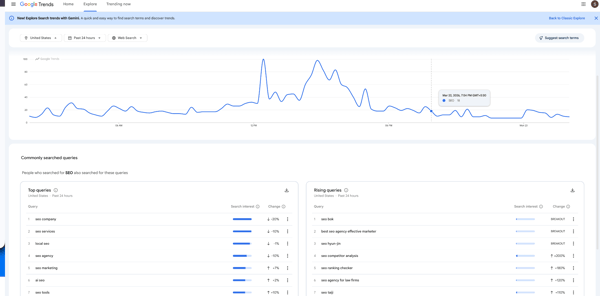
Despite the strengths, there are some areas worth noting. Several G2 users point out that Google Trends focuses on relative search interest rather than absolute search volume, which can make it harder to gauge the true scale of demand or validate ideas with precise numbers. That said, many users who use trends for initial research and trend validation find that it is quite a solid no-investment option for content planning and keyword strategy.
Some G2 users note that Google Trends' filtering and category options can feel broad, particularly for teams that need more precise or granular analysis. Reviewers mention that category filters are fairly basic, and the lack of advanced segmentation options can make it harder to drill down into specific topics, regions, or timeframes with the level of detail some workflows require. That said, for directional research and early-stage trend validation, the platform's core filtering capabilities are generally sufficient and easy to use without any setup.
Overall, Google Trends reads like one of the best SEO tools for early-stage research and content ideation. If you want a fast, free way to understand search demand and spot trends, it's incredibly useful, but it's most effective when used alongside more comprehensive SEO tools.
"Google Trends is one of the fastest ways to understand audience interest shifts. In our workflow, we use it to track trending topics, validate campaign ideas, and analyze seasonal behavior. The interface is clean, charts are easy to interpret, and exporting data is straightforward."
- Google Trends review, Vishwajeet M.
"One thing I find frustrating about Google Trends is that the data isn't always precise. Since it displays interest relative to itself rather than providing actual search volume, it can be challenging to gauge the true impact. Additionally, I wish it offered more advanced filters and detailed demographic information, as these features would make analysis much more straightforward."
- Google Trends review, Tiwari S.
G2 rating: 4.5/5
Having used Ahrefs and combining it with G2 reviews, it comes across as an accurate, comprehensive, and balanced SEO tool that is sure to add value to your business. At its core, it's a powerful traditional tool that is in the process of pivoting to become an AI marketing platform. The platform is powered by their own robust crawl bot and big data to give it a competitive edge in the SEO industry.
While it covers a broad range of SEO functions, what really stands out from both my experience and what I've seen in G2 reviews is how strong it is on off-page SEO. I've personally leaned on Ahrefs whenever I needed to understand backlink profiles or break down competitor strategies. If you're trying to figure out who's linking to you, where competitors are getting their authority from, or how to build a link strategy, it's usually one of the first tools that comes to mind.
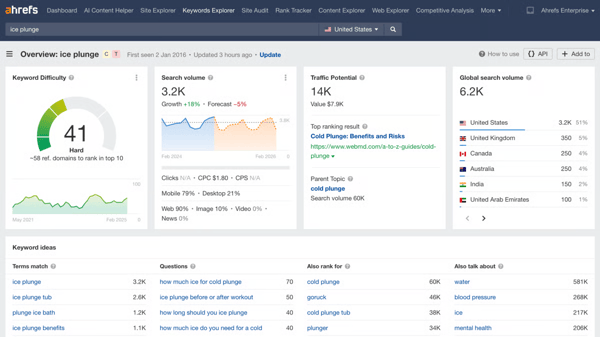
What stood out to me early on was the quality of its backlink data. From using it myself, the level of detail makes it easier to evaluate link profiles and spot opportunities without second-guessing the data. That aligns closely with what reviewers highlight as well, and you can see it reflected in its score for link building (93%), reinforcing its position as a leader in backlink analysis.
That same depth carries into keyword research and content planning. I've found it particularly useful for identifying keyword difficulty and uncovering content gaps when planning new topics. This lines up with user feedback around its reliability in this area, supported by its 90% for its keyword research capabilities, which shows how consistently it performs for discovery and prioritization.
Competitor analysis is another area where it feels especially strong. I've used Ahrefs to break down competitor rankings and traffic sources, and it makes it much easier to connect the dots between content, keywords, and backlinks. Its competitor analysis score (92%) reflects how central this capability is to the platform. And from a usability standpoint, I can personally attest that getting started is relatively smooth. Ahrefs Academy, in particular, makes onboarding easier for beginners.
Another thing I've noticed is how reliable the data feels in day-to-day use. Whether I'm tracking rankings, analyzing domains, or evaluating keyword opportunities, the insights are generally consistent enough to act on confidently. That reliability shows up in its scores for SERP rank tracking (87%) and overall usability signals, including a 90% approval for its ease of use, which help make the platform easier to navigate in practice.
While many G2 users say that Ahrefs is a comprehensive tool, this comes with a slightly more hefty price tag. I see pricing being one of the more commonly mentioned considerations, particularly for smaller teams or individual users. While many reviewers recognize the value of the data and insights provided, some note that certain features are tied to higher-tier plans, which may require some evaluation based on usage needs.
Another thing I see in G2 reviews is the occasional mentions around data interpretation. Ahrefs is widely trusted for its depth, especially in backlink analysis and keyword research. However, some users note that, like most SEO tools, certain metrics can vary slightly compared to other platforms or real-world performance. In practice, this often comes down to differences in data modeling rather than reliability. That said, teams still find the data directionally accurate and valuable for making informed SEO decisions.
So, is Ahrefs worth it? I'd say yes. Ahrefs is one of the best SEO tools for teams that prioritize backlink analysis and competitive research. If you're focused on understanding link profiles, uncovering content opportunities, and building a data-driven SEO strategy, it's a strong fit based on what users consistently describe.
"There are a couple of sections in AHREFS that I really like. The first is the keyword research data, which includes keyword intent as well as information on similar keywords. Another section is backlink research data, which is very easy to use; it also bifurcates between do-follow and no-follow backlinks. Also, it is super easy to spy on my competitors' backlinks, which helps me find sites on which I can create backlinks."
- Ahrefs review, Hemkesh R.
"The main downside of Ahrefs is its pricing, which can feel high for freelancers or small teams. Some features also have usage limits, so you need to be mindful when running frequent reports. While the tool is powerful, beginners may need some time to fully understand all its features. That said, once you get used to it, the value it provides outweighs these limitations."
- Ahrefs review, Vishnu G.
G2 rating: 4.6/5
Wincher comes across as a tool that focuses on SEO-related tracking without the baggage of extensive, hard-to-set-up SEO features. From what I've seen in the reviews, it's often used by teams that want a straightforward way to monitor keyword positions without dealing with the complexity of larger SEO tools.
What stood out to me first is how consistently users talk about accuracy and reliability in rank tracking. Teams reportedly rely on Wincher for daily updates on keyword positions, and many reviewers highlight how dependable the data feels when tracking performance over time. The satisfaction ratings for its SERP rank tracking (89%) and SEO change tracking (90%) reflect this sentiment, and it reinforces its strength in monitoring performance consistently.
Ease of use is another area where Wincher stands out. Users frequently mention how simple the platform is to navigate, with minimal setup required to get started. On G2, ease of use scores at 94% and ease of setup at 94%, making it especially accessible for teams that want quick, no-friction onboarding.
Another theme that comes through clearly is how well it fits focused use cases. Rather than overwhelming users with too many features, Wincher keeps reporting and tracking straightforwardly, which makes it easier to interpret and share performance updates. Its score for data visualization (90%) supports this, helping teams quickly understand how rankings are changing over time.
What also stands out across G2 reviews is the quality of Wincher's customer support. Users frequently describe the support team as responsive, knowledgeable, and genuinely helpful when questions arise, which is especially appreciated given that the platform is often used by smaller teams or individuals without dedicated SEO resources. With a 92% approval rating for quality of support, it indicates that teams that want reliable guidance without long wait times or generic responses will be satisfied.
Taken together, the consistency of daily rank updates and proactive alerting features are themes that surface repeatedly across reviews. Users mention receiving timely email alerts when keyword positions shift, which helps teams stay on top of ranking changes without having to log in and check manually. For lean teams or individuals managing multiple sites, that kind of proactive visibility reduces the risk of missing important performance movements.
More broadly, Wincher performs well in day-to-day usability, and 92% users mention that it meets requirements, which reflects how effectively it delivers on its core purpose without unnecessary complexity.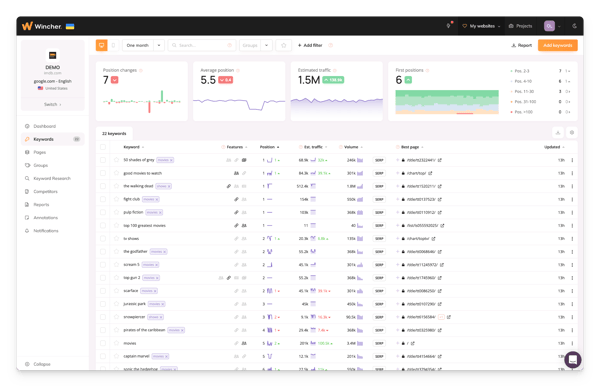
At the same time, the limitations are fairly clear in how users position the tool. While Wincher performs well for rank tracking, several reviewers mention that it's designed with a more focused scope and doesn't aim to cover the full range of SEO capabilities like keyword research, competitor analysis, or technical audits. However, that focused approach is also what makes it so easy to adopt and maintain. Teams consistently highlight how the platform's simplicity means less time spent on setup and more time spent acting on the insights it delivers.
I've also seen occasional mentions from users around its pricing. Some reviewers note that while Wincher offers strong value for its core functionality, certain plans or feature limits may require evaluation, especially for small teams that need to scale their usage. That said, teams that actively invest in the platform and use it consistently often find strong value in its simplicity and focused approach to rank tracking.
To summarize, Wincher is one of the best SEO tools for teams that want a simple, focused solution for tracking keyword rankings. If your priority is monitoring positions accurately without dealing with unnecessary complexity, it's a strong option based on what users consistently describe.
"Their free services are awesome! I don't have the money to invest in SEO services right now. Being able to still watch the top 5 search terms for my rank is a lifesaver. Watching how my top competitors rank helps me determine where to pivot my approach. Anyone trying to succeed online needs a tool like Wincher to help track their SEO accuracy. "
- Wincher review, Angela J. S.
"It would be helpful if suggestions for keywords were available before the need for users to sign up for more features."
- Wincher review, Steven E.
SE Ranking: Best SEO tool for agencies and all-in-one SEO workflows
Combines keyword tracking, site audits, and reporting with strong usability for teams managing multiple projects.
BrightEdge: Best SEO tool for enterprise performance and AI-driven insights
Enterprise-grade platform with deep analytics, content recommendations, and AI-powered search insights.
Yext: Best SEO tool for local SEO and listings management
Helps manage business listings, maintain consistent data across platforms, and improve local search visibility.
Similarweb: Best SEO tool for traffic insights and market intelligence
Provides competitive traffic data, audience insights, and benchmarking to understand market trends and opportunities.
Got more questions about the best SEO tools on G2? We've got the answers!
The best SEO software for local business marketing helps manage local listings, track rankings, and optimize for location-based searches. Tools like Birdeye and Google Search Console are commonly used to improve local visibility and manage reviews.
The best SEO tools for e-commerce focus on keyword research, product page optimization, and competitor analysis. Platforms like Semrush and Ahrefs help identify high-intent keywords and improve product visibility in search results.
Small businesses benefit from SEO tools that are easy to use and cost-effective. Google Search Console, Wincher, and SE Ranking are popular choices for tracking performance, identifying opportunities, and managing SEO without complexity.
SEO tools like Semrush and Ahrefs help optimize web content by providing keyword suggestions, content gap analysis, and on-page recommendations to improve rankings.
Mid-sized businesses often need scalable SEO tools that balance depth and usability. Platforms like Semrush and Conductor provide advanced features for keyword research, reporting, and team collaboration.
SEO professionals commonly use tools like Ahrefs and Semrush for keyword research. These platforms offer detailed insights into search volume, keyword difficulty, and competitive opportunities.
The best SEO tools for improving rankings combine keyword research, content optimization, and technical SEO insights. Tools like Semrush, Ahrefs, and Google Search Console help identify issues and opportunities that impact rankings.
Affordable SEO tools include Google Search Console, Google Trends, and platforms like Wincher, which offer essential features at a lower cost. Many tools also provide free trials or limited free versions.
SEO tools like Semrush and Ahrefs help with content analysis by identifying keyword gaps, analyzing competitor content, and providing recommendations to improve on-page SEO.
The best SEO software for increasing traffic helps identify high-value keywords, optimize content, and track performance. Platforms like Semrush, Ahrefs, and Conductor are widely used to drive organic growth.
After giving you the list of the best SEO tools, I'd like to conclude with this simple yet evident fact: SEO tools don't magically improve rankings on their own; they shape how you make decisions. The best tools don't just give you data. They help you understand what to do next, turn scattered insights into clear actions, and build a consistent rhythm around content, optimization, and performance.
Briefly summarising, if you need an all-in-one platform to manage everything from keywords to competitors, Semrush is hard to ignore. If backlinks and competitor insights are your priority, Ahrefs stands out. If you're building your foundation or validating performance, Google Search Console becomes indispensable. And tools like Conductor or Wincher start to make more sense when your focus shifts toward enterprise strategy or simple, reliable tracking.
One thing worth watching as you evaluate: the line between SEO and AEO is beginning to blur. As more players enter the answer engine optimization space, SEO tools are increasingly expected to track and surface the metrics AEO demands, how content performs in AI-driven results, not just traditional search rankings. Most analysts predict these two categories will continue to converge, which means the tool you choose today should have a credible path toward supporting that shift tomorrow.
So instead of asking "what's the best SEO tool overall," the better question in 2026 is: what's the best SEO tool for the way your team plans, creates, and measures content today, and where search is heading? Get that match right, and SEO stops feeling like guesswork. It becomes a system you can scale.
With search quickly moving into the AI-first era, getting citations is all the more important. Learn how G2 has increased website traffic by 20% in the AI search era for tips on your AI strategy.

At a quick glance, the best free SEO tools for small businesses that I found are Semrush, SE...
by Shashank D Shastry

Published: April 2025 · Last Updated: April 2026 As someone who’s been in the SEO game for a...
 by Sagar Joshi

As a senior SEO content specialist, I am continuously on the lookout for new and emerging SEO...
/DarshayitaThakur-OrangeBG.webp) by Darshayita Thakur
by Darshayita Thakur