.png?width=400&height=150&name=Untitled%20design%20(56).png)


A few years ago, I helped a friend launch their retail store. The shelves were stocked, the marketing was in place, and customers walked through the door. But behind the scenes, we faced a major issue: keeping track of sales, inventory, and transactions efficiently.
Some thought a basic cash register would be enough, others relied on spreadsheets, and a few tried to track stock manually. But without using the best retail POS software, we struggled with slow checkouts, misplaced inventory, and missed revenue opportunities. That's when I did some research and suggested that we invest in a modern retail POS solution.
Once we implemented the right system, everything changed. Sales were processed faster, inventory updates became automatic, and we finally had clear insights into what was selling and when. Instead of juggling operational headaches, we could focus on growing the business.
If managing sales and inventory seems challenging, keep reading. I've evaluated the top retail POS systems and will share my insights to help you find the best fit for your store.
At a glance, the best retail POS systems I shortlisted are Square Point of Sale, Stripe Terminal, Shopify POS, Clover, SpotOn, and KORONA POS.
Square Point of Sale: Best for small businesses wanting a free, easy-to-deploy POS
Intuitive interface, automated invoicing and payment reminders, accounting software integrations, and AI-powered search. (Starts at $49/mo + variable processing fees)
Stripe Terminal: Best for businesses unifying online and in-person payments
Seamless Stripe ecosystem integration, developer-friendly APIs, fast and reliable payment processing, and easy third-party integrations. (Commission-based pricing that varies based on use case)
Shopify POS: Best for online and in-store retail integration
Real-time inventory sync across online and physical stores, customizable dashboard tiles, and seamless Shopify eCommerce integration. (Starts $89/mo per location with transaction fees)
Clover: Best for versatile businesses needing flexible hardware and payment options
All-in-one platform for payments, inventory, and reporting, portable hardware, recurring billing, and QuickBooks integration. (Starts $40/mo with transaction fees)
SpotOn: Best for businesses combining POS with built-in marketing and loyalty tools
Intuitive interface, dedicated account support, customizable reporting dashboards, and all-in-one POS, scheduling, marketing, and loyalty tools. (Starts at $55/mo per station)
KORONA POS: Best for specialty and high-volume retailers needing deep inventory control
Real-time reporting dashboards, responsive customer support, deep inventory management with loss prevention tools, and processor-agnostic setup. (Starts at $59/month per terminal)
*These retail POS software are top-rated in their category, according to G2's Spring 2026 Grid Report. I’ve also added their monthly pricing to make comparisons easier for you. Please refer to the websites for in-depth breakdowns of pricing and commission fees.
The best retail POS (Point of Sale) software helps businesses manage sales, inventory, and customer transactions seamlessly. G2 Data shows retail POS software is used mostly by small businesses (62%), followed by mid-market companies (29%) and enterprises (9%).
During evaluation, I saw how these tools streamline checkout processes, track stock in real-time, and provide valuable sales insights. Features like automated inventory management, integrated payment processing, and detailed reporting optimize operations, helping retailers improve efficiency and enhance the customer experience.
It's no surprise that the global POS software market was estimated at USD 17.13 billion in 2025 and is projected to reach USD 38.82 billion by 2033, growing at a CAGR of 10.8%, a clear signal that retailers worldwide are doubling down on modern POS infrastructure.
Now, not all POS systems excel across every feature. G2 Data shows that retailers are most satisfied with features like credit card payments (93%) and receipts (90%), while barcode scanning (87%) and price adjustments (87%) receive slightly lower marks on average. Hardware integration scores a strong 89%, suggesting most systems handle peripherals well.
First, I explored G2 Grid Reports to identify the top retail POS software that businesses trust the most. Then, I evaluated G2 reviews to understand how well they handled transactions, inventory management, and customer engagement. I also connected with retail professionals who use these POS solutions daily and cross-referenced their feedback with verified G2 reviews.
The screenshots in this article come from a combination of my evaluations and vendor-provided materials on G2. To ensure a well-rounded analysis, I used AI to analyze thousands of POS software reviews for retail businesses on G2, extracting key insights and common feedback. The goal? To find the best retail POS software that streamlines operations, enhances the customer experience, and helps businesses grow.
When evaluating the best retail POS software, I focus on several key features to determine its effectiveness:
What I've listed below are the best POS systems that stand out with unique strengths, whether that's ease of use, inventory tracking, or all-in-one retail management.
The list below contains genuine user reviews from our best retail POS software category page. To qualify for inclusion in the category, a product must:
*This data was pulled from G2 in 2026. Some reviews have been edited for clarity.
G2 rating: 4.6/5
Square Point of Sale consistently stands out in G2 reviews for its intuitive interface, making both front-end and back-end navigation easy for users. From what I've read, even team members with limited technical experience are able to learn the system quickly — which is especially useful for fast-paced retail environments. Ease of use is rated at 95% and ease of setup at 94% on G2, both well above category averages, and that lines up exactly with what I see in the reviews.
Across multiple reviews, I've noticed that users really appreciate how easy it is to add and edit products. This is particularly helpful for businesses that need to make quick inventory updates on the go. I've also seen positive feedback from industry professionals who mention how quickly new staff can get up to speed.
A standout capability, according to users, is Square's integration with accounting software. This connection helps reduce manual work and errors while streamlining financial tracking. Features like subscription billing tied to customers and built-in gift card redemption also get called out as helpful for boosting customer retention. Credit card payments are rated at 96% and receipts at 95% on G2, reflecting how reliably Square handles the core transaction experience retailers depend on most.
I've come across several reviewers who mention the newer Square AI in the search bar as a valuable addition. It helps users quickly find products, customer details, or past transactions, making the checkout process faster and more efficient during busy periods.
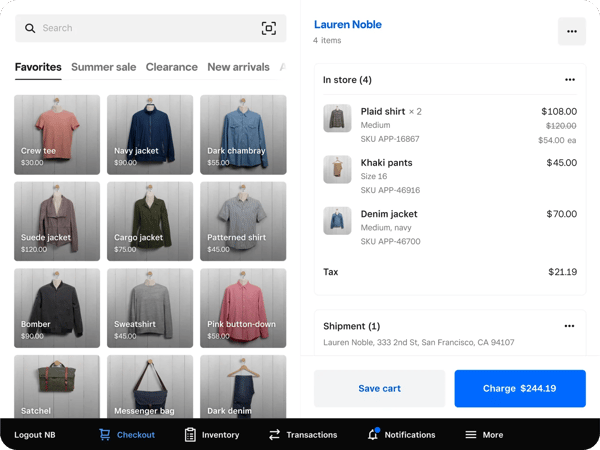
One area that comes up consistently in G2 reviews is customer support. While some users report smooth interactions, others mention delays and inconsistent resolution quality, particularly during technical issues or platform changes. That said, most reviewers note that for day-to-day operations, the system runs reliably enough that support is rarely needed, making it a minor friction point rather than a dealbreaker for most small retail teams.
Overall, based on what I've gathered from G2 user reviews, Square Point of Sale is a dependable and user-friendly system with strong automation and integrations. It delivers the most value for small businesses and solo operators looking for an affordable, fast-to-deploy POS that handles invoicing, inventory, and payments cleanly in one place.
"Very easy to enter all products beforehand and even enter custom sales on the go, all while keeping track of inventory after sales is made simple. Support is quick to help if you have any problems with the setup."
– Square Point of Sale review, Alysa F.
"Customer support feels limited. Support requests require a merchant code that's only available to active accounts, which makes it difficult to get help if your account isn't currently active."
– Square Point of Sale review, Abigail C.
Discover how retail management systems can streamline your operations, enhance customer experience, and boost sales.
G2 rating: 4.4/5
Stripe Terminal stands out for how seamlessly it bridges online and in-person payments within a single unified system. From what I've read across G2 reviews, businesses that already operate within the Stripe ecosystem describe adding in-person payments as a natural extension rather than a separate implementation. Managing online transactions, in-store payments, reporting, and reconciliation from a single dashboard eliminates the friction of juggling multiple platforms. Ease of use is rated at 93% and ease of setup at 91% on G2, reflecting how consistently users describe the experience as straightforward once the integration is in place.
I've also come across consistent praise for how fast and reliable the payment processing is. Reviewers describe transactions as quick and secure, with clear visibility into payment status and payout timelines. The platform supports contactless payments, chip cards, and mobile wallets, giving customers multiple ways to pay. Credit card payments are rated at 98%, and end-of-day reports at 100% on G2, two of the platform's highest-scoring features, reflecting how dependably Stripe Terminal handles the core transaction and reconciliation experience.
The developer-friendly APIs and documentation are another theme I see come up frequently. G2 reviewers with technical backgrounds describe the APIs as clean, well-documented, and flexible enough to build fully custom POS flows without fighting the system. Several users mention that integration with existing platforms took hours rather than days, which speaks to the thoughtfulness of the developer experience.
I've also noticed that ease of integration with third-party platforms, from e-commerce tools to donor management systems, gets called out as a meaningful strength. Reviewers appreciate that Stripe Terminal works within the tools they already use, reducing the need for manual data entry and keeping financial records clean and accurate across systems.
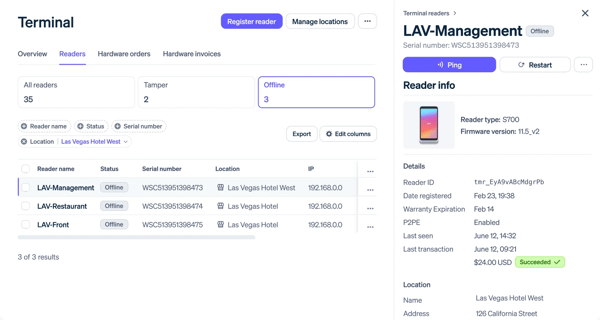
I've also seen that G2 reviews the setup complexity for teams without strong technical resources. Several reviewers note that the initial configuration and customization can require developer involvement, making it less suited to businesses looking for a plug-and-play experience. That said, once the system is configured, most users describe it as running reliably with minimal ongoing maintenance. Stripe's extensive documentation and support guides mean that technical teams rarely hit a wall they can't work through.
What stands out most about Stripe Terminal is how well it serves businesses that want payments to feel like infrastructure rather than friction. It delivers the most value for technology-forward retailers, SaaS platforms, and businesses already running on Stripe that want to extend that into physical locations with a unified, developer-friendly, and highly reliable payment foundation.
"Stripe Terminal's biggest strength is how seamlessly it integrates with the Stripe ecosystem. Managing online and in-person payments from a single dashboard makes reporting, reconciliation, and customer management much easier. The APIs are very developer-friendly, well-documented, and flexible enough to build fully custom POS flows."
– Stripe Terminal review, Bharat G.
"It would also be helpful if setting up and managing the devices were a bit simpler, so new team members can get started more easily. I think Stripe Terminal could be even better if setting up devices were simpler, maybe with a step-by-step guide or interactive walkthrough. More stable connectivity with automatic reconnection would also help, especially during busy checkout times."
– Stripe Terminal review, Mike F.
G2 rating: 4.4/5
Shopify POS is often praised by G2 users for being easy to use, especially for those new to point-of-sale systems. From what I've seen in reviews, many users find the setup process quick and straightforward. The variety of available themes also makes it easy for retail businesses to create clean, professional-looking storefronts without needing advanced design skills. Ease of use and ease of setup are rated at 90% on G2, reflecting how consistently the platform delivers a frictionless onboarding experience.
One feature that I see getting a lot of praise is the customizable tiles. According to feedback I gathered from G2 users, being able to arrange the dashboard based on popular items, discounts, product categories, and key actions really helps streamline the checkout experience. This flexibility seems to benefit both small and large businesses.
I frequently see G2 reviewers highlight the inventory management capabilities as another strong point. Users often mention that stock levels are automatically updated across online and physical stores, helping prevent overselling and reducing manual work. E-commerce integrations are rated at 92% and sales tracking at 90% on G2, reflecting how reliably Shopify POS keeps online and in-store operations in sync.
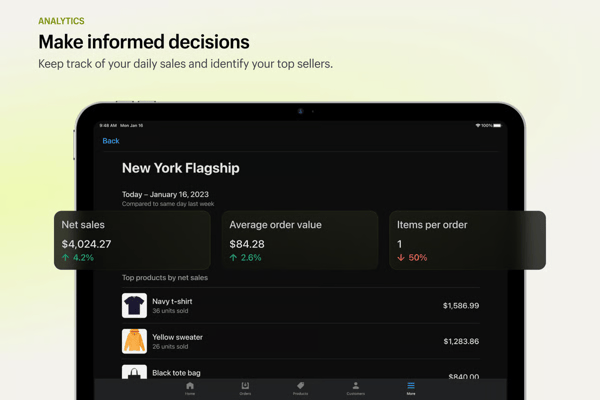
That said, one area that comes up consistently in G2 reviews is the cost structure. Several users mention that useful features, particularly advanced reporting and staff permissions, are only available on higher-tier plans, which can feel limiting for smaller businesses watching costs carefully. That said, most reviewers acknowledge that the core plan reliably handles everyday retail needs, and the tight integration with the Shopify ecosystem remains a strong reason to stay on the platform as the business grows.
In general, the feedback I've seen suggests that Shopify POS offers a smooth, intuitive experience with standout features in customization and inventory management. It delivers the most value for retailers already on Shopify who want their online and in-store operations to work as a single unified system.
"We started with Shopify POS on our iPhones using a small card reader, which worked well, but upgrading to the POS Go in fall 2023 was a game-changer. The software remains the same across devices and is easy to use once you get familiar with it. It allows seamless location switching for pop-ups, applying discounts, sending receipts, and capturing customer info, including newsletter sign-ups. The best part is the barcode scanning system, which has saved us countless hours of manual entry."
– Shopify POS review, Zein K.
"One thing I don't like about Shopify POS is the pricing. Some useful features are only available in higher plans, which can feel a bit expensive, especially for small businesses. Also, certain advanced features and integrations sometimes require extra apps, which adds to the overall cost. Another downside is that customization options are somewhat limited in a few areas, like reports and POS specific settings. Occasionally, the system can feel slightly slow when syncing data or handling large inventories."
– Shopify POS review, Radhika R.
Effortlessly manage transactions with secure and reliable payment processing solutions.
G2 rating: 3.9/5
Clover is a flexible point-of-sale solution used by restaurants, retailers, and service-based businesses. Based on G2 reviews I've read, it's frequently recognized for supporting multiple business types with tools for customer management, employee tracking, and payment processing, all from one platform. Ease of use is rated at 90% and ease of setup at 88% on G2, reflecting how consistently users describe the day-to-day experience as straightforward and accessible.
One feature that I see getting a lot of praise is payment flexibility. According to user feedback, the portable Clover units make it easy to complete transactions anywhere, whether handing off a device for a customer signature or processing payments via hotspot. This level of mobility is especially valuable for service providers or retailers who operate in non-traditional spaces. Credit card payments are rated at 94% on G2, and partial payments at 92%, reflecting how reliably Clover handles diverse transaction types across different business environments.
I've also noticed consistent praise for Clover's all-in-one capabilities. Reviewers describe being able to track sales, manage inventory, and process payments all in one place without needing to switch between systems. The recurring billing feature stands out in particular, users mention setting up billing agreements for payment schedules that work reliably without manual intervention, giving business owners clearer financial visibility day to day.
Another strength that comes through in G2 reviews is Clover's integration with QuickBooks and third-party apps. Users describe how connecting Clover to their accounting software creates a smooth flow of financial data, reducing manual entry and reconciliation errors. The broader app ecosystem also gives businesses the flexibility to extend the platform with tools for scheduling, gift cards, loyalty programs, and workforce management as their needs evolve.
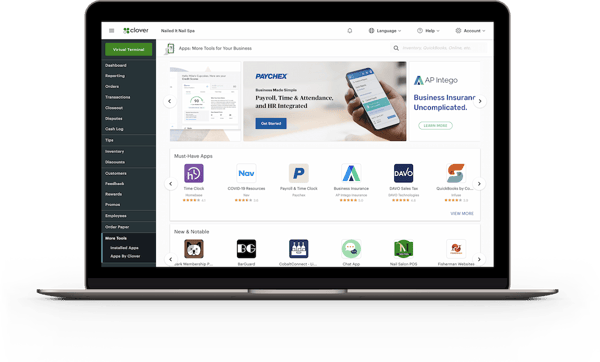
Now, one theme consistently observed in G2 reviews is the cost of add-on apps. While Clover's core platform covers the essentials, many of the features that make it genuinely powerful, such as advanced inventory tracking, gift cards, loyalty programs, and scheduling, come through paid third-party apps. For businesses that rely on several of these, the monthly costs can accumulate meaningfully. That said, many reviewers acknowledge that the modular approach also means you only pay for what your operation actually needs, which suits businesses with simpler requirements.
All in all, the feedback I've seen suggests that Clover is a well-rounded, versatile platform that adapts to a wide range of business types. It delivers the most value for retailers, service businesses, and mixed-use operations that need flexible hardware, reliable payment processing, and the ability to extend functionality as they grow.
"I love how Clover keeps better track of our sales and provides specific reports regarding our inventory and what has been sold. I also love that there is a camera on the POS systems, which helps us know who's using and doing what because sometimes people forget to sign out."
– Clover review, Sammi G.
"They charge a very high membership fee in order to incorporate advanced inventory, which would allow the tracking of the cost of goods. Right now, I'm on a $30 a month plan, but if I wanted to do more advanced inventory, it would cost me around $85 a month, which is a lot more. I think we should include that in the cheaper plan."
– Clover review, Jonathan K.
G2 rating: 4.4/5
SpotOn is a solid combination of a retail and restaurant POS, and is also widely praised in G2 reviews for its intuitive interface and how quickly staff can get comfortable with the system. From what I've read, users describe the POS layout as straightforward and well-organized, making daily transactions simple even for team members who aren't particularly tech-savvy. The ability to easily organize screens, menus, and modifiers is also cited as a practical advantage during busy periods. Ease of use and ease of setup are rated 91% on G2, reflecting how consistently the platform delivers a smooth operational experience from day one.
One of the most distinctive themes I've come across in SpotOn reviews is the quality of customer support. Unlike the impersonal support experiences found with many other POS platforms, SpotOn users frequently mention named account representatives who are responsive, knowledgeable, and proactively involved in resolving issues. Reviewers describe texting their rep directly, jumping on a quick Zoom call, or getting a same-day resolution, a level of personal attention that stands out significantly in this category. The quality of support is rated 92% on G2, one of SpotOn's highest-rated attributes.
Reporting and customizable dashboards are another area where SpotOn earns consistent praise. I've seen reviewers describe being able to monitor sales, track what's selling, and pull customized reports without navigating complex menus. The clarity of the financial data available through the platform helps business owners make faster, better-informed decisions. Meets requirements is rated at 92% on G2, reinforcing the platform's reliability in delivering on the operational needs of its core users.
What also comes through clearly in G2 reviews is how much users value having everything in one place. SpotOn brings together POS, scheduling, payment processing, marketing, and loyalty tools into a single, connected system, eliminating the need to manage separate platforms for each function. Reviewers describe the automated reminders, loyalty program setup, and marketing integrations as genuinely useful tools that help strengthen customer relationships without adding operational complexity.
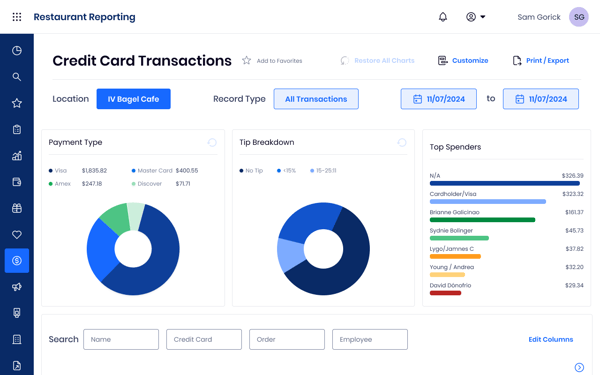
One area that comes up in recent G2 reviews is the difficulty with third-party integrations. Several users mention frustrating experiences with API access, describing a slow approval process with no self-serve developer portal and little visibility into timelines. Integration with delivery platforms like DoorDash also draws mixed feedback, with some users reporting delays in getting issues resolved due to difficulty reaching the integration team directly. That said, reviewers who do get through the setup process generally describe the platform's core functionality as reliable and well-supported by their account representatives.
At its core, SpotOn works best for retail and hospitality businesses that want a fully integrated platform covering transactions, customer loyalty, marketing, and performance reporting without having to manage multiple disconnected tools. It delivers the most value for operators who want to actively use the business intelligence SpotOn provides, supported by a team that stays engaged well beyond the initial setup.
"Spot On is amazing for its simplicity and transparency. The automated reminders, scheduling, and easy-to-use dashboard all coordinate really well, which makes day-to-day management much easier. I also like the reports, especially that we can customize them, because they provide deeper insight and help drive better decisions that can benefit the business."
– SpotOn review, Purva K.
"For some reason, we had a difficult time integrating with DoorDash. It was frustrating not being able to contact the integration team directly, and it took days to hear back from them."
– SpotOn review, Trolley S.
G2 rating: 4.7/5
KORONA POS is a cloud-based POS built specifically for retail, and that focus shows clearly in G2 reviews. Users consistently describe it as a system that understands the operational complexity of high-volume retail in a way that more general-purpose tools don't. It's particularly well-regarded among specialty retailers, including convenience stores, liquor shops, and ticketing operations. Meets requirements is rated at 93% on G2, reflecting how reliably KORONA delivers on the specific needs of its core retail audience.
Reporting and analytics are the most consistently praised aspects across the reviews I've read. Users describe detailed, real-time dashboards that surface sales performance, product trends, and employee activity in a clear, customizable format, all without needing additional software. Sales tracking is rated at 95% and credit card payments at 95% on G2, two of the platform's highest-scoring features.
Customer support is another area where KORONA stands out. I've come across reviewers describing waiting less than a minute for a representative, having support staff walk them through every step of a new configuration, and even having technicians access their back office directly to resolve issues in real time. The quality of support is rated 95% on G2, the platform's highest-rated attribute, and well above the category average.
The inventory management and loss prevention tools are a standout for retail operators. Automatic reorder points, vendor management, barcode automation, ABC inventory grading, and real-time multi-location stock tracking are all included. Role-based permissions and detailed audit logs give business owners visibility over staff activity and help surface discrepancies early. Barcode scanning is rated 94% on G2, reflecting its central role to KORONA's retail value proposition.
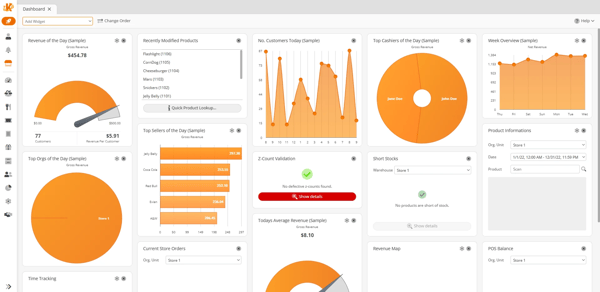
At the same time, I see that G2 reviewers highlight how the learning curve can be a challenge for some. The backend is feature-dense, and the terminology can feel unintuitive, making initial setup more demanding than plug-and-play alternatives.
Several reviewers describe the configuration process as overwhelming at first, particularly for businesses without prior POS experience. That said, the support team receives strong praise for guiding users through setup patiently and thoroughly, and most reviewers note that once configured, the system runs reliably and the depth of functionality pays off.
At the end of the day, KORONA POS is its combination of deep retail functionality, processor-agnostic flexibility, and a support experience that users describe as genuinely exceptional. It delivers the most value for established retailers, specialty stores, and multi-location operations that prioritize inventory accuracy, loss prevention, and customizable reporting over out-of-the-box simplicity.
"KORONA POS can be used for multiple stores and can sync inventory and sales across all locations, which makes management more sustainable."
– KORONA POS review, Dmitry K.
"The most common complaint is the steep learning curve; the backend is dense, and the terminology often feels unintuitive, making it far from plug-and-play."
– KORONA POS review, Ryan S.
Thinking about a new POS system? Check out this guide covering how much a POS system costs.
Have more questions regarding the Retail POS software? We've got the answers!
For retailers looking for a truly all-in-one solution, Clover and SpotOn stand out. Clover brings payments, inventory, employee management, and customer rewards together in one platform with a strong app ecosystem for extending functionality. SpotOn goes further by combining POS with built-in marketing, loyalty programs, and scheduling, making it a strong fit for retailers who want operational and customer engagement tools in a single system.
Square Point of Sale is the strongest option for small businesses, offering a free plan with no monthly fees, an intuitive interface that requires minimal training, and built-in tools for invoicing, inventory, and payments. Shopify POS is also a great choice for small retailers already selling online, while Stripe Terminal suits businesses looking for a transaction-fee-only model with no subscription required.
Based on the G2 Spring 2026 Grid Report ratings, KORONA POS leads with a 4.7/5 rating, followed by Square Point of Sale and Stripe Terminal, both at 4.6/5. Shopify POS, SpotOn, and Clover also feature strongly in the category, each earning Leader status on the G2 Grid.
The leading retail POS systems on the G2 Spring 2026 Grid are Square Point of Sale, Stripe Terminal, Shopify POS, Clover, SpotOn, and KORONA POS. Each leads in a different area: Square for ease of use, Stripe Terminal for unified payments, Shopify POS for omnichannel integration, Clover for hardware flexibility, SpotOn for built-in marketing, and KORONA POS for deep inventory control.
Square Point of Sale is the most widely used retail POS on G2, with over 1,191 reviews and the largest market presence in the category. Shopify POS follows with 362 reviews, making it the most popular choice among omnichannel retailers. Clover, SpotOn, Stripe Terminal, and KORONA POS all hold strong positions in the category as well.
G2 reviews consistently highlight transaction speed, inventory accuracy, and ease of use as the most important factors for retail businesses. Small retailers prioritize affordability and quick setup, while growing businesses focus on reporting depth, omnichannel integration, and scalability. Support quality also features prominently, with platforms like KORONA POS and SpotOn receiving particular praise for their responsiveness.
The top recommended retail POS software depends on your business type. Square Point of Sale is the top recommendation for small businesses, Shopify POS for omnichannel retailers, Stripe Terminal for developer-driven businesses, Clover for versatile hardware needs, SpotOn for businesses combining POS with marketing tools, and KORONA POS for specialty and high-volume retailers needing deep inventory control.
For most retail shops, Square Point of Sale leads the category due to its combination of a free plan, ease of use, and strong transaction processing. For shops with more complex needs, KORONA POS leads in inventory depth, while Shopify POS leads for shops with an online presence that needs to stay in sync with in-store operations.
For medium-sized retailers, Shopify POS and SpotOn are strong options. Shopify POS provides unified inventory and omnichannel visibility that scales well as product catalogs and locations grow. SpotOn offers a comprehensive platform with dedicated account support and reporting tools that suit retailers managing more complex operations across multiple channels.
SpotOn stands out for growing stores due to its dedicated account representative model, where businesses have a named point of contact who stays involved well beyond the initial setup. KORONA POS is also a strong choice for growing retailers that need deep inventory control and multi-location management, with processor-agnostic flexibility that helps keep costs manageable as transaction volumes increase.
Based on user reviews, KORONA POS and Square Point of Sale are the most trusted. KORONA POS holds a 4.7/5 G2 rating, with its highest-rated attribute being 95% quality of support, and Square earns 4.6/5, with ease of use at 95%, both dependable choices for teams responsible for running retail operations day to day.
For mid-market retailers balancing cost and capability, Shopify POS and SpotOn stand out. Shopify POS offers unified inventory and omnichannel visibility that scales as catalogs and locations grow, and SpotOn combines POS, marketing, loyalty, and reporting in one platform with dedicated account support, giving broad capability without stitching together separate tools.
KORONA POS and Stripe Terminal are cited most for reliability. KORONA pairs dependable multi-location performance with a category-leading 95% quality of support, and Stripe Terminal earns some of the highest feature scores in the category (98% credit card payments, 100% end-of-day reports), reflecting consistent, dependable transaction processing.
Platforms with the fastest learning curve see the least pushback. Square Point of Sale is repeatedly praised for an intuitive interface that gets new staff up to speed with minimal training (95% ease of use), and SpotOn's well-organized layout (91% ease of use) is described as simple even for team members who aren't especially tech-savvy.
Comparing the leaders, Square and Shopify POS are quickest to deploy (94% and 90% ease of setup), while KORONA POS and SpotOn stand out on support quality (95% and 92%) with reviewers citing named reps and hands-on setup help. On overall feedback, KORONA leads the category at 4.7/5, with Square and Stripe Terminal close behind.
For fast efficiency gains, Square Point of Sale and Shopify POS are strong picks. Square deploys quickly with automated invoicing and accounting integrations that cut manual admin from day one, and Shopify POS syncs inventory across online and in-store in real time to remove manual reconciliation. Actual payback depends on store size and setup complexity.
Stripe Terminal, Clover, and Square lead on integration. Stripe Terminal offers developer-friendly APIs and unifies online and in-person payments in one dashboard, Clover connects with QuickBooks and a broad third-party app ecosystem, and Square integrates cleanly with accounting software to streamline financial tracking.
Square Point of Sale and Shopify POS are the easiest to deploy. Square rates 94% for ease of setup, with staff getting up and running with minimal training, and Shopify POS rates 90% with a quick, straightforward onboarding process that new POS users pick up fast.
Square, Shopify POS, and Clover cut manual work most directly. Square automates invoicing and syncs with accounting software, Shopify POS auto-updates inventory across channels to prevent overselling, and Clover brings payments, inventory, and reporting into one platform with role-based tracking that gives teams shared visibility into daily operations.
For rapid deployment, Square Point of Sale leads with a fast, free-to-start setup and minimal training needs, and Shopify POS follows closely for retailers already online who want in-store operations to go live quickly. Both pair high ease-of-setup scores with intuitive interfaces that drive quick user adoption.
Without the right retail POS system, running a retail business can quickly become chaotic. But once I implemented the right solution, everything changed. Suddenly, transactions were seamless, inventory was always up to date, and managing sales became effortless.
After thoroughly evaluating and reviewing the leading POS systems for retail, one thing became clear: the right platform can streamline operations and improve the customer experience.
With so many options available, I'm confident you'll find the system that helps you track sales, manage inventory, and take your retail business to the next level.
Looking for tools to keep your stock levels accurate and operations running smoothly? Check out the best inventory control software on G2 for easy comparison based on your needs.
.png)

Let AI shortlist the best tool for your use case Ask AI 1 Click on the button below2...
 by Soundarya Jayaraman
As a consumer, you’ve been on the receiving end of a point of sale (POS) system thousands of...
 by Holly Landis

I compared 20 tools to finalize the 9 best restaurant management software: Petpooja,...
by Devyani Mehta