Most creators don't think about podcast hosting until it becomes the reason an episode doesn't reach listeners. A delayed distribution, unreliable analytics, a broken RSS feed, or a monetization feature locked behind an upgrade can turn a background tool into the biggest bottleneck in your workflow.
That's why choosing the best podcast hosting platform affects far more than just posting. The right platform impacts how reliably you publish, where your episodes appear, how you grow your audience, and how easily you monetize over time.
If you're comparing platforms and need to know which one fits your show, your team size, and your next twelve months, that's exactly what this list is built for. I evaluated hundreds of G2 reviews, focusing on feedback from creators who had been using the platform long enough to know what actually works.
After evaluating more than 20 podcast hosting platforms, I shortlisted 10 that consistently stood out in G2 reviews. Ausha leads for all-in-one podcast management, Buzzsprout is the strongest choice for beginners, Castos excels for WordPress users, Transistor simplifies multi-show management, SoundCloud stands out for audience discovery, PodBean prioritizes monetization, RSS.com focuses on straightforward hosting, Storyboard is built for private podcasts, Anchor removes the cost barrier for new creators, and Libsyn remains a dependable choice for large, established catalogs.
Here’s what each one does best.
* These podcast hosting platforms are top-rated in their category based on G2's Spring 2026 Grid Report and market reputation. I've included their strengths and ideal use cases to help you choose the right solution for your team's workflows.
From what I've seen across the G2 review base, the platforms that earn long-term loyalty in this category all do the same thing: they stay out of the way when things are working and show up fast when they aren't. The ones that fail do the opposite, they look good in a trial and quietly become the bottleneck.
What I found separates the right pick from the wrong one is almost always about the stage. Independent creators need clean publishing and analytics they can act on. Content teams need CMS and CRM integrations. Enterprise teams need private distribution and access controls that hold.
What every creator shares is the need for reliability. Episodes that load instantly, distribute automatically, and track accurately build audience trust over time. Unreliable uptime, broken feeds, or weak analytics erode it. For anyone treating their show as a serious content channel, the hosting decision is one of the highest-leverage calls in the entire production stack.
I used G2's Spring 2026 Grid Reports for podcast hosting to shortlist the top platforms based on verified user satisfaction scores and market presence across independent creators, small businesses, mid-market teams, and enterprise accounts.
From there, I ran hundreds of verified G2 reviews through artificial intelligence (AI) to see what actually surfaces once creators move past setup: episodes that went live on time, support tickets answered on a weekend, and a monetization tool that started paying for itself.
Since I have not personally hosted a show on every one of these platforms, I cross-checked my findings with creators and content teams who actively manage podcast production and distribution workflows. The visuals and product references in this article are sourced from G2 vendor listings and publicly available product documentation.
Every criterion below comes from what G2 reviewers consistently raise when hosting platforms either earn long-term trust or quietly lose it.
Every platform has different strengths, like better analytics, monetization, or security. I’ve matched each to specific user needs based on G2 reviews. Choose the best fit for your team's skills, production needs, and your podcast's stage.
Below, you’ll find authentic user reviews from the Podcast Hosting Platforms category. To appear in this guide, a platform must:
*This data was pulled from G2 in 2026. Some G2 reviews may have been edited for clarity
Built as an audio community since 2007, SoundCloud is the one platform on this list where the audience already exists before you publish. I'd call it the structural advantage no dedicated hosting tool has managed to replicate: a network of independent creators, DJs, and podcasters where discovery moves through followers, reposts, and a genuine social layer. You walk into something that took seventeen years to assemble.
Across the G2 reviews I read, creators named the community as the reason they stayed. The upload flow and the dashboard barely came up. The network itself, niche, unfiltered, built over seventeen years, is what polished streaming services have tried but never managed to carry. A podcaster who launches here does not build an audience from scratch. They walk into one that was already assembled long before they arrived.
You post your first episode, and something happens that a dedicated host cannot replicate. Underground artists appear in adjacent feeds. Exclusive live sets sit close to your content. Niche material with no other route to ears finds listeners through a discovery engine that mainstream platforms structurally overlook. Unlimited bandwidth at 88% means new content moves without throttling into a base that keeps expanding, and that expansion happens without the creator doing anything beyond publishing.
Publishing holds the same way across every upload, from episode one through episode one hundred. No configuration surprises. No support tickets needed across extended regular use. I found this note across G2 reviews spanning very different tenure lengths, which tells me the reliability is baked into the architecture instead of being dependent on a favorable run of circumstances. Cloud recording adds a direct capture layer for creators who want to work entirelyone the platform.
The engagement layer here does something passive listening tools cannot touch. Timestamped comments turn plays into exchanges. Reposts push episodes through listener networks the moment you publish. Spotlight pins selected tracks to the profile top, so a first-time visitor lands on your best work. I keep coming back to how naturally these features connect, each one feeding directly into the next.
The shareable audio link was the detail that kept standing out to me in G2 reviews that were nominally about something else entirely. A single link reaches a label, a venue, or a collaborator as a file that plays on contact, with no attachment needed and no download prompt slowing the conversation down. The embeddable player carries that same directness into third-party pages, sitting cleanly inside surrounding content without pulling attention away from it.
G2 reviewers note that ad frequency on the free tier is a recurring friction point, with multiple users describing interruptions as disruptive even when tolerable. The open upload model also means content quality varies considerably across the catalog, and finding original or high-quality material requires more active filtering than curated platforms demand. Upgrading to a paid tier removes the ad interruptions entirely, and the filtering tools improve as familiarity with the platform builds.
SoundCloud's feed-based discovery can produce noticeable shifts in organic reach following platform updates, with limited advance notice of changes that affect how content surfaces to listeners. G2 reviewers with years of consistent publishing noted significant year-on-year drops in plays following gradual algorithm changes that were not clearly communicated. Podcasters relying primarily on platform-native discovery will feel this variability more than those drawing audience from external channels. Building distribution across multiple touchpoints strengthens overall reach and reduces dependence on any single discovery mechanism.
Podcasters who want new work sitting inside an active listening network from the first upload have one clear answer: SoundCloud. Advanced production tools and multi-host recording belong in a separate part of the stack, worth knowing before committing. What SoundCloud does is place a new release inside a community that took seventeen years to gather, and purpose-built hosting tools have spent years trying to replicate that starting position without success.
"SoundCloud is a great platform for music discovery,y especially for independent artists. There is a diverse range of content and a strong community of artists."
- SoundCloud review, Dakota F.
"I would like a cheaper alternative to boosting my profile, because that's a little too expensive. I would also like for SoundCloud to include a mastering feature in there."
- SoundCloud review, E. “Phil” P.
Explore the best social media management tools to make sure every podcast episode you publish reaches further than your RSS feed alone can take it.
If you manage the full lifecycle of a show without bouncing between services, Ausha is worth serious attention. Most platforms promise an all-in-one setup and quietly leave gaps. This one actually closes them. I've worked through the G2 review base, and the picture is consistent: an international creator community, a loyal French-speaking foundation, and a toolset that genuinely earns the all-in-one label across independent podcasters at every stage.
Ausha pulls everything into one place and trims the number of actions needed to keep a show running. I've seen the podcaster community and educational resources sit alongside the toolset as something reviewers credit for showing growth well beyond what the feature set alone would produce. The path from signup to published episode is short enough that creators with no prior technical background have gone live within days, and that simplicity is mentioned across the review set, regardless of how technically confident a creator was when they arrived.
Cross-platform publishing runs automatically, reaching every connected directory without manual steps per platform. No separate submission queues, no logging into individual services to push a new episode out. Unlimited downloads at 98% is among the strongest delivery figures across every product on this list. That consistency holds across shows at an early stage and high volume alike, which tells me the infrastructure does not quietly degrade as output grows.
I'd point to the support model as one of the more underrated reasons to take Ausha seriously. Responses within the hour, live sessions, and personalized guidance sit well outside standard hosting support. Improvements ship based on what creators actually request. G2 reviewers at six months and at eighteen months described the same level of team involvement, and that consistency is exactly what the meets requirements score reflects.
Ausha's marketing toolkit moves the platform into active promotion territory. The integrated newsletter, promotional clip generation, and social scheduling tools sit inside the same dashboard that a creator already uses for hosting. Custom branding at 95%, reflecting how consistently creators retain control over how their show looks across every surface it reaches. What stood out to me was how rarely creators mentioned needing a separate promotion tool, which points to a dashboard that genuinely covers that ground instead of gesturing at it.
The analytics layer gives creators a sharp operational view of how each episode performs and where audience growth is actually happening. G2 reviewers describe the detailed statistics as a genuine working tool, covering audience behavior and the areas that need improvement. The data sits inside the same platform used for publishing, and having actionable insight alongside scheduling and promotional tools in one place is something I'd highlight as a real daily advantage.
Ausha is a web-only platform, which is the gap G2 reviewers raise most consistently. Independent podcasters who prefer managing their show on the go will find the absence of a mobile app creates friction that competing platforms avoid. The publishing and distribution workflows are fully optimized for desktop, and the browser-based interface delivers a consistent, uninterrupted experience across the complete feature set.
Some features that creators find valuable sit behind higher-tier subscription plans, which G2 review data shows can feel steep for those at an early stage. This is most relevant for new shows that want access to the full promotional toolkit before they have an established audience to justify the upgrade. The entry-level plan covers core hosting and distribution reliably, and the progression to higher tiers becomes more natural once a show reaches consistent output.
Honestly, the case for Ausha is straightforward: it is built for creators who are done running four tools to do one job. The support model, the depth of the promotional toolkit, and the distribution reach pull it well past platforms that stop at RSS delivery. For anyone building a show with serious intent, this is one of the more complete starting points on this list.
"Ausha allows you to minimize the actions needed on the podcast by centralizing everything on the platform. The real added value is the podcaster community and the content available to help improve your practice."
- Ausha review, Samia B. (This review was originally written in French and has been translated.)
"Some useful features are reserved for the second subscription tier, which is quite expensive when you are just starting out."
- Ausha review, French B. (This review was originally written in French and has been translated.)
Already hosting your show? The best free podcast editing software helps you get the audio right before it ever hits your hosting platform.
Castos was built for a problem most hosting tools ignore entirely. Embedding audio on a WordPress site without breaking the page layout, keeping feeds in sync, and managing episode metadata across two platforms are three separate friction points that standard hosts leave unresolved. I tracked that pattern consistently across WordPress podcaster G2 reviews, and it points to exactly the gap Castos was designed to close.
Roughly five minutes after connecting, episodes begin syncing and pushing to all connected services within the hour. Episode metadata, including length, recording date, and file size, populates without manual entry. No coding knowledge needed at any stage. Ease of setup at 96% held across G2 reviewers arriving with very different technical backgrounds, which indicates that the simplicity is genuine. A creator who has never touched a hosting platform before gets the same clean path to a published episode as someone who has done it a hundred times.
Custom branding at 98% sits as the highest-rated feature across the entire Castos profile, and I'd highlight that number as genuinely rare in hosting platform data. Branding scores at this level almost never appear in this category. Creators retain strong control over how their show appears on every surface it reaches. You push one episode out, and it lands uniformly branded across every connected directory; that operational consistency is what makes a show sound professional.
The stats surface clearly without requiring a data background to read or act on. Ease of use at 96% holds across first-time publishers and experienced podcasters managing catalogs built over several years. A team member with no prior platform knowledge learns the full backend in under two hours. That detail kept appearing in G2 reviews from operations of very different sizes, and it tells you the simplicity goes deeper than the surface level suggests.
Monetization performs well beyond what hosting-focused platforms typically offer. Ads and donation setup is fast to configure and quick to generate revenue, with ease of monetization flagged as a standout capability across the review set. Private podcast functionality restricts content to specific audiences without a separate infrastructure. Calls to action at 97% reflects how precisely creators can direct listeners after each episode ends. I've seen these capabilities flagged as core reasons creators stayed on the platform well past the initial decision period.
Support team members get named individually in the G2 reviews, and that detail stopped me mid-read because it rarely surfaces in hosting platform data at any price point. Four years of documented use show personal responses to technical questions without generic ticket routing. The team proactively reaches out, asking how they can help, a quality that goes well beyond standard helpdesk behavior.
G2 reviewers note that certain workflow automation steps require manual handling that adds friction to an otherwise efficient publishing cycle. Uploading video content alongside a corresponding transcript file involves separate steps rather than a single automated action, and transcription files require a separate login to the Castos interface to download instead of being fed directly back into WordPress. The defined step structure supports consistent, repeatable output once the production routine is established.
G2 review data mentions that analytics granularity has a defined ceiling that creators building data-driven content strategies will notice over time. Historical analytics portability when migrating from another host is not supported, and distinguishing unique listeners from repeat downloaders alongside listener journey tracking across episodes sits outside the platform's current scope. The standard download metrics and performance data cover the needs of most independent shows well, and the reporting is clear and easy to interpret across all plan tiers.
Running a WordPress-native show across fragmented tools is a problem Castos was built to end. The integration removes more friction than most feature lists combined, and the support model backs it up in a way that is uncommon at this price point. Advanced audio editing and deep listener analytics are gaps worth knowing. For WordPress-native publishing with dependable distribution, I'd put this at the top of the shortlist.
"I appreciate the easy monetization of podcasts through Castos, which allows me to make money right away. I find the setup process to be extremely easy, which facilitates my initial use a lot. The one-click distribution to every platform is particularly beneficial, saving me time and effort by simplifying the process and expanding my reach effortlessly. These features make me want to continue with Castos, underscoring the platform’s value in addressing podcast distribution and monetization needs."
- Castos review, LEVEDA M.
"I wish there were a way to copy over previous podcast analytics when you migrate from a different host. Not a big deal, but would be useful."
- Castos review, Danielle G.
Spend time with the G2 data, and one thing stands out: most platforms treat monetization as a feature. PodBean built the whole product around it. Video, live audio, advertising, and a dedicated listener app are included in a single subscription across every stage of a show's growth. That breadth accumulated over years of watching what creators actually needed as shows moved from hobby to income, and the breadth here is something I'd call structural.
Monetization sits at the operational core of this platform in a way that changes how every connected feature behaves. Donation tools, premium subscriptions, and advertising coverage are ready for you at the point you decide to generate income from your audience. The platform handles video format podcasts for Apple while separately syndicating audio-only versions elsewhere.
Distribution reach and delivery reliability generate the strongest praise across the G2 review base. Automatic uploads to Apple Podcasts and Google Podcasts run reliably once distribution is configured. The delivery figures here are worth calling out specifically: unlimited downloads at 98% ranks among the strongest across every product on this list, and I'd rate this infrastructure among the most dependable for high-volume and long-format shows alike.
The dashboard gives creators what they need without requiring them to hunt for it. User interface, reporting, and support are described as exceptional across the review base. Complete satisfaction is noted after extended regular use. I pulled that detail out specifically because it held across newer accounts and long-tenure ones alike. That tells you the clarity is structural. Performance at 95% reflects a delivery layer that performs without fault under regular publishing schedules.
The free tier and competitive pricing appear as a recurring positive for solopreneurs working within tight budgets. Value perception stays consistent across G2 reviews from creators at very different income stages, which signals that the pricing holds up regardless of where a show is earning. Onboarding requires no significant technical knowledge, and analytics covering country, time, and listener variables make audience data straightforward to read and act on.
PodBean pushes new episodes to social media platforms automatically once connected, extending distribution beyond standard directories without additional steps after publishing. G2 reviewers get specific here, and the data backs them up: no downtime reported across extended publishing periods, fast upload and download performance throughout. My read is that the combination of social reach and delivery consistency is a meaningful operational advantage for shows building audience across multiple channels.
A few themes in G2 reviews suggest that the advertising marketplace has a defined entry threshold that early-stage shows encounter before they are ready to run campaigns. The minimum budget required to access PodBean's ad system sits at $200 per campaign, which G2 reviewers flag as a meaningful barrier for independent creators looking to test advertising at a smaller scale before committing a larger budget. The ad marketplace is fully structured, and the infrastructure supports campaign execution effectively once a show reaches the threshold.
G2 reviewers point to one consistent workflow friction for creators running both video and audio formats: publishing both versions of an episode requires separate manual actions each week rather than a single automated split. A creator hosting video podcasts on Apple while syndicating audio-only versions elsewhere describes the double-posting requirement as an ongoing overhead that compounds across a regular publishing schedule. The core hosting and distribution workflow is clean and structured, and each publishing action follows a consistent, predictable path.
I'd describe PodBean as a platform that has spent years solving problems newer hosts are still discovering. The monetization depth, delivery reliability, and subscription breadth are already in place before a show needs them. Creators who need strong branding control or reliable support resolution should weigh those gaps honestly. For shows built around income from the start, this is the most purpose-built option on the list.
I like that PodBean is user-friendly. It took me only a few minutes to find my way around the website."
- PodBean review, Zoie S.
“Podbean does not include recording or editing tools. It is only for publishing.”
- PodBean review, Mandie L.
The G2 dataset handed me a clean answer here: getting a podcast live should never require a technical background, and RSS.com is the platform that proves that conviction holds in practice. Fast setup, distribution that works from day one, and a support team that catches problems before you have to name them. That combination runs through the full dataset without the drop-off at longer tenures that weakens similar claims elsewhere.
Set up speed leads before anything else in this review set. You get a show uploaded and distributed within a single day despite having no prior publishing knowledge, and the guided structure keeps the path short enough that experience level stops being a factor entirely. The review set confirms this across accounts from first-time creators to educators distributing content at scale, and that range is what makes the claim credible.
Directory submission happens automatically, removing the per-platform work that quietly consumes time in a standard publishing routine. One-click sharing handles distribution, and full tutorials cover every step, including RSS feed implementation without assuming technical fluency. Nothing in the process asks more than a creator can give. Unlimited downloads at 94% takes capacity off the planning list entirely. You set up once, and the infrastructure keeps pace without demanding attention as the audience grows.
I'd mention the support pattern here as something worth reading carefully. A playback glitch was resolved on the weekend. A billing issue was closed within ten minutes of an email. Helpful responses arriving on Sunday afternoons. What makes these details land is the pattern. They describe the standard instead of the exception, showing up across account sizes and plan tiers without variation. Quality of support at 98% is the strongest signal in this entry. That is a team hired for judgment instead of one that simply fills a response queue on schedule.
Listener counts, geographic origins, and episode performance data sit inside the platform where creators already work, with no separate tool required. Ease of admin and ease of doing business both running high are worth noting: two scores climbing in parallel like this point to something deliberate, and I want to name it. When both climb together across a dataset this broad, the product and support relationship was built from the same priorities.
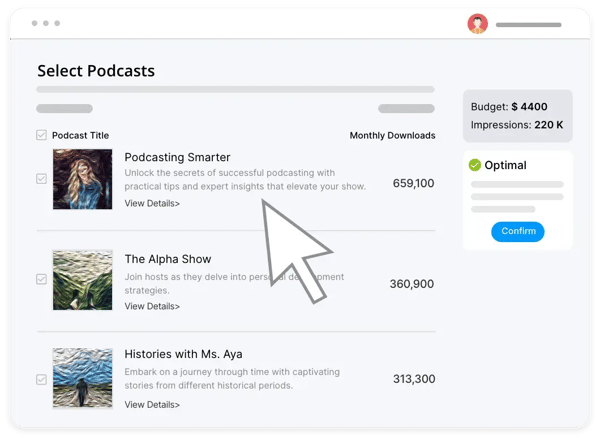
Non-profit and education accounts rate the support team as highly as independent creators with far larger audiences. The consistency across account types is the detail that sharpened my view of this platform: feeling heard when raising an issue is something G2 reviewers describe at six months and at two years in near-identical terms. Calls to action at 92% exceeds what the platform's straightforward positioning suggests, pointing to a product built with real intention.
The platform's podcast website and branding customization have a defined ceiling, as G2 reviewers note. Wanting to change aspects of the embedded player and finding the podcast website does not match their branding, opting to create a dedicated page on their own site instead, is a pattern that surfaces consistently in G2 reviews. The customizable website redirects externally, stopping short of offering true on-platform design control, while the core distribution and feed infrastructure remains polished and dependable across every plan tier.
G2 reviews mention that creators who are looking to access dynamic ad insertion: the feature is available only once a show reaches a defined download threshold, rather than from day one of hosting. G2 reviewers describe wanting dynamic insertion for all customers regardless of download volume, and for shows still building toward the threshold, this creates a waiting period that competing platforms do not always impose. The feature is fully built out and delivers a complete monetization toolkit the moment a show's audience reaches the access point.
RSS.com was built for getting a show live, keeping it distributed, and having someone respond when something breaks. The setup is clean, the delivery is dependable, and the support holds up in a way that is uncommon at this price point. Creators needing advanced branding, private feeds, or complex monetization workflows will want to look further down this list. For independent creators who need reliable hosting that just works, I'd back this one without hesitation.
"RSS.com has provided all I wanted and nothing unwanted. I wished for a clean, professional, uncluttered experience both for myself and for my listeners, and this is what RSS.com has offered."
- RSS.com review, Simo Sakari A.
"I wish they had dynamic insertion for all customers, not just at a certain download threshold, but I'm still able to do what I need to without it."
- RSS.com review, Meg L.
If your first podcast episode is still sitting in a folder somewhere, Buzzsprout was built for exactly that moment. First-time creators arrive uncertain and leave with a show running across every major directory without needing help at every step. The G2 pattern holds without meaningful variation, and I'd say that kind of consistency across usability, support, and reliability is harder to build than the platform's approachable surface suggests.
Ease of setup at 97% is a number that rewards closer inspection, and that conclusion landed hard when I read the multi-year accounts. Even creators with no prior publishing background describe getting a show live and distributed across multiple platforms with minimal effort. Multi-year users credit the platform directly for their show's growth over time, pointing to a path from signup to live episode that was engineered to stay short.
Automatic distribution removes the most repetitive part of a regular publishing routine. One upload pushes to Spotify, Apple Podcasts, Deezer, iHeart Radio, and every major directory without manual submission to each. The time saved compounds across a publishing schedule and is measured in months over a full year. Delivery stays unconstrained as output grows, and that matters because capacity and reliability failing together is where growing shows get hurt most.
The support picture here is one of the more striking I've come across in this analysis. Friendly, patient, informed, and available on weekends from as far as the United Kingdom (UK). An almost instant human response to an automated email, with the agent staying engaged until a complex account migration was fully resolved. These details appear at six months and at two years,s close enough to suggest the standard never slipped.
You land on the platform expecting hosting and find an education layer that other hosts in this category do not maintain at the same depth. Buzzcast, Buzzsprout's own podcast about podcasting, sits alongside blog content and YouTube tutorials that G2 reviewers credit directly for show growth. Regular training emails and update videos compound in value the longer a creator stays. Magic Mastering and Cohost AI add quality without requiring audio engineering knowledge.
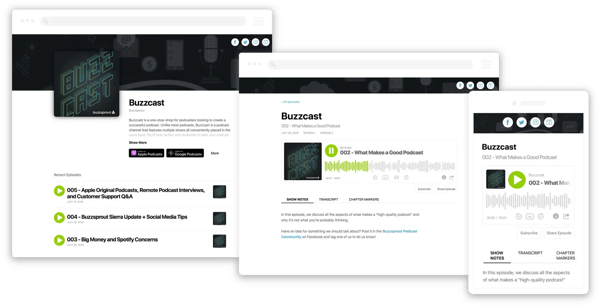
G2 users highlight a production and episode management ceiling that creators with more complex needs will notice. In-platform editing and compression tools are more limited than standalone audio software, bulk episode management falls short for larger catalogs, and video podcast hosting sits outside what the platform covers. The platform's audio hosting and distribution infrastructure is purpose-built and consistently delivers reliable performance across every publishing workflow it supports.
Storage limits on lower-tier plans G2 reviewers flag for creators at an earlier stage. Unused upload minutes do not carry over between months, which creates inefficiencies for shows with irregular publishing schedules, and video podcast support sits notably below the category average, reinforcing the platform's audio-only positioning per G2 review data. The upload and storage structure is clearly defined across every tier, giving creators a transparent and predictable framework for planning their output.
Buzzsprout has spent years refining the moment most platforms get wrong: getting a first show live and keeping it running. The education layer, the support quality, and the distribution reach all hold up well past the starting line. For audio-focused creators who want a guided, reliable, and well-supported path from the first episode to a steady publishing schedule, this is the platform I'd point to first.
"Using Buzzsprout automates the distribution of your podcast to all the favorite platforms. Set up is simple and well-guided. Even a total amateur like me can publish to multiple platforms with minimal effort."
- Buzzsprout review, Mark B.
"Limited storage on lower-tier plans can derail long-term availability. Some advanced features require higher-tier subscriptions, which is understandable but worth noting."
- Buzzsprout review, Shawn C.
Your hosting platform distributes your show, but it won't retain your audience. The best email marketing software gives you a direct line to listeners that lives outside any directory.
Internal communications have a distribution problem. Emails get ignored, intranets go unvisited, and important updates from leadership or training teams reach only a fraction of the intended audience. Storyboard was built to solve that through audio, giving organizations a private, secure podcast environment that delivers content directly to employees. Every feature was designed around controlled delivery, and I think that context shapes everything else worth knowing about this platform.
I'd point to private podcast functionality as what defines the Storyboard experience more than anything else in the G2 reviews. Adding members to a private channel and pushing important updates to a targeted global audience quickly is the core operational value reviewers keep returning to. The embedded player and voicemail both outperform the category average. Cloud recording at 98% reflects a capture layer that holds up reliably inside team publishing workflows without requiring technical oversight at every stage.
Integration with the existing company infrastructure is where the G2 review set keeps returning after setup. Easy incorporation into company websites is a proven strength reviewers name consistently. You deploy it inside an existing intranet or company site, and the audio layer sits there without demanding a separate destination for employees to find and remember. The platform eliminates communication friction across geographically distributed groups without adding a new tool to the stack.
Hands-free mode, analytics, and translation capabilities carry significant weight for organizations communicating across language barriers. Highly encrypted security allows access to be granted to specific individuals, keeping content inside the intended audience without relying on directory controls built for public distribution. The precision here is what separates Storyboard from a standard hosting tool repurposed for internal use, and the G2 data makes that case clearly to me across every tenure length reviewed.
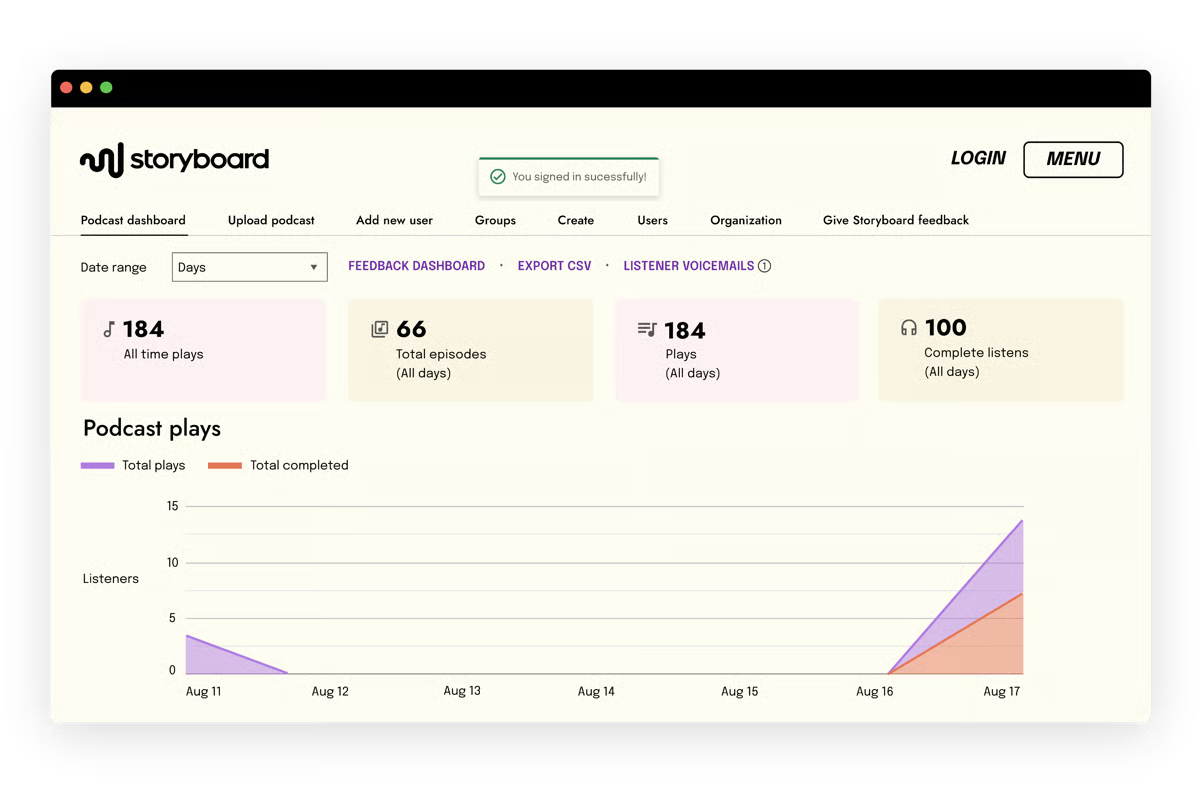
Analytics within team environments draws strong marks across the G2 review feedback, with data described as giving accurate insight into channel growth and employee engagement over time. Performance at 96% reflects reliable delivery across enterprise-scale deployments, and the backend stays manageable for operations or human resources (HR) teams without dedicated technical support standing by. Ease of setup kept appearing in reviews from teams that deployed without information technology (IT) involvement. To me, that signals the onboarding was engineered for the people running internal comms.
Calls to action at 95% reflect exactly what teams using audio to drive specific employee behavior need, whether completing a training module or accessing a linked resource after an episode ends. The delivery infrastructure handles team-wide content access without constraint, regardless of publishing frequency or group size. Reviewers describe the commercial relationship as straightforward from deployment onward, with no friction as team size or cadence grows, confirming a pricing model built to scale.
Team collaboration depth is the part of this platform that surprised me most when I read past the standard internal comms use cases. Private audio delivery combined with integration capability makes it practical for training, knowledge sharing, and project documentation at scale. Advanced features are described as easy to implement across the board, and that depth comes without trading usability for capability. The platform holds up as publishing operations grow more complex over time.
Customer support resolution times are an area where G2 reviewers note room for improvement. An audio glitch during recording, where the support team took considerable time to respond, affected a time-sensitive use case. Resolution times for more technical issues can run longer than expected, and for teams managing time-sensitive publishing schedules, this gap is most pronounced when a technical issue surfaces close to a release. The support team is available and engaged, and response quality on straightforward queries is consistently rated well across feedback.
Initial implementation can require more setup effort than teams anticipate, particularly for organizations deploying without a dedicated IT resource, as G2 review data reflects. While the initial setup can be tricky, the customer support team resolves any issues quickly once contacted. The platform's day-to-day management is straightforward once the initial configuration is in place, and teams that invest in a thorough setup typically report a smooth ongoing experience.
Storyboard was built for private internal audio at scale, and every feature reflects that focus. For communications, training, and team knowledge sharing, this is where I'd send an internal comms team without hesitation. You get a platform that stays true to its purpose, and that kind of focus is precisely what makes it difficult to replace once it is embedded in an organization's publishing routine.
"Storyboard is an easy-to-use platform that has a great ease of implementation. The integration capabilities make it a standout tool for podcasting. The features like creating a private podcasting channel are awesome."
- Storyboard review, Vinayaka C.
"I am using Storyboard regularly. The only issue I have encountered is that its customer support team fails to address the issues properly sometimes. Apart from that, it is a great application."
- Storyboard review, Purvika R.
If cost is the only thing standing between you and a first episode, Anchor removes it completely. Free to use without limits, owned by Spotify, and distributing automatically to every major directory from a single dashboard. No upload caps, no subscription required. The G2 review set reflects that positioning clearly, and the data behind it is worth understanding before assuming free means limited.
The free all-in-one publishing workflow dominates the reviews before any other capability gets mentioned. Recording, editing, and distributing from a single dashboard without submitting to each platform individually is described across G2 reviews as something hard to find anywhere else in this category. The review data on this one piles up fast, and honestly, it is hard to argue with once you read through it.
Distribution runs automatically to Spotify, Apple Podcasts, Google Podcasts, and every other major directory from one upload without any action required from the creator after hitting publish. Creators who had previously worked around clunky third-party plugins describe the shift to Anchor as the moment publishing stopped feeling like a technical task. Performance at 94% reflects a platform that handles the core workflow reliably across devices and operating systems. You upload once, and the episode reaches every directory without a follow-up step sitting between you and your audience.
Built-in recording and editing tools give creators a complete production environment without requiring them to use external software. Background music, effects, and episode scheduling all sit inside the same dashboard used to publish and distribute. Managing uploads, episode information, and releases is described as straightforward from the first session onward, and I would take that as evidence that the product was built for people who had never published a podcast before and needed the path to be genuinely short.
97% on meets requirements for a free platform. That number sat with me longer than most in this analysis, because free platforms in this category rarely score that high across a broad reviewer base. Listener counts by day, week, or month alongside geographic data adds visibility uncommon at this price point, giving new creators everything needed to understand early traction without paying for a separate analytics tool.
.jpg?width=600&height=338&name=Anchor%20(branded%20as%20Spotify%20for%20Creators).jpg)
Anchor's mobile app gives creators a complete recording-to-distribution workflow from a phone, covering capture, basic editing, and publishing without requiring a desktop environment at any stage. Background music, episode scheduling, and direct publishing to all major directories are accessible from the same app used to record. For creators whose workflow is built around mobility, that self-contained capability removes the production friction that desktop-dependent platforms introduce from the first episode onward.
Analytics outside of Spotify is the area G2 reviewers raise most frequently. The platform only pulls sufficient statistics from Spotify, and data from other platforms is thin, making it difficult to build a complete picture of audience behavior across the full distribution footprint. The absence of meaningful search engine optimization (SEO) guidance tools further reflects an environment optimized for Spotify-first publishing, stopping short of broad discoverability. The Spotify analytics layer is detailed and consistently rated as actionable, giving creators a strong foundation for understanding their core audience.
Spotify for Creators' built-in editing environment is intentionally basic, designed for straightforward publishing rather than detailed post-production. G2 reviewers describe finding the editing tools confusing at times, with better results consistently achieved by editing audio externally before uploading a finished file. The publishing workflow is fast and frictionless from upload to distribution, and the platform's streamlined interface keeps every step between a finished file and a live episode clear and direct.
I would place Anchor squarely within one creator profile: someone starting out, working alone, and unable to spend on hosting. Advanced production tools, multi-host recording, and complex branding sit outside what this platform was built to carry. For any creator where cost is the primary barrier, every obstacle between an idea and a live episode gets removed, and that delivery is exactly what the G2 data confirms.
"It distributes my podcast to several platforms without any effort from my side."
- Anchor review, Juan Pablo d.
"What I don't like about Anchor is that you can only have one podcast. My podcast isn't monetized. It's a Christian podcast that helps women deal with life. My first one was in Spanish, and now I have a need to expand to English as well, to help more people."
- Anchor review, Tammy R.
Podcast hosting fees compound fast when you are running more than one show. Transistor charges based on downloads and leaves the show count out of the equation entirely, meaning multiple podcasts run under one subscription without fees stacking per podcast added. That structural difference draws a specific creator type, and the G2 reviews reflect it. Professional creators, agencies, and teams managing content portfolios name the pricing model as the reason they arrived, and the product quality as the reason they stayed.
Running a new podcast series for every university class, paying one monthly fee regardless of how many shows are active. That use case surfaces regularly enough in G2 feedback that it reads, to me, as a signal built into the pricing architecture itself. Managing multiple shows and accessing performance data for each gives a clear comparative picture across an entire content operation, and charging based on downloads scales with actual audience growth.
Support quality is where Transistor separates itself most clearly from competing platforms. Creators who switched described the transition as one of the most relieving software decisions they made, with the team credited for going well beyond standard issue resolution at every stage. You raise something with the support team and find someone who already understands the context of a multi-show operation without needing it explained.
Distribution, uploading, and analytics are described as impressive inside a tool that presents simply but performs beyond what the interface suggests. Performance at 98% is the highest-rated feature in Transistor's profile. That number carried real weight when I read what sits behind it: delivery infrastructure holding up across high-volume multi-show operations is precisely where platforms in this category lose professional creators who needed more than they were sold.
The analytics layer gives teams a comparative view across every active show without pulling them into a separate tool. Tags at 97% reflects strong content organization across large catalogs. A clear picture of each podcast's individual trajectory is what G2 reviewers describe as making the platform valuable for portfolio management. Onboarding runs notably fast across accounts migrating from other hosts, and that migration speed led me to read the process as something built with portfolio complexity specifically in mind.
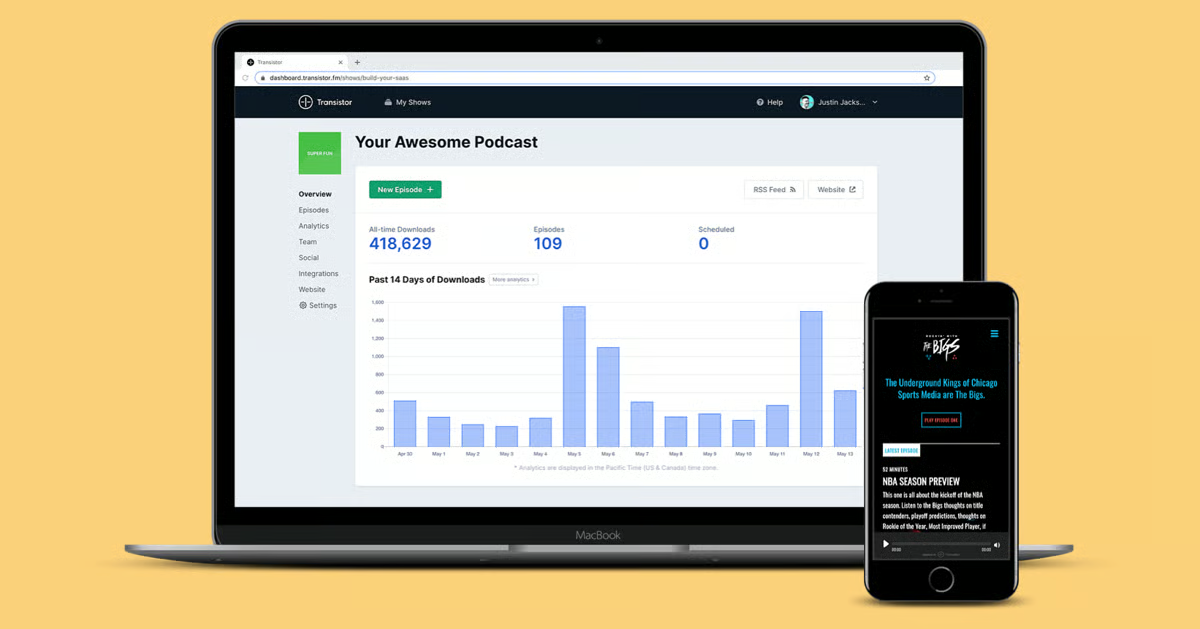
Transistor allows unlimited collaborators to be added to each show under one account, giving teams and agencies a practical way to distribute publishing responsibilities without separate accounts or individual billing per user. The collaborator structure here is the operational detail that impressed me most for agencies reading this: each show maintains its own permissions and access, keeping everything organized across a portfolio without bleed between projects from the first show through the tenth.
The built-in website builder has limited styling options, which G2 reviewers note when comparing it to dedicated site builders. The website is described as difficult to style to a high standard, per G2 review data, and for creators who want a heavily designed show page as part of their brand presence, the toolset stops short of what a standalone site builder would provide. The platform's hosting infrastructure, multi-show management, and analytics are consistently well-rated, and the day-to-day operational experience holds up strongly across every show a creator runs.
Transistor's entry-level Starter plan does not include dynamic ad insertion, YouTube auto-posting, or dynamic show notes, features that sit behind the Professional plan. For professional creators and agencies whose shows have reached a stage where advertising and YouTube distribution are active priorities, the jump from Starter to Professional is a meaningful cost increase that effectively doubles the monthly commitment. The tier structure is transparently laid out, and each plan delivers its full feature set completely, giving creators a clear and reliable foundation at whichever level their workflow requires.
For agencies and teams managing multiple shows, I would call this the most structurally honest pricing model on the list. The performance scores, the support quality, and the collaborator structure all hold up across every account size and tenure length in the data. You get a platform that scales with actual audience growth, and that commercial logic is what keeps professional creators here long past the initial decision.
"It has everything I need to publish my podcast, and it makes it easy to propagate my episodes to every podcast outlet. The price is great. It runs amazingly well. The team behind is always great and eager to help.”
- Transistor review, Val S.
"I had one early tech support exchange that was not very helpful."
- Transistor review, Taegan G.
Libsyn has been in this market longer than most of its current competitors have existed, and the product carries that history in every layer of what it delivers. I'd put infrastructure reliability, distribution breadth, and back catalog management as the three things it does better than anyone else. Those qualities matter most to established creators with hundreds of episodes behind them, and the G2 review set reflects that creator profile clearly.
You will not find many platforms pushing podcasts to as many directories as Libsyn does, including ones many creators have never actively managed, reflecting a network wider than most competitors maintain. Broad distribution and infrastructure reliability are what long-tenure accounts return to before anything else. Running a show for years without a single listener complaint about delivery reflects exactly what that consistency is worth. Unlimited uploads at 89% accommodates large back catalogs without episode rotation becoming a planning consideration.
The infrastructure commitment Libsyn has built over continuous operation is something newer platforms have yet to replicate by adding a reliability badge to a marketing page. Receiving zero listener complaints across extended periods sits as a baseline expectation among established accounts. Established shows stay precisely because that expectation has held across years without meaningful interruption. I draw that conclusion from the long-tenure G2 review data, where very little variation appeared in how extended users describe the reliability standard across the full dataset.
Stats covering podcast listens and global listener locations are cited as primary reasons long-tenure users stay, alongside the ability to measure growth through tools refined across years of continuous use. You set the distribution once, and Libsyn handles delivery to every major network, including Spotify and Apple, without requiring ongoing management after initial configuration. That workflow sits at the core of why established shows with deep publishing histories find the platform dependable in a way that newer competitors have not yet earned.
Experienced podcasters find the publishing workflow reliable and predictable across extended cycles in a way newer platforms have yet to claim. Libsyn carries a professional standing relative to consumer-facing hosts, attracting creators who have outgrown beginner tools. Unlimited downloads at 90% meets category expectations without degrading under back catalog volume. The WordPress integration embeds cleanly and pushes automatically, and it struck me as the kind of quiet consistency only a maintained integration produces.
The platform stays navigable across experience levels without demanding prior technical knowledge to operate at full capability. New podcasters describe it as approachable from the start, and established creators find the interface stable across extended publishing cycles, without the disorientation that frequent updates on competing platforms create. Analytics are accessible on the lowest subscription tier, meaning performance data is available without an upgrade, regardless of how long a creator has been on the platform. I point to that because it surprises creators who expected a paywall.
G2 reviewers consistently flag the website experience and interface as feeling outdated relative to the price point. The available tools are noted as dated, and content tagging for discoverability and episode organization is also flagged as falling below category expectations. Libsyn's hosting infrastructure and global distribution network are among the most established in the category, and that operational reliability is reflected consistently across G2 feedback.
G2 reviewers note that the stats do not drill down far enough for creators building data-driven content strategies. Audience demographic details, including gender, age breakdowns, and time-of-day listening patterns, fall outside what standard reporting delivers, and episode-level data stops short of the granular performance breakdowns that more analytics-forward platforms offer. For shows at a stage where detailed audience insight directly informs content, sponsorship, and scheduling decisions, the reporting gap is most pronounced. The platform's download tracking and global listener location data are clearly presented and reliably delivered across every plan tier.
For established shows where infrastructure reliability is the core requirement, I'd back Libsyn without qualification. The distribution breadth, back catalog management, and delivery consistency add up to something newer platforms are still working toward. You get decades of operational depth behind every upload, and for creators who have outgrown beginner tools and need a platform that holds up under serious publishing volume, that depth is exactly what matters.
"I love that Libsyn pushes my podcasts to multiple podcast platforms. Even ones that I've never heard of."
- Libsyn review, Gwheyohn G.
"The interface, while using it,t was a bit outdated. The stats section was generic."
- Libsyn review, John D.
|
Platform
|
G2 rating
|
Free plan
|
Best for
|
|
SoundCloud
|
4.5/5
|
Yes
|
Independent creators who want a built-in community and organic discovery
|
|
Ausha
|
4.9/5
|
No
|
All-in-one podcast marketing, distribution, and promotional tools
|
|
Castos
|
4.7/5
|
No
|
WordPress-native podcast publishing with seamless plugin integration
|
|
PodBean
|
4.2/5
|
Yes
|
Monetization tools and listener support features under one subscription
|
|
RSS.com
|
4.9/5
|
No
|
Straightforward, unlimited hosting with exceptional customer support
|
|
Buzzsprout
|
4.8/5
|
Yes
|
Beginners who want a guided, well-supported path to getting live
|
|
Storyboard
|
4.5/5
|
No
|
Internal and corporate podcast publishing with private access controls
|
|
Anchor
|
4.7/5
|
Yes
|
Free, frictionless publishing with automatic multi-platform distribution
|
|
Transistor
|
5.0/5
|
No
|
Hosting multiple shows under one account with download-based pricing
|
|
Libsyn
|
4.5/5
|
No
|
Established podcasters managing large back catalogs with reliability
|
*These podcast hosting platforms are top-rated in their category based on G2's Spring 2026 Grid® Report.
Got more questions? G2 has the answers!
If YouTube is part of your distribution strategy, your shortlist is Ausha or Castos. Ausha handles Spotify and Apple on every plan and adds YouTube on Boost and above, converting audio to video automatically. Castos includes YouTube republishing from its Growth plan. RSS.com and Buzzsprout cover Spotify and Apple reliably, but stop there. If YouTube is not a priority, either works. If it is, go with Ausha or Castos and do not settle for a workaround.
PodBean. It is the only platform on this list with a fully functional mobile app covering uploads, scheduling, analytics, and monetization tools. If you want to record and publish entirely from your phone without a desktop, Anchor is the answer. Buzzsprout has a mobile app, but it is limited to uploads and stats. Ausha, Castos, and RSS.com are web-only. If mobile management is a regular part of your workflow, those three are off the table.
Castos, if you are running paid subscriber feeds with Stripe integration and password-protected RSS. Transistor, if you are managing subscriber-only content alongside public shows under one account. Buzzsprout, if you want private podcasts with strong satisfaction scores and a simpler setup. Storyboard if the content is internal and corporate, not paid public subscriptions. The use case splits cleanly. Pick the one that matches yours.
Anchor if your budget is zero and you want to go live today. No setup, no uploads from external tools, automatic distribution to major directories. Buzzsprout, if you are willing to pay and want a guided setup with support that reviewers across the board call the best in the category. RSS.com if you want unlimited hosting at a low price point and support that multiple reviewers say got their show live within hours. Do not overthink this one. Any of the three gets you publishing. Buzzsprout gets you there with the least friction after launch.
Libsyn. Reviewers with hundreds of episodes cite reliability as the primary reason they stay, not features, not price. Unlimited uploads mean no pressure to archive older episodes as the catalog grows. PodBean is the closest alternative with a 98% download delivery rate and infrastructure built for high-frequency publishing. If your catalog is large and your audience depends on uninterrupted access, these are your two options. Everything else is a step down in infrastructure maturity.
PodBean is at around $9 per month for unlimited storage with platform, country, and listener analytics included. RSS.com at around $12 per month with the same unlimited structure and comparable analytics depth, plus discounted pricing for educators and students. Anchor if cost is the only variable, though its analytics are Spotify-focused and limited outside that ecosystem. If you need analytics, you can actually make decisions from PodBean or RSS.com. If you just need to live for free, Anchor.
PodBean or Castos, depending on what you are trying to build. PodBean has a built-in advertising marketplace, listener donations, and premium subscriptions inside the core product. Castos has dynamic ad insertion, paid subscriber feeds via Stripe, and donation tools. Buzzsprout and Transistor both offer monetization capability, but neither matches the depth of the other two. If running ads and paid content simultaneously is the goal, PodBean and Castos are the only two worth comparing seriously.
Ausha, if you want growth tools built into your hosting. SEO optimization, social scheduling, newsletter automation, and Smartlink routing listeners to their preferred app are all included. SoundCloud, if organic discovery is the priority. It has an active listener community already browsing for content, which no other platform on this list has. For audience growth as a primary outcome, those are your two options.
Match your situation to the answer. First podcast with no budget: Anchor. Beginner who wants guidance and real support: Buzzsprout. WordPress site as your home base: Castos. All-in-one marketing and distribution: Ausha. Multiple shows under one account: Transistor. Large established catalog that cannot afford downtime: Libsyn. If you are still not sure after that, the G2 Grid for Podcast Hosting has verified reviews filtered by use case and company size. That is the fastest way to pressure-test a shortlist before committing.
Transistor. Download-based pricing means you can create as many separate feeds as needed without paying per show, and multiple team members can access and manage the account. Castos works if your business runs on WordPress and needs multiple shows on one subscription. Buzzsprout handles multiple shows as separate accounts under one billing relationship, which works but adds overhead. For internal content restricted to employees and off public directories, Storyboard is purpose-built for that, and nothing else on this list comes close.
The decision comes down to one question: what does your show need to do next that your current setup cannot support?
Better analytics to justify the content investment. A cleaner publishing workflow that your team can actually run without manual fixes. Private distribution for an internal audience. Monetization infrastructure that doesn't require a third-party workaround. Whatever that gap is, it should be the only filter that matters when you make your final call.
Before you commit, confirm current pricing directly with each platform. Run a real episode through the trial, not a test file. Check how support responds before you need them, not after.
The podcast infrastructure landscape is also shifting in ways worth watching. Dynamic ad insertion is becoming a baseline expectation rather than a premium tier. Private and internal podcast distribution is growing fast as companies treat audio as a serious internal communications channel. The platform you choose should have a credible path into these capabilities, not just a static feature set.
The work of evaluating is done. You have the data, the criteria, and the tradeoffs. Pick the platform that solves your biggest operational problem today and has the infrastructure to grow with you. Then start publishing.
Ready to build out the rest of your stack? Start with the best free podcast editing software.


The build vs. buy question on infrastructure is already closed for you. What you're deciding...
 by Disha G

The best VPS hosting providers in 2026 include DigitalOcean, ScalaHosting, Cloudways, GoDaddy,...
 by Hasitha Varre