.png?width=400&height=150&name=Untitled%20design%20(56).png)


You already know the stakes: choosing the wrong MFT platform doesn't announce itself with a breach; it shows up in missed SLAs, compliance gaps during audits, and hours spent on manually tracking down failed transfers. By the time those issues surface, you've already paid for the wrong tool
That prompted me to take a closer look at how organizations are really using best managed file transfer (MFT) software, not just for secure delivery, but also for day-to-day reliability, governance, and automation.
For that, I evaluated 20+ MFT platforms across G2 reviews, feature ratings, and satisfaction scores to understand how these tools perform when the stakes are high. I prioritized tools that not only met the baseline on encryption and protocol support but also held up on the metrics that matter most in regulated, high-volume environments, including compliance, provisioning, and transfer reliability.
My top picks are: GoAnywhere MFT, AWS Transfer Family, Files.com, Progress MOVEit, MetaDefender Managed File Transfer™ (MFT), and Axway Managed File Transfer (MFT).
If you're deciding between platforms right now, whether you're migrating off a legacy system, scaling to new compliance requirements, or evaluating your first enterprise MFT solution, this breakdown is built for that decision.
Progress MOVEit: Best for secure, compliant file transfers
Offers end-to-end encryption, audit logs, and automation features to support regulatory standards like HIPAA, GDPR, and SOX. (Custom pricing)
Axway MFT: Best for enterprise-grade governance
It provides a robust MFT platform with high visibility, strong compliance controls, and hybrid deployment options for large-scale enterprises. (Custom pricing)
*These best managed file transfer (MFT) software solutions are top-rated in their category, according to the latest G2 2026 Grid Report. I’ve added their standout features and pricing information for an easy comparison.
According to Straits Research, the global MFT market is projected to grow from $2.55 billion in 2026 to $5.76 billion by 2034 at a CAGR of 10.73%, driven by rising demand for secure, compliant data exchange, particularly in healthcare, finance, and government.
What's changed in 2026 is how much more these platforms are expected to do. AI is now being embedded directly into workflow engines to make autonomous decisions, analyze historical transfer logs, and flag optimization opportunities that admins can act on.
In fact, no-code and low-code configuration has shifted from a differentiator to a baseline expectation, as IT teams seek to reduce their reliance on specialist knowledge to manage critical workflows. And as cloud-native deployment continues to gain ground, MFTaaS is becoming a practical default for organizations seeking enterprise-grade security without the overhead of maintaining their own infrastructure.
I started with G2's Summer 2026 Grid Report for managed file transfer software, which ranks products based on verified user reviews and market presence. This helped me identify both established category leaders and emerging solutions that consistently perform well for secure file transfers, workflow automation, and compliance management.
Next, I analyzed hundreds of verified G2 reviews to understand how these platforms perform in real-world environments. I focused on the factors buyers care about most, including protocol support, encryption, audit logging, role-based access controls, deployment flexibility, and integration with enterprise systems. I also looked for recurring themes in user feedback to identify where products consistently excelled or fell short.
Because I wasn't able to test every platform firsthand, I validated my findings using G2 review data, feature satisfaction scores, product documentation, and AI-assisted review analysis.
All product screenshots featured in this article come from official vendor G2 pages and publicly available materials.
When evaluating MFT tools, I focused on six capabilities that determined whether a platform was genuinely reliable or just feature-complete on paper:
This data was pulled from G2 in 2026. Some reviews have been edited for clarity.
GoAnywhere MFT is a secure managed file transfer solution developed by Fortra (formerly HelpSystems). It is widely recognized for its centralized interface, deep automation features, and secure protocol support.
G2 reviewers across industries highlight workflow automation as GoAnywhere's most valuable capability. Teams use it to eliminate manual file handling entirely, building encrypted, multi-step workflows that trigger on schedules or events and run without intervention. Reviewers particularly appreciate that this level of automation doesn't require heavy scripting; the visual workflow builder makes it accessible even to users without deep technical backgrounds.
What also comes through clearly in G2 reviews is how well GoAnywhere handles centralized visibility. IT teams managing multiple client environments or partner integrations point to the single-pane dashboard as a genuine operational advantage, with user management, transfer scheduling, encryption, and audit logs all accessible from one place rather than spread across disparate tools.
The breadth of protocol support comes up repeatedly as a reason teams choose and stick with GoAnywhere. Reviewers working in complex environments highlight its ability to handle SFTP, AS2, AS4, HTTPS, S3, SharePoint, and Azure Storage on a single platform, bridging legacy vendor systems and modern cloud infrastructure without requiring a full migration. According to G2 Data, 93% of users rate GoAnywhere highly for meeting requirements, which reflects how reliably this flexibility translates into real-world fit.
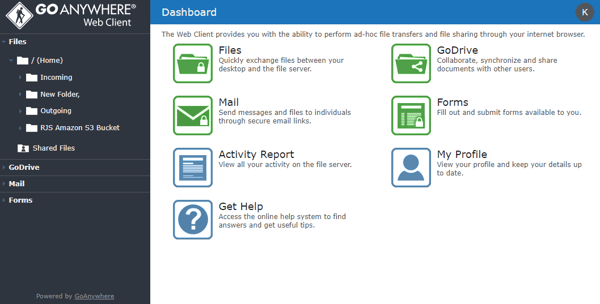
Encryption and data security are sources of confidence for reviewers, especially those handling sensitive client data in regulated industries. Reviewers describe the combination of encryption at rest and in transit, FIPS 140-2 support, and compliance-ready controls as giving them genuine peace of mind, not just a checkbox feature, but something they rely on when transfers involve payroll files, healthcare records, or financial data.
Scheduling reliability is another feature reviewers repeatedly return to. Once workflows are configured, G2 users report that scheduled transfers run consistently in the background without requiring follow-up; daily data pushes, month-end reports, and partner-facing transfers all execute on time without manual prompting. This consistency is particularly valued by smaller IT teams that can't afford to babysit recurring transfers.
89% of users praise GoAnywhere’s deep integration with external applications. Teams are using it to connect to services such as AWS Lambda for post-processing and AWS IAM for fine-grained access control. This native compatibility makes it a great fit for cloud-first organizations, reducing the need for third-party connectors or manual workarounds.
Nonetheless, I noticed that onboarding new team members is a common friction point, with several reviewers noting that the learning curve is steeper than it should be for a platform as established as this. GoAnywhere's feature depth is real, and once users are comfortable, the experience improves significantly.
When transfers fail, G2 reviewers note that error messages and logs aren't always easy to parse, particularly when failures surface as Java exceptions rather than plain-language descriptions. For teams handling time-sensitive transfers, this adds unwanted resolution time. Most reviewers are quick to note, however, that failures are genuinely infrequent, and GoAnywhere's centralized audit logs and visibility tools make it easier than on most platforms to track down the source of an issue once you know where to look.
GoAnywhere MFT earns an average rating of 4.6/5 on G2, built on a strong foundation of automation reliability, protocol flexibility, and compliance-ready controls. For IT teams managing high-volume, multi-partner file workflows, it remains the category's most well-rounded platform.
"GoAnywhere MFT has helped us make major improvements in our File Transfer process by letting us centralize it into one system. The service supports many file transfer protocols, including SFTP, AS2, AS4, S3 buckets, HTTPS, SharePoint, and others, making it a highly flexible platform that enables us to transfer data to partners securely and efficiently. The workflows allow for file manipulation as well, which means processes that were being handled by several individuals can now be completed by one process."
- GoAnywhere MFT review, Gurpal B.
"One thing that I noticed while using it is that though GoAnywhere MFT is powerful, that power brings complexity and overhead with it. Downsides of GoAnywhere MFT are that it's not beginner-friendly, lacks a modern UI/UX, Setup is complex and requires experienced troubleshooting, and it can also be expensive. These are some downsides that can be fixed."
- GoAnywhere MFT review, Maulik M.
AWS Transfer Family is a fully managed service from Amazon Web Services that enables secure file transfers to and from Amazon S3 or Amazon EFS using protocols such as SFTP, FTPS, and FTP.
The feature G2 reviewers return to most consistently is the elimination of infrastructure overhead. With AWS Transfer Family, there are no servers to patch, no uptime concerns to manage, and no scaling decisions to make manually. Reviewers describe this as a meaningful operational shift, particularly for teams that previously spent significant time maintaining dedicated SFTP servers alongside their core cloud workloads.
Native integration with the broader AWS ecosystem is the second major strength cited across reviews. Reviewers highlight how naturally the service connects with Amazon S3, EFS, IAM, CloudWatch, Lambda, and Secrets Manager, enabling access control, post-processing, and monitoring to be configured entirely within familiar AWS tooling rather than through separate systems.
86% of G2 users appreciate the integration with AWS Identity and Access Management (IAM) for managing permissions, as well as encryption at rest and in transit.
Multi-protocol support gives AWS Transfer Family flexibility that reviewers value when working across diverse partner environments. The ability to serve SFTP, FTPS, FTP, and AS2 endpoints from the same managed service means teams can onboard external partners using whichever protocol they already rely on, without standing up separate infrastructure for each.
Automatic scaling is a capability reviewers specifically call out as differentiating. Unlike self-managed solutions that require capacity planning, AWS Transfer Family scales automatically with transfer volume. Reviewers handling batch reports, daily client data pipelines, and high-throughput workloads describe this as removing an entire category of operational risk.
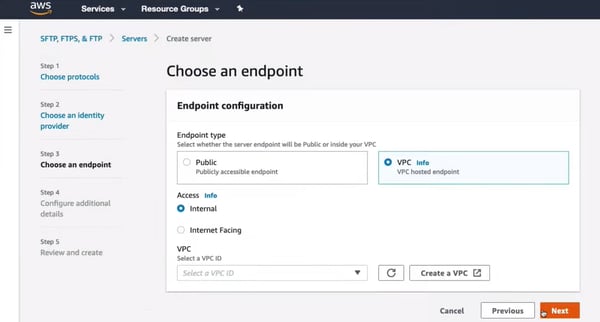
Built-in security is another consistent strength in G2 reviews. IAM-based access control, encryption at rest and in transit, and integration with AWS Secrets Manager for credential management give teams in regulated industries a security posture that's both comprehensive and tightly aligned with their existing cloud governance models. According to G2 Data, 86% of users rate AWS Transfer Family highly for compliance, reflecting how well its security controls translate into audit readiness.
Compliance logging rounds out the six most praised capabilities. Reviewers in healthcare and financial services highlight CloudWatch integration as providing them with the transfer visibility and audit trail they need for regulatory reporting, without having to build custom logging infrastructure on top of a self-managed solution.
Initial setup is the friction point G2 reviewers most consistently cite. Configuring IAM roles, networking, and custom identity providers, particularly when integrating external directories through AWS Lambda, requires solid AWS familiarity, and reviewers new to the ecosystem report a steeper-than-expected learning curve. That said, reviewers consistently note that once the configuration is complete, the platform runs reliably with minimal ongoing maintenance, meaning the setup investment pays dividends quickly through reduced operational overhead.
Pricing unpredictability is the second recurring limitation. The combination of hourly endpoint fees and data transfer charges can make costs difficult to estimate upfront, particularly for teams with variable or high-volume transfer workloads. Reviewers advise monitoring usage closely during initial deployment to avoid billing surprises. It's worth noting that for teams with steady, high-volume workloads, the trade-off between the cost of maintaining equivalent self-managed infrastructure and the benefits of AWS Transfer Family often still favors AWS Transfer Family over time.
AWS Transfer Family earns an average rating of 4.3/5 on G2, driven by its infrastructure-free deployment model, deep integration with the AWS ecosystem, and strong compliance controls. For organizations already invested in AWS, it remains the most natural path to enterprise-grade managed file transfer without adding new tooling complexity.
"What I like most about AWS Transfer Family is that it lets organizations securely transfer files using familiar protocols such as SFTP, FTPS, and FTP, while still leveraging AWS storage services behind the scenes. It removes the burden of managing file transfer servers and offers smooth integration with S3 and EFS."
- AWS Transfer Family review, Atharva P.
"The only limitation is that some advanced features, like cross-region transfers or automation for large volumes, can be a bit tricky for new users. In some cases, troubleshooting failed transfers may require knowledge of multiple AWS services, which can be a bit challenging if you're not already familiar with them. Be cautious with your costs, as high-volume transfers might increase them unexpectedly. Even though this service is very reliable, smaller teams without any AWS knowledge might take a while to set up access controls correctly."
- AWS Transfer Family review, Nijat I.
Files.com is a cloud-native Managed File Transfer (MFT) platform designed to securely store, transfer, and automate file workflows across organizations. It strikes an ideal balance between usability and power, earning its place as the best MFT software for small businesses and startups alike.
According to G2 data, 96% of users specifically mentioned how easy it is to create Secure File Transfer Protocol (SFTP) folders and manage permissions. G2 Users described the process as fast and almost frictionless, which is especially notable given how complex and security-sensitive SFTP configurations typically are.
Security and granular permissions are other major strengths that G2 reviewers consistently return to. Files.com's permission model, covering role-based access, IP allowlisting, SAML SSO, and folder-level controls, gives admins the fine-grained governance regulated industries require, without the complexity that usually accompanies it. Reviewers managing multiple client environments highlight the ability to enforce least-privilege access and maintain clear isolation across sites as a genuine differentiator.
Platform reliability comes through strongly across reviews. Reviewers describe Files.com as a platform that simply works, with multiple users noting zero unplanned downtime over extended deployment periods. For teams where file transfer failures create downstream operational or compliance problems, this consistency is consistently described as the reason they stay.
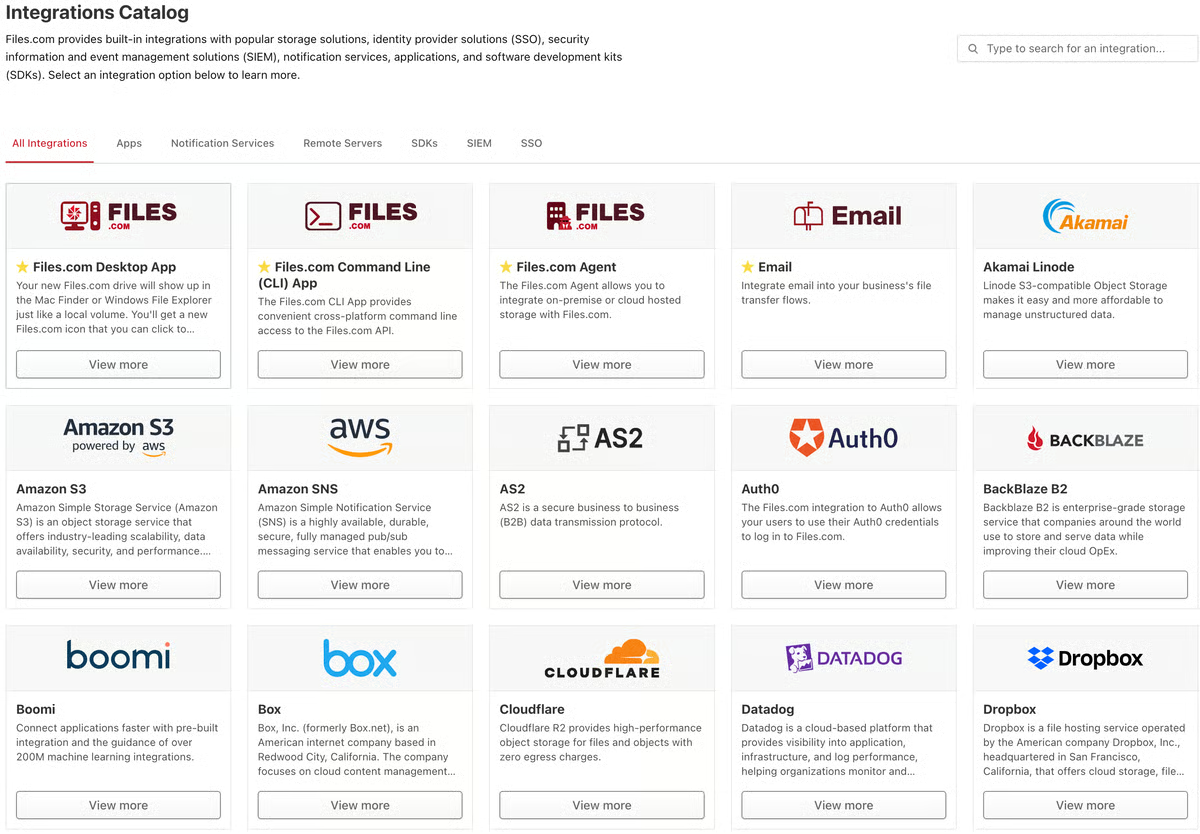
Automation and smart file routing are capabilities that reviewers increasingly cite as central to their workflows. Reviewers use Files.com to replace fragile custom middleware setups, building rule-based routing, scheduled syncs, and webhook-driven workflows that run without manual oversight.
Integration quality is another consistent strength. Reviewers highlight that Files.com's SDKs, REST API, and out-of-the-box connectors with services like Google Cloud, Salesforce, and various SaaS tools make it straightforward to embed secure file transfer into existing business workflows. Reviewers with development backgrounds specifically call out the API documentation quality and the SDK reliability as above average for the category.
Customer support rounds out the six most praised capabilities. Reviewers describe the support team as unusually responsive and technically capable, with multiple users noting that issues were resolved via direct calls with knowledgeable engineers rather than through ticket queues. According to G2 Data, the 98% quality of support rating reflects what reviewers describe as a team that's genuinely invested in customer outcomes, not just ticket closure.
Some G2 reviewers, particularly those managing larger user bases, note gaps in group admin permissions, specifically regarding group admins' ability to add, edit, or remove users independently. Reviewers acknowledge that Files.com has been actively working on improvements in this area, and the platform's overall trajectory in responding to user feedback is consistently described as positive.
A few reviewers with high file volumes and complex routing needs describe the platform as well worth the cost, but those with lower-volume or lighter workloads note that the pricing model is structured for scale, which can feel like paying for more capacity than they need. It's worth noting that multiple reviewers also point out that Files.com replaces several disparate tools in their stack, which changes the cost comparison when viewed in the full context.
Even so, Files.com earns an average rating of 4.6/5 on G2, driven by its combination of genuine ease of use, strong security controls, and a support team that G2 reviewers trust. For teams that need enterprise-grade file transfer without the enterprise-grade complexity, it's the most accessible path to getting there.
"We use Files.com as an interface to Google Cloud Storage, which gives us the ability to easily manage access. It's a perfect veneer for our needs, providing an extra layer of permissions, history, permission fencing, and public access. We also appreciate the file permissions and fencing to prevent unintended access, and that they work well without getting in the way. The command line interface (CLI) is handy as it gives us programmatic access, and the initial setup was very easy."
- Files.com review, Josh L.
"The main drawback for us is pricing flexibility. For lower-volume use cases, it can feel like you are paying for a larger-scale setup than you actually need. We would also like to see a more separate sandbox or testing environment, because debugging in the same account requires extra care with permissions and folder access. Better low-volume pricing options and a cleaner test environment would improve the experience."
- Files.com review, Anton A.
Find top encryption tools to safeguard confidential data and meet compliance requirements with end-to-end protection.
Progress MOVEit is an enterprise managed file transfer platform that has been a category staple for over two decades, with deployments spanning healthcare, financial services, government, and manufacturing. It supports SFTP, FTPS, HTTPS, and AS2 and is built around a compliance-first architecture with encryption, role-based access control, and audit logging at its core.
Long-term reliability is the theme that runs most consistently through MOVEit's G2 reviews, often expressed in years rather than months. Reviewers with deployments spanning a decade describe the platform as one that simply runs, workflows execute as configured, transfers complete without intervention, and the system holds up under sustained enterprise load without requiring constant attention.
According to G2 Data, 92% of users rate Progress MOVEit highly for meeting requirements, reflecting how reliably it delivers on its core promises across diverse environments.
Security and encryption are central to why regulated industries continue to rely on MOVEit. G2 reviewers in healthcare and financial services specifically call out the combination of AES encryption, role-based access control, and Entra (Azure AD) integration as giving them a security posture they trust for sensitive data at scale. The platform's compliance controls are built in rather than bolted on, which is clear in how reviewers describe their audit and governance workflows.
Automation and workflow management are a consistent operational strength. Reviewers use MOVEit Automation's drag-and-drop task builder to configure multi-step file transfer workflows, including encryption, decryption, file manipulation, and conditional routing, without requiring custom scripting. The "set it and forget it" quality of well-configured automation workflows is a recurring theme in reviews, particularly among teams managing high-frequency, scheduled transfers across multiple systems and partners.
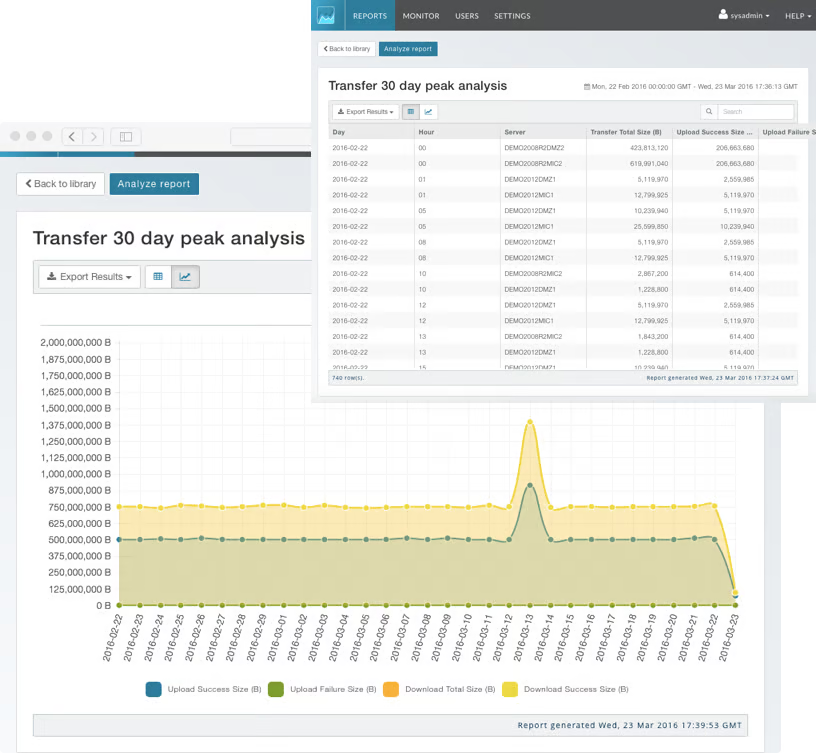
Audit logging and compliance visibility are capabilities MOVEit's G2 reviewers describe as genuinely mature. Detailed transfer logs, covering user activity, transfer status, file metadata, and error events, are accessible directly from the web interface and are downloadable for external reporting. Reviewers in regulated industries highlight this as a meaningful advantage during audits, where being able to reconstruct transfer history quickly and completely is a compliance requirement, not just a convenience.
The web interface is a feature reviewers consistently contrast favorably against the legacy thick client. The current browser-based UI is described as easy to navigate, with a gentle learning curve for new users and accessible log visibility that makes troubleshooting faster than it was in earlier versions. Multiple reviewers note the transition to the web interface as a meaningful usability improvement that has simplified day-to-day administration.
G2 reviewers managing large data pipelines and batch workflows describe MOVEit as holding up well under high volume, reliably handling large file packages without data loss or significant latency. The platform's stability during data spikes is specifically noted by reviewers who've stress-tested it under high-throughput workloads.
New users and administrators unfamiliar with the platform describe the initial configuration as non-trivial, particularly with complex permission structures and automation tasks. MOVEit's depth of capability is real, and reviewers who have been through the initial ramp consistently describe the platform as significantly easier to work with once that foundation is in place.
Likewise, some reviewers would like to see more out-of-the-box reporting options for active automations, user expiration notifications, and failure alerts, without requiring additional configuration. The interface, while functional and improved over the thick client, still feels dated to some reviewers compared to more modern platforms. Progress has been actively investing in the product, and reviewers acknowledge the platform's trajectory has been consistently in the right direction.
Overall, Progress MOVEit earns an average rating of 4.4/5 on G2, underpinned by decades of enterprise trust, compliance-ready architecture, and automation capabilities that hold up under sustained operational load. For organizations with strict regulatory requirements and high-volume transfer environments, it remains one of the most proven platforms in the category.
"What I like most about Progress MOVEit is its reliability and strong security for managed file transfers. It offers a stable platform for automating SFTP and batch-file workflows, helping reduce manual effort and operational risk. Built-in capabilities such as encryption, role-based access control, detailed logging, and audit trails make it well-suited to enterprise environments with strict compliance requirements."
- Progress MOVEit review, Raakesh M.
"When searching the history of a file, folder, or user, the available options should be more intuitive. The search options are useful, but they could be improved to make it easier to find what I’m looking for."
- Progress MOVEit review, Adrian C.
Need more than file movement? Review cloud migration tools built for large-scale workload and application migrations.
MetaDefender Managed File Transfer (MFT), developed by OPSWAT, is a secure file transfer platform built specifically for environments where threat prevention is as important as transfer reliability. Unlike conventional MFT tools that treat security as a compliance layer, MetaDefender MFT embeds advanced threat detection, including malware scanning and content disarm and reconstruction (CDR), directly into the transfer workflow.
Encrypted, policy-driven transfers are the capability reviewers describe as central to MetaDefender MFT's value. Reviewers in banking, IT services, and regulated infrastructure environments highlight that the platform automatically enforces transfer policies, such as routing files based on predefined rules, applying encryption in transit and at rest, and ensuring that sensitive data moves only through approved channels, without requiring manual intervention for each transfer.
Centralized audit trails and access control are capabilities reviewers across industries describe as essential to their compliance workflows. The platform provides a detailed, supervisor-approved audit trail that tracks exactly what was entered into or left the environment and when, giving compliance and security teams the traceability they need for regulatory reporting in BFSI, healthcare, and government environments. According to G2 Data, 95% of users rate MetaDefender MFT highly for security, one of the strongest scores in the category.
Advanced threat detection integrated directly into the transfer workflow is the capability that most distinguishes MetaDefender MFT from the other platforms in this review. G2 reviewers describe the combination of malware scanning and CDR as adding a meaningful security layer without impacting transfer performance; files are inspected and sanitized in transit, rather than checked separately after delivery.
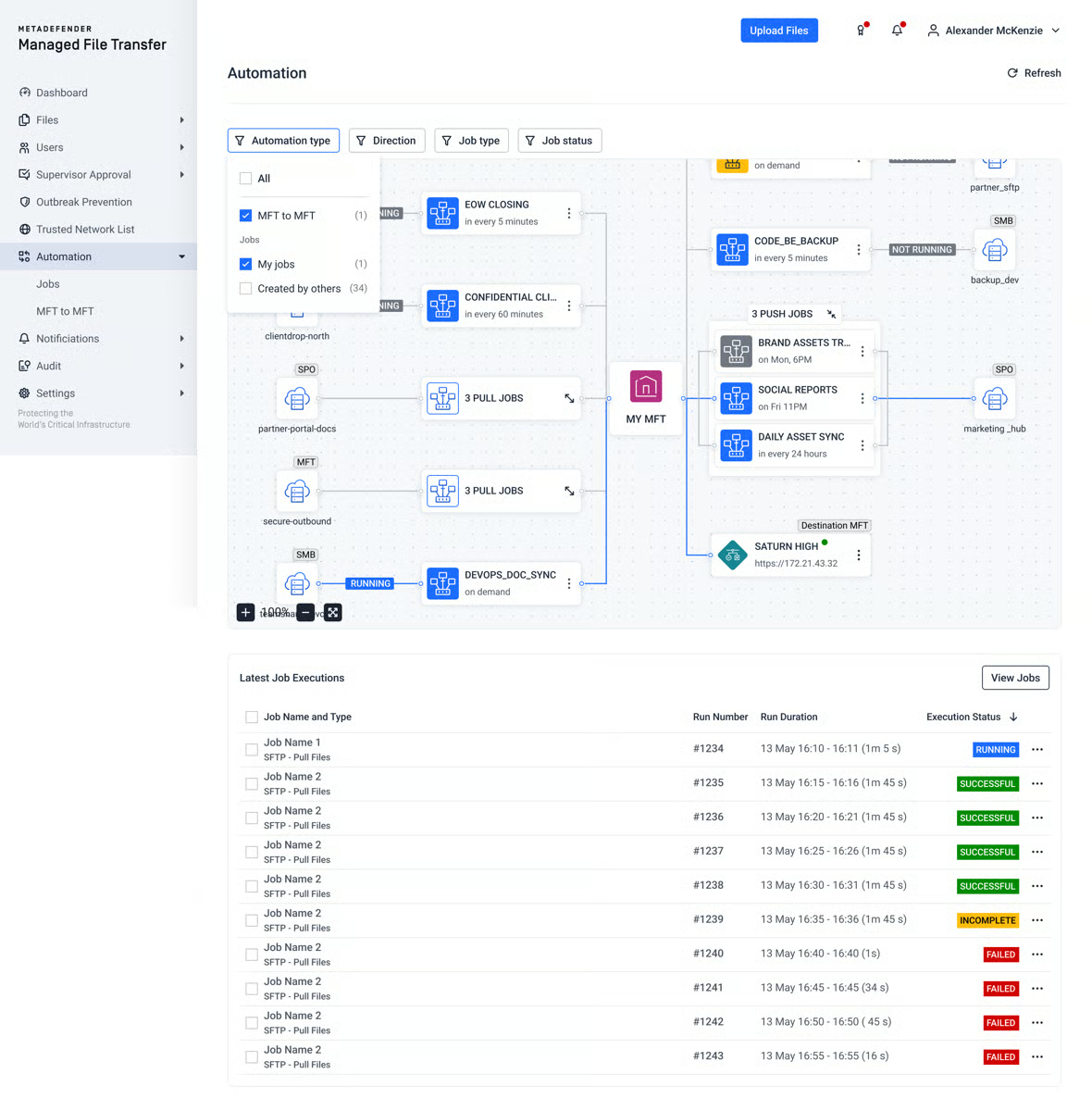
Transfer stability and predictability for large files are strengths that come through clearly in reviews from QA engineers, contractors, and infrastructure teams handling large artifacts, documents, and builds. Reviewers describe downloads as fast and consistent, with no reliability issues even for high-volume or large-file workloads, which matters when a failed transfer of a patch or build artifact has downstream operational consequences.
Multi-protocol support and scalability give MetaDefender MFT flexibility that reviewers value when working across heterogeneous partner environments. The platform supports standard protocols alongside its security-first architecture, meaning teams don't have to choose between protocol breadth and threat prevention. According to G2 Data, 94% of users rate MetaDefender MFT highly for meeting requirements, reflecting how well this combination translates to real-world deployment.
Ease of day-to-day use is a recurring theme in G2 reviews, with particular praise for the clean interface and straightforward file access. Reviewers, including external contractors and non-technical end users who receive files through the platform, describe it as intuitive to navigate, without having to fight the system to find what they need. The setup experience draws similarly positive feedback, with reviewers noting the initial configuration was more straightforward than expected for a platform with this depth of security capability.
Initial configuration could be smoother for teams without prior MetaDefender experience. The one substantive limitation in G2 reviews points to the absence of guided setup options and best-practice templates for common use cases, which means administrators setting up the platform for the first time may need to rely on documentation and support rather than in-product guidance. That said, reviewers consistently describe the platform as performing exactly as expected once configuration is complete, with no ongoing operational friction.
Reporting and dashboard flexibility are areas that reviewers would like to see further developed. G2 feedback points to a desire for more customizable dashboards and granular reporting options, particularly for teams that need to surface specific transfer metrics for internal governance or external audits. Reviewers note that the platform's core visibility and logging capabilities are strong, and the reporting gaps don't undermine the audit trail itself; they simply add manual steps for teams that need tailored views.
MetaDefender Managed File Transfer (MFT) earns an average rating of 4.8/5 on G2, backed by consistently strong scores in security, compliance, and transfer reliability. For organizations operating in high-security or heavily regulated environments where threat prevention at the transfer layer is non-negotiable, it is the most purpose-built platform in this review.
"I find MetaDefender Managed File Transfer™ (MFT) incredibly easy to use and very intuitive. It just gets the job done so easily, and I'm really grateful that we've got it. I also love that it's incredibly customizable, with options like the sandbox and deep CDR. The ability to add things and customize them the way we want is just amazing. From an administrative point of view, it's incredibly easy to use, and the Opswat team themselves have been absolutely fantastic in their communication and in building everything with us. Honestly, it's been amazing working with them."
"While the solution is robust, the initial setup experience could be simplified with more guided configuration options and clearer best-practice templates for common use cases. Enhancing the flexibility of reporting and dashboards, as well as offering more granular role-based access controls, would further improve usability. More transparent or flexible pricing options could also benefit smaller teams or organizations with lower transfer volumes."
- MetaDefender Managed File Transfer review, Verified User in Oil & Energy
Axway Managed File Transfer (MFT) is an enterprise file transfer platform with over two decades of deployment across banking, healthcare, retail, and government. Built around its core components SecureTransport, Transfer CFT, and Workbench, it handles high-volume, high-availability file exchange across on-premise, cloud, and hybrid environments.
Broad protocol support is the capability G2 reviewers most consistently cite as central to Axway MFT's enterprise value. The platform supports SFTP, FTP/S, HTTPS, AS2, PeSIT, and AS4, alongside native connectors for AWS S3 and Azure, giving enterprise teams the flexibility to maintain existing partner connections while extending into cloud infrastructure without having to stand up separate transfer systems for each protocol.
Another standout feature is the platform’s high availability and reliability under sustained load. Reviewers running the platform as SaaS describe guaranteed uptime and consistently reliable transfer execution across complex, multi-pattern workflows, both internally between applications and externally with partners and regulators. According to G2 Data, 92% of users rate Axway MFT highly for meeting requirements, reflecting its dependable performance in enterprise-scale deployments.
In terms of performance, 87% of G2 reviewers often cite Axway's load-balancing capabilities. The platform handles high volumes of simultaneous connections without slowing down, maintaining speed and reliability even under heavy load. This gives users confidence in the platform’s ability to support enterprise-level operations.
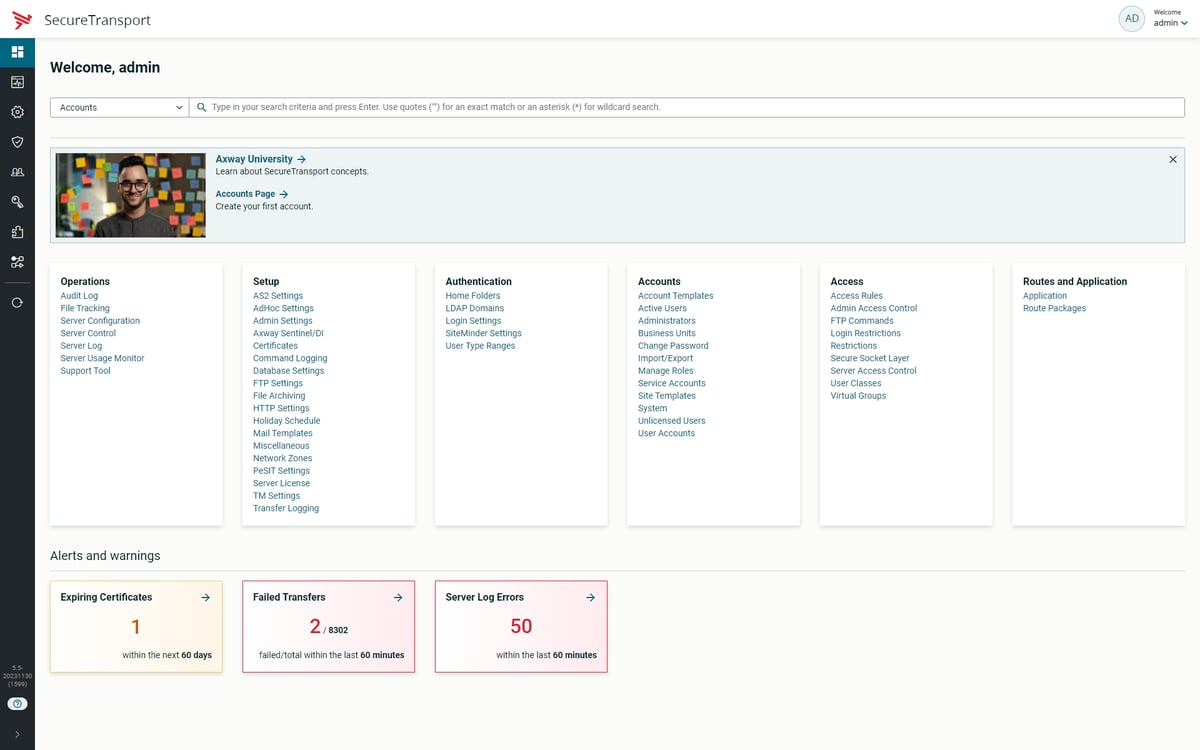
Many reviewers highlight end-to-end encryption, granular role-based access controls, and comprehensive audit trails as providing compliance and security teams with the governance framework they need to meet GDPR, HIPAA, SOX, and PCI DSS requirements. The combination of strong encryption with detailed audit logging is described by reviewers in regulated industries as providing the confidence to handle critical data without operational risk.
Centralized governance through Workbench draws increasing attention in recent reviews. Axway's Workbench provides health visibility, remote command issuance, end-to-end file tracking, and automated operational management across both SecureTransport and Transfer CFT environments from a single interface, giving enterprise teams centralized oversight of complex, distributed transfer infrastructures without switching between tools.
Hybrid deployment flexibility is a strength G2 reviewers value when operating across mixed on-premise and cloud environments. Axway MFT's ability to route files between on-premises ERP systems and cloud platforms is specifically highlighted by reviewers in manufacturing and retail environments that manage supply chain data flows across large partner networks and distributed store locations.
DMZ architecture support is a capability that sets Axway MFT apart for financial services and government reviewers with strict network segmentation requirements. G2 reviewers describe the platform's native DMZ support as essential for organizations where data must traverse security boundaries without exposing internal systems.
That said, some reviewers note that the available documentation for regular use cases and troubleshooting scenarios needs improvement, particularly for administrators working through complex configurations or diagnosing transfer failures without vendor support. Axway's support team is consistently described as responsive and willing to engage directly with customers' issues, helping bridge the gap as self-service resources continue to mature.
Likewise, backward-compatibility changes during upgrades are the second most recurring friction point. G2 reviewers note that updates occasionally break compatibility with previously supported configurations, potentially requiring adjustments to existing workflows post-upgrade. Axway actively engages with customer feedback on its product roadmap, and the platform's overall trajectory has been toward greater stability and operational intelligence.
Axway MFT earns an average rating of 4.5/5 across its G2 reviews, reflecting strong satisfaction among its enterprise user base. For large organizations managing high-volume, multi-protocol file exchange across regulated environments it remains one of the most capable and proven platforms in the category.
"I like that we've moved to a cloud service for Axway Managed File Transfer (MFT), and it has shown better resilience and high availability. Using Axway MFT's managed services, I've noticed improved reliability, especially in server patching. We continue to use its software confidently."
- Axway MFT review, Dipesh A.
"The onboarding partner in the workbench should have been identified earlier. Now, most MFT users have their own Frontend UI that uses the Axway REST API for their onboarding cases. I am looking forward to see more implementation in ST, AI and Workbench."
- Axway MFT review, Jaeson R.
Have more questions? Here are the answers.
GoAnywhere MFT and Progress MOVEit are the best options for large enterprise deployments. GoAnywhere's centralized setup and no-code workflow builder make complex rollouts manageable, while Progress MOVEit's two-decade enterprise track record means its implementation process is well-documented and predictable. Axway MFT is worth considering for organizations with complex hybrid infrastructure requiring structured professional services support.
GoAnywhere MFT and Files.com are the most effective options. GoAnywhere's visual workflow builder automates scheduled and event-triggered transfers without scripting, while Files.com's rule-based routing and smart orchestration replace custom middleware setups. Both platforms are designed to run reliably in the background once configured, with minimal ongoing intervention required.
Files.com and GoAnywhere MFT are the most accessible starting points. Files.com is consistently described by G2 reviewers as offering same-day setup with no technical expertise required. GoAnywhere MFT suits teams migrating off legacy SFTP servers while building toward cloud-first infrastructure, thanks to its broad protocol support and drag-and-drop workflow builder.
Files.com is a good option. G2 reviewers specifically highlight the ability to get from initial setup to fully operational transfers without needing technical support. Its auto-deprovisioning, intuitive permission model, and flat learning curve mean day-to-day management doesn't require specialist knowledge.
Progress MOVEit and Axway MFT have strong long-term reliability track records. Progress MOVEit reviewers with deployments exceeding a decade consistently describe a platform that runs without requiring constant oversight. Axway MFT carries over two decades of enterprise deployment history, with reviewers in banking and manufacturing describing sustained high availability in production environments.
Files.com and GoAnywhere MFT lead in support responsiveness. Files.com reviewers prefer direct calls with knowledgeable engineers over ticket queues when issues arise. GoAnywhere MFT reviewers note timely, technically capable responses. MetaDefender MFT is also praised for direct vendor engagement, particularly during initial configuration and setup.
GoAnywhere MFT is the strongest option. G2 reviewers describe seamless migration experiences, including transitions from IBM MFT systems, with external partner credentials and workflows remaining unchanged throughout. Its support for legacy protocols such as AS2, AS4, and PeSIT, alongside modern S3 and SharePoint integrations, lets teams bridge legacy and cloud infrastructure without a full cutover.
GoAnywhere MFT, Files.com, and Progress MOVEit carry the strongest trust signals. GoAnywhere leads the category in review volume and satisfaction score on the latest G2 2026 Grid. Files.com reviewers describe it as a platform they rely on for business-critical file exchange without operational anxiety. Progress MOVEit's large, long-tenured review base reflects sustained enterprise trust over time.
AWS Transfer Family integrates natively with IAM, S3, EFS, CloudWatch, Lambda, and Secrets Manager, the most natural fit for AWS-based environments. GoAnywhere MFT connects with S3, SharePoint, Azure Storage, AS2, and AS4 from a single platform. Axway MFT is the strongest option for enterprises with complex, multi-vendor environments, covering ERP, SIEM, and legacy protocol connectors, as well as modern cloud storage.
Files.com delivers the fastest time to value. G2 reviewers consistently describe going from setup to fully operational in hours, with no infrastructure to provision and no specialist knowledge required, a critical advantage for distributed teams without centralized IT. GoAnywhere MFT is the stronger option for distributed teams needing centralized visibility across multiple remote environments from a single dashboard.
The MFT category has matured well past basic secure file delivery. What the best platforms in this review share isn't just encryption or protocol support; it's the ability to give IT and operations teams genuine control over data flows that have historically been fragile, opaque, and manual.
The actionable reality is this: if your team is still relying on ad hoc scripts, emailed credentials, or manually monitored transfers for business-critical data, the risk isn't hypothetical; it's a compliance gap or a missed SLA waiting to happen. The platforms reviewed here eliminate that exposure by making automation, audit trails, and access governance the default, not the exception.
As MFT platforms continue to evolve, with AI-assisted workflow optimization, no-code configuration, and MFTaaS deployment becoming standard expectations rather than differentiators, the gap between organizations running modern MFT and those still on legacy setups will widen. The question isn't whether to modernize; it's whether to do it before or after an incident forces the decision.
The right platform is the one that fits your infrastructure today and scales with your governance requirements tomorrow. Start with the non-negotiables, compliance standards, protocol requirements, and deployment model, and let those narrow the field before evaluating features.
Check out leading compliance tools that simplify regulatory tracking, documentation, and reporting for HIPAA, GDPR, SOX, and more.
.png)

If you’re a small- to mid-sized business selling into big-box retailers or major partners, you...
 by Soundarya Jayaraman

I know how stressful it can be to finish a project only to have a computer crash erase all...
 by Sudipto Paul

Developers and architects spend their days juggling live deployments, debugging integrations,...
 by Keerthi Rangan