I evaluated 40+ tools to find the seven best iPaaS software in 2026. These are Zapier, Celigo, Workato, n8n, SAP Integration Suite, ServiceNow Integration Hub, and MuleSoft Anypoint Platform.
As a marketer, I work extensively with multiple cloud-native applications, and my workflow often feels fragmented.Moving data between tools reveals recurring challenges: API inconsistencies, data silos, coding hurdles, and software incompatibilities.
To solve this, I collaborated with cloud engineers and DevOps teams, which led me to evaluate iPaaS (Integration Platform as a Service) software, a tool that automates data syncing, manages integrations, and centralizes data control on a single platform.
After learning the basic structure and use cases, I evaluated the 7 best iPaaS tools available today and tested their top features, such as custom scripting, robust integration management, and productivity optimization.
If you're comparing options — whether you're an IT lead trying to reduce engineering dependency, a RevOps manager drowning in tool sprawl, or a developer who's tired of being the integration glue — this guide highlights top-rated platforms based on G2 scores, reviews, and user ratings. These tools are ideal for teams looking to streamline workflows, reduce IT dependencies, and secure data across cloud infrastructure.
7 best iPaaS software in 2026: My top picks
- Zapier: Best for automation with notifications and simple data transformation
For connecting apps, software integrations, basic data transformation, and encryption. ($19.99/month)
- Celigo: Best for secure integrations with industry-standard protocols
For teams needing secure, encrypted data transfers with support for key communication protocols. (Custom pricing)
- Workato: Best for real-time integrations and advanced data mapping
For enabling real-time, bi-directional data flow with advanced logic and mapping capabilities. (Custom pricing)
- n8n: Best for flexible, code-friendly automation with self-hosting control
For technical teams wanting self-hosted, code-flexible automation with full data control and no per-task pricing. ($22.87/month)
- SAP Integration Suite: Best for enterprise SAP landscape integration with pre-built content and centralized governance
For SAP-heavy enterprises needing pre-built integration content, centralized monitoring, and seamless connectivity across the SAP ecosystem.
($1728 for a contract duration of 3 to 36 months)
- ServiceNow Integration Hub: Best for enterprise workflow automation within the ServiceNow ecosystem
For ServiceNow-native enterprises looking to automate cross-platform workflows using pre-built spokes and a no-code Flow Designer. (Custom pricing)
- MuleSoft Anypoint Platform: Best for scalable app integrations and API monitoring
For connecting enterprise systems through API, migration, monitoring, and transformation. (Custom pricing)
*These iPaaS software are rated as top solutions in G2’s Summer 2026 Grid Report. I have included their standout features for easy comparison. For most solutions, pricing is available on request, and I have also included the starting price for the others.
My research also factored in the technical complexities businesses face with data in cloud-native applications. At any given moment, organizations are focused on protecting their data, managing growing data volumes, and adhering to proper compliance and regulatory requirements in a hybrid setting.
Keeping all of that in mind, I evaluated and shortlisted tools that are ranked as top leaders in the G2 Grid Report with consistently high G2 ratings for iPaaS-related features.
7 best iPaaS software that I evaluated and recommend
Organizing and centralizing cloud resources can drain your infrastructure and bandwidth. Most companies still lack the technical expertise to manage integrations, leaving data in isolated locations without a centralized way of application management.
From my research, I found that what businesses need isn’t just an iPaaS tool to centralize and manage data on the cloud, but also to grow production efficiency, scale usability, and deliver continuous features as a part of their SaaS stack. These tools help you create new product functionality with ease and push it live securely and safely.
According to Grand View Research, the global iPaaS market size was valued at $12.9 billion in 2025 and is projected to grow from $15.9 billion in 2026 to $55.5 billion by 2033, exhibiting a CAGR of 19.6% during the forecast period.
These numbers ascertain that companies are investing in iPaaS solutions more than ever to manage data workflows, add features, and shorten production and time to market — all while scaling their data management and security processes.
How did I find and evaluate the best iPaaS software?
I spent weeks evaluating which iPaaS tools are the perfect fit for organizations looking to manage cloud-native apps in a multi-cloud environment. I focused on including key features like scalability, low-code or no-code interface, data security, compliance and regulation, and customization and control of integrations so that they lead to software product growth within SaaS companies.
During my evaluation process, I used AI to summarize key sentiments from real-time G2 reviews, condense technical information, and bring accurate insights for iPaaS solutions to your doorstep. Other than that, I delved into G2 insights and Grid Reports that highlight the ease of use, customer satisfaction, and market presence of these solutions to give you unique insights that are hard to find anywhere else.
I also consulted market professionals with industry experience in iPaaS software and elaborated on their hands-on experience, along with cross-validating it with G2 reviews.
Screenshots featured in this article might be a mix of those found on G2’s profile or third-party vendor sites.
What makes an iPaaS software worth it: My opinion
According to the intel I gathered regarding the best iPaaS platforms, an ideal iPaaS tool reduces your efforts to create and control cloud-native applications and enables smooth data transfers. It allows both dev and non-dev teams to manage and optimize integrations in a multi-cloud or a hybrid cloud environment
Unlike the enterprise service bus (ESB), which generalizes cloud operations for enterprises, iPaaS tools are key drivers of app productivity and efficiency. The environment is easy to deploy and scale, and it reduces the overall total cost of ownership (TCO).
Below are some crucial parameters that you need to consider while shortlisting iPaaS software
- Pre-built connectors for tech stack: I shortlisted iPaaS tools that offered “out-of-the-box” SaaS connectors for applications. I specifically checked whether they supported the tools that are actually used on a large scale, like Salesforce, NetSuite, Workday, and a couple of legacy on-prem systems. This list contains tools that don’t just claim flexibility, but actually have real, working APIs and connectors I could test.
- Event-driven architecture support: During evaluations, I found that the best iPaaS platforms have event integrations, not just batch-based data transfers. This is a critical feature because event triggers within ERP or CRM systems are always a priority and need immediate attention. If a tool only supports scheduled syncs and doesn’t offer webhook automation or stream events, it might not be efficient for internal teams.
- Error handling and observability built for Ops teams: One of the most underrated features I looked for was how errors were handled and mitigated. The tools in this list have the ability to trace failures, see retry logic, and get proactive alerts before business users start complaining. Platforms that exposed logs provided root-cause visuals and had alert integrations with tools like Slack or PagerDuty got an instant bump in this list.
- Data transformation layer with low-code capabilities: I prioritized vendors that offered strong data transformation capabilities while offering both visual and code-based options. This helped our integration team manage field mappings, conditional logic, and normalization without writing full ETL pipelines every time. If it required spinning up an engineering sprint for every little update, it didn’t make it to the list.
- Security, compliance, and governance controls: I checked for enterprise-grade security features like role-based access control (RBAC), data masking, and audit trails. I shortlisted systems that extended security coverage to cloud applications and ETL processes, too. If you handle PII and financial data, I prioritized platforms that were SOC Type 2 compliant and supported data residency options. The vendors that provided automated security updates or audits in their integrations stood out to me the most.
- Sandbox and version control for integration testing: I restrained myself from deploying untested workflows into production, so sandbox protection is a must. The better vendors gave full-dev tested production pipelines, and the ability to control versions for testing. That gave our teams peace of mind to experiment and test without breaking things in live environments.
- Active vendor ecosystem and market adoption: I didn’t overlook the platform’s demand in the market. I looked at customer reviews, third-party analyst reports, and even developer forums. High adoption among companies is a sign of faster updates, stronger community support, and better integrations. It also indicated that vendors will provide automatic updates and maintenance that will lower IT overheads and service costs.
- White-labeled or consumer-facing integration portals: Since integrations are used in-house or offered to customers, I prioritized solutions that could give us embeddable UIs or white-labeled portals. The best platforms let me expose certain integration flows externally, with branding control and user-friendly interfaces. This means that there will be less custom development on your side, and non-technical teams can build integrations and offer a cleaner experience.
Apart from this, the iPaaS platform also improves the time-to-market of your cloud apps by providing automated integrations without manual intervention and faster production.
Because of the initial challenges companies faced in coding integrations, there has been a wide upsurge in the valuation of iPaaS platforms in the market.
Out of 40+ iPaaS tools that I initially shortlisted, the following 7 stood out in terms of utilizing low-code or no-code features, reducing failover risks, offering API or webhook, and controlling integration workflows.
To be included in the iPaaS category, software must:
- Build, deploy, and manage integrations within the cloud
- Allow users to govern and manage integration flows
- Connect various cloud-to-cloud systems and solutions
- Consolidate cloud solutions into a single platform
*This data was pulled from G2 in 2026. Some reviews may have been edited for clarity.
1. Zapier: Best for automation with notifications and simple data transformation
Zapier offers workflow automation to businesses looking to manage, secure, and control their app integrations. Its plug-and-play extension enables your teams to maintain the efficiency of tools and processes without relying on development teams. Zapier has been recognized as a G2 leader based on a 100% customer satisfaction score and strong market presence. Not only that, 96% of users have rated it 4 or 5 stars, and 90% would recommend it to others, as per G2 Data.
If you are juggling multiple apps and trying to get them to talk to each other without running into confusion, Zapier saves you the trouble. At its core, Zapier automates tasks between apps; think of it as your behind-the-scenes digital assistant. You can link everything from Gmail to Trello, Slack, HubSpot, and even obscure tools like RSS feeds. It supports over 9,000 apps, so odds are, whatever you’re using is on the list.
What I really love is how easy it is to create automation, or "Zaps" as they call them. The platform gives you this drag-and-drop builder that makes it simple to stitch actions together. For example, I have one Zap that takes every Typeform submission and posts it into a Slack channel while also updating a Google Sheet and sending an email summary to my inbox. It’s seamless.
The interface is intuitive enough that you don’t need to be a developer, but if you are one, you’ll appreciate the more advanced options like multi-step Zaps, filters, and even JavaScript and Python code steps through Webhooks. 89% of G2 reviewers find Zapier easy to use.
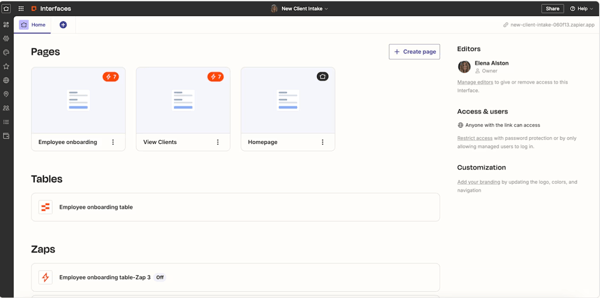
While Zapier is easy to adopt and offers a wide app ecosystem, some G2 users note that pricing can rise as automation needs grow, especially with higher task volumes or advanced features. That said, its accessibility, broad integrations, and time-saving automation can still make it a strong fit for teams that want to connect tools quickly without heavy technical setup.
Overall, Zapier continues to impress with its flexible API handling and effortless data transfers, making automation feel accessible and impactful for teams of all sizes.
What I like about Zapier:
- Zapier helps you create automated systems without hiring a developer.
- Zapier is great for CRM integrations, like syncing needs between platforms, auto-updating contract records, and triggering follow-ups.
What G2 users like about Zapier:
"What I like best about Zapier is how easy it is to connect different platforms and automate workflows without needing custom development. We use it to connect marketing tools, CRMs, AI agents, lead generation systems, and communication channels, which saves a significant amount of time and reduces manual work. The large number of integrations and the reliability of the automations make it an essential part of our operations."
- Zapier review, Richard D.
What I dislike about Zapier:
- Zapier’s pricing can rise with higher task volumes or advanced features, but its ease of use, broad integrations, and quick automation setup still make it valuable for growing teams.
What G2 users dislike about Zapier:
"As for negative features, there are three primary issues with this tool: price, complexity, and lack of control. After getting used to the service, you'll likely pay more due to the number of tasks, and some of the automations may fail if a particular application's API changes or the log-in fails. In essence, even if the program offers convenient automation, there will still be a need for constant monitoring. As such, Zapier is useful when you need to connect different tools quickly; however, it is definitely not the best long-term solution.”
- Zapier review, Mark D.
2. Celigo: Best for secure integrations with industry-standard protocols
Celigo is an integration-as-a-service platform designed to offer low-code development capabilities, centralize data, and control integrations for your cloud-native applications. As per the G2 Grid Report, Celigo is used by 36% of small businesses, 58% of mid-market teams, and 5% of enterprises.
The first thing that pulled me in was how user-friendly the interface is. Even when I had to build out fairly complex workflows, I found the whole process super intuitive. The platform doesn’t make you feel like you need to be a hardcore developer to get real work done. With pre-built connectors, especially for NetSuite, Salesforce, and Shopify, I could literally drag and drop to set up automated flows that otherwise would have taken hours of scripting.
Now, what really stands out to me is the breadth of integrations and automation features. I evaluated the feedback of G2 users who set up flows that sync data in real time between their CRM and ERP systems, and the accuracy and speed have been solid. I love how Celigo helps shape the logic with built-in transformation layers and error handling.
Celigo’s customer support stands out for being responsive, knowledgeable, and genuinely invested in helping customers succeed. G2 reviewers frequently highlight the team’s ability to guide implementations, troubleshoot issues quickly, and provide practical expertise throughout setup and ongoing integration management. This hands-on support, combined with strong training resources like Celigo University, helps teams move faster, resolve blockers with confidence, and get more value from the platform.
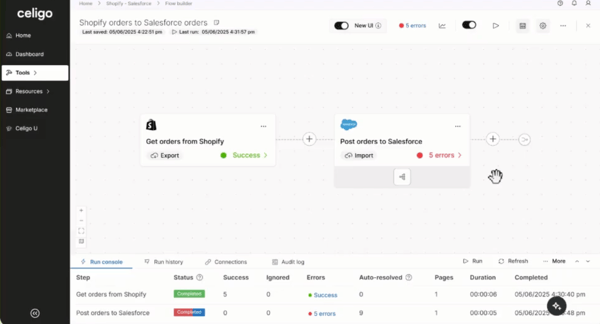
While Celigo is highly capable of automating integrations across business systems, some G2 users note that more advanced workflows can take time to configure and may require a stronger understanding of mapping, logic, and platform settings. That said, once teams get familiar with the setup process, Celigo’s flexibility becomes a strength, especially for businesses managing complex, multi-app integration needs.
Overall, the G2 customer sentiment for this iPaaS tool is strongly positive. Celigo’s flexibility, powerful integrations, and dependable support are its key strengths.
What I like about Celigo:
- Celigo has proven to be both flexible and reliable. I love how it streamlines operations and enables real-time data synchronization.
- It offers unrivaled functionality, multiple endpoints, built-in connectors, ease of use (even for users with limited technical expertise), process automation, and an excellent UI.
What G2 users like about Celigo:
"I am not an IT person, but the integration to NetSuite is intuitive and easy to use. We've been using Celigo as our NetSuite connector for 3 years, and the performance is smooth and intelligent. When I get stuck, the tech support is exceptional and very timely. Pricing for our small implementation is reasonable.”
- Celigo review, Pete K.
What I dislike about Celigo:
- Advanced workflows in Celigo can take time to configure and may require knowledge of mapping, logic, and platform settings, but that flexibility is valuable for teams managing complex, multi-app integrations.
What G2 users dislike about Celigo:
"Some advanced use cases require a deeper technical understanding, especially when building custom flows, handling edge cases, or working with complex APIs. The UI can feel overwhelming for new users, and debugging large integrations could be improved with more developer-style tooling. Pricing can also be a consideration for smaller organizations compared to lightweight automation tools”
- Celigo review, Nuri Vladimir E.
Ensure proper maintenance for your cloud-native applications and extend data security across the infrastructure with this detailed analysis of 30+ best cloud monitoring tools by my colleague, Soundarya Jayaraman.
3. Workato: Best for real-time integrations and advanced data mapping
Workato is a cloud-based enterprise orchestration platform. It offers API management, webhook automation, data transfer, integration controls, and data scaling features to automate and control your data integration workflows. 99% of users on G2 have rated it 4 or 5 stars, and 96% of users believe that it is headed in the right direction.
What I loved initially was the easy-to-understand UI/UX of the platform. Even if you are not a developer, it has got this drag-and-drop interface that makes building automations, or recipes, an easy process for developers. I especially love how it’s low-code but not low-power. Workato supports advanced logic, like loops, branches, and complex data transformations, and even lets me run SQL queries directly inside recipes.
You can integrate and sync ERPs like Salesforce, Slack, Gmail, and even Snowflake with just a few clicks. Once the credentials are in, Workato magically connects to the APIs and just works. It’s like the integrations know what I’m thinking, which is perfect because I don’t want to waste my time figuring out REST payloads or managing secrets. Workato takes care of all that behind the scenes.
There’s a built-in error-capturing feature, which can prove beneficial for your efforts. And with its huge library of connectors, you can always expand your horizon. I’ve used their scheduling tools, and cloning recipes makes it easy to scale repeatable workflows. The best part is that I don’t need to know Python or Ruby to get things done. However, if you are a developer, Workato’s SDK lets you create custom connectors, which gives you even more control.
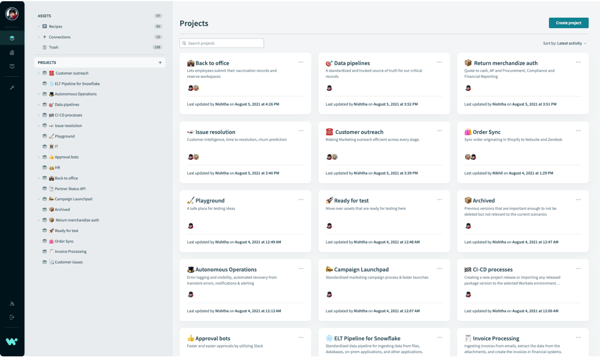
G2 users note that handling larger data volumes or more data-intensive processes can require extra planning around limits, performance, or recipe design. That said, for teams that structure their workflows carefully, Workato remains a powerful fit for scalable automation and cross-application orchestration.
Overall, G2 customer insights reflect a strong sense of satisfaction, with many users feeling that Workato's benefits far outweigh its limitations, especially as it continues to evolve based on feedback.
What I like about Workato:
- Workato’s ability to simplify and minimize tasks via automation fundamentally transforms business processes.
- It enables users to integrate and sync ERPs like Salesforce, Slack, Gmail, and even Snowflake with just a few clicks.
What G2 users like about Workato:
"The development effort required to build an automation or integration in Workato is much lower compared to other iPaaS tools. Workato offers many features and actions that make development easier and more straightforward."
- Workato review, Karthi C.
What I dislike about Workato:
- Larger data volumes in Workato may require extra planning around limits, performance, and recipe design, but structured workflows can still support scalable automation across apps.
What G2 users dislike about Workato:
“The Workato Go platform should improve the process for adding data sources. When adding data to a data source, there is an 'Access Group' field. If a new group is created after the data load is completed, I need to fully reload the data to include the new group, as there is no edit option available. This consumes a lot of API tasks from applications.”
- Workato review, Venkatesh M.
4. n8n: Best for flexible, code-friendly automation with self-hosting control
n8n is an open-source workflow automation platform built for technical teams that want full control over their integrations without the constraints of per-task pricing or vendor lock-in. As per G2 Data, n8n is used predominantly by small businesses (79%) and mid-market teams (19%).
If you're a developer or technically inclined user who wants the speed of a visual builder but refuses to give up the power of custom code, n8n hits that sweet spot. At its core, n8n lets you connect apps, APIs, databases, and AI models into automated workflows using a node-based visual editor. Each node represents a step — triggering events, transforming data, calling APIs, or running custom JavaScript and Python — and you can chain them into complex multi-step pipelines without writing full application code.
What stands out most to me is the self-hosting option. You can run n8n on your own infrastructure, whether that's a VPS or a full Docker Swarm cluster, which means no execution limits, no per-task charges, and complete data sovereignty. For teams automating sensitive customer data or operating under strict security audits, this is a genuine differentiator.
n8n's growing AI capabilities are also worth noting. The platform's MCP integration, LangChain support, and AI agent nodes make it a go-to choice for teams building production-ready AI workflows. G2 users report being able to orchestrate multi-LLM pipelines, switch between OpenAI, Anthropic, and local models mid-workflow, and build agentic automations that previously required custom backend development.
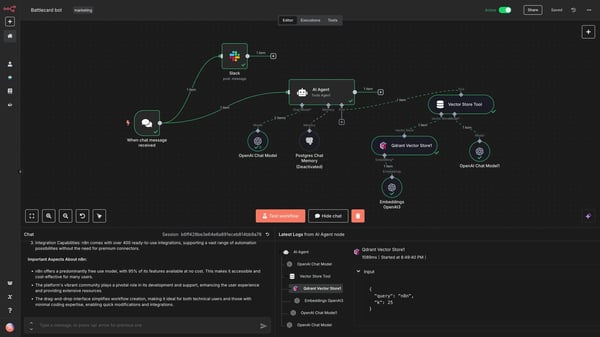
While n8n gives teams strong flexibility to build custom automations, some G2 users note that configuring more advanced workflows can require technical know-how and extra setup time. That said, its visual workflow builder and open-source flexibility make it a strong fit for teams that want deeper control over automation logic.
Overall, G2 customer sentiment for n8n is strongly positive, with users consistently praising its flexibility, open-source model, active community, and rapidly expanding AI capabilities.
What I like about n8n:
- n8n lets technical teams build production-grade automations without per-task pricing, making it especially cost-effective at scale.
- The self-hosting option gives teams full data ownership, making it a strong fit for security-conscious organizations and those with strict compliance requirements.
What G2 users like about n8n:
"I love the flexibility of the self-hosted version. It allowed our team to automate sensitive customer data workflows without sending that data to a third-party cloud, which was a dealbreaker for us on other platforms."
- n8n review, Renee C.
What I dislike about n8n:
- Advanced workflows in n8n may require technical know-how and extra setup time, but its visual builder and open-source flexibility give teams deeper control over automation logic.
What G2 users dislike about n8n:
"The licensing for this application can be somewhat confusing and tends to be on the expensive side. While the software is still evolving, it has yet to fully mature for large-scale enterprise deployments, particularly in areas where governance, privacy, and security are critical—especially given the current landscape of AI.”
- n8n review, Sunil K.
5. SAP Integration Suite: Best for enterprise SAP landscape integration with pre-built content and centralized governance
SAP Integration Suite is an integration platform as a service built for enterprises that run on SAP and need a reliable, scalable way to connect their SAP core systems with third-party applications. According to G2 Data, 94% of users rated it 4 or 5 stars, 90% believe it is headed in the right direction, and 86% would be likely to recommend SAP Integration Suite.
If your organization is heavily invested in SAP, running S/4HANA, SuccessFactors, Ariba, or Concur, and you're dealing with the classic enterprise headache of fragmented, point-to-point integrations, this is where SAP Integration Suite shines. At its core, the platform gives you a unified, cloud-based toolkit to build, deploy, and monitor integrations across SAP and non-SAP systems without writing everything from scratch.
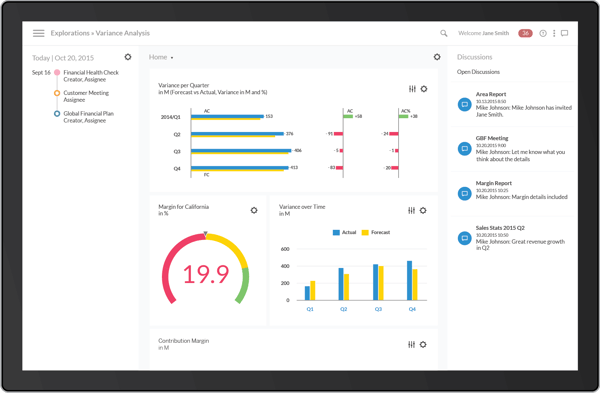
What really stood out to me from G2 reviews is the monitoring cockpit. It gives you real-time visibility into message processing, retries, failures, and throughput across your entire integration landscape. This kind of centralized observability is hard to find in more developer-focused tools and is particularly valuable for enterprises running business-critical flows like employee lifecycle events, purchase order updates, or invoice processing.
SAP Integration Suite also supports the clean core philosophy by moving integration logic out of your ERP and into the Suite. In this way, you reduce custom ABAP code in S/4HANA, which makes upgrades significantly smoother. Several G2 reviewers report that this side-by-side extension approach has been transformative for their upgrade cycles.
While SAP Integration Suite offers strong governance, pre-built content, and native SAP connectivity, debugging complex or multi-step iFlows can take additional time when error messages are not immediately actionable. That said, for enterprises already invested in the SAP ecosystem, these trade-offs are manageable given the platform’s depth and integration control.
Overall, SAP Integration Suite is strongly recommended among SAP-centric enterprises, with users consistently highlighting its pre-built content, centralized monitoring, and scalability as the key differentiators.
What I like about SAP Integration Suite:
- The centralized monitoring cockpit gives enterprise teams real-time visibility across all integration flows, reducing operational risk for business-critical processes.
- The platform gives you a unified, cloud-based toolkit to build, deploy, and monitor integrations across SAP and non-SAP systems.
What G2 users like about SAP Integration Suite:
"I love this platform as it efficiently connects the SAP Ecosystem with other platforms, with so much efficiency that it improves productivity and quality of the work. Other than this, I love this platform for its ability to monitor, which ensures that all the processes are in line. One of the best parts I love about this platform is its capacity of this platform to monetize by creating plans. The API Management capacity of this platform is outstanding in this platform. The fact that its ability to monitor all integration in this platform is really useful and improves the efficiency of work."
- SAP Integration Suite review, Konjengbam M.
What I dislike about SAP Integration Suite:
- Debugging complex or multi-step iFlows can take time when errors lack detail, but SAP Integration Suite’s governance, pre-built content, and native SAP connectivity make the trade-off manageable for SAP-focused enterprises.
What G2 users dislike about SAP Integration Suite:
"Honestly, what I don’t like about SAP Integration Suite is that it can sometimes feel too technical for daily business users. When something fails, the error details are not always easy to understand. In AR, we just want to know what went wrong and what we should fix, but sometimes you need technical support to fully understand the issue.”
- SAP Integration Suite review, Kanan A.
6. ServiceNow Integration Hub: Best for enterprise workflow automation within the ServiceNow ecosystem
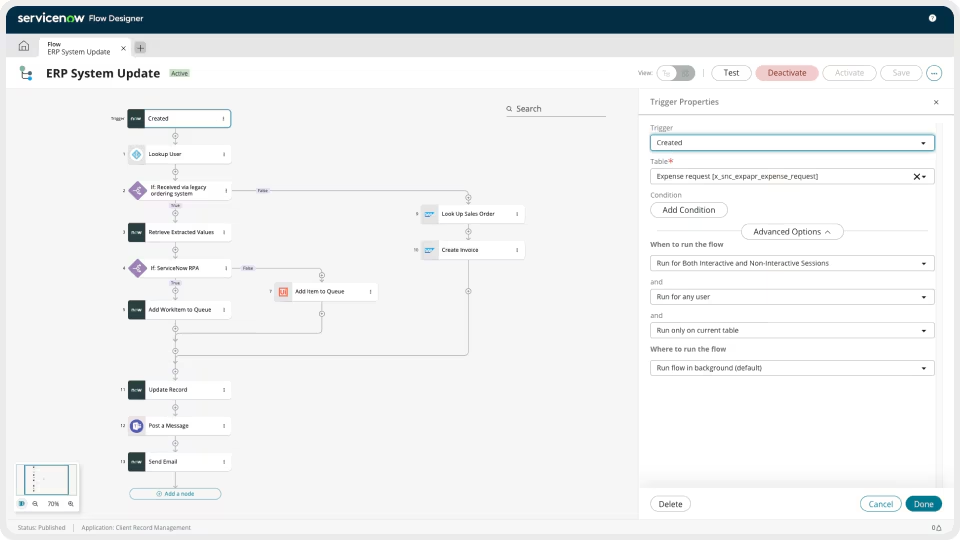
ServiceNow Integration Hub is a no-code integration platform built natively into the ServiceNow ecosystem, designed to connect workflows with external systems, applications, and data sources without requiring specialized integration developers. As per G2 Data, 100% of users rated it 4 or 5 stars, 100% believe it is headed in the right direction, and 95% users said they would be likely to recommend ServiceNow Integration Hub.
Because Integration Hub is built natively into ServiceNow, integrations trigger and respond directly to platform events like incidents, change requests, and onboarding tasks, without any middleware in between. This native depth is a significant advantage for enterprise IT and HR teams that run their operations primarily within ServiceNow, as it eliminates the latency and maintenance burden of external integration layers.
Across G2 reviews, one of the clearest outcomes users report is a meaningful reduction in manual, repetitive work. Integration Hub allows teams to automate data entry, system synchronization, user provisioning, and notification workflows that would otherwise require human intervention at every step. Users note that this not only saves time but also reduces human error, improves response times, and allows team members to redirect their focus toward higher-value work. magical about watching data flow without any hurdle or manual exports.
By replacing custom-coded, point-to-point integrations with standardized spoke-based flows, Integration Hub reduces both the upfront cost of building integrations and the ongoing cost of maintaining them. G2 reviewers note that the platform lowers technical debt, minimizes the risk of integration failures caused by bespoke code, and enables smaller teams to manage a broader integration landscape than would otherwise be feasible.
While the spoke library covers a wide range of popular enterprise applications, G2 users note that niche or industry-specific tools aren't always represented, requiring teams to build custom spoke actions from scratch for those scenarios. This adds development effort in areas where users might reasonably expect out-of-the-box support.
That said, Integration Hub does provide a Spoke Generator powered by OpenAPI specifications, which significantly reduces the effort needed to create custom spokes, making the gap less of a blocker for teams with even basic technical resources.
Overall, ServiceNow Integration Hub has users consistently praising its pre-built spokes, intuitive no-code interface, and the native depth of its ServiceNow connectivity.
What I like about ServiceNow Integration Hub:
- ServiceNow Integration Hub reduces both the upfront cost of building integrations and the ongoing cost of maintaining them.
- Integration Hub allows teams to automate data entry, system synchronization, user provisioning, and notification workflows that would otherwise require human intervention at every step.
What G2 users like about ServiceNow Integration Hub:
"Integration Hub provides great flexibility for connecting external systems to the ServiceNow ecosystem, such as SAP, Microsoft Azure, and SharePoint, without scripting, because those methods are already available. It mainly involves providing the configuration details, like defining connections and setting up credentials."
-ServiceNow Integration Hub review, Verified User in Telecommunications
What I dislike about ServiceNow Integration Hub:
- ServiceNow Integration Hub covers many enterprise apps, but niche tools may require custom spoke actions; its OpenAPI-powered Spoke Generator helps reduce that development effort for technical teams.
What G2 users dislike about ServiceNow Integration Hub:
"The pricing can be a bit confusing, especially when you’re trying to figure out what’s included versus what requires extra licensing. Custom integrations can also take a bit of effort to get right."
-ServiceNow Integration Hub review, Vusala J.
7. MuleSoft Anypoint Platform: Best for scalable app integrations and API monitoring
MuleSoft Anypoint platform from Salesforce is an agile iPaaS and business automation tool that connects with your cloud-native databases within your CRM or ERP. It offers scripting frameworks to automate integrations. Around 99% of G2 users rated MuleSoft 4 or 5 stars, and around 90% of users said they would recommend it to other software buyers, as per G2’s Grid Report.
What I love about MuleSoft is its integration capabilities. It is versatile, robust, and often a little overwhelming at first. What really drew me in was the sheer breadth of what it can do. Whether I’m integrating legacy systems, cloud services, or third-party applications, it’s got me covered. The moment I saw the wide range of pre-built connectors (especially the ones for Salesforce, SAP, AWS, and databases), I realized this wasn’t just another iPaaS tool; it was infrastructure-grade middleware.
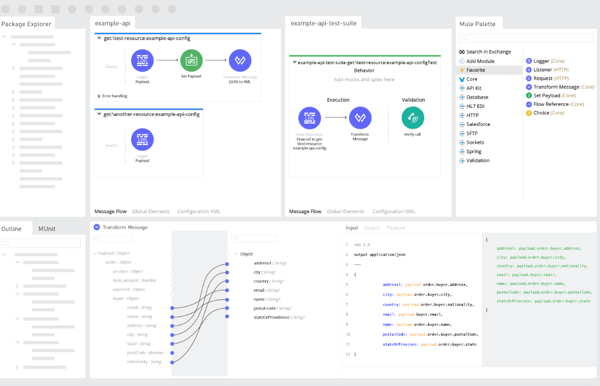
The standout feature for me is Anypoint Studio. The drag-and-drop interface makes visualizing complex integrations so much easier, especially when I’m working with DataWeave for transformations. It's like writing code, but with a UI that actually helps you think through your logic.
I also found CloudHub pretty seamless for deployment as it has no setup hassles, and it scales beautifully. The monitoring dashboard is another gem. With Runtime Manager, you can deploy, manage, and analyze APIs and applications in one place. It's comforting to have that kind of control without having to piece together data from ten different logs.
That said, the platform isn't without its challenges, though many G2 reviewers still praise its powerful connectors and flexibility for complex integrations. The initial setup can be tricky, especially for teams new to API-led architecture. But once configured, G2 users say the development flow becomes intuitive, thanks to tools like Anypoint Studio and DataWeave.
Overall, G2 reviewers see MuleSoft as a powerful, enterprise-grade integration platform that shines in scalability, security, and flexibility. Most users agree that the depth of features, like reusable APIs, robust monitoring, and hybrid deployment support, makes it a reliable choice for large organizations.
What I like about MuleSoft Anypoint Platform:
- MuleSoft is helpful for simplifying complex integrations and connecting systems that previously couldn't communicate.
- The drag-and-drop interface makes visualizing complex integrations easy, especially when working with DataWeave for transformations.
What G2 users like about MuleSoft Anypoint Platform:
"MuleSoft offers strong DataWeave capabilities, along with features such as MuleSoft Vibe, IDP, and a wide range of connectors, to name a few. Tools like Anypoint Manager and Access Control are particularly useful for API governance and day-to-day management. MuleSoft also has a large, active developer and architect community program, which can be very helpful for resolving bottlenecks during development.”
- MuleSoft Anypoint Platform review, Abhay K.
What I dislike about MuleSoft Anypoint Platform
- Initial setup can be tricky for teams new to API-led architecture, but MuleSoft’s connectors, flexibility, Anypoint Studio, and DataWeave help make complex integrations more intuitive once configured.
What G2 users dislike about MuleSoft Anypoint Platform:
"I find the customization limit a bit frustrating, especially when it comes to niche industry connectors. I think it would be beneficial to have more niche-related industry connectors to reduce the need for custom development.”
- MuleSoft Anypoint Platform review, Simran M.
Best iPaaS software: Frequently asked questions (FAQs)
Got more questions? G2 has the answers.
Q1. What are the most trusted iPaaS by integration engineers, as ranked based on user reviews?
Based on G2 reviews, MuleSoft Anypoint Platform and Workato are among the most trusted by integration engineers, with 99% of users rating both 4 or 5 stars, followed closely by ServiceNow Integration Hub at 100% and SAP Integration Suite at 94%.
Q2. What are the highest-rated iPaaS for enterprises replacing fragmented point-to-point integrations with centralized platforms?
SAP Integration Suite and ServiceNow Integration Hub are both specifically praised for replacing point-to-point integrations with centralized, standardized platforms: SAP for ERP-heavy landscapes and ServiceNow for ITSM-driven enterprises.
Q3. Which iPaaS tools maintain data consistency when the upstream system fails in mid-sync scenarios?
MuleSoft Anypoint Platform and SAP Integration Suite are best suited for their error handling, retry logic, and monitoring capabilities that help maintain data consistency when upstream failures occur mid-sync.
Q4. Which tool can assess iPaaS capability when integrating legacy systems lacking modern APIs or interfaces?
MuleSoft Anypoint Platform is purpose-built for legacy system integration, with infrastructure-grade middleware and pre-built connectors for legacy and on-premise systems; SAP Integration Suite also supports hybrid cloud and on-premise scenarios across SAP and non-SAP environments.
Q5. Which iPaaS solutions support conditional logic, looping, and branching without requiring any custom code?
Workato supports advanced logic, including loops, branches, and complex data transformations within its low-code recipe builder; Zapier and ServiceNow Integration Hub's Flow Designer also offer conditional logic in a no-code environment for standard use cases.
Q6. Evaluate iPaaS with real-time error monitoring dashboards showing failed syncs and issues immediately
SAP Integration Suite's monitoring cockpit and MuleSoft's Runtime Manager are both suited for providing real-time visibility into failed syncs, retries, and throughput — making them strong choices for teams that need immediate operational observability.
Q7. Which iPaaS platforms process millions of messages monthly without scaling costs doubling?
MuleSoft Anypoint Platform and SAP Integration Suite are designed for enterprise-scale message volumes, though G2 reviewers note that SAP's message-based licensing can escalate unpredictably at high volumes; n8n's self-hosted model offers a cost-stable alternative for technically capable teams with no per-task pricing.
Q8. Which iPaaS tools come with an intuitive visual mapping designer, letting non-coders build complex transformations easily?
Workato and Celigo are frequently praised by G2 reviewers for their visual, low-code mapping and transformation capabilities that non-developers can use effectively; ServiceNow Integration Hub's Flow Designer and Zapier's drag-and-drop builder also make transformation accessible without coding for standard scenarios.
Q9. Compare iPaaS solutions enabling real-time data sync between CRM, ERP, and marketing
Workato and Celigo both enable real-time, bi-directional data sync across CRM, ERP, and marketing tools. MuleSoft also supports this through its broad pre-built connectors for Salesforce, SAP, and cloud applications.
Q10. Which iPaaS platforms come with comprehensive 1000+ pre-built connectors, reducing custom integration development significantly?
MuleSoft Anypoint Platform, Zapier (9,000+ apps), and SAP Integration Suite offer the broadest connector libraries among the tools covered in this blog, significantly reducing the need for custom integration development.
Extending Z security, even when your data is on the cloud
After analyzing around 40+ iPaaS tools, I listed down the major prerequisites that need to be considered before you invest in an iPaaS tool.
Before you make a proposal, analyze your network requirements, developer bandwidth, data sources, application monitoring, and continuous integration and continuous delivery (CI/CD) pipelines to really focus on the essence of integration of an iPaaS stack.
As a company, your main goal should be protecting and securing your cloud data, increasing the efficiency of application development, and ensuring that data flows smoothly. This will reduce your team’s time spent on making manual function calls or handling error cases. Investing in an iPaaS solution should help you to automate your current business workflows and reduce the glitches or escalations that you faced earlier with integrations.
Apart from that, while you shortlist your options, refer to this list to check the ideal features that can create the best data management framework for your cloud and on-prem applications.
Ready to take your integrations further? Explore the best data integration software to find tools built for moving and transforming data across cloud environments at scale.
.png?width=400&height=150&name=Copy%20of%20G2%20Image%20(1).png)

.png)