/DarshayitaThakur-OrangeBG.webp?width=400&height=150&name=DarshayitaThakur-OrangeBG.webp)

This guide was last updated on March 12, 2025. A newer report has since been published. The tools below reflect the scores from G2's Summer 2026 Grid® Report.
Based on verified G2 reviews and the latest Grid® placement.
The tools below have also been exhaustively tested and evaluated, and continue to hold their place among the best Invoice Management Software on G2.
I’ve repeatedly heard my peers working in finance complain about the time spent chasing invoice approvals rather than actually analyzing financial performance. When invoices live in inboxes, spreadsheets, or disconnected systems, even small delays ripple into cash flow uncertainty, missed discounts, and stressful month-end closes.
That’s what pushed me to take a closer look at the best invoice management software available in the market. I evaluated 20+ leading platforms based on verified G2 reviews, user feedback, adoption data, and real-world finance use cases. I focused on tools that reduce manual back-and-forth, centralize approvals, integrate cleanly with accounting systems, and provide real-time visibility into invoice status and spend.
Based on my evaluation, I finalized a list of the seven best invoice management software. These include Xero, Paylocity, SAP Concur, BILL AP/AR, Stampli, Payhawk, and SAP Cloud ERP.
At its core, invoice management software standardizes how invoices move through an organization. It captures invoice data, whether uploaded manually or received digitally, routes it through approval chains, matches it against financial records, processes payments electronically, and stores documentation for future reference. Some platforms extend this with mobile approvals, payment allocation controls, and integration with procurement or billing systems.
For accounting teams, the impact is operational clarity. Paper trails are replaced with searchable digital records. Payment processing becomes structured rather than reactive. Historical invoices are easy to retrieve, and financial documentation is centralized rather than scattered across inboxes and file cabinets.
If you’re looking to streamline approvals, improve financial visibility, or scale your accounts payable (AP) and accounts receivable (AR) processes with confidence, this guide walks through the best invoice management software options for 2026 and what each one does best.
Xero: Best for small business accounting, bookkeeping, and financial management
Connects invoicing with accounting, bank reconciliation, and real-time financial reporting in one cloud platform. (Pricing from $29/month)
Paylocity: Best for payroll and human capital management
Combines payroll processing, workforce management, and HR workflows within a centralized system. (Custom pricing)
SAP Concur: Best for centralized travel, expense, and invoice management
Unifies travel booking, expense reporting, and invoice approvals in a single enterprise platform. (Custom pricing)
BILL AP/AR: Best for intelligent accounts payable and accounts receivable automation
Automates payables and receivables with structured approvals, digital payments, and accounting sync. (Pricing from $49/user/month)
Stampli: Best for AI-driven procure-to-pay automation aligned with your ERP
Uses AI-powered workflows to streamline invoice capture, coding, approvals, and ERP-aligned procure-to-pay. (Custom pricing)
Payhawk: Best for finance teams looking for global spend management
Centralizes corporate cards, expense tracking, and multi-entity spend management for global teams. (Custom pricing)
SAP Cloud ERP: Best for streamlining finance at an enterprise level
Integrates financial operations, reporting, and enterprise controls within a scalable cloud ERP environment. (Custom pricing)
*These invoice management software are top-rated in their category, according to G2's Winter 2026 Grid Reports. I have included their pricing information for easy comparison
Recommended reading: Learn how to automate bookkeeping to streamline transaction syncing, expense categorization, invoicing, reconciliation, and financial review without adding more manual work.
For most businesses, invoice management is tied to cash flow clarity, approval accountability, and how smoothly month-end closes run. When approvals happen over email, data lives in separate systems, payment status isn’t easy to track, and small inefficiencies compound quickly.
It’s not surprising that the invoice management software market is expected to grow at a 7.1% CAGR from 2026 to 2034. Businesses are steadily moving away from spreadsheets and email-based approvals toward structured, automated workflows.
As companies grow, data silos become harder to manage. More vendors, more entities, and higher transaction volumes mean invoice workflows need structure and automation. The software you choose plays a central role in how controlled and predictable your financial operations feel.
The seven invoice management tools I recommend for 2026 stood out for different reasons. Some are ideal for companies that want deep AI-driven automation. Others are better suited for teams managing global entities and multi-currency payments. A few shine when tightly integrated with accounting systems, while others are built for full-scale enterprise finance transformation. The best choice depends on your team’s size, structure, and financial maturity.
What the strongest platforms have in common is that they reduce manual back-and-forth, centralize approvals, and give finance teams real-time clarity into invoice status and spend. Using these tools, teams can operate proactively instead of reacting to bottlenecks.
The best-suited invoice management software offers smarter workflows, cleaner integrations, and better financial visibility.
To identify the best invoice management software, I analyzed real user reviews on G2 to see how finance, IT, procurement, and HR teams use it in practice. This helped clarify which platforms consistently deliver value and which tend to fall short.
From there, I shortlisted seven platforms that stood out for distinct use cases, including AI-driven procure-to-pay, global spend management, payroll-connected workflows, enterprise ERP finance, and streamlined AP/AR automation.
To dig deeper, I used AI to comb through the latest G2’s Grid Report and user feedback to compare customer segments served, invoice processing capabilities, account syncing, and overall user satisfaction ratings across these platforms.
Screenshots included in this article are sourced directly from vendor listings on G2 and publicly available product documentation.
After digging into G2 Data and evaluating how businesses address invoice management, I noticed a few themes that consistently stood out. Here’s what I focused on when evaluating the best invoice management tools:
The best invoice management software isn’t defined by a single feature. It’s defined by how effectively automation, integrations, visibility, governance, and scalability come together to support your financial operation.
The list below contains genuine user reviews from our best Invoice Management Software category page. To qualify for inclusion in the category, a product must:
*This data was pulled from G2 in 2026. Some reviews may have been edited for clarity.
G2 rating: 4.4/5
Xero is one of the top-rated cloud-based accounting software solutions widely adopted by small businesses. According to G2 Data, 69% of its users are from small businesses. Xero’s invoice management capabilities are complemented by powerful accounting, bookkeeping services, real-time reporting, and seamless integrations, making it much more than a basic invoicing tool.
I found that users love its clean, intuitive interface and often describe the software as straightforward to navigate and efficient for day-to-day use. They highlight how easily they can generate professional invoices, track payment statuses like paid, pending, or overdue without unnecessary clicking, and view financial insights in one place.
From my evaluation of G2 reviews, Xero’s invoicing connects tightly with its core accounting system. Users can create and send professional invoices, reconcile bank transactions with automated bank feeds, and view updated financial dashboards all within the same platform.
Xero’s workflow spans expense tracking, comprehensive reporting, and basic inventory tracking, and it supports payroll where available or through integrated services. Its broad integration ecosystem lets teams connect payment systems, payroll tools, expense capture apps, and other business systems to tailor workflows and sync data across functions.
I noticed high praise for Xero’s automation capabilities. Reviewers consistently highlight saving time and reducing manual work through automation. From automated bank feeds that bring in daily transaction data to smart matching and reconciliation, Xero helps teams keep their books current without repetitive data entry. Users also note that recurring invoices and automatic payment reminders keep cash flow moving while minimizing follow-up.
Another area where Xero stands out is its multi-user collaboration and cloud-first design. Because the platform is fully cloud-based, business owners, accountants, and internal finance teams can access the same real-time financial data from anywhere.
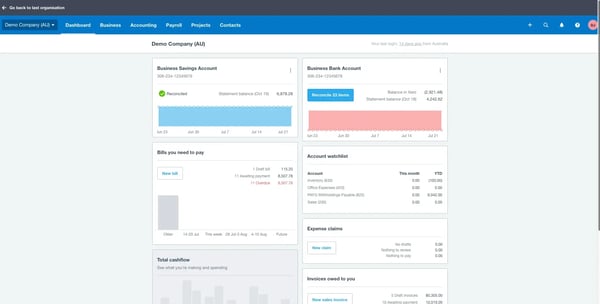
Xero delivers strong configurability through customizable dashboards and reporting filters. Reviewers note that highly advanced reporting layouts or specialized accounting structures may require deeper setup or integrations. For most small and mid-sized teams, however, the balance between structure and flexibility keeps workflows efficient without adding complexity.
The invoice management software offers help resources and support, but the experience with support responsiveness varies based on the type of inquiry and region. Some teams indicate that getting detailed guidance on specific accounting scenarios or feature questions can take additional time. That said, many users leverage Xero’s community forums, help center, and partner network to complement direct support and ensure they stay productive.
Overall, based on my evaluation, Xero’s combination of robust invoicing, deep accounting features, automation, and strong integrations makes it a standout choice for businesses that want their invoice management tightly woven into their financial operations.
"The best thing about Xero is its simple and clean interface. Even someone new to accounting software can understand it easily. Bank reconciliation is excellent and saves a lot of manual effort by matching transactions automatically. The dashboard gives a clear overview of cash position, outstanding invoices, and upcoming bills. Invoicing is very smooth, and invoices can be shared directly with customers via email. Being cloud-based based I can access data anytime without depending on office systems. The integration is reliable for document sharing and communication. I use it daily for creating and tracking sales invoices, recording expenses, monitoring cash flow, reconciling bank transactions, etc."
- Xero review, Pranjal P.
"Xero handles most accounting needs really well, I do wish the reporting customization was a bit more flexible. For bigger organizations like ours that have more complex reporting needs, the standard templates can feel pretty restrictive sometimes."
- Xero review, Nishtha C.
Compare 10 free accounting tools and find the perfect fit for your business.
Invoice management and billing often overlap for small businesses. If you're also evaluating cloud billing platforms, here's how Xero and other top cloud-based billing solutions for small businesses rank on satisfaction, support, and ease of use.
G2 rating: 4.5/5
According to G2 Data, 77% of Paylocity's users come from mid-market teams, and the platform maintains an impressive 83% average user adoption rate, reflecting strong internal engagement across organizations. While best known for payroll and HCM, I noted that Paylocity also helps teams align labor data with invoice and vendor payment workflows.
Users describe the invoice management tool as intuitive and straightforward, both for administrators and employees. Whether navigating payroll modules or accessing employee information, reviewers often mention that the interface feels organized and efficient for daily use.
I found consistent praise for Paylocity’s payroll processing capabilities. Reviewers frequently highlight how easy it is to run payroll, review pre-process registers, make adjustments, and process off-cycle payroll when needed. Automated tax updates and compliance features help teams process payroll confidently and on time.
I observed reviewers highlighting Paylocity for its integrated time and labor management tools. Timecards, PTO tracking, scheduling, and attendance data flow directly into payroll, helping reduce discrepancies and improve overall payroll accuracy without manual intervention. Reviewers also mention that this centralized workforce data helps HR and finance teams maintain better visibility into employee hours and labor costs throughout the pay cycle.
Beyond payroll, the platform supports HR management, including onboarding, benefits administration, performance tracking, and employee record management. Reviewers appreciate having the full employee lifecycle, from applicant tracking to active employment, managed within one connected ecosystem.
I noted that Paylocity’s integration ecosystem extends beyond payroll operations. Through connectors and APIs, the platform syncs workforce data with accounting systems and financial ledgers, supporting broader financial visibility and simplifying downstream reconciliation processes.
Paylocity also offers robust reporting and analytics that help financial and HR leaders gain visibility into labor costs, payroll expenses, compliance metrics, and spend trends. These reporting tools support invoice workflow decisions and improve cross-department financial insights.
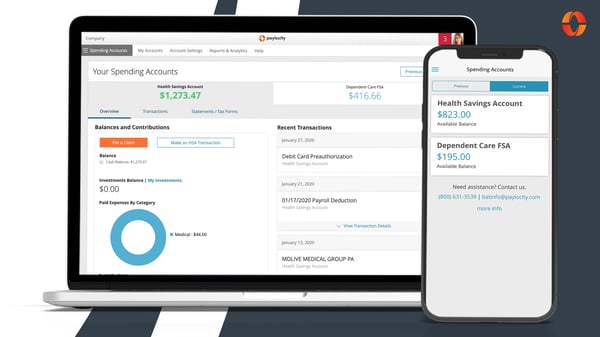
While Paylocity offers a broad range of payroll, HR, and financial workflow tools, reviewers note that there are certain capabilities that teams sometimes look for in specialized invoice or accounts payable (AP) systems that aren’t yet deeply developed within the platform. Teams mention that they augment Paylocity with additional tools.
Reviewers highlight that getting fully up to speed with Paylocity’s breadth of features can take a bit of orientation for new users. Once teams become familiar with the layout and workflows, many describe the system as intuitive and efficient for ongoing use, underscoring how initial orientation transitions into productive daily operations.
Based on my evaluation, Paylocity’s combination of structured payroll processing, integrated time tracking, HR management capability, and intuitiveness makes it a powerful choice for organizations seeking centralized payroll and human capital management.
"Paylocity has proven to be extremely helpful when it comes to onboarding new employees and managing payroll. The onboarding process is straightforward and user-friendly, which helps save time and minimize mistakes. Processing payroll is also intuitive and efficient, allowing for accurate and confident completion each pay period."
- Paylocity review, Carla H.
"What I dislike about Paylocity is that some features can be a bit slow or complicated to navigate, especially when switching between different sections like reports and approvals. Certain functions, such as customizing forms or uploading multiple documents, could be more efficient. It also takes time for new users to learn all the tools available. Overall, while it’s a great system, there’s room for improvement in speed and ease of use."
- Paylocity review, Paul A.
If you’re modernizing invoice workflows, it might be time to streamline payroll too. Explore the best payroll software options.
G2 rating: 4/5
According to G2 Data, SAP Concur serves a strong share of enterprise (50%) and mid-market organizations (39%), reflecting its positioning as a solution built for complex travel, expense, and invoice workflows.
One of SAP Concur’s most valued capabilities is its centralized expense and invoice tracking system. I noticed reviewers highlighting how the platform consolidates travel expenses, vendor invoices, and supporting documentation into one structured environment, making financial records easier to manage and audit.
SAP Concur offers automated invoice capture and approval routing, allowing finance teams to intake vendor invoices digitally, apply coding rules, and streamline multi-level approval workflows. Reviewers appreciate the visibility this provides into invoice status and payment timelines.
The mobile receipt capture functionality stands out in particular, allowing users to take photos of receipts and instantly attach them to expense reports, reducing manual entry and keeping documentation organized in real time. Reviewers also note that capturing receipts on the go helps ensure supporting documentation is recorded immediately, making expense submission faster and easier to manage later.
I found reviewers praising its policy enforcement and compliance controls. SAP Concur allows organizations to embed travel and expense policies directly into workflows, helping flag out-of-policy spend before approval. Finance teams note that this structured enforcement reduces compliance risks and improves audit readiness.
Another major strength of SAP Concur is its deep integration capabilities. I found reviewers consistently highlighting how smoothly the platform connects with enterprise resource planning (ERP) systems, payroll environments, corporate finance tools, and company credit cards. This connectivity ensures that travel bookings, expense submissions, and invoice data flow directly into existing financial systems without duplicate entry.
By aligning with backend accounting infrastructure, SAP Concur helps organizations maintain consistency across departments while improving accuracy and reducing administrative effort in reconciliation and reporting. This integration allows expense and invoice data to flow directly into financial systems, helping finance teams maintain more reliable records without duplicate entry.
I observed that for global teams, the ability to handle multi-currency transactions within the same system further strengthens the invoice management tool’s value, especially when managing employee expenses and international vendor invoices across regions. It also allows teams to process and review international expenses without switching between different financial systems.
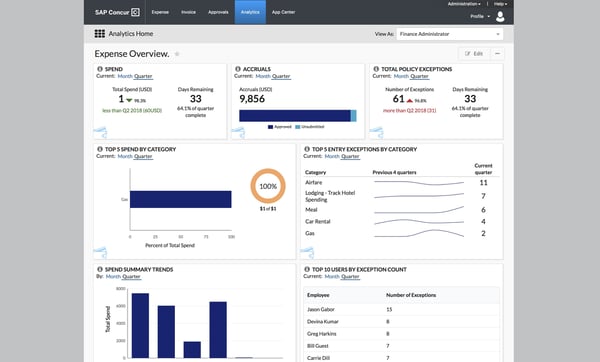
SAP Concur offers a comprehensive travel, invoice, and expense platform. However, reviewers mention that the interface structure can involve multiple steps for routine tasks, particularly when navigating between reports and approvals. Once users become familiar with the workflow structure, many describe it as supportive of organized financial processes.
While SAP Concur delivers robust functionality across modules, reviewers mention that loading times for detailed reports and large receipt uploads can vary, particularly during peak usage periods. This is more noticeable when switching between modules or uploading high-resolution documents. Even so, many organizations continue to rely on the platform for its depth of capabilities and centralized control.
Overall, based on my evaluation, SAP Concur’s combination of automated invoice capture, travel integration, compliance enforcement, ERP connectivity, and global scalability makes it a powerful choice for organizations seeking centralized travel, expense, and invoice management.
"Here are a few things that stand out in the features of SAP Concur that I noticed. The automation and accuracy are impressive. Receipt scanning, automatic categorization, and built-in policy checks significantly reduce the need for manual entry and help minimize errors and wrong coding. Policy compliance and approval hierarchy are in place, so employees are guided to stay within company guidelines before submitting and approving the invoice. Its global readiness is another advantage, as it supports multiple currencies, various tax rules, and local compliance requirements, making it especially valuable for multinational organizations. Very easy to use and beginner-friendly as well.”
- SAP Concur review, Mark B.
"The interface feels clunky and unintuitive, making it difficult to get started due to the steep learning curve. Performance is often slow, particularly when handling large amounts of data or receipts. I have also encountered frequent bugs, and the mobile app is not user-friendly. Additionally, the lack of offline support and the presence of frustrating error messages further detract from the overall experience."
- SAP Concur review, MadhuSudhan L.
Managing invoices is just one part of recurring revenue. Explore the best subscription management software to automate billing cycles, renewals, and customer lifecycles.
G2 rating: 4.4/5
BILL AP/AR is widely adopted by small businesses (61%) and mid-market teams (29%) looking to modernize their invoice workflows through automation. Designed for accounts payable and receivable operations, the platform centralizes bill intake, approvals, payments, and collections within one connected environment, helping organizations reduce manual effort and improve cash flow visibility.
Reviewers praise BILL AP/AR’s automated invoice capture and approval routing. The invoice management platform enables electronic invoice receipt and automatically extracts key invoice details before routing them through configurable approval workflows. Finance teams can track invoice status in real time, ensuring visibility from submission through payment authorization.
I observed that this invoice management tool simplifies vendor payments through its multi-method disbursement capabilities. Organizations can process ACH transfers, wire payments, or paper checks directly within the system, allowing accounts payable teams to manage the full payment lifecycle without switching platforms. This flexibility supports diverse vendor requirements while keeping documentation centralized.
I noticed BILL AP/AR provides streamlined digital invoicing and payment collection tools. Users can send electronic invoices, enable online payment options, and monitor outstanding balances from a unified dashboard. Automated reminders and structured follow-ups help accelerate collections and support healthier cash flow management.
Another major feature is its two-way accounting software synchronization. The platform integrates with systems such as QuickBooks, Xero, and NetSuite, automatically syncing invoice data, payment records, and ledger updates. This real-time connectivity reduces duplicate entries and simplifies reconciliation during the month-end close. This is reflected in the 90% user satisfaction rating for accounting, according to G2 Data.
Reviewers mention that the invoice management software further enhances invoice oversight by integrating spend and expense management controls. Through BILL Spend & Expense, organizations can issue corporate cards, set budget parameters, and monitor real-time spending activity. Transactions flow into the system automatically, aligning card spend with invoice and accounting records to maintain financial consistency.
I like that security and compliance are central to the platform’s design. BILL AP/AR incorporates bank-level encryption, role-based permissions, fraud safeguards, and audit trails, helping finance teams maintain control over vendor payments and receivables data while supporting audit readiness.
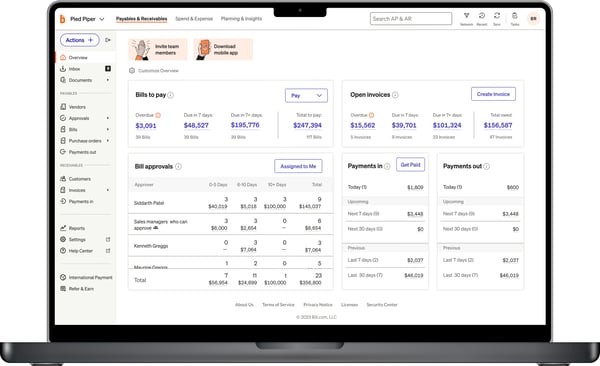
BILL AP/AR provides flexible payment options across automated clearing house (ACH) payments, checks, and international transfers. However, reviewers note that organizations operating across multiple countries may centralize payments through a primary entity rather than managing fully localized subsidiary disbursements.
This software provides strong automation for invoices and payments. But reviewers mention that some actions, such as bill processing or status updates, may take a moment to reflect in the system. For teams working on tight timelines, this may require a bit of planning around processing cycles. Even so, many users continue to value the platform’s overall organization and efficiency in managing payables and receivables.
Based on my evaluation, BILL AP/AR’s combination of automated invoice capture, digital receivables tools, accounting synchronization, spend management integration, and built-in security controls makes it a powerful solution for organizations seeking intelligent accounts payable and receivable automation.
"I like how easy it is to post invoices in different manners. It integrates smoothly with Sage Intacct, making my accounting job easier since everything posts automatically into Sage Intacct, and the general ledger always ties to what it should. It's also easy to void payments. I really appreciate the super-easy setup, especially with implementation support. Overall, I find processing vendor invoices much easier with BILL AP/AR."
- Bill AP/AR review, Brett A.
"Since we have subsidiaries in other countries, right now, we are only able to pay through our US entity. Even though we have bills from Canada, UK, and Mexico, we have to centralize them all in the US. We would rather have a subsidiary for each country and make local payments instead of international."
- Bill AP/AR review, Jose G.
Want smarter AP workflows and fewer manual steps? See the best accounts payable automation solutions for your team.
G2 rating: 4.6/5
Stampli is purpose-built for procure-to-pay (P2P) workflows, aligning tightly with ERP systems rather than replacing them. From purchase requests to invoice approvals and payments, Stampli is designed to operate within existing financial structures. According to G2 Data, Stampli serves a strong mix of small businesses (30%) and mid-market teams (62%).
Across G2 reviews, I repeatedly saw praise for Billy, the AI assistant, which supports invoice capture, coding, and approval routing. The AI assistant extracts invoice data, flags exceptions, and helps manage vendor compliance directly within the workflow. This embedded AI capability allows finance teams to process invoices faster while maintaining structured oversight.
Reviewers appreciate Stampli’s ERP-aligned architecture. The platform mirrors charts of accounts, entities, cost centers, and approval hierarchies directly within connected ERP systems such as NetSuite, Sage Intacct, SAP, and others. This tight integration reduces duplicate data entry and ensures invoice information syncs in real time without disrupting existing accounting environments.
I observed reviewers talking about its collaborative approval workflow. Stampli centralizes invoice discussions, approvals, attachments, and audit trails in one interface. Reviewers frequently mention that the ability to communicate directly on invoice records reduces back-and-forth emails and improves approval turnaround times.
Stampli also supports broader end-to-end P2P operations, including procurement intake, vendor management, invoice processing, and payments. As organizations scale across multiple entities or higher invoice volumes, the system adapts without requiring teams to reconfigure their ERP foundation.
I also noted strong feedback around Stampli’s scalability. The invoice management platform accommodates growing invoice volumes, additional business entities, and layered approval structures while maintaining compliance and financial governance.
Stampli delivers comprehensive visibility into accounts payable workflows through customizable dashboards that highlight invoice status, approval progress, and key activity metrics. Users appreciate having a centralized view of AP operations that supports informed decision-making and helps streamline team collaboration across invoice processing and approvals.
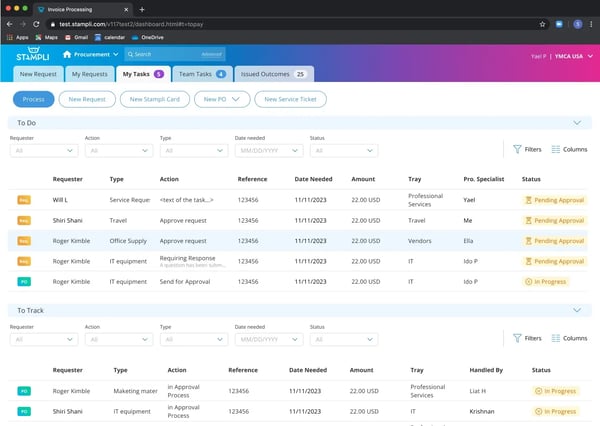
Stampli offers structured invoice processing and centralized document storage. However, reviewers mention that different invoice types and attachments may sometimes require manual adjustments. Organizations managing multiple internal entities may also coordinate workflows carefully when entering invoices manually.
Stampli supports structured, multi-level approval controls for invoice governance. Reviewers note that smaller invoices follow the same approval path as higher-value bills. For teams that prefer senior-only review on select invoices, aligning approval rules by invoice amount or priority may require additional configuration. Even so, many users continue to value the platform’s consistent accountability and oversight.
Overall, based on my evaluation, Stampli’s combination of AI-driven invoice automation, ERP alignment, collaborative approvals, scalability, and structured financial controls makes it a powerful solution for organizations seeking intelligent procure-to-pay automation.
"Stampli completely changed how our company sends out invoices for approval before payment. Before Stampli, I was being sent invoices for approval over email. This led to some invoices slipping through the cracks and being lost until down the road, the accounting team would follow up and ask for approval again. With Stampli, all of the invoices pending approval are in one place and easy to review and approve, or provide feedback when needed."
- Stampli review, Jason G.
"I don't like that too many approvers are needed to pay a small invoice. It would be more convenient if invoices could be set up so that high-level invoices only need the most senior manager's approval. Currently, it requires a junior manager's approval to land in my inbox, and I'm the director."
- Stampli review, David M.
Don’t let invoices pile up and cause friction in your procurement operations. Explore these 6 best procure-to-pay software.
G2 rating: 4.6/5
According to G2 Data, Payhawk is widely used by mid-market (56%) and small businesses (33%) managing distributed operations across bills, cards, expenses, travel, and procurement.
Based on the G2 reviews I evaluated, Payhawk supports efficient expense automation, enabling employees to capture receipts and invoices via its mobile app and upload documentation quickly. Reviewers highlight that the platform’s streamlined workflows and automatic data extraction help reduce manual tasks and improve spend visibility, making expense reporting more efficient.
Corporate card control is one of Payhawk’s most praised capabilities. Reviewers highlight the ability to issue physical and virtual cards, assign role-based limits, and monitor transactions as they occur. Finance teams note that having structured card controls improves governance over employee spend.
Based on my analysis of user feedback, Payhawk also supports structured accounts payable workflows. According to G2 reviews, teams can upload supplier invoices, assign approval routes, and track invoice progress within the platform. Reviewers note that managing invoices alongside card transactions creates a more organized AP process.
Reviewers consistently highlight the invoice management tool’s ERP and accounting integrations. Users reference integrations with systems such as NetSuite and QuickBooks, stating that transaction data syncs with their accounting platforms to support reconciliation and financial record accuracy.
According to G2 reviews, Payhawk provides real-time spend visibility and reporting dashboards. Finance leaders describe using reporting tools to track budgets, monitor departmental spend, and analyze transactions, helping them maintain better oversight of company finances.
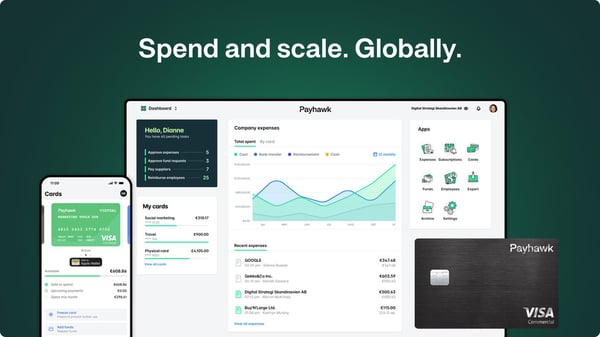
Payhawk provides structured approval workflows designed to support governance and consistency across finance teams. Reviewers mention that organizations with highly complex or layered approval requirements may look for additional flexibility and customization in tailoring workflow paths. Many users continue to value the clarity and control that the standardized approval structure provides.
The software supports multi-entity management within one platform. However, users note that certain configurations, such as report creation, may need to be set up separately for each entity. For organizations managing several subsidiaries, this can involve repeating similar setup steps. At the same time, configuring entities individually allows teams to tailor reports and financial controls to the specific requirements of each business unit.
Based on my evaluation, Payhawk’s combination of corporate card controls, automated expense capture, multi-entity support, invoice management, ERP integration, and real-time spend visibility makes it a powerful choice for finance teams seeking structured global spend management.
"We especially value the native integration with our ERP system, as well as how straightforward the deployment and onboarding processes are. Additionally, the user experience stands out for being clean, intuitive, and genuinely enjoyable."
- Payhawk review, Stéphane M.
"Some features still lack consistency and require extra time to manage across different entities. For example, when I create a report under one entity and want to use it for the others, I have to recreate the same report for each entity instead of being able to copy it or have it automatically applied across all entities."
- Payhawk review, Ngoc Son N.
If global spend control matters to you, explore the best spend management software next.
G2 rating: 4.5/5
SAP Cloud ERP (formerly SAP S/4HANA Cloud) is consistently described by users as a centralized ERP platform built to unify finance, procurement, supply chain, and accounting functions within one structured system. According to G2 Data, the invoice management system is used by 43% enterprises and 41% mid-market teams.
Based on my evaluation of reviews, one of the most frequently highlighted strengths is its end-to-end financial management capability. Teams use SAP Cloud ERP to manage general ledger, accounts payable, accounts receivable, asset accounting, and financial consolidation within a single environment. Reviewers emphasize the benefit of having all core finance processes integrated rather than operating across disconnected systems.
Another commonly praised feature is real-time financial visibility powered by SAP’s in-memory architecture. According to G2 reviews, users appreciate being able to access up-to-date financial data, generate reports quickly, and monitor performance metrics without relying on delayed batch processing.
I observed that SAP Cloud ERP also stands out for its enterprise-grade scalability. Organizations operating across multiple entities, countries, and currencies highlight the platform’s ability to handle global operations while maintaining structured governance, risk, and compliance controls.
Reviewers mention its advanced reporting and analytics tools. Leaders leverage built-in dashboards and customizable reports to analyze profitability, cost centers, and operational performance across departments. These insights help finance teams track financial metrics in real time and support more informed decision-making across large organizations.
According to G2 reviews, SAP Cloud ERP integrates seamlessly with other SAP products and third-party enterprise systems, enabling data consistency across procurement, HR, and supply chain environments. Users note that connecting operational data across these systems helps maintain a single source of financial information throughout the organization.
Users also highlight the platform’s automation and process standardization features. From the reviews I evaluated, organizations value how automated workflows and predefined best practices help streamline approvals, financial postings, and reconciliation activities at scale. This structured approach allows teams to maintain consistent processes across departments while handling complex enterprise operations.
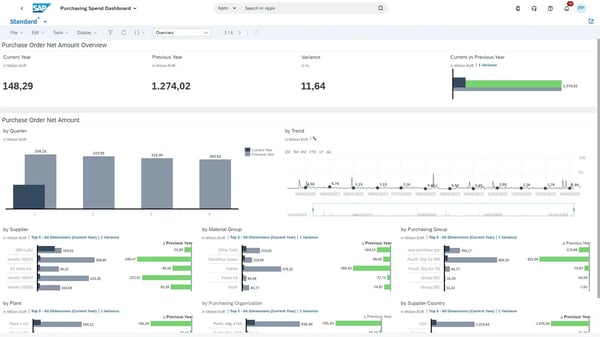
SAP Cloud ERP delivers enterprise-grade capabilities across finance and operations. Users note that implementation and migration, particularly from legacy systems, require detailed planning. For organizations preparing for transformation, allocating time for configuration and user enablement helps ensure a smooth rollout. Once established, many teams report strong long-term operational value.
Reviewers also mention that its licensing model and subscription structure require careful evaluation to align with organizational needs. For mid-sized and growing enterprises, conducting a thorough cost-benefit assessment supports better budget planning. Many users emphasize that with proper optimization, the platform delivers significant strategic return.
Overall, based on my evaluation of G2 reviews, SAP Cloud ERP stands out as a powerful, enterprise-grade platform designed to unify finance, operations, and reporting within a single cloud environment. Its structured processes, real-time data visibility, and deep integration across business functions make it especially well-suited for standardized, scalable financial management.
"What I like best is the seamless integration of production, costing, inventory, human capital, and financial processes within a single system. This allows for real-time access to comprehensive data, ensuring better decision-making and cross-departmental alignment."
- SAP Cloud ERP review, Rusela C.
"What I dislike about SAP HANA and SAP Cloud is that the system can be complex to understand for new users and requires proper training. Implementation and migration from old systems take time and can be costly. Sometimes the system performance depends on internet connectivity, especially in cloud environments. Licensing and subscription costs are also high compared to other platforms. In some cases, customization is limited and requires expert support, which increases dependency on consultants."
- SAP Cloud ERP review, Sanjay K.
Ready to modernize your full finance stack? Discover the best accounting and finance software.
Got more questions? G2 has got the answers.
SAP Cloud ERP is often chosen for enterprise-level finance and invoice workflows due to its integrated financial management and global scalability.
BILL AP/AR and Payhawk both offer real-time dashboards and spend reporting that help teams analyze payment patterns and cycle performance.
Stampli stands out for AI-driven automation across invoice capture, coding, and approvals, enhancing efficiency throughout procure-to-pay workflows.
Invoice management platforms like Xero, Paylocity, SAP Concur, BILL AP/AR, Stampli, Payhawk, and SAP Cloud ERP all have accounting integrations that sync invoice and transaction data.
SAP Concur, SAP Cloud ERP, and Payhawk support multi-entity, multi-currency operations. Paylocity and SAP Cloud ERP also address tax compliance requirements.
Xero and BILL AP/AR are often cited as strong picks for small to mid-sized businesses seeking robust invoicing with cost-efficient plans.
Stampli and BILL AP/AR are well-suited for high-volume invoice environments, with automation and structured workflows that scale with growth.
Payhawk, SAP Concur, and SAP Cloud ERP support global operations, with multi-currency, multi-entity, and localized financial workflows.
Stampli leverages its AI assistant, Billy, for intelligent data extraction, matching, and workflow recommendations across the procure-to-pay cycle.
Xero, BILL AP/AR, Payhawk, and SAP Cloud ERP all offer dashboards that let users monitor invoice statuses and payment progress in real time.
Based on my evaluation of G2 reviews, it is clear that the best invoice management software centralizes invoice capture, approval, payment, and reporting into a streamlined, automated workflow. It improves visibility, reduces manual work, strengthens financial control, and integrates seamlessly with your accounting and ERP systems to support scalable growth.
Each of the tools covered here serves a distinct purpose depending on your business size, complexity, and financial priorities. Companies managing travel and expense-heavy operations may benefit from SAP Concur, while BILL AP/AR focuses on automating payables and receivables. Payhawk supports global spend management across distributed teams. For large enterprises standardizing finance at scale, SAP Cloud ERP provides structured, end-to-end financial control.
The right choice ultimately depends on your operational complexity, integration needs, approval structures, and growth plans. Consider how each invoice management tool works with your existing systems, reporting requirements, and internal workflows.
Want clearer, smarter expense tracking alongside invoice management? Explore the best expense management software.
/DarshayitaThakur-OrangeBG.webp)

While studying accounting, I realized how inefficient accounts payable processes can be in...
by Darshayita Thakur
Keeping track of expenses is a headache, whether it’s personal spending getting out of control...
 by Sudipto Paul

I evaluated 20+ spend management software to identify the seven solutions that consistently...
 by Harshita Tewari