/DarshayitaThakur-OrangeBG.webp?width=400&height=150&name=DarshayitaThakur-OrangeBG.webp)


While studying accounting, I realized how inefficient accounts payable processes can be in real-world settings. Invoices accumulate, approvals move through fragmented channels, and discrepancies often delay payments.
It gave me a clearer sense of how complex accounts payable can be at scale. Many teams struggle with manual invoice processing, slow approvals, and payment errors, issues that the best accounts payable automation software could easily solve.
So, I reviewed over 25 tools to find the ones that truly simplify invoice processing, automate approvals, and improve cash flow visibility. The final list of best AP automation software contains BILL AP/AR, Sage Intacct, Stampli, SAP Concur, Ramp, Tipalti, and Brex. If your team is tired of chasing approvals and fixing errors, these seven handpicked tools are worth considering.
*These AP automation software are top-rated in their category, according to Spring 2026 G2 Grid Reports. I’ve also added their monthly pricing to make comparisons easier for you.
Recommended reading: Learn how to automate bookkeeping to streamline transaction syncing, expense categorization, invoicing, reconciliation, and financial review without adding more manual work.
When I talk to my friends in procurement, they mention spending way too much time dealing with slow approvals, missing purchase orders, and payment delays. Trust me, I know the struggles!
The best accounts payable automation software doesn’t just make things faster. It eliminates inefficiencies, reduces errors, and keeps the entire AP process running smoothly. But not every tool gets it right. Some make life easier, while others create as many headaches as they solve.
According to Future Market Insights, the accounts payable automation market is anticipated to expand from $3.8 billion in 2026 to $10.0 billion by 2036, recording a 10.3% CAGR.
With the growing demand for AP automation software, I wanted to cut through the noise and find out which ones actually help with invoice processing and approvals, and give finance teams better control over payments. Here’s how I went about it.
I began by reviewing G2’s latest Grid Report, examining usability, automation capabilities, and how well each AP automation tool helps finance teams manage their responsibilities. This gave me a clear picture of which platforms consistently performed well and which ones had recurring issues.
To gain a deeper understanding, I used artificial intelligence (AI)-powered analysis to go through thousands of user reviews, identifying trends in what finance professionals found most valuable and what caused them frustration.
Beyond rankings and reviews, I compared key AP automation features, focusing on invoice processing, approval workflows, payment scheduling, and ERP integrations. I reached out to finance professionals who use these tools daily to get their firsthand experiences and validate my findings.
The screenshots in this article include both images from my evaluation and verified visuals from vendor pages on G2.
I considered the following factors when evaluating the best accounts payable automation software.
The list below contains genuine user reviews from the accounts payable automation software page. To be included in this category, a solution must:
*This data was pulled from G2 in 2026. Some reviews may have been edited for clarity.
BILL AP/AR brings invoicing, approvals, and vendor payments into one simplified space for finance teams looking to ditch manual spreadsheet work and follow-ups. According to G2 Data, it is used by 61% small businesses and 34% mid-market teams.
Based on my evaluation, one of BILL's biggest strengths is its user-friendliness. The layout is clean, and actions like uploading invoices, adding vendors, or scheduling payments take just a few clicks. Users do not need extensive AP automation knowledge to get comfortable quickly. That ease of use can help shave hours off the monthly workflow and eliminate confusion.
Reviewers mention that vendor management also feels smoother than expected. BILL stores detailed vendor profiles and lets you automate payment reminders. Users could keep track of payment history, tax documents, and even communication logs in one place. The process makes vendor relationships more transparent and less reactive.
The approval workflow options are another major win. Teams can assign custom roles, route approvals across departments, and track every decision with full visibility. It’s a great fit for teams that want internal controls without unnecessary bottlenecks. Reviewers appreciated how easy it was to set up multi-step approvals.
I noted that BILL AP/AR also stands out for its AI-assisted invoice capture and coding, which helps finance teams cut down on repetitive data entry. Instead of manually keying in every field, users can upload or forward invoices and let the platform pull in key details automatically, making bill entry faster and more consistent.
BILL AP/AR’s integration with accounting and enterprise resource planning (ERP) systems gives teams a more connected finance workflow. G2 reviews repeatedly highlight how the platform syncs invoices and payments into systems like QuickBooks, NetSuite, and other ERPs, helping reduce duplicate entry and keeping financial records aligned across tools.
The AP automation platform earns praise for its centralized recordkeeping and compliance support, which makes it easier to keep payment history, supporting documents, and audit-ready records in one place. Users call out the value of having invoices, proof of payment, W-9 details, and related documentation tied to a single workflow rather than scattered across inboxes and folders.
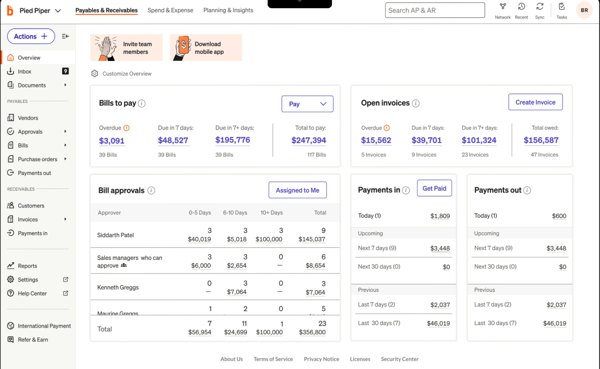
While BILL AP/AR integrates with accounting systems and ERPs in ways that save teams a lot of manual work, some G2 users note that occasional sync delays, duplicate entries, or reconciliation issues can still require follow-up. That said, for teams prioritizing automation and day-to-day efficiency, the integration still delivers strong value and is generally manageable with routine oversight.
The platform makes digital payments much easier to manage than manual check workflows, but some reviews mention that payment processing and vendor receipt timing can take longer than expected in certain cases. However, teams that value centralized payment controls, auditability, and automated scheduling may find that trade-off worthwhile, especially when immediate turnaround is not the primary requirement.
Overall, BILL AP/AR is a strong fit for finance teams that want to simplify invoice management, tighten approval controls, and move away from manual AP processes without adding unnecessary complexity.
“BILL AP/AR streamlines our invoice processing, strengthens internal controls through clear approval routing, and provides a transparent audit trail. The system has significantly reduced paper-based processes and increased efficiency. Additionally, the ability to process payments from anywhere offers valuable flexibility and supports timely approvals.”
- BILL AP/AR review, Hasan D.
“While BILL AP/AR is very effective overall, there are occasional usability, syncing, and workflow limitations that can require workarounds, especially for more complex approval structures or reporting needs. Some areas of the interface could be more intuitive, and deeper customization in reporting would be helpful. That said, these are incremental improvements rather than major issues, and the platform still delivers strong value for managing AP/AR processes efficiently.”
- BILL AP/AR review, Amol L.
Related: Explore the latest accounting trends and how AI chatbots are revolutionizing this space.
Sage Intacct is a cloud-based financial management solution for growing businesses and organizations with complex accounting needs. According to G2 Data, it is used by 61% mid-market teams. The platform covers core modules like general ledger, accounts payable and receivable, reporting, and multi-entity consolidation.
I observed how user-friendly the core navigation was. The layout is clean, menus are logically grouped, and common actions are easy to find. Users don't need to rely on guesswork to locate features or settings. Once they get the hang of the workflow, tasks like invoice approvals and journal entries flow quickly.
The reporting engine is one of Sage Intacct’s standout features. Reviewers could slice data by department, location, or project and customize reports with filters and dimensions. It gave them the flexibility to see financials from multiple angles, which is something many other systems struggle with. For data-driven teams, this is a huge win.
I was also impressed by how easily Sage Intacct handles multiple entities. Managing inter-company transactions, consolidations, and entity-specific permissions was straightforward. It makes overseeing parent-child relationships much easier and rolling everything into unified reports when needed.
G2 reviewers frequently mention that it automates tasks like accounts payable, invoicing, reconciliations, recurring journal entries, billing, and approvals, which helps cut down on manual work and reduces the chance of errors. For finance teams trying to move faster without adding more administrative burden, that kind of built-in automation can make a noticeable difference in day-to-day efficiency.
Another strength is Sage Intacct’s integration ecosystem and API flexibility. I found that users appreciate how well it connects with third-party tools and how API-based transaction transfers can be refined to fit specific business processes. That connectivity helps reduce silos between systems and makes Sage Intacct more practical for teams that don’t want their ERP operating in isolation.
Beyond core accounting, Sage Intacct supports areas like project accounting, revenue management, role-based dashboards, and compliant revenue recognition, and reviewers also call out its modular add-ons as helpful for budgeting and other growing finance needs. That makes it feel like more than a basic accounting tool.
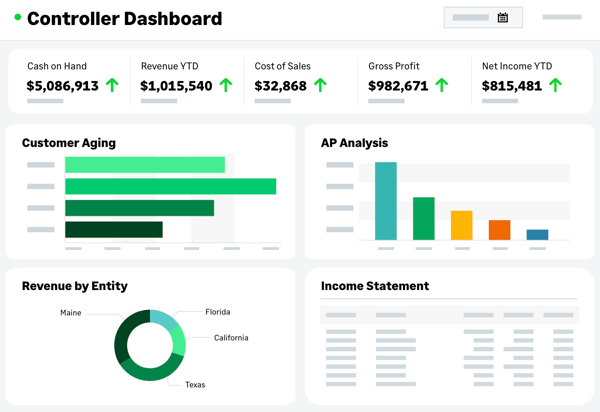
The platform can take time to learn, especially when teams start working with custom reports, configurations, and more advanced workflows. However, that complexity is often part of what makes the system so flexible, and many organizations find the ramp-up worthwhile once users are trained and day-to-day processes are in place.
Sage Intacct gives finance teams tighter control through structured permissions and role-based access, though some reviewers mention that access limitations can slow down certain tasks when broader visibility or admin intervention is needed. For organizations that prioritize governance, compliance, and controlled financial operations, those restrictions can be a reasonable trade-off for stronger oversight.
Overall, Sage Intacct is a strong choice for organizations that need deeper financial visibility, flexible reporting, and scalable controls to support more complex accounting operations. It’s especially well-suited for growing or multi-entity businesses that want an ERP built for finance teams that need more than basic bookkeeping.
“Being able to keep multiple tabs open for different entities within the same login is a game-changer. I also really appreciate how quickly I can move between modules. The custom reports are extremely helpful once you know how to use them. The CSV uploads for checking accounts, 1099 transaction updates, adding bills, adding invoices, adding GLs, adding vendors, and adding customers are amazing and make those updates much easier to manage.”
- Sage Intacct review, Levi S.
“One thing I dislike about Sage Intacct is that some processes are not as intuitive as they could be, especially for new users. Certain tasks require several steps or navigating through multiple menus, which can take time to learn. Customizing reports and configurations can also require a deeper understanding of the system, so there can be a learning curve for teams that are new to the platform.”
- Sage Intacct review, Marcus G.
Related: Are you a small business wondering if you should outsource your accounting or invest in an in-house team? Check out this article on in-house vs. outsourced accounting.
Stampli simplifies invoice management and approvals and works alongside your existing accounting system to help route invoices faster and reduce manual data entry. According to G2 Data, it is used by 29% small businesses and 63% mid-market teams.
Invoice processing in Stampli is smooth and fast. Users are able to upload, route, and track invoices with minimal effort, and the system does a great job of auto-filling key fields. I liked how approvers were looped in automatically, which sped up turnaround time. Even with high volumes, everything feels easy to manage.
Customer support stood out in a good way. Based on G2 reviews, anytime users had questions, whether it was setup-related or about specific workflows, they got helpful responses quickly. They never felt stuck waiting for a fix, which gave them more confidence in the tool overall. The support team clearly knows the platform inside and out.
The interface is simple, modern, and easy to learn. I noticed reviewers mentioned that they didn’t need much training to get started. The navigation is intuitive, and common tasks are just a click or two away. For a finance tool, it’s refreshingly straightforward.
Stampli also does a great job of centralizing invoice records and audit history. Reviewers repeatedly mention how helpful it is to have invoices, receipts, supporting documents, and prior invoice history all in one place instead of scattered across inboxes or folders. That makes it much easier to search past records, check payment status, and revisit earlier approvals without slowing down the AP process.
Another standout strength is its built-in collaboration around individual invoices. Users appreciate being able to ask questions, leave notes, tag coworkers, and keep the full conversation tied to the invoice itself instead of chasing context across email threads. That added visibility helps teams move approvals along faster while also keeping communication clearer and more accountable.
Stampli earns praise for its AI-driven automation, especially when it comes to reducing repetitive AP work. G2 users call out features like auto-filled invoice fields, coding suggestions based on invoice history, duplicate invoice detection, and intelligent data capture as major time savers. For finance teams processing a high volume of invoices, automation helps cut manual entry while improving speed and consistency.
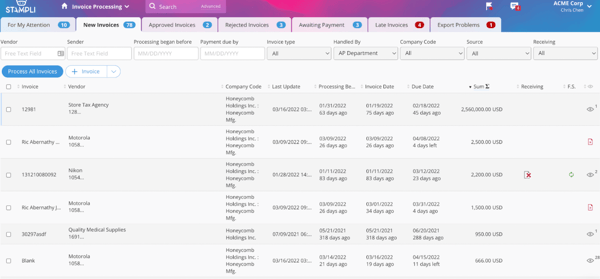
While Stampli helps streamline invoice processing and approvals, some teams may find its payment capabilities less comprehensive for certain industries or payment scenarios. It works well for organizations that primarily need stronger AP workflow automation and are comfortable handling the final payment step through a connected system.
Some users note that once invoices are exported or marked complete, making edits can be more difficult. However, for teams that value tighter process control and cleaner completion workflows, that rigidity may be a reasonable trade-off, especially when review steps are handled carefully upfront.
“Stampli completely changed how our company sends out invoices for approval before payment. Before Stampli, I was being sent invoices for approval over email. This led to some invoices slipping through the cracks and being lost until, down the road, the accounting team would follow up and ask for approval again. With Stampli, all of the invoices pending approval are in one place and easy to review and approve, or provide feedback when needed.”
- Stampli review, Jason G.
“I've experienced some technical problems, e.g., I got notifications of an invoice to sign, yet it is not there."
- Stampli review, Chelsey W.
Related: We put the 11 best accounting software against each other. Check the results here.
While SAP Concur is best known for expense and travel management, it also plays an important role in automating parts of the accounts payable process—especially when it comes to employee reimbursements and non-PO spending. For companies with high volumes of travel expenses or decentralized spending, Concur helps structure approval workflows and keeps reimbursement cycles moving. It’s not your typical AP solution, but it fills a critical gap in broader spend control.
The mobile app is one of Concur’s most helpful features. Users could snap a picture of a receipt, assign it to an expense, and submit it without needing to open the laptop. It comes in handy during work trips when you need to keep things moving. For teams on the go, the app really helps reduce delays in reimbursement.
Expense management feels structured and scalable according to G2 reviews. Teams could break out categories, track spending by department, and attach documentation with just a few clicks. The automated reminders helped them avoid missing receipts or leaving reports in draft. It can make monthly closeouts far less chaotic.
The approval workflow was another strong point. Requests move smoothly through the chain, and notifications make it easy for managers to review and sign off. I liked that one could customize roles and set up multi-layer approvals. That flexibility is a plus for finance teams trying to maintain control.
I was impressed by SAP Concur’s enterprise readiness for global and connected finance environments. Reviewers mention strong integrations with ERP, HR, and accounting systems, along with support for multi-currency transactions, tax considerations, and centralized reporting. According to G2 Data, the platform is used by 52% mid-market and 36% enterprise teams.
SAP Concur stands out for its automation and policy enforcement, which helps teams reduce manual review without losing control. G2 users call out features like automatic receipt capture, AI-powered data extraction, expense categorization, card matching, and built-in policy checks that flag out-of-policy submissions before they move further along.
Another major strength is how well it brings travel, expense, and invoice activity into one connected system. Reviewers repeatedly highlight the convenience of managing bookings, receipts, approvals, reimbursements, and invoice-related tasks in a single platform instead of bouncing between separate tools. That all-in-one structure gives finance and operations teams better visibility into spend while also making the experience much more consistent for employees.
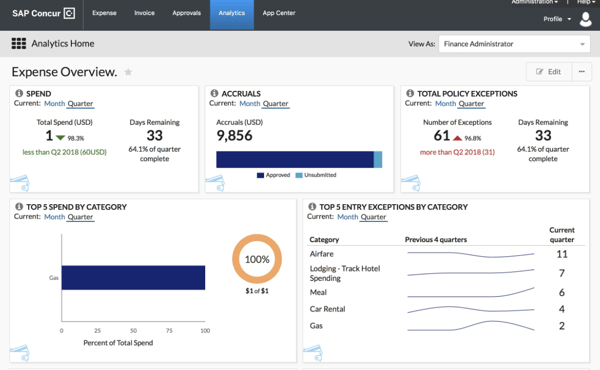
According to G2 reviews, the interface can take a little getting used to, especially for employees completing quick or infrequent tasks. However, the more process-oriented design can work well for organizations that prioritize policy control, consistency, and standardized spend management across teams.
SAP Concur delivers solid automation and visibility for expense reporting, though some reviewers note that certain actions can take a bit longer to load, particularly when working with reports, receipts, or higher-volume tasks. Many teams still find the platform worthwhile because its approval controls, mobile functionality, and end-to-end expense structure help keep reimbursement and spend processes organized at scale.
Overall, SAP Concur is a strong fit for organizations that need more control, visibility, and consistency across travel, expense, and reimbursement workflows.
“Having a strong mobile app and ExpenseIt receipt scanning capability makes SAP Concur particularly effective. With the ability to take pictures of receipts while on the move, managing expenses across several projects can save time significantly. I enjoy using the easy integration with my business credit card; this allows for transactions to be added automatically to the system, streamlining the process of entering data and matching receipts to the line items in my receipt journal every month.”
- SAP Concur review, Devansh Kedia.
"The SAP Concur interface feels dated and not very intuitive, especially for first-time users. Some workflows take more steps than they should, and it’s not always obvious where to find certain actions or information. There are also occasional glitches or sync delays, which can be frustrating when you’re trying to submit something quickly. Overall, it gets the job done, but the experience could definitely be more streamlined.”
- SAP Concur review, Sakshi S.
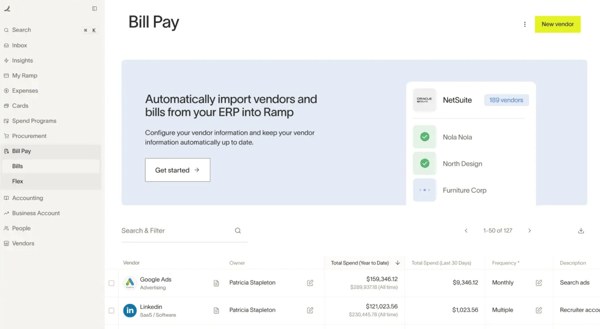
Ramp automates expense workflows for businesses, enhancing control over spending. While it is not a comprehensive accounts payable system, Ramp manages a significant portion of the daily expenses that finance teams oversee. According to G2 Data, it is used by 57% small businesses and 40% mid-market teams.
Ramp’s card management system receives multiple mentions in G2 reviews. With just a few clicks, users could issue virtual cards instantly, set spending limits, and assign cards to departments or projects. It helps provide real-time visibility and prevent unauthorized purchases, making managing recurring or one-off expenses much easier.
Receipt management is also a major strength. One can text or email receipts, and Ramp auto-matches them to the right transaction. This simple process reduces the usual follow-up emails and keeps teams ahead during the monthly close.
I was impressed by how efficient the whole platform felt. From approvals to categorization to syncing with accounting tools, everything moved quickly and without friction. That kind of speed and consistency makes a noticeable difference during busy periods like month-end, when finance teams need processes to run smoothly without delays or bottlenecks.
I liked how much control and compliance support Ramp gives finance teams without making the process feel heavy. Users mention customizable approval chains, permission structures, merchant controls, spend programs, and separation-of-duties features that help enforce policies while still keeping day-to-day spending moving.
Another major strength is Ramp’s AP and bill pay functionality, which gives teams more than just card controls. G2 users call out how easy it is to upload invoices, schedule payments, manage vendors, process reimbursements, and even handle 1099 workflows from the same platform.
Ramp stands out for how well it connects spend management with accounting systems. Reviewers frequently mention seamless integrations with tools like QuickBooks Online, NetSuite, Sage Intacct, and Xero, which help transactions flow into the general ledger with less manual cleanup.
Teams with international operations may find that card usage abroad or payments involving global vendors, require a bit more planning. That said, for U.S.-based companies or teams with primarily domestic spend, Ramp still delivers a highly efficient experience with strong visibility and control.
Ramp also does a strong job of keeping finance workflows moving, though teams with more complex accounting export needs may need to spend extra time adjusting report formats or organizing fields before using the data elsewhere. However, for most day-to-day spend tracking, reconciliation, and expense oversight, the platform still helps reduce a significant amount of manual work.
Overall, Ramp is a strong fit for businesses that want faster expense management, tighter spend controls, and a more automated approach to everyday finance workflows.
“I really like how Ramp makes my work life easier. It's pretty nice that I don't have to do much with receipts because the app takes care of it for me. When I'm at a work site and can't send my receipt because I'm busy, Ramp does it for me without needing me to take a picture or categorize the expenses. It's cool how it operates on its own and takes that burden off my shoulders. This is especially helpful for all the employees in the company. Setting it up was easy too, just a quick login and everything connected pretty fast. I also mentioned that I've never used another app like this, so I'm loyal to it.”
- Ramp review, Leandro L.
“There are very few drawbacks to using Ramp. However, I do find it challenging to manage old expenses or canceled transactions. I have several transactions that remain open on my account, appearing as if they are still waiting for a receipt or a comment, even though these transactions were canceled or refunded months ago. In the past, such transactions would eventually disappear from my account, but these have lingered for many months, and I have not yet figured out how to remove them. I would appreciate a simpler way to either delete these transactions or mark them as returned or refunded so they no longer appear on my main screen.”
- Ramp review, Matt D.
Tipalti is a global payables automation platform that handles everything from invoice intake and approvals to vendor onboarding and cross-border payments. The platform integrates with common ERPs and also includes built-in fraud prevention. According to G2 Data, it is used by 29% small businesses and 67% mid-market teams.
Tipalti really shines in the invoice processing workflow. It automatically routes approvals, flags duplicate invoices, and helps standardize formatting across vendors. Teams can easily monitor progress at each step, which helps avoid bottlenecks later on. The time saved here is immediately noticeable.
Vendor onboarding is fast and structured. It is easy to collect tax forms, banking details, and compliance documents all in one portal, so vendors don’t have to email information back and forth. Once they’re in the system, everything runs more smoothly. It reduces manual errors and saves a lot of follow-up time.
Customer support was also consistently helpful according to the G2 reviews. Whether it was walking through an integration issue or answering specific reporting questions, the Tipalti support team felt accessible and responsive. Users didn't have to wait long for a reply, which made the learning curve easier to manage.
Tipaltist stands out for its global payment capabilities, especially for businesses paying contractors, suppliers, or partners across multiple countries. Reviewers consistently highlight how the platform supports different currencies, payment methods, and regional compliance needs without forcing finance teams to manage those complexities manually.
Tipalti also stands out for its OCR-powered invoice capture and coding automation. Reviewers highlight how the system automatically extracts key invoice details, reduces manual data entry, and improves accuracy during processing. This helps teams move faster while minimizing errors, especially when handling high volumes of invoices across vendors.
I was also impressed by Tipalti’s ERP integrations and scalability for growing finance operations. G2 users repeatedly call out smooth connections with tools like NetSuite, QuickBooks, and Sage Intacct, along with the ability to support multi-entity workflows and higher transaction volumes without adding manual work.
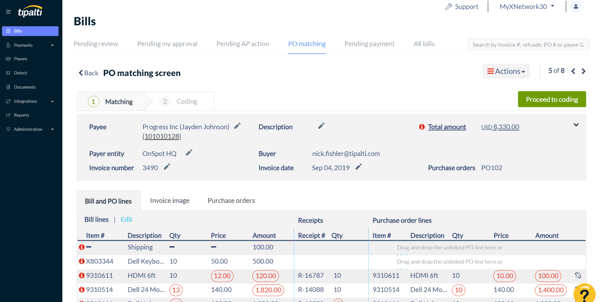
While Tipalti gives teams strong visibility into payables activity and helpful reporting for everyday monitoring, some users may find that more customized reporting or highly specific export formats take extra effort and occasional spreadsheet cleanup. It still works well for teams that primarily need reliable operational visibility and can supplement deeper analysis with external reporting workflows when needed.
Tipalti also does a solid job of centralizing vendor and payment information, though some users mention that finding specific records can take a bit more digging when they need quick answers or historical details. For teams managing large volumes of payments, the platform still delivers meaningful value through its organization, transparency, and end-to-end payables structure.
Overall, Tipalti is a strong fit for businesses that need to automate global payables, reduce manual AP work, and maintain better control over vendor payments at scale.
“It's very convenient, and I save a lot of time with scanning receipts through my phone instead of uploading them to the web. saves a lot of steps. It was easy to set up as well.”
- Tipalti review, Rohan D.
“What I dislike about Tipalti is that it can feel complex and not very intuitive, especially for new users. Some workflows require multiple steps, which can slow things down for simple tasks. Customization options are also somewhat limited, and certain reports or configurations require support assistance. Additionally, processing times and system lag can occasionally be an issue, and troubleshooting errors isn’t always straightforward.”
- Tipalti review, Fia T.
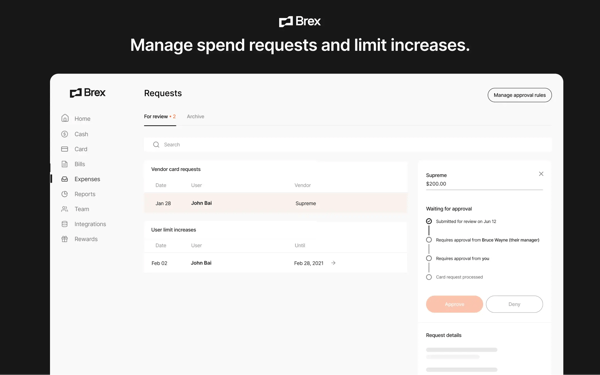
Brex is a unified spend platform that makes it easy to control every type of spend. It offers customizable workflows for complex and diverse types of spend and enables the highest levels of compliance with the least amount of friction for employees. According to G2 Data, Brex is used by 62% small businesses and 38% mid-market teams.
Brex helps businesses manage corporate cards and employee spend at scale. Reviewers consistently highlight how simple it is to issue physical and virtual cards, assign spending limits, and control purchases across teams without adding friction.
Brex’s ease of use across both web and mobile receives consistent praise from reviewers. Users repeatedly describe the platform as intuitive, modern, and easy to navigate from the start, whether they are uploading receipts, reviewing transactions, or managing cards on the go.
Reviewers praise its strong expense tracking and receipt capture workflows. Employees can categorize expenses, attach receipts, and respond to prompts, often right from their phones. By pushing receipt collection and transaction follow-up closer to the point of purchase, the platform helps reduce back-and-forth with accounting and keeps the financial close more manageable.
I was impressed by Brex’s all-in-one approach to financial operations. Users call out the convenience of being able to handle cards, reimbursements, AP-related payments, wires, travel, and budget management in one place rather than juggling multiple tools.
Brex’s integration and implementation experience ensures smooth onboarding, easy setup, and helpful support when connecting Brex to systems like QuickBooks Online or existing financial workflows. That lighter lift during rollout makes the platform especially appealing for startups and SMBs that want to modernize financial operations without a long, complicated implementation cycle.
The platform brings meaningful value through its banking and payment flexibility, which goes beyond basic card management. Users highlight features like few-click wires, free international wire transfers, global card usage, check deposits, and disposable virtual cards for added security.
Some teams may find that certain integrations in Brex require a bit more adaptation depending on their ERP, banking setup, or industry-specific processes. For many startups and growing businesses using common finance tools, the platform still offers a modern and efficient experience that covers core spend management well.
Brex brings strong structure to spend controls, travel, and reimbursements, though a few users mention that certain workflows can take a little adjustment in more specific scenarios, such as category-based card limits, reimbursement setup, or travel booking. However, for teams that prioritize visibility, consistency, and policy control, that added structure can still be worthwhile.
Overall, Brex is a strong fit for startups and growing businesses that want a faster, more modern way to manage spend, cards, and financial operations in one place.
“I really appreciate how simple it is to create virtual cards that are linked to specific budgets, as well as the option to submit invoices that are automatically matched to the corresponding charges without any manual effort. The automation built into the system makes handling purchases and reimbursements much faster and more convenient.”
- Brex review, Bryan M.
“Sometimes uploading receipts and figuring out what the card was used for can be confusing. It can be a barrier when trying to get the definitions or explanation of what the card was used for. Also, initially, it was not easy for me to set up Brex, and I needed help from finance. It was a little difficult and confusing with the questions it asked."
- Brex review, Deborah E.
Got questions? G2 has the answers.
The leading AP automation services include BILL AP/AR, Sage Intacct, Stampli, SAP Concur, Ramp, Tipalti, and Brex. The right choice depends on factors like company size, ERP stack, global payment needs, approval complexity, and whether you want AP automation only or a broader spend-management platform.
For small businesses, ease of use and affordability matter most. BILL AP/AR is a great fit, with straightforward invoice capture, approval routing, and QuickBooks integration. Ramp is another solid choice, especially for startups that want to automate payments while managing cards and spend policies in one place. Stampli also works well for smaller teams that handle frequent vendor invoices and need a more collaborative approach to invoice approvals without jumping into an enterprise-grade system.
Larger companies typically need more than just invoice automation. They require robust controls, scalability, and international capabilities. Tipalti is built for high-volume AP teams and easily handles global payments, tax compliance, and fraud prevention. Sage Intacct offers strong financial reporting, multi-entity support, and integration with other enterprise systems. SAP Concur is best suited for companies already using SAP products, offering a seamless experience for managing both AP and travel-related expenses.
Ramp and Brex fit startups that want AP plus broader spend management, including cards, reimbursements, and tight controls in one platform. Stampli is a common choice when the priority is invoice-centric AP automation and approval workflows, especially for teams that want AP depth without a broader spend suite. Tipalti is usually the best fit when a startup has global payouts, supplier onboarding, or tax/compliance complexity.
If you’re looking at AP automation software with strong review performance, Ramp and Stampli stand out for higher ratings, while BILL AP/AR and Sage Intacct stand out for larger review volume and broad market presence.
For mid-sized businesses, popular AP automation options include BILL AP/AR, Stampli, Tipalti, Ramp, Brex, SAP Concur, and Sage Intacct. The right choice depends on whether you need invoice automation, global payments, or broader spend and financial management capabilities.
Managing payables doesn’t have to be a headache. These seven AP automation tools bring serious muscle to the table, whether you’re chasing faster approvals, cleaner audit trails, or global payment capabilities. From AI-driven invoice capture to multi-entity support and seamless ERP integration, there’s something here for every finance team.
What stood out to me most was how each platform tackles different pain points. Some shine at spend control, others excel at cross-border compliance, and a few wrap it all up into a beautifully intuitive dashboard. Personally, I leaned toward tools that reduce manual entry and help teams stay ahead of deadlines without needing a finance degree to operate.
I dug into each one to uncover the real strengths and limitations so you don’t have to. Now it’s your turn to explore, compare, and find the AP automation software that will actually make your month-end close a little less painful.
Searching for an invoicing tool instead? Check out this list of the best free invoicing software ranked and reviewed by my colleague.
/DarshayitaThakur-OrangeBG.webp)

Recently updatedSummer 2026 Grid® Report · published May 26, 2026 This guide was last...
by Darshayita Thakur

If you’re here, you probably already know how Sage Intacct helps finance teams, CFOs,...
 by Sudipto Paul

I know how delayed reimbursements can affect employee travel experiences and overall morale....
.png) by Shreya Mattoo
by Shreya Mattoo