


I evaluated 20+ free tools using G2 Data and reviews to finalize the 8 best free marketing analytics software for marketing teams. These are AgencyAnalytics, CallRail, CleverTap, HubSpot Marketing Hub, Intuit Mailchimp, Klaviyo, Semrush, and Singular.
I've spent enough late evenings stitching campaign numbers together across six browser tabs to know that "free" marketing analytics tools are not all built the same. What separated these eight from the rest of the field was how cleanly each owns a different slice of the job, from SEO and email to call tracking, app attribution, and client reporting. The real skill is knowing exactly where each free plan stops.
Many marketing teams don't get a tooling budget on day one, so you're proving ROI and reporting to leadership on whatever costs nothing. Free plans always sound generous until you hit the contact cap mid-campaign or the trial clock runs out right as your VP asks for numbers, so it pays to know those limits before you commit to one.
For this guide, I focused on G2's free marketing analytics software category, dug into exactly what each free plan or trial includes, and cross-referenced what marketing teams say about them in their G2 reviews. Here's what I found about the best free marketing analytics software for marketing teams in 2026.
*Tools are listed alphabetically. These tools offer a free plan, a free trial, or a freemium model.
Here's exactly what each free plan or trial covers, and where it stops, before the full reviews.
| Tool | G2 Rating | What the free plan or trial covers | Paid starts at |
| AgencyAnalytics | 4.7/5 ⭐ |
|
Core $20/client/mo (billed annually; $25/mo monthly) |
| CallRail | 4.5/5 ⭐ |
|
Lead Tracking $50/mo (billed yearly); 5 numbers, 250 minutes |
| CleverTap | 4.6/5 ⭐ |
|
Essentials tier, priced by monthly active users (quote-based) |
| HubSpot Marketing Hub | 4.4/5 ⭐ |
|
Starter from $15/mo; 1 seat, 1,000 marketing contacts |
| Intuit Mailchimp All-in-One Marketing Platform | 4.4/5 ⭐ |
|
Essentials $13/mo (12-month introductory promo) |
| Klaviyo | 4.5/5 ⭐ |
|
From ~$20/mo (251–500 profiles) |
| Semrush | 4.4/5 ⭐ |
|
Paid from $139/mo ($117.33/mo billed annually) |
| Singular | 4.5/5 ⭐ |
|
Growth from $0.05/conversion (usage-based; sales-assisted) |
*All pricing and free-plan details are based on publicly available data at the time of publication and are subject to change.
Marketing teams are being asked to prove more with less. Marketing budgets have fallen to just 9% of company revenue, and overall marketing spending grew only 1.7% over the past year, the weakest rate since 2021. When budgets are that tight, a capable free analytics stack isn't a compromise.
I started with G2's free marketing analytics software category, which lists tools offering a free plan, free version, or free trial. From there I worked down the most-reviewed, highest-rated tools that offer a genuine free plan or trial, and evaluated each in detail, what you actually get without paying, how the limits are structured, and the exact point where a marketing team gets pushed to upgrade.
I then cross-referenced verified G2 reviews from people in marketing roles to understand how each tool holds up in real marketing work beyond my own evaluation: what teams lean on it for, where it gets in the way, and how much of the value sits behind a paywall. G2 review data referenced throughout was pulled in 2026, and some reviews have been lightly edited for clarity. The G2 Score, satisfaction, feature, and payback figures cited throughout come from G2 Data, G2's verified user reviews and Grid ratings.
The screenshots in this article are a mix of those taken from each vendor's G2 profile and publicly available materials.
A free plan is only useful if it does real work before it runs out. Here's what I paid attention to:
To be included in G2's Marketing Analytics category, a product must:
From that category, I focused on the tools that offer a genuine free plan or free trial.
This data was pulled from G2 in 2026. Some reviews may have been edited for clarity.
Want the full field, including paid tools? See G2's best marketing analytics tools list for a broader comparison across free and paid options.
I opened AgencyAnalytics expecting another single-channel dashboard, and instead found a tool built specifically for agency marketing teams juggling several clients at once: it pulls campaign data from dozens of ad, SEO, email, and social platforms into one white-labeled dashboard, so a client sees their numbers without ever touching the underlying tools.
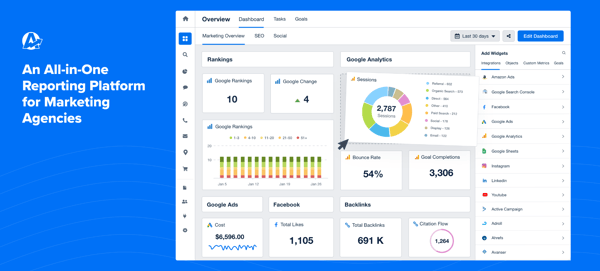
Across the 14-day trial, what stood out to me was how little assembly the reports needed: connect a client's accounts, and the dashboard and share link were ready without custom formulas or a design pass. One thing to know up front, AgencyAnalytics moved to a single-plan pricing structure, so there's no free-forever tier to fall back on once the trial ends.
For an agency marketing team billing hours against reporting time, the G2 Data backs up the time-savings pitch: AgencyAnalytics is a category Leader with a 71 G2 Score, the highest star rating of the eight (4.7/5), and it tops the group on quality of support (96%) and ease of setup (93%), with G2 reviewers consistently pointing to the breadth of integrations as the reason setup goes fast.
Two situations move agencies onto a paid plan:
Core runs $20/client/month billed annually (or $25/month), which reviewers say is easy to budget once your client count is steady, and harder to justify when you manage only one or two brands.
"I use AgencyAnalytics for marketing reports, and the main thing I like is that it pulls all my marketing campaign reporting data into one dashboard. It's easy to use and easy to scan the data. It pulls from most of the platforms I need, and it's easy for clients to access with share links. The biggest impact for me is that it pulls data from multiple platforms so my clients don't have to look through multiple documents or long pages."
- AgencyAnalytics review, Jena M.
Best for: Agency marketing teams that report on multiple clients' campaigns and want one white-labeled dashboard instead of per-client exports.
Not ideal for: In-house teams reporting on a single brand, or teams that need a free-forever plan rather than a 14-day evaluation window.
"I wish there were a way to combine or consolidate data from multiple data sources into a single page, for example: a summary of KPIs across key channels on a single page. To my knowledge, only one data source can be linked per page. I also wish there was functionality that would allow you to group campaigns by theme or tactic and create charts or tables that display that data by theme or tactic."
- AgencyAnalytics review, Nina M.
Reporting for more than one client? See G2's data visualization category for the wider field of dashboard tools.
I evaluated CallRail expecting a straightforward call-tracking tool, and found it answers a question most marketing teams ignore while analyzing their campaigns: which marketing actually made the phone ring. For teams running Google or Meta ads, or local campaigns where prospects call instead of click, CallRail ties each call back to the campaign, ad, and keyword that produced it, closing an attribution gap that web analytics alone leaves open.
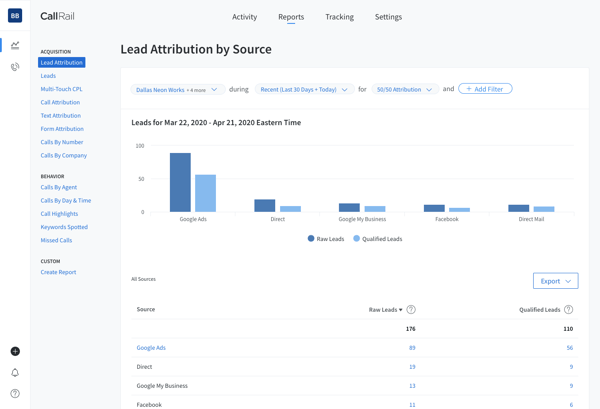
On the 14-day trial, I watched the value land fast for anyone spending on ads: dynamic number insertion showed which source drove each call, and call recording and transcription made it easy to verify lead quality. One thing to know up front, CallRail is trial-only, so you get 14 full-featured days on the Lead Tracking plan before it becomes a paid tool.
What stood out to me was how little setup stood between signing up and seeing attributed calls. If getting live fast with minimal setup matters most for your marketing team, the scores back it up: on G2, CallRail goes live fastest of the eight (about 0.6 months) and scores highest on ease of use (92%).
CallRail offers a 14-day free trial on every plan tier, no credit card required. During the trial you can try the following features from the entry Lead Tracking plan ($50/mo):
A few situations move teams onto, or up, a paid plan:
For a team that lives on inbound calls, reviewers say the attribution earns back the cost quickly.
"The customer support team has always been incredibly helpful whenever I need help with our account. Overall though, it's a relatively simple UI however there are times that I'm navigating it and it feels slightly unintuitive. Only in the sense that I'll be within an account, then I'll navigate to "Settings" and from there I have to select the settings again. For the account I was just in. So that part feels a little redundant. But other than that it's been pretty good for what we need it to do."
- CallRail review, Jessica C.
Best for: Marketing teams and agencies that drive phone leads through ads or local campaigns and need to attribute calls back to the source.
Not ideal for: Teams that need a free-forever tool, or whose funnels are entirely online with no call component.
"Reporting can sometimes feel more complicated than it needs to be, especially when I'm trying to track down specific call details or compare performance across campaigns. I'd also like more flexibility to customize dashboards and reports, since the built-in views don't always line up with how we prefer to slice the data. Some integrations could be deeper as well, because getting call data into other tools occasionally takes extra setup or requires workarounds."
- CallRail review, Brandon S.
Comparing tools that tie calls to campaigns? Browse G2's inbound call tracking software category for the wider set of options.
What surprised me about CleverTap is how much further it goes than the campaign send itself. It's where app-first marketing teams go to see how users behave after the install, and to act on it, pairing behavioral analytics, segmentation, funnels, cohorts, and retention with omnichannel campaigns across push, in-app, email, and SMS, so the same platform that measures engagement also runs the messaging meant to improve it.
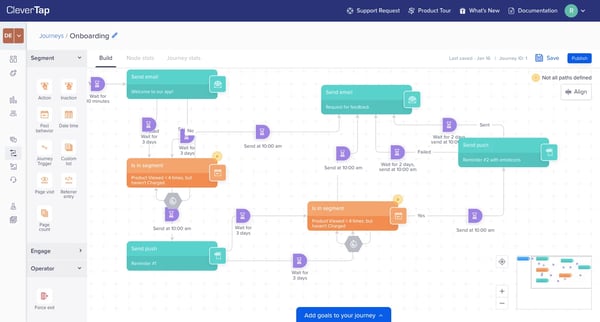
Across the 30-day trial, analytics and engagement never separated for me: segmenting an audience, building a journey, and tracking retention and campaign performance all happened inside the same dashboards. It's a mobile and product-marketing tool at heart, so it fits teams with an app more than a classic web-and-email shop. One thing to know up front, CleverTap is trial-only, a 30-day free trial with no free-forever plan, and paid pricing is quote-based and tiered by monthly active users, so treat the trial as a month to prove value.
While marketing analytics tells you how users arrive; you can check free product analytics software for SaaS startups to understand what they do after they sign up.
What kept surfacing for me was how loyal that depth makes its users: CleverTap holds the highest NPS of the eight on G2 (81), and I saw reviewers credit analytics that actually deliver, with campaign insights scoring 91%. It carries G2's Spring 2026 Leader, Momentum Leader, and Enterprise Leader badges, though its mid-market skew and quote-based pricing mark it as a tool for teams past the starting line.
Beyond the 30-day trial deadline, G2 reviewers point to a few upgrade triggers:
Paid plans start with the Essentials tier, priced by monthly active users, largely on a quote basis.
"Segmentation is robust, the journey builder has been dependable, and the reporting and dashboards make it straightforward to track performance and keep iterating across our different verticals."
- CleverTap review, Vatsal S.
Best for: App-first and product-marketing teams that want engagement and retention analytics tied directly to push, in-app, and email campaigns.
Not ideal for: Teams that need a free-forever tool, or web-and-email marketing teams without a mobile app to engage.
"While the basic campaign setup is straightforward, mastering advanced segmentation, event mapping, and lifecycle automation can be difficult. The dashboard includes a lot of features, which are powerful, but it can also make navigation feel unintuitive, especially when you're managing multiple campaigns or trying to analyse cohorts."
- CleverTap review, Rishabh P.
Engaging and retaining app users? G2's mobile marketing software category has the wider set.
I delved into HubSpot Marketing Hub curious whether its free CRM was worth the hype, and it is: with more than 14,800 G2 reviews, it's one of the most-reviewed marketing platforms anywhere, and the pitch for marketing teams is unification, forms, email, landing pages, and the contacts they generate all live and report in one place, so campaign performance connects to the people behind it.
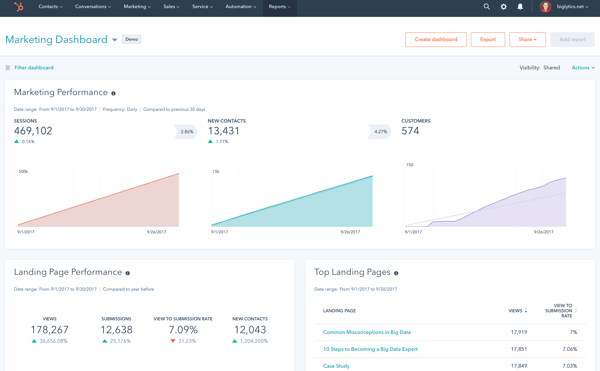
Working through the free tier, I could capture leads, send campaigns, and pull basic dashboards without paying, and HubSpot's free Breeze Assistant added light AI drafting along the way. The free tier stands out for how much of a working marketing stack you get at zero cost, and for where the ceiling sits: as reviewers put it, it's powerful enough to launch on, but the deeper reporting and automation only arrive on paid plans.
My takeaway: if you want the safest all-round free starting point rather than the deepest single feature, HubSpot makes the strongest case. It tops the entire category on G2 with a perfect 100 G2 Score, earned across more reviews than any other tool in the category.
Most teams move to a paid plan when they hit one of these:
Marketing Hub Starter (from $15/month per seat, billed monthly) lifts the send cap, removes the branding, and adds 1,000 marketing contacts. More advanced reporting, attribution, and A/B testing sit on the Professional tier.
"I love that HubSpot Marketing Hub consolidates everything into one place, allowing me to spend my entire day managing all aspects of my marketing easily. I can author messages, design emails and landing pages, and craft forms for tracking information all within HubSpot. I appreciate not needing external connections for things like Google Analytics or my website analytics, as I can access everything directly from within HubSpot. Compared to previous solutions like Nutshell, which were clunky and not functional enough, or Salesforce, which is powerful but overwhelmingly difficult to maintain, HubSpot is smooth and easy to understand, with everything I need right there."
- HubSpot Marketing Hub review, Steve O.
Best for: Small marketing teams that want campaigns, email, forms, and a CRM connected in one free platform, with room to grow into paid tiers.
Not ideal for: Teams that need advanced automation or deep reporting at no cost, or larger lists where marketing-contact pricing scales quickly.
"The main downside is pricing. Costs scale quickly as your contact list grows and as you add hubs or move into higher tiers, and several features I'd consider essential sit behind the more expensive plans, so the jump between tiers can feel steep for a smaller team. There's also a learning curve past the basics. Simple workflows are easy, but advanced automation, custom reports, and conditional logic take real time to figure out, and reporting itself is powerful but rigid. Customizing dashboards beyond the default templates is more limited than I'd like, and pulling a specific cross-object report sometimes means exporting data and finishing the analysis elsewhere."
- HubSpot Marketing Hub review, Vitor V.
Outgrowing the free tools? G2's marketing automation software category shows where teams go next.
Using Intuit Mailchimp All-in-One Marketing Platform, I could see why it's often where small marketing teams first learn what their campaigns are actually doing. Beyond sending email, its free plan reports on opens, clicks, and audience engagement in a way that's approachable for non-analysts, and it bundles forms, landing pages, and basic automation into the same dashboard.
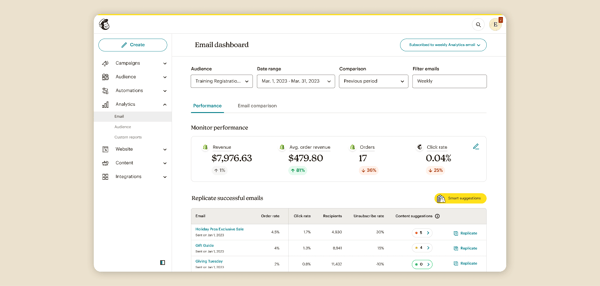
In the free plan, what I kept coming back to was how easy it made things: I could build, send, and read a campaign report without a specialist. The limits are about scale, not capability: the free tier tops out at 250 contacts and 500 emails a month, and the more advanced automation and AI content tools sit on paid plans. For a small list, it's a clean, complete starting point.
My honest read: for getting a first campaign sent and measured with the least friction, Intuit Mailchimp clears the bar without a weak spot. Its 90% on ease of use and 90% on reports and dashboards both sit right at the Marketing Analytics category average (89% and 90%), so nothing in the free plan slows a first campaign down.
A few situations move teams onto a paid plan:
Essentials starts at $13/month (a 12-month introductory rate); reviewers advise pruning your list regularly to avoid paying to store contacts you'll never email.
"I like its all-in-one capabilities. I don't have to use multiple apps for funneling, which is ideal for contact management. I'm able to filter contacts into specific flows based on their input and do specific follow-ups based on those interactions. It's very much a setup and let-it-run kind of deal, which is great for our team. The initial setup was pretty easy, and the platform really supports our marketing funnel. We can use it to set up multiple pop-ups and forms to create different auto-flows based on the products we offer, and integrate LiveChat to push particular content."
- Intuit Mailchimp All-in-One Marketing Platform review, Mingo B.
Best for: Small marketing teams that want approachable email analytics and a light all-in-one platform on a free plan.
Not ideal for: Teams with lists above 250 contacts, or those that need advanced segmentation and automation without moving to a paid tier.
"While MailChimp offers a wide range of features, some advanced tools are locked behind higher priced plans. The interface can feel overwhelming for new users and certain automation and audiences' management features. Learning curve pricing can also become expensive as contact list grows."
- Intuit Mailchimp All-in-One Marketing Platform review, Medusa I.
Scaling your email program? G2's full email marketing software category has the wider field.
I went into Klaviyo expecting another email sender with analytics bolted on, and found the opposite order: revenue attribution is the point, and email and SMS sends are how it gets acted on. For an ecommerce-leaning marketing team, campaign and flow performance report directly against revenue per recipient, so a send isn't judged on opens alone.
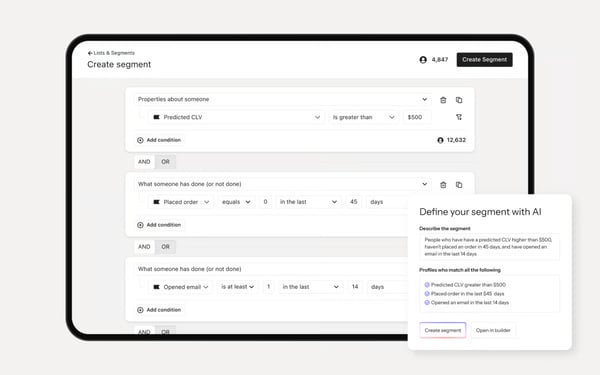
On the free plan, segmentation is already built in: you can build dynamic audiences from behavior, purchase history, and profile data without a separate tool, and revenue attribution ties those segments back to campaign performance from day one. Klaviyo's Segments AI, which turns a plain-language description into a finished segment automatically, is reserved for paid accounts, so free-plan users build segments manually rather than by prompt. The free tier covers up to 250 active profiles, 500 email sends a month, and a small monthly allotment of mobile messages, with 10,000 AI Composer credits included.
For a marketing team that measures success in revenue rather than opens, that's exactly where Klaviyo's G2 Data points too: it's a category Leader with a 73 G2 Score, driven by one of the strongest market-presence scores in the group (81), with G2 reviewers repeatedly crediting the segmentation and revenue tracking for the rating.
A few upgrade triggers come up most in G2 reviews:
The next tier starts around $20/month for 251 to 500 profiles and scales with your list from there.
"I like Klaviyo for its powerful AI segmentation, which makes my job so much easier by suggesting segments without needing to search manually. It's pretty helpful as I just type whatever segment I want, and it gets done. The drag-and-drop email design feature is a time-saver for me, allowing for quick email designs without creative hassle. Additionally, tracking revenue through campaigns and emails is straightforward, allowing me to monitor month on month revenue efficiently."
- Klaviyo review, Devadiga V.
Best for: Ecommerce-leaning marketing teams that want email and SMS performance tied directly to revenue, not just opens and clicks.
Not ideal for: Non-ecommerce teams, or teams whose list will outgrow 250 profiles quickly and want to delay that cost.
"The thing I dislike most is that some advanced functions are not very simple at first. If you need to build more complex logic, test many scenarios, or find the reason of issue, it can take extra time. Also the price is not small, especially when contact base grows. Sometimes I would like to have more flexible reporting and more simple navigation between some sections."
- Klaviyo review, Anna K.
Pairing email with SMS has a category of its own on G2, SMS marketing software rounds out the comparison.
Semrush is the SEO and competitive-intelligence layer I reached for when I wanted the search side of a marketing team's stack covered. Keyword research, rank tracking, site audits, and competitor analysis all live in one place. The free account is limited, but it's a real, no-credit-card way to get a search snapshot, and the brand's free SEO education is a genuine bonus.
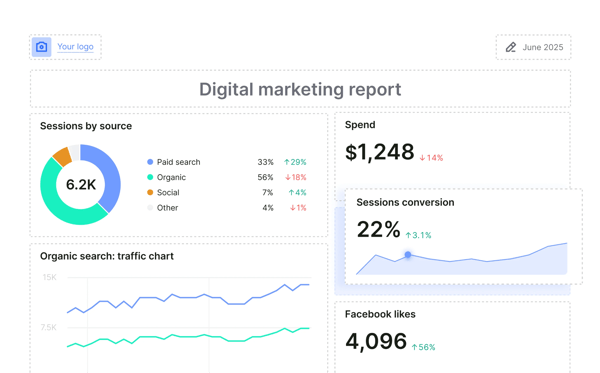
Working the free account, I found the daily caps set the ceiling: a fixed number of lookups per day across keyword, competitor, and backlink reports, plus a small site audit, fine for a quick check, not for continuous work. I noticed G2 reviewers love the depth of the paid product (the Keyword Magic Tool and competitor analysis come up constantly), but meaningful SEO work runs into the free limits quickly. Semrush's AI Visibility toolkit, which tracks brand presence inside AI answers, is a paid add-on, not part of the free account.
When SEO drives your pipeline, Semrush is the standout dedicated tool here, an 89 G2 Score and a category Leader, and I saw G2 reviewers credit its support and free SEO education for getting them productive without an analyst.
A few situations move teams onto a paid plan:
The entry plan runs $139/month (or $117.33/month billed annually) for 5 projects and 500 tracked keywords.
"What I value most about Semrush is that it brings keyword research, competitor analysis, and site health checks together in one place, so I'm not constantly juggling separate tools. The Keyword Magic Tool makes it quick to uncover low-competition terms that still have real search volume, and Position Tracking lets me monitor ranking changes day by day. The Site Audit has flagged technical issues I likely would have missed otherwise, and being able to pull a competitor's top pages and backlink profile in just a couple of clicks has influenced a lot of my content strategy. One unexpected upside is how much time it saves on client reporting."
- Semrush review, Udaya S.
Best for: Teams that want a free snapshot of their SEO and competitive position, and a path into a full toolkit as their search program grows.
Not ideal for: Teams that need ongoing, high-volume SEO work for free, the daily caps make the free account a trial more than a workspace.
"It can be pretty overwhelming when you first log in because there are just so many features. There's definitely a learning curve. Also, the pricing is a bit steep for freelancers or very small agencies. Sometimes the traffic estimations for really small niche websites feel a bit off compared to my actual Google Analytics data, but that's common with most SEO tools."
- Semrush review, Cagatay K.
Serious about search? Ranking well is rarely a one-tool job; check out G2's SEO tools category for the rest of the stack.
I hadn't expected a genuinely free-forever tool this far into mobile attribution, and Singular is exactly that: it unifies attribution across ad networks, app stores, and web-to-app journeys into one view, so a marketing team running app-install or re-engagement campaigns can see which channel actually drove a paying user rather than just an install.
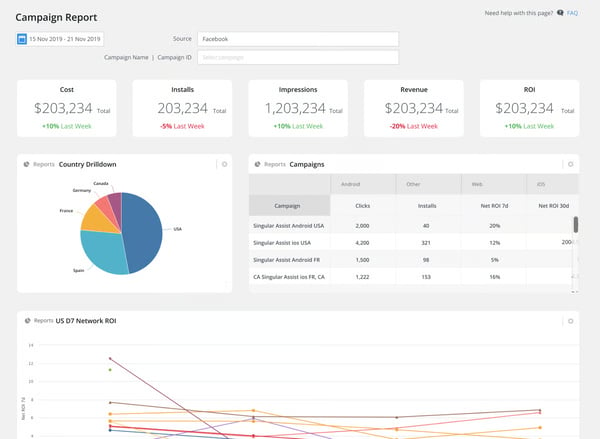
On the free plan, the attribution model is the whole story: connect your ad networks and app, and Singular ties installs and conversions back to the campaign that drove them, with fraud prevention and SKAdNetwork support built in rather than bolted on. The free tier covers up to 15,000 paid conversions a month at no cost, no credit card required, which is a usage cap rather than a time limit, so it's genuinely free-forever within that ceiling.
For an app-marketing team that needs attribution without a six-figure MMP contract, that's where Singular's G2 Data lines up: it's a category Leader with a 72 G2 Score and 95% on quality of support, among the highest of the eight, with G2 reviewers pointing to responsive support and pricing that reads as competitive against other measurement platforms in the category.
Singular is the rare genuinely free-forever tool here, so cost barely registers as a switching driver in its G2 reviews, the walls are about features and data access instead:
"Simple, easy to integrate, reliable and allows us to do full marketing attribution measuring performance across different channels. Support has been amazing and always available via email or Slack. Price for the same features was also very competitive versus other companies. UI is also easy to understand but the dashboard and charts need to be updated to be more modern."
- Singular review, Dror Z.
Best for: Mobile app marketing teams that need cross-channel attribution and fraud detection without an enterprise MMP contract.
Not ideal for: Teams without a mobile app to attribute installs for, or those that will blow past 15,000 monthly paid conversions quickly.
"Sometimes the platform can be a bit slow, especially when working with larger datasets or more detailed reports. It can slow down the workflow when you need quick insights. Also, some advanced features like creative analytics require additional upgrades, which can be a downside if you want everything in one place without extra costs."
- Singular review, Marko D.
Piping data into your own reports? See G2's ETL tools category for the data-integration layer.
The right free tool depends on your situation. Here's the free stack to start with for each, and the G2 Data behind the picks.
| If you're... | Free stack | Why this pairing works |
| A small, lean team measuring search and email first | Intuit Mailchimp + Semrush |
|
| Running paid ads where prospects call instead of click | CallRail + HubSpot Marketing Hub |
|
| A lead-gen or B2B team that wants analytics on a CRM | HubSpot Marketing Hub + Semrush |
|
| An ecommerce team measuring email and SMS against revenue | Klaviyo + Semrush |
|
| An app or product-marketing team measuring engagement and attribution | CleverTap + Singular |
|
| An agency reporting on multiple clients | AgencyAnalytics + Semrush |
|
Semrush turns up in several rows because search is the one channel almost every team measures, so it pairs well with whatever you start with. Whatever you pick, lead with your priority job, then add a reporting layer once you track more than a couple of channels. The reviews above go deeper on each.
Picks are matched to what each tool measures best, with the "why" grounded in G2 Data, satisfaction, feature scores, and go-live times, where a metric applies.
Free marketing analytics tools fit best for:
That matters more than usual right now: marketing budgets have been squeezed to their lowest share of revenue in years, so proving value on a free tool before asking for budget is often the only realistic path. The honest ceiling shows up in three places:
Many marketing teams combine two or three of these into a stack rather than expecting one to do everything.
A few signals come up consistently:
When you hit those walls, the upgrade paths are reasonable and incremental:
The smart approach is to run your real numbers through the free versions first, you'll know quickly which wall you'll hit, and which upgrade is actually worth it.
Got more questions? Here are the answers.
HubSpot's built-in dashboards update without any queries, so a marketer can see performance without waiting on a data team, and Klaviyo's built-in reporting works the same way for email and SMS revenue. AgencyAnalytics is the other no-SQL option here: its dashboards pull campaign data into a shareable client view without a single formula.
Among the eight, CallRail offers the sharpest attribution for call-driven campaigns, tying each phone lead back to the exact source, Singular does the same for mobile app installs and re-engagement, and HubSpot handles campaign-level attribution inside its CRM. For ecommerce, Klaviyo attributes revenue back to specific campaigns and flows, so you can see which send actually drove the sale.
HubSpot scores highest on trust here, a category-topping 100 G2 Score across 14,800+ reviews for all-in-one campaign analytics. AgencyAnalytics carries the highest star rating of the eight (4.7/5) for agency reporting, while Klaviyo (4.5/5) and CleverTap (4.6/5) are the reliable picks for ecommerce revenue and app engagement, respectively.
HubSpot is the B2B staple here, valued for keeping campaigns, contacts, and reporting in one place across 14,800+ reviews. Semrush backs it up on the search side, and CallRail is the B2B pick when phone leads matter, tying each call back to the campaign that drove it.
For SaaS customer acquisition, pair Semrush for the top-of-funnel search side, HubSpot for campaign and lead tracking on a CRM, and CleverTap for in-product engagement and retention analytics. Singular adds mobile attribution if your acquisition funnel runs through an app.
AgencyAnalytics is the consolidation tool among the eight, pulling every channel into one white-labeled dashboard on a 14-day trial. HubSpot also consolidates campaigns, email, and contacts into one reporting view, if you want a free-forever option rather than a trial.
HubSpot's native dashboards update automatically, so campaign numbers stay current without exports, and Klaviyo's built-in reporting refreshes the same way for email and SMS revenue. Match the cadence to your needs, since some connector-based tools run on a schedule rather than in real time.
Many marketing teams use two or three together rather than one. A lean small-business stack might be Semrush (SEO) plus Intuit Mailchimp or Klaviyo (email, ecommerce-leaning). A lead-gen team pairs HubSpot (campaigns and CRM) with Semrush (search). An app-first team pairs CleverTap (engagement and retention) or Singular (attribution) with Semrush. Agencies lean on AgencyAnalytics for automated multi-client reporting, with CallRail where phone leads matter.
HubSpot's native dashboards give executives a fast, at-a-glance view on the free plan, keep them lean (focused metrics, clear date ranges) for the quickest loads. AgencyAnalytics is the other option for a clean, client-ready dashboard, though it runs on a 14-day trial rather than a free-forever plan.
CallRail integrates call data with Google Ads, GA4, and CRMs, and AgencyAnalytics connects to most major ad, SEO, and social platforms for consolidated client reporting. HubSpot is itself a marketing automation platform, so its analytics and automation already live together.
After evaluating all eight, here's where I'd start: Semrush on SEO, Intuit Mailchimp or Klaviyo on email, CallRail when phone leads matter, AgencyAnalytics to pull client channels into one report, HubSpot for all-in-one campaigns on a free CRM, CleverTap when app engagement and retention are the metrics that matter, and Singular when mobile attribution and fraud detection are the job. Many marketing teams combine two or three for different parts of the job.
Most cost nothing to start, and where it's a trial, you have one to four weeks to prove the value, so the only real risk I'd flag is choosing on a feature list instead of your own data. Start with the tool that answers the question you can't answer today, not the feature list you think you need, and revisit this list as your stack grows.
Check out G2's take on the biggest marketing automation trends to understand how AI is reshaping campaigns, personalized messaging, and predictive marketing.


When I started evaluating marketing analytics tools, comparing HubSpot Marketing Hub, Semrush,...
.png) by Tanuja Bahirat
by Tanuja Bahirat

I evaluated 20+ tools to find the 10 best marketing automation software in 2026. These are ...
/DarshayitaThakur-OrangeBG.webp) by Darshayita Thakur
by Darshayita Thakur

For some people, marketing is just a word. For others, it is an aspiration to beat all the...
 by Daniella Alscher