When I started evaluating marketing analytics tools, comparing HubSpot Marketing Hub, Semrush, CallRail, Klaviyo, Google Cloud BigQuery, Singular, GetResponse, and AgencyAnalytics, I ran into the same problem most teams do: no shortage of options, but very little clarity on what each platform is genuinely built for before you commit.
Marketing analytics software sits at the center of how teams track campaign performance, attribute revenue, and make spending decisions. Choosing the wrong tool, or one that covers some needs but leaves gaps elsewhere, costs more than just the budget. It costs the visibility you need to make good calls.
I evaluated each of these platforms on G2, focusing on tools with strong ratings, a high volume of recent reviews, and clear differentiation across use cases. Whether you're building a case for a platform switch or comparing finalists before a final decision, this guide covers what G2 reviewers consistently say about each one, where they deliver, where they fall short, and which use cases they're genuinely built for.
8 best marketing analytics tools for 2026: My top picks
-
HubSpot Marketing Hub: Best for comprehensive inbound marketing campaigns
Delivers powerful automation features, CRM integration, and analytics to manage multi-channel marketing in one platform.
- Semrush: Best for SEO optimization and competitor analysis
Offers extensive keyword research, site audits, and competitor tracking to improve search visibility and strategy.
- CallRail: Best for call tracking and lead attribution
Connects phone calls, forms, and chat to marketing campaigns so teams can measure which channels drive the most valuable leads.
- Klaviyo: Best for email and SMS marketing automation for e-commerce
Unifies customer data, email, and SMS into one platform built specifically for e-commerce retention and lifecycle campaigns.
-
Google Cloud BigQuery: Best for real-time big data analysis
Provides scalable querying and fast insights from massive datasets, making it ideal for data-driven decision-making.
- Singular: Best for unified marketing measurement and ROI intelligence
Combines attribution, cost aggregation, and creative analytics to give marketers a single view of campaign performance across every channel.
- GetResponse: Best for all-in-one email marketing and automation
Brings email, automation workflows, landing pages, and webinars together in a single platform designed for growing teams.
- AgencyAnalytics: Best for client reporting and multi-channel dashboards
Centralizes data from dozens of marketing platforms into clean, white-labeled reports built for agencies managing multiple accounts.
*These best marketing analytics tools are top-rated in their category, according to G2 Summer 2026 Grid Reports. The pricing details are dependent on various factors and are available on request.
8 best marketing analytics tools I’d recommend
When I started digging deeper into marketing performance, it became clear how essential marketing analytics tools are for making sense of modern campaigns. With data coming in from SEO, paid ads, email, and social channels, it’s easy to track metrics, but much harder to connect them into something meaningful. That’s where the right analytics platform makes a difference.
Think of marketing analytics tools as your decision-making layer. Instead of jumping between dashboards or relying on surface-level reports, these tools help you understand what’s actually driving conversions, where campaigns are underperforming, and how different channels contribute to overall ROI. Whether it’s attribution, customer journey tracking, or real-time reporting, they bring clarity to otherwise fragmented data.
As I compared different marketing analytics platforms, a few things stood out: the ability to unify data across channels, strong reporting and visualization capabilities, and reliable attribution models. The best tools don’t just present numbers; they help you interpret trends, identify opportunities, and act on insights without adding complexity to your workflow.
The growing importance of these tools is also reflected in the market itself. The global marketing analytics software market is projected to reach $12.51 billion by 2030, expanding at a CAGR of 16.7%. As organizations look to better understand customer behavior and optimize their campaigns, investing in marketing analytics software is quickly becoming a necessity rather than an option.
In my view, the best marketing analytics tools go beyond reporting. They help teams move from reactive tracking to proactive decision-making, improving campaign performance, optimizing spend, and ultimately driving better results from every marketing effort.
How did I find and evaluate these best marketing analytics tools?
To identify the best marketing analytics tools, I started with G2’s category rankings, focusing on platforms with high ratings and a strong volume of recent reviews. This helped surface tools that are widely used and consistently deliver value.
I then evaluated each tool based on core capabilities like campaign tracking, multi-channel attribution, reporting flexibility, and marketing ROI measurement. I also looked at how well these platforms integrate with other tools like CRMs, ad platforms, and analytics systems. Usability played a big role, too. I considered how easy each tool is to navigate, customize, and use for day-to-day reporting, especially for non-technical marketers.
To go deeper, I used AI to analyze G2 reviews and identify common patterns in user feedback, highlighting where tools excel and where they fall short. Since I didn’t have hands-on experience with every platform, I relied on verified user insights to guide my evaluation.
The screenshots featured in this article are a mix of visuals taken from G2 vendor pages and publicly available product materials.
What makes the best marketing analytics tools worth it: My perspective
With so many marketing analytics tools out there, figuring out what really matters takes some digging. Whether the goal is optimizing ad campaigns, tracking website analytics performance, or analyzing customer behavior across multiple channels, the criteria that separate genuinely useful platforms from impressive-looking ones aren't always obvious upfront.
Finding the right software isn't straightforward. Some platforms look compelling but fall short on the insights that actually drive decisions. Based on my evaluation of G2 reviews, the features that consistently make a difference are the ones that help teams turn raw data into actionable strategies without adding unnecessary complexity to their workflow.
If you’re looking for the best marketing analytics software, here’s what to keep in mind:
- Real-time data tracking: Waiting days or even hours to see how campaigns are performing isn't an option. I always prioritize data analytics tools that provide real-time tracking. Whether it's website traffic, ad performance, or email engagement, having up-to-the-minute analytics helps make quick, informed decisions. If a campaign isn't performing well, you can pivot immediately rather than waste budget waiting for outdated reports.
- Multi-channel attribution: Marketing isn't about just one platform. It's a mix of SEO, paid ads, social media, email marketing, and more. I look for tools that don't just track individual channels but actually connect the dots to show the full customer journey. Multi-channel attribution helps understand which touchpoints drive conversions so teams can focus on what's actually working instead of guessing.
- Customizable dashboards and reports: Not all marketing strategies focus on the same metrics. I want an analytics tool that lets me customize dashboards so the data that matters most is visible at a glance. Whether it's tracking ad ROI, customer engagement, or lead generation, tailored reports give clear insights without forcing you to dig through unnecessary data.
- AI-powered insights: The best marketing decisions aren't based on just what's happening now, they're based on what's likely to happen next. I look for analytics tools that use AI-driven insights and predictive analytics to identify patterns in data, forecast trends, and recommend optimizations before issues arise. Instead of reacting to problems, teams can stay ahead of them.
- User behavior and customer journey analytics: Numbers are great, but understanding the people behind the data matters just as much. I look for tools that provide user behavior analysis, heatmaps, session recordings, and funnel tracking, that show exactly how visitors interact with a website, where they click, how far they scroll, and where they drop off, so teams can improve the user experience and boost conversions.
- Seamless integrations: A tool that works in isolation adds friction rather than removing it. I always check whether an analytics platform integrates with the existing marketing stack, whether that's a CRM, email marketing software, ad platforms, or e-commerce tools. When everything is connected, teams get a full picture of marketing performance without switching between multiple dashboards.
- A/B testing capability: One of the best ways to improve marketing performance is through constant experimentation. I look for tools that support A/B tests across ad creatives, email subject lines, landing pages, and CTAs. Testing different variations and analyzing results allows teams to refine strategy and optimize for the best possible performance.
Over several weeks, I researched and evaluated more than 20+ marketing analytics software programs. I narrowed it down to the top 8 based on their features and ease of use.
To be included in this category, a solution must:
- Collect data on marketing campaigns distributed across a variety of media channels
- Monitor marketing campaigns and targeted audiences to identify the results
- Analyze the results and compile data of marketing campaigns
- Integrate with sales, marketing, and other analytics software through which users can source marketing data
- Visualize marketing campaign performance via an analytics dashboard or similar visualization
*This data was pulled from G2 in 2026. Some reviews may have been edited for clarity.
Want more context behind your marketing data? Explore the latest marketing statistics to benchmark performance and understand the trends shaping marketing strategies in 2026.
1. HubSpot Marketing Hub: Best for comprehensive inbound marketing campaigns
HubSpot Marketing Hub is a platform that consistently rises to the top when evaluating all-in-one marketing solutions. Whether a team needs to automate email marketing, manage campaigns, or track leads, HubSpot offers a tightly integrated ecosystem that brings it all under one roof.
Based on G2 review patterns, the initial impression can feel dense; there's a lot to explore. But once teams settle in, reviewers consistently note how well thought out the platform actually is. The dashboard is clean, workflows are visual, and everything is organized in a way that makes campaign management intuitive even for those ramping up for the first time.
The workflow automation stands out for how effortlessly it handles lead nurturing sequences, auto-responders, and follow-ups with minimal manual work. You can create triggers based on user actions (like email opens or page visits), and the system executes the rest. The drag-and-drop email editor pairs well with built-in A/B testing, so optimizing subject lines and content is baked into the day-to-day. Plus, the analytics layer is detailed and actionable. 89% of G2 reviewers rate the sending outbound emails feature highly.
G2 review data also indicates that 90% of users find HubSpot easy to do business with, and the platform earns an 88% satisfaction score for meeting requirements, reflecting how well the feature set maps to real-world marketing workflows across team sizes.
HubSpot's landing page builder is another standout. Teams can spin up pages quickly, connect them with forms, and capture leads without needing a developer. The templates are polished, and everything integrates seamlessly with email lists and workflows.
The native CRM integration ties marketing activity directly to sales outcomes, giving teams full-funnel visibility without bolting on a separate system. G2 reviewers frequently note that having contact records, deal stages, and campaign data in one place streamlines handoffs between marketing and sales — and makes attribution reporting significantly more reliable.
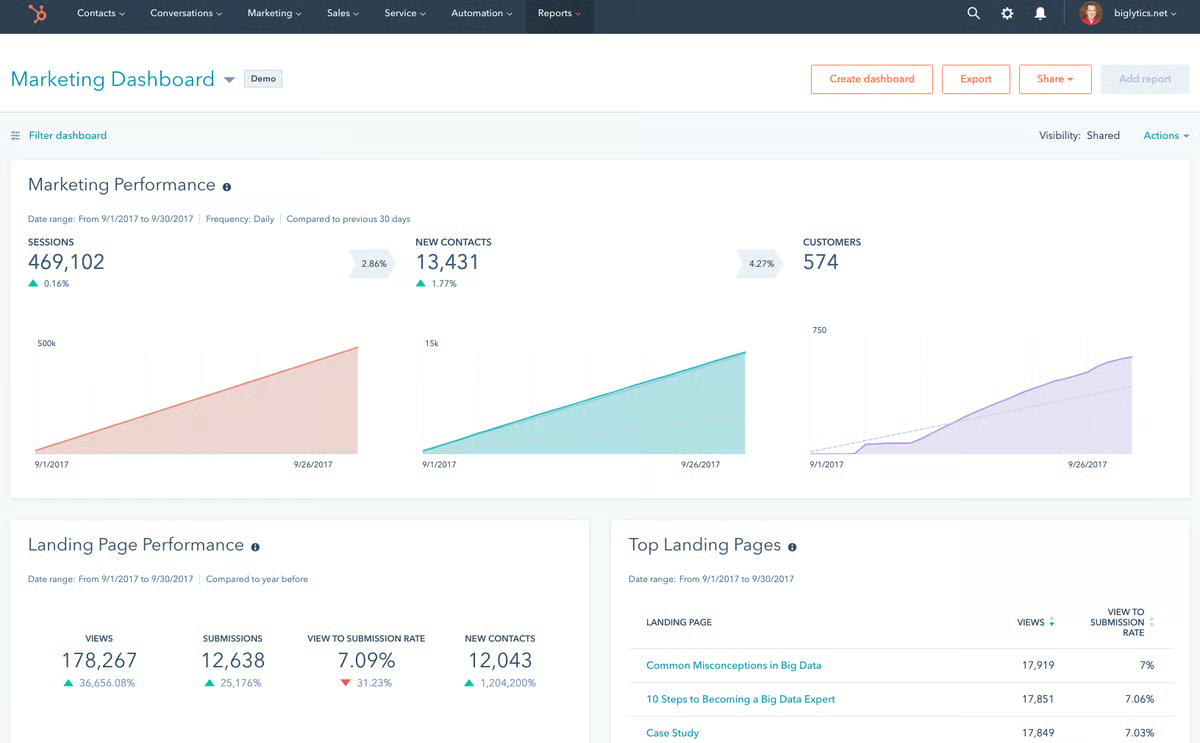
HubSpot's built-in social tools handle scheduling, engagement tracking, and monitoring in one place, which many teams appreciate for simplicity. For deeper competitor research or advanced social analytics, reviewers often pair it with a specialist tool. In practice, this keeps day-to-day execution inside HubSpot while power users augment analysis as needed.
Reviewers confirm the platform is broadly user-friendly and scales well from basic campaigns to sophisticated workflows. That said, several mention that unlocking the most advanced capabilities, particularly when designing complex automations, takes some guided time with tutorials and trial runs. Teams that value long-term flexibility typically find that investment worthwhile as they ramp.
G2 review data also surfaces a pricing consideration: reviewers highlight a noticeable gap between Starter and Professional tiers, with many calling for an intermediate option to soften the jump. For growing teams evaluating HubSpot, mapping out which plan features align to current needs helps avoid overpaying before the full feature set is warranted.
Overall, G2 review data frames HubSpot as a robust, scalable choice for marketers who want automation and analytics in one place. If you plan for a brief ramp-up and supplement social analytics where needed, most users find the long-term payoff well worth it.
What I like about HubSpot Marketing Hub:
- I see users consistently highlight the automation capabilities as a major time-saver; reviewers say it cuts down on repetitive busywork and keeps campaigns running smoothly without constant manual intervention.
- I also notice frequent praise for the drag-and-drop email editor, built-in A/B testing, and performance analytics, which G2 reviewers say make it remarkably easy to create and optimize campaigns from a single interface.
What G2 users like about HubSpot Marketing Hub:
"What I like most about HubSpot marketing is how everything is centralized. You can manage campaigns, track leads, automate follow-ups, and see performance all in one place, which makes it a lot easier to connect marketing efforts directly to results."
- HubSpot Marketing Hub review, Tyric C.
What I dislike about HubSpot Marketing Hub:
- Based on G2 reviews, I get the sense that while HubSpot is broadly user-friendly, mastering automation workflows and advanced features takes time, it isn't an overnight ramp. Teams that plan for guided onboarding and early enablement tend to get the most out of the platform.
- I also notice reviewers consistently flag the gap between Starter and Professional tiers, with many calling for an intermediate pricing option to soften the jump. For growing teams, mapping out which plan features align to current needs can help avoid overpaying early on.
What G2 users dislike about HubSpot Marketing Hub:
"I guess the only thing is, like, it's manually a CRM, not really a ticketing system. And I wish there were more emphasis on the ticketing side. I feel like for a new user, it can be kinda confusing to learn."
- HubSpot Marketing Hub review, Emmanuel B.
Want to understand why retaining customers is just as important as acquiring them? Check out these key customer retention statistics and see how data-driven insights can boost long-term success.
2. Semrush: Best for SEO optimization and competitor analysis
Semrush has been a standout in driving measurable results for marketing teams, and it holds a strong reputation on G2. 92% of G2 reviewers say they'd recommend it, and 89% rate its ease of setup highly, reflecting how quickly teams can get up and running. The platform's competitor analysis uncovers gaps in strategy, enabling marketers to capture market share in areas they previously overlooked.
Its PPC tools help optimize ad campaigns, and the content optimization features have proven invaluable across use cases. The real-time visibility it provides into performance metrics makes decision-making faster and more informed. Semrush doesn't just offer insights; it delivers actionable data that translates into tangible growth.
Semrush is widely recognized in verified G2 reviews for delivering a deep, end-to-end SEO and marketing toolkit, covering keyword research, competitive intelligence, local SEO, PPC insights, backlink auditing, and technical site health checks. Many teams highlight how quickly it translates visibility gaps into actionable next steps, and customer support is often described as fast, knowledgeable, and genuinely helpful.
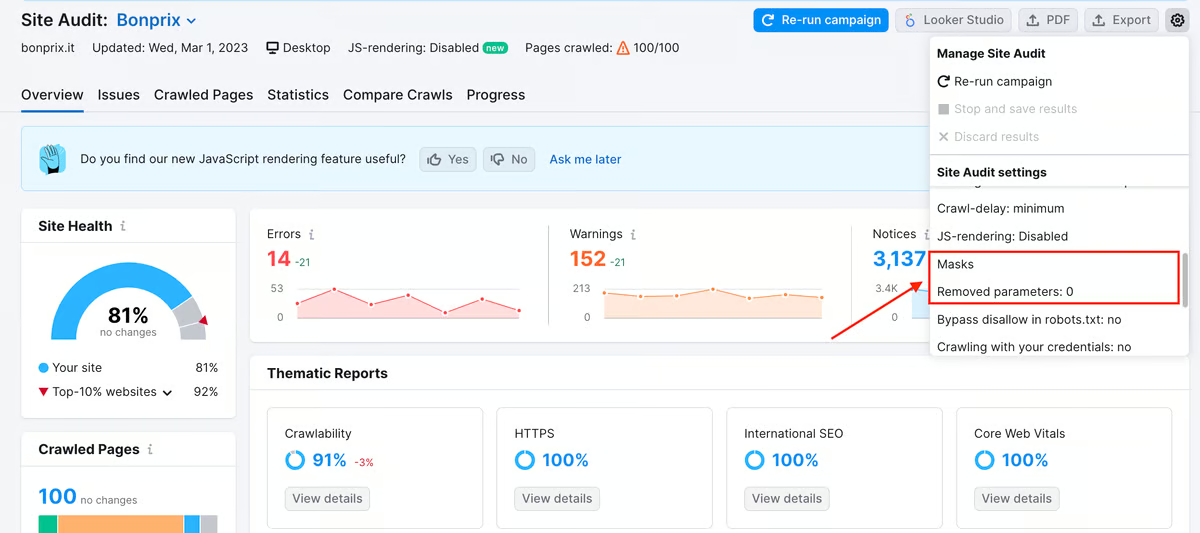
The backlink auditing and site health monitoring capabilities are areas where G2 reviewers see consistent product innovation. Teams can identify toxic backlinks, track domain authority shifts, and run automated technical audits that flag issues before they impact rankings, a workflow that saves hours of manual analysis and keeps SEO hygiene proactive rather than reactive.
The social media management toolkit rounds out Semrush's breadth. Teams can schedule, publish, and track engagement across major platforms from a single workspace, which simplifies day-to-day content operations. G2 reviewers appreciate having competitor benchmarking baked into the same social dashboard, making it easy to spot trends and adjust strategy without switching tools.
With 85% of G2 reviewers rating its brand optimization capabilities favorably and an estimated payback period of just 10 months, Semrush consistently delivers return for teams that commit to building it into their workflow. Notable patterns in G2 reviews emphasize continuous product innovation, especially in backlink auditing and site health, which helps marketers fine-tune their strategy and stay ahead of competitors.
G2 reviewers highlight Semrush's breadth across SEO, paid, and competitive research as a key strength; teams appreciate having core workflows in one place. That said, several note that pricing has risen over time, which can be harder to justify for smaller teams or tight SMB budgets. For those that do adopt, reviewers often recommend right-sizing plans and add-ons to the immediate use case, then expanding as the program matures.
Feedback also points to a ramp: the sheer volume of data and tools can feel expansive at first. Reviewers say the experience improves when teams start with a few core modules (e.g., Site Audit, Keyword/Domain research), lean on presets and templates, and use guided resources to accelerate setup. Many would like more step-by-step, in-product tutorials to shorten onboarding, but once workflows are scoped and standardized, the platform's depth tends to pay off.
Taken together, Semrush is a premium platform that pays off for teams serious about SEO, content, and PPC performance. While cost and ramp-up are common considerations, the breadth of capabilities and speed of insight make it a strong pick for data-driven marketing teams.
What I like about Semrush:
- Reviewers consistently value the social media scheduling and publishing across Facebook, X (Twitter), Instagram, TikTok, Pinterest, LinkedIn, YouTube, and Google Business Profile, managing all profiles from one location clearly simplifies day-to-day execution for content teams.
- The competitive social monitoring also gets strong marks in G2 reviews, letting teams track top-performing accounts in their space and spot emerging trends before competitors do.
What G2 users like about Semrush:
"I use Semrush to see where we rank organically for keywords and for keyword research. It makes researching quicker and in one place, so I don't have to spend more time looking for information. I like the competitor insights, which let me see what keywords our competitors rank and bid on. This helps me skip any guesswork, focus on what's already working in my market, and spot gaps where I can outperform them. Also, the initial setup of Semrush was very easy."
- Semrush review, Carrie W.
What I dislike about Semrush:
- From the G2 reviews I read, I get the sense that the breadth of features can feel expansive initially. Reviewers say teams ramp faster when they focus on core modules first and park non-essentials for later.
- Pricing is the other recurring theme: while larger teams often find the consolidated workflow justifies the spend, SMBs with tight budgets see the rising cost as a hurdle. Right-sizing plans to the immediate use case helps manage this.
What G2 users dislike about Semrush:
"I don't like the pricing; it's very high and everything feels like an extra cost. They charged me for overspending when I was just making a few tests and not even using it for my own clients. The cost unexpectedly shot up to about $450 one month instead of the usual $240 or $249, and this was not communicated, which was not nice at all."
- Semrush review, Adi U.
Looking to dive deeper into data-driven decision-making? Explore our digital analytics tools to learn how to track, measure, and optimize your marketing performance effectively.
3. CallRail: Best for call tracking and lead attribution
CallRail is the platform I'd point marketers to when the question is simple: which campaigns are actually making the phone ring? It's an AI-powered lead intelligence platform that connects phone calls, form submissions, texts, and chats back to the marketing activity that drove them, and it does this with a clarity that makes budget decisions significantly easier.
The setup experience is one of CallRail's strongest suits. 91% of G2 reviewers rate ease of setup favorably, and that tracks with how the platform is built. You assign unique tracking numbers to campaigns, landing pages, or channels, and CallRail handles attribution from there. Dynamic number insertion on your website ensures every visitor session gets properly tracked back to its source, whether that's a Google Ad, an organic search, or a direct mailer.
Where CallRail really shines is in its call recording and AI-powered conversation intelligence. The platform automatically transcribes calls, detects keywords, and analyzes sentiment, giving marketing and sales teams deep insight into what's happening on the phone without manual review. G2 reviewers consistently praise this as a time-saver that removes the need to listen through hundreds of calls to understand what's converting.
The reporting layer is clean and actionable. You can see call volume, lead attribution by channel, and individual call details, including customer journey milestones, all in one view. For agencies managing multiple client accounts, the multi-account structure and campaign-level breakdowns make it easy to demonstrate ROI without stitching together data from different sources.
Integration is another area where CallRail earns consistent praise. It connects seamlessly with Google Ads, Google Analytics, HubSpot, and a wide range of CRM and marketing platforms. G2 users highlight that having call data flow directly into their existing analytics tools keeps everything centralized and saves hours of manual reporting.
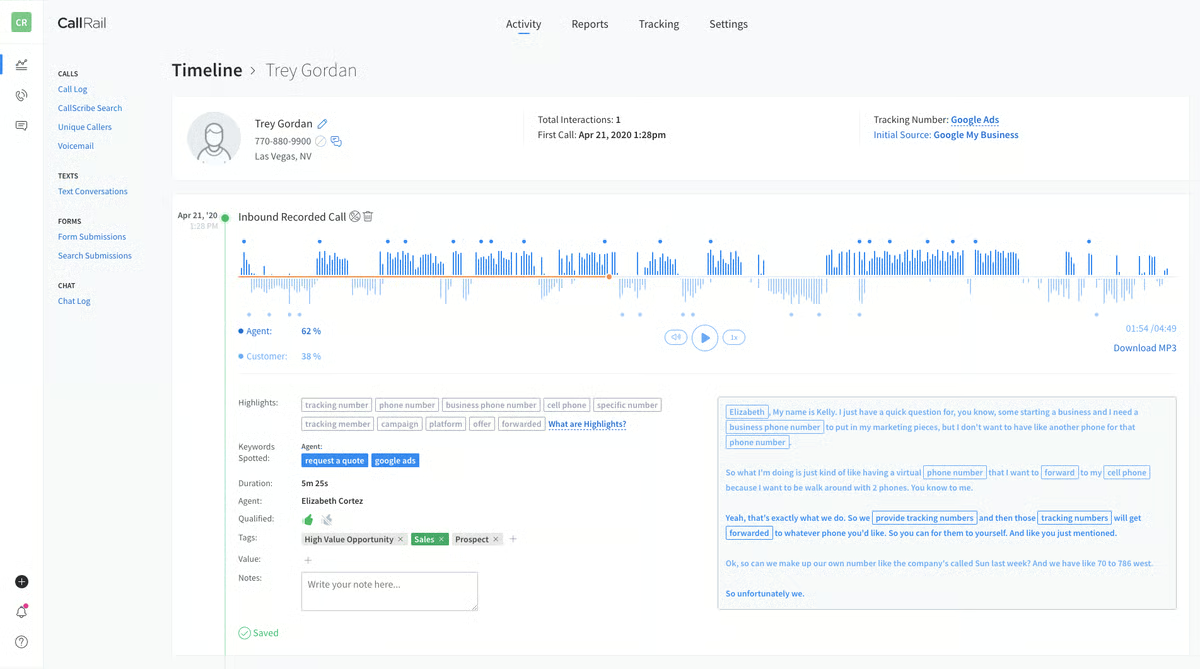
The platform's lead management features extend beyond just calls. CallRail also captures form submissions and text messages, creating a fuller picture of how leads interact with your marketing before they convert. This multi-touch visibility is particularly valuable for service-based businesses where the phone call is often the conversion event.
CallRail's G2 data further reinforces its strengths: a 92% rating for ease of use, 92% for meets requirements, and 93% for ease of doing business with. With a customer base that skews 76% small business, it's clearly built with accessibility and speed-to-value in mind. And at an estimated payback period of just 8 months, the ROI math tends to work out quickly for most teams.
G2 reviewers do note a few considerations. While the core interface is intuitive, some of the more advanced settings, like call flow configuration and custom routing, take time to learn. Teams that invest in onboarding support or lean on CallRail's guided resources tend to move through this phase more quickly.
Costs can also scale up as you add more tracking numbers, call minutes, or higher-tier features like premium conversation intelligence. Teams that start with a core plan and expand based on demonstrated campaign value tend to manage spend more effectively and keep costs aligned with outcomes.
Based on what I found, CallRail solves a problem that most marketing analytics platforms overlook entirely: connecting offline conversions, phone calls, texts, form fills, back to the campaigns that drove them. If inbound leads are your revenue engine, the attribution clarity here is hard to beat.
What I like about CallRail:
- G2 users rave about the AI-powered conversation intelligence, automatically transcribing calls, flagging keywords, and surfacing sentiment analysis means teams can understand what's converting across hundreds of calls without manual review.
- The multi-touch attribution dashboard also earns consistent praise, with reviewers valuing how calls, forms, texts, and chats all tie back to specific campaigns in one centralized view.
What G2 users like about CallRail:
"CallRail has a simple UI and a quick setup, which keeps things easy for me as a user. It offers one of the best call-tracking services, and it helps create analysis around which ads are driving business. APIs are available for custom integrations, and the support team is responsive and helpful. AI can also help with in-call transcription and keyword tracking."
- CallRail review, Saurabh B.
What I dislike about CallRail:
- From the G2 reviews I evaluated, the core interface feels intuitive, but setting up advanced features like call routing and custom scoring takes extra time and often requires relying on guided resources.
- While the base pricing delivers quick ROI, costs can climb as you add tracking numbers, minutes, or conversation intelligence features, so teams that scale gradually tend to manage spend more effectively.
What G2 users dislike about CallRail:
"Biggest con for me is pricing. I'd love to be able to set up every client, big or small, with CallRail accounts, but because of pricing, we reserve it for only clients with larger budgets. The only other con is that while I do get a lot of outreach from CallRail about new technologies, strategies, and product offerings, I don't receive anything about strategies CallRail is undertaking to help the swap JS not get ad-blocked. The issue of CallRail tracking code getting blocked by ad-blockers has slowly become moer and more noticeable."
- CallRail review, Madhav S.
4. Klaviyo: Best for email and SMS marketing automation for e-commerce
Klaviyo is one of those platforms where the more I dug into G2 reviews, the clearer it became why e-commerce teams keep coming back to it. It's not trying to be a general-purpose marketing tool; it's purpose-built for retention-focused teams that want to turn customer behavior into revenue, and that focus shows in almost every feature decision.
What strikes me most from the G2 review data is how consistently reviewers highlight the depth of Klaviyo's e-commerce integrations. Teams managing Shopify stores especially describe the connection as genuinely deep, not just a data sync, but the ability to build flows and segments directly on purchase history, browsing behavior, and lifecycle stage without stitching together third-party connectors. Reviewers running retention programs for e-commerce brands say this lets them spin up abandoned cart sequences, post-purchase flows, and win-back campaigns in a fraction of the time they'd expect, because the behavioral data is already there and ready to use.
The unified email and SMS workspace is another capability that comes up repeatedly in G2 reviews. I notice reviewers don't just mention it for convenience; they specifically call out that having both channels in one place keeps the customer experience consistent. The same segment can receive a coordinated email series followed by a targeted SMS without duplicating logic or managing two separate tools. 90% of G2 reviewers rate Klaviyo highly for ease of doing business with, which reflects how much operational simplicity compounds over time for teams running high-frequency lifecycle campaigns.
Segmentation gets significant attention across G2 reviews, and it's easy to see why. Reviewers describe building audience groups based on purchase frequency, predicted lifetime value, engagement signals, and dozens of other attributes, well beyond what basic list-based tools support. The pattern I see in reviews is that this precision translates directly into campaign performance: teams report higher conversion rates once they're targeting cohorts built on actual behavior rather than broad demographic cuts.
Klaviyo's reporting layer earns solid marks in G2 reviews for connecting campaign activity to actual business outcomes. I see reviewers specifically appreciate that revenue attribution and flow performance are surfaced clearly, not just open rates and clicks, but actual downstream impact. Reviewers working in regulated industries also call out the platform's privacy controls and consent-based segmentation, which G2 feedback suggests matter more than most tools acknowledge.
Klaviyo's AI capabilities are an area where G2 reviewers express genuine confidence in the platform's direction. Automated product recommendations, send-time optimization, and AI-assisted content tools are all actively in use across the reviewer base, and the feedback points to real workflow impact, teams getting more out of existing campaigns without adding headcount. 92% of G2 reviewers confirm the product is going in the right direction, a score that reflects broader trust in Klaviyo's roadmap and how consistently the platform delivers on what it ships.
Something that also stands out in G2 reviews is how accessible Klaviyo is for lean teams. 75% of Klaviyo's G2 reviewers come from small businesses with 50 or fewer employees, and reviewers from that segment consistently describe the platform as intuitive and easy to navigate without technical skills. The drag-and-drop builders, pre-built templates, and straightforward setup process come up repeatedly as reasons smaller teams adopt it confidently from the start.
Where G2 reviews surface constructive feedback most consistently is around pricing. As contact lists grow, costs scale accordingly, and reviewers managing large lapsed segments they haven't yet activated describe the pricing math can feel front-loaded before those contacts start generating revenue. Teams that build a list hygiene practice early tend to keep this well within budget.
I also see recurring notes about the complexity of advanced automation configurations, particularly multi-branch flows and logic-heavy sequences. G2 reviewers note that newer users without prior automation experience typically need a few weeks to reach full confidence with these configurations. Reviewers who lean on Klaviyo's documentation and pre-built templates consistently describe the ramp as time well spent.
For e-commerce teams serious about retention, Klaviyo is the clearest choice in this lineup, its behavioral data depth, unified channel execution, and precision segmentation are purpose-built for the use case in a way that general marketing platforms simply aren't.
What I like about Klaviyo:
- G2 reviewers consistently highlight how deeply Klaviyo integrates with e-commerce platforms, the ability to build flows and segments on actual customer behavior rather than just list membership is what sets it apart from general-purpose email tools.
- The unified email and SMS workspace also earns strong marks, with users noting that coordinating cross-channel lifecycle campaigns from a single platform saves time and keeps messaging consistent across every customer touchpoint.
What G2 users like about Klaviyo:
"I love how Klaviyo connects everything, email, SMS, and customer data, all in one place."
- Klaviyo review, Manohar D.
What I dislike about Klaviyo:
- Based on my analysis of G2 reviews, pricing scales with contact list size in a way that can become significant for brands with large inactive segments, teams that proactively manage their list hygiene tend to keep this cost more predictable.
- Some advanced automation flows and multi-branch logic also take time to configure correctly, particularly for users new to lifecycle marketing tools; G2 reviewers who carve out dedicated setup time and lean on documentation tend to ramp faster.
What G2 users dislike about Klaviyo:
"One challenge I’ve noticed is that some of the more advanced features can take a while to learn, especially for new users. Also, as my contact lists grow, pricing can become more of a consideration."
- Klaviyo review, Mohd danish K.
Want to streamline customer relationships and improve retention? Check out CRM platforms and discover how they can enhance your marketing and sales strategy.
5. Google Cloud BigQuery: Best for real-time big data analysis
Google Cloud BigQuery is a powerhouse analytics tool for teams that work with massive datasets and want quick, reliable insights.
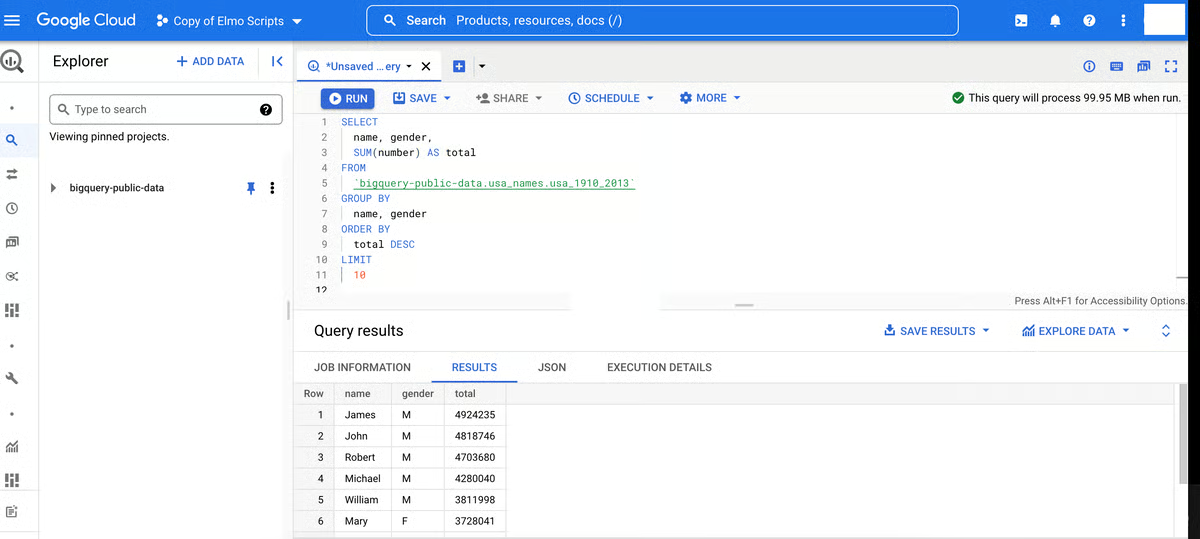
First, the performance is remarkable. BigQuery is a serverless, highly scalable data warehouse that lets you run SQL queries over terabytes, or even petabytes, of data in seconds. There is no infrastructure management; just write your query, hit run, and the results are ready.
The integration with Google Cloud is seamless. For teams already using tools like Google Analytics, Google Sheets, or Google Data Studio, BigQuery fits right into the workflow. The connection with other cloud services is smooth, and it plays well with external databases and third-party tools.
Another significant strength is cost-effectiveness for large-scale querying. Instead of paying for a full database setup, you're charged based on the amount of data processed. If you're smart about query optimization, you can keep costs under control.
Built-in capabilities like BigQuery ML also add value by enabling predictive analytics directly within the platform. This reduces the need to move data into external systems and supports more advanced use cases, all within the same environment that handles your core analytics.
The SQL-based interface keeps the barrier to entry low for teams that already know standard SQL, which means analysts can start querying production data without learning a proprietary language or framework. G2 reviewers consistently cite this as a reason onboarding goes smoothly, new team members can contribute meaningful analysis within days rather than weeks.
G2 review data shows BigQuery earning a 95% rating for reports and dashboards and a 93% score for data collection, both among the highest in this lineup. With 91% of reviewers confirming the product is going in the right direction, the platform's trajectory aligns well with what data-heavy marketing teams.
G2 reviewers flag a few areas worth planning for. Usage-based pricing is flexible and can scale predictably, but several reviewers note it takes homework to model costs beyond pay-per-query, especially when you factor in storage, distinctions between long-term and active tiers, and how usage spikes affect budgets. Teams that invest time in understanding partitioning and cost controls early tend to keep spend aligned with expectations.
G2 feedback also points to a learning curve with some of the more advanced features, and a UI that could be more intuitive for managing complex pipelines or configuring granular security controls. That said, for standard SQL querying and day-to-day analytics, most reviewers find the interface more than capable, and teams working with sensitive data note that row- and column-level policies deliver strong governance once the initial setup is complete.
The bottom line: G2 sentiment analysis frames BigQuery as a high-performance, scale-friendly analytics engine that rewards teams willing to climb a brief learning curve.
What I like about Google Cloud BigQuery:
- The query speed is a theme that comes up again and again in G2 reviews. Running SQL on terabytes of data in seconds clearly supports real-time decision-making for data-heavy marketing teams.
- Reviewers also call out the completely serverless architecture as a major advantage, since there's no database management overhead and teams can stay focused on analysis rather than infrastructure.
What G2 users like about Google Cloud BigQuery:
"I like that we can connect Google Cloud BigQuery to data sources easily - in particular, Google sources like GA and Ads. I also appreciate how we can build queries and schedule them, which is super convenient. It’s also great that we can run queries that generate their own data."
- Google Cloud BigQuery review, Sean T.
What I dislike about Google Cloud BigQuery:
- G2 feedback suggests the pricing structure can be hard to parse, with costs scaling unpredictably when queries aren't optimized. Reviewers who invest time in understanding partitioning early tend to keep budgets in check.
- A few reviews also point to a learning curve for advanced features and a UI that could be more intuitive, though for standard SQL querying, most find the interface straightforward enough.
What G2 users dislike about Google Cloud BigQuery:
"I don't think there is anything I don't like. Maybe they need to work on the estimated cost feature while running any query; sometimes it doesn't show the memory associated with that, and as it's an analytical warehouse, a real-time update is not possible, like a transactional database. Maybe in the future they can add those features as well."
- Google Cloud BigQuery review, Aayush M.
Curious about how different marketing touchpoints contribute to conversions? Explore the best attribution tools that can provide an end-to-end analysis.
6. Singular: Best for unified marketing measurement and ROI intelligence
Singular is built for marketing teams that need a single, consistent view of how every dollar performs across channels, and, based on my evaluation of G2 review data, it delivers on that promise with notable precision. If you're juggling attribution, cost aggregation, and creative analytics across a complex media mix, Singular consolidates it all into one unified platform.
What stands out immediately to me is how Singular connects marketing activity with real business outcomes. Instead of showing clicks or installs in isolation, it ties acquisition data to revenue, letting growth teams see which channels drive quality users, not just volume. G2 reviewers consistently call out this end-to-end visibility as a differentiator, especially for teams managing spend across dozens of partners and networks.
The customizable dashboards are another strength. Teams can slice performance by cohort, channel, campaign, and creative, giving granular control over how data is surfaced and analyzed. This flexibility matters when the goal is understanding not just what's happening, but why, and where to double down.
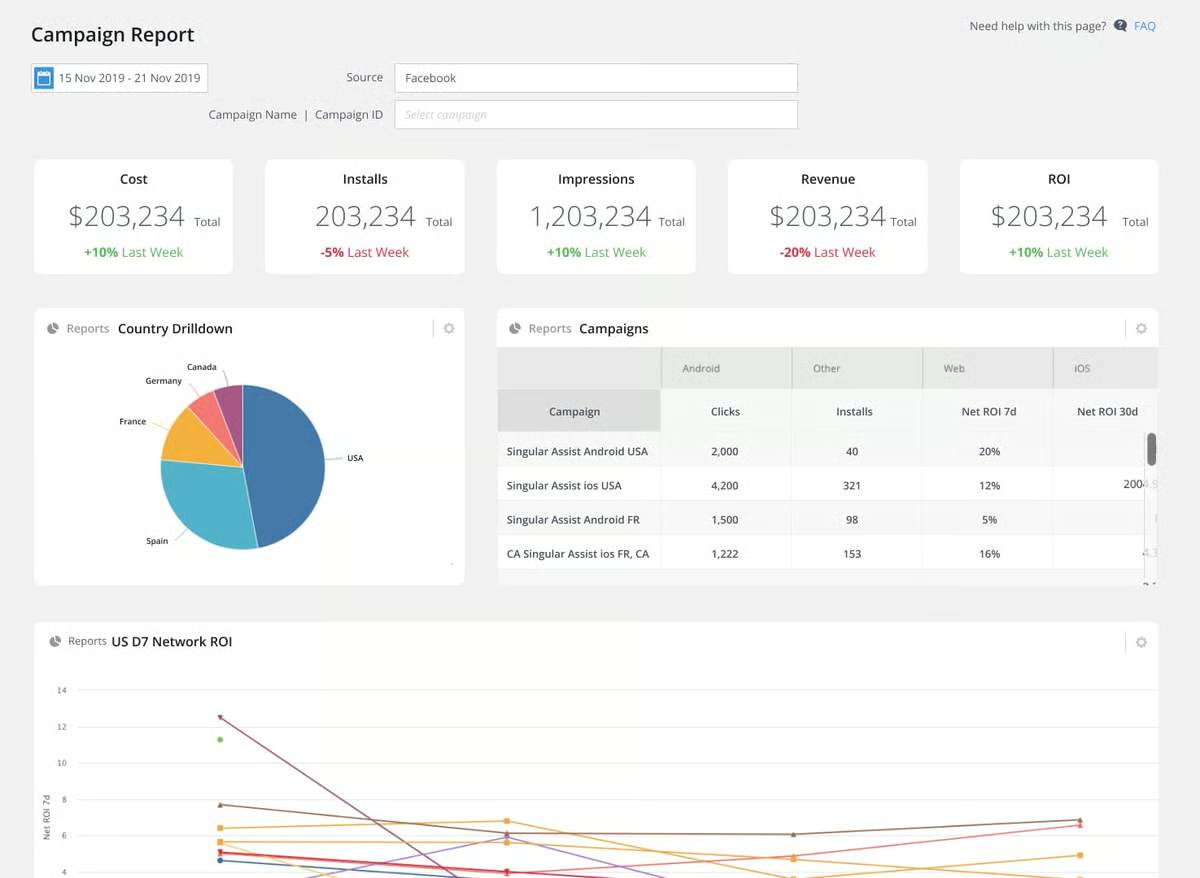
Singular's cost aggregation engine deserves its own callout. It unifies spend data from thousands of marketing channels into a single, normalized view. That alone saves growth teams significant manual reconciliation time and eliminates conflicting numbers across platforms. G2 users highlight this as one of the most operationally useful features, because it lets them focus on execution rather than data wrangling.
Fraud prevention is baked into the platform rather than bolted on, which is a meaningful advantage for mobile-heavy teams. Singular's pre-attribution fraud rejection and customizable detection rules help keep budgets focused on real users, an area where G2 reviewers note the platform punches above its weight.
The ETL capabilities round out the picture nicely. Singular can push attribution, ad spend, creatives, and ad monetization data directly into warehouses like Redshift, Snowflake, and BigQuery, which makes it particularly well-suited for teams with mature data infrastructure that want a managed pipeline for analysis-ready marketing data.
With an estimated payback period of just 6 months, the fastest in this lineup, and 95% of G2 reviewers rating the quality of support highly, Singular demonstrates that a focused investment in unified measurement can deliver rapid, tangible returns. The platform's 92% recommendation rate further reflects the confidence users have once they're up and running.
G2 reviewers do flag a few things worth planning for. Cost integrations can occasionally be complex or unstable when working with non-standard partners or custom setups. Teams with extensive partner networks should budget time for validation during onboarding.
Additionally, while the platform's core reporting is strong, some users coming from other marketing analytics tools note the absence of certain advanced querying capabilities they've grown accustomed to elsewhere. Teams that scope their analytics needs early, and supplement with warehouse-level querying where needed, tend to find a smooth balance.
All things considered, G2 review data positions Singular as a high-value choice for growth and performance marketing teams that need clean, consolidated measurement across every channel. If you plan for partner integration time and know your data infrastructure needs, Singular delivers the kind of ROI clarity that makes budget decisions significantly easier.
What I like about Singular:
- What stands out most in G2 reviews is Singular's ability to unify cost, attribution, and performance data from every channel into one consistent view, reviewers describe this as operationally powerful because it eliminates conflicting numbers across platforms.
- The built-in fraud prevention layer also earns strong praise, with users noting that having pre-attribution fraud rejection baked into the measurement workflow keeps budgets focused on real users without requiring a separate tool.
What G2 users like about Singular:
"Needs are resolved with diligence and a high level of detail. Both the UI and the data available in the tables are clear, and everything is supported by the documentation."
- Singular review, Alexa E.
What I dislike about Singular:
- Based on my analysis of G2 reviews, cost integrations with non-standard partners can require additional setup and validation time. Teams managing a large number of ad network connections should scope integration work early in onboarding.
- Some reviewers also mention that the interface could benefit from a more modern visual refresh and that documentation for less common ad platform integrations could be more thorough.
What G2 users dislike about Singular:
"I don't feel that Singular is very intuitive at the UX level and understanding where to look for each thing. It could be simpler. It could be better if there were descriptions within each section that said what can be done there, or if things were visually well separated and with simple, non-technical language."
- Singular review, ABN D.
If you’re ready to move beyond campaign reporting and start anticipating outcomes, explore the best predictive analytics tools to forecast conversion trends, churn, and customer behavior.
7. GetResponse: Best for all-in-one email marketing and automation
GetResponse is the kind of platform that earns its place by doing a lot well without requiring a lot from you. For teams that want email marketing, automation, landing pages, and webinars under one roof, without the complexity overhead of enterprise tools, it delivers a clean, workable solution that holds up at scale.
The drag-and-drop email builder is where most teams start, and the experience here is genuinely accessible. I see reviewers across G2 describe getting from blank canvas to a ready-to-send campaign in minutes, not hours. Templates are plentiful, the editor requires no coding knowledge, and G2 reviewers consistently point to how quickly new team members pick it up without formal training. That ease of entry is a recurring reason teams choose GetResponse over more technically demanding alternatives.
The automation builder is the feature that gets the most attention in G2 reviews, and it's easy to see why. Reviewers describe it as both flexible and approachable, capable of handling behavior-based customer journeys, abandoned cart sequences, and post-purchase flows, yet simple enough that non-developers can make meaningful changes without touching code. 87% of G2 reviewers rate GetResponse's data collection capabilities highly, which tracks with how reviewers describe the automation engine, well-fed by behavioral signals and contact data that make targeting more precise without extra setup work.
Segmentation brings further precision to campaign execution, and it's an area I see reviewers call out consistently across G2. GetResponse lets teams tag and group contacts based on behavior, purchase history, and engagement signals, making it possible to run highly targeted campaigns without managing complex external logic. 89% of G2 reviewers rate the customer insights feature favorably, reflecting how reliably the segmentation tools translate contact data into actionable audience groups that actually move campaign performance.
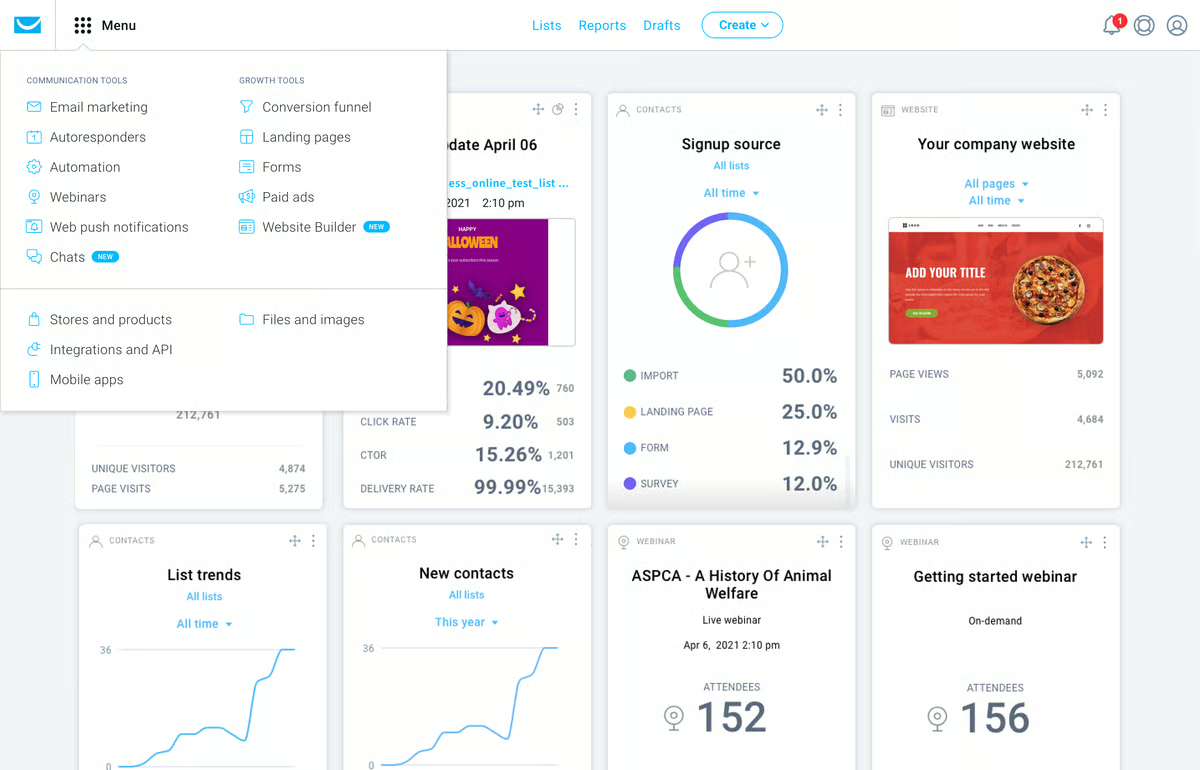
GetResponse also bundles features that typically require separate tools: landing page creation, pop-up forms, webinar hosting, and conversion funnels all live inside the platform. G2 reviewers consistently call this out as a practical advantage, particularly for smaller teams managing lean stacks. Having fewer integrations to maintain reduces friction and lowers the risk of data inconsistencies across tools. 75% of GetResponse's G2 reviewers come from small businesses with 50 or fewer employees, pointing to how well the all-in-one approach serves teams that need broad marketing capability without the overhead of managing multiple platforms.
Email deliverability is another area where GetResponse earns trust in G2 reviews. Reviewers across industries note that campaigns reliably reach inboxes rather than spam folders, a foundation that any email-dependent marketing program depends on but rarely gets to take for granted. I also see reviewers in regulated sectors specifically call out the GDPR-compliant consent tooling and audit trail features as meaningful strengths for compliance-conscious teams managing cross-border audiences.
Customer support comes up frequently in G2 reviews as a genuine differentiator for GetResponse. Reviewers describe reaching responsive, knowledgeable support quickly, whether through live chat or direct contact, and note that issues get resolved rather than redirected. 90% of G2 reviewers rate the quality of support highly, a score that reflects consistent satisfaction with how the team handles both routine questions and more complex setup challenges. For smaller teams without in-house technical resources, that accessibility matters more than it might for larger organizations.
Where GetResponse generates more measured feedback in G2 reviews is around pricing tiers. Costs increase as subscriber lists grow, and some of the more advanced automation and e-commerce features are gated behind higher-tier plans. Teams that hit those thresholds while still building program maturity may find the pricing jump harder to justify before the full feature set is in active use. Teams that map out plan thresholds before committing tend to avoid mid-cycle surprises.
The reporting layer also draws constructive notes from reviewers. Standard campaign analytics, open rates, click-throughs, automation performance, are well handled, but reviewers with more advanced analysis needs find the dashboard less customizable than they'd like. GetResponse works well as a primary execution and reporting tool; teams with complex attribution requirements tend to supplement it with a dedicated analytics layer for deeper analysis.
For growing teams that want a capable, consolidated marketing platform without the enterprise price tag, GetResponse delivers meaningful breadth in a package that stays accessible as the program scales.
What I like about GetResponse:
- G2 reviewers consistently highlight the automation builder as a standout, the ability to create and modify complex customer journeys without developer involvement is what keeps teams choosing GetResponse for lifecycle campaign work.
- The all-in-one platform approach earns frequent praise too, with users noting that having landing pages, forms, webinars, and email under one roof meaningfully reduces the tool stack they'd otherwise need to maintain.
What G2 users like about GetResponse:
"It’s very easy to use and has everything I need, from email marketing to webinars.GetResponse stands out for its intuitive interface and comprehensive feature set."
- GetResponse review, Piotr J.
What I dislike about GetResponse:
- GetResponse covers a broad range of marketing needs within a single platform, and pricing stays manageable at lower contact volumes. As subscriber lists grow and advanced features become relevant, costs increase noticeably and higher-tier plans are required, teams that anticipate scaling quickly should map out plan thresholds early to avoid mid-cycle surprises.
- The reporting dashboard handles standard campaign metrics well and gives teams a reliable read on day-to-day performance. Reviewers with more complex attribution needs note it could offer more depth and customization; supplementing with a dedicated analytics tool tends to close that gap for data-heavy teams.
What G2 users dislike about GetResponse:
"The tagging system in GetResponse isn't very efficient. It's a bit complicated when working with different lists and tagging users, especially the way automation works. It was sometimes difficult to organize and follow through with."
- GetResponse review, Christopher H.
8. AgencyAnalytics: Best for client reporting and multi-channel dashboards
AgencyAnalytics is purpose-built for one of the most time-consuming parts of agency work: pulling performance data from a dozen different platforms and turning it into something clients can actually understand. With a 4.7-star rating across more than 450 G2 reviews, it consistently earns high marks from agencies that have made it a core part of their reporting process.
The platform's central value proposition is data centralization, and it's where I see the strongest and most consistent praise in G2 reviews. AgencyAnalytics connects to Google Ads, Meta, Google Analytics, Search Console, LinkedIn, and dozens of other sources, then surfaces all that data through a unified dashboard clients can access with a single link. Reviewers who previously built reports by manually exporting and merging data from multiple platforms describe the time savings as significant, some teams report cutting monthly reporting time in half or more. 95% of G2 reviewers rate the reports and dashboards feature highly, a score that reflects how reliably the platform delivers on its core reporting promise across diverse agency workflows.
White-labeling is another capability that generates consistent loyalty in G2 reviews. Teams can design client-specific dashboards under their own branding, so clients see a polished, agency-branded experience rather than a generic analytics interface. I see reviewers in agency contexts call this out specifically as meaningful for client relationships and perceived value, it's not just an aesthetic detail, it shapes how clients experience and trust the reporting they receive. 93% of G2 reviewers rate the white label feature favorably, pointing to how well the capability holds up across different agency sizes and client types.
Report scheduling is another area that earns recurring praise. Teams can configure automated sends on a recurring schedule, so clients receive performance summaries ahead of review calls without anyone on the agency side manually triggering a download. G2 reviewers managing large client portfolios describe this as one of the biggest operational time-savers on the platform, once configured, the reporting rhythm runs itself. 94% of G2 reviewers rate multichannel tracking capabilities highly, which underpins why the automated reports carry real value: the data pulling through is broad, consistent, and reliable across channels.
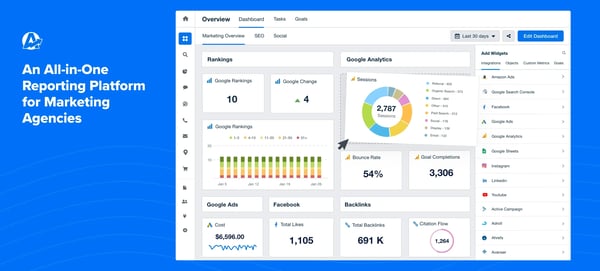
The onboarding experience for new clients is genuinely fast, and that comes through clearly in G2 reviews. Reviewers note that connecting integrations and configuring initial dashboards takes minutes rather than hours, and the template duplication feature lets teams clone a well-structured report across new accounts quickly. For agencies managing large client portfolios, this repeatability is a material operational advantage that compounds as the portfolio grows.
Customer support is a standout across G2 reviews for AgencyAnalytics, and I see it mentioned more consistently here than for almost any other platform in this lineup. Reviewers describe reaching real, helpful people via chat within minutes, with responses that solve the actual issue rather than redirect to documentation. 96% of G2 reviewers rate the quality of support highly, the strongest support score in this entire lineup, and reviewers credit the team with keeping integration issues from becoming bigger problems when they surface before client meetings.
Something that also stands out in G2 reviews is how well AgencyAnalytics serves smaller agencies and freelancers. 91% of AgencyAnalytics' G2 reviewers come from small businesses with 50 or fewer employees, and reviewers from that segment consistently describe the platform as easy to navigate and set up without technical support. The clean interface, straightforward integration connections, and template library make it accessible even for agencies that don't have a dedicated ops or analytics function managing the tooling.
Integration depth varies across platforms, and G2 reviewers flag this as an area worth knowing going in. While major sources like Google Ads, Meta, and Search Console connect cleanly, some niche or partner platforms offer more limited data access than users would like. The platform handles the most common agency reporting needs well; teams managing clients with unusual tech stacks may need workarounds for certain data sources rather than a fully native connection.
Cross-source data blending is another area where reviewers see room for improvement. Each report page currently scopes to a single data source, which means creating a true multi-platform KPI summary on one page requires manual workarounds. AgencyAnalytics covers the full breadth of channel reporting effectively; teams that need live cross-source aggregation on a single view tend to build that layer separately while using the platform for everything else.
For agencies that need to make client reporting faster, more consistent, and more professional without building a custom stack, AgencyAnalytics is the most purpose-fit tool in this lineup.
What I like about AgencyAnalytics:
- G2 reviewers consistently praise how quickly they can connect data sources and configure dashboards for a new client, the template duplication feature in particular gets credit for making onboarding fast and repeatable across large account portfolios.
- The automated report scheduling also earns strong marks, with users noting that clients receive polished, branded performance summaries without anyone on the team manually triggering a send, a reliable time-saver when managing many accounts simultaneously.
What G2 users like about AgencyAnalytics:
"AgencyAnalytics enables us to centralize all our analytics data from multiple sources into a single, streamlined system. From there, we can curate only the most relevant data for our clients and present it in visually stunning, fully branded reports. This powerful reporting platform not only saves us valuable time but also delivers meaningful insights that drive informed decision-making."
- AgencyAnalytics review, Mike Dee
What I dislike about AgencyAnalytics:
- G2 reviewers praise how broadly AgencyAnalytics connects across major platforms. Where reviews flag friction is with niche integrations that offer limited data access and occasional social platform disconnections that require reconnection. Reviewers who audit integrations regularly tend to catch these before they affect a client deliverable.
- Individual channel reporting is a consistent strength in G2 reviews. Combining data from multiple sources onto a single report page requires manual workarounds rather than a native feature, which adds steps for teams wanting a unified cross-channel KPI summary. Most handle this by building that consolidated view separately while using the platform for everything else.
What G2 users dislike about AgencyAnalytics:
"I wish there were a way to combine or consolidate data from multiple data sources into a single page, for example, a summary of KPIs across key channels on a single page pulling data directly from respective sources. To my knowledge, only one data source can be linked per page."
- AgencyAnalytics review, Nina Martinez
Tip: Before optimizing attribution, make sure consent signals are collected correctly.
Frequently asked questions about the best marketing analytics tools
Have more questions? Find more answers below.
Q1. Why do I need a marketing analytics tool?
Without analytics, you're left guessing. These tools help you understand what's working, what's not, and how to optimize your marketing efforts. They provide key data on ROI, customer engagement, and performance trends, allowing you to refine your strategy and make the most of your budget.
Q2. How do marketing analytics tools differ from Google Analytics?
Google Analytics is a solid starting point, but dedicated marketing analytics platforms go further. They offer multi-channel attribution, deeper customer insights, predictive analytics, automation, and integrations across your full marketing stack, giving you a more complete view of performance than website traffic data alone.
Q3. Are free marketing analytics tools effective?
Some free tools, like Google Analytics and HubSpot's free CRM, offer genuine value. But paid platforms typically provide deeper data analysis, more reliable attribution, and better integrations, capabilities that become important as your program scales and the cost of poor decisions grows.
Q4. What are the best marketing analytics tools for small businesses?
Several tools in this lineup serve small businesses well. GetResponse and Klaviyo both draw 75% of their G2 reviewers from small businesses, making them strong fits for lean teams that need capable email, automation, and retention tools without enterprise complexity. CallRail is also a solid choice for service-based small businesses focused on tracking inbound leads across calls, forms, and texts.
Q5. Which marketing analytics tools deliver ROI fastest?
Singular leads with an estimated payback period of 6 months, the quickest in this lineup, followed by AgencyAnalytics and CallRail at 8 months each, and GetResponse at 9 months. Klaviyo also delivers strong early ROI for e-commerce teams that activate retention flows quickly, with abandoned cart and post-purchase sequences generating revenue from day one.
Q6. Which marketing analytics platforms have the strongest customer support?
AgencyAnalytics leads the entire lineup on support, with 96% of G2 reviewers rating quality of support highly. Reviewers describe reaching real, helpful people via chat within minutes. Singular also earns high support marks alongside the fastest payback period in the lineup, and GetResponse draws consistent praise for responsive live chat support that resolves issues quickly.
Q7. What are the best marketing analytics software platforms for consolidating multi-channel campaign data?
AgencyAnalytics and Singular are the strongest options. AgencyAnalytics connects to Google Ads, Meta, Google Analytics, Search Console, LinkedIn, and dozens of other sources through a unified dashboard — 94% of G2 reviewers rate its multichannel tracking highly. Singular unifies cost, attribution, and creative data from thousands of ad networks into a single normalized view. HubSpot is worth considering for teams that want campaign and CRM data consolidated without a separate data pipeline.
Q8. Which marketing analytics software is most trusted by B2B companies based on user reviews?
HubSpot Marketing Hub and Semrush earn the strongest trust from B2B teams on G2. HubSpot connects marketing activity to sales outcomes through its native CRM, giving B2B teams full-funnel visibility. Semrush is trusted for competitive intelligence and keyword research that B2B marketers rely on to build organic presence. Singular also earns strong confidence, with 92% of G2 reviewers recommending it.
Q9. What is the highest rated marketing analytics software for proving marketing ROI to finance teams?
Singular is the strongest choice — its cost aggregation engine unifies spend from every channel into one view, making it easy to show exactly where budget went and what it returned. HubSpot is a strong second for B2B teams, connecting campaign activity directly to pipeline and revenue through its CRM integration.
Q10. Which marketing analytics software avoids data delays that cause reporting bottlenecks?
Google Cloud BigQuery processes queries across terabytes of data in seconds, making it ideal for teams that can't afford slow reporting cycles. AgencyAnalytics eliminates manual delays for agencies with automated report scheduling that runs without anyone triggering an export. CallRail centralizes call, form, and chat attribution in real time, removing the need to stitch together sources manually.
Q11. Which marketing analytics software is most reliable based on reviews from growth marketing teams?
Singular and HubSpot earn the strongest reliability signals from growth teams on G2. Singular connects acquisition data to revenue so teams can identify which channels drive quality users, not just volume — its 6-month payback period reflects how quickly growth teams see returns. HubSpot is the stronger fit for teams that need automation and analytics in one place, with 88% of reviewers confirming it meets their requirements.
Q12. Which marketing analytics software has the fastest dashboard load times for executives?
AgencyAnalytics and HubSpot are most consistently praised for clean, fast dashboards suited to executive audiences. AgencyAnalytics surfaces multi-channel data through a single shareable link — 95% of G2 reviewers rate its reports and dashboards highly. HubSpot consolidates campaign, attribution, and CRM data in one view without SQL or manual pulls. BigQuery delivers the fastest raw query performance but requires SQL, making it better suited to analyst teams.
Q13. Which marketing analytics software has the best attribution modeling for digital campaigns?
Singular leads for complex digital campaign mixes, connecting acquisition data across every channel to downstream revenue. CallRail is the best fit when offline conversions matter, tying calls, forms, and texts back to specific campaigns through dynamic number insertion. HubSpot is the strongest option for B2B teams that need attribution connected directly to CRM and pipeline data.
Q14. Which marketing analytics software integrates with marketing automation platforms and Google Analytics most seamlessly?
HubSpot leads, connecting natively with its own CRM and automation tools while integrating with Google Analytics, Google Ads, and major third-party platforms. CallRail integrates cleanly with Google Ads, Google Analytics, and HubSpot. BigQuery connects naturally across Google's ecosystem and pushes data into warehouses like Redshift and Snowflake.
Q15. What are the top marketing analytics tools for teams managing SaaS customer acquisition metrics?
HubSpot and Singular are the strongest fits. HubSpot connects campaign activity to CRM data, giving SaaS teams visibility into how channels contribute to signups and pipeline. Singular gives growth teams a unified view of acquisition cost and quality across paid channels, tying spend to user revenue rather than volume. Semrush complements both for teams investing in organic acquisition.
Q16. Which marketing analytics software provides real-time ROI visibility without requiring SQL queries?
HubSpot and AgencyAnalytics are the strongest options. HubSpot surfaces campaign performance and revenue attribution through a clean dashboard with no SQL required — 90% of G2 reviewers rate it easy to do business with. AgencyAnalytics consolidates performance data into a branded, auto-updating dashboard shareable through a single link. Klaviyo offers real-time revenue attribution for e-commerce teams without any technical configuration.
Make data your best friend
Picking the right marketing analytics tool is just the first step. The real value comes from putting it to work, setting up dashboards that reflect your actual goals, tracking the metrics that drive decisions, and acting on what the data tells you before your competitors do.
The eight platforms in this guide cover a wide range of needs. Whether you're an e-commerce team building retention programs with Klaviyo, an agency streamlining client reporting with AgencyAnalytics, or a growth team unifying cross-channel spend in Singular, there's a tool in this lineup built for your specific use case. The clearer you are on what problem you're solving, the faster you'll see returns.
Start with the platform that fits where you are now, not where you hope to be in two years. Get the fundamentals right, and the rest follows.
Want to go beyond analytics and put your insights to work automatically? Explore the best marketing automation software to nurture leads, personalize campaigns, and drive better results from every channel.
.png?width=400&height=150&name=My%20project-1%20(1).png)


.png)



/DarshayitaThakur-OrangeBG.webp)