A few years ago, I was tasked with organizing an event for a small business. Our small team launched a major campaign, investing significant resources in ads, emails, and social media. However, when the results came in, we encountered a problem, while conversions were up, we had no idea which channel was actually driving the results.
We were looking for the best software for tracking marketing attribution across email, ads, and social media, but had no idea where to start. Without a proper attribution system, we were left to guess, so we began searching for the best attribution software.
After deploying these tools, we were able to allocate resources more effectively and focus on what truly drives results. I moved beyond simple tracking and gained deeper insights into how each touchpoint contributes to conversions.
TL;DR
- Top product picks: G2 recommends HubSpot Marketing Hub, Dreamdata, and Triple Whale as standout tools for multi-touch attribution, with strong ratings for usability, integrations, and ROI impact.
- Key features: Attribution software stands out for cross-channel tracking, custom attribution models, and native integrations with CRMs and ad platforms, making it easier to tie marketing efforts to revenue.
- Common use cases: These tools are used to optimize ad spend, analyze full customer journeys, and pinpoint which channels drive conversions, helping marketers make smarter, data-driven decisions.
I’ve reviewed the most reliable attribution software for measuring customer touchpoints and understanding which interactions actually drive conversions. After testing the top 10 marketing attribution tools, I'm here to share key takeaways from my research to help you choose the right strategy.
10 best attribution software: My picks for 2025
-
HubSpot Marketing Hub: Best for comprehensive attribution across all channels
Provides detailed reporting to track ROI and marketing performance. ($45/month)
-
ActiveCampaign: Best for email marketing attribution and automation tracking
Tracks customer interactions and automates marketing workflows. ($145/month)
-
CallRail: Best for connecting offline phone conversions to online marketing
Links calls to campaigns for full conversion tracking. ($45/month)
-
WhatConverts: Best for multi-channel attribution
Monitors leads and conversions from various marketing sources. ($30/month)
-
Triple Whale: Best for e-commerce attribution
Tracks customer journeys and ROI across digital channels. ($649/month)
-
Invoca: Best for AI-driven call tracking and attribution
Connects phone call data to digital campaigns using AI insights. (pricing available on request)
-
impact.com: Best for affiliate, influencer, and partner marketing attribution
Manages and tracks performance across partner-driven campaigns. (pricing available on request)
-
Dreamdata: Best for B2B marketing attribution
Integrates CRM and marketing tools for full-funnel customer journey mapping. ($999/month)
-
Flowcode: Best for QR code engagement tracking
Analyzes customer interactions and engagement via QR codes. ($60/month)
-
Demandbase One: Best for ABM attribution
Provides insights into targeted account engagements and ROI. (pricing available on request)
*These marketing attribution tools are top-rated in their category, according to G2's Spring 2025 Grid Reports. I’ve also included their monthly pricing to facilitate easier comparisons for you.
My top 10 best attribution software recommendations for 2025
The best attribution software enables businesses to track and measure the impact of their marketing efforts across various channels. During testing, I observed how these tools streamline data collection and provide valuable insights into what drives conversions. Features like multi-touch attribution and real-time tracking optimize strategies and resource allocation, providing a clearer understanding of campaign performance.
The global marketing attribution software market is projected to grow from $5.34 billion in 2025 to $10.10 billion by 2030, reflecting a robust demand for these tools.
In this article, I’ll share my personal picks for the best marketing attribution software in 2025. The list includes a mix of different types of attribution software. I’ll highlight what makes them stand out and how they improve marketing effectiveness. Choose the one that best aligns with your business needs.
How did I find and evaluate the best attribution software?
I started by reviewing G2’s latest Grid Reports to see which attribution tools consistently performed well in terms of usability, feature completeness, and overall satisfaction. This provided a strong baseline of trusted tools that marketers already lean on.
From there, I narrowed my list by getting hands-on experience with the features and workflows. For solutions where testing wasn't entirely possible, I leaned on verified G2 user feedback, product demos, and vendor documentation to understand real-world performance and limitations. I also used AI-powered analysis to scan thousands of user reviews, surfacing common praise points and recurring challenges.
Throughout testing, I focused on the experience through a marketing lens: Was the platform intuitive? Did it make it easier to track and measure channel performance? Could it deliver accurate, actionable insights without overwhelming teams? And most importantly, would it fit seamlessly into a modern marketing tech stack?
Screenshots in this article are a mix of my testing visuals and verified vendor images on G2.
What I look for in attribution software
When evaluating the best attribution software platforms for multi-channel marketing attribution, I focus on several key features to determine their effectiveness:
- Cross-channel and cross-device tracking: I need software with robust tracking mechanisms that can capture user interactions across various touchpoints, including devices like desktop, mobile, and tablet, as well as marketing channels such as paid search, organic search, email campaigns, social media platforms, and display advertising. The key technical requirement is the use of persistent identifiers, such as cookies, device IDs, or user authentication tokens to track users across multiple devices and sessions. I also expect the software to support session stitching, which ensures a seamless view of the customer journey even when users switch devices or channels. This unified tracking provides insights into how different touchpoints and channels contribute to conversions.
- Multi-touch attribution models: The software must support a variety of attribution models, including first-touch, last-touch, linear, time decay, and algorithmic attribution. I also look for the ability to define and customize models that align with specific business goals and customer behavior. The software should leverage advanced statistical techniques like regression analysis or machine learning models to calculate the weight assigned to each touchpoint and reflect its true contribution to the conversion path. These models help capture the full impact of various marketing activities across the entire customer lifecycle.
- Data integration: Seamless integration with other marketing tools and platforms is essential. The software should integrate effortlessly with CRM systems, marketing automation platforms, web analytics tools, and advertising networks through standardized APIs or pre-built connectors. I require the ability to work with different data formats, such as JSON or CSV, and support for extract, transform, load (ETL) processes to ensure data is normalized and ready for analysis. Integration should also enable smooth data flow across systems, eliminating manual data handling and improving overall efficiency.
- Customer journey mapping: I need the software to help visualize and map the customer journey from the first interaction to the conversion. It should allow me to build multi-stage funnels and perform path analysis to see how customers engage with different touchpoints throughout their journey. I also look for the ability to segment users based on behavioral characteristics or lifecycle stages, such as first-time visitors, repeat customers, or cart abandoners. Interactive visualizations like heatmaps, flow diagrams, and cohort analysis are crucial for identifying areas where users drop off and for optimizing the conversion path.
- Data privacy and compliance features: Given the importance of data privacy regulations like GDPR and CCPA, the software must provide robust features for compliance. I need it to anonymize sensitive customer data, such as personal identifiers, to ensure regulatory adherence. The software should include consent management functionality, allowing customers to opt in or out of tracking, and provide audit logs that track consent events. These tools help maintain transparency and ensure that the company complies with privacy laws, which is critical in managing customer trust.
- Advanced attribution algorithms: To improve attribution accuracy, I look for software that incorporates machine learning algorithms to analyze large datasets of customer behavior. These algorithms can identify patterns and predict which touchpoints are most likely to lead to conversions, enhancing the precision of attribution models. Additionally, predictive analytics helps forecast which channels or campaigns are expected to yield the highest returns, enabling me to optimize future marketing strategies. I also need the ability to continuously refine attribution models as new data is collected, ensuring that the software adapts to changing customer behavior and marketing trends.
- Data visualization: The software should support seamless integration with data visualization and business intelligence (BI) tools like Tableau, Power BI, or Looker. This enables me to export attribution data and create more advanced visualizations, predictive models, and custom reports. I also require interactive dashboards that provide a comprehensive view of marketing performance by combining attribution insights with other business metrics, making it easier to make data-driven decisions and optimize campaigns.
The list below contains genuine user reviews from our best attribution software category page. To qualify for inclusion in the category, a product must:
- Track interactions across multiple marketing and communication channels.
- Use attribution models like single-touch, fractional, and algorithmic attribution.
- Provide dashboards and visualizations based on historical data and KPIs.
- Integrate with software used by sales, marketing, or PR departments.
This data was pulled from G2 in 2025. Some reviews have been edited for clarity.
1. HubSpot Marketing Hub: Best for comprehensive attribution across all channels
I've used HubSpot Marketing Hub for over two years, and it's proven to be a powerful, all-in-one marketing solution. Strategizing, creating, implementing, and analyzing content performance in one place has drastically improved our team's efficiency.
By having visual attribution to metrics, it's easy to connect the dots between the marketing activities we launch and the results they generate. This has allowed me to give real meaning to our content strategy and ensure we're always on track with our goals. In fact, according to G2 Data, 74% users praise its ability to build custom attribution models.
Click tracking and automatic UTM parameter creation, when sending marketing emails, further enhanced the measurability and accuracy of our marketing campaigns. It’s great knowing that the platform takes care of these details automatically, freeing me up to focus on other parts of the campaign.
Another feature I’ve greatly appreciated is the real-time visibility into the sales pipeline. With this, I could easily see where leads stood in the funnel, which helped me prioritize efforts and make smarter decisions.
Plus, the HubSpot Academy is an excellent resource that helped me enhance my expertise. It provides valuable lessons and certifications that deepen my understanding of the platform.
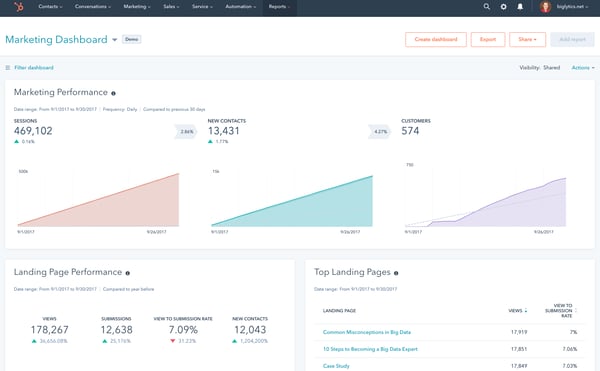
HubSpot Marketing Hub already delivers strong reporting fundamentals. That said, I felt the marketing attribution reporting could benefit from more customization, especially around percentage breakdowns and extra reporting views. Still, for most users who need a straightforward, built-in attribution solution without extra tools, HubSpot provides a reliable and easy-to-use setup.
One thing I found a bit inconvenient was that recently engaged customers don’t appear at the top unless they’re newly added, making it harder to prioritize active conversations quickly. Even so, the overall layout and filtering options remain helpful for teams that don’t need highly dynamic sorting.
HubSpot already automates many routine tasks, which is great for keeping processes smooth and efficient. However, I did notice a gap in more advanced AI tools for analytics and database cleansing, especially for users managing a large, constantly changing database, where some extra automation could save time. That said, for small businesses or teams that just need basic AI assistance without complexity, HubSpot’s current automation features still add value.
For small businesses seeking an affordable customer attribution tool with CRM and email marketing features integrated, HubSpot Marketing Hub provides a great starting point.
What I like about HubSpot Marketing Hub:
- The visual attribution tools make it easy to understand how marketing actions translate into results, and it’s something many G2 users seem to appreciate as well.
- Automatic UTM creation and strong email click tracking save a lot of manual work, a convenience that others on G2 often point out when talking about day-to-day efficiency.
What G2 users like about HubSpot Marketing Hub:
"I've been using HubSpot Marketing Hub daily, and it's become my go-to marketing command center. What stands out is how it packs powerful features into a system that's easy to use, everything from email campaigns to landing pages works seamlessly. The best part is how quickly you can set it up, and it integrates smoothly with almost any other tool. Despite its many capabilities, I’ve never needed to contact support because it's so intuitive. For anyone seeking a robust marketing platform without technical headaches, HubSpot Marketing Hub feels like the "easy button" for digital marketing. I’ve even discovered features I didn’t realize I needed because they’re so accessible, it’s like a Swiss Army knife where every tool is actually useful and easy to find."
- HubSpot Marketing Hub Review, Danielle W.
What I dislike about HubSpot Marketing Hub:
- The attribution reporting feels a bit limited when you need deeper customization, and I’ve seen G2 users call out similar constraints.
- Recently engaged customers not showing up at the top can slow things down, which aligns with what a few G2 users have mentioned about workflow friction.
What G2 users dislike about HubSpot Marketing Hub:
"HubSpot Marketing Hub offers robust reporting features, but customization could be improved. There are limitations when creating highly specific or tailored reports for certain metrics or key performance indicators (KPIs). Expanding the flexibility of report customization would be a valuable enhancement."
- HubSpot Marketing Hub Review, Daniel M.
2. ActiveCampaign: Best for email marketing attribution and automation tracking
I’ve come to appreciate ActiveCampaign's robust features that streamline email marketing and customer journeys.
From the moment I started using it, I noticed how intuitive and user-friendly the interface is. Navigating the platform was seamless, allowing me to dive into creating campaigns and automation workflows without feeling overwhelmed.
One of the standout features for me was behavioral tracking, which provided deep insights into how contacts interacted with my emails, website, and other touchpoints. This data-driven approach significantly enhanced my marketing effectiveness, enabling me to tailor campaigns to individual customer behavior.
Not only can you set up email campaigns effortlessly, but analyzing their performance is just as easy. The conversion attribution reports clearly showed how email clicks translated into conversions, giving me the confidence to invest more in email marketing strategy.
Another feature that impressed me was ActiveCampaign University. The wealth of educational content helped me maximize the platform’s potential, while community forums provided valuable peer-to-peer support. Additionally, the designated expert sessions were an excellent resource, I could speak directly with a specialist to get in-depth guidance and troubleshoot any issues.
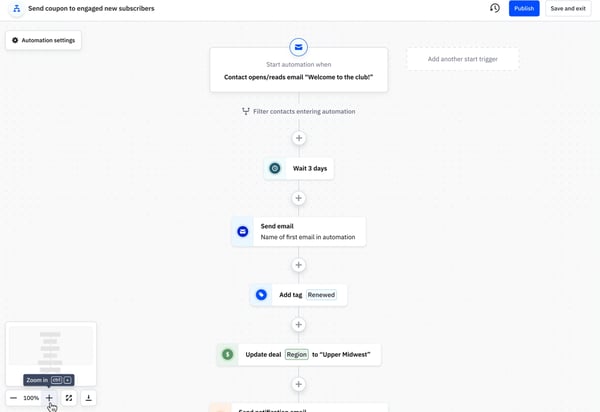
ActiveCampaign already provides robust email marketing and automation capabilities, making campaign management straightforward and effective. That said, I wish there were a way to track how many purchases or "add to cart" actions were directly tied to our email campaigns. Seeing which specific customers made purchases or added items to their carts would provide deeper insights into campaign ROI. Still, for teams primarily focused on email performance, ActiveCampaign delivers reliable attribution and actionable metrics.
The reporting tools are generally valuable and offer useful insights into campaign performance. However, I found them a bit slow and sometimes tricky to set up, with some confusion around structuring reports to surface the most relevant data. Even so, once configured, the reporting system provides meaningful analytics that can support ongoing optimization efforts.
ActiveCampaign excels at email attribution and tracking engagement, which is a major strength for marketers focused on email-driven campaigns. I would have liked to see more attribution for organic searches and non-paid advertising, as this would allow for a fuller picture of multi-channel performance. Nevertheless, for users whose primary focus is email marketing, ActiveCampaign’s existing analytics offer solid guidance for driving conversions.
What I like about ActiveCampaign:
- Being able to link calls directly to campaigns and keywords makes ROI clear, something G2 users often mention as a standout benefit.
- Assigning unique tracking numbers for different marketing channels helps me measure lead quality precisely, which others on G2 have found really useful.
What G2 users like about ActiveCampaign:
"I love how straightforward the workflows are. I haven't yet encountered an automation that I couldn't create using ActiveCampaign. Over the past five years, I've migrated myself and four other clients to ActiveCampaign, with contact lists ranging from a few hundred to 50,000. They’ve always been personable and helpful when issues or questions arise. I’ve especially appreciated being able to reach a real person when facing technical problems, and I love the recent updates that have made tagging and segments more user-friendly. These improvements have helped my clients better understand the platform. I’ve built extensive sales, onboarding, and client CRMs using the deals feature, and my client loved it. Her entire team used it, and it was seamless to integrate into their rapidly growing coaching business."
- ActiveCampaign Review, Elie R.
What I dislike about ActiveCampaign:
- The initial setup can take quite a while, and G2 users have noted that it may feel a bit challenging for those less tech-savvy.
- Occasionally, some calls aren’t recorded or logged properly, a small but noticeable issue that others on G2 have flagged too.
What G2 users dislike about ActiveCampaign:
"The reporting capabilities are limited, with a poorly designed and slow interface. Reports are often inaccurate, and the weak attribution model makes it difficult to trust the numbers, which could be a dealbreaker for companies with an established marketing function. Additionally, functionality for channels outside of email feels disjointed, SMS is hard to configure, and the transactional email feature requires signing up for a separate platform and integrating it like a third-party tool."
- ActiveCampaign Review, Verified User in Marketing and Advertising
3. CallRail: Best for connecting offline phone conversions to online marketing
CallRail is a call-tracking tool. I’ve found it to be incredibly effective in tracking marketing efforts, and one of the features I appreciate most is how it allows me to identify which marketing efforts generate the most calls.
Instead of relying on assumptions or incomplete customer feedback, I obtain concrete data that shows which ads, keywords, or sources drive phone leads. It also allows me to record calls. According to G2 Data, 93% users appreciate the ability to capture and replay a conversation for further information
Proving return on investment can be a significant challenge for marketing agencies and businesses that depend on phone calls to convert leads. For digital marketers managing both online and offline campaigns, CallRail is one of the top attribution tools for measuring lead quality and ROI from calls. It simplifies this process by directly linking phone calls to specific campaigns, keywords, or ads. This feature allows me to see exactly how many leads are coming from each source.
Another powerful feature of CallRail is its ability to assign individual tracking numbers to different campaigns, whether they are print, radio, TV, or online ads. This allows me to track attribution and ROI across various marketing channels with precision.
What’s even better is that CallRail measures not only the quantity but also the quality of calls. This added layer of insight enables me to make more informed decisions, focusing on campaigns that deliver the most valuable leads and ensuring better outcomes for clients.
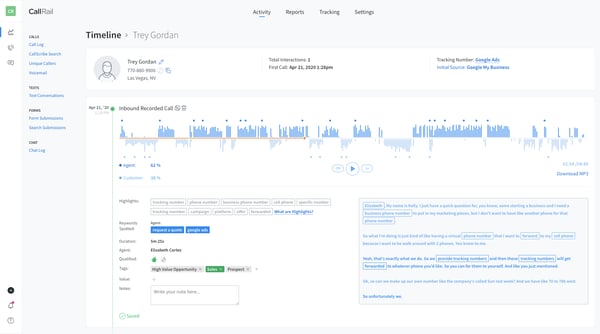
CallRail offers powerful call tracking and analytics capabilities, making it a valuable tool for understanding marketing performance. That said, I found the initial setup to be quite time-consuming. For users who aren’t particularly tech-savvy, configuring tracking numbers, routing, and other features can feel a bit challenging. Even so, once set up, CallRail provides robust tracking that supports informed marketing decisions.
The insights CallRail delivers are generally strong and help identify trends in customer interactions. However, I did encounter some missing data, as a few calls weren’t always recorded or logged properly. While this issue was occasional, even a small gap in data can impact conclusions about campaign effectiveness. Still, for most campaigns, the platform captures enough data to give a useful overview of call performance.
CallRail’s reporting tools are helpful for analyzing performance and spotting patterns. I did notice that some API connections to third-party reporting platforms weren’t always seamless, which can complicate the integration of data into other systems for comprehensive analysis. That said, for teams relying primarily on CallRail’s native reporting, the tools remain functional and provide actionable insights.
What I like about CallRail:
- Being able to link calls directly to campaigns and keywords makes ROI clear, something G2 users often mention as a standout benefit.
- Assigning unique tracking numbers for different marketing channels helps me measure lead quality precisely, which others on G2 have found really useful.
What G2 users like about CallRail:
"CallRail has been extremely useful in providing channel attribution insights, making it easy to show clients which channels are driving not just more phone calls but also the highest-quality calls."
- CallRail Review, Verified User in Marketing and Advertising
What I dislike about CallRail:
- The initial setup can take quite a while, and G2 users have noted that it may be challenging for those less tech-savvy.
- Occasionally, some calls aren’t recorded or logged properly, a small but noticeable issue that others on G2 have flagged too.
What G2 users dislike about CallRail:
"CallRail lacks the ability to track attribution for overlay chat widgets, which are becoming mainstream communication tools for websites."
- CallRail Review, Trevor J.
4. WhatConverts: Best for multi-channel attribution
Having tested WhatConverts, a lead tracking and reporting software, I quickly found it to be an excellent tool for tracking and attributing conversions across multiple channels.
The multichannel attribution enables me to track multiple customer interactions that contribute to a conversion, making it easier to understand the entire customer journey. Whether the lead comes from search engine optimization (SEO), Google Business Profile (GBP), or paid ads, WhatConverts does an impressive job of providing a clear picture of the contributing factors behind conversions.
Another major benefit of WhatConverts is its ability to integrate with popular ad platforms, simplifying data collection, distribution, and analysis. This feature is key for streamlining marketing operations, allowing me to identify and eliminate wasted ad spend. With its clear attribution models, I could easily see which ads were performing well and which weren’t. This allowed me to reallocate my budget to top-performing campaigns, maximizing ROI and improving overall marketing efficiency.
Keyword attribution is also a great feature, especially when optimizing accounts. It lets me see which keywords are driving conversions, which helps with fine-tuning PPC campaigns and improving overall targeting strategies. This aspect of WhatConverts has proven to be essential for identifying high-performing keywords and ensuring that marketing efforts are aligned with business goals.
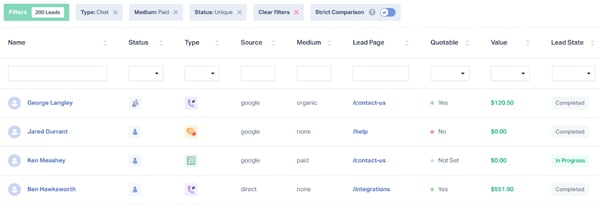
WhatConverts already delivers strong lead tracking and conversion insights, helping businesses understand the effectiveness of their marketing channels. That said, I would love to see more integrations, particularly with CRMs. Direct integration would enable the valuable data collected by WhatConverts to flow seamlessly into other systems, eliminating the need for external tools. Even so, for teams using supported integrations, the platform still provides actionable insights efficiently.
The reporting features in WhatConverts are useful and give a clear view of campaign performance. However, reporting customization could be more flexible. While the out-of-the-box reports are helpful, having additional options to tailor reports to specific needs would enhance usability and provide deeper insights. Nevertheless, the current reporting tools remain functional and informative for most users.
WhatConverts is generally straightforward once set up, but I noticed that some users might encounter a learning curve during the initial configuration. The setup process can be somewhat complex and time-consuming, which could be challenging for new users. Still, once configured, the platform operates smoothly and offers reliable conversion tracking.
What I like about WhatConverts:
- Tracking conversions across multiple channels provides a clear picture of the customer journey, something G2 users seem to value greatly.
- Keyword attribution and ad platform integrations make it easier to optimize campaigns, a feature that others on G2 have highlighted as especially useful.
What G2 users like about WhatConverts:
"We love the detailed tracking and insights into the user journey. It helps us better understand the user experience on our site and identify which pages have higher conversion rates. The system is simple to use and easy to navigate. The team has been very responsive, and the implementation and integration have been much easier compared to most other tracking efforts."
- WhatConverts Review, Team S.
What I dislike about WhatConverts:
- The setup can feel somewhat complex at first, and G2 users have noted that new users may need some time to become comfortable.
- Reporting customization is somewhat limited, a point that comes up often among G2 users looking for deeper insights.
What G2 users dislike about WhatConverts:
"I like most of it! It’s super helpful! However, the first-click attribution default is different from both the Ads platforms and GA4, which creates a challenge. I’ve also heard from my web company that setting up new forms is a significant undertaking, although I assume support might help alleviate that. The definitions of duplicates vs. repeats, as well as setting the attribution window for “repeat,” could also be clearer. What I’ve been struggling with is building a central lead database to avoid having to go to WhatConverts and our lead management system to capture and respond to leads. I can’t figure out how to consolidate offline leads and paid calls from other call-tracking platforms into WhatConverts or elsewhere, especially with all the different attribution models in play."
- WhatConverts Review, Verified User in Consumer Services
5. Triple Whale: Best for e-commerce attribution
Using Triple Whale has significantly improved my ability to manage and analyze data across marketing channels. One of the key advantages of this platform is that it aggregates all data sources in one place. According to G2 Data, 90% users appreciate reports and other relevant data housed in a single, easy-to-navigate location. This centralization has enabled me to make quicker and more informed decisions.
I also appreciated how the platform tracked expenses, cost of goods sold, and marketing spending, giving me a more comprehensive view of profitability beyond the traditional profit and loss statement.
True attribution to ad spend is another critical benefit I’ve experienced. With Triple Whale, I finally had clarity on where marketing dollars were most effective. I particularly appreciated the ability to see new customer cost per acquisition (CPA) and return on ad spend (ROAS) metrics, which are invaluable for understanding the effectiveness of my campaigns. This level of insight was crucial for our growing business, as it provided a real-time understanding of how well they are scaling and where adjustments needed to be made.
One of the things I found most valuable is how we’ve been able to compare Triple Whale’s data with what we see in Facebook and Google Analytics. These platforms each have their own attribution windows, which can lead to discrepancies in data reporting. By using Triple Whale as an additional source, I was able to cross-check and get a clearer view of my campaign performance.
Another feature that stands out is the platform’s ability to track individual consumer journeys across multiple marketing channels. I could clearly see the path each customer took to purchase a product, which helped me better understand which touchpoints were most effective in driving conversions.
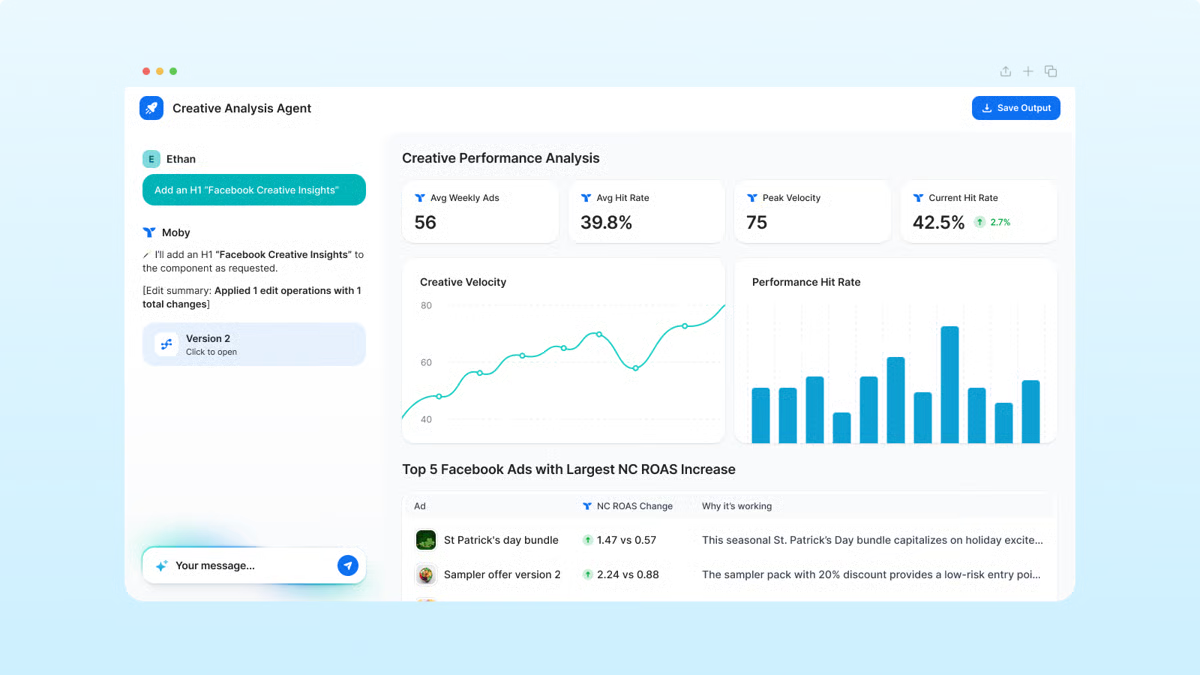
Triple Whale offers excellent attribution tracking and ROAS insights, making it a top choice for e-commerce businesses seeking to understand their ad performance. That said, aggregating all the data can sometimes slow down the system, especially with large datasets. While the team is actively working on improvements, it’s something to be mindful of when analyzing complex data. Even so, for most day-to-day tracking needs, the platform remains responsive and reliable.
Cohort tracking in Triple Whale offers valuable insights into customer behavior, but I found it could be clearer. Analyzing middle-funnel conversions, such as how specific groups progress from click to lead to purchase, can be challenging, leaving gaps in understanding the full conversion journey. Still, the overall analytics provide a strong overview of marketing performance and trends.
Currently, Triple Whale is only available through Shopify, which limits its use for businesses on other platforms, such as WooCommerce, Drupal, or Magento. Expanding compatibility would make it even more versatile. That said, for Shopify-based businesses, Triple Whale remains a highly effective tool for accurate ad spend tracking and actionable ROAS insights.
What I like about Triple Whale:
- Having all marketing data in one place makes it much easier to make quick, informed decisions, something G2 users frequently point out.
- Seeing true attribution and metrics, such as ROAS and customer CPA, provides clarity on ad spend effectiveness, which others on G2 have found invaluable.
What G2 users like about Triple Whale:
"The great news is that Triple Whale offers a ton of features that, in theory, would be very helpful across marketing, finance, and operations in an organization like ours (DTC eCommerce). Triple Whale offers solutions for multi-touch attribution (MTA) and media measurement, financial forecasting, creative learning and optimization, as well as pseudo-CRM functions such as lifetime value (LTV), cohort analysis, and sales cycle insights. I have no doubt that organizations that fully commit to adopting and truly learning how to use Triple Whale will find the tool incredibly useful."
- Triple Whale Review, Hans H.
What I dislike about Triple Whale:
- Handling very large datasets can slow the platform down, a limitation I’ve seen mentioned often by G2 users.
- Cohort tracking and middle-funnel analysis could be clearer, as noted by G2 users who struggle to fully understand conversion paths.
What G2 users dislike about Triple Whale:
"I'm unable to view different sublevels of the campaign, ad set, and ad directly. I can only view the campaign level, and to see the ad set level, I have to click through. I'm also not a fan of the export feature. The revenue numbers are often inaccurate, especially with view-through attribution. If that issue can be resolved moving forward, it would save my team a significant amount of time. Additionally, the load time for higher-spending accounts could be improved."
- Triple Whale Review, Verified User in Marketing and Advertising
6. Invoca: Best for AI-driven call tracking and attribution
Having tested Invoca, a robust conversion analytics software, I was impressed with its real-time data and insights, making it a powerful tool for quick decision-making.
One of the most valuable features was real-time multi-site and multi-channel call insights. This capability is invaluable for businesses running campaigns across different channels. In industries where speed is critical, like retail or customer service, this can be a game-changer for improving both conversions and customer satisfaction.
I also found Invoca’s AI-driven signals and conversational intelligence scorecards particularly useful. These tools help standardize metrics and assess sales performance, making it easier for teams to make data-backed decisions and adjust strategies with reliable insights.
Another aspect I really appreciated was Invoca’s well-structured training program. Learning new software can often be a challenge, but Invoca has streamlined the process. After a brief session, I was able to navigate the platform with ease, minimizing downtime and enabling teams to quickly leverage its full potential.
When it comes to reliability, Invoca excels. It has proven to be a dependable platform over time, with many users reporting consistent satisfaction even after extended use. This kind of stability is essential for businesses that rely on conversion tracking and optimization, ensuring that Invoca remains a trusted part of their analytics infrastructure.
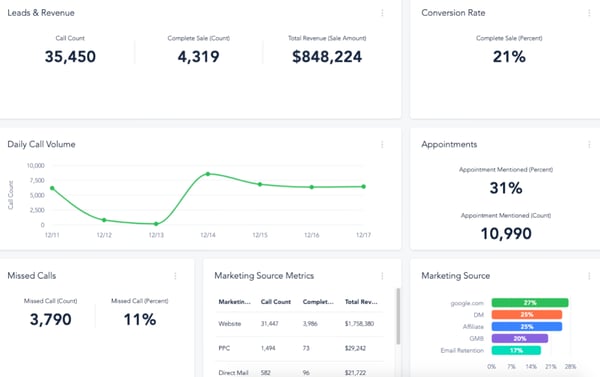
Invoca provides robust call tracking and analytics, offering valuable insights into customer interactions and marketing performance. That said, there are a few areas that could be improved. For example, CRM match rates and some reporting features could be more refined, and certain unsupported data parameters required workarounds that added complexity and slowed down analysis. Even so, for teams focused on core call tracking metrics, Invoca continues to deliver reliable and actionable insights.
The platform generally handles time zone settings effectively, accurately reflecting the user’s time zone. However, it doesn’t adjust for the local time zone of incoming calls, which can be confusing for businesses operating across multiple regions. That said, once aware of this limitation, teams can plan accordingly, and Invoca’s other tracking features continue to support effective multi-region campaigns.
What I like about Invoca:
- Managing affiliates, influencers, and B2B partners on a single platform feels seamless, which G2 users seem to appreciate for scaling partnerships.
- The data-driven insights and flexible crediting rules really helped me understand which channels drive conversions, a feature many on G2 highlight as a standout.
What G2 users like about Invoca:
"Invoca provides actionable insights that enhance our understanding of the customer journey and experience. It equips us with the tools and data needed to make smarter decisions about functional processes and digital strategies, including paid search. The data helps drive measurable results, and our account representatives actively listen and assist in implementing signals that align with our strategy."
- Invoca Review, Debbie C.
What I dislike about Invoca:
- The dashboard could use more customization, which G2 users have mentioned as a limitation when handling multiple campaigns.
- The report configuration feels somewhat restrictive, making it more challenging to extract specific insights, a point others on G2 have also noted.
What G2 users dislike about Invoca:
"Setting up tracking and reporting in Invoca can take time initially, especially with a large volume of numbers and locations to monitor, making it a logistical challenge. However, this setup process is a one-time effort, and once completed, the system runs smoothly."
- Invoca Review, Kyle J.
7. impact.com: Best for affiliate, influencer, and partner marketing attribution
I’ve tested impact.com’s affiliate, influencer, and referral marketing platform, and it has certainly proven to be an impressive tool for managing different types of partnerships all in one place.
One feature I particularly liked was how seamlessly it handles various types of partnerships, whether dealing with affiliates, influencers, mobile apps, or even B2B partners. This centralized approach makes it so much easier to manage and scale multiple partnership models, especially if your business is looking to expand and diversify. I was also impressed by the platform’s advanced partner attribution and commission options. In fact, according to G2 Data, 88% users appreciate how it ties social activity to business results such as leads, conversions, and sales.
Another standout feature is the platform's data-driven insights. The analytics are exceptional, giving me a clear view of which partnerships are driving results. They enable me to adjust my strategy in real-time based on detailed metrics. The platform is perfect for companies looking to get actionable insights from their data.
Impact.com stands out as the only platform I’ve tested that allows you to create crediting rules based on customer interactions with both paid media and affiliates. This feature provided me with a much more nuanced understanding of how each part of my marketing strategy contributed to conversions, and I could set up custom rules to ensure that commissions were accurately attributed.
I also appreciated the detailed referral URL reports and the easy configuration of brand portals, which significantly streamlined the entire process of managing partnerships. The platform makes it easy to handle even the most complex tasks without getting bogged down in unnecessary complications.
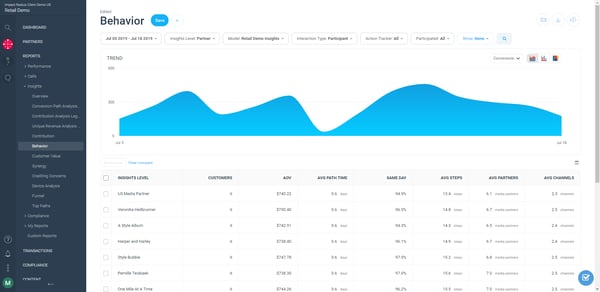
Impact.com offers a robust platform for managing affiliate and partnership campaigns, enabling easier tracking to performance across multiple channels. That said, the dashboard could benefit from more customization options. Being able to tailor the dashboard to individual preferences would help users manage multiple campaigns more efficiently. Even so, the existing dashboard still provides a clear overview of campaign performance for most users.
The reporting tools are functional and offer useful insights into campaign data. However, I found them somewhat limited in terms of customization, which made extracting specific insights a bit challenging. More flexibility in report configuration would enable deeper analysis, although the current tools still provide a reliable baseline for understanding campaign outcomes.
Implementation is relatively straightforward for users familiar with tools like Google Tag Manager. For those without technical resources, however, the setup process can be more challenging and may take longer. That said, once implemented, Impact.com runs smoothly and supports effective campaign tracking and management.
What I like about impact.com:
- The platform provides exceptional data-driven insights, offering a clear view of which partnerships yield the best results. This enables real-time strategy adjustments based on detailed metrics, making it ideal for companies focused on optimizing performance.
- Impact.com is the only platform I’ve tested that enables crediting rules based on both paid media and affiliate interactions. This feature gave me a more nuanced understanding of how different marketing strategies contributed to conversions, ensuring commissions were accurately attributed.
What G2 users like about impact.com:
"Impact.com offers an intuitive platform for managing affiliate campaigns, making it easy to create custom links efficiently. The wide range of well-known brands provides excellent partnership opportunities, especially for content creators. Its robust analytics features help track performance and optimize campaigns effectively."
- impact.com Review, Leyla P.
What I dislike about impact.com:
- The dashboard could benefit from more customization options to better suit individual needs. Tailoring the layout and prioritizing specific metrics would make managing multiple campaigns easier.
- While implementation is straightforward for those familiar with tools like Google Tag Manager, it can be challenging for businesses without technical resources. Companies without a dedicated tech team may face a steeper learning curve or require additional support to set up the platform efficiently.
What G2 users dislike about impact.com:
"The dashboard customization in Invoca is user-specific, meaning updates to pinned or built reports are not visible to other users on the account. This requires each user to manually update their dashboard, which can be a cumbersome process. A shared dashboard option would improve collaboration and efficiency across teams."
- impact.com Review, Tori P.
8. Dreamdata: Best for B2B marketing attribution
Dreamdata is an impressive tool for B2B revenue attribution and growth analytics. While testing it, I noticed several features that set it apart in terms of functionality and usability.
One of the most notable features of Dreamdata is its ability to collect data from multiple sales and marketing channels and unify them under a common identifier. This capability enables me to track a customer’s entire journey, from initial contact to deal closure, which is essential for understanding the full scope of revenue-driving activities.
Dreamdata excels at connecting and cleaning data from multiple sources. This made the insights we received feel reliable. I was able to trace the complete customer journey, from awareness to conversion, ensuring that attribution was both accurate and actionable.
Another powerful feature was its custom attribution models. The ability to tailor these models to suit our complex B2B sales cycle was a game-changer. I was able to pinpoint exactly which campaigns, content, and channels were contributing to revenue at each stage of the customer journey.
Dreamdata also provides a clear view of channel performance, which I found particularly valuable for understanding ROAS, content performance for conversions, and the impact of various initiatives on our sales pipeline.
With Dreamdata’s robust insights, I felt more confident in reallocating resources, as the platform helped me avoid relying on incomplete attribution models like first/last touch, which can lead to over- or under-investment in certain channels.
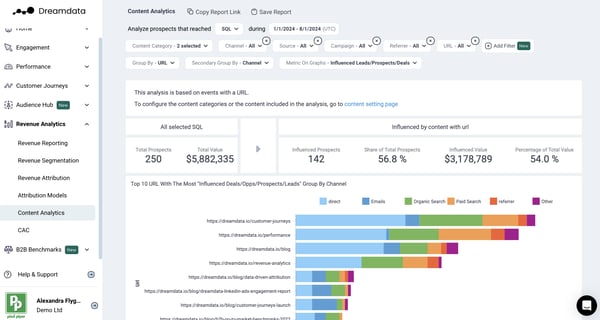
Dreamdata provides robust data handling and advanced attribution capabilities, making it a strong tool for understanding marketing performance. That said, the platform’s data visualization can be a bit complex and less intuitive than expected. While the scope of data is impressive, more user-friendly visualizations would significantly enhance the overall experience. Even so, users who invest time in exploring the dashboards can still gain valuable insights.
The dashboards are customizable, which is a major plus, but the ability to save customized views would be a helpful time-saver. This would enable quick access to key metrics without requiring repeated setup steps. Nevertheless, the current customization options still offer flexibility and control over the data displayed.
Setting up advanced attribution tools in Dreamdata comes with a learning curve, particularly for more complex features. While the platform provides excellent support for nearly all queries, processing all the information during setup can feel slow. That said, once configured, Dreamdata delivers reliable and comprehensive analytics that support informed marketing decisions.
What I like about Dreamdata:
- Being able to unify data from multiple channels makes it easy to track the full customer journey, which is often highlighted by G2 users as a major advantage.
- Custom attribution models enable me to see exactly which campaigns and channels drive revenue, a feature that others on G2 have found invaluable for complex B2B sales cycles.
What G2 users like about Dreamdata:
"The filtering and dashboard capabilities of Impact.com are robust, and after completing a couple of training sessions with the team, the tool becomes very easy to use. The implementation was smooth, as I set up about 90% of it during the trial, with only a few adjustments needed during onboarding. Now, I use the tool daily, and with continuous updates and new integrations, it continually enhances our marketing efforts."
-Dreamdata Review, Sara G.
What I dislike about Dreamdata:
- Some of the dashboards appear to be somewhat complex, and G2 users have noted that the visualizations could be more intuitive.
- Setting up advanced features comes with a learning curve, which seems to be a common challenge noted by G2 users.
What G2 users dislike about Dreamdata:
"We find it a bit tricky to track upsell and cross-sell deals separately at the moment. It would also be helpful to see ad impressions at the account level in the customer journey (ABM) dashboard, as currently, we can only view engagements and touchpoints. Additionally, having the ability to view trend and period-on-period comparisons natively in the tool would be a major improvement. However, the Dreamdata team takes feedback seriously, so we’re optimistic that these features will be available soon."
- Dreamdata Review, David B.
9. Flowcode: Best for QR code engagement tracking
Flowcode is a QR code platform designed for measuring conversions. One of the biggest advantages I noticed was how simple and user-friendly it is to create custom QR codes.
The interface on Flowcode’s web platform is intuitive and easy to navigate. I can easily generate, customize, and integrate QR codes into various marketing materials.
The real power, however, lies in its ability to redirect QR codes to other URLs as needed, which offers great flexibility. This feature was incredibly useful, as I could easily adapt the codes over time and track the success of different campaigns.
Another major benefit was the ability to add UTM parameters to the Flowcodes. By adding UTMs, I could track clicks, data, and attribution directly in Google Analytics 4 (GA4), which was crucial for analyzing the performance of print ads, over-the-top (OTT) content, connected TV (CTV) ads, and outdoor activations.
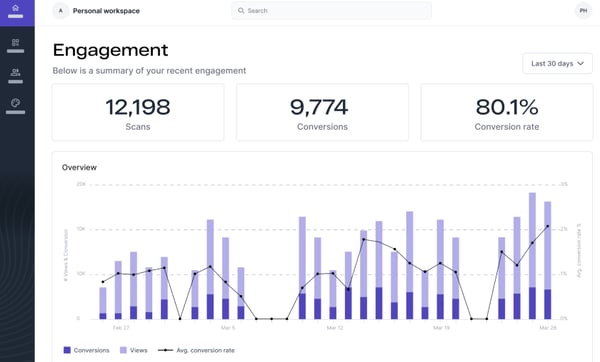
Flowcode provides a straightforward and effective way to create and manage QR codes, making it a valuable tool for marketing campaigns. That said, organizing QR codes within the platform can sometimes be challenging. As the number of codes grows, keeping track of them becomes challenging. Even so, for smaller campaigns or fewer codes, the platform remains easy to navigate and manage.
The design customization options are useful and allow for some branding adjustments. However, Flowcode currently limits color choices within the builder, which can restrict flexibility when matching specific brand guidelines or campaign aesthetics. Still, the available design options are sufficient for basic customization needs.
Flowcode’s search functionality is functional, but could be more efficient. Opening multiple folders to locate a specific QR code can be a time-consuming process. That said, for campaigns with fewer codes, the existing search tools remain practical and allow users to access the needed QR codes without major issues.
What I like about Flowcode:
- Creating and customizing QR codes is straightforward, and G2 users seem to agree that it’s a significant time-saver.
- Being able to redirect codes and add UTM parameters makes tracking campaigns much easier, a feature that others on G2 have also found valuable.
What G2 users like about Flowcode:
"It seems like you're talking about Flowcode, which offers a simple and user-friendly platform to create custom QR codes. The ability to customize the design and redirect codes to different URLs while tracking their success is very useful, especially for print marketing and digital signage. Additionally, the customer support team is responsive and helpful whenever needed, making the experience even more efficient."
- Flowcode Review, Ayelet F.
What I dislike about Flowcode:
- Keeping track of a growing number of QR codes can get sluggish, and G2 users have mentioned this as a common pain point.
- The color options for design customization are limited, which seems to restrict branding flexibility according to feedback from G2 users.
What G2 users dislike about Flowcode:
"The backend interface of Flowcode can be a bit confusing, particularly when it comes to sharing the platform among a team."
- Flowcode Review, Verified User in Hospitality
10. Demandbase One: Best for ABM attribution
During my time testing Demandbase One, an account-based, go-to-market platform for B2B enterprises, I discovered several standout features that make it an excellent tool for enhancing marketing attribution and campaign structures.
One of the most compelling aspects is its ability to provide intent signals that indicate which accounts are actively researching your company. This feature not only alerts you to potential prospects but also helps guide your targeting strategy by providing prediction scores on which accounts to focus on for outreach.
As one of the leading attribution platforms for enterprise businesses, Demandbase One’s identification and scoring model prioritizes prospects and guides them more effectively down the sales funnel. This helped me design more targeted marketing strategies, which was a significant advantage.
The platform provides you with full control over the building process, allowing you to tailor your attribution models to your unique requirements. This flexibility was incredibly useful for structuring campaigns and refining attribution models to better align with our objectives.
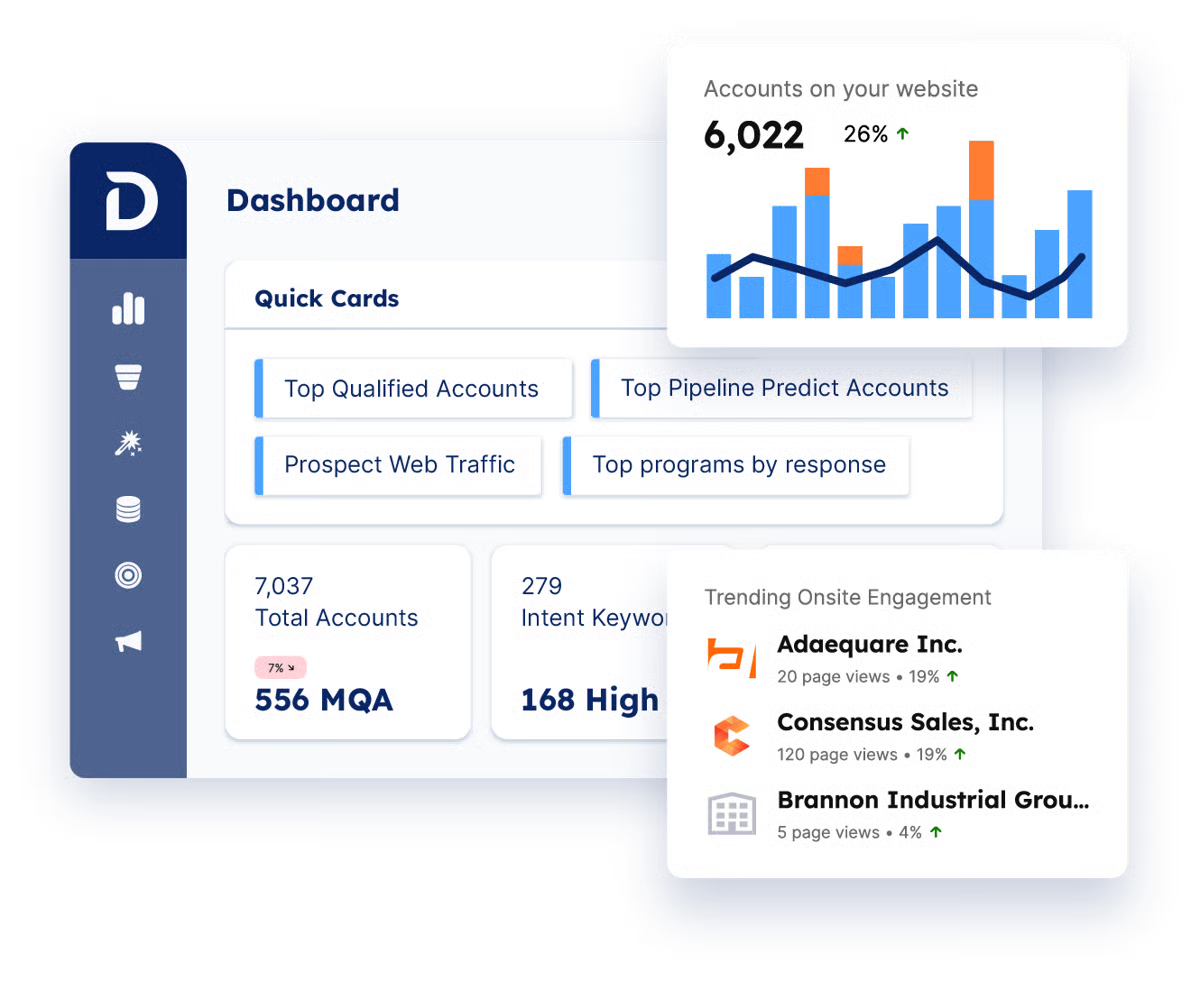
Demandbase One offers powerful account-based marketing tools. However, the lead-to-account matching engine isn’t always intuitive, which can make maintaining high data quality somewhat challenging. With careful setup, the platform still provides valuable alignment between leads and accounts.
The platform integrates with a variety of systems, which is a major advantage. However, syncing data between Demandbase One and other tools can sometimes be complex and time-consuming, requiring extra effort to ensure consistency across platforms. Nevertheless, once integration is properly configured, the system supports effective, multi-platform marketing campaigns.
The user interface is comprehensive and feature-rich, offering deep insights into marketing performance. Though it can feel slow for end-users without full training, this might limit effectiveness for less experienced teams. Still, for trained users, the UI offers a robust environment to analyzing and acting on data efficiently.
Overall, G2 users believe that Demandbase One suits the needs of teams seeking a comprehensive account-based marketing attribution solution, particularly when users are well-trained and integrations are carefully managed.
What I like about Demandbase One:
- It highlights which accounts are actively researching your company, which helps prioritize outreach effectively. G2 users have mentioned this as a game-changer.
- I appreciate having the flexibility to build and adjust attribution models to fit unique strategies, which others on G2 have also found useful.
What G2 users like about Demandbase One:
"For me, the most impactful feature is the ability to customize experiences by creating custom lists with various filters and selectors. I also appreciate the reporting aspect, which is great for our sales and marketing teams to easily measure success by tracking engagement."
- Demandbase One Review, Heloise M.
What I dislike about Demandbase One:
- The lead-to-account matching can be confusing at times, a point G2 users have flagged when talking about data quality.
- Syncing with other systems can be a significant effort, which appears to be a common problem noted by G2 users.
What G2 users dislike about Demandbase One:
"I find the dashboard difficult to navigate. While there are many great insights available, it can be hard to surface them. You often end up clicking into an account or prospect and then have to figure out how to return to the main report. It would be more helpful to have a high-level, actionable report that aligns better with my workflow."
- Demandbase One Review, Brianna H.

FAQs on attribution software
Q1. What are the leading attribution platforms for enterprise businesses?
Top enterprise attribution tools include Adobe Analytics, Google Attribution 360, Dreamdata, and HubSpot Marketing Hub. These platforms offer advanced multi-touch attribution, cross-channel tracking, and deep integrations, which are well-suited for large organizations with complex data needs.
Q2. What is the best attribution software for mobile apps?
The best mobile app attribution tools are AppsFlyer, Adjust, Singular, and Affise. They specialize in tracking installs, in-app events, and campaign performance while protecting against ad fraud and supporting deep linking.
Q3. What’s the top attribution tool for SaaS companies?
For SaaS businesses, Dreamdata, Attribution App, and Hyros stand out. These tools help map the entire customer journey, from initial touch to revenue, enabling more accurate insights into recurring revenue and subscription growth.
Q4. Which are the most recommended attribution software for marketing agencies?
Marketing agencies often prefer Ruler Analytics, Hyros, and WhatConverts for their flexibility, client reporting features, and ability to connect online and offline conversions across multiple campaigns.
Q5. Which is the best software for tracking marketing attribution?
HubSpot Marketing Hub, Google Analytics 4, and Dreamdata are among the most popular tools for tracking marketing attribution, offering clear visibility into channel performance and ROI.
Q6. What is the best customer attribution tool for a small business?
Small businesses can benefit from WhatConverts, CallRail, or HubSpot Starter, which offer affordable plans, intuitive dashboards, and lead-tracking capabilities without requiring complex setup.
Q7. What’s the best option for multi-channel attribution software?
Ruler Analytics, Dreamdata, and Attribution App are strong multi-channel options. They consolidate data from different platforms, social media, ads, email, and CRM, to show which channels drive the most conversions.
Q8. Which is the most reliable software for ad spend attribution?
Hyros, Triple Whale, and Google Ads Data Hub are considered highly reliable for ad spend attribution. They provide clear cost-to-conversion mapping and help optimize ad budgets effectively.
Q9. What is the best-rated attribution app for eCommerce businesses?
For e-commerce, Triple Whale, Northbeam, and Hyros are top-rated. They integrate directly with Shopify and other platforms to reveal customer paths, purchase behaviors, and true ad ROI.
Q10. What are the top attribution services for digital marketers?
Digital marketers commonly rely on HubSpot, Dreamdata, Ruler Analytics, and WhatConverts. These platforms simplify cross-channel measurement, offering actionable insights to refine marketing strategies.
Because guessing isn’t a strategy
Without the right attribution tool, marketing can quickly become overwhelming. But once I implemented the right system, everything started to fall into place. Suddenly, I could streamline my efforts, minimize wasted spending, and keep my marketing on track.
After thoroughly testing and reviewing the best attribution software, one thing became clear to me: the right platform is a game-changer when it comes to truly understanding the customer journey. With numerous options available, I’m confident you’ll find the solution that provides the data needed to make smarter, more informed decisions and elevate your marketing strategy to the next level.
Whether you’re looking for the best attribution software for mobile apps, a B2B sales cycle, or high-volume ad campaigns, these tools cover a wide range of use cases, from startups to enterprise-level teams.
Looking to explore a trending new channel? Explore affiliate marketing tools to refine your strategy and broaden your reach!
.png?width=400&height=150&name=Untitled%20design%20(56).png)


.png)